#helpdesk-twitch
1 messages · Page 58 of 1
 edgy kindle
 unreal pike

 rich urchin
Question ~ I made some overlays for Follow and Host alerts, but the sound for the overlays doesn't play on the Twitch stream (even though they play fine in OBS). Is there a way to fix that?
 weary mist
that would be something from OBS. make sure you have the volumns up, and you have the right audio source selected
rich urchin
What do you mean "the right audio source"?
weary mist
if you have it playing to your headphones, but you are streaming your desktop speakers, people in stream would not hear it
rich urchin
Wait... which volume has to be on?
weary mist
the one in OBS, because you can mute certain audio streams
 lament blade
i know this is a really simple fix, but when im trying to move the text layer, it snaps to the top of the image. Can i turn snapping off?

"wettwet" being the text layer.
weary mist
you should be able to use your arrow keys to move it around
no clue how to turn off snapping
but the arrow keys avoid the snap function
lament blade
you're the man, thank you.
 lusty notch
hey guys how do i run giveaways with the points viewers earn in my channel
weary mist
!giveaway start <userlevelAllowedToParticipate> <word to trigger> <time in seconds> <cost in points>
currently only allowing people to purchase 1 ticket, Giveaway 2.0 coming Soon ™
weary mist
currently only allowing people to purchase 1 ticket, Giveaway 2.0 coming Soon ™
lusty notch
cool
thanks for the hardwork idk if your just a random person or someone who works for them
but thanks
weary mist
they keep me chained up in the dungeon
lament blade
thats a good job
weary mist
but I get to use the whips on them... its got good benefits 😉
 stoic geyser
@weary mist Ran to take a nap (well, walked..) after your reply. Wanted to say Thank you for the help! ❤
weary mist
👍
 rough pebble
I've got subscribers reporting that my page doesn't think that they are subbed to me
Is there some sort of hotfix or cache I can clear
weary mist
Are these gamewisp or twitch subs
rough pebble
Twitch
It's worth it to mention that I have had my username changed before, I had a similar issue with Revlo
 strong apex
I'm having some trouble with getting overlays to work from the store.
 solid delta
Just making sure, but there's no way to reset the All-Time Leaderboard, right?
There's bots at the top of my Leaderboard, and removing their points and adding them to the Ignore List aren't removing them! My viewers hated when the bots were on the Leaderboard before Revlo added a feature to remove them. How can I remove them?
 frosty lantern
not as of yet @solid delta however i believe its being worked on
strong apex
Can anyone help me out with getting an Overlay to work that's linked to redemptions from the store?
strong apex
Ohhhh it's under widgets? Hang on...
That's 90% of the way there! Is there a way I can have each redemption have a different picture?
frosty lantern
i dont believe so yet however this has been heavily requested and should be being worked on
strong apex
Alright, thank you!
 winter hull
Anyone know why its not showing my most recent / highest tipper..?
Someone tipped $30 and it didn't show
frosty lantern
was it before or after joining Stream Elements
solid delta
Also checking, is there any way to put the Additional Requirement Message in a Stream Store Redemption Alert?
Revlo had that option, but I'm only seeing User and Item in StreamElements.
frosty lantern
@solid delta do you mean this?
solid delta
@frosty lantern Yes, I would like the Requirement that the user types to show up in the alert, like it did in Revlo.
It makes it where I don't have to go check my Redemptions Page for rewards and can react to the redemption alert instantly.
weary mist
@winter hull What is your twitch link?
 hollow compass
So @atomic hollow I think I got the timer thing figured out ,thanks guys
And high five on the contest thing @everyone one of my fav options from revlo,because I stream alot of fps games
weary mist
the singing though 
hollow compass
Question are we only allowed one active timer at a time?
weary mist
it is a bug I think it should work with more than one timer
hollow compass
Ok I got one to work without the chat being active
Tried setting them to diff times but only one came up
 bronze nacelle
is there a way for me to be able to handle a streamer's SE without the need for his account infos?
bronze nacelle
like physically go into SE and turn off and on options
weary mist
we are trying to get mod/supermod access
 rapid tapir
Its definitely planned and coming, but theres still many things to be done before that, sorry
bronze nacelle
k
 minor kindle
More feedback. Besides getting rid of the bet confirmation messages, can the bot link the public contest page in the initial message.
Also, there was a link on the streamer's profile to vote on the contest, that seems to be gone.
 upper monolith
How can I resolve my overlay not displaying the updated font I selected?
weary mist
Which widget?
upper monolith
recent follow, recent tip, total donator.
weary mist
is it the overlay in OBS that isn't updating, or the one in the overlay editor?
upper monolith
The overlay in OBS. Overlay editor updates fine. Other updates go through without issue.
weary mist
this button in the source settings helps
also make sure to press save
in the overlay editor
upper monolith
Ok will try cache refresh. I have saved repeatedly in editor. Thanks.
 wise prism
the bits keep disappearing from my cup is there any way i can keep them there so they stack up
weary mist
The dev's are rewritting the code for the cup so that the bits don't escape @wise prism
wise prism
@weary mist okay thanks for the knowledge
weary mist
👍
upper monolith
@weary mist thanks, that did the trick! 
weary mist
👍
upper monolith
One other newb question, how can I adjust the template command for loyalty points? It currently responds as "@username, username has x points"
${user} has ${user.points} ${pointsname}
weary mist
yeah, you can disable the default one and just do a custom command
upper monolith
Ok thanks
weary mist
no, not yet. Giveaway 2.0 coming soon will provide a lot more information
 lost sparrow
Store redemptions logs is still down/not working Im guessing?
bronze nacelle
it seems to be worlking for me
Also, is there a way like if someone types !redeem Item. Is it possible for the bot to block that and message the person with "Details is needed. !redeem item details"
instead of using the points
nvm found it
 rapid mason
how long does it take for a viewer to get their points from hosting my channel?
 trim perch
ahhh so hard not knowing how many min left on my giveaway xD
 hearty peak
is there a list of the fonts availible somewhere for the overlays?
 mint flame
hey there! just a quick question - is there a way to run a giveaway through stream elements yet? thx!
 misty wagon
Scalper incoming
weary mist
yes, you can run a giveaway, but it is basic. !giveaway start <useraccesslevel> <word to get in giveaway> <time in seconds> <cost in points>
misty wagon
Version 2.0 soon ™
weary mist
⤴
weary mist
nop, just <keyword>
mint flame
got it!
 slate meteor
How do i get the bot to not say anything on follow or host?
misty wagon
Chat module settings @slate meteor
 echo basin
how do I get notified on my stream when someone redeems a gift?
weary mist
@echo basin make sure to add the store redemption widget to your overlay
 pastel cairn
Question: The other day when I was streaming I had people viewing but they weren't gaining my currency anyone know why this might happen?
 dense jackal
twitch has being acting up which has been causing these kinds of bugs with out bot @pastel cairn
pastel cairn
@dense jackal thanks ^^ i was just a lil worried cause it had been working the stream before
dense jackal
ye twitch has been having problems recently they think bc E3 influx
 mighty kayak
uhhhh ....... I umm imported the whole list of points from revlobot
but while overviewing the leaderboard
there is a huuuuge list of people
and I don't want to see it no more
so I tried to erase everyones points
but it didn't work
now they are all still there but with 0 points on the leaderboards ffffsffs
is there some sort of a way where anyone can help me to reset all the leaderboard back to 0
like as if I never imported info from revlobot?
like I never touched anything xD
 buoyant hull
@mighty kayak https://33.media.tumblr.com/059e279c12945f05351bb7a3c688ca7a/tumblr_inline_o6jyieFzuL1s9x8us_500.gif
 mighty kayak
FFFFFfffff
 torpid pulsar
This is why I wear sunglasses at night
buoyant hull
Someone will help you with that i'm sure pretty soon @mighty kayak
buoyant hull
People appaeare on the leaderboard just because they connected. So.having viewers with zero isnt really an issue, is it?
mighty kayak
I wanted to wipe it all out ^^;
because I have like 200+ pages to scroll through
so uhh
if it's possible for a reset I'd like to have that
buoyant hull
Did you used the reset Leaderboard button here? https://,streamelements.com/dashboard/leaderboard/alltime
 tawdry girder
My friends notifications are not working
StreamElements is blocking his streamlabs
buoyant hull
Hello, does he use the alertbox widget in the StreamElements overlay manager ?
and i don't think SE blocks Streamlabs. Both can live together (even if 2 bots can be overwhelming 😃 )
buoyant hull
and make sure to have the url of the overlay containing the alertbox widget in OBS too with a brower source.
 patent wraith
Hi, is there a way to reset points for only 1 person on all time leaderboard?
 atomic hollow
no way to reset all time for now
patent wraith
It's on the list? 😃
atomic hollow
of course
patent wraith
Cool, thanks 😉
Is there a page or something to follow the next updates or the new features updated? 😃
atomic hollow
adding that to the dashboard soon, we understand the need
patent wraith
Ok ! Thanks for the replies 😄
 unborn cedar
Hi there. I'm attempting to integrate streamelements in my live stream and am having difficulty figuring out how to get alerts to show up on OBS. Any help would be greatly appreciated.
torpid pulsar
Streamelements will give you an url that you will have to put in OBS as a browser source
Though you do have to make sure your alerts are set up in the overlay, it's under widgets
atomic hollow
@unborn cedar https://youtu.be/X7XrDdRE7Fk

Need help setting up your Overlay Manager? Got any questions, or just want to say "Hey"? Join our Discord server: http://bit.ly/StreamElementsDiscord
 sacred fiber
How does one get added to Mee6 in "sellout"? 
 soft gull
you need to sell out if you want to be sold out 😛
sacred fiber
if you add "skrill" as a payment option to your tipping, I will use it^^ Already using bot+overlay 😃
atomic hollow
adding these soon 😃
sacred fiber
nice 👍
 red vine
Alipay? 
 upbeat tree
In the video she says that KappaGen is stream elements exclusive. Which it isn't. It was actually developped by a single person if I am not mistaken. What Stream elements does have is a very easy to use UI for people to customize.
atomic hollow
Kappagen was developed by cBenni who is now a StreamElements employee
red vine
cbenni made It. Now he has been taken over by streamelements (SELLOUT)
atomic hollow
ill leave it with that 😃
 hollow zinc

atomic hollow
the kappagen site you know now it not gonna be there for long
upbeat tree
Well I use stream labs anyways. So it doesn't matter if the website is there or not
*stream elements
Name is so similar lol
atomic hollow

upbeat tree

Has songrequests back up playlist not showing up in the overlay manager fixed yet? lol
atomic hollow
no 😦
 upper steeple
is there gonna be a fix on the text to speech with cheer messages, to where it won't say trihard1 trihard1 or whatever the emote was used to cheer?
atomic hollow
im drinking coffee
upper steeple
@atomic hollow oh well then, i shall let you drink your coffee sorry for the interuption
^_^
soft gull
☕ and 🍩 's are life !
soft gull
❤ tea
upper steeple
😃
atomic hollow
actually there is no bug report for that
upper steeple
_< haha
upper steeple
yes there is text to speech on cheer messages
atomic hollow
you think it shouldnt say the emote?
upper steeple
but it will actually say trihard1 or kappa1
well when someone cheers you 50 bits individual and they are trihards. it saying trihard 50 times in a row is annoying lol
soft gull
yeah it rly does ^^
i just tryed it out
it keeps saying tryhard1 to me
a milion times
upper steeple
yep
soft gull
😄
atomic hollow
ok, you just ruined my morning coffee, I need to report a bug
soft gull
seems like voice lady will have a sour voice soon xD
atomic hollow
THANK
YOU!
upper steeple
T_T nuuuuu i didn't mean it
soft gull
i am sorry @atomic hollow 
 unkempt oasis
Making SB do work... tsk tsk tsk 
soft gull
but we ❤ u @atomic hollow
upper steeple
yes much ❤ at @atomic hollow and all SE staff ^_^
upper steeple
@hollow zinc lol ❤
soft gull
darko has been summoned with out summoning schroll like woot 
upper steeple
magically powassss
hollow zinc
I'm starting paying more attention to Discord
buoyant hull
@hollow zinc User Settings > App Settings > Notifications > Enable Desktop Notifications : ON
mighty kayak
@buoyant hull yes I did press the button to reset all leaderboards but the "all time leaderboard" is still there with all the points .-.
 edgy stag
Hello! Having an issue with the backup playlist only playing the first song. Tried searching it and seen others having the same issue, some advice to 'unhide player' given but I'm not sure what that means...?
 buoyant hull
@edgy stag How do you use the songrequest ?
Do you use it in OBS with a browser source, or do you simply have it open in your browser while streaming ?
hollow zinc
I rephrased that sentence so many times i fucked it up at the end LUL
edgy stag
@buoyant hull I believe open in browser. It's a stream I mod in but I've been helping set up the streamelements dashboard.
lament blade
StreamElements won't let me upload any image. help
 quiet stag
hi there! yesterday i was using the modules for the first time (roulette and duel) but the bot didn't answer the command to the viewers. it only answered when I was using it. any help pls? 😃
mighty kayak
maybe someone can purge all info on my account?
that's the only other thing I can imagine :Ta
atomic hollow
@quiet stag
looking
@lament blade which browser?
@quiet stag you set the global cooldown to 900 seconds
soooooo
quiet stag
btw @atomic hollow notification alerts are under "overlay manager" right?
atomic hollow
Need help setting up your Overlay Manager? Got any questions, or just want to say "Hey"? Join our Discord server: http://bit.ly/StreamElementsDiscord
lament blade
Maxthon 5, I tried other browsers as well but no luck :/
 small egret
How can i reset my alltime leaderboards? Or can someone reset it for me??
lament blade
@atomic hollow K
small egret
If i ask someone from streamelements, will they be able to reset my leaderboards stats?
By that i mean all-time leaderboards
 small egret
That sucks, my bots are in the top 5 of all time leaderboards, and i don't want them in there :(
atomic hollow
use current, why do you want to use all time?
small egret
Is that feature coming soon? So i will be able to reset?
atomic hollow
its coming but not that soon
small egret
My viewers want to be in the top 3 of all time
So they are kinda being rewarded for watching a very long time
So many of my loyal viewers want to see the top 5.. and all they see are bots :(
Unfortunate that filtering is not an option at the moment
atomic hollow
I understand, I can help with promotiong the change to be sooner
small egret
That would be really nice of you!
lament blade
@atomic hollow Chrome seems to work. What kind of browser-ism is that?
small egret

 atomic hollow
I got you friend ❤
small egret
:)
buoyant hull
@small egret Just picking up the conversation, so maybe it has been said, but you can exclude bots from earning points
In the loyalty settings
atomic hollow
@buoyant hull ON FIRE TODAY
 atomic hollow
damn we are 27 and we live in the desert
small egret
@buoyant hull I already excluded them from earning points, but i currently can't exclude them from appearing in the alltime leaderboards :(
lament blade
Hot at mine too
small egret
Thanks bro!!
You could also add this text to that feature request: / filter users from appearing in all-time
Oh and your nice too bro :) @atomic hollow

 small egret
Haha goeiemorgen! 
lament blade
Goeiemiddag
In chatstats, is there a way to get rid of a list that you don't want? For example, I don't want the list of top hashtags to be displayed, can I get rid of it?
I tried setting it to 0 or -1 but it's still there, although no longer displaying the people on it
 icy saddle
Hey @everyone, I'm trying to use the virtual currency I use on wizebot in order to make it work for a giveaway where they use it to buy "tickets" I've seen people do it and I heard possibly streamelements can. I'm only all that familiar with the emote part of it and was wondering if anyone knew how I could do that?
trim perch
its not super user friendly yet as 2.0v is coming out but you can do:
!giveaway start <useraccesslevel> <word to get in giveaway> <time in seconds> <cost in points>start <
icy saddle
like a custom command?
trim perch
for access level, put "everyone" if oyu want it to all, i beleive
that is a command currently active with the bot
icy saddle
ohhh okay so I'd have to transfer their points from wizebot somehow to the streamelements and then use the giveaway command like that
trim perch
oh you want to transfer first points over first
i would think the revlo transfer upload would work if it is the same file type, but a SE support guy/gal would be best to answer that
icy saddle
i thought revlo went down already
trim perch
can you export your points from wiz?
icy saddle
i can do it manually
trim perch
it goes down tomorrow
trim perch
indeed ha, hopefully someone else will have that answer for you. As for giveaways, you can do it where they buy in with a set amount of points
atomic hollow
if you can export points we can import them
icy saddle
also not sure where to find an "account" list like people and what points they have
trim perch
you can message their support and see contact@wizebot.tv
if you dont have too many where manual would not murder your fingers, that route is always a last option
a quick google search gave me no answer for exporting through wizebot however
trim perch
😃
icy saddle
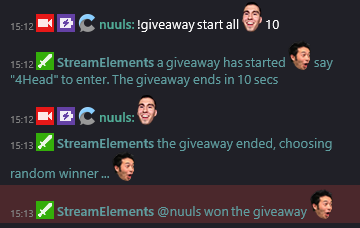
is there a place where i can see the commands for the giveaway like how ot do it exactly i know someone up there told me but !giveaway start <useraccesslevel> <word to get in giveaway> <time in seconds> <cost in points>start < i don't know what the end start and < like if theres more of it i just do !giveaway start 0 giveaway (not sure what time in seconds is for) and then like 100
hollow zinc
just type !giveaway in chat, it will guide you.
 stuck hamlet
Is the command enabled?
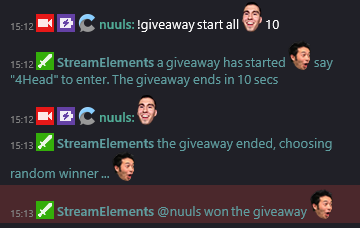 hollow zinc
Working on features, cmon  🔧
🔧
atomic hollow
stuck hamlet

icy saddle
THANK YOU
i am so new o streamelements and it looks diff from the other stuf fim used to
hollow zinc
It should be enabled by default tho
icy saddle
i also just woke up lol
hollow zinc
Get your coffee first 😄
 hollow zinc

trim perch
im atwork, avoiding work
hollow zinc

unkempt oasis
You're still in bed and I've nearly my full day done
stuck hamlet
¯_(ツ)_/¯
hollow zinc

trim perch
can anyone point me in the direction of creating a stream starting animation as well as a switching games/brb animation/video. free is always best but i can check out some paid
trim perch
overlays I am excited for, but Im talking like a stream starting soon with timer. Unless overlays cover that
 atomic hollow
what are you confused about?
 magic orbit
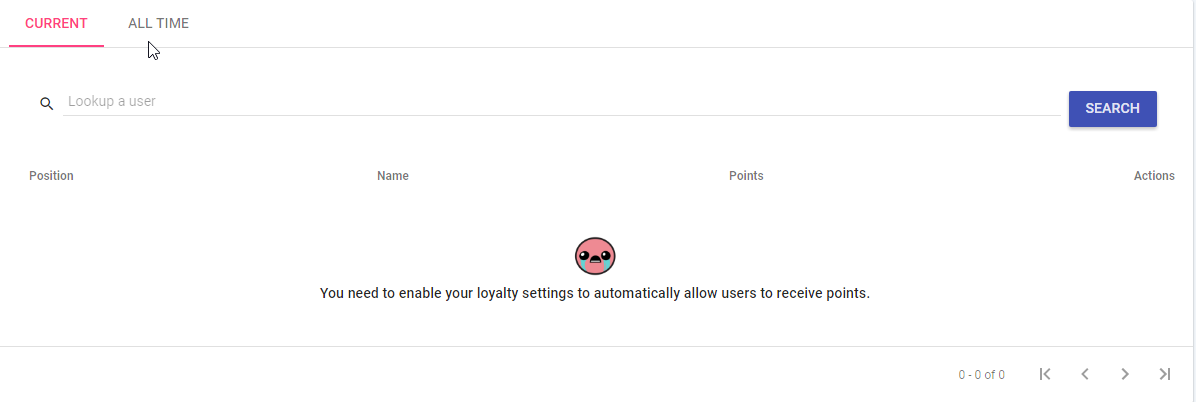
is it because there is no one with any coins that the leaderboard doesn't work
atomic hollow
yes 😃
trim perch
have any to import over?
magic orbit
no im like just starting with the loyality system
Thanks though 😄
ok well cool, now how do I make rewards xd
trim perch
stream store
magic orbit
ok
trim perch
you can also go to modules to turn on some in chat game like features to use points with
weary mist
@magic orbit let me know if you have any other questions, we are all here to help 😃
magic orbit
See that's what I mean your always there ❤ I love it guys keep up what you do! 😗
 silk patrol
@trim perch there is a countdown widget in the overlay editor
trim perch
ah i see, and a rotating image thing too, much excite. At that point i just make a separate overlay for starting, and make it a separate scene in OBS correct?
to flip flop between the two
weary mist
yes sir
silk patrol
@trim perch exactly
magic orbit
question help
Can you make it so you can gamble your points (or whatever you call it) or is that not a feature
magic orbit
❤ thanks @atomic hollow
atomic hollow
 whole swallow
Hey there. Whenever I use an overlay from here it causes my stream to slow down immensely. When I take the overlay away, I have no issues so I'm fairly certain it's the overlay. Has anyone else experienced this?
weary mist
it could be your CPU usage. using a browser source with OBS causes a bit of an increase in CPU power needed
whole swallow
Ahhhh! Ok. Next time I'll look into that and report back. Thanks @weary mist
weary mist
👍
 split harbor
The song request backup playlist isn't working for me :/
I'm about to go live, and it'll only play the first song
atomic hollow
it just worked for me
weary mist
make sure ot have the video visible
split harbor
ahh @weary mist that's been an issue? I'll do that. I've been hiding the video since I don't really have a lot of computer power to spare
weary mist
also, you can use the ground control app, which will play the music in the backup list and the !sr queue in the background and show you the activity feed 😃
hollow zinc
Nic, unhide the player. Make it show the song
weary mist

GitHub
Contribute to ground-control development by creating an account on GitHub.
split harbor
does ground control work on mac?
hollow zinc
It's a known bug with the youtube player
split harbor
@hollow zinc thanks - I wasn't aware
hollow zinc
Unhide it, refresh and it will work.
weary mist
@split harbor as far as I know, it does. or is supposed to. It is in beta, so it doesn't hurt to try
hollow zinc
I want to fix it at some point. It's noted 😃
split harbor
@weary mist Is there a place I can get a .dmg? .exes don't open on macs
it says there are mac versions available, but I can't seem to find one that's not an *.exe
hollow zinc
Yeah, one sec.
split harbor
thanks! I'm starting up my stream now, but I'll try to get that done for tomorrow
hollow zinc
Uhh, this is awkward. We need to make a build with the latest fixes.
Getting it on Mac is not possible at the moment
weary mist
split harbor
oh no!! no worries
weary mist
another trick is to turn the vid quality way down (i put it to 144p)
 main shell
buoyant hull
main shell
buoyant hull
Chicky emote
split harbor
Hey!! So someone's donating to stream to test out TTS stuff and it's not going through
it doesn't come up on the dashboard, but I get the money on the tips page
and see the message and stuff. When I use to test donation feature it works fine
weary mist
let me have a look at a few things real fast, sometimes its an easy fix, sometimes it isn't, lol
buoyant hull
Scalper is Bob the builder.
Boooob the builder, can he fix it? 🎶
Booob the builder, yes he can!
 proud pumice
@tawny pivot report of stats counting twice
weary mist
It might be something wth how the TTS settings for minimum tip amount one the manager is a percent, instead of set numbers. I think I reported that bug a week or so age
@split harbor
 inland lion
Ey how do i set a new tip goal? it always show me the total donations ive got!
weary mist
you can edit the amount of tips you got at Activity feed -> edit session
the final goal can be edited in the overlay manager, on the left after you select the tip goal widget
 sullen onyx
Is it possible to remove the mod and sub icons from the on-screen chat?
inland lion
Thanks ive been looking like crazy after this 😄
weary mist
@sullen onyx I do not think that is currently an option, you can add it to http://www.tricider.com/brainstorming/3HdiALda4Zp as a feature request
split harbor
@weary mist No, the alert isn't coming up at all, TTS or no. :/
weary mist
do you have tip moderation on?
check your activity feed to see if it needs approved
@split harbor
 brittle rock
How can i reset my donation goal?
weary mist
activity feed -> edit session @brittle rock
brittle rock
@weary mist Thanks a lot
weary mist
👍
 ruby stirrup
can someone help with how to set up the giveaway please ....and thanks I am doing it butr for some reaseon it always picks the last persone that entered
trim perch
what are you typing to start it
trim perch
yeah you need the other stuff 😛 hang on
ruby stirrup
!giveaway start 100 win 3000 5
trim perch
yes, you can run a giveaway, but it is basic. !giveaway start <useraccesslevel> <word to get in giveaway> <time in seconds> <cost in points>
that is pasted from scalper
weary mist
takes too much time
trim perch
haha
weary mist
slow internetz
 hollow garnet
@everyone Can anyone tell me where the sound bits from the store come from? do i have to make them? if so how? thanks again! @lament blade
trim perch
fair enough, but yea, Johnny doesthat make sense
down side is right now it doesnt show they entered and you cant seee the time left or who is in it
misty wagon
Copy/paste dear @weary mist 😂
weary mist
@Audi-J#5902 you upload your own for the store sound effects
ruby stirrup
it does and thats what I did right with the !giveaway start 100 enter 300 5
and it will always win the person that enters last
hollow garnet
Does anyone know what sites are used to create your own? @weary mist Thank sbtw
misty wagon
Search for .wav or MP3 soundbytes
weary mist
you can google sound effects, look for ones that are creative commons or public domain. To make your own, you can do audacity to record, cut and export your own
sullen onyx
Streamelements has no new data for last 3 days, how I fix this?
Streamlabs, which I am transferring over from, just continued as normal. What new information should I give and where?
hollow garnet
Where do i upload the sound bit in stream elemtnts? i couldnt see where? Apologies im not used to stream elements yet
 shut summit
clearly the solution is to change your name back to what it was before.
sullen onyx
LUL
shut summit
But as far as I knew, it was supposed to just work
stuck hamlet
Try logging out, CTRL + F5 and log in again
sullen onyx
I mean I changed my Twitch name from DarkViper88 to DarkViperAU
weary mist
@Audi-J#5902 on the second page when creating a sound effect, there is an option to upload the sound
hollow garnet
he cant he can only change twitch names every 2 months and every 6 months after twitch releases his old name again
trim perch
@ruby stirrup trying "everyone" instead of 100
weary mist
@sullen onyx can you link your twitch to your discord profile? then we can check things easier
sullen onyx
@stuck hamlet No change
shut summit
(my solution was a joke)
hollow garnet
in stream elements? @weary mist
weary mist
aye sir
ruby stirrup
right
hollow garnet
did you say yeah sure? or yeah sir?
weary mist
@sullen onyx you might want to reconnect, it still has your old name set up
ruby stirrup
ok I will try
weary mist
yes sir
sullen onyx
To discord?
hollow garnet
Apologies where is the 2nd page? all i see is my dash board with the list on the left side @weary mist
trim perch
i can go to your twitch @ruby stirrup and test it you and i both enter
sullen onyx
Disconnected and reconnected, it still says I am darkviper88 on discord
twitch.tv/darkviper88 is dead obviously.
How odd
 obtuse slate
shut summit
obtuse slate
shut summit
yeah same. shows up right there
sullen onyx
Says DarkViperAu Stream twitch.tv/darkviper88 for me -.-
split harbor
it was themoderation! thanks!
trim perch
k we fixed @ruby stirrup haha D
sullen onyx
@weary mist Any further advice? Spent the last few hours setting up things and it won't function without being able to find my channel and such.
weary mist
so SE isn't picking up your stats because of the name change, is that correct?
sullen onyx
Yes
weary mist
Ok. Let me go slap someone
hollow garnet
LUL
proud pumice
@sullen onyx did you click the signout button on SE?
i can see namechanges working on our logs
 visual shale
Hey friends any way to show the current playing song from the fallback yt playlist on the overlay?
weary mist
WIP @visual shale, we want it as much as you 😉
visual shale
okay thanks 😃
sullen onyx
Any way to create an outline on text? Drop shadow isn't doing much on white
misty wagon
Change background to a slightly different color?
weary mist
Dark, add in a black image with an image widget, and just change the opacity
sullen onyx
But then I would have a dark background on my screen
I get its a stylistic choice but I am ultimately just trying to migrate everything I have into StreamElements
trim perch
you could double up on each of the texts you have
make the back layer black
and ever so slightly larger
would give it the look like you last linked
in theory.....
weary mist
I am just offering a temporary fix. I believe having an outline has been requested, but if not, you can add it to the board http://www.tricider.com/brainstorming/3HdiALda4Zp
trim perch
or skew it to the left/right a tiny hair to give it a dropback
sullen onyx
I don't believe that would work scot with multiple words
If I am visualizing it correctly.
No worries Scalper
trim perch
yea the first might not, but doing a second text and moving it up like 2 px and over 2px it should work
it would be like a shadow effect
turns out something like this
sullen onyx
Try making it an outline
I believe the distances between the larger words will be different from the smaller words
making it now fit
I could be wrong
weary mist
@sullen onyx you may need to clear cookies or something odd like that for your name to update properly. It might still have your old name cached
 frank falcon
hey guys! we're having a problem with the alert sound D: we changed it to something else than the standart song but it won't reset. :c It plays the sound we picked to customize and the standart one too at the same time.
weary mist
which alert is this happening on (follower/cheer/tip)
 broken shadow
is this the bot that makes emotes rain down on ur stream when they make an emote in the chat?
weary mist
We have Kappagen, yes
broken shadow
is that what its called?
frank falcon
@weary mist all of them. Bits are the most annoying, but we don't have that much donations in bit yet so i'm just worried about follow. But it happened in all of them yesterday whil we ran tests.
sullen onyx
Cleared cookies, logged on with DarkViperAU as my username. It now shows twich.tv/darkviperau on my profile but I am still missing the last 3 days of data from my stream (which was when my name changed). I am not in a situation where I can test if new data will come in, although none came in while I was streaming 15 minutes ago.
broken shadow
how do i use it
weary mist
@broken shadow check out the OVerlay manager, create an overlay, and add the Kappagen widget
@sullen onyx it only collects data when linked up correctly, so it won't be able to back track 😦
@frank falcon make sure you only have 1 alert box. Close any tabs with the overlay open in it. Make sure that you have the "shutdown source when not visible" box checked in OBS on browser source, otherwise they will continue to run, and continue to get the alerts
 rigid moss
Hi! How can I reset the All Time Leaderboards?
weary mist
@rigid moss upvote it on http://www.tricider.com/brainstorming/3HdiALda4Zp so the devs will add it in faster 😃
frank falcon
@weary mist I'll try that, thank you ^^
sullen onyx
@weary mist I had some people send me a few bits. They didn't come up in the 'recent activities'.
weary mist
was this after you changed names in SE
sullen onyx
It was just now
Yes
After I cleared cookies and relogged
...well obviously it forced me out because it cleared cookies so I suppose I just logged in
weary mist
does it show up now? @sullen onyx
 quasi nebula
Im trying to set up stream store - not sure im doing it right. Basically i stream retouch photography and id like to set up a store where viewers can use their loyalty points to purchase the retouches i do on the store. 2 things have happened so far. I created a test prodcut but could not upload a preview image. I purchased it with my points as a test and provided my email (which is one of the requirements i set) but i never got an email notificaiton for it. Am i doing something wrong?
Im on safari if that helps
rigid moss
Thanks @weary mist ! After I imported from Revlo, I got a lot of bots on my all time leaderboards... Now i want to get rid of them. If there's another way, I would love to know...
weary mist
so the store redemptions will show up here: https://streamelements.com/dashboard/store/redemptions/items
you can review all the information for the redemptions there, and approve them, or reimburse them
quasi nebula
@weary mist yes sorry forgot to mention that. I saw my email on the recemption list and click approved. Im assumign that means i need to phsycially email the image to the person? I thought maybe incorrectly by uploading the image to the store it would automaotically email the person who purchased the image once i approved
weary mist
@rigid moss at this time, we have to wait. The best you can do is make sure to add them to the banned list in Loyalty settings so they don't gain any more points
quasi nebula
@weary mist also still cant upload a preview image though to any product
weary mist
@quasi nebula Yeah, it is manual. For the upload, on the second page of the item creation/edit, click change preview image, then upload at the right. This might only work in chrome for the moment, so I would recommend at least downloading chrome and using it for this limited purpose
quasi nebula
@weary mist thanks for clarifying its manual. Yeah i did that to upload but when i click the upload button nothing happens. Ill try chrome for sure
weary mist
@rigid moss hopefully once they add in a feature later, you will be able to pull them off the all-time leaderboard
@quasi nebula Yeah, they made the site geared toward the biggest userbase, so safari is kinda low on the list
quasi nebula
no problem makes sense
weary mist
@sullen onyx looks like the bot just joined your chat
sullen onyx
@weary mist Wanted to see if it needed the bot to be there to see the bits or something
and still nothing in my recent events
I did have my overlay set to only show an on screen notification for 100 bits, but that shouldn't stop the recent events from showing it...
quasi nebula
@weary mist yep chrome worked lol
 worldly wharf
hiya all! Q: My StreamElements alerts seem to be way behind where StreamLabs Alerts are. Is there a way to fix this/make it more real time? I'll get my "Cup" alert.. then like 30secs to 2 minutes later I'll get my StreamElements alert pop up. Also my Gif Animation does not always animate each time. 😛
My Cup alert is from StreamLabs btw. 😛
Another Issue: Revlo Loyalty points/Current Leaderboard Import does not match when in Stream Elements.
shut summit
did you check and make sure the csv values from the export match up with the leaderboard?
shut summit
All Time Points + Current Points = Revlo Total.
Current points = SE points
so if you wanted them to line up perfectly you could add the two columns together
shut summit
well that is silly, but if it works. ¯_(ツ)_/¯
worldly wharf
yeah.. Now the tough part.. how to update it? How do i Clear everyones points and reupload it?
This?
shut summit
that seems like the logical choice. I haven't pushed said button though, so goodluck.
worldly wharf
YOLO! hahaha here we go!
That fixed it. Thanks a ton @shut summit 👍
For the tip on checking the CSV file. Its always something. 😛
 lament widget
Heyo! Just made the switch over to StreamElements to replace RevloBot & possibly Nightbot. I have a question though regarding commands.
In my channel I have the command !model for when people want to know who the model is that Im editing in my photos. I ended up making a second command !models that would trigger the !model commands since people would forget if it had an s or not LOL. The way it was setup, Id only have to change out the text in one command versus two. I could also have a timer setup where it would trigger that !model command.
However, I cant seem to find a way to do this in StreamElements, would it be possible?
 sinful bolt
I have a question, how do I import points from revlo and how long does it take. It said I did it buy I don't have any points
lament widget
@sinful bolt Go to Revlo, at the top of the page there is a red "export" button. Itll take you to a page to export & download your CVS file. When you log into StreamElements theres a "Import from Revlo" and itll ask you to import that file you downloaded. StreamElements made it super easy 😃
shut summit
@lament widget > Edit Command > Show Advanced > Command Aliases
however afaik, timers can't be setup for commands, but someone else might know better.
sinful bolt
@lament widget Okay, so how do I see all my points for all channels that use it to make sure that it worked?
shut summit
you can create a timer, it just has its own text.
lament widget
@sinful bolt If you go to the leaderboard it should have all your viewers & their points listed
sinful bolt
Okay, thank you
worldly wharf
@sinful bolt I suggest to compare "Leaderboard > Current" on both sites to make sure it worked correctly. Just fixed mine as it got messed up.
sinful bolt
Will do
lament widget
@shut summit Alright thanks for the heads up about the alias feature. I didnt realize that there was an advanced options and it took me a solid minute to realize I had to hit enter to submit the alias ("...why isnt it saving?? do i need to use commas??" LOL). Ill dig around about the timer thing though, it would be nice if it could just call a command so I wouldnt have a second thing to update haha
Also, is there a feature where a person spends x amount of time in the channel it would automatically put them as a regular? Manually imputting regulars would be a pain haha
shut summit
That is what mods are for, make them enter them all.
lament widget
LOL
lament blade
I'm also seeing that same issue where my Stream Labs cup will update first and then Stream Elements will pop-up rather late.
weary mist
PArdon the lateness of these responses. and If you already solved it. I just wanna make sure I covered everyone 😃
 echo zephyr
Is there a way to edit the leaderboard on StreamElements?
weary mist
@echo zephyr not at this time, except for reseting a person or the whole current leaderboard. The Alltime is set
lament blade
https://gyazo.com/a2c6fdd9255ba34bcd651090daf7aa86 i need help it keeps spamming yet its set for intervals
 weary mist
yeah, make sure to ban them from getting points in the Loyalty Settings
@lament blade I saw that, I am sorry no one got to your question before now
echo zephyr
@weary mist Will there be a way to edit in the future?
lament blade
its ok i am streaming and its annoying D: @weary mist
weary mist
@lament widget There is no way to make it call a command yet. Check out the link in the pinned message in #💭︱feedback-and-ideas. Make sure to ctrl+f and search for the item you want, and upvote the new features!
@echo zephyr Not yet, though it is a requested feature. Check out the link in the pinned message in #💭︱feedback-and-ideas. Make sure to ctrl+f and search for the item you want, and upvote the new features!
@lament blade Give the bot some time, it likes to caress each bit that passes through its hands. Plus we are growing RAPIDLY, so it has to split its time between joining new channels, and passing out those bits. (things might slow down a bit, but they will pick back up as we get caught up). Also, the bit cup is getting a re-write, so it will be much better and faster at collecting bits and spiders and rum (last two unconfirmed) in the future
@lament blade What sort of intervals do you have set?
lament blade
@weary mist HA! Will do.
dense jackal
We're taking in an incredibly large amount of people at the moment we appreciate everyones patience 😃
 analog crane
Hey with the overlay editor, I cant control the sound or image for cheers. I hit save several times as well, for some reason its only playing the default
weary mist
make sure to refresh the cache in what ever broadcasting software you use. Also, make sure to change the variation sounds as well
lament blade
i messaged you in my stream @weary mist
weary mist
totally wasn't paying attention HEY
analog crane
Its the editor on the website, im using the alert box, the others like subscribe and followers they work fine when I edit sound and image
it saves, its just cheers
weary mist
Yeah. If you go into the settings for cheers, at the bottom left, there is a tab for variations
weary mist
😃
proud pumice
@weary mist you rock
weary mist
haha, I try some days. searches pickture of a rock to add to emoji collection
@proud pumice 
proud pumice
Lul
weary mist
it is surprisingly hard to find one without a white boarder
misty wagon
rock ❓

 haughty apex
If I mod for someone who has this bot how can I reset a counter within the chat?
weary mist
is this a follower counter, or a counter in a chat command?
haughty apex
It's a deathcounter for dead by daylight. So a counter command
strong apex
If I'm running a contest, is there a way to have the bot in-chat remind everyone of the cnotest every few minutes?
weary mist
@haughty apex the only way to do it now would be to delete the command, and re-make it
misty wagon
@strong apex unfortunately not atm. What I do is copy and paste it myself every couple mins with a time left added. Works great
haughty apex
@weary mist ok thank you sir
frosty lantern
not as of yet as the modules cannot be changed however im sure this will come in the future @ancient wigeon
 full elk
Is there anyone online who can assist me with a SE store reward?
 vivid trail
@full elk Hello, I could try helping 😃 What's the issue with the SE store reward?
omg u have a sugar glider 😮 https://streamelements.com/auraina/store
full elk
@vivid trail It's for a streamer I mod for actually. (Link_Listen) He has a reward called "snowball". He uses this as a way to "sell" one snowball per person, per night. But it doesn't seem to keep track of them for more than 3 days.
Yes, I do have a sugar glider! 😄
He wants it set up so you can't buy more than one per person, per night.
We just aren't sure how to set it up that way.
vivid trail
Ah I see. So does the snowball trigger a stream perk or sound effect?
full elk
He has the Stream perk checked.
vivid trail
Currently the max cooldown is 1200 seconds, perhaps you can request that cooldown limits be increased to be 24hrs here http://www.tricider.com/brainstorming/3HdiALda4Zp
Setting quantity to the number of average viewers should work too, at least there's a limit per stream
full elk
I'll have him try it and update you at a later date, thank you!
 fluid dune
Apologies if this has already been asked! If I have a "sound effect" stream store item that can be purchased with loyalty points. How do I actually get the effect to play immediately? I was expecting to add a BrowserSource with some sort of link that points to the stream store item but was unable to find it 😦
dense jackal
The overlay has a seperate widget for store redemptions which should do this
dense jackal
np
vivid trail
@fluid dune Yep, it's the "store redemptions" widget under Stream Alerts. Here's a tutorial video https://www.youtube.com/watch?v=X7XrDdRE7Fk 😃
Need help setting up your Overlay Manager? Got any questions, or just want to say "Hey"? Join our Discord server: http://bit.ly/StreamElementsDiscord
fluid dune
Overlays are awesome! Apologies if I'm missing it but is there a way to add variations for the "Store Redemptions" widget?
basically I want each store redemption to have it's own unique sound/image
depending on what item you are redeeming
 grim olive
Stupid Question -- Trying to set a donation goal, and it's auto showing money that I made last month, which I already spent, how do I get around this to set a goal starting at $0?
vivid trail
@fluid dune Yea you can change sound/image to be anything you want 😃
Here's the loyalty store guidethrough https://www.youtube.com/watch?v=hoNYfLw1Gg4

www.twitch.tv/randomgirlsinging helps you all work your store better!
weary mist
@grim olive activity feed -> edit session
fluid dune
Sorry... I'm still kinda confused... Using the stream store widget I can choose any image/sound that I want but it will be the same if any store item is redeemed. I want a unique sound/image to be displayed for each store item.
I've uploaded a sound/image for the the reward itself in the store - I'm just not sure how I actually get these to show up on my stream as an alert
fluid dune
awesome! Great work so far - very impressed with the site. Yea I noticed that I could set an image/sound for each store item individually so thought I might have just been missing how to link everything up
happy to know it's coming soon 😄
weary mist
😃
small egret
Can someone help me?
 olive lintel
drop it
small egret
Im trying to export my revlo points but it's stuck on "exporting..." any way to fix it?
olive lintel
try killing the bot first
weary mist
it takes some time for some reason.
I didn't have a lot of people, but it still took me time
olive lintel
if you click the "download" button, what's happen?
small egret
The dowload link is from a old csv file that i exported yesterday
Went live with revlo today so it's not uptodate
Last 2 times i exported the list it was done in like a minute max..
Now its taking ages
olive lintel
@small egret it's time to go to: https://discord.gg/YANWCA
weary mist
they are probably getting loaded down with all the people trying to export at once
 ancient wigeon
For whatever reason, the alerts for redemptions aren't showing. The noise is playing but nothing is showing. It shows in the preview when creating it, but in OBS and even the browser source URL, nothing but sound
olive lintel
@ancient wigeon first at all.. try checking this 2 options in your browsersource for each overlay per scene
ancient wigeon
Did try
olive lintel
switch between scene and emulate some events in each scene.
ancient wigeon
Have done. Everything else seems to be working
Just not the redemptions
Not an OBS issue - they don't appear in the browser source URL given either
olive lintel
try creating a new redemption item, and choose
ancient wigeon
They're all stream perks
olive lintel
and try again
 mystic ridge
Just wondering if there is a cool down and if so can it be changed?
weary mist
@mystic ridge cooldown for what?
@ancient wigeon you have the Store Redemption widget on, correct?
mystic ridge
everything points related?
weary mist
@mystic ridge yeah, everything points related like commands and such has a cooldown you can change
ancient wigeon
Yep. Just recreated the alert, now it seems to work. Can't explain that one. Same settings and everything
#beta
 vast wren
I'm having a weird issue setting up my over lay in obs
weary mist
sometimes just turning it off and back on again does a lot
mystic ridge
@weary mist how do I go about changing it?
weary mist
@mystic ridge depends on what you want to change. For commands, check out the chat commands page
vast wren
Widgets aren't lined up even though I'll fit to screen the browser source
weary mist
you can edit it all in the setting for each command
mystic ridge
I just want to turn off the cool down for everything
weary mist
@vast wren make sure you set the width and height in the settings to the proper dimentions you defined when creating the overlay
olive lintel
@vast wren try click here:
weary mist
@mystic ridge if you click the pencil, you can change the user/global cooldowns to 0
 tranquil horizon
Hey everybody. So im coming to Elements from just using Revlo. trying to get my stuff setup similar to how it worked when using revlo. Any tips or vids I can watch to get started?
weary mist
@tranquil horizon of course
let me get you the link

YouTube
Official youtube channel for StreamElements tutorials https://StreamElements.com
ancient wigeon

tranquil horizon
appreciate it 
weary mist
👍
mystic ridge
@weary mist thanks for the help 😃
weary mist
@tranquil horizon let me know if you have any questions on it. I am availible most times, except for when my bed traps me, then sometimes when my phone wakes me. But I set everything up for my stream, so I have been through just about everything on this platform 😃
im also known as the support god here, haha
 vast wren
@nanito and scalper trying now ty
How do I verify the over lay dimensions
I only see the independent widget dimensions
olive lintel
weary mist
did you set it up as 1080p?
once you check that, change these
click the source in OBS, click the gear
@vast wren
 dusk viper
Soooo.. does the bot only let one Timer message run at a time?
olive lintel
well. I have 2
dusk viper
I have several setup. But it's only cycling the one that's most recently updated
olive lintel
try disabling that one and check the other ones
 final cedar
Hey quick question, how can my moderators change my commands is there a specific link I need to give them or what?
dusk viper
I'll mess with it tomorrow. 1am, sleep is calling me. lol
olive lintel
@final cedar in "chat commands" in "default commands"... scroll down to "moderator", you will se the "!command" command 😃
final cedar
so is there no way for them to edit the cmmd outside of chat? for example i was using moobot and we had a "talk" cmmd where they would edit what the cmmd said so when they ran it from the site it looked like moobot was talking is tht function not possible?
olive lintel
@final cedar not a this moment... but you can go to the pinned msg in #💭︱feedback-and-ideas to make a "feature request" 😃
final cedar
alright thanks for the help!
weary mist
@final cedar there is a link pinned there, moderator access to dashboard is one of them. It is a work in progress, and should be coming 🔜
final cedar
alright awesome!!
tranquil horizon
@weary mist Im trying to set up separate reward redemption animations. How do I link a certain alert to a specific store redemption alert?
weary mist
@tranquil horizon at this time, not possible. But It is something the devs are working on.
 weary mist
@tranquil horizon get it set up now, lol. Less work later. You can do a single custom reception
tranquil horizon
so one alert for all the store redemptions for the time being? alright
weary mist
Yeah
The custom sound effects do work. I have them set up
It does not show an image, just instantly plays the sound, when purchased
tranquil horizon
ah. so the sound effects option can be heard as an alert without the image?
weary mist
Yeah
tranquil horizon
gotcha
weary mist
Anyeays, bed is calling my name. There should be other blue shirts arou d to help somewhere. If not, DM me, and I'll help as soon as I wake
tranquil horizon
thank you for the help! 
mighty kayak
c-can I still somehow wipe all my data from my bot profile about leaderboards,
like revert back to the moment before I imported RevloBot info?
proud pumice
@mighty kayak not atm. But if its urgent we can wipe your entire account with a developers help
mighty kayak
if it isn't an issue and easy to do
getting my StreamElements account reset would be the best help SeemsGood
proud pumice
What's your twitch username ?
mighty kayak
BonkiHart
mighty kayak
thank you ^^
 gritty belfry
are all comands changeable ? @proud pumice
Like changing !roulette to !play
Like !roulette
vivid trail
@gritty belfry Modules commands like !slots/ !roulette/!bingo are fixed. You could always create your custom commands for gambling games. 😄 !gamble for example !command add !gamble ${user} diceroll is ${random.1-6} NotLikeThis
gritty belfry
@vivid trail how would I incorporate that with the roulette system? Perhaps maybe in the future we can change those module commands
Or even create custom commands that runs another command
That would be helpful :)
vivid trail
@gritty belfry Sounds like a fun idea. Pls submit ideas or desired features here 😛 Devs will then consider it 👍 http://www.tricider.com/brainstorming/3HdiALda4Zp
gritty belfry
Thanks. I'll submit some ideas now xD
lament blade
If I want to use a sub goal, or current sub, how do I enter the current subs I do have? Also, how do I link gamewisp with streamelements or is that not a thing at the moment?
 proud crow
It is a thing, it's in beta currently.
atomic hollow
@lament blade https://streamelements.com/dashboard/session
proud crow
However I am unsure of if they count them as subs in an alert or overlay yet.
proud crow
How do we tell if it works?
Or better yet - how do we set this up/where would I find how to?
atomic hollow
if you integrate gamewisp and youre not a partner all the sub related features will use GW
lament blade
awesome thanks for the link~
 marble raft
Ok guys i need your help. I design these store items with alert. i can buy them in the store and the alert appears. But if i use the chat command nothing happend. And I activate chat redeem 😄
silk patrol
@marble raft it's working fine in my chat. have you used the !redeem command? to redeem item you have to use the redeem command, here is what your two items can be redeem throught chat : !redeem namemypet !redeem foxlove
marble raft
no doesn´t work like that ^^ i try it 😄
is there any chance to get different alerts for the redeems yet?
silk patrol
@marble raft not yet, but since it has been highly requested, it will be added soon
btw, to allow people to redeem item through chat, you have to enable it, check if you have ticked the checkbox on your items
marble raft
I activate this too! 😄 @silk patrol I really don´t know why it doesn´t work anymore. Last time I try it, both works, store and chat. This was for 2 tweeks I guess. But today only store works for me 😄
silk patrol
have you disabled the redeem command? when I go to your command page, I can't see it anywhere. maybe that's the issue. go there to activate it https://streamelements.com/dashboard/bot/commands/default
marble raft
sorry I use two bot system at the same time the last two weeks so i disabled a few features that there is no spamming from the bots >< it was disabled. thx a lot. Didn´t think about this. 😄
silk patrol
@marble raft no problem, as long as your problem is fixed, I'm happy 😉 ❤
lament blade
hi
can i make a contest where people can use points to buy "tickets" and then it picks a winner?
silk patrol
@lament blade yep https://streamelements.com/dashboard/contests people will bet on one of the options you create, and the pool is shared across winners at the end of the contest
lament blade
i want to raffle out €100 for users, and i want them to purchase tickets with their points, and only one winner will be selected
is there any function like this?
silk patrol
@lament blade you can use the giveaway command for that. right now it's only available throught the chat, but a UI will be released soon
here's the syntax !giveaway start <accessLevel> <keyword> <time in seconds> <cost?>
access levels are : 100 or all (everyone), 250 (subscriber), 300 (regular), 500 (moderator)
keyword is what people have to type to enter the giveaway (you can also use emote), cost is the number of points required to enter
silk patrol
!giveaway stop and yes it will be shown in the chat
the giveaway will automatically stop once the time limit is reached too
lament blade
ahhh thank u bro
silk patrol
you're welcome, feel free to ask if you need anything else
 crystal glacier
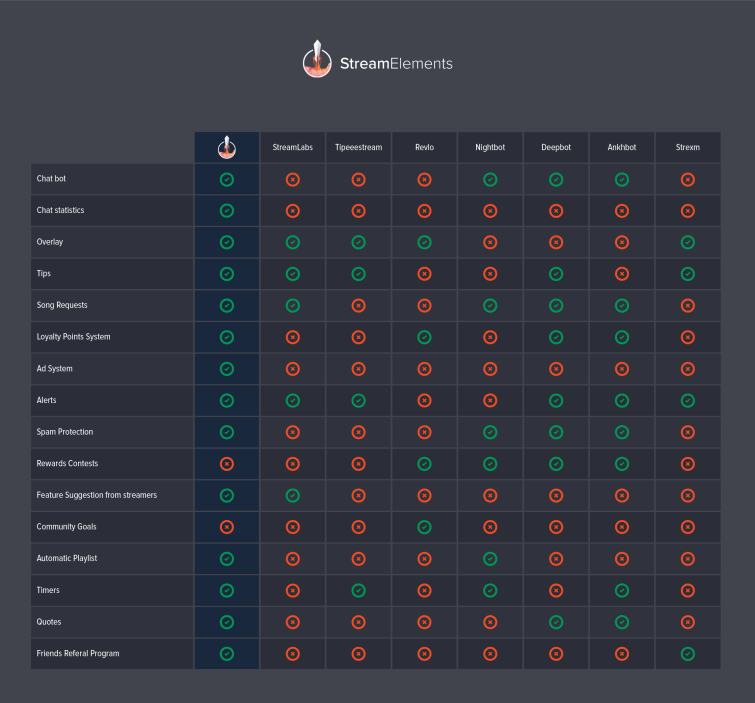
Hello, where can I find out more about the Ad System ?
silk patrol
@crystal glacier what do you mean? There is no ad system right now I think




 silk patrol
I think it's part of the planned "Revenue" system. But it's not there yet
atomic hollow
its one of our biggest projects. not ready yet
lament blade
Where can I access the permitted links filter?
atomic hollow
lament blade
I can't actually see the links that are whitelisted, the list is empty
soft gull
it isnt empty
crystal glacier
How do I change the tipping page header background back to default ?
Delete the picture I added but it stays there anyway.
soft gull
i am not sure but i think u cant @crystal glacier
crystal glacier
Is it possible for example if you go here: https://streamelements.com/tip/comewithme
To make the default big box with all the info in it transparent so that my background picture covers everything instead and just have everything written on top if it with a different colour where needed to be read-able ?
silk patrol
@crystal glacier no you can't sorry. you can make a suggestion for it here http://www.tricider.com/brainstorming/3HdiALda4Zp. Feel free to upvote any other features you like

 coarse karma
why my viewer cant use !sr to request song? the command only work on me 😦
silk patrol
@coarse karma make sure it's enabled via chat here https://streamelements.com/dashboard/songrequest/settings and that the command is enable here too https://streamelements.com/dashboard/bot/commands/default. let us know if it's still not working
atomic hollow
whats your Twitch accont @coarse karma your Discord is outdated
coarse karma
thanks so much ❤
 grim vigil
Hello here
atomic hollow
hey
lament blade
Yo
coarse karma
btw here is my CHinese tutorial about SE. in case anyone need it : https://www.youtube.com/watch?v=EVmUoirklR4&index=1&list=PLX6GGl523xsixZiMa6-fOET5k3B79cbTF&t=1s

RevloBot宣佈結束之後,大概讓很多Twitch實況主和觀眾都感到非常地傷心吧,其實市面上有一個與其非常相似的機器人(StreamElements,SE)! 這一個教學影片只是初步介紹SE的功能和操作,往後還會發佈一些詳細的教學,如果你想多了解哪一部分的功能或者有什麼問題,可以留言給我!
 noble tartan
@coarse karma omg hi!
 honest echo
Can i suggest a change to chat giveaway?
grim vigil
Do the contest options shown in chat?
honest echo
okay, thanks 😃
grim vigil
But I only see the option commands
such like
bet with !bet <a, b, c, d, e, f> <10-1000000>
but no one knows what a,b,c,d,e,f stand for
atomic hollow
you need to show the contest in the overlay
grim vigil
can the bot just show it in the chat? 
grim vigil
My options are often a sentence... so I abbreviate them into a,b,c,d to represent those long sentence
and my audiences bother me what those a,b,c mean
such like AnkhBot would show:
a: (a sentence)
b: (a sentence)
c: (a sentence)
and then show "use !bet <a,b,c>" in the final
crystal glacier
I'm setting the text animation to none for following alerts, saving but it's actually not saving at all. Bug ?
coarse karma
@noble tartan Halo ^^
crystal glacier
Now sound is not really saving anymore either
crystal glacier
chrome, it stopped bugging and it seems to work now idk
stuck hamlet
You could always try and refresh when that happens
silk patrol
@crystal glacier use Ctrl+F5 to clear the cache too
 vital jackal
hey I'm using stream elements on mac and it is not allowing me to import revlo points or update store images
silk patrol
@vital jackal which browser are you using?
silk patrol
try using chrome. even tho safari uses webkit like chrome, the website is optimized for chrome (because OBS uses chrome as a browsersource)
vital jackal
@silk patrol Thank you !! It's working now
silk patrol
@vital jackal glad I could help ❤
upper steeple
is there an updated eta on the chat box being fixed?
silk patrol
@upper steeple are you talking about the fact that messages were off by a few pixels? it's probably fixed because I saw it working on another stream. But I might be wrong
upper steeple
@silk patrol yeah if they aren't a mod or prime it is off
i'll have to check my stream tomorrow cause as far as I saw it was still wacky looking lol, but if its fixed then HORRAYYY
silk patrol
let us know if it's still off then ^^
upper steeple
@silk patrol I will indeed
 woven gull
any se staff that could help me?
silk patrol
@woven gull always ❤ what's the matter?
atomic hollow
secret help, i like it
proud pumice
you dont know what you got yourself into @silk patrol
i got hit by the one and only @woven gull on livechat support before

 clever mango
Not sure when the change was made but thanks for pushing TTS to after the alert sounds
atomic hollow
❤
clever mango
The devs here have done a great job at implementing feature requests so quickly
woven gull
@proud pumice ❤
atomic hollow
yes, but we still need to communicate changes better, adding that system right now
 tawny pivot

silk patrol
@proud pumice LMAO it only took me 10 minutes and it was all good. and for another 10 more minutes I was able to help him for discord and twitch stuff, so i'd say it went very well ❤
clever mango
I agree @atomic hollow. Changelog is real important and it will be great when it's here
vast wren
@scalpso I see everything from the over lay now but I toying with obs to make it fit still new to the obs game lol
clever mango
I'm testing the ground control app because hotkeys. It doesn't check for updates automatically at this time does it?
weary mist
@vast wren glad you got it working 😃
vast wren
So I know you're not obs support but any tips as the over lay at the 1920 is way bigger than my obs canvas should I tweak the canvas or shrink the over lay
If not I'll use my googlefu
weary mist
I shrink my overlay
weary mist
lol
clever mango
did you fit the overlay to the canvas with CTRL-F ?
 pulsar plinth
Hi, guys! I was curious if anyone could tell me where to find the file for transfering points from revlobot is?
pulsar plinth
thank you, dante.
silk patrol
yw
 wind moat
hello! I am having a really rough time figuring out how to make notifications for my shop. I read the how to link thing but im still majorly confused.
weary mist
@wind moat I could help you on that
wind moat
yes please!
weary mist
There are two types of notifications available from the shop. In text and on screen alerts. Which one are you shooting for
wind moat
on screen alerts:) I just transfered over from revlo
weary mist
perfect. Have you created an Overlay in the Overlay Manager?
wind moat
that is what i am having a hard time with its not clicking what i am supposed to do. Its a lot of information to soak in.
although i like the full freedom:)
weary mist
ok. Have you created your first overlay? (bare with me, just seeing where I need to start from 😃
wind moat
no i have not even started. A little overwhelmed:)
weary mist
even better, haha
wind moat
cool! Do you have time to voice chat? That might be faster and easier.
i have to start my boradcast soon.
weary mist
give me 5 minutes, I will try to get some voice
just for you 😉
@wind moat I am in Voice support
lament blade
Is there a document about how to add commands from chat as a mod / supermod? e.g.: I noticed that you can set options to a command using !cmd options !test -cost 10 ... but how do you add aliases, keywords and the other things? what's the proper syntax that i should to use?
misty wagon
@wind moat HI!!
vast wren
You're awesome scalps got it!!
misty wagon
@lament blade It's not an official document (yet) but one of my friends uses this
!command add/remove/edit/options/show
hollow garnet
I get you guys are in beta but there is a HUGE delay between Stream elements and Streamlabs follow notifications. is there anyway to change that? the follow is immediate with stream labs and Elements then puts in in the chat about 2 minutes later? thanks for your help on this matter!
i would like to go full streamelements with my follows and such but i dont like to delay
trim perch
when you do the "emulate follower" does it also have a delay?
hollow garnet
right now i am using streamlabs for follows, but i have streamelements on in my channel and it welcomes the follower about 1-2 minutes after ive been already notified
i havnt gone full streamelements as of yet
just testing it out especially since Revlo is rip
trim perch
so why not just use SE for both and they will pop up in chat and on screen ath te same
 humble ether
Anyone knows if its only mods that can start raffles ? and if that can be changed ? 😛
lament blade
@misty wagon i see, that's similar to the tables you can see in the dashboard 😛 i hope that we get soon a nice documentation, but probably it would be useless once you can give mods the access to the channel's SE dashboard 😄
clever mango
I don't see a notification delay with SE ...
trim perch
i dont tend to see a delay, but at the same time im only using SE
hollow garnet
@trim perch i do not want to add any more of a Delay then necessary to the stream is all, its no biggy i was just curious about that.
Nice prfile pic @lament blade TO HYPE
atomic hollow
@humble ether yes, mods and up
humble ether
can it be changed @atomic hollow ? 😃
lament blade
@hollow garnet haha world's small 😄 i actually designed that emote :3
lament blade
@hollow garnet yep, i'm shadon's mod
atomic hollow
no :/ @humble ether
hollow garnet
thats right