#helpdesk-twitch
1 messages · Page 55 of 1
 stuck hamlet
@turbid reef ?
 misty wagon
stuck hamlet
misty wagon
stuck hamlet
@edgy stag umm, what do you mean? Like just setting regulars in general?
Yea that 
Was confused by your question :p
misty wagon
@upper steeple they get easily confused. Had it happen to, I change them all a bit, make them different and they fired again
 edgy stag
Well cos it looks like you have to add them manually. Is there a way to set if someone is in stream for however long, they automatically become one?
stuck hamlet
Ahhhh
misty wagon
@edgy stag not yet, soon ™
 upper steeple
@misty wagon i have so many T_T lol
edgy stag
Ah, okay
upper steeple
i'll try that thank you
stuck hamlet
I tagged nuuls, he'll look into it/fix it LordFluffyButt
Low key, is your butt really fluffy? 🤔
misty wagon
@upper steeple make it an event in your chat, IRL tag on and interaction with your users. Add everyone who !followage xxxx 😉
upper steeple
@stuck hamlet currently streaming but yes
stuck hamlet
Interesting 🤔
misty wagon
Will the bot think the stream is online or offline during a Vodcast?
 trim perch
hello support, am I blind or are there no giveaway options?
 worldly wharf
Cheer Cup ? > Any way to change the look?
 vivid cove
Noob question alert: I've created an 'item' that viewers can buy with the loyality currency, with sound and video and everything - how do I get it to actually show up on stream?
 unkempt oasis
Not at the moment @worldly wharf But the cheer cup is being reworked
@vivid cove You add the Store redemptions Widget to your overlay and then add the overlay to your streaming software
vivid cove
@unkempt oasis Thanks, I'll try that
 lament blade
soo we cant have overlays for each individual store redemtion? Like I have viewers redeem points to play a scare sound. I can't seem to link the store redemtion to an overlay... is that possible?
 dense jackal
not currently, but that is something we are working on
trim perch
sweet so i can do giveaways, is there a how to guide? or if i want people to use X amount of their points, is it just !giveaway start 10
 tough horizon
is there a way to give a moderator access to my stream elements dashboard?
 weary mist
@tough horizon 🔜
@trim perch !giveaway start <who can join> <keyword to join> <time in seconds> <cost in points>
so if I did !giveaway start everyone Kappa 600 50
I would get a giveaway anyone can join, it will last 10 minutes, cost 50 points, and they just have to type Kappa to join
trim perch
awesome, not !Kappa
 silk patrol
@tough horizon not yet but this has been higly requested and should be coming soon
weary mist
you can set it that way Scot, if you want. What ever you put in that keyword position will be the command to join the giveaway
 shy ridge
so ya? it's how it look on internet explorer ^^
 proud crow

 sleek acorn
Hi All, I was wondering how to i give acces to my super mod to change things on stream elements? Does she need my account ddetails or does she open her own account and get acces through there?
unkempt oasis
@sleek acorn Supermod access isn't currently available, but is coming soon
sleek acorn
okay, thank you 😃
unkempt oasis
@shy ridge We highly recommend Chrome. Internet Explorer doesn't follow standards properly so doesn't work well with the site
shy ridge
ya but i use Internet Explorer for work and chrome for personle stuff 😃
dense jackal
the tool is optimized for chrome
shy ridge
okay 😦 
silk patrol
@shy ridge and since OBS uses chromium, what you get in chrome is what you get in OBS. #ChromeFTW
shy ridge
ya but i cant use chrome for 2 twitch acc at the sametime 😉
 tawny pivot
I would highly recommended not using Internet Explorer for anything at all.
The amount of security flaws are out of this world.
And you can have 2 twitch accounts open at one by using incognito tabs 😉
shy ridge
no is logging me of 😃
silk patrol
or you can create 2 users in chrome
shy ridge
you cant logi on 2 profil on twitch in chrome i have try so many time now
silk patrol
@shy ridge yes you can. go into the settings, create 2 users. each user will have it's own cookies and stuff
shy ridge
how xD
silk patrol
click on the chrome menu (3 bars on the top right corner), then go into settings. there you have a users list, create a new one. a new button should appear in the top right corner with your avatar
shy ridge
it's not working 😃
silk patrol
i'll send you some screenshots later
shy ridge
okay xD
silk patrol
or if someone else wanna do it first ^^
 edgy kindle
@shy ridge Dont use internet explorer; its trash and has been dropped by microsoft; Chrome and Firefox work fine though
shy ridge
im still going to use internet explorer @edgy kindle
edgy kindle
Well the dashboard was programmed for chrome/firefox because those are the top two browsers
shy ridge
okay xD
edgy kindle
If you want to continue to use it, thats fine but just install a secondary browser for use on the dashboard
shy ridge
i have chrome xD
but im not going to use on chrome when im useing my personle tiwtch that one
 viral wraith
Quick question, how do you edit a quote once you've added it via chat? Is there a way to see all quotes added? I tried !quote edit but that didn't work.
vivid cove
Trying to set up redeem system, is it possible to have item1 with custom sound, and item2 with a different custon sound?
weary mist
at this time, all you can do is remove the quote and add it again. You can do !quote # to see the quote at the different numbers
viral wraith
So there's no way to see all the quotes in the dashboard
weary mist
Not yet, battery, but that is definitely the plan. We want to be able to have each item display their own image/gif and play their own sound
not yet @viral wraith, it is something they are working on
vivid cove
@weary mist Thanks - Yeah that really needs to be added imo
viral wraith
Okay thanks @weary mist
vivid cove
@weary mist Wait, isnt it technicly possible if I make several Store redemtion overlays? Obviously this is not..ideal
weary mist
@vivid cove I do not thing there would be a way to define which reward plays through which widget, it would play on all of them, just different gifs
 final isle
Is there a way to make the reward alert in the overlay gif match the ones in the store? or can it only be one default?
weary mist
It is in the works @final isle, coming 🔜
final isle
@weary mist awesome.
trim perch
is a "regular" a follower?
unkempt oasis
No, you assign regular to users whenever you want
 little ice
what does interval online and interval offline means at Timers ? :/
 atomic hollow
how often should it post when stream is live and offline
 distant marlin
question about rewards in store, will we be able to make rewards for subs only? or is it possible already and can't find it. thank you
 light lynx


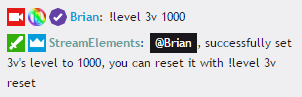
 turbid reef
 misty wagon
@unborn willow @dense jackal phone is bout to die, can you please post here.
 gaunt bronze
How you can name your bot?
misty wagon
Currently not possible @gaunt bronze
We are enjoying our growth sprint, but we are thinking about it for later
 kindred stone
A friend gave me supermod in streamelements but I do not find an option to enter his dashboard, or I do not know if the mod of streamelements is only for chat
 wanton jetty
okays
 clever mango
What does the global cooldown mean for commands?
if the individual cooldown is how often a specific person can use the same command again, does the global mean how long that person would have to wait to do any other command?
wanton jetty
@hollow zinc Are ya gunna fix it tho so it works without the player coz my pc isnt the greatest and player lags my streeam a little
unkempt oasis
@kindred stone There's no option to access the gui as supermod just yet, but it is in the works
 pastel lava
need help with something. i have "join viewer game" in store but when i type "!redeeem viewergame" nothing happens. the item command is "viewergame"
unkempt oasis
@clever mango Global cooldown is the time between uses of a command for everyone, so if someone used a command, another person wouldn't be able to use it for the cooldown time
clever mango
ah ok thanks!
so global would include the person that sent the original command right?
unkempt oasis
Yes
distant marlin
could somebody give me some help ,was just setting up everything for tomorrows 1st stream with SE. but i dont see where you can set sub only rewards? is it doable or not yet?
 hollow zinc
yeah @wanton jetty it will be fixed, no ETA tho.
 proper loom
Trying import deepbot points. I put in the API secret and hit import, but nohting happens. Any ideas?
tawny pivot
@proper loom Your deepbot is running & you have VIP correct?
proper loom
Yes
 minor kindle
How does the bonus command work?
wanton jetty
@proper loom i get an error message so yh :/
proper loom
hehe I don't get that I just keep hitting submit and it does nothing. Even if I refresh the API secret
tawny pivot
Damnit, i would love to see what's going on but i'm stuck with my mac for the next month or so 
I'll see what i can do at the office tomorrow morning 😃
misty wagon
@minor kindle can you be more specific
wanton jetty
Roulette really needs a maximum bet amount :/
 pastel cairn
Is there a way to get the Current Song to show more than just song in the queue, so like do songs that are in the Fallback playlist?
minor kindle
@misty wagon Like, what does it do? I've seen people mentioning mods being able to !bonus people.
I didn't see it in the default commands.
misty wagon
!givepoints under default commands @minor kindle
It has two aliasses, !give and !transfer, but you can add more like !bonus
weary mist
!bonus is used to give people bonus points, super mod command
Givepoints is used to transfer points between people
misty wagon
My bad 
silk patrol
@weary mist really? givepoints (which is called give to be exact, but maybe givepoints work, mine doesn't have any aliases) seems to work live addpoints/bonus when you read the description : ${sender} gave 10 ${pointsname} to ${user}
weary mist
Ah, I must have confused them. Brain fried already today, haha
misty wagon
His bad 
worldly wharf
Another ??: Do you guys have the ablity to give out Loyalty Points for Sub & follows on YouTube & Twitter like Revlo?
Like this:
wanton jetty
^ 2nd that
 mighty bronze
is there a way to change the name of the bot? instead of using streamelements
 quasi skiff
I'm trying to get the follower goal widget to reflect how many current followers I have. I've tried to go to edit session and change the number there, but it doesn't update. Any help?
edgy kindle
@quasi skiff Did you change both numbers in Session Edit?
@mighty bronze Not yet. If we do get it eventually it will probably be a premium feature
@wanton jetty @worldly wharf Not yet. I believe it has been requested but you can always check/post it @ http://www.tricider.com/brainstorming/3HdiALda4Zp
wanton jetty
my subs command doesnt even show the subs iv currently got :/
iv 9 on gamewisp
How can i fix that @edgy kindle
come to my channel ill show ya (im live right now)
silk patrol
@rapid tapir dammit, you so fast 
wanton jetty
well dat sucks 😢
 rapid tapir
theres lots of places where gamewisp stuff needs to be added
feel free to add it to tricider so we can keep track of everything
sorry, the last few weeks have been ridiculously busy
and im just "part time", doing 16h per day
lol
 untold estuary
part time LUL
Anyone know when the bets/contests and/or giveaway systems will be implemented?
weary mist
they normally do releases on sunday's
misty wagon
@untold estuary tomorrow indeed, monday announcments 😉
untold estuary
@misty wagon nice, I am available now btw 😄
 hard cargo
Mine is too!
 dusty comet
How do you reset the session for the top session donations?
 oblique crag
I'm helping a friend set up Stream Elements, and for some reason the banner image will upload, and I click submit, but it's not saving. Is this a known bug?
dusty comet
Is there another way to delete an element without pressing the 'delete' key? I loaded a theme and decided I don't want it, and now I seem to be stuck with the boxes since they're not getting deleted..
oblique crag
Is there a way to make a !command trigger a preset !giveaway command? Can you make a preset !giveaway command, without having to type it out every time?
weary mist
not as far as I know. I recommend making a list and just copy/paste
 naive meteor
Adding Whitelist links isn't working?
 jolly basin
Hello I just signed up for this service and tried to create first overlay and clicked the LAUNCH OVERLAY button and its opened up a new tab in Chrome but it's empty.
weary mist
That just launches what you have created. Click the pencil next to that button
jolly basin
well there was no pencil icon.. It looked like it was clocking so i hit F5 to refresh and its clocking again
weary mist
clocking?
jolly basin
yes trying to load
OK NM I went to Overlay manger on the far left and I see it now created as Gaming Talk shows
weary mist
ok, good, now click on the pencil 😃
jolly basin
Yep. i chose Binding of Issac Afterbirth as the game but it did talk shows, I'll mess around with the settings now I'm guessing there are some default themes to build on?
 stray hawk
@everyone how the heck do I switch to a different dashboard for someone I mod for?
????
weary mist
that is in the works
 inner flint
Alright so I just spent a couple hours creating my stream store items and was then told to go to the overlay manager to set up the browser link for my stream: but there's seemingly no way to use those settings I have for all of the items into the overlay.
Any help on this would be great, am not sure if I'm just missing something or what
dense jackal
theres a storm redemption alert what specifically are you looking for? @inner flint
 slate meteor
Is there a way to input your own CSS code for an Event List on the Layout Editor?
inner flint
@dense jackal where do i find that
dense jackal
its under the widgets
@slate meteor we are looking into editing css support in the future but not currently
inner flint
i saw it in the overlay manager but it doesnt give me the option to use the settings i made for the actual store items, with their sounds and such
so i have to make a separate overlay for every item?
slate meteor
ok thank you @dense jackal for now I will just use the custom one I have on streamlabs.
dense jackal
You have the store redemption widget on correct?
 proper shoal
Yes
we do 😃
So we've got it to pop the redemption
but it's still showing gift box, not the gif or image we've places
*placed
weary mist
it doesn't show the gif/image from the store, that is in progress
proper shoal
Oh okay!
distant marlin
<-- mod from 1ceprime along with ladybuglauren, is there a way to renma roulette command and others?
proper shoal
Well that makes sense 😄
weary mist
but it "should" show a different gif/image if you set it in the overlay editor
@distant marlin anything that shows up under the !command link that comes up
can be edited
distant marlin
but cant find roulette
weary mist
roulette is a module, and can't be editted except by the broadcaster at this time. Plus there is no option to change the name yet
key words, yet, lol
distant marlin
ok
aslo will there be at some point implementetion, if a module is on cooldown to say it when user pops it
bc now you dont know why its not showing?
weary mist
you could always add that to the pinned message in #💭︱feedback-and-ideas
proper shoal
@weary mist How do we add an animation instead of the gift box?
distant marlin
is there SE bot for discord?
we use nightbot in discord to test out our new commands. and since we want to transfer all to SE would like to have it in discord
dense jackal
not currently on our list but maybe in the future we are looking to get more features for the bot itself at the moment before expanding to discord integration 😄
distant marlin
ok
lament blade
How does one spend there points in the bot?
 olive lintel
@lament blade making Stream store items or using modules for gambling with it
jolly basin
suggestion on more themes, maybe add a pixel theme for Retro 8 or 16 bit games
weary mist
#💭︱feedback-and-ideas could always use some luve 😃
 spark plaza
No matter what I do I can't seem to get the text chat widget to align text correctly. I always get a look like this. http://i.imgur.com/oanZtuB.png
 olive lintel
@spark plaza it's a known bug, they are working in the fix right now.
spark plaza
Ah cool. Thanks
weary mist
👍
distant marlin
so how do you start single raffle and whats the difference between single or multi?
multiple winners?
also how to get SE bot a sub,m talk to your twitch guy or some other way?
lament blade
Thank You @olive lintel
 waxen fox
yoo can any1 help, I'm trying to get items from the stream store to work after they are redeem'd nothing happens.
jolly basin
@weary mist OK I posted it there
waxen fox
when I !redeem hype. a sound clip is supposed to play
but nothing happens it just sits in the redemptions and I when I click approve nothing happens
weary mist
do you have the store redemption widget in your overlay, and active in OBS?
and sound clips shouldn't have to be approved
they auto play
waxen fox
ahhh!! I didn't know there was an overlay widget! thank you that should solve it haha.
 little depot
Hello
I have a question
Is there a way to make the bot whisper the person instead of flooding the chat?
little depot
Response type? I don't see this
little depot
Is there no option for this for the defult commands?
dusty comet
How do you reset the session for top donations etc?
 strange dagger
Hello
atomic hollow
hello
strange dagger
Is anyone available to answer a question?
strange dagger
Love the bot so far, I'm wanting to setup a currency system with rewards. I see how to do that with the store. I can set items to spend currency on, and a sound effect. Is there a way to make a specific photo show up with each redeem? I see you can set a photo with the alert, but i want a specific photo for each item redeemed.
distant marlin
you can set the photo when you are making the item for store @strange dagger
strange dagger
Does that photo pop up on the stream though?
distant marlin
on 2nd stage, where it asks if it can be redeemd from chat
it should if you set the overlay
atomic hollow
@strange dagger currenty the image that will appear is the one used in overlay alertbox, we are changing it now to support your request, its a common request
strange dagger
sweeeeeet, whats the ETA on that? I need my revlobot replacement! lol\
atomic hollow
no ETA yet, we are doing the gambling features first
strange dagger
okay i gotcha, well i will be awaiting it. Thanks for the speedy reply
atomic hollow
❤
 weary quest
how do you promote song requests?
atomic hollow
what do you mean?
weary quest
Paid song promoting
Tips will beat points requests to next playing song (amounts don't matter)
is there a way a streamer ca promote songs to the next song without people having to pay tips?
weary quest
@atomic hollow thank you 😃
dusty comet
Session
atomic hollow
dusty comet
Weekly donations covers the session top bits?
I hit reset all, and it is the only thing that didn't reset
atomic hollow
bits arent included
dusty comet
Oh okay
I'll just go ahead and remove that overlay then, I guess
That's a shame
Think the feature will be added in the future?
atomic hollow
that bits will be counted as donations?
dusty comet
No, that there will be a function to reset the session top bit amount
dusty comet
There's not much other point to having the session top bit widget, is there?
If it doesn't actually reset
dusty comet
Thanks, I appreciate it
atomic hollow
thank you
stuck hamlet
Shadow going in rn
 ancient wigeon
Is there a way to have the 2x points and !makeitrain commands for loyalty rewards like in revlo?
atomic hollow
we are working on Revlo's features 😃
 hardy storm
Am i missing something.. is there a way to "target" someone.. like in ankhbot?
atomic hollow
we dont believe in targeting people 
hardy storm
Haha well for having a multistream command.. i need to do it.. im sry.. 😦
stuck hamlet
@hardy storm like "!target onslaught" would return "check out twitch.tv/onslaught"?
hardy storm
@stuck hamlet like this: http://multistream.xyz/#t:dracoian79/$target
first one is me.. and then i can just add ppl to it
stuck hamlet
Instead of $target, use ${1}
Can you show me what it looks like when you use the command?
stuck hamlet
👍🏼
atomic hollow
@stuck hamlet ❤
hardy storm
multistream.xyz/#t:${channel}/${1}
stuck hamlet
@atomic hollow 💙
hardy storm
ok and if i wanna add more?.. lol
stuck hamlet
@hardy storm I mean you could always just attach all of them together
Like !target name/name1/name2
hardy storm
Well with ankhbot command i just have the $target and i can just add space and a new name and they get added.. 😄 i can always just target ankhbots command.. 😄 ive done that with a few commands..
 hearty crag
I need to delete or edit/adjust timers & commands, but it doesn't give me the option to edit/delete. What can I do?
upper steeple
@stuck hamlet i change my timers around and they are all different but still only one is firing
hearty crag
I'm using chrome
 unborn willow
hey everyone, so my problem is, i get dropped frames on obs studio but i don't get on obs classic. my internet is VERY BAD, none of u would have streamed with such speed, but i do, and i've been for 1 year. i set the same settings on obs studio but i get dropped frames. is obs studio performing great ONLY with high bit rate/good quality internet?
also in obs classic, under video, there is 'video adapter' with the options Intel core OR nvidia GTX, and under encoding there is encoder with the options x264, quick sync, and nvidia nvenc.
in obs studio, i only see the encoding with the same options as obs classic. i can't seem to find the video adapter option with the intel core and nvidia options.
last night after setting up everything in obs studio, ended up in obs classic just cuz of the dropped frames. i will continue streaming with that if i can't find the problem (either than my bad internet which doesn't seem to be a huge prob in obs classic), but that means no kappagen 😦
hearty crag
How strange, you can edit timers etc on Internet explorer, but not chrome
stuck hamlet
Euh
@tawny pivot for @hearty crag I think
@unborn willow stream.twitch.tv scroll down a bit, you'll find settings you can use.
Also, twitch made their minimum 3k bitrate a while ago.
I don't see why you'd be dropping frames in obs Studio, because studio just uses Windows default "send" command.
So it's not obs' fault.
Double check he site I linked with your settings, it might help
unborn willow
but i know i can't present high quality content and i wish to change that in the future but for now i'm building a community with the shitty internet i got. i guess i can't with obs studio, because of the windows default 'send' that apparently doesn't effect obs classic. good to know, so i can recommend obs classic to other people who have bad internet 😛
thanks anw 😃
i'm still curious tho where is the 'video adapter' with the options intel core and nvidia.. in obs studio .. i dont see the word intel core anywhere
 unkempt oasis
You could try Enabling the new networking code feature in OBS Studio under Advanced / Network
If you select your computers network card under the Bind to IP, you can also enable the Low latency mode
Those might help @unborn willow
unborn willow
i saw that yesterday and i had a feeling it may be... thanks , i will try that out! @unkempt oasis
 robust jewel
Hello, I found this bot after finding out Revlo is shutting down. I am currently trying to use StreamElements and wish this was the only bot I needed. I see a lot of potential in it but at the same time a lot of flaws that makes me stick to the mainstream StreamLabs.
One reason I have decided to not use streamelemts tipping page is because it doesn't sync with BitBoss. I don't know if there is any plans for this in the future but I like bitboss too much to give it up.
Second and biggest reason I so far mostly only use the loyalty system on StreamElements is that I find the whole Overlay system very confusing. I am very use to only using widgets from StreamLabs where I can freely move them around on my screen in OBS. Going back to the overlay editor on StreamElements all the time is for me stressfull.
I don't want to sound negative because I really like it. I just wish I was able to use it as my only bot/tool.
lament blade
I am live right now and i cant get the emote pyramid thing to work can someone help maybe?
@everyone
pls :3
how cna i sto stream elements from gaining currency i turned it off and put in the ignore list but didnt work as still on leaderboard
can* stop*
 timid yacht
Remove all of its currency and make it go to 0, then while its on the ignore list it won't gain anymore currency. In other words will not count on the leaderboard.
Was gonna help you with the Pyramid thing, but you figured that one out right when I was about to answer you. lol @lament blade
Happy to help. 😄
 vestal mural
Honestly, that was one of the main things stopping me from setting it up
timid yacht
Welp, I hope everything else is working correctly for you as well! 😃
vestal mural
Thanks 🙂
stuck hamlet
@vestal mural go to your tip page, hit CTRL + F5
Open the PayPal redirect again, and is it still there?
The random symbols and such
vestal mural
Yes, they're still there after that
misty wagon
@robust jewel Good input, thanks it's needed. The bitboss is unknown to me. Hence I gonna look it up and you learned me something new! thanks.
You don't need to use OBS to move things around, OBS in fact is only used for a webcam source and a browser source. After that you can leave all the nitty gritty txt labels and move onto the widgets from the SE overlay manager.
stuck hamlet
Aight.
robust jewel
@misty wagon Glad to hear my input might be useful.
Bitboss was made originally for bits but works now for donations as well. It has helped me earn a few extra bucks and is being used by more and more streamers. it's easy to find but here is a link to their site: https://www.bitbossbattles.io/
I like to move things around. Sometimes I want the alert on the left and sometimes I want it on the right. By using the same source I can have different places on different scenes, which I think it's handy.
misty wagon
Import the Streamlabs to your SE > My Account > Import & Integrations, then goto the overlay manager. Everything will be there ( copy the url into OBS as browser source ) and you can move around/add/remove/change everything real easily without any strain on OBS
 worn pivot
is there any eta on moderator dashboard access btw? 😃
robust jewel
@misty wagon I'll look in to it thanks
lament blade
okay thank you! @timid yacht
vestal mural
With the loyalty cheer bonus, do people only get the bonus every 100 bits cheered?
I'm basically wondering if I set it to 100 points per 100 bits, will it give 1 point per bit
misty wagon
It's 1ct per bit so I give them 1 LP per 1 bit. It's 100 LP per 1 dollar (which is 100 cents). Best to keep it at ratio with the $ donations unless you fancy bits more 😉
stuck hamlet
Well you didn't answer is question haha, no it won't give them points if they give (legs say) 69 bits.
And it won't give them 200 points if they give you 199 bits.
If you want them to earn 1 point per bit? You'll have to set it to 1 for 1
 solar brook
HeyGuys ! I encountered a problem yesterday while streaming, i was receiving tips but it didn't trigger any alerts, why tho ?
Just to mention that the overlay is Ok, when i do a Tip Test it does work great on OBS and i have placed all new links on my channel
 static heart
Hello y'all. I wonder if there's anybody who has experience setting up audio capture from a gaming pc to a streaming pc. I'm trying to set it up via Elgato Sound Capture, but I'm a bit stuck.
vestal mural
@stuck hamlet Thanks 😃 How do I set it up so it's 1 for 1? The only part I can edit in 'Loyalty settings' is the amount per 100 bits. It's fine if it's not possible
stuck hamlet
Hmm 🤔 I'm not currently at home. Doing support on mobile can be hard sometimes. @misty wagon can you answer this mans question/is it possible?
@static heart what seems to be the issue?
static heart
Well, I understand there's 2 types of audio I have to capture and send to my streaming computer. The desktop audio, and my microphone. I wish to keep my microphone connected to my gaming computer ofcourse. I have started to try and send the desktop audio to my streaming computer, but I haven't gotten that to work yet. I tried setting it up like https://www.youtube.com/watch?v=uozJ8H1KJr0

I upgraded to an Elgato HD60 Pro and wanted to help. Catch live on Twitch.tv/gdaps
stuck hamlet
Do you have the elgato software installed?
static heart
I somehow just got it to work. It now recognizes the audio. Seemed I had to disable the capture card on my device, restart pc, and then re-enable it.
Seemed to be some kind of known bug with the HD60Pro
stuck hamlet
You're welcome for fixing it
static heart
Now I just need to find out how to send my microphone to my streaming pc
stuck hamlet

There's this cool app called "Voice Meter Banana"
I know, the name is weird, but program is dope.
It basically sends the audio (whatever you want to capture) through local host.
It's pretty 👌🏼
static heart
Cheers, will look into that.
Well, I found another way, I love how awkward it is to ask for help after being stuck researching for 2 days, and then finding a solution minutes after giving up haha\
Seems I can set ' Listen to this device ' in audio options, and send the audio to the Elgate capture software
stuck hamlet
Ayy. That's cool 😃
misty wagon
http://vb-audio.pagesperso-orange.fr/Voicemeeter/banana.htm Voicemeeter Banana
The Advanced Virtual Audio Device Mixer For Windows !
@static heart no worries, we are always happy to help or 'whip' your motivation 
 round otter
Hello Guys, I have some issues with the bot, streamelement is not responding to songrequest in the chat and also some commands are not working for now..
 hearty crag
hey team, is it possible to reboot the inchannel bot? i the S.E bot is duplcating annoucements and is still doing so after a part/rejoin
lament blade
https://gyazo.com/fc99d4788aeb844a8bda4495c4444f6a Can i have some information on what this even is i cant find out how to creat levels?

create* or change
how does on claim a level?
edgy stag
Yeah I'm curious about to change levels, how to set requirements etc
lament blade

just makes no sense?
is there a place i can make ranks to how much hours have been watched?
like tiers?
misty wagon
https://streamelements.com/dashboard/bot/users there are currently a couple tiers / levels we support. More are being requested.
Everyone (100), Regular (300), Subscriber (250), Moderator(500), Supermoderator (1000), Caster (1500).
ugh to slow, @frosty raptor thanks haha
misty wagon
If you specify a question we can answer it. Otherwise the 'meaning of life' is currently in #💭︱feedback-and-ideas ❤
 frosty raptor
your total time in stream is $(user.time_online)
If you want people to see their hours
lament blade
i know that
if you read up my question was level or rank (whatever it may be) is there teirs for hours watched
example !rank noob 0 - 1 hour
ect
frosty raptor
so you want it so it's pretty much giving ranks as hours go up?
lament blade
yeah that they can check
frosty raptor
like say 10 hours you're (apprentice) 20 hours (associate)
lament blade
yes
frosty raptor
something like that?
lament blade
correct 😃
with deepbot i have all my ranks
just the last think i wanted to bring over
edgy stag
It'd be nice to have automated ranks. So noob viewers can only type in chat but after spending a certain amount of time in the stream, automatically get moved to the next rank up where they can songrequest, post links etc.
Customisable to each streamers preferences obviously
lament blade

this is my current one i want to intergrate with streamelements
is there a way or not yet?
edgy stag
Doesn't look like it.
unkempt oasis
We don't have it yet, but it's one of the most requested features on https://strms.net/features
misty wagon
If you go upvote the features requested, the blue people get to use their whips on the red people coming monday  So Go UpVote!
edgy stag
Just looking at the dashboard from a stream last night and it's counted every bits donation twice. So it says for example 1200 bits donated by 6 cheers, when it was actually 600 bits by 3 cheers. Any ideas why it's doing this?
lament blade
its a glitch
you have to delete the repeated one
@edgy stag
Can anyone help me? My subs dont seem to work with the command it says i have 0 when i have 4?
edgy stag
@lament blade do you know how you delete them? There's no button on the dashboard.
lament blade
yeah go to your tips and then far right
lament blade
ah sorry no idea i do mine throgh streamlabs
edgy stag
Ah okay
sleek acorn
Links aren't working when imported from nightbot. Do i have to do something to them?
dense jackal
@lament blade not currently but we have plans in the future to have it
@edgy stag I'm not sure why that's happenning I'll ping some devs
edgy stag
@dense jackal thank you 🙂
 naive yoke
Hey guys is there currently a way to do community goals
dense jackal
Not yet but it's in the works 😄
hard cargo
@dense jackal So in OBS you can create different scenes for different time in the stream... like starting scene, chatting scene, gameplay and ending... Each one (for me) has different overlay or just differently place.
lament blade
I have a simple question, Current playing song within song request, I use a custom font for my overlay, is there a way to edit the fonts within SE? Great service btw
unkempt oasis
@lament blade At the moment, only fonts available on fonts.google.com can be used
lament blade
ty
 unkempt oasis

solar brook
HeyGuys ! I encountered a problem yesterday while streaming, i was receiving tips but it didn't trigger any alerts, why tho ?
Just to mention that the overlay is Ok, when i do a Tip Test it does work great on OBS and i have placed all new links on my channel
naive yoke
Thankyou for your help @dense jackal
 echo hound
Overlays taking very long to load today for anyone else?
wanton jetty
Ummm this is broken AS FUCK man we need to be able to put a cap on the gamble amount
http://shnm.us/img/97c3.png
 edgy kindle
@wanton jetty Just disable slots and use !roulette?
wanton jetty
roulette is just as broken
no cap for max gamble
its silly
iv disabled roulette for that reason
edgy kindle
No but if you set the winrate to like 35% its pretty balanced
and I mean compared to slots its less broken cause you can only max triple your bet
wanton jetty
I want to be able to cap what people can bet
Otherwise im not setting up a store
coz people can cheat it easily
edgy kindle
Well you figure it's not gambling if they dont lose anything... So gambling 10000 and having a 35% chance to win 20 to 30k or 65% chance to LOSE that 10k isnt so bad
misty wagon
How can people cheat? SE won't track loyalty points when stream is offline for example.
wanton jetty
I mean common :/
this is broken as fuck look at those numbers from gabling 13
http://shnm.us/img/6557.png
 weary mist
Make sure to move the slider way down to reduce the winnings on slots. Also adding more emotes makes it more difficult to win, though unsure if that increases the payout
wanton jetty
yh ima disable the slots and roulette, there really broken imo 😢
the payouts is just wayyyyy to high
edgy kindle
Roulette isnt broken though it's literally double the payout
Just decrease the chance to win
weary mist
@Shenmue good news is that they are working on an upgrade, so we can bug them to put an optional maximum on the bet amount
weary mist
The idea with having a minimum is to 1. Prevent spamming, 2. Guarantee that they will lose some. With a low win rate, they would have to get super lucky to hit that big pot on roulette
waxen fox
hey, is there any specific things that prevent you from uploading a picture? I tried to upload a picture to add to my overlay, after I drag it into the box like it says to, when I hit upload nothing happens.
hard cargo
How come on my loyalty settings i dont have a way to enable sub bonus or anything?
weary mist
@waxen fox browser does.
edgy kindle
@hard cargo Are you partnered?
weary mist
@hard cargo gamewisp integration is very new, so that is in the works. Sub bonus does activate automagically for partners
hard cargo
No, but i have gamewisp subs
So until you guys get more options with GW i can't do that?
Any idea of when that might roll out?
weary mist
@waxen fox SE is optimized for chrome, and we have heard a lot about issues in IE/edge
@hard cargo Not 100% sure. They are working hard on scaling (unexpected growth for some reason (revlo)), getting revlo features, and fixing bugs. Hopefully that will come soon. Plus with them looking at additional payment options for tipping, they are damn busy, lol
hard cargo
Yea i bet.
My only hesitation about switching to SE right now full time is the lack of features that i've been using from stream for awhile now that my subs would miss.
waxen fox
@weary mist thanks ill try using chrome
weary mist
@hard cargo understandable. We are definitely working hard to implement all that so you have a one-stop-shop for all your streaming needs ;) make sure to add all your requests to the site in the pinned message in #💭︱feedback-and-ideas and vote on those you like :) until then, we can at least get you set up with the other parts that will make your life easier ;)
@waxen fox saweet
hard cargo
I am setting up as much as i can in the meantime! I'm excited for all the new implements though! You guys have things taht i've been wanting but can't get from others, so just gotta get the stuff i already have elsewhere and i'll be good to go!
 small field
Manually setting widget position by number in the overlays displays as 0px offset until I use the arrow keys to nudge it, then it jumps to the correct position. Is anyone else having this problem?
distant marlin
@misty wagon are you around, have 2 question if you might help me?
how do i use 8 ball variable? and is there a way that item in store adds points automaticly in stream?
when redeemd
misty wagon
@distant marlin half my programming collegues are now snickering, you got me! I didn't even knew there was an 8-ball variable (and still can't find it). I only know there is a module for that game. Tbh I'm the worst coder in the world so I have to forward you.
In regards to your second question, can you elaborate please?
misty wagon
Definately a coder question. What it does I know; it's a variable that allows you to call upon a custom api from outside. The 8-ball was only an example afaik.
Do you have a specific reason to call upon other api's or are you just curious about the wonders like me?
distant marlin
i was asking bc on stream i mod i made for night bot to be named 1ceflake instead of 8ball
and if i cant make it agaion i need to usedefault one
weary mist
@JoeCavallo#8168 have you tried to do a negative cost for the store? not sure if that works
weary mist
-10 points to redeem, could potentially reward people for redeeming an item, though you would want to limit it. Again, I haven't tried it, so can't guarentee it works
distant marlin
no, what i want to do is, we have 3 rewards like make it hail, rain, and snow, when somebody redeems it we give 5, 50,100 to chat
so i wondered if its possible that as its redeemd to post in chat also !bonus all 5 ,50, or 100
static heart
Rev - Today at 7:13 PM
@lament blade At the moment, only fonts available on fonts.google.com can be used
I tried using the font Dawn of a New Day, but it's not changing it to that in OBS. Is that a type of font not used by font.google and thus not working?
weary mist
@JoeCavallo#8168 I know that is a WIP. That is a revlo feature, and I know they want to get that out asap
misty wagon
@distant marlin but I see what you mean, you want an alias to trigger the !8ball. Easiest way to request this feature was if we could add aliasses to module commands (!gamble for !roulette for example and !1ceflak for your !8ball) just like you can with normal commands. It's a Work In Progress
Damn you @weary mist 😂 😂 ❤
weary mist
❤
distant marlin
thank you guys, you are rocking, continue what ever you are doing , you are doing great ❤
weary mist
lulz, caps lock
distant marlin
love the fast respons and help
misty wagon
lol, I was outside typing on my cellphone trying to fix typo's and get Joe's name linked and he cuts me off with a quick WIP reply (still ❤ Scalpie)
 valid pagoda
bot is down in dmactastic1 on twitch, not responding to commands
behavior is same as a few days ago
 ancient prism
Dawning of a New Day @static heart you want to copy paste that in
 nimble owl
guys is there anyway that i could see the video that people requested via songrequest on my laptop? cause every time i have sr open it would just be a whit screen without anything on it...
weary mist
Yeah, let me snip it for you 😉
and that is on the https://streamelements.com/dashboard/songrequest/general page
misty wagon
weary mist
❤
misty wagon
Scalper I'm taking the night off 😂 😂
weary mist
❤
nimble owl
w8 dude that wont work sincce i need to have 2 videos in total
1 in my stream and 1 on my laptop
and if i have 2 active sr videos on 1 will work and 1 wont...
you guys dont get my problem xD
rip
r
i
p

weary mist
Can you expain it inhow you will eb using it? I might hve a solution, but I want to see if it will work first
edgy stag
He just mistyped be 😄
nimble owl
ok i can explain it more simplistic
w8
so If i enable Sr right ? i need to see the video otherways people could just request something sexual
how ever i dont have a second monitor
i have a pc and laptop
i cant have Sr on both devices enabled...
static heart
luminaryfive - Today at 8:56 PM
Dawning of a New Day @static heart you want to copy paste that in
It's in there exactly like that. In the overview on the website it shows the correct font, and I saved it. But it still shows default font in OBS.
unkempt oasis
Are you on the latest version of OBS?
nimble owl

ancient prism
It works for me RoAd
 modest atlas
@silk patrol @buoyant hull Un de vous peut possiblement m'aider, il n'es tpas possible d'ajouter un calldown auto a une commande ? pour qu'elle se répêtte tout les X temps définis, comme sur Moobot par exemple ? 😃
 buoyant hull
hey, si regarde dans le menu de gauche, tous en bas, y'a les timers
modest atlas
Ah ok c('est la !
Par contre autre détaille
les "réponse" au commande type sondrequest, when ect... on peux pas lui dire de les faire en privé ?
unkempt oasis
@proper shoal You add your twitter handle in the followers and it will post your tweets in chat
buoyant hull
By default it show you the streamelement account and twitchsupport
like Rev said, just add your account, and active if it should react to tweets or retweets (or both)
modest atlas
Cocci ? 😃
buoyant hull
yes ?
modest atlas
@buoyant hull Par contre autre détaille
les "réponse" au commande type sondrequest, when ect... on peux pas lui dire de les faire en privé ?
buoyant hull
il ne me semble pas non
distant marlin
@misty wagon how do you start single raffle?
and why cant i make a command that gives points
misty wagon
!sraffle
misty wagon
!givepoints
distant marlin
i changed the command to bonus
edgy kindle
Give me just a moment.
distant marlin
ok
edgy kindle
I'm not seeing any variables or templates to allow this but I did ping nuuls to see if its possible
distant marlin
so what i want is, when somebody redeems a reward rain, we give 100 points to all, so when someone makes the command !redeem rain we make !100 and streamlabs posp the command but it doesnt give chips
it doest recognize his own command, but when nightbot does it , it makes it
edgy kindle
Hmm Can you show me in a code box how you format the !100 command
distant marlin
!bonus all 100 Somebody redeemed Make it Rain!
so that the respons from command
and i though it will recognize it as command again and do the bonus
but it doesnt
edgy kindle
I dont know that you can put text after the command and it work properly
distant marlin
so bc of text it doesnt work
hm.. let me try deleitin extra text
nope, i deleted text and still doestn work
it sreally bugging me
edgy kindle
Yeah real slow for me
distant marlin
i guess everyone switching to SE
tawny pivot
Gonna take a look 😃
distant marlin
thank you
proper shoal
@here Possible Bug:

Apoorcollegestudent's view of chat when he did !roulette

Another viewer's view when he popped it
We could all see he won
edgy kindle
Looks like he has BTTV
unkempt oasis
BTTV has been very buggy lately
edgy kindle
Another reason I refuse to use BTTV lol
Its so buggy that it ruins your chat experience

 edgy kindle
@distant marlin It seems the bot can not read it's own inputs as commands.

I tried 3 different combinations of userlevels for the commands
none of them worked
Even made SE supermod
distant marlin
so only thing i can wait for rewards to do bonuses
tawny pivot
Yeah that's correct, the bot ignores itself.
distant marlin
any ETA of adding that feature or adding posibility for rewards to do bonuses
edgy kindle
@tawny pivot Im guessing this is so mods with access to creating commands can not bypass level requirements
tawny pivot
Exactly + infinite loops
mod: !test
bot: !test
bot: !test
bot: !test
bot: !test
bot: !test
distant marlin
oohh
tawny pivot
i guess you know how the rest would play out
distant marlin
so then abalitiy to do bonuses when you redeem a reward maybe?
edgy kindle
@distant marlin For now You'll just have to manually do !bonus
distant marlin
ok thanks
tawny pivot
It's currently in the pipeline yeah 😃
 vast quail
Question: Is it possible for supermoderators to see redemptions and be able to add things to stream stores like Revlo or?
edgy kindle
Not yet
vast quail
Will it be added?
vast quail
Will they in the future?
edgy kindle
From what I know, Supermods will have same access but you as the streamer may be able to customize what they can access
vast quail
In that case shouldn't they be able to add store stuff?
edgy kindle
Yes.
vast quail
Because I am unable to find a way
edgy kindle
Right now:
Super mods can not do anything but command based operations
In the future:
Supermods will have dashboard access on the same level as you with limitations
vast quail
How do you add and edit store stuff outside of the dashboard?
edgy kindle
You cant
lament blade
Hiya, can I have some help?
So, I've set up an overlay.
But when I do everything, it only comes up with a black screen.
edgy kindle
Can you screencap your overlay in editor excluding the address bar?
edgy kindle
You never want to expose your URLs because it has private information
lament blade
Roger that.
edgy kindle
And for your OBS browser source. Did you hit Launch on your editor, copy the url from the new tab and paste it in?
lament blade
Yup.
vast quail
Have we got a estimated date of when supermoderator dashboard being a thing? or is it too far in the future?
edgy kindle
@vast quail From what i've heard within the next month
@lament blade Hmm... When you pasted it in the browser source URL spot, did it show properly?
lament blade
Hold on a second..
Okay it works now..
Idk what i did
Thanks for the help anyway
edgy kindle
Np
 drifting sluice
bot is down?
 candid cargo
For stream store, the item quantity is per stream basis? For example if I put 1, will it auto fill back to 1 on the next stream?
edgy kindle
Hmm i actually dont know about that. I know it's global quantity
but i would think not
@rapid tapir Do you know about this?
 upbeat topaz
Should the Bot Overview be showing anything under the realtime event log, or does the events expire after so much time?
upbeat topaz
😃
edgy kindle
I've honestly never seen the "realtime event log" work @stuck hamlet @misty wagon Any clue on this?
 lone bridge
@upbeat topaz do you just mean the dashboard?
lone bridge
interesting...
 edgy kindle
Yeah I have "no logs" either.
stuck hamlet

lone bridge
huh. learn something new every day. I really appreciate this, as my mods sometimes go play in the bot and I don't know what they did.
edgy kindle
@lone bridge You trust them to access your twitch account?
lone bridge
a select few.
 lone bridge
I have two kids and way too much going on, when I have people I trust who are willing to help me, I let them.
upbeat topaz
So that logs window only updates when commands are added / removed / modified?
 upbeat topaz
Definitely need some kind of docs for these features / tabs.
Also disabled the timers since they are not working properly, at least for me.
stuck hamlet
FQA coming soon ™
lone bridge
what is this about "you trust them to access your twitch account?" anyway? A) How is a mod adding commands and playing around in my bot allowing them to access my entire twitch account? And B) by "allowing them to access my twitch account" it means they can set my title and game.
edgy kindle
Wait I thought it was called FAQ not FQA
@lone bridge You're way too aggressive. I simply asked that you trust them to access it considering the stuff that could go wrong.
stuck hamlet
@lone bridge B) Editors A) Sounded like you gave them your password.
Different point of view, i wouldn't give someone my password.
 you do you boo.
upbeat topaz
That's why you use the bot to update your game info. 😃
edgy kindle
Since there is no Dashboard support for mods right now @lone bridge I was confused on the fact that you would have to give your mods your twitch password to log into your dashboard to "play around" on it
lone bridge
They are editors
as onslaught corrected
bot is always active, they tweak commands and play when I'm offline.
edgy kindle
I think the misunderstanding here was simply that it wasnt specified you were talking about your Stream Dashboard when we were refering to SE dashboard
upbeat topaz
Is there a way to setup a command alias, disable the original command, but let the alias function instead?
lone bridge
@edgy kindle I was confused why you would assume -- in this context-- I was talking about my Twitch dashboard. And when you inquired as to access, I assumed you meant the ability to set game and title, which is something Twitch allows you to designate mods to do.
 urban beacon
YoYo
do I need to keep the overlay window open in my browser for sounds to play?
They're not playing via CLR browser.
edgy kindle
@urban beacon Upgrade to OBS Studio and use Browser Source; and no you dont need to keep it open
edgy kindle
Classic isnt supported anymore
urban beacon
You realize almost no streamers use Studio right
if you run a platform that requires it you're botching yourself.
edgy kindle
Actually I know quite a bit of people who use studio.
urban beacon
The encoding in studio is fucked.
edgy kindle
A lot of people here that I know of use Studio as well
urban beacon
That's a meme right
edgy kindle
Nope.
stuck hamlet
no.
urban beacon
Literally every competitive fps player I know that streams
uses classic
to avoid the ridiculous input lag
urban beacon
I mean, I live with/have lived with 4-5 players all of which used classic, all of which had teamates that also used classic.
Every single person I've spoken to that streams fps games competitively uses classic.
Or shadowplay.
stuck hamlet
So what you're saying, is that they are all outdated?
urban beacon
You telling me that's "incorrect" doesn't make any sense. + studio has qpc time stamp problems that aren't in classic.
Which results in audio delay.
Those show up far more frequently in studio.
 wanton jetty
Who in the right mind thought a 250 char limit was a good idea for commands and timed alerts.... YALL THINK THIS IS FUCKING TWITTER
 stuck hamlet

stuck hamlet
We let you know that we don't support classic cause it's outdated.
wanton jetty
Classic OBS in 2017 
stuck hamlet
We are out of touch? Literally OBS Classic hasn't been updated in over 10 months.
wanton jetty
but seriously tho fix that 250 char limit... its annoying as fuck for commands.
 wanton jetty
Timed messages like such
A vodcast is a re-broadcast of old streams and/or highlights WITH A LIVE CHAT. The broadcast itself IS NOT LIVE. Look at the !title to see if it is a !Vodcast or not. You are welcome to enjoy old broadcasts with the rest of the community and chat. Read more about Vodcast here: https://blog.twitch.tv/vodcast-brings-the-twitch-community-experience-to-uploads-54098498715
You know to ACTUALLY PROVIDE INFO
this this isnt twitter
no need for a char limit pronto
stuck hamlet
Ayy, my friend. we are having a friendly convo here. no need to be passive aggressive
wanton jetty
i know
stuck hamlet
I understand your frustration, for the time being, have you looked into maybe using a url shortner for that link?
wanton jetty
but converting from deepbot to SE is annoying me due to silly things like char limits in places they dont need to be.
edgy kindle
@wanton jetty If you dont like the current limit please take the time to fill out a request for it http://www.tricider.com/brainstorming/3HdiALda4Zp
If people like it it will be upvoted and eventually added.
stuck hamlet
I 100% understand and we will mention it to the team.
wanton jetty
thank you and appologies for the hostility not had a great day 😦
stuck hamlet
Twitch max messages size is between 400-500 characters, so we might one day bumped it up to that
but there will technically always be a limit becuase of twitch's limt
Shen, that's fine, we all have bad days 😃
Looks like Mr Hex was havbing one as well. 
wanton jetty
yh but 250 seems a little low i mean twitters message cap was 250 and you seen how little info you can provide with those 😦
wanton jetty
Well point proved.
stuck hamlet
I'll ask the team why this was added and get back to you 😃
edgy kindle
if anything the limit should be raised to the normal twitch character limit.
Which iirc is like 400 or 500 characters
stuck hamlet
😃
edgy kindle
@wanton jetty Seems to be a possible bug. It will be worked on in the morning if it was indeed a bug
stuck hamlet
 harsh heath
i have points enabled and for some reason, it's not giving out points. is there a setting i missed?
edgy kindle
@harsh heath You dont earn points while the stream is offline
You also only earn them every 10 minutes
harsh heath
i understand that. i went live for 20 , 25 minutes and no points were earned. not for me or my viewers.
 light elbow
Is there an issue with the bot responsiveness today? Trying it out today to see if it's viable for my channel and it responds to maybe 1 in 15 commands
untold estuary
LOL at classic being used in 2017
untold estuary
Classic is so bad now. In comparison to how much studio has been improved
Literally unfair to compare at this point
 abstract lava
Donation unable to process?
 inner nimbus
It' s not showing an accurate amount of followers for my overlay, please help
edgy kindle
@inner nimbus Click on Activity and then Edit Seesion
You can change the top two amounts
^On your main dashboard
 stoic geyser
Hi, group! Does anyone know where I can find out how to adjust settings to where my stream gets a sound notification when someone makes a purchase in my store?
olive lintel
here's a SS @inner nimbus (complementing to @edgy kindle )
edgy kindle
@ocean mango You gotta go into your overlay and use the Store Redemption widget I believe
stoic geyser
@edgy kindle Thank you! Let me take a gander and a goose at that!
olive lintel
@stoic geyser
stoic geyser
@olive lintel Geez, such a QUICK response! You guys must get these questions a million times a day! THANK you for your time! ❤
@olive lintel I'm derping... where can I find the Editor mode?
edgy kindle
@ocean mango When you click on Overlay Manager
olive lintel
@stoic geyser
edgy kindle
@ocean mango You click the pencil
stoic geyser
@edgy kindle @olive lintel ....you're my heros...thanks guys!
inner nimbus
went to activity and edit session, updated follower count but it's still not displaying in my current stream session
olive lintel
@inner nimbus don't forget to click "Save"
edgy kindle
@inner nimbus Did you edit both the top numbers? ^and that
 silver agate
Is it possible to allow access for moderators/super moderators to a streamers dashboard?
olive lintel
@silver agate they are developing that feature right now. 😃 , so it will be available soon (check the pinned msg in the #💭︱feedback-and-ideas to see all the "feature requests" 😃
 lament radish
If my bot wont do anything in chat (answer to commands and stuff. Wont react at all) what do I do?
olive lintel
@lament radish this is the first time?
lament radish
First time streaming with it yes. I've tried resetting stats and muting/unmuting
lament radish
And then connect again after?
olive lintel
yep
lament radish
Doesn't seem to help /:
Maybe it's cuz I've been streaming for 12 hours while testing things but idk. Hopefully it works tommorow
olive lintel
can you DM me the link to your stream?
 oak solar
Any clue whey the Stream Store won't let ya upload images? I cna drop it in the box, then nothing occurs when I click "upload" in the bottom right
edgy kindle
@oak solar What browser?
oak solar
Edge
edgy kindle
Try switching to Chrome or Firefox
edgy kindle
SE was made to be compatible with Chrome or FF; Support for IE and Edge are almost nonexistant
oak solar
Then Stream Elements will sadly be impossible for me to use
edgy kindle
Why can you not switch?
oak solar
Chrome is a nightmare for me, causing constant crashes and BSOD. Firefox runs at 20% memory usage when everything is fired up, whereas Edge runs at 8-10%
 solid delta
@oak solar I also can't upload anything to StreamElements while using Microsoft Edge. I have to use Mozilla Firefox to upload anything, which is annoying because Edge is my default broswer.
edgy kindle
You guys must have worse computers than me with my 2012 pc with 3 gigs of ram
solid delta
I just prefer Edge. I like the design.
oak solar
Edge is simply cleaner and leaner
solid delta
@oak solar I agree. 
edgy kindle
But theres hardly any support for it lol
solid delta
@edgy kindle I get by. Been using it for a while now.
I rarely find a site that doesn't support it.
oak solar
I dont think we are debating browser superiority, just trying to use your software...
solid delta
So far StreamElements, TweetAlerts, and sometimes the occassional hiccup with Twitch have issues with Edge.
edgy kindle
You should be fine using chrome or ff just for SE to upload files
Use Edge for everything else
solid delta
@edgy kindle That's what I plan on doing. Thankfully, uploading isn't something I'll need to do often.
edgy kindle
I'll see with the higher ups if Edge support will be anything upcoming.
solid delta
I actually came here to ask an uploading question:
What is the ideal Preview Image Size for Stream Store Redemptions?
Every size I upload gets cropped really oddly.
edgy kindle
200x200 I believe would be ideal
depending on the size of the box you're resizing to
olive lintel
@solid delta it's 275x210
edgy kindle
@olive lintel How did you get that button in #💭︱feedback-and-ideas ?
solid delta
@edgy kindle It's only on the Stats page.
olive lintel
hxxps://stats.streamelements.com/c/[username ]
silver agate
How do i get stream elements to join in the chat? i activated it and it has a green check but it doesnt show in my twitch chat members
solid delta
@olive lintel Thank you, that seemed to work!
edgy kindle
Stream link?
silver agate
 olive lintel
@edgy kindle this is the second stream I heard it has this problem.
@silver agate try
edgy kindle
Just asked him lol
silver agate
already have done that
edgy kindle
Im about to see something real quick
Okay
So
Your issue

^Your channel
You cant invite the bot to join someone elses channel
silver agate
i know im talking to suge on discord im his mod
edgy kindle
so unless you're signed in with his twitch name and password you cant do it
silver agate
yah but he did the part channel and join
olive lintel
@edgy kindle yep, this is the second channel with this issue ( "muted bot")
static heart
Btw, since I've got a dual pc stream setup working with elgato hd60 pro, I'm willing to help out people with settings to get it to work aswell. You can send people to me if they need help.
Got it to work with merely the elgato software, no other hardware or cables.
 north sluice
just setup the bot and it joins but commands dont work
 dawn wasp
@north sluice have you modded it? (I'm not sure if that makes a difference)
north sluice
i modded it but it doesnt hsow up in my viewer list
show up
even though it says its running
olive lintel
maybe is an issue of the bot.. you are the third user reporting this problem @north sluice ( @rapid tapir can you check this? )
rapid tapir
I cant, sorry
youll have to get @turbid reef to look into that
hes the head of chat bots 
no but seriously, I cant do anything with the bot, sadly
olive lintel
@north sluice you need to wait for @turbid reef to check this problem. (again, you are the third user reporting this).
north sluice
well they will see this since you mentioned them right?
 fast marsh
This is probably a very stupid question, but whatever: You don't have to use one of the stremelements overlays right? I can still use OBS and use my own stuff? If so, there isn't some way to store your OBS settings on streamelements is there?
misty wagon
@fast marsh Top Right > My Account > Import & Integrations > Import Streamlabs and you are set. Just copy the url on the left into OBS as browser source and you make your PC very happy 😉
fast marsh
Do you have a desktop app or is it just ran from browser for now?
stuck hamlet
im confused by your questions
proud crow
I'm not sure. Your guess is as good as mine. 😛
fast marsh
bro you get it in, thank you
proud crow
No problem!
misty wagon
There is a desktop application called ground control but I'm unsure if it's been released. In bed now, will check tomorrow when we have our weekly meeting. Night 👋
proud crow
Currently only Streamlabs, Nightbot, Revlo, Deepbot, Streamtip and GameWisp work.
fast marsh
Also, when you import Streamlabs does it just sort of import all of your stuff that would just be done with streamlabs onto SE? if I were to change anything I would still be changing it through streamlabs right? Is there a way to just set all of my alerts and stuff internally through SE so I can just update my alerts with that and not to have to use another service anyway? Or did importing my streamlabs info sort of put it all onto SE?
I don't really get that whole thing
proud crow
It put your alertbox and tips information in there.
fast marsh
I don't see an alertbox on SE. Is there a way to just use SE for my alerts?




 fast marsh
okay where is that lol i have no context as to where i should look for that, I do not see it on the sidebar
or anywhere in the dashboard
proud crow
It is in overlay manager, then go to overlay editor and it should be in widgets.
ancient prism
on the other hand @slow pasture if youll send me a link to your stream i can check it out and give you a better answer
fast marsh
Is there a way to set up alerts in SE the same way I can set up alerts in Streamlabs or do I have to set up alerts with streamlabs and then import them?
never mind I found it. Thank you lol
ancient prism
there is youll have to set up an overlay and for importing go to https://streamelements.com/dashboard/account/import
sleek acorn
Links aren't working in stream. Is there something I should be doing? Writing?
fast marsh
if I import my alerts from streamlabs, can I then edit the alerts in SE?
 wispy thorn
hi all, can anyone tell me how to turn off tips please??
 slow pasture
i told the bot to join my channel... there is a notification that says: streamelemts is running. i've modded the bot, but i cant see the bot in the friends list and none of the commands work..........
so weird
is there any reason why the bot doesnt appear in the friends list?
 proud pumice
@slow pasture allow it up to 5 minutes
@wispy thorn what do you mean turn off?
The cmd in the bot?
wispy thorn
Make it so people can no longer donate
 lusty frost
Question, when adding a super mod to Bot Moderators, what does the (1000) mean?
sleek acorn
I have timers set that appear with links to my youtube etc. But streamlabs is delete the link not the message
@frosty lantern
 frosty lantern
@proud pumice ^ i feel like this is something on your end
proud pumice
@wispy thorn put minimum of 999.
wispy thorn
thank you!
 proud trench
is there anyway promote a song in the song request list to play next?
sleek acorn
I'm sorry, I meant Streamelements. Sorry.
So I type in a command/timer that has a link in it like so: Come check out my wierdness on Youtube: http://www.youtube.com/kooperamused
But while you see the text there is no link provided in the stream chat. Am i typing it wrong? Did I miss something?

YouTube
"A Wannabe Gamer, Book Enthusiast and Japanese Culture Lover." Welcome! I'm an Aussie girl that wants to do more than just exist, so come along for the ride ...
works in discord obviously (Sorry) but not on twitch chat
stuck hamlet
Most likely because of your twitch settings.
sleek acorn
thanks for checking it out