#helpdesk-twitch
1 messages · Page 48 of 1
 oak sonnet
 rapid tapir
but theres work to be done D:
 lament blade
hello one of the admins could help me out with logging in as a super mod? i was already added but haven't figured out how to work it yet, thanks
lament blade
ok thanks
 edgy kindle
Im guessing my question was pushed away?
 tired sonnet
Is there a way to offer sub-only prizes in your store?
 frosty lantern
@edgy kindle what was it?
edgy kindle
So I was testing out the !lastseen command preset on my channel on people who gave me a follow but i never knew and I ran into a small issue.
http://puu.sh/w5J1j/431a7830bb.png
I should also note that on some of the names it simply filled in my name
http://puu.sh/w699F/671da9a4da.png


Never got any replies for that.
frosty lantern
@edgy kindle i linked some higher ups to that earlier who will be on later
edgy kindle
You linked Shadowboxer did you not?
frosty lantern
@tired sonnet ill look into it when i get home if nobody else has yet. Im pretty sure you can
 karmic rivet
Try @ the staff
 atomic hollow
Repeat the question please
karmic rivet
Out of curosity, since I've been fighting it all night, is there a way to have the overlay better fit OBS? I've been having the overlay not fit in OBS almost at all unless I adjust the width and height
atomic hollow
The resolutions must match in the overlay and in OBS
karmic rivet
Oh ok I'll look into thanks 😃
atomic hollow
@karmic rivet https://blog.streamelements.com/1-minute-twitch-stream-setup-89a6c73c85b9?gi=8315c39a1ab7
Stream Elements - Legendary Live Streaming
- Get latest OBS Studio https://obsproject.com/download
- Build Overlay on https://streamelements.com/dashboard/overlays (instructional…
karmic rivet
Hahah yup I just found my way there, I found it at one point but couldn't recall how to get there again
Thanks again 😃
 ruby anchor
so sorry im back now and rdy to get help :i @atomic hollow
The problem is that i cant inport my tips and stuff from streamlabs
i did ask @tawny pivot last nigth but dident get any respons on it
 unreal pike
Is it possible to make "bits goal"?
atomic hollow
We are fixing the streamlabs import tool right now, hope to have it available on Monday
ruby anchor
@atomic hollow Nice 😃
 tropic apex
would it be posisble for my tip count / total $ tipped to be reset? the tip system is recording deleted tips still which were duplicate tips that I added by mistake
 buoyant hull
@tropic apex Hey, you can edit the tips on this page :
https://streamelements.com/dashboard/mytips
You can update your session data by going to your "Activity feed" menu then on the right "edit session" (https://streamelements.com/dashboard/session)
 sleek ember
Is there a way to only show the links to parts of the site we use on our profile and hide the ones we have disabled? i use streamlabs for tips and nightbot for songrequests, and it'll cause confusion if there's sections for that on my streamelements profile too
buoyant hull
That's a lot of tools, knowing SE does it all 😋
frosty lantern
Im confused with what you mean @sleek ember
buoyant hull
Which links are you talking about ? The one on your profile page here :
https://streamelements.com/co6studio ?
(that's my profile)
the one on the left ?
or on the top menu
sleek ember
@buoyant hull exactly, the profile page my viewers see ^^
there's the icons for song requests and tipping up there, is there a way to hide them if you have both disabled?
or at least add a note to it that leads to the bots I use for it
brb
buoyant hull
May i ask you why you want to keep several tools ? Isn't it a bit complicated to manage in the end ?
i can't find the option you are looking for. Maybe someone else knows the answer.
tropic apex
yeah I know about those links @buoyant hull the problem I'm having is if you add a $10 tip for example, then delete it, that $10 tip amount is still stored, so even though there are no tips in the "my tips" section
which messes up the leaderboard if you activate it
sleek ember
sorry, had an important call @buoyant hull
as it is now it would mislead new viewers into thinking they could neither donate nor songrequest with me, even though they can do it over nightbot and streamlabs
I wouldn't want all my stuff on one bot, I like keeping that extra. Happend too often to me that a bot wouldn't work for a short period of time because of technical problems, so I prefer making sure that only a small portion of the stream is affected by such things
also I have about 60-70 different alerts, so I really don't wanna mess with them and move them to another bot xD
meh, if there's no option for hiding the icons for the disabled tools atm I'll just try to make sure my viewers go straight to the shop and don't click around from there. I really only want streamelements to handle currency at this time
buoyant hull
No worries @sleek ember . I can understand the fact you don't wan't to put all your eggs in the same basket 😃 If it's more a fact of migrating all your alerts, i know a few buddies here that will be more than happy to help you do the transition 😃
on my part, i was a bit like you before, i use sevral tools, but now that i can manage it all from one place, it's a real relief 😃
sleek ember
For me it's about feeling more secure having separate parts on separate bots, so if I ever run into problems with one I can keep the stream running on the others while problems are being fixed. Also of course because of what I and my viewers are used to ^^ don't wanna change everything
buoyant hull
Sometimes, change is a good opportunity to lean back a minutes, and have a global overview of what you are achieving and where you want to go next 😃 Taking a bowl of fresh air is good time to time 😃
you could also try to duplicate your alertes, give it a try, and still have your previous bots in backup in case, if you feel more secure
sleek ember
I'll probably switch over completely at some point, but at the moment my viewers are already going crazy over revlo leaving, I wanna keep the rest as it is for now ^^
 proud pumice

 lone bridge
i think what my friends mean is...
 UNLIMITED POWER
 hard edge
Does ${user.lines} just show the users chat line count for the current stream or for all pervious streams too?

 worn pivot
I am still using Muxy for all my alerts, because I can customize them completely with CSS and HTML. That means I also need to use their tip page since it wouldn't work with using the streamelements one, right?
Also, another question: how do multi raffles work command wise? I can't find anything unless there is a support page I just didn't see 😃 (then I apologize)
proud pumice
@hard edge ibelieve its total
@worn pivot yeah, unless muxy decides to do a SE integration, we dont custom css atm, but i hope that we'll have one in the future, a tricky and advanced thing this is ;p
!raffle is for multiraffle, !sraffle is for single raffle
worn pivot
What are the parameters for !raffle? I can't really find anything 😃
I mean, can I set how many winners it uses?
proud pumice
@turbid reef can provide assistance when he wakes up 😄
worn pivot
thanks sorry for the onslaught of questions @proud pumice 😃
 turbid reef
@worn pivot its !raffle <points> <time in seconds> 😄
lament blade
Does StreamElements have a TOS anywhere to read through?
 soft gull
whats tos im sry never saw that shortcut
 silk patrol
@soft gull Terms of Service
soft gull
leme see 😄 quickly
silk patrol
@lament blade on the main page https://streamelements.com/terms
silk patrol
@soft gull you're welcome sir 💜
proud pumice

soft gull

 drifting sluice
Hi. I've changed my currency name and it doesn't apply. Still have to put !points in the chat. Not !(what I named it)
silk patrol
@drifting sluice change the name of the command here https://streamelements.com/dashboard/bot/commands/default
 misty wagon
No please don't CHANGE the name folks, just add an alias in the !points command
So for example if your currency is called spots, the command can be called upon with !points and the alias !spots. Best to leave generic default commands in.
silk patrol
@LatteMotte ☕#7620 kinda smart, or you can put points as an alias ^^
misty wagon
silk patrol
I've actually disable the default command so I can translate it
misty wagon
Yes I renamed my car to Wheeble now if the police holds me they always throw me in jail when I talk about I was driving Wheeble home... Best to leave default commands untouched 😉
In case of translation I'd suggest adding a command and leave the default command there too. That way both options work and offers users freedom to choose.
Dutch or Asian countries for example, we are multi-language orientated so both English or local is helpful
silk patrol
@misty wagon I don't like the output of the default command, it says the name of the user twice at the beginning, it should be changed imo
since we can't change it yet, recreate it is the only way for me to have what I want as of right now
sleek ember
Can it cause problems to change the default commands? I changed pretty much all of them D:
turbid reef
@sleek ember no, it shouldnt cause any issues
silk patrol
@sleek ember yes, there's a widget for it in the overlay editor
sleek ember
Nice :D
silk patrol
and you would have to tick the "Redeeming this item shows an alert" checkbox on the reward (second tab called "item content")
sleek ember
Already did that ^^ was just unsure if that meant chat or on screen 👍
 timid fable
Hey guys, there's any way to show the image of the item at the redeem alert? Or will always show the gift box?
silk patrol
@timid fable right now no, but it's planned
timid fable
nice to hear that
silk patrol
you can go on the brainstorming page and vote for it (pinned message in the #💭︱feedback-and-ideas )
misty wagon
@silk patrol I see no problem to vote using Chrome.
silk patrol
@misty wagon wrong @?
misty wagon
Yes, my bad.. need more ☕
silk patrol
LOL np 💜
misty wagon
I promised someone (sorry forgot) to write down the legal way to avoid chargebacks/refunds on donations. Add this or a shorter version (No Refunds!) to your donation panel and you are gucci
There are no products or services rendered or exchanged for your donations. By donating, you agree to not chargeback/refund any tips made and are the rightful owner of the funds being donated. You are paying for a virtual product and not covered with buyer protection. All donations are final!
 junior shore
Thanks @misty wagon
 exotic halo
Just wondering- since i feel like this is probably in my face and I'm just missing it, where can you find your submitted quotes/can you edit delete them? I see the option to toggle them on and off but can't find anything else D:
 quiet trout
Is importing tips from StreamLabs still broken? Still doesnt work for me.
silk patrol
@exotic halo I know that you can do !quote id to display it in chat, but I don't know if the quotes appear somewhere on the dashboard
 nimble owl
is there any way how to take the cooldown emunity from my mods away so they wont spam the slotmachine?
🤔
 fossil jasper
I was having issues with the song requests in stream yesterday. I was not able to skip songs with the skip command or the skip arrows on the player. Also, if no songs were in que, it wouldn't start playing the backup playlist that I had added.
edgy kindle
@turbid reef So I was testing out the !lastseen command preset on my channel on people who gave me a follow but i never knew and I ran into a small issue.
http://puu.sh/w5J1j/431a7830bb.png
I should also note that on some of the names it simply filled in my name
http://puu.sh/w699F/671da9a4da.png
turbid reef
yeah it only adds them if they typed in your chat
and i should probably change the 292 years to "never" 
edgy kindle
Is there any way you could fix it so if they "never" showed in your chat it will display the correct information instead of filling in the user's name?
silk patrol
@turbid reef can we use ${1.lastseen} tho ?
turbid reef
there is no way to check when they were in your chat from the twitch api, so thats not possible
and no, that doesnt work @silk patrol
edgy kindle
Well I mean like if it doesnt find any information on them cant you make it show "never logged in to your channel"
turbid reef
but that would break all points commands etc
 weary mist
nuuls, is there a way to see how old an account is on twitch through the API?
like my account is 5 years old
junior shore
If you have bttv you can click on the name and it will show you the sign up date
weary mist
Nakupenda, the new Twitch moderation box does that, im talking specifically through the API
turbid reef
@weary mist there is a !accountage default command 
weary mist
ok, so if you do logic for lastseen: if accountage < lastseen, then return "never logged into your channel"
or am I missing something reading through the comments, lol
 unkempt oasis
@misty wagon In your message about the legal chargeback thing, you said in the start of the message "There are no products", but you also say "You are paying for a virtual product". This is a little confusing and might be misconstrued as you actually selling a product. Disclaimer IANAL so I might be wrong, but that's what I take from that
misty wagon
@unkempt oasis yes I see. Adept the text to your likings. This is something I stored ages ago when I first had to deal with a CC company and it works. Shortest one is; No Refunds, All Donations Are Final
 spark plaza
I have a backup playlist on the songrequest system. When I bring up the songrequest page SE starts playing the first song but when it ends it just stops. The playlist has a bunch of songs in it, and it is public, and if I do a play all on youtube of the playlist it works fine. Just can't get SE to do anything except play the first song.
 dim sorrel
^t did that to me when I first tried usng the SR system. I don't know what I did to fix it... I don't think I did anything really it just seemed to start working afer a day or so. Also, do any staff know if it will be possible to shuffle the backup playlist at all in the furture?
misty wagon
It's in the feature request list @dim sorrel
spark plaza
I have tried multiple playlists and it always stops for me after playing the first song.
dim sorrel
Feature request? I'm not seeing that, where is that located? @misty wagon
I'm sorry if I'm blind xD
junior shore
dim sorrel
ohhh
junior shore
junior shore
😉
 steep moth
SE takes no cut right? It's just a fee from paypal?
unkempt oasis
@steep moth Correct
weary mist
yup, and i love the automatic addition of points per dollar
which gives almost a way for people to "purchase" the points and a good way to fund real items in the store 😃
 spare jay
I kinda Depressed my Mods, because it forced them to be on their toes ..... the bonus points for hosting and following got taken away from them now ....
weary mist
yeah, im tempted to remove the host bonus. I am not sure if it just gives points for the host, or the number of viewers they are hosting for
Is there a way to see total cheer's per person? (like muxy)
misty wagon
It's a fixed number for the caster hosting you @weary mist
If you have bits, I'd advice to give loyalty points 1/100 to what you give with $ donations.
 tawny pivot
Any gamewisp users around? 
weary mist
I have things set up, no subs though, lol
 restive lantern
@tawny pivot yas
I had to re-enable streamlabs alerts cos ppl were like "where's my alert?"
only for that and tiltify donations doe
@tawny pivot let me know if you need anything with GW
tawny pivot
👌
 tight shell
Hello
 short scarab
Where is the person I set up as moderator suppose too go to access my dashboard?
short scarab
Is the moderator able too access anything? @edgy kindle
edgy kindle
Only commands you set right now
short scarab
Okay
edgy kindle
@proud pumice So is there any way Twin can do what he's trying to?
spark plaza
Is SE down?
 upbeat birch
SE down? 
 upbeat topaz
I'm in it.
edgy kindle
@upbeat topaz Try refreshing or changing pages lol
upbeat topaz
Hrm, yeah it's bork.
tawny pivot
Just a moment
edgy kindle
Yap its live now
proud pumice
works for me too
edgy kindle
@proud pumice Sorry for the spam emails the other day lol I had not joined the discord yet
proud pumice
no worries
spam at will
ok so can you recap for me what @upbeat topaz wants to do?
edgy kindle
He wants to clear the bots from the All-Time leaderboard without resetting the leaderboard
upbeat topaz
Or just wipe the alltime leaderboard and have it re-pull from the current leaderboard
proud pumice
all time is sort of perm, otherwise its not all time and can be altered ;p
hmmmmmmmmmm
edgy kindle
Well current is based on bonus points and all; All-time is time only
from my understanding
^I've got 4 people with points from follows but nothing is showing in all-time so thats where my understanding is from
upbeat topaz
heh, noticed that SE is giving itself loyalty points as well.
frosty lantern
Cheeky buggers
 pine hemlock
^
edgy kindle
@pine hemlock Do you guys happen to have docs on the overlay stuff? I didnt quite understand what its for and havent touched it yet
weary mist
I love the overlay editor, btw. Its the best thing ever
pine hemlock
The overlay manager is used for setting up your alert box and other stuff that you want to show on your stream (via a CLR browser, like other services use.. but instead of having multiple CLR browsers you can make it so you only need one)
edgy kindle
But I thought thats what OBS scene manager was for?
pine hemlock
As for documentation, im not sure.. someone might have a video 
proud pumice
@upbeat topaz feels kinda weird banning yourself 😄
edgy kindle
I'd rather read than watch
upbeat topaz
lol. I put a couple bots on the ignore list but their points remain on leaderboard / alltime.
Yeah I guess I should have the bot ignore myself also.
edgy kindle
@upbeat topaz They're already on the leaderboard; Ignoring them just stops it from gaining more
upbeat topaz
Hrm ok. Revlo would hide them off the leaderboard & alltime.
edgy kindle
Actually Revlo had two options
upbeat topaz
Which I guess was their workaround for it.
edgy kindle
You could "Filter" people from the leaderboards or you could "ban" them from the bot
upbeat topaz
Yeah I had to filter them
edgy kindle
Banning them would stop them from using any function of revlo while filtering would only exclude them from the board
@upbeat topaz Since you added them on the ignore list try checking the public leaderboard
pine hemlock
Well OBS scenes are for scenes. The overlay manager is so you can add follower alerts, sub alerts, host alerts, etc. and more of the other fun stuff that makes your stream.
You customize your overlay on streamelements and add the url to a new CLR browser source in OBS .
I believe they're creating a wiki/faq soon
edgy kindle
@upbeat topaz You might be checking the dashboard version
edgy kindle
From what I'm seeing on your leaderboard @upbeat topaz You could literally wipe your board and just go in your chat and !givepoints all 30(to make up for the people who have 30 or less) and then manually add points to those Top 15
That would solve your issue, would it not?
upbeat topaz
Could do that. 😃
Gotta run though. Work is done. Thanks for the help. I have more questions and stuff but it'll have to wait until later.
edgy kindle
It would be different if your viewers had hugely different amounts
short scarab
With the commands, is there anyway to edit it so it doesn't @ the user or broadcaster?
edgy kindle
Such as?
If the command is oriented to a certain person such as !duel HavoK Crypto 25 The bot is going to @ the user so the user knows they're being talked to
You cant really do anything about that
There are commands/messages you can change to remove the $(user) from but that might make people miss things in chat
short scarab
I'm talking about like !uptime or the !points command
Is it possible to remove the $(user) from that?
edgy kindle
For !uptime My suggestion is disable the Default version and create a custom version
short scarab
What about the !points one?
short scarab
Thank you!
edgy kindle
You have ${user.points} ${pointsname}```
^Paste that in your new command for !pointsHmm...there are no variables for uptime
I would need to download a packetsender to get the correct variables for !uptime
Unless @proud pumice could help
edgy kindle
Not actual SE support lol
edgy kindle
I've had this name since feb 2015 lol
 waxen valve
@frosty lantern any ETA on credit card donations ?:)
edgy kindle
Also doesnt SE go through paypal?
waxen valve
yeah 😃
edgy kindle
So you can just do creditcard on paypal
waxen valve
but i have viewers who dont like paypal, they prefer stripe + normal paypal transactions
edgy kindle
@waxen valve Well a temporary fix would be to use a seperate page that people can use to send you donations that support Stripe, etc
You could link it on your SE tip page
waxen valve
how so ?

 waxen valve
okay but how do you go from the seperate donation page to link to SE ?
edgy kindle
Like say...IF(i dont know for sure) StreamLabs uses Stripe/etc you could have your streamlabs tip page linked from your streamelements page via the memo and have both linked to your paypal account/bank account
 uncut mulch
A channel streamer just made me an admin on his page. But when I log into stream elements, I cannot see where I click to access the dashboard for HIS channel - I can only see mine.
Please help! :\
edgy kindle
@uncut mulch They dont have dashboard support yet for mods/super mods
Its ITW though
uncut mulch
ah. so I have to do everything from command line OR log in as him?
edgy kindle
Yeah
uncut mulch
ok, thank you. quick reply!
edgy kindle
No problem
weary mist
love how everyone thinks you are support @edgy kindle
weary mist
haha, yeah
edgy kindle
nb4 I get a blue name @weary mist Keepo
weary mist
haha, good luck 😃 i wouldn't mind one of those either 😛
edgy kindle
I wouldnt mind just having nitro lol
I would very much like to use common twitch emotes around discord and my own emote at that
weary mist
probably because the is another kappa saved from someone else's discord
yeah, there is Kappa and kappa
edgy kindle
Weird..
weary mist

edgy kindle
Are they saved on your User Settings, Personal Discord settings, or emotes you have uploaded across all servers?
weary mist
I think emotes that I have access to across all my servers
edgy kindle


 I has weiner dog emote
edgy kindle


 (boosted monkey)
You can have these if you subscribe to HanjaroLol on twitch Keepo
For tier 3 sub you get this magnificient thing 
Pink glitterbeard with heart eyes
weary mist
sweet
edgy kindle
of course because discord cant read tiers yet you get them all with $5 sub ahaha
edgy kindle
Use it you can
edgy kindle
Well you want the weiner emotes and you have twitch prime lol
weary mist
ill forget by the time I get home from work, lmao
edgy kindle
How long til you get off?
weary mist
less than an hour
edgy kindle
Ah alright i'll remind you then Kappa
weary mist
haha
dim sorrel
So i need a bit of help with overlays
weary mist
overlays with SE are fun
dim sorrel
I play two games, Overwatch and Stardew. I made two different overlays for the games to fit how they look
weary mist
ok
uncut mulch
oh yeah, so do you have a n idea when Mods will be able to access dashboards for the pages they support, @edgy kindle ?
edgy kindle
@uncut mulch I asked earlier and they said no ETA
dim sorrel
My OW overlay when added to OBS looks like my stardew overlay
weary mist
sounds good so far Jennasis
dim sorrel
no, I mean it is my stardew overlay
weary mist
lol, I missread
dim sorrel
The overlay doesn't change
edgy kindle
^
dim sorrel
yeah, I made a new sorce and everything
weary mist
ok, then i would double check to make sure you copied in different links
edgy kindle
Honestly I have no clue how the overlay system works
weary mist
I would recopy them from the overlay manager into the brower source properties.
edgy kindle
I used Streamlabs for my obs
dim sorrel
Its also giving me double alerts
weary mist
I wish I was at home, then I would be able to help you a lot easier Jennasis
tawny pivot
Double as in playing twice or double as in echo?
dim sorrel
playing twice
weary mist
you might have two widgets giving the alert
you can see how many you have by opening the overlay edittor, and expanding the layers bar
edgy kindle
@tawny pivot Im curious When viewing the "setup guide" for overlay why must you put in this Paste URL, insert Width 1920 Height 1080
dim sorrel
I have different sounds for the different overlays. I test the follow on the OW overlay and both the OW follow sound and the stardew sound play
dim sorrel
yeah D:
weary mist
Go to the scene with the stardew overlay
tawny pivot
@edgy kindle Use your native screen resolution 😃
edgy kindle
@tawny pivot Ah okay
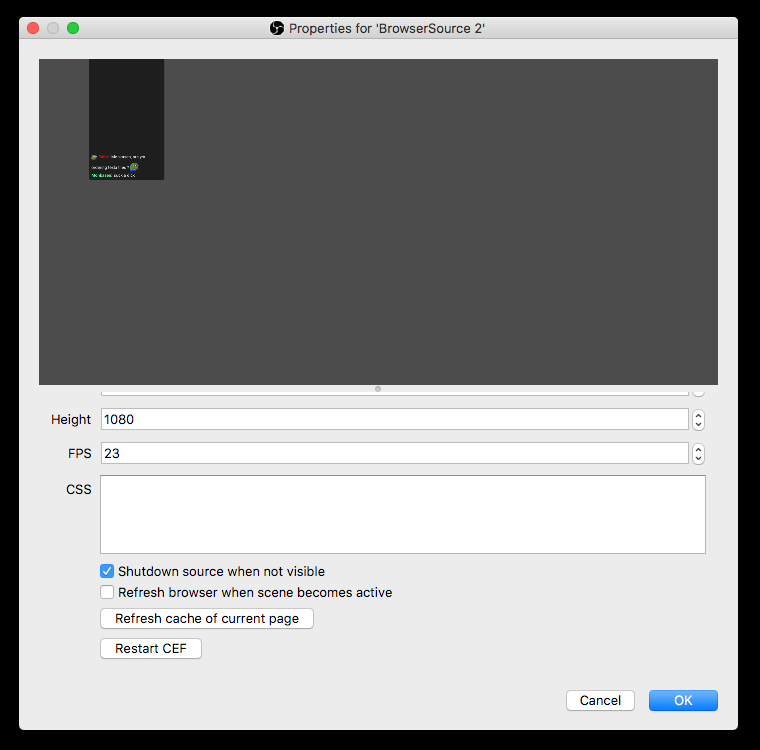
weary mist
go to properties, and make sure the source shuts down when inactive
otherwise it will continue to run that browser source even when you don't have it up
dim sorrel
ohh that must be it!
weary mist
also reduces the load OBS has on your system
dim sorrel
Though I dont know where Properties is
weary mist
right click on the overlay in OBS, click properties
dim sorrel
ohh in OBS
tawny pivot
 dim sorrel
Bless up. I actually love you
edgy kindle
@tawny pivot When setting the custom resolution for overlay, do I set the native resolution of my computer or the downscaled resolution of my output?
tawny pivot
Very important you tick that box 😉
dim sorrel
You guys are the freak'n best
tawny pivot
@edgy kindle Native
weary mist
and spent hours figuring it out because I hate asking others for help, lmao
dim sorrel
lol I spent about an hour last night trying to figure it out D:
then I just said fuck it and now im here
weary mist
lol
I already have 5 different overlays set up. I love the editor tooo much lmao
and the Kappagen
edgy kindle
Im running into a slight issue with the overlay editor
Its like freezing or something after setting a custom image for alert widget
weary mist
is it freezing on stream or when you watch through obs/xsplit
 weary mist
hmmm, can you even click save?
edgy kindle
No
I can move the box and scroll but everything else doesnt work
Hmm
I hit escape(ESC key) and it started to work again
edgy kindle
Btw is there a way to make it stay on screen?
Different widget
edgy kindle
I was looking for the "Event List" thing
Im guessing this is a no go?
http://puu.sh/w713o/88888a6093.png

 hollow zinc
Minimum is 3
edgy kindle
Boooo
hollow zinc
we are pushing an update soon for the event list though
edgy kindle
I hope so lol...
http://puu.sh/w5fty/840de63682.png
My overlay I made only works with 1 at a time
 frosty lantern
Noiiicceeee overlay bruv
weary mist
thats pretty sweet
edgy kindle
Thanks; took about 4 hours
weary mist
lmao
frosty lantern
Worth it
weary mist
totally
frosty lantern
You do the pic too?
edgy kindle
The way I made it work is the "Starting Soon" is actually part of the overlay and it gets covered by the game when OBS captures it
frosty lantern
Its probably one of the best starting soons ive ever seen
weary mist
Yeah... I need a starting soon thingymajiger
 frosty lantern
I got mine made but nowhere near dat guddo. Mines just basic
 harsh sky
So I had a host and a follow today and the alerts didn't go off at all, is it currently down or something?
edgy kindle
@harsh sky It was down for about 5-10 minutes a little bit ago
harsh sky
This was an hour ago
edgy kindle
Today at 3:55 PM <- around the time it went down
Its 5:22PM for me now
harsh sky
I got a follow at 3:51 so that's around the time
weary mist
4:24pm here 😃
I am not good at graphic design, so im SOL until I pay someone for a starting soon screen....
hollow zinc
@weary mist you could resize the widget to show only 1 event though 😃
weary mist
That's a great idea, @edgy kindle was the one looking for it though ;) thanks @hollow zinc
hollow zinc
Oh right 😄
weary mist
I got you
hollow zinc
💯 👌
 serene elbow
how busy have you guys been 😆
hollow zinc
Veeery busy 
weary mist
Probably a landslide since revlo announced its closing
serene elbow
That's what I was getting at.
I see you talking about design, there, scalper... I happen to be a designer. I'm trying to break into doing stream graphics more
weary mist
😀
tight shell
hello
serene elbow
I do the info panels, offline images, headers....send me a message 😃
weary mist
Hai
weary mist
We all need help. What brand of help so you need?
weary mist
I think that's a separate widget from the alert box are you using the correct one
weary mist
If you give me 10 minutes I'll play with it when I get home see if I can get it to break
rapid tapir
whats up?
tight shell
i cannot for the life of me get my store redemption alerts to work!!!
weary mist
are the emulated events working?
tight shell
huh?
weary mist
when in the editor, you can trigger a fake event
tight shell
yes they do
weary mist
ok, but real redemtions are not working, gotcha
tight shell
yep
@rapid tapir idk if you have a quicker answer/solution but my rewards redemption alerts aren't working
weary mist
hmmm, mine seem to be working fine. Try removing the widget, saving the overlay, then re-adding the widget, save, and do a test alert or 3
weary mist
np
edgy kindle
Derpy is back Kreygasm
misty wagon
I hope @edgy kindle brought more 🍩 and ☕ cause we need it. And a 'landslide' is an understatement @weary mist 
weary mist
^^^
rapid tapir
@tight shell there seems to be some bugs going on it seems
im able to reproduce the bug, do sound effects also play for you?
we will look into it, thanks for the report
tight shell
i can get all the sounds working and get my image in
i got it to work once then it stopped and i cant seem to get it to work again
edgy kindle
So "follower goal" How do I do? I want to make like a progress bar/jar
weary mist
I did the donation progress bar, let me see if i can get follower
tight shell
@rapid tapir are you going to post an update in here when it works again or?
 prime wraith
i am trying to set up the points for donations and following but every time I save it wont update it
any reason why
edgy kindle
I see this one
http://puu.sh/w74Y0/a311a15297.png
but...
 rapid tapir
im also gonna go to bed very soon
edgy kindle
that bar is ugly
tight shell
@rapid tapir so it prolly wont be fixed today i am assuming?
tight shell
ok i just hope its fixed soon lol its the only thing i want to work haha
rapid tapir
@tight shell are the items sound effects?
weary mist
@rapid tapir they seem to be working for him now (tested it)
edgy kindle
@rapid tapir Do you know of any way to make a progress bar for followers/subs?
frosty lantern
i think its a widget @edgy kindle if not then probably an upcoming feature
edgy kindle
@frosty lantern Theres counters yes but no actual bars
tight shell
@rapid tapir originally i didnt assign a game too it because its just an overlay for that specific alert
@rapid tapir maybe thats it?
weary mist
@edgy kindle all I found was a text counter
edgy kindle
@weary mist Do you know how to configure the follower goal at least? It's not displaying my actual follow count only the number since I've been on se
weary mist
yeah
edgy kindle
How do
weary mist
edgy kindle
So will it update when you launch it or...?
weary mist
I have no idea. I didn't notice it before
I have had 3 followers since I started StreamElements, so not sure if that is related or not
edgy kindle
Yeah it is apparently.
Displays my current number of followers since joining StreamELements
tawny pivot
saved
edgy kindle
?
tawny pivot
The URL contains private information
weary mist
no idea what url you guys are talking about, lmao
edgy kindle
Oh I see. API token was the last section of /
tawny pivot
Exactly 😃
weary mist
dang, didn't post the gif
edgy kindle
Failed gif
upbeat topaz
Have you thought about allowing the bot to respond to users privately? They could even send commands privately, provided they are in the chatroom at the time.
Don't need 50 point checking commands lol
edgy kindle
@upbeat topaz You can send messages to whispers if its custom
edgy kindle
 weary mist
I likey
need those advanced options on the default commands
puts in feature requests
edgy kindle
They need to add in the variable for Uptime too.
upbeat topaz
I'd rather not have to custom 90% of the commands, lol.
There could be an option to enable / disable that returns commands to the requestor via pm, if that command uses the @ user feature.
Like a global flag. 😃
upbeat topaz
Only drawback might be the games stuff, depending on how that's incorporated.
Custom commands almost feel like constructor overloading. The same command twice. If no @ is used, it does response X. if @ or something is used in command, could do response Y.
Been checking out SE and Phantom Bot recently. Lot of similarities.
weary mist
I just deactivated my nightbot because of SE, lol
only thing that SE needs for me to fully remove nightbot is discord integration
discord bot
edgy kindle
@weary mist Yeah I already asked perry about that one lol
Im still waiting on LoL API support
upbeat topaz
For the tipping page, is that handled through paypal? Any fees taken off the tips?
 dawn wasp
is there any way to see absolute date time of an activity in the feed instead of "2 days ago"?
edgy kindle
@weary mist What are those icons on nightbot?
weary mist
the gear I think is for moderator bot, the second one is some emote FrankerFaceZ emotes supporter, the check because it is "verified"
weary mist
you didn't specifiy which one, so 😛
the gear was new to me, but I was able to hover over it and learn
edgy kindle
Must be an extension thing
upbeat topaz
The chat module could be interesting, for SE. Not sure about some of the other ones, lol. Spamming emotes & stuff.
 strange meadow
bitcup question - if someone does cheer1 cheer1 cheer1 (you get my drift) can you seperate out the cheers instead of lump
weary mist
haven't tested it yet. gotta a channel? I can test it for you
edgy kindle
With Streamlabs it does that @strange meadow
upbeat topaz
What's with PogChamp? I guess that's just an example of the broadcaster's name?
 misty wagon
@upbeat topaz we dont take fees, just Paypal
tawny pivot
@dawn wasp Gonna add it to the list 😉
weary mist
@tawny pivot It looks like the cooldowns are resetting even when the redemption doesn't happen because of a cooldown
tawny pivot
@weary mist it'll be the very first thing I take a look at in the morning ☺️
weary mist
sweet
tawny pivot
Thank you for the report btw
 wise prism
frosty lantern
wise prism
frosty lantern
!roulette (amount)
weary mist
that, and you have to make sure the module is active
 lament merlin
So question.. On the song request page is this iten:
"Paid song promoting
Tips will beat points requests to next playing song (amounts don't matter)"
It says it'll beat points requests..
Does that mean there is a way to promote songs with points?
Or just referring to you being able to set points costs to song requests in general?
weary mist
i missed that. Must check into
misty wagon
Yes, there is but I'm to foggy to explain (past 3:30 here :D) check out this awesome redemption page from @lone bridge https://streamelements.com/randomgirlsinging/store She's all about songrequests ❤
weary mist
haha, just about to explain what I found
misty wagon
Go for it @weary mist we love all support and like it when people help eachother
weary mist
It looks like when you have request for tips on, it will add a field on the tip page that lets you put in a youtube link, including a start time in said video 😃 its a pretty awesome feature
my next guess is that if you have the thing activated, it will put the tipped song to the top of the play queue
 wild edge
could someone please help me? I have a question
restive lantern
Hey team I have a public playlist in the song request "fall back" option, but it only plays the first song and then stops 😦
wild edge
I'm doing a giveaway tonight and I'm trying to figure out if there's a way to set up the giveaway on the site so people can purchase tickets or something. like on revlo
rip revlo
restive lantern
ok ty very much ❤
weary mist
the only way they currently have one is through !giveaway, and that is for a set number of Points. As far as I know, there is no way to get something that will do it similar to revlo. I recommend setting up a store redemption they can buy
or for now use revlo since they still have 2 weeks
@wild edge Correction, if you do Raffle, not only can people win the points they bet, you can also use it for a giveaway
wild edge
is there a way to set how much that can be put in the raffle?
also I was hoping to do like 1st 2nd and 3rd place so I don't know how well that will work
weary mist
hmm, doing some testing
from what I can see, I am wrong again
but !giveaway start everyone Kappa 60 20
will start a giveaway, everyone can enter, Kappa is the keyword people have to type to get in, it lasts for 60 seconds, it costs 20 points to enter
it will give you one winner
wild edge
well I guess the raffle will work for the other people. since the majority of the giveaway will be points. but I wanted to give a game away as well
weary mist
the giveaway will give you that, without giving the points. raffle is something else
wild edge
okay okay...so they can buy stuff for the giveaway to make their probability higher?
weary mist
not sure, can't test that on my own, lol
they might be able to, because you can set a cooldown on the command in the settings
wild edge
just trying to figure out a way without using revlo since I already switched my points over and then I'll get confused
weary mist
haha, yeah
wild edge
also another question. how does bingo work? I do !bingo and then what?
weary mist
bingo is based of emotes, give me a second to explain
so if you go !bingo twitch 1000
you start a bingo game for 1000 points.
the users then have to guess which twitch emote. the first one to get it will win 1000 points
or if the timer runs out, no one gets it
wild edge
so like Kappa ?
lament merlin
Anyone give me an idea how to use ${user.lines} ?
I tried it but it doesn't display anything?
wild edge
okay. thanks
weary mist
ill test it xeno
weird. it says it is supposed to put in the number of lines a user has typed. But it is showing nothing in my chat
lament merlin
Same, thats what got me.. but loving the other arguments.
lament merlin
\
weary mist
nice, haha
short scarab
How'd you do that? Lol @lament merlin
weary mist
clever usage of the arguments 😃
 split panther
I am in need of help
waxen valve
does anyone know why recent followers arent being updated or poping up in the dashboard current stats ? i got 10 followers over night, and that didnt pop up in my daily follower numbr? is that because the website is based over seas? is there no "local timezone" option ?
weary mist
I am not sure, but recent might be a per session thing. it might reset every session
@split panther
what do you need
split panther
I Need help managing someone elses dashboard if they made me moderator @weary mist
weary mist
At this time, they don't have that set up. All you get are the in chat commands for moderator
split panther
@weary mist At some time will that be available?
weary mist
yes, it has been said to be in the works
split panther
Allright. . .. Can I still add points as a Super Mod?
weary mist
yes, it is a default command
split panther
@weary mist Where can I find a list of commands
weary mist
if you type !commands in this persons chat, it will show them all
 red vine
Hey, can I set the frequency my viewers receive points to once every minute?
weary mist
yes
well, you can set it to 10 per 10 minutes
There is no way to set when the points are added
split panther
@weary mist Is there A way I can add points I can't seem to get it to work but the streamer can get it to work 😦
weary mist
has he put your name into the Supermoderator section?
weary mist
just to verify with him, its under user management, then New Super Moderator, and it has to be your twitch name
split panther
Yup that is what he did
weary mist
ok, testing something else
split panther
Test something else out?
edgy kindle
make sure he has !givepoints enabled
weary mist
^^ that too
edgy kindle
It's under default commands
split panther
@edgy kindle I can't give points in other channel unless that is enabled on his end?
weary mist
yeah, he has to have it enabled
split panther
Ok I will let him know
edgy kindle
make sure the streamer isn't just trolling you either
split panther
No the streamer won't troll me He walked through it with me on Discord VC @edgy kindle @weary mist
edgy kindle
ah okay
split panther
But I guess that because this is his first time using this then getting rid of Revlo it is going to take some time to get used to @edgy kindle
weary mist
yeah, it takes a bit, but its going to be well worth it
edgy kindle
yeah I'm still learning how to use some of the features myself but after a few hours of exploring it gets easier
weary mist
its fun 😃
split panther
How would one enable !give just wondering? @weary mist @edgy kindle
split panther
@weary mist !addpoints
weary mist
ok, just making sure you are using the right command, lol. Chat Commands-> Default Commands _> Scroll all the way down.
edgy kindle
scalper so late Keepo
edgy kindle
currently watching 2009 Friday the 13th movie in bed lol
weary mist
nice
weary mist
I believe so, you can test it in chat to see if the bot responds
split panther
Yup it works in my channel but no the other streamers
My guess is that he spelled my name wrong
weary mist
possible, lol
 frosty urchin
quick question : how can I turn off the tipping page?
worn pivot
Quick newbie question 😃 I have timers setup basically I thought if I just trigger the !customcommand for commands I already set that should work? It doesn't however, even though when I manually trigger them they work fine. The timers basically just display !customcommand without actually executing it. (If that makes sense) Do the timers have to be full commands? If so that is kinda inconvenient.
proud pumice
@frosty urchin what do you mean?
@worn pivot hmmmm. Interesting.
Bot cant cause itself to trigger command
proud pumice
@frosty urchin yea if you don't put your email in its disabled
frosty urchin
but once you have done that, you cant resave it
frosty urchin
for example.. if you are doing a charity promotion... you need to ensure people dont use your tippiung page, so you need to have the page hidden and the link removed
Sorry 😦
proud pumice
Easy fix is setting minimum tip of 100k 
frosty urchin
haha
 raw cosmos
hello~
proud pumice
Can also add msg saying don't donate here
raw cosmos
how to custom !givepoints message? have any way?
proud pumice
You can add alias to the default command and use your own trigger. Cant change text tho @raw cosmos
worn pivot
@proud pumice so you have to add complete commands for the timers as well? Because in deepbot it works the way that you can trigger the custom commands itself. You don't have to enter commands double. It would really be easier if the timer could just trigger existing commands (still not sure if I am making myself clear, sorry :D)
but I guess that means you only need the timer commands once because you could still trigger them manually as well?
proud pumice
Yeah I think its supposed to work the same for us too
worn pivot
oh, well for me it doesn't right now
the bot just basically "says" the command and it doesn't actually trigger the comment in chat
@proud pumice here is an example https://gyazo.com/324cce063fcf987cd4be4d65e061181e it happens with any of my timers. I can trigger them fine manually but the bot just does the ! thing
 raw cosmos
thx all~
proud pumice
hmm
checking
well one thing is for sure, the bot cant trigger its own command
its an opening for abuse
and endless loops ;p
worn pivot
@proud pumice ok, so I am still not sure I understand you right. You are supposed to add proper commands like you do in the custom commands for the timers then? How does Deepbot avoid the loop issue you mention then? Because, as I mentioned, in those timers you basically just use the existing commands to trigger.
I am fine with either - just need to change it then (also I think it actually used to work once or twice :D)
proud pumice
deepbot doesnt care about the loop issue, cuz if someone abuses a loop the deepbot app crashes and streamer needs to restart, we care cuz if someone crashes our servers, tens of thousands of streamers get hit ;p
you can just copy pasta the text directly into the timer
so it outputs the wanted text other than the command
worn pivot
got it thanks 😃
One more thing (sorry) - my alerts go off (which I hear) but then it takes a while for StreamElements to mention the follower in chat or update the live activity feed. I generally relay on the last two to thank whoever followed and since I am a small streamer I feel like a jerk not thanking them right away 😃 Is there any way to speed that up? I assume it's a server load issue though 😃
 wanton pike
HAROOOO, for some reason I am hearing streamelements alerts multiple times on OBS herlp meh
pls
proud pumice
@wanton pike have you trying checking the V mark on the browsersource?
can @atomic hollow bounce on your teamviewer and fix it for you? 😃
buoyant hull
and if you have the overlay manager open in your browser at the same time, it plays the sound too (need to mute it in the top menu when editing) 😃
wanton pike
yup I just figured that because I made different layers instead of duplicating that theyre playing at different times in all scenes
whats this V thing youre talking about?
sleek ember
I just got done with my last stream before holidays and imported the revlo points. Quick question: How do I hide users from the leaderboard? i only found how to stop people from earning, but not how to hide people/bots from the board completely
sleek ember
hm, well. I'll be on holiday for two weeks anyway. lots of things could change :P
for now I'll just delete the points so they're further down the list
atomic hollow
we are indeed working hard on these things for the next 2 weeks
sleek ember
@atomic hollow but is there going to be an option for that soon? My viewers would be pissed about this 😂
what service... answering questions before questions are sent 👌
proud pumice
Lol
atomic hollow

worn pivot
@sleek ember I think it's soon yeah. I asked about that yesterday, too 😃 for now I just removed the bots manually from the board (they don't need to earn points after all)
sleek ember
I already removed their points, but they're still in all time, since they had the points already 😅
atomic hollow
yeah, that will be fixed
wanton pike
So its not suppose to be marked?
IVe just changed everything hahahha wish i knew before.. oh well ill redo it all tomorrow - im late!
atomic hollow
it needs to be marked
 olive lintel
good day, how do I add an stroke/shadow to my text in the overlay editor? (the same question for the text in the "twitch chat widget)
buoyant hull
@olive lintel At this point it's not yet possible. You can only do stuff like bold text, emphasis, underline, uppercase
 rain bone
Hey All, Used out about 3 complete overlays tonight in OBS studio for around 2.5 hours. After about 30-45 mins scrolling text starts to stutter. Not sure if there is an OBS studio setting to change the load out for browser settings but just an FYI.
olive lintel
WIthout the overlay added to OBS = 19% of CPU. With the overlay added to OBS = 54%-90% of CPU. I will test more about this trying to find the problem with the overlays.
silk patrol
@olive lintel weird, OBS uses only 16% of my CPU with the overlay loaded, and I'm on a i5
olive lintel
@silk patrol me too (i5), do you use 1080p or 720p overlays?
silk patrol
1080p
worn pivot
@silk patrol why does your name look so familiar 🤔
silk patrol
@olive lintel OBS Studio 64bits
olive lintel
I will try in 64bits then.
silk patrol
@worn pivot i've helped you last week with the "write to a local file" question ^^
 brisk marten
what should I set the slot machine to? it seems like nobody ever wins. Maybe I have it set too high?
silk patrol
@brisk marten as said on the module page "lower than 100% means people will lose points over time". I guess you can up the value a bit if you want ^^
brisk marten
i guess i'm not understanding what that means.
does that mean they will win the majority of the time?
i just want to know a good starting point to set it to. i want people to win maybe 50% of the time.
silk patrol
I don't use it, but by default it's on 80%. Try to put it on 150%
rapid tapir
100% means exactly a 50% win rate afaik
brisk marten
higher than 100 = more likely to win? or no
silk patrol
Thanks @rapid tapir for the heads up
rapid tapir
I thought so, yes. But i didnt write it, so take that with a grain of PJSalt
brisk marten
who did?
rapid tapir
Probably nuuls 
olive lintel
yep, without the overlays = 19% CPU, with the overlays 57%-61% of cpu , OBS 32 and 64bits.
buoyant hull
i use 2 overlays from SE and my CPU is fine 
olive lintel
1080p or 720p?
buoyant hull
do you have the latest OBS version
rapid tapir
@olive lintel are you using kappagen?
olive lintel
yep
unkempt oasis
OBS has disabled hardware acceleration in the Web source, so that might be contributing to the high cpu
buoyant hull
@olive lintel you could check on chrome if your overlay hits hard on your pc
rapid tapir
Nothing we can do about it for now, but a PR for cef exists
If we are lucky, that will be merged in soon
olive lintel
@buoyant hull yep, in chrome my CPu is ok. @rapid tapir the problem is th ekappagen widget?, so I wil try without it.
rapid tapir
Yeah :(
buoyant hull
The Browser source is chrome based. Never tried it, but you can enable GPU on OBS by adding "--enable-gpu" on the .exe
buoyant hull
ok, so forget what i said then 😃
olive lintel
confirmed... it's the kappagen
rapid tapir
Thats the bug that hasnt been fixed
buoyant hull
oh right
rapid tapir
We might try building cef with the fix and distributing a custom version
Or talk to the obs to use that bleeding-edge cef, but i doubt theyll do that
olive lintel
as obs's mod said: "if you are interested in some new features, you can do it yourself and post it in the forums". 😃
rapid tapir
All of that takes time, so we will have to see about thaz
worn pivot
Another question: can anyone start a bingo round? I don't see any settings for which users can trigger it 😃
or CD for that matter
atomic hollow
mods and up
worn pivot
ah perfect - thank you
olive lintel
is it possible to add transparency to an image in the overlay editor?
olive lintel
because atm I can't add stroke or shadow to a text in the overlay editor. I need to put an image behind the chat to contrats the white text. I want this image to be "translucent".
unkempt oasis
There is transparancy if you use PNG files
rapid tapir
Yeah ^
Just make the image transparent with the image editor of your choice and export it as png
olive lintel
sorry I chose the worng word in the question, is it posible to choose the opacity of an image in the overlay editor?
lone bridge
@olive lintel functionality to edit images in the overlay editor does not exist at this time. But what Rev and CBenni are suggesting as a workaround solution is that you edit the image in photoshop or a similar program. You could apply 50% opacity and save it as a PNG. Then when you bring it into the overlay editor it'll be opaque.
olive lintel
ty
worn pivot
@olive lintel just do a png in photoshop if you have it and set the transperancy of that layer to whatever % you need
wasn't fast enough FeelsBadMan
unkempt oasis
But no, you can't adjust the opacity directly in the overlay editor
lone bridge
although that would be neat, @tawny pivot 
tawny pivot


 rapid tapir
Ill be back in like 2h
olive lintel
opacity FTW 😃
rapid tapir
 /
/
atomic hollow
@turbid reef can you please comment on this?
[12:06 PM] scarfino: i guess i'm not understanding what that means.
[12:06 PM] scarfino: does that mean they will win the majority of the time?
[12:07 PM] scarfino: i just want to know a good starting point to set it to. i want people to win maybe 50% of the time.
for @brisk marten
turbid reef
what is he talking about 
atomic hollow
just type here @narrow lagoon
ruby anchor
can any1 tell me how to check points in chat ?
atomic hollow
!points
ruby anchor
not working :i
ruby anchor
oh okay
tawny pivot
 beer
beer
 vital moss
"Tror du mente bajer" Keepo
atomic hollow
🍺
vital moss
Hahahahaha typical dane
tawny pivot
🇩🇰👌
turbid reef
do other commands work?
ruby anchor
yea
upbeat topaz
Once SE is ready for YT testing, I'd be happy to try it out. 😃
In general that is (at work)
atomic hollow
thanks, that would be great
upbeat topaz
Cool. I'm curious to see how reliable it is with warp.world compared to nightbot
Will SE be able to notify in chat when someone follows on YT (free, not paid)?
atomic hollow
I dont have any infromation for you currently
upbeat topaz
That's ok. Do you know if there will be a separate command list for YT, since Twitch & YT wouldn't be able to work with all of the same commands.
atomic hollow
I am not in the loop for YT, I dont know anything, we will connect you with the devs for that when its relevant
upbeat topaz
ah, ok.
 narrow lagoon
how to make bot and broadcaster not show on Loyalty Leaderboard?I want to hide them on the list
atomic hollow
you can set the bot to ignore them and delete them from the current leaderboard
atomic hollow
yes
narrow lagoon
ok thanks very much
sorry i can't find the setting to set bot and broadcaster ignore on leaderboard
atomic hollow
 rough jacinth
When I press "Emulate event redemption" - nothing changes. Is this okay?
narrow lagoon
thanks for the picture
atomic hollow
narrow lagoon
how to set !givepoints to give points for all in chat
exotic halo
!addpoints all #ofpoints
narrow lagoon
OK thanks
exotic halo
I believe addpoints is the default name of the command I'm sure someone will correct me if my morning coffee hasn't kicked in yet
silk patrol
@exotic halo you're right
exotic halo
Hehe
silk patrol
@atomic hollow you were sorta right, there's a !give cmd too ^^
narrow lagoon
my friend just want broadcaster to give only
exotic halo
Lazy me likes the shorter one. @atomic hollow ME TOO always more coffee pls
You can change the permission to caster only in the options
silk patrol
@narrow lagoon the !give command is for broadcaster only, the addpoints cmd is for mods and above, you can either disable one or change the user level
narrow lagoon
thanks
exotic halo
Ohhh @silk patrol taught me something new today ty
silk patrol
@exotic halo always glad to help ^^
atomic hollow
@exotic halo quick tip
in your panels, make sure donation is in the first row
scrolling down for tips lowers the conversion
and change it to SE (#SEsellout)
 jagged herald
Is there anyway to make the lurkers not to earn points during offline?
tawny pivot
Points are only handed out while the stream is online 😃
exotic halo
@atomic hollow do you mean the panels below stream? And lol I do appreciate the tips so thank you
atomic hollow
yep
I know money so if you need more tips I am here 😃
that came out bad actually
I know about payment conversion
exotic halo
@atomic hollow I'll bump it up. I always felt odd about the donations on page in general. But honestly my viewers have been going nuts with bits since I became an affiliate and I've earned a lot more from bits than anything else. LOL @atomic hollow thanks for giving my page a once over also. Kind of you 😃
My financial consultant @atomic hollow who also shares a name with a great Fiona apple song. I'm in good hands 👌🏻
atomic hollow
❤
the only one that knows the true origin of the name
your panels are very well done by the way
maybe just a bit less text
atomic hollow
LUL
exotic halo
Pls delete my shame new friend
atomic hollow
you can link the specs & gear to an external site for example
exotic halo
Do you recommend any specific sites for external pages like that? Free hosting stuffs?
atomic hollow
I see most streamers just use google docs, even the big ones
its gets the job done
exotic halo
Sounds like a plan
unkempt oasis
Pcpartsbuilder (I think that's the name) is good for PC specs
silk patrol
@unkempt oasis good idea
exotic halo
@unkempt oasis ty!
unkempt oasis
:)
atomic hollow
I really need that coffee now
silk patrol
atomic hollow
bye
exotic halo
👋🏻
worn pivot
@atomic hollow sellout confirmed!
atomic hollow
oh for sure
jagged herald
@atomic hollow maybe implement a text for stating the stream is online and it is tracking the loyalty...
atomic hollow
we were just discussing that
worn pivot
Why not just list them in text in a panel? It's not like there is thousands of inputs and it doesn't change that often?
For the hardware specs I mean
jagged herald
@atomic hollow okay.
exotic halo
@worn pivot it's more for the sake of keeping things less cluttered and more visually and aesthetically pleasing
worn pivot
right 😃
exotic halo
@worn pivot people in general don't like a big wall of text 😂
soft gull
mother knows best 😉
worn pivot
of course not but how much hardware do you have 😄 I understand if you have a double stream setup with elo cards etc but if you just have one comp it should be ok. Granted, I am not even listing my specs since I don't think it's important. (I also never look at another streamers specs, I just get jealous :p)
@soft gull 🤔


 soft gull
😋
worn pivot
joke - that's great, thanks ❤
silk patrol
Some streamers only use the image as a link with some text on it, like Sacriel does
worn pivot
Yeah, I do that as well for some panels - and only have little text in the images themselves
soft gull
god i hate sacriel his voice is tilting me all the time
when he plays w summit i just close the chrome 😄
but he plays playersunknown very good 😄
silk patrol
@soft gull lmao, i know what you mean, but he is such an amazing PUBG player with JackFrags and Break
soft gull
agreed
worn pivot
funny - I was just talking to one of our animators about my new alert animations for stream and he is watching breaK right now :p
everyone is trying to convince me to get pubg but I know I will just be shit :/ no one wants to see that
we are derailing btw..maybe take it to general 😃
upbeat topaz
Heya. I just finished resetting the leaderboard, but it never cleared the all-time leaderboard as well. How do I wipe that out?
I'm also not able to delete users off the leaderboard. Clicking the trash just resets the points to 0.
sleek ember
I asked the same thing earlier, they said they're working on it :)
atomic hollow
Hey, there is no way to delete from all-time, fixing it now
and once you delete a user, just add him to the ignore list until we fix it
upbeat topaz
I've added the bots & myself to the ignore list. 😃
atomic hollow