#helpdesk-twitch
1 messages · Page 44 of 1
 main fern
 atomic hollow
@main fern currently no alert for top donator
and credit card option is available via PayPal
 lament blade
hey is there a way to Reset the Follow Goal Widget , so afther every stream i can do that 😃
 hollow zinc
 silk patrol
still no update on the ${game} variable ? 
 tawny pivot
@silk patrol Are you having issues with the variable?
silk patrol
@tawny pivot nope averything is working fine. i have created a shoutout command but I wanted to show the last game played like this "Please give a follow to ${1}, he last played ${game}" Some bots do it, but I haven't been able to find out how they did it using the Twitch API
lament blade
hey does somebody know how the Emote Pyramids works
silk patrol
@tawny pivot you can retrieve infos about a channel using this https://dev.twitch.tv/docs/v5/reference/channels/#get-channel(édité)
lament blade
ooh like that @tawny pivot
 lament blade
oke thx
tawny pivot
np
 turbid reef
@silk patrol try $(game $(1)) 
that works for all of the $(channel...) variables, for example $(channel.uptime $(1)) 
silk patrol
@turbid reef Thank you, works like a charm. You should maybe add that the variable list or on some kind of FAQ
 proud pumice
@coral kelp did you check edit overlay today?
 coral kelp
hold on lemme check
the resolution keeps defaulting to my screen resolution
it should be 640x360
everything else seems to be sticking
proud pumice
@pale wave right now there can't be a resolution smaller than 500x500
but since you had that issue we removed that limitation
tomorrow evening you would be able to do that
main fern
Just a question regarding the alerts, how do i have the alerts over multiple scenes, without them playing through each scene when a scene isnt active?
Is it a setting in obs itself?
atomic hollow
main fern
Yesssssss! So if the same alerts are in each overlay, it will only play through the current scene! Thank you!
atomic hollow
@main fern my pleasure 😃 stream on!
 empty fjord
Guys the !quote command is still not working in my chat :/
Its been like this for a few streams now
Im streaming now if you wanna come take a look
proud pumice
that tmrw came quick
turbid reef

 fiery lake
Some issues I had with Song Request yesterday:
- Firefox doesn't start playing song requests. I had to switch to Chrome for it to work.
- When the backup playlist hits, it always starts at the first song, this is quite repetitive especially if you don't get a lot of requests. Tell me if this can be done differently 😉
fiery lake
- When the backup playlist starts again after a request, it doesn't automatically go to the next song.
hollow zinc
The backup playlist should continue where it left off.
I'll look into it and also for firefox.
 vague jungle
The backup playlist continued where it left off for me, but still had the problem of not continuing to the next song and I had to do the whole show video refresh trick and then it would go back to the very first song which was annoying
proud pumice
@fiery lake @vague jungle we'll put some time into finding and fixing that
fiery lake
Awesome, thanks Inormous
 zinc shale
Is there a way to automatically have someone become a regular after so many hours in the stream?
zinc shale
Thank you @silk patrol Votes are in
 misty wagon
Is it possible to add some stuff to the feature request tool itself. I.e.; priority, seen, rejected, future version xx, expected date, etc.. Not that I don't love a lot of features but now features and improvements are side-by-side on the same tab. 😄
empty fjord
Can we have a new tool for requesting features for the feature request tool? 🤔
 tawny pivot
We have more on slack
empty fjord
no idea why im not invited yet tbh
tawny pivot
Too many memes/s 
empty fjord

misty wagon
 buoyant hull

 tropic eagle
Hey team! I have a small question about commands. Is there a way I can put some "bold" things, putting thing next line, etc?
atomic hollow
not sure you can do bold on Twitch chat :/
empty fjord
dont think twitch chat supports that, and since the bot basically sends stuff to the chat that would be impossible
you can use markdown in the info tab, but i dont think it works in the chat box
just googled: Not possible 😉
tropic eagle
Mh I have a command for all my links and it doesn't go on the line under nicely enough. I just need to space things out a lot I guess 😃
 lone bridge
any way to make text widgets (follower count, etc) able to be L,R, or C alignment? Not sure how to use the border option to do that?
ps I see what you did here 😃
atomic hollow
😃
lone bridge
also - every time I read "dark theme" i read it as "dank" theme
atomic hollow
Steph
see that A
click on it
its under text settings
thats the alignment
@lone bridge
@hollow zinc we should probably put that in a more visible place
buoyant hull
What could be a could idea, is add some variety in color background in the sidebar overlay dashboard. Sometime he gets a bit confusing between the open tab and the closed one.
lone bridge
Yeah, this menu is already a little busy cuz so much white and so much grey text with all the arrow drop downs, it's easy to get lost. Then again, I have really bad ADD so I'm not the best example. I'm kind of a dumb dumb
buoyant hull
The UI is pretty good overwall. But some graphic tweaking could really help the global understanding of it
tropic eagle
Small question again for the commands. I typed !setlist and it comes with a command for Stream Elements and I don't see it anywhere in the chat commands tab.
atomic hollow
@turbid reef please help @tropic eagle
tropic eagle
@atomic hollow @turbid reef I waited a bit and it disappear. I don't really know why/how.
I'm using Rio Music Bot for the request from my songlist.
I guess it was just the time for the bots to be friends 😄
atomic hollow
our bot is super friendly 😃
tropic eagle
I love the experience so far! ❤ working great now that I set up my OBS a bit more accuratly
atomic hollow
very happy to hear that, did you setup the tipping presets in your tipping page?
tropic eagle
I put a background, a image too. A nice title and set the device on €
tropic eagle
Oh no I didn't
tropic eagle
Mh how does it work? I set up the "suggested amount" already
And when I click on a preset, it doesn't stay highlighted
atomic hollow
do a number --> press enter
atomic hollow
i dont see it yet
and change the twitch account linked in your Discord profile, its wrong
tropic eagle
Oh so weird that was that box!
When not selected it says : "tiping presets disabled" and I thought it was for disabling the presets
atomic hollow
works now 😃
tropic eagle
Oh I had to unlink and relink my Twitch account
Discord doesn't understand name changes
atomic hollow
yeah, happend to me as well
tropic eagle
thanks for the heads up! 😄
atomic hollow
np 
tropic eagle
❤
 lusty wedge
❤
 red vine
yessss
proud pumice
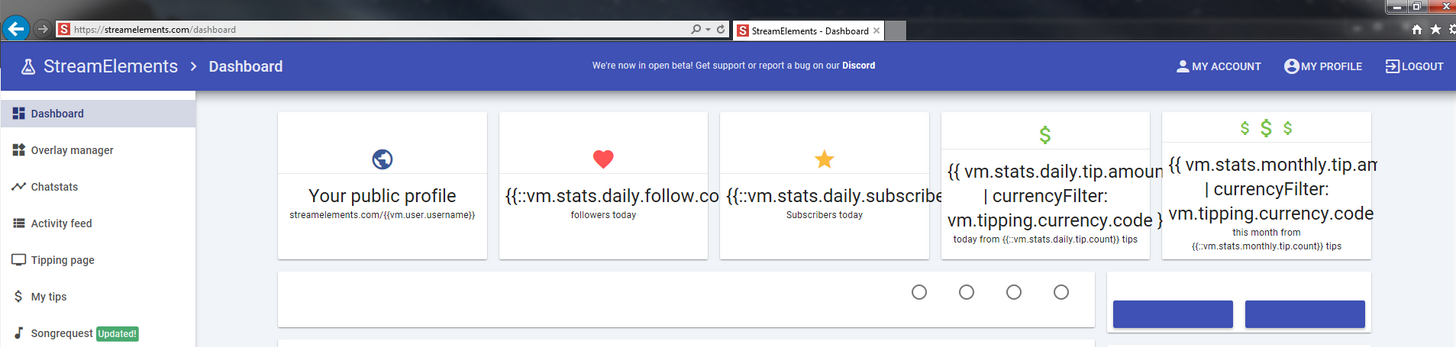
@red vine looks like your have some scuffed internet
webpage didnt load properly
thats why it looks like that
refresh and make sure to unscuff your internet
red vine
my connection is stable, and it works in chrome
 red vine
but i like to explore the internet
 proud pumice
@turbid reef ?
 uneven olive
2 ppl*
turbid reef
I'll take a look
uneven olive
tnx
just tested to see, still does it
"The Raffle has ended and skylin3r, thoteph won 50 SkyCoins"
turbid reef
its fixed and will go live later today or tomorrow
coral kelp
hey could you guys add trailing 0s to donation cents?
proud pumice
@coral kelp more than the existing 2?
coral kelp
no i mean someone donated $4.20 and it showed up as $4.2
 wise marsh
I am testing my stream and cant seem to get the Overwatch overlay to come up over the game in my stream, should I be using OBS classic for this?
 dense jackal
obs studio is much better atm and gets constant updates
lone bridge
good morning from VA! Having some issues with my follower alert not letting me remove the sound alert from it. I've tried: removing all variations, setting volume at 0%, AND removing the sound and it still keeps playing it.
 vast wren
@atomic hollow yo so with my store items can these be redeemed by users via chat commands?
atomic hollow
yes
vast wren
would i have to create the command in custom commands or does it create the command based off of the item name
atomic hollow
its in default commands
vast wren
@atomic hollow you are on my list if you stream or need anything promoted on twitter lmk
hollow zinc
When yo ucreate an item, there's a thing that it's being filled in automatically, but you can change it, it's on the 2nd step of item creation/item edit process and is called item command. People can redeem it by typing !redeem [item_name] in chat
hollow zinc
ye
vast wren
cool... any way i can have it work with just a !itemname
?
or would i have to make command !itemname
and have command action be run command !redeem itemname
hollow zinc
I don't think we have that thing atm, will have to wait for the Bot dev
vast wren
it looks like it may be possible with current bot
okay i found a way around this
you can use the advanced settings and if the store item isnt an actual item just an action you do
you can have the command be triggered and cost points
and it will alert you with a message without having to actually redeem the item in the store
only downside is you wont be able to track the redemptions
but functionality for end viewer is same
hollow zinc
yea
vast wren
fuck yeah it works
hollow zinc
you wont be able to track them tho
vast wren
i know 😦
but its viable workaround for now so i dont have to make my viewers change how they trigger it
i want my transition to SE to be as seamless for them as possible idc if gotta do a bit of grunt work
and im sure a quick redeem commands will populate soon
damn my stream gonna be weird today since im in between bots hahaha
hollow zinc
You could make the bot buy the item for the person
actually nvm, that didn't quite work out 
vast wren
Yeah cause it removes points from the bot
Tried that first
Cause the bot issues the redeem... I'll toss that into feature request
lone bridge
Well I'm going to stream, we'll see if it does it in action LUL
vast wren
Good luck random post in sellout I'll stop by
lone bridge
@hollow zinc I'm having issues testing chat using the overlay manager
i can not get text to pop up in OBS. Any insight?
hollow zinc
we are working on resolving that bug
lone bridge
will it work when streaming?
hollow zinc
yeah i dont think it will pop up in obs too
 surreal sapphire
"Allow hosts to be rewarded bonus points."
Does this also reward auto-hosting or just manual hosting (I don't want to reward autohosting the same as manual hosting if possible)
tawny pivot
Yes, they are considered the same right now
tawny pivot
Currently there isn't a way to seperate it out
surreal sapphire
just asking before I do a request that's not possible heh
tawny pivot
We're just talking about it internally
surreal sapphire
yeah I was just asking in terms of the twitch api -- if it distinguished the difference
tawny pivot
Yeah so that's another thing, the twitch api doesn't tell us what type of host it really is.
A host is a host when we look it up
 umbral skiff
In the activity feed, when I click on the 'reset session' button on the main page, it doesnt reset any session tips or follows so the count remains. I have to go into 'edit session' then click 'reset all' for this to put everything to 0. Its not too much of a problem but if this is an issue I just wanted to make you guys aware 😃
proud pumice
@tawny pivot ^
silk patrol
Just a quick question. If I set a timer to 5 minutes and another one to 10 minutes, will they be both sent at 10 minutes ?
I could just test it tho ^^^
turbid reef
there is at least 1 minute of delay between timers 😄
atomic hollow
@silk patrol
silk patrol
ok thanks guys @turbid reef @atomic hollow
lone bridge
Is there a way to rename !redeem commands? I remember we talked about it once before but can't recall if that was an easy fix or not
atomic hollow
@turbid reef
turbid reef
you can add an alias for it on the default commands page
lone bridge
wait i just looked at the features thread LUL
turbid reef
or you mean !itemname without the !redeem?
tawny pivot

lone bridge
Like how it was explained !itemredemptionrenamedthing instead of !puttingthis andthis
yes, how you explained it 
turbid reef
that is not possible currently, but it seems like it should 
lone bridge
Ha! yeah, that extra step has made a big difference, unfortunately.
turbid reef
ill try to get it in for next week
 lone bridge
It's cool, for now I'm goofing around with youtube requests and just playing along with them/freestyling.
if I need to turn revlo on for song request performance days I can do that
proud pumice
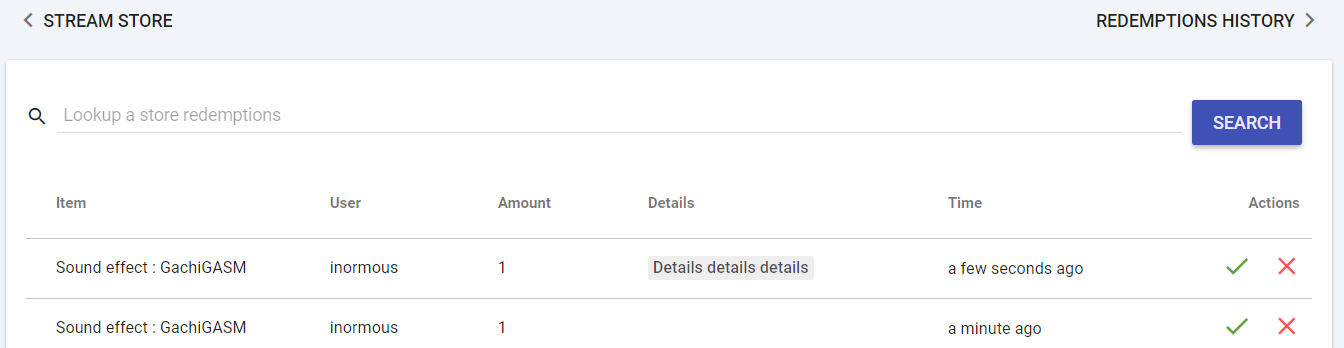
@lone bridge have you seen that we added redeem details in the main redeem page? http://i.imgur.com/ineEvKq.png
 silk patrol
I found a small issue with the description text on the reward cards. If it's too long,words are cut instead of going to the line
since the first line is in french, look at the second line. the "awesome" is cut
hollow zinc
That's to prevent some cards going rogue in height.
 hardy forge
hey guys im trying to sdert up the tipping system, do you guys know if there are issues with google chrome?
atomic hollow
no, what happens?
hardy forge
i tried to type in my paypal email and it wouldnt really work but i went to the tipping page and its working jsut fine now
atomic hollow
weird
but its working now?
make sure to use tipping presets
it can boost your average tip, easy
hardy forge
😄
buoyant hull
1337.00 !
 wide delta
Hello, does anyone here know how to set up a songrequest queue that will just read back song names without assuming youtube videos? I would like people to just be able to go to my personal song list and type: !sr [song-name] and it just gives me the name without associating w/ youtube videos
hollow zinc
songrequests can be made iwth youtube links as well
And currently there's no other way to do it, except if you make a store item and set up item requirements for a link or a song name.
wide delta
So there's no way for someone to just type "!sr Echoes" (the name of one of my songs off my songlist) and that will just create a new item named "Echoes" at the top of my song request queue?
hollow zinc
if it's on youtube it can, else it can not
You can create a store item for songrequests that you can play
 junior shore
I'm trying to put in my local time using ${time.TIMEZONE} with my proper time zone code but the bot is saying the wrong time. Suggestions?
turbid reef
can you post the command here @junior shore ?
 lean birch
@lone bridge You want to be a test subject for me, to do with importing revlo points to SE ??
red vine
it might be a good idea to refer ppl to https://en.wikipedia.org/wiki/List_of_tz_database_time_zones for time zone command (the TZ column)

This is a list of time zones in the tz database release 2017b. The list is derived from the zones, links, and rules specified in zone.tab and the 7 "continent files" – africa, antarctica, asia, australasia, europe, northamerica, and southamerica...
 drowsy sorrel
good day
either im missunderstanding twitter widget or something is wrong
it does not show retweet of my tweet in my chat
it did show my tweet but not ppl retweeting it
atomic hollow
did you check the retweet option? @drowsy sorrel
drowsy sorrel
yes
atomic hollow
what is your Twitch username?
drowsy sorrel
donefear
atomic hollow
should work, @turbid reef will take a look when he wakes up
 glass stag
Can we not manually change the song queue order or is it just me? Like if I see a song I'd like to do first, is there a way to drag and drop it to the front of the list? Or maybe double click the list in the right and go straight to that one?
proud pumice
@glass stag we dont have it right now as the only way to affect rank is by tipping.
Buuut. Once we go for another round of improvements on songrequest we'll defo add that
lone bridge
Yes @lean birch
lean birch
@lone bridge 
glass stag
So if a song is in queue already and someone tips does it get bumped up?
I requested "got any grapes" and afterwards realize it's gonna be at least 14 minutes until my song comes up, and I have places to be, so I'd like to hear the duck sing sooner.
So here's $40 for my song ...
Speaking of, If I request got any grapes, and grapes of destruction goes in the queue. Is there a !wrongsong command to remove or replace it?
Ok I'm done for now. 😉
lone bridge
Good questions, I know there is tip function but not sure if before or after the song has been requested 🤔
But I don't have any grapes. Just lemonade.
glass stag
I'll waddle away
turbid reef
@drowsy sorrel it only shows if someone from the list retweets someone else, not when someone retweets you
silk patrol
@turbid reef Hey, how are you ? just a quick question since you answered it lately. We are trying to setup a time command for South Korea. But when we use ${time.KST}, the answer is off by 9 hours ^^
since Nakupenda had to use PST8PDT maybe there's a catch too
turbid reef
ill take a look @silk patrol
silk patrol
@turbid reef thanks
hollow zinc
We're working on fixing that  🔧
🔧
 crude relic
oh its a known thing?
tawny pivot
Yeah it's a known thing, we're looking into it right now 😉
crude relic
sweet
silk patrol
Is there a way to create a queue command so I can have a list of people that want to play with me ? maybe a !queue that returns the ${sender} into list ?
turbid reef
@silk patrol try $(time Japan) 
silk patrol
@turbid reef ok thanks, i'll keep you posted
turbid reef
looks like ill have to find a better library or use some API for $(time) 
silk patrol
@turbid reef works like a charm
turbid reef
@silk patrol and the queue thingy is on the todo list, but no eta yet
silk patrol
ok nice, thanks for the update
turbid reef

red vine
$(time Asia/Seoul)
silk patrol
Just noticed something a bit annoying but it might be tricky to fix. if someone unfollows, the follower count stays the same
@red vine works too, thanks for the heads up
are you using an internal counter based on the session ? can't you use the channel object from the twitch API ? just asking ^^ https://dev.twitch.tv/docs/v3/reference/channels/
turbid reef
yeah we have our own counter currently, we might use the api directly for the subcounter and follow counter at some point
silk patrol
yeah, it could save you some time and trouble in the future. you could also get the follow object https://dev.twitch.tv/docs/v3/reference/follows#get-channelschannelfollows
 copper mulch
will you guys ever have the cup for shouts and stuff
proud pumice
ofcourse @copper mulch
we're working on some exciting ideas for the cup
for instance, it won't have to be a cup, might be a cat, or a dragon (with a lair for all them bits)
and it'll have the ability to drop in anything, not just cheers
copper mulch
sounds great cant wait
silk patrol
@proud pumice looks amazing, it could be nice to be able to use custom images too
copper mulch
@proud pumice woould there be an ability to make it streamer related like a potato pirate where the bits and stuff goes into a tresure chest..... also why you not be part of bebo
proud pumice
@copper mulch once custom images will be a thing, yeah.
and bebo? why would we be part of bebo?
bebo is a loyalty/sellout mechanism
while we're a whole platform
copper mulch
i thought you where but it was stream labs
proud pumice
you mean bebo uses streamlabs for tips?
proud pumice
yeah
copper mulch
yea i would prefer you guys then them
proud pumice
thanks man! means a lot
copper mulch
yea you should talk to them and get on it cuz i have tomany bots cuz of it lol
proud pumice
to be honest once we launch KappaGen on SE this weekend there's not going to be a lot of reasons to keep using Bebo 😄
copper mulch
really?
proud pumice
yup
we have gifs
we have points giveaways (coinspin @ bebo)
and this weekend we'll have KappaGen (make it rain)
we have much more betting options
can do pts giveaways already
so what else do you need bebo for?
copper mulch
lootbox?
proud pumice
that basically equals points
on SE this is Loyalty Settings
give points == lootboxes for following, subbing, donating, cheering
etc etc
proud pumice
Bebo = Gain points -> buy lootbox -> get awards -> use
SE = Gain Points -> use on awards
2 steps simpler
and we have more ways of gaining points by doing things that are good for the streamer
follow,donate,sub,cheer etc
sounds good?
copper mulch
yes it dose
copper mulch
nice enjoy
 cinder ibex
Working on the overlay, and there are some thing I can't seem to do...
Two things I noticed, maybe that is already known... or maybe it's only on my end. When I try to adjust Alertbox, for example the tips.... When I want to change my image and select one of my own uploaded gifs, after that I can't edit anymore... I have to reload and do it again... and again... the save button is gone and also can't work on the layers... This keeps happening.
The other thing is that when I use one of my own gifs, and I adjust the size so the text has more space, it also adjusts the size of the gif and it looses the original proportion, and it also get's cropped at the top. And it shows different sizes on the website and in gameshow.
The sound bar, should be able to adjust the volume I guess? Also that, can't do anything with that. I'm on a mac, use firefox...
atomic hollow
@hollow zinc please help
cinder ibex
I did... I'll show you a screenshot... it not only happens when I adjust or select a pic/gif... also when I adjust other things... but even closing it, doesn;t help, it stays... Save and launch overlay are gone, though if my mouse comes at that place where the save button used to be, the mouse changes into the pointing finger and then I can save it... then I have to reload and adjust, till the buttons dissapear again... it's like a ghost 😋
hollow zinc
Also, the Overlay Editor is optimised for Chrome because OBS uses chrome in the background for the CLR thing
cinder ibex
Yes... but I don;t use OBS... I use Gameshow 😄
Mac user... firefox
see... no save button... dissapeared 😋
hollow zinc
I see. I'll look into it
cinder ibex
thanxs ❤
hollow zinc
No problem 
cinder ibex
😃
hollow zinc
Temporal work-around could be clicking on an empty area on the green area
so it will deselect the current widget.
cinder ibex
it seems that did the trick! 😄
Oh, do you want some screenshot about the differing sizes of gifs between the website and how it shows in gameshow?
hollow zinc
Sure
cinder ibex
hollow zinc
that would be a gameshow issue
as it's displayed correctly in the editor, launched mode
cinder ibex
Is there a way to solve it... With both I used the 720p settings
the tip goal and evenlist do have the same size and proportions
proud pumice
so only the alertbox has different proportions on Gameshow @cinder ibex ?
are you using Mac?
ive seen this error happening only to mac user since you're trying to run a 720p/1080p overlay on a screen that doesnt have these native proportions, right?
cinder ibex
Yes, a mac
eum... trying to understand, english is not my first language 😋
But I think I have it all set to 720p
proud pumice
yeah but your screen on your Mac isn't 16:9, its 16:10 so you see it wrong, right?
cinder ibex
it;s a custom mac... don;t know it that matters... I use a 4k monitor
proud pumice
ok let me see if we can do something about it from our side
cinder ibex
oh but indeed... I think it doesn't have those proportions... I am a complete noob 😄
proud pumice
going to check your overlay settings from your account
dont be alarmed if you see alertbox showing things 😄
cinder ibex
haha oke, thankxs!
proud pumice
i dont get that issue in OBS : http://i.imgur.com/Ez73jrG.png
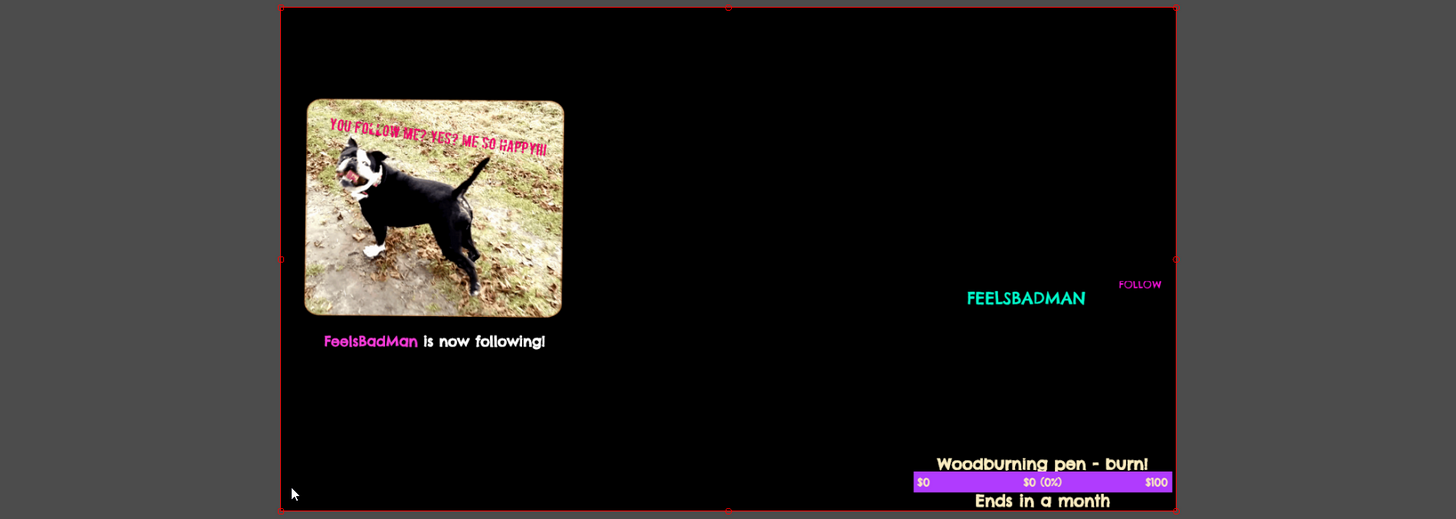
which means your GameShow might be configured wrong 😮
is it updated?
cinder ibex
yes, it's the latest version... but can still be buggy at times... it just crashed :p had to restart
cinder ibex
Thing is, Gameshow allows me to use sound as I want... obs was a horror
tawny pivot
OBS on mac is rather interesting for sure 😄
proud pumice
yeah but it seems to be buggy... so maybe worth going back to OBS ;p
cinder ibex
cause I stream music, sing etc... and use Logic for that... and that's a problem with obs... and the one who build the custum mac tried everything... so if he can't get the music/soundsettings to work in obs... then... it doesn't 😋
I could ask him... but eum... I think he will cry 😋 and he never cries 😄
tawny pivot

cinder ibex
I was thinking to use mulliple alerboxes for each gif... so I can search for the most optimal sizes... it's not ideal... but maybe that could work...
proud pumice
having multiple alertboxes is something we advise against
buuuut
you can try it
in a different overlay
so if the new one doesnt work right, get the old one
but, i do think there's some resolution issue with your BrowserSource
it might be lacking a few pixels like maybe you've set it to 722p instead of 720p
or some silly mistake like that
if u could take a snapshot of the settings page i can help spot it
cinder ibex
eum... you're talking about gameshow now? which settings?
proud pumice
yeah installing
a bit slow ;p
ok i have it now @cinder ibex
few mins ill learn how gameshow works
and test it there
cinder ibex
oke 😄
proud pumice
wow gameshow works like shit haha
cinder ibex
whahahaha oh oh! 😋 and I was so happy with it!
proud pumice
im trying some alerts now
can you please exit (without saving) the overlay?
i think i spot the issue and can resolve it
cinder ibex
oke
 smoky turtle
With tips and variations im having a little confusion with setting a variation for a top of the month tip alert. If someone tips me $1 the regular alert sound should play but every tip bigger than the last I want a bigger sound to play. how should I go about setting that up properly?
proud pumice
@smoky turtle the variations are just for specific numbers, not top right now
smoky turtle
ah ok thanks!
empty fjord
@cinder ibex pretty sure Logic creates a virtual output device that you can either use with OBS, or mix it in the Audio MIDI Setup tool on Mac. Im streaming on a Mac 50% of the time, with OBS Studio, never had any issues. That should be no different for a Hackintosh (which is what i assume you have)
tawny pivot
This is what i use for my mac: https://github.com/mattingalls/Soundflower/releases/tag/2.0b2

GitHub
Soundflower - MacOS system extension that allows applications to pass audio to other applications.
cinder ibex
Thanxs Grot, The problems where with my previous mac (not custom), with that one we tried a lot, soundflower, jack, etc... when I started using gameshow, I could have my sound and logic exactly how I want. With the new custom mac I kept using gameshow, cause I was satisfied with how it works... still am, exept for some bugs, but they are not major and not bothering when I stream. So there was no need to go back to obs. Now I am a complete noob with computers and stuf... So I have to ask my guy... But, to be honost, i'd rather stick with gameshow, and not go through the whole thing again, cause with building the custom mac, getting the sound settings right in general was the biggest challenge...
and with the previous mac, it was soundflower and other virtual cable software that messed up the sound settings... and with this custom one, if it gets messed up, he may have to re-install all over.. but again - I will ask him... cause hey, I don't know what I am talking about 😋 I just go for what works 😄
empty fjord
You might want to look into iShowU Audio Capture @cinder ibex
I used all of the previously mentioned libs, this one is by far the best
both for setting it up and the sound quality, stability, etc.
this guide should help you get everything up and running: https://obsproject.com/forum/resources/os-x-capture-audio-with-ishowu-audio-capture.505/
iShowU is a paid app for screen recording on Mac, but the iShowU Audio Capture is a free extension that provides the same functionality as soundflower and jack, with the only difference being that it actually works 😃
cinder ibex
also tried that with the old mac, same messed up audio settings in combination with logic pro and capture system audio. I really apreciate all the advice ❤ But like I said... It works really fine atm, I can have my sound the way I want... I like gameshow more then OBS. And the overlay thing with streamelements is good thanxs to the help of @proud pumice
I will sent the gameshow-guys a mail... cause they are constantly working on improving it, just like you guys. Why not work together? I am probaply not the only one using Gameshow. 😄
proud pumice

tropic eagle
A lil' question on the tips.
On the tipping page, I set up the currency to euros.
Several times, people tipped with the amount showing correctly on the activity feed of S.E but on the chat, it says $ instead of €. Is it a known issue?
proud pumice
@tropic eagle noted, will get that checked and fixed asap 😃
 tight veldt
This may already be somewhere here but I just saw it for the second time: "In order to redeem items, you must sign up first". Is that really a thing? Not a cool thing if so.
proud pumice
redeeming via chat is currently only for people who signed up for StreamElements, else we can't attach a clientid properly to redeem it.
afaik revlo forces website signin too for redeeming (not chat redeem option there, right?)
lone bridge
I have heard (and agreed with) Docs complaint before. Honestly with revlo I've never had to manually sign in. I have suspected this has been one of the reasons my chat redemptions have been low but not sure. @lean birch any insight? This is interesting
I really can't remember how it works. If I never signed into revlo isn't it still collecting the amount of time I have spent in channels?
tight veldt
I have tons of redemptions (in chat) every day through Revlo for song requests and it does not require them to sign up with Revlo. If I want to add a customized redemption with a bunch of different options, they can only redeem via the store. But for basic song redemptions, they just type !request Somewhere Over The Rainbow and it deducts their points and puts the song on the list.
Feel free to test how Revlo works on my channel if you'd like, by the way. If you let me know when, I'll bonus you the points so you can make a request
lone bridge
Gotcha Doc. Good feedback and definitely something that has been echoed by others too!
tight veldt
😃
lone bridge
I used revlo prior to this also
proud pumice
@Doc Bizzle#5235 @lone bridge roger copy
created an urgent issue for this behavior to be fixed
cant @ the doc 😭
tight veldt
Got it not sure why you can't @ me. LOL
lone bridge
I can't @ him either lol
thanks @proud pumice it'll be neat to see if anything improves on my end
lone bridge
Special 😂
 blissful pecan
I am aye
lone bridge
@tight veldt oh I got em now!
atomic hollow
@tight veldt
tawny pivot
blissful pecan
I fixed it aye
lone bridge
LOL
atomic hollow
everybody tag him please
lone bridge
Hahaha
 ornate sequoia
Is the backup playlist limited? I have a playlist of 2.4k songs but only 180 of them show up
atomic hollow
@turbid reef
tight veldt
You guys are nuts! LOL. Happy Mother's Day to all the moms. Happy Mutha's day to all you fellas. @lone bridge
RandomGirlSinging#1914
hollow zinc
@ornate sequoia that's on youtube end.
ornate sequoia
How so @hollow zinc?
hollow zinc
We're just using the interface they are providing
 west canyon
Hey so I've been working on an overlay for League of Legends and I was wondering if it's possible to add that to my overlay manager on streamelements. Because right now I see you can add text, images, etc etc to your overlay on SE, but not external URLs
hollow zinc
@west canyon you need to upload it to your assets and then you can use it as an image or if it's a webm you can use the video widget to place it on the OM
west canyon
basically I have my own overlay service, where people can sign up, add their league account and it will show their rank and other stats directly on their stream. just like with streamlabs alerts you get a unique URL that you can add in OBS through browser source. But I was wondering if it's possible to add that URL into the SE overlay manager, so I basically have 1 browsersource (only SE's)
I don't want to put the link here, might seem like selfpromotion lol
atomic hollow
we appreciate self promotion
west canyon
https://riftside.net/beta/ Just check the about. It's not an image, it's an actual webpage you add through browser source
atomic hollow
@hollow zinc anything we can do?
west canyon
I thought maybe it would be cool to have something like browser source in SE overlay manager. So you get that inception thing going on
hollow zinc
We don't support something like that at the moment.
west canyon
alright np. Maybe something for the future?
empty fjord
That does actually sound pretty cool. @west canyon you should make a feature request (see the pinned message in the #💭︱feedback-and-ideas channel) for some kind of an iframe widget. I found myself wanting something similiar more than once before, to place some kind of a self hosted css animated widget on the screen, avoiding another obs browser source.
This league integration looks neat btw. might use it on my league streams 👍
hollow zinc
@west canyon probably for the future 🙂
proud pumice
@west canyon as of now we haven't enabled any third party integrations in our platform. Yours looks cool, we should definitely talk about it.
west canyon
@proud pumice Fair enough. And thanks. Yeah it's a little something I've been working on with a few guys. We have about 25 streamers testing it now, hoping to launch it soon and start promotions.
proud pumice
Coolzies. We just added smth similar to our bot
Havnt created smth for overlays yet tho
 rapid tapir
I definitely agree with that
we just talked about it and made a plan for that kinda feature
uneven olive
!sraffle still rewarding points to 2 ppl
tawny pivot
We got some fixes / new cool things lined up for tonight
tawny pivot
smoky turtle
is the player for song request supposed to randomly play the songs in que without stopping? Ive had 10 songs in que and 3 of them have repeated already without the others playing at all. or am i just not understanding how the player works?
hollow zinc
it's a known bug and we're working on resolving it
west canyon
@rapid tapir sweet. As long as you guys don't steal my widget Kappa
 unkempt oasis
I'm adding a scrolling text to my overlay, but the text that is scrolling is blurred compared to non-scrolling text... Any ideas how to fix?
proud pumice
Lower scroll speed?
rapid tapir
@west canyon for now it would probably look more like the suggestion by Grot - an iframe widget
no guarantee about that tho, we just talked about how you would add it and agreed that it would be impressively easy
implementing it is down to styler to do ヽ༼ຈل͜ຈ༽ノ
unkempt oasis
Hmm, only seems to be blurred when zoomed in
west canyon
How come when I start streaming it's not mentioned in the #291219887274328064 channel? Am I missing something
 hollow marlin
@west canyon They probably just haven't added you to this list yet
You can always just post your twitch there yourself anyways
west canyon
ah ok, I thought maybe I had to sign up somewhere, thanks @hollow marlin
hollow marlin
How do I change my email on SE?
empty fjord
dudes, does the monthly top donator count a month back from now or how does that work ?
@hollow marlin pretty sure your email is getting pulled from twitch, id say its safe to assume that it will update if you change it on twitch
turbid reef
the email currently does not update, but it will in a few days, just fixed it
empty fjord
👍
hey, you showed your face now @turbid reef so ill bug you directly
about the montly top thing @turbid reef ? 😄
empty fjord
alright, thanks
lament blade
question how do you make a gif and a sound effect pop up saying someone donated to your stream, im confused/ stupid in finding that 😂 my bad
proud pumice
@lament blade
Overlay Manager - Widgets - Alertbox
video with info here: https://www.youtube.com/watch?v=mWP1Ti6Nt0M

Hey, that's pretty good! Get support any time: Twitter: https://twitter.com/StreamElements Discord: https://discord.gg/5zWfUZT
lament blade
thanks buddy 🤗
smoky turtle
Can the tiping page write to a file to show recent tips in the overlay by chance?
 proper wigeon
hello! is it the right place to ask for assistance?
 burnt leaf
Hey Najal, Here to help 😄
proud pumice
@smoky turtle go to overlay manager add a widget for recent tips
No need to use files, its all in the cloud 
smoky turtle
alright thanks. sorry im so used to streamlabs for such things lol this is much simpler
vast wren
@atomic hollow i shot you a message but the chat refresh my chat alerts still arent working on my stream not showing any hosts or follows
atomic hollow
lemme see
vast wren
just like last time same config but im not sure what else to flip since it doesnt leave a whole lot of room for error
atomic hollow
PMing
fiery lake
I can't change the colour of the letters in my alert box
Not sure why.
It stays locked on white, I'm probably doing something stupid.
hollow zinc
is it a variation you're trying to change?
And is it a specific alert or all of them?
fiery lake
That's what I was thinking too just now
I'll hop on, I'm on break now
I'm remaking my alertbox into my main overlay
it must have been that yeah
how did I not see that 🤔
hollow zinc
🤔
 warped sentinel
I'm currently triggering two Alert sounds at once. One is the StreamElements Sound and the other one is my old muxy sound even though the muxy alert package has been deleted and there is no Browser Source for it
Any ideas?
atomic hollow
there is nothing in OBS from Muxy?
warped sentinel
Also sometimes it triggers multiple instances of the stndard Stream Elemnts Sound
Nope
Completely removed it
atomic hollow
maybe its open in your browser?
turbid reef
maybe in another scene?
turbid reef
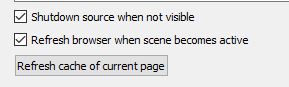
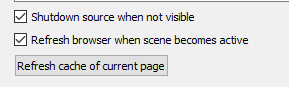
also make sure to check these in obs https://i.nuuls.com/1LR11.png
 warped sentinel
And the stock sound pops as well al my own implemented one
Ah alright, that fixed at least the muxy sounds
And the double trigger as well
Thank you
turbid reef
 👍
👍
warped sentinel
Is there an option to copy an alert box to another overlay?
Or any other widget for that matter?
proud pumice
@warped sentinel not yet, but we're working on the copy option
atomic hollow
@warped sentinel you can duplicate the overlay
delete all but the alertbox
go from there
warped sentinel
That'd be more work than just having to re enter my donation goal widget
atomic hollow
indeed
warped sentinel
😃
silk patrol
Is the 2-factor authentification working ? Nothing happens when I click on activate. i tried to disable my adblocker but nope


 atomic hollow
@turbid reef can you take a look please?
turbid reef
do you have an overlay open?
turbid reef
yeah, thats a limitation from twitch, we need to connect to chat to get hosts (with your account)
so it only works when you have an active overlay
vast wren
:/
 spare sage
Still having issue with chat showing up:
Comparison of knowing the bot is there here is a small snip of the chat where the bot is obviously occupying the chat:
The size thing though I was showing above I wanted as a side note, sorry wasn't very clear there as it was a side comment. Notice on the test chat to the right the screen elements see 1080 window at a smaller scale but it seems the box with the chat doesn't scale with it, but instead cuts it out. Not sure if bug or OBS but wanted to document it
coral kelp
how do i edit commands in chat again
misty wagon
@coral kelp !command add/remove/edit/options/show Add, edit and delete chat commands.
coral kelp
ty
hollow zinc
@spare sage we are pushing a fix for the chat widget very soon ^_^
smoky turtle
Quick note about Bits and the loyalty system. For Partners and Affiliates we are not allowed to use the points as a reward for people who cheer in our chats so I have personally disabled the option because it is a violation of ToS. Just thought I would bring it up for future reference and didnt know where else to post it.
tropic eagle
Hey there!
I got an issue with my overlay today.
I started with the regular setup I was using and decide to create another one, litter, for when I was mixing music.
I duplicated the actual overlay I was using and disabled the Cheer cup, an image to go with (a gif) and the Tip goal. Saved this and put it in my OBS.
Worked, but when I wanted to go back to the first overlay for the regular setting, those 3 things I put down on the 2nd overlay don't want to show up on the first one 😦 They're still on and active... But not shown on screen.
I don't really understand ^^'
proper wigeon
hi, i would like to have help setting up my stream if anyone's free 😃
dense jackal
im here man
burnt leaf
@proper wigeon Sure, I will to help you
 high ingot
@tropic eagle if I understand your issue well, I had something similar today, all I had to do was refresh the browser source in OBS (when you open the brower sourxe options-same place as the one you put the browser source link- theres a refresh option). It worked for me and I hope it helps!
 digital plinth
just wondered if you are taking requests for overlays to be added 😃
proud pumice
yes @digital plinth
but first we're going to complete the 50 we have lined up 😄
@tropic eagle did you get your problem fixed or need more assistance? 😄
 ivory lotus
Can anyone help me on how to remove a donation goal I've hit the goal but I can't take the percent back down to 0%
proud pumice
@ivory lotus go to your activity feed and click 'session settings'
there you can change the progress
here's a link
ivory lotus
Ty :D
 willow mountain
it's currently possible to name custom commands the same as in built ones so the bot replies to both which is a bit confusing - seems like a bug to me
tropic eagle
@high ingot Thank you for your heads up. I tried it just in case and it didn't work.
@proud pumice I still need help on this. Basically, the issue comes from SE and not the links on the OBS. It's on the SE that my layers don't show anymore even though they're showed as present and visible (the eye on the right)
Thanks for your help!
atomic hollow
are the overlays 720p on purpose?
tropic eagle
I changed them to try and see if it was lighter for my computer/internet connexion
atomic hollow
ok, can you join voice support for a sec?
turbid reef
@upbeat birch this should be working now $(random.pick '$(random 1-5) cm 4Head' '$(random 5-10) cm LUL' '$(random 10-20) cm SeemsGood' '$(random 20-40) cm gachiBASS') just replace it with your own emotes 
atomic hollow
cant believe you support this
turbid reef

atomic hollow
MYD
willow mountain
You tipping page just told me my payment was cancelled, but it's been taken in paypal. which is fine but there's clearly an error path through the system that isn't being caught properly
umbral skiff
When Im trying to add custom sounds to my bit alerts on my overlay, it isnt getting rid of the preset sound and is only layering mine over the top. Ive tried to remove the sound first and then upload my sound but still nothing :/
Never mind, I seem to have fixed it 😃
 mossy cove
How can I access another channel if I'm super mod in it? 😃
hollow zinc
To edit their dashboard stuff ?
mossy cove
Yes
hollow zinc
I can't give you a specific date, just that we will have something like that
mossy cove
Nice to see such an active discord. Btw great job with this app 😃
atomic hollow
thanks a lot
smoky turtle
ok so im a newb and commands for me are hard. i get that. now.... im trying to get the bot to run the command to show what song is in my plug.dj room. can someone hold my hand and give me a binky and tell me what exactly do i need to put in for it to work right? I feel like a nubcake for asking cause i should know commands by now...
mossy cove
You want to show the current song?
smoky turtle
yeah. this is the variable ${plugdj_current.your_plug_dj_room} but what do i put for my room? ive tried the url and the room name and it doesnt detect a song even though i have music playing
in place of your_plug_dj_room
atomic hollow
nuuls our bot master for the help
turbid reef
the last part in the url should be it
smoky turtle
weird i thought i tried that but apparently not. lol thanks for the help
turbid reef
maybe you got unlucky with the cache
smoky turtle
also would it be possible for me to make a command that activates an overlay? I had a good idea for my chat but not sure if its possible
errr and alert not an overlay
turbid reef
you can do something like it using the store, not sure if thats what youre looking for tho
atomic hollow
currently that can only be done using the store
mossy cove
What are all the arguments for a command?
Or do you have a documentation somewhere? 😄
atomic hollow
mossy cove
I'm talking about arguments like these: !cmd options keepo -cd 5 -cost 100
mossy cove
Trying to use the mod role from chat, who needs a ui? 😄
turbid reef
hold up ill get you a list
mossy cove
Thank you
turbid reef
all these should work 😄 -cd 5 -usercd 10 -cost 100 -level 250 -type whsiper -count 420
mossy cove
yey, thanks a lot 😄
mossy cove
Is there any way of triggering modules with commands?
turbid reef
what do you mean excactly?
turbid reef
no, thats not possible, not yet at least
mossy cove

 upbeat birch
@turbid reef Awesome PogChamp I can finally laugh at people with small... I mean, who rolls low 
turbid reef

lament blade
hay, i have a question abouut the cheer jar, is there any ways im able to get any other different jar or cups
mossy cove
Does anyone have problems with bits text&tts ? When emulating or replayed it works just fine, but when someone donates the text is not showing/read 😦
lament blade
and im also having hard time wiht the text recent follower and dontor this
hollow zinc
@mossy cove we are aware of that and are investigating it 🔧
mossy cove
Ok. Thank you 😄
mossy cove
How can you use variables into customapi request parameters? Do you guys sanitize the customapi link for white spaces?
turbid reef
no it currently does not do that, but i was thinking about adding something like $(urlencode $(1)) 🤔 @mossy cove
i wonder if it could cause any issues to just always encode it when inside $(urlfetch) 
mossy cove
If I am using arguments inside the customapi link and if i don't add any value to them the whole command fails to execute and I get just its string value
Sorry btw if I ask for things you guys already answered to. I do a quick search before and nothing related shows up 😄
burnt leaf
You can up the amount here https://streamelements.com/dashboard/session
hollow marlin
@burnt leaf Thanks 😄 How can I access this after I close it?
burnt leaf
Activity page right under the checkboxes
 rocky river
Can i change user level of a command from "Everyone" to "Moderator+" as a mod in chat?
Nvm found it xD for anyone wonderin : !cmd options <commandName> -level 500
rocky river
As far as i can see ${time.CEST} should be GMT +2 but the time shown is GMT +0 xd is that a known bug or am i doing something wrong? CET doesn't work any better
vast wren
did we get fix for the chat bug features? i have a stream today and i need to know if SE will work with chat alerts or if i need to re setup angrybot
mossy cove
If I am using arguments inside the customapi link and if i don't add any value to them the whole command fails to execute and I get just its string value . Is this the correct behavior ?
vast wren
@proud pumice awesome i dont have to do anything but disable angry bot this is excellent news!!
proud pumice


tawny pivot
IE 
mossy cove

lament blade
school only allows IE
it sucks
reasoning is people downloaded viruses, so we arent allowed to download
tawny pivot
Download chrome, get an IE skin
mossy cove
So it's angular 😄
mossy cove
As you can see, I don't think so
tawny pivot
What version of IE is that even?
lament blade
11.0.9600.17498
tawny pivot
I'll have to look a bit into that 
In the meanwhile go tell someone at the school, that it makes no sense to disallow chrome
lament blade
welp its just at school so if you need to code extra, dont
school thinks IE is fastest browser since its built in
stupid
tawny pivot
IE is the literal definition of vulnerable
lament blade
yeah, i know
tawny pivot
What country are you from?
mossy cove
😄
tawny pivot
I'm from Denmark, don't worry i know where it is 😄
lament blade
the one with hookers and coffeeshops in Amsterdam
tawny pivot
IE 
lament blade
gonna go to english class rn
tawny pivot
Alright have a good one 😄
turbid reef
@mossy cove can you post the command here? 🤔
mossy cove
@turbid reef ${customapi.nighbothelperapi.esy.es/api/add.php?user= $(1)&nick=$(2)&mod=true}
mossy cove
I have 2 command line arguments
If I don't give data for them, it breaks
!command 123 123 works, but *!command * or !command 123 doesn't
mossy cove
I am basically looking for optional arguments 😄
turbid reef
there are defaults, it works like this $(1|$(sender)) 🤔
mossy cove
ok, i'll try with this workaround
atomic hollow
@mossy cove bro, you looking for a QA job?
turbid reef
neat
silk patrol
Hi guys. Is there a way to return the name of a random user watching the stream ? I tried this but it only returns a random number ${random ${user}}
silk patrol
we are trying to create a spank command ^^
turbid reef
silk patrol
we could use ${1} but having it being random is fun
turbid reef
not sure if i wanna add it, since it will be annoying for most people
same reason why were not adding the notice when someone joins the chat
turbid reef
turbid reef

rapid tapir
tawny pivot
mossy cove
You can make that with a custom api
with the help of twitch api: http://tmi.twitch.tv/group/user/CHANNEL_NAME/chatters
silk patrol
@mossy cove thx mate
mossy cove
No problem 😄
silk patrol
now I just need to get the list of the viewers without all the crap around it, and a quick random
mossy cove
From there is just programming... Don't think current SE logic can execute complex code
silk patrol
yep, but i'm a software engineer so it should be pretty easy to parse a json ^^
mossy cove
What is you specialization ?
silk patrol
accountant software. back in the day it was web based, now it's c++/c#
atomic hollow

 rustic fulcrum
My nickname was changed a while ago, I'd like to merge my stats with my new nickname + the old one
Old username was Doppelmannen>Doppelson
misty wagon
Think it should just be a default command ${spanknuuls} no? But I like the randomchatter a lot. Hate it when I called out lurking
silk patrol
@rustic fulcrum yeah just noticed that, if a viewer change his name, the loyalty points aren't transfered to him
rocky river
Okay we have the variables : ${user.time_online_rank} and ${user.time_online} and both work fine.. but is there any chance to see the leaderboard hidden behind those variables?
atomic hollow
@turbid reef
turbid reef
there is a !top online/offline command but there is nothing on the website yet @rocky river
rocky river
Okay thanks xD where can we see when and what is added? So we'll notice when stuff like manager is comin
turbid reef
usually in #270206314561404928
rocky river
Ah thanks i coulda just opened my eyes and seen that xD
uneven olive
so about the raffle issue i keep complaining about, it seem to me that the commands might be mixed up
i did a !raffle by accident and it only gave out 1 winner
turbid reef
that can happen if not enough people join
 analog isle
Is there a methode to change the default commands?
So I can translate them in dutch?
uneven olive
i see, well i'll test out !sraffle today see how it works, you guys push out that update right?
turbid reef
!sraffle should be fixed
uneven olive
k
turbid reef
@analog isle no, you can only edit metadata like the command name, cooldown etc 
analog isle
FeelsBadMan
Antoher question is there a way to see the whole text of an command
like the uptime command
turbid reef
most of the default commands have custom logic, so you cannot edit them
because there are multiple possible responses
turbid reef
no ETA yet 😄
unkempt oasis
Is there a list of the timezone locations?
vast wren
its still not announcing hosts 😦
lament blade
@analog isle i am dutch too, so if you wanna get help starting a twitch channel indutch, i can help
analog isle
I know how it works thanks
lament blade
I am just setting up streamelements .. i am setting commands up . i used to use ankhbot so ankbot has $target . is $(sender) the same ?
unkempt oasis
$(sender) would be the user using the command
mossy cove
@lament blade look in the variables tab
unkempt oasis
${1} would be the target of the command
lament blade
yeah .. but i wanna know to make a !shoutout command
unkempt oasis
${1} is awesome and deserves your follow. Check them out at twitch.tv/${1} They were last seen playing ${game ${1}}.
unkempt oasis
Yes
analog isle
LUL xD
junior shore
I ran some test alerts and now on stream it says the alerts where my latest follower and donator. Is that supposed to do that?
coral kelp
any way to enable an fps counter?
any way to turn off vsync and prevent screen tearing?
tawny pivot
@junior shore You can reload the overlay or wait for an actual event to happen 😃
uneven olive
is there a way to see the jackpot size of !slots ?
turbid reef
there is no jackpot 
uneven olive
so how does it decide the size of the reward?
turbid reef
it takes the bet !slots <bet> and the winrate on the module settings and applies some maths
warped sentinel
Is there a possibility for the Loyalty settings to display some sort of progress through the bot?
proud pumice
@warped sentinel progress? Elaborate
warped sentinel
Is there a possibility to have the bot show the progress of someone within the loyalty system from time to time?
Through the bot in the chat
vast wren
hey guys ive noticed SE bot isnt calling out hosts and the statistics isnt tracking them
vast wren
On the website
And this is a chat alert
Followers issue was fixed but hosts aren't being announced still
i get at least 10 hosts a stream
proud pumice
@vast wren and our overlay was loaded on your obs the entire stream? Were those autohost or manual host?
buoyant hull
A quick question, no alarm to raise, just a remark.
Last night, during my stream, i saw the SE bots dissapear a few times from the viewers list. Nothing much was happening in my chat, so i can't tell if the bot was working or not, or just a twitch refresh bug, or a bot reboot 😃 Just wondering.
empty fjord
Also, yesterday during my stream the song requests refused to switch songs, kept playing the same one in a loop, both from a request or the backup playlist. I use ground control, restarting multiple times didnt help 😦
fiery lake
I had an evening that song request just didn't want to work at all.
I tried Firefox, Chrome, etc.
it just wouldn't
unkempt oasis
Does ground control play the songrequests or does it just control the web player?
empty fjord
plays em
unkempt oasis
Ooh nice
buoyant hull
Ground controls is a separated UI from the website but they share the same requested songs
mossy cove
SE bot stopped working suddenly and he doesn't appear in the viewers list anymore. Do you guys know what's the problem? 
Now it's working, but no one did anything
turbid reef
we just restarted it quickly
lament blade
My chat thought they killed it from dueling.
rustic fulcrum
My nickname was changed a while ago, I'd like to merge my stats with my new nickname + the old one
Any dev that could help me out
@proud pumice
Old nickname was Doppelmannen, new is Doppelson
Or @tawny pivot
proud pumice
@rustic fulcrum did you ever login to SE before changing the nickname?
PM me with your account email address so we can verify ownership, we'll take care of your stats 😄
mossy cove
I have some problem with customapi again.
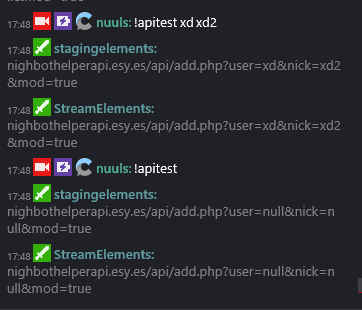
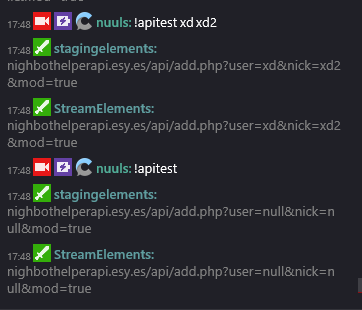
${customapi.nighbothelperapi.esy.es/api/add.php?user=$(user)&nick=$(1|null)} E.g. : !join test -> user = twitchusername; nick = test
${customapi.nighbothelperapi.esy.es/api/add.php?user=$(1|null)&nick=$(2|null)&mod=true} E.g. : !add test1 test 2 -> user= ;nick=; mod=;
first one works just fine, butI have problems with the second one for some reason
atomic hollow
@turbid reef
mossy cove
I tried to just make a console log of the parameters i get, that's how I got the example data 😄
turbid reef
because this is working fine for me https://i.nuuls.com/3owmZ.png
 lament blade
I set up 1 dollar = 100 loyalty points, when someone donated 4 dollars he did not recieve 400 loyalty points. Is this intended to give manually?
turbid reef
did he use the correct username when tipping?
mossy cove
ahaha, no
lament blade
!!! So I should enable login to donate?
turbid reef
you could add it as a hint in the tip memo thingy
if you want points use your own username or something like it
lament blade
Good call, ty
lusty wedge
@turbid reef can you take a look at @soft gull 's bot and overlay? For some reason they stopped working
turbid reef

mossy cove
@turbid reef edited the command with the same value as before 3 time and now works , wtf, thx I guess
turbid reef
@mossy cove wtf 
mossy cove
I think it's because twitch chat adds some white spaces into the url ...
 soft gull
turbid reef
soft gull
turbid reef
🤔
soft gull
here a prof
turbid reef
make sure to /mod streamelements
turbid reef
it was muted
mossy cove
lusty wedge

soft gull
thanks nuuls ur a god
turbid reef

soft gull
turbid reef
maybe we should make the unmute button red or something
turbid reef
or add some obvious hint that its muted
soft gull
yeah
lusty wedge
Maybe add a nessage that says its muted
soft gull
maby ive done it by mistake but i didnt do any thing except toy with my overlay a bit
thanks again @turbid reef
turbid reef
np
soft gull
❤
misty wagon
I'm sending this file around to mods/streamers until the wiki is up. What's the ETA on the Wiki?
lament blade
i got a question . i synced streamLabs to Streamelements . so do i have to change anything on my OBS for the follower/host pop up ?
lusty wedge
@misty wagon hopefully sometime next week 😄
atomic hollow
@lament blade you need to use our overlay
create an overlay in the overlay manager and follow these steps -
StreamElements
- Get latest OBS Studio https://obsproject.com/download
- Build Overlay on https://streamelements.com/dashboard/overlays (instructional…
mossy cove
Is there a command to promote a song or is there any way to create one?
lament blade
@atomic hollow thanks
 crisp snow
Mee6 won't post when I go live on Twitch ;(
atomic hollow
adding you now @crisp snow
 gloomy tartan
somone in support?
crisp snow
TY 😘
gloomy tartan
somone can help me?
lusty wedge
How can we help uou @gloomy tartan ?
gloomy tartan
i whant do giveway in my stream with stream elements but i dont know who
lusty wedge
Sorry Noob but we don't have a giveaway system on SE
gloomy tartan
oh ok
mossy cove
isn't giveaway some kind of raffle?
You can config that raffle thing and giveaway what you want to give to th raffle's winner
#hacks
mossy cove
But can stream store chose a winner?
lusty wedge
Oh no, it's not like the raffle 😅
mossy cove
it shouldn't be hard to make a giveaway module, just copy-pasta the raffle and change it a bit
mossy cove
Can you set for the Follower Goal the total number of followers / goal amount?
proud pumice
:p
 tulip pecan
Would you consider changing the way sound effects display in the store? The play button covering the artwork kind of... Covers up the artwork lol.
Also, would you consider putting a 'toggle' feature on the need to approve store purchases that trigger an animation. Ie: approve item before animation triggers Y/N
Would give streamers more flexibility
Love SE btw! Best thing out
 pale iron
^
proud pumice
@tulip pecan thanks man! We'll discuss those ideas in our next team meeting on Monday
tulip pecan
Can I come? I'll bring Donuts!?
lament blade
Hey guys! Do I have to do something else besides login in with my twitch account to properly link twitch with streamelements? I just tested streamelements today but it does not show any stream activity?
proud pumice
@lament blade gief your twitch username so we could check 😃
 tropic apex
hey guys, how would I go about making a shoutout command? I'm having a hard time figuring this out :\
nevermind, I figured it out 😃
atomic hollow
its part of the basic commands now
proud pumice
theres a command templet for shoutout
tulip pecan
Hey team, i am setting up sound effect for chat redemption. The sound effect plays if you manually goto the store and click redeem, but not if you type the command in chat.
I have 'allow redemption viachat" checked.