#helpdesk-twitch
1 messages · Page 43 of 1
 wide wasp
 atomic hollow
not yet, adding it soon
wide wasp
ok. Thanks
Possible to disable some default commands via chat?
(Just wanting to avoid some command name conflicts with Nightbot)
atomic hollow
why not disable them in advance via the dashboard?
wide wasp
I don't have access as supermod. Can get haiimbelle to do it but she's kind of busy. Not a big deal - just seeing if I could get it done.
atomic hollow
ohhh
wide wasp
So is that a no? 👀
atomic hollow
sec, checking to see if we can do something
all our developers are sleeping, so rude
wide wasp
ok. No drama. Thanks either way ❤
 hardy grove
Hey guys! Ok so I've found a way for viewers to redeem a soundbyte through the store which is great, however my channel uses a lot of custom commands that show an on screen GIF and sound. For example !waddle brings up a waddling duck gif and sound clip on stream. Is that possible with SE?
atomic hollow
yes, edit the !redeem command or add commands that do the same
hardy grove
Thank you, could you confirm how I make a command bring up a widget to show the gif?
atomic hollow
you use our store for that, the command will be varations of the "!redeem" command and the widget you add to your overlay is the store redemption
hardy grove
Awesome, I'll give that a go thanks!
Unforntunately I'm struggling a little with this. Thanks for your help though
 lone bridge
@lusty wedge command redemptions with gifs and stuff ^
Haven't gotten that far myself so I can't assist yet 😦
 lusty wedge
@lone bridge meant more specifically 😋
lone bridge
But theoretically, add the widget for the redemption alert in your overlay and then adjust the gif in the overlay manager is what I think is what needs to happen
Oh shique LUL my bad
hardy grove
I don't know if I'm explaining things clearly enough, so may be my fault! I need different custom commands to bring up different gifs and sounds. I understand setting up store items to bring up the redemption widget, but that only shows one picture. For example !redeem emoteonly brings up the same gif as !redeem duck. Is there a way to change that gif to something different on a per item basis?
lusty wedge
yes sure, you can cerate different items, and each item will have it's own picture/gif
did I miss something? :/
hardy grove
Ok, can someone talk me through that then as I cannot work it out!
lusty wedge
@hardy grove lets do teamviewer
hardy grove
Sure, I'll DM you my details
lone bridge
@hardy grove I may have to hit you up soon for help then lol
hardy grove
haha no problem!
Unfortunatley it isn't possible after all! Good job with the platform so far though guys, I'll be back if/when you implement different on screen gifs per shop item and a option to rename the bot 😃
 hollow zinc
Stream perks have only one image. A stream perk can trigger an alert. All stream perks have 1 image that you set up in the overlay manager. Sound effects are a differennt thing. They only need you to have the widget added to your overlay. They play automatically and do not require streamer action to be approved.
 trail hornet
Hello, is there a way to turn off the "songrequest is not activated " message whenever someone try to use it but it's not activated ?
 proud pumice
@trail hornet @turbid reef will answer this
 turbid reef
@trail hornet you can disable the command here https://streamelements.com/dashboard/bot/commands/default
trail hornet
so the bot will stop answering to the command ? nice! I didn't think it would do it, thank you very much!
turbid reef
yes 
 upbeat rose
OK sorry @hollow zinc i'm late to this convo, but my friends had this issue yesterday. They set up a sound effect in their store, but couldn't get it to play. I know they need to have something set up in their overlay and input into OBS, but I didn't know what. I tried a few things and got nothing. Can you explain further please?
hollow zinc
In the overlay manager we have a widget called store redemption. Just add that to your overlay and sound effects will play.
upbeat rose
Ok that's what I thought, so if I have multiple sound effects within the store it automatically differentiates?
or can I only have one?
hollow zinc
Id advise to have only one
Sound effects are not queued as events so they will play whenever someone buys em
upbeat rose
Hmmm, any plans to be able to have multiple in the future?
upbeat rose
oh ok, so the widget differentiates which sound to play based on what users "redeem" with the redeem command?
turbid reef
the widget will play all sounds from your store, i think @hollow zinc just misread your question 
upbeat rose
ahhhh ok, phew!
ok another question, i know that it was a sneak peak a few weeks ago, but my friends want to upload a cropped image (like an emote almost, but custom) and have it rain across the screen when someone redeems it in the store, is that/will it be possibleL?
hollow zinc
Its hard to walk, read and write on 25C on a phone :/
turbid reef

upbeat rose
awesome, thanks so much!
 tight harness
@hollow zinc The bot just disappeared again like yesterday 🤔
Had to tell it to Part and rejoin to get it back
turbid reef
thats really weird 
might be twitch updating their servers and disconnecting us or something 
 shadow dirge
Hey guys i have a Problem with the Follower Count it's actually at 1 but i got alrdy 358 can someone help me
 burnt leaf
You can change the follower count here https://streamelements.com/dashboard/session
hardy grove
Cool, I was hunting for that page too!
burnt leaf
Sure, if you click on the button Edit Session https://streamelements.com/dashboard/activity
That will take you to the same place.
 daring reef
i cant get hosts to show anywhere, any ideas guys
turbid reef
hosts only show up if you have an active overlay open
daring reef
so it'd work if i just click on the launch overlay with a host alert on?
im not using any overlays at the moment
shadow dirge
@burnt leaf but it's only for the session is it possible to get the all time twitch follower
burnt leaf
Currently we don't have that. When someone follows you it will increment the value.
 merry dove
I have a question. I am trying to get everything set up in my overlay editor and I have a MP4 that I have used as my donation alert for a long time. Everytime that I try to upload the mp4 it says it's not a supported format. But when I change it into an animated gif the file is too large. Is there anyway to be able to still use this alert?
hollow zinc
Convert it to a webm
proud pumice

online-convert.com
Convert a video to the brand new WEBM format from Google with this free online video converter. Optionally set further options to enhance quality.
merry dove
Thank you! Will mp4 be a supported format later on?
proud pumice
depends if we find it harming performance
we try to keep our overlays light on CPU resources
 lament blade
Where did the transparent theme go for the chat?
 tawny pivot
@lament blade Try pressing ctrl, shift + R
Make sure to save the overlay first
If you have any changes
lament blade
Okay awesome.
 zinc shale
While setting up my alerts, I get sound, but nothing else during preview on OBS. Am I doing something wrong here?
zinc shale
I have it figured out now, ^_^ It was on my end. Bahah it happens. Thanks anyway
 patent stag
Where can I find a list of quotes I put into the bot?
proud pumice
@zinc shale huhihu quick catch tho
@patent stag no list atm, we'll have to find a place for that on the website
patent stag
Okay, thanks
 buoyant hull
Is the video overlay cache bug in that release? 😃
And if people can use a command line on there computer, what i do for my videos, is convert them with ffmpeg
the command is easy if not affraid to see the black command console ^^
proud pumice
@buoyant hull yes vid bug fix is there
buoyant hull
Noïce 😃
 thorn path
i think i just broke the site for me
that option is not clickable anymore
chrome user adblock turned off
hollow zinc
You have at least 1 overlay? 😃
proud pumice
@thorn path its just the first one, go to overlay manager :
you can create endless overlays
each can have everything you need from alertbox to labels
(save that CPU power)
thorn path
got it
proud pumice
if you need help setting up, @atomic hollow can teamviewer in and help you out
just say the word
atomic hollow
Im here for ya
 umbral skiff
What is the best format to use for the video widget in the overlay? Like what movie files formats are uploadable/usable?
atomic hollow
webm works good
umbral skiff
Ok awesome, Ill give that a go. Thanks 😃
atomic hollow
np 😃
 vague jungle
Hey guys, I changed the quote command to allow regulars to use it but it's not letting them? Just doesn't respond with anything and then when I do the exact same thing it'll add the quote
turbid reef
@vague jungle its currently hardcoded for mods or higher
vague jungle
Any way to change that @turbid reef? I trust my regulars not to do dumb things, hence why they have regular so it would be nice for them to be able to add it themselves
turbid reef
i might have to change it to !addquote or something then @vague jungle 🤔
vague jungle
I mean if it's not too hard then I'd appreciate the ability for them to do it otherwise I'll just add it or get my mods to @turbid reef
turbid reef
@vague jungle btw you can give someone mod access to the bot without actually modding them 
vague jungle
Lol yeah I found that out by accident @turbid reef but I trust my regulars enough to have control of quotes, not enough to have control of commands 😉
 merry dove
Wait....there's a quote command? That was the only thing I was sad about losing from my old bot when I moved to streamelements. Where can I find it, because I didn't and don't see it?
turbid reef
https://streamelements.com/dashboard/bot/commands/default right here, got added not too long ago 
merry dove
Thank you!!
turbid reef

umbral skiff
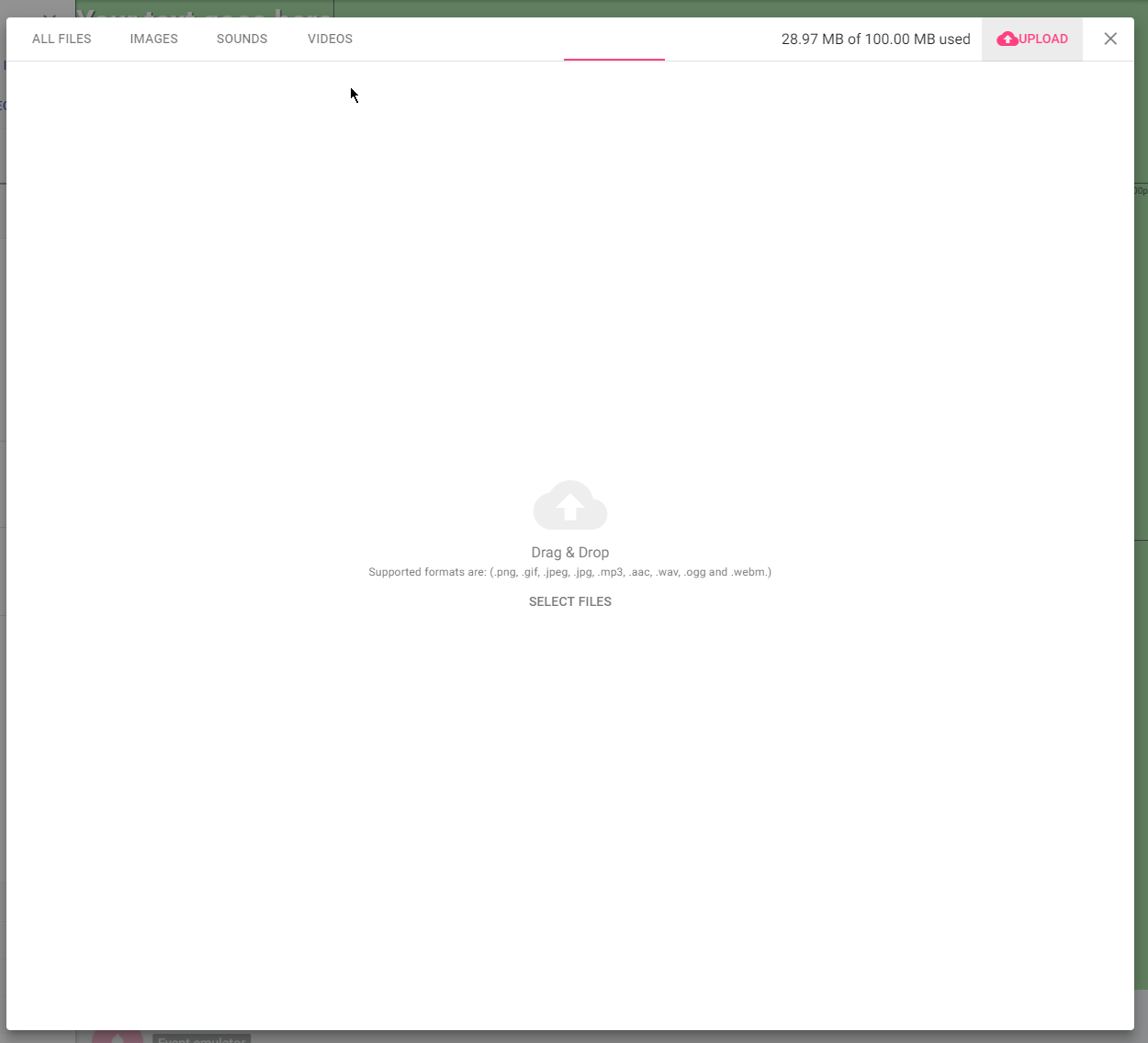
Im trying to upload the .webm video but it isnt letting me. Not sure what it is cause the size is only 4mb so i dont htink it woul dbe because its too big?
tawny pivot
Hey could you try throwing it in here?
tawny pivot
Cheers
mhm that's odd.
try doing a ctrl, shift + R
Save before
If you got any important changes
tawny pivot
Command, shift R
umbral skiff
On streamelements right?
tawny pivot
Yes
umbral skiff
Yeah it still wont recognise the file
tawny pivot
You are on this page right?
http://i.imgur.com/4bu34zS.png
 umbral skiff
No worries
tawny pivot
Are you using safari by chance?
tawny pivot
I'd say go for chrome always
 high ingot
Is there any place we can read patch/update notes? 😃
hollow zinc
tawny pivot
The issue is safari is that the version is based around the macbook model you have
umbral skiff
Yep, all working now. Cheers dude!
tawny pivot
So if you're not running late 2015 / 2016 models, your safari is relative outdated
umbral skiff
I think mine is late 2016 yeah, ok chrome it is 😃
Does the vid auto loop or do i need to set it to do that?
umbral skiff
Ok awesome, ill check later on the to see whats new 😃
high ingot
@hollow zinc I haven't enven seen this channel! So sorry XD
hollow zinc
No problem ^_^
tawny pivot
Taking a look right now 👍🏽
 granite forum
thanks :)
lone bridge
how do we fix this again?
how can I fix this again?
when a mod shouts out another streamer but it accidentally shouts himself out?
(he meant to shout out metricula)
proud pumice
@lone bridge what was the command that triggered this?
if he does !shoutout with no ''metricula' afterwards this is what happens
lone bridge
it happens randomly
some users he will do it and it will work
some will just default to his own name
it was the !so metricula
!so pepe
!so joeschmoe you get the idear LUL
it happens to other mods too
i can't figure out what triggers it
someone else had a similar issue
proud pumice
@turbid reef can you take a look?
turbid reef
use $(1) instead of $(user)
lone bridge
Cool thanks
 fair river
@tawny pivot I think the main issue is more that Safari doesn't conform to web coding standards, I've written some beautiful code which I've had to completely rewrite just because Safari didn't like it.
It's a pain to work with
tawny pivot
Exactly what you just said, combined with the version per mac iteration.
 willow wharf
Hi 😃 I have some questions. First, if i stream directly from my xbox one, can I had overlays and things like that? Second, how do I do if I want the bot to thank followers ?
 tidal swallow
@willow wharf no, you can't use an overlay as an Xbox streamer but you can get the chat commands to work! you just have to go into the modules and turn on the ones you want.
i'm a fellow Xbox streamer on SE so if you have questions about using the bot with console streaming, i'm always happy to help!
willow wharf
Ok thanks, but I have my laptop for moderating my chat when I stream. I just really wanted to have overlays to show who has followed or things like that
atomic hollow
regarding the bot, you need to activate chat alerts from here - https://streamelements.com/dashboard/bot/modules
willow wharf
Thanks
tidal swallow
yeah, you need to be running your stream through a program like OBS with a capture card if you want overlays and song requests, unfortunately.
atomic hollow
Thanks @tidal swallow
tidal swallow
the chat alerts are definitely helpful for that, and i like that SE offers them for free. i was donating to Moobot before to get them.
willow wharf
Ok it's good. I'm supposed to get a capture card but for now I wanted to know if it was possible
tidal swallow
yeah, i got a capture card but i need a better CPU to run it at the quality i want 
willow wharf
Okok
atomic hollow
@willow wharf dont forget to mod our bot
atomic hollow
"chat alerts"
willow wharf
Thank you 😃 I'm not speaking English that's why aha
willow wharf
Yes French but I'm learning english since primary school
atomic hollow
we got @buoyant hull here to help you in French
willow wharf
Yeah thanks but I understand almost everything in English and I'm not that bad it is only expressions that I sometimes don't understand
buoyant hull
The Baguette Army 🥖
willow wharf
Je suis Québecois moi Cocci 😃
buoyant hull
ils ont pas de baguette au Quebec? 😋
 tight veldt
hosts are still not registering in stream elements. Not sure if someone else posted about that.
tawny pivot
You got an active overlay right?
willow wharf
Ouais mais c'est moins significatif qu'en France 😛 and I got another question, can I actually change the default commands language?
 fiery lake
Hey guys, any idea why, when getting multiple grey bits, only one drops into the Cheer Cup?
buoyant hull
Need a Wine Cup  🇫🇷
🇫🇷
hollow zinc
need an entire bottle of that.
tight veldt
@tawny pivot I believe so. But I'm not worried about the overlay. I am currently only using the bot in my channel. The bot works when people follow, but not when they host.
buoyant hull
Ture @hollow zinc I count on you!
 main fern
Generic question, is streamelements free? (Doesn't take a cut of donations?)
turbid reef
no, we do not take cuts of donations 😄
 sleek blade
So how does StreamElements make money? jw
 lean birch
They get paid in memes
lone bridge
Is the event list capped at 3 events? Or is this just what the emulator is allowing to stick around after I emulate events?
should it fill events to the size of the box?
burnt leaf
Anytime 😄
lone bridge
Will it still pop events down if the box is big like it emulated, and then just default to saving 3?
that's kinda cool.
for raids and stuff
lone bridge
FYI - this sub charge up bar is a lot larger when you pull it in OBS than it appears in the overlay manager
any way to make it even smaller? 
Did you guys just do this? AMAZING! Now we can emulate custom events to test alert variations YAYYYYY
buoyant hull
i saw that yesterday too, that's pretty sweet 😄
hollow zinc
That sub charge up bar is one of my favorite widgets of all time 😄
lone bridge
I really like it I just wish I could make it a tad bit smaller.
But that's just picky. We'll see how it works in action
hollow zinc
Just to let you know, it's per stream based.
lone bridge
Ah, cool. I can't wait to see it in action, the emulator doesn't seem to impact it
hollow zinc
I'll look into it ^^
atomic hollow
still relevant @lament blade ?
proud pumice
Taken care of
lament blade
sorry for late response , its already done ❤
high ingot
@lone bridge Maybe that's a sketchy solution, but if you want to scale something down, you can always make a special overlay for it on SE, and then scale the browser source down in OBS ^^
lone bridge
That's a pretty cool idea to hack it @high ingot -super clever!
high ingot
Maybe I'll try doing that with the event thing because I think it's big
hihi thank you! 😃
Hope it helps ^^
Of course would be cooler if we could actually scale things directly in the overlay manager because it saves resources, but well ^^
lone bridge
Still a neat solution.
 visual bone
Quick question, a streamer I mod for has set me as a supermod of the bot, I was going to help him migrate settings from his old bot to stream elements but I cannot figure out how to get to his dashboard for his stream rather than my own.
vague jungle
Not available at the moment @visual bone
visual bone
Oh okay, so what are the current abilities of a supermod for the bot right now?
lusty wedge
check the bottom of the page - https://streamelements.com/dashboard/bot/commands/default
and the streamer can also create any custom command he'd like
visual bone
Thank you!
One last thing, is there a list of variables for command creation? I see things like $(user) but I wasn't sure if there was a compiled list somewhere?
zinc shale
I just a had a simple question. Does game wisp subs trigger the subscription alerts in the overlay?
Finally have everything set up and working. Just wanted to make sure before I enable the subscription overlay.
proud pumice
@zinc shale we dont support gamewisp atm, but the good news is that we'll allow your viewers to send reoccuring tips via our tipping server that will act as subs, and will have all the proper sub alerts via overlay and hightend access via bot. so they'll feel like actual subs.
zinc shale
Okay. Thank you. @proud pumice
proud pumice
no sweat 😄
 tropic eagle
Small question on the setting up.
What you call Tipping page and the tip alert are the same thing as the donation on Twitch? If I set up the Tip alert, it takes into account the donations people would make?
 burnt sigil
Yeah
Tipping and donating are the same thing
Tipping just sounds less of a charity work imo
tropic eagle
I've found some nice Cookie Monster GIFs :p
I'm setting up my first overlay thing to see how it works.
Trying to find some nice sounds now :p
Thanks for the support @atomic hollow
tropic eagle
Thanks I'd really appreciate
 golden yew
@proud pumice can you help me?
lusty wedge
@golden yew how can we help? 😃
golden yew
when i put my alertbox iin obs its not showing evrything
lusty wedge
are you working with OBS studio?
atomic hollow
@golden yew
atomic hollow
it could be a resolution issue, which resolution do you use in OBS?
@golden yew
StreamElements
- Get latest OBS Studio https://obsproject.com/download
- Build Overlay on https://streamelements.com/dashboard/overlays (instructional…
golden yew
i fixt it tnx
tropic eagle
Another question if I may.
Is there a way to reduce the background size of the "Event List" I can change the size of the names and the messages but it doesn't adapt the main box.
I'd love to reduce the height of the boxes.
And is it possible to change the background color? Make it more transparent?
high ingot
@tropic eagle heyyy nice to see you!!!
My solution may be a little sketchy but it works! You can always make a seperate overlay for this one on SE ap, and scale it down directly in OBS 😃
tropic eagle
Hey good to see you too!
high ingot
😄
high ingot
As for the colours you can change them in its options (theme)
No problem!!!
Wish I could tune in, but I need to leave in 20 😦
atomic hollow
@tropic eagle I am checking this for you, will talk to our dev in charge of the widgets
high ingot
@atomic hollow 😄
tropic eagle
Thanks @atomic hollow
 empty fjord
Guys, is it possible to add a live check to the bot modules? I just realised that there was a case of someone spending a sick amount of time using the roulette module while the stream was offline, and made an insane amount of points on it.. i had it set to be a 65% win chance with a sufficiently long cooldown to make it fun and rewarding during streams, but well.. that left a door open for some abuse.
I want my viewers to have fun with those games during streams, but i dont want them to be able to leverage that to make a ton of points off stream
I could just disable them manually when im not streaming, but thats kind of a hassle. And so far SE was all about making my streaming life easier, not harder :p
high ingot
oh wow, that's intense 😮
I was about to ask a question about the games. I would like to add the raffle but I don't know how to trigger it?
 uneven olive
it's !raffle <amount> for multi-raffle, and !sraffle <amount> for single winner raffle
high ingot
thank you! 😃
proud pumice
@empty fjord so someone was interacting with your stream for an insane amount of time while you while offline and thats a bad thing? hehe xD
we'll see if there's an option to tick 'disable when offline' on modules
@turbid reef will look into that this week.
 iron hamlet
Is it possible to rename m bot?
atomic hollow
not yet
iron hamlet
Ok Thanks. Shoub be a feature.
atomic hollow
it will 😃
 spare sage
Is there a label that shows last cheer?
atomic hollow
currently no, we are adding a lot of cheer widgets/features very very soon to support all the new Twitch affiliates
spare sage
Ok, sounds good.
Next question @atomic hollow can I use a label for current song playing in song request?
atomic hollow
Same :/ we are on it 
spare sage
I cri
lol hopefully soon, just was working on my overlay and was adding in areas.
either way great stuff so far.
tawny pivot
I'll see if i can do the currently playing songrequest today
spare sage
oh wow, that would be pretty awesome
tawny pivot

tawny pivot

uneven olive

 junior shore
Any way to import commands from bots like deepbot and ankhbot?
atomic hollow
how many are we talking about @junior shore ? my new bff
junior shore
#bff uh... Tops 30 commands. Same question applies for our quotes.
empty fjord
That hurt my feelings @atomic hollow 


 mild comet
question about twitch rules - can I stream my desktop screen and talk with my chat in IRL or I'm forced to show my face?
guidelines dont say anything specific about that
 unkempt oasis
 crisp snow
Hey, is it possible to display current viewers count on my overlays?
hollow zinc
We don't have that option yet
crisp snow
Ok, thanks 😄
hollow zinc
Keep an eye on #270206314561404928 for new stuff 😛
lean birch
@cinder ibex All your user points should be imported now
This is not offical StreamElements.. YET. But if you have a CSV of your users and points from another provider I made a little tool to import them to SE... Use of this tool is AT OWN RISK.. If you have any questions I'll try help. https://filter.dj/CSVtoStreamElements.html
high ingot
BUG REPORT!
I reported a bug a few days back that I think was noted as fixed, but I still have this problem where sometimes some variations get linked together and it is impossible for them to have different images (they update together). Though, I have been able to "fix" the problem by deleting one of the variations, and re-creating it.
It doesn't always happen to all variations
Like this time I had 2 of them linked together (out of three)
Exploring the bug further, I realize that sometimes it fixes the problem if you go out of the variation tool and come back
It really does look like an object copy problem
hollow zinc
We will look into it. Thanks for the find!
high ingot
No problem! 😃
Also I've noticed that the variation priorities might not work properly, i'll send a screenshot
With ths setup, I have realized that Coffee and Poutine never trigger, they trigger the copper one. Is it a matter of order? If so, it might be important to offer the option to reorder the variations manually, or if not, change the priority to make sure "exact" amounts will always trigger before "at least".
I'll test this further
high ingot
After testing further, I have realized that I can't make the "exact" amount types trigger at all
hollow zinc
We are aware of it and working on fixing it 🙂
 rough cradle
my follower goal list is about 16 off of what it's supposed to be
should be at 26 not 10
at least according to twitch
atomic hollow
you can go here and fix it - https://streamelements.com/dashboard/session
@rough cradle
we will take a look why it happend
rough cradle
resetting it took it to 0?
hollow zinc
Resetting takes everything back to 0 😃
 glass stag
If I want to make a custom version of uptime, what's the variable I use? It's not listed, and I can't see or edit the default version. Help please.
Also, is there a variable I can set to count down or up from a date/time. !birthday resulting in CKurtis birthday is 42day, 8hrs, 12 min, 15 seconds away.
glass stag
Also, when I try to make a command with the $(channel.subs) variable it sends me a response of 0. I know I'm not big-time, but that number is off a little. 😉
 ancient prism
your bigger than me Ckutis
glass stag
Sub zero. 😃
^5
I mean, hi...five
Also, I tried making a command using the $(user.lastseen) variable. Seems good but if you put in someone who's never been to your room...or at least since using se, it gives an inaccurate response.
vague jungle
Yeah it grabs from bot database for user last seen @glass stag so I don't think there's much that can be done about that
glass stag
Maybe return a 0 or -1 if never seen
vague jungle
Oh does it just make a number up?
glass stag
Yep
glass stag
Summit1g was in my chat 19 seconds ago. Lol
vague jungle
Damn you famous lol
glass stag

fiery lake
I wasn't able to emulate notifications anymore yesterday for the ones that have variables (cheer/sub)
The options would appear when hovering over the main button but then I couldn't go to the options without them disappearing
hollow zinc
@burnt leaf
fiery lake
this does work on my work PC
but this is in Chrome
maybe that's the difference
at home it was in Firefox
proud pumice
firefox is probably busted af
fiery lake
yeah but my Twitch works better in Firefox than Chrome
funny enough
was having a lot of buffering issues
and general loading issues
in Chrome
glass stag
For scrolling chat, can I change the size or font?
hollow zinc
We are in the process of making that a thing
hollow zinc
1 sec.
glass stag
Fala mnogu
hollow zinc
@turbid reef can help with that
glass stag
Also my $(channel.subs) wasn't working. Small stuff. But thought I'd let you guys know.
turbid reef
@glass stag i just fixed the subcounter and added $(uptime), will go live later today or tomorrow morning
glass stag
Sweet, thanks
 silk patrol
How does the #291219887274328064 channel works ? Is it automatic, do we have to enable something ?
tawny pivot
@proud pumice Can add you to the list 😃
silk patrol
@tawny pivot ok thanks
proud pumice
@tawny pivot add which
silk patrol
@proud pumice me and @tropic eagle
proud pumice
Oh yeah sure, usually @atomic hollow does that, ill take care of you two in a minute
rough cradle
Oh, an uptime? Neato
tropic eagle
Oh thanks @proud pumice and @silk patrol for the heads up
tidal swallow
hey guys! i was doing a 24-hour stream Sunday into Monday and the quote command wasn't working at all. wasn't sure if this was an issue you knew about or might already be fixed.
sleek blade
Curious as latest subscriber doesn't pull my recent sub or any sub for that mean are these daily or session based?
proud pumice
@tidal swallow @turbid reef will check about the quote issue
@sleek blade you have the ability to reset session from your feed, otherwise its the last sub that we tracked.
sleek blade
Hmm 🤔 odd thanks @proud pumice so it doesn't just pull from the API but what SE last pulled or tracked
proud pumice
we're shipping all sorts of tracking bug fixes this week, so expect lots of functionality upgrades
if you find smth that doesnt behave properly let us know
shadow dirge
The animated overlay is insane @proud pumice is it possible to take this alrdy?
sleek blade
@proud pumice Any plans of custom CSS? 😛
proud pumice
yeah, plans already made, development started
its a big big task
so it takes time
sleek blade
I know!
 orchid valley
Ty, also how do I edit the text of a default command
I dont want it to say the leaderboard thing when checking for points
is that possible?
proud pumice
I'm giving her all she's got captain! :datsheffy:
 slender treeBOT
 proud pumice
@orchid valley right now you can only disable default commands, not alter them
shadow dirge
Is it possible to configure the chat commands messages or i am only allowed to configure the command name?
proud pumice
@shadow dirge can change both on most of the commands, some do not allow it
whenever there's an edit button (pencil) you'll have the options there
orchid valley
ok
shadow dirge
@proud pumice I ask that because I am from Germany and i want to configure the chat messages into german language
glass stag
Did they ever create an $(uptime) variable?
proud pumice
@shadow dirge most can for sure
@glass stag saw that done few hours ago
will be tomorrow on the website
glass stag
Ah, tomorrow ok. Thanks
tropic eagle
Hiya!
A small question to the dev and a request for support to other music streamer.
Since I'm running SE, my streams are more laggy (images wise, the viewers told me I have some image drops I didn't have before). Do you know if it's more demanding when using SE through OBS Studio? I'm only using one overlay atm.
And I'd love to have some help from music streamer running SE and OBS Studio. I've set up mine a while ago for gaming and I didn't personalized it for music only streams (bitrate wise, etc). I'm pretty noob on these things so any help would be appreciated.
@lone bridge ? @long garden ? @high ingot ?
proud pumice
actually, we're usually way less heavy on the PC resources since we use one CLR browsersource rather than a few
lets wait for some feedback from the people you tagged, and if it won't be solved quickly tomorrow i can assign you someone to take a closer look on your setup via teamviewer to see if everything is in place
would love a clip/vid of the lagginess you're getting
 long garden
@tropic eagle I am not a tech guy at all. 😂 I barely get by
But I'm flattered that you thought I was worth asking
sleek blade
I noticed a bug with the Overlay -- If you do a test donation it doesnt update the top donation if its more
high ingot
@tropic eagle , as @proud pumice said it is supposed to be less hard on the CPU as part of the process is done directly on SE, so I'm not sure why you are getting that issue. On my side of things, I have duplicated my scenes in OBS (to have a copy of my old ones) and then on the new stream element one, I have deleted all the widgets, even the inactive ones that were not from stream elements (or the ones I didn't want to keep, but happens I just prefer to use one app and that's it). I'm not sure how OBS works about hidden items, but I didn't want to take a chance, and it also just becomes annoying to have a ton of hidden widgets you don't use like that.
This might not make a difference for you... but maybe I would recommend doing a speedtest when you get these issues to know that might be due to your internet connection.
I didn't have any problem on my side of things when it comes to laggyness with SE... I don't know if any of this will help, but let me know if so! 😮
@tropic eagle http://www.speedtest.net/ 😃

Speedtest.net
Test your mobile network speed, wherever you may be.
Download the free Ookla Speedtest app for iOS, Amazon, Android or Windows Phone.
 tranquil iris
Hello I may be missing something, but I rolled out the SE Song Request on my stream tonight and maximum song length doesn't seem to work. I had users who were mods, subs, and then just regular users request songs that were like 10 hours when I had the time limit set to 600 seconds, and the songs went through. I then changed it to 60 seconds and they still went through. maybe the system is set to cut the songs off after that point? but ideally it would just not even accept them, and tell the user it's too long. insight?
proud pumice
@tranquil iris will check with @turbid reef and get back to you
tropic eagle
@proud pumice And having some GIFs shouldn't make a difference?
But that's what I thought, and I deleted all of the other sources I was using to have only the SE one.
So I guess it's more a matter of my Internet connexion and the way I set up OBS stream details
proud pumice
use them gifs on our overlays, shouldnt make a difference at all
silk patrol
Hey guys! How's everybody doing ? I wanted to created a command with ${args} but i'm habing trouble figuring out how to carry variables from the command.
here is what I want : the command !blame someone and the answer : welp GG someone
my guess is that the answer has to be welp GG ${1}
but how do I use the ${1} in the command itself ?
 willow mountain
if you want to have !blame bob you would use "welp GG ${1}" as the text for the command which would reply with welp GG bob when triggered
(minus the quotes they were just for clarity)
if thats what you mean
silk patrol
@willow mountain i want people to be able to put any text as an argument, I don't want it to be based on the person sending it
willow mountain
if you're interacting with the bot rather than in the admin !command add blame welp GG ${1}
yes, that will do what you're asking
silk patrol
nvm, i didn't understand what you were saying, it's working thanks a lot @willow mountain
willow mountain
no probs dude
 bright copper
Hey Guys. Small Bug. I changed my name on Twitch recently. And seems I now have started my "points/things/whatever" from scratch. If I log into streamelements website, I see my old points still, but in twitch chat, there's a new number
lean birch
Im willing to bet its because they store based on unique username as the primary key
which they kind of have too for points
bright copper
Yeah. Revlo bot had the same bug when the free usernmae changes came out
They had to link to twitch profile/uuid, I believe
vague jungle
they're usually able to link the two usernames together for you so bot shows complete stats @bright copper
don't remember exactly who does it though so not sure who to tag
bright copper
Thanks @vague jungle But I will definately be changing my name again after the 60 days are up... and again after that... and so on. Just thought they needed to know about the bug... I'm not actually worried about the points, personally
vague jungle
oh okay no worries then @bright copper! it's less a bug and more of a complication of name change which they have to manually alter, just due to the technicalities of name change
turbid reef
@bright copper have you first signed up before you changed your name or after?
bright copper
Was signed up for a month or so already. Then I namechanged on Twitch
turbid reef
try logging out (top right) and logging back in
bright copper
Okay @turbid reef I now see the "newly" started Tacos. Old ones are gone.
um... Tacos = Points/Whatever
turbid reef
in what channel?
bright copper
RandomGirlSinging
Old account was named Milamber9000Ultra. New one Milamber9000UltraDad
Will it also have my SuperMod status pulled over... let me see...
Nope @turbid reef Unless RandomGirl stopped the bot completely... I can't !bonus after the name change...
proud pumice
@turbid reef ?
 smoky wave
hi i want to creat a command but i can't name templates
 prime yew
can SE do alerts from streamtip? or only from your tipping page?
atomic hollow
from ours only
 shy ridge
do you take fee from tips ?
lusty wedge
nope :)
 surreal sapphire
They do not 😉
lusty wedge
100% free 😁
shy ridge
😮 ❤
surreal sapphire
add a * to that :3
prime yew
my paypal email, will that be kept private? it's my personal non streaming email is why I ask
atomic hollow
yes it will
prime yew
any way to add a line break to the donation memo?
hollow zinc
try <br> but I'm not sure that it will work. I'll poke @burnt leaf to look into it ^_^
prime yew
yeah I tried <br> no luck
also not sure if I'm missing it... but is there a recent/last host widget?
 dapper patrol
Yeah, amatuer coder here, I dont think <br> would work as youd be puttting it inside a string, you might need to use innerHTML? That being said I dont know the inner workings of their code, so I could be totally wrong
prime yew
used some ------------- as a workaround for now lol
dapper patrol
Yeah spaces or tabs should work, good thinking
buoyant hull
In the overlay to do empty lines i use on each single line to make space
It's the html value for unbreakable space
You can also use it to move text to the right
If you put several in a row like so
My text here
glass stag
Hey, did about 5-6 hours last night with S/e. Had some annoying issues with song request. If I let a song okay fully thru, when the next dog came up, it said underneath it was playing but it repeated the first song video and music. Also, is there no way to move songs around in that list? I was trying to double click a song to play next to no avail. So I basically lost like one out of three requests and then couldn't bump up missed ones as they were re entered.
(**play (okay))
(*song(dog)). Frickin Steve jobs predictive text needs help too. Lol
hollow zinc
What browser are you using ? Did you have it minimized when it repeated the same song?
uneven olive
just did !sraffle 50 120, and after 2min i gave 50 points to 2 winners instead of 1
it gave*
i was told !sraffle is for single winner
glass stag
Chrome, it was open...I'm capturing video from it.
lean birch
For the line break issue
try \r\n
depending how its encoded on the other end it may work
or just \n
you might need to ASCI it
high ingot
Developpers will surely hate me for this bug report but...
there's no adaptive timezone for stats... XD
lean birch
Timezones and date time in general is the worst
silk patrol
Hi guys. Just wanted to know if there is a way to trigger an alert with a command. Let's say i have in my store an item called "have your own welcome sound", when people redeem this item, they get to choose a sound and assign it to a command. when the command is triggered in chat, it plays a sound (maybe using an empty/invisible alert box). I've seen people do that with other bots
glass stag
A command to repeat the last alert (donation, sub, host) would be great too, instead of having to open the box to see what you missed.
!replay
silk patrol
@glass stag that's not a bad idea, you can activate alert message in the chat too, so you get to see who it was (of course if you chat isn't lit af ^^)
glass stag
The sound effect option is already there I think
Make that replay command owner only
Go to store item, and hit sounds I think
Create new item, you can choose perks or sound effects
silk patrol
@glass stag oh nice, i haven't notice that. But the sound effect was just an idea. Having a way to trigger an alert could be cool too
glass stag
👍🏼 you inspired the idea. 😃
I think to link the !redeem xyzeffect to a command would be really smart.
Because that's how you play it now as I understand it.
Would be nice to just type !xyzeffect
Since you can assign points cost to any command
silk patrol
yeah, that's exactly what I meant in the first place. a streamer I follow creates commands with the name of his mods, so when they log in, they type their command in the chat to let people know they are here. for example, if my mod is called azel, he types !azel and his sound is played
 modest rampart
how do i reset my tip goal
atomic hollow
Activity feed --> edit session
modest rampart
ty
 vast wren
PSA "DNS Codes" are not real do not buy them do not use them not listening to this will leave your information vulnerable
proud pumice
@turbid reef @hollow zinc have a look at @glass stag bug
glass stag
Seems like it's fixed now. 👍🏼
atomic hollow
@turbid reef can you please help @uneven olive
Skyliner: just did !sraffle 50 120, and after 2min i gave 50 points to 2 winners instead of 1
[12:41 AM] Skyliner: it gave*
[12:41 AM] Skyliner: i was told !sraffle is for single winner
shadow dirge
Hello guys i have a Problem with changing my Stream Title with the streamelements dashboard isn't very important for me but maybe someone knows alrdy the problem
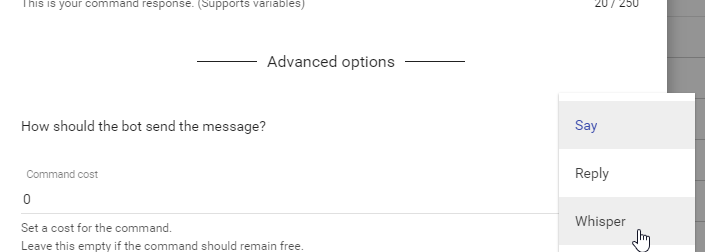
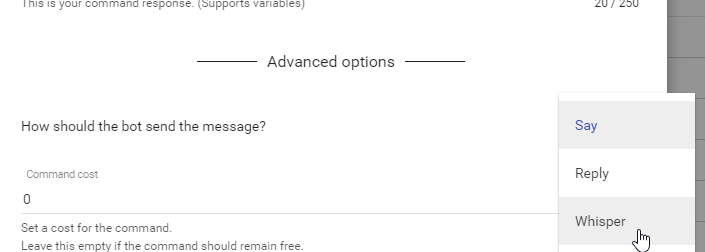
orchid valley
Is there any way I can get the bot to whisper the person when they type in !bal? I just wanna clear some of the spam in brings
turbid reef
yes, you can set the command type to whisper @orchid valley
orchid valley
Ok, Ill take a look at that when I can. Thank you!
turbid reef
 lusty wedge
@shadow dirge you can change your stream title on your dashboard, you'll see it on the right
shadow dirge
@lusty wedge yeah i know but i get every time a error message 😄
lusty wedge
ohh really? when do you get it? after you try and update?
shadow dirge
yes if I click update i get in the corner on the right an alert Error!
shadow dirge
@hollow zinc yeah i fill it and then i get the Alert "Error!" not even more
hollow zinc
I need to go to the store i'll assist you in a like 15 mins, ok?
shadow dirge
okay
lusty wedge
Amm store? loyalty store? 🤔 @hollow zinc
 upbeat birch
Is there an option for filtering profanity in TTS donations, and if so; where?
hollow zinc
@lusty wedge 🤔
shadow dirge
😄
hollow zinc
@upbeat birch on the tipping settings page in the dashboard, there's this:
upbeat birch
Thanks a lot ❤ I was searching through the overlay manager >_<
hollow zinc
@shadow dirge log out and then login again
shadow dirge
Thanks Dude 😄

 livid jewel
How can i update my total follower count? Just shows as 0 right now, same with follower goal.
proud pumice
@livid jewel https://streamelements.com/dashboard/session
its a button on https://streamelements.com/dashboard/activity
livid jewel
Ah, didnt think to look there for some reason, thanks
proud pumice
no problem!
 warped sentinel
How to Import the total sum of Twitch folloers into the Widget?
lusty wedge
@warped sentinel you mean to the widget on your overlay manager?
warped sentinel
Thank you
hollow zinc
Anytime ^_^
 spiral snow
Just curious, everybody, is there a way to change the name of your Stream Elements bot?
turbid reef
currently not, but we wanna do it at some point
spiral snow
Ah okay! Thanks @turbid reef 😄
tropic eagle
Hey guys! I need a tiny help on a command. I wanna do a Shoutout command and I have this, but it's not working. It doesn't show the "user" name nor the link.
Please take a moment to check out $(touser). Give them a follow at twitch.tv/$(touser) and share the cookies!
willow mountain
Use ${1} where you have $(touser)
tropic eagle
Ow that simple?! XD
Thanks @willow mountain It's working perfect! ❤
willow mountain
No probs :)
tidal swallow
last night and today, when i go to update my stream title and game from the SE dashboard, it keeps telling me error. i've tried a couple different browsers and computers now.
hollow zinc
relog
Logout from SE then login again
that fixed it for @shadow dirge
if it doesnt we'll take a closer look at it.
tidal swallow
thanks!
hollow zinc
The classic turn it off and back on again 😛
lone bridge
HELP
I have a vision
Y'all know Consuela from Family Guy? "noooo noooooooo"
I would love to play a clip of her saying "nooooo... nooooooooooo" when someone is timed out. Is that possible at all? Could that ever be possible?
To integrate Sound fx with Twitch chat stuff like that?
vague jungle
I would go for that if that can be a thing
 dense jackal
that's hilarious
lean birch
@lone bridge just looked at some twitch chat docs. it can be done
can it be done with 500000000 users. maybe
lone bridge
MAKE IT SO EIDRM AND NO ONE GETS HURT 
glass stag
What sound plays when you put the kids in a timeout? 😉
lone bridge
LOL we need to work on those
vast wren
have we gottent the ability to easy transfer creds from one bot to another?
i want to use streamelements however i dont want to have my viewers lose thier waffles
empty fjord
one should never take away another ones waffles tbh
shy ridge
my alert is ehcoing and not showing ppl sometime
shy ridge
no only OBS and twitch
turbid reef
its 4 followers in the current session
turbid reef
you can set the current number here and it will count from there https://streamelements.com/dashboard/session
 coral kelp
will i have to do that every stream?
turbid reef
only if you reset the session
coral kelp
none of these settings "stick"
ive set all of these like 3 times
and they keep reverting to this, except for the test
hollow zinc
What do you mean?
coral kelp
when you click "submit" and then come back to these settings, they've changed back to defaults
did streamelements just go down
never mind
proud pumice
😮
@coral kelp did you get that working?
cuz it sounds like you had an internet hiccup, so it didnt save the settings
uneven olive
what determins the Slots reward?
had the same person win the exact same amount 8hrs after
tidal swallow
luckiest person ever because slots are super rigged. lol
uneven olive
lucky yeah, but what i found odd is the reward was exactly the same.. 937
and there arn't enough ppl doing slots for it to accumulate 937 in 8hrs
tidal swallow
that is pretty odd. i've only ever seen an even 2,000 and 10,000 won on my slots.
tranquil iris
hello, a user of mine is getting timed out for Symbol Protection. for posting a paragraph with no symbols
I know it's Symbol based on the timeout length
the paragraph is
i read about how ppl like gamestop were stopping console stores like playstation store sony from selling their digital titles for less or they will refuse to sell their consoles
can someone explain this to me? it was initially set to the default settings
thanks
silk patrol
@tranquil iris that paragraph is 177 character long, the default setting for paragraph protection is 140. try upping the maximum amount or disable paragraph protection
tranquil iris
paragraph protection wasn't on
symbol protection was on and that's what was triggering
and like i said, i knew that because i set an odd timeout length
i can show you a VOD if you like
tawny pivot
@tranquil iris Please throw the vod in here 😃
tranquil iris
still streaming but will try to remember later
tawny pivot
no problem 👍
lone bridge
Hey y'all! Sorry I've been kinda MIA this week, haven't even had a chance to play with the bot. BUT I had a couple issues today with notifications that I thought I'd bring up. I know @long garden also had buggy notifications earlier too
Couple different things happened:
tawny pivot
Currently 4 AM, but fire away 😄
lone bridge
LUL thanks @tawny pivot
so, in OBS I have different overlays set for different scenes, and different alerts set up for those.
so I have a performance overlay -- where I turned off sub notification sounds. They showed the sound on those at 0%, and I saved it that way and went back in and it was STILL 0%, it kept triggering the sound anyway
I am wondering -- if I have different overlays in different scenes in OBS that are not currently supposed to be active or shown, will it still trigger sound in the background?
I am wondering if that's why I've gotten some weird buggy double-sounds too
where you can hear the notification doubling, as if its coming from two sources
tawny pivot
Yeah so the new OBS updates are very interesting
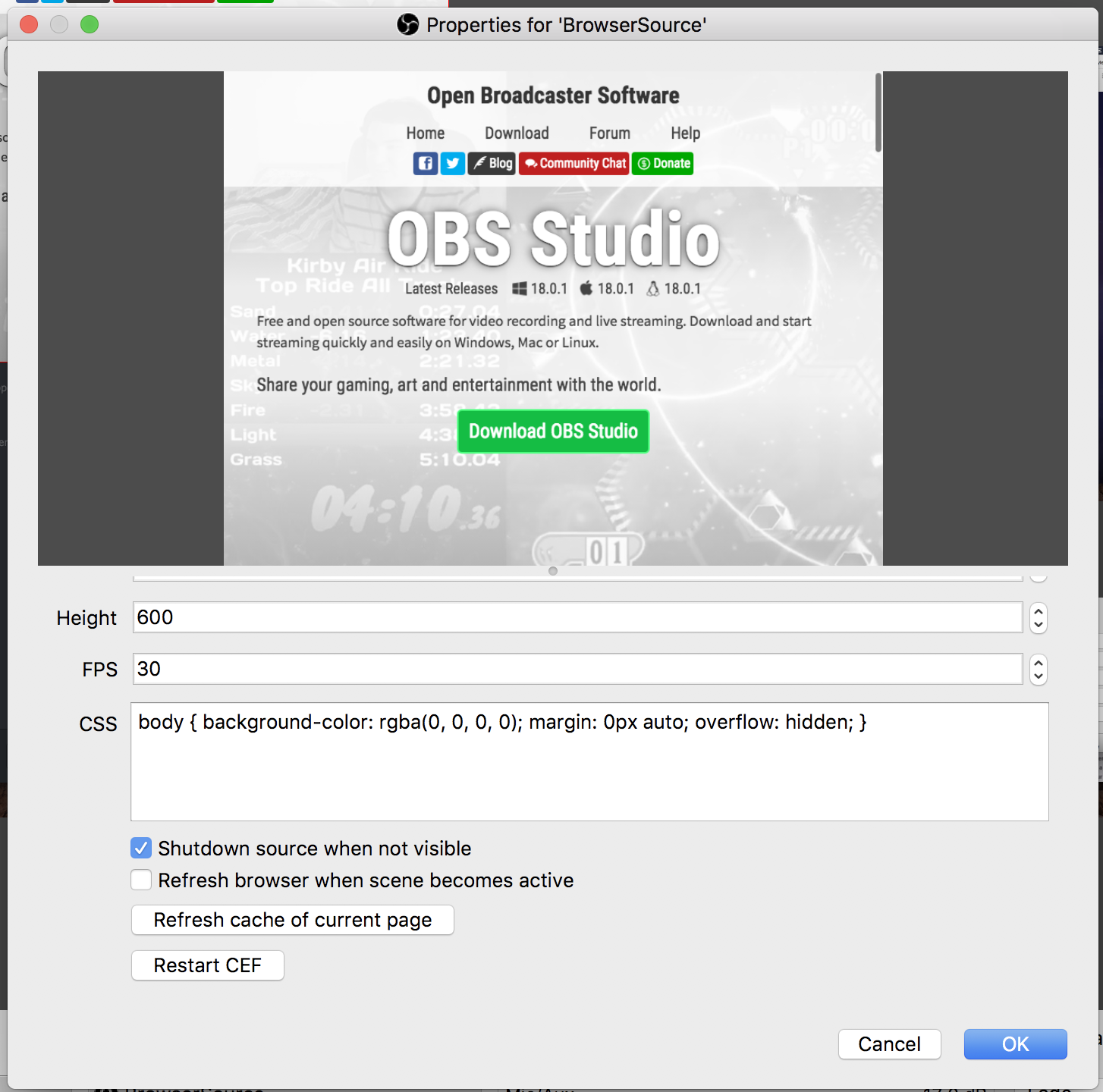
It has an option to keep CLR's "alive" in the background which will cause it to play twice
lone bridge
interesting. It had been doing that last week, and today I just reinstalled OBS
and obviously it still did that
tawny pivot
 lone bridge
is there any work around within OBS?
lone bridge
OH i see
tawny pivot

lone bridge
so in each browser source just enable that it shuts down when it's not visible
tawny pivot
Yeah exactly
Consider it like a browser tab that's not active
Chilling in the background playing sounds 😄
lone bridge
I'm happy to know it wasn't SE. It sucked, cuz I had to just delete all the browser sources
tawny pivot
Oh rip
lone bridge
yeah
I couldn't talk up SE at all today cuz of that shit
No notifications or anything on screen
usually people ask what I use
tawny pivot
That checkbox confuses the living shit out of people
lone bridge
Maybe we should tweet/retweet a PSA about it? hrmmmm
I wonder if others are struggling with it too (not just with SE)
lone bridge
Good to know. Thanks so much for the insight, I'm going to go let the Twitch Music server know about it.
And probably Twitch Partner server too, if no one already discussed it
lone bridge
@tawny pivot one more thing if you have a chance --
what are the specs for the laptops that INORMOUS said the staff use? They're Lenovos yeah?
lone bridge
SORRY hahaha
tawny pivot
I have a macbook pro
lone bridge
LUL it's okay, I have a 2010 macbook pro and that bitch is still going strong.
tawny pivot
Not sure if the serial number is secret
lone bridge
HAHAHA
I ask because right now some music streamers and I are discussing the mac vs pc laptop debate.
lone bridge
Exactly - I use an iMac right now and just want to add a powerful windows laptop to the mix to handle the streaming component (not audio or art stuff) and also for travel
tawny pivot
The new macbook is fucking amazing, but holy shit the price..
lone bridge
They keep taking things away though
tawny pivot
Well so here's the deal
I have a single USB-C that goes to my monitor
The monitor then powers the computer and provides everything i need
lone bridge
that's cool
but how much when you upgrade your ram to something adequate to stream?
$2K at least yeah?
tawny pivot
The new macbook pro is actually capped at 16gb ram
lone bridge
I think the Lenovo @proud pumice sent over was 16G too
but now that link is deleted on newegg
tawny pivot
I just very much prefer the mac's overall feel and design
And it's perfect for traveling
tawny pivot
Gaming, hell no
lone bridge
So definitely that would probably be the tipping factor -- are you planning to game with it?
tawny pivot
So it's 100% a deal breaker if you wanna play games
lone bridge
For sure. Yeah, that's why I am actually looking into a windows platform (although I don't want to), just so I COULD game if I want to.
tawny pivot
I just do both
lone bridge
Yeah hahaha. Personally, I need something that can just handle the output of OBS/the stream/ and occasional gaming. I plan to continue to use my imac for audio production and all my art stuff
and if it can run the whole show for occasional travel, that'd be nice too
tawny pivot
One pro tip is to use the hardware encoder
https://i.imgur.com/b1yoTEU.png
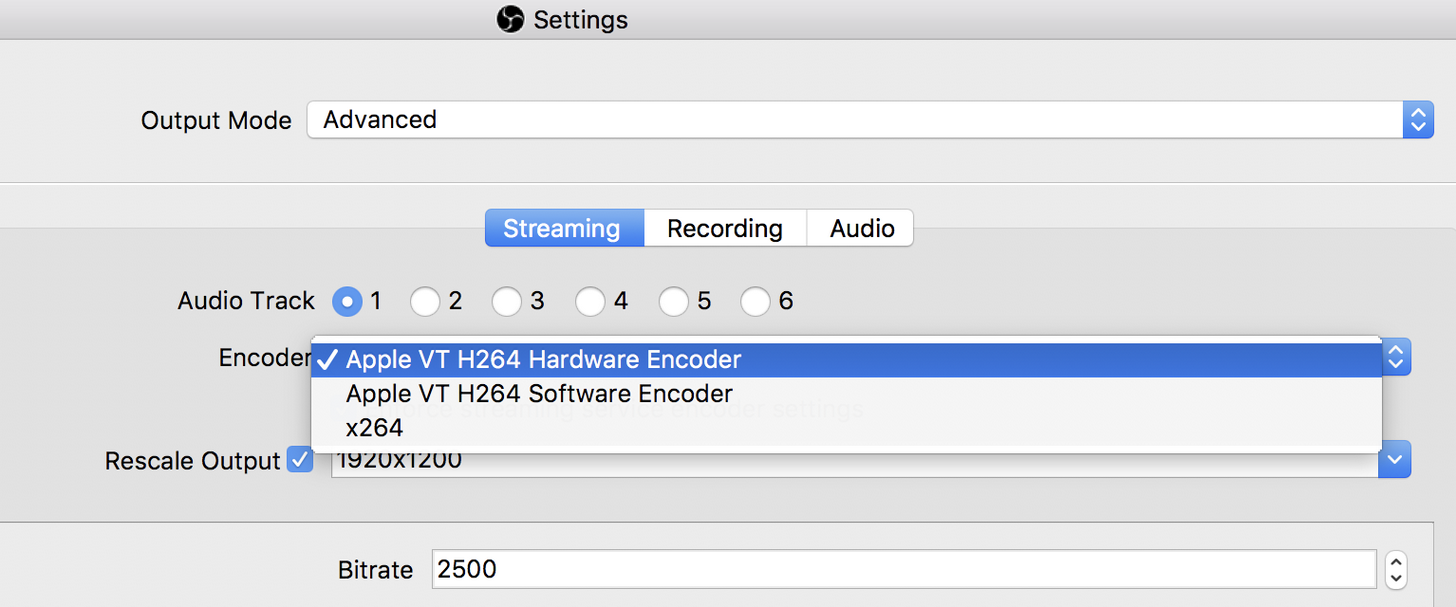
If the iMac has that
lone bridge
WUTTTTTT
tawny pivot
It's like 30X faster 🔧
lone bridge
I have never, EVER seen that, and I am one of those people who looks at all the options hahaha
I'm gonna go peek now
Does that mean if I have it I could maybe stream 60 fps again? LUL
I was able to handle it for a while.
 tawny pivot

lone bridge
wow, why is yours all different?
tawny pivot
What does it look like for you?
tawny pivot
You found it  ?
?
tawny pivot
First the serial number now this.. 😄




 lone bridge
WHY HAS NO ONE TOLD ME ABOUT THIS
lone bridge
Wait, so which one, the hardware encoder?
lone bridge
Does this mean I could up my aspect ratio or my fps?
tawny pivot
Removing the strain from your cpu
And moving it to some hardware that's really good at what it's doing 😄
tawny pivot
Same on windows
If you have a nvidia graphics card or an Intel CPU
You can offload it to the hardware encoing thingies there
Issue is that not everyone has this fancy technology
lone bridge
hahaha
so do you think this means I could increase bitrate, bump it up to 1080 or 60 fps?
tawny pivot
I'd say go 4k 144 fps
lone bridge
LUL
is a test recording as good as a test stream for stuff like this?
probably not
tawny pivot
Create a shitty test account
lone bridge
okay, looks like brushesnbongs is back online 
tawny pivot
Do a test stream in secrecy
lone bridge
kinda like ckurtis - his is sitrukc
DUDE thanks for the knowledge. Now I gotta play
tawny pivot
You're welcome, have fun 
lone bridge
@tawny pivot do you know what the rescale output is for?
tawny pivot
Yeah
lone bridge
if on the video settings you already set your canvas and output, what does rescaling do?
Dude, we need an OBS thread lol
tawny pivot
lol yeah
I think it's just another word for downscaling
aka 4K -> 1080p for example
lone bridge
but why do you need that if you've already set the canvas and output.
basically, do I need that? probably not yeah?
or is it so you could potentially be simultaneously recording a nicer quality video?
tawny pivot
I'll check my mac in a second, just making some coffee
lone bridge
HAHAHA omg I'm so sorry.
You totally don't have to chat about this right now. Just interested
tawny pivot

lone bridge
@wide delta there's a lot up there about mac stuff ^
 wide delta
I saw, I'm picking my way through it 😃
tawny pivot
🔧
wide delta
That looks like an awesome tip, I'll be trying that out tomorrow. I've noticed my Mac heating up in a way I don't like when I stream, hopefully this will help by using up less CPU
lone bridge
That alone, PLUS using streamelements instead of various bots/software bots is going to help a ton ❤
but @wide delta I will warn ya that basically when I stream my imac has the fan going on full blast the entire time. It sucks. The second I open OBS basically.
but 9% CPU is much better than the 20-30% it used to reflect
wide delta
Yeah, and I'm using a Mac Mini which has even worse heat dispersion issues than IMacs
I'm trying to convince the wife to let me buy a Mac-Pro, but unsurprisingly, she is hesitant on the price...
tawny pivot
Understandable
lone bridge
Well, you have styler here to make a good argument for ya 
tawny pivot
It's a good computer
wide delta
lol
lone bridge
I posted this, then deleted, but I'm gonna repost:
tawny pivot
lone bridge
Styler: "I love my mac"
wide delta
that's a helluva monitor
lone bridge
he said it basically powers it for him?
wide delta
I think my favorite rocket league streamer uses that
lone bridge
I dunno, when it comes to this stuff I'm like "HEY I KNOW THINGS" 
tawny pivot
wide delta
Before I switched over to Mac, I considered myself relatively tech savvy - I'd built my own computer from the ground up multiple times, never had problems fixing & replacing things, and never had to ask someone how to do something. Now I feel like my parents... Thanks Mac
lone bridge
That's funny, since mac is supposed to be "easy." and it is, but it also has so many things you can customize and you have to go hunting for them. Like, remember when I helped you set up your aggregate drive? LUL
Dang styler look at your pretty lights. I wanna come hang out
tawny pivot
It's hooked up to chat 
wide delta
Yeah, for a computer that prides itself on being built for artist production stuff, the fact that the Mac's internal audio situation is so FUBAR'ed is ridiculous
tawny pivot
Phillips hue is fucking awesome
wide delta
I love them - I have several in my band jam room
lone bridge
ooh fancy. (just googled). And here I was buying LED stringlights from target
wide delta
They're not bad priced either (though I seem to remember they used to be very high)
There may just be a bunch of different options now though for all I know
tawny pivot
$100 per lightstrip is a little steep
But you know.. if that's what it takes for me to control my lights from twitch chat
100% worth the investment
wide delta
Ah, I have the bulbs
lone bridge
you can control from twitch chat
tawny pivot
Fuck yeah 
wide delta
I also bought them on a woot.com sale, so I may be out of touch w/ the reality of their pricing
lone bridge

wide delta
But it was like their 2 starter bulbs (colored) for $35 or something like that, I bought 3 packs
tawny pivot
I currently got 4 bulbs, 2 lightstrips & 1 bloom whatever thingy
lone bridge

tawny pivot
Alright well i gotta pickup my drunk brother 
wide delta
And I've got to take care of a sick dog
lone bridge
 okay
okay
wide delta
been nice chatting w/ you
tawny pivot
Likewise
lone bridge
ditto
wide delta
g'nite/morning
glass stag
Not complaining (okay maybe a little) but the GUI for designing in template creator is a little difficult. hard to access the font choices, tick arrows sometimes don't work or you need to type px , Would be nice to copy paste elements between templates
Can only resize from the bottom right corner. Etc
Fixed size tip jar
lone bridge
I agree @glass stag, I have some of the same issues. The tick arrows and limited vertical space in a browser window means I am often losing menus and not being able to find them quickly. You can duplicate a template currently, and that's what I do to start a new template.
and the resizing from only bottom right corner has tripped me up before too
I mean, this is all simple stuff but you and I are quite tech savvy when it comes to this stuff, so if we are having some problems I wonder what total noobs will think.
glass stag
Is it just me or do the fonts not all work?
I keep saving but the templates all look like the same font as before
lone bridge
In OBS? try to relaunch/copy pasta that code in the browser source
that fixed it for me
if it's just in the builder, I did not have that issue
but I had to re paste the url to get the font to change in OBS
glass stag
Some fonts change. Some don't. Baloo, bangers, able
lone bridge
hrmm. Are they by default really large or something? Different sizes work?
Lemme go try the same ones.
glass stag
Nope. Some work, some don't
Try any of those I mentioned. See if it's just me
Would be awesome to have a click down arrow instead of txt input on fonts, and to actually have each font name in its own font so we don't need an hour to pick one that may or may not work.
Ok, my bad. Weird. I reloaded from vmix and now I see it
But other times I didn't need to.
Thanks @lone bridge
lone bridge
oh yeah? cool!
glass stag
Ask me why. Lol
lone bridge
WHY
glass stag
Oh... BS in general
tranquil iris
k @tawny pivot asked for a VOD. here it is with timestamp: https://www.twitch.tv/videos/140400961?t=29m58s

so just to recap what happened
I only had Symbol Protection and Emote Protection enabled in the bot
someone wrote a long paragraph, user All_Over_Rs (you can see chat on the VOD)
and the bot timed them out for 15 seconds
15 seconds is the default timeout for Symbol Protection
(Paragraph protection is still set to the default which is 30)
I then tried changing it from 15 to 16 seconds, confirming that Symbol protection was timing him out for a long paragraph for some reason
I open the browser window to show it
coral kelp
is this "percentage" or literally just "this many caps"
for caps protection
edit:
im an idiot
so if a user exceeds either of these they get timed out
also, for banned words, can you use regex? are they case sensitive? can you submit multiple at a time by seperating them with a delimiter?
also are there commands that you can use without exclaimation points?
also the overlay settings for this overlay are still reverting back to default
also how come you can add commands using !commands add blah blah blah that are longer than 250 characters but you cant add a command in the streamelements dashboard thats longer than 250 characters
for example, this is a command i have
that has more than 250 characters
fiery lake
I'm still getting the issue that the chat widget doesn't stay up to date while on non-active scenes, if I go to my end screen it often shows chat from somewhere halfway during the stream.
Anything I can change about that?
glass stag
I'm still getting issue of song player not going to the next song and repeating first one
hollow zinc
@glass stag we'll look into it. Thanks for the video
glass stag
Ok thank. I worked for me once after and thought it was fixed.
But I noticed it's doing it again. Sorry to be a pest
hollow zinc
Not a problem at all. If it happened for you, it can happen for anyone else and it needs to be fixed
glass stag
👍🏿
silk patrol
Hi! how's everyone doing? I wanted to recreate the shoutout command that shows someone last played game like : Go check out "somebody", he last played "some game". In Nightbot, they use their own variable $(twitch game $(touser)) which we don't have yet. I've been checking the twitch API, the "get channel" function returns a whole bunch of stuff including the game. If anybody knows more or have already done that, I would be forever grateful to know how you did ^^ https://dev.twitch.tv/docs/v5/reference/channels/#get-channel
tropic eagle
I just got live on Twitch and don't see my link on the #291219887274328064 thingy. Am I on the list?
turbid reef
ill take a look @coral kelp 
coral kelp
overlay settings still revert to default for me 😦
or rather, what i set them to the first time i made them
main fern
Is there a way to set an alert for the top donator?