#helpdesk-twitch
1 messages · Page 41 of 1
 turbid reef
 lament blade
galford_78
 tight harness
Wow, you really want to get rid of it huh? 
lament blade
i just don't want it in chat if i don't want it to be in chat
turbid reef
let me know if its still there in a couple minutes 😄
turbid reef
thats weird 
lament blade
and if you delete the whole account on streamelements?
turbid reef
talking to the others right now trying to figure out whats going on 
lament blade
okay thanks...just end me a pm if you guys figured it out....hav a early day tomorrow and heading off 😃
turbid reef
alright
tight harness
One suggestion I have is being able to either manually update our donation goal or if it's easier being able to set a start amount and just restarting it if it changes, seeing as I plan on adding my income from twitch to mine half way through every month
turbid reef
you should be able to edit it through the session reset page
overlay manager-> reset session
tight harness
Doesn't that just set it to 0 though? Whereas I want to be able to choose what it starts at so I can add my twitch income to the amount gained and go from there half way through the month when I receive it, or am I wrong in thinking that?
tight harness
So I can, thank you very much, I'll just slide out of this chat awkwardly like nothing happened don't mind me 
turbid reef

 burnt leaf
!vanish @tight harness
turbid reef

burnt leaf
😄
 wary laurel
i missed alot I was leaving work but @tight harness I do use gleam, using it right now for a $100 steam giftcard giveaway in fact, the problem is I really want people to enter in with loyalty points so that I can formulate "viewers" from the giveaway instead of "followers". Basically force them to love me and watch me all day 
oh and PS welcome to the scuba squad 😃
turbid reef

tight harness
I can understand that, I'd like to do it that way too. It's just that posting on Reddit about a Gleam giveaway is good advertising and thanks 😄
 humble ether
import from streamlabels didn't get a single donation variation 😦 ... feelssadman
lament blade
Hey guys. Streamelements is still in my channrl. Have you figured out why that is?
 burnt sigil
Lol
 gentle imp
want to remove the bot @lament blade ?
if so https://streamelements.com/dashboard on the right side, part channel button
lament blade
rippz0r yes since yesterday. nulls wanted to look at it but couldn't figure out why it won't part the channel
thanks for the advice doesn't work 😉
 hollow zinc
The bot went rogue and is roleplaying Skynet. Refuses to listen. Just kidding. It's being looked into.
lament blade
thanks darko
hollow zinc
No problem ^_^
gentle imp
hehe ok 😃
 upbeat merlin
hey, I had my name changed on Twitch and wanted to know if I could have my stats moved across?
 proud pumice
@upbeat merlin https://stats.streamelements.com/c/onscreen
done
#blazingfastservice
upbeat merlin
thx dude
 granite forum
i have dual stream pc setup, is there a way for me to hear the alerts without it echoing for the stream?
 atomic hollow
@turbid reef or @hollow zinc will help 😃
turbid reef
dont you have some kind of mixer that combines the 2 audio streams?
thats what most people do 😄
granite forum
I unfortunately do not
I use Stereomix
to route my sound to my 2nd pc
okay so id have to get that then np
figured as much, unless there was a 3rd party software
turbid reef
you could mute the obs clr browser i think, but that would be a bit hacky i guess 
it might get out of sync
granite forum
mm
i mean does out of sync alerts matter? i dont think id mind that
how do you mute it?
ill test it
turbid reef
ill take a look
granite forum
ty
turbid reef
i cant find any option to mute a clr browser
turbid reef
but a proper mixer is probably the best solution in the long run
granite forum
any idea what most people use? i honestly havent even looked into it
turbid reef
i dont really know much about audio, ive just seen/heard it on streams 😄
granite forum
haha okay thanks for the help :)
turbid reef
np 
 rugged frigate
Behringer makes a lot of great mixers on the cheaper end
The Xenyx Q802 is a great board that's cheap yet has room for expansion
lament blade
Any updates on my case?
proud pumice
@lament blade the bot is still on your channel and not leaving?
lament blade
Exactly
proud pumice
@lament blade we'll restart our bot connection service in 8 hours to solve your issue (it has been running for about 2 months consecutively)
 red vine
but its gna take time to re-join all the channels
proud pumice
about 20 mins
we do that in stages, on twitch's lowest activity points
and joining live channels first
lament blade
restarted yet? bot is still in the channel
proud pumice
@lament blade yeah its out 😄
and dont forget to keep an eye on our songrequest while its on beta, you might like it https://streamelements.com/dashboard/songrequest/general
lament blade
Thank you guys 😀
proud pumice
thank you @lament blade that was the strangest thing, bot must love your username
lament blade
Lol...was probably a samurai showdown fan too 😄
 icy stirrup
Is there a way to enable and disable features via command? For example !disablesr
proud pumice
@turbid reef ?
turbid reef
currently not , no
icy stirrup
Should I add it to the reature-requests? I think it would be beneficial for mods to quickly enable and disable features like that. I was playing H1Z1 and as nice as the SR feature is, it's also nice to hear the game 😉
turbid reef
ill add it to the todo list 
icy stirrup
Awesome, thank you 😃
icy stirrup
Is there an option for selecting your Time Zone? My statistics are not accurate because I am on the west coast. I think whom ever created it is using a static east coast time zone 😉
turbid reef
it has been on our todo list for some time 
icy stirrup
No worries I just keep pointing out things I notice... You guys are wesome as always
 rapid silo
Hey guys i use my twitch chat as a part of my overlay, although id like it to disappear when there is no activity for a certain amount of time. Ive had a look but can't find an option in the overlay editor, am i missing something?
thanks in advance
tight harness
I haven't used it myself but I'll enable it and see if it's possible for you
rapid silo
awesome thanks 😃
tight harness
Okay yeah it isn't possible yet but if you mention it in the feature requests channel they can see about adding it 😃

 turbid reef

tight harness
I've forgotten when songrequests are meant to no longer need us to minimise and go to the page for the next song to play automatically when's that meant to be a thing again? 😃
turbid reef
after every song?
tight harness
Yep, every song needs me to minimise the game and go to the page before it's load the next one
turbid reef
i know that happens if a song is blocked
tight harness
For me it's every song 
turbid reef
try putting this in your address bar chrome://flags/#automatic-tab-discarding and set it to disabled
it will increase ram usage if you have many tabs tho
tight harness
For the first option?
turbid reef
this one https://i.nuuls.com/Uesf7.png
 turbid reef
let me know if it helped
tight harness
Still seems to be doing it
turbid reef
i guess we should add that as a hint to the page then, or find a way to fix it
tight harness
It's still broken, confirmed 
turbid reef
oh nvm then
tight harness
That didn't fix it, yeah 
tight harness
Will test that now
tight harness
Okay so it seems that having it in it's own window may have worked 🤔
turbid reef
thats weird
 covert ocean
For song requests, is there anyway to make a queue repeat or make certain songs stay after they've been played?
So if no songs are requested, "default" songs will keep playing
tight harness
It's one of the things I asked for a long time ago, it's in the to-do list
Adding playlists, adding previous playlist and shuffle 😄
covert ocean
I only need a bot for music It doesn't really have much use for me like this
tight harness
I'm pretty sure it was one of the Coming Soon™ updates
turbid reef
yes, default playlists are coming 🔜 ™
 vague jungle
Yeah @tight harness I had that problem too, fixed it by having it in a window, not a tab and it'll auto play even if you're clicked onto another program/chrome window
tight harness
Thanks  seemed to work after I tried this, temporary fixes
vague jungle
I don't mind it like this anyway because I like to have it open so I can see what's playing and who requested it but it was definitely a weird thing to come across initially
tight harness
I only have 2 screens currently, maybe if/when I have 3 then having it on a screen open all the time will be plausible
vague jungle
Oh I only have 2, I just drag it down to the bottom of the screen so only like the top 1/5 where the info is shows, so I can't see the queue or anything, plus I have the video turned off because as has been mentioned, potato internet
tight harness
I have OBS, dashboard and chat on my 2nd monitor, would be a bit of a tight squeeze to fit that on there too 😄
vague jungle
I have obs, twitch alerts because I'm yet to change shit, dashboard, chat and Spotify 😂 things just have to overlap a bit, I tend to not look at obs during stream so thing just be put over it
proud pumice
@vague jungle if you need help setting up the rest of SE, tipping etc, let us know 😄
vague jungle
Will do, thanks @proud pumice! Less lack of knowing what to do and more of lack of time to sit around and get it how I want, but I have some time off soon so will check it out and have a play then 😊
proud pumice
ohhh, we havnt invented a feature to provide additional hours in a day, sowwy :p
our platform is excellent at saving time tho ;D
vague jungle
I should add that to feature requests Kappa
granite forum
Whats the command to check points with the bot?
tight harness
!leaderboard 😃
granite forum
oh so theres no way to check individually? just the leaderboard?
tight harness
Ohh, I just use the search function in the leaderboard
But yes the variable ${user.points} is a thing
turbid reef
im just gonna add it as a default command since so many people are asking
tight harness
Mine is !gold and it goes: ${user} has ${user.points} Gold (points) PogChamp
Just incase people think they actually have real gold
granite forum
ty
tight harness
No problem 😃
 proud escarp
Hii! So I'm messing around in the editor and I noticed I can't move my image all the way to the bottom left XD
Is there a way I can move it towards that corner guys? Otherwise, it looks kinda odd XD
tight harness
Once you've got the box selected you should be able to use your arrow keys to keep on moving it 😃 you can also zoom out with Ctrl + zoom wheel on your mouse to see the full overlay
proud pumice
You can also use arrow keys to move it by pixel
hollow zinc
Just arrows => moves things by a pixel
Arrows + shift => moves things by 10 pixels
tight harness
No problem 😃
hollow zinc
@proud escarp also by pressing the delete key, you can remove the widget that you selected. On mac it's Fn + Backspace 😃
vague jungle
Hey guys, with the user points rank variable, it seems to bypass the custom message I had for points?
Also bot has been a little weird today, missed a few commands that shouldn't be due to cooldown or anything
proud pumice
@vague jungle we deployed an update to the bot, it usually means it cycles connection for a few minutes, mightve been that exact time? 😃
vague jungle
It happened about 3 times that I recognised during my whole stream, and I did !ping and it didn't match up with them? Two of the non-responding were when song requests were done with song name, but he just redid the exact thing and it worked?
The only thing he changed was going from !sr Chandelier sia to !sr chandelier sia, on both of them, so was wondering if it was an odd thing with capitals at the start of requests
Also yeah the change to default points command when I added rank to it also needs to be checked not sure if you read that bit @proud pumice
turbid reef
the points default command should not get added if you already have a custom command which is !points 🤔
@vague jungle you can just disable the default command on this page if it still happens https://streamelements.com/dashboard/bot/commands/default
tight harness
I had a custom command called points telling people the rates of which they can earn points but I changed it to !earn, easy
Ohh awesome, I love the new commands! 😄
vague jungle
Yeah I already had a custom points and then I edited it tonight to also say rank so maybe it got confused? Anyway I disabled the default one so it should work now, thanks @turbid reef!
turbid reef
@tight harness can you test the !commercial command for me? im not twitch partner
@vague jungle ill take a look
tight harness
I'm not live right now so it won't work, also my subs don't get played ads and I myself am I sub of my own channel by default, you may need to come and test it with me in 2 hours
turbid reef
ill join your stream when youre live, thanks 
tight harness
I don't normally play ads, this is a special day indeed
Also when I disabled then re-enabled the command it worked
vague jungle
No rush @turbid reef, I'm off to sleep now anyway, just thought I'd let you guys know!
turbid reef
👍
vague jungle
Oh wait I'm an idiot, my points are called dollarydoos, but I did !points not !dollarydoos so that's why it came up with default command, nevermind 😂
turbid reef
i actually wanted to do that for some time but never actually did it
red vine
next feature
tight harness
Another reason why it's awesome that SE is online, when you enable this for a bot that runs on your PC it legit warns you that it'll use more processing power
red vine
i dont understand the second part of your sentence
tight harness
If you use a bot that runs on your PC instead of online on the Cloud like SE then you enable the ability for it to trigger messages when keywords are used then it uses more of your computer's resources
turbid reef
red vine
yes ofcourse, it must iterate through your message
tight harness
Exactly, another reason why SE is better
red vine
best way to compare bots is get a whole bunch of them in your channel, make the same command for each one, and see which one replies first
turbid reef
tight harness
Survival of the fittest
red vine
lowest latency server would be AWS oregon
vague jungle
Hi guys, slightly odd question, is there anyway to duel the bot for its points?
hollow zinc
@vague jungle you can !duel StreamElements, but it won't accept as for now. Our duel champion is on vacation 😛
vague jungle
Damn that's okay thanks anyway @hollow zinc 😂 I did a command so bot would ping back !accept but it wouldn't recognise it FeelsBadMan
hollow zinc
👍 we'll notify you once it's available 😛
vague jungle
Appreaciate it!
gentle imp
hmm got a donation and got a bit of it cut down, got it on same currency I use, dunno what happened
is it something on SE side or paypal?
 obtuse ivy
turbid reef
obtuse ivy
turbid reef
i think they take 30 cents + 2.9% or something
gentle imp
could be, but first time i see it, although i don't get that many ^_^
they do identify it as a fee so guessing it's them, ty guys ❤
vague jungle
oh also song requests has been a little weird today for me and croc, randomly deleting songs and then at one point it was like "queue is empty" but played the song that was meant to be there
proud pumice
@vague jungle a specific song? Or in general? @nuuls will check accordingly. We've fixed the blocked in your area bug you mentioned
vague jungle
@proud pumice no it happened with a few different ones, and then when I requested it it would queue and play fine, and both of us still had the blocked video bug today?
proud pumice
@turbid reef will be checking that out today
turbid reef
ill take a look 
tight harness
The always watchful eye 
turbid reef
@vague jungle do you have the songrequests in a background tab by any chance ?
vague jungle
Nah @turbid reef I know it hates that so it's always sitting around by itself
It was less the stopping randomly and more the deleting songs from the queue that was weird
turbid reef
it currently skips songs if they cant be played after 5 seconds, could that be it?
vague jungle
I don't think so, it was pretty immediate after the song was loaded as next, plus there were still songs that were having the not available on this platform error
turbid reef
so it got skipped after it started playing?
vague jungle
It didn't even start playing
I happened to be looking as it just finished the song before and then it was gone from the queue
vague jungle
Nah it was quite rare
But just odd considering the queue would just be gone
I think @rapid silo also had some problems today too, which is why I picked up on it so quickly
rapid silo
Yeah i had the same thing too as well
roughly between 10-11am AWST
if the time helps?
turbid reef
ill do some testing and see if i can reproduce it
vague jungle
I'll be streaming again in a few hours and I always have song requests on so I'll let you know if it happens again
turbid reef
alright thanks
rapid silo
thanks nuuls 😃
 tidal swallow
is there a way i can make it so StreamElements itself doesn't get any points in my channel so it won't show up on the leaderboard?
turbid reef
not yet, but banning people from receiving points is on the todo list
hollow zinc
You're welcome 🙂
vague jungle
@turbid reef it did it again, bot said song request had been taken, but it didn't play it?
turbid reef
got skipped or just didnt get added?
vague jungle
Not sure, I'm assuming skipped seeing as bot said in chat it was added to the queue, but I can't see the queue the way I have it set out so I'm not entirely sure
hollow zinc
Do you have banned videos / tags ?
vague jungle
Nope
Although it was one of the same songs that did it yesterday, which isn't what I would call the most appropriate song, so like maybe bot recognised that even though I haven't told it to?
turbid reef
nah, its not that advanced yet
hollow zinc
Secret project of SE: Machine learning
vague jungle
Oh god no
NfRtkCGE40A
Just add that to https://youtu.be/
But when I then requested it, it would play?
turbid reef
thanks I'll take a look tomorrow 
hollow zinc
 lmao
lmao
vague jungle
Darko plz
turbid reef
ok the video is indeed age restricted, but it played fine for me when i added it 🤔
hollow zinc
but you are 18
turbid reef
but it still shows the confirm your age thingy on youtube itself
maybe if youre not logged in it doesnt work
vague jungle
Yeah it didn't work when a regular requested it but it worked when I did?
hollow zinc
When the streamer requests something
the bot trusts the request
and the dashboard guy in the background 😛
vague jungle
Lol this is true, but seeing as he's a regular in the bot is there a way to allow it? Or is it like a really back end thing that can't be changed?
turbid reef
if you dont have any banned tags and videos it should not happen 🤔
vague jungle
I mean yeah this is true
turbid reef
it only happened with that one song right?
vague jungle
If there are banned tags, wouldn't not also say in chat that it can't add that song? Because that's what confused me that bot was like yeah k it's added and then just turned around and deleted it
turbid reef
yeah it should error when adding
vague jungle
It may have happened with others, I can't remember exactly because there were also not available on this platform errors, so I can't remember if there were others just deleted but I'm like 70% sure there was at least one other
I was playing BG so I wasn't as focussed on song requests as I am when playing other games
vague jungle
It just did it with take me to church by Hozier so yeah idk what it's doing
vague jungle
actually it was from a different song I think but I'm not sure what song it was
and when it did it, it deleted all the ones in the queue, so like 3 songs gone
turbid reef
oh wtf
vague jungle
ya it's weird af
 river prism
hey
turbid reef
 /
/
river prism
can you somehow get an all time statistic of an channel? even tho the channel was never linked to streamelements?
turbid reef
you mean chatstats?
river prism
ye
turbid reef
no that is not possible
river prism
shieeeeeet
red vine
coz it has to listen
why dont you just just join all chats but don't join the viewerlist
 hidden tangle
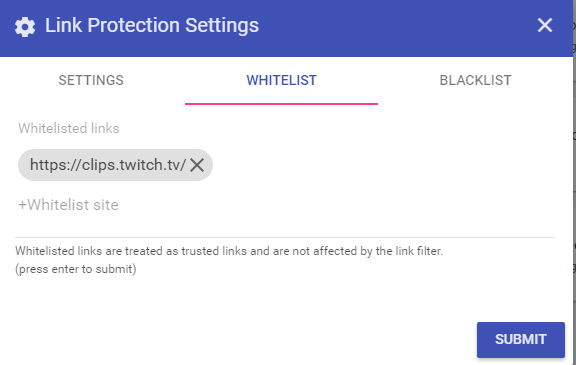
I have a question @tawny pivot, on our spam filter for links, it mean a domain name ?
 tawny pivot
Yeah exactly
 turbid reef
do clips.twitch.tv/* , that should be better
hidden tangle
thanks @turbid reef
tawny pivot
@hidden tangle Keep the questions flowing if there's anything 😄
hidden tangle
Yup i'm setting it up & discovering 😃
hidden tangle
Possible in the future to get a random name for our bot ? ^^
hidden tangle
nice 😃
Dunno if it's already there, but it could be cool that for example, people who have more than 1000+ loyalty points obtain the regular rank ^^
turbid reef
🤔
hidden tangle
dunno if you understood x)
turbid reef
yeah i did
hidden tangle
it mean that people who are on your stream everytime obtain like a special rank where we can setup custom commands etc..
 tame patrol
Does streamelements display current song from songrequests ?
oops
i mean streamelements
atomic hollow
Lol yes we do
tame patrol
nice, just what im looking for
tame patrol
for some reason having issues with chat overlay
vague jungle
Hello it's me again lol
It's done it again with wrecking ball by Miley Cyrus and totally addicted to bass, so it's definitely not an age restricted viewing issue
turbid reef
ok im gonna try something later, just cant test it since i dont have the issue
i think i know what it is tho
turbid reef
if it is what i think its related to slow internet/high ping
vague jungle
ah yes that is a thing I have
turbid reef
ok that makes sense then 
 mild comet
can I somehow force TTS to read everything and ignore filters - for example recived donation "REEEEEEEEEEEEE" but TTS just said "RE" 
turbid reef
thats just how the tts voices are 
turbid reef
what voice are you using?
mild comet
Ivy - US
mild comet
Didnt identify why yet - but yestarday on stream songrequest module was skiping each 2nd song for my channel
Songs was regular music from few not connected channels
tawny pivot
@mild comet We pushed a few updates for songrequest like an hour ago
I'd say take it for another spin today, if the same issue seems to happen, let me know and i'll take a closer look 😃
mild comet
oh oki I'll try crash it again then
red vine
the "clear queue" button on the song queue doesn't really look like a clear button
red vine
and it seems if you don't have the song request tab open it will only play 1 song and cancel the rest
tight harness
Ooo, I have how to give songrequests a try again today if it's been updated
turbid reef
yeah you should have it in its own window or chrome will pause it to save memory
red vine
but it wont just pause it, all the other songs in queue get removed
turbid reef
when did that happen?
red vine
hm i refreshed and they came back
turbid reef
wtf
vague jungle
Oh my god it happened to someone else thank god
 torpid pulsar
On the leader board page is their a way to hide certain bots and users?
atomic hollow
you mean the stats page?
torpid pulsar
@atomic hollow this is what my public leader board shows to 3 is two boys and myself and if like it to show only viewers
atomic hollow
oh, @hollow zinc might be able to help with that
hollow zinc
There's no option to ignore bots yet. What you can do as a work around for now is to give them some really small negative number and they wont appear for some time 😃
tight harness
That's a good idea I didn't think of that
torpid pulsar
I'll try that when I get off work
mild comet
Keep in mind sometimes bots have custom names like mine do
torpid pulsar
Yeah I was just hoping for a check box that stated "Ignore user for public leader board" or something similar.
proud pumice
yeah we should implement something like that
torpid pulsar
After that my next problem is just coming up with some custom commands for viewers to use their points on
hollow zinc
@torpid pulsar you can enable some of our bot modules. Your viewers can play those and spend their hard earned points from watching. I quite like the slot machine.
I know it seems like so, but I don't have a gambling problem
torpid pulsar
@hollow zinc only when it involves imaginary money, or other people's
 empty fjord
Hi there peeps, is it possible to import points from a csv file or something like that ? ive been using a different loyalty bot so far. manually moving all the users and their points is not really an option
atomic hollow
@empty fjord we can help, send it to me and ill take a look
empty fjord
Alright, thanks @atomic hollow ! Ill get in touch tomorrow once ive gotten the csv ready. I want to divide those points by a factor that i didnt decide on yet before we import 😉
empty fjord
How about.. not repeating webm videos in alerts ? Is it possible to make it play from the beginning once every time an alert pops ? Right now it just fades the alert in when triggered, but the video keeps looping in the background. Doesnt match the sound 😦
proud pumice
@empty fjord weve chosen webms to loop since it fits most of the cases of alerts, its possible to limit the time length of an alert to the time of your webm in order to prevent it from looping
try it out, if it doesnt work we can get a task on the pipeline and add a 'dont loop' button
empty fjord
@proud pumice hmm, the time limit wouldnt prevent it from looping in the background after the first time its triggered - a 'dont loop' button sounds like a perfect solution
proud pumice
I'll check with the devs if our queue system can support that 😄
mild comet
Since i'm using premium SMS thing for donation I was able to import my donation but sadly I can't show them in my alert box? I know its good for some reasons like creating fake donations/donation train.
But overall showing this donation without using another CLR would be nice 
tawny pivot
@mild comet What service are you using for the SMS thing?
mild comet
they have awful embed player, when I was using streamlabs I was adding manualy my donations and show them by dashboard
tawny pivot
Would love to help if they had some sort of API.
That way, we'd be able to build something custom to throw it on screen
With a single CLR
tawny pivot
👍
mild comet
question for my side-job as designer of overlays for other streamers can I export somehow a overlay for another SE user or I need to request their login data to setup things up?
I hate when I'm asking about stuff like that since probably that would be used by like 10-15 users of SE if you dont have it yet.
tawny pivot
@mild comet That's surely something we can get get 😃
mild comet
@tawny pivot okey would be useful since ppl sometimes I'll steal their accounts
mild comet
nice 
tawny pivot
We wanna try and make it as granular as possible
tawny pivot
ye ye, and not having two factor
mild comet
not having two factor? I have two factor even for discord 
red vine
hey is there currency support for bosnian war effort tokens
atomic hollow
Lol
empty fjord
hey @atomic hollow got the list of peeps that i would need imported into the loyalty system!
can i send it to you over Discord ?
atomic hollow
Sure :)
mild comet
Chatbox from overlay dont support BTTV/FFZ emotes or did I break something? 
 tribal shore
Do you guys have a bot for Beam?
proud pumice
We do twitch only for now
tight harness
Now it's a new month but my Monthly Top Donator is still showing as last month's 🤔
atomic hollow
@turbid reef
turbid reef
its from the last 30 days, not from the current month
turbid reef
nope
tight harness
That way I could reset it at the start of every month
turbid reef
ill add it to the todo list
tight harness
Thank you Mr. Nuuls
 cyan hill
Can we put some Default Commands in the Commands list ?
atomic hollow
this is a "bug" and we are fixing it, the !commands should include all the default commands, for now it doesnt
mild comet
weird, sometimes songrequest is lagging for like 15s and dropping few requests from queue.
empty fjord
hey, is SE not supporting SVG's in the overlay manager ?
not that i would need it, just curious since it displays a missing image icon when trying to get one into the overlay
empty fjord
Could reduce the total filesize significantly (assuming more people would start uploading their graphics as svg's)
One more thing.. i copied over a few donations from StreamLabs, just so that my labels dont hang there looking all empty when i start using SE.. and its not updating the overlay label 😦
burnt leaf
Manual Donations will not display to the overlay. If you would like to add some data check the session page. https://streamelements.com/dashboard/session
empty fjord
Ahh, thats good enough! Thanks!
burnt leaf
😄
 orchid zealot
Hey question - when my followers want to look at a list of commands for in-chat games, the only commands that show up are the custom ones that I've created. How do I get the chat game commands to show up on the command list? Thanks!
atomic hollow
Thats a good question, ill check that for you @orchid zealot
@turbid reef can you help maybe?
proud pumice
Thats an interesting update we need to do
 warm zenith
Could you make a Google docs list and link to it with a timer?
proud pumice
Yeah @warm zenith
Regarding default game commands we should show what games are enabled and how to interact in the command list page
tight harness
So it seems that one of the new updates has broken something with having multiple alert boxes I think 🤔 before I had an alert box for follows in the top left corner and an alert box in the middle for everything else, now if I enable or disable something on either one of them it mimics which options are selected for the other alert box too 🤔 @tawny pivot
tawny pivot
On it!
tight harness
Thank you
Could have been a glitch from my side, testing it now and it seems to be working alright
tawny pivot
@tight harness We're shipping a quick hotfix for that right now 
tight harness
Nope it's not showing the second alert in the editor, but it is still showing up in OBS
And it is for every event
turbid reef
oh its stiil uploading
tight harness
turbid reef
now for real
tight harness
Hmm, now followers only show in the top left, as they're meant to. But all the other alerts are still showing in both
turbid reef
did you reload all your overlays?
mild comet
chat from SE still dont have outlines/shadow? 
turbid reef
sorry for that @tight harness 
tight harness
It's alright, these things happen 
turbid reef
tight harness
Do I need to readd my text labels? none of them are showing anymore 😛
turbid reef
oops, fix going up in a bit
tight harness
So if I wait for the fix they should reappear? No need to readd them?
turbid reef
yeah just dont do anything right now
tight harness
Alright, I'll make a cup of tea 😄
turbid reef
 cinder bronze
When i press launch overlay its opening up a white tab?
mild comet
@cinder bronze click edit
if u got everything transparent u will see nothing at start
@cinder bronze
turbid reef
reload overlays @tight harness
tight harness
Is the variable {amount} working?
And name for that matter
Hmm, variables seem to be bugged now
tawny pivot
Can you reload the overlay?
tight harness
Yeah I reloaded it and the text shows now whereas it didn't before but none of the variables are loading in
Well, the {currency} variable is working but the {name} and {count} ones doesn't seem to be
turbid reef
🔧
tawny pivot
@tight harness Ok we found the root of the problem 😄
turbid reef
🔨 🔧
granite forum
is there a !gamble command?
vague jungle
!roulette and !slot as well as !duel @granite forum
they're in the modules section on the page and you can enable and customise them
granite forum
okay ty
atomic hollow
Thanks Leishaaa 😃
vague jungle
Np, I'm here to help! 😊
lament blade
I'd just like it to have text to speech donations from like 25$ or more but not read it out loud if it has certain words in it but i don't thing that's an option yet or am i blind?
tawny pivot
@lament blade https://streamelements.com/dashboard/tipping
https://i.imgur.com/c3rj0Mx.png These are current options
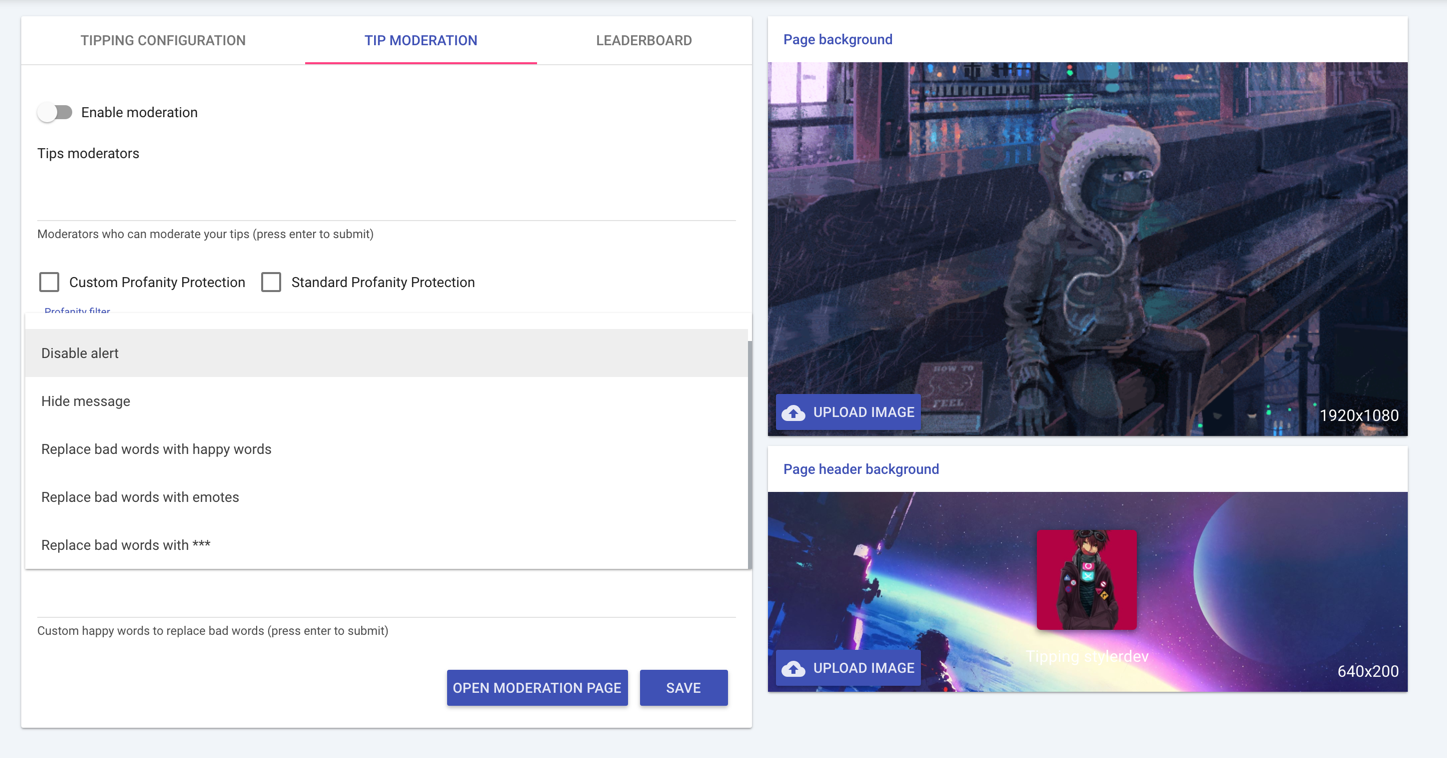 lament blade
ah, thanks!
tawny pivot
You can make it replace all bad words with for example
Disabling TTS all together could also be an option later on 😉
lament blade
also, is there a way to show some history for the event list? When i start the stream now, it's just gone untill someone follows or donates again. Is there a way to show the previous events when i just start the stream?
atomic hollow
@turbid reef the event feed doesnt use the last actions?
lament blade
idk if i need to have it active for it to save from now on but it doesn't show anything when i preview it
lament blade
👌
another question, sorry if i'm annoying :P
Is there going to be a way for the viewers to use their points for certain things other than just having them, betting them, ect? Like cashing them in for a songrequest or whatever?
atomic hollow
yep
our store is coming soon
its going to be amazing
we are working hard on that
lament blade
👍
tight harness
I am hyped for the store 

atomic hollow
believe me guys, its going to be amazing
 teal rapids
Is it going to be yuge?
empty fjord
is it going to be amazing or more like SUPER amazing ?
atomic hollow
its going to be 
empty fjord
heyo!
"This is your timer response. You can use command variables to make dynamic responses."
by command variables, ti means that i can use already defined commands in there ?
like i made a !facebook command - how would it look in the timer message field? {facebook} ?
turbid reef
no, but you can use most of the variables from the commands like ${lasttweet} for example
empty fjord
ahh, gotcha!
tight harness
Whenever I'm not streaming i'll try to help out with any questions as much as I can
tidal swallow
is there a way to check my stats from previous months or does it reset every month?
tawny pivot
@tidal swallow What stats are you looking exactly ?
tight harness
Think she means the data under Statistics on the dashboard
tidal swallow
this
tawny pivot
Ohh, yeah we keep the data but you can't go back right now 
tight harness
Agreed 😄
proud pumice
hey @tidal swallow regarding the quote system
do you need a representation in a form of a list on the website for the quotes
like
number of quote, user who added, user who said it, quote itself, date added
so you could summon a quote by !quote #4 for example while you add quotes with !quote add 'quote'
tidal swallow
all of that would be good except for maybe user who said it because i plan on letting my mods be the only ones to add quotes for anyone so i'm not really sure how that'd work. but yeah, numbers would be great so people can find a specific quote to trigger and the other info would just be a good reference as the streamer.
knowing who said what would be good too, but i figured that might just be part of the quote itself unless you guys had something else in mind. i'm not particularly tech savvy so i have no clue. haha
turbid reef

proud pumice
ok we're just figuring out the front facing part of the system so we'll make it right the first try
tidal swallow
well i like the sound of that
tight harness
Can't remember who I spoke to about the possibility of having a live sub count, but at the moment a resub raises my sub count even if it technically doesn't go up one 🤔 meaning that it needs to be manually set every time we have a resub because it makes it inaccurate
Also means that it doesn't go down if you lose one, also making it inaccurate, so a live one would be much better 😃
 tight harness
It basically just needs to reflect the current active subscriber count from our dashboard, I'd have thought that the Twitch API would offer that 🤔
This bit
The problem is that if I get a resub and it stays at 56 it will go up to 57 because it assumes that resub is a new sub for some reason 🤔
proud pumice
@tawny pivot @turbid reef does the twitch api give that?
turbid reef
yes, but its a bit sketchy
tight harness
Sketchy?
turbid reef
we have to check for the subcount every couple seconds
tight harness
On other services it's normally updated every minute or so, doesn't need to be too often, would at least be accurate 😄
turbid reef
yeah i guess
tight harness
For people with an event at a certain sub goal this kind of accuracy is pretty important, that's my thinking behind it
 frosty nexus
Isn't a special message sent for resubs? AFAIK, that's the way Twitch chat distinguishes subs from resubs
I mean on IRC level
Ah, yup
You can check for USERNOTICE
With re-sub message, it looks like that:
@badges=staff/1,broadcaster/1,turbo/1;color=#008000;display-name=TWITCH_UserName;emotes=;mod=0;msg-id=resub;msg-param-months=6;room-id=1337;subscriber=1;system-msg=TWITCH_UserName\shas\ssubscribed\sfor\s6\smonths!;login=twitch_username;turbo=1;user-id=1337;user-type=staff :tmi.twitch.tv USERNOTICE #channel :Great stream -- keep it up!
Without resub message, it looks like this:
@badges=staff/1,broadcaster/1,turbo/1;color=#008000;display-name=TWITCH_UserName;emotes=;mod=0;msg-id=resub;msg-param-months=6;room-id=1337;subscriber=1;system-msg=TWITCH_UserName\shas\ssubscribed\sfor\s6\smonths!;login=twitch_username;turbo=1;user-id=1337;user-type=staff :tmi.twitch.tv USERNOTICE #channel
tight harness
But how would it detect an unsub to lower the count without using the API? 🤔
frosty nexus
Hmm... that'd still have to run over the API, I guess...
There's no message for unsubbing
tight harness
But also a resub can happen a few days after being unsubbed, so I think it still needs to check with the API, because that would technically need to add 1
frosty nexus
Yeah... Or you'd count in the threshold Twitch uses to determine, if someone really unsubbed or hasn't resubbed yet
I think it was a week, wasn't it?
tight harness
I don't entirely know, I've heard 2 - 3 weeks
frosty nexus
Hmm... it'd be great, if unsubs sent a message in the IRC too
tawny pivot
The main issue is managing when people unsub.
frosty nexus
Yeah... if, like I said, Twitch sent a specially crafted USERNOTICE for unsubbing, it'd be a lot easier
tawny pivot
Yeah for sure.
frosty nexus
Maybe opening up a ticket for that
tight harness
Doesn't the Twitch API contain a number of current active subs?
frosty nexus
Yeah it does, but it is highly inefficient to re-call the API every now and then
tight harness
Seems like the only way at the moment to get a completely accurate number
Even if it's a delayed "re-call", say every minute
Or longer if necessary
frosty nexus
Opened issue on the Twitch API
granite forum
Is there a way to turn off auto host alerts?
mild comet
@granite forum just add 1 viewer in minium amount in alertbox - http://i.imgur.com/HibO7hV.png

or any number that fits you
granite forum
ok ty
mild comet
no problem, if u have any other questions feel free to ask
tidal swallow
does the leaderboard go by points total or points earned? i'd like my leaderboard to just be points earned from viewing and not games.
vague jungle
Points total
tidal swallow
okay. i'll go post over in features requests then. thanks @vague jungle ❤
vague jungle
No worries @tidal swallow ❤
empty fjord
Hey dudes, any way to drop the text-shadow on the text widgets ? or at least make it less "in your face" ?
hollow zinc
With this community we don't need to hire a support team 
vague jungle
I mean, I'll gladly take some of your money Kappa
 slow flume
Just curious if anyone here knows if Stream Elements has any codes to use so that resubs will update on my stream overlay? If that makes sense... New subs will automatically show up with my Nightbot codes, but not resub names. Curious to see if that's something you guys offer
 pale iron
Alright I'm a derp for not using the appropriate channel! Got a couple more things haha, is there backend access for mods with commands etc? And seperate sub alerts for different months/times?
turbid reef
you can currently only edit commands via chat as a mod, and yeah we have variations on the overlay/alert box
pale iron
Is there any plans to add backend access?
pale iron
Thaaank you 😃
proud pumice
@slow flume what do you mean codes for resubs? we have labels for new subs total subs etc, you can even set targets on our overlay manager
empty fjord
Thats nice. I think i need to up my audio game a bit 😂
slow flume
@proud pumice I don't know how to quite explain it... StreamLabs for example had a bunch of txt codes you can download that are linked to Twitch. You can use these through OBS browser source to have it show up on your stream/overlay. They don't however have a code for resubs so that currently has to be inputted manually
proud pumice
so the benefit of using StreamElements is that you dont have to download anything and instead of text codes you have widgets
go to our overlay manager here: https://streamelements.com/dashboard/overlays
and when you create a new overlay choose Widgets
and on Labels, you have everything you need
tawny pivot
Oh you mean labels ?
proud pumice
this is how it looks @slow flume http://i.imgur.com/G7reBQs.png

You can login to our voice chat support, and we can also connect via TeamViewer and help you set it up in real time
atomic hollow
@slow flume if you would like we can get on voice chat and ill show you everything
even though I am a bit scared to talk to a teacher
 slow flume
Okay cool I might just in after work today
empty fjord
Hey guys! for some reason requesting this song: https://www.youtube.com/watch?v=bknkg5XGlaY, SE replies with "Moderator StreamElements : @empty fjordhawk , could not add song: An internal server error occurred"
empty fjord
Ok, 90% of the time, the bot is saying that he added a song to the queue but it doesnt actually add anything 😦
turbid reef
does it show up when you reload the page by any chance @empty fjord ?
turbid reef
ill take a look
empty fjord
it added a request from me just now, seems to ignore my viewers 😦
empty fjord
ok, looks like everything is working fine when the tab with the playlist is active while requesting songs
but thats kinda.. meh.. 😛
turbid reef
try using another window for it instead of a tab
empty fjord
yea thats what im doing now, seems to work for now 😉
empty fjord
@turbid reef about those server errors on some songs, i think that it only happens on polish songs that people requested (happened on a bunch of different ones), im thinking special characters might be fucking things up ?
turbid reef
i dont think thats the issue, but i saw some issues with the youtube api
 dusky vessel
Is it allowed to export livestreams with StreamElements Overlay and other features to youtube? And is everyone allowed to monetize this content?
tawny pivot
@dusky vessel Yeah go a head 😃
mild comet
I might find a bug if u disable in alert box follower alert both desktop app and event list dont show anymore follows aswell.
If I enable followe alert in alert box, everything seems working again properly 
 surreal sapphire
hosts don't seem to be showing up for us currently on the event list or overlay
tawny pivot
@surreal sapphire Let me just take a look 😃
mild comet
follows shows after sometime, nvm about my bug I guess
granite forum
anybody having errors with song request?
Keep getting "could not add song: An internal server error occurred"
oh i scrolled up
apparently yes haha
anybody have a fix or is it just the bot>?
atomic hollow
@turbid reef
turbid reef
for some reason the youtube api is not giving us the information we need which makes it fail
vague jungle
@turbid reef could this be linking to my random queue clearing that was happening?
turbid reef
no, that just affects adding songs
vague jungle
weird then
empty fjord
guys is it not possible to edit custom commands? do i have to delete and make a new one ?
empty fjord
ok, sorry at the window size i had the site in, the edit button was outside of the frame
didnt notice the horizontal scroll
my bad, kinda - but its a bit of a UX fail tbh 😛
turbid reef
that should not happen tho
empty fjord
turbid reef
yeah the cooldown stuff is taking up way too much space
hollow zinc
Tables 
 austere oasis
I created an awesome project, but wanted to create a 2nd one with different positions of the overlays I used before. I used duplicate, but when I want to change the project name it doesn't change.
When I refresh it goes back to the 1st name.
The 1st was named Binding of Isaac as a placeholder, but in fact it's a lobby overlay. 2nd was supposed to be a gameplay overlay, and the 3rd was supposed to be another game repositioned layers from the 2nd one.
When I change the names and go edit an overlay or refresh my page. It goes back to the default names 😦
And they all differ and have different links - therefore every OBS Scene has unique overlays, but I can't change the name of my overlays on your page 😦
austere oasis
When I change the names and go edit an overlay or refresh my page. It goes back to the default names 😦
tawny pivot
@austere oasis I think i found something, try setting a game
It might just swallow the error right now
tawny pivot
It is not supposed to be
😄
I'll get that corrected right now, thanks for the heads up
austere oasis
It works! ❤
I'm so fucking proud of my overlays right now 😄 Ok, now it's time for a good night sleep! Cya tomorrow! 😃
tawny pivot
Good night man, it looks dope 😃
 crisp snow
@austere oasis Overlay looks amazing man 🔥🔥🔥
proud pumice
@austere oasis those are amazing!
austere oasis
@crisp snow @proud pumice thx guys 😉
proud pumice
❤
atomic hollow
@turbid reef
turbid reef

atomic hollow
is there a way to pause the videos autoplay in the overlay manager?
turbid reef
while using the editor or in general ?
turbid reef
yeah i saw
austere oasis
@atomic hollow what did you mean? "why our bot not modded bro"
I think I don't get it 😄
Never did anything with bots
atomic hollow
^^
some actions can only be done by the bot if its modded (if the bot is a moderator in your channel)
lament blade
shh dont tell them that!
turbid reef
you can skip the current song only
austere oasis
Ok, I said it to @atomic hollow on my stream, but when I attached my custom sound for follow alert, I can hear it twice. Like a sound and it's echo.
I don't know if I'm the only one who can hear it twice, or everyone on my channel does
www.twitch.tv/MateuszMattGreloch - you can test it with a follow
atomic hollow
and he is not just writing this so you follow his stream
proud pumice
@austere oasis its one of two things
1- you have the overlay manager open
2 - you didnt mark the browsersource with 'disable when inactive'
and you may have two sources or two difference scenes
tis still loaded in the background
and therefore plays sound out of the two
i can quickly hop on your teamviewer to debug this if you're available this minute
DM me the TeamViewer details 😄
austere oasis
TeamViewer?
I have the same alertbox on every overlay
My overlay manager is not open
@proud pumice where's that option to tick "disable when inactive"?
proud pumice
hold up uploading
StreamElements
- Get latest OBS Studio https://obsproject.com/download 2. Build Overlay on https://streamelements.com/dashboard/overlays (instructional…
and the image:

the blog post has some extra info in case you need it
austere oasis
Thx, I've spent like 6 hours yesterday in the overlay editor, so I might have fucked up something 😄
proud pumice
if you get stuck lmk and i can login to your computer via TeamViewer and help you fix it in a jiffy
vague jungle
yeah I just got the internal server error for a chainsmokers song
mild comet
@vague jungle its a youtube API
vague jungle
 lone bridge
Hello! I have a question. Is there a good way to link my new users to a list of all commands? Although I have default commands enabled, when I go to look at what the link provides it shows none. Does it currently only show custom commands?
 frosty otter
Hello, I have created a !shoutout command for my bot that seems to work great most of the time. I type !shoutout (username) and it displays my message with the proper user and the game they have played. However, on some channels it treats it like the channel doesn't exist at all. For instance it works fine if I type "!shoutout ZoldaPLS", pulling the game and putting up the link properly. However, it fails to work with "!shoutout Super_Retro_Bros". Could someone look into why it fails to grab that channel properly?
Here is my Response script: Go check out ${user} at twitch.tv/${user} . They were last playing ${game ${user}}.
Additionally, it picks up ThePixelPirate just fine, but refuses to grab TheTapStream. 😦
lone bridge
@frosty otter thanks for putting your shout command here. I am just working on that now, so I appreciate the example on how to use the variables. Bummer it isn't working right tho!
atomic hollow
our EU devs will be up soon and help you out guys
@turbid reef @hollow zinc @tawny pivot
proud pumice
@lone bridge is this what you need? https://streamelements.com/randomgirlsinging/commands
This list will be updated tomorrow with default commands too
@frosty otter @nuuls will provide you with a proper shoutout script, hang tight
lone bridge
Hurray! Thanks @proud pumice.
turbid reef
${User} only works if that user ever typed in your chat, otherwise it will default to yourself , try using ${1} instead @frosty otter
 open burrow
Anyway to change the $ on dashboard to my currency symbol?

i have set my currency as GBP on the tipping page

 open burrow
Great, will it display the right number
so if i get a 10 GBP donation it will just show as $10?
open burrow
Yeh thats fine
proud pumice
since we have a {currency} vars on overlay manager
open burrow
Anyway to get users to automatically become a regular? say after 10 hours in stream?
proud pumice
you can look at #297092117933719552 to see how it looks
what do you plan on granting them with regular rank?
open burrow
Oh i was hoping there was a regular discount for songrequests
but ive just spotted theres only a subscriber discount
So song requests are cheaper
Actually i could make it so they are free as a regular
But i would have to give regular rank manually to people?
proud pumice
hmm let me check that for you with @turbid reef
mild comet
nuuls fix it 
turbid reef
the sub discount also applies to regulars
open burrow
But regulars have to be manually assigned?
proud pumice
automated regulars after X points / hours
turbid reef
yeah
not sure if its a good idea to automate that since they will also not get timed out by filters etc
open burrow
Sorry for so many questions, im looking to move away from an existing bot and seeing what features i need to tweak/change
mild comet
@open burrow dont be sorry for questions - stuff and users are here mostly to help others

open burrow
Ok for songrequests is there a way to manually import a playlist so that if there isnt a song requested there isnt just blank noise
so like a fall back song list
turbid reef
yes playlists are coming 🔜 ™
 turbid reef
!raffle 3000 30
open burrow
is there an assosciated command list?
turbid reef
open burrow
point raffle
open burrow
Ok thanks 😃 it just wasnt obvious from the online interface what that was
mild comet
@turbid reef SE supporting multiraffle?
turbid reef
only multi raffles currently
open burrow
Anyway to giveaway a game key?
mild comet
@open burrow just droped that in feature requests since I belive there is no giveaway module ATM
u can use always twitch giveaway chrome addons, but they are poor
frosty otter
@turbid reef What does {1} mean, exactly? I'd like to better understand the specifics of it.
turbid reef
it takes the first word after the command, for !xd 123 it would be 123
turbid reef
np
lone bridge
an you rename bot?
turbid reef
its planned, but no eta yet
lone bridge
cool 😃
tawny pivot
Hopefully something we can get around to soon enough 😉
Right now we're just aiming to stabilize some of our features, like songrequest.
And the addition of a stream store
lone bridge
Yes super important. What will the store transactions look like from our end? For example, I currently use revlo to allow people to make song reuqests and it just pops a big long list of currently pending redemptions.
I really want to be able to only use this bot but right now I am struggling to figure out how to make it work for my show -- because the song requestss are currently tied to youtube and the store isn't live yet. So I'm not sure how people can "buy" requests from me with their points
(I write and play original music and covers)
tawny pivot
Quick question, do you rely on soundcloud ?
lone bridge
No
I rely on text requests
This is how it works for most music streamers who perform music: People come to our channel, they view a songlist by typing !songlist. And then they use a bot to send their request through for us to sing. It compiles the requests and then I play them in order.
Like, I literally just need the capabaility to do a text list
delete, or push requests to the front if I need to.
If this can happen, you'd probably hook any new music streamer who starts. There are already a couple I"m talking to who wanna convert
tawny pivot
That sounds like something we can do for sure
lone bridge
that would seriously eliminate the need for any of them to need a separate bot.
there's a lot of us too! I think 150+ just in the Twitch Music discord alone. I keep a twitter list with about 85 right now.
that's just those who speak english 😮
tawny pivot
So the current goal is to push the store out to the public ~wednessday 😉
lone bridge
That's pretty bomb! 😄
I was planning to start hyping up the switch tomorrow am on my strim 😃
tawny pivot
That sounds awesome
lone bridge
Everyone in the Twitch Music discord seems pretty intrigued at this point. I think what you guys are doing is amazing. Thanks so much for doing this, and for letting streamers be a part of development.
Creative/music streamers have some unique needs and we currently have to hack things tailored toward gaming to make them work. The fact that you even listen and entertain some of these ideas is just amazing. Thanks.
tawny pivot
You're welcome, we're really trying to include people in the proccess so we can make something awesome together as a community 😃
Not enough do that, which is a shame
lone bridge
true!
lone bridge
@tawny pivot any way we can get a sneak peak of what the store "purchases" look like from our end? Curiosity is killing me
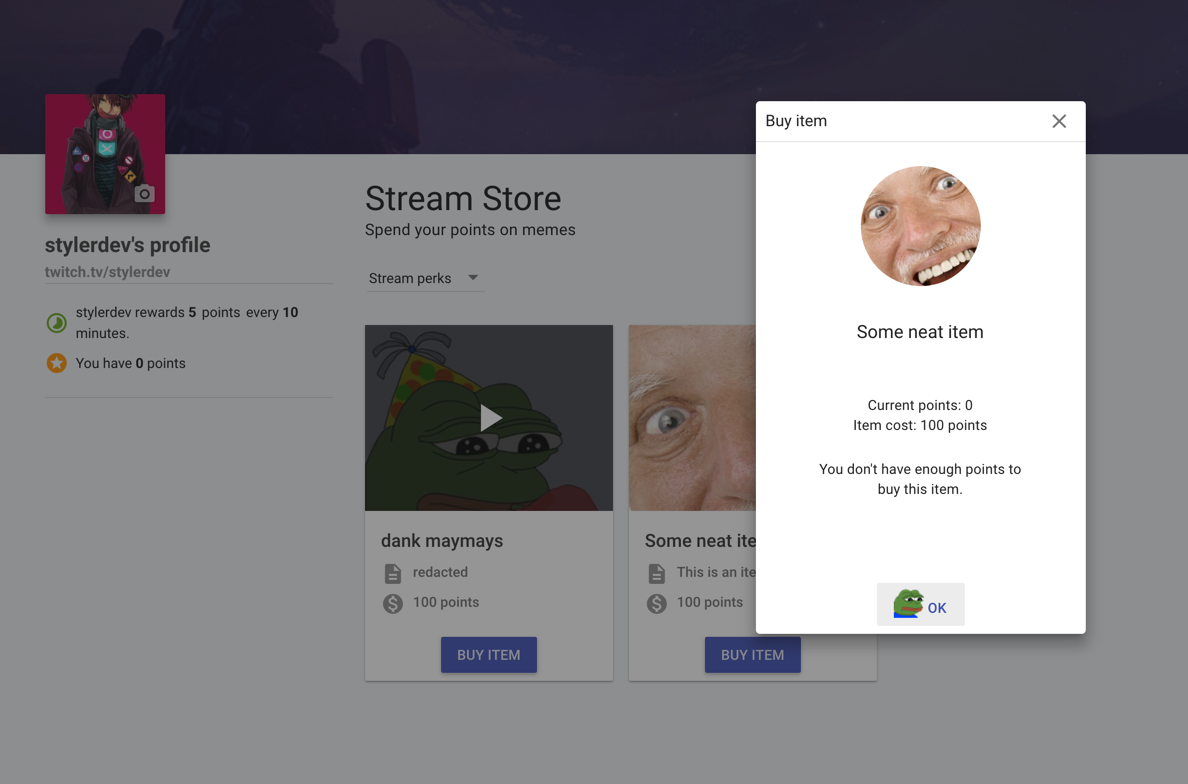
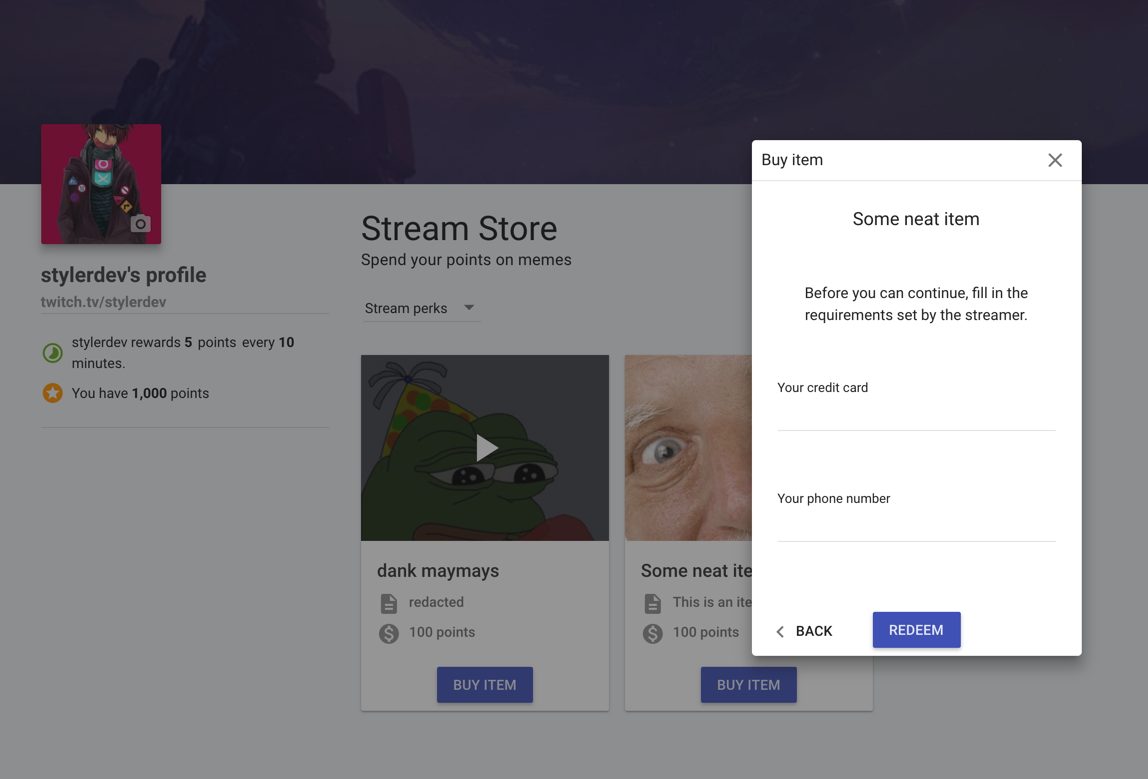 lone bridge
Cool. What will it look like on my end when ppl redeem it?
hollow zinc
lone bridge
That's cool. For the requirements can you set requirements of just text? For example if I want to use it to let people request a song or something, can I just write "song title - artist" and have them fill out a text field?
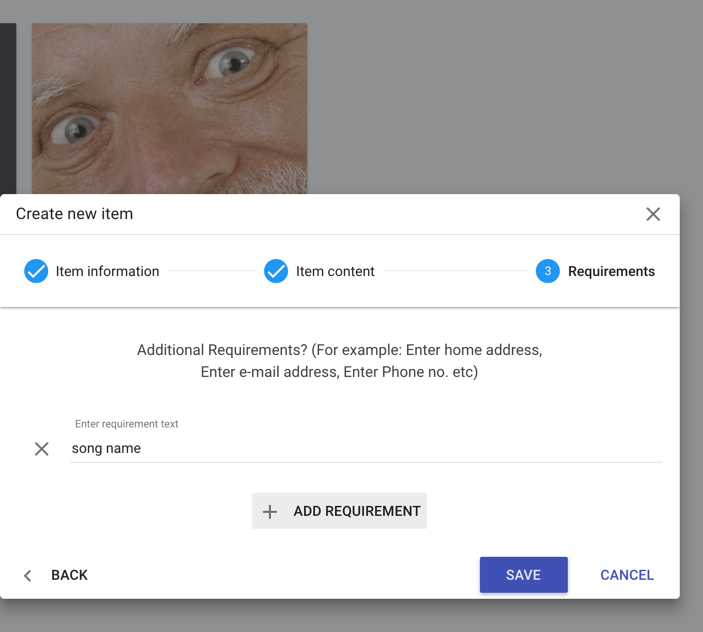 lone bridge
Sweet.
tawny pivot
Feedback is always highly appreciated 😉
lone bridge
Well this will def do the trick for song requests!
I still kinda hope we can figure out a way to do them outside of the store and without youtube, with some additional features like allow users to use points toward pushing a song to the front or vetoing or something. But obviously I'm just dreaming big.
Can you redeem via a command from chat?
lone bridge
Ah so they could do !Redeem <reward title> "song title - artist" and skip manually typing in fields?
and that would push to the store?
@oblique violet @upbeat rose ^
Or it would send a link in chat for them to fill out redemption on SE?
tawny pivot
You'll be able to redeem an item fully through chat
There's currently 1 limitation which requires you to be signed up
But it's an area we wanna put more effort into for sure
lone bridge
Gotcha.
For now i may just have to let folks who are non-sign ups add songs they'd "like" to hear (more like suggestions) to the embedded playlist cue. But with the precedent that I won't necessarily play them unless they utilize the store feature, in which case they need to sign up.
Really music strimmers would just benefit from a feature like Rhiow's music bot. It tells people when their song is coming up next, etc, and it also automatically detects if the requester is currently live in the chat so that you can make sure they don't miss their song.
But it's only Windows based
So lowly Mac users are still seeking a proper solution
tawny pivot
We might be able to create a mac version for you guys
lone bridge
That would be incredible. But for now with the store and playlist I can definitely get by
tawny pivot
😉
lone bridge
And what's great is that you guys are seriously taking feedback and addressing it, so I can def brag on that
Thanks dude.
 lusty wedge
😍
atomic hollow
Styler why you only help girls?
lone bridge


tawny pivot
 tawny pivot
I'll be there 
atomic hollow
Supporting the girls
 atomic hollow
Lolol
lone bridge
Yesss I'll be there too.
 upbeat rose
Omg I'm loving all these upcoming music features too! And Awww i wanna go to twitchcon soooooooooo badly
crisp snow
Hey, today I recived my new top donation but Top Donator widget won't change name and amount from previous one
lone bridge
Hello again-- anyway we can reset my all time leaderboard? Was playing w the bot before official "launch" and ppl already have accumulated an insane number of points 🤔 doesn't seem fair
If not ¯_(ツ)_/¯
proud pumice
@crisp snow there might be an issue with showing anonymous as all time top donor, we'll look into why its happening exactly.
you can hop on https://streamelements.com/dashboard/session
to make sure its all showing properly?
@lone bridge the ability to reset ALL points has already been created, we expect it to be available on the website tomorrow evening
lone bridge
Well hot damn 
proud pumice
whoop that was quick
go here
RESET LEADERBOARD
see it?
@lone bridge
we fast boiz

 lone bridge
Oh yeah, I did this yesterday. I was hoping I could reset the "all time"
People started racking up points before the bot officially "launched" so I was hoping I could scrape all the data and start everything from 0
the current worked 😃
it's no big deal, obviously it wouldn't be an "all time" leaderboard if you could just delete verything hahaha
 lean birch
Maybe a leaderboard from X date then 😉
then you can do all time, and milestones like, when you got partner or when you got 1000 follows etc
lone bridge
lean birch
should be just as easily to implement if they have a timestamp of each event that counts towards a "leaderboard" entry
crisp snow
Last tip displays correctly, top tip is empty
lament blade
erm, for some reason my chat won't update on stream but it updates in the overlay in my browser?


the first picture is a preview of my overlay and the 2nd one is the preview of my stream with the overlay active but the chat won't show any of the messages from my chat
proud pumice
@lament blade using obs Studio?
proud pumice
That's the issue. We suggest moving to studio since regular is buggy as hell
Regular hasn't been updated im 2 years and doesn't support our new technology
lament blade
but it does update the alerts and the alert box, just the chat stays like that
proud pumice
We've seen alerts not going through some since it doesn't keep a connection properly
It has very old clr browser version
lament blade
still, it has updated all alerts perfectly, just not a single chat line
and i've tested over 300 of each
makes no sence why it only updates 1 and not the other
proud pumice
I agree, but it's very hard for us to debug such an old unsupported version
lament blade
i see, updatetime it is then and see if that has the same problem or not
proud pumice
We can try. But can't promise we'll succeed
We can try. But can't promise we'll succeed
You can just install the new version without deleting the old
See that it works there
Tell me if the bug remains ok?
lament blade
will do
proud pumice
@crisp snow was the tip inserted manually to the list? Did you try adding it there?
crisp snow
No, it wasn't and i didn't. Another interesting thing - Top Donator doesn't display it but Top Donation does
proud pumice
That's a good catch
Adding it to urgent bug fixes
Top donation has the ability to show user amount and msg so you can use that for now yes?
You can remove unwanted vars
lament blade
@proud pumice it works fine on OBS studio and it didn't work when i manualy updated on regular OBS
lament blade
probably, still makes no sense at all
that 1 thing updates correctly but the other thing in the same CLR browser doesn't
proud pumice
Emulation will work since its us pushing it
Real events from twitch might fail
Old obs is ded geim
lament blade
it works, just doesn't work well with new stuff
crisp snow
@proud pumice Yeah, it works just fine with top donations widget and I'll use it for now
I'm so proud of myself finding a bug
proud pumice
Haha so am Ib @crisp snow
vague jungle
am I just being dumb or is there no way to rename layers on the overlay?
tawny pivot
No you're not dumb 😄 but that's a good idea 😉
 tulip dagger
Is there any way for viewers to look at songs in queue? (url would be enough)
tawny pivot
We wanna add the queue to the profile page
vague jungle
ah yes good intelligence is again validated thank you @tawny pivot!
also I'm finding it a bit difficult to get images to fit on the background? they like to stop just sort of the edge
tawny pivot
I got some experimental changes lined up so you can move images outside of the container
That'd solve those issues for sure 😃
vague jungle
awesome thanks again 😃
 vague jungle
hello me again soznotsoz is there a way to start a donation goal from a certain amount? want to move it over but I already have it part way done
tawny pivot
@vague jungle It'll be live in 2 minutes 😃
vague jungle
thanks @tawny pivot! really helping my exam procrastination!
vague jungle
@tawny pivot any way to make it so the gif size doesn't change when a donation message is bigger than normal? I just tried to make the alert box longer and that just distorted the gif
omg I hate you I hadn't saved the overlay yet




 vague jungle
it's okay I had only done like 2 things
but I was like oh wait where they go
they things do move off screen though so 👍
tawny pivot
Snapping should also be waaaay smoother
Should overall make positioning things easier 😉
vague jungle
it's not snapping?
proud pumice
snaps to eachother and small snap on the edges
lean birch
real time dev. I too like to live dangerously 😆
tawny pivot
proud pumice
yeah, got and try to get smth fast as things on streamlabs 
lean birch
it's ok, we all do it. Only Facebook and the other 1%'ers get offices devoted to dev, unit tests and QA 😆
vague jungle
it's snapping to others but not to the edge