#technology
1 messages · Page 290 of 1
 sullen blaze
 violet plank
np,helps sometimes
sullen blaze
Soooo
I have closed discord, bc. i remembered it was causing issues with Battlefront2, and it worked again (BattlefieldV) So now i hve started it again and it has the same issues again
Would it help to reinstal dc or origin?
 fallen harbor
ok try playing now with discord on
 rare parrot
Hi
fallen harbor
on both games?
rare parrot
How i can get permission on gaveaways server??
sullen blaze
on both games?
@fallen harbor Only on BattlefiledV
fallen harbor
are you in the game right now?
sullen blaze
Yes
fallen harbor
can you send me a screenshot of your graphic settings?
rare parrot
How i can get permission on gaveaways server??
@rare parrot any one can help ??
 hard wing

 plush valley
Aight so I’m running bf3 on a decent computer, it’s running at a native 80 FPS, but however, whenever I die, the game performance turns into absolute garbage, starts running at 30 FPS, why the hell is this happening
fallen harbor
w-what does native frame rate mean
 storm osprey
The default frame rate of your monitor. Like 60hz or 144hz
 oblique parcel
Can you play ps3 with ps4 controller?
 high ivy
Hey guy do you think i can run BFV on my surfacebook 2, he got : i7 Nvidia GTX 1050 2GB, 8GB RAM 🤔
 supple bane
eh, probably not a great experience
thats minimum spec
id guess 720p would be fine
!!specs
 silent oasisBOT
ℹ Battlefield V: System Requirements:
Refer to this image to know more about the minimum and recommended system requirements in order to play Battlefield V
https://cdn.discordapp.com/attachments/451791186642993152/509053395768705024/sys.png
 high ivy
ah yes it's just minimum system requirement lol
supple bane
what i7 is it?
high ivy
yes my surfacebook have a i7
supple bane
yes, but WHAT i7
high ivy
intel core
high ivy
ah crap okay
 prime jasper
uh
I wouldn't say your case is hopeless, I know plenty people who play daily with far worse spec CPU
supple bane
yeah its probably still possible. but its not performance i could play with
high ivy
i already play bfv on ps4, but i have this computer for working, and i was wondering if it could run bfv to try it on pc
supple bane
you will get better performance on ps4 than you would on that laptop almost certainly
prime jasper
however if you are a tech perfectionist and prone to not having fun with anything less than a 5000$ system then probably not
high ivy
no i'm not a tech perfectionist lol
prime jasper
just a word of advice, its absolutely fine to have fun on a system thats not 280fpz 4k res
supple bane
some people have different tolerances too. if you play on console you probably are used to playing games at 30fps. i get headaches/motion sickness from things at that low frame rate
prime jasper
I have been gaming since I got my amiga 500 console in 1991, to me anything above 3200 is fine for battlefield
high ivy
i know this pc isnt meant to for playing game for sure, but i heard this pc can good handle for playing game so that why i was wondering if it could run bfv (sry for bad english, i'm not eng)
supple bane
3200?
high ivy
i've installed the Geforce expercience and it's really helping to run game on my pc, i've try on fortnite an before and after, and there is really a difference
prime jasper
well when BFV first came out I was on an old GPU, I used to drop the resolution scale to 60% and the game became snappy, responsive and very playable, just looses a bit of resolution quality
high ivy
that cool, i think i will try it on my pc to so
prime jasper
awesome 👍
high ivy
thanks for those advise guy !! 😁
 strong breach
for a moment
i played BFV on a Intel Xeon E3-1231 V3
it was fineeee got about 80fps
violet plank

MacRumors
iPhone 12 dummy models based on leaked schematics have been starting to circulate online and in online marketplaces.
Not happy with the...
what did you wanna write @supple bane ? 

 violet plank
iirc you did tell me to get used to big phones 
supple bane
me
violet plank
lmao
violet plank
they are indeed,good pun
violet plank

supple bane
oh wait
nope, i think i did type
i hit space bar to pause netflix. but i had discord in the foreground i think
violet plank
hmm,good to know lol
supple bane
you asked lol
violet plank
so discord is good for stalking 
 violet plank

 iron canyon
2 monitors... those are rookie numbers
violet plank
still waiting for a 32" uhd 144hz monitor 
fallen harbor
would these two be able to do dual channel?
first one is 8gb 2133mhz
second one is 8gb 2666mhz
supple bane
yes. but the stick that is 2666mhz will clock down to 2133
fallen harbor
ic
ty
another question, anybody knows why the rx590 stopped being produced but rx570 and rx580 didnt?
supple bane
probably cuz it didnt sell as well
fallen harbor
makes sense to me
 digital hill
Another educated guess it was shit with drivers
just searching up rx 590 freezing got me so many results
fallen harbor
guise
an important question
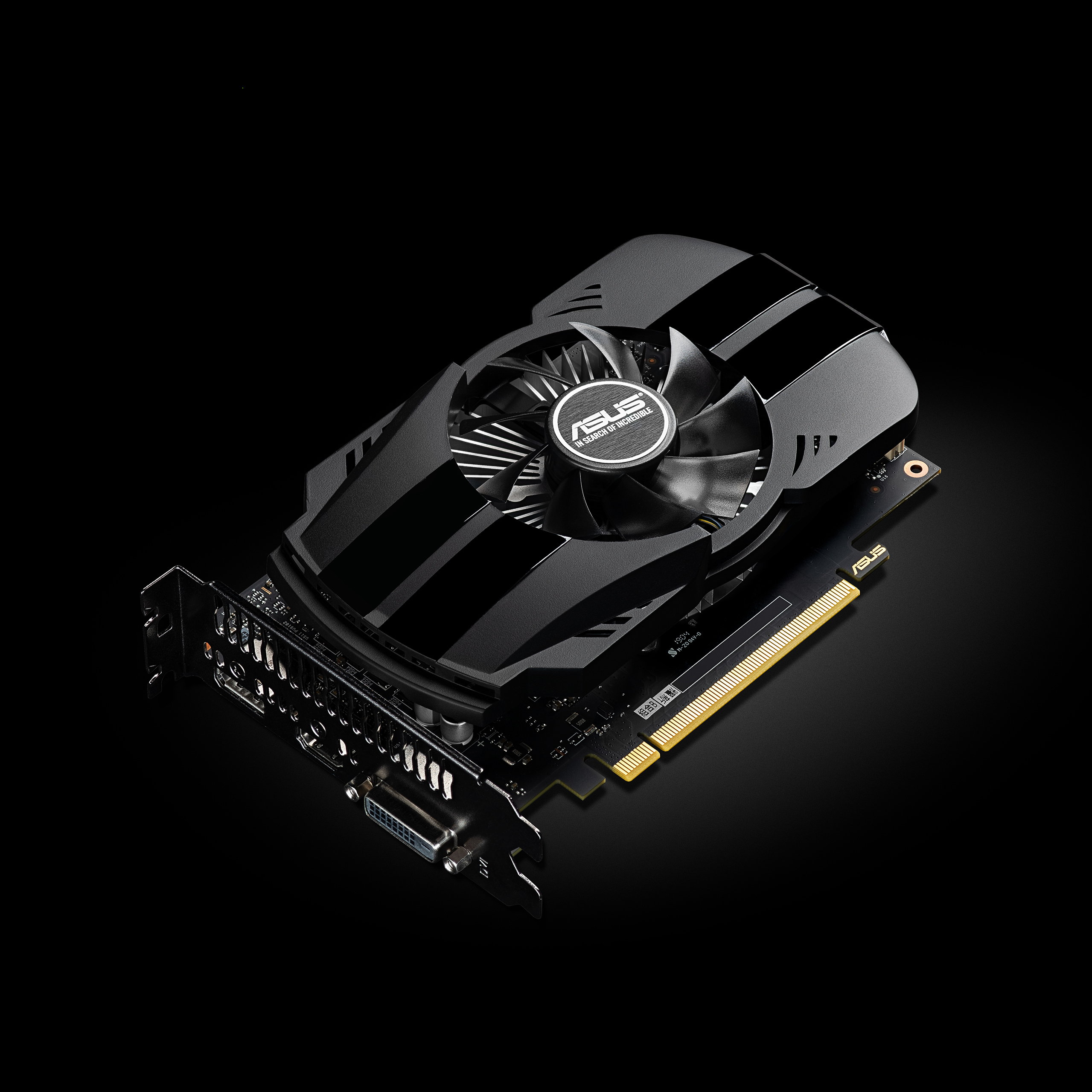
is there an official name to differentiate small gpus from big gpus? like the 1650 for example has a small and a big version
and i need to know if a seller has the small version specifically
like this
fallen harbor
nvm just found out its called gtx1650phoenix
do you think it would fit in an average office case?
my cousin is debating wether to buy an rx570 and a bigger case or use his old office case with a small gpu such as 1650 phoenix
 cloud geyser
I cant get my fucking game to not crash
every game i start is such a waste of time
and then i went to contact ea
and theyre not open rn
storm osprey
👆
@fallen harbor average office pc case varies a lot... generally speaking if it’s a standard macro atx mb and case any dual fan gpu will fit
storm osprey
If you can give a model that will help
fallen harbor
idk the model because he doesnt have it yet. His parents would give him their old case
i feel bad because i recommended him an rx570 and a proper case for it to fit but i couldve rather recommended him a small 1650 or small 1650super and not having to buy any case and he wouldve saved money
 fallen harbor
yikes
supple bane
its alright, i fixed it
its just really small now for some reason
see, you can barely even see it at the bottom lol
fallen harbor
looks like youre using a ridiculously high res to me
fallen harbor
asdf
fallen harbor
2004? what
 sinful mantle
I wish we could once again only install critical updates. I hate being force feed microsoft bloatware.
storm osprey
i just updated windows and now my task bar is white
@supple bane it’s because you’re a filthy light mode user and even windows knows.
supple bane
Mhm
A light mode user that doesnt use light mode?
Infact scroll up lol, a conversation that has nothing to do with light mode, I'm using dark mode in that screen shot
plush valley
Anyone know any program that can increase FPS for bf3?
fallen harbor
come on dont tell me you dont have any link to download more ram
btw anybody knows if the 1650 super phoenix (1 fan ver) requires 12v pins?
 orchid violet
anyone know why my game chat in bf4 isnt working?
fallen harbor
i am assuming you know you can hide and display it by pressing h?
 molten coral
fallen harbor
molten coral
fallen harbor
is this some kind of non-peasant joke i dont get?
digital hill
Brown rgb they'll make for it
 sand cove
D
 arctic dragon
do you guys play with rtx on or off?
storm osprey
i dont have rtx, but if i did i would only use it for singeplayer games
anything multiplayer i care about my performance more than how the game looks
 lofty light
Pretty much
I've got a 2080ti and still never used RTX
The performance is literally cut in half at the weakest level of it
 tall kindle
My friend wants to build a PC for 1200 USD, any suggestions for best parts?
lofty light
R5 3600
storm osprey
My friend wants to build a PC for 1200 USD, any suggestions for best parts?
@tall kindle
Answer those
 molten bramble
tall kindle
molten bramble
tall kindle
Yea, imma ask him
 latent light
Ryzen 7 4700G overclocked to 4.76 GHz on all cores at 1.425v
A 3700X/3800X can't even do 4.5 at that same voltage
supple bane

Check out the Kioxia CM6 V-Series SSD for your enterprise storage solution at https://lmg.gg/CM6
Use code LINUS and get 25% off GlassWire at https://lmg.gg/glasswire
AMD is launching new Ryzen 5, 7, and 9 processors with Zen 2 cores, but with a twist: The new XT chips are fa...
violet plank
gotta love linus
violet plank
the architecture is already hard on it's limits
gotta give intel credit for how they manage to push their 14++++ still
supple bane
can you explain the weird results tho
like why is the 3600x outperforming the 3900x?
violet plank
latest agesa fucked up my sound(card) completely,if they don't fix it i have to switch to intel....
guess longer and higher clocks ?
supple bane
honeslty i never knew the 3900x was crap at gaming
i thought it was amd's second fastest chip for gaming. but according to this. my cpu probably out performs it 
violet plank
seems a bit off tbh
 violet plank
i mean could be wrong ?
if you check all those reviews/tests the 3900x never falls off to the lower ones
supple bane
he cant have even put the 3900x and 3600x in the wrong places
cuz the 3800x is also outperforming the 3900x
he must have done something wrong with the setup
supple bane
i mean, what can i say. i did it the other week 
violet plank
maybe fixable via bios
supple bane
forgot to put my cpu cooler on i mean
violet plank
supple bane
r5 2600 will get to windows with no cooler btw, confirmed 
supple bane
if i hadnt left the cooler on my desk, i would have continued using it without realising tbh
violet plank
after that hard shutdown?
supple bane
tastiest cooling definitely
i also shit my self when my pc wouldnt post. inb4 i left the cpu power unplugged
im the worst at building pc's this desk pc has proved that
i had to assemble/disassemble my pc about 3 times. i made a mistake on each run
i can advise others on how to build computers all day. but when it comes to my own. i start to panic and stuffs
violet plank
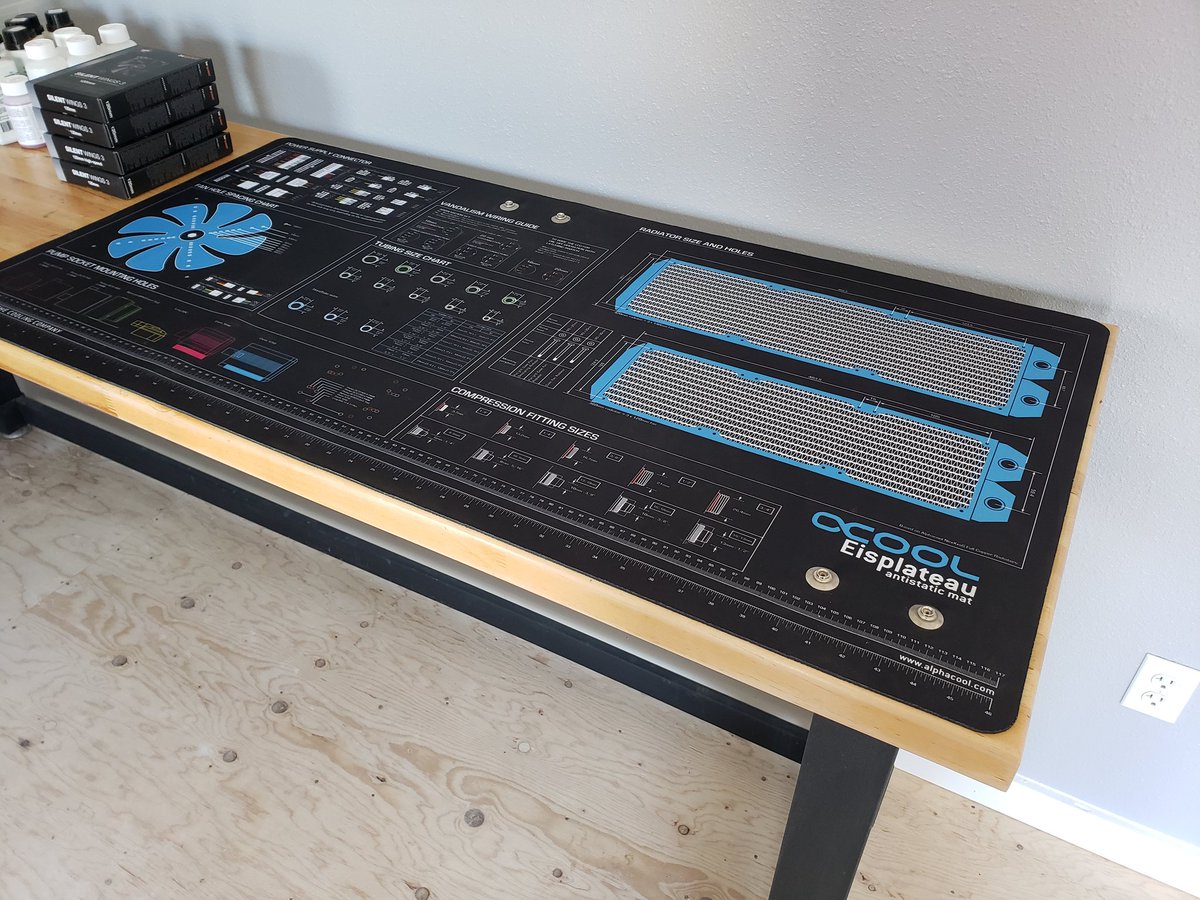
get yourself a partlist mat
so you won't forget anything ever again
some cardboard will do as well,just label everything with a pen
can be really helpful,like for custom loops
 violet plank

Clock Scaling and Thermals Gaming In Hitman 2, both the Ryzen 7 3700X and 3800X show similar boosting behavior. The residency is mostly identical here, with both chips seeing drops in similar positions. We decided to check the scaling graph for Assassins’ Creed Odyssey as it s...
those thermals,ouch
like amd doing the intel thingy lol
 verbal token
https://pbs.twimg.com/media/EXcgIQpUcAAG3dd.jpg
@violet plank what is that thing can u explain looks interesting
violet plank

Alphacool
Alphacool Eisplateau Anti-Statik Matte Ein sauberer Arbeitsplatz ist die Voraussetzung für ein erfolgreiches Arbeiten und ein gutes Ergebnis. Das Alphacool Eisplateau bietet dafür die Grundlage und alle wichtigen Maße und Daten sind...
@verbal token
bleh,might have to switch manually to english on top of the site
latent light

TechPowerUp
MSI President and CEO Sheng-Chang Chiang has died, he was 56. The Taiwanese press reports that he died from falling from a building, causing head injury, although the circumstances behind the fall are unknown and subject of a Police investigation. Sheng-Chang Chiang took over ...
digital hill
Damn
digital hill
Man the g29 is a good steering wheel with pedals
but for the crew something is weirdly going on
The throttle is opposite meaning when I push on it it lowers the speed not increases
Somehow I fixed it
 ashen ether
Anyone planning to get this one? Because I am planning for this. Also reviews?
P.S. dont tell me to get a pc and dont mind the storage mentioned in the pic
storm osprey
Pc > laptop
ashen ether
Everyone knows that
People have reasons for preferring a laptop over a pc
I also have my reasons
 opaque saddle
I think Linus tech tips has posted a new video of this laptop
I would say it doesn’t worth paying for 1650 but may worth considering paying for upgrade from anything weaker than 2060 but more powerful than 1650S
@ashen ether
Unless it’s a 400 bucks US difference...
 trail marsh
I like laptop over pc because I can bring it places easily
opaque saddle
When 1650 becomes a standard equip for low end budget product line up (currently it isn’t) then it’s time to buy gaming laptops.
lofty light
I mean I'm looking to get an egpu for my Mac
Play some games on the bootcamp partition
lofty light
Looking at the cheapest box I can get and a 480
It's a 13" laptop CPU so the CPU will still be the bottleneck
opaque saddle
Nah you will need to hook your laptop to your monitor
lofty light
Only with certain ways of doing it
I was googling and saw that stuff
But you can get around it
opaque saddle
Then you may get 60-70% of performance
lofty light
🤷♀️
lofty light
It's much cheaper than a gaming laptop and still good enough for my MMOs
Seeing as I'm driving around it's fine
opaque saddle
Get a cheap monitor
lofty light
3kg brick is better than my 20kg PC, monitor and peripherals
opaque saddle
And search, EXPGDC
On google
Cheapest possible solution
See if they have tb3 model
supple bane
sigh, i give up.... Can anyone help me pleaseeee. my gpu wont clock to what it should
memory is only reaching 6800mhz instead of 7000
ive done everything at this point. and im kinda lost
it also wont downclock at idle, it stays at pretty much full turbo the entire time
 oblique lion
Will this game take long to load on an HDD?
I got a 480gb ssd so i wanna
prioritize what games to install on it
molten coral
Battlefield games always take long to load when it's placed on a HDD in my experience.
oblique lion
Hmm... ok, Only got 200gb left on my SSD so i dont know what to install on that
I was gonna get a 1tb SSD later but im out of Sata ports...
My DVD thing is replaced with a disk aswelll
molten coral
I'm wondering if a sata port splitter exists and if that would work 
oblique lion
I learned about sata ports yesterday at a computer store hehe
It was dumb of me not getting a 1tb instead...
prime jasper

supple bane
@molten coral its point to point, so no. you cant
you would have to get a pcie sata card if you are out of ports
oblique lion
Ive heard of that
oblique lion
Such a bad decision of me 
supple bane

pcgamer
Chiang, 56, had been CEO of the Taiwanese company since early 2019.
oof
fell from the 7th floor of a building. not sure how that would happen. but sure
how can you just "fall off a building"
prime jasper
F
supple bane
im not buying it, he was either pushed or jumped. both really shitty but still
molten coral
im not buying it, he was either pushed or jumped. both really shitty but still
This 100%
violet plank
100TB SSD 40'000 $ 
Download PDF View Qualified Hardware Model Name ExaDrive DC Capacity 100 TB, 50 TB Flash Type eMLC Interface SATA-3 or SAS-2 6.0 Gbps interface Form Factor 3.5” / LFF Endurance Unlimited for 5 years Power 8 to 16 W IOps Up to 114,000/105,000 IOps reads/writes Throughput Up to ...
prime jasper
😳
prime jasper
^
molten coral
Got myself a logitech MX master 2S it's pretty poggers
storm osprey
@oblique lion in my experience bfv load just fine on HDD, im usually in a match right before it starts, on ssd im waiting for 20-30 seconds
storm osprey
ewwwwwwww
supple bane
thats like one of the highest rated mice iirc right?
storm osprey
its a highly recommended production mouse, like video editing, cad, etc
its another brick though
supple bane
it reminds me of the g502 alot tbh
latent light

TechPowerUp
Here is the first picture of the Ryzen Threadripper PRO 3995WX processor, designed to be part of AMD's HEDT/workstation processor launch for this year. The picture surfaced briefly on the ChipHell forums, before being picked up by HXL (@9550pro) This processor is designed to c...
8-channel threadripper is coming
😳
storm osprey
i just care about 4600...
latent light
It can handle 2TB of ECC RAM
"To enable its 8-channel memory, the processor could come with a new socket, likely the sWRX8, and AMD WRX80 chipset, although it wouldn't surprise us if these processors have some form of inter-compatibility with sTRX4 and TRX40 (at limited memory bandwidth and PCIe capabilities, of course)."
storm osprey
@ashen ether
i have a laptop discord you might want to visit
i can dm you if you want the link (cant post here)
latent light
Seems like Ryzen 4000 laptops are the clear choice now
latent light
So Ryzen 3000XT does not use the same silicon chips as Ryzen 3000/3000X
 mild bough
yes
fallen harbor
anybody knows if the n68 vs3 fx motherboard is compatible with the latest nvidia drivers? I an planning to put a 1650 super on it
latent light
@fallen harbor that's an AM3+ socket motherboard with Nvidia integrated graphics btw
Weird
Of course you can put a 1650 Super on it
fallen harbor
ive just seen a forum thread of a guy saying he couldnt make is 1650 super work on it because the motherboard was too old and it was a model from 2011 i think
and afaik the n68 vs3 fx mobo is from around that time as well
the guy said the screen goes black after installing the drivers
so i wondered if my mobo could have that same problem
latent light
Defective card
fallen harbor
oic
is it worth it to get a 1660 super for an FX6300?
or would it bottleneck badly?
digital hill
Good question maybe bottleneck
opaque saddle
It certainly does...
opaque saddle
In gaming? It’s a par
Productivity wise, 3600 is more powerful
If you have limited budget, go for Ryzen
fallen harbor
ic ty
storm osprey
For gaming 10400 will generally be better, though the price difference is probably in Ryzens favor
And when I say better I mean maybe 5-10 FPS more.
latent light
Ryzen 3600 is also on the AM4 socket which means you'll be able to upgrade to the 4000 series which is going to be a significant upgrade
 latent light
Ryzen 4000 has an entirely new architecture built from the ground up. Huge reduction in latency for inter-core communication, cache, and memory. 8 cores per CCX instead of 4. Expecting at least a 20% increase in single core performance.
Also for Intel 10th gen, you have to buy a Z490 motherboard to run your RAM above 2933 MHz
B460 and H470 will only run memory at 2666 for i5 and 2933 for i7/i9
No point in buying that crap
fallen harbor
People still buying Intel these days
i got i5 8400 a year ago and ever since then i havent stopped listening to people talk about how the ryzen 5 3600 is a better option
all of the sad
btw
anybody knows how to check the specs of my drives?
idk how to complete this
opaque saddle
Unless it’s equipped with 3200mhz RAM. Then the 10400 shall be 5% faster than 3600
Otherwise it’s either a par or slower than 3600
In gaming according to gaming benchmark
latent light
You need a $200 Z490 motherboard to run 3200 MHz RAM on any Intel 10th gen CPU btw
digital hill
2666mhz jeez its crap
opaque saddle
As stated, Ryzen will be a better option delivering greater value with the price
fallen harbor
lol
digital hill
I have a 125 dollar b450 board and can run 3000mhz ram on it
latent light
All Ryzen motherboards can do 3600 MHz memory easily, it all depends on IMC of the CPU
digital hill
My ram is 3000mhz not 3600mhz which becomes an oc
opaque saddle
My friend was trying to get a 10700k but I told him to go for Ryzen 7 3700x instead
He ended up paying the price of 10700k but top of the range X570 board with 3700x
latent light
The 8-core i7-10700K at stock consumes more power than a 16-core Ryzen 9 3950X
That means higher temps too
opaque saddle
He wanted to go for 3900x tho
digital hill
Any reason he needed those cores?
opaque saddle
I asked him what’s the point of going for 3900x if he wanted purely for gaming
opaque saddle
I got x570 coz the top of the line b450 cost 20 bucks less
latent light
3600 is the best all-around CPU for performance per dollar
It will run games smooth for the next 5 years at least
digital hill
I mean if he has the price of that maybe a 3600 would have been better
opaque saddle
At least it runs smoother than his 7700k
latent light
3600 will only be like $120 when the 4600 comes out lmao
opaque saddle
It’s another story when 4600 came out
digital hill
The biggest story is it any good
opaque saddle
Let’s postpone it and talk about it when it released lmao
latent light
7700K should still play any game fine
opaque saddle
7700K kinda bad after those patches
144hz at 1440p tho
His PC couldn’t get a stable 120fps after the patches
latent light
That's the game itself imo
opaque saddle
In apex
digital hill
The cpu patches?
digital hill
Ah
latent light
My friend plays Apex with a i5-7400 and it seems to run fine
digital hill
Maybe his pc isn't up to date?
digital hill
Did he try the software that removes those patches
digital hill
Well he could still get a couple more years outta that
opaque saddle
Nah I told him either get 8 core Ryzen or i9
digital hill
if he removes them which tutorial online could be found less then a few seconds of going on youtube and searching disable intel patches on windows 10
opaque saddle
I don’t think he wanted to deal with those patches anymore
digital hill
Ah
opaque saddle
Coz you can spend heaps of time getting something or nothing but broke your PC
He doesn’t have the luck to do so
digital hill
Ah
opaque saddle
Well he has the money and money kinda solve problems
 wary forum
fallen harbor
wary forum
fallen harbor
youre lucky 1050 consumes little
 peak storm
Gtx 1050 ti really handles battlefield on 30 FPS 😔
 ashen flax
well
mmm
im ont gt 730
and give me
mmm
50+ fps on bfv
800x600 res quiet fine
 sand phoenix
lol
ashen ether
lofty light
Lol
violet plank
looks like a legit intel chart 
hmm lol,waste of silicon,that sums it up perfectly

AMD's Ryzen 7 3800XT CPU benchmarked vs. the R9 3900X, R5 3600XT, 3700X, and Intel CPUs. Questionable use of sand, here.
Get the X570 Chipset Metro poster: https://store.gamersnexus.net/products/x570-chipset-metro-station-poster-18-x-24
Watch our AMD R5 3600XT review & overcl...
latent light

The next-generation Rocket Lake-S vPRO processors. Intel Core i7 with 12-threads? We received quite an interesting photograph from a reliable source. The picture showcases performance tiers for the upcoming desktop Rocket Lake architecture featuring up to 8 cores and 16 thread...
8 cores with 12 threads
That means 2 cores don't have hyperthreading

 molten coral
 glossy plinth
LMAO
supple bane

Thanks to Samsung for sponsoring today's video! Check out the Odyssey G9 Monitor at https://bit.ly/3f6zvV3 or the rest of the Odyssey Line Up at https://bit.ly/38ym11E
The Samsung G9 Odyssey is something exciting, and currently, nothing comes anywhere close to the performance...
That fucking curve tho
Daymn
supple bane
I mean, it might be expensive now 
Ssds used to cost hundreds for less than 100 GB, so give it ten years and I'll have that for 400 bucks 
Also side note, that "gigantic mouse pad" is the mouse pad I use 
My cheapo amazon mouse pad that I have used so much the matt finish around the mouse area has been worn down so its shiny
molten coral
I also use a mousepad like that
It's nice
I need a new one though the edges are getting loose
supple bane

currys
Quad HD 2560 x 1440p; Response time: 4 ms; Input: HDMI / DisplayPort; Can be wall mounted
Damn, the price of my monitor went down another 100 pounds
250 pounds for 1440p 144hz
storm osprey
these are incredible and yet confusing times
 sacred horizon
digital hill
sacred horizon
digital hill
At what resolution
fallen harbor
also what cpu
glossy plinth
threadripper
ashen ether
Hello, how can I use the microphone in a headset if the laptop doesnt have a mic input?
 craggy rock
what laptop are you using?
supple bane
@ashen ether a lot of laptops have a combo port. mic and audio on one jack
so yes, i assume you can. would be a really shitty laptop if you couldnt use an external microphone
ashen ether
@supple bane yea, i know about laptops that has mic and audio combo but what if the headset itself has green and pink male plug
supple bane
usually the headset is a single 3.5mm jack and it goes into a Y splitter
if it doesnt have that removeable splitter then you can probably buy one for next to nothing
ashen ether
I googled this. Will this not reduce the quality of both audio and mic tho?
supple bane
i assume not
it should be just a direct copper line from the headset side to the computer side
quality would only be decreased if it passed through some form of chip to be processed
ashen ether
thanks mate. I might get one of these
 wild parrot
GUYS THIS IS VERY SERIOUS!
I LOADED IN BF1 AND TRIED YO PLAY IN CAPPORETO AND I COULD BECAUSE A MESSAGE WAS APPEARED WHICH SAID "COULDN'T CONNECT TO SERVER BECAUSE THE SERVER IS RUNNING STAFF THAT YOU DON'T OWN. GO TO STORE". I WEMT TO THE STORE TO BUY THE STAFF THAT I " DIDN'T HAVE" AND IT SAID THAT I OWN THE PRENIUM PASS. I WENT TO THEENU AND UNDER THE RANK CYCLE THERE WAS SAID "PRENIUM PASS". IN CONCLUSION, I HAVE THE PRENIUM PASS BUT I CAN'T PLAY IN DLC MAPS. CAN ANYONE HELP ME FIX THIS PLEASE?!?!?!?
supple bane
!!support
silent oasisBOT
ℹ Contacting Battlefield Support
If you need to contact the Battlefield Support team for questions you might have, crashing in game and or server issues head over to
https://help.ea.com/en/battlefield/battlefield-v/
ℹ Contacting EA Support
If you need to contact EA support about account issues, billing issues etc head over to
https://help.ea.com/en/
If you need help in this Discord server you can send a Direct Message to our ModMail bot!
violet plank
why do all good monitors have to be fucking curved 
ashen ether
What's wrong with curved
violet plank
it sucks for photo/video editing
glossy plinth
my monitor is pretty good and it isnt curved
mild bough
@violet plank have you still blocked me
glossy plinth
my monitor is pretty good and it isnt curved
latent light
storm osprey
a better speced laptop could perform as well as a lower speced pc because of using mobile components and thermal throttling
supple bane
the argument that desktops are better than laptops arent specs. its about everything else
 median elm
My laptop thermal throttles every time i play either indie games or triple a titles
Getting me a cooling pad and hopefully it relieves my cpu
supple bane
better upgradeability, quieter, cheaper etc
opaque saddle
Lmao how many times do I have to see this pic
Gaming Laptop: Portable but compensated performance.
Gaming Desktop: Performance but compensated Portability
storm osprey
because people dont know
opaque saddle
Shall put that on to a command or something
Like !!computer
Then show up the recommended PC built with X amount of budget. Laptop or desktop
Lmao
storm osprey
sadly that constantly changes
molten coral
!!build
silent oasisBOT
- What's your budget/currency and country of purchase? Any preferred physical/online shops?
- Gaming? Streaming? What's your resolution/FPS targets? What games are you playing?
- Not gaming or professional/hobby use cases? What are the applications you will use and workload involved? Kindly elaborate as much as possible.
- What else do you need to buy? (monitor, keyboard, mouse, headset, speakers, Windows, WiFi)
- Anything else you want to tell us? RGB, Small Form Factor, already have a part list? Tell us!
- If you have a build list and are looking for a second opinion or are upgrading an existing system, please have a PCPartPicker permalink for it (https://pcpartpicker.com/list)
molten coral
nice
storm osprey
ooooo
opaque saddle
Lmao
molten coral
Should I keep this tag or do another one?
opaque saddle
Keep it and do another one
Coz people asking which one should I get? Laptop or desktop
!!desktoporlaptop
Lmao
Or maybe !!recommendedpc
molten coral

median elm

storm osprey
!!getadesktop
Bot: yea, pretty much
prime jasper
Pog
 pallid haven
E
 olive warren
O
 tough latch
Question peeps
are any of my battlefield games on origin able to be loaded on steam client?
or am I stuck to origin?
Would be nice to have BF from my Origin library loaded onto my Steam library
opaque saddle
it works but you will have to open up both origin and steam clients to launch the game tho
digital hill
Yes but derek said the problems
peak storm
Gtx 1050 ti = 35 fps on medium graphics
fallen harbor
anybody knows whats limit of ram mhz the i3 6100 can afford?
 valid lodge
Please help, Battlefield 1 has been running at an unplayable 2 FPS framerate recently, I have and RX 570, I used to be able to run the game at 60 FPS on multiplayer the first weeks I had it.
What do I do?
It’s impossible to play, but when I go on campaign I get an instant 100 FPS.
fallen harbor
no idea tbh sounds weird as heck
valid lodge
This wasn’t happening before, I do have a AMD Fx 6300, but this didn’t use to happen.
16GB of RAM
fallen harbor
did this start to happen right after an update?
are you sure the game has DX12 disabled? because an update might have enabled it automatically
check all your graphic settings again
valid lodge
It’s disabled.
fallen harbor
the FX-6300 is old and it might be very incompatible with something new
valid lodge
It started happening around the time the game came out on Steam.
fallen harbor
it's very weird that it happens only on multiplayer
valid lodge
It’s happening for my friends too, and he has an i5.
fallen harbor
i see
valid lodge
We are on origin.
fallen harbor
tried disabling origin in-game overlay?
valid lodge
It’s disabled.
glossy plinth
gpu update!
valid lodge
But my GPU is younger than this game.
It can run it at ultra.
It’s just multiplayer.
tough latch
it works but you will have to open up both origin and steam clients to launch the game tho
@opaque saddle That's hella weird - thanks for clarifying that 👍
opaque saddle
@tough latch personally I do not recommend doing it, the game became less stable running both launchers
No worries
tough latch
Wasn't going to attempt and scrapped the idea 😆
thought there would of been a smooth transition to include BF in the steam library from Origin
Will just stick to Origin
It's just quite the ballache these days with all the launch clients
as if steam alone wasn't a ballache enough for the past decade 😆
opaque saddle
Nah business decisions
Steam takes an amount of money out of the game devs. And EA has origin at the time. But it’s always nice to see more people playing the same titles and didn’t mind paying a bit extra
tough latch
completely forgot about that business aspect
would have been nice just to have a clean game install rather than have to load it up through a client though
latent light
3600 chips are selling so well that they run out of the official boxes and started using other ones
that's a 3200G box
opaque saddle
Well nice to see AMD competing with intel. More competitions always be better for both consumers and businesses
fallen harbor
anybody knows at what point the i5 6400 bottlenecks?
whats the best gpu it can take 100% advantage of?
fallen harbor
how much do people usually sell second hand gtx1080 for?
supple bane
300-400 pounds
fallen harbor
ic
do you think an i5 8400 would bottleneck a gtx1080?
im using a bottleneck calculator but it says there's a bottleneck of 12.97% between i5 8400 and rtx2060 when it also says there's no bottleneck issues between i5 8400 and gtx1080 which confuses me since the gtx1080 is stronger
i want to know what the sweet spot is for my i5 8400
its currently paired with an rx590 and i know it can afford a stronger one so im thinking of what i should upgrade it into, without going too far to the point it bottlenecks
supple bane
id say an i5 8400 can handle a 1080
in fact i know it can, i have a ryzen 5 2600 which is slightly weaker than the 8400 in games and i have it paired with an rtx 2070
which is slightly faster than a 1080
fallen harbor
and there's no bottleneck?
this site for instance says there's 19.06% bottleneck between i5-8400 and rtx2070
opaque saddle
dont trust those sites
fallen harbor
i am assuming there's some type of relativity to be taken and that i am ignoring
opaque saddle
you have to remember it's gonna be a curve
fallen harbor
dont trust those sites
if i dont trust google then who!!
opaque saddle
gaming fps benchmarks
fallen harbor
opaque saddle
you have to remember jumping from GPU A to GPU B may get 10% fps improvement, but you may ended up paying 43% more
fallen harbor
every game here uses up to approx 70% of the cpu
you have to remember jumping from GPU A to GPU B may get 10% fps improvement, but you may ended up paying 43% more
i know i know
but i think i might be getting an used gtx1080 for a very cheap price
plus i am curious
opaque saddle
hmmm
fallen harbor
my sisters also have an i3-6100 with 750ti and an i7-3770 with an r9-380 and i am almost sure those cpus could use better gpus as well
the priority being the first one becuaase the 750ti is struggling a lot already nowadays
opaque saddle
so i would say, the 8400 can go up to 2080Ti and still gains fps over 2080
fallen harbor
also i wouldnt have gotten an i5 8400 if i wasnt willing to spend on a gpu that would use it to its limit. It was a poor decision
i was just ignorant
opaque saddle
i guess it depends on your budget mate
fallen harbor
i deffo cannot afford high end gpus
opaque saddle
yeah i know
i mean what you should think of, is what GPU can you get with your budget
rather than "whether the gpu i picked will caused bottlenecking"
fallen harbor
yeah thats what i mean. If I initially thought id never get anything stronger than something like a 1660super then i probably shouldnt have gotten a i5 8400 since i will never fully optimize its use with a 1660super
opaque saddle
dont get me wrong, the 8400 is still powerful than the quad core i7
fallen harbor
i know, and thats the problem. I might have gotten something stronger than I needed
fallen harbor
yeah but do you get my point tho
if 1660s was the end and definitive target then i shouldve gotten a cheaper cpu
supple bane
the game in question also has a big impact on if a cpu will bottleneck a gpu
opaque saddle
it's gonna be a curve anyway
supple bane
for example in BFV my cpu does bottleneck. but its only in bfv
ark for example, my gpu will sit at 100% and my cpu around 25%
opaque saddle
i dont think your cpu matter
fallen harbor
yeah but arent the very demanding cpu games an exception overall?
supple bane
yes
fallen harbor
i should have probably gotten something like an i3 9100 instead
and the performance shouldve been the same since i will never get a high end gpu
not the same on very demanding cpu games but thats something id be willing to give anyway
i just spent too much
on a cpu i will never fully take advantage of
opaque saddle
at least you went for 8400 which gives you more stable fps
fallen harbor
im sad
supple bane
i too am sad at computer hardware lol. i brought a damn nvidia card over an amd card BeCaUsE ThEy ArE MoRe ReLiAbLe, like get lost. all i have had with this damn card is issues lol
fallen harbor
which one and why?
supple bane
ive spent 2 weeks now trying to diagnose a clock issue.
im putting together a little video that better explains it than what i can. ill share it here shortly
opaque saddle
if you got a cpu that is a bit more expensive, you get solid fps in game.
or
you got a cpu that is cheaper, the cpu is struggling to get solid 60fps in game
which one is more enjoyable?
supple bane
long story short. every time i turn my computer on i have to reinstall the drivers for my card to clock correctly
which is a joke tbh
fallen harbor
wtf?
opaque saddle
i think that could be windows issues...
similar thing happened to me before
my old system installs older GPU drivers at start up which causes major issues in the system
supple bane
if i dont. my gpu wont downclock. it will sit at 1400mhz core and 6800mhz memory. and in games memory wont reach the full 7000mhz and rather stick to 6800mhz
once i reinstall the drivers, it downclocks like normal. and in games the memory reaches 7000mhz
like i said, i have a video soon that will better explain thatt
@opaque saddle wait, maybe i should try boot up with my internet off?
opaque saddle
safe mode with internet (not command lines option)
uninstall GPU driver completely
then do not connect to wifi after you restarted your PC (unplug your cable/switch off wifi router)
supple bane
when you say uninstall gpu driver completely, is this with DDU? or just through windows?
opaque saddle
not DDU, not exactly
through windows. coz DDU may not work in some cases
you will need two PC tho
supple bane
how come?
opaque saddle
coz you will have to install the driver (exe file) from another PC. then copy the driver to an USB
supple bane
right
opaque saddle
switch on your PC with the issue WITHOUT WIFI. copy and install the driver then it should work
coz what happened was, my GPU was getting 0mhz ONE min after i booted up my PC
i quickly realised it is an issue under windows update, where it automatically install an older, broken drivers for me without checking Whether i have a newer GPU driver
supple bane
the issue im getting really doesn't effect me that much. the card still works fine with the "issue" its just im missing out on 200mhz memory
opaque saddle
Same thing happened to my friend recently and he went through my way and it got solved right away
^ i meant 0mhz
supple bane
and cuz im not downclocking at idle, i probably am using slightly more power. but i cant imagine it being much and i have adequate cooling
supple bane
AMD
opaque saddle
i meant... do you have any software that manipulated the GPU as the side effects
like OC software... helping you to auto OC whatever
supple bane
yeah i have msi afterburner
opaque saddle
what profile is it
supple bane
but i know its not that as the same issue happens with it uninstalled
supple bane
no, its gigabyte
opaque saddle
have you uninstalled it?
opaque saddle
have you tried to boost it up a fresh windows system
if it didnt get solved, that will be GPU issues
supple bane
well i have thought about putting it in my spare pc and see if it happens there too
opaque saddle
why dont you install a Second windows 10 on your SSD or hdd
coz if something/some software have messed up your main win10 system, you can just go back to the 2nd "clean" windows 10 system, then solve it from there, and get your main win10 working ASAP
supple bane
im gonna try a restart with no internet. just to make sure windows isnt installing some stupid driver upon boot
opaque saddle
well delete the driver from Safe mode before doing it tho
coz im sure it will install the "stupid" driver for you after your internet is connected
and... dont forget to clean the windows update cache files
supple bane
yeah thats fine. im not doing this as a fix. rather a diagnostic
if i restart with no internet and its fine. then put the ethernet cable in, restart and it goes kapoot again. i know what it is and i cant take further steps sort of thing
supple bane
and if i restart now with no ethernet cable in. and the issue is back. ik its not a windows update
and can move on
ok then, brb
opaque saddle
i think you might not get this...
assumably, your PC has downloaded the older GPU driver, and stuck at 98% or 99% in the progress bar
when you switched on your PC and connected to internet. windows update client will resume the download progress. as soon as it finished the download, it will install it for you automatically
this is case of a corrupted windows update
supple bane
well i did recently update windows to 2004
but i did that a couple days AFTER this all started
so it cant be that
opaque saddle
and... please do ONE thing
go to windows update without internet after you booted up your PC
see whether windows update is trying to install an older/current GPU drivers for you
supple bane
and how would i do that ?
supple bane
mhm
opaque saddle
restart your PC
supple bane
yup
opaque saddle
click on windows button, type in "windows update"
left click on "window update" from the task bar
it should tell you whether the PC is installing/downloading the "updates" for you
supple bane
ok ill do that now.
opaque saddle
if you cannot see anything, but after you "plug in" your Ethernet cable.
you may see the keywords like, "Nvidia" from the list
supple bane
Just booting up now
That's with no internet
And the clock speeds have gone wonky
opaque saddle
what about with internet
opaque saddle
then can you please connect it to internet. see if windows is installing the driver for oyu
you
opaque saddle
what about the GPU clock speed?
supple bane
What about it?
opaque saddle
coz it takes a few mins to see differences
opaque saddle
weird
then i guess you have to test it on different systems
you can live with it if you think it doesnt bothered you too much
supple bane
Like I said, the main two issues are that at idle it doesnt clock down fully and under load it only reaches 6800mhz on memory when it should reach 7000
The not not clocking down just means it runs hotter idle I guess, which isnt a problem. And I can overclock an extra 200mgz on memory to take it back where it should be
Its just really annoying. I cant work out what's causing it
supple bane
I have another system but it only has a 400w psu
And I'm not sure if putting a 2070 on a cheap psu is a good idea
Would you say the symptoms I'm getting are dangerous ?
Ie is it running at higher clocks at idle bad for the card in any meaning full way?
Cuz if not I'll just live with it until gigabyte gets back to me
Ok @opaque saddle I just noticed something
Its sitting at 10% usage
(Its hot cuz I have fans on 0rpm)
It also isnt showing up on that page
opaque saddle
Did you make any changes under Afterburner
supple bane
Wdym?
opaque saddle
Or the fans are simply not working
opaque saddle
Wait up I have to reply you one by one
And I'm not sure if putting a 2070 on a cheap psu is a good idea
absolutely not safe, coz it may blow up in a min, you can try but strongly not recommended
Ie is it running at higher clocks at idle bad for the card in any meaning full way?
It doesn’t really matter but it will not last as long. I have to say tho, depends on the QC, not every single GPUs are manufactured the same, one will be more powerful than others, or using more power to get “X amount of mhz”; or some cards may die during warranty period
Its sitting at 10% usage
Sometimes it doesn’t really mean everything. Unless it’s clocked at really low clock speed, then open up Xbox app or epic launcher will use “a few %” of your GPU, for either download or to browse with their browsers “client”
supple bane
Wait a second. Let me explain
opaque saddle
It can be running at 405mhz but it shows you it has been using 15% usage
supple bane
It only sits like that before I update the drivers
It is sitting 10% usage without change. And had been for 5 minutes now. But as soon as I updated the drivers again it went back to 0
opaque saddle
Hmmm why don’t you test it with another system...
Just saying. Coz you may know how to solve it after you have tested on it. Remember to use your PSU from your main PC
supple bane
Yeah that's gonna be a no go I'm afraid
opaque saddle
I do not know exactly how to solve PC problems over the internet. Coz I usually test it with a clean windows 10
This is how I solved many issues from my friends’ PCs
Coz you can narrow down your assumptions
supple bane
Reinstalling windows might be my next step tbh
opaque saddle
Nah you don’t need to
Create another disk partitions and install another windows on to the new one
Then you can test it out there
If it doesn’t work, that will be a hardware issue
But if it works, you just need to bring your data from the corrupted OS drive (my documents) to the new OS
Then to wipe the corrupted one (make sure you have installed the EFI files on to the “new partition” first)
supple bane
I'd rather just install windows again tbh, just in my mind is cleaner, rather than having two installs to one drive
opaque saddle
Well this is installation, not “reinstallation”
supple bane
I dont have anything important on my pc lol, just games and memes
opaque saddle
Well up to you, hopefully it will be solved on the new OS
and yeah that was the only issue that I have faced, 5 years after i built the PC.
supple bane
Just noticed, if I put the pc to sleep instead of shutting it down
It's fine when I get back to desktop
So I'm just going to reinstall the drivers in geforce experience, and then just have my pc sleep instead of shutting it down for the next little bit while I chat with gigabyte
 smoky drum
Anyone know a fix? everytime i play BF5 like almost in the middle of the match i crash
supple bane
@opaque saddle sorry to bother you again, but i thought i should update you
pretty sure i have fixed it now btw. i had tried everything i could in my pc. and i knew the next step was trying the graphics card on another windows install. but the only pc i could do that in had a cheap psu and i didnt feel comfortable putting my baby on that, so i had the big brain moment of instead of taking the graphics card to the windows install, bring the windows install to my graphics card. Took the ssd out my dads pc. put it in mine and boom, i can restart it all i want and i dont get the weird clock issues
on MY ssd, every restart or shutdown or what ever. after coming back to the desktop my gpu would be clocking wonky. so im 99.9% sure i just need to reinstall windows 👍 Thanks for the help man!
opaque saddle
@supple bane no worries... i forgot to switch on do not disturb
supple bane
sorry. i guess its late for you
supple bane
oof, ill shut up now. gn
 plucky violet
Hello, does anyone know anything about good headsets?
supple bane
budget?
plucky violet
80-100 dollars
supple bane
well, i would say get a condenser microphone and a pair of headphones
fifine k669b... for 40 bucks is insane. i have recommended it to 6 people now and all have loved it to death. in terms of the headphones. hyper x cloud stingers are pretty good and will fill the budget nicely
plucky violet
I dont care about mic too much
just a good headset
I was looking at some corsair ones
but idk
supple bane
the ROG delta gets decent reviews
and i have some experience with them. they are very well built and comfortable
plucky violet
They're 180 dollars
supple bane
lul wut
plucky violet
I was looking at corsair void pro rgb usb
supple bane
they are uncomfortable from what ive heard
the fabric on the earcups is irritating apparently
plucky violet
How about hyperx cloud stinger core?
supple bane
also supposedly quite good
plucky violet
Last thing I looked at was razer kraken TE
storm osprey
Headphones > gaming headsets
fallen harbor
guise i have an old dead laptop and i wanna know if its possible to use the screen somehow on a desktop pc
anybody has any idea about it?
latent light
Linus: "I hope AVX512 dies a painful death, and that Intel starts fixing real problems instead of trying to create magic instructions to then create benchmarks that they can look good on."
savage
glossy plinth
lmao
 jaunty fable
@fallen harbor Worst solution I can give is just plug a video cable between the two pc's and then on the pc you use hit Windows key + P
Does anyone have any knowledge of where I could buy pc parts at a non-bs price that might ship to Latvia?
 latent light
3700X will drop less than 4600 pricing when it comes out
Which is just a few months away
prime jasper
Any programmer here who wants to create a game?
 ashen sable
I’d give an arm and a leg for a battlefield type survival game
mild bough
yoo
so
Whenever I try to play a game that is on the Xbox app
I just get stuck on the loading screen
and after a bit it just quits
anyone know a fix?
prime jasper
Don't think you can play games on the xbox app unless you are doing project x cloud
 hot plank
does anybody here stream which using RTX? I'm trying to find the most optimal settings for streaming with RTX on. Anyone have an tips?
supple bane
i wouldnt even bother trying tbh unless you have a 2080ti and 9900k
hot plank
really?
supple bane
it depends what you consider playable framerates
hot plank
im trying to get at least 60
mild bough
20fps is good fps 😎
supple bane
well even if YOU can get good fps. i imagine your stream will suffer
stuttering and all
what gpu do you have ?

hot plank
I have a 2070
I'm doing a charity event in 2 weeks and Im streaming BF5 and I want to be able to run RTX if all possible
Problem is I only have a single PC setup
supple bane
im looking at the stream linked to your profile now and its stuttering like fuck
hot plank
It shouldn't be live right now
go watch the past vods
it did okay for a good period of time
and then recently it just crapped out
supple bane
you either can drop the bitrate of the stream and make it look like ass, or just play with rtx off like a normal person lol. considering you can barely notice a difference when actually playing
hot plank
do you think it would help if I switched to CPU encoding on the streamJ?
supple bane
i stream 1080p 30fps with a bitrate of 5000 i think. and in game its 1440p low settings
also with an rtx 2070,
storm osprey
wait you want to stream with rtx on?
supple bane
he does aye
storm osprey
!!oof
silent oasisBOT
yeet
supple bane
as i said, without either a 2080ti or titan rtx im guessing its impossible
or at least for it to be watch able
storm osprey
didnt rtx get a performance boost?
molten coral
Even with a 2080ti RTX is awful tbh
hot plank
I turned it off
 ember raptor
@sage flame VSync or capped at 60hz?
You have to select the hz of your panel in the options
ember raptor
It does the exact opposite
Disable vsync at all time. Also, everything above 60 frames doesn't matter for you, since your panel can only display 60fps
@sage flame
In the advanced options of bf one, you can cap your fps at panel hz
It might be enabled by default
 sage flame
I set the frame limit at 144 for smooth experience
ember raptor
My dude, again, everything above 60fps doesn't do anything for you
sage flame
Sorry
ember raptor
Might aswell cap it at 70
It's fine
I suggest you get a panel with 120/144hz, if your equipment is this powerful
sage flame
But I have already set the frame rate to monitors refresh rate but that doesn't help
ember raptor
You have to set it higher if you want higher fps
sage flame
Few days ago I played on high settings with 120+fps
ember raptor
Disable vsync
sage flame
But suddenly with the same settings it runs on below 50fps
Vsync already disabled
I tried to lower my graphics settings ingame but the frame is still 40_50fps
sage flame
I'm on my online class
But that doesn't matter
But battlefield 4 runs at 130+fps on the same system
So the problem is with battlefield 1 application
Can you help me with this
ember raptor
You're not at your pc, so no, can't help rn
Well, not available, that's what I mean
supple bane
Bf4 is much easier to run
Just cuz one game gets more fps than another doesnt mean something is wrong
prime jasper
couldnt i just put a graphics card in my optiplex 760 and id be able to play bf4 right?
prime jasper
ya lol its a almost 10 year old pc
supple bane
And you are probably stuck to graphics cards that dont require power connectors, as I doubt your power supply has the right cables
A low profile 1050ti is the best you can probably fit
prime jasper
ah
 little zinc
prime jasper
little zinc

prime jasper

supple bane




I imagine something like that would be your best bet
But its starting to be kinda useless now, it certainly wont run every game out there
little zinc
 signal forge
Guys need help locating apex legends