#technology
1 messages · Page 225 of 1
 untold sluice
 prime jasper
yes they are but you can probably get an adapter
 supple bane
can i just say, if you are getting a cpu/ram/mobo combo, dont get one with corsair vengeance i feel like punching the guy who makes this shit in the face, in the space of a year 2 of my sticks of died on me
2 STICKS IN 1 YEAR
untold sluice
oh I have corsair vengeance - that is the memory stick I used since 2013
 molten bramble
Really? Never had a dead stick from Corsair Vengeance LPX
supple bane
i must be fucking cursed then
molten bramble
I’ve been using their ram for years, traditionally the Dominator series prior, and no problems.
prime jasper
@untold sluice I wouldnt worry too much about the cooler as AMD cpus come with perfectly sufficient air coolers
supple bane
agreed
molten bramble
I have had dead sets with Crucial and Kingston.
untold sluice
ah ok!
supple bane
well. 50% agreed
in sythetic loads it isnt good enough, but for gaming its perfectly fine
on stock my 2600 got to 82 degrees and climbing rapidly. at that point i cut the load
when gaming i was high 60's and low 70's
all stock speeds
prime jasper
I mean youre getting melted by a heatwave so that doesnt help
supple bane
right!
i decided to cycle down to a friends just to test my ram on his system and i thought i was gonna die
i just wanted to make sure that it was the ram that was dead and now my motherboard having issues with it
is this heat wave on the news across the pond or something ?
supple bane
i dont think i have ever seen it this hot
ik people that are on holiday in spain and turkey and what not and they were saying "ooh look at me its 32 degrees!!" and im just dabbing on them haters with 34 degrees from the north of the uk
 sour ivy
So I’ve further improved my Bfv performance
Apparently nvidia shadowplay was using like 90% of my disk
Causing lag as you would guess
prime jasper
you probably had the bitrate way too high
sour ivy
Maybe
prime jasper
doubly so if you have the xbox game dvr running too
supple bane
its out
 unkempt mirage
Oh ok
supple bane
and what does "does not dies mean ?
unkempt mirage
I miss spelled
sour ivy
Don’t get it yet @unkempt mirage
The blower has shit temps
Wait till other companies make them
sour ivy
It’s so good
unkempt mirage
What ia
 violet plank
any hardcore microelectronic nerd inhere ?
molten bramble
Looks like GeForce Experience broke itself again.
unkempt mirage
Oof, how sow?
molten bramble
Some sort of weird programmatic error. Boots to the splash screen and then errors out.
Weird.
Still doing it even after a new install.
prime jasper
yeah bro, try rebooting
molten bramble

So I noticed a lot of people getting this issue recently and hadn't had a clue how to fix it, hopefully this video will help you, at least it did for me. htt...
Yeah, did that like five times.
Apparently there is a fix at that video link.
prime jasper
apparently you didnt reboot hard enough
molten bramble
Maybe I need to disassemble everything and reassemble. 😄
Just going to do a full uninstall, reboot, reinstall.
prime jasper
DDU breh
molten bramble
LOL, this video...
So yeah.... fixed by a full reinstall process. Apparently something corrupted in the directory--best guess.
 latent light
When installing Nvidia drivers, I check no when it asks to install GeForce Experience too
molten bramble
I use it for the FPS counter primarily and some standard optimization on games.
Ansel is useful as well.
supple bane
i use the fps counter and the record/ capture past 5 mins
latent light
Damn RX 5700 was only $299 at microcenter today but it sold out fast
 reef pasture
Is the RTX 2080 worth it?
latent light
@reef pasture not really
RTX 2080 is roughly 10% faster than RX 5700 XT but also costs over 50% more
@steep gust speculation that Ryzen 5 3500, Ryzen 7 3700 and Ryzen 9 3900 is coming 
3900 should be $70-50 cheaper than 3900X
3500 - $149 USD
3700 - $299 USD
3900 - $429 USD

molten bramble
Dude... the actual fuck, Apple Mac Pro will have expansion up to 1.5Tb of ECC memory.
Just the memory alone, if I am pricing this correctly based on current costs, will run close to $35K in that configuration.
That's not including the damn system. That's pretty extreme.
Definitely marketed towards production houses or the filthy rich, only one of which could probably use that much to any degree.

 steep gust
eypc 2 supports up to 4TB per socket
supple bane
what program is going to ever need that much fucking ram?
latent light
Epyc 2 like as in 12nm?
latent light
is Rome being sold atm?
steep gust
not yet
Engineering samples exist as far as I know and if you trust random chinese sellers with $12000
supple bane
sounds like a job for ltt
steep gust
the board also costs similar
and its uh
legally questionable to buy engineering samples
supple bane

Buy the Nuforce BE Sport 3 Ear Buds for $34.90 instead of $59 on Amazon at https://amzn.to/2BB5bCv SmartDeploy: Simplify new hardware rollouts, remote IT aut...
tgl
this is, a dream
molten bramble
@supple bane Modeling can make of use of it for high-end renders, and scientists can use it for analysis models. There are a number of applications, but it's not something a normal consumer would ever need that I could foresee.
supple bane
that what im saying, a scientist wouldnt buy a mac, they would most likely get something more in a server rack etc
molten bramble
Well, not everything modeled needs to be dumped to a server farm initially.
Sometimes, you want to build a proof-of-concept prior to more extensive testing.
I do this with predictive models for budgetary/economic purposes at work.
I could see a meteorologist getting some use out of this for quick modeling of hurricane paths, etc.
supple bane
i guess i just cant imagine something so professional being handled by a machine that looks like a cheese grater
molten bramble
lol
supple bane
what im trying to say is, when i imagine computer being used in that context, i just imagine raw power and best cooling performance "a server rack" not something that is all pretty and dressed up nice
steep gust
oh the highend mac pro has no usage in a environment that can actually use it
Thanks to you know
MacOS
and not being in a server rack
lack of I/O comparable to servers
costs
molten bramble
? OSX is built on BSD. Most of the hardcore modeling is done in *nix environments.
You can load anything from the open-source BSD library for these purposes.
molten bramble
Think you're thinking of graphics (which I do on even 64Gb, but not to the degree I could on purpose built machines) modeling--I'm talking scientific and data modeling.
steep gust
Then that is done on a multi-socket board in a server rack 
1.5TB of RAM? pff that's per socket
latent light

TechPowerUp
AMD is giving final touches to a second wave of 3rd generation Ryzen processor family, which includes the new Ryzen 5 3500 processor, and "Pro" variants of various already-launched SKUs, such as the 3600X, 3700X, and 3900X. These chips were spotted in an import registry of th...
3500 6-core

Now there's speculation that Ryzen 3 could be 4 core/8 threads
supple bane
what would the 3500 compare to ?
like performance wise
I would assume the 2600(x) right ?
molten bramble
@steep gust Think you need to read back through the conversation where I stated that pre-modeling typically occurs prior to full-scale, multi-option modeling....
latent light
3500 would be about 3% slower than 3600 @supple bane
Underfox (@Underfox3) Tweeted:
@davideneco25 I'm much more excited about that. https://t.co/gNF0guXr5S https://twitter.com/Underfox3/status/1155966262809264129?s=17
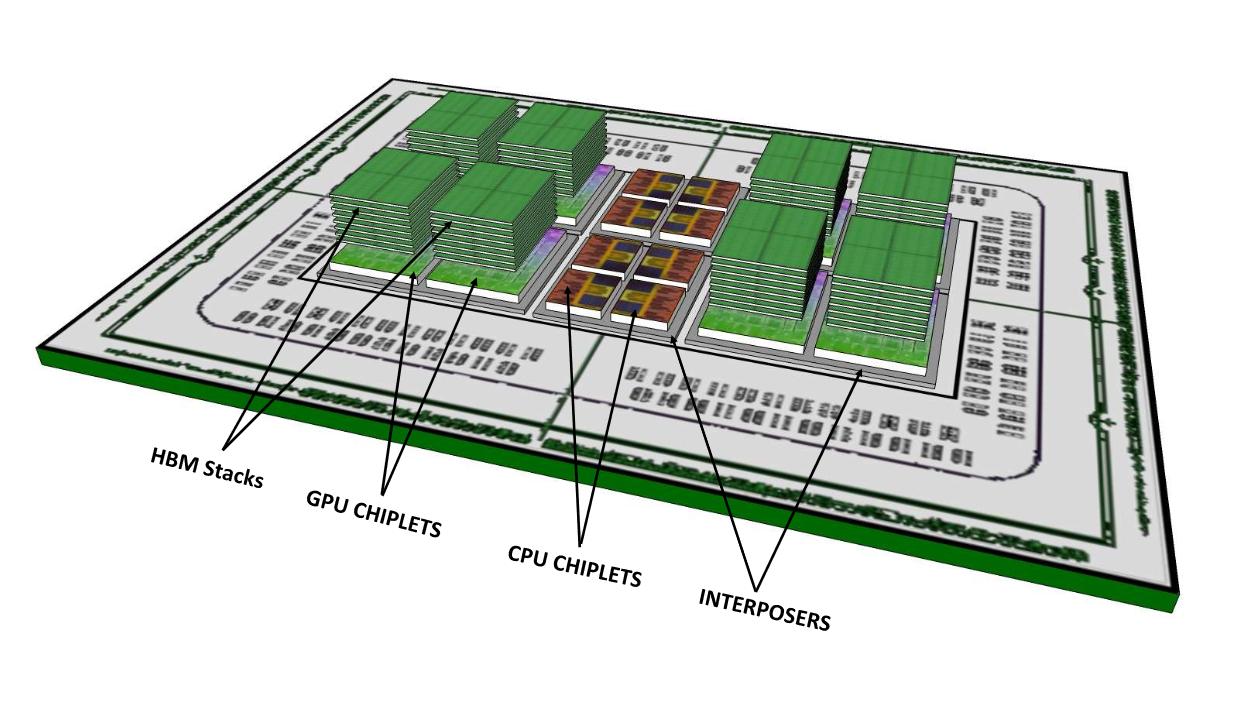


HBM on APUs could happen in near future
 quaint topaz

Pixel 4 is in the works - here's an early look at some new tech coming to next-generation Pixel this Fall. This tech enables two new features - Motion Sense ...
Soli radar 
steep gust
@latent light That's going to be expensive, motherboard intensive and large
latent light
molten bramble
Sooo... they've just regurgitated something that was already available as early as the late-90s prior to the era of the smart-phone?
 cursive marten
What is that thumbnail btw
are they saying you can perform telekinesis to pick up the phone
what is this.
An Nvidia scientist has predicted that the first game to require a ray-tracing capable GPU will ship in 2023
🤔
steep gust
well
You know dx12
DX12 has a ray tracing API inside of it
RTX uses it
So that is uh
Maxwell and above right
 lofty light
Looks like an offshoot of MSI
 jade star
Greetings fellow techies https://i.4cdn.org/gif/1564228418160.webm
 winged tapir


 molten coral
This laptop looks so good, if it wasn't 3k I would propably buy it.
Would be a fun upgrade from my Dell XPS 15
ASUS Zenbook Pro Duo
prime jasper
that looks like it would be such a massive pain to fix
 steep gust
They have been for a long time
cursive marten
desoldering tools exist
lofty light
Not something that's normally worth your money compared to doing what they want and getting it "fixed" coughreplacedcough at an official dealer
lofty light
I've got a 2080ti and never used the rtx
But I do have a vive, so maybe I should do the Minecraft thing...
latent light
damn 3rd gen Ryzen launch sold 4x more than what 2nd gen did at launch
according to AMD earnings call
lofty light
Not surprised tbh
AMD hit it right out of the park, even got me to buy one so good on them
reef pasture
RTX won’t actually improve Minecraft shaders that much, considering the shaders themselves snap the FPS in half.
And they have dynamic reflections in the water as well,
So hm
lofty light
I guess it depends on the shaders
steep gust
@reef pasture Minecraft shaders generally brute force, since they don't have access to DX12 unless they want to rebuild the game.
So yes any more raw compute is going to help
supple bane
you just need a gpu and ram
lots and lots of ram
its the only time i have seen a game use more than 16gb of ram, i got to 15.8gb, ill assume that if i had 32gb it would have went higher.
prime jasper
molten bramble
LOL... W10 "Photos" app has a massive memory bleed if you leave it open for more than 10-hours.
prime jasper
hm....why indeed would you have it open for more than 10 hours though
molten bramble
Reference images for a 3D model I am working on.
I couldn't figure out why the system started stuttering. It would roll to 71% memory usage spikes for an application that shouldn't take more than 1Gb.
prime jasper
time to fire up the ol' windows photo viewer then
 hushed aurora
Does anyone know how to fix this problem? i got the newest drives for my graphics card
winged tapir
so whats the issue @hushed aurora
hushed aurora
wait
winged tapir
😃
hushed aurora
i need to copy the error
"detected microsoft basic render driver driver version unknown.
the required driver version is amd,intel, nvidia, etc. or later.
amd.com,intel.com,nvidia.com, etc."
latent light

 latent light

 fallen harbor
guys im trying to transfer some data from an old pc to my external drive but its a really old pc so its taking literally like a day and the pc goes to sleep after some minutes despite having (I believe) disabled it
anyone knows what I can do to prevent it from going off from inactivity? even though it's copying archives so idk why it does that
prime jasper
you have to go into power settings and set the sleep from whatever minutes to 'never'
fallen harbor
ive seen that option in screenshots in google
but i dont have it
i only have the “turn off the display after”
which is only the screen
prime jasper
Win 7 or 10?
fallen harbor
10
prime jasper
its under "power and sleep"
type that in at the start menu search and it will come up
if you dont see a sleep option go to additional power settings
 long sphinx
lol dat xfx looks like a sad wall-e
latent light

TechPowerUp
G.SKILL International Enterprise Co., Ltd., the world's leading manufacturer of extreme performance memory and gaming peripherals, is releasing a highly optimized, extremely low latency Trident Z Neo series DDR4-3800MHz CL14 RGB memory kit in 16 GB (8 GB x2) and 32 GB (8 GB x...
3800 CL14 kits being sold
prime jasper
now thats a fine ol' binnin'...they dont make 'em like they used to 
prime jasper
announcing something that will never hit market
steep gust
G.Skill does that semi often
See the DDR4 5000 kit that was announced at this point like 2 years ago
latent light
just noticed that Ryzen 3000 and X570 can use 128GB of ram
Threadripper 3000 should be 256GB

lofty light
Oh they support the 32gb sticks?
I'm probs gonna go for the 64 and make a reasonable ram disk partition
supple bane
why does all the fun stuff happen when I'm in bed reeeeeee
When I'm awake nothing happens in this server, and when I go to bed everyone seems to come online
latent light
7nm Big Navi is on track? During AMD second quarter Q&A, AMD’s Lisa Su was asked about high-end Navi products. To this point, AMD has not confirmed the existence of such GPUs. Q: Can you give us a sense on 7nm high-end NAVI and mobile 7nm CPUs A: You asked a good product qu...
Lisa said high-end Navi is coming in the "upcoming quarters"
So Q4 2019 or Q1 2020

cursive marten
alrighty then.
 hoary ember
looking forward to 5800 mm
any monitor prof here
I am thinking of buying this
dis gud?
hoary ember
then i got a deal thx
 sour sapphire
violet plank
sour sapphire
violet plank
bleh,3700x prices are going up,too much demand and 3800x/3900x are rare af
lofty light
3800X is a waste of money so 🤷
violet plank
atm yes,might change in the future cause of the higher power target,but i doubt the gain will be high
boost clocks are limited by the bios atm anyways
getting a 3900x is near impossible 
if any are on stock,sold out in max 10 min
steep gust
Boost clocks are limited by the voltage limitation of the silicon
violet plank
there was a leaked bios that allowed higher boost clocks,actually the boost clocks that they don't reach atm
what's the average single core boost atm? few 100mhz below the advertised from amd ?
like 4,2-3x for advertised 4.4 ?
violet plank
wtf,my cpu usage for bfv dropped about 20%,is rivatuner broken?
latent light
My friend has the 3600X and it does 4.4 Ghz single core boost with ease
And 4.3 all core
Well it does 4.475 GHz single core boost
prime jasper
i got a silly question whats stopping me getting 144hz on my monitor. im running low graphics settings gpu and cpu only run up to about 60 percent i get 120 hz most of the time but why not 144?
are you saying your fps is hitting a ceiling at 120?
no i set it to 120 but thats after i realised i almost never got 144. could ram speed affect it? as iv just fitted new cpu and motherboard and iv not given it a oc or anything
im only running 1080p aswell
you would set that in your Nvidia/AMD settings panel
unless your monitor itself has a menu setting for the refresh rate
yea i set the nvidia control panel to 144hz and monitor is set to 144 unless im missing somthing and my gpu isn't up to it but with it only running up to 60 percent i thought it might be able to make the frames
depends on your gpu/cpu
latent light
maybe your monitor/gpu needs a certain cable
prime jasper
yeah displayport is preferable
latent light
some GPUs can only do 144hz on DVI-D and DisplayPort
prime jasper
i got a 1080fe oc to 2100mhz and im running a standard i9 and asus maximus mobo i will be upgrading the gpu soon tho
latent light
if using HDMI, it probably needs to be a 1.4 cable or better
prime jasper
im on display port so that could be the problem or gpu not up to it?
latent light
that's the most preferred cable on gaming monitors
prime jasper
ok ill have a play with some settings
isnt a 1080fe a blower card?
yea but mine is water cooled so i dont think its heat throttling
the card just might not be able to do it ?
huh...well you can try toggling FFR on too
ffr?
future frame rendering
make sure v sync is off too
ok and that is off im pretty sure
prime jasper
i tried the future frame rendering thing and it it did make 144hz
at a guess would you say gpu would need upgrading to not need FFR
violet plank
@latent light is this a 3600x thing?never seen a 3700x or 3900x hitting it's fully boost clock,or at least none that i've heard off
latent light
I think it depends on your power delivery and cooling headroom
latent light
he has a very well bin tbf
violet plank
so he has been lucky
latent light
he's got it at 4.4 GHz all core overclock 1.3v and it's been running for a week with no issues
latent light
it compares nicely to a i7-8700K at 5 GHz
violet plank
didn't read much 3600 tests,or seen much of them,maybe it just clocks easier ?
latent light
3600X is slightly faster than the 3600
about 3% difference in performance
when compared stock
violet plank
it's 105w right ?
latent light
95W
latent light
his motherboard is ASRock X570 steel legend
violet plank
i don't have any lower end boards,strix-e it would be i guess
which has about the same vrm as the hero
totally overpowered lol
violet plank
nice
gonna try it with air first tho
dark rock or noctua d15
should be about the same result
wait,max temp in aida stress test ?
latent light
he used prime95
latent light
although many are saying 1.325v is the max safe limit even though it's not confirmed
latent light
Corsaire Vengeance Pro RGB 3200MHz CL16
latent light
yeah people been freaking about about stock voltages even though it's 100% safe
2 sticks
violet plank
still waiting for my 3600 cl16 ram,have to use my 3000 15 in the mean time
difference from spd to xmp is huge already,wondering how much more i will get of the 3600
at least the steel legend hasn't that complete fail design as the taichi
does he got no problems with chipset overheating cause of the gpu running over the fan ?
latent light
"I don't like seeing it at 1.5v all the time, I still think it's dangerous based on what I've seen before"
This is a feeling based on experience with chips of older, completely different design. Chips that don't dynamically scale their voltage and utilize a one-off voltage for all applications. In that age of time, yes, it was dangerous to run a high voltage - because that would be a permanent voltage, for all circumstances, even at full load. We are using bleeding edge technology today. These chips are dynamically in control over their own voltage and take tens of sensor readings in account to make sure everything is within spec. This means that we're going to see different behavior than we're used to - they have become smart. You can really only complain if you see 1.5v straight during a full-load all-core benchmark, such as Cinebench Multi. But nobody has experienced that. Not a single soul. Ergo, the algorithm works fine.
violet plank
yeah,this will be the future of all cpu designs inc
even intel has to switch to chiplets
and win10 is still not fully optimized for ryzen 3k
what was it,they hat to change the 1-2ms intervals to 15ms ?
latent light
Common Ryzen 3000 complaints:
"My voltage reads 1.5v and this is dangerous for this chip"
Short answer: It's not dangerous when running stock (auto).
"Sitting at 1.5v for longer periods of time is dangerous"
Short answer: It's not dangerous when running stock (auto).
"The safe voltage is just 1.325"
Short answer: It's not. This value was taken way out of context, and blown WAY out of proportion, and never came from an official source, nor will it ever.
"My CPU is running hot during idle because of the 1.5v voltage!"
Short answer: It's not due to the voltage, it's due to actual boosting, by design.
"The temperature is high, that's a lot of wasted power!"
Short answer: Power draw hardly increases, temp=/=power, the temps are a result of chiplet architecture.
"I don't like seeing it at 1.5v all the time, I still think it's dangerous"
Short answer: This is a you-problem. Stop worrying about a reading that's fine.
"I don't like seeing 50c on my screen when I'm idling"
Short answer: Also a you-problem, and it does not equate a hot PC. You're seeing transient peaks. This was edited in the latest Ryzen Master, to show the actual average chip temp instead of transient peaks
"I'm super idle, and still seeing 1.5v and I shouldn't!"
Short answer: Many of you are not actually idle. Background processes can also trigger boost, and 1.5v is still fine.
"My other CPU didn't do this, so this one shouldn't do it either"
Short answer: Apples to oranges, this new arch is entirely different and it's normal.
1 more thing
violet plank
haha,i'^ve seen that too,reddit iirc
latent light
"The safe voltage is just 1.325, so 1.5 is way too much"
This is conjecture, a rumor gone wild. The origin is user "The Stilt" in his Matisse topic on Overclock.net. He looked at the FIT tables of his specific CPU and extrapolated that - by his interpretation - 1.325v would probably be a safe voltage for manual all-core overclocking. That is all. The number has started to live a life of its own, and has evolved - as is the nature of spreading rumors - to "1.325 is the max safe voltage for 3rd gen Ryzen, period". Which, of course, is bollocks. /u/AMD_Robert has said, and was very clear about it, "I'm never going to provide a 'safe all-core OC' voltage. If you want safe, run stock."
violet plank
always amazing how easy you can get ppl to panic
latent light
Someone buys Ryzen 3000 and spends the days looking at CPU monitoring tools. They try to understand, don't understand, they cry.
power consumption limit for the 3600 at stock is 88 watts
for the 3900X it's 142 watts
steep gust
@violet plank Well Silt's information is not wrong
It's just misinterpreted by plenty of people
Also a lot of FX chips could daily 1.5v
I can daily a 2500k at 1.5v and it'll be fine
Or a core 2 quad
It's just more misleading information from people who dont care to understand
latent light
when Ryzen 3000 boosts the voltage will spike high but for a short time
manually setting 1.5v to run constantly will damage the CPU though
steep gust
If I lock all cores to one clock and disable power limits then 1.32v or so is the max safe voltage for AVX loads
The boosting algorithms will follow that if you pay attention
latent light
people are misinterpreting Ryzen 3000 boost algorithm
Buildzoid released a video explaining how Ryzen boost algorithm works and why you get high temps at idle. Short summary - it's working how it should be, but not how normally you would expect.

do retailers put very low stock items at high prices so they don't get a backorder?
steep gust
Yep
violet plank
haha,love buildzoid and his vids,top guy,and even his vids are always long af,they never get boring 😃
only thing i dislike a bit is his gigabyte love

 violet plank
well yeah,at least he does that on all brands lol
latent light
I guess my 1600 just has a bad IMC
can't do 2666 MHz at 15-15-15-35 timings
even at 1.4v
updated BIOS just now and problem still exists
lofty light
I mean he somewhat likes some Asus and MSI ones
 quartz whale
Any ideas on why I'm getting WHEA warnings in event viewer I've tested this CPU in prime95 for 8hrs and realbench for 8hrs with no cache errors In HWINFO and have tested this memory with HCI Memtester no errors there… I've did some research apparently this has been happening with even older chips was told to be ignored ? https://www.overclock.net/forum/5-intel-cpus/1536052-about-whea-event-19-warnings.html#/topics/1536052?page=1
prime jasper
new headset, new AIO, new map, today is a good day
@quartz whale if youre stable I wouldnt worry about it
quartz whale
Warnings @steep gust
Event 19
The warnings cause it to report an error in HWINFO though as I've stated before I've tested this CPU for hours on end
Only seems to be happening Black ops 4 which causes it throw a warning in event viewer .
latent light

pcgamer
They should start arriving in retail in a couple of weeks.
lofty light
XFX 🤢
steep gust
that doesn't look like it handles 300w+ well
lofty light
Those classy older coolers do look damn good
Imo it's all gone to shit recently, only coolers I liked the look of recently were the EVGA FTW3 cards for the 10 series
lofty light
Still though, doesn't mean we should have cards that look like this
 rigid knoll
User-friendly much?
 proven hawk
@lofty light whats wrong with that design?
lofty light
@proven hawk the shell is clear plastic and has lots of little E's all over it for the logo. It's INCREDIBLY tacky. I've actually got that exact card and I took the cooler off 😛
proven hawk
i dont care about design. its closed in case so ... dosnt care if its pink/orange/tacky or whatever else. everything we need is 144fps 😃
prime jasper
I have that card too, cant notice any of the tackiness when its installed
just enjoy that sweet rgb glow
violet plank
wtf,another day and prices for ryzen 3k going up again,soon they match intel...
 kindred cedar
Do you guys know what I can delete that wont mess with my phone because it's lagging like crazy when I scroll down YouTube?
prime jasper
delete any apps you dont use
kindred cedar
That's the tough part I use them all and the ones I don't I might miss but I gotta delete something
prime jasper
if the phone is too old that would be an issue itself
kindred cedar
No it's like a 4 months old but I think the issue is I left it charging by mistake like over charge
I know that's not good for them androids
prime jasper
does rebooting help at all? Ive owned nothing but androids and its never 'overcharged'...not even sure how thats possible
kindred cedar
Well my is just warm rn but it was hot after I turned it on.
And i did several reboots but it still was lagging. It seems to be lagging less now
Phone*
I do notice when my phone gets hot it lags but that makes sense
prime jasper
you can check to see which programs are chewing up your battery in the battery menu thing
the heat is probably from something running constantly
kindred cedar
Ok thank you I'll try that
kindred cedar
I think I found the issue I forgot to update my Google 🙄
fallen harbor
anybody knows which i should use?
i always forget which one works
and the pc is turning on but without display
it is something else but the wrong one here also causes this so i want to discard this asap
only the power and led pins and the mobo-psu pins are connected and it still wont show display so idk what im missing
its not the vga because i tested with another pc minutes ago and it worked
theres no beep either
pls help
molten bramble
Most people are at work probably, and your question is a bit unclear.
violet plank
no beep no boot,i guess those are cpu power cables ?
combined 2x4 pin ?
for the top connector on your mobo
pic is bad
molten bramble
Bad cable?
violet plank
if there is no beep it dosen't boot
fallen harbor
however i tried both but the pc still wont display
molten bramble
Do you have an LED readout on the top of your motherboard?
And if so, what motherboard is it?
violet plank
you got the 8 pin cpu power plugged in ?
fallen harbor
hmm maybe im using the wrong vocab, the fans spin and leds turn on but pc wont boot
h61mk
yes the 8 pin wire is plugged in
molten bramble

ASUS Global
The ASUS H61M-K motherboard features the Intel® H61 chipset, designed for everyday productivity. It has a user-friendly and intuitive UEFI BIOS and improved network bandwidth control, all designed for a stable and reliable computing experience.
violet plank
or 2 x 4 pin in your case,at least from the looks from your pic
molten bramble
You only have one four-pin on that board.
molten bramble
Only need to use one.
fallen harbor
oh i thought you meant the other big pin
yes as i said only one fits
but idk which i should plug
fallen harbor
however i tried both and none will work
fallen harbor
i just used this psu for a different mobo minutes ago and it worked
so im guessing i plugged somethig wrong
or this mobo is failing
molten bramble
Take a picture of your motherboard as it is for the moment.
fallen harbor
ok sec
molten bramble
Let us see what you've got done.
violet plank
and of that 4 pin cpu power plug
molten bramble
Take a picture of the back panel connections as well.
fallen harbor
molten bramble
Okay
violet plank
no beep is = no boot,so if fans spin up and stuff,probably 4 pin psu cpu power missing
fallen harbor
yes ive booted this build many times before
molten bramble
So, there is a LED at the bottom left.
When you hit the power button, that should come on.
Does it?
violet plank
you need to clean that thing lul
fallen harbor
it comes on when i plug the psu in, i dont need to hit the power button
its unplugged en
rn*
molten bramble
Okay, this is a lot like my old P35K-E
violet plank
no hd plugged in ?
molten bramble
Two things.
fallen harbor
i only plugged in the necessary things
molten bramble
A) pull your CMOS battery for about 30-seconds, then put back in.
fallen harbor
in order to at least see te bios
molten bramble
B) make sure you don't have the CMOS jumper shorted.
fallen harbor
whats cmos sorry
molten bramble
It won't let you start it up if so.
You see that big silver disc in the bottom of the board? that's a battery
fallen harbor
oh ye
molten bramble
Pull it out for some time, then replace it. Anything stored in memory should reset.
Then the blue plastic jumper needs to be seated in the right position.
violet plank
old school 😏
violet plank
and not sure if you even get into bios without any ram ?
fallen harbor
ram is plugged in
violet plank
my bad
fallen harbor
np
violet plank
kinda hard to see lol
molten bramble
You have a blue jumper to the bottom right.
And another at the bottom.
Check the manual, it will tell you the config you need to have.
ASUS Global
The ASUS H61M-K motherboard features the Intel® H61 chipset, designed for everyday productivity. It has a user-friendly and intuitive UEFI BIOS and improved network bandwidth control, all designed for a stable and reliable computing experience.
fallen harbor
idk what a jumper is : D
fallen harbor
oh ok i know what you mean now
molten bramble
Section 1.7 of that link above
violet plank
i leave you with hydra,we would tell you the same thing anyways
fallen harbor
i never touched those jumpers and the pc workd fine for years so what should i do with them
molten bramble
Go to section 1.7 and read.
fallen harbor
kk
molten bramble
It tells you how to clear the CMOS.
steep gust
hmm might pick up an x58 classy + i7 950 + two garbage 660s if it goes cheap enough
and some random bad bins of ddr3
prime jasper
why
fallen harbor
i did the thing but nothing new happens, the keyboard wont even turn on
prime jasper
its entirely possible the psu and/or mobo are bad
molten bramble
So you moved the jumper from pins 1 and 2, to pins 2 and 3, then turned it on, then moved them back to the original position?
fallen harbor
no, it says to change them only for 10 seconds and then put them back and then turn on the pc
molten bramble
Yeah, that's not what it says.
fallen harbor
🤔
molten bramble
fallen harbor
thats what i said
molten bramble
Oddly, that is what it says.
Anyways, do you have the LED lit on the board when starting up?
Just even plugging in the power.
It should start to glow.
molten bramble
Okay, so there is power to the board.
So those old boards don't normally beep, at least mine didn't.
I have essentially a bigger version of what you had, but older.
These boards get finnicky over time. There is a chance the board is dead, but let's step through a little more.
How is your power button connected?
The internal cabling should be setup like that.
fallen harbor
yes
molten bramble
Make sure you have everything in the pins.
molten bramble
When you hit the power button, does the fan spin up?
fallen harbor
im setting up a different board now just to check
yes the fans spin up
and leds turn on
molten bramble
Okay--so you've got power to the board, the board is assumingly functioning. Are you running a VGA cable?
or DVI?
fallen harbor
vga
molten bramble
Okay--do you have an extra VGA cable?
to see if maybe this one is bad?
And is it safe to assume that you're using the on-board graphics versus a GPU?
fallen harbor
uuh i plugged in the same board i tried hours ago that worked fine and the same problem is happening kek
oh nvm
its working
this one works
im only using on board
molten bramble
Hmmm... board just might have taken a crap.
molten bramble
? You could just have a wonky board, doesn't mean the CPU is bad.
Why'd you disassemble it in the first place?
And were you properly grounded when handling the board?
fallen harbor
yes
and i dont mean the cpu is bad
its just that this is one of the few rare boards that is compatible with it
if i wanr another i have to buy an overpriced second hand one
prime jasper
such is the life of technology lol
molten bramble
Just curious, do you have another PSU?
molten bramble
Could be board powered, but maybe the four-pin is jacked up.
Worth a try just to see if it boots, provided they meet spec.
fallen harbor
jacked up?
molten bramble
Cables go bad over time.
fallen harbor
my spare psus are very casual ones i doubt they will do better
molten bramble
We're not looking for better, we're looking for does something work.
fallen harbor
i used this psu with this board and cpu before but maybe the psu got old and lost potence? idk
if the cable went bad shouldnt it have not worked with the other board i just tested?
molten bramble
Did you test another board?
molten bramble
Ah, didn't catch that. Looking through your manual.
fallen harbor
np
molten bramble
Question--where are your standoff screws for behind the board?
fallen harbor
im sorry for all this loss of time but now that i replugged the mobo its working fine so i must have plugged in something poorly
molten bramble
Is any part of that board touching the metal?
fallen harbor
this is embarrassing
molten bramble
Not a waste of time. It's working now, that's what matters. We stepped through the problem.
prime jasper
Im flying down there right meow
molten bramble
Remember these steps next time.
fallen harbor
i deserve it
prime jasper
here comes the pain train
molten bramble
You could save yourself a lot of headache in the future by writing down what we did above.
fallen harbor
yeah
molten bramble
Especially with old boards like that.
fallen harbor
tyvm
molten bramble
no worries
sour ivy
Omg I can’t wait for my 1080
 fading grove
Good card. I got the EVGA 1080 FTW a while back
steep gust
I have a 1080 strix with broken rgb
sour ivy
I mean 250 for a 1080!!!
 spring kettle
my 1070 SC has been serving me well but im going to have to upgrade my 8600K soon, it's having trouble keeping up with some stuff
fading grove
Yeah i held out getting the first 1080 cause it was a blower
fading grove
got the FTW edition pre order over the factory Nvidia first edition
spring kettle
for 250 that's an insane deal
fading grove
yeah still a good card
latent light
Update your BIOS if you have Z370 and get a 9900K
fading grove
can always replace the heatsink with aftermarket I'm sure if it's too loud or hot
latent light
If you have Z390 you won't need to update BIOS
fading grove
2 or 3 yep
sour ivy
Nice
fading grove
Mine has two fans, keeps it plenty cool
or one of those AIO gpu liquid coolers if you're feelin fancy and got the case space
sour ivy
But 1 will work for now
spring kettle
im looking to get a new mid ATX case for a 240mm AIO, right now i'm looking at a thermaltake one but im still searching around
fading grove
I go for basic looking cases, my Fractal design case has served me well
Arc midi r2 iirc
basic black case with tinted window but supports water cooling
spring kettle
the thermaltake level 20 MT looks pretty tempting with that 240mm back pannel rad spot
sour ivy
I’ll just build my own case
fading grove
I need to clean my case so bad lol
spring kettle
last time i cleaned my case i was choking on dust
fading grove
lol, it's been almost a year since i last lugged it outside to blow out the dust with compressor
spring kettle
i used an entire can of compressed air last time i cleaned it
prime jasper

spring kettle
lol
fading grove
Better high than smoking wasp spray, that's for sure!
prime jasper

spring kettle
fading grove
spring kettle

prime jasper
natural selection is a hell of a drug
fading grove
lol probably fake news, you'd have to be a moron to try smoking wasp spray
It would be instant death or extreme pain i would imagine
 slim kite
Anyone got any recommendations for free beginner video editing software?
prime jasper
editing what
slim kite
Gameplay
prime jasper
Davinci Resolve
slim kite
K, tnx
latent light
Davinci Resolve doesn't open anymore for me
It will just say that it's not responding when I try to open it
prime jasper
no surprise
violet plank
they can't supply the demand anymore
violet plank
hope TSMC increases their AMD chip output
guess they could sell 3 times the cpus
if they were available
lul that gif
steep gust
@violet plank That's uh misleading
violet plank
hmm ?
steep gust
of course the new CPUs sell more than CPUs that have been out for like 6 months
violet plank
i'm talking more about the fact that it is getting really hard to even find/buy a 3k
no mater which one
at least around here
prime jasper
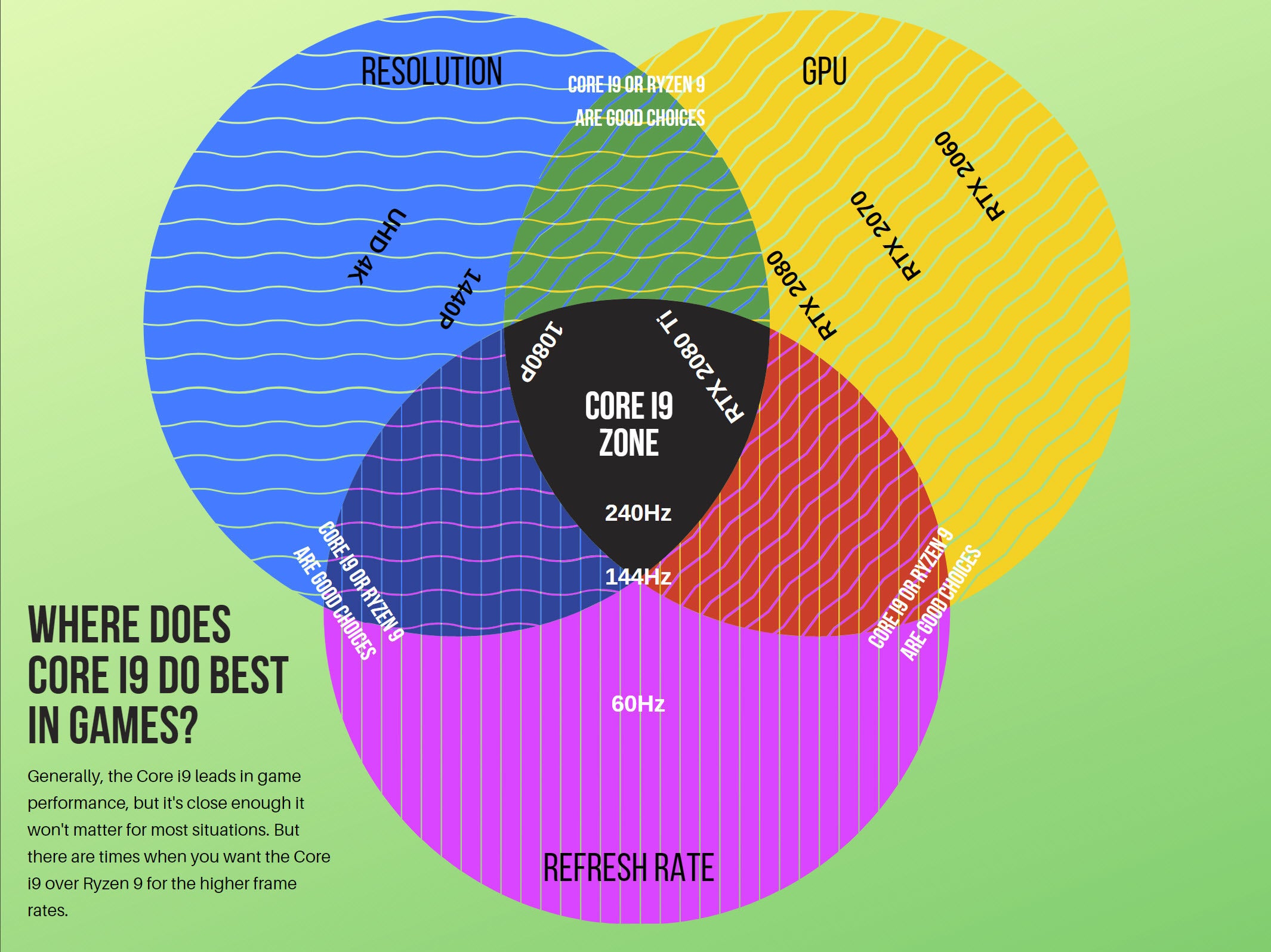
its rather telling that people were waiting to buy these rather than upgrading to intel 9th gens, hence the sales being so skewed
violet plank
that too
violet plank
why would you bother to buy a 9900k at all ?
prime jasper
violet plank
as soon as you go higher res it won't matter anymore
steep gust
There is a lot to be done on a computer than just gaming
steep gust
You can see the decline in CPU sales after Christmas
a lot of people were waiting on Zen 2
and Intel had no immediate counter
 prime jasper
Just Wait ™
fallen harbor
i kinda wanna do the same
i want a small case and those arent sold here
anyway whats safer? turning a pc off at night when you wont use it till the next day or putting it to sleep?
prime jasper
off would be safer in the event of power outage
fallen harbor
hm yeah but what about the life time
doesnt it get lowered mostly by turning it off and on?
a gtx 980 is sold at the same price as a 1660ti here wth
isnt the 980 far worse
or am i wrong
latent light
30% worse
fallen harbor
i wish pc parts werent ridiculously expensive here
feelsbadman
having a gaming pc is a burgoise thing only
in these countries
steep gust

latent light
the naming scheme is awful
we're going back 
next gen will be the 2000 series
i5-2005G1
0.7 GHz base frequency
steep gust
Fake
You can tell the Iris Plus graphic was added poorly
It literally looks stuck on top in photoshop
and Intel never puts that much info
 reef ermine
hmmm 4 cores are we going backwards ?
lol I gave up on intel latest stuff i'm fine with my i7 930 which I know is old but is gold
reef ermine
Lol never realized been desktop guy for years some one told me intel desktop cpus where going backwards so I didn’t know
reef ermine
Who here still uses X58 my current pc is a dell XPS 9100 found on the curb just need to get a new gpu
I use 120gb ssd boot drive and 500gb for games plan to add another 1tb soon
steep gust
I might buy an X58 system
reef ermine
As much as i7 930 is claimed to be old some one did a video of a i7 920 which is worse and the graphics card 1080 can’t remember if it was ti but the card was bottlenecking system not cpu
X58 being almost decade old is still kicking ass
Try to find x58 local because the prices on eBay aren’t worth it
latent light
Raja Koduri said Intel plans on to release a $200 mid-range GPU next year. He wants to replicate AMD's strategy of capturing high-volume price points, such as the $199 Radeon RX 480.

reef ermine
Yeah that’s neat
latent light
Intel is going to launch a complete lineup of GPUs, from budget to high-end within the next 2 or 3 years
a bit late if you ask me
 craggy halo
hey ik this is kinda weird
but if anyone can help me wit my bfv
it starts for like 2 seconds then auto sbhuts down
Im not that good with comps but if anyone can help I'll really appreciate it pm me if u can Im on pc
prime jasper
@craggy halo restart, try again
supple bane
I'm in Spain atm so all my adverts are I'm the Spanish prices, I thought England was expecting expensive for parts, this place is on a whole other level
a 1tb normal 2.5" SSD is around 300 American dollars 
 brisk vector
Can someone help me flash my bios
I just got a new processor and I need to flash it for it to work
latent light
@brisk vector what cpu and motherboard model
brisk vector
Ryzen 3 2200g
reef ermine
Depending on mother board you can use a USB and download a bios from motherboard site on separate computer
brisk vector
I just tried flashing it but it says the file won't work and I got it from the website
latent light
you got a USB drive?
brisk vector
Yup
reef ermine
Or it comes with a disk. Your 3700x might work givve minute I have compatibility list
latent light
did you unzip the bios file?
brisk vector
I extracted it
latent light
ok
brisk vector
And @reef ermine it won't work already tried
But @latent light it still won't work after extracting it I just need a walkthrough for it
latent light
what bios version do you have now
latent light
in order to update to version F40 or newer, you need to update to F31 first
brisk vector
Oh
latent light
ah, you need to update to F31 first then
reef ermine
Um no you can update past f31 I’ve done updates and skipped several numbers before I did it on FX board etc
brisk vector
Okay I just started the download for F31
brisk vector
Yeah I saw that lol
latent light
- If you are using Q-Flash Utility to update BIOS, make sure you have updated BIOS to F31 before F40
- Before update BIOS to F40, you have to install EC FW Update Tool (B19.0517.1 or later version) to avoid 4DIMM DDR compatibility on 3rd Gen AMD Ryzen™ CPU
I don't know anything about step 2
brisk vector
Okay which one?
brisk vector
I know but when I extract it it says Efiflash and X470AOUG.F31
Those are the 2 files
brisk vector
What about to F42a
brisk vector
Omfg I am
latent light
lol
brisk vector
I have 4 4gb
latent light
what speed
brisk vector
2666
latent light
damn
brisk vector
?
latent light
then you have to do it
latent light
reddit
2 votes and 1 comment so far on Reddit
don't use the link the person commented as it's for another board
@brisk vector hmm have you ever updated chipset driver
that's something you should do

GIGABYTE
AMD X470 AORUS motherboard with 8+3 Hybrid Digital PWM, Dual M.2 with Thermal Guard, ALC1220-VB, USB DAC-UP 2 Design, CEC 2019 Ready, RGB FUSION 2.0Supports...
brisk vector
Idk lol
brisk vector
Okay
Do I extract it first?
And how do I get this tool thing for the F40
@latent light
latent light
yeah extract
latent light
GIGABYTE
AMD X470 AORUS motherboard with 8+3 Hybrid Digital PWM, Dual M.2 with Thermal Guard, ALC1220-VB, USB DAC-UP 2 Design, CEC 2019 Ready, RGB FUSION 2.0Supports...
this
looks like when you run this, it installs it as well
brisk vector
okay so after I do my driver should I just extract that and run it?
latent light
yeah
brisk vector
My 350 kb/s wifi really isn't helping rn
Wait so when I run the EC FW it installs F40 as well?
@latent light ^
latent light
no
brisk vector
So should I do F40 first?
brisk vector
K
brisk vector
@latent light so I did all of that and I put in my new processor and when I turn on my pc it goes for about 5 seconds and shuts itself off
latent light
F41?
prime jasper
my pc won't open s1 help?
latent light

Radeon RX 5700, Radeon RX 5700 XT ASUS unveils custom RX 5700 STRIX The designs of new ROG STRIX and TUF series were unveiled by Hardware.info earlier today. The ASUS ROG STRIX Radeon
As expected
molten bramble
^ thing looks like it was dropped into a bucket of primer
violet plank
2x 8 pin for a mid range card,cmon amd lul
or is this custom from asus
open limit power sucking
untold sluice
Are there any new hard drive tech for gaming these days? I have a 120GB SSD that is loaded with stuff, and the Crucial 240 GB is only $30 - thinking about getting it:
https://www.amazon.com/Crucial-BX500-240GB-2-5-Inch-Internal/dp/B07G3KRZBX/
steep gust
@violet plank yeah not stock I meant overclocked or the factory overclock
@untold sluice SSDs will always beat spinning metal for games
5700xt is a 225w card
2080ti is "260w"
violet plank
hope it dosen't get any higher with navi 20 when they switch to full rdna architecture
molten coral
So how good is the 5700xt compared to the 2080ti?
violet plank
it's like between 2070 and 80
molten coral
Mhh alright, i've a 1070 and kinda thinking about upgrading but fuck paying 1200 Euro for a card.
steep gust
I love all the people talking about GNC / RDNA because some YouTuber they watched mentioned it
violet plank
rdna should be more efficent
steep gust
A new architecture doesn't make something more powerful by default
steep gust
uh its not that simple
violet plank
well,we shall see next year
steep gust
if it releases next year
violet plank
yeah if lol
or when in 2020
rumor is Q1,but i doubt it
my guess is their main resources are still on cpus
and ofc the new consoles
steep gust
CPU and GPU teams are entirely separate
steep gust
If you think AMD is going to release a high-performance GPU that somehow crushes NVidia in every metric
keep on waiting
steep gust
People think AMD is gonna become king literally every time they announce a new GPU
violet plank
i would be happy if the pull something even like the 2080ti
and i'm sure nvidia already has something in their pipe just waiting to be released
violet plank
well almost
maybe the next nvidia is just a turing shrink
and i'm waiting to see microsoft to fail hard
with their attempt
too bad freesync doesen't work on gsync monitors
molten bramble
You mean AMD?
Because that's who is the backing manufacturer on the next XBox GPU.
https://www.rockpapershotgun.com/2019/01/09/microsoft-museum-of-gpu-history/ Nice, I had a few of those old cards.

Microsoft’s Direct3D team have covered some of their office walls with the hundreds of graphics cards they’ve gathered while working on the 3D API. That’s 402 graphics cards spanning 35 years of technohistory. If you get misty-eyed at the sight of a Voodoo card, shed a ...
3DFX/Voodoo was the shit back when.
violet plank
imagine gpu's with passive cooling these days
too bad that pic is so small,if i wanna enlarge it,it get's even smaller
molten bramble
Yeah, I just went to https://assets.rockpapershotgun.com/images/2019/01/microsoft-office-wall-of-gpus.jpg and then zoomed in.

It was enough to recognize some of the boards.
violet plank
what's that huge card top left ?
molten bramble
It's funny how everything got smaller... and then got bigger again.
violet plank
too blurry if i zoom
at the beginning 2d and 3d were separate cards,think after combining they started to go big
violet plank
that thing is so fucking huge lol
molten bramble
Dual-head as well.