#technology
1 messages · Page 206 of 1
 lofty light
 quaint topaz
I might also switch to a Google Pixel
The Pixel 3a is pretty cheap
impressive camera but the tech inside is like mid range
 flint locust
Can we just stop taking selfies so front cameras aren't needed
quaint topaz
 quaint topaz
price range?
quaint topaz
There's the GTX 1660 Ti but never bothered to check it's performance
quaint topaz
the 1660 Ti is like $230
 fallen harbor
poor budget style
gotta be lower
maybe there isnt any
just asking
a friend has an old pc with an fx4300 and wants a gpu for it
a new tier gpu would be a waste
i suggest a 750ti but im not sure
quaint topaz
could go for a GTX 960 or 970 but i expect the cpu to bottleneck the living hell out of them
Can find GTX 9 series cards pretty cheap atm
 latent light
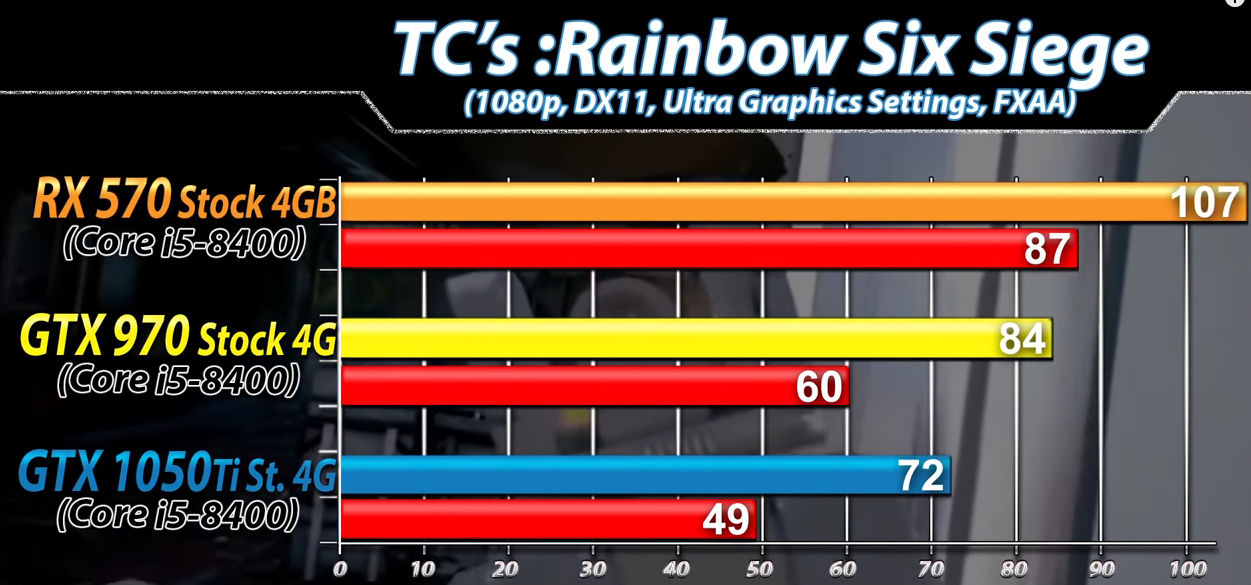
@fallen harbor check out a RX 570
$120 USD
also comes with 2 games
GTX 970 performance
although will be bottlenecked by a Fx-4300

would be a good GPU to buy though even if there is a bottleneck
lofty light
In future you can get a better CPU for it too
I've seen CPUs better than that chucked weekly in my job
lofty light
It's either
fallen harbor
huh
quaint topaz
960 has 2 versions
lofty light
The extra vram shouldn't matter btw
fallen harbor
i just want to know what v ersion it is
because the price differs
also for benchmarks
quaint topaz
There's both 2GB and 4GB for the same card just read the description before buying
 molten bramble
Jesus... if only I could fix this disconnect issue.
latent light
@fallen harbor how much is your friend looking to spend
latent light
if he gets a low tier GPU now and upgrades CPU/motherboard/ram in the next year, then that GPU he bought this year was a waste
fallen harbor
he doesnt plan on upgrading the rest any soon
¯_(ツ)_/¯
he's kinda poor
tbh
ngl
like legit
latent light
yeah RX 570 is the best value, but even if that's too much, get a RX 550 or maybe a used 750Ti
lofty light
@little comet palpy, you're not dead!
 little comet
Ah
latent light
also has 4GB of vram which makes it even better than the 1060 3gb tbh
latent light

Based on 30,804 user benchmarks for the AMD Athlon 200GE and the FX-4300, we rank them both on effective speed and value for money against the best 1,157 CPUs.
Athlon 200GE is $50 and 26% faster than Fx-4300
also, Fx-4300 says it has 4 cores but it really only has 2
latent light
yeah
The Division 2 gold edition and World War Z included
$120 worth of games and a free GPU basically
little comet
Yeah
You could call the rx 570 the ak 47 of gpus
I got an rx 580 oc for mine but that's more expensive
lofty light
I didn't get either 
little comet

But I can't play bf1 until Monday because I need to get it an OS tomorrow then leave for cabin

lofty light
You have the watermark and can't change the colours but who cares about that tbh
lofty light
I bought mine for $80 AUD but didn't bother licensing my server yet
little comet
Aussie/
lofty light
Yuss
little comet
Thank you Australia for plastic money
lofty light
canadan
little comet
It's so good
lofty light
It pree great
lofty light
Canadans are from canadia
little comet
Yea
lofty light
Lol
lofty light
I took a ride down to Naboo, cause queen amadana wanted to
 rich willow
how many fps could I expect when I run bf5 on gtx 970 and i7 4790?
 exotic plover
Not good
JK idk
For reference my rtx 2080 runs bf5 at 120 fps all ultra if that helps
Without overclocking
And my friend who has a GTX 1060 runs bf5 at about 100 fps
On high and medium
@rich willow
rich willow
ok thank u
exotic plover
Maybe 60 fps medium but like I said before never used it
rich willow
i would like to run it over 100fps to feel a bit smoother on 144hz
exotic plover
Yt videos probably will tell you
rich willow
yes i watchd them. between 70 to 90 fps
rich willow
yes i will see how it will run on low settings
exotic plover
Mhm
rich willow
but i don't want to reduce the scaling
then it looks like trash xD
Srry for my english btw i'm german
latent light
might get some small occasional stutter from the i7-4790, 4 cores/8 threads is the limit for BFV
rich willow
rtx is a bit expensive and for me, a student, this is way too much 
exotic plover
:P
rich willow

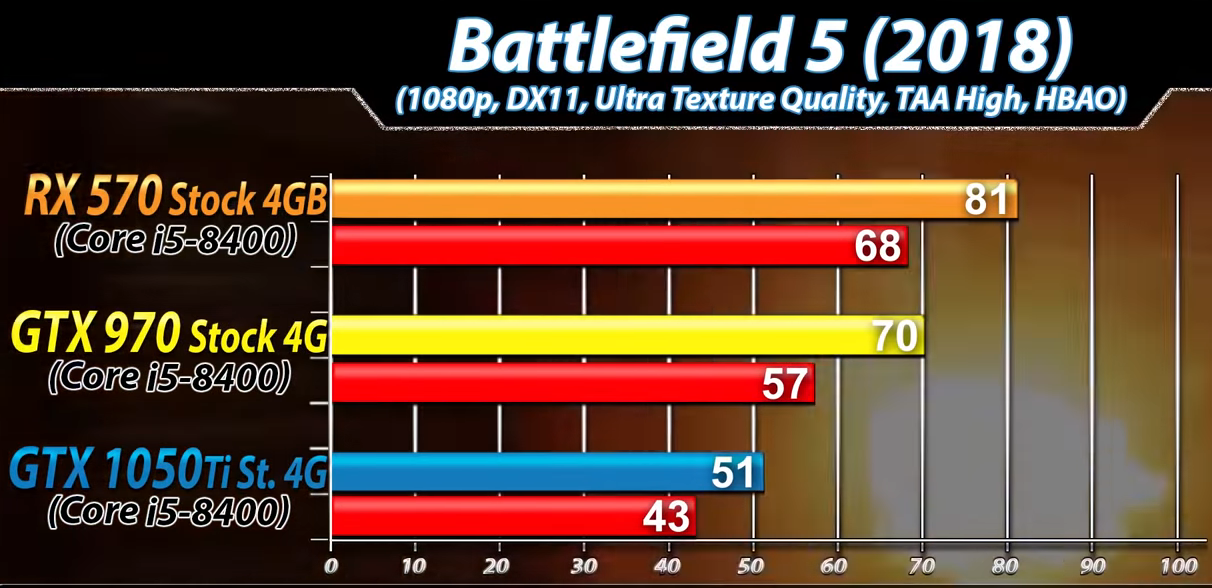
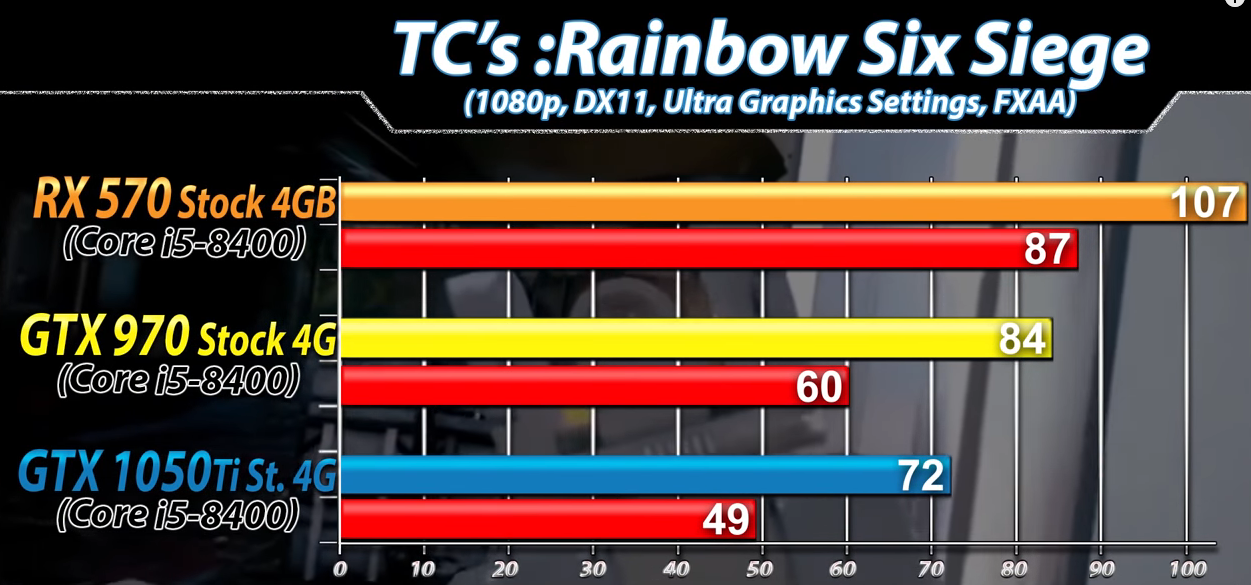 rich willow
why should i play bf5 on such high settings?
I think it would be better to have more fps and lower the quality

latent light
that's just a comparison chart
RX 570 gets around 15% more performance
you probably need a card in the range of RX 580 to GTX 1660 Ti performance tbh
for your monitor
rich willow
yes this is the Problem. I can run bf4 on 200 fps and now everything will be killed xD
latent light
RX 580 gets around 90 fps with all settings on high
120 fps average with everything low, stays above 100
although could vary depending on CPU
rich willow
yes i heard about it
latent light
GTX 970 to RX 580 is only a 20% upgrade though lol
well, like 30% in BFV due to the game liking AMD cards for some reason
rich willow
120-20%
xD
so i will get around 90. i will see if i downloaded it with my trash wifi
latent light
when I play on everything ultra, I get 80 fps average with dips into the mid 60s
I've got a 580
and a Ryzen 5 1600 at 3.8 GHz
on low it seems around 120 fps average with lows down to 100
latent light
roughly 3% faster than 3770 and 4% slower than 4770
 jade tangle
just use linux for gaming iTs tHe FutUrE oF GaMiNg
where every game runs like shit
talking to palpatine
rich willow
cloud gaming
latent light
Xeons seem a bit... bipolar when it comes to gaming
can yours use quad channel ram?
nvm it's only 2 channels
lofty light
I can quad channel but I don't 
latent light
it would only be a 10-15% fps increase in BFV
lofty light
I've already got more frames than my monitor can put out on max tbh
latent light
yeah 140 fps to 160 fps difference
quad channel also has more stable frametimes
but not by much
 grizzled apex
Also I would not recommend a 1660 ti with DDR3 16gb and a 4790k. It’s a 7% decrease in performance easily
 storm osprey
my lord ram and ssd prices are dropping
 molten coral
RAM is actually super cheap now compared a while ago
storm osprey
its literally half the price
storm osprey
jesus christ
yea, the most popular sticks of ram on pcpartpicker at the highest price was 204 bucks, its now 90 bucks
molten coral
Did buy the G.skill trident z
storm osprey
RGB?!
molten coral
Yesss
molten coral
storm osprey
orange?!
storm osprey
for my next build i want to do some rgb, but idk how
molten coral
I kinda want a new cooler but the thing is that I don't really wanna spent any money on my setup for a while
 prime jasper
why would you need a new cooler?
molten coral
my 8700k gets really hot and this cooler is alright but there are better ones/
storm osprey
has 4790.... non k
 supple bane
@storm osprey, the best way to do rgb is not to really have that many rgb parts, yes have them obs, but mainly have strip lights at the top of the case, when i went to insomnia (british gaming festival) the pc's that where on t he game booths had an rgb cooler and rgb ram, and rgb fans. and they had some super bright strip lights at the top, and this made a really cool effect
they had the parts on blue and the strip lights on pink and it looked amazing
supple bane
oh...
storm osprey
right now only my gpu rgb
supple bane
just throw on some rgb fans and an rgb cpu cooler
prime jasper
rgb mobo, ram, and cooler. bam youre done
supple bane
nah, ram doesnt look that good in rgb imo
prime jasper
I have all mine syncing up with aura to show temps so they all change in sync anyway
storm osprey
im only gonna replace my cpu, ram, and mb
i have 7 cougar fans that i love right now
not gonna buy new fans just for rgb
supple bane
fair enough
latent light

Facebook Marketplace
Processor: AMD 8350
RAM: 8.0 GB
Storage: 1TB
Graphics card: EVGA Geforce 1070ti
Works great never had any issues out of it. Message me for more details price is 600 OBO
Fx-8350 and 1070Ti
prime jasper
sure, it'll play games. 600 though....yikes
supple bane
tbf i bet the 1070ti is most of that
latent light
lol just get a 2060
prime jasper
is that just a huge heatsink? weird ass cooler
supple bane
a 2060 is 400 usd here
storm osprey
you can get a 2600 for 145, a 1660ti for 280
2600 comes with 2 games
(idk if these deals are live atm)
425 right there, 175 to fill out the rest of the components to match that ad
what a horrible deal
storm osprey
WITH 2 free games
molten bramble
Man, I tell you what, for what it is, the 1660Ti has significantly helped the gameplay.
Still looking at taking it back this weekend and picking up a 20* series card.
 steep gust
2070 is a decent buy
don't buy the founder's edition anyways
I would see if they have of the binned GPUs one
paying an extra like $30 can easily net you a solid gain in freq
molten bramble
Link me to the type? I'll check.
Little faded at the moment, office sip-session. 😄
molten bramble
Okay, that's what I thought. I could have sworn they had one. I'll talk to the dude up there tonight and see.
steep gust
yeah stuff with boost clocks around 1600-1700mhz will be the non-binned (so the non -A) GPUs
storm osprey
unless youre playing at 1440p or 240hz 1080p, i dont see a 2070 being much help
molten coral
Cries in 1070
molten bramble
Right now, the 1660Ti @ 144 can be sporatic with the FPS. Way better than the 1050Ti by miles, I'll admit.
Back in a bit.
storm osprey
i can only see a 1080 holding back in an unoptimized game like bfv at ultra settings
steep gust
yeah well BFV slams both my CPU and GPU to 100%
or it did
I haven't played in 6 months
molten bramble
CSL is heavily unoptimized, and the 1660Ti is a workhorse with it.
storm osprey
i use a 1080/4790 for 1440p gaming on low and sit around 100-120 fps
steep gust
If you want really stable FPS I would go with a higher GPU than you need
molten bramble
R6S is hugely better in terms of FPS and texture with the 1660Ti.
molten bramble
I might pick one up at a later date, but the 144 @ 27" is doing superb.
I either stay with this for a hot minute and pick up a high-end 20* series card later, or I pick up a 2070 now and wait even longer for the next gen.
molten coral
49'' 1080p
molten bramble
Gawdamn
storm osprey
ppi at 27" 1080p 
steep gust
27" 1080p is stretched
molten bramble
I was looking at the ultrawide Samsung, but it still needs to come down off that price before I even consider the purchase... and even then, as counterintuitive as it may seem, I like compartmentalizing my apps to smaller scales.
steep gust
I kinda want a ultrawide monitor
but at the same time having a 240hz monitor for competitive games sounds nice
molten bramble
@steep gust Not to disregard the coolness of it, but I think it would agitate me more than compliment my workflow.
latent light
PPI of 22" 1080p is identical to 27" 1440p
steep gust
ppi doesn't help stretching
latent light
yeah 24" and under is best for 1080p
funny there's phones with a 5" screen at 1440p
kinda useless
molten bramble
On the 27", I'm 2560x1440 in-game, with no tearing which is incredible compared to the previous.
latent light
109 ppi with 27" 1440p
92 ppi with 24" 1080p
my brother has a Acer Predator X34 which is 3440x1440 at 34"
and I thought the pixel density was garbage
even compared to my 24" 1080p
molten coral
@molten bramble The super ultrawide from samsung?
molten bramble
@molten coral yeah man, I was checking that out the other day
storm osprey
except 4k is not reasonable
steep gust
4k 60hz isn't hard to do
latent light
my RX 580 could do 4K 60 fps at lowest settings
molten bramble
@latent light So now you're better than us, huh? 😄
latent light
consistent frametimes and pixel density is my preferred experience
storm osprey
i dont want absurd jaggies, and i want a smooth experience
molten bramble
Anyone else buy V8 juice in bulk? Gets me some vitamins and a heavy dose of sodium. Think if I poured it on this GPU I'd get better frames? Asking for a friend. 😄
molten bramble
Racist.
latent light
what about V8 fruit juice
storm osprey
v8 is the devils juice
molten bramble
No! Vegist.
😄
@latent light Tried it, but it was too concentrate and fucked with my reflux.
latent light

molten bramble
Also, dropped frames. #ijs
latent light
I'm shocked with utter amazement when I see a B350 motherboard running 3200 MHz memory
or is that not impressive
 sacred walrus
fx 6300
 sacred walrus
1050ti
steep gust
yeah that cpu be pretty bad
 molten coral
If you don't have anything to add to the conversation why even say anything
¯_(ツ)_/¯
latent light
prime jasper
No kidding got old quick
latent light
just realized there was DDR3 3200 MHz sticks
what platform would you need to run DDR3 at 3200
prime jasper
Z97
molten coral
@molten bramble But I got the 49'' ultrawide from samsung and I freakin love it. It's kinda expensive but for me the biggest thing is: no more hassle with a monitor frame in the middle.
molten bramble
So I think it's about time to start experimenting with this board/memory to OC.
steep gust
DDR3 3200mhz isn't even the good ICs
prime jasper
I only got my ddr3 to 3000mhz on dual sticks. It's pretty fucking hard.
 molten bramble
@molten coral I remember the pic of your setup, I am thinking one 27", two 24" and a 32" TV.
latent light
watercool the ram once you get to 1.85v
latent light
or use a.... chiller 
steep gust
DDR3 has different safe voltages
for each IC
and so does DDR4
its just no one tests it
Pretty sure my CJR degraded at 1.45v
but I'm too lazy to test it
prime jasper
Also I dont even know anyone that actually did 3200 cl9 on ddr3
Let alone that clock speed in genral
steep gust
It should be possible cold
prime jasper
Out of the box
Tho
Like

Would be more believable than seeing someone at 5100 cl18
For daily
steep gust
5100 CL18 isn't possible
prime jasper
That's what I'm saying
steep gust
on a daily system
prime jasper
For daily
steep gust
also its Corshit
They probably just binned the sticks to that and knowing Corsair it can't even do it properly
molten bramble
Daily.
prime jasper
Hell I was at cl12 to get 3000 to work for ddr3 and that's with really gnarly hyperx
steep gust
Gotta have that PSC for cold scaling
 molten bramble
Intel i7 8700K w/ Corsair LPX 3200 32Gb.... let's take bets what I can get out of the setup?
molten bramble
MSI MEG Z390 ACE
The next step was GODLIKE, but I wasn't looking to drop $ on that.
I haven't yet enabled XMP, been babying the setup making sure everything worked properly before I started switching things up.
So far it's been pretty damn stable.
 molten bramble
Part of the reason I didn't buy it, wasn't much of an advantage over the ACE
little comet
Woohoo new PC is awesome
Runa bf1 smoothly on ultra
Unfortunately can't play multiplayer until Sunday but still happy
RX 580 oc + amd ryzen 5 2600
16 gb RAM
prime jasper
 shut zephyr

 jade tangle
anyone here well versed with unity ?
 raven blade
i5-9600k or i7-8700? Trying to decide for my upcoming build
prime jasper
For bfv, 8700k wrecks it
raven blade
I'm not talking 8700k, just 8700 locked
I don't really have the extra 70 bones for the K
The 9600k has 6 less threads but performs around the same as the 8700 and is around 60 bucks cheaper. With the reduced thread count I'm not sure
supple bane
if you just want it for the gaming side of things and you dont want to do any work on your pc then the 9600k would be better as it is cheaper and as far as im aware thread count doesnt matter that much for bfv,
why not the 2600x anyway ?
that has more threads, basically the same clock. and is loads cheaper
 warm junco
raven blade
warm junco
raven blade
Because in multiple tests I've seen even the AMD 2700X is significantly slower in gaming than any of the newer Intel chips
The 2700x is up to like 40 fps slower than the i7-8700k
steep gust
uh
You realize max FPS is worthless
If you have a 1080p 144hz monitor
150fps vs 200fps is the same
supple bane
i said 2600x anyway
but yes, the 2700x is slightly more powerful than the 2600x
but is still 100 pound more
raven blade
Except with my GPU it's the difference between 110 fps and 160
raven blade
I'm not
steep gust
One variable at a time
raven blade
I'm saying with my gpu these two CPUs push different fps to support it. The AMD 2700x with is about 30-35 fps slower than the i7-8700 paired with a RTX 2070
And they are the same price
supple bane
what is the fps tho
yes it is slower, but what is the fps
as like what predator said, there isnt any point having an fps< than your monitors refresh rate
raven blade
I already said, it's the difference between me hitting 144hz or not
With the 8700 I'll be hittinf around 150 fps on ultra as for what I've seen on my friends 2700x he gets about 105-110
prime jasper
are those those tests you are looking at on dx11 or 12?
that can make quite a difference
raven blade
This is with directx11 I believe
supple bane
with that gpu you want dx 12 as far as im aware
jade tangle
dont
supple bane
oh ok
raven blade
I would be using DX12
jade tangle
dx12 is trouble in bf5
prime jasper
my 2700x/rtx 2080 loves dx12 so I cant argue with it
the people who have trouble seem to have lower spec hardware aka less than 6 cores
supple bane
well you have to have which dx your system supports
it isnt going to be the same for every system
raven blade
I'm going to ask Linus Tech Tips because I also am pursuing a career in video editing which would benefit from a powerful CPU especially multicore
steep gust
what

We're finally doing it! This livestream intends to overclock AMD Ryzen CPUs (R7 2700X) past 5GHz on liquid nitrogen, ft. Bearded Hardware. Ad: Buy Gigabyte's...
prime jasper
lmao they have the opposite amounts of hair
supple bane
prime jasper
and I have that mobo, sweet
prime jasper
@prime jasper actually ironically dx12 issues are with higher end cpu's
Dx12 helps more with a CPU that has bad single core
Hench the 2700x
The RTX 2080 has equal performance to the 1080 Ti. Change my mind
I thought that was the general consensus
prime jasper
Well let me ask you
does the encoder make graphics look better w/ little frame reduction?
tbh I don't know what the encoder is
 forest token
x264 nvenc encoding on the gpu
prime jasper
um ok
You know if I had lots of money, one thing I'd get is the Titan RTX
That thing is a beast good god
If you wanna play with Raytracing with absolutely no frame reduction, go for that lmao
forest token
looking for a link
prime jasper
Why do you say that
steep gust
Also the RTX Titan loses to the 2080ti while gaming
prime jasper
What makes it beat 1080 Ti out of stock
steep gust
because it has higher performance?
prime jasper
False.
steep gust
a 1080ti at stock settings loses to a stock 2080
steep gust
worse performance?

It’s more “RTX OFF” than “RTX ON,” at the moment. The sum of games that include RTX-ready features on launch is 0. The number of tech demos is growing by the hour – the final hours – but tech demos don’t count. It’s impressive to see what nVidia is doing in ...
wow took 30 seconds
prime jasper
All the research that has been done shows the 1080 Ti and 2080 have equal performance, even in 4K. I have a FTW3 Elite model 1080 Ti and I can run 99% of my games at 60FPS (and higher) with 4K and I'm not even overclocked.
prime jasper
No it's not wat
I know someone IRL who has a 2080 and his 2080 literally performs almost equal to my 1080 Ti. Not to mention the "fancy" features that the 2080 has (DLSS & RTX) SIGNIFICANTLY hinder the frame rate in games.
If you want good frames and RTX/DLSS you need to get a 2080 Ti :p
steep gust
a stock 1080ti has a boost clock of 1582mhz and draws 250w
a FTW3 has a boost clock of 1683mhz and draws something like 350w once you increase the power limit
So yes, a 1080ti FTW3 is factory overclocked
and I know someone IRL who has a bunch of bloatware on their PC and runs RAM at JEDEC
prime jasper
My mind is not changed :p
steep gust
Anecdotal evidence is meaningless
forest token
steep gust
You have zero sources
steep gust
I have provided soruces
prime jasper
You provided one source
prime jasper
Based on 397,089 user benchmarks for the Nvidia GTX 1080-Ti and the RTX 2080, we rank them both on effective speed and value for money against the best 613 GPUs.
There's my source
steep gust
userbenchmark is not a source
prime jasper
Sure it is
steep gust
Its crowd sourced
which means its not reliable
Due to every person have different hardware and settings
prime jasper

PCWorld
Nvidia's GeForce RTX 2080 and GTX 1080 Ti perform similarly. So which graphics card should you buy? Here's what you need to know.
Very similar performance
Almost equal
steep gust
I can run my 1080 with just PCIe power (75w) and userbenchmark treats it as if I let it draw 500w
fun fact
"almost equal" and "equal" are different
prime jasper

Eurogamer.net
Benchmark performance, value and feature comparison included.
steep gust
wow you googled "2080 vs 1080ti" and pulled the first 3 pages
without really reading into them
prime jasper
No I read them. I've made this argument before lmao
steep gust
at stock, a 2080 beats a 1080ti by a few percent generally
Once overclocked, the gap widens
prime jasper
One of my friends made the argument that the RTX 2080 is better because it has DLSS & RTX
Until I showed him the frame reduction when running those features 
 coarse nimbus

steep gust
blurry AA = good right
you know you don't have to worry about edges if everything is blurry 
 violet plank
wtf,any 1080ti i have ever seen/owned runs easy af over 2k clock stable
violet plank
atm running a crappy gigabyte at 2.1k
prime jasper
*MHz
violet plank
same,under 70
atm running a crappy gigabyte at 2.1k
might be the reason why nvidia took them out of the market so fast 😏
steep gust
uh what
Pascal lasted like 3 years
They took them out of production because they were being replaced
also I know people who's 1080ti can't even do 2000mhz, so again, anecdotes are worthless
latent light

AMD Matisse Engineerning Sample with 12 cores and 24 threads is floating about motherboard vendors, and according to my sources the clock frequency for this ...
12 core 5GHz

wtf does 4-way SMT mean
prime jasper
Wait someone just now was arguing a 2080 = 1080

God damn its crusading time @steep gust

@prime jasper a under clocked 2080 would ass rape a heavily overclocked 1080 on any time of the day
prime jasper
Never heard of that, if I had to guess, it's for 2 chiplets dual controllers
That's my guess
If there was 4 threads per core
Then in cinebench 
latent light
Cine🅱ench: eyes glowing
prime jasper
Would be a dirty move of AMD but smart
Since all that "cores" on dual channel is pretty ooof
But let's see
latent light
went to my brother's house last night and he has a delidded 8700K with a copper IHS and it's a mini-ITX build, he got it to 5.2 GHz stable on all cores
molten bramble
Simultaneous multithreading (SMT) is a technique for improving the overall efficiency of superscalar CPUs with hardware multithreading. SMT permits multiple independent threads of execution to better utilize the resources provided by modern processor architectures.
I thought they did that on Sun boxes ages ago?
"Simultaneous multithreading (SMT): Issue multiple instructions from multiple threads in one cycle. The processor must be superscalar to do so."
prime jasper
8700k'a early and late models are super easy to OC @latent light
prime jasper
And?
latent light
he got it for $250, he got it from someone that said it "overclocks very well"
prime jasper
@molten bramble grim wasnt asking about what is smt, talking about 4 way
It's something pretty new
"4 way smt"
Dosnt make sense on the slightest but since am4 is now a mini threadripper
Who the fuck knows what they did
latent light
I thought 4-way would mean 4 threads per core because currently we are on 2-way
imagine a 4 core with 16 threads
molten bramble
Huh? No it isn't. It's new for consumer chipsets maybe. Otherwise, it's been existing since the '90s.
latent light

prime jasper
Double threads per core since the 90's on what cpu? @molten bramble
Never heard or seen of this
molten bramble
I want to say IBM was doing it, maybe with the RISC platform, but dunno off hand. The concept is not new though.
The technology catching up, perhaps.
prime jasper
Smt is basically the same as hyper threading
molten bramble
Hyperthreading essentially multi-homed.
molten bramble
Ok.
prime jasper
If there is as you say, please any link or anything
So I know were not being trolled
latent light
btw, after a little bit of research, 4-way SMT means 4 threads per core
they could add up to 40 threads per core if they wanted to, just like GPUs do

prime jasper
I wonder if a CPU exist with this
molten bramble
"The Blue Gene/Q Compute chip is an 18 core chip. The 64-bit A2 processor cores are 4-way simultaneously multithreaded, and run at 1.6 GHz. Each processor core has a SIMD Quad-vector double precision floating point unit (IBM QPX). 16 Processor cores are used for computing, and a 17th core for operating system assist functions such as interrupts, asynchronous I/O, MPI pacing and RAS. The 18th core is used as a redundant spare, used to increase manufacturing yield. The spared-out core is shut down in functional operation. The processor cores are linked by a crossbar switch to a 32 MB eDRAM L2 cache, operating at half core speed. The L2 cache is multi-versioned, supporting transactional memory and speculative execution, and has hardware support for atomic operations.[38] L2 cache misses are handled by two built-in DDR3 memory controllers running at 1.33 GHz. The chip also integrates logic for chip-to-chip communications in a 5D torus configuration, with 2GB/s chip-to-chip links. The Blue Gene/Q chip is manufactured on IBM's copper SOI process at 45 nm. It delivers a peak performance of 204.8 GFLOPS at 1.6 GHz, drawing about 55 watts. The chip measures 19×19 mm (359.5 mm²) and comprises 1.47 billion transistors. The chip is mounted on a compute card along with 16 GB DDR3 DRAM (i.e., 1 GB for each user processor core).[39]"
prime jasper
Ah thank you
molten bramble
That project started in 1999.
It was based on concepts from the early-to-mid '90s, but I don't think anyone had a working concept until then. I could be wrong.
I am guessing what they've done here, however, is bring something to the consumer market that isn't bleeding edge and hemorrhaging cash from the the consumer's wallet.
prime jasper
That chip looks super specific and not really a CPU
molten bramble
Holy shit.
prime jasper
More of a compute stick to assist
molten bramble
I wonder if it would run Battlefield V? 😄
prime jasper
Not to be a total dick, but pretty sure this isnt really considered something to run in a os
At all
molten bramble
That wasn't what was posited though. The point is, the concept existed for a long time. They've just figured out a way to bring it to the masses.
latent light
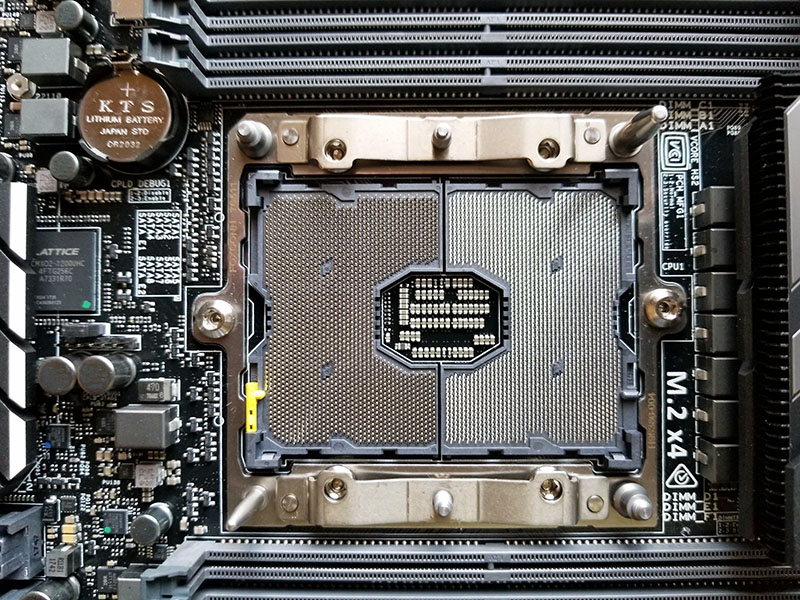
ASRock Rack has released a new M-ITX, small form factor motherboard based on the LGA 3647 socket that can house up to 28 core Intel Xeon CPUs.
molten bramble
Wow.
molten bramble
I don't disagree.
prime jasper
So I should be more specific, there hasn't been multiple threads in a actual CPU
 better?
Or bootable
molten bramble
What's the intent of that SFF/mITX board?
prime jasper
This board wont even support my CPU at stock
 quaint topaz
 iron canyon
nice keyboard /jk
nice whatever-board 😛
quaint topaz
i just mix random sound assets together to make something
i never publish whatever i make
molten bramble
@iron canyon It basically works inline with Ableton.
quaint topaz
got a lot of free ableton audio packs
molten bramble
Nice
quaint topaz
Is this what freedom feels like
molten bramble
Dunno, you get to Miami yet? 😄
 quaint topaz
f
 cold cave

 latent light

Driver1: 378.66 WHQL Release Date: 2017 Driver2: 430.64 WHQL Release Date: 2019.5.9 GPU: Gigabyte GTX 1050 Ti 4GB OC CPU: intel core i7-8700K Games: 1-Assass...

only tested new games
molten bramble
Interesting.
 random kiln
1 or 2 fps hardly gimping
latent light
should of tested csgo, witcher 3, bf1
steep gust
1-2fps is literally margin of error
 outer basalt
battlefield 5 won't go full screen!! I have tried almost every thing now i cant get the game to stay in full screen! I select it in the menu and when i go back in to the game it goes straight back to windowed border less. Please does any one know how to fix this ?? PC
jade tangle
verify game?
outer basalt
I have tried that as well 😦
outer basalt
Does no one else have 2 screens with this problem ?
 junior ploverBOT
:information_source: Contacting Battlefield Support
If you need to contact the Battlefield Support team for questions you might have, crashing in game and or server issues head over to
https://help.ea.com/en/battlefield/battlefield-v/
Contacting EA Support
If you need to contact EA support about account issues, billing issues etc head over to
https://help.ea.com/en/
If you need help in this Discord server you can send a Direct Message to our @woeful crater bot!
molten bramble
I've seen FPS chatter and such on there, might be a tidbit about windowing.
supple bane
wait do you mean that when you launch the game it appears in the top left in a window not in a full screen ?
outer basalt
@jade star That does not work when i am in game playing and i push escape my mouse can go onto my other screen if i use alt + enter my mouse stays on the screen until i go off the menu (in game) and i push escape again to go onto the menu my mouse can again go onto the other screen ?
 jade star
alt+enter forces fullscreen
Not borderless fullscreen
aka, toggles fullscreen on/off
in almost every game
outer basalt
it does not work man i have tried
jade star
seems like a driver issue then
outer basalt
soon as i push escape to see if it is border less my mouse goes on to my other screen
how do i sort out the driver ?
jade star
contact ea help as above, and advisor will help you further
jade star

 split storm
They're together @wicked forum
 wicked forum
May be a bum router unable to keep up with the data
steep gust
probably not
wicked forum
Bfv is moving a good amount of information with destruction, vehicles and bodies
steep gust
games don't send much data
wicked forum
More than crusader kings that they don't have issues with ping wise
split storm
Eeeh..
Crusader kings is also pretty demanding
Armies, every character in the game needs to be processed, every country, every action by every nation
wicked forum
Think that is a load on your CPU
4x games run a grip of simulation data
network load would be marginal after the CPU does the work
And it isn't exactly tit for tat fast input data like a fps
split storm
Well I have to send this data to his PC
steep gust
which is minor
Most of it can be stuck to basic bytes
"x character at x,y,z"
"x action"
repeat
grizzled apex
I could argue rust is pretty demanding
Even on a 4790k, 16gb DDR3 and 1660 ti, I maybe get 80 FPS on medium
split storm
That times about a million
 ionic frigate
Rust the survival game? Or a different rust?
jade tangle
1v1 me rust
ionic frigate
No
 icy mist
Which motherboard can you suggest for i7 9700k?
 vagrant quartz
what RAM would you guys suggest for Ryzen? gonna build a new rig soon, dw will wait for ryzen 3000 and navi, just reading into it
jade tangle
good ram ;)
molten bramble
@icy mist A Z390 board of some flavor most likely, I use a MSI MEG Z390 ACE myself that can accommodate it, but I run an i7-8700K.
jade tangle
3000+ id suggest
icy mist
ty very much
molten bramble
@icy mist If you're deadset on getting that CPU, make sure you don't skimp on the liquid cooling solution for it. Do it right the first time, they run hot.
supple bane
i mean, i wouldnt get a water cooler for it imo
get a nice cooler
more affordable and the performance gain is minor
molten bramble
I've got an h80iv2 currently on mine, and under load it gets up there, so I'm going to have to pick up another AIO.
That's with an open case as well.
supple bane
my cpu under load reaches 60 at most on a intel stock
icy mist
@molten bramble I was going to buy hyper 212 evo. Im going to edit some 1080p video
molten bramble
Yeah, that's pretty much what I use my build for half the time.
icy mist
What gpu do you suggest? I'm thinking to postpone gpu for while and use cpu only
molten bramble
Good question, I just picked up a new 1660Ti myself, runs great. However, I might take that back for a RTX 2070.
I'm on the fence on that.
check out pcpartpicker, there are some pretty great builds on there, most using the same family of GPUs.
icy mist
does 1660 support hardware acceleration in premiere pro?
molten bramble
You're referring to NVENC/HEVC? That's been supported since the 1050Ti.
Specifically, 1660Ti will handle H.264 / H.265.
icy mist
I don't exactly know but I see it in forun discussion.
they were mentioning cuda
also
molten bramble
CUDA is just a platform/API for developers at the software layer which expedites instructions/usage of the GPU. I wouldn't worry about that, you're not going to have to deal with that as it's already baked in for your particular applicaton.
It's been raining here for four straight days, all variants of it. Not sure where all this came from, but the east coast is getting swamped.
storm osprey
i live in az and its been pretty rainy here too
especially odd for this time of year for us
jade tangle
excuse me but i doubt that rain is a technology 🤓
storm osprey
it is if you believe in the government made a weather machine to control the environment
molten bramble
It's the original liquid cooling technology.
icy mist
@molten bramble thank you very much for information
molten bramble
Yeah bud, be sure to check out that site and see what other folks are doing with their builds. You'll start to notice trends, might save a buck or two.
Does MSI Dragon Center seem laggy to anyone else since the last update when diving into profiles?
icy mist
Build is like this
Intel Core i7 9700K 1151P
Asus Prime Z370-P Intel Z370 2133MHz DDR4 LGA1151 USB 3.0 ATX
Hyper 212 EVO for cooling ( I will look at liquid cooling setups too)
VENGEANCE® LPX 16GB (2 x 8GB) DDR4 DRAM 3000MHz C16 Memory Kit
Samsung 970 EVO 500 GB SSD, NVMe M.2
AEROCOOL AE-CYLN-750 Cylon RGB 750W 80+ Bronze Case
storm osprey
dont get that ssd unless you absolutely need it for something work related
using that as a consumer or gaming wont benefit you much at all, but it costs a hell of a lot more
icy mist
For video editing?
storm osprey
im sure it will help there, but i doubt its gonna be a dramatic difference
970 is just so effin expensive
icy mist
Is there huge differecen between normal ssd and nvme for video editing?
storm osprey
i dont video edit or know anything about it
so i really cant say, but ssd is just save and load times
violet plank
nvme benefits only with loads of small files
storm osprey
if editing is long on those ssds will help, but the difference on most tasks between sata and nvme ssd isnt amazing
molten bramble
I have the 970 EVO + NVMe drive @ 500Gb and it was a night and day difference with Adobe's suite.
violet plank
windows and games benefit like zero on a nvme,but if you wanna save space,it's a good option imo
icy mist
@molten bramble Do you know ıf normal ssd will be enough? I'm on low budget and due to usd price everything is too expensive
storm osprey
going to ssd from hdd is gonna truly be a huge difference
molten bramble
I used a normal SATA SSD for a long time before this. You'll be fine. I ran the Samsung 860 Evo.
They're as cheap as $70 atm
violet plank
i still got a samsung 830 evo running 🐏
molten bramble
If you can find a Pro version, even better.
violet plank
as a dump drive,that thing just won't die
violet plank
as a private user there isn't really a reason to use the pro version
icy mist
Pro version is expensive than the one I want to buy
violet plank
with normal programs it isn't faster
icy mist
IF buy m2 I can't buy normal 2tb hdd for now also I have to cut bugget from graphic card
molten bramble
@icy mist You need to look at the pins above, as this discussion can become circular.
storm osprey
we talking m.2?
molten bramble
storm osprey
m.2 isnt faster, its a form factor that supports nvme, which is faster
you can get a sata m.2 drive that is the same exact speeds as a 2.5m ssd drive
icy mist
@molten bramble ok ty. My budget is 1700 usd.
storm osprey
you can get a crucial bx500 250gb ssd for 25 bucks though
molten bramble
Not including the monitors.
icy mist
@molten bramble yes. I bought the monitor. LG 29 inch ultrawide monitor
molten bramble
https://www.amazon.com/Samsung-970-EVO-Plus-MZ-V7S1T0B/dp/B07M7Q21N7?th=1 I paid $179 for mine I recall, could have waited a month and a half and saved.
Amazon.com: Samsung 970 EVO Plus Series - 500GB PCIe NVMe - M.2 Internal SSD (MZ-V7S500B/AM): Computers & Accessories
I just realized my mb will do max 128Gb memory...  😄
😄
Looks like I'll be buying some 32Gb sticks in the future.
icy mist
Nice. Price of ram going up too. I had to play Battlefield V with 8 GB stick for 3 month before I could buy one.
storm osprey
ram prices are going down
molten bramble
Yeah, I'm waiting for some bottoming.
Does Corsair Vengeance not come in 32Gb sticks? Interesting.
Seems like they'll go max 64Gb across 4x16Gb sticks.
Same with G.Skill it seems.
icy mist
Well for me, price of everything going up. I live in Turkey now 1 USD is equal to 6 turkish lira. I bought GTX1070 1 year ago now its 1.5x expensive than the price I bought.
storm osprey
1070 should be going up in prices everywhere because its a last gen gpu that should be running out of stock and is replaces by the 1660(ti) and 2060
molten bramble
Even Crucial doesn't offer anything more that 16Gb dimms. Now I need to see if anything has actually put 128Gb of anything into this mb.
@icy mist https://pcpartpicker.com/guide/ there are some solid builds in there, one of those with your CPU.
icy mist
@molten bramble ty very much. I will take look at them.
molten bramble
"MSI is claiming their Z390s can now handle 32gb JEDEC DDR4 Modules on all their boards. Claim you can have up to 128GB of Ram on the ACE. I have yet to see a bios yet though. https://www.msi.com/news/detail/f668...78e24829cddba9"

In all honesty, I'm just going to up this to 64Gb.
I am curious though about the 128Gb debacle.
https://gnd-tech.com/2019/01/all-msi-z390-motherboards-ready-for-the-latest-jedec-standard-of-ddr4-32gb-memory/ They were talking about it in January, but I am guessing it's just not there in the manufacturing lane at the moment.

MSI has just announced that they will be the first major motherboard vendor to fully support the latest JEDEC standard memory for 32GB memory modules for its current MSI Z390 motherboard lineup.

Intel has confirmed the new 9th-gen desktop processors due later this year will fully support a maximum of 128GB of DDR4 based on recently leaked information.
"Now that we’re seeing high density modules in the 32GB flavor emerging from companies like Corsair, G.Skill, and Kingston, there is no wonder Intel has upped the official support capacity for the 9th-gen processors to 128GB." Umm.. where? lol I just went to their sites.
Only Kingston seems to have a 128Gb kit.
and I believe that's still 8x16Gb
Not 4x32Gb
Same goes for Corsair
latent light
Yeah that only works for iMacs and certain laptops
molten bramble
https://www.newegg.com/Product/ProductList.aspx?N=100007952 600418367 601190338&IsNodeId=1&Submit=ENE Looks to be the same situation.
Though that's more server than much else.
So either 128Gb (4x32Gb) is on a delayed launch, or it was a marketing pipedream...
latent light
WiFi adapter was overheating so I put it in case and taped it in front of the intake fan
prime jasper
now that some quality redneck engineering
latent light
need new wifi adapter
I like this one because it doesn't use software or an install wizard and it works instantly when you plug it into any computer
prime jasper
Arent most usb adapters just plug and play?
latent light
Netgear ones aren't
prime jasper
or just get a pci-e card and unlock maximum power
storm osprey
wired is maximum power
latent light
family doesn't want a ethernet cable running across the hallway
storm osprey
thats why you buy those wall clips
storm osprey
or get a long wire with wall clips
supple bane
could someone explain to me what the hell a power line is in the context of networking ?
i have heard of the sacred power line adapter before but i have not a clue what it is
prime jasper
those things. allow you to plug an eithernet into an adapter that plugs right in and connects to your wifi
supple bane
so there still isnt a wired connection between the router and the pc ?
it goes from wifi to ethernet ?
prime jasper
exactly
supple bane
that sounds.. dumb..
prime jasper
works better than usb adapters and some devices have no usb so you have no other options anyway
steep gust
@molten bramble The rated limit is almost never the limit
I know people running 96GB on 8th gen
molten bramble
Hm?
steep gust
8th gen is rated to 64GB
9900k has the strongest IMC on the market
It will have zero issues with 128GB
steep gust
You are making it sound like its not possible
9th gen is not the first generation to support over 64GB
molten bramble
I did nothing of the sort. I said that memory manufacturers don't have 128Gb (4x32Gb) kits for the 4-slot Z390 board.
I went to four manufacturer sites and two reseller sites. Noone is offering them.
And the only ones I did find were for servers and for iMacs.
steep gust
That because 32GB non ECC RAM sticks don't exist
Outside of one proprietary garbage by Asus
molten bramble
That's what I am saying, but as early as Oct 2018, reviewers (based on marketing by companies like MSI) were touting such kits already in the field. Here we are in May 2019, still don't exist. So I have a MSI MEG Z390 ACE capable of handling 128Gb, but the max that can be found on the market is 64Gb kits.
steep gust
Its not really on the board to run 128GB
molten bramble
So, for these consumer boards, it's either delayed or just not gonna happen.
4x32Gb
steep gust
That page is about how it will support 8x2048 standard
molten bramble
I see a bunch of 8x16Gb kits though
steep gust
yeah because 32GB sticks don't exist outside of one proprietary PCB for non ecc
You can buy 32GB sticks that are ECC but Intel is Intel
molten bramble
exactly
So, in essence, whether it supports the JEDEC standard or not at this point, to the consumer, is inconsequential and potentially marketing fluff... because there is just nothing to buy DDR4-wise that will accommodate someone doing that.
That and a price point for over $1K in memory alone is probably going to keep that out of mainstream for most people anyways.
molten bramble
I don't disagree
Reminds me of ASUS's marketing for LGA775 boards like the P5K-E that were touting support for DDR3/performance, but only supported DDR2.
Misleading at best.
In any case, for me, 64Gb on this build is plenty.
steep gust
yet.
supple bane
i knew that i had an account for a CAD program through my school that will last me for another 3 years, but i didnt realise that said program would have cost 1500 pound for that time if i purchased it my self

supple bane
cad is a priceless tool tho
steep gust
CAD for business use is fine for its price
supple bane
but i mean someone like me who is kinda thinking of a career in it, its would be impossible to get practise without being at schhol
 wheat copper
can i post the name of a website with some pretty cool products?
steep gust
is it legal?
wheat copper
its just gaming stuff
supple bane
i dont think that it isnt allowed just maybe ask in general if it isnt tech
wheat copper
yeah they have pc stuff
supple bane
well then
wheat copper
so idk how its not related to tech
they have meeces and storage. and headsets. i believe shroud iss apart of it as theres a huge video of him being featured
steep gust
That sounds more promotional
wheat copper
i personally dont have affiliations with it. maybe i should dm you the site so you can see for yourself? dont want to break any rules so ill let you decide
nvm mind. sorry for clogging the caht. im just stupid.
supple bane
damn
im sort of getting my head around the marketing of amd now heh
but still confused by it a little
latent light
apparently MSI, Biostar and Gigabyte got the 16 core and 12 core Zen 2 samples
supple bane
just to confirm, zen 2 is the generation of chips that are coming out later this year right ?
latent light
well they get announced in 2 weeks
supple bane
oh
latent light
and come out in either June or July
supple bane
well at least i got something right for once heh
steep gust
Engineering samples are worthless
Remember the 9900k that was doing 5.3ghz on air?
I remember
latent light
I thought that was just a single core oc though
steep gust
I don't think so
but Chinese engineering samples that can't be verified are not to be trusted
latent light
oof
steep gust
nowhere near enough flow
supple bane
personally I think that an air will be better in most cases
latent light
240mm or 280mm optimal
steep gust
I prefer the looks of water
latent light
also, you probably need a custom pump for 360mm
latent light
lol
supple bane
if you would go to the effort of having a custom pump it isn’t really an aio anymore, just a water cooling loop
supple bane
would make a cool yt experiment, take an aio, cut a pipe and slap a pump on there and see what happens
molten bramble
@supple bane Autodesk / 3DS or?
latent light
By the way, Biostar showed off their X570 motherboard
supple bane
fusion 360
molten bramble
I have that as well.
It's good for components and what not, not as much for artsy modeling.
latent light

TechSpot
AMD is expected to announce its much anticipated Ryzen 3000 series of processors at Computex 2019. Along with that, we also expect to hear about its new flagship chipset, the rumored X570 platform. However, thanks to Biostar, we can get…

 supple bane
I’m still only dabbling my toes in the animation and like the making bearings move for example, something i want to learn
molten bramble
Yeah
Fusion 360 is good to start with, the UI is very forgiving a well.
Comparative to it's big brother 3DS, it's very easy to use.
supple bane
one thing I hate about it, or I just haven’t figured it out, THERE ISNT A FREE CAM, i want to be able to go into a mode and left click like moves me around the “world” so to speak, not just to rotate the camera around a pivot
molten bramble
Hmm, there is a freewheeling rotation mechanism across the plane(s), but I am not sure about a freestyle cam.
supple bane
Here’s a situation which I’m trying to get at, I have a flat wall, on that plane I want to make a very small but precise box that extrudes off it, so I’m thinking “right let’s zoom in to hell and back” but it zooms into the wrong area of the plane and I can’t see the area I want to place my other box, and it just feels like I’m in mission impossible trying to get my camera in the right place,
molten bramble
Hmm, I think the only way to do that is sketch inside the wall.
You'd select your placement and then set the sketch point. The camera should focus there
supple bane
hmm, I’m sure there is a simple way around it that I haven’t figured out yet,
I do need to do some research on the moving parts side as that would open way more opportunities
molten bramble
I learned how to use the tool from this series: https://academy.autodesk.com/course/126271/introduction-3d-modeling?reload=1

Design Academy
Good designers and engineers know how to explore and iterate their designs. Thankfully, computer aided design (CAD) allows you to do just that—explore and iterate your design—until the model suits your needs. However, this iteration process isn’t as easy as it sounds. I...
It's free and informative. Throw it on one screen and follow along on the other.
supple bane
ye I learned the basics the same way I found a bunch of powerpoints that showed you how to make really simple things but explaining all the tools you would need as it went along, the first thing I did was a key ring, so it taught me extruding and text, also some other sketch tool that I forget the name of heh
I don’t look at the names now I just know where all the things are off by heart heh
molten bramble
Nice