#technology
1 messages · Page 181 of 1
 deft bone
 odd goblet
@lofty light I'd rather my computer case be a potato
Or several potatoes
or some kind of godzilla potato
 molten bramble
Mmmmm potato
 lofty light
Why not both?
odd goblet
Godzilla potato running a 2080ti
deft bone
Several godzilla potatoes?
odd goblet
My god
 latent light

Rx 580. $250. Rx 580 strix 8gb they are 350 new. If u have any questions feel free to ask. on Facebook Marketplace
dude trying to scam

deft bone
Which is really sad, as you can litterly open a new search window and check for yourself
lofty light
Facebook marketplace
 ocean canopy
 slate rivet
hello ❤
i need to write of a data breach scenario.. does anyone have one i could use?
slate rivet
cheers buddy
 stable trail
k
 minor turret
Praise raptor jesus
gtx 1070 unlocked to new level
2162 core overclock been stable for 1.5 hour now
 supple bane
neat
minor turret
@sonic osprey same here if i hit over 50-54 celsius, its rip 50-75mhz if that happens
 sonic osprey
I dont hit temp limit, its steady at 50c, should be able to push to 75c
minor turret
ah, i read it as 1080ti so i am not familiar with 2xxx gen
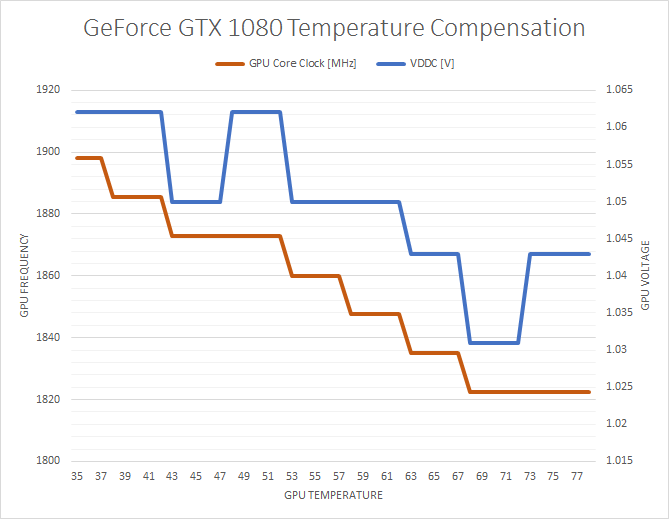
i know boost 3.0 does not boost hard over 50c
sonic osprey
Stock is at 1635mhz 😅
minor turret
even blower cards usually manage 1900ish in 1xxx gen with 1600ish stock boost
sonic osprey
yeah, its not the temps, its the power
 steep gust
@minor turret Functionally identical
Turing and Pascal handle almost exactly the same
but GDDR6 can clock hella hard if you get Samsung
Like +1000 is not impossible
sonic osprey
I have +1000mhz on my gddr6
that is max for the afterburner I am using, might do more tho
steep gust
You can increase the range
minor turret
@steep gust well apparantly even the 1070 could clock like 1200 if you got samsung
sonic osprey
i could get latest after burner to get 1400mhz max on mem
steep gust
Also memory requires actual testing
Not just increasing it till it doesn't work
You have a sweet spot of performance due to errors that might not cause crashes but stop the GPU
sonic osprey
well yeah ofc, but I have like 20C overclock headspace :P
steep gust
uh you get scaling from GPU boost well into exotic cooling
So you never really have 'headroom'
Since you can always go colder and get an easy 12mhz
sonic osprey
well I do have, just power capped
steep gust
Colder then
sonic osprey
wont help
steep gust
Yes it will
sonic osprey
still power capped
steep gust
Cold scaling is very much a thing
minor turret
more heat = card draws more power
steep gust
Now you might have to get a chiller to get proper scaling
sonic osprey
no
steep gust
yes
sonic osprey
need more power intake
steep gust
electronics output almost all of the power draw as heat
and fun fact
more power =/= performance
sonic osprey
its 250W TDP and 111% power on afterburner (max allowed from bios)
steep gust
as seen by entirely bypassing the power limits and you might get a nice 20mhz
sonic osprey
and my gpu caps at 50C
steep gust
50C isn't even cold
Try like almost ambient before you say anything about no headroom : ^)
steep gust
Yes it will
sonic osprey
no it wont
steep gust
Do you not understand
GPU Boost fucking scales with temps
Its just like how Psycho does like 2250mhz on his 2080ti because he uses chillers to get to like 4C
sonic osprey
also he uses flashed bioses
steep gust
XOC BIOS does help but not all that much
sonic osprey
having lower temps helps with need of lower power
steep gust
its like how shunt modding kinda isn't worthwhile
Because you bypass the power limit for what
To hit a voltage limit?
To hit the core limit?
To hit the GPU Boost temp limit for that frequency?
sonic osprey
welp the only way to get max from gpu is negative temps and maxing power from bios
steep gust
no duh
I can take my CPU to like 5.6ghz at the same voltage it is now by just going with LN2
sonic osprey
"negative temps and maxing power"
well "negative"
but I am not gonna get a chiller nor LN2
so my only way to improve more over water cooling is to get bios flash
minor turret
well my friend, its a proven fact that with heat you have more loss in efficiency, generally its minimal
but with my 1070 i noticed that with high temps i hit powerlimit as well
sonic osprey
50c for a gpu is not high temps
75-80c is "high"
most gpus can hit power limit with stock air coolers
minor turret
75-80 is fine for stock mediocre clocks
but for top clocks things changed after the 9xx gen
supple bane
I get to 83 degrees under full load, it’s going to be interesting to see what the 1660ti reaches once I get it
 dusty wagon
how much does a bottle of liquid nitrogen cost
because I wanna overclock a cpu to 7 ghz
 coarse nimbus
extreme OCing like that is so dumb, imo
supple bane
maybe to set a new record
coarse nimbus
what in the hell is the point in getting a super high number thats unusable in anything other than "look what i can do in this very controlled situation"
supple bane
but just doing it for the fun i wouldnt be recommending
 storm osprey
people love "look what i can do" things
coarse nimbus
daily OCs are much more appealing since you know..you actually use your cpu to game or render etc
storm osprey
its the same thought with fast cars, when there are speed limits, and you dont race your car
minor turret
some silly people use chillers and sub zero temps for 24/7 rigs
steep gust
Chillers can't really do subzero under load
@dusty wagon LN2 is like $1-2 a gallon
Its just finding a company to ship it to residential, and buying a dewar + pot (easily $200-400 each)
@coarse nimbus XOC exists to push hardware you paid for to its limit, to see what it can do
coarse nimbus

steep gust
and yes 50C is high for GPU Boost 
coarse nimbus
I understand the theory of stressing the hardware to the limit but
the whole ln2 pot, coating everything to protect it, wrapping it up for moisture containment etc..only to find the max number you could run it only under those conditions just seems rather 
steep gust
You don't need much insulation for LN2, and as long as you are okay with Vaseline its quick to do
Dealing with condensation can be annoying but its honestly not that hard if you take your time
Also you wrap the pot to keep the cold in, LN2 forms ice and isn't risky
 prime jasper
I mean if I din't take apart my mega chiller, under load my GPU's would never get out of subzero and would take heat like a boss. But for normal chillers that you can buy, your subzero on idle and in some games, but in most games it pulls into 6c-12c under max load
Still isn't bad
and XOC isn't silly if you can do daily subzero in games without condensation @coarse nimbus
@dusty wagon My 180L ln2 tank to refill is 115$
You can't buy a small bottle because it evaporates real fast
Im guessing XOC wouldnt help much with an air cooled card then
nope
prob worse because of heat
 atomic zenith
does anyone wanna make a retro gaming server with me
deft bone
Nzxt made one
prime jasper
Asus has some too @latent light
prime jasper
are you building a new rig?
latent light
not me
prime jasper
prime jasper
need a blizzard eh?
prime jasper
lol never even thought of that
x370 titanium msi @latent light
It's not pure white but close
latent light

latent light
gigabyte has RTX 2070 and 2080 that are white
galax HOF isn't available in NA
my brother got 32GB of Galax HOF 4000 MHz
think it's CL18 stock
prime jasper
theres no NA equivalent vendor? that sucks
There aviable, just gotta pay for that shipping
oh
I seen loooooots of people in NA with HOF
lots
molten bramble
This mouse is driving me a little crazy. Can't find the sweetspot on it
prime jasper
rofl and my cooler is right there too, thats creepy
latent light
deepcool is the best
prime jasper
its a chunky monkey but she does the job
 cold igloo
How do you use the bot stat checker?
 lime pollen
@cold igloo !bfvstats [Platform] [ID]
 signal forge
Guys my cpu usage reaches 70%.
My gpu 50%
Is that bottleneck?
Specs.
I7 8700k.
8gb 3000mhz.
256gb ssd.
1tb hdd.
Gigabyte gtx 1070 8gb.
And a bunch of fps drops
Help
steep gust
You need more than 8GB of RAM
Not sure how you ended up with a $300 CPU and GPU and have 8GB of RAM
sonic osprey
so you have just 1 stick?
sonic osprey
you are running your ram in single channel mode, get the 2nd stick back
sonic osprey
yep, you need 2 ram sticks to enable dual channel
you are basically running 1500mhz ram
signal forge
3000mhz
sonic osprey
which is equivalent to ddr3 speeds
signal forge
8gb
sonic osprey
yes with 2 ram sticks it is 3000mhz efective speed
single stick will run half the speed
signal forge
that is the issue?.
sonic osprey
most likely
sonic osprey
should be fixed when you get the 2nd stick back
just make sure it goes to correct slot in the motherboard too
signal forge
alternate slots right
sonic osprey
there is a diagram on near the ram slots
sonic osprey
and then check from the manual how to install the 2 stcks so they do work in dual channel mode
steep gust
@sonic osprey uh yeah no
Single channel doesn't slice your RAM speeds in half
It drops your bandwidth in half
going from 2133mhz to 4266mhz doesn't double my bandwidth
sonic osprey
also you need to enable the xmp in bios to get over 2133mhz
steep gust
Depending on your settings the game will not use all 12 threads
So you will never see 100% CPU usage
 desert bear
CPU 95% :c High Settings
minor turret
2133 ram also holds back most modern CPUs
signal forge
to be honest
the gpu usage
went to 90+%
im getting 100fps on huigh
time to increase ram
tq guys
minor turret
maybe in 2020/2021 we will get DDR5 and not care about ram until 2027 or something
 fair fable
@signal forge Enable DSR and set ingame res to 2560x1440 and scale it down to 80-85%
it will force the gpu to work harder
and wont look like ass
signal forge
@fair fable aye aye sir
supple bane
everyday that goes by i get more annoyed about my pc specs... like i could have got so much more for the same amount of money 
 echo wren
Atleast you didnt buy a PC during the height of mining my 1070 was about 1k
supple bane
it was my first pc tho and when i brought it i didnt exactly know what i was looking for, like i got a i5 7400 and for a few pound more i could have got the 8400 which is like 10000 times better
also yes i got a prebuild, i wouldnt have known how to build a pc back then
echo wren
YT is a beautiful thing
minor turret
is the silverstone RL06 ever slated to get a new refresh with mesh?
that can actually support 360mm rad?
steep gust
@fair fable Fun fact setting a higher resolution and then forcing the game to render at a lower resolution does literally nothing
coarse nimbus
only works in the reverse of that?
steep gust
He sets the game to 2560x1440
Then sets resolution scale to 75% or something
Which means you end up between 1920x1080 and 2560x1440
Then you might as well play at 1920x1080 and set resolution scale higher
Because borderless is superior
latent light
jay played at native resolution then dropped the resolution scale to 80% and it looked sharper than DLSS while getting similar performance

steep gust
He isn't talking about DLSS
DSR is super sampling
and no duh playing at a lower resolution with better anti aliasing will look sharper while getting similar performance
latent light
DLSS is in early stages though, it will get better
fair fable
@steep gust the idea is not to gain FPS, but to force more GPU utilization and ease the load of the CPU
take that shit attitude somewhere else
steep gust
What
You are doing literally nothing but dropping your FPS for a like 10% gain in pixels
and now you have a GPU bottleneck instead of a CPU
So drop your graphical settings to decrease the load off your GPU
oh. wait.
coarse nimbus
inb4 putting a water block on it
molten bramble
@latent light Pretty good grab.
latent light
he got it from some 16 year old kid with an Origin prebuilt PC
it was only used for gaming
he went to the kid's house and took it out of the system for him and traded
ASUS Strix Vega 56 for a 1080 founders edition
latent light
facebook marketplace
steep gust
I need to check facebook marketplace
latent light
lmao there was this terrible deal on there
some dude selling a Fx-8320 and RX-480 system for $1500
steep gust
and it does sell
latent light
yeah
molten bramble
I need to check out FB marketplace again then
latent light
all I see on there is just memes tbh
molten bramble
Looking around for a good priced 1080Ti or something similar
latent light

Intel i7 6700 w/motherboard. $250. Asus wifi dongle included on Facebook Marketplace
molten bramble
I almost bought a nice roadbike on there from this lady that was divorced and was selling
 molten bramble
$2K bike for $600
I couldn't get off work in time to drop by and get it, so she sold it to someone that offered here an extra hundred. :\
I am looking for a new chair first though.
lol
This desk chair has done its work, it's time to get a new one.
steep gust
1060 and an 8350 for $1100 omg
 turbid verge
Gonna get new phone
steep gust
I need to get into selling PCs
turbid verge
My nexus 5 is dying after 6 years of good use
steep gust
a lightening fast 4.00 GHz Octa-Core (8 Cores) AMD FX-8350 (All cores can be overclocked) Processor (so you get a blazing fast, smooth experience),
I'm sorry
Lightning
and the FX8350 is garbage
I also think its a locked chipset
molten bramble
Hmm... maybe I can sell the old P5K-E build on there. 😄
latent light

Custom Gaming PC!! $1,000. Custom Gaming PC!! Very well maintained and very fast!!
Drivers up To Date! Comes with peripherals and monitors!!
Windows 10 PRO!!!
CPU: intel i7 5820k
GPU: Geforce GTX 980
RAM: 32GB ddr4 Gskill
MEMORY: 1xm.2ssd 500GB
MOTHERBOARD: MSI X99s SLI plus...
this one ain't too bad
5820K and MSI X99 mobo
gtx 980
steep gust
Still not a good price
latent light
that's a good mobo
prime jasper
all FX processors are unlocked by default
molten bramble
I'll put the Q9650/ASUS P5K-E up there for like $1K, bet I find a buyer. 😄
latent light

Tom's Hardware
Singaporean retailer Bizgram listed prices and model names for the upcoming Ryzen 3000 series; these model names and prices follow very closely with the AdoredTV leak of last year.
minor turret
lol facebook marketplace always has overpriced crap
either tech illiterate people that dont understand value depreciation or people trying to bait tech illiterate
steep gust
@latent light fake
From another server that was posted in
2 really sketchy sources and one of them is known to lie and and the other can't format a pdf so that it's readable
minor turret
the 12 core being 5 ghz whereas 8 core isnt makes me skeptical
steep gust
5.0ghz makes me skeptical
Great way to advertise because Intel has held the 5.0ghz crown
but that is a 4-600mhz gain from last gen, which isn't really believable
minor turret
well zen+ gave a ~200ish mhz gain from previous gen and AMD specified that it was a minor tweak
but 16 core 5.1ghz seems like a pipedream
steep gust
16c with one core going to 5.1ghz
You can already take a single core off a 2700x to like 4.7
deft bone
From the list above, where does the xxxxG fall? Between the base and the X variants, under base, or above the X?
steep gust
Uh the list is fake
we have zero information on the lineup for Zen 2
Outside of an eight core
deft bone
I'm just curious, as I seen there were G branded chips with the 1st batch
 versed cave
@supple bane I got the remedy from Reddit. Enter key to open chat solves it
supple bane
Oh cool,
latent light
@steep gust fucking gigabyte wants me to send my whole PC to them and diagnose it just for a damn GPU RMA
they think it's my PC with problems but I already told them that I can put my old GTX 770 back in the system and it will work flawlessly
steep gust
Tell them its illegal
steep gust
or keep blowing it up the support and call them out on twitter with screenshots
latent light
if this RMA doesn't work, I'm just going to flash bios and hope that helps
prime jasper
thats the spirit!
minor turret
@latent light Tell them sure minus your harddrives and they ship a fully working computer thats equal or better in performance
also they cover shipping
and insurance
latent light
I'm not going to send them my pc
my pc isn't at fault
if I put my old gpu in it, it will work perfectly
Gigabyte and Asus are said to have the worst customer service out of all AIB partners lol
prime jasper
well I have an ASUS board so Im sweating now
latent light
they do whatever they can and pull out excuses to avoid sending you a new product or repairing it
coarse nimbus
so saying you can put in an alternate gpu and the issue is gone...isnt exactly an indication that the gpu has an issue? -gigabyte support probably
latent light
I already told them that when I put my old gpu back into the system, the issues go away
I don't want to send them my PC because the shipping will probably expensive as hell and I will be without a PC for 2-3 weeks
molten bramble
Shipping a PC can be very bad for it too.
I've seen some horrible shipping disasters for built systems.
coarse nimbus
unless you buy that special expanding packaging
and really pack it all in there with an inner and outer box too lol
molten bramble
I think Linus TechTips even had one on their contest, whether the winner got a really destroyed PC.
coarse nimbus
damn youd think they would go the extra step to ensure a decent packaging job
molten bramble
The sticks of ram came loose inside it and basically sawed through the case/board, the NVidia GPU did the same thing.
latent light
yeah usually workers in the shipping field throw packages around
coarse nimbus
I think it was a contest winner from Jay where he showed how to package a pc
molten bramble
The build was like a $2K build.
coarse nimbus
no wait it was a pc he built to ship to his driving instructor...and he used the expanding packets and doubled boxed + added more foam between the 2 boxes etc
latent light
I'm probably just going to sell someone this card for $100 on ebay or some shit
idk
molten bramble
What card?
latent light
rx 580
molten bramble
Ah, you like the Radeons huh?
latent light
yeah
adrenalin software is nice
I could reinstall windows but I don't have an extra drive to backup all my files
prime jasper
hahah oh wow
latent light
low stock
molten bramble
That card better make me breakfast.
latent light
EVGA customer service is good
prime jasper
or just get a 2080ti and have enough left over for a breakfast or two
molten bramble
I know right?
I am surprised DisplayPort is still getting so much play, didn't HDMI beat it out?
prime jasper
in what way? HDMI requires royalty anyway
molten bramble
Probably comes down to the application and the hardware one has for which is best, I could have sworn that HDMI gets better signal over longer distances though, but if we're considering gaming, I guess that's not going to really matter.
Most people are going to be within a 6-ft range, what's length got to do with it at that point.
ARC and some other features native to HDMI are great for TV/Media, but applicability to PC-gaming is probably not of much use.
supple bane
grimace, you mentioned that hdmi can run at 240 hz, what is its max refresh rate? another strange question, do you think that there is an fps cap for what the wire can push?
latent light
there isn't a fps cap, it's a bandwidth cap
also, HDMI 2.0 may work with 240hz but I'm not so sure
if you have a G-sync monitor, use Display Port 1.4
FreeSync, HDMI 2.0 and Display Port 1.4
Newer G-Sync capable monitors also have HDMI ports, but those ports won't support the G-Sync feature.
molten bramble

Tom's Hardware
Given the choice, which of these leading high-speed display interfaces should you be using for PC gaming? The Tom's team explains.
 violet plank
dusty wagon
violet plank
dusty wagon
I wonder if AMD will make cards for thin and light laptops kinda like Nvidia Max Q
Or do they already have them because i don't know about AMD
latent light
Ryzen 5 2500U and Ryzen 7 2700U in thin laptops exist
2500U has Vega 8 and the 2700U has Vega 10
latent light
AMD probably learned from their mistakes with vega
latent light
Radeon VII VRMs are ridiculously too high quality
they cost over $100 alone
I think buildzoid said it has the best power stages in the whole industry
dusty wagon
we neee radeon vii max q
latent light
I wouldn't be surprised to see a new variant of the Radeon VII that's clocked higher and has a liquid cooler
kind of like the Vega 64 LC
dusty wagon
if amd doesnt make a lc radeon vii someone will because of other companies
and who thinks its stupid that nvidia didnt have sli support for the 2070
latent light
SLI would make more sense on the 2060 than the 2070
but considering the garbage support by game devs for SLI/crossfire, multi-GPU setups are becoming more and more irrelevant in gaming
steep gust
1070 and 1070ti didn't support sli
latent light

GTX 1070 SLI: Is It Worth It? - Ft. MSI 1070 Gaming X MSI GTX 1070 Gaming X @ Amazon: http://amzn.to/28TgJgN My Store - SHIRTS/MUGS/GLASSES: http://store.pau...
they do
1060 doesn't though
dusty wagon
do u need sli for 2 cards
lofty light
2 NVIDIA cards yes
If you have two AMD you can use crossfire and a mix of each is possible with DX12 but not utilised by anything
dusty wagon
so u have to buy an sli bridge for 2 cards
molten bramble

Receive an additional $25 credit for Ting today when you use code LINUS2018 at https://linus2018.ting.com/ GlassWire Firewall: Use code LINUS and get 25% off...
 proud relic
dusty wagon
proud relic
dusty wagon
u idiot
lime pollen

Microsoft says the new and improved HoloLens 2 makes manipulating holograms feel like interacting with objects in the real world. Subscribe to CNET: https://...
heh
dusty wagon
lol i tried hololens and it was the shittiest experience ever
and microsoft thknks that hololens took off so we go this
lime pollen
As long as there are improvements
I don't really mind/care
We're steps closer to a world of virtual reality
 clear breach
anyone done ps4 port forwarding? trying to get rid of NAT 3 on wifi 😦
storm osprey
i dont recall exactly what i did to get nat type 2 for ps3/4 before, but that could have been it
i could have sworn theres a settings to just use nat type 2
minor turret
aftermarket gpu makers will 100% make a liquid cooled version of vega7
there is so much to gain that its silly not to
clear breach
yeah diabled and reenabled UPnp but still didn't change it
I didn't think you HAD to port forward
disabled*
 terse hound
Where can i submit a crash report?
storm osprey
ea support of sorts
terse hound
ok thanks
coarse nimbus
!bug
 junior ploverBOT
:information_source: Bug Reporting!
If you would like to report a bug to EA please head over to this link!
Please note:
We the moderators are not EA Or DICE employees, we CAN NOT assist you with your issues regarding in game, we can only provide some form of help before redirecting you to the official support page.
We hope you understand this and we look forward to seeing you guys on the server and on the Battlefield!
Regards,
The staff team!
https://help.ea.com/en/contact-us/?product=battlefield-v&category=report-a-bug
storm osprey
that
terse hound
I submitted a report to Answer EA
dusty wagon
u can
latent light
GPU collection
Used that 770 for 4 years before I got RX 580, got that GT 1030 for only $50, was going to build my dad an mini ITX pc for general use but he got a laptop instead
minor turret
i should be put down for being a retard.. bought a wd black nvme ssd when samsung 970 was 12 usd more expensive
didnt realize at the time that warrantied max write was so different
wd black: 80tb tbw, samsung 970: 150tb tbw 
molten bramble
Soo... my audio is completely hosed and I'm dumbfounded. I've gone through a shitton of troubleshooting up to and including removing the drivers entirely. Still no luck. Maybe it's bad cable at this point. The speaker is powered, and it works--cross-checked that.
Anyone else have the MSI MEG Z390 ACE and had issues with the audio out?
Headphones and mic in work just fine.
Might just be the cable, trying it at the moment with another speaker and nothing. Doesn't really make much sense, but who knows.
prime jasper
not sure I get it. so your audio out doesnt work with only 1 particular set of speakers but works with others?
@molten bramble
molten bramble
Doesn’t work at all with either speaker, but I tested both speakers and they work.
Very weird, happened when I attempted to increase the sampling rate.
prime jasper
yeah thats a strange one. I mean this sounds dumb but did you try the windows sound troubleshooter? might as well
molten bramble
Yeah, no joy.
prime jasper
did you go to device manager and click view then show hidden devices? I wonder is something weird is hiding
molten bramble
Yeah, tried that earlier on, thought maybe it was a hosed device profile.
I dunno, I’m baffled at this point.
prime jasper
boo! well shit maybe system restore to before it happened?
molten bramble
Haven’t done that yet, and haven’t ever done it on Windows 10, but it’s probably the next step. 😦
deft bone
Do you have another external speaker set to troubleshoot with?
molten bramble
I’m going to try and delete every audio device profile first.
@deft bone Yup, already hooked up.
molten bramble
The headphones work perfectly.
deft bone
But not the other set of speakers?
molten bramble
I wonder if the voicemod Software I was trying out fucked something up.
deft bone
What are you using for a monitor?
molten bramble
A Bose Soundlink I and II
Tested them via phone audio first, then line-in audio. They definitely work.
prime jasper
system restore is pretty painless and quick. I mean the only other thing I can think of is uninstall the MSI drivers/software and let windows pull its own drivers just to see what happens
latent light
When you send a graphics card away for rma for 3 months and they send back a more boken replacement 👌👌👌 Created by VideoShow:http://videoshowapp.com/free
gigabyte
molten bramble
Restarting again, deleted every single device profile/driver set.
prime jasper
Gigabytes way of saying he needs watercooling
lime pollen
@latent light gigabytes and evgas rtx series is cheeks
coarse nimbus
thats a 1080 you pleb
lime pollen
rtx series manufactured by them is still cheeks

specifically evga
the cards break about a week or two of use
prime jasper
my card didnt seem to get the memo lol
molten bramble
Recovery not available because windows updated or some bullshit. Just resetting the entire OS and I’ll redownload everything.
prime jasper
did you recently update to 1809?
molten bramble
Yes.
prime jasper
maybe you can try rolling back to 1803
molten bramble
Just letting the reset do it’s thing.
Damn, this will take awhile, be back later.
Thanks for the inputs.
latent light
EVGA has the best customer service though
deft bone
Well, won't be looking at gigabyte for a gpu
lofty light
I need to get my EVGA 1080 repaired, it turns out it had an extra year on the warranty so I'm in the clear for replacement 😃
lofty light
Na I'm like 8-9 months at this point
latent light
what's wrong with it
lofty light
Suddenly stopped reciever power or being seen by the PC, tried every troubleshooting trick I could think of and even took it apart to check for damage but nothing seemed to be obvious
Luckily I had a 2080ti on order at the time
lofty light
Neither tbh
latent light
2060 is the best value
lofty light
If you're looking for money's worth then the 1080ti is good
But good luck finding one 
steep gust
I'm doing time spy at 800mhz 1 core on my 8600k
Don't ask why its been loading for minutes now
deft bone
glad you got it working again. odd it happened though. maybe a driver conflict?
molten bramble
Must have been, and didn’t matter if I killed all the old one or even edited the registry, it was all persistent.
Now the shit part in downloading all the drivers, software, and installing.
Heh
I’ll be organizing the driver catalogue though to keep track of what works and what doesn’t so I don’t run into this crap again.
latent light
thermal grizzly kryonaut best to use on GPU?
also wonder what thickness thermal pad I need
lofty light
Just stack 4-5 of them if need be
Alternatively just don't use them, that could never go wrong. Link unrelated https://www.google.com/amp/s/amp.reddit.com/r/nvidia/comments/7dw0f6/evga_gtx_1070_ftw_capacitor_fire_rmaed/
latent light

Sapphire Nitro+ Radeon Rx 570 8GB OC. $150. Like New. Barley used. Orginal packaging. I have already sold one. I have 5 more Left! THEY ARE 150 EACH!!!!!! on Facebook Marketplace
miner trying to sell 6 RX 570s for $150 each... lmfao
you can find them for that much new now
dusty wagon
id just get a new one
molten bramble
Hmmm... looking forward to replacing the Radeon HD8490 for the non-gaming monitor, swapping the 1050Ti in it's spot and pick up a 1080Ti or better for the gaming monitor. I think that'll do just fine for this build.
lofty light
@latent light well Facebook marketplace is for middle aged mom's who don't know what tech is worth
dusty wagon
middle aged moms buy macbooks and say that there better than pcs
lofty light
Oi, I have a MacBook
 finite torrent
Middle age moms when they say macbooks better>
 forest token
my gtx 1060 I bought from evga near launch date had a problem with the fan going to mach speed at random times, took me over a year to find the cause - a cable bent a certain way
problem is I had to keep readjusting it every month or so so it wouldn't have the fan problem again
so after a couple years of the 1060 I bought a 1070 ti and had coil whine problems, so I returned two different 1070 ti's after long story (coil whine, found a better deal)
and now I want a rtx card 😦
latent light
what RTX do you want
forest token
undecided
the problem is I just got my 1070 ti a few months ago
so I can't really justify getting another card
I do quite a bit of gaming clip recordings using the OBS replay buffer, so the improvements to hardware encoding on turing sounds really good
lime pollen
Need to replace my gpu since it's defecting
and I'm stuck on deciding on whether to get a 1660 ti or 2060
latent light
what do you have
lime pollen
a 1070 currently
Wanted to upgrade recently because of a new build I was making
back then I thought of getting a 2070 but I can't confirm if it's worth it
sonic osprey
do the math, how long you gonna use the new gpu, then divide the cost / time
like 2070 is 600e(?), think you gonna use it for 4 years? 600/48 = 12.5e/month, actually also include resale value of like 60-80e after that period, so its even less
lime pollen
mm
All I need to see is benching statistics and I'd be fine
since apparently I use bad sites for it

sonic osprey
2070 should fall somewhere in between 1070ti/1080 and 1080ti
lime pollen
Mhm
sonic osprey
so upgrading from 1070 to 2060 or 1660ti is not really feasible
unless you have a broken card and need to replace, even then maybe getting used one for few more years might be more feasible option
lime pollen
Mhm
I do know that going to a 1660ti is a practical downgrade
but its pricing is very nice
$280-ish for a card that performs close to a 1070 is pretty good
sonic osprey
well yeah, and its new with warranty
if you are okay in sticking within the same performance category, guess it is a decent buy
steep gust
@sonic osprey 2070 can very easily beat a 1080
The 1660ti from a 1070 is not a worthwhile move
prime jasper
400 FPS on Minecraft
steep gust
That means literally nothing
 unborn epoch
Penis
 knotty wolf
to change it to azerty keys
minor turret
1660ti costs more than used 1080ti here
Saw one with aio being solid 20 usd cheaper
latent light
looking for the best phone with stock android
storm osprey
BEST? like money doesnt matter?
storm osprey
moto g phones are always up their with bang for buck phones, and they are pretty damn close to stock
i have the g5 plus, cost me 210
latent light
I know Google Pixel phones have stock android
storm osprey
yea but i dont think youll find one for around 300 unless its used
latent light

storm osprey
for a budget i always recommend moto phones, they really are good
nokia are good alternatives
latent light
Xiaomi Mi A2 looks nice
storm osprey
imo, i would do VS videos, and do a gauntlet kind of thing
xiaomi vs moto, whoever wins vs nokia, etc, etc
latent light

It sounds like a submachine gun, I cannot stand it more than a minute!
lmfao
i would just tear that blower cooler off and put a AIO on
steep gust
Its also a blower card
So
He deserves it for trying to put a 150-225w card on a blower in a non SSF case
coarse nimbus
my 1070ti sometimes has a weird harmonic blowing sound when it gets to a certain rpm I guess
because as soon as i touch the rpm manually it just goes away
 lapis moon
Hey, is the Razer Nari ultimate any good?
deft bone
Is $250 for a nitro 590 a decent price?
latent light
NITRO+?
deft bone
Yea
latent light
Sapphire NITRO+ has an extra 6-pin connector for heavy overclocking
or it may be an extra 8-pin since it's a 590
deft bone
My bad, just nitro
latent light
the boostclock is 40mhz higher on the nitro+
deft bone
Hang on
latent light
you would be able to go higher than that from a manual OC anyway
deft bone
The sku just has nitro rx590, looking at images, it has the nitro+ on the box
prime jasper
sad i got an rtx 2070 and i dont see DXR mode.. 😦
Palit GamingPro RTX 2070 8GB GDDR6 OC
the cheapest i could find
i got
i downgraded from 32gb to 16gb to buy that beast
but, no difference between my old gtx 980ti oc and rtx 2070 oc
my processor is AMD Ryzen 7 2700X Eight Core Processor
sonic osprey
for DXR you need win10 1809 and gpu drivers to support it too, latest or 418.xx
for the performance difference, what is gpu and cpu usage, what fps is it running
according to some benchmarks 2700x seemed to max out at 130fps even with 2080ti, might be ram speed dependant on ryzens
lofty light
Ryzen is very memory reliant
sonic osprey
yep, the design of the infinity fabric is a neat trick but kinda fails if you don't get fast ram, slow ram gimps the communication between cores and memory too much
 polar bear
I've been experiencing a lot frame drops/Stuttering on BF4.. It's been happening for the last few months.. The game ran butter smooth before on the same pc..
EA support suggested few troubleshoot which has not helped completly..
- Trun off all notifications and Origin In-game
- Max power for performance in Nvidia 3D settings
- Clear origin and Windows cache
These steps has improved the performance slightly but has not fixed the problem completely..
I'm running the game on i7 6800k, GTX 1080,
16gb ram ddr4, at 1440p
This problem is only on BF4
Please advise
prime jasper
try turning off game mode/game dvr
 signal galleon
hello guys, I hope someone can help me because I'm honestly tried, frustrated, and really annoyed. I recently decided to give Origin Acces a try and play some BF1. After installing it I got the "common" "cant connect to online play" I've tried every solution I've found and nothing works. Also each time I open the game it resets as if it was the first time I open it, intro, tutorial, brightness settings. I honestly dont know what to do
prime jasper
maybe you have a firewall or something messing with it
signal galleon
already checked is "allowed"
if anyone had this problem and found a solution please tell
prime jasper
reinstall origin and/or the game
signal galleon
Already tried, also disabled and enabled firewall permissions. reinstalled and repaired the game. Turned off anti virus...
 vocal vapor
 minor turret
Its very simple, BFV does not have any servers that allows non top-tier origin premiums access. Hence it becomes singleplayer only @signal galleon
cheap basic version basically gives you nothing in bfv
Is there a mouse with exact same shape as original nixeus revel but with better grip? This thing is slippy as fuck so im forced to use grip tape that keeps wearing out. Each time I change grip tape my spm+k/d radically improves
prime jasper
I really dont get why thats special
storm osprey
a med/large comfortable mouse with top of the line sensor that weighs 70g
prime jasper
eh, I dont see how it would be any more comfortable than something else with that shape. I guess the weight is a plus for some, but those holes are going to fill with dust and hair
storm osprey
its not that its "more" comfortable, is thats its comfortable for its size and weighs a lot less than other similar mice
as someone who takes their gaming serious, if they made the mice i use now, lighter, id use that
i have small hands so these med/large mice arent good for me, ive tried the finalmouse ultralight and really liked everything about it, other than the size
minor turret
reddit.com/r/mousereview is made out of people that will drill holes in their mouse for additional 5g reduction in weight
storm osprey
^
minor turret
they take their mouses way too seriously lol
 spice locust
I mean its like wearing lighter runnibg shoes in a race i guess
storm osprey
i wouldnt drill anything, but i do replace my mouse feet and will do a paracord if the cable sucks
@spice locust pretty much exactly that
minor turret
i havent seen pro gamers start drilling holes in their mice yet
at least not OW pros
storm osprey
its not like shoes are heavy, but they can be lighter and it is nice/technically better
spice locust
Its lighter so yiu can move it slightly faster than someone who didnt drill holes
spice locust
However that only works if you have the same mouse, mousepad, and muscle mass
minor turret
but one thing i think they are right about
its paracording your mouse
if you dont want wireless
spice locust
Yeah
storm osprey
same line of thought, getting rid of unnecessary stuff for performance/preference
paracording a mice doesnt make you better, i mean it might, but its super miniscule to where it wont be measurable
minor turret
mouse cable really makes a difference
even with bungee its noticeable
especially if its some braided dogshit cable or stiff rubber/plastic
well time to start rebuilding my rig into phanteks p600s, i lugged that 20kg shit with no proper handles for 20 minutes
rip neck
storm osprey
it makes a difference, much like weigh of a mouse does, but its not gonna make you a better player
as long as a mouse is under 150g and has a good sensor and decent shape for me, i could still play close to the same level as i do with my ideal settings
minor turret
i really noticed mouse cables when i ran a lot of mccree in overwatch
the drag when flicking fast becomes noticeable
and theres zero accel in that game so flicks have to be instant
storm osprey
you notice it, but it doesnt stop you from landing shots
minor turret
flicks become slightly inconsistent so not always
i had a roccat braided cable before and holy shit it was bad
storm osprey
why does it become inconsistent?
minor turret
mouse was good but cable was utter dogshit
storm osprey
the weight/tension of the cable not allowing you to aim like you want?
minor turret
because of stiffness and within a certain range you have less resistance
storm osprey
isnt that similar to the weight of a mouse?
minor turret
but as you do larger flicks the resistance increases
storm osprey
minor turret
and different resistance/drag spots on mousepad
storm osprey
true, cable isnt a static resistance like mouse wight
i think i was GM in OW with and without a bungee on logitech g pro
and thats a bad cable
i played ana, so my aim had a big factor too
minor turret
you underestimate the need for big brain in ow
storm osprey
not sure what that means
minor turret
theres a lot of game sens in that game and if you grind it shots become less hard to take
and you can still rank up
storm osprey
true, but if you cant aim with certain characters, youre game sense means nothing
and shots become less hard because of getting better with aiming
minor turret
wow buyer beware, phanteks p600s is not the same version as the one reviewed by youtube reviewers, front panel is most likely not removable
prime jasper
this ain't a bf question, i need a new phone, my google pixel 1 broke, and i'm thinking of getting either the 3rd google pixel, or the razer phone, which one lol
and iphones not gonna happen
lol
ive already done like 4 hours of research on this lol
storm osprey
you dont have to talk bf in the tech chat, thats only for bf chat
prime jasper
i know lol
supple bane
@prime jasper, tbh it really does depend on what you do with your phone, if you use it just to flex on people (it is crazy how many people do that) or if you want the one which looks the best or if you want the one that has the best features like best camera etc
prime jasper
well, i like using a camera, since i go hiking and photos COOL, so for that google pixel
but then the hecking 120 hz, like....
but idk
the google pixel is more ""perfessional"" than the razor
supple bane
well i mean the only difference between most phones now is the screen size and the camera, because you can say that some have more ram and a better cpu etc but from my experience non of that matters, like because of the such basic tasks as phone will have to perform i have found that no matter what a new phone is going to feel lightning fast.
oh and obvs storage space
someone like you who takes lots of photos maybe look for the one with the most storage, idk,
prime jasper
yea
thanks for the info/opinion/facts n knowledge/ideas
supple bane
np
storm osprey
do you game hard enough to make use of the razer gaming features?
i literally use my phone for memes and texting, so i use a moto g
storm osprey
i would get whatever is cheaper of the 2 in that case
 balmy night
can someone dm tell me why cpu is at 100% usage 😦
storm osprey
what cpu you got?
balmy night
ryzen 1200 at 4ghz
storm osprey
yea bfv likes 6 cores or 4c8t cpus
you really just have a budget cpu, and bfv isnt a budget game
but.. youre still playing
balmy night
im here messing around with settings trying to fix this dumb crap
storm osprey
well, at 1080p you are more cpu dependent
so if you have a good gpu, you can up resolution/settings to make the game more GPU bound
balmy night
currently playing 720p :p
storm osprey
try 1080p
balmy night
can't, tv doesn't support
balmy night
rx 580
ryzen 1200
b350 board
storm osprey
turn up resolution scale
storm osprey
scales the resolution
so if you play at 1080p, put scale at 200% (2x) it will render at 2k/1440p
balmy night
lol i set tv to 1080p and pixels are fuzzy af
this was through the windows stuff
why am i now on 29 hz 😦
storm osprey
might be windows display settings
balmy night
na tbh playing at 1080p makes my head hurt, pretty sure it's because tv doesn't support it nativly,
storm osprey
well the lower the resolution the more cpu bound you are
so if you want to offload to gpu you gotta increase something
 red ingot
Meh it doesnt make a huge dif imo
My CPU was still hammered the same at 1440p and 1080p
Maybe depends on the game
Bfv it didnt make a huge dif
balmy night
i guess ima just have to try get 4.1ghz on my cpu
storm osprey
thats not gonna help
balmy night
ofc it will. higher freq mean more fps
i think i might just solder a few more cores onto the dye as well, should fix issue
wtf is the command to show fps again?
balmy night
mines on too but doesn't work
prime jasper
are you on dx11 or 12?
latent light
Ryzen 3 gets maxed out on BFV
Ryzen 5 1600/2600 would get much more stable performance
prime jasper
and playing at 720p only makes it worse
latent light
yeah
storm osprey
afaik naming convention is for what its close to
2560x1440 being named down to basically 2k
latent light
1080p is 2K because 1920 pixels horizontally which is almost 2000
storm osprey
Under its two official consumer labels, Ultra HD and UHD, 4K is well established in the consumer and home theater landscape, using the 3840 x 2160 pixel option.
 quasi sparrow
resolutions need renaming
naming conventions are terrible
imo they should go by the vertical res
storm osprey
So yes, the pedants are correct. Ultra HD TVs aren't technically "4K" since their resolution is 3,840x2,160. However, it doesn't matter. 4K is way easier to say than 2,160p or Ultra HD
basically, shit is just deemed whatever they want it to be
quasi sparrow
1080p = 1K
1440p = 1.5K
3440x1440 = 1.5K ultrawide
3840p = 2K
storm osprey
ive heard 2k for 1440p often
quasi sparrow
far more sensible
storm osprey
basically, i dont think theres a right or wrong here, since it all doesnt make sense really
supple bane
Am I right in saying that no matter the size of the screen the amount of pixels will be 1080 no matter the size of the screen, so if that’s true an I had a tiny screen with 1080p surely it would look really good,
For 1080 p at least
quasi sparrow
having short names is nice
steep gust
Phones look great at 1080p
due to pixel density
Also short hand names have to be accurate
Calling 1440p 2k is just wrong
1080p, almost always mean 1920x1080
Same applies for 1440p
And 2160p
If you want to say ultrawide just say ultrawide 1080p, etc or 21:9 1080p
latent light
4K 27" monitors have really nice pixel density
latent light
32:9 1440p 144hz monitor was revealed at CES
Not many games will play at that width though
quasi sparrow
current naming conventions are terrible, no matter how you cut it
3840x1600 looks amazing rn, just really expensive
quasi sparrow
pretty close to 21:9
i got 3440x1440 for productivity first, not gaming
but lots of modern games seem to not have issues with weird aspect ratio
storm osprey
@supple bane PPI or pixels per inch is probably the best measure of resolution, but you also have to factor in your distance from the screen as well
supple bane
I guess if you put it that way a 4K tv would not look nearly as good as a 4K 27” monitor
storm osprey
well, the PPI of a 4k 27" monitor would be really good
i have a 1440p 27" and my ppi is around 110
supple bane
ye, it’s like if you go up close to a large tv it looks horrible
storm osprey
and i can barely see the pixels
supple bane
I don’t think my next monitor is going to be a 27, I think it’s way too big for a normal desk, even tho mine is L shapes and kinda big it still just looks huge,
storm osprey
27" is perfect for gaming imo
quasi sparrow
depends on how far you like to sit
and how good your vision is
the Dell 23.8" 1440p 165Hz looks incredible if you wanna sit up real close to a monitor
prime jasper
I have the 27" version of that Dell, its gud
 fallen harbor
guys is a b360 mobo enough for the 2000 nvidia gen gpus?
more precissely 2060 or 2070
quasi sparrow
why wouldn't it b
fallen harbor
because it might not meet the required specs?
my current mobo cant stand a r9 380
it shuts the pc down
quasi sparrow
GPUs don't really have required mobo specs
sounds like you have a different problem
latent light
could be your power supply
fallen harbor
every expert i asked has told me that if the mobo is too shitty it will not only do bottleneck but also might fuck things up
latent light
R9 380 requires a 500W power supply minimum
latent light
do you have another graphics card to test
fallen harbor
a 750ti
latent light
the only problems could be a defective PCIe slot, power supply or the graphics card itself
quasi sparrow
I mean could be an issue with your CPU or boot drive
fallen harbor
this is not the point
you say its not true that the mobo can do a bottleneck or generate this sort of problems if its very low tier?
latent light
what kind of motherboard and cpu is it
lofty light
That'll be fine
fallen harbor
pc shuts down at absolute random times when i put the r9 380 in
latent light
even when idle?
quasi sparrow
does it work fine without the GPU in?
lofty light
Check error logs?
latent light
yeah check error logs
fallen harbor
it actually doesnt shut down, the os loses contact. Screen goes black and sound dies but all the lights and fan keep working
even when idle yes, sometimes when booting, sometimes while playingb
it never happens without the gpu in
quasi sparrow
doesn't sound like a mobo problem
lofty light
If sound dies too that sounds like a diff issue
fallen harbor
¯_(ツ)_/¯
i have another pc where i put the r9 380 in and this never happened there
i doubt its the gpu
its an old mini mobo
i really would think the mobo cant stand it
quasi sparrow
any mobo (unless you're talking about something super old) can handle any GPU
unless it has its own set of issues
fallen harbor
source pls
latent light
Mini-ITX motherboards can handle 300w graphic cards no problem
 wispy lake
True
fallen harbor
well this is a 500w card isnt it
latent light
R9 380 is only 190 watts
quasi sparrow
it's not about the power draw
latent light
it recommends a 500w psu minimum
quasi sparrow
unless you aren't plugging your PSU into your GPU?
quasi sparrow
you can plug a 295X2 into your old shit mobo and it'll be fine if your mobo doesn't have problems
your PCIe slot sounds fucked
wispy lake
Ye
quasi sparrow
if the card works on other PCs
fallen harbor
ic
quasi sparrow
your mobo isn't even that shit or old
latent light
if your 750 Ti works fine which is a 75w card that only pulls power from the pcie slot, it may not even be the pcie slot
fallen harbor
so the people at stores that told me that the mobo must meet some specific requirements depending on the cpu and gpu i use were all talking absolute shit?
quasi sparrow
they're dumb
latent light
yeah
wispy lake
Ye
lofty light
Ah, sounds like they were trying to upsell you
latent light
CPU/motherboards from 2007 will even work with that card
quasi sparrow
mobos only have CPU requirements
fallen harbor
idk what to do now then
quasi sparrow
you don't need to know shit about tech to sell hardware
try it with a different PSU
or different PSU cables if your PSU is (semi) modular
fallen harbor
i dont have another psu, id have to buy another
latent light
what psu did the other computer have
wispy lake
I would buy stronger then 600wats
latent light
500 is fine for a r9 380
quasi sparrow
nah 600W is plenty for any modern single GPU build
quasi sparrow
unless you're using a high core count CPU
fallen harbor
is 600 enough for a 2060
quasi sparrow
I ran an OCed 6700K + 980 combo off a 500W PSU for a long time
wispy lake
Yes Tru I'm stupid XD
quasi sparrow
how much headroom you want kinda depends on how much you want to OC/noise
and the latter depends on the PSU itself
can't go wrong with a EVGA G2 PSU
550W G2 Is good enough for almost any build and it's $80
latent light
my 650W PSU used to shut off under load sometimes back when I had an Fx-8350 (125 watts) and a GTX 770 (230 watts), now I have a Ryzen 5 1600 (65 watts) and a RX 580 (185 watts) and it hasn't shut off at all
quasi sparrow
yeah, bc you can draw a lot higher loads than what TDP suggests alone
I had a 4670K and SLI 760s with a 650W PSU years ago and it shut off under load a few times
quasi sparrow
tf is a stabilizer
fallen harbor
ok lol
quasi sparrow
just try your PSU with a different mobo/PC if you have it on hand
if it doesn't work, you have PSU issues
fallen harbor
its a device that connects before the psu to make sure the pc gets the right voltage in case theres a blackout or tension instability or whatever
quasi sparrow
maybe if don't live in the US or EU that's a thing?
PSUs can handle that on their own
fallen harbor
ic
last time i saw one was in the 90s
but i was wondering what happened
with those things
lofty light
Tech got better I guess
steep gust
@quasi sparrow Don't ever recommend people to use different PSU cables, its a good way to kill something when 12v is sent down a pin it shouldn't be
Also the G2 is garbage
No OCP
and for $80 you can do a lot better than 550w
quasi sparrow
G2 was good for the price for awhile
not a bad pick nowadays by any means
but not great
I stopped keeping up with PSUs when I relegated myself to the SFX life
and i was also assuming he'd know how to mix PSU cables from incompatible sets but ig not everyone knows that
you can fuck your shit up like that