#technology
1 messages · Page 176 of 1
 scarlet grotto
 foggy shadow
@scarlet grotto try to login on Origin and perhaps restart game. It can also be issues with origin servers, like last week during Anthem demo. Check EA help on Twitter for info
scarlet grotto
@foggy shadow Worr#3957 it is the origin access trial. Loads of people have had this problem. I tried what they said and also what the customer support said. I just am getting frustrated.
 lofty light
Have you downloaded the full game?
I recall if you download part way it only provides the SP
 minor turret
Pretty sure origin acess trial is limited to offline 1 mission due to hackers.
 steep gust
Its limited to servers that allow it
Which is none in BFV since no custom servers
ay boys
Not asking much of the kit but sitll
lofty light
I have a Kingston ram set that's 2400 but is meant to XMP to 2666, and it doesn't seem to want to go 
steep gust
Man why does my motherboard have to fail to post 5 times before it goes to safe mode
Like I know my RAM ain't stable if it doesn't train / post on the first attempt
Dont bother with 4 more tries
 buoyant rover
@steep gust this is a setting
scarlet grotto
@minor turret I have not seen anywhere say this.....
@steep gust also @ing you cuz idk where you found this
steep gust
by experience
From playing BF4 / BF1 on trials
They changed in it BF4 to not allow you on most servers with trials due to hackers over running the game
scarlet grotto
Then why can other people with BFV trials play it online.
steep gust
They might have found a server that lets them
or they are paying $5 more for premiere
scarlet grotto
10*
There are no rented servers in BFV I thought?
Also i can do online in fifa 19
steep gust
Source on other players?
steep gust
Have you tried contacting support like half the people are saying to?
We are not tech support
steep gust
or have you tried not using a trial? You have to ask yourself how much effort 10 hours is worth
idk about Origin's refund policy, but it should allow you to refund if you don't like the game within a few hours
scarlet grotto
It is from origin access so it would not be worth it. Plus I get bF1 and BF4 for the next month for 1 buck
(OA is having a deal rn)
I heard bad things about BFV so I am worrying if it would be worth it
steep gust
I found it stale
 golden swan
Minimum ram for bfv is 12gb?
 jaunty sonnet
i run on 16gb
 latent light
what matters the most is dual channel RAM @golden swan
golden swan
Yea i have 8gb of ram and i can only play 16 player modes without lagging. If it's 32 or 64 player modes then I'll omly get 30-40 frames and sometimes evem lower.
latent light
do you have 1 or 2 sticks of ram in your pc
golden swan
1
jaunty sonnet
Have 2
latent light
which means half the bandwidth of dual channel
jaunty sonnet
Also if that fucks up for some reason you have another to rely on
latent light
@golden swan if you get another stick of ram, preferably the same brand as the one you have, you will see great improvement in performance
golden swan
Alright, thanks
latent light
you want to see a video on the difference for BFV?
golden swan
Sure
latent light

Battlefield V Beta, 1x8GB vs. 2x4GB RAM performance comparison. G.Skill Trident Z RGB DDR4 8GB (1x8GB) 3000MHz CL16. ADATA XPG Z1 DDR4 8GB (2X4GB) 3000MHz CL...
about 50% improvement
golden swan
Okay, thank you
steep gust
It would have been leagues smarter to be 2x8 and 1x16
and he controls the timings (at least tCL, tRCD / tRP, tRAS, CR (not a timing shh), tWR, tRFC, and tREFI)
Since your motherboard can decide to do dumbshit for no reason
latent light

5 Games tested. 2x8/3200MHz/CL16 vs 4x4/3200MHz/CL16. RAM (1 rank) RYZEN 2600x 4.2 GHz. GTX 1080 Ti Gaming X Cheap games http://www.cdkeys.com/?mw_aref=MrCoc...
this videos shows 4x4 > 2x8
on a Ryzen 5 2600X

this video is wrong
"Four sticks is faster than two because there are twice as many ranks per channel. The memory controller can interleave data across ranks or perform a read on one rank while performing a write on the other rank."
idk what to believe anymore lol
steep gust
Reading his comments
He has no actual idea about memory
dual rank dimms do perform slightly better than single rank, but not by a real world amount
and it has nothing to do with dual channel and is seperate
Also with dual rank, the other memory chips are not accessible when its writing to the one
latent light

pcgamer
The Radeon Pro SSG has some insane specs: 16GB of HBM2 memory, and another 2TB of SSD storage on-board.
the Radeon Pro SSG pairs 16GB of HBM2 ECC memory with 2TB of NAND flash storage plugged into a pair of M.2 ports for extended memory support.
steep gust
and I can buy dual rank 8GB sticks and get the same amount of 'ranks' are single rank 4x4GB
So the dude is really talking shit
That GPU is server only
Since no consumer workloads would support it
steep gust
AMD's SSG API allows application developers to let the GPU talk directly to the 2TB of on-board SSD storage, bypassing the CPU, PCIe bus, and system interface, which can create bottlenecks
latent light
that's neat
wonder why it costs that much though
probably cost under $1000 to manufacture
minor turret
enterprize subsidizes consumer goods often
 dusty swift
is anyone else having issues since the update?
steep gust
!bug
 junior ploverBOT
:information_source: Bug Reporting!
If you would like to report a bug to EA please head over to this link!
Please note:
We the moderators are not EA Or DICE employees, we CAN NOT assist you with your issues regarding in game, we can only provide some form of help before redirecting you to the official support page.
We hope you understand this and we look forward to seeing you guys on the server and on the Battlefield!
Regards,
The staff team!
https://help.ea.com/en/contact-us/?product=battlefield-v&category=report-a-bug
 grand maple
I have been having this problem with bfv. And i thought it was just the game but when i purchased bf4 the same lag is happening. Using the perfgraph command i can see that the cpu is peaking when the lag spikes occur. https://cdn.discordapp.com/attachments/253762689640300544/540194580260454440/unknown.png
Im pretty sure my computer can run this game and can definitely run bf4. It would be great if anyone can help.
Specs
AMD Ryzen 5 1600 Six-Core Processor
NVIDIA GeForce GTX 1070
16 GB ram
Windows 10
2400mhz ram 16gb
 near agate
latent light
near agate
latent light
@grand maple your temperatures ok?
that fucking frametime spike that goes all the way to the top of the screen though

@grand maple I also hope you have dual channel memory, having only 1 stick of RAM affects BFV performance greatly, especially on Ryzen
 forest token
that is the same link twice
 prime jasper
Is this monitor ”Acer K242HL” 4K or not ?
latent light

Acer
Discover more about Acer K242HL. 61 cm (24") - 5 ms - Twisted Nematic Film (TN Film) - Screen: 61 cm (24") Full HD (1920 x 1080) - Panel Technology: Twisted Nematic Film (TN Film) (170°x160°) - Inputs: DVI, VGA - Response Time: 5 ms - Brightness: 250 cd/m².
1920x1080 60hz
prime jasper
So i guess not.
 rugged fractal
salut @prime jasper
 steel aspen
good is relative at that price point, you're not asking for good, you're asking for cheap and not terrible
grand maple
@latent light i have dual channel and temps are normal
minor turret
@grand maple i have r5 2600 at 4.25 ghz and the CPU is the reason for the dips. That said, I am going for 144 hz gaming
which the 2600 is not sufficient for
3533 cl 16-18 ram
Also that city map is absolutely dreadful on cpu
i dont know if its the destroyable buildings but i get like 30 fps lower on that map
vs other maps
 viral ibex
When is DLSS going to be supported in BFV?
grand maple
@minor turret hmm fps is fine on most maps i was thinking of getting the 2600. I heard the X version is the same pretty much
I was told i should oc my cpu to at least 3.7
grand maple
yes but the dips
minor turret
Need ram specs
grand maple
im getting over 60
minor turret
Enabled xmp?
grand maple
it was for my kinda budget build
but works fine for most modern games rn
except battlefield -.-
viral ibex
When is DLSS going to be supported in BFV?
latent light
Could take months for it to be added
jaunty sonnet
What's DLSS?
viral ibex
Deep learning super sampling from nvidia for RTX GPUs
 worldly ibex
Can someone help me. I got the game yesterday and it keeps forgetting all the settings and binds. It keeps making me play the first episode over and over
worldly ibex
@latent light ok I’m doing that now Ill let you know if it works. Thanks
It’s odd if so because I got it like less than 20 hours ago.
did not work wtf
latent light

Battlefield Forums
Everytime, when i start the game my setting are reset. I Must set Brightness and everything. Then i must wait for the intro, over and over again.
check this out
 coarse nimbus
@molten bramble Im  right now
coarse nimbus
@steep gust so how would you access a hard drive to copy data from if it doesn't let you boot into windows
steep gust
is the HDD dead?
There is software to read from dead HDDs as long as its not super dead
coarse nimbus
It's spinning
steep gust
bad sata cable?
coarse nimbus
Basically my computer was acting weird.. noticed one of the four partitions was like blank again
So I threw in my new drive to copy shit to and now it's not letting me boot into windows with the drive connected lol
And I've tried different sata cables to in... running it off my other storage drive cable that I know was just working
I fucking hate this evga board for the bios... can't figure out how to start it in safe mode lol
But it works off the stupid windows recovery automatic thing but that isn't even coming up with the drive in place
 quasi sparrow
man G305 is the best mouse i've ever used
 quaint topaz
G502 
latent light
my friend wonders if his RM750X will handle a Radeon VII and future 8-core 7nm Ryzen CPU
he doesn't plan on overclocking
latent light
he's probably going to buy the Radeon VII when it comes out
steep gust
might pull 400w
latent light
and hold it aside until computex
steep gust
I kinda want to see how the Radeon VII faces off agaisnt the 2080
latent light
it's going to be worse in GameWorks titles
steep gust
So the like
5 that do
I don't own Witcher 3, Divison, Fallout 4, or GTA5
Which are the games that use important features from GameWorks
latent light
what's weird is that Division is gameworks but division 2 isn't
steep gust
because its not very useful tbh
latent light
witcher 3 uses gameworks but amd and nvidia trade blows on that game
steep gust
Hairworks is worthless
latent light
for example. RX 580 and gtx 1060 performing equally
hairworks barely made a difference in detail lmao
like you could only see it if you zoom in on geralt
quasi sparrow
didn't like G502 @quaint topaz too big and heavy
wireless meme is actually fantastic
latent light
I thought logitech had better software than other brands
especially razer and corsair
steep gust
iCue is annoying but I don't want to be forced to use a dumb piece of software
pls just work with Aura Sync and move on with your wannabe RGB ecosystem
quasi sparrow
Logitech software for their non-gaming hardware is good
LGS is good enough i guess
latent light
why do some M.2 SSDs have a tip like this
and some like this
are they both compatible in the same slot?
steep gust

M.2, formerly known as the Next Generation Form Factor (NGFF), is a specification for internally mounted computer expansion cards and associated connectors. It replaces the mSATA standard, which uses the PCI Express Mini Card physical card layout and connectors. M.2's more ...
and no
latent light
M.2 2280
steep gust
Some sockets support B+M
Some don't
For example, M.2 modules with two notches in B and M positions use up to two PCI Express lanes and provide broader compatibility at the same time, while the M.2 modules with only one notch in the M position use up to four PCI Express lanes; both examples may also provide SATA storage devices. Similar keying applies to M.2 modules that utilize provided USB 3.0 connectivity tldr
latent light
wanted to know if the Crucial 1 TB M.2 2280 MX500 would work on a ryzen board
latent light
Asus X470-Pro
steep gust
Most motherboards have at least one SATA / PCIe M.2 slot that supports B+M
AMD Ryzen™ 2nd Generation/ Ryzen™ with Radeon™ Vega Graphics/ Ryzen™ 1st Generation Processors :
1 x M.2 Socket 3, with M key, type 2242/2260/2280/22110 storage devices support (SATA & PCIE 3.0 x 4 mode)```You are fine
latent light
he was going to choose between these 2
I told him to get the M.2 because no cables required
steep gust
M.2 is generally superior
I might add an NVMe drive and moving SATA drives is a lot faster, so I won't be buying M.2 until I get more slots
latent light
that crucial M.2 isn't NVMe, it's the same speed as the SATA III SSD
but the M.2 slot is more convenient
because no power cable and no sata cable
and it's the size of a stick of gum
steep gust
ye
 molten bramble
@coarse nimbus Not following, what was the ping about again?
quasi sparrow
M.2 is a lifesaver if you have an mITX PC
two less cables makes a world of difference
coarse nimbus
@molten bramble about wanting to put a boot up my hard drives ass 
coarse nimbus
yeah, perhaps it knew I was going to put in the new one just to test 
basically 1/4 of the partitions had its Usage bar disappear, and then I wasnt able to access the disk management page, unplugging it solved the issue but then after trying to hook up the new one and transfer data....the processing before the transfer happens was going
really slowly, but then eventually the drive was preventing windows from even booting into the OS, just sat on the mobo screen again like it was doing before
coarse nimbus
this conversation is eerily similar to last week now
steep gust
Probably
but if it is you need to fix your windows install before you can't even boot
coarse nimbus
well if I unplug it like it is currently its all fine
the drive was installed after windows, and i made up 4 partitions
steep gust
Ah
steep gust
Can you merge the partitions?
coarse nimbus
and this 1tb hdd is just a storage drive basically
in the disk management?
it wasnt even letting me access that page so I doubt i could merge them
I was doing some cursory searching trying to find shit about hard drives not letting windows boot up etc, but most of that seemed like that was implying it was the OS drive
although I did see something about using a installation disk or usb drive, to boot into the windows installer, and then going through the advanced options -> opening up the command prompt -> opening notepad -> then going to the file explorer page, and I guess you can copy and paste from there?
steep gust
¯_(ツ)_/¯
buoyant rover
@steep gust Why NVMe?
latent light
NVMe is a better option if you find a good deal
like if you find an NVMe drive that costs only $10-20 more than a SATA of the same capacity, it's worth it
buoyant rover
rare to be the case
buoyant rover
most people I see buy NVMe and when I ask for why they say "Oh I want my games to have good load times, OH and boot times!"
and I 
steep gust
I don't understand boot times
steep gust
My monitor takes longer to turn on than my SATA installed windows
latent light
also, M.2 SATA SSD > SATA 2.5" SSD for the convenience of no extra cables
buoyant rover
On the other hand as grim said
SATA M.2 is cheap af
and often the same price
as 2.5"
latent light
like I said before, M.2 2280 Crucial MX500 is the best value you can get
steep gust
I have samsung SSDs right now
but I would recommend something like an MX500 for budget builds
latent light
Crucial MX500 is currently $0.11 per GB
970 EVO is $0.26
or $0.25 for the 1 TB version of the 970
buoyant rover
I've seen $114 for the 1tb MX500 before
latent light
Crucial MX500 offers the best price/GB for M.2 on PCPartPicker
latent light
#1 pick for budget builds
prime jasper
does anyone know why my mic's volume keeps going up and down while using it
 ornate shale
do you have a separate volume dongle that accidentally gets rubbed on clothing / objects?
prime jasper
nope
i just bought this razer kraken pro v2
i tried it on my phone the mic was fine
its only on pc @ornate shale
ornate shale
hmm...maybe the 3.5mm or usb jack, whatever it's attached to, might not be firmly in the computer is my prediction
I'm no good at troubleshooting since I don't have that model ;_;
prime jasper
well
when i try to test it in speech recognition the voice that comes out from the mic is sooo low @ornate shale
ornate shale
is it low on discord only, or is it across all chat no matter what application?
prime jasper
everthing
ornate shale
oh boy um..damn I am no good at troubleshooting. Can't help I'm sorry ;_;
prime jasper
its ok
coarse nimbus
@molten bramble so in talking to an old tech friend... he said he had a similar issue when his laptop hdd shit the bed basically, and suggested looking in the event viewer to see if an error was being thrown... big yikes The device, \Device\Harddisk3\DR3, has a bad block.
 turbid verge
so this is where they fly drones 
 obtuse verge
Anyone here also getting a lot of DCs from teh BF servers?
steep gust
!down
junior ploverBOT
:information_source:
Looking to see if the Battlefield Servers are having some issues?
https://aussieservicedown.com/status/battlefield-one Head over to this link
Looking to see if the EA Servers are down?
https://downdetector.com.au/status/ea Head over to this link.
Note
These are not always 100% accurate.
steep gust
ayy lazy memory tweaking 101
 red trellis
still crashing bfv.exe
1.0.69.20852
5c487dbc
unknown
0.0.0.0
00000000
c0000005
00000001506d59c0
2c28
01d4bdbd42ed20cc
C:\Program Files (x86)\Origin Games\Battlefield V\bfv.exe
unknown
a1531bb2-af55-4e81-b6c1-0e1895203573
steep gust
!support
junior ploverBOT
:information_source: Contacting Battlefield Support
If you need to contact the Battlefield Support team for questions you might have, crashing in game and or server issues head over to
https://help.ea.com/en/battlefield/battlefield-v/
Contacting EA Support
If you need to contact EA support about account issues, billing issues etc head over to
https://help.ea.com/en/
If you need help in this Discord server you can send a Direct Message to our @woeful crater bot!
latent light

We return with Ask GN! This is the first of three we shot for this round, one of which goes to Patreon backers. We talk NVIDIA process nodes, OCing, and more...
hate these thumbnails
"Ryzen 3"
Ryzen 3rd gen or actual Ryzen 3

everyone should call it 3rd gen Ryzen or Ryzen 3000
steep gust
Rip 16-17-34 3600mhz wouldn't post
16-18-36 seemed to be stable so imma try 3700mhz
Rip that
latent light
what is your ram at stock
latent light
so you are just tightening the timings
steep gust
Ye
I'll tighten the timings as hard as possible
Then download Aida64 and try for 4000mhz, etc to find the best
The issue is my motherboard freaks the fuck out @4000mhz with auto sub timings
prime jasper
VR Battlefield 5 yet anyone? Haha
prime jasper
@prime jasper try here
@prime jasper - OK! 😃
try this link . a few of us in our bf4 platoon use it
lets you remove unwanted aspects of windows 10
may help you
grand maple
😦
prime jasper
that may help you as well
just try searching https://answers.ea.com for other posts
every time I run into a tech issue I have found a fix there
Good morning, boys! I have a very unpleasant crash problem with BF4, BF1, BFV after 5 minutes of playing, just throwing me on the Desktop without any serious mistake but with the CCleaner I found Memory Dumps -> CrashDumps and Windows Crash Reporting -> AppCrash_bf1.exe. My current operating system is Windows 10 Enterprise LTSC 2019 x 64 EN, which I installed a few hours ago, with Windows 10 Pro N x 64 I did not have any problems but it is full of unnecessary applications!
All the files and logs here - https://drive.google.com/drive/folders/1mIjqc1yFtCg1a7FXjsH7uoDI6o5UVXgn
@prime jasper - Is it safe to use this program Utilitybox?
yep, just read the readme
look im not kidding it could be many different things and im willing to bet most people you ask will give you just enough help to get you off their radar, its something you are going to have to find for yourself probably .. but do look at https://answers.ea.com
again https://answers.ea.com has solved 99% of my BF related issues
Hm, i do all the steps, but no positive effect... ={
#56
keep looking, I am not EA support lol
@prime jasper - Yeap, yeap, thank you for advises and links, man. 😉
grand maple

steep gust
@prime jasper Read the crash log to figure out what is crashing the game then
Most likely you are missing a framework
 lucid pollen
anyone else have fps issues playing on ps4 where it drops to single digits and becomes unplayable for a few second with the latest patch?
BFV
 bright cape
guys anyone know if disabling Nagle Algorithm has any performance improve in latency for BF?
 crimson crest
guys can't access origin servers 😦
can't even access the troubleshooting page about this issue
is it only me ?
prime jasper
I cannot
connect
oooh
@crimson crest
me too
buddy
let's burn somebody on a cross
no seriously
if anyone can HELP US
we would be
grateful
okay
i'll resort to violence
.
junior ploverBOT
:information_source: Contacting Battlefield Support
If you need to contact the Battlefield Support team for questions you might have, crashing in game and or server issues head over to
https://help.ea.com/en/battlefield/battlefield-v/
Contacting EA Support
If you need to contact EA support about account issues, billing issues etc head over to
https://help.ea.com/en/
If you need help in this Discord server you can send a Direct Message to our @woeful crater bot!
steep gust
So the AssRock Timing configurator didn't seem to work even with real time timing control
Going to have to figure out why
I just use it to read timings but still its annoying it don't work
 pallid silo
hello there guys how comes my cpu temps are keep going up and down with nothing running but steam and discord?https://i.imgur.com/WCZWOrO.png
steep gust
load changes
that only looks like its going up like 5C so its fine
Hmm so it seems like dual 2080ti on chillers can do 8k BFV at like 80fps
molten bramble
My God... I don't understand the problems with this board's wifi interface.
It goes down randomly for no reason. No other device on the network does. I tmakes no sense.
latent light
can it get hot?
my old wifi adapter would get hot and would get slow
I even unplugged it and put it in front of a fan sometimes

molten bramble
It's pretty chilly in this room and it's an on-board with a shitton of fans.
The antennae goes from out the back ports to a mounting position on the wall. I don't think it's getting too hot.
I have enough signal pumping from the main and repeaters as well that I saturate the entire block.
latent light
yeah it can't be cooling problem then
sometimes built-in wifi on motherboards can be bad
but since you have a high-end Z390, it should be good
unless it's defective
molten bramble
I sure as hell hope not.
I'm running a 300-ping from the fiber modem to see if I drop any packets
at 200 and nothing so far, been searching around for the Intel AC 9450 data, apparently some people have issues at 5Ghz
That may be the problem, trying at solely 2.4Ghz to see what happens
at 250 pings so far without a drop
27 wifi devices on this net, this is the only one that has issues.
well, wifi and ether combined
molten bramble
Most are ether and inactive until used, some are perpetually on. Only network congestion I had was the hall camera at one point, but I disabled that feed.
minor turret
i know the intel chips require a heatsink
god knows how the usb wifi devices manage
latent light

Here is how I managed to purchase (NOT PRE-ORDER) a new AMD Radeon VII graphics card one day before release.
 soft pecan
Laptop got over 90 degree Celsius when running Bf V💩 can cook eggs
prime jasper
radeon 7 is shit
 violet plank
is it out yet ?
violet plank
hmm,same performance as my 1080ti
atm at least
wondering if the rumours are true about better performance with an amd cpu over intel
 crude storm
when do they finally start and stop doing benchmarks with an overclocked cpu?
 limpid tree
Who wanna send me some sexy specs for my new pc being built
 storm osprey
budget?
storm osprey
euro i presume
limpid tree
£
storm osprey
is this JUST tower or everything?
 blazing quest
Guys I'm facial issues with my cloud sync in origin even after i have a working internet.... Error is " Your latest cloud storage data may not be available"
What should i do?
storm osprey
@limpid tree so tower, hdd, monitor, mouse, keeb, wireless (if wanted), headset?
limpid tree
Wait
latent light
Radeon VII starts to throttle at 110C
is that the highest temperature a GPU can handle?
it has a junction temperature
 sonic osprey
latent light
sonic osprey
latent light
it has 60 different temperature sensors
which is 2x more than the vega 64
don't know the point of it
steep gust
all the issues of multiple GPUs on a single card
latent light
latent light
does a lot more than a triple fan open air cooler
soft pecan
How to arm or defuse a bomb in frontline?
Is it just capture the area and it will auto arm the bomb or defuse?
Sorry wrong place
 raw turtle
press e
lofty light
B
storm osprey
getting ridiculous at this point
coarse nimbus
wait...one 120mm by what 30mm rad, is better to cool 2 gpu chips and vram vs a triple fan set up?
minor turret
@coarse nimbus im guessing its a question of how much aluminum and copper they pack on card
but apparantly the bigger die size really makes AIOs efficient, as in so efficient that they outright blow hot air out of rad
 finite torrent
Anybody else in school right now?
storm osprey
work
finite torrent
Tight
 plush smelt
in brazil right now
pallid silo
Is SLI worth it? :) I have a gtx 1080
 crude flint
 fallen harbor
guise
i need suggestions for CPU, MoBo and PSU pls
im building a new pc
pretty pls
is there a lot of difference between i5 8400 and 8600?
molten bramble
8700K is life 😃
$64.00 difference
https://www.cpubenchmark.net/compare/Intel-i5-8400-vs-Intel-i5-8600-vs-Intel-i7-8700K/3097vs3251vs3098 w/ i7-8700K included in comparison.

Electronic Arts Inc.
Battlefield V - enter mankind's greatest conflict as the series goes back to its WW2 roots. Available now for Xbox One, PlayStation® 4, and PC.
fallen harbor
i dont think the 8700k is in my country yet
cant find it
theres 9600k tho
is that one better
and its not much more expensive than the 8600
molten bramble
That's roughly $10 more than the 8600 and I believe it isn't capped. 3.1Ghz vs 3.7Ghz
Really comes down to what you're wanting to spend $ wise.

Intel® ARK (Product Specs)
Intel® Core™ i5-9600K Processor (9M Cache, up to 4.60 GHz) quick reference guide including specifications, features, pricing, compatibility, design documentation, ordering codes, spec codes and more.
You're going to need to run DDR4 with this, not sure what you have now.
Intel® ARK (Product Specs)
Compare Intel® Core™ i5-9600K Processor (9M Cache, up to 4.60 GHz), Intel® Core™ i5-8600 Processor (9M Cache, up to 4.30 GHz)
Both are 6-core, but the latter sucks up 95W. What board are you looking at @fallen harbor ?
fallen harbor
idk as i said i need recommendations for all three cpu, mobo and psu
molten bramble
Okay, and you're looking to spend what?
fallen harbor
the prices in my country are ridiculously different so
idk what to say really
i can only speak for local currency
transforming it into usd wont solve it
i want something around mid-high tier
not nasa pc level
the cheapest possible mid-high tier pc
the gpu i have is a r9 380 4gb
molten bramble
https://pcpartpicker.com is a good place to take a look at other people's builds and find similarities to what you want.
Lists what they paid for the build as well.
molten bramble
There looks to be about 40 pages of builds with the i5-8600
And about 7 pages for the i5-9600K
Lowest priced build for the latter is right under $600
Looks like they paired it with a MSI Z390-A PRO
16Gb of DDR4
Not really a bad build to be honest, especially if you liquid cool.
latent light
what games you gonna play with sli
storm osprey
while a good price, idk if the general scaling youll get from sli would make it worth it
which also comes down to personal preference
i would look at an average sli difference and wonder if its worth the cost of getting the gpu
pallid silo
@latent light does battlefield have good SLI support
storm osprey
right, the general consensus was that it wasnt worth it unless you got it cheap
latent light
SLI scaling in BFV usually will show 30% higher fps but people been compaining a lot about microstutter when SLI or Crossfire is used
@pallid silo what power supply do you have
if I get 64GB of ram, can I install a 50GB game on it? 
pallid silo
850w seasonic
storm osprey
only if you get a single stick
latent light
@pallid silo yeah you could handle two 1080s pretty easily
the thing is, the card has to be the same brand and model as the one you have for SLI to work
well it could still work as long as the Core and VRAM frequencies are adjusted equally
well it's really not the brand that can make them incompatible, it's the PCB
example being if your current card uses a reference PCB but the GTX 1080 you want to use SLI with is a custom PCB, it won't work
 lofty light
Ooooh nice mate!
lofty light
Way too much card there, you could fit 3 1070's in there
 vapid pebble
Wow, that card.....


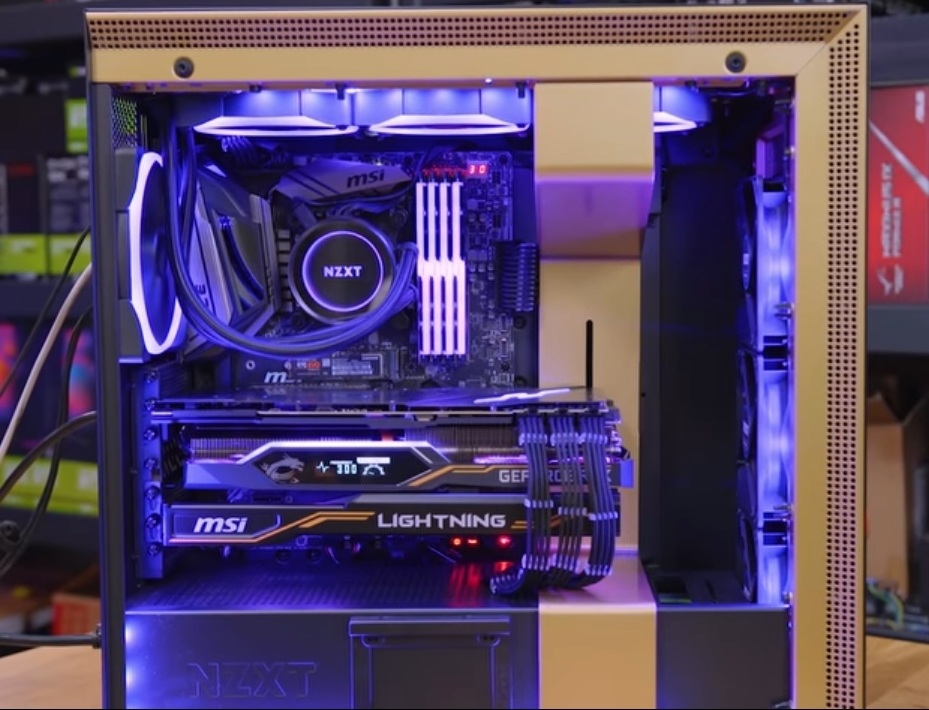 violet plank
2 x 8 and 1 x 6 pin for power?lmao
 delicate storm
Hmm 3 card? for wot?
lofty light
Why not? 
sonic osprey
it really does not need that much power as it can't draw that much power anyways :D
lofty light
Well it's made for modding, you can hit the power limit on the double 8 pins if you short the shunts a lot or replace
sonic osprey
because I think nvidia is limiting the power limit the 3rd party cards can draw
so in theory with appropriate cooling and power delivery the cards could be clocked higher than what at the moment
my water cooled 2080ti sits at 45-50C and 290W drawn as the max with the sliders without bios modding to allow higher ..
violet plank
290W sounds pretty low as cap,not even some high spikes ?
sonic osprey
its the reference card cap
sonic osprey
if you check jayz two cents video on the lightning he says exact same thing on the 2080ti reference max power draw
well not sure if there is any hardware limitations, so most likely bios/oc software, though the max voltage is 1.093
violet plank
didn't pay too much attention on the rtx series so far,my 1080ti can overclock like it has no limits
did you use afterburner?
sonic osprey
yes
violet plank
bios limit then
sonic osprey
it draws like 1037mV
violet plank
that's low imo
sonic osprey
with all sliders on max
sonic osprey
maybe
the oc scanner said +183 is safe "overlock" but it crashed on heaven even at 160
so running +150 atm for 2025
violet plank
that's about the standard clock on my 1080ti
can't remember the limits in volts as i tested,too long ago,but power drawing spikes were almost 400w
violet plank
yeah
sonic osprey
plat+ corsair m850x or rx
violet plank
should be more than enough
sonic osprey
yea
violet plank
i only use a 700
sonic osprey
but the card is 250w tdp, so
violet plank
isn't the 1080ti aswell ?
sonic osprey
but gonna go play some apex now
violet plank
have fun
lofty light
The 20 series is severely power limited
Even I max mine out on the bios limit with basically no overclock
Thus it requires some fancy modding to get it higher
minor turret
thermal conditions since you took OC scanner might have changed
sonic osprey
yeah but GPU-z shows pwr as my limit for additional overclocking
so maybe flashing the bios would be helpful, since temperature is not an issue
lofty light
There isn't even too much that bioses can do due to NVIDIA
sonic osprey
53C max temp today playing apex for about 2hours straight
minor turret
the 1xxx series was vulnerable to heat, i think my gtx 1070 requires more power with more heat
with max OC only being stable below 50 c
but i dont know how 2xxx series is
lofty light
20 has the heat thing too
sonic osprey
without water cooling this card was at 70-75C
lofty light
The lower the temps the higher it clocks naturally
minor turret
How much cooling does the memory on nvidia cards require?
can you slap a tiny heatsink on them?
if you add AIO
sonic osprey
I have EK block with heat pads
https://gyazo.com/4e2dce02ca0525a02c272b3562aa9fe9 not that the card it self had "bad" thermalpads etc
lofty light
Shouldn't need more than those small fins on the memory so long as you have airflow
I've got a full cover block on mine so I don't need to muck around though
sonic osprey
https://gyazo.com/d22394a962c28a73ca1614760022af61 my setup now 
sonic osprey
4x corsair HD120 as exhaust, 2x same and 2x EK Vardar for intake, 360+240 rads
lofty light
Ooh nice, my case wasn't designed for water-cooling so I've got a 240 and a 120 only
But I've got 5x RGB maglevs
lofty light
Yeah, I've been considering changing my case just to add another rad in but I really like this case
It takes too damn long to reset a win 10 laptop
I just wanna sleep but I'm setting up a gaming laptop for my sis whilst she's in the hospital and it's taking sooooooo long
sonic osprey
heh
steep gust
@sonic osprey Meshify S2 for water cooling tbh
Better airflow same chassis
GPU Boost 3.0 scales very well with temperatures
Who's ready for DLSS to be garbage in BFV 
viral ibex
DLSS looks great in 3DMark so it should look nice in bfv too
viral ibex
And I hope it makes RT payable in 4k
minor turret
giving you more choice whether you prefer sound or silence
latent light
@steep gust apparently it's not possible to manufacture an 8GB or 12GB version of the Radeon VII because HBM2 only comes in 4GB stacks and the GPU die for the Radeon VII requires all 4 stacks

steep gust
@viral ibex dude
3D Mark is not a test for DLSS
That was fucking shit advertising that people bought into
DLSS works great on a set path wow guess I have to plan my games on the exact path as Nvidia does
DLSS needs something random to actually test it, currently it's just shitty AA that sucks at small stuff and will be a performance hit
@latent light Sounds about right for the bandwidth
They would need 2GB stacks so get the same bandwidth at 8GB
 gaunt depot
fix the server crashes!!!!
i havent been able to play for more than 10 min the last 3 days thanks to APEX (most likely)
constant server disconnects mid game
fallen harbor
there doesnt seem to be a significant difference between i5 8400 and 8600k in videogames
what MoBo would you guys recommend for the 8400?
molten bramble
@fallen harbor Weren't you asking these questions yesterday?
fallen harbor
similar questions but no
molten bramble
@fallen harbor I am pretty sure i pointed you to the pcpartpicker site for some build information to see what some other gamers on a budget were pairing.
fallen harbor
yeah but i didnt find that bit of info
although
the mobo question, yeah
youre actually right, i just forgot
sry
molten bramble
no worries
steep gust
Budget build goes with ryzen
fallen harbor
the ryzen and 8400 cost the same here
and the 8400 seems to be the same if not slightly better
molten bramble
@fallen harbor What Ryzen?
fallen harbor
2600*
im thinking of a i5 8400, the cheapest possible mobo, a 550 thermaltake or corsair and 16gb ram (3000mhz i guess)
jaunty sonnet
i7 7700K
fallen harbor
thats way too expensive
molten bramble
Are you trying to overclock this or...?
latent light
the benefit of the Ryzen 5 2600 is that is has 6 extra threads which will benefit it a little more in future gaming @fallen harbor
but the R5 2600 and i5-8400 are very similar in gaming as of now
fallen harbor
oh i see
so you suggest the 2600?
do you know what mobo i should get to match the 2600?
latent light
if the prices are similar, yes
any B450 board will do if you don't care about overclocking
most of them range from $70 USD to $100 USD
latent light
I'd recommend getting 2666 MHz RAM too
or higher
you can get an A320 motherboard which is the cheapest motherboard chipset for Ryzen
doesn't have overclocking support but it will even run a Ryzen 7 CPU fairly well at boost clocks
A320 will probably need a BIOS update though because some motherboard venders are behind and don't update their stuff
molten bramble
If you're going to go Intel, spend the coin and get a better mb, IMO. You can always upgrade your CPU later on. A Z390 is going to last you awhile and will support what you're looking to run.
latent light
he wants great value, cheapest Z390 is $130 lol
if he gets Z390 now for future upgrading, that motherboard chipset won't even be supported anymore for newer gen CPUs

molten bramble
It supports up to i9
Is there something else out that you're referring to or over the horizon?
fallen harbor
u asking me?
latent light
ye he is
fallen harbor
uh idk i just want something that has the best price/working/aging value
something good but not so expensive and if i. can make it age better by adding few bucks then ill do that iguess
latent light
if you get an expensive motherboard, it will just become outdated because motherboards usually only support 1 or 2 generation for Intel
and Ryzen's AM4 socket will only be compatible with new CPUs until next year
so might as well get something cheap
molten bramble
I agree and disagree--it depends on how much life you plan to get out of it, not how often something changes. My last build I had for 10 years, worked just fine for my needs, but at this point, it couldn't keep up to run more complex games. The gamespace isnt going to change for awhile in terms of requirements as a whole, so it really depends on you.
molten bramble
@coarse nimbus What are you going to do with what old drive? Probably find yourself an old microwave or something and cook her. :p
coarse nimbus
ill take up skeet shooting with it
steep gust
@molten bramble AM4 will be supported through 2020 (aka the next two generations) while LGA1151v2 is almost guaranteed to not support Sunny Cove
The 2600 + B450 has a much better upgrade path worth Zen 2 this year then Intel
molten bramble
@steep gust Never said otherwise?
steep gust
Also saying it supports up to i9 is misleading at best
i9 is advertising
Not performance markers
molten bramble
@steep gust The discussion was iterations of processors, and as he's looking at an i5, he has room to grow into an i7 or i9 later on. For now, it gives him the chance to get the foot in the door with the budget build, and that's really the point.
@steep gust As for AMD vs Intel in this case, I don't disagree with your recommendation.
latent light
tbh, I wouldn't consider buying any CPU or motherboard now until Ryzen 3000 series comes out
steep gust
We haven't got anything on a new chipset for Zen 2
So I wouldn't bother waiting out on high end motherboards 
latent light
getting an AM4 motherboard now would mean he'd need a BIOS update for Ryzen 3rd gen to work
and a lot of people aren't comfortable with flashing a BIOS
latent light
hell, I got friends that don't know a lot about hardware and not even comfortable booting into the BIOS
steep gust
The fear mongering that goes on with BIOS updating should be directed at motherboard manufacturers not consumers
Dual BIOS, BIOS flashback, etc should be standard
latent light
BIOS looks overwhelming to people that aren't big into computers or hardware
first time I ever entered a BIOS, I thought I might destroy my PC lol
steep gust
Most BIOS now have a basic easy mode
latent light
my motherboard has an easy one, you press Alt on any settings and it gives you a simple explanation of what the setting does
steep gust
That is generally not helpful if you don't understand at all what you are looking at or what it means
ie VCCIO
Or VCCSA
Also good luck putting RAM timings into simple terms
molten bramble
That fear comes from when BIOS' were pretty primitive in nature ages ago before probably half these folks here were born, no offense. It's just been passed down between friends and family ever since. Today's BIOS is incredibly simple to navigate and a BIOS update is a walk in the park.
steep gust
BUT WHAT IF YOU BRICK YOUR MOTHERBOARD
This whole mentality of don't fix it if it works for BIOS isn't helpful
molten bramble
Agreed.
steep gust
A BIOS update takes less time than a windows update
And losing power during a windows update can mean rip install
Also I legitimately cant think of the last random power outage I had
latent light
I get them once a week usually but it's a short time, like 5 seconds
molten bramble
Regarding the RAM timings, there was actually someone that did that--a relatively easy to understand visual chart that explained. I used to have it somewhere.
If they could put something like that into the BIOS itself, I think you'd see people warm up to it. Otherwise, people will fear what they don't understand.
That's just human nature.
molten bramble
I dunno, this MSI board has a GUI that looks like a friggin' website tbh.
steep gust
Also let's leave RAM overclocking as a mystic art so people don't brick their installs
molten bramble
I suspect they could dump some of that and put a chart in.
steep gust
Because being lazy on CPU stressing just means a game might crash
But not actually checking RAM stability (takes a long time) can result in a lot of issues
RAM tweaking doesn't even need to understand what you are doing physically
Literally as long as you understand stress testing
molten bramble
Another solution would be for them to take an explanation from a page like this: https://www.hardwaresecrets.com/understanding-ram-timings/ clean it up some, and put it in their booklet they provide with the mobo. Then, it's physically in hand rather than reliant on the BIOS to provide it..

A detailed and thorough description of RAM Speed vs. RAM Timings and all of the factors that impact RAM performance. Includes pictures to show how to find your RAM Speed.
latent light
Rolled back to previous BIOS version, better RAM support for some reason
steep gust
They cant even do proper manuals for each motherboard
molten bramble
I've noticed.
steep gust
Its just a generic one
Even if you download it which then it's no excuse
But even then, they know exactly how many motherboards they make
So they can't end up with spare manuals
latent light
Took only 4 minutes to update my BIOS
molten bramble
Kind of surprised noone seems to have come up with a ram timing calculator based on real-world sticks and configurations... or maybe I just haven't come across it yet.
latent light
Can't even run 2666 memory at stock timings on a B350 board
Sad
Well never getting a budget Gigabyte board ever again
Lmao I manually set it to 2800 MHz at 1.3v and it worked
I guess this RAM can't handle stock speeds at stock voltage
but it auto set the timings to 20-19-19-37...
has to be a problem with this board
molten bramble

Now that we have RAM modules capable of up to 4266MHz, we need to find out... does high speed RAM ACTUALLY make a difference? Tunnelbear sponsor link: Try Tu...
 acoustic quail
I installed the game and Origin on a SATA HDD, not on the boot drive
can I move my drive on another PC and play on it?
and no , RAM speed doesn't matter at all
coarse nimbus
I think youd have to reinstall the origin client..dunno if it would boot up from that hdd, maybe it would
but i believe all youd have to do is verify the files and then youre good to go
molten bramble
https://www.digitalstorm.com/aventum-x.asp Wow... that's insane.
World's most advanced PC with internal fluid ports and power panel.
Thing weighs an ungodly amount.
acoustic quail
@coarse nimbus I am afraid the NTFS drive will have write protection on that PC
In that case I am pretty sure it will be unplayable
 stray vortex
hi, im saying this here because i think i'll get more attention this way (probably not lmao): the most recent optional update for amd drivers claims to have fixed the ghosting effect that stays on the screen, but it didnt. i know since this seems to be a driver-related issue, i should report it to amd, but
i thought that if dice were to contact amd about that it would be resolved faster
stray vortex
wouldn't/shouldn't QA make sure that the claim that its fixed is grounded on proof though?
fallen harbor
if i have two hard disks connected to my mobo, is there a quick way to switch from one to another like switching from one pc to another without having to restart it and choose a different boot in the bios?
molten bramble
You mean running two different operating systems on two different harddisks?
molten bramble
Natively, on a consumer machine, no.
There are some specialized machines that can do that, but for what you're going to get in the marketplace, no.
fallen harbor
i see
molten bramble
Alternatively, however, you could run VMWare and install an operating system inside of an operating system.
Then you could dedicate the container to consume that entire other HDD, but you're still running inside of another.
You can dual-boot as well, but you would have to restart to jump into the other.
lofty light
VMware MAY be able to run a second dedecated disk as it can do it natively with Mac
molten bramble
@lofty light He's referring to swapping the same way one could swap using a kvm between two systems running simultaneously.
fallen harbor
i see
molten bramble
The only place I have seen a system that posts two different operating systems at once in tandem was a couple in the DoD I'd come across. Not classified, but these were specialized hardware setups, and they weren't cheap. Used Xeon processors and had two sitting on the same board each with their own separate array (I think it was like 24-cores or something a piece?). I don't know the point of it, but I'm sure it was some data science something or other.
@fallen harbor What would you need something like that for anyways?
fallen harbor
i do art, music and video edit and i would really like to have that separated from gaming
molten bramble
@fallen harbor Could just get two PCs and a blackbox to switch between them instead, but easier.
fallen harbor
yeah thats what i was thinking
but asked this just to see if there was a more confortable way
molten bramble
Well, I do that as well, but I don't need to use two different machines for it. I have an SSD that serves as the base, and then separate HDDs for the content or the project work.
And for anything else creative wise, I use my Macs of course.
fallen harbor
how do you use your ssd and hdd
cause idgi yet honestly
ive never had multiple disks
molten bramble
The SSD houses the operating system. The HDDs act as my storage drives. Alternatively, you could just dedicate one of those HDDs to your games, but you're going to get better performance running it on the SSD and just saving any game data to the drive I'd guess.
fallen harbor
i dont think i understand entirely tbh
how do you use the disks that qay
way*
do you have a video where i can visualize it
cause i honestly have no idea
i want to have two separate systems anyway, i dont want the operating system to use both things so iguess i have no other option but to make two pcs
lofty light
You have the SSD as the C drive then keep adding the HDDs as D, E etc
fallen harbor
i... guess i could do that i suppose
lofty light
I have like 4 HDDs with my SSD main drive
fallen harbor
how big do you recommend the ssd to be
is 240gb fine
is it always fine as long as it has enough for the os
cause if thats so i could get a 120 one
lofty light
Pretty much
fallen harbor
also isnt there any ssd with the physical size if a desktop hdd one? because ive only seen laptop sized
lofty light
No 3.5 inch SSDs no
lofty light
But I have a 1TB SSD so I can put games on it too
fallen harbor
itd be hanging there
lofty light
If your mobile has an M2 slot that could work
lofty light
DM me
fallen harbor
kk
molten bramble
@fallen harbor There is a little adapter tray you can buy for like 6 bucks
It's a piece of ABS plastic that holds it in the normal slot
fallen harbor
you mean a switch to connect two pcs in one monitor?
not sure what you talkin about
sry
molten bramble
for the SSD
fallen harbor
do i need a more powerful PSU if i use an ssd and two hdds instead of only one hdd or is it the same
lofty light
It doesn't use much power no
fallen harbor
icic thnx
why do i always think about buying things when its sunday
i cant buy anything during the week
lofty light
I was thinking about buying stuff yesterday and the computer store nearby is only open on weekdays
fallen harbor
pats
acoustic quail
Hi , I can’t boot Battlefield V on my another PC
Sata plugged and detected but it can not detect BFV
🤦🏿♂️
minor turret
would almost certainly have to manually find it with origin
minor turret
ffs i keep getting random crashes when the game is loading now
be it to a new map or to menu
fallen harbor
the menu is shitly optimized
i thought it was my pc being kinda old but then seen it on ps4 and it works the same
all laggy and stuff
 random panther
Am I the only one that can't load bfv? pressing play button, minimalizes origin and its not opening
fallen harbor
make origin check the game files
right click on the game, properties and the option should be over there
sonic osprey
first you need to map the origin directory to the folder, then it should find it, for the swapping of harddrive issue
fallen harbor
oh that
random panther
I did both and still nothing
fallen harbor
- move the bfv folder out of the origin games location
- click download the game on origin (this will create the bfv folder in program files>origin games)
- close origin
- put your actual bfv folder where the new one was created (replace it)
- launch origin
- it will start checking the files instead of downloading it, it will take several minutes still though
fallen harbor
@random panther did you try that yet
random panther
oh yeah i forgot to say thanks
minor turret
vega 7 is looking somewhat promising
people are getting OCs in 1900-2000 mhz range from stock 1700-1750 mhz
but its only in window mode so far because OC tools dont work fullscreen
a 1900 clocked vega 7 would smoke 2080
and reported memory clock increase from 1000 to 1100-1200 mhz
though im unsure how valuable that is considering the memory throughput
latent light
Radeon VII stock is 1450 mhz
and it boosts to around 1750 on average to 1800 mhz max
minor turret
@latent light reviewers with graphite pad didnt boost to 1750
it was around 1730 for many
during sustained load
latent light
I want to see new drivers and see how much will change
minor turret
https://imgur.com/a/I7wzZmZ this graph from gamersnexus shows how big a pipedream 1750-1800 mhz is stock
 jovial yoke
Recently I want a new screen for my PS4 any advice? PS: don't want to spend too much
about 200 to 250 would be nice
sonic osprey
high variance on boost clocks is bad for your constant fps
wish you could force the boost to not work when gaming so you get even fps
latent light

They say it's the world's thinnest mechanical keyboard... Keychron - https://www.keychron.com/ WATCH SOME MORE VIDEOS... Nike Adapt BB Unboxing - Futuristic ...
 spare rune
Anyone able to tell me how the RX 570 4GB goes in Battlefield V?
limpid tree
anyone wanna msg me and tell me if the pc im getting good
pls
thx
and upgrades
ect
coarse nimbus
just post a link of your build from PC parts picker here and people will comment
latent light
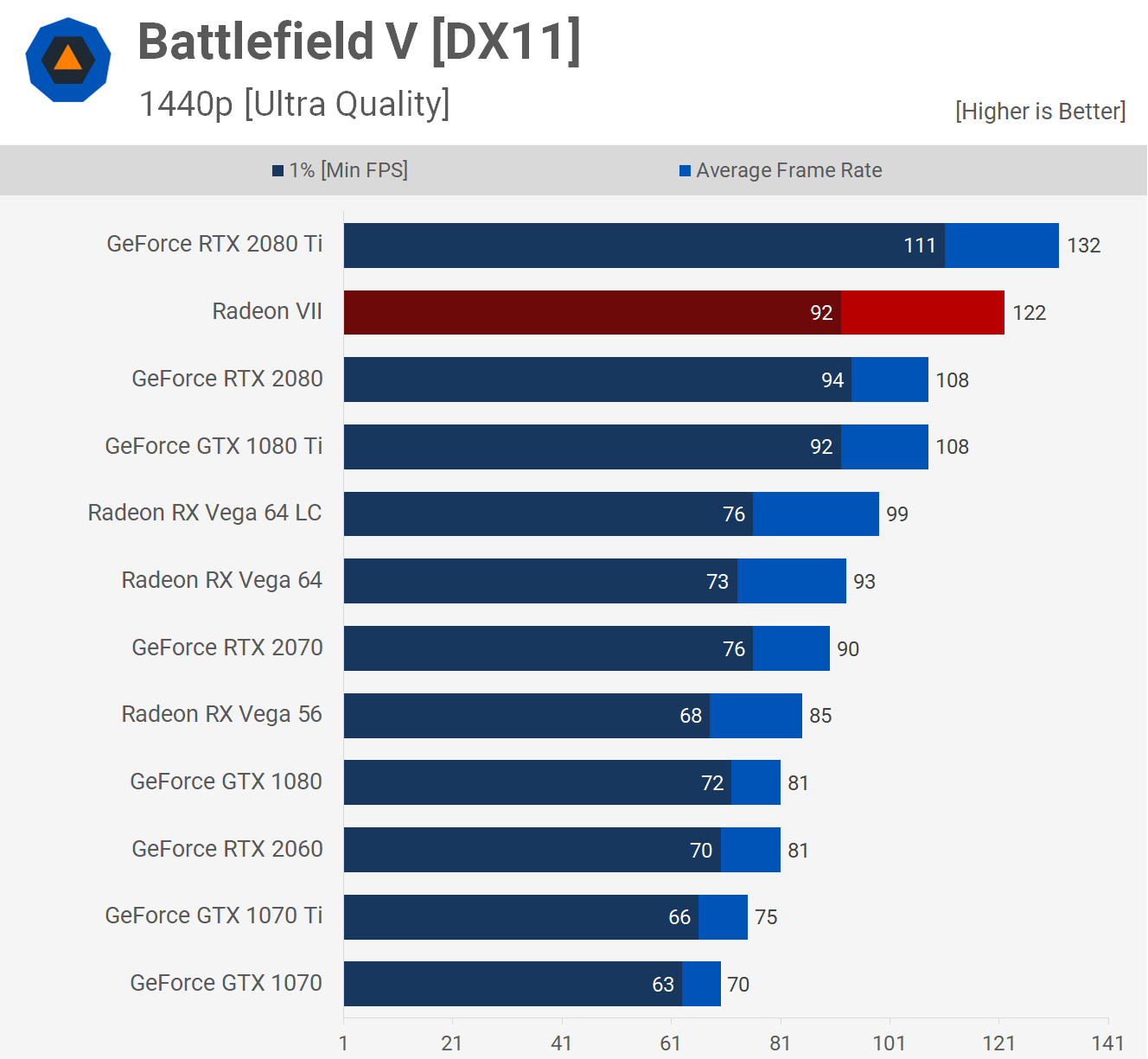
@spare rune really good, I've got an RX 580, which is only about 15% better than a 570, and it gets 80+ average fps on Ultra settings
If I play on a mix of medium/high settings I stay above 100 fps
 raven basalt
DISCORD DID A FUCKING OOPSIE
https://twitter.com/nickmon1112/status/1092469779137482755?s=21
forest token
Someone smart enough to use google can make a fake text chat, web browsers have built in editing of web pages. So for example I can make a deleted tweet look like something incriminating when it was just an accidental tweet of a single alphanumeric letter
So I'm always hesitant to believe anything I see onn the internet about a conversation
prime jasper
hey guys i need major help
so
i bought a bf1 premium pass for 10$ from the microsoft store, as a gift for someone. i then bought another for me. i accidentally redeemed his code on my device. so i said i’d told him i’d send him my code obviously. i went to my order history and i saw the gift purchase and my personal purchase. the gift had an option that said “view code” and i clicked it and it was the code i put in my own xbox. i scrolled down to my personal order and all it says is “Completed” it won’t let me see the code at all
 flint locust
contact xbox support
acoustic quail
@lofty light yes
@spare rune resolution matters
@minor turret yeah , Radeon seems to be better at BFV. But not many titles, in general if u also play other games , RTX 2080 is the way to go
https://www.youtube.com/watch?v=4YyCN1iOAHU
minor turret
as per usual amd butchered their gpu release
i would wait a month to see how things settle
when reviewers are struggling to hit 1750 boost clock with stock settings
jaunty sonnet
When i launch BFV it opens then closes straight away
 west siren
on xbox?
jaunty sonnet
PC
west siren
Oh nvm then.
jaunty sonnet
Why?
jaunty sonnet
Ok
storm osprey
try running in administrative mode
check firewalls/antivirus
verify files
restart
reinstall
west siren
Reinstall would suck.
storm osprey
thats why its last
jaunty sonnet
Sound
west siren
wut
jaunty sonnet
Will a driver update be required for the graphics card
jaunty sonnet
The list didn't work
west siren
ok........
storm osprey
making sure drivers and other software is up to date is always a recommended part
west siren
did you 100% check firewall?
west siren
Like........................what kinda computer you got?
jaunty sonnet
Custom
west siren
oh.
jaunty sonnet
There was a driver update 6 days ago
west siren
Don't ask me any other questions cuz I don't have my own custom pc
jaunty sonnet
What do you have?