#technology
1 messages · Page 163 of 1
 steep gust

 prime jasper
NVIDIA = The new Apple for the GPU market
 lime pollen
yea
prime jasper
God bless my soul for buying a 1070ti when I did
lime pollen
bought a 1070 oc for 400
back in like
late 2016
now I just can't upgrade it
because these prices are awful
prime jasper
I really hope those AMD GPU rumors are true, lol
 latent light
AMD mid-range prices have been great for like 7 months now
lime pollen
yeah
latent light
but vega prices are still pretty bad
prime jasper
If so NVIDIA is going to be hemorrhaging money
lime pollen
I'm just disappointed in them
was expecting prices to dip somewhat for the gtx 10's
not even close
big sigh
prime jasper
100%
lime pollen
fuck off nvidia
prime jasper
I was so hyped for RTX, lol
I was going to dump a paycheck into a new card but
Thats a big yikes from me dawg
lime pollen
mhm mhm
I mean
the rtx 2070 is actually a cheaper
1080
with slightly more power
but it's like
buying inflated prices, especially for a launch card that doesn't yet support games for its gimmick
prime jasper
Only because 10xx stock has dried up, due to people realizing RTX is a meme
prime jasper
SAME LOL
prime jasper
SAME
lime pollen
l m a o
prime jasper
Nvidia pulled a fast one
latent light
they wanted to get rid of Pascal stock but they didn't even drop prices at all
steep gust
what
latent light
fucking ngreedia
lime pollen
I was looking at pricing ranges between cards
steep gust
they stop production
lime pollen
and at this point
steep gust
months ago
steep gust
Because there is no stock
GP104 or whatever die the 1080 / 1070 etc use is no longer in production
lime pollen
ahh
steep gust
and hasn't been for months which is why they quickly sold out when Turing was announced
lime pollen
I was planning on rebuilding my comp in the beginning of january, planned this around october and expected prices for gpus to drop, but I guess I gotta port over my gpu or hope for amd lmao
latent light
Vega production stopped last month or in october but you can still find a Vega 56 for $400
with 3 free games
lime pollen

prime jasper
lime pollen
using games to boost prices
prime jasper
Nice meme

 latent light
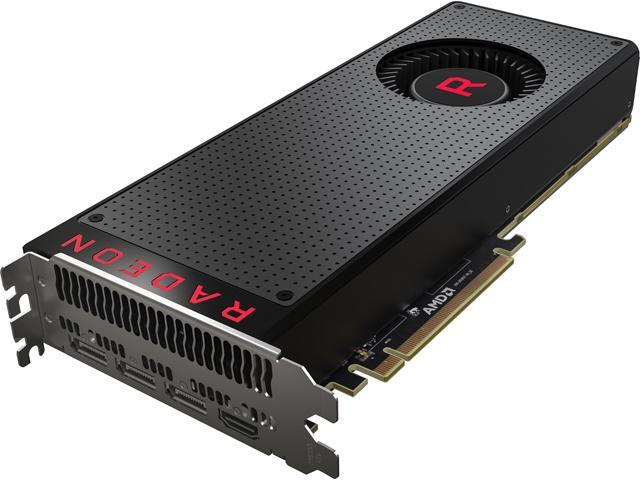
Buy SAPPHIRE Radeon RX Vega 64 DirectX 12 21275-03-20G 8GB 2048-Bit HBM2 PCI Express 3.0 CrossFireX Support Video Card with fast shipping and top-rated customer service. Newegg shopping upgraded ™
latent light
Vega 64 for only $400 and 3 games
prime jasper
Say thanks to Nvidia
lime pollen

prime jasper
Can't even blame miners at this point
latent light
blow me
lime pollen
with the wattage usage
latent light

lime pollen
checking to make sure but
latent light
Ryzen 3 has a TDP of 65W but even the 1300X will stay around 50-55 watts on boost
HWMonitor says my 1600 consumes 90-95ish watts at 3.8 GHz 1.375v
lime pollen
@prime jasper https://gyazo.com/5678a038d107631b85c0300440205634
l m a o
the evga cards suffer from artifacting and break within a week
but dw
you can get bfv
🙃
prime jasper
I had a friend who just spent 3 grand on a new rig
 prime jasper
Guess what happened to his 2080ti upon first use?
prime jasper
Hold up, imma see if I can find his screenshot of his screen
Its totally fucked lol
latent light
tbh, hardly anyone cares about DLSS and Ray-Tracing
we just want higher performance every gen
lime pollen
I actually enjoy the ray tracing
but it's very inefficient
in usage
draws out a good portion of your fps
steep gust
@latent light Source on all cards dying within a week?
 steep gust
the evga cards suffer from artifacting and break within a week
lime pollen
damn
latent light
not my quote
lime pollen
can you see my name or
steep gust
wrong person
latent light
EVGA got the big gay
lime pollen
lmao okay
prime jasper
Fucking rip I can't find it now, but I found pics of his build at least
https://cdn.discordapp.com/attachments/394215618779414528/526878652600811530/IMG_20181224_113214.jpg
https://cdn.discordapp.com/attachments/394215618779414528/526869304386256914/IMG_20181224_160954.jpg
https://cdn.discordapp.com/attachments/330777295952543744/526818840919932968/IMG_20181224_124410.jpg
steep gust
Less than 1% of most AIB 2080TIs are RMA'ed
lime pollen
that is a niceu setup
steep gust
People only leave reviews when they have an issue
 flint locust
nice cat
lime pollen
I got my friend a h500
steep gust
I know for a fact I'm never left a single review
even when I love a product
too much effort
prime jasper
Anyways hes having to send his card back, since it was basically DOA
 lime pollen

latent light

lime pollen
my build is almost done
I don't think I'll change the gpu
because of these
prices
prime jasper
Same
lime pollen
nvidia has the big stupid
latent light

prime jasper

lime pollen

steep gust
RX580s are cheap
latent light
got my RX 580 for $200 and got 2 games
prime jasper
Oh yeah, 580s arent bad
latent light
a lot of 580s have trash coolers
2 fans are deceiving whenever the heatsink under is thin as fuck
prime jasper
Yup
steep gust
580 is the perfect 1080p 60hz-75hz card
latent light
580 is more futureproof than the 1060 tbh and not because of more vram
steep gust
because you can flash a XOC bios on it and let it draw like 440w
ez overclocking
might kill the card but shh
latent light

lime pollen

 steep gust
raw gpu compute doesn't mean much for gaming
lime pollen
^
steep gust
See the Titan V
lime pollen
I'll just check benchmarks for now
steep gust
or GV100
lime pollen
steep gust
userbenchmark is not the best source
Since most people don't buy founder edition GPUs and a lot of 580s suck
lime pollen
¯_(ツ)_/¯
latent light
that benchmark also includes the 4GB 580s
since there isn't a separate choice for the 4GB and 8GB models
 tawny venture
ooof
i've tried gpu driver updates now and directx
and repairing my game now again
still didint work TT
lime pollen
does it still give you a directx error?
lime pollen
what kind of gpu do you have
tawny venture
ohh okay! ill try!
tawny venture
ahhh yess i thought about that tooo
but i dunno how to get it to run with 11
xd
or if thats even possible
lime pollen
oof
 gaunt dragon
I have a really fun story to post, but I think it'll get zapped since it's quite the wall of text, so have a pastebin detailing a rather weird issue I'm having: https://pastebin.com/WuG0JnQe
It's quite funny as well, because random PC issues that happen to no one else, happen to me, apparently
 queen field
i kinda scanned through the texts
do u need the realtek audio drivers? @gaunt dragon https://www.techspot.com/drivers/driver/file/information/18084/
the official site doesnt seem to host download links for their drivers anymore T_T
gaunt dragon
I can find them fine, but I have a ghost install of a realtek driver on my system
and I have no idea how to remove it
queen field
have u tried going to safe mode and uninstall
gaunt dragon
I have to find out how to uninstall it first, in regular mode, before I swap over to safe mode and uninstall it
which, there's no uninstaller for the driver
as I said, it's a ghost install
you try to delete the files in the program files for it
file(s) in use
you try and launch any application in the folder
all empty .exe's that do nothing
??
prime jasper
ok can you tell me from the beginning
what is the problem
go into private
message
gaunt dragon
still have no idea
gaunt dragon
Nope
Realtek driver is still ghost installed on my PC, with Windows Audio driver being the actual driver in use, but both are being ran somehow
Still no idea what to do
👏 👏
 gaunt dragon
Uninstalling the realtek driver, uninstalling the windows audio driver, deleting the files of the realtek driver automatically and the realtek auto driver updater
Oh yeah, and looked on ASUS' website for proper audio drivers
 narrow fable
What motherboard have ye?
gaunt dragon
ASUS p8b75-m
 neat nacelle
perfect example why a framerate higher than your screen's refresh rate won't make any visual difference. 😃 https://twitter.com/CaughtCctv/status/1078628452826255360
gaunt dragon
Yes @narrow fable

 lofty light
My next case will probs be a View 71
 mortal nacelle
link ?
 strong breach
!support
 junior ploverBOT
:information_source: Contacting Battlefield Support
If you need to contact the Battlefield Support team for questions you might have, crashing in game and or server issues head over to
https://help.ea.com/en/battlefield/battlefield-v/
Contacting EA Support
If you need to contact EA support about account issues, billing issues etc head over to
https://help.ea.com/en/
strong breach
Keep in mind that people are in their holidays which may slow down any kind of process
 red ingot

Ohhh fancy @mortal nacelle
I have the fractal design meshify c
Super sexy
I can dm u pics if u want
 dim jungle
@red ingot I'm planning to get the meshify c too, may I ask what are your specs? and is it annoyingly small? I'm worried if I get an AIO cooler the space would be tight for the gpu
 storm osprey
you can mount the AIO cooler on the top as well
and unless you have a 3 fan gpu it should fit if you put a rad in the front
latent light

Its finally here! Let's go through the top PC cases of 2018 and pick out the best for your gaming, creative or workstation systems. Support Hardware Canucks ...
yoooo why the FUCK my pp hard

 steep gust
@dim jungle As long as your GPU isn't longer than ~295mm you can front mount a 25mm fan + 25mm rad
I have an Asus rog strix 1080 (298mm) and need like 4mm more
red ingot
@dim jungle yeah i have an h100i mounted in the front and a 1080ti and it fits perfectly
it is a bit tight but everything fits
also a fits a full atx board
dim jungle
I'm planning on an RTX 2070 strix
red ingot
(which is what i have)
yeah
it can fit a full-size gpu, full-size board, and fit a front or top mounted AIO
afaik front can fit up to a 360mm rad and top can do a 240mm
storm osprey
^
red ingot
i personally have a 240 mounted in the front np
steep gust
@dim jungle You can't front mount a rad then
storm osprey
you will lose the hdd bracket if you do 360 rad in front though
red ingot
no?
steep gust
also wouldn't recommend spending the extra $100 on the strix
and you don't lose the HDD bracket
steep gust
I have a 1080 strix
red ingot
there's still clearance below my 240mm rad
steep gust
same size as the 2070
red ingot
for a 360mm
red ingot
evga
steep gust
evga ?
red ingot
evga sc2
storm osprey
if you use a 360 rad in front? pretty sure your lose the hdd bracket
steep gust
nah it slides back
storm osprey
mine barely fits with 3 120mm fans
steep gust
you can't remove the hdd bracket
red ingot
3x120 is 360 tho
dim jungle
@steep gust any recommendation other than the strix?
storm osprey
but i dont have a rad
storm osprey
just fans
red ingot
i dunno
steep gust
The SC2 is 30mm shorter than the Strix
storm osprey
i had to squish my psu calbs to get it to fit
red ingot
would have to look at the manual i guess
steep gust
Buy one with the binned GPU @dim jungle
red ingot
it would tell u there
steep gust
They should be around $550-600 instead of $500
red ingot
and damn the strix is that much bigger?
shit
yeah now that i look at it i probably have like 5mm of clearance from the end of my gpu to the fans
steep gust
but you will have to check a review to make sure the GPU you buy has the "A" suffix after the TU104 or whatever on the die
storm osprey
i mean, it also depends on the size if your psu
red ingot

dim jungle
@red ingot yeah 3 fans and shit
storm osprey
but yea, i barely god my hdd backkets, fans, and psu with cables to fit
steep gust
strix has three fans not 2 so yeah its bigger
red ingot
oh
yeah maybe then it won't fit
afaik the meshify c manual has the max size listed
max gpu size
Max 315mm with front fan mounted```max 315mm
as long as your gpu length doesn't exceed that u should be fine
all other max sizes listed there
latent light

steep gust
I thought it would fit 
storm osprey
you got a 2 fan gpu
latent light

red ingot
yeah
steep gust
I could probably make it
 sonic osprey
get a shorter gpu and waterblock
red ingot
i mean i just assumed mine would fit
steep gust
it would fit with a waterblock
red ingot
tbh i dont think u really need 3 fans on a gpu anyways
kinda overkill
my gpu never exceeds 71c with 2 fans
steep gust
yeah same
red ingot
but w/fan curve on auto + 2 fans never exceed 71c (max load)
red ingot
tbh i haven't even gotten around to oc'ing mine
but i mean it comes superclocked
🤷
could defs push it more but im already getting amazing fps
so idc much rn
steep gust
2050mhz with just upped power limit / voltage limit and +90 on the core
I need to undervolt it tho
or find an xoc bios
steep gust
because it hits voltage limits
so I drop to the next voltage on the turbo graph
It'll lose like 20mv
but I should be able to go up like 10-20mhz
steep gust
some times
red ingot
interesting
steep gust
but you have to tweak the voltage / frequency turbo boost graph
red ingot
ic
 red trellis
Day 28 the game still crashing with c0x000005 error
bfv.exe
1.0.68.32584
5c1007a4
nvwgf2umx.dll
25.21.14.1735
5c0f6b7f
c0000005
000000000066668d
cf4
01d49eddedf33f60
C:\Program Files (x86)\Origin Games\Battlefield V\bfv.exe
C:\Windows\System32\DriverStore\FileRepository\nv_dispi.inf_amd64_e7b3660b4830c245\nvwgf2umx.dll
8c9c662e-be78-427b-aa59-522160848086
 north crow
!support
red ingot
especially if u have the exact error code
junior ploverBOT
:information_source: Contacting Battlefield Support
If you need to contact the Battlefield Support team for questions you might have, crashing in game and or server issues head over to
https://help.ea.com/en/battlefield/battlefield-v/
Contacting EA Support
If you need to contact EA support about account issues, billing issues etc head over to
https://help.ea.com/en/
red ingot

north crow

storm osprey
whos that?
 red trellis
its not only me wait a second
steep gust
@red trellis Any anti virus?
red trellis
no use
storm osprey
they just trying to take away our points for trusted role
red trellis
windows defender
steep gust
Windows Defender shouldn't be blocking BFV but make sure it isn't
red trellis
red ingot
even if it was i doubt it'd crash from windows defender...
red trellis
24 pages of full crashes
red ingot
holy
steep gust
If defender blocks it then it'll crash
red ingot
reformat
steep gust
or part of it
red trellis
i dont think is the antivirus
 crude storm
ea support is upid
steep gust
Still check your anti virus
red trellis
its a game crash error , something is bad with the game and drivers of ryzen
crude storm
they tell me that i have to install win10 fresh 😄
steep gust
yeah like the fucking anti virus blocking it
red trellis
remember the ryzen problem of bf1?
steep gust
googling the error code brings up mostly anti virus related issues
red trellis
i just reinstall windows yesterday
steep gust
full format or just windows?
red trellis
full format
crude storm
https://answers.ea.com/t5/Technical-Issues/Game-Keeps-Crashing-don-t-know-what-to-do-HELP/m-p/7309760#M6894 look here, its a known issue
red trellis
all my cpu is in stock mode
steep gust
I doubt that
red trellis
i dont oc anything
steep gust
or your RAM was never stable to begin with
red ingot
run memtest?
crude storm
my ram is perfectly stable, dont start this discussion here pls
steep gust
really?
because it crashes BFV
which is a nice big ole sign that it isn't stable
so yeah run memtest with 100% of your RAM to 400% coverage and find out
red ingot
starts discussion
steep gust
https://github.com/integralfx/MemTestHelper even make it easy to run overnight
crude storm
i have the same pc build - 63 times - you cant tell me that on the 10 machines i tried bf5 the ram is faulty
steep gust
yeah what
Also yeah
If BFV crashes at XMP settings on your RAM, its not stable
Its that simple
crude storm
i crashes on all 10
steep gust
I had no issues with BFV on multiple different RAM kits on different XMP settings
crude storm
the ram is in the qvl
crude storm
i did also swaped out the ram to a different kit, the same thing is happening
different vendor, memtest all passes
steep gust
to 400% coverage?
crude storm
it is definitly a bf5 - frostbite engine - problem
red ingot
yeah
like
99% of people arent having issues
and 10/10 machines for u
are having issues
which is like
odd af
steep gust
I really doubt the 10 machines claim
narrow fable

steep gust
It was probably 10 different hardware combinations on the same motherboard or something like that
narrow fable
Cant doubt Mister Dr. Phil
latent light
so I may not need to RMA my RX 580 after all
went back a couple windows updates and its been fine for 3 days now

crude storm
@steep gust i will do what i always do, wait half a year and see if the problem got fixed 😄 i had almost every battlefield release problems in some way, only in battlefield 1 which i startet playing 1 year after release, i have/had no problems
another thing what i find interesseting is, the alpha and the beta ran without any problems, the initial gamestart was without problems, after the first update the problems started for me
red ingot
yay
 sullen lichen
Hi guys, back again... Game is still crashing randomly. Really frustrating
storm osprey
time for new pc
 undone harbor
Worth a watch. The broken "Skill" system.
https://www.youtube.com/watch?v=TUvnsQSyjtg&feature=youtu.be
red ingot
so uh
what are the two "broken" components
i dont wanna sit through an 8m video for the clickbait
 short crypt
Damn can’t wait two months then imma buy the Samsung Q9FN 65” QLED tv 😄
latent light

Buy Praxis WetBench - White w/ Black PMMA Accents with fast shipping and top-rated customer service. Newegg shopping upgraded ™
JayzTwoCentz test bench

storm osprey
on the convo of tvs, im looking to get a mid range 4k 55" inch tv suited for gaming
any pitches?
currently looking at lg sk8000
red ingot
wouldn't black friday have been the best time to go?
steep gust
nah black Friday is bad for TVs
storm osprey
sales are like 50 bucks off
red ingot
hm
mortal nacelle
its now the best deals are
red ingot
3k on sale for 1k
mortal nacelle
black friday have shit deals on hardware
the pump up the price a few before
and then drop it calling it black friday deal
steep gust
and also sell hardware that is cut down on black friday
storm osprey
america judge!
 molten bramble
Lot of cases mentioned up above, some pretty cool ones.
I picked up this one myself and I am happy with it.
I'll be wall-mounting it soon once I get a new desk to take the place of those L-shaped frosted glass one.
steep gust
That only works if you don't have pets
latent light
black friday sales are usually not as good as people say they are
latent light
pc hardware usually goes on sale many days before black friday
steep gust
It was RAM so it cost like $80 more months ago 
Shame it was CJR and not B-Die
Screw whatever site I read that it was B-Die and that QVL I found that said it was
storm osprey
110 seems to be the lowest i would pay
the 100 and under ones that pop up are not brands i would trust
im glad prices are dropping though, especially since im gonna upgrade within this year
red ingot
nice
although the ram was probably the cheapest part of the ugprade for me... lol
cpu & motherboard both costed more
steep gust
DDR4 is DDR4
Brands 'you trust' are impossible when JEDEC forces the standards
You got SK Hynix, Samsung, and Micron making the actual RAM
prime jasper
also elpida and nanya
latent light
Micron makes Nvidia VRAM?
prime jasper
the most stability and endurance comes from micron, the second are hynix
yep
also elpida makes ram for nvidia too also for amd
latent light
does SK Hynix and Samsung make VRAM?
latent light
Intel started out as a memory manufacturer
prime jasper
you get the mem chips+ the pcb from them(but pcb is made with help of foxconn).
intel only makes optane technology supported memory via software
but they get ram from micron that's based on industrial/server hardware.
latent light
Intel was an early developer of SRAM and DRAM memory chips, which represented the majority of its business until 1981.
prime jasper
now intel is just subbrand for ram
their mobos like any other brand's are made by foxconn, only aesthetics and bios specifics varies so as cooling solutions.
corsair ram are made by hynix, nanya, samsung and micron. some may be from elpida, but most mid ranges and budget ones comes from sk hynix. corsair only makes heatsinks for the rams and labels but thats all.
latent light
does samsung manufacture the best memory chips?
prime jasper
the fastest consumer memory yep
latent light

Buy G.SKILL TridentZ RGB Series 16GB (2 x 8GB) 288-Pin DDR4 SDRAM DDR4 4266 (PC4 34100) Intel Z270 / Z370 / X299 Desktop Memory Model F4-4266C19D-16GTZR with fast shipping and top-rated customer service. Newegg shopping upgraded ™
prime jasper
but not the most durable one for consumers. samsung their cpu/memory production mostly dedicates to a professional use and military-pentagon.
storm osprey
@steep gust all i know is all the pny ram that ive seen used, has had problems
and i havent heard problems from corsair and gskill
so i buy those two
latent light
I got 16GB G.Skill RipJaws V 3000 MHz CL15
lime pollen
Quick question
would it be worth now to get a i7-8700
or just go with the i5-9600k
latent light
8700
lime pollen
That's what I was thinking
latent light
9600K does overclock but 8700 has hyperthreading
lime pollen
yeah
 clear widget
id go with the ryzen 7 1700x or 2700x
lime pollen
Yeah
clear widget
more bang for buck
latent light
or wait 2 weeks for CES 2019 to take place
latent light
when you're this close to something, it's better to wait tbh
storm osprey
some video games title
clear widget
im worried if i go from a 6700 to 8700 my 600w power supply might give
lime pollen
before my bday
latent light
it's only 2 weeks away lol
prime jasper
tridentZ's rgb are high end samsungs or hynix
lime pollen
I'm also looking at motherboards
prime jasper
some of them are samsung b-die
lime pollen
trying to find a good one for the lga 1151 sockets
prime jasper
mainly top of the line ones has potential out of samsung b-die
https://aphnetworks.com/reviews/g-skill-ripjaws-v-f4-3000c15d-16gvr-2x8gb/2 @latent light samsung
 prime jasper
samsung uses their own memory only in flagships
they usually put in nanya/hynix or elpida in mid ranges or budget ones
but i'd say they count on nanya and elpida to limit potential as much as possible
pretty much every iphone smartphone comes with samsung memory.
steep gust
@prime jasper Hynix what?
CJR?
MJR?
That is also super dated
3200mhz 14-14-14-34 will always be B-Die
prime jasper
Guys, after I installed a new cooler (Ryzen 2600X) I can only use 1 memory (Slot/Stick) on a MSI X370 Carbon Pro
(16GB is hardware reserved)
If I use both sticks it restarts like 3 times. POST also showed only 16gb ram,
so I took it out and am running Single channel RN :/ 1 of 4 slots used (boots without any red LED)
You think it's because the CPU isn't placed correctly or is it the motherboard?
Both memory sticks work btw, just can't run both
storm osprey
are you putting ram in right slots?
prime jasper
Yea
storm osprey
2 and 4?
prime jasper
I did yes
Before I had 32GB
It's 2x 16GB 3000Mhz
I think the CPU isn't installed correctly, bc after I took it out and installed the cooler it showed 16gb useable, before I had both running. I had both RAM sticks untouched
 coarse nimbus
did you make sure the ram was seated correctly?
coarse nimbus
i made the mistake of not fully pushing in the bottom side, id not the one you clip in, and it was giving me bsod crashes when i would boot up
prime jasper
And reinstalled them, now I only use 1 stick
storm osprey
i just dont see how a cpu cooler does this
storm osprey
why?
coarse nimbus
because it has no way of staying in there when you remove the cooler?
prime jasper
I replaced the stock cooler with a be quiet Dark Rock 4 (before I had 80°C temps)
storm osprey
but why did you have to remove the cpu?
prime jasper
Tbh it was "glued" on the wraith Stealth cooler
I think the thermal compound was bad, am also using a Noctus RN and temps are good.
Noctua*
 minor turret
AMDs mounting mechanism is shit and often the default paste will pull up cpu if force is used
coarse nimbus
amd cpu doesnt get held into the socket like an intel one
prime jasper
Yeah. I screwed it tight
coarse nimbus
so you need to remove the cooler and cpu then gently warm the paste up right? and like slide the cpu off
prime jasper
When I took the cooler off, the CPU came with it. Lol.
minor turret
And sometimes when CPU gets pulled up pins will be lost
coarse nimbus
that shit scares me honestly...the pins being on the cpu and not the pads
prime jasper
I will try put the CPU in the socket again and see.
If not I will try a new Mainboard
coarse nimbus
do a visual inspection of your pins
storm osprey
pulling up the cpu cooler pulled up the cpu with it WHILE it was supposed to be locked in?
yea that sounds like that would jack up the cpu pins
prime jasper
Yikes, that was a week ago, but I think I pulled the security lever before
To loose it .
coarse nimbus
it doesnt lock into the socket
storm osprey
what does the latch do?
coarse nimbus
thats literally how you have to remove the cooler by taking the cpu with it as far as i understand lol
prime jasper
Well, so far even BFV runs smooth as hell, even with single channel RAM so I could live with that if I don't get it fixed
storm osprey
man, you must have money
steep gust
@prime jasper update your bios and then clear it
and the pins being on the CPU is better
they are stronger
prime jasper
But it worked before? With the same bios
prime jasper
Any clue how? The board doesn't have a physical button for that
steep gust
BIOS?
prime jasper
Ye
prime jasper
Alright, ty will try soon
latent light
I've bent pins on an AMD CPU before, not hard to bend back
never seen them break off though

prime jasper
!!! Yeah mine are fine too
steep gust
I bent pins on an LGA1151 motherboard
broke one off and gave up
They are fucking brittle
coarse nimbus
because they arent pins 
steep gust
yes they are 
coarse nimbus
arent they angled flaps
that touch the pads and get slightly pushed down in the socket
storm osprey
ive seen both
latent light

Gaming Computer. $500. Looking to sell my gaming desktop. Specs for the PC can be found below. Thanks.
CPU: AMD - Ryzen 3 1200 Quad-Core Processor
Motherboard: Gigabyte - GA-AB350N-Gaming WIFI Mini ITX AM4 Motherboard
Memory: TForce 8 GB (2 x 4 GB) DDR4-3000
Storage: 256GB ...
I would buy it but idk
Mini-ITX build lol
mini-ITX motherboards are usually $120+
coarse nimbus
http://i68.tinypic.com/29njm83.jpg well thats what I was envisioning
not strictly straight up and down pins compared to an amd cpu
coarse nimbus
steep gust
those are pins
prime jasper
Try to turn off your dark mode add on if I use one
steep gust
I wouldn't call that very much an ITX case
prime jasper
^^
steep gust
You could easily fit an ATX motherboard in that size
prime jasper
- reference design Rx 480, arrrrgh.
coarse nimbus
yes I understand they are pins...
I was saying they werent vertical, and slightly depress down when the socket + pad connects with them
This isnt the build a pc discord you dont have to be overly dense and smug its ok
storm osprey
i would say leaflets are a more accurate word for them
latent light
reference 480 > reference 580
temps wise

Sapphire R9 290 4gb tri-x oc edition. $120 obo. $120. Good condition, great card. on Facebook Marketplace
this is like RX 480 performance for $120
not too bad, could find a used RX 480 for nearly the same price
storm osprey
is facebook marketplace popular?
storm osprey
i never thought it would take off
latent light
saw some dude sell a EVGA 1080 Ti for $400 a few months ago
it sold in like 20 minutes
storm osprey
idiot
latent light

Gaming Pc Full Set Up. $800. Computer parts:
I5 7600k
RX 460
1TB Storage
16 GB RAM
650W Gold Power Supply
Windows 10 Home
MSI Z270 Motherboard
Included:
ASUS VG248QE 24” 144hz monitor
Razer Ornata Chroma keyboard
Razer Deathadder mouse
Hyper X Cloud II headset! on Facebook...
this one is awful
coarse nimbus
I disabled my vdroop earlier, changed my multiplier from 42 (stock turbo setting) to 45, put the volts at 1.160 from 1.128 stock on my 8600k, seemed to be stable...just ran bf5 fine
max 57c
latent light

RED Devil Rx 480 8gb. $125. Amazing condition, Only used for gaming. on Facebook Marketplace
speak of the devil
$125 for triple fan 480 8GB
thick ass heatsink for a 150w card tbh
prime jasper
So.... no vibration on XB1 controllers? Grand Operations? Wtf
steep gust
@coarse nimbus Can't disable vdroop
coarse nimbus
Now Im not even sure to believe you or not
tawny venture
Welp ive managed to try so much on my own that i now dont have the bf3 error msg anymore but now its stuck at initalizing or joining game TT
welp idk if its a step forward or backwards
nvmd its back
rip
steep gust
You can reduce vdroop
but you can't remove it
LLC can also overshoot and do too much voltage
So don't just max LLC
storm osprey
git gud
prime jasper
@steep gust hynix has their b-die too, not just samsung. also micron has b-die
a-die m-die also exists, so it;'s really variable chip.
tawny venture
BF3 dosent get me the "directX" error when i try to run it on windowsxp mode
but its not even supported on win xp so
i guess its also the reason why its stuck on initalizing game
oof
coarse nimbus
@steep gust everything ive seen about it on my evga z370 board says to disable it https://forums.evga.com/Am-I-missing-an-OC-setting-m2840074.aspx
steep gust
@prime jasper I meant samsung B-Die clearly
Its a stupid replacement to LLC that adds 80mv @coarse nimbus
not an actually vdroop remover
coarse nimbus
well i set it to 1.160 and it goes to 1.168, like the stock was 1.120 (was 1.128 max)
steep gust
I doubt your motherboard can only do 1.128v max for vcore
Mine does 2.1v on a LN2 BIOS
coarse nimbus
No......Im saying what it actually goes up to is .008 higher than whats listed... like you were saying adding 80mv
im not saying the mobo only goes up to 1.128....and then saying right before that I have it at 1.160, do you even read?
steep gust
You have some terrible sentence struggle tbh
well i set it to 1.160 and it goes to 1.168, like the stock was 1.120 (was 1.128 max)
I set it to 1.160v, and it is given 1.168v. Like how it was at stock 1.120v (actually 1.128v)
Which one is easier 
coarse nimbus
Imagine being this obtuse But hey at least you got to use another one of your emotes
steep gust
run that debugger
tawny venture
idk where i can find it rip neither do ik what it is TT
steep gust
I'm guessing there is a file in the dx folder called "DXGI.DLL" that will give you more information
maybe a better error code
tawny venture
ooh okay ill try to find it
steep gust
tbh idk I'm never had DX errors like that
latent light
@steep gust
you were right about the memory VRMs being on the right side of the motherboard
steep gust
What board were you wanting to know about the VRM again?
steep gust
IMC and south bridge
 steep gust
Give me a second having issues with booting
Also SOC doesn't draw much power

Fucking post already this was stable 5 minutes ago
latent light
all high end motherboards have heatsinks for SOC VRMs
steep gust
Yeah it looks better
latent light
lol
steep gust
The mosfet is gonna be rated to like 150C
latent light
is there any reasons to cool the MOSFETs on the right side of the memory slots
latent light
just looking for something to put these little mosfet heatsinks on lol
steep gust
Oh then have fun
latent light
steep gust
That was ruining posting
 latent light
lol
steep gust
I guess 3600mhz 15-18-19-26-30 1T was asking a ton for Hynix CJR on a non memory overclocking board
latent light

steep gust
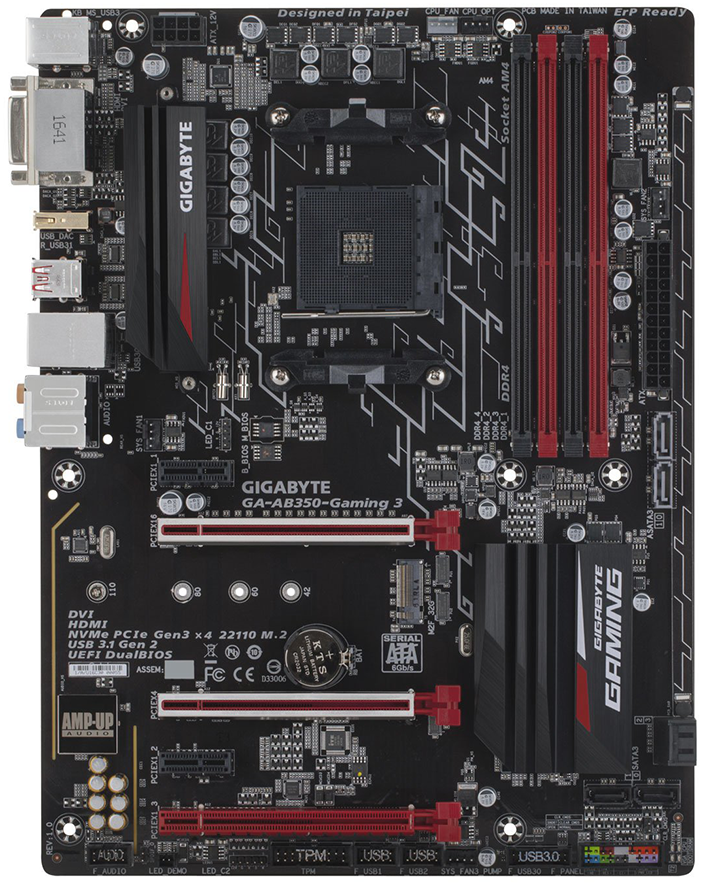
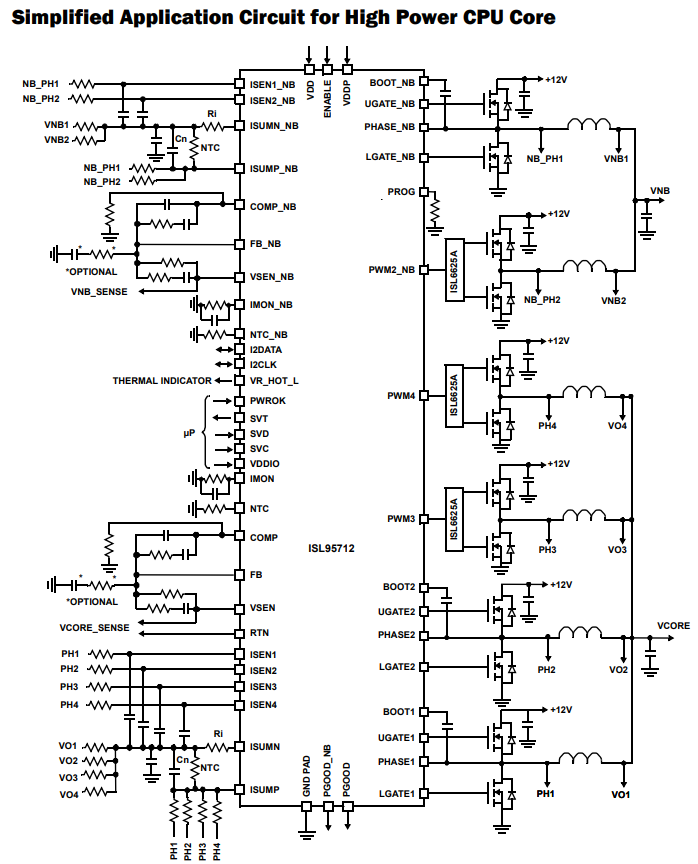
That board is a 4+3 using a ISL95712 as the controller
4C10N for the high side mosfet
2x 4C06N for the low side mosfet
SOC uses the same controller and mosfets but only one low side
Man I love random German websites that have VRM lists

 steep gust
Its efficiency looks fine
Also I'll pass on electrical engineering
But yeah Tjmax of 150C
latent light
that's not difficult to learn, just very time consuming
like everything engineering related
all learning takes is willingness and effort




 winged tapir
why 
north crow
all the cameras
winged tapir
can make 9 pictures of you
north crow
or one 9-dimensional picture of you 🤔
winged tapir

latent light

 solar forum
I have a question
Are my specs good?>
Heres a list
Raijintek Paean
GIGABYTE X399 AORUS
AMD Ryzen Threadripper 2990WX
(8x16) G.Skill Trident Z
Nvidia Geforce 2080 TI SLI
(3x4 TB) Seagate BarraCuda 4TB
(3x960GB) CORSAIR Force Series LE200 960 GB
SilverStone ST1100-TI
CORSAIR Force Series - MP500 960 M.2
Cooling
EKWB EK-Supremacy sTR4 - nickel
EKWB EK-XRES 140 Revo D5 RGB
EKWB EK-CoolStream SE 360 RGB
(with green coolant for XTRA NVIDIA FPS)
 molten coral
No, my intel pentium and my onboard graphics are better than that.
I can play minecraft on fricking 17 FPS! Nobody can beat that experience.
 limpid glade
No need to flex, @solar forum. Smh smh
short crypt
Just ordered the Samsung QE65Q9FN 65" can't wait 😄
red ingot
Fleeeeex
storm osprey
ill always assume "are my specs good" is a flex
storm osprey
dude, youre gonna be jealous of my next keyboard
storm osprey
custom made yo
gonna be that case, with led psb, aliaz switches, aanndd
idk what keycaps
shit
storm osprey
dude, i completely forgot about keycaps
red ingot
You're welcome
storm osprey
hmm
red ingot
storm osprey
yea drop ended
it was like 120 minimum
but thats almost exactly the keycap set up i want
red ingot
Shit
storm osprey
yeeaaa
storm osprey
ad 50 bucks and thats a 2600....
storm osprey
the rest of my keyboard probably wont equal 120
red ingot
But it gave me +50fps
red ingot

Set my whole build to red
Everything in my case is rgb now
Well, except psu and drives but those are hidden
storm osprey
and case
red ingot
Shh
I looked at rgb cases mind u
And they all looked shitty
I actually really like the meshify
storm osprey
meshify c is god tier