#technology
1 messages · Page 118 of 1
 limpid glade
 storm osprey
do you have a frys electronics by you?
limpid glade
no
storm osprey
no friends on 4th gen intel?
 rose eagle
lol thats pretty niche a request
i mean 1.. i wouldnt help my buddy out by tearing my own cpu out 😄
maybe thats why i have 0 friends
storm osprey
its even worse than just cpu, its pulling apart the whole thing
rose eagle
yea i imagine since i moved off stock cooler to 212 evo its not as easy
storm osprey
ehh not that hard either
id do it for a friend
well
no i wouldnt
well
yes i would
frys electronics doesnt carry 4th gen mb's anymore
rose eagle
id do it for like my friend since kindergarten who moved away if he was still here
but anyone else? naaaah
i dont have any friends left id just hang out with and make it a fun project to find out whats wrong 😄
everyone i know either a) moved out of this crap state or b) didnt get married or have kids
storm osprey
i got a small group of friends, so my list isnt very big lol
 red ingot
i don't blame u for not wanting to rip out a 212 evo
I had one of those monsters once upon a time
good lord that thing was a pain in the ass
 floral pilot
@pastel lily uninstall origin and reinstall, i had the same thing and did that
 fickle stratus
do we know what fps the game will run on xbox one x?
storm osprey
i dont KNOW, but i think its safe to assume 60 fps
but idk about 4k
hasnt 60 fps been the standard bf experience on this gen?
storm osprey
1080p, xbox one x will easily hit 60 fps
rose eagle
@graceful aspen you got FSAA off right? in beta you couldnt disable TAA
storm osprey
i want to say they targeted 60 fps on base consoles
 graceful aspen
where is FSAA
graceful aspen
its on TAA HIGH
rose eagle
you may have better luck trying a higher res scale and that off
graceful aspen
rip fps
rose eagle
with image quality, not sure.. since im on 1440p i dont use AA
AA is fps rip so just see if that is the setting causing it at least
graceful aspen
i would get 1440p as well but my gpu couldnt handle 1440p at 144hz
rose eagle
try off and itll look bad but then try another setting
graceful aspen
and I cant play at 60
rose eagle
i got a 2070 and its solid
rose eagle
no, its really only noticeable under 90fps for me
graceful aspen
yeah when games do 90 im fine
rose eagle
i have 120fps avg on 1, V im sure will be worse
graceful aspen
but when it hits 60-70 it sucks
graceful aspen
i have the nvidia counter at the top left. So i mean when I notice the game looks like shit and i check
and its at 70
graceful aspen
yeah
rose eagle
cripes
rose eagle
such a dark scene, hard to tell
graceful aspen
that link you sent
i know its bf1
but why is it so pixelated
thats my issue
he has TAA on as well
but looks like shit
storm osprey
plays with no AA
graceful aspen
@rose eagle how about future frame rendering
rose eagle
dx11 right?
rose eagle
i doubt V implemented 12 correctly again
not related but id imagine everyone is turning it off
what cpu you got?
graceful aspen
for future fram rendering and high dynamic range
shoudl they be on or off
i7 7700k
not overclocked atm
graceful aspen
yeah
the pixel problem
but it seems to be a battlefield thing (this is my first battlefield since bf4 on an xbox)
rose eagle
yea it may just be something im used to lol
rose eagle
i dont really play any other FPS games
i play bfront but i bet it's the same also
whats your FOV?
rose eagle
holy hell that's low, lol
graceful aspen
i didnt set it
maybe i set it by accident
but I think its the automatic one
whats yours on?
rose eagle
85
graceful aspen
honestly this pixelated thing is something ill just get used to ina few games
but it stutters/freezes way to often
like at least once per 30 sec
rose eagle
i mean on 1080p especially.. things farther away are so tiny, theres not many pixels there to do much with
maybe i just dont see it as much at 1440
rose eagle
27"?
rose eagle
yea, Frostbite engine just looks insanely beautiful, things had to be cut somewhere for perf
rose eagle
im sure they got plenty to work through
i only played beta and have Deluxe so im twiddlin fingers
i never had any issues but for beta i was only on a 970
never had issues, but cant see why a 1080 would have problems
red ingot
Latest drivers?
rose eagle
doesnt seem to be many reports of problems
graceful aspen
yeah
red ingot
Odd
graceful aspen
it was stuttering so i updated drivers
red ingot
Restart pc?
rose eagle
crypto hacked? 😄
red ingot
The amount of times that's fixed stuff for me is insane
graceful aspen
yeah I did
rose eagle
cpu load?
graceful aspen
lemme check temp
rose eagle
and temp of it also yea
red ingot
I've had that before, a loose cable blocked a fan
rose eagle
i had temp throttling on my 3770k
cause the fan broke
didnt notice til i was having issues lol
red ingot
Or just tons of dust
graceful aspen
rose eagle
😄
red ingot
If u havent cleaned recently
graceful aspen
lemme play a few sec
red ingot
Like too cool
graceful aspen
I paused the game then checked
rose eagle
i think cpu stutter would cause more issues than gpu at 1080p
red ingot
I've had issues where my gpu underclocked itself for whatever retarded reason
graceful aspen
but cpu is good no?
red ingot
Yah
graceful aspen
not a bottleneck
red ingot
RIP my 4770k
rose eagle
naw
red ingot
Still chugging along
rose eagle
i got 3770k, plan to keep it through 2020 ;P
red ingot
Damn
rose eagle
but im at 1440p
red ingot
I want to upgrade next year
rose eagle
buys me more time
red ingot
But I'll see when the time comes
rose eagle
until anyone comes out with anything worth upgrading to.. there's literally no point
DDR4 is nothing useful
red ingot
Yeah I'm hoping someone will
rose eagle
more cores and threads isnt even
red ingot
I thought ddr4 was supposed to be much better?
red ingot
I mean I cant get my ddr3 past like 1600 :/
rose eagle
mine is stock
 wispy wing
DX12 performance isnt good yet
red ingot
Yeah which is stock on mine
rose eagle
my 3770k is at 4.3 though
red ingot
Idk my cpu used to be at 4.4
rose eagle
from 3.5
rose eagle
poopoo
red ingot
Maybe just age
One day started getting unstable and kept crashing had to turn it all down after a few years of no issues
:(
graceful aspen
rose eagle
stuttering is sad panda
graceful aspen
this is the stuttering
rose eagle
oh god
graceful aspen
thats recorded with nvdia shadow play
rose eagle
thats just SP?
graceful aspen
it doesnt look that crazy irl
red ingot
Thata so odd
rose eagle
did you upgrade your gpu recently?
red ingot
Cause it's like not all the time just every 5 sec or so
graceful aspen
1-2 months ago
graceful aspen
i dont have the issue in other games tho
red ingot
U should be able to play on higher settings but just try just to see
Restart your game too
After switching to low
rose eagle
i mean thats like a complete hitch
graceful aspen
multiplayer would be unplayable
rose eagle
this is in full screen or borderless?
red ingot
What's your psu btw
graceful aspen
650w
graceful aspen
im using like 350w anyway i would think
500w is enough
for 1080 and i7700k
not overclocked
no more stuttering
on low settings
wtf
red ingot
Yeah 500w should be enough
You're on 1 1080 right
Not two?
No overclock on cpu or gpu?
graceful aspen
no overclock on anything
red ingot
1 gpu?
graceful aspen
yeah
red ingot
U try it again on low after restart ?
red ingot
And
graceful aspen
np
red ingot
That
graceful aspen
is that an issue with my 1080 then?
red ingot
How much vram does your 1080 have?
graceful aspen
8gb
red ingot
And how much system ram?
graceful aspen
16gb
graceful aspen
but no one else has the issue
red ingot
I mean its anecdotal rn
Games been out for only a few hours for a select few people
Once it releases for everyone in a week or so and they have some more patches itll hopefully be better
Imo if it was a gpu issue switching to low settings wouldn't fix that type of issue
Plus a 1080 should be able to run higher settings
red ingot
Sounds normal to me
That hitching issue is really odd though, and not normal.. I'd just play on low for now so u can at least play the game smoothly and not have to worry about hitching
Cause that's no fun
red ingot
Maybe just an issue with ultra then
red ingot
Np
rose eagle
@graceful aspen Does V let you disable AA? it wouldnt in beta and bfront2 doesnt let you
storm osprey
i thought i had it off when i played the beta
rose eagle
fkin kiddin me
rose eagle
you see a motion blur setting?
storm osprey
bfv had motion blur
rose eagle
try 1
rose eagle
1%?
storm osprey
takes up resources and makes it harder to spot, wh wants that
graceful aspen
0%
rose eagle
theres some weird post here saying try 1%
it might interfere with AA and make the image sharper
worth a shot
graceful aspen
to fix the stuttering?
rose eagle
no that one is fkd ;P
rose eagle
see if it adjusts the blurryness with 1% motion blur
 undone terrace
are new nvidia drivers worse?
I lose like 60 FPS
GPU never goes above 60-63% use (i7 8700k gtx 1080)
wtf my CPU is at 50% and GPU doesn't go above 60%
anyone has same issue?
storm osprey
did you play bfv, get good frames, then dl drivers and get worse?
 ocean dirge
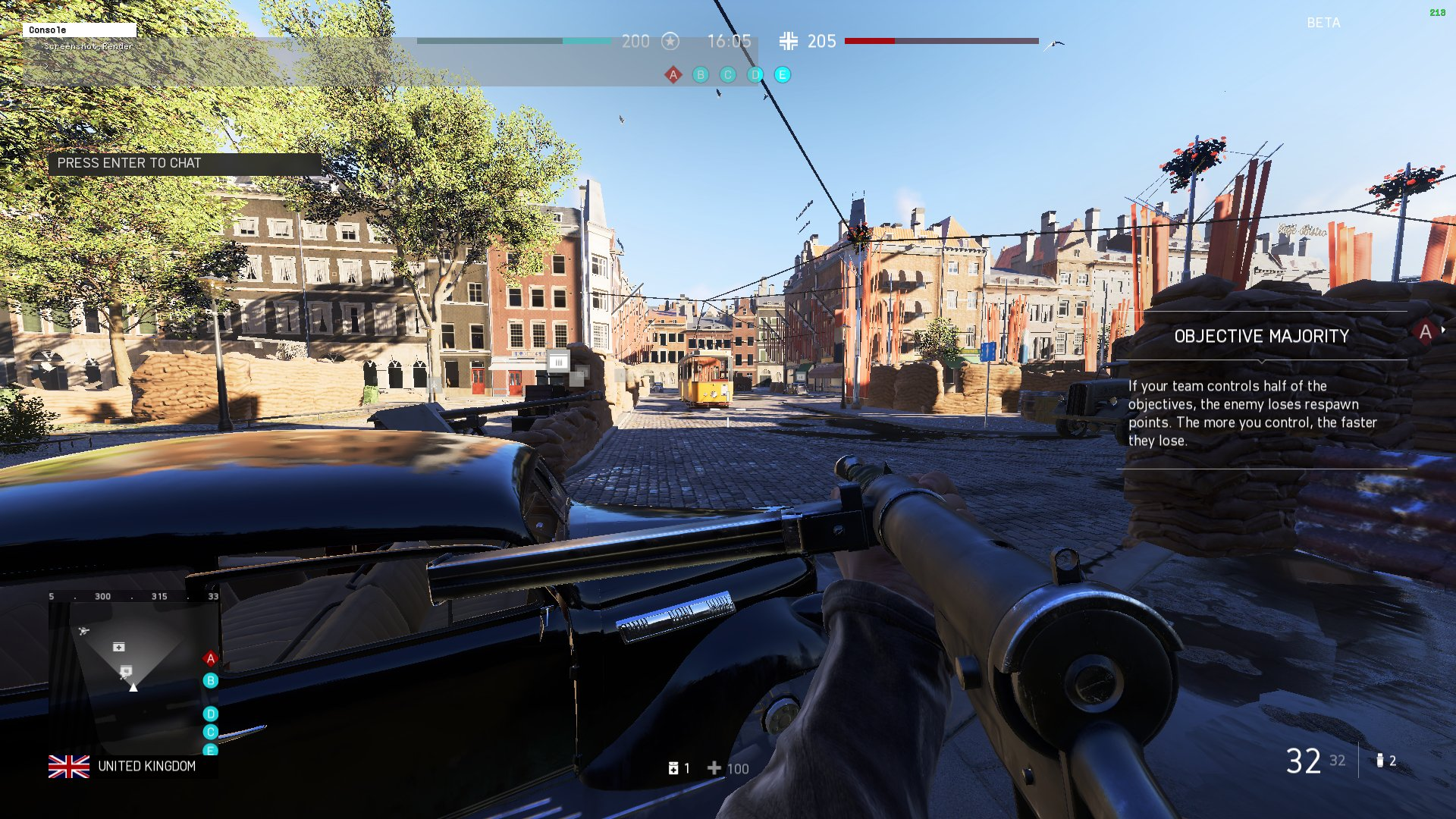
Would love to see if I can get the  Logo or image for an emoji for my discord server is that a possibility ?
red ingot
You have to say "I love EA" 3 times in chat


 ocean dirge
Thank you !!! I was at e3 and played the demo it was awesome ! Can't wait till next week !
 dusty frost
Any idea how to boost fps? New drivers are cool?
storm osprey
low/turn off everything
 faint peak
so 1440p ultra is with 1080 ti (and 8700k 5,1 ghz) 70-80 fps at dx11 and 130-140 fps or more at dx12
but dx12 has still great stuttering
so i prefer lower fps and dx11
but a shame, because dx12 could make great fps
but they cant fix it
undone terrace
I figured out my issue
it is in options, future frame rendering OFF
it causes massive performance issues
faint peak
sure i have that also off
storm osprey
turn everything off
undone terrace
I turned it on again and no issue
storm osprey
you only need fps
faint peak
but still 70-80 at bfv vs 120-140 at bf1 is a bit bad
storm osprey
the game is barely up
faint peak
hm lets see how it works in 2 weeks
storm osprey
at least
rose eagle
@graceful aspen "Microstuttering can also be down to a driver issue, whether it’s a driver conflict or the latest driver for your graphics card not working well with Battlefield V. If you’ve already tried a clean reinstall of your graphics drivers, you may just need to wait for a new driver to fix it."
lol, nice.. NOT US, ALL NVIDIA!
storm osprey
@rose eagle we should get a special tag "techies"
faint peak
guys
Future frame rendering off: 67% gpu usage, 80 fps
future frame rendering on: 99% gpu usage, 120 fps
rose eagle
pretty sure it affects your input latency and is not a good idea
 strong breach
It does add latency
 unborn epoch
Is it worth using dx12 in bfv
faint peak
more fps
but stuttering
so no
yeah but 120 fps vs 80 fps i prefer the extra input lag
and make future frame rendering on
as long as i get only 67% gpu usage with future frame rendering off it is not worth it...
maybe a bug
 violet jay
does anyone how to get the framerate? Is it Perfoverlay.drawfps.1 ?
faint peak
gametime.maxvariablefps 140
perfoverlay.drawfps 1
PerfOverlay.FpsDisplayScale 2.5
thats my user.cfg
in bfv main folder
perfoverlay.drawfps 1
PerfOverlay.FpsDisplayScale 2.5
is good
rose eagle
i mean.. if you're really getting 60 vs 90 the input latency could be offset
or 120 vs 80
what video card and settings are those?
storm osprey
i hate input lag
faint peak
1080 ti 1440p ultra
boy
FFR off just makes GPU usage at 67%
and on 100%
thats a bug
 leaden inlet
weird so future frame rendering is forcing the gpu to actually work?
faint peak
67% of gpu is like using 1070 ti instead of 1080 ti
yeah
off would be nice
but only 67% gpu usage, hell no
leaden inlet
Really weird
rose eagle
why would higher frames cause more input latency?
graceful aspen
best settings for comprtitive play but game still look good
rose eagle
i hate that i have to set framerate limit to 120 and not 143
to avoid any input latency issues
faint peak
It pre renders frames... that will give the pre rendered frames input lag
1 pre rendered fram 6 ms
2 12ms
rose eagle
wait so like, unpredictable input lag on different frames?
cause you never know how many it will pre-render?
faint peak
Probably they prerender constant one or two frames
rose eagle
12ms is no bueno
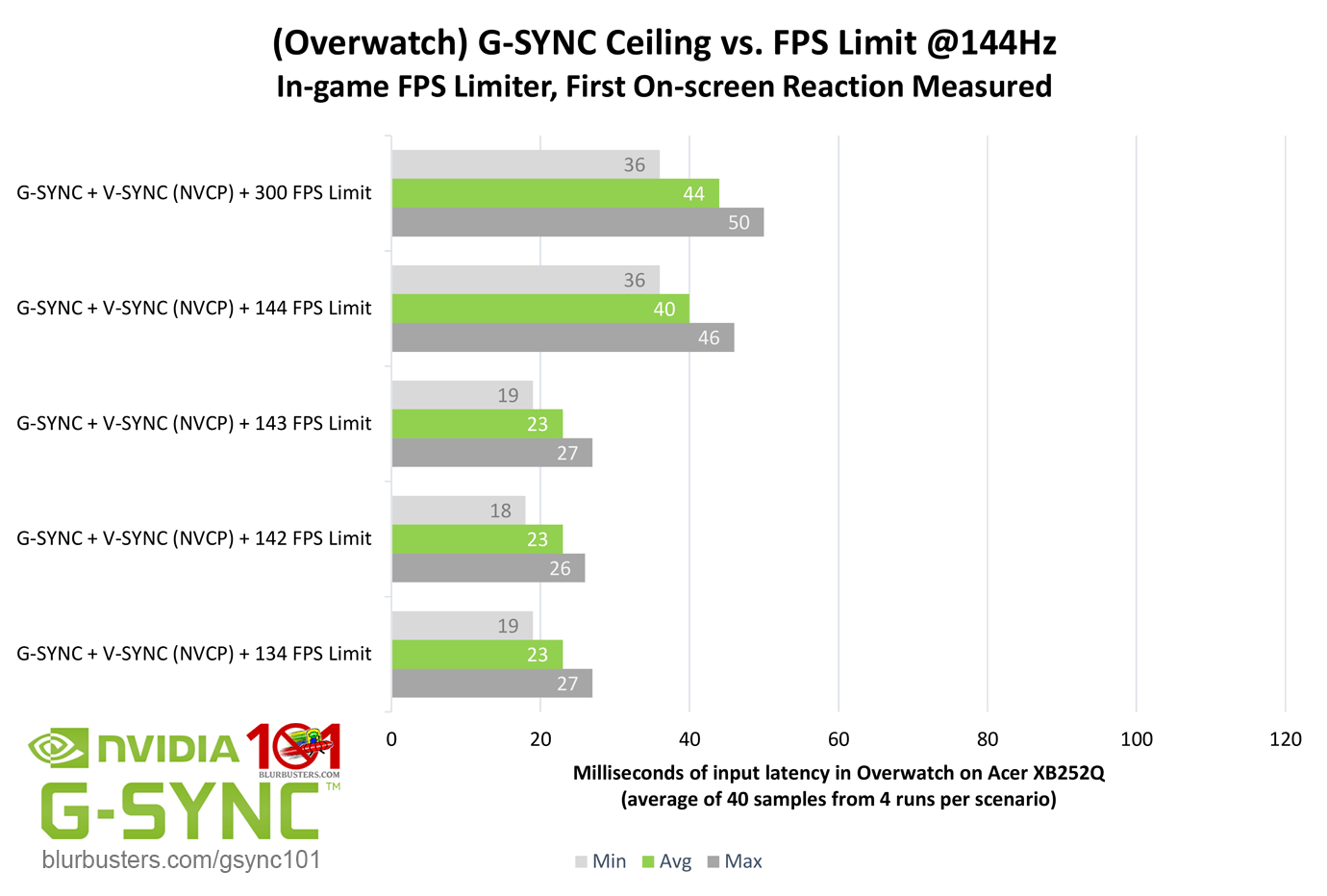
considering gsync is 23ms ish at 143fps
is there any info on input latency on 144hz monitors and framerate?
i know 60hz is like 40ms
and 144hz 143fps is 23ms, but no idea what 80fps on 144hz would be or if same
leaden inlet
wait, input lag is that high for gsync?
rose eagle
the tests for Overwatch were done on 1000fps camera to capture actual input response times
with hardware connected to the mouse to turn a light on
and muzzle flash
so the guy had basically a frame to frame capture of light til muzzle flash to see the real ms in what you feel as a player
 faint peak
all in all my pg279q has around 4 ms input lag
faint peak
in the test vsync is always on
rose eagle
even with vsync off and no gsync you can only achieve 15ms on 144gz 1000fps according to this
faint peak
so its senseless for us
rose eagle
thats nvidia sync
it has no impact, its not "vsync"
there are tons of pages and diff tests and arrows to click
faint peak
it says gsync + VSYNC (NVCP) + 142 fps limit
rose eagle
NVCP isnt in game vsync
faint peak
but yeah 23 ms lag
it says
i think future frame rendering on is just the standard thing BF1 uses
and off is sth new which reduces the input lag and gives us horrible fps and 67% gpu usage
its only for esport gamers which play low settings to max fps and wouldnt use 100% gpu anyway
i knew bf1 felt like input lag is there
so yeah if you play with FFR off, make graphics settings to low-medium
if on, you can play ultra
because the off seting is only worth it when you achieve max fps, 140, 160, or 200, depends on the monitor you use
rose eagle
i guess we'll see waht my 2070 can do on the 14th
dusty frost
Hey guys, I ve got an error that my account is restricted from online features, whats going now? i ve been playing few horus ago
 lilac dawn
Anywhere i can see a place of what each setting does and wether to turn it off or not ?
My pc is pretty decent i want the game to look ok but need 144 fps
 steep root
how can I play with someone with same ip as me?
cant connect to same server as my brother
leaden inlet
why would they do that I wonder
if the server authenticates multiple origin users I dont see why it matters
leaden inlet
lighting quality
 tawdry light
Boys
Need some good suggestions for a motherboard thats compatible with the AMD Ryzen 5
Yeah Ik theres a ryzen 7 but your boys got a budget ok....
Plz help
tawdry light
Same.... sad times
Plus I gotta get these upgrades next month when I get my next paycheck... plus I've got to save money as well
Sad times and difficult times
unborn epoch
Good luck friend
tawdry light
Thanks
Stupid question guys but if I bought a motherboard that was compatible with a ryzen 7...... would a ryzen 5 also be compatible with it?
Ik its stupid be feed my curiosity plz
 grim folio
Guys how can i disable vsync?
grim folio
thx
 teal lark
anyone else get a fuzzy pixel like screen on PC? never had that on bf1
 spring condor
anyone here having issues with ea access? Game sharing with friend that bought it, have ea access and when i go to install the 10 hour trial says preparing and then errors out
 fiery oracle
@teal lark check to see if film grain is on
 heady junco
oof, i can barely play, i have a 1060 6gb
 prime jasper
how much fps do u get and on what settings? @heady junco
heady junco
i dropped them to medium and i still get bad frames, around 30-40
prime jasper
cpu?
teal lark
@fiery oracle thank you!
rose eagle
@heady junco 1080p?
heady junco
yes
rose eagle
wow.. people with 1060s are really getting shat FPS i dont understand
my 970 had 60 in beta on 1440p
well, ok yea your i5 is 4c4t that hurts a bit
still surprising, that usually hurts min fps worse
 pliant steppe
I'm running gtx 1060/ I5-8600k at 1080P perfectly.
leaden inlet
my 970 is getting shit frames tbh
prime jasper
i need to cry q.q
wispy wing
@leaden inlet did u try turning on future frame rendering
 crisp island
In full screen? Borderless was crap for me
 eternal notch
i got some weird stuff going on lol...ill be in voice chat on discord and playing BFV and 30mins into BFV gameplay everyone ingame is walking in place, and my voice chat is frozen also. Then 5 seconds. Discord voice is fine i hear everyone. Then i DC from server on BFV? Anyone getting connection dropped.
No Packet loss, and Connection is stable
prime jasper
Zen2 in Q1 RIP my wallet if I can get money together
 spark kindle
guys is it just me or server browser filters won't work sometimes?
resetting filter works but still, kinda weird
spark kindle
resfresh won't help
dusty frost
I scaled my reslution by 50% from 4k and works much better for me
 sacred nacelle
http://prntscr.com/lg7e83
Before i bought the 7700k cpu everyone in forums saying how it has heat problems.. been playing bf1 last few hours and temps are still great! with a budget coolermaster cooler as well 😄
prime jasper
Alright I tried my best but I can’t get rid of the stutter on BFV. It runs and hits 60 and has some drops which are fine but then it microstutters. Guess I’ll have to wait for a patch
leaden inlet
change preset to custom and everything to low, let us know if it still microstutters
prime jasper
@sacred nacelle hdd
@leaden inlet I have everything on low or off but the texture quality that’s on medium
sacred nacelle
well thats your problem right there.
large games like bf1 on a hdd can have stutters
i had the problem few weeks ago when i had hdd, upgraded to ssd
no stutters at all
prime jasper
i don't have any issues on other games
i even played AC Odyssey today on a HDD, no stutters, BF1 works fine for me
leaden inlet
hmm, a HDD definitely won't help
prime jasper
i have gtx 1060 6gb / r5 1600 / 16x1 ram
and i get very very bad performance that drops from 60fps to 45 all the time
https://youtu.be/NQBxFGwqy1E
after seeing this video i feel like there is something wrong
i play on the lowest settings possible even tried to lower the resolution scale to 70% and still get same fps drops
also my gpu and cpu usage is at 60%ish most of the time
 wet notch
my 970 gets about 115-120 when i put settings on low
but res scale on 100%
had to turn off vsync tho, otherwise i would be stuck at 60
leaden inlet
what res
wet notch
who you responding to?
prime jasper
anyone got any idea why this is happening ?
leaden inlet
did you try turning on future frame rendering
wet notch
my res is monitor default 1920x1080
 rigid knoll
Future frame rendering seems to help, not sure how much input lag it adds though. Can't tell the difference right away
prime jasper
i use it and still drops very badly
look at this video
why my setup not getting anywhere close to this performance
rigid knoll
Same resolution?
floral pilot
how much should i overclock my i5 8600k?
floral pilot
i got AIO
floral pilot
i can or cant?
 paper kite
Anybody know how to fix the extremely delayed control input with mouse? Everything is delayed by a good 2/3 secs and its all floaty despite solid 60fps+
rigid knoll
@paper kite disable v-sync and future frame rendering?
floral pilot
imma wych a vid
paper kite
tried both, and at hardware level. Tried fixed and g-sync. Always delayed controls
 raw turtle
Tried another mouse?
paper kite
dont have a spare 😦
 vernal spire
I personally dont think 60fps is bad
raw turtle
Maybw another pc? Wheee u can test
vernal spire
All below 60 is a no
prime jasper
can someone help me overclock my gtx 1060 6gb
cuz i dont know much about overclocking other than it might give me fps boost
vernal spire
I would always trade some fps for graphics settings if it isnt below 60
raw turtle
I have one from gigabyte, just use the software, sometimes theres an option oc-mode or max power or smth like that
@floral pilot but pls, the numbers i told u were jokes dont try them haha
prime jasper
my game crashes when i overclock
floral pilot
@raw turtle yeah i know
raw turtle
Then dont do it
Maybe 4.4 or 4.5 with decent cooler?
U have to raise multiplicator step by step and the voltage step by step and then test it with prime95
prime jasper
also why is my game using about 60% of both gpu and cpu and getting bad fps
shouldnt it go higher?
sacred nacelle
tbh if you dont know much about overclocking you probably shouldnt be doing it, you can fuck up your hardware 😆
faint peak
@prime jasper at future frame rendering off the game uses only 67% of your GPU
prime jasper
its on for me
 slate rivet
Anyone have good knowledge on bitlocker win 10?
 queen field
@floral pilot which aio and whats ur ambient temp
floral pilot
im all set, thanks though!
queen field
awesome, all the best
floral pilot
you too!
slate rivet
@leaden inlet a windows 10 laptop
leaden inlet
do you have a real need to bitlock it
slate rivet
yeah it's for work
curious to know if i can encrypt software.. as by default it's hardware
found a link on msrc
rose eagle
 chrome flint
I wanna do a little help for people if you want I build a PC within a budget I will help you choose the parts
prime jasper
@chrome flint if r5 1600 is bottlenecking gtx 1060 6gb should i upgrade to a better cpu?
chrome flint
Not sure lemme do my research and will give you an answer
prime jasper
oki
 verbal geode
@prime jasper it shouldn't be
chrome flint
@prime jasper Hey! After my research (Not a Ryzen User) Ryzen 5 1600 have 6 cores and 12 threads so it should never bottleneck what so ever you may easily play ultra settings on 1080p/1440p with no issues
prime jasper
how am i getting very bad performance
chrome flint
Ofc for a higher FPS a 1070 would do the job just fine
chrome flint
That’s why
Home version isn’t for gaming
It is for office workers
Pro version would fix your issue
I never had a problem like that
As of my knowledge home version limits RAM usage
prime jasper
oh
prime jasper
weird
chrome flint
And as Snutten said try to play on higher settings
 paper lark
I only have 8gb but I've been meaning to upgrade to 16gb. Is that like the bare minimum nowadays?
chrome flint
8gb is fine
prime jasper
look at dis
how is my performance not even getting close to this
also my gpu and cpu usage is barely hits 70%
chrome flint
For triple a titles at medium settings
prime jasper
@plain vessel when it comes to graphic settings ....trust me i tried everything... also installed potato mode on 30% resolution
100
dx12 off
dat sht nasty
chrome flint
Meko your CPU/GPU aren’t bottlenecking but your system is limiting them
Make sure you have the windows set to best performance
chrome flint
^
prime jasper
lol
chrome flint
Get Windows 10 pro
prime jasper
yes^
chrome flint
Optimize the game for the best experience
prime jasper
on gerforce experience it says game cant be optimized for some reason
i wonder why bf1 ran way better
chrome flint
Don’t know really it is really weird the only thing I would try now is to get Win10 Pro and if the problem stays
Update your drivers
RAM usage is limited
Unless you unlock it
Which will break your pc
prime jasper
does geforce experience say game optimized for you guys?
chrome flint
I have heard that a lot from different people might be wrong not sure
prime jasper
so heres what am gonna do
im gonna remove geforce drivers
and install latest one
if doesnt work im gonna install windows 10 pro
(although reinstalling drivers in the beta didnt work )
yes
yeah
q.q
chrome flint
Snutten limits are on x86 not x64 my bad
chrome flint
Nope
prime jasper
64
chrome flint
One sec
prime jasper
@plain vessel bf1 runs for me at 80fps on ultra somtimes drops to 65
have u seen the vid i sent
prime jasper
look at tis man
chrome flint
Get your motherboard drivers up to da
Date*
And reset your bios settings if you played with them
Also make sure you got your win10 updates
chrome flint
Yup
prime jasper
h0w
prime jasper
BIOS 1.70
Version American Megatrends Inc. 1.70
Manufacturer American Megatrends Inc.
Date
thats it ?

chrome flint
What is your motherboard?
chrome flint
One sec
prime jasper
so should i give up on win10 pro ? because the dude who i built this pc from told me to install it too
chrome flint
Can I send an image here?
chrome flint
Okay
There is a chip driver so do bios driver
Update those
And you should be good to go
 stray nest
hi !
Each time I launch this game, "Tutorial" begins.
Also, video settings disappear every round.
Please tell me how to fix this.
I have already played the tutorial 15 times.
xd
chrome flint
I guess
Ryzen motherboards always needs an update
Him upgrading his chip driver and bios
Will be a solution for his performance
Yup
prime jasper
i think i tried that b4 in the beta
idk
but k
anyways
if none of these works
shud i upgrade to a better cpu
like i5 or somethin?
prime jasper
tanks man
 plush smelt
for those who already playing BFV, what's your average fps and what your cpu/gpu?
wet notch
gf970, i7 6700, get about 115-120 fps with everything on low except resolution scale (using maxfps 120 btw)
rose eagle
i got 50-80 in beta with a 970 1440p, 1080p really is a massive perf boost if you get 120 lol
i dont know how anyone plays on a 24"
plush smelt
what's your cpu @rose eagle ?
rose eagle
3770k
ive ran benchmarks against people with 8700k's, its not any perf impact
not at 1440p anyway, im just shocked 1080p is that much better fps
i mean it is 2x the pixels
prime jasper
i average 50fps with a 570 at 1440p medium
plush smelt
i'm on 1080p with an i5 6400 thinking in get one 8gen i7
prime jasper
oh bfv not bf1
i remember getting really low framerates during the beta
or you could get a ryzen 2nd gen
plush smelt
i'm not a big fan of ryzen for games
i will sell my h110m + i5 6400
and get one i7 8700 + b360
rose eagle
1080p with i5 non 6c6t is definitely a kick in the pants
plush smelt
so you think is better a i5 8400 i5 8600 or i5 8900 better than i7?
what about 6c x 8c?
chrome flint
@prime jasper updates?
 golden girder
Hey guys, anyone having issues with server disconnections? I can't play a game for longer than 5 minutes without getting the "Lost the connection to the service" error message....
Worked fine this morning, now this afternoon it is unplayable...
golden girder
A guy earlier this morning Bauer24x stated he had the exact same issue,
So frustrating...
chrome flint
Well
It is early access
Servers are still not at their best
Try on a different region
golden girder
My discord chat hangs for like 30seconds, and then i get disconnected...
no issues with any other games,
internet is fine. flushed dns, repaired game files, tried playing using a different internet connection, same issue...
My friend who lives 1 mile away from he has no issues playing...
golden girder
They are...
chrome flint
There must be a virus or something
That is disturbing your connection
Scan your pc
golden girder
Ill try it now
chrome flint
Ok
golden girder
No viruses detected..
chrome flint
Weird
chrome flint
Does your internet disconnect on any other software/platform or just BFV?
rose eagle
reformat
did you try forwarding all known BF ports on your router?
i know a guy who had timed out issues a year ago in BF1, replaced his entire rig since and still has issues so its gotta be something net related
update router firmware, forward ports, somethin has to be a fix
storm osprey
eep, my 4790 NON K will hurt
rose eagle
get a 1440p monitor!
red ingot
getting a 1440p in a couple weeks
waiting for those sweet sweet black friday deals
although if anything i think 1440p will make my fps go down no?
lol
red ingot
worth tho
storm osprey
youre using more resources for more pixels
red ingot
will look sexy af
rose eagle
which will make your CPU work less
rose eagle
less frames to process
chrome flint
My i7-8700k is a beast
storm osprey
forgot that you were on 1080p yag
red ingot
rip me
1080p for 2 more weeks
but uh higher res = less load on cpu?
i mean i figured ofc greater load on gpu but i didn't think cpu would work less, figured it would be about the same
red ingot
huh
interesting
i mean im down with that
cause my gpu is at like 50% utilization
and cpu at 100%
chrome flint
I got a 1080 shall I get another one? And make an SLI bridge?
red ingot
so im more than happy to pass more work off to my gpu lol
storm osprey
thats why when they test cpus they pair it with a 1080ti and run it at 1080p
red ingot
ic
storm osprey
gpu isnt a bottleneck and 1080p is more cpu demanding
rose eagle
think of it as your cpu and gpu constantly in communication and if its overloading it with more info, it'll work harder
storm osprey
really
red ingot
well another great reason to upgrade to 1440p lol
rose eagle
lamens dumbed down version
storm osprey
yea, thats why majic and i are on old cpus but we dont have a solid reason to upgrade yet, since we are both on 1440p
storm osprey
its like 10 frames more at 1440p, 20 max
red ingot
not bad
storm osprey
eww, idk the last time i saw 40 fps on my pc lol
(i play low on everything except textures)
red ingot
yeah i wanted to puke
so i turned everything down to low
averaged about 70-90fps
still not amazing though
especially on a 144hz monitor
😦
rose eagle
what gpu again?
red ingot
1080ti
storm osprey
dayumm
red ingot
rip me
storm osprey
yea i had over 100 fps most of the time on bfv with my 1080
storm osprey
up to you
red ingot
even with the new nvidia drivers, although my cpu usage during beta wasn't as much
imo 2080ti not worth it
storm osprey
1080 is a completely solid card
chrome flint
It is indeed
red ingot
like ~30% performance increase for 100% the price
red ingot
my thoughts are nah - i mean i have the means for it rn, and I was considering it, but when i saw those benchmarks, i noped out and got a 1080ti
chrome flint
So I get better rendering time for my premier job
prime jasper
my friend gets this in a game multiple times it crashes the game
any clue what it is
chrome flint
2070 is good though dunno
storm osprey
@chrome flint how much of a difference is ryzen vs your cpu right now? cant be THAT much
red ingot
@rose eagle can tell u, im pretty sure he has one - a 2070
chrome flint
@storm osprey well I have saw a lot of benchmarks and stuff and it got more threads
storm osprey
oh yea its better, but you already have one
i just cant imagine its worth switching
if you were building new, yea i would recommend ryzen
but not after you already have an i7 8700k
chrome flint
Yea idk
I guess I will get more ram and get a better GPU
I got 32 gb of RAM currently
storm osprey
jesus
chrome flint
I do 4K editing
rose eagle
what about me 2070
id never recommend Ryzen unless you do heavy streaming on 1440p, that would be the ideal solution for a 2700x
but dont insane streamers use a whole other PC?
not sure how that works, output the signal of your vid card to something that isnt displaying it but just processes it?
capture card? crazy streamers and their streaming
im patiently waiting to see how my damn 2070 does with my DEluxe preorder
 strange quiver
so does anyone know why my fps cap still is 60 even though i set it to 'monitor refreshrate' (on a 75hz panel)
vsync is off
storm osprey
turn off any cap
strange quiver
i did
rose eagle
75hz at max res?
some monitors only do 75hz at different resolutions if they're old and weird like that
strange quiver
nah its a new one
i dont want unlimited framerate tho
i want the 75hz i paid for 😛
storm osprey
do you have 75hz selected in your windows options?
rose eagle
back to basics 😄
nvidia control panel, change resolution, yea theres a hz dropdown
time to see if its even acknowledging it in winders
and then in game if you choose borderless it should show different options for same res
strange quiver
aight let me try that
storm osprey
yea you gotta change your windows and or nvidia settings to 75hz
strange quiver
aight the nvidia one said 60hz now for some reason, so i changed that back to 75
where is the windows one?
storm osprey
click windows in bottom left
type display
change display settings
advance display settings
click the monitor display adapter properties
go to monitor tab
in there
strange quiver
recognizes it as a 75hz panel
storm osprey
should be good in bfv now
storm osprey
wait, what?
strange quiver
yup
thats what i thought
i had problems with it in bf1 too, every time i started up bf1 i had to change my refreshrate in game from monitor refreshrate to 120 and back
for it to recognize as 75hz again
 worn storm
cant disable TAA ? wtf ?
rose eagle
bfront 2 did that shit
 hazy spire
Dice...
rose eagle
supposedly someone talked to some random guy in support who talked to someone techy and said it would release a patch allowing disable
prime jasper
@chrome flint still like dogshit
chrome flint
Well is it only in BF?
rigid knoll
What is this, my fps is suddenly locked to 60. Tested out today and was running on about 90-100
chrome flint
The game is in early access
chrome flint
So that might be the reason of low performance for some of you
If I were you I would ticket ea
Informing them about the issue
prime jasper
i did
chrome flint
They should release an update soon
prime jasper
someone called rajiv told me to reinstall origin lmao
prime jasper
i swear i might just sell this crap and get a ps4 pro
rigid knoll
Some folks had weird lag in BF1 early days if Origin was left open in the background... or something like that
rigid knoll
@prime jasper did you try replicating all settings between BF1 and BFV?
rigid knoll
Ok, so it's pretty certain it's something they'll need to fix
 celest matrix
How does one disable AA completely? I can't for the life of me use AA in FPS games.
 onyx granite
anyone playing on a i5-4670k and 1060 6gb?
chrome flint
I don’t but why?
prime jasper
someone know why it crasch when i take off memory save blabla in game? i have 1080 with 8gb it says if i have less then 2gb i should not turn it off but i have 8gb? wtf
rose eagle
damn that memory save blahblah
prime jasper
haha dont remember exactly what the name was of it
 dusk jacinth
Anyone know how the frames are on an Xbox One X?
 velvet oar
60 @dusk jacinth Similar performance to BF1 on the X
 molten bramble
@dusk jacinth They're relatively the same as XB1, but slightly more fluid.
Even moreso if you turn down the effects/film grain/etc.
A lot fo folks feel that gets in the way of their gameplay, so they turn off extra, remove bloom, etc.
One of my buddies on the MaD team runs his at the widest angle POV possible, looks crazy to me, but he does well with it.
 cloud smelt
BFV is terrible laggy after installed the latest GeForce driver. Does anyone have the same issue?
steep root
Rollback timee
 split storm
Yeah mine runs better than bf1 too lol
I wonder if AMD has dropped their updates already
raw turtle
Maybe its because i got a new cpu and didnt played bf1 with it
Changed from i5 4690k to ryzen 7 2700x
prime jasper
what the fucking problem is this? happens like 5 times today... https://imgur.com/a/GGAvb45
its just lagg there and freeze ..
cant do nothing just chat?
 solar cedar
Anyone know why my FPS would drop massively in BF1 in the past few days? Even the home menu I am lagging to the point I can't use the menu.
red ingot
Odd
Temps are okay?
Only bf1 or all games?
Try a repair install on bf1?
Do a clean install of your drivers?
solar cedar
Temps check out. 55C on average. Doing repair install now. Appears to only effect BF1
Gonna do a clean install.
red ingot
Of bf1?
 chilly lichen
Guys, quick question about BFV free trial. If I download the trial now, and after the 10 hours I decide to buy it (I get a code to activate in Origin), do I need to reïnstall and download the entire game again or does it just give me "permission" to play it again? Also, ~44gb seems a little bit too small for a game like Battlefield