#technology
1 messages · Page 98 of 1
 prime jasper
 steep gust
or CPU
prime jasper
yes
true
but some people mix K models with non-oc mobos
they do it all the time
steep gust
but when we are talking about overclocking, we are assuming people have unlocked CPUs and motherboards that can overclock
prime jasper
because the base clock is higher on K models
steep gust
and those people are wasting money
steep gust
Generally the difference between locked and unlocked CPUs is like 100mhz
steep gust
which is reasonable
prime jasper
not to me it isnt
steep gust
Considering you can easily kill hardware
prime jasper
just keep the vcore under 1.35 and you run near no risk
steep gust
Still waiting for a source on 1.35v
prime jasper
You can find one yourselfd
prime jasper
then you didnt use google
or a search engine
how many sources do you want?
give me a number
steep gust
I found product specifications for like Haswell CPUs, but I couldn't find max voltage due to the amount of fucking text there was
I'm not reading 60 pages of worthless info to find the possible max voltage
3 would be fine
So I want 3 different Intel / AMD CPU semantics linking to the page that says 1.35v is the max that they can safely run for prolonged periods of time
prime jasper
if you dont want to read 60 pages
then I cant supply anything
I have spec pages
and they normally are around 200+ pages
steep gust
Find where it lists the voltage limit then
just crtl-F voltage and it should pop up if its there
prime jasper
then do that
because 1.35 is the universal safe limit
that is agreed on
as I said, doesnt mean higher isnt safe
but not all processors are equal
prime jasper
hell I tried a 8600k on 1.45 before
steep gust
and the max on your motherboard depends entirely on your VRMs
steep gust
You can short the voltage limiter and get up to 2.1v on ASUS motherboards if you really want to
prime jasper
yeah, but that doesnt mean its safe for the cpu
steep gust
Its not
But 1.4v is fine
prime jasper
It can be fine
steep gust
with ample cooling it will get replaced by the time it dies
steep gust
My 8600k got up to 5.512ghz at 1.512v
prime jasper
its not a good 8700k
steep gust
Now it BSOD right after the benchmark
but that was due to a voltage drop since I may have not disabled speedstep
prime jasper
Good for you, that has nothing to do with the normal user safe voltage limit
steep gust
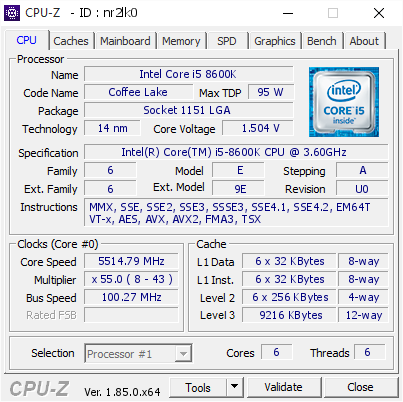
[nr2lk0] Validated Dump by BetrayedPredator (2018-06-07 02:27:14) - MB: Asus ROG STRIX Z370-H GAMING - RAM: 15282 MB
prime jasper
good for you
steep gust
and I could run my golden chip at 1.4v without issue
but I'll settle with 4.9ghz on stock voltage
prime jasper
I bsod at 1.38
steep gust
o o f
steep gust
normal users shouldn't be overclocking anyways
prime jasper
I see people quote 1.4 for coffeelake specifically all the time
but my experience has still been 1.35 for safety reasons if you include ripple
normal users should overclock
steep gust
Yes lets let normal users burn out their $200+ CPUs
prime jasper
its not scary and as long as you keep the mind set of 1.35, even beginners are fine
youre enforcing the hardcore myth of that
steep gust
but you have linked to a proper source of 1.35v
steep gust
I said evidence lies in the person making the claim
 sour ivy
should i turn on precision boost overclocking
steep gust
I can find people with decade of overclocking experience saying 1.4-1.45v
sour ivy
2600x
prime jasper
bold claims dude
Anyways I need to get back to work
I'll deal with this later
logic board repairs aren't my best skill
steep gust
If you really want to get technical
sour ivy
should i turn the precision clock on my ryzen
steep gust
Anything over stock voltage is killing the chip
sour ivy
precision boost overdrive
prime jasper
boost clock kills the chip, ripple kills the chip, useage kills the chip
sour ivy
doesnt everything kill a chip
steep gust
Yes
sour ivy
so
steep gust
Any voltage flowing through the transistors is damaging it
steep gust
If you have the cooling to handle it
prime jasper
he doesnt
sour ivy
just the stock processor
steep gust
Then just enable MCE and leave it be
prime jasper
precision boost is mce
steep gust
no
prime jasper
effectivelyt
steep gust
Precision Boost Overdrive (PBO) is a powerful new feature of the 2nd Gen AMD Ryzen Threadripper CPUs.1 Much like traditional overclocking, PBO is designed
PBO is like GPU overclocking were you set a power limit and it'll overclock around it
MCE is syncing all cores to run at the same speed
steep gust
more heat
sour ivy
itll slow back down
prime jasper
PBO is the amd version of MCE
steep gust
Who would have thought it took AMD all the way till Threadripper 2 to get to MCE Precision Boost Overdrive requires a 2nd Gen AMD Ryzen™ Threadripper processor with AMD X399 chipset motherboard
sour ivy
should i turn legacy compatibility mode on or off
steep gust
MCE is the Intel name scheme but it still applies to AMD
prime jasper
test it, then make your own decision
sour ivy
ok
prime jasper
Yes but saying pbo isnt mce when it is just the amd name for it was the issue
steep gust
Do you know what PBO does?
prime jasper
yes
steep gust
Now what does MCE do?
MCE syncs all cores to run at the same speed
So instead of having two cores run at lets say 4.3ghz, it'll have all 6
PBO is adaptive overclocking for Threadripper 2
prime jasper
knwo what, im going back to fixing this logic board then I'll come back and explain things
I still have 5 more to get done before I leave
sour ivy
whats the max temp i should be hitting under load
steep gust
https://www.gamersnexus.net/guides/3077-explaining-coffee-lake-turbo-8700k-8600k
MCE locks all cores to the single core turbo speed
PBO is an adaptive overclocking

This content piece aims to explain how Turbo Boost works on Intel’s i7-8700K, 8600K, and other Coffee Lake CPUs. This primarily sets forth to highlight what “Multi-Core Enhancement” is, and why you may want to leave it off when using a CPU without overclocking. -
Precision Boost Overdrive (PBO) is a powerful new feature of the 2nd Gen AMD Ryzen Threadripper CPUs.1 Much like traditional overclocking, PBO is designed
Depends on the load
Prime95 is different to gaming
prime jasper
hes not going to be using prime95...
steep gust
When did he say that?
prime jasper
I know for a fact he wont be
steep gust
Its a good test to pump heat into your CPU
but its not accurate since its 100% synthetic
prime jasper
he's not going to benchmark it, he's just going to be gaming
steep gust
benchmarking is how you test for stability kiddo
steep gust
then he shouldn't be overclocking
steep gust
Try to stay in 60s and low 70s while gaming
steep gust
and the 2600x or 2700x you have doesn't support PBO
prime jasper
actaully they do
prime jasper
on them its mce
steep gust
Precision Boost Overdrive (PBO) is a powerful new feature of the 2nd Gen AMD Ryzen Threadripper CPUs.1 Much like traditional overclocking, PBO is designed
sour ivy
makes sense
steep gust
1. Precision Boost Overdrive requires a 2nd Gen AMD Ryzen™ Threadripper processor with AMD X399 chipset motherboard. Because Precision Boost Overdrive enables operation of the processor outside of specifications and in excess of factory settings, use of the feature invalidates the AMD product warranty and may also void warranties offered by the system manufacturer or retailer. GD-128
requires a 2nd Gen AMD Ryzen™ Threadripper processor
prime jasper
youre still only talking about threadripper
anyways bgack to work, go get some real info
please
steep gust
because its a feature that came with Threadripper 2
I literally have the AMD SOURCE PAGE ON IT
prime jasper
You have one source
steep gust
from AMD
steep gust
Precision Boost Overdrive (PBO) is a powerful new feature of the 2nd Gen AMD Ryzen™ Threadripper™ CPUs
First line
prime jasper
Go. Look. Up. PBO. ON. R5 2600.
sour ivy
steep gust

[H]ard|OCP
We wanted to put together a quick overview about what Precision Boost 2 and XFR2 are NOT about. It seems that slides leaked, and faked, earlier in the 2nd generation Ryzen's development have clouded some people's understanding on what features are included, but more importan...
sour ivy
is it hwinfo.com?
prime jasper

HWMonitor is a hardware monitoring program that reads PC systems main health sensors : voltages, temperatures, fans speed.
The program handles the most common sensor chips, like ITE® IT87 series, most Winbond® ICs, and others. In addition, it can read modern CPUs on-die cor...
thats what most people use
steep gust

Best one
It'll give you CPU temps, CPU loads, vcore,
Same stuff for GPU
SSD life, total writes, motherboard temps, etc
prime jasper
opinion
steep gust
max and averages
Let me rephrase
its the monitor with the most amount of features in an easy to use app
prime jasper
anyone know how to get the origin version of BF 1942 running on windows 10. I have it installed but when I try to play, it has a tiny window
 silent belfry
Current build is i5-6500 with a 1060ti and 8GB ram. Suggest upgrades?
 lofty light
1060ti? That doesn't exist mate 😛
I'd go with more RAM (16GB) and a better processor as that one will be minimum for BFV I think
I'll assume you don't have an overclockable mobo so I'd recommend the 7700 non-k
lofty light
Yeah that should be fine for a while
silent belfry
Idk how much im gonna get at christmas, since it's my birthday at the same time
it's my 18th
so hopefully alot
lofty light
Just ask for the tech
silent belfry
huh?
 silent belfry
no lol i fucking wish
Idk what it is
but
we just moved house so im bascially on the rest of my family for christmas
prime jasper
When I was 18 all I got for my birthday was a .22lr to the shoulder and told to never come back to the house
but yeah you need more ram and a better processor
prime jasper
Why is it so difficult to use a dedicated GPU like an AMD in a laptop? My brother has a laptop and it can barely run Fortnite with 30 fps, so I think it's still running on the integrated graphics. Followed some tutorials, but it doesn't really seem to help
 quaint topaz
depends what kind of processor the laptop is rocking
laptops use different processors which are soldered onto the motherboard which means you can't change it
prime jasper
Yeah I was looking this up. It's about this laptop: https://nl.hardware.info/product/295946/hp-probook-650-g1-k0h16es/specificaties
HP ProBook 650 G1 (K0H16ES) specificaties: Laptop, Intel Core i5 4310M, 8 GB, 15.6 inch, 1920x1080, AMD Radeon HD 8750M, 500 GB, Windows Pro.
 timber glade
thinking about upgrading my 6700k to 8700k cuz i feel 8700k is dragging down my fps a little, do you guys think the upgrade worth it?
prime jasper
Is it better? Yes. Is it worth it? That's up to you and your wallet
you're looking at a $500+ investment that probably wont do everything you'd want it to do.
timber glade
i can sell my 6700k on craglist so im thinking how much improvement it will bring to my gameplay
i overclocked my 6700k to 4.5ghz but the frame still dips under 120 in bf1
prime jasper
yes
prime jasper
press it gently, not smash it
quaint topaz
smh
prime jasper
dont break your mouse peter
I dont have to have to go into mice and why X is better than X when X is cheaper than X but X has this feature and the exact reason why you dont want to continue to use a ball mouse
 magic totem
What card did you buy with it?
prime jasper
i think he has a 1070
magic totem
Ai dope
 prime jasper
not bad
Anyone has an answer on my question?
nope
it as a lot of answers, most wont help
quaint topaz
One reason why I dislike gaming laptops
quaint topaz
Hardest thing about building a new PC is picking the mouse
 wet notch
i usually end up picking a logitech eventually anyways
cuz they feel higher quality than others
tried a zowie fk2 last year, really light and nice mouse, but i could FEEL the low quality parts
sour ivy
Zowie does not make low quality mice
sour ivy
However, they do have a lot of manufacturing errors
wet notch
and when i bought it something was loose inside the mouse
wet notch
so if i shook the mouse in midair, you could hear whatever it was, just flying around inside the mouse
prime jasper
zowie makes mice?
With mice I trust logitech since every mouse ive gotten from them even wireless has lasted 10+ years
sour ivy
Yes zowie makes mice lmao
 north crow
zowie has some great mice
sour ivy
^
prime jasper
all of them are basic and nothing actually worth while it seems
 sand plinth
maybe your mouse ate something it shouldnt have @wet notch
lofty light
I do like Logitech mice
It's a pity they didn't continue making the G602, that was a glorious mouse to use
prime jasper
Logitech for mice, hyperx for headsets, none big names for keyboards
 haughty hollow
it is the time to get free games in here now add me or send a message if there is any problems https://www.humblebundle.com/store/warhammer-40000-space-marine

Humble Bundle
For a limited time, get Warhammer 40,000: Space Marine for free and keep it forever, courtesy of Humble Bundle! While supplies last.
sour ivy
@prime jasper They are fantastic mice.
prime jasper
Maybe for budget one, but I don't cut costs or cheap out on tech.
prime jasper
PeterSMK2#9923 needs more RGB
my mouse is from china has deathadder body with pmw3360 sensor
works like a dream for 20€
need to buy teflon sheet tho
 white wind
I got a Corsair mouse which is really nice & only like $50 


 inner folio
😭
prime jasper
Im experiencing minor lag spikes while playing bf1 , anyone got a clue?
Running ryzen 5 2600
16 gb 3000 ram
and 1060 6 gv
gb
timber glade
i dont own a ryzen cpu but i heard people saying there were some ram latency issues with the ryzen cpu, which leads to microstuttering if youre using certain model of rams, no entirely sure tho
 merry flint
hey does anyone know a lot about monitors?
i’m considering a few monitors
BenQ Zowie XL2540
ASUS ROG Swift PG258Q
they’re 240hz
for 144hz, I’m looking at Acer Predator XB241H
and BenQ Zowie XL2430
I don’t know what to choose, because apparently the XL2540 has 16ms of input lag, or am i wrong?
I have a GTX 1080, but i’m not sure if GSYNC is worth it
if anyone sees this pls reply asap
 charred thistle
I haven't kept up with 240hz monitors but for 144hz the XG2401 / XG2402 are generally the ones to look at if available/priced comparably @merry flint
merry flint
ok
charred thistle
If you don't mind not having g-sync that is, it's entirely personal preference
merry flint
what does gsync do? i know it eliminates screen tearing, but the current monitor i have rn doesn’t have screen tearing, and it’s a very standard 60hz
on bf4 at least
charred thistle
Do you play in borderless or fullscreen?
merry flint
full
charred thistle
You probably just don't notice it then, which you'll notice it even less at higher refresh rates
If you're playing in fullscreen without vsync you'll almost always have some amount of tearing, whether or not you notice it is dependent on you
merry flint
my budget isn’t really that low, so i would go for a better one
i want the predator one, but apparently it’s a bit overpriced
charred thistle
That's the g-sync tax for you
merry flint
apparently the XL2430 is really good
and also according to some the ASUS ROG Swift one is like the best gaming monitor, but idk if it’s worth the price when there are other similar 240hz that are cheaper
charred thistle
The Swift is 1440p, all the others are 1080p
charred thistle
Oh I see, they've released new monitors under the same name
As I said I don't know the 240hz monitors lol, I didn't even know
merry flint
i really like the XL2540, but i’m just not sure about the input lag. marketing and some reviews say it’s super low but the technical specs say it’s really high (could be typo but who knows)
charred thistle

The BenQ Zowie XL2540 is 240Hz gaming monitor with a TN panel that is full of gaming features. It is incredibly responsive due to the high refresh rate and excep...
Rtings typically have reputable reviews, they say it's low
They're the only ones who have reviewed it out of the ones I typically look at first
 odd goblet
tmw you're attempting to reformat a computer to give to someone else and end up frying the Hard Drive rendering it useless
tmw you gotta spend about an hour calibrating fucking bullshit because of that.
quaint topaz
Thoughts on the Corsair K70 lux?
prime jasper
@merry flint what country are you in and whats your budget?
Generally gsync isnt worth it if you have higher end parts, if you get lower end then get gsync, you'd be better off getting freesync and splurging on higher end parts
@quaint topaz I dont like the fact it doesn't have macro keys... But thats my only complaint.
prime jasper
No, most at that price range have infuriating software or dont have cherry mx
I know someone that got a g.skill ripjaw and I literally smashed it with a sledge because its software was shit
it sort of worked as a keyboard though
but its software was just so bad...
prime jasper
@merry flint go for ips 144hz if you have the money
unless ur like hardcore
prime jasper
While ips is great, it's not for battlefield
TN is still better due to the blacks not being true
yes
but my benq has black equalizer its better than changing the gamma
Ehh, you then have the delay issues, while with some aren't major on most screens, even so testing monitors in the bf5 alpha, the 240hz I had was the best, but that's the only TN panel I have anymore.
steep gust
VA > TN
and gsync is required for higher end parts running high-end displays
A lot of games 1440p 144hz isn't possible to drive, so you want gsync to deal with the constantly changing FPS since FPS drops are were you notice it (screen tearing, etc)
Once you get to 4k, its damn near impossible to break 100fps in a lot of games and so gsync is nice
merry flint
so
i’m pretty hardcore
but i figured that i can’t hit 240hz on every game, so might as well just go for a 144hz TN
steep gust
144hz 1ms VA panel would be the dream
prime jasper
4ms gtg VA panels exist, the issue is that most have input lag that is insanely high. difference between 1ms and 4ms is not noticeable
I have a VA panel, not the biggest fan of it but ehh, it's ok for what it is. They just cost too much for their gimmicks.
quaint topaz
I'm so not confident in my part selection

Probably sticking to this cooler
No need to pay for overpriced (but cool) Nzxt RGB mirror goodness 

 flint locust
Always wanted a custom loop but too lazy to set all that up
prime jasper
They also require yearly maintenance
@quaint topaz your list is fine, now press that order button or suffer with that current system
quaint topaz
 short crypt
@prime jasper doesn't require much maintenance
@prime jasper just change the fluid every 1-2 years
 winged tapir
where is the GPU peter
prime jasper
@short crypt If you want a healthy loop, it's slightly more than that depending on the type of tubing youre using
short crypt
That's what I'm doing since 2 years
And my loop and temps are the same as they where when it was built tho
quaint topaz
@winged tapir i have a 1070
steep gust
Custom loops aren't terrible to maintain
Its that sweet sweet upfront cost if you are doing hardline with fittings instead of bends
how to spend $800+ on cooling
steep gust
and if you only used distilled water you can really get away without worrying about maintaining it
Coolants are what cause the buildups, etc
winged tapir
@quaint topaz but 1070 doesn’t have things to make things to look like things
quaint topaz

prime jasper
straight distilled is also problematic as algae and bacteria and build up in it... You need some additives to make it not cause issues. Also dyes dont do much of anything towards build up. It's pastel and what not liquids you want to avoid in general, even though there are a lot that aren't bad. Look at skunkworks, it run for two years without being checked and had pastel coolant in it. When it was, everything was fine and no build up.
prime jasper
Yes, but at least one of those was also primochill vue
the point is, it highly depends on the fluid
some are better than others
 silver crown
Origin won't open when I'm connected to TeamViewer. Does anyone know of a workaround?
sand plinth
hpw
j
how do i clip videos i got 6 takedowns on snipers on a rock without them noticinh and a 12 multi kill
white wind
Windows 10 has a built in trim function, lol
quaint topaz
I managed to find an old (VERY OLD) WD Blue 1tb drive
any good software to check health status?
 limpid glade
No.
You may be able to look at the physical back of the drive to see how old it is.
prime jasper
kinda wasting money on that RAM. 3000 speed is expensive, and it offers nearly imperceptible performance boosts. At least for gaming.
Unless that's the minimum for that MOBO
I vaguely remember seeing something about the new intels forcing you into arbitrarily expensive ram
Or maybe that was Ryzen, Idk
steep gust
Uh okay
240mm = 94.5 inches now boys
@prime jasper No? DDR4 highest rated speed is 2666mhz, anything over is overclocking
And they have to support 2133mhz, since that is default speeds for DRR4
3000mhz isn't that expensive, and it does offer minor performance advantage for only like $10 more generally
I paid $150 for 2x8 kit of DDR4 C16 3000mhz (and it has samsung BDIE) in December, I think the cheapest 2x8 kit at the time was like $135
prime jasper
im soo worried about battlefield v's performance on my pc
i have gtx 1060 6gb , 16gb ram and ryzen 5 1600 six core
i run battlefield 1 on ultra 60-80 fps
will it be the same or what ?
;c
prime jasper
thats on ultra?
prime jasper
i dont mind mixing between ultra and high
 quartz canopy
You should be fine
prime jasper
the game actually still look good on all low
 formal garden
i tried it on high with a gtx 1060 6gb i5 4460 i was at about 30-60
and it looks incredible on low don't worry
prime jasper
thats the alpha ofcourse right
prime jasper
sure
 sharp beacon
I have EA access but why won’t it let me download the open beta on the Xbox store? It just gives me an option to “Get Ea Access” even though I own. If anyone has a solution that would be great.
 trim wyvern
@sharp beacon I don't have a solution for that. Try to contact the EA support.
sharp beacon
@snow solstice yes it is paid for monthly
 bleak yoke
So is battlefield v very unoptimized right now?
 strong breach
Havent played the beta build yet and i doubt nobody other than devs have
bleak yoke
I mean it feels very laggy in the menu screens
strong breach
They already optimized the alpha map to a good condition if you compare alpha 1 to alpha 2
bleak yoke
and I have the opitions on low wiht a i5 7600k and 1070
bleak yoke
idk maybe its just me but it felt a little laggy and weird
like there was a input delay lag or something
but im on fullscreen
strong breach
I switched to borderless as soon as possible
strong breach
I just play all my games borderless
strong breach
Can quickly alt tab out of game mostly
prime jasper
@bleak yoke it feels abit laggy for me too but i think its gonna be fine ingame
bleak yoke
@prime jasper oh ok hopefully it does feel a little odd at first
 scarlet estuary
Where is the Vsync option in battlefield 5 I am trying to find it
quaint topaz
@scarlet estuary good question actually. I was wondering the same
it's under Advanced video settings
scarlet estuary
Oh nice thanks I will go give it a try
quaint topaz
Flip graphics quality to custom and you'll be able to turn vsync on or off.
scarlet estuary
Thank you!
quaint topaz
np
bleak yoke
@quaint topaz Thanks so much turned off the vertical sync and it made the menu feel way better and more responsive and way less laggy thanks so much
 !HYPES REAL!
bleak yoke
@snow solstice at the end of the day we're' all on the battlefield killing each other
 snow solstice
But the WII is best
white wind
Nice troll
 slow pier
wassuh merds 🤓
Can anyone tell me if there's a performance increase over BF1?
because I find bf1.. troubling
 icy warren
i think bf1 is just hard to run overall
I'm not that much into PC specs but I know a (decent) amount
scarlet estuary
Would it be better to use vulkan for battlefield 5 if I am using an rx580 with ryzen 2600x?
prime jasper
soon
I have a i5-3470 + GTX 1050 and ran BF5 just the same as I do BF1, 60-90fps On Medium
 wild phoenix
when i try to play b5 the matchmaking stuff where i have to kill 15 people i always get stuck in the loading screen. i just get the loading icon in the top right (which moves) and nothing else happens.
does anybody else have the same problem?
prime jasper
every server I join says lost connection when i load in
THE FUCK
in the bf5 beta
why on earth do you people think this is going to work smoothly right as it launches
 abstract kite
well at least i hoped my game will launch, but guess not
wild phoenix
i dont expect it, i just want to know if it just me or everyone 😄
icy warren
@prime jasper right?
 slate wave
is anyone else not able to get into a single match?
keeps saying they can't get my squad data
north crow
There are some matchmaking issues right now, but they're looking into it. See https://forums.battlefield.com/en-us/discussion/152821/battlefield-v-open-beta-matchmaking-and-squad-join-issues/p1?new=1

Battlefield Forums
Hello, We’re excited to have you join us for the Battlefield V Open Beta.
slate wave
oh well... guess I get back to work then
 low lagoon
Anyone else see just black loading screens?
 ocean valve
sexy
ocean valve
I have a note 8, love it
 atomic atlas
Flex
 granite kestrel
Know what makes that pic worthless?
 granite kestrel
Correct
atomic atlas
its a meme with the r6 staff lmao
 atomic atlas
white theme makes me so sad
 livid crown
if being blind is better, then sure
icy warren
^
sour ivy
No it's horrible
 wide vine
 weary stone
Hey I preordered bf5 for Xbox, how do I activate my early access beta?
 prisma wagon
Did you get a code emailed?
 grave hamlet
does anyone know how to access BFV's config?
 valid bolt
there's this thing called monitor brightness
you might've heard of it
turn it down and you won't go blind by anything
 rugged sonnet
Anyone getting painfully slow download speeds through origin? capping out at around 500 KB/s when at the start it was only going to take about an hour..... connection 30 Mbps
 undone terrace
my processor usage is way higher than alpha
anyone noticed it?
like 70% instead of 45
 elfin hedge
Anyone having issues with shadowplay recording at 720p? Playing at 1440p and my recordings are coming out bad.
steep gust
Set it in the settings to be 1440p
prime jasper
All I get is a black screen popup for a second and then disappear when I try to launch the beta. Anyone know of any solutions to this? I've tried several and even ran into a dead end with tech support.
steep gust
toss PC out window
steep gust
Try fully uninstalling your GPU / CPU drivers and downloading the newest @prime jasper
Oh and troubleshooting is the easiest when we have a full spec list and know your drivers are 100% up to date
prime jasper
I did a clean install with the latest drivers earlier
Intel i5 4690k processor, R9 390 GPU, 16GB ram
 rose eagle
errr, 860EVO cheaper than 850, what? y
valid bolt
850 might be out of production and nobody is bothered to adjust the price anymore
valid bolt
860 came out this year, of course it is in production
the 900 series is a different product lineup
M.2 not SATA
 verbal geode
@rose eagle clearly no-one here can answer u. Check out the speeds again. The 860 focuses on different speeds than the 850.
 reef apex
Anyone else getting server disconnected everytime they try to join a BFV match?
I get it like 95% of the time
 round nacelle
No disconnects for me
Anybody know what settings I can tune to help CPU? I run at 60 fps, but my CPU is constantly at 100%. My GPU is only around 75%.
prime jasper
what CPU and GPU do you have? if they're both high end cards you really shouldn't have too many problems.
reef apex
i5 4690k and GTX 1070
BF1 and this game always peg my cpu at 100% no matter what I do, it's always been that way
But for BFV I actually needed to turn everything down to low so I can play the game at a framerate that doesn't hitch
See the FPS isn't a big issue at higher settings, it's the massive hitches it has
reef apex
I just chalked it up to the way the game is optimized for cpus
Particularly i5
I think the engine doesn't play nice with most cpus
round nacelle
I need to upgrade the CPU, but was thinking there might be some tweaks in the meantime
prime jasper
your cpu is still an i7 so the 1080 shouldn't really bottleneck it. now let me think as for tweaks to the game....hm?
might i ask what settings you're using currently as of right now?
prime jasper
that is very odd. now off the top of my head maybe open the task manager while the game is running to see what is hogging all that usage, also maybe limit the fps to 60 and see if that might help.
another problem could also be maybe you ran out of thermal paste to cool the cpu?
if that's not the culprit it most likely is just how the game is optimized and a quad core cpu is just being hammered by this game.
steep gust
@prime jasper not how bottlenecks works
prime jasper
yeah, i felt stupid after saying it.
steep gust
If your CPU or GPU hits 100% usage while the other isn't, that's a bottleneck
Oh and i7 is a naming scheme, the 4770k is kinda old
prime jasper
that is also very true.
tbh i'm not the most super tech guy, but i tried my best to help the guy out. least i could do.
steep gust
Its most likely just how Frostbite functions
Its a new game on some older hardware, something is gonna be hitting 100% usage
and if its 1080p, it will almost always be the CPU
prime jasper
yeah, i wonder why it's like that though?
you would think lower settings equals better optimization or something like that?
steep gust
TLDR: 1080p is easy for high-end GPUs to render, which means your CPU has to keep up with it
I have games that my CPU is at 100% and my GPU is at 30% 
prime jasper
ah, yeah, that's right. i completly forgot about that.
steep gust
Hitching might just be a bug that should hopefully get fixed in the full game
Its a beta and Dice only has so much hardware and time to test the game on
prime jasper
yeah, that is true, betas are always kinda wigged out in some way or another.
round nacelle
Thanks @prime jasper , interesting comment about the thermal paste. When I opened Task Manager, is was like 80-90% BF5, but I'll check again. The CPU cooler is a Kraken x60 water cooler. I haven't ever re-applied thermal paste before, but will research that
Would re-applying thermal paste help with utilization, or just temperature?
prime jasper
just temps, always good to have good temps for a demanding game.
round nacelle
Gotcha. Good to know, I've never reapplied.
steep gust
Generally the pump will die well before the paste does
prime jasper
☝
round nacelle
@steep gust thanks for the extra info. I play at 1440p.
I'll just save up and try to upgrade next month, my CPU is showing its age.
I was hoping there were some settings that affected CPU usage, something I could turn down, but doesn't seem like it.
white wind
If your CPU supports OC'ing & if its not that bad atm, you can always OC it and squeeze another year or so out of it
 fossil flame
I'm here looking for help. It won't let me download and I preordered a physical disc at gamestop
white wind

fossil flame
There is and I have already redeemed it.
 inland pier
what are you trying to download?
fossil flame
The open beta. Early access and enlisted pack are installed but cannot get the beta
inland pier
cannot get it how? like you open the game and it says you need to do Origin Access or Premier or preorder?\
quartz canopy
What platform
inland pier
That's an interesting page
let me see if I can find the one I downloaded for the Xbox
Also, Xbox was having issues
according to the Microsoft site for purchases and downloads earlier
View the current status of Xbox Live and related services.
Still is
fossil flame
Maybe that's my issue and it cannot confirm my EA Access membership?
inland pier
That's my guess.
fossil flame
It says this issue with xbox has been active since June 22nd 2018 lol
quartz canopy
Have you contacted Xbox support? Maybe they can help.
fossil flame
On hold now. Was wondering if anyone here would have a clue.
inland pier
I would try rebooting your xbox first, not just a simple reboot.
I assume youv'e tried that though
fossil flame
Already did a full reboot twice unfortunately
And I've uninstalled the early access stuff and reinstalled them.
inland pier
You have an iPhone or Android?
fossil flame
Android
inland pier
have you tried using the Xbox app to push the Beta to your home xbox?
That just worked for me no problem.
fossil flame
Tried that a few times already unfortunately
inland pier
Although I don't have EA Access or a preorder code
This is where I'd say get an PC 😉 but I've been having loads of issues on PC
So don't do that!
I think we're all struggling, I'd wait to see what Microsoft Support says, or just hold off till tomorrow, which kind of sucks. You'll be missing a full day of early access.
fossil flame
Yeah it's pretty frustrating that all my buddies are playing
inland pier
Yeah I played 2 games earlier and all it does is crash now with DirectX issues or it tells me GPU doesn't have enough RAM. It's dumb.
But Xbox Live is for sure having issues according to their site, all you can do is really wait. Which sucks.
 dusk jacinth
@fossil flame Having the same problem. EA Help said it’s not their problem so I’m waiting to chat with MS right now.
fossil flame
Xbox support had me try to uninstall and reinstall my xbox game profile
dusk jacinth
Do you subscribe to live or do you gameshare and the other Xbox subscribes?
scarlet estuary
Is there a place to report bugs ?
quartz canopy
Yes
I will get you the link
Report bugs and see what the Battlefield V Beta community is saying on this forum.
scarlet estuary
thank you
quartz canopy
Welcome
 tawdry charm
after a two hours of playing while aiming I have the character's lag. I must restart the game and its fine for another few hours. Idk why 🤔 I have all the time 45-60fps so i dont think its something with my computer wrong. But well the rest of game its pretty fine 
prime jasper
Hey guys, my game keeps crashing when ever I got discord (as client) open
north crow
could be the overlay - have you tried disabling that?
 cloud perch
I randomly get a popup saying origin.exe is missing. It seems like it auto-uninstalls. I'm running Windows 10, anyone else facing the same issue?
 viral topaz
Ay guys, I'm lookin at building my own pc with the 2080 RTX Ti but dunno what I need, e.g the PSU, motherboard, ram, SSD, case, etc. I would like it RGB, could you guys help? Mention me if you got a suggestion 👌
/2080 RTX
 limber salmon
 atomic atlas

 dense field
I'm getting really low gpu usage, around 50% in the beta, with a 1060 3gb, anyone else having similar issues, or has a fix? It's pretty insane lol
prime jasper
me too
but gtx 1060 6gb
i also got ryzen 5 1600 six score
and no matter how i change the grahpic presets it still gives me low fps
dense field
Yup
prime jasper
do u have 16gb of ram
i noticed my system uses around 1gb more ram compared to bf1
@dense field @prime jasper
i got 16gb ram
hmm
dense field
I have 8
prime jasper
my cpu usage is about 60-80% now so is my gpu
but i still get the same amout of fps now matter how much i lower the graphics
dense field
Pretty much the same for me
prime jasper
what cpu do u have
dense field
I don't really know anything about amd stuff
dense field
My 950 ran bf1 in the beta better than my 1060 is right now, lol
prime jasper
bf5 is more gpu heavy for sure
dense field
Yeah, the thing is I'm rarely above 50% usage lol
prime jasper
is 70-80% usage okay ?
dense field
No
prime jasper
yes
dense field
It should be at 99%
prime jasper
hmm
then how do i make it 99%
could be ur cpu or ur gpus ram limiting @dense field
dense field
It's the game's fault
prime jasper
4.3gb vram on bf5 with ultra
is there any fix for that or the full game will be like that too
prime jasper
bf5 has a setting for min latency have u tried that
where is that exactly
graphics setting
o i think it just disables the vsync lol
thats soooo weird man
on ultra i get around 50-55 fps
on low i get the same amount
why is that happening
same thing for me
with i7-8700k and gtx 1080ti
same fps with diff settings
hmm
do u think i will get better performance at launch?
prob
lofty light
I'm getting 100fps on mine
 hazy solstice
Im the only one that can't find a game?
lofty light
At 3440x1440
sour ivy
What do you mean @hazy solstice
prime jasper
It tells me i dont havve early access, but i downloaded the open beta. ? I got premium also.
 dusk marten
i need to update my gforce drivers but im using an msi graphics card
 spare stirrup
For BFV Beta on xbox one, is no one not having any issues with just launching the game?
I also don’t think this has nothing to do with an early access issue. I have everything but I’m not even getting any messages saying you’re too early to play and what not. If I can’t even start the game I don’t think it still won’t work even when it’s available to everyone on the 6th...
I feel like this issue isn’t getting enough attention either. Has anyone got anything for me?
prime jasper
When it comes to consoles, there is nothing we can do about fixing the performance or any issues. Your only option is to call microsoft, waste 3 hours for some hollow promises. call EA and waste 7 hours to get hung up on.
 obtuse yew
i5-7600
1060 6gb
8gb ram
getting drops to 40 fps in busy areas and it's kinda disappointing
changing from high to medium makes like no performance difference 
 autumn vigil
obtuse yew
autumn vigil
obtuse yew
i hope it improves on release
because stutters kinda ruins it for me
especially on fps games
 real bramble
you're gonna struggle with the 1% lows and a 4 core/thread CPU
Was the case in bf1 and this one is no different unfortunately
obtuse yew
welp that's disappointing
prime jasper
@obtuse yew i have ryzen 5 1600 and 16gb ram and also suffer from fps problems
real bramble
what gpu?
obtuse yew
gpu?
prime jasper
gtx 1060 6gb
real bramble
when you say fps problems what numbers we talking
that setup should be able to run bf no problem
obtuse yew
for me I spawn in around 70 fps, run into an objective and drop to 40
prime jasper
48-55 fps on every single graphics preset
real bramble
whata settings?
obtuse yew
^
real bramble
theres no way
prime jasper
its so weird
obtuse yew
i can confirm that
 quiet coyote
who here is good with computers and stuff? starting the game makes my PC retared. need help.
obtuse yew
maybe like 1-2 fps difference
obtuse yew
define "retared"
quiet coyote
one screen becomes black and the other flickers.. for like 2 min.
prime jasper
its like 70-90%
quiet coyote
got a video.
real bramble
I've done so many benchmarks with bf5 and not even the worst setup gave me 40fps on low
obtuse yew
updated your drivers?
real bramble
so theres def something wrong
real bramble
doublecheck if you guys have DX12 disabled
quiet coyote
it's updated.
real bramble
and go through everyr setting twice
real bramble
1060 on ultra should get 60-70fps avg.
prime jasper
bf1 runs at ultra 80-90 fps
obtuse yew
maybe 1060 is just not optimized since I heard from 3 people so far having fps problem on this gpu
real bramble
Also keep in mind that a 1050 is min. requirement to even run this. 1060 + 4 core/thread CPU of course you will have issues
i'm sure you can get a few more FPS with some ocing, settings and all
but its not gonna make a insane difference
prime jasper
i have six core cpu
obtuse yew
i thought you can't OC non-k variants of CPUs
real bramble
ryzen 1600
is like
midrange cpu
if i'm generous lol
same for a 7600 i5
not saying its bad, but don't expect to run 144fps avg. with that kind of Hardware
@obtuse yew you actually can oc non K cpus through the BLCK
prime jasper
all i need is stable 60 fps
real bramble
But your issue here is more the 4 threads then the actual single core performance
obtuse yew
well maybe i'll look into a new cpu
real bramble
Then you'll most likely need a new board if you want to upgrade to a i7 and do overclocking
You could buy a cheap used 6700k and buy a cheap z170 board with it if you're on a tight budged
but that would still burn like a 250-300€ hole into your wallet
prime jasper
so the full game wont have better performance ?
real bramble
I can't say that. I'm sure with more driver optimizations and all it will gain more FPS as time goes by
But both of you are most likely bottlenecked by your CPU
which is why you're getting almost the same framerates on Low as on Ultra settings
No magical driver is gonna fix that
prime jasper
its weird becuz everyone i talk to have a different openion xd
also i realize that the performance on ps4 is more stable than pc
real bramble
I'm getting 200fps and like 150~ or so avg
works just fine
comparing ps4 and pc performance 
 long ridge
tried using windowed mode?
 hazy siren
Anyone on PC and running a i5-4xxx CPU by any chance?
prime jasper
if u got problems then its not only you
wet notch
Hey guys, i need to replace my power supply, just wondering how much of the cable stuff i need reinsert?
i mean, some of the stuff like, SATA or whatever that goes to the hard drives, i can just reinsert that into the new powersupply without having to re-wire it or something right?
but other stuff, like PCI cable that goes directly to the graphics card, i gotta use the cables that comes with the new power supply for that?
sour ivy
@prime jasper how much ram do you have
prime jasper
16gb
with AMP on
@sour ivy
oh my god
i even make the resulotion to 200% and still getting the same amount of fps
can someone explain this ?
on low preset 25% resolution i get about 48-55 fps / on ultra preset 100% resolution i get about 50-56 fps
wat is dis
 iron canyon
What processor do you have?
prime jasper
ryzen 5 1600 six core
iron canyon
Oh... no idea with amd 
Had an i5 4670k and upgraded to a i7 4790k last fall and my frames more than doubled.
Frame rates aren't just tied to the graphics card.
Your graphics card may be top notch to handle the game, but I guess your cpu could be at fault here
prime jasper
to the point it only gives about 2-3 fps if i lower the graphics to the point i cant see anything


 warm dragon
@prime jasper try disabling dx12 if u have FPS issues
prime jasper
it is disabled
real bramble
@prime jasper i explained you this. your CPU is bottlenecking
which is why your graphics setting dont matter much and you're getting consistent framerate across quality settings
real bramble
depends on your budged really
i7 any generation down to sandybridge would be still better then your 1600ryzen for gaming
If you wanna stay on AMD platform, then 2700x is the way to go
real bramble
if you wanna go intel then 8700k or wait 2 weeks and graab the 9900k
sour ivy
nah the 1600 is fine LOL
prime jasper
i dont think i need to upgrade.....at least now
real bramble
he doesnt need to, but if he wants more then 50fps then he wil have to
sour ivy
no you dont
warm dragon
it uses a bunch of different benchmarks to come up with these averages, it's more or less accurate enough, the 8700K looks like the best bang for the buck
prime jasper
i have friends using same specs and get better performance and stable
sour ivy
what fps is he going for
real bramble
@sour ivy please just reaadup
prime jasper
@sour ivy its kind of weird to the point it makes me think its only because of the beta
sour ivy
i dont see anything about what fps he wants
real bramble
If you have a 1600 ryzen with a 1600 and you bitch about not getting 60fps avg. then yes its your hardware
and not the game
real bramble
This is the newest AAA title out there
sour ivy
you need to be joking
real bramble
1060 with 1600 ryzen
prime jasper
@real bramble can u explain how can my friend get 60+ fps easily
real bramble
he doesnt get that
prime jasper
same exact specs
real bramble
i cant explain what your friend does or not. stop beeing so offensive. You're the one telling me you're not getting above 50fps no matter your quality settings. So the only explanation is a CPU bottleneck
warm dragon
a 1060 is considerably slower than a 980TI btw lol
prime jasper
who said i was being offensive i asked if u could explain it
warm dragon
r u and ur friend both using 1920x1080?
prime jasper
yes
warm dragon
u said u already disabled DX12 as well.... something is wrong, did u enable MFAA or something performance demanding in the nvidia control panel?
prime jasper
nope
real bramble
think you're missing the argument. No matter what quality setting he puts in, the performance doesnt change apart from 1-2 FPS
atleast that was his last statement
warm dragon
the i7 4790K for me is running at 100% usage on this game, and with a 980TI (slightly faster than a 1070) i get 80+ FPS at 3440x1440, or almost twice the resolution of 1080p
warm dragon
ya ur global settings
and some settings like terrain quality, lightning, mesh make a large difference from low-> medium
warm dragon
i recommend this video for graphics settings tweaks https://www.youtube.com/watch?v=w4wgm54vMkg

THE NEXT LEVEL - FOG of GAMING - 1440p Ultra Settings. Subscribe and be the First One to get access to the most detailed Weapon guides, the most exclusive Ti...
scarlet estuary
I get stable 80fps with ryzen 2600x and rx580
real bramble
he kinda is right. the 4790k might still outperform a 1600
scarlet estuary
This game is very heavy on 4 core CPUS, get an 8 core and everything will be fine
warm dragon
The 4790K sits at 100% usage for me
sour ivy
just like yours
sour ivy
?
real bramble
@sour ivy pls educate yourself on hardware lol
warm dragon
i guess for 60FPS 1080p a 4770K would be fine
real bramble
youre just argueing for the point of argueing
6 cores amd isnt 6 cores intel performance level
and just because a 1600 does have 6 cores doesnt make it a good CPU
sour ivy
im not saying it is
real bramble
infact its a really hard budged CPU
real bramble
not even worth unless youre on tight budged
prime jasper
🤔 hmm...i feel like this is going way off
sour ivy
isra was saying that the 1600 is 4 cores
real bramble
im leaving lol
sour ivy
good
real bramble
this riel guy
sour ivy
👋
scarlet estuary
One thing is true, if you are a 100+ frames gamer, then you should buy intel
before getting into 100fps AMD or Intel both are fine
Get the cheaper one
scarlet estuary
then he should buy the cheaper one, usually AMD
sour ivy
he already has it my dude
scarlet estuary
It seems I am late, I cant find him saying which CPU he has
scarlet estuary
wow, then you should be getting 80 FPS
prime jasper
thats what im trying to say
scarlet estuary
I can get a lot more with my 2600x but there is not much difference
sour ivy
^
prime jasper
idk if there is a difference or what but in bf1 i used to get 70-80 fps on ultra
scarlet estuary
I put lighting in medium and anti aliasing off, I get 80-90, so I just use afterburner to limit it to 80 so I don't get screen tearing using my 60hz monitor
I tried using dx12 and my rig was running BF5 at 40fps
So I had to disable that
prime jasper
i tried all settings low and there was a very little increase of fps
about 3-4
maybe
scarlet estuary
The only thing that comes to mind is, memory ram, or somthing wrong with the CPU
scarlet estuary
are you monitoring your temperature and usage?
sour ivy
yeah whats ur temps at
prime jasper
let me check them
scarlet estuary
if your fan is failing that could be the problem
prime jasper
yeah
scarlet estuary
That is very strange, I get exactly similar performance
prime jasper
in bf1 i get about 70-80 fps on ultra
scarlet estuary
whats the temperature of the CPU though
Because your gpu has nothing to do with your problem in my opinion
warm dragon
50C is very good for a GPU under full load
scarlet estuary
What I would do in your position is be 100% sure that the CPU is the problem by installing afterburner and monitoring both gpu and cpu while gaming.
prime jasper
ok let me just enable the monitoring