#technology
1 messages · Page 90 of 1
 prime jasper
ok
oh tpu just helps with minor OCs and not turbo
turbo processing unit aka noob trying to overclocking so they let the software deal with fine tuning helper unit
thats actually a good thing
this is why I know little about it, because I deal with my stuff in the bios so i can fine tune voltages
ah makes sense
and yes, I am a noob when it comes to overclocking. xD
They let the software deal with it until some egg head decides to try to turn their CPU ratio up to 80 LOL
Other than that, I really like the features my board came with
It's an ASUS Prime Z370-A
btw
Also with Turbo don't you have to select applications that need it?
thats not a bad board
because with the software you need to pick apps for Tubo
*Turbo
Its actually one of the better low-mid end boards
yes, its low-mid
wat\

See? I know what Turbo does but I didn't know you needed to select programs for it
turbo is done in another software also
its some intel program
ah
I thought it'd just do it automatically
¯_(ツ)_/¯
Oh well I'll just keep my minor overclock of 4.3 GHz. It seems to not mind it hehe.
yeah
4.3 is good
but
5.0 is better
but also risky
naw
just get a good cooler
I have a good one ;p
which one?
Corsair H100i V2
ehh
thats low end
high end uses giant tanks of LN2
then recaptures most of that and puts it into other tanks to recycle the nitrogen
you should get it
it only costs $45,000usd
Only
yes only
thats like 1/5th a years wages
You do realize where I come from 42 thousand is lots of money
How much money do you make what the fuck
 north crow
remember to also get a sennheiser he1 for optimal game audio
prime jasper
I thought minimum was 140,000 a year...
north crow
only 60k
prime jasper
Uhhh no?
how do you live off 60k a year?
We manage lmfao
my car insurance is like $1300 a month
north crow
no no, the he1 is 60k
prime jasper
oh
I should buy that
sounds fancy
I bought 3
just incase 2 break
@prime jasper what kind of car do your drive a freaking bugatti ?
No a 93 lebaron thats missing a door and a hood
also a windshield
lol thats 1 hell of insurance 75 euros month Seat Ibiza from 2017 lol
unexperienced male driver
in the US
dam that is expensive dam
for liability alone it was $375 at the cheapest
but drivers ed here said that they wouldnt accept the insurance
i stopped paying those bills, I figured its cheaper to work from home
then it was to have a car
yea I can Imagen quick calculation 1300x12 = 15,600 dollars a year
you can buy a Fine ass PC from that 😛
I have a fine ass pc
prime jasper
specs ?
prime jasper
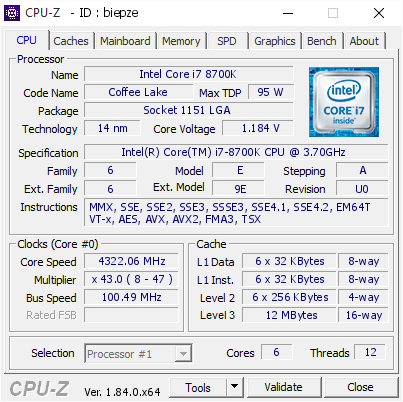
[biepze] Validated Dump by DESKTOP-48EPSL6 (2018-04-10 18:50:25) - MB: Asus ROG MAXIMUS X HERO (WI-FI AC) - RAM: 16384 MB
niceeee
prime jasper
lol got an I7 not sure what kind 16 GB RAM and AMD 380x
so your machine is pretty high end if I look at the specs
we all have low end
its not x299 with quad sli volta
 wet wharf
man 1080ti is high end
prime jasper
titan v exists
wet wharf
Logical Increments, the PC Builder\'s Friend
Building a PC? These are the parts to get.
isoutdated
prime jasper
Yes very
wet wharf
I only saw is outdated after i post it.... sorry! xD
prime jasper
its close enough to modern
 fiery aspen
are there still issues with the titan v?
cause i remember there was a linus tech tips video and they tried out blender and a bunch of other applications and blender crashed
but then again thats different from gaming
prime jasper
Well considering they arent for gaming or rendering, yes. But they are slightly better now since nvidia didnt think anyone was stupid enough to buy a $3000 card for gaming.
fiery aspen
Lul
I wish I could use the ai compute performance to compute my renders in blender
I wonder how gpu based lightmappibg in unity would be with a titan v
Compared to top end amd stuff
Considering it uses Radeon rays
prime jasper
http://www.speedtest.net/result/7451185358 I fucking hate charter

Speedtest.net
Test your Internet connection bandwidth to locations around the world with this interactive broadband speed test from Ookla
400 ping on a local server
and this issue has been on going since the repeal of NN
 turbid verge
First world issues
prime jasper
I have net the third world calls slow
because its about as abundant as what they have
2 days a year its on, the rest its off
prime jasper
so... worse now
 agile rain
@prime jasper Your internet is poop 
prime jasper
i know
charter is screwing me hard
Now Im in the process of trying to get them to say racial slurs on twitter
prime jasper
lol
prime jasper
That's a nice improvement
 lofty light
Very nice improvement
 strong breach
”Tiny bit” 
lofty light
I tried overclocking my 1080, only got around 5% improvement before it started getting too hot and downclocking
prime jasper
my s8+ almost got the black screen of death
it just shut down
with the blue light and nothing worked
WEll its time for an new phone
fiery aspen
How much vram?
prime jasper
I would just leave it on
 latent sentinel
12GB
prime jasper
umm
you have a titan xpp?
vram not dram
vram is video random access memory, its whats on the graphics card
latent sentinel
prime jasper
ahh
so you do have a titan
I always have to assume that they don't since thats a super high end part
yeah it doesnt matter if its on or off, I just leave it on because it's not like it'll use the entire thing and I'm at 11gb vram
north crow
the only thing that helps with cutscene jittering for me is to switch to dx12
which causes other stuttering, but at least I can watch the cutscenes
prime jasper
That might not work on a titan
north crow
no idea, but I'd give it a try, helped on my 1080 ti
prime jasper
dx12 requires the game dev(dice in this case) to code in the card manually
so something like a titan xp is kind of obscure in the consumer market, xpp not so much
my titan v cant do dx12 to save its life
then again those I never got for gaming, but for AI learning
prime jasper
Whats up with bf1 i have performance settings and all that gibberish turned to max
with i7-8700k and gtx 1080ti im barely getting 144fps on 1080p
 fleet gale
Do you have dx 12 turned on ? Do you have vsync turned on ? Latest drivers ? Power plan set to performance ? Post a screenshot of msi afterburner overlay when you are in game
prime jasper
4.7ghz it always shows the normal
fleet gale
Alright
Temps are ok too
This is weird
Do you have any other game installed ?
When I have problems in some games, i fire up Witcher 3 as its the best benchmark imo. If you have 50% gpu usage there as well then its probably a malware that hinders the performance of your gpu. I recommend Malwarebytes and run a full scan
@prime jasper I have to get some shut eye. Let me know if you managed to solve your issue. DM me with the problem and the solution, your case is interesting.
prime jasper
Yea i will try to solve it @fleet gale
fleet gale
-thumb up-
prime jasper
@prime jasper cpuz the specs then link dxdiag to me.
I actually do this stuff for a living, so I should beable to figure out whats going on within a timely manner
 limber salmon
https://cdn.discordapp.com/attachments/66272382980984832/465977024914259978/JPEG_20180709_232600.jpg

slight upgrade on the left side monitor
went from a 720p fat ass Tv to a Benq V2410 Eco
it's pretty old but got it essentially for free
traded in my old cpu cooler and built and setup my step bros pc
prime jasper
only 3 monitors?
prime jasper
only 4?
get back to me when you have 32 4k 144hz monitors
then I'll be impressed
because you just shit wrecked linus
 winged tapir
@iron canyon pls show them how to deal with monitors
 iron canyon
winged tapir
iron canyon
winged tapir
perfect
prime jasper
5 times Discord, how though
iron canyon
Eeeeh... internet
(Chrome)
prime jasper
only 4?
iron canyon

prime jasper
I got 2 and that's fine for me
 woven flame
mood
 quaint topaz
 prime jasper
You're welcome, @quaint topaz 😘
prime jasper
I need a larger desk. 2 pcs and 5 monitors is kinf of a lot
limber salmon
just ordered that audio interface @prime jasper
That's the Scarlett Focusrite am I right?
prime jasper
yes
thats what I have exactly
I bought it in a bundle with an at2035 at a decent discount
this dp cable that came with the monitor is short
I have to move my desk around
prime jasper
Is memtestx86 better than mdsched.exe?
@prime jasper
My windows installation is randomly freezing
Thought it was the motherboard, just replaced it
still freezing
I have brand new RAM, CPU, and a Cooler
no mdsched.exe is basic, memtest86 is indepth
Okay
I need to rule out RAM
is the ram fully plugged in?
yeah
power cabled?
wtf
RAM doesn't need a power cable?
What kind of RAM are you using 0.o
no im talking about all the issues that can be happening
Oh
yeah
Everything is plugged in tight
I had a similar issue happen to me a few days ago, the solution that fixed it was remove the processor, plug it back in, but thermal paste on it then install the cooler
I did that lol
When I got my new mobo
or well, returned it
do it again
then a third time
and a fourth
then use a hammer
...
no but seriously just keep it in mind
Ok. Any other suggestions? Other than the RAM diagnostic
Someone said my GPU could be starting to die
I fucking hope not lol
what card?
EVGA 1060 6GB
i doubt it
remove all overclocks
memtest disk check
just do all the basic stuff
I already did a disk check
The SFC /scannow right?
clean install of windows?
Yeah it's a clean install
windows repair?
Repair doesn't do anything. "There is nothing to repair"
switch the ram chips around?
Yup
Well if there is any RAM issues I'll probably see it on memtest
Also the CPU is brand new. It's an 8700K. So I doubt it's that.
to an extent but yes
is the cpu in the correct direction?
Yeah xD
The freezing is COMPLETELY random mind you
I could be playing Garry's Mod and it'll freeze, or I could simply just be typing something on Discord
I can't reproduce it
otherwise I'd figure out what the issue is pretty fast lol
there is a lot of things can that cause it
Yeah :/
have you tried hitting the pc to replicate it?
yes
serious question
I shook it just now
nothin
Like I said, completely random
then its software
That's what I figured lol
but what software 
My event logs are nearly clean
Well, correction
psu might be going bad
It's a brand new PSU
what mobo?
forgot to mention that
what brand of psu?
ASUS Prime Z370-A, and the PSU is an EVGA Supernova 750 G2
hmm
did you update the bios yet?
Not yet, I will in a second
but uh
There's this in my event logs

Idk if that has something to do with it
woven flame
It seems like a software issue rather than a hardware issue
prime jasper
it could be a ram compatibility issue
woven flame
Try running it off a tails linux boot
prime jasper
The RAM appears to work though which is the odd thing
I can be playing Arma 3, a CPU, GPU, and RAM instensive game
and it won't freeze
but I can just be typing on Discord and boom it'll freeze
woven flame
Did you try running a different OS?
prime jasper
No lol
I really don't think it's a hardware issue
If it is, it has to be the RAM
The only issue I have is finding the software that's doin dis
the compatibility doesnt mean it wont work
it just means its unstable
Home | Patriot
Patriot Memory designs, manufactures, and markets high performance memory modules, flash memory and gaming accessories.
My RAM is a Patriot Viper 4
It's max clock is 3200 MHz with XMP enabled ofc
know them well
remove the xmp
It already is removed
I don't have it enabled
Its running at like 2100 MHz atm
you just said it was
I said its max clock is 3200 MHz w/ XMP
Not that I have XMP enabled
oh
was it doing it with the OC?
Yeah
still without the oc?
For some reason Turbo ain't doing what it's supposed to do.... my CPU frequency is sitting at 4.3 GHz and not fluctuating like it should be and yeah
it only fluxtuates when it needs it
4.3 is more than what most apps need
ah
I wondering if it's the Corsair iCUE 🤔
Now that I think of it, my computer hasn't frozen since that program has not been running
disable it
Other people have reported it lagging their PC
also update your bios
icue is trash
but I use that software to keep track of my temps, and it allows me to adjust my Pump/Fan RPM
that is true
well
umm
try it without?
Oke
btw @prime jasper are all of my processors cores supposed to be synced on a frequency?
or are they supposed to be independent 0.0
woven flame
They're independent
 woven flame
That shouldn't be happening then
prime jasper
I know 0.0
Hang on lemme update bios and go see if I can fix it
auto tends to do that in hw monitor
prime jasper
updating bios didn't do it
woven flame
@prime jasper Try installing Tails on a USB drive and then booting off that
See if it still freezes
prime jasper
if its happening at random then that wouldnt prove anything
it could create a ton of false positives
LOL
so uhhh
My D drive, which houses most of my programs, is 95% fragmented
That would be the issue LOL
wow
fleet gale
Anyone else playing with G-sync here ?
prime jasper
@prime jasper How though? Defragmentation of stations is enabled by default in Windows 10
Not sure lol
woven flame
@fleet gale I have GSync
prime jasper
@fleet gale I have a few monitors with it, I tend to not have it on though.
 rich ivy
hows the g503 wire?
rich ivy
well google shows the g503 wire as braided so it should be similar to g403
prime jasper
its not
 prime jasper
its thicker and heavier for one
rich ivy
on the g503?
prime jasper
yes
rich ivy
well did it ever cause any drag issues?
prime jasper
braided cables also catch on things easier
Yes all the time
which is why i went g903
rich ivy
yeah, the last braided cable mouse i had was the G5 years ago lol
prime jasper
the g402 also catches on things
rich ivy
i had to "shape it right" to make it not fall behind my desk since i didn't had any bungees
prime jasper
I made a bungee which helped a fairly small amount
prime jasper
with and without
do the drag issues are like bad bad
but because I am super sensitive to that stuff, it bugged me
rich ivy
I see
prime jasper
I get off work after 20 hours of tech support
rich ivy
well that's what they have in stock in my shops, the g403 wired
prime jasper
everything pisses me off
rich ivy
they stopped stocking on g403 wireless for some reason
and act like g603 is its successor
prime jasper
g603 is good
rich ivy
isn't it AA batteries only and doesn't have the cable recharge mechanic?
rich ivy

Logitech G603 wireless gaming mouse with ergonomic design, advanced HERO optical sensor, multi-device support, and LIGHTSPEED wireless technology with 1 ms report rate.
here
it does
prime jasper
actually I might be thinking of the g703
rich ivy
yeah
prime jasper
right after I said it I remembered the g703
rich ivy
anyways its a downgrade from g403 so they just sell that and act like its an upgrade because the number is bigger and stopped supplying g403 wireless T_T
and of course they also sell the g703 for $100
with that lightspeed mechanic which I wont use since i don't have that $100 mouse pad
rich ivy
the g903 shape isn't for my hands
rich ivy
i bet it is, but dropping $200 on a mouse hurts the wallet heh
prime jasper
$115 but will drop
rich ivy
it doesn't look like a shape I'd like? not sure how to explain it
buttons on both sides right?
i rest my hand on the right side of the mouse all the time and it would bother me
prime jasper
no its ambidextrious
rich ivy
my grip is claw mixed with palm too
prime jasper
the buttons can be put on there if you want
rich ivy
oh sweet
prime jasper
rich ivy
if it came bundled with a recharging pad for $150 deal i'd get it but it's a bit pricy atm for the budget lol
looks nice
rich ivy
which one do you use as your main?
prime jasper
g903
I work long shifts and come home to game
than get pissy at the cable
saves me money to just buy this and never care
rich ivy
yeah lots of praise for logitech's wireless tech
prime jasper
honestly Idont notice much of a difference in latency
and I notice the difference between 144 and 240 fps
which most wont notice
prime jasper
So I've been running memtest86
And its about to pass its 3rd time
And the CPU passed diagnostics
So its software related but which freaking software
prime jasper
iCUE is the software.
 olive hazel
Anyone ever have their USB 3.0 slot stop working? Mine just died and idk what the problem is. My rear 3.0 slots work but not the front.
prime jasper
Check your case connector cable. Mine is a fat blue one that plugs into the movo
Mobo
It might've unplugged itself
prime jasper
Does double NAT make the game more laggy?
I have to use the ISP Modem + router combo to access the internet and I can't enable bridge mode
lofty light
I've got that combo too @prime jasper, I came from the G402 which had multiple months of battery life so I don't feel I'm missing much other than the extra thumb buttons
prime jasper
@prime jasper Submit a bug report to corsair.
@prime jasper Technically no, you lose out on buffer device which does though. A lot of thing can cause a laggy network.
@lofty light its amazing isnt it?
lofty light
It's real nice, had some troubles with the fabric mouse mat however...
prime jasper
I use the hard one that it comes with
lofty light
Yeah, that's why mine stopped working I think 😛
prime jasper
Looks like I'm going to have to ask the ISP to send a modem so I could fix double Nat
I think youre using double nat wrong
double nat is when you hide a modem behind another modem on your network
to create a second network
a router+modem wont create a double nat
I'm using Google WiFi to connect my laptop to the internet because it's too far away from the router
why not get an extender?
they arent that expensive
lol I should have went with that
I think I have an old one somewhere in the garage
go with a mesh web
The Google WiFi devices are in mesh mode
I know, but you dont have a router that supports it
google fiber doesnt even give you one that supports it
Ah I see
I think I will just buy a long ass ethernet cable to play games lol
that wont help
Even if it's directly from the router to the laptop?
signal degradation
happens with long ethernet cables
if its far enough that youre having signal problems. the ethernet cable will probably be too long
Your most optimal is to make an AI mesh network
or
do what I did
if you have a coax cable connecting to it, use an m2m adapter and extend it that way
 silk echo
any thoughts on the 29UM69G-B?
prime jasper
let me check my database
I dont deal with ultrawides personally because I hate them
so
bunch of issues
it says 75hz but you most likely wont get that
panel has a "high failure" rate
aka normal bs for IPS panels
I wont put my opinion in there because as I said, its bias
I can just give the data I have
prime jasper
ips panels have weird issues with backlight bleed, dead pixels
etc
The panel is not good for FPS games like BF, because its response times are shite
prime jasper
its more about lg panels having just bad lottery issues
silk echo
But does it like mean Dead pixels n stuff like that?
agile rain
I might get this soon. I think I have someone lined up who will pay 130 for my 960
Think of all the frames in BFV ❤
prime jasper
@agile rain I'd recommend you hold out for a 1070 or 1070ti if you can, because they would smash BFV even at 1440p, and 1440p is really nice.
I have a 1080 and play everything at 1440p and it's the best. 4k's nice too, but not practical in terms of framerate with current hardware.
wet wharf
guys and grils
should I wait 1 more month for grafics cards drop?
or there is no use
what do you think?
I was trying to wait for 11 séries (to get a 10 xD)
prime jasper
@wet wharf Everything I've seen recently would lead me to believe that the 11 series chips are still a while away. 10 series cards have been going for decent prices more often recently so just jump on a good deal if you find one.
wet wharf
yeah, I have been checking the prices for the last 2/3 months.. and it got down more than 50€
also RAM got cheaper
xD
I will probably buy the game
** PC
prime jasper
Yeah just go for it. I upgraded my 1060 to a 1080 a couple months ago and I'm extremely happy with it.
wet wharf
I will go from a 960 tp 1080 xD
960 isnt bad... but is starting not to handle very well the recent games
also my processor is "old" i5 4500
lofty light
@silk echo I had an LG Ultrawide IPS monitor and it was alright for BF, not the best obviously and you've got to luck out with the panel as phthinein said, but I loved it
Went to the Acer Predator X34P now to replace it so I'm in for a pound now
lofty light
Depends, mainly on how whiny you want to be 😛 I've had plenty of stories of people complaining and getting a replacement monitors multiple times over from Amazon, but it depends on the retailer
silk echo
So i shouldnt go for it?
lofty light
I really like ultrawide, I can't go back now
silk echo
I shouldnt go for the IPS monitor then?
lofty light
If it's cheap, I'd go for it as I love the colours
silk echo
Yeah but if it will fail 24/7 then whats the point
lofty light
It won't?
lofty light
The fact of the matter it, it'll work but there's a reasonable chance there will be a fair amount of blacklight bleed in the corners. Funnily enough my LG panel was the best one I've ever seen, let alone had for bleed, but as long as you're not viewing a lot of dark scenes it won't be a big issue at all.
silk echo
I dont mind backlight bleeding at all
I have a 10 year old monitor so im hella used to it
lofty light
Fair enough 😛
silk echo
So i guess ill go for it
lofty light
Give it a try, I definitely enjoyed mine
silk echo
Im not going to "give it a try" i dont have the money to buy a new monitor if this one fails
if im buying it its going to stay here for min 5 years
lofty light
So long as you have a warranty and you don't care overly about the reaction time difference between it and TN then it'll do you well
prime jasper
Warrenty doesn't cover dead pixels
Just keep that in mind
Or we'll when it's only a few
 sour ivy
@agile rain dont get a single fan card
silk echo
So that monitor is a no go by your books? @prime jasper @lofty light
prime jasper
Its honestly up to you
Monitors are major risks when you buy them without trying them, much line chairs
I'd suggest seeing if any local stores have them
toy around with them
I dont like ultrawides because I find it hard to see everything on the screen, plus most competitive games don't actually give you that extra fov, it just stretches. CSGO how ever just puts ugly black bars to block off the rest of the screen
 tardy basin
I use a pg348q
and only game I play that stretches is Overwatch
you'll probably see that with most FPS games
but most games these days other than FPS games support 21:9 / higher res
have very minimal bleed
and 80hz, couldnt get mine to 100
prime jasper
I use a 21:9 and its fine in comps, it's when you get past 2560x1440p
tardy basin
pg348q is 3440x1440
prime jasper
like 2560x1080 you'll see issues and stretching
tardy basin
again, only seen the stretching with fps
and youd notice right away if its stretching
tardy basin
just google for the games you play if they support 3440x1440 native
but @silk echo id wait til sept/nov if youre planning on getting an ultrawide now
they are starting to pus hfor the next update to these things i.e. higher refresh rates and resolutions
most of these 34-35 inch ultrawides have already dropped 100-200 bucks in price in the past 2-3 months
theyll drop a bit more by then as well making way for the new ones
prime jasper
@tardy basin http://www.wsgf.org/mgl/uws this list
battlefield supports it because it's not a competitive game
hence forth
silk echo
So i will prob hold myself till black friday
prime jasper
smart Idea
tardy basin
be careful with black friday
they do the same shit with monitors as they do with tvs on black friday
silk echo
Define "same shit"
prime jasper
depends on the retailer, some sell open boxes as new
tardy basin
like they make models specifically for black friday
silk echo
huh
prime jasper
Umm
silk echo
I doubt Israel does that as we dont give a shit about black friday
tardy basin
55 inches
on black friday you look up deals on that tv
and hey $300 off
its being sold as the same model
but its actually a shittier version of that tv
prime jasper
Black friday is for stock clearing
tardy basin
used to be
silk echo
Pretty much
prime jasper
Still is
I deal closely in the tech industry with retailers
Some retailers will "misship" a product
samsung is just a shady company in general so dont use them as an example
silk echo
I doubt Israel retailers will do that tho
tardy basin
you're not the only person that deals closely in the tech industry with retailers =p
im surprised you guys aren't aware of this in regards to TVs on black friday
from an nbc article, one of many examples you can find on tons of reports about blac kfriday deals
silk echo
Never knew that
tardy basin
These limited edition models are called “derivative” products. Sometimes the manufacturer simply gives an existing product a new model number. In other cases, they make changes to the current model in order to hit a lower price point. For example, a TV could have one less HDMI input or use lower quality parts.
tardy basin
"one of many examples you can find on tons of reports about black friday deals"
prime jasper
They have a tendency to produce news just for views.
prime jasper
The making a new model number isnt a new thing
prime jasper
that happens not just for black friday
tardy basin
yeah me neither
prime jasper
Out of the 500 TVs I've gotten on black friday, yes I literally mean 500
silk echo
So i should be very carful in black market? got it
prime jasper
Ive never gotten one that was bad
tardy basin
yeah kartov
prime jasper
or the wrong product
tardy basin
you should be careful with black friday
silk echo
Thanks friends
silk echo
Any thoughts about the monitor i said im going to pick up tho?
tardy basin
you're like taking the extremes from everything I'm saying to meet your own argument
what was it the X34 predator?
pg348q / x34 are like the most popular for gsync / freesync, never seen anyone complain much about them
silk echo
No, the 34UM69G
tardy basin
I avoid LG monitors
because I'm pretty sure htey have paid trolls on all UW communities
but they could be good =p
silk echo
it doesnt even make you a breakfast smh
prime jasper
yeah, I guess I should buy a girlfriend since you can also get them in ultrawide
prime jasper
Does anyone know if they have displayport 1.4 installed?
Kartov is broke
thats $270 more
silk echo
^^^^
silk echo
I couldnt care less for 144hz
tardy basin
theyll be even closer.
silk echo
my CPU is half dead
prime jasper
I can get the 34UM69G for $300 if I shop around
tardy basin
I can get the one I linked for $500 if I shop around
prime jasper
or free if I get one from walmart
silk echo
Well the taxes in Israel are fucking over the roof
so i doubt ill find one in under 300
the min is 350
prime jasper
I can get a 34uc79g-b for $440 actually
tardy basin
does EA ever comment in this channel
tardy basin
know if theres any devs in the ea/dice list
prime jasper
they dont post here
Dont ask those questions
just pretend those people arent there
seriously
silk echo
bit rough there mate
silk echo
@strong breach fite me
prime jasper
I'm not
strong breach

silk echo
hess is my baby
tardy basin
server rule is dont ping them if they dont talk in here
server rule is not a rant about how they dont exist
silk echo
hess ban me
tardy basin
relax dude
prime jasper
I am relaxed, I'm just telling you what the mods will also tell you
This is also not tech related
tardy basin
anyone rocking skylake-X that plays any game that runs on Frostbite 3 which I think is BFV and BF1
prime jasper
devs of a game=people not tech
tardy basin
every monitor can have dead pixel problems
prime jasper
that would be stupid
tardy basin
thats why you buy new
ok phtinein
I think im done here
I appreciate your total confidence in your knowledge of 'tech'
but you're seriously ridiculous
worst iamverysmart vibe ever
silk echo
Yeah but phtinein said that the old monitor i was looking at had high failure rates
prime jasper
Seriously, there are only a very small amount of Skylake-x chips for gaming
most should not be gaming as they OC very poorly
tardy basin
they don't OC poorly
prime jasper
Skylake X had no reason to exist.
tardy basin
They require better cooling
skylake X has a big reason to exist
consumers just don't know about it
prime jasper
lol explain
And if I want to get my 16 core to 5.0 I need LN2, I have it at 3.8 on custom loop
and its still gets toasty
the kaby lake-x had no reason to exist
skylake does
tardy basin
high speed high core count cpus are needed in certain markets
and 16core to 5.0 yeah you need ln2
youre being nonsensical
its a bad overclocker because you cant hit 5.0
tardy basin
uh a CPU being a bad overclocker has to do with how much you cna overclock it from it's turbo speed
silk echo
can you cough cough please answer meh question
tardy basin
16core is just a worse binned 18core though so you're right about itn ot being a good cpu though
silk echo
the 34UM69G-B , it doesnt have any dead pixels problems?
prime jasper
the ones on x99 and x299 marketed towards gamers are either A) Worse 8700ks B)A more expensive 7700k or C)minor improvment that doesn't justify the massive price increase
silk echo
well every monitor has that, but you get me
prime jasper
One example is the 7800x which is just a more expensive and inferior 8700k for gaming
with which processor?
I was saying before LG panels had a high rate of dead pixel issues
just in general
not that monitor specifically
As I was saying, it's entirely up to you, on if it fits your needs. there are better ones that I would say go for, but they are also substantially more expensive.
tardy basin
Kartov,
looking at LG dead pixel policy
their max # dead pixel allowed b4 warranty is double that of ASUS
so you would likely see more complaints about dead pixels on LGs and I would also guess LG expecting higher amounts of dead pixels with their panels
unless they are just too lazy to deal with unhappy customers / warranties
but its probably because their panels are actually lower quality
but also explains LG's lwoer prices
tardy basin
the problem is if you get dead pixels on your LG
you're pr much DOA because youd have to be Really unlucky to have 12+ dead pixels
but ASUS / Acer / whoever else its like 4-5 pixels for their warranties
prime jasper
I have a dead pixel on my XF270HU, it's annoying but you dont really notice it
can you spot it?
tardy basin
bottom left?
prime jasper
nope
tardy basin
then no
prime jasper
marked it
a single dead pixel as I said, is annoying
but it just tends to blend in with everything
and after time its not noticable
on a 1440p monitor
 prime jasper
Want me to post pictures of you?

 golden raft
what headphones do you lot use to game on?
golden raft
Currently i use 2.1 speakers and im wondering if its worth buying a pair of headphones for the pc to game on
 quartz canopy
I think so, yeah
especially the Astro A40 TRs with Mixamp
Or go wireless and get the A50s
golden raft
Alright i'll check them out, ty for the info =]
quartz canopy
You're welcome 
I prefer the A40s with Mixamp though, since you can customize the sound however you want
lofty light
Definitely worth the headphones, if you get surround ones you can hear the direction enemies are
prime jasper
@golden raft if you're on PC get an actual pair of headphones, not gamer ones. Open back preferred and a DAC. Its way more expensive but the quality matches the price
I have a lower end set up, AKG240+Scarlett Solo
quartz canopy
Astros are cheaper, and just as good
prime jasper
I have astros
they arent
I have A40s in the basement in the game room
I have a sennheiser hd700 in my music room, but I hate using them because they are $500 and I'm incredibly clumsy
sour ivy
lul
prime jasper
Im using superlux hd330 best for the price
So, questionn to anyone who's good about computer parts and selling junk.
How much would you price a computer with an i7 2600, a gtx 970, a 265 gb SSD, a 2TB HDD, 1600x900 monitor and 8gb ram at?
prime jasper
@prime jasper Put starting price of 400$ and the min price i would let it for would be around 300$
the monitor is prolly worth around 10$ or something
just my assumption what the price is around
prime jasper
@prime jasper I actually own a shop. tell me the brands of the ssd, the HDD, the ram(also its speed), and the motherboard. Also the case. The 970 might be better off selling on its own
I'd also need to know the brand of the 970 and the model
 ocean valve
My CPU is always at 100% Usage in-game but I have 0 lag, stutter or decreased performance (on highest settings) Should I start looking for a new CPU or as long as it works, don't touch anything ?
prime jasper
Astros are more the rotten steamed spinach of gaming.
They are to good as water is to dry.
prime jasper
What headsets do yall have
 prime jasper
feels bad man
i got the corsair void pro for like 30 bucks
brand new
ooof the new macbook pro is 6.7k with all upgrades
i9 and 4tb ssd
32gb ram
lofty light
I've got the G903
 limpid reef
prime jasper
limpid reef
prime jasper
Oh damn, They worht the 100 euro pricetag?
prime jasper
I'm using a Logitech G430 🤷
prime jasper
Phillips SHP9500s here
 pastel sequoia
anyone else getting the save local data issue?
a lot of people in my group have recently been getting this same issue
 misty ridge
I just go for the local data and disable the cloud thing from origin settings
quartz canopy
@pastel sequoia I've been getting that too
strong breach
same
i always just click local
or cloud
doesn't matter it really doesn't go away
quartz canopy
Someone mentioned Clearing Cache worked for them, but I tried it and it still happens
Happens after closing a few different games
 quiet swift
need to do some achievements, anyone up for that?
 edgy socket
Hello everyone,
I always get a black screen when i run battlefield 1,and after get a return to desktop (the game is still running.)
prime jasper
@edgy socket Already tried to install older/newer drivers?
And since when is the problem occurring?
edgy socket
Since i installed the game on Windows 10
prime jasper
Already tried to install older/newer drivers?
prime jasper
So it's occurring since using Windows 10? You did an upgrade?
edgy socket
Nope.
prime jasper
Must be 1803 right?
edgy socket
This computer was always on Windows 10
edgy socket
I tried and never found a viable solution
One time i just spammed with left click on the black screen and it worked
prime jasper
You can try to borrow another card from someone else and check if the problems still persists
edgy socket
I see
 cold swan
New build
AMD Ryzen 7 2700X
Gigabyte GTX 1080 WINDFORCE OC 8G 8192 Mt
ROG CROSSHAIR VII HERO AM4 ATX
CORSAIR VENGEANCE DDR4 16 GB 3000Mhz
prime jasper
Congrats
 prime jasper
PFFFFFFFFFFFFFFTTTTTTTTTT GET ON MY LEVEL BRO I HAVE A NASA COMPUTER
prime jasper
stock cooler on cpu, but case is not equally cheap... hmmm
budget was not wisely spent'
good choice on ryzen, hopefully you didn't get ripped off on the gpu now that prices are crashing
 flint locust
Stock cooler is easy to change down the road, a case not so much
agile rain
The best coolers are intel stock coolers
prime jasper
ryzen stock coolers are actually decent
the only problem with them is that they are for ryzen
and the only problem with ryzen is that it's trash
agile rain
@turbid verge This is tech channel 
turbid verge

 split hazel
Cooler Master MLW-D12M-A20PC-R1 RGB AIO CPU Liquid Cooler: Amazon.in: Computers & Accessories
It's currently on discount and cheaper than the Corsair h60 2018 and I'm considering to buy it
Guys need a quick reply if possible
strong breach
I really dont know
I have aircooled self sooo
Havent investigated any watercooled ones
split hazel
Thanks for the reply tho, I've made up my mind to buy it
strong breach
👌 hope it'll be worth it
split hazel
The reviews are good, so I think it will be great
silk echo
Prime day over on Amazon, if you dont live in places where fees double or triple the price you should really look into that!
prime jasper

The Vivo Nex S is about to be opened up from the inside. Its time to see how that hidden camera smartphone from Vivo work, and expose the insides for all to ...
prime jasper
@silk echo find anything? I mostly just see prime disappointment
silk echo
I couldnt be bothered to order anything from Amazon as the fees double the price
But i am going to pick up the 34UM69G
 stark escarp
Hello, i have a question, and i hope someone can help me
My motherboard is a MSI Z270 PC MATE, and i want to buy 2 Corsair ML120 for my new case https://cdn.discordapp.com/attachments/381075646354292736/468479046217629697/unknown.png
 silk echo
Love your TABG pic 
prime jasper
4 pin is a standard for pwm fans, they also work with 3 pin fans.
prime jasper
is anyone else here having problems with bf1 running shitty
quartz canopy
Define running shitty
Can't suggest anything when you don't specify what the issue is 
prime jasper
So I learned today that BF doesnt like IPS panels because they make enemies blend in because of how good their color is
while TN panels wash out the walls to the point where enemies are incredibly dark next to them because they are moving
prime jasper
@astral merlin
 astral merlin
yeesh
prime jasper
@quartz canopy got it fixed with the help of phthinein
quartz canopy
Awesome, glad to hear 👌
prime jasper
Im really glad too
quartz canopy
 odd goblet
For no reason, didn't install or uninstall anything, didn't touch any settings or anything but my PC has been going much slower than usual and I have no idea why.
lofty light
@prime jasper I'd still prefer the looks of the panel than the ability to play tbh


 turbid verge
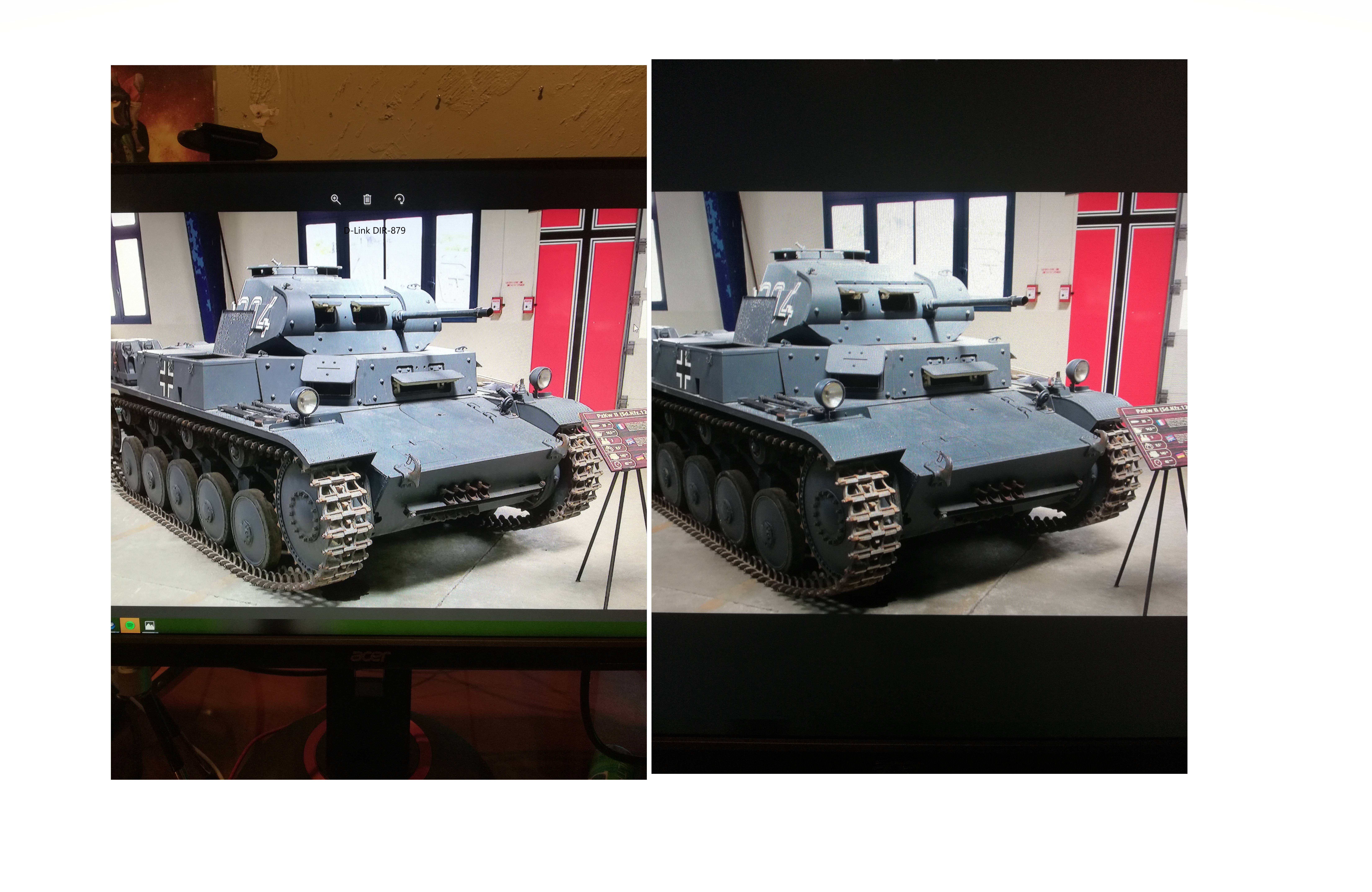
IPS basically has more alive colours compared to TN
Its good for maybe to work with image and stuff and video stuff I guess
lofty light
And it just makes me feel great looking at it
prime jasper
asked which was better for post scriptum on the discord, got called a troll because they knew nothing about tech >.>
I'm going to be sticking to the 240 hertz monitor for Bf1 anyways because shaving a few MS does help
lofty light
It's not good for gaming, but I always look at it that I should just play better to make up
turbid verge
Tbh its bit of choice imo
prime jasper
it also has one of the lowest input lag and response times on the market
turbid verge
But ips and 144hz isnt cheap or easy to find
prime jasper
ips is lovely for games
@turbid verge http://www.microcenter.com/product/478859/XF270HU_27_WQHD_144Hz_DVI_HDMI_DP_FreeSync_Gaming_LED_Monitor

Micro Center
$400 IPS 1440p 144hz
i switched from ips to tn for 144hz and the first thing i noticed was that the wallpaper didnt show as much as detail as ips did
While technically not cheap, that is cheap for what that is
turbid verge
I used to use my 1440p 60hz ips monitor then made that one my secondary. Now my main is a TN 1440p 165hz gsync
But from ips to tn is a bit downlgrade but I got used to it
400$ aounds avout right but still bought mine with a prime discount for like 360€ thats almost the same peice in dollars if Iam not mistaken
prime jasper
something like that
but that sounds like a sale
just like this xf250q I bought that was for dirt cheap
I got it for 1080p 144hz price
turbid verge
I mean finding a monitor 144hz and gsync and 1440p for that price is not everyday
At here in EU
turbid verge
Oh it is
prime jasper
ok yeah thats a tn panel and goes on sale for around $400 a lot
turbid verge
Idk about US but in here checked around on other amazons and sites rarely found any or something similar to it on sale or with the same specs
Thats why I went for it
Still worth it. Actually enjoy it as my main screen 
prime jasper
is yours a 24 or 27?
turbid verge
- For two reassons, first because Iam used to 24 inch and other is because it was a good deal
prime jasper
yeah
in the US we get https://www.dell.com/en-us/shop/dell-27-gaming-monitor-s2716dg/apd/210-agjr/monitors-monitor-accessories

Dell
Immerse yourself in stunning edge-to-edge gameplay with the Dell 27 Monitor’s crisp QHD resolution and blur-reducing rapid refresh rate.
this for $400 a lot
which is just the 27" version of the 24"
prime jasper
its the only gsync 1440p monitor I know that goes that cheap
turbid verge
Same
prime jasper
I opted out of gsync if you cant tell
turbid verge
I can see the difference a bit but sometimes I dont ever notice or most of them
prime jasper
Well Im also using halo tier gaming stuff
so gsync is just kind of a waste
when without gsync its cheaper and exactly the same as the gsync version
turbid verge
Yeh
prime jasper
that being said I'm waiting for gsync 2 to release before I buy a 4k 144hz panel
gsync 2 supports HDR
 manic vine
@turbid verge there was a acer predator 1440p 144hz /160hz OC g-sync monitor in the prime deals yesterday for £329
Can't remember if it was the 24 or 27 inch version
lofty light
The Acer Predator X35 is eventually going to be released, and I'll be VERY excited for that day
prime jasper
So, High refreshrate Low res monitor, Or Low refresh and high res?
Or both 144hz and 4k
i just need a screen with excellent color accuracy and res
 rotund pendant
1440p 144Hz IPS perfect
prime jasper
@prime jasper youd want a 1440k 144hz with a ips panel, but after the month long testing I've been doing, competitive fps games don't like ips panels since the blacker blacks and more accurate colors cause enemies to disappear into the map a lot.
So the TN panel is still top dog if you're trying to be competitive.https://imgur.com/s2lOIRD TN vs IPS
manic vine
agree completely, an IPS looks better and even though they still have the 1ms response time I would still pick a TN panel for gaming, the greyness/faded colours helps players stand out more. Particularly those in darker areas
prime jasper
yeah its weird how a better panel is worse for games like bf
agile rain
This is the better deal though at $300
prime jasper
there are also 8gb rx580s running around for less than $300
I see them pop up for like 220-250
agile rain
yes but the 1060 is more powerful even with less vRAM
Plus I really like Nvidia's fast sync option which throws out any frames that exceed the refresh rate but without input lag from vsync
prime jasper
not that much more powerful
agile rain
Unfortunately Nvidia cards come with more features such as gameworks stuff. I dont like Nvidia for their practices but their cards are A1
prime jasper
true
but the goal here is to save money since you need to pay for those meds you need
agile rain
I want new
prime jasper
picky arent you
agile rain
Kinda. I mean I got my 960 used but from a irl friend
 chilly lichen
Guys this might be a nooby question but can I split my USB microphone (just the mic, not a headset) between my PS4 and PC?