#Death Stranding 2
1 messages · Page 4 of 1
 wet rivet
 spare socket
1k
 velvet trench
M has issues with motion blur in this game I noticed
spare socket
velvet trench
M has issues with motion blur in this game I noticed
is it something that's like
you know it's there
but can't quite pinpoint
Idk M just looks a bit unstable and I can't quite put my finger on what it is
Haven't noticed any issues with Motion blur tho
what's crazy to me is how similar K looks to E in general
it feels like L/M are the real upgrades
J/K are closer to E than L/M
 wet rivet
transformer gen 2 with RR hopefully will have big improvements to boiling
spare socket
Hopefuly they're actually working on it and not just on instagram filters
velvet trench
spare socket
but can't quite pinpoint
No it's super noticeable when it happens. I think it also depends on your upscaling factor and fps. It is way less noticeable when using frame gen, maybe because fps is higher and motion blur becomes less intense
 spare socket
velvet trench
No it's super noticeable when it happens. I think it also depends on your upscal...
spare socket
velvet trench
No it's super noticeable when it happens. I think it also depends on your upscal...
oh what the fuck
I haven't noticed that
velvet trench
Also depends on the scene and background color I think
spare socket
and this is worse with frame gen off?
velvet trench
Yes, but it might just be because fps is lower, and therefore the motion blur is more intense

Testing the Nvidia GeForce RTX 5090 GPU in Grand Theft Auto V Enhanced with the new DLSS 4.5 (preset M and L) at 4K, 8K, 720p and 360p resolutions!
⏱ Timestamps ⏱
Intro, Specs, Stuff - 0:00
4K Max / DLAA (DLSS 4.0) - 0:25
4K Max / DLAA (DLSS 4.0) / FG 4x - 4:26
Preset M:
4K Max / DLAA (DLSS 4.5) - 5:47
4K Max / DLAA (DLSS 4.5) / FG 4x - 8...
I think it might be the same issue here?
At 8:03
spare socket
Ya i see it, hmm
velvet trench
But I've only noticed it in GTA and now this game


 spare socket
so many highlights are like 5x the brightness lol
I can't believe how downplayed the new presets are by tech youtubers
 fluid glade
yea I immediately noticed how much better particles and highlights looked on preset M/L when trying out for the first time
I could never play with K again haha
spare socket
velvet trench
No it's super noticeable when it happens. I think it also depends on your upscal...
what setting do you have set for motion blur
velvet trench
spare socket
what setting do you have set for motion blur
I was using the default 5 I think. I believe it became less noticeable at lower settings
It was more obvious at DLAA
spare socket
velvet trench
I was using the default 5 I think. I believe it became less noticeable at lower ...
I'm not actually seeing it
velvet trench
spare socket
I'm not actually seeing it
Try the very start of the game without frame gen
spare socket
ya not using frame gen at all
the ui artifacts are hella ugly
and cutscenes stutter when locked to 120
fluid glade
spare socket
and cutscenes stutter when locked to 120
actually if you used fixed refresh so you actually get 120fps instead of 116 the stutters don't happen
spare socket
fixed refresh tho
spare socket
if you drop under vsync stutters go hard
fluid glade
sure you just gotta make sure you have enough power
spare socket
velvet trench
Try the very start of the game without frame gen
yep
it's there with M
preset L it is
spare socket
fluid glade
sure you just gotta make sure you have enough power
I'm just using DLSS quality no rt locked to 80
fluid glade
spare socket
I'm just using DLSS quality no rt locked to 80
I mean yea that works
fluid glade
just saying if you can hold 120fps you can still use FG just make it fixed refresh rate
velvet trench
Seems more noticeable against light greyish or sandy backgrounds
spare socket
and the image is more stable with RT turned off altogether
fluid glade
for some reason the cutscenes judder when base framerate is under 60 it seems
fluid glade
yea seems like it
I hope lyall or someone else can fix that
then you could probably use Gsync with FG on a 120hz display
but I haven't seen a lot of people talk about that so I don't know if it's not a known issue yet
 warm osprey
wet rivet
can't wait for RR L/M
warm osprey
wet rivet
can't wait for RR L/M
there probably won't be
DLSS SR 4.5 L/M relies on the same technical stuff as RR 4.0
4.0 RR is already a heavier model than even SR preset L
Nvidia can't combine the improvements and get a reasonable performance
fluid glade
warm osprey
4.0 RR is already a heavier model than even SR preset L
not an issue on 5000 series cards I think
warm osprey
they will have to make something completely new
warm osprey
fluid glade
not an issue on 5000 series cards I think
no, it is an issue even on 5000 series
fluid glade
running preset L is way heavier than RR in cyberpunk for example
i have almost no performance hit when using preset L or M compared to K for example
warm osprey
it depends on many factors in actual gameplay
but the model itself still is
it's unrelated to actual hardware or games
fluid glade
in theory but the 5000 series has way less of a performance hit compared to older GPUs
so it's basically a non issue
warm osprey
fluid glade
in theory but the 5000 series has way less of a performance hit compared to olde...
4000 series too, so what?
spare socket
warm osprey
4.0 RR is already a heavier model than even SR preset L
they are not comparable
RR is very different from standard DLSS
fluid glade
I'm saying that on those GPUs there is definitely room for RR preset L/M
warm osprey
spare socket
they are not comparable
they are, in fact, really comparable, from AI technical POV
warm osprey
both are trained Transformer models that execute on the same kind of hardware
they do different things, but are the same in terms of type of workload on your GPU
it is just not feasible to combine improvements of DLSS 4.5 and RR 4.0 for technical reasons at this point
it's not an accident that Nvidia didn't do that
or not a matter of different priorities
and they already showed that they are gone working on completely different stuff for DLSS 5.0
fluid glade
I still don't see a good reason not to have DLSS 4.5 for RR?
warm osprey
fluid glade
I still don't see a good reason not to have DLSS 4.5 for RR?
technical limitations
fluid glade
what technical limitations
warm osprey
it's not an easy thing to explain briefly
I'm not ready to provide a two page essay here rn, sorry (I just woke up kek), but you can easily find this information
just don't hope and wait for nothing, the likelihood of RR 4.0 ever working with DLSS 4.5 (in a form of RR 4.5 or in any other way) is practically 0, Nvidia will have to come up with something completely new to achieve similar results
wet rivet
spare socket
From what i noticed RT AO seems to crush corners more as well
RTAO looks fucked on foliage
weird boiling
turned it off
spare socket
RTAO is actually really slow to accumulate
Off/On/On after a few sec


 spare socket
wet rivet
RTAO looks fucked on foliage
spare socket
wet rivet
RTAO looks fucked on foliage
ya it's not good
There's boiling in general in the game, but RTAO makes it even worse
in interiors as well

 warm osprey
RTAO is unusable, I disabled it too
 cold cargo
Shi is so fine


 cold cargo
warm osprey
RTAO is unusable, I disabled it too
cold cargo
warm osprey
RTAO is unusable, I disabled it too
True its so bad
warm osprey
and tbh I consider disabling RT reflections simply because they clearly tried to make reflections not noticeable in most cases
there are too little actually reflective surfaces, unlike DS1
everything is rougher, more worn down, less flat
the weirdest part of DS2 for me is that like half of the Orders for Sam aren't about delivering anything anymore
feels really weird to press "Deliver" and then Confirm an empty list

 tight stratus
The biggest hope about this is that the developers will fix it? 😕
spare socket
tight stratus
The biggest hope about this is that the developers will fix it? 😕
there should be a new frame gen model end of this month
that supposedly helps with ui elements
 short charm
I thought it was only a new adaptative FG
 reef copper
Is the default DLSS preset K? I've read somewhere that it is 4.5 by default, altough I'm not sure whether that was true
wet rivet
people on nexus don't like that the mod isn't deep fried
gonna add a deep fried preset
normally we call it hdr look but I need them to feel my disdain
wet rivet
have to appease the cattle
fluid glade
💀
 wet rivet
they think psycho isn't working because they can't see the very obvious clipping
fluid glade
I also don't understand that there literally are slider
sliders
just use them
my god
wet rivet
anyway this is the deep fried preset
              {"ColorGradeShadows", 75.f},
              {"ColorGradeAdaptationContrast", 60.f},
              {"ColorGradeSaturation", 55.f},
defaults / deep fried


looks fine here but i imagine interiors might get cooked
fluid glade
lmao
wet rivet
what even is this

 fringe harness
lmao
 ancient musk
profound questions from BIGDICKBULL over here
fringe harness
big dick question for sure
 shadow wave
anyway, after backreading. I tried preset L on quallity. It lookds better compared to preset k. Expensive though
 wispy crescent
Moooooosa gets the best users
tight stratus
wet rivet
normally we call it hdr look but I need them to feel my disdain
But Reno itself has a more "HDR look" than the native in this game 🤨 lol, they need more
It also depends on the screen people use, of course
wet rivet
tight stratus
But Reno itself has a more "HDR look" than the native in this game 🤨 lol, they ...
they're probably lowering the luminosity slider
doing that cranks up the contrast and saturation
spare socket
reef copper
Is the default DLSS preset K? I've read somewhere that it is 4.5 by default, alt...
seems to be doing the nvidia recommended thing, M for performance, K for everything above
Imo L/M looks the best here
fluid glade
wet rivet
doing that cranks up the contrast and saturation
that looked kinda bad though when I tried it
I mean 1 step down or so was okay<
wet rivet
luminosity at 6 and brightness at 5 looked good to me. Fairly similar to sdr at 100 nits
i would be fine playing through the game unmodded like that
just with liliums shaders
reef copper
spare socket
seems to be doing the nvidia recommended thing, M for performance, K for everyth...
Thanks
reef copper
 rose valley
why are they even looking for a mod if they like default hdr
rose valley
why are they even looking for a mod if they like default hdr
potentially because default hdr is broken with dlss
fluid glade
yea one guy is determined to play the game with PICO instead of DLSS and Reno
just for native hdr
spare socket
fluid glade
💀
They go out of their way to increase contrast with default HDR and not with Reno
it's crazy
rose valley
reef copper
potentially because default hdr is broken with dlss
true makes sense
spare socket
with default settings for both, Reno does proper gamma correction so it looks punchier
i don't even understand
fluid glade
yea only explanation is indeed what musa described
they lowered luminosity on native hdr to make it look deep fried
so they thought reno looked flat probably
spare socket
wet rivet
```cpp
{"ColorGradeShadows", 75.f},
{"ColorGradeAdap...
top of the charts with this one
Native / Reno default / Reno deepfried


 thorny badger
wet rivet
RTAO looks fucked on foliage
thorny badger
wet rivet
RTAO looks fucked on foliage
oh, so that's what was causing that effect on the foliage in the forest during the intro, when you were heading to the base and building a watchtower
yeah so RTAO is fucked for sure
I'm disabling it
feels like classic nixxes ports lately, unfortunately. They add some cool stuff on paper, but it's undercooked
wet rivet

Nexus Mods :: DEATH STRANDING 2: ON THE BEACH
Partial rewrite of the game's DX12 post processing code to fix issues in tonemapping, color grading, and the appearance of UI in HDR
i added a lut scaling slider as well
shadow wave
reco valu for that slider is default?
wet rivet
shadow wave
reco valu for that slider is default?
haven't gotten to a place with raised luts so I can't test it but 100 is likely good
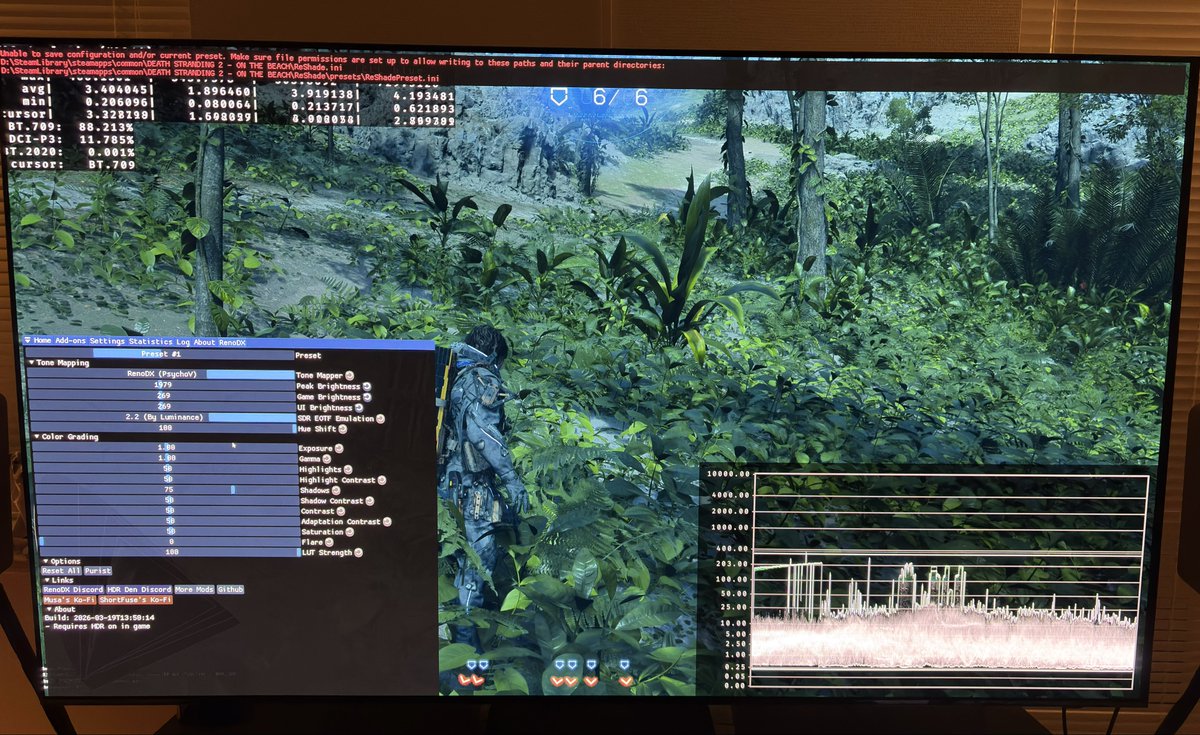
so looks like they added the hdr luminosity setting to console in a patch
cursed settings though:
https://girlcockx.com/keremitough/status/2034770211849556250

@HDRgameAnalysis Are these settings also in the PC version? They got added to console. It helps a lot with maintaining paper white with better black level

 girlcockx
·
girlcockx
·
luts are raised in some areas:
https://girlcockx.com/HDRgameAnalysis/status/2034811882826093026

@JosephStPaul This is the massive black level raise at night time out in the open world if you don’t adjust LUTs.
︀︀
︀︀Thats why I think its worth changing the LUTs.
**👁️ 55 **
 girlcockx
·
fluid glade
girlcockx
·
fluid glade
I don't think that's an issue though
cold cargo
wet rivet
cursed settings though:
https://girlcockx.com/keremitough/status/203477021184955...
I have those settings because oled
wet rivet
cold cargo
I have those settings because oled
it breaks hues and saturation
cold cargo
oh
wet rivet
the luminosity setting is this cursed mix of brightness and gamma
cold cargo
That explains a lot
 chrome heart
wet rivet
luts are raised in some areas:
https://girlcockx.com/HDRgameAnalysis/status/2034...
chrome heart
wet rivet
luts are raised in some areas:
https://girlcockx.com/HDRgameAnalysis/status/2034...
this is like the 3rd delivery, so easy to get to that spot, looks like night

 thin abyss
Yeah idk mine are compiling rn
cold cargo

thin abyss
Some of my graphic options were reset aswell but idk if that stems from this
cold cargo
didnt happen to me so no cule
 wet rivet
omfg
spare socket
Smart App Control blocks it for whatever reason
 late aspen
disable it then
 knotty bobcat
what even is smart app control? is it just extra windows antivirus thingy?
i have it off and cant even turn it on if I wanted tto
reef copper
What's "Deep Fried"?
wet rivet
reef copper
What's "Deep Fried"?
extra contrast and saturation
spare socket
knotty bobcat
i have it off and cant even turn it on if I wanted tto
🤷♂️
I can't turn it back on either
good riddance
 twin monolith
knotty bobcat
what even is smart app control? is it just extra windows antivirus thingy?
twin monolith
knotty bobcat
what even is smart app control? is it just extra windows antivirus thingy?
it won't make you play games that does "suspicious" things but generally it's needed to be on for normal civilians who don't know how in computes
 normal sleet
these are all dlaa right?
spare socket
normal sleet
these are all dlaa right?
Quality
DLAA doesn't noticeably change the image in terms of highlights/detail retrival
normal sleet
So I'll stick with preset K I guess since I'm on DLAA
spare socket
I wouldn't
normal sleet
But it doesnt change much?
spare socket
K quality looks similar to K DLAA
U really wanna use L or M
K DLAA / K Quality / L Quality


L Quality is significantly better than K DLAA, not in a place where it's extremely obvious and cba going there, but should be visible enough in those screenshots
normal sleet
I've found that M in anything higher than performance tends to oversharpen edge a bit, making aliasing more visible, I guess it also depends on the game
 pale delta
I knew L was better than K for highlights but does it fix the rain issue with K DLAA (and older presets) in Death Stranding?
Even with DLAA preset K rain was disappearing in games I have played. How is L now?
short charm
normal sleet
I've found that M in anything higher than performance tends to oversharpen edge ...
I still use K for these reasons
spare socket
pale delta
Even with DLAA preset K rain was disappearing in games I have played. How is L n...
Rain L Quality

It's very good
pale delta
Last night, I was seeing a lot of rain particles in FF16 with DLAA preset L but didn't have the right tool to change it to K on the spot
spare socket
doesn't even smear
spare socket
pale delta
Last night, I was seeing a lot of rain particles in FF16 with DLAA preset L but ...
Can try M as well
it's less smeary
but less stable as well
pale delta
M isn't as stable as L though. At least in the games I tried.
(I was using Quality/DLAA)
spare socket
I don't have a screenshot of it on hand, but L and M preserve rain drops on vehicles and stuff as well
it looks really good
idk about K tho, it might as well
pale delta
spare socket
idk about K tho, it might as well
Last time, I used it in a game with rain, rain drops were not really visible. I think it was Dragon Age (the shit one that came out 1-2 years ago)
but maybe I am remembering it wrong
spare socket
Nah K definitely looks worse
Rain itself with preset K is smeary and overaveraged
tried PICO a bit as well and it's pretty bad even on Native
 solemn osprey
I noticed really bad shadow crawling with preset M and L on brick and rock surfaces at night, especially in the forest ruins area. I find M and L to be a mixed bag overall, with clear drawbacks in handling of reflections, volumetrics, and increased raytracing noise in most games.
wet rivet
I tried preset l and in one area got had weird noisy pattern on the ground
didn't actually check if it was preset l causing that
spare socket
solemn osprey
I noticed really bad shadow crawling with preset M and L on brick and rock surfa...
This is generally due to game denoisers, if you can disable those, M and L look excellent, but they do cause some moire patterns yea.
spare socket
wet rivet
I tried preset l and in one area got had weird noisy pattern on the ground
Seems to be a game issue, I've seen some as well, tried PICO and it was still there
might be worse with dlss tho idk
I also found foliage flickering
I turned LoD to High and that seems to have fixed it
then turned it back to Very High and it was still fixed
it's a little weird
 crystal ravine
"added deep fried" lmaoo
I notice the preset moved from 2.2 (By Luminance) to 2.2 (Per Channel)? what's the difference?
spare socket
pale delta
I knew L was better than K for highlights but does it fix the rain issue with K ...
Rain droplets

Screenshot doesn't even do it justice, it looks excellent in motion
shadow wave
6.9mb patch
 burnt zealot

 zealous stag
is reno working for anyone with the latest patch?
 edgy wyvern
no its not working
wet rivet
Does it work with DLSS off
edgy wyvern
wet rivet
Does it work with DLSS off
tried it without dlss, its working
wet rivet
Not sure if I wanna nap rn or just power through and see how much they broke
edgy wyvern
wet rivet
Not sure if I wanna nap rn or just power through and see how much they broke

 timid mist
Nixxes fixes native HDR for DLSS but breaks reno

 split cosmos
Is musa napping
 slow forum
Damn DLSS HDR looks awesome now but Reno is not working currently ATM.
 hushed leaf
 hushed leaf
slow forum
Damn DLSS HDR looks awesome now but Reno is not working currently ATM.
hushed leaf
slow forum
Damn DLSS HDR looks awesome now but Reno is not working currently ATM.
Will have to wait for musa then:p
 radiant light
hushed leaf
radiant light
hushed leaf
ooh nice
@nocturne flint maybe the new hotfix will help ur crashing issue
 hushed leaf
late aspen
Leave musa alone
hushed leaf
late aspen
Leave musa alone
U cannot rush a master chef
split cosmos
Nah I was gonna say let him nap
normal sleet
wet rivet
fuck it just gonna do it now
 fringe harness
wet rivet
fuck it just gonna do it now
fringe harness
wet rivet
fuck it just gonna do it now

 tepid oracle
 fluid glade
omg the defects of native hdr are so much more clear now that renodx is gone haha
I don't understand how people on nexus could not see this
tepid oracle
fluid glade
omg the defects of native hdr are so much more clear now that renodx is gone hah...
I had to turn the game off because highlights were clipping so much. The sky was almost all white in episode 1 of the game
timid mist
i had to stop playing
fringe harness
yeah me too, im here starring at Dollman waiting hahah
fluid glade
guess I'll wait too
timid mist
"The native HDR is amazing. The skies really have a nice green hue to them"
 raw sinew
I was mid installing the renodx fix and then the game updated to fix the DLSS issue lmao
wet rivet
raw sinew
I was mid installing the renodx fix and then the game updated to fix the DLSS is...
working on it rn
just a couple shaders
can have it out shortly
tight stratus
burnt zealot
If they haven't fixed the ghosting, I still won't be able to use DLSS FG
fluid glade
tight stratus
If they haven't fixed the ghosting, I still won't be able to use DLSS FG
they haven't
tight stratus
then there is no point in all this
fluid glade
I mean at least they kinda fixed the DLSS bug but yea nothing interesting for us haha
tight stratus
If only there was a way to separate the alpha channel
crystal ravine
I'll just keep my game running until reno update lmao
 crude sphinx
ui brightness doesnt work properly. it always shines 10k nits
 unkempt lava
Hey all! Could someone point me to good settings to use on a Samsung S95C TV
crystal ravine
crude sphinx
ui brightness doesnt work properly. it always shines 10k nits
for me the slider did decrease it?
 lone sinew
My sliders aren't updating at all now
 earnest skiff
I'm loving the deep fried preset cuz I like the more saturated look 
lone sinew
Oh it hasn't been updated yet my bad
wet rivet
Nexus Mods :: DEATH STRANDING 2: ON THE BEACH
Partial rewrite of the game's DX12 post processing code to fix issues in tonemapping, color grading, and the appearance of UI in HDR
 signal pine
wet rivet
updated
https://www.nexusmods.com/deathstranding2onthebeach/mods/8?tab=files
signal pine
wet rivet
updated
https://www.nexusmods.com/deathstranding2onthebeach/mods/8?tab=files
thanks man
can play again
thin abyss
Cheerrrrrs
https://www.nexusmods.com/deathstranding2onthebeach/mods/16?tab=description We finally have an FOV mod. Reshade-based too

Nexus Mods :: DEATH STRANDING 2: ON THE BEACH
Reshade addon to control FOV and enable ultrawide.
hushed leaf
wet rivet
updated
https://www.nexusmods.com/deathstranding2onthebeach/mods/8?tab=files
BLESS YOU

 hazy sand
musa how about that nap?
fringe harness
thin abyss
https://www.nexusmods.com/deathstranding2onthebeach/mods/16?tab=description We f...
does it mess with cutscenes too?
fringe harness
Lmk
thin abyss
Will do
knotty bobcat
hazy sand
musa how about that nap?
he took jon bernthals advice
napping is for the birds
 pine crag
Musa is a national treasure
 covert hawk
For anyone here who also thinks the games textures look bad change the mip bias manually in NVPI revamped
I think it looks better with it set that way
Nixxes may have forgotten to change them based on upscaling levels
covert hawk
knotty bobcat
he took jon bernthals advice
Did you see he had to "apologize" for this recently?? 😂😂😂
Gotta be doing something right when that's your worst controversy lmao
 unkempt jacinth
pine crag
Musa is a national treasure
unkempt jacinth
pine crag
Musa is a national treasure

 distant shard
pine crag
Musa is a national treasure
distant shard
pine crag
Musa is a national treasure
90% of the games I played with renodx were Musa mods 👀
thorny badger
thin abyss
https://www.nexusmods.com/deathstranding2onthebeach/mods/16?tab=description We f...
does this game even need an fov slider, though? I feel like fov is part of the narration here, like those cinematic camera moments where the game automatically widens it. I wonder how this mod works with it
thin abyss
thorny badger
does this game even need an fov slider, though? I feel like fov is part of the n...
It seems to just be a multiplier. so all those moments are still there. Idk about cutscenes yet
 pearl harbor
pine crag
Musa is a national treasure
pearl harbor
pine crag
Musa is a national treasure

 unique pulsar
loooooooooooool
knotty bobcat
covert hawk
Did you see he had to "apologize" for this recently?? 😂😂😂
yeah lol it was funny af dont think he was forced to, just asked
raw sinew
wet rivet
updated
https://www.nexusmods.com/deathstranding2onthebeach/mods/8?tab=files
legend, sent you a ko-fi
knotty bobcat
funniest of em all is that he didnt even apologize he just doubled down on it lol
unkempt lava
Hey what am I doing wrong? If I change any setting in the renodx menu nothing happens
I’m using the latest update btw
I only see changes happening when I am in the hdr settings menu of the game itself
My bad. Was not using the latest version 😩
tepid oracle
wet rivet
updated
https://www.nexusmods.com/deathstranding2onthebeach/mods/8?tab=files
 fringe harness
ok thank you mate
thin abyss
My pleasure
 real valley
I was wondering, how do you take an HDR screenshot of the game in a format that works on Discord?
 urban tapir
Reshade for HDR screenshots
real valley
the regular screenshot from reshade or an plugin ?
urban tapir
real valley
the regular screenshot from reshade or an plugin ?
There's a setting to save as HDR png
covert hawk
LMAO
the game ships with super outdated directstorage
somebody uploaded the newer dlls online and it fixes all my stuttering
fucking nixxes

Nexus Mods :: DEATH STRANDING 2: ON THE BEACH
Upgrade Direct Storage and turn off Tips Display for better performance
if anyone else is interested
urban tapir
covert hawk
fucking nixxes
Classic nixxes. Either updating or just getting rid of the direct storage DLLs usually improves performance for people.
fringe harness
covert hawk
somebody uploaded the newer dlls online and it fixes all my stuttering
even with FG?
hazy sand
anything on uncapping fps on cut scenes?
normal sleet
hazy sand
anything on uncapping fps on cut scenes?
not yet it seems, what a strange choice to cap them at 60, usually it's 30 for physics reasons or some hardcoding reason, but the game is already designed for arbitrary framerates, why cap it at 60???
real valley
urban tapir
There's a setting to save as HDR png
i don't see it did i miss an addon ?
hazy sand
im pretty sure it will work well here!
normal sleet
hazy sand
no idea!! and cutscenes here are so beatiful!!
The worst thing about death stranding 2 cutscenes is that even the tiniest scene count as a cutscene, Sam loading cargo at a destination? Cutscene, for some reason, like the assets are clearly all the gameplay assets, everything is the same and yet it switches to 60 even for those short moments, it's so jarring
urban tapir
real valley
i don't see it did i miss an addon ?
It should be in the settings options of reshade UI. Near options for screenshot save location iirc
real valley
i do see the option to have it in png but when i take it it's an sdr screenshot (sorry it's in french)
 short charm
covert hawk
https://www.nexusmods.com/deathstranding2onthebeach/mods/18?tab=description
short charm
covert hawk
https://www.nexusmods.com/deathstranding2onthebeach/mods/18?tab=description
The game is sent with v1.2, this mod upgrade it to 1.4
hazy sand
short charm
The game is sent with v1.2, this mod upgrade it to 1.4
this is same shit they did with ratchet and clank back in the way
and i can confirm what when i switch them it improved the stutters
i didnt even fathom that they will do this thing here again
so i will be replacing!
short charm
Is there any cons to do this ?
covert hawk
short charm
Is there any cons to do this ?
if you keep a copy of the old dll files you can just switch them back if it makes it worse. so no.
you could also verify game files in steam if you didnt make a copy
after some testing it seems that resizeable bar helps tremendously in this game
fixed remaining stutters
0x0000000060000000 seems to work well
^for the size limit i mean
short charm
For FPS stutters, did you see this Nixxes answer in Steam Community ?


When the character is standing still, the frame rate remains stable at around 90 fps, but as soon as the character moves, the frame rate drops by 20–30 fps. When the character stops moving, the frame rate returns to normal. This simply needs to be fixed quickly. It happens on both Nvidia and AMD graphics cards.
urban tapir
real valley
i do see the option to have it in png but when i take it it's an sdr screenshot ...
That's weird. I don't see the settings for HDR screenshots here. Can someone else send a screenshot of their reshade settings page showing the HDR screenshot settings?
fluid glade
urban tapir
That's weird. I don't see the settings for HDR screenshots here. Can someone els...
screenshots are HDR by default
make sure you open them in a chromium browser
the windows viewer doesn't support hdr, it will show them in SDR instead
if you open the produced pngs in Chrome for example it will be HDR
chrome heart
short charm
For FPS stutters, did you see this Nixxes answer in Steam Community ?
classic nixxes
hammering the PCI-E bus as if it's your neighbors daughter
I like how they're acting oblivious while it has been a well documented issue with the way they handle datastreaming since at least Horizon Forbidden West.
short charm
I bet they did the same with Spider Man 2
fluid glade
btw @wet rivet the fires are very pink by default


I set hue correction to 30 in the left screenshot
right is 100
a blowout slider would be nice
they seem very saturated still 🙂
maybe 50 looks a bit better
late aspen
covert hawk
somebody uploaded the newer dlls online and it fixes all my stuttering
Placebo normally
fringe harness
covert hawk
https://www.nexusmods.com/deathstranding2onthebeach/mods/18?tab=description
FG stutters in cutscenes are fix for me with this, tyty
normal sleet
short charm
For FPS stutters, did you see this Nixxes answer in Steam Community ?
I have a gen 5 running at gen 5, still get micro stutter if I unlock the frame, tried rebar as well and directstorage update, still the same, this isn't the first nixxies port with this problem btw, I've experienced something similar in other nixxies ports as well.
covert hawk
normal sleet
I have a gen 5 running at gen 5, still get micro stutter if I unlock the frame, ...
yeah same. even with all the fixes there is still some occasional stutter
i also used process lasso to set the game to use the cores with more cache
only applicable for dual ccd amd cpus tho
normal sleet
If you play with mouse and keyboard you might not notice them much but with controller the microstutter is pretty constant and quite noticeble
normal sleet
It's 2026 and this is what? THeir 4-5th port? This mofos still can't figure out how to make vrr work, insane
covert hawk
Yeah I'm really not surprised they were shuttered
Their ports all had a bad rep bc of performance except for like their first few
So ofc sales were poor
If they were good ports would've made way more money
fluid glade
I don't think that's why sales were poor
covert hawk
They don't understand the level that word of mouth opinions affects sales on pc
fluid glade
but doesn't matter
covert hawk
Way more then other platforms
I mean why else? They were super sought after PlayStation games
Only thing that hampered them was the technical state
Especially Spiderman 2
Oof
fluid glade
because they were released after a year or more after the game has already been out
you can't create as much hype around a game as on its initial release
covert hawk
Oh for sure that as well
normal sleet
covert hawk
Their ports all had a bad rep bc of performance except for like their first few
I never understood why DF glazed them so much over the years, their ports have almost always been kinda shit
covert hawk
But people def still wanted the games here
covert hawk
normal sleet
I never understood why DF glazed them so much over the years, their ports have a...
Yeah
I've been opening my eyes to df being kinda shit lately
Or well
They have been for a while
Only realized recently
 warm spade
I hope Alex calls out the visuals of crimson desert
normal sleet
covert hawk
I've been opening my eyes to df being kinda shit lately
I think they're still the best around for retro content and cool insight into the tech of games, Alex's video about motion blur has always been one of my favorite examples to show why I love the channel still
timid mist
Native HDR clouds
normal sleet
covert hawk
I've been opening my eyes to df being kinda shit lately
But they do glaze things way too much, that is truee
covert hawk
normal sleet
I think they're still the best around for retro content and cool insight into th...
True
I'm still subbed for that lol
covert hawk
normal sleet
But they do glaze things way too much, that is truee
Probably also lack of manpower with how small they are as well
Like maybe they don't have enough people to do enough testing to find all negatives before consumers get their hands on it
normal sleet
Yeah and Alex has been struggling with health problems for a while now so that doesn't help as well, especially since he's the most important one of the team imo
fluid glade
I like John's content the most
he seems like the real actual gamer and I like most of his takes
normal sleet
I like john's passion for sure, but in the practical sense I think Alex is more "valuable" to the content that DF historically produced
Alex is more a tech focus creator, John is more a vibes focus creator, both have their strenghts and I like them both but imo Alex within the company has more value, the recent DLSS debacle kinda of also proved that, he basically came to cover Rich and Olivers butts in the apology direct with a far more reasonable take and discussion
He's also the most knowledgeable when it comes to videogame tech in general, which definetely helps when you're part of a tech focused channel
covert hawk
I do feel like John and Alex could branch off and do their own thing and it'd end up higher quality
But will coming back should help
normal sleet
covert hawk
I do feel like John and Alex could branch off and do their own thing and it'd en...
Funny you say that because I legitimately think that they thought about it after the DLSS5 incident, their dissatisfaction with DF on bluesky was palpable, never super explicit but you could tell they were pissed that Rich didn't consult them before making the direct
I mean John straight up was MIA for the apology direct, he was definitely not feeling it
John also mentioned a bunch of times how burnout he sometimes feels with the type of content he sometimes has to make for DF, long story short, I wouldn't be super surprised if John and/or Alex pulled a "why I left Digital Foundry" once their contract is up
hazy sand
has anybody tried dlss quality with preset L?
fluid glade
hazy sand
has anybody tried dlss quality with preset L?
that's how I play exclusively
any game
hazy sand
like damn!!!
preset L is powerful af
no wonder the recs are performance mode
i came to try it cause i had some head room with preset M
and the difference is clear
fluid glade
yea L is the king for me I don't care if it's heavier to run
it's totally worth it haha
hazy sand
oh it is heavier ahahah
takes away 20 fps easy
but i'm at 90s now
is literally DLAA almost
with 20 fps more ahah
velvet trench
hazy sand
has anybody tried dlss quality with preset L?
Yes but at 1440p, so the performance hit isn't as big as 4k
knotty bobcat
I use L as well for every game, especially because of hardwares unboxed recommendation
not sure if theres an instance where M is better, since its "oversharepened" apparently
hazy sand
I never got to use it cause i play at 4k and it will tank my fps
but this one is so well optimized i said let me check
 rotund salmon
L has some oddities sometimes and it can ghost a little more in certain scenes
fluid glade
preset L does tend to have aliasing sometimes though but it's still my favourite out of all
velvet trench
M and L both have additional aliasing compared to K sometimes
fluid glade
yea
rotund salmon
little isolated stuff like this as well, where L botches this spider web but M, K, and E don't

 fluid glade
on older models I never saw one bit of aliasing
covert hawk
rotund salmon
little isolated stuff like this as well, where L botches this spider web but M, ...
such a good game
fluid glade
with preset L/M first time I'm seeing aliasing again
covert hawk
fell to my knees when they announced sequel wont be on pc
fluid glade
but it's still best overall especially for highlights
fluid glade
rotund salmon
little isolated stuff like this as well, where L botches this spider web but M, ...
is this returnal?
rotund salmon
yeah
hazy sand
rotund salmon
L has some oddities sometimes and it can ghost a little more in certain scenes
haven't seen ghosting yet! not sure if is becuase im using quality
warm spade
velvet trench
M and L both have additional aliasing compared to K sometimes
Is output scaling still noticeably beneficial to u with M/L? or do u just recommend it for Ray reconstruction to reduce boiling
velvet trench
warm spade
Is output scaling still noticeably beneficial to u with M/L? or do u just recomm...
Yes
tepid oracle
You guys use preset L Quality at 4K or 1440p? I have a 5070ti and at 4K using Preset L Qualify (RT off) I am getting low 60s with drops in the high 40s to low 50s
velvet trench
M/L are literally unusable to me at 1440p
without output scaling
not exaggerating, I hate how it looks at lower output res, I would rather use K if I couldn't use output scaling
warm spade
Still using a 3.0 ratio? 960 to 2880
velvet trench
Yeah
warm spade
I just wish there was a way to reduce the rt noise
hazy sand
warm spade
I just wish there was a way to reduce the rt noise
i don't notice much noise with L and i have ray tracing on! in guessing RT here is not that great
velvet trench
I have RT off in this game, but the noise is pretty noticeable in other games
hazy sand
yes!
velvet trench
I would use FSR1 with M/L since they're already so sharp and have additional aliasing at times. Lanczos makes the aliasing way worse @warm spade
warm spade
The resident evil games are annoying with rt
K has horrible volumetric ghosting with the flashlight
And M/L make rt noticeably worse
hazy sand
but RE thankfully has RR so you can get away with M!! i can't imagine that game with no RR, but i played it with K
velvet trench
rotund salmon
little isolated stuff like this as well, where L botches this spider web but M, ...
This is the first biome right? How often do these spider webs show up? I want to see if I can replicate it, that's really bad
hazy sand
warm spade
Yes for requiem I used pt
oh i see!! i played 2 long time! never tried the dlss mod
warm spade
hazy sand
oh i see!! i played 2 long time! never tried the dlss mod
Dlss isn’t perfect modded it breaks the ui
But still better than the atrocious taa used in re engine
hazy sand
i remember i wanted to try it the same way i did dlss on dead space but it was more complicated than that so skipped it
forcing the dlaa
velvet trench
The UI is way less ghosty with dlss 4.5, but having bloom on still causes issues
shadow wave
anyone tried this mod?
Nexus Mods :: DEATH STRANDING 2: ON THE BEACH
Reshade addon to control FOV and enable ultrawide.
nevermind the above. Lyall already has a mod!
Codeberg.org
An ASI plugin for DEATH STRANDING 2: ON THE BEACH that expands aspect ratio support, removes cutscene pillarboxing and more.
velvet trench
rotund salmon
it's the first biome in the second set of levels
Okay I see it, but it doesn't seem to be as bad for me as your screenshot. Does the volumetric fog flicker for you on M/L? On both M and L the fog starts flickering like crazy
It just randomly stopped, idk what that was
pale delta
warm spade
Is output scaling still noticeably beneficial to u with M/L? or do u just recomm...
Ray Reconstruction preset E is a must if it is available in a path tracing /ray tracing game.
velvet trench
I found E to be really ugly in RE9, it would oversharpen and cause ghosting
Also hallucinated texture detail in-motion, at least on the stairs in the care center
 crisp notch
from everything ive seen so far the RT is so close to pointless in this game (and i am a certified 💯 drank the kool aid RT enjoyer) that i would just ignore it completely
warm spade
crisp notch
from everything ive seen so far the RT is so close to pointless in this game (an...
def was added as an afterthought
im just using L and no rt in this game
crisp notch
warm spade
def was added as an afterthought
decima is such a cool engine to begin with - just a bit sad to see it implemented in such a pointless way as its initial showing in that engine
crisp notch
warm spade
im just using L and no rt in this game
yeah thatd be my recommendation too - decide whether you prefer L or M
stick with that
M seems clearer to my eyes but a bit less stable than L esp when using FG
crisp notch
ray reconstruction is generationally better than any other denoiser when it comes to making path tracing playable on today's hardware, but now that we have 2nd gen transfomer DLSS-SR, its no longer worth using outside of real PT games imho
it used to be great for lumen noise etc in UE5 games with shitty software lumen implementations but the downsides it causes to image quality arent worth it any more in those instances, now that we have L/M
fringe harness
warm spade
did they fix the cutscene stutter with fg?
i got fixed by updating the directstorage version from 1.2 to 1.4
warm spade
i already updated the directstorage since release
crisp notch
fringe harness
i got fixed by updating the directstorage version from 1.2 to 1.4
i swear to god this is the biggest placebo "this does nothing" fix posted on nexus for every game in existence, but for a nixxes port, i actually believe you lmao
they seem to have a unique ability to fuck up directstorage or - tbh - anything PCIE bus related lmao
fringe harness
i havent had any stutter since updating that shit, i don know xd
crisp notch
like i said, ill give it a try for sure, this is the 1% of games where i totes believe you haha
🫠
crisp notch
cant remember what nixxes port it was where Alex at DF had a whole video on how you could get these massive performance issues depending on PCIE bus generation and config even tho on paper it shouldnt matter and doesnt for any other game ever
warm spade
crisp notch
cant remember what nixxes port it was where Alex at DF had a whole video on how ...
ghost of tsushima
lone sinew
I updated the DirectStorage and camera movement in the Magellan feels smoother. Traversal on land also feels less stuttery but it still stutters when you move too fast in a bike for example
spare socket
knotty bobcat
I use L as well for every game, especially because of hardwares unboxed recommen...
Hardware unboxed video is terrible, don’t listen to their advice. He was comparing the presets in games with forced sharpening with no way to disable. Horizon Forbidden West, TLoU1 some early Nixxes (lol) ports as well. Preset M does not oversharpen by default, there are no oversharpening artifacts, however if the game has any sharpening at all, Preset M will exagerate it and look terrible.
He also downplays some of the biggest advantages of the new models
M has more detail than L
L is more stable than M
Try both see which one you like
They both have some artifacts in some games, but are infinitely better than old models especially for HDR
raw sinew
is anyone else cranking the game brightness all the way to 500? I feel like the daytime areas are kinda grey/dark at the default purist setting
its not needed for the night scenes though so idk
cold cargo
What settings yall using
split cosmos
Yeah
shadow wave
cold cargo
What settings yall using
In game settings?
cold cargo
shadow wave
In game settings?
Reno settings
shadow wave
cold cargo
Reno settings
Purist preset. Then hue correction at 50, uo brightness at 180
cold cargo

Reno no worky I just put in latest ver
maybe I fucked up
ah I did
The dl was marked as sus for some reason?
split cosmos
if you got it from nexusmods and from musa then you’re fine, dlls are commonly flagged as a false positive from most anti virus securities
cold cargo
Direct storage is a crazy technology
 molten herald
On my old sata ssd it still loads this fast, it's pretty good, I don't think it supports direct storage or at least not fully.
cold cargo
I think direct storage is only for mvmes on pci enabled slots
If you press windows+G go to settings then gaming features it should tell you if your drive has it enabled
 molten herald
yeah no supported drives, that was my understanding as well, gpu and os supported but no nvme drives
twin monolith
cold cargo
where should i open this? it doesn't show Drive status for me
do i need to open it while in-game?
wet rivet
fluid glade
btw <@251818887526612992> the fires are very pink by default
I'll force stronger hue shift
Nexus Mods :: DEATH STRANDING 2: ON THE BEACH
Partial rewrite of the game's DX12 post processing code to fix issues in tonemapping, color grading, and the appearance of UI in HDR
tight stratus
After the hotfix the ghosting is still there, but for me it's much better now overall

Now it's quite playable
fluid glade
shadow wave
nevermind the above. Lyall already has a mod!
https://codeberg.org/Lyall/DeathS...
I assume this doesn't unlock cutscenes fps?
shadow wave
fluid glade
I assume this doesn't unlock cutscenes fps?
Yes, no option for that. I just adjusted my fov
fluid glade
🙁
shame, the cutscenes don't play well with VRR unfortunately
if you don't play them at 30 or 60fps they judder
 tribal otter
cold cargo
Direct storage is a crazy technology
tribal otter
cold cargo
Direct storage is a crazy technology
first time i've seen direct storage actually work this well lol
fluid glade
wet rivet
I'll force stronger hue shift
looks better now but I still saw a lot of pink streak with the "meteors" fallin down in one scene
wet rivet
fluid glade
looks better now but I still saw a lot of pink streak with the "meteors" fallin ...
guess I can make it even stronger
 wet rivet
vanilla also turns these lights yellow
vanilla peak 300, luminosity 6, brightness 5 / renodx game brightness 100, peak 400

 fluid glade
wet rivet
vanilla also turns these lights yellow
vanilla peak 300, luminosity 6, brightnes...
fluid glade
wet rivet
vanilla also turns these lights yellow
vanilla peak 300, luminosity 6, brightnes...
yep noticed that yesterday too
spare socket
Hue shifting too much seems to affect sunrise as well
Vanilla / Reno default peak 1000


Should've checked sdr as well but didn't realise at the time
I don't dislike how it looks tho
it's much more consistent with the reflections as well
fluid glade
@wet rivet some more fires, RenoDX / Native HDR


reno seems to blow out the fires for some reason
I'm using purist preset
this whole particular scene looks better with the original tonemapper to me
RenoDX / Native HDR

 wet rivet
I could just ditch psycho and use what I do in other games
wet rivet
fluid glade
RenoDX / Native HDR
does it look good if you set hue correction and hue shift both to 0
spare socket
Native / Reno / Reno hue sliders 0 / SDR, all default peak 1k


 fluid glade
wet rivet
does it look good if you set hue correction and hue shift both to 0
fluid glade
wet rivet
does it look good if you set hue correction and hue shift both to 0
yea looks better
wet rivet
only thing is the electric rods look very different with psycho if you have 0 hue shift and hue correction
they're blue as opposed to the vanilla purple
fluid glade
wet rivet
maybe hue shift 100 and hue correction 50 is good
yea looks kinda decent
but
no actually it doesn't
fires look good but these sparks look kinda weird haha


reno shift 100 corr 50 / native HDR
haven't checked how it looks in SDR
sdr looks closer to native HDR
shadow wave
cold cargo
What settings yall using
do you have to delete the reno addon to revert to native hdr? Or just set the tonemapper to none?
wet rivet
shadow wave
do you have to delete the reno addon to revert to native hdr? Or just set the to...
use the off preset or the vanilla tonemapper
none is just no tonemapper
signal pine
https://x.com/GIMBAP_XI/status/2035658089265815742?s=20
This guy says the black levels are raised with LUT strenght at 100 and that's my genuine answer trying to figure out whats going on, am I wrong?
Just trying to understand if there's an actual hardcap or not

@HDRgameAnalysis I just tried the LUT at 25 strength, but it literally destroys the bluish tint the game is meant to have, even with vanilla settings.
It's the same way the FFXII artists integrated the greenish vintage look in the remastered version, which was intentional and looks phenomenal.
 X
·
X
·

With LUT strenght sub 20 it goes down to 0 nits when I walk around in the desert yes but it doesn't look right (there's a bright full moon in the sky)
wet rivet
the lut is the color grading
you can do whatever you want
but for a first time playthrough I'd never disable the color grading
it's crucial the vibes and atmosphere
signal pine
wet rivet
but for a first time playthrough I'd never disable the color grading
yea I agree
the way the guy says it tho, it's like the LUT 100 is the reason black levels are higher (?)
 wet rivet
the lut scaling option is pretty conservative
wet rivet
I care less about existence of raise vs how its raised
like clipping shadow detail always looks bad to me
signal pine
if I put Sam in a fully dark room with no lights, do you get 0 nits with these settings?
spare socket
signal pine
if I put Sam in a fully dark room with no lights, do you get 0 nits with these s...
if you find said room
signal pine
wet rivet
like clipping shadow detail always looks bad to me
yes same
signal pine
spare socket
if you find said room
which is impossible yea
wet rivet
signal pine
if I put Sam in a fully dark room with no lights, do you get 0 nits with these s...
with defaults ya you would if there's no lighting
fluid glade
yea definitely
wet rivet
the lut scaling setting would map 0 back down to 0
signal pine
wet rivet
with defaults ya you would if there's no lighting
then no point to drop the LUT strenght apart from the fact than it removes the intended tin
wet rivet
but if something is 0.05 then its not gonna get scaled down as much with lut scaling
signal pine
wet rivet
but if something is 0.05 then its not gonna get scaled down as much with lut sca...
oh I see
wet rivet
signal pine
then no point to drop the LUT strenght apart from the fact than it removes the i...
basically the entire look of the game is in the lut
 signal pine
im using purist too
wet rivet
fluid glade
so is hue correction and shift both at 0 giving you the best results for fires?
fluid glade
wet rivet
so is hue correction and shift both at 0 giving you the best results for fires?
yea at least they're not blown out and they look good to me
wet rivet
guess that will be the default now
signal pine
fluid glade
yea at least they're not blown out and they look good to me
oh good to know, dropped both to 0

 spare socket
but the color is better at least
ya it is
at 120 nits game brightness it's quite okay
signal pine
spare socket
Hue correction and shift 0 / 100, 203 nits
damn looks pretty massive gap lol
fluid glade
also I noticed if you lower the highlights slider either contrast or just highlights it messes with the peak brightness
it goes up instead of what I expected to go down lol
spare socket
spare socket
Hue correction and shift 0 / 100, 203 nits
Vanilla default (brightness to 29 for ~200 nits) for reference
 thin abyss
fluid glade
fires look good but these sparks look kinda weird haha
thin abyss
fluid glade
fires look good but these sparks look kinda weird haha
Its the level that sprays piss all over you
spare socket
it's almost sdr lol
signal pine
he replied
still doesn't make much sense, but ok
 spare socket
2.2 per channel / by luminance


default, hue sliders 0
per channel actually looks a bit more natural to me here
wet rivet
signal pine
he replied
still doesn't make much sense, but ok
its ultimately preference but words like "fix" aren't the right thing to use here
raising shadows in the color grading lut is a deliberate choice on the part of the developers
does help with visibility
I think people focus too much on contrast
I'm more interested in what tools they even used for color grading
now that I know how weirdly blue is handled depending on what color space you do your transformations in
sometimes I feel like the dark blue shadows at night can appear a little smeary
the purple tint in shadows in re4 remake has a smeary effect
look at expedition 33 if you wanna see really smeared and fucked up shadows
signal pine
wet rivet
its ultimately preference but words like "fix" aren't the right thing to use her...
yea that is what triggers me a little bit, it sounds like "the mod is hardcapping the black levels" which is untrue
 dim yoke
There are some minor stutters in cinematics
signal pine
wet rivet
I think people focus too much on contrast
I understand we run OLED panels and we want games being able to reach 0 nits in certain scenes but removing the original LUT intended by devs is criminal imho, plus I think HDR should be all about increased details than super peak brightness
signal pine
dim yoke
There are some minor stutters in cinematics
try dropping foliage settings to ultra
might fix some popping too
wait but that's crimson
wet rivet
spare socket
looks a lot like per channel / by luminance
ya i don't recall exactly how I set up the slider but it takes shadows from luminance when its at 100
spare socket
I remember trying to replay the game like 2 months ago or so
and everything looked blue
then i clicked on musa preset
signal pine
do you guys use colorcontrol? if yes, do you have pure power 2.2 gamma too under advanced EOTF settings?
 spare socket
infinitely better
wet rivet
signal pine
do you guys use colorcontrol? if yes, do you have pure power 2.2 gamma too under...
is that an icc profile
signal pine
wet rivet
is that an icc profile
ye
wet rivet
you have to turn it off for games
if youre using the custom transfer function stuff in it
signal pine
entirely? 'piecewise' was the default basically
spare socket
having any gamma correction while windows hdr is on will mess up with games
at least those that already have gamma correction in place
wet rivet
signal pine
entirely? 'piecewise' was the default basically
piecewise is fine, that just means it doesn't do anything
the other settings are there to emulate transfer functions
signal pine
wet rivet
piecewise is fine, that just means it doesn't do anything
ive tried bt1886 too but i think it's closer to 2.4 gamma and it was probably intended for LCD, ive put piecewise back
wet rivet
bt1886 emulates 2.4 gamma on the windows desktop if you set maximum sdr brightness to match the nits value of the sdr content brightness slider
e.g. with the slider at 5 that means you have 100 nits sdr brightness
if you want to emulate gamma in windows there are other programs
can't remember the name
I just keep windows as is
with srgb gamma
just remember if you select bt1886 or pure power it'll apply those curves to native hdr content as well which fucks them up
since the icc profile applies to everything
signal pine
wet rivet
just remember if you select bt1886 or pure power it'll apply those curves to nat...
thanks, fixed it
wet rivet
lut strength 100 / 25 / 0


 spare socket
Lmao
fun to see how it's actually the LUT imitating light bouncing
@wet rivet any chance for highlight saturation and blowout sliders?
wet rivet
spare socket
<@251818887526612992> any chance for highlight saturation and blowout sliders?
ya I can add them
spare socket
signal pine
if I put Sam in a fully dark room with no lights, do you get 0 nits with these s...
0 nit reading


 signal pine
spare socket
0 nit reading
signal pine
spare socket
0 nit reading
perfect thanks yea
warm osprey
people, beware about updating DirectStorage, the version 1.4 that is currently circulating is a preview1 released a few days ago, in Microsoft terms it means "unstable as fuck, don't use it"
you better update to the latest stable version 1.3
I had no issues even with the version that is shipped with the game, but tried updating to both of these to check them out: 1.4 gave me stutters, 1.3 is perfectly fine
signal pine
mhhh
cold cargo
I downloaded the one off nexus and it was fine
fringe harness
1.4 is fine for me, at least for now
chrome heart
poeple really shouldn't just be willy nilly updating random DLLs
there is no actual evidence(i.e. benchamrks) of it improving performance
nobody read the documentation to see whether there are any breaking changes
do we even know in which mode Direct Sotrage is being used?
is the DLL update going to potentially fiz the issues you're seeing or are you suffering from some other issue?
warm osprey
cold cargo
I downloaded the one off nexus and it was fine
the one on nexus is the unstable 1.4
short charm
I see comments from people who have replaces DLL, and even deleted DLL and it's 100% resolved
warm osprey
tbh, replacing your DLL with 1.4 might even disable DirectStorage altogether
you may try deleting it to compare
short charm
warm osprey
you may try deleting it to compare
Yes, that's what I was thinking.
Maybe replacing them has the same effect as deleting them
hazy sand
i did 1.3 when i saw nexus one said preview on the side ahaha
chrome heart
short charm
I see comments from people who have replaces DLL, and even deleted DLL and it's ...
anecdotical evidence, issue could have been fixed due to a restart
 icy belfry
Idk about that one it has some insane stutter during cutscenes which is apparently if you're not locked at exactly 30/60fps
warm osprey
hazy sand
i did 1.3 when i saw nexus one said preview on the side ahaha
yeah, preview1 isn't even a beta I'd say
fringe harness
i will try 1.3 but i didnt have any issues with 1.4 yesterday
warm osprey
ngl, the new Deep Fried preset looks more like DS1 with Reno than the other two
short charm
Isn't it risky to download a wild DLL from internet ?
wet rivet
warm osprey
ngl, the new Deep Fried preset looks more like DS1 with Reno than the other two
Outdoors areas in general have less contrast in this game than ds1 from what I recall
thin abyss
For sure
short charm
thin abyss
For sure
 thin abyss
short charm
Isn't it risky to download a wild DLL from internet ?
thin abyss
short charm
Isn't it risky to download a wild DLL from internet ?
Depends where you get them from
chrome heart
icy belfry
Idk about that one it has some insane stutter during cutscenes which is apparent...
Then benchmark it, set up a save, run capeframex and compare.
warm osprey
wet rivet
Outdoors areas in general have less contrast in this game than ds1 from what I r...
yeah, exactly
chrome heart
Le desert filter
warm osprey
short charm
Isn't it risky to download a wild DLL from internet ?
definitely not from Microsoft's official repository
icy belfry
chrome heart
Then benchmark it, set up a save, run capeframex and compare.
Im not talking about directstorage Im just saying in general lmao
warm osprey
short charm
Ok here https://www.nuget.org/api/v2/package/Microsoft.Direct3D.DirectStorage/1....
nuget is the Microsoft's official repository, so yeah, it is safe to download
short charm
It's in \native\bin\x64
warm osprey
yes
urban tapir
Usually the only time i've seen any change to performance with directstorage is when people remove the dlls. Updating them is a placebo. This whole song and dance happened once wih SM2 pc port. DirectStorage will not magically fix a shitty port
cold cargo
Cranking gamma make me like the look of the game a lot more
normal sleet
cold cargo
Direct storage is a crazy technology
Yeah for all of this port's faults I was truly impressed with how quick it loads the game, possibly the fastest I've ever seen of any game
warm osprey
urban tapir
Usually the only time i've seen any change to performance with directstorage is ...
I can assure you that updating DirectStorage DLLs can definitely change performance, way beyond any placebo range, easily measurable
will it be in a positive way - that's another story
cold cargo
cold cargo
Cranking gamma make me like the look of the game a lot more
I feel a terrible disturbance in how the shadows/gamma are in this game
wet rivet
cold cargo
I feel a terrible disturbance in how the shadows/gamma are in this game
Try increasing the adaptation contrast setting
It’ll increase contrast and saturation without breaking hues
urban tapir
warm osprey
I can assure you that updating DirectStorage DLLs can definitely change performa...
🤡
chrome heart
warm osprey
I can assure you that updating DirectStorage DLLs can definitely change performa...
Benchmarks where?
knotty bobcat
spare socket
They both have some artifacts in some games, but are infinitely better than old ...
Thank you so much for the info!
Ngl i havent had an rtx card for long so I wasnt sure what source is good for things like this, thought H unboxed was good
Learned more in a few sentences now than in that vid
twin monolith
rtx cards expensive but worth it (still depends)
dim yoke
What about windows color management settings? There is the advanced tab that has some "system default" options. Should we mess with those or they dont matter anymore?
dim yoke
twin monolith
rtx cards expensive but worth it (still depends)
Although I own a 5090, anything more than 1000€(5070Ti) is meh
a 5070 Super with 18GB of VRAM at ~600$ would be ideal for most people
earnest skiff
My God, this looks so ugly? I’ve been playing like this since yesterday lol because for some reason RenoDX didn’t work after the update, even though I downloaded the latest file. It only started working after I restarted my PC


I thought the area I'm in was just messed up 
knotty bobcat
twin monolith
rtx cards expensive but worth it (still depends)
For sure, im so glad I switched back from AMD, I had a GTX card before that
normal sleet
spare socket
They both have some artifacts in some games, but are infinitely better than old ...
I disagree, I find the added sharpness of both M and L to be extremely distracting in most games, especially in anything higher than performance
warm osprey
chrome heart
Benchmarks where?
again, I'm not saying that it will bring a positive change
it is beyond me how DS2 still doesn't have a Repair Vehicle button in a garage
you still have to either store it or change color
spare socket
warm osprey
it is beyond me how DS2 still doesn't have a Repair Vehicle button in a garage
there should be a repair vehicle command
i think it's hold circle?
rotund salmon
yeah, if you park it on a loading bay there's a repair prompt
warm spade
normal sleet
I disagree, I find the added sharpness of both M and L to be extremely distracti...
In which game?
Or is it every game you play
urban tapir
warm osprey
again, I'm not saying that it will bring a positive change
Bro is just yapping at this point. Set priority as high ahh advice.
normal sleet
warm spade
In which game?
I've tried it in DS2 among others, and yes hightlights look brigher but I don't like how it oversharpen the overall image, creating more visible aliasing, which to me is more of a dealbreaker
chrome heart
warm osprey
again, I'm not saying that it will bring a positive change
Ok if you're just throwing shit at the wall with random claims, please do check the rules about sharing info you have no clue about. Because you sure as hell make it sound as if does anything, when we aren't even sure it even loads the dll or not at all.
urban tapir
chrome heart
Ok if you're just throwing shit at the wall with random claims, please do check ...
No he's tested 
 hazy sand
so fellas! hue both at 0 is the new norm for this?
 hazy sand
yes but i think Mr musa said hue 0s might be new default
cold cargo
This is how dark I like my nights in this game
 rotund salmon

warm osprey
urban tapir
Bro is just yapping at this point. Set priority as high ahh advice.
"advice" lmao, I never advised to update directstorage libraries
the only thing I advised is against updating to preview releases
warm osprey
rotund salmon
yeah, if you park it on a loading bay there's a repair prompt
kek, thank you, weird that they didn't add it to the menu as well
fringe harness
can confirm that with 1.3 cutscenes have no stutters too
 stray hamlet
sniper zoom is hilariously bad no matter what your dll is
warm osprey
chrome heart
Ok if you're just throwing shit at the wall with random claims, please do check ...
you sound like someone who doesn't even understand what is a .dll and how it works, lol
I'm not sharing any info I have no clue about, I just mentioned my observations (that updating those DLLS can make things worse), without advising anything, feel free to ignore them
warm osprey
stray hamlet
sniper zoom is hilariously bad no matter what your dll is
yeah, I think they boosted the chromatic aberration in scopes to mask this
chrome heart
warm osprey
you sound like someone who doesn't even understand what is a .dll and how it wor...
Ok check my github linked on my discord profile
stray hamlet
oh i dont mean bad lod quality i mean the game screeching to a halt to load in new assets
warm osprey
stray hamlet
oh i dont mean bad lod quality i mean the game screeching to a halt to load in n...
interesting, haven't noticed that, I'd rather have it actually load assets than not doing anything lol
stray hamlet
maybe another case of me getting scammed on vram
chrome heart
Nixxes special sauce code will just hammer the PCI-E bus if you run out of vram, which nixxes games easily do.
Causing mad stutter and slowdown
stray hamlet
i can watch my system ram just fill up all 32gb when i spam the sniper zoom
warm osprey
stray hamlet
i can watch my system ram just fill up all 32gb when i spam the sniper zoom
wow, that's really bad 😭
how do Nixxes even mess things up so much
I just tried doing that and my RAM and VRAM usage stays the same, quite weird how they manage to make it break only on some systems
stray hamlet
i have a 12gb card so if you have more it probably doesnt need to page out as much
foolish me only spending $800 instead of $1200 at the time
warm osprey
yeah, I'm not paging anything, I noticed VRAM can go up to almost 16gb but not more
and RAM to about 22 gigs
(with other background stuff open)
stray hamlet
turning off frame gen and setting textures to high makes scoping smooth, ugh
so uhhh mystery solved on my end
warm osprey
stray hamlet
turning off frame gen and setting textures to high makes scoping smooth, ugh
basically, exceeding VRAM capacity is really bugged in this port
stray hamlet
slow camera panning is still noticeably jittery so this didnt help with that 😭
urban tapir
stray hamlet
foolish me only spending $800 instead of $1200 at the time
You didn't give 2 kidneys to Nvidia. Unstable frametimes for you
signal pine
warm osprey
I just tried doing that and my RAM and VRAM usage stays the same, quite weird ho...
im on 21-22gb vram usage average on a 5090
at 5120x2160
which makes me think this game at that res only run without bottlenecks on a 5090 and 4090
maxed out, at least
need to try on my wife pc she has my old 4090
 glass sage
stray hamlet
slow camera panning is still noticeably jittery so this didnt help with that 😭
glass sage
stray hamlet
slow camera panning is still noticeably jittery so this didnt help with that 😭
That was an issue on PS5 as well
covert hawk
glass sage
That was an issue on PS5 as well
wow even on ps5? bruh moment
thats impressively bad
glass sage
there's a camera stutter that has nothing to do with your framerate
They said they patched it but apparently it made it's way to PC because I'm noticing it as well.
Also rBar is off by default, anyone try turning it on?
unkempt jacinth
dc1 had a camera stutter issue at high framerates
fluid glade
glass sage
Also rBar is off by default, anyone try turning it on?
I turned it on but I don't see any difference
unkempt jacinth
yeah
glass sage
fluid glade
I turned it on but I don't see any difference
Boo, one could hope
glass sage
Lyall coming through here at least with a FOV fix
unkempt jacinth
it's always best to leave rbar at the defaults
glass sage
yeah it made it worse for me, just checked
a few stutters in the first ten seconds of driving.
warm osprey
signal pine
at 5120x2160
daym, seems like ultrawide 4K takes a lot more than one might think, compared to regular 4K
signal pine
warm osprey
daym, seems like ultrawide 4K takes a lot more than one might think, compared to...

yea...
warm osprey
signal pine
maximum recorded value I have after a long playing session is exactly 16 gigs
lone sinew
Either the patch or updating DirectStorage fixed the camera pan stutters, but the game still lurches/hitches when traversing fast on a bike
rotund salmon
the spotlight hitting this orange vehicle paint in the menu looks so much nicer with Reno
vanilla (BFF) / Reno


 lime lynx
I just started playing this game and i noticed that on my rtx 4090 for some reason LOD, textures are lower than on my base ps5, any idea how to fix that?
stray hamlet
forcing 16x af though nvcp helps a little, the ingame setting ignores a lot of textures though i cant tell if it has adverse effects yet
Probably want to leave lod bias unclamped
lime lynx
But it's not just textures it looks like distant terrain has less polygons overall
stray hamlet
ah i wouldnt know since i skipped the console version
lime lynx
It looks like geometry matches base PS5 performance preset, but it's a bit hard to tell because of way lower resolution, but if you switch to quality 30fps preset, then it already has more detail than PC
covert hawk
use nvidia profile inspector to force the mip bias
lime lynx
I got this game on PS5, but i was planning to start playing it after i get PS5 PRO, but then i noticed news about PC version and it looks like nixxes made some weird choices here 😄
covert hawk

not a major change but seems to help
i think nixxes forgot to change mips for different upscaling levels
stray hamlet
That alone does nothing without setting transparency super sampling to replay_mode_all
Why? I have no fucking idea
-2 bias is the recommended value for 50% scale though if you try that
covert hawk
im using the newest nvpi revamped and 1.5 is recommended for perf on that
can try that too tho
stray hamlet
Whatever they're pulling that value from is wrong, can confirm by checking the dlss docs
Sounds like hybreds fork so not a big surprise
stray hamlet
Its not a huge difference honestly
stray hamlet
https://www.wolframalpha.com/input?i=log2(render+X+resolution+%2F+native+X+resolution)+-+1 that's the formula from the dlss sdk, fairly simple
It always starts at -1 at 100% scale though there is an additional epsilon that devs have control over iirc
And they can also control bias per texture which we can't really do with tweaks like this
Forcing it this way did break certain textures in death stranding 1 so I didn't really bother with it here so far
covert hawk
holy fuck
enabling transparency aa just made reflections look wayyyyy better on my end
covert hawk
stray hamlet
That alone does nothing without setting transparency super sampling to replay_mo...
ily
Shocked that isn't on by default
velvet trench
covert hawk
enabling transparency aa just made reflections look wayyyyy better on my end
transparency aa also improves the blocky fog in cyberpunk when upscaling, just found out about that recently. i thought that setting didn't do anything in modern games, but I guess it does
covert hawk
why the hell is it disabled at a driver level by Nvidia???
Like wtf?
Is this an ai-making-drivers mistake?
I used to enable it all the time when games offered it as an in game setting, not sure why they would block it
Never seemed to cost too much perf
I remember it being a thing on older cod games
pale delta
covert hawk
Never seemed to cost too much perf
Wait, what is this setting? :O. Does it cost anything nowdays?
Second one here, right?

Should I enable it for other games? Is there any situation it matters that much?
covert hawk
that is where it is yes
im enabling it globally

my settings will look slightly different because im on the nvpi fork thats a bit more up to date
pale delta
Alright, thanks a lot :))
stray hamlet
pale delta
Should I enable it for other games? Is there any situation it matters that much?
the only purpose of this is to make lod bias overrides work
again i have no idea why the lod bias flags on their own do nothing
can test this by setting bias to a value like +4 and seeing what it does with and without the transparency supersampling flag
if the game looks like it forgot to load any textures in then it worked
dont want to clamp bias either, that just forces the value to 0 (which is what you want if dlss isnt part of the picture)
 raven gulch
late aspen
Placebo normally
raven gulch
late aspen
Placebo normally
yeah, the game isn't even using direct storage lol, they are probably just default dlls nixxes put in every game folder
 late aspen
raven gulch
yeah, the game isn't even using direct storage lol, they are probably just defau...
late aspen
raven gulch
yeah, the game isn't even using direct storage lol, they are probably just defau...
ahahahahahha
warm spade
💀
short charm
 pine crag
If you add the current direct storage files in does the game use it then?
I couldn't figure out how to download the 1.3 versions.
short charm
short charm
Ok here https://www.nuget.org/api/v2/package/Microsoft.Direct3D.DirectStorage/1....
Here
twin monolith
raven gulch
yeah, the game isn't even using direct storage lol, they are probably just defau...
im blind where in screenshot is the indicator if the game uses directstorage?
pine crag
short charm
Here
Not sure what to do with that once I download it.
 waxen horizon
Ffs kept switching between different protons, reinstalling and whatnot due to hanging near the end of opening cutscene on Linux, turns out it was frigging Reshade.
Hope it stays fine afterwards.
Apparently not...

Oh well, native HDR it is...
Frigging reshade.
covert hawk
well this is interesting
i had my windows power plan set to balanced because of some core parking stuff i saw related to my x3d chip
i changed my windows power plan just to see if that would do anything
i noticed process lasso added a new mode called high performance
i switched to that and literally all stutter in death stranding 2 is completely gone
not slightly alleviated
gone
traversal,cutscene,camera movements
gone
if someone else has the stuttering and also has process lasso and that power plan lmk if it does anything for you
this is way more impactful than every other tweak ive tried
completely solved
split cosmos
wat 3d chip?
covert hawk
9950x3d
i already had the game set to the cache cores too
so this power plan is smth different/additional
glass sage
Everyone recommends to use balanced but I swear it is way worse on balanced than higih
split cosmos
im assuming u also have that bios setting on?
glass sage
for x3d chips specifically
covert hawk
yeah thats what i saw too
this isnt high though
its specifically from process lasso
covert hawk
nice
glass sage
I personally see improvements, don't know why
covert hawk
yeah well it just solved every problem i had with the game so
glass sage
nice
covert hawk
i DEFINITELY agree
split cosmos
i personally thought they performed the same, i wonder if it has to do something else within windows
covert hawk
must be
split cosmos
y'all on the recent versions of 11?
glass sage
Everyone suggests balanced to save power and that the x3d chips perform best on balanced, but every time i set it to balanced I start stuttering.
covert hawk
 glass sage
split cosmos
y'all on the recent versions of 11?
glass sage
split cosmos
y'all on the recent versions of 11?
Yes
split cosmos
thats so weird
covert hawk
all up to date chipset and bios too