#Resident Evil Requiem
1 messages · Page 7 of 1
 brittle badge
 lime nimbus
I DDU for every driver update
I also only update drivers every 6 months or so
But DDU’ing has only positives to it, and barely takes a minute. So do it.
 wet kiln
Yea takes like 5-10 minutes tops, I swapped to 581.42 and gained like 2-4 fps from 566.01, though preset K makes the game compile shaders every time I started it and the screen was pitch black after
 quasi lodge
lime nimbus
But DDU’ing has only positives to it, and barely takes a minute. So do it.
quasi lodge
lime nimbus
But DDU’ing has only positives to it, and barely takes a minute. So do it.
lots of negatives if you have custom NVCP settings for individual games
I suppose you could export nvcp settings using NVPI, but that could affect the efficacy of the DDU, not sure I just don't DDU unless i'm having major issues
 marble iron
finally working fov mod https://www.nexusmods.com/residentevilrequiem/mods/64
doesn't break cutscenes

Nexus Mods :: Resident Evil Requiem
I've always hated the close-in over-the-shoulder camera in recent RE games. If you feel the same, this mod is for you. Pulls the camera further back without touching FOV — just orbit distance. Wall
 sweet estuary
lime nimbus
I DDU for every driver update
sweet estuary
lime nimbus
I DDU for every driver update
thats overkill man
no you dont need to constantly wipe your temp files
you are installing the same driver over and over again
DDU is meant to be used when driver uninstall fails
lime nimbus
quasi lodge
lots of negatives if you have custom NVCP settings for individual games
There’s options to keep the nvcp settings as is
During ddu
lime nimbus
sweet estuary
thats overkill man
It’s alright, I don’t see the downside. Like I said, a min of my time isn’t overkill
If you head over to the official Nvidia discord, you can ask the moderators of the subreddit themselves, who ddu each time when a new driver drops.
This is not something unusual
sweet estuary
lime nimbus
If you head over to the official Nvidia discord, you can ask the moderators of t...
yeah, reddit mods... the expert authority on everything tech related
lime nimbus
Official Nvidia Reddit mods, most of them do it. I just wanted to let you know that it’s not a corner case. Many people do it.
sweet estuary
same reddit mods who delete every thread asking for help with tech but keep every single low effort post of people posting pictures of their new GPU
lime nimbus
I’m not saying they’re credible, but it’s a common practise.
 knotty apex
It's stupid to do it every single time
lime nimbus
I do it every 6 months. I don’t update drivers every time.
knotty apex
"a minute" is a pretty big exaggeration
lime nimbus
Unless necessary.
knotty apex
Oh well sure that's fine lol
lime nimbus
knotty apex
"a minute" is a pretty big exaggeration
Restart in safe mode, run ddu, restart again? Every 6 months? I don’t see how this is supposed to be cumbersome for me lol
knotty apex
You left out the every 6 months part or I missed it
lime nimbus
lime nimbus
I also only update drivers every 6 months or so
@knotty apex
 kindred bough
Can you share the files for this? It says it's under moderation on nexus mods and can't download the file
 pulsar wadi
if someone tried, do you suggest enabling raytracing in requeim? in re village it killed the mood by lighting things up
(or if it is worth for the performance hit)
 winged apex
the game was authored with PT in mind so what are you asking
lime nimbus
pulsar wadi
if someone tried, do you suggest enabling raytracing in requeim? in re village i...
What gpu you got and res?
PT looks the best, except for the first area
Rt, deeper in the game artifacted too much for me even with frame gen off
 foggy tide
marble iron
finally working fov mod https://www.nexusmods.com/residentevilrequiem/mods/64
d...
foggy tide
marble iron
finally working fov mod https://www.nexusmods.com/residentevilrequiem/mods/64
d...
seems like it doesnt work indoors
 proven pilot
Hello, does the latest version of REFramework still have issues with modified FOV? (Cutscenes and item prompt misaligned)
Does the ultrawide fix work well?
pulsar wadi
lime nimbus
What gpu you got and res?
5070ti, 1440p
i know that i can run it, i wanted to know only if it ruins the aesthetic of the game (like i said, in re village by enabling raytracing the game becomes less horror and in the same time you lose a lot of fps for nothing)
but what you said makes me think that rt is better, so thanks
pulsar wadi
winged apex
the game was authored with PT in mind so what are you asking
I didn't know.
proven pilot
pulsar wadi
5070ti, 1440p
i know that i can run it, i wanted to know only if it ruins the ae...
PT is amazing, enable it
pulsar wadi
proven pilot
PT is amazing, enable it
thanks, i am gonna use DLDSR 4K performance with RCAS to fight the blurryness of RR :)
 potent meadow
marble iron
finally working fov mod https://www.nexusmods.com/residentevilrequiem/mods/64
d...
potent meadow
marble iron
finally working fov mod https://www.nexusmods.com/residentevilrequiem/mods/64
d...
does it only work in 3rd person?
playing in ultrawide i've found increasing the uw fov to 1.3 is much better and doesnt break cutscenes
foggy tide
potent meadow
does it only work in 3rd person?
it only works on the intro.
potent meadow
foggy tide
it only works on the intro.
oh right
i'm using this with no other fov changes, cutscenes work fine

dont know if it will work in 16:9
i'm liking this more than 7 and 8
those games were good but i feel this is better
proven pilot
potent meadow
playing in ultrawide i've found increasing the uw fov to 1.3 is much better and ...
Thanks I'll try this
 heady arch
RenoDX is why its called PCMR
 kind fossil
And? What's your point?
 unkempt seal
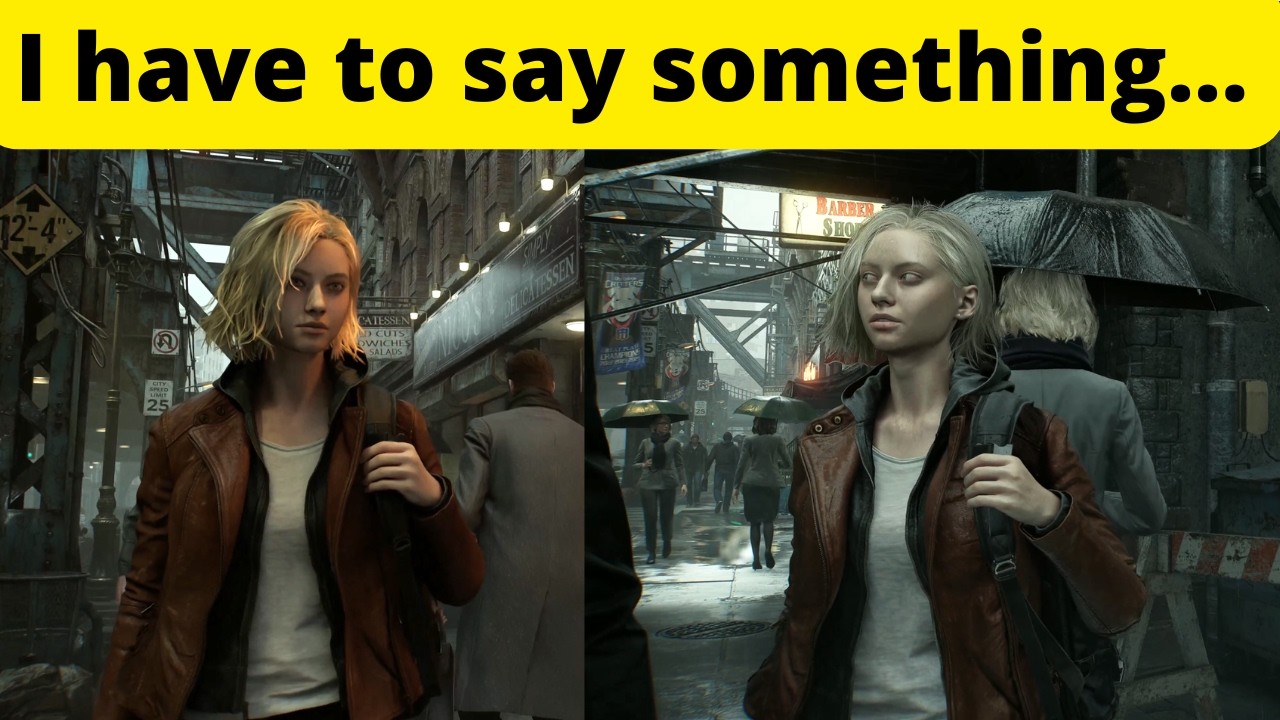
Resident Evil Requiem PC Settings Recommendations. Depth of field looks terrible, path tracing has pros and cons. If you aren't ray tracing, consider turning off screen space reflections. And Capcom needs to give an option to turn off film grain, and should work on improving the close up view of items.
Test system specs (ResizeBAR/SAM ON):
GPU:...
 surreal cliff
I saw that video and I don't understand how he can prefer RT over PT, the boiling isn't that bad and RT has a lot of artifacts
lime nimbus
Rt has so much more artifacting than pt later on in the game
Is there a seperate mod on nexus to remove film grain?
Or is it just the renodx one people are talking about
knotty apex
There is
unkempt seal
surreal cliff
I saw that video and I don't understand how he can prefer RT over PT, the boilin...
it was more about the item viewer
but yeah
knotty apex
Is he just complaining about the film grain
lime nimbus
knotty apex
There is
So I should use that in combination with the renodx one?
Could someone please drop a link to the film grain fix mod
knotty apex
It is not necessary if you are using renodx
Renodx just has the slider you can set to 0
I just use the custom grain set to 30 since it looks way better when it is done after upscaling
lime nimbus
Oh alright
unkempt seal
knotty apex
I just use the custom grain set to 30 since it looks way better when it is done ...
so renodx filmgrain is done after upscaling as opposed to game's default?
knotty apex
Yes
It's pretty clear when you like, set the vanilla grain to 100 and then the custom grain
 stray finch
marble iron
finally working fov mod https://www.nexusmods.com/residentevilrequiem/mods/64
d...
stray finch
marble iron
finally working fov mod https://www.nexusmods.com/residentevilrequiem/mods/64
d...
looks stupid as fuck
just ruining creator intent
 raw ridge
i just put only dinput8.dll file alone into directory is that all from re framework needed guys?
knotty apex
Yes
 serene shore
PSA for anyone who got stutters. You need to disable and re-enable GSYNC and VSYNC through nvidia control panel. It happened for me the first time i installed reframework and the hdr mod. I thought it was a reframework issue but i also had the issue without ref.
raw ridge
knotty apex
Yes
if the yes to my question?
knotty apex
Yeah
raw ridge
ok thanks
knotty apex
The other files are for VR mods and similar stuff
raw ridge
got it
kindred bough
surreal cliff
I saw that video and I don't understand how he can prefer RT over PT, the boilin...
Boiling effect annoys me aswell, but still I think Path Tracing is best comproimse between all the modes (no rt, rt, pt)
There's also visible halo/ring effect especially while I'm playing Grace in 1st person and moving camera
lime nimbus
serene shore
PSA for anyone who got stutters. You need to disable and re-enable GSYNC and VSY...
This has to be done everytime you restart the game?
Or just once after installing reframework?
That is, moving the DLL file
serene shore
lime nimbus
This has to be done everytime you restart the game?
I did it once after installing ref and that seems to work
 teal mountain
serene shore
PSA for anyone who got stutters. You need to disable and re-enable GSYNC and VSY...
teal mountain
serene shore
PSA for anyone who got stutters. You need to disable and re-enable GSYNC and VSY...
I tried this and was still getting sporadic stutters unfortunately. I put an additional frame cap using displaycommander and now it seems they're gone
 marble totem
Noob Q, which reframework version should I download? Pragmata?
serene shore
marble totem
Noob Q, which reframework version should I download? Pragmata?
RE9. It's not visible until you expand the list
marble iron
lime nimbus
If you head over to the official Nvidia discord, you can ask the moderators of t...
i mean in the DDU app itself there is a big text that says you only need to use it when switching gpus and not for a simple driver update
lime nimbus
serene shore
I did it once after installing ref and that seems to work
alright I’ll just reset my nvcp
And try
serene shore
Is there a way to hide reframework ui from appearing every time you start the game ?
 unique snow
yes
there is a checkbox for remembering open/closed state
should be the first or second drop-down menu
 manic oriole
Is the 591.86 driver functioning properly with a 5080? Was it only the most recent pulled back one causing issues?
lime nimbus
manic oriole
Is the 591.86 driver functioning properly with a 5080? Was it only the most rece...
Yes, 591.86 is functional
But reportedly, the driver pulled out gave 15% better performance on PT
unique snow
I use 595 on my 5080, works great, haven't tried anything else
manic oriole
595 is the pulled back one no?
lime nimbus
manic oriole
595 is the pulled back one no?
Yes
 vagrant arch
Should I still configure the game brightness sliders or does RenoDX override them?
vagrant arch
unique snow
Nexus Mod page explains it all
oh, I just saw the new .addon64 file in the github releases page, thank you!
 naive fern
hi what do you set the game brightness to?
SDR EOTF Emulation: Choices include Off, 2.2 (Per Channel), and 2.2 (By Luminosity)
what to choose here?
 abstract quarry
Luminosity is recommended
serene shore
unique snow
should be the first or second drop-down menu
Ty man
 signal sky
abstract quarry
Luminosity is recommended
signal sky
abstract quarry
Luminosity is recommended
Per channel is the default
serene shore
serene shore
PSA for anyone who got stutters. You need to disable and re-enable GSYNC and VSY...
Did some more restarts and problem came back. Turned off nvidia frame-gen and now it seems to be fixed
 sonic musk
@fierce wedge Option to add the separate EOTF emulation for the UI? Honestly, I'm thinking the game might look better in sRGB but the UI is messed up then
signal sky
sonic musk
<@251818887526612992> Option to add the separate EOTF emulation for the UI? Hone...
Oh, interesting. sRGB is what sdr used?
sonic musk
Up to preference, but I'm surprised to see how many people say the vanilla looks fine and reno looks crushed
signal sky
Vanilla is lifted af
sonic musk
More than I would expect, that's for sure
signal sky
The brief Reno testing I did seemed fine. Game is just dark generally
sonic musk
ye
But when it gets dark the shadow detail clips pretty bad
RE4R was the same really
 velvet ferry
I thought intentional
signal sky
To make you pull out the flashlight and have a very narrow fov
sonic musk
the Fov is kinda trash too
velvet ferry
I thought the flashlight was the craziest tech, so small, so bright
signal sky
I do like it cause it feels oppressive but yeah I can understand those who don’t
sonic musk
The FPS perspective is borderline unplayable to me
And I'm not the one to usually complain about this stuff
 gusty pond
for those who have updated their DLLs; any improvements, any preferred DLSS presets? experience with PT and non default presets?
game was fantastic though being a capcom game of course had a few problems. nothing bad enough to ruin the experience though 🙂 hope everyone else is having a great time with this title
oh and one more thing, I'm sure this would be better asked in an optiscaler forum but I'll try here. in my previous experience getting optiscaler to work with reframework I always ran into the same issue: when DLSS was turned on in reframework I couldn't see the optiscaler menu, but with it turned off I couldn't EDIT upscaler options in the now visible menu because, well, it was turned off. since this game has DLSS integrated by default, I take it this will probably not be an issue, what are your experiences?
 dense sapphire
sonic musk
<@251818887526612992> Option to add the separate EOTF emulation for the UI? Hone...
dense sapphire
sonic musk
<@251818887526612992> Option to add the separate EOTF emulation for the UI? Hone...
already an option, no?
 fierce wedge
sonic musk
<@251818887526612992> Option to add the separate EOTF emulation for the UI? Hone...
fierce wedge
sonic musk
<@251818887526612992> Option to add the separate EOTF emulation for the UI? Hone...
I added that yesterday
 wraith rivet
potent meadow
i'm using this with no other fov changes, cutscenes work fine
wraith rivet
potent meadow
i'm using this with no other fov changes, cutscenes work fine
thx il try
 stark ermine
Hi, onece I install this mod, the game seem to lock to SDR mode. I'm using Linux.
Oops, it turns out that the game is using the wrong PROTON which doesn't support HDR.
signal sky
dense sapphire
already an option, no?
Oh true yeah
It is
Just tried it and without eotf emulation it looks lifted imo
It does crush shadows less that’s true
I think I like it significantly more with per channel. It’s more punchy
And actually more accurate in theory I believe
 sharp stump
kindred bough
Can you share the files for this? It says it's under moderation on nexus mods an...
sharp stump
kindred bough
Can you share the files for this? It says it's under moderation on nexus mods an...
Use this mod instead. But you need DSX for it to work.

 signal sky
I didn’t test luminosity
It’s pretty similar in regards to crush
Off looks lifted but detail is much preserved
Wait lemme try one thing
per channel with shadows 85

Still pretty crushed compared to off
sharp stump
is it safe to update reframework from 01260 to 01262?
signal sky
signal sky
Off // Per channel
Really torn with this
I cant get perfect blacks with off but it does look better
Like you cant even see the drawers on the bottom left corner with 2.2
They are crushed to oblivion
White wall also gets a slight bluish tint with 2.2
Probably per channel stuff
Yeah I do think @sonic musk was right, having this off is the way
It crushes way too much for the sake of inky blacks
 proven mauve
Can someone guide me on the best settings for LG OLED CX? I am not talking about brightness but rather the other settings.
 fleet rover
proven mauve
Can someone guide me on the best settings for LG OLED CX? I am not talking about...
fleet rover
proven mauve
Can someone guide me on the best settings for LG OLED CX? I am not talking about...
use RTINGS
proven mauve
talking about renodx settings for re9
like the gamma settings 2.2 per channel or the other one.
signal sky
proven mauve
like the gamma settings 2.2 per channel or the other one.
You have a comparison above
Pick your poison
No perfect option imo. Dunno if Musa could figure a better solution for the blacks
proven mauve
signal sky
Off // Per channel
this is with path tracing?
signal sky
Yeah
all maxed
Imma go with off
2.2 crushes too much
Not even lifting shadows helps
proven mauve
sigh off might be the way then for now
fierce wedge
the color grading clips shadows earlier in the pipeline and then the tonemapping and 2.2 brings them back down
I can try scaling the color grading luts
serene shore
Maybe when the next update for the mod arrives, we could have rcas also
I know it's just a toggle from Lilium's HDR Shaders but just saying
 bleak cliff
I mean... it's a horror game, maybe it's intentional that some details are crushed in low-light situations... it occurs also in sdr with default settings so i think it's intentional
signal sky
bleak cliff
I mean... it's a horror game, maybe it's intentional that some details are crush...
The default is that it doesn’t crush tho
I think
The crush is introduced by the mod with 2.2 afaik
I could be wrong tho
bleak cliff
i checked default in sdr and renodx hdr and it's the same. remember that if you disable hdr in game you have to disable it on windows as well, otherwise the windows hdr will raise blacks again
signal sky
Oh so sdr looks the same as 2.2 on?
fierce wedge
if you click the match sdr button
it makes it looks like sdr with 2.2 gamma
the defaults are similar to sdr with 2.2 gamma just slightly raised shadows
2.2 luminosity / 2.2 luminosity with shadows 85 / srgb / srgb with lut scaling


 signal sky
Oh you implemented the lut scaling already? Nice!
Test inside the hotel in the kitchen. It was crushing hard there
It’s a 3 min walk from where you are
 coarse kettle
@fierce wedge shouldnt you change the discord status from "draft" to "ready"?
sweet estuary
Is it on nexus?
 gritty sparrow
signal sky
Pick your poison
gritty sparrow
signal sky
Pick your poison
I see what you mean haha
2.2 luminosity looks so damn nice
Off raises blacks
But at least I can actually see stuff
I'm conflicted haha
 eternal trench
surreal cliff
I saw that video and I don't understand how he can prefer RT over PT, the boilin...
eternal trench
surreal cliff
I saw that video and I don't understand how he can prefer RT over PT, the boilin...
The boiling is mostly contained to the intro racoon city streets sequence. For whatever reason, the wet effect and rain has some issues. I also noticed in in very specific places indoors. In the Care Center there's a set of windows opposite end to the courtyard doors and to the right. The volumetrics from the light coming in from those windows is really messed up. Another area is the building in the courtyard when the room becomes an elevator, there's a lot of fuzziness happening because the bouncing light isn't taking into account the height motion
besides that it has been extremely stable so far
some of those issues are probably FG related
gritty sparrow
I also just saw this comparison
I’ve seen several posts here recommending the use of Ray Reconstruction with the Transformer Preset “E” via Nvidia Inspector…
 Reddit
Do you guys agree?
fierce wedge
srgb no scaling / srgb with scaling / 2.2 luminosity with shadows 85


 signal sky
fierce wedge
srgb no scaling / srgb with scaling / 2.2 luminosity with shadows 85
signal sky
fierce wedge
srgb no scaling / srgb with scaling / 2.2 luminosity with shadows 85
Yeah srgb with scaling looks the best
Is this the new thing?
signal sky
Good shit
signal sky
signal sky
per channel with shadows 85
You can also look here
Its just at the end of the path ahead
Lots of black there to test
sonic musk
dense sapphire
already an option, no?
Haven't looked at the latest build yet, mb
signal sky
Imma wait for the lut scaling build to come out to play
fierce wedge
srgb no scaling / srgb with scaling / 2.2 luminosity with shadows 85


 winged apex
gritty sparrow
Do you guys agree?
winged apex
gritty sparrow
Do you guys agree?
Preset E is broken in everything, it never got shipped in any game
fierce wedge
these are scenes where you have access to the flashlight though
signal sky
Hell yeah that´s it
gritty sparrow
Can you please explain what is scaling? Haha
 unkempt sparrow
Anyone else getting laser sight ghosting?
signal sky
fierce wedge
these are scenes where you have access to the flashlight though
Yeah I don´t know if the actual intent is for it to be crushed
Would need a sdr image as ground truth I guess
fierce wedge
signal sky
Would need a sdr image as ground truth I guess
the sdr match preset matches sdr
we assume 2.2 for sdr
kind fossil
fierce wedge
so basically 2.2 channel and 50 shadows is sdr
signal sky
Like it gives u an option
signal sky
fierce wedge
so basically 2.2 channel and 50 shadows is sdr
Then yeah I guess the intent is to crush it xD
fierce wedge
signal sky
Doesnt the game use scRGB or 709 for SDR tho
rec709 oetf is meant to be used with 2.4 gamma displays which means that it would appera even more crushed
signal sky
Whether its good or not Im not sure
signal sky
Yeah its weird
 inland topaz
Finished the game last night. Only had the last couple hours with Reno because I played most of it on Friday but it looked great from what I saw.
Game is fantastic imo
fierce wedge
right now the shadows slider is run before the 2.2 correction and tonemap
I could move it to after
that might be best
signal sky
I found that shadows didnt do much yeah felt kinda limited
 autumn spruce
I think even for me the default reno settings make parts of the game look a bit too dark. I’m basically blind without the flashlight but def feel its intended. I might also try the sdr preset/settings later tonight.
fierce wedge
it seems intended cause there are rooms when you first arrive at the care center with items you can interact with that I don't think you're supposed to see until after you get the lighter
autumn spruce
What’s really annoying is now that I’m playing Leon more, his hair unless he’s directly in a light source is a dark brown to almost black at times
fierce wedge
like those childrens books
signal sky
Yeah seems like it
autumn spruce
But idk it might be like that without the mod
dense sapphire
winged apex
Preset E is broken in everything, it never got shipped in any game
Indiana Jones ships with E. D breaks depth of field in that game. Basically just don't ever change RR preset from whatever the game shipped with
 gentle basalt
Hello people just got my first gaming pc and currently playing requiem and I haven't got a clue how to install the HDR mod is there any videos or step by step instructions 🤣
signal sky
I guess I´ll start playing with 2.2 and try lut scaling when its released
autumn spruce
Yeah you’re def not supposed to see in that section. There’s other areas I’m talking about where it just appears too dark at times or maybe im just so used to having played games in sdr before that im more sensitive to true blacks
I couldnt figure out how to fix leons hair tho
fierce wedge
gentle basalt
Hello people just got my first gaming pc and currently playing requiem and I hav...
- download reframework here and drag the dinput8.dll file into the game directory
- install latest reshade with addon support, select re9.exe, you don't need to select any of the shaders or the addons listed during setup
- drag the renodx-re9requiem.addon64 file from here into the game directory
- Run the game and access the ReShade UI with <Home>. Select the Add-ons tab and disable
Generic DepthandEffect Runtime Sync, then restart. - Run the game and access the ReShade UI once again. Now you can navigate to the RenoDX tab and adjust the settings to your liking.
- Settings in the Tone Mapper section do not apply in real time and require the user to toggle HDR off and on again in order to apply in full

Nexus Mods :: Resident Evil Requiem
Rewrite of the game's post processing shaders to fix errors in handling of HDR. This includes 2.2 EOTF emulation, adjustments to tonemapping, fixes for brightness controls. Other enhancements include
gentle basalt
fierce wedge
- [download reframework here](https://github.com/praydog/REFramework-nightly/rel...
Thank you 👍
autumn spruce
Musa, so when changing the EOTF Emulation setting either a reboot of the game or turning hdr off and back on will apply the change in game right
signal sky
HDR on and off yeah
autumn spruce
Any of those too sliders/settings basically
fierce wedge
autumn spruce
Musa, so when changing the EOTF Emulation setting either a reboot of the game or...
ya
autumn spruce
Sometimes i just prefer to reboot the game. My 2 monitors r annoying and it sometimes turns hdr on for the second
No matter how many times i tell it only use hdr on main display it doesnt care
Effing windows smh
fierce wedge
just adjusting hdr sliders in the game's menu should be enough to trigger a shader reload
signal sky
You think the new build will be up soon? I kinda want to wait for the lut scaling lol but Im itching to play
fierce wedge
signal sky
You think the new build will be up soon? I kinda want to wait for the lut scalin...
prob less than an hour
signal sky
Nice! Will wait then
autumn spruce
Oh sidebar guys, if you come across any kind of stuttering in a few sections (specifically for me it was when playing as Leon), turn Mesh Quality to Low
There was this repeatable very bad stutter in one section mid game, changing it from Standard to Low fixed it completely for me. Saw people on reddit saying turn orr ReBar but i didnt even need to do that
Legit thought my gpu was dying or there was a vram leak or somethin it was so bad
kindred bough
I'm confused. Which setting most closely matches the developers intended vision for the game?
Eotf off/ 2.2 per channel/ 2.2 by luminosity
signal sky
kindred bough
I'm confused. Which setting most closely matches the developers intended vision ...
2.2 per channel in theory
Just click match sdr button
fleet rover
autumn spruce
Oh sidebar guys, if you come across any kind of stuttering in a few sections (sp...
||Are you talking about the raccoon city part with leon?||
sharp stump
@fierce wedge I think game uses rec 2020 for hdr and not srgb or 709rec.
you can only change that setting when HDR is off ingame.
 polar summit
The problem with not doing gamma correction is that the black floor is lifted
fierce wedge
sharp stump
<@251818887526612992> I think game uses rec 2020 for hdr and not srgb or 709rec.
rec2020 is the color primaries, while in sdr srgb and rec709 refer to the gamma curve which makes the setting confusing
polar summit
black is no longer black
those same scenes are black in SDR even with srgb gamma
I ended up just cranking shadows up till i see lifted floor
autumn spruce
fleet rover
||Are you talking about the raccoon city part with leon?||
I’m on mobile so I can’t see how to tag my text as spoilers, and its not rlly a spoiler IMO since they showed you going back in the trailers but yes. That area, and it’s actually the first longer Leon section before you reach the center which is labeled separately past that on the map
polar summit
and then did -1
fleet rover
autumn spruce
I’m on mobile so I can’t see how to tag my text as spoilers, and its not rlly a ...
im literally at that part rn and your suggestion worked so thank you!
quasi lodge
fierce wedge
if you click the match sdr button
is this ideal? setting unchecks my sefault isnt it?
autumn spruce
I cant say exactly when it happened here to avoid spoilers tho, it was a specific sequence
autumn spruce
fleet rover
im literally at that part rn and your suggestion worked so thank you!
Awesome, yeah it happened when facing certain directions or looking at specific objects it seemed and was happening, actually in a pretty large area but i went back to where u can save and it still happened im like wtf. Mesh quality is the culprit
fierce wedge
quasi lodge
is this ideal? setting unchecks my sefault isnt it?
it's likely what's intended by the devs but I feel like its crushed in some scenes, hence why I upped shadows to 85
sonic musk
fierce wedge
rec709 oetf is meant to be used with 2.4 gamma displays which means that it woul...
bt709 with the 2.4 eotf is actually a bit brighter than sRGB with sRGB eotf
quasi lodge
yeah i think it looks phenomenal esepcially compared to washed out vanilla
i just run defaults
fierce wedge
sonic musk
bt709 with the 2.4 eotf is actually a bit brighter than sRGB with sRGB eotf
then they def fucked something up there cause rec709 oetf + 2.4 eotf should add a ton of contrast
polar summit
I think it's just a setting meant for 2.4 gamma viewing
sonic musk
sRGB with sRGB EOTF / BT.709 with Gamma 2.4 EOTF

 polar summit
Alan wake 2 has similar settings for gamma
sonic musk
polar summit
Alan wake 2 has similar settings for gamma
Alan wake also had Gamma 2.2
And in theory sRGB and BT709 should match when viewed with correct EOTF
fierce wedge
polar summit
Alan wake 2 has similar settings for gamma
in alan wake its meant to match your display setting
polar summit
sonic musk
Alan wake also had Gamma 2.2
And in theory sRGB and BT709 should match when view...
yea exactly what I mean
polar summit
fierce wedge
in alan wake its meant to match your display setting
Yea this should be the same
 still lance
can anyone help me my game looks very bright
fierce wedge
polar summit
Yea this should be the same
there is no rec709 display setting, rec709 is a curve meant to be mismatched and used with 2.4
polar summit
fierce wedge
there is no rec709 display setting, rec709 is a curve meant to be mismatched and...
right that's what you mean
fierce wedge
sonic musk
Alan wake also had Gamma 2.2
And in theory sRGB and BT709 should match when view...
srgb with inverse srgb would match rec709 with inverse rec709, but there's no inverse rec709. that's supposed to be used with 2.4
 spark vale
I play this game with some friends and our schedules dont line up great. So pretty much every time we play there’s a new Reno build and 500+ messages of discussion
sonic musk
fierce wedge
srgb with inverse srgb would match rec709 with inverse rec709, but there's no in...
correct
fierce wedge
so who knows wtf they were doing
spark vale
So thank you Musa and community, you’re helping me slowly get the best visual experience possible for first playthrough
fierce wedge
cause now its not even in the code anymore
they baked the rec709 shit into the luts now
sonic musk
fierce wedge
they baked the rec709 shit into the luts now
So it's switching LUTs when you change the setting?
quasi lodge
my only issue is the game hitches occasionally random times seems almost like traversal stutter wonder if it's reframework still
still lance
fierce wedge
srgb no scaling / srgb with scaling / 2.2 luminosity with shadows 85
how do i change this
to this
heady arch
fierce wedge
srgb no scaling / srgb with scaling / 2.2 luminosity with shadows 85
so whats the "intended by the devs" setting? At the beginning with Grace you are not supposed to see anything without the lighter
quasi lodge
the sections where you can't see anything still are pitch black even with musas slight tweak to shadows for me.
fierce wedge
sonic musk
So it's switching LUTs when you change the setting?
ya its the same shaders
so it has to be built into the luts
fierce wedge
heady arch
so whats the "intended by the devs" setting? At the beginning with Grace you are...
2.2 per channel with shadows at 50, the mod has a match sdr button that does that
sonic musk
heady arch
so whats the "intended by the devs" setting? At the beginning with Grace you are...
No one knows for sure
The UI and the SDR calibration seems to imply that 2.2 is correct option
But it looks kinda bad
fierce wedge
still lance
how do i change this
its something i'm adding rn
calibration menu could just have been passed off to some random person
so who knows
heady arch
so if you use renodx, does the ingame brightness settings matter?
fierce wedge
heady arch
so if you use renodx, does the ingame brightness settings matter?
no
it overrides those
sonic musk
yeah
probably done by the different people that haven't been in a room together ever
heady arch
Ok thanks, so match SDR is "what the devs want you to see" and you just see the better highlights
fierce wedge
heady arch
Ok thanks, so match SDR is "what the devs want you to see" and you just see the ...
ya
quasi lodge
so the default is more balanced just doesn't match SDR doesn't crush black as much
fierce wedge
quasi lodge
so the default is more balanced just doesn't match SDR doesn't crush black as mu...
ya
heady arch
They should do something about the banding, 10bit is not enough or what ?
fierce wedge
I can do something about the banding on nvidia gpus
signal sky
heady arch
They should do something about the banding, 10bit is not enough or what ?
It’s RR
fierce wedge
ah ok if its rr then maybe not
signal sky
Happens in cyberpunk too
heady arch
its many games not just Requiem
sharp stump
PT forces RR on.
 pure chasm
I’m using Lilium’s blue noise dither for banding, pretty damn good if you ask me
 mental glen
lol driver defo matters a ton on 4090
20fps faster on quality mode than i was on balanced before

heady arch
signal sky
It’s RR
RR creates banding in the flashlight ? If you pause the game you can see it clearly in the grey background
 dense fjord
mental glen
lol driver defo matters a ton on 4090
dense fjord
mental glen
lol driver defo matters a ton on 4090
ewww turn off chromatic abomination
signal sky
heady arch
RR creates banding in the flashlight ? If you pause the game you can see it clea...
Most likely
 sharp stump
So I am using Ultra+ mod and just changing the PT Ray bounces to 16 will drastically reduce boiling / noise.
signal sky
sharp stump
So I am using Ultra+ mod and just changing the PT Ray bounces to 16 will drastic...
Didn’t change a lot for me
heady arch
yeah but what about FPS
pure chasm
Some form of dithering likely
sharp stump
I am also not talking about banding but boiling from fence in intro / steam area.
heady arch
pure chasm
Some form of dithering likely
would like to try that
signal sky
sharp stump
I am also not talking about banding but boiling from fence in intro / steam area...
Yeah I tried 16 and didn’t change much. Was a tiny bit better but not significant
Doesn’t hurt tho
pure chasm
heady arch
would like to try that
Try the one from Lilium’s package
heady arch
The reshades deband doesnt do much
pure chasm
Not talking about deband shader
Lilium launched his/her own dithering shader
I’m using it since it was a beta a few months ago
sharp stump
does anyone turn off camera bobbing?
autumn spruce
quasi lodge
my only issue is the game hitches occasionally random times seems almost like tr...
What part of the game are you at without spoilers? If you’re playing as Leon, try setting Mesh Quality to Low as it corrected a severe stuttering issue I had during a main section of the game
pure chasm
Mine hitches too occasionally
 ornate kernel
quasi lodge
my only issue is the game hitches occasionally random times seems almost like tr...
ornate kernel
quasi lodge
my only issue is the game hitches occasionally random times seems almost like tr...
Yeah, I started to see those on today’s beta. On yesterday’s it was fine for me, but maybe I’m hallucinating
heady arch
The stutters are small for me and are completely random..Something to do with their crappy DRM again?
quasi lodge
autumn spruce
What part of the game are you at without spoilers? If you’re playing as Leon, tr...
stuttering isn't severe I am probably like 1-2 hours in just occasional noticeable hitches
pure chasm
Maybe reFramework related?
heady arch
pure chasm
Maybe reFramework related?
Maybe
pure chasm
I think it was better yesterday with one of the earlier nightliies
quasi lodge
also camera movement on controller seems not smpoth as it should be maybe cuz i turned motion blur off
 small igloo
banding is not RR
pure chasm
small igloo
banding is not RR
Agree!
small igloo
it happens on normal RT mode and even raster mode
signal sky
heady arch
The stutters are small for me and are completely random..Something to do with th...
Most likely
autumn spruce
I’d honestly still try mesh quality on low, doesnt even rlly make much visual impact
heady arch
small igloo
banding is not RR
Musa said he has something in mind for NVIDIA cards
signal sky
small igloo
it happens on normal RT mode and even raster mode
Oh it does? I assumed it was RR as in cyberpunk
small igloo
heady arch
Musa said he has something in mind for NVIDIA cards
yea just wanted to emphasize it's not caused by RR
autumn spruce
Fixed the issue which you’ll come across later in the game, i was mostly smooth up until then
signal sky
Mb
quasi lodge
praydog releases a new version loke every hour so im gonna try the alteat when i get home
small igloo
signal sky
Oh it does? I assumed it was RR as in cyberpunk
yea I know what you mean but there's also banding not caused by RR
serene shore
pure chasm
Mine hitches too occasionally
Have a hunch that it its frame-gen related. Had zero stutters when playing without it
small igloo
serene shore
Have a hunch that it its frame-gen related. Had zero stutters when playing witho...
same
I also came to the same conclusion
since I turned off frame gen I had no hitches
autumn spruce
0 issues with FG on my 9070 xt with RT High
pure chasm
serene shore
Have a hunch that it its frame-gen related. Had zero stutters when playing witho...
You’re on to something
sharp stump
Some ppl claimed that FSR FG is much better actually.
autumn spruce
Frametime was flat using it whole time up until the section i mentioned and it ended up being mesh. Possibly the microstutters are also related bc it says something about how 3d movement is handled
 timid sky
for me textures looks blurry even though with RT high and presets M,K DLAA, I see a lot of shimmering in that medical chair
 sharp stump
doesn't have the noise / artifacts that DLSS FG has.
signal sky
serene shore
Have a hunch that it its frame-gen related. Had zero stutters when playing witho...
Yeah FG never helps lol
signal sky
sharp stump
Some ppl claimed that FSR FG is much better actually.
No way
sharp stump
timid sky
for me textures looks blurry even though with RT high and presets M,K DLAA, I se...
using PT? if so RR overrides DLSS presets
small igloo
the game runs surprisingly well with PT on
I guess since it's kinda closed spaces there's not much to render
autumn spruce
signal sky
No way
I just did but i dnt have an nvidia gpu to test dlss fg against
serene shore
small igloo
since I turned off frame gen I had no hitches
Yeah I'm on 5080 and have the stutters at very specific intervals. Latest reframework & mod. Uninstalled both and issue persists.vsync on & off change makes no difference.
signal sky
small igloo
I guess since it's kinda closed spaces there's not much to render
Yeah. On the streets tho like in the beggining it dies a bit
signal sky
serene shore
Yeah I'm on 5080 and have the stutters at very specific intervals. Latest refram...
Could easily be FG then yeah
They need to improve it asap
kindred bough
Has anyone else noticed subtle screen flickering in this game? Not VRR flicker - I disabled it completely. Something visible when looking at a wall and slowly moving the camera. The screen gently shifts between slightly brighter and slightly darker over and over. It's hard to notice though.
signal sky
Rather reflex needs massive improvements
pure chasm
serene shore
Yeah I'm on 5080 and have the stutters at very specific intervals. Latest refram...
I’m on 5090 and have them too.
 hidden sphinx
Anyone know how to set this up in the mod or which setting needs to be tweaked?
sweet estuary
Wouldn’t changing mesh values lead to drastically worse visuals
timid sky
sharp stump
using PT? if so RR overrides DLSS presets
using RT high, without RT ( RT off) I don't see any shimmering/boiling artefacts
signal sky
small igloo
maybe using display commander to replace reflex could help with FG
Probably not
Never worked for me
small igloo
🙁
sharp stump
timid sky
using RT high, without RT ( RT off) I don't see any shimmering/boiling artefacts
B/c RT high doesn't use RR
signal sky
I do think the game is totally fine vanilla tho
sharp stump
by default.
signal sky
Just some minor quirks
small igloo
I mean yea the game runs great and looks awesome
signal sky
Main thing is the hdr
sharp stump
PT forces RR on.
small igloo
textures could be a bit higher res though
small igloo
yea it's mostly fine
serene shore
kindred bough
Has anyone else noticed subtle screen flickering in this game? Not VRR flicker -...
Should be Capcom's denoiser. Totally normal and nothing to worry about on your end. Also normal to have small white artifacts in different scenes as the denoiser can't keep up.
signal sky
serene shore
Should be Capcom's denoiser. Totally normal and nothing to worry about on your e...
Yeah I got those white artifacts
Kinda distracting as they flash
autumn spruce
sweet estuary
Wouldn’t changing mesh values lead to drastically worse visuals
Apparently not. I also noticed barely any difference between standard and low

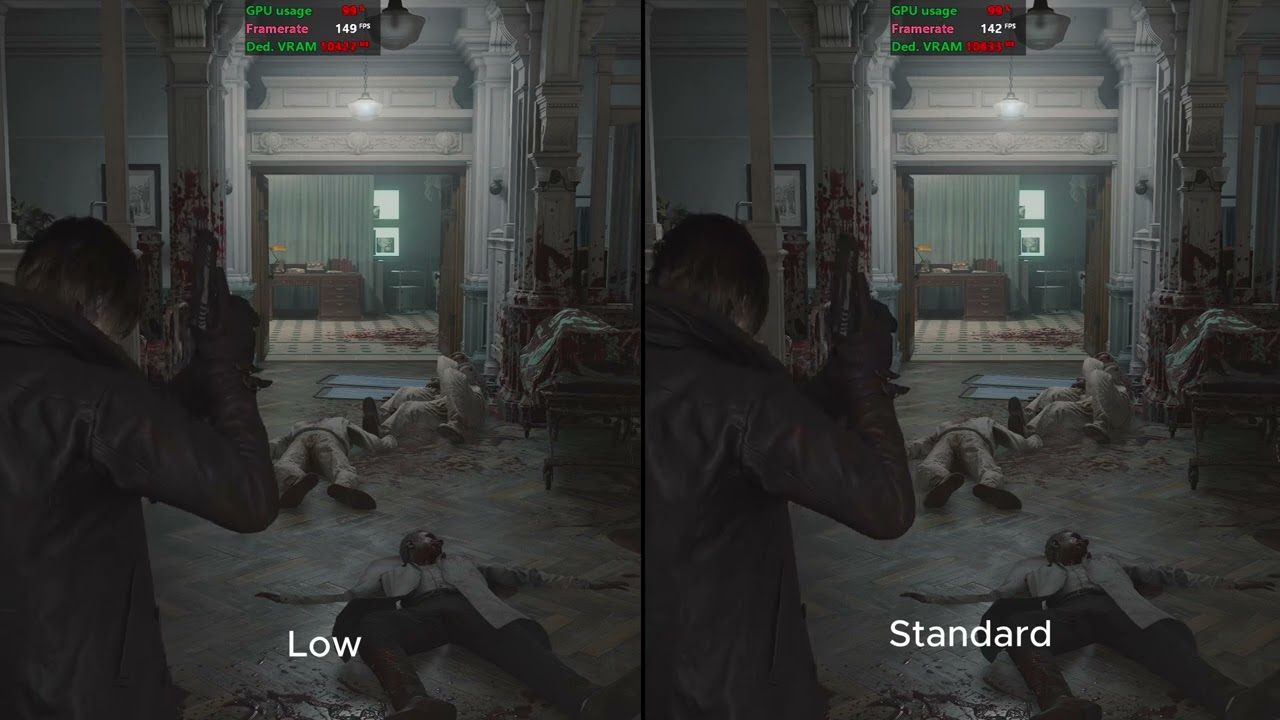
Resident Evil Requiem - Mesh Quality Comparison
timid sky
sharp stump
B/c RT high doesn't use RR
I thought with preset M it should look much cleaner no blur no shimmering, and there is no option to disable RR and enable preset M with PT 🙁
sharp stump
timid sky
I thought with preset M it should look much cleaner no blur no shimmering, and t...
PT mode in the game forces RR on. and so Whenever RR is used it uses that preset instead of DLSS one.
When using RT high it I believe turns off RR off.
Hence why there is no noise / boiling effects.
heady arch
They need to update RR to a newer model
sharp stump
You can try it if you want.
fleet rover
Visually is RT high or path tracing better?
sharp stump
Just replace DLLS with newer ones.
PT is better. For most part.
But uh it has some major boiling / noise when rain and steam combine near fence lol
heady arch
fleet rover
Visually is RT high or path tracing better?
PT is the best if you care about photorealism
sharp stump
I am using Lazorrs mod right now to set Ray bounces to 16 and that seems to downplay the boiling issues a bit.
small igloo
lazorr did a mod?
small igloo
that's awesome, where did he post it?
sharp stump
Right now best thing is he got rid of hero rim light and made it easy to change ray bounces.
In his discord. its mostly beta right now.
quasi lodge
i was debating whether this is the best looking game I have ever seen it's either this or alan wake this def has better character models
sharp stump
There is new RE9 channel.
kindred bough
serene shore
Should be Capcom's denoiser. Totally normal and nothing to worry about on your e...
Thanks for the answer because it's driving me crazy lol
But it's only visible in this game in my case so you're probably right
 desert nebula
Ohhh I need that for the hero rim light
quasi lodge
maybe cp2077 modded and path traced but the chracter models arent as good as either AW2 or this
small igloo
sharp stump
There is new RE9 channel.
thanks
sharp stump
welcome 🙂
small igloo
damn I was waiting for the hero rim lighting mod
signal sky
Yeah I asked for it and he just did it, hes the goat
Welp imma start the game with the 2.2 thingie I cant wait more 
 blazing fiber
where can i dl it?
desert nebula
Does that go in the autorun folder?
desert nebula
Love that guy
 versed magnet
Extra bounces for PT. Small performance hit, less boiling.
quasi lodge
i turned off dof vanilla is so bad
blazing fiber
versed magnet
Extra bounces for PT. Small performance hit, less boiling.
Is there one for RT too?
versed magnet
Yeah. Seems they do DOF before upscaling.
versed magnet
blazing fiber
Is there one for RT too?
Not yet. But I imagine that will come. But don't know anything. Just guessing.
quasi lodge
i mean I think DOF is silly effect in games
blazing fiber
Where can i find this guys mods?
versed magnet
I like it when done well. Same with motion blur.
signal sky
versed magnet
Yeah. Seems they do DOF before upscaling.
Happens at native TAA too
That ain’t it
versed magnet
sharp stump
16 ray bounces for me was only 4 to 6 fps loss
make sure you choose what channels you can see. Gotta unhide them first.
versed magnet
signal sky
That ain’t it
Could be doing anti aliasing after DOF too. So the DOF is trying to blur an image full of aliasing. And then TAA and DLSS can't work with the blurred image.
It's just a guess at why it looks so badly aliased.
signal sky
Could be
blazing fiber
Did you test out "Radiance cache" ? Does it work?
 steady flame
gritty sparrow
https://www.reddit.com/r/nvidia/comments/1rh9dpn/do_not_use_preset_e_with_path_t...
steady flame
gritty sparrow
https://www.reddit.com/r/nvidia/comments/1rh9dpn/do_not_use_preset_e_with_path_t...
The image quality hit is bad enough that I moved down to RT High instead
versed magnet
blazing fiber
Did you test out "Radiance cache" ? Does it work?
In my short testing, it works pretty well as long as you keep the bounces for the RC at 1. Otherwise the lighting gets too flat and bright in certain areas.
Little to no performance cost it seems. Actually performance increase in some areas. Clears of a lot of noise and boiling. But it's not a panacea.
versed magnet
Radiance Cache with these settings seems to work really well:
Bounces: 3
Tile size: 2
Scene scale: 2
Works wonders in indirectly lit interiors, like that warehouse in Racoon City. Haven't yet seen any issues with it.
Don't mind the compression.


 fierce wedge
2.2 per channel (matches SDR) / 2.2 luminosity pre tonemap shadows 85 (current defaults) / 2.2 pre tonemap shadows 95 with lut scaling / srgb with scaling / srgb


 heady arch

Disabling Resizable BAR completely fixed the stuttering issues
I find it weird how that was the cause of this whole issue, re-BAR is supposed to make games perform better, not worse.
If you're on PC and are experiencing stuttering issues in RE9, try disabling Resizable BAR
 X
·
heady arch
fierce wedge
2.2 per channel (matches SDR) / 2.2 luminosity pre tonemap shadows 85 (current d...
X
·
heady arch
fierce wedge
2.2 per channel (matches SDR) / 2.2 luminosity pre tonemap shadows 85 (current d...
What do you have in mind for the banding issue(For NVIDIA cards)?
fierce wedge
heady arch
What do you have in mind for the banding issue(For NVIDIA cards)?
just upgrade the render format from r11g11b10 to r16g16b16a16. not sure if that will actually help though
i couldn't notice a difference in re4
desert nebula
We have a banding issue?
heady arch
Yeah in some cases
versed magnet
versed magnet
Radiance Cache with these settings seems to work really well:
Bounces: 3
Tile si...
Scratch that. Certain locations will crash with radiance cache enabled. 😭
 formal tapir
is my nvidia app bugged or is it just not allowing dlss settings in re9 for everyone
theres nothing under the optimized settings thing
fierce wedge
desert nebula
We have a banding issue?
someone mentioned they saw banding and then someone else said that it was just RR doing that. if its rr doing that then upgrading to rgba16 probably wouldn't make a difference
small igloo
there definitely is banding without RR in some cutscenes
formal tapir
theres a border around every ui item with the mod that i found extremely distracting
blazing fiber
heady arch
What do you have in mind for the banding issue(For NVIDIA cards)?
Theres banding on AMD too. Fix it by using custom grain at 30
fierce wedge
formal tapir
theres a border around every ui item with the mod that i found extremely distrac...
that was fixed yesterday
small igloo
formal tapir
theres a border around every ui item with the mod that i found extremely distrac...
newest file on nexus should fix thatr
 sand pivot
but nexus only shows 1 file uploaded
formal tapir
is there any reason to have that reframework film grain mod with this
fleet rover
sand pivot
but nexus only shows 1 file uploaded
lolol
sand pivot
dont laugh 🙁
fierce wedge
formal tapir
is there any reason to have that reframework film grain mod with this
no
fierce wedge
I just replace the old file with the new one. I usually don't archive
formal tapir
the archive is there i just checked
fierce wedge
ah ok it must do that automatically
sand pivot
really? i only see one
formal tapir
it says file archive under it click that it takes u to the old one
sand pivot
ok now i see it
fierce wedge
you have to click archive
sand pivot
yes yes
formal tapir
if ur into that for whatever reason
sand pivot
you are correct
i got OCD!!
i didnt notice that much film grain until you took it off
that was nasty shit!
Musa the option you have as custom grain, is that like a happy medium you set up?
 oak maple
fierce wedge
2.2 luminosity / 2.2 luminosity with shadows 85 / srgb / srgb with lut scaling
oak maple
fierce wedge
2.2 luminosity / 2.2 luminosity with shadows 85 / srgb / srgb with lut scaling
very nice
 formal tapir
that grass needs some touching i fear
oak maple
fierce wedge
2.2 per channel (matches SDR) / 2.2 luminosity pre tonemap shadows 85 (current d...
yeah srgb with scaling is the ticket
dense sapphire
Musa do you know if there's a sharpening filter active when using dlss? Seems like there is one when using TAA, but I can't tell if it's active when using dlss
oak maple
it's insane how much easier life would be for artists if they just used the right encoding in SDR
coarse kettle
Would you say for someone that doesnt understand HDR the other one is better?
sharp stump
formal tapir
is my nvidia app bugged or is it just not allowing dlss settings in re9 for ever...
The nvidia drivers 595.59 had the profile for nvidia but it was withdrawn to too many issues.
fierce wedge
coarse kettle
Would you say for someone that doesnt understand HDR the other one is better?
this just adds new options, defaults are the same as before
so if you don't change any of the new sliders then its the same as before
 dire helm
What is the default dlss sr preset in this game?
fierce wedge
signal sky
There is 2 match sdr buttons
fuck I messed up
both are different
just name is same
fierce wedge
ya giving them the same name probably breaks it
TEST BUILD
- adds lut scaling sliders
- adds preserve shadow detail button
signal sky
Ok working now
fierce wedge
I should probably add a post tonemap flare slider
signal sky
Match SDR // Preserve Shadow Detail


I think match sdr looks best
But the new option is cool too, not sure
its quite different
 analog cave
fierce wedge
and another one to 2.2 per channel
analog cave
fierce wedge
and another one to 2.2 per channel
Isn’t 2.2 per luminance more accurate?
fierce wedge
analog cave
Isn’t 2.2 per luminance more accurate?
channel is accurate to how it would look in sdr on a 2.2 display
analog cave
fierce wedge
channel is accurate to how it would look in sdr on a 2.2 display
Ah I see
fierce wedge
but it shifts hues and smears colors
sand pivot
when i click preserve shadow detail. it crushes the blacks on me :/
signal sky
I think Imma go match SDR yeah
unique snow
finished the game 
fierce wedge
sand pivot
when i click preserve shadow detail. it crushes the blacks on me :/
you have to toggle hdr off and on again since it moves the sdr eotf emulation slider
sand pivot
oh right! thanx
teal mountain
fierce wedge
**TEST BUILD**
- adds lut scaling sliders
- adds preserve shadow detail button
how do you personally prefer playing, out of curiosity?
fierce wedge
teal mountain
how do you personally prefer playing, out of curiosity?
so far I've liked the defaults but with game brightness 100
so 85 shadows and 2.2 luminosity
still messing around with flare and scaling stuff
brittle badge
when you say game brightness 100 do u mean the 3rd hdr ingame slider?
fierce wedge
i only play at night
game brightness 100 and all effects off
defaults (2.2 luminosity + shadows 85) / match sdr / preserve shadow detail / srgb


game brightness 100 and all effects off
defaults (2.2 luminosity + shadows 85) / match sdr / preserve shadow detail / srgb


 signal sky
fierce wedge
i only play at night
signal sky
fierce wedge
i only play at night
Yeah me too. I guess my eyes are tired cause I use 203 
fierce wedge
signal sky
Yeah me too. I guess my eyes are tired cause I use 203 <:kekpepehands:1409649023...
are you on an oled monitor
blazing fiber
300, like the game defaults to, looks good to me.
stray finch
fierce wedge
i only play at night
we are kindred spirits gaming in the dark
fierce wedge
gritty sparrow
I am on a C2 using 203 as well. Is that correct?
there is no correct, it's just preference
only thing wrong would be game brightness higher than peak
that would be less range than sdr
shadows 50 / pre tonemap shadows 85 (old defaults) / post tonemap shadows 85


 signal sky
fierce wedge
are you on an oled monitor
signal sky
fierce wedge
are you on an oled monitor
Oled TV yeah LG G5
 woeful shadow
I rolled back drivers but can’t use preset L or M anymore. Is there a way to get around this or do I need to wait for nvidia to come out with a non broken driver?
signal sky
fierce wedge
game brightness 100 and all effects off
defaults (2.2 luminosity + shadows 85) /...
Yeah match sdr consistently looks the best on my screen
fierce wedge
203 on a tv is probably less fatiguing than a monitor
signal sky
fierce wedge
shadows 50 / pre tonemap shadows 85 (old defaults) / post tonemap shadows 85
Here second one too
fierce wedge
unless you're really close to it
signal sky
fierce wedge
203 on a tv is probably less fatiguing than a monitor
Yeah its pretty decent
sand pivot
i thought the in game brightens slider was disable with Reno
signal sky
I do suffer from eye fatigue sadly tho
fierce wedge
sand pivot
i thought the in game brightens slider was disable with Reno
it is
the renodx brightness slider is what I'm talking about
polar summit
fierce wedge
shadows 50 / pre tonemap shadows 85 (old defaults) / post tonemap shadows 85
post tonemap looking good
heady arch
fierce wedge
shadows 50 / pre tonemap shadows 85 (old defaults) / post tonemap shadows 85
the difference is so minor that you won't notice during gameplay. Am i Missing something ?
fierce wedge
meant to clean up dark scenes
fierce wedge
heady arch
the difference is so minor that you won't notice during gameplay. Am i Missing s...
what display are you using
polar summit
Peak 1k and Trueblack 400 look different in shadows as well keep in mind
signal sky
fierce wedge
what display are you using
Yeah I sent this comparissons to people with LCD and they were like… huh?
I told them to go to their oled phones and they were like AHHHHHH
fierce wedge
ya difference is pretty noticeable on my oled
signal sky
Yep. OLED magic probably
polar summit
much more noticeable with TB400
Still an improvement with with Peak 1k tho
probably needs higher shadows still
fierce wedge
ya 1000 mode is shit on most oled monitors
tvs are fine ofc
the abl is ass on my g80sd
polar summit
ye it differs per model
Dimming is a non issue in this tho
but it also struggles with dark scenes
I ended up with shadows at 97 to not have it look super crushed in peak 1k
lol
heady arch
fierce wedge
what display are you using
PG32UCDM
 smoky kraken
oh my freaking god i've been wondering why the game looked sort of blurry since yesterday and just saw it had set itself to 1920x1080 resolution lmfao. i've been easily playing like this for 10 hours now.
heady arch
time to replay lol
smoky kraken
i hate it so much when games randomly reset their settings
heady arch
Only thing that gets reset for me is DLSS Quality back to Performance
heady arch
fierce wedge
the abl is ass on my g80sd
What mode are you using ? I'm told that the most accurate HDR mode for my display(PG32UCDM) is the console HDR which is like the HGiG from TVs
coarse kettle
smoky kraken
oh my freaking god i've been wondering why the game looked sort of blurry since ...
This happened to me atleast 3 times
smoky kraken
unique snow
DLSS settings always reset back to performance
yeah but it was dlss performance AND 1080p
so i've been playing at 540p internally on a 2160p screen
sweet estuary
fierce wedge
and pre tonemap default to 50
is the new version out? i dont see it in pinned or nexus
polar summit
heady arch
What mode are you using ? I'm told that the most accurate HDR mode for my displa...
the only accurate mode is TB400
analog cave
signal sky
That’s mega low I’m surprised
He plays true black 400 
analog cave
So 400 peak 100 paper white
 icy arrow
sorry to change the subject but I think the best FOV mod so far just released https://www.nexusmods.com/residentevilrequiem/mods/99?tab=description

Does not mess with cutscenes or interaction markers
heady arch
polar summit
the only accurate mode is TB400
But you lose Highlights, right ?
polar summit
heady arch
But you lose Highlights, right ?
yes
if you wanna keep the highlights then yea console hdr is the best
without dynamic brightness boost
analog cave
heady arch
But you lose Highlights, right ?
Yeah but way less ABL
heady arch
So what's the best to use with RenoDX ?
analog cave
heady arch
So what's the best to use with RenoDX ?
Its preference
heady arch
For a game like Requiem
sweet estuary
The preserve shadow detail option turns off word emulation
heady arch
which is mostly dark
sweet estuary
I assume that that’s by design?
serene shore
fierce wedge
**TEST BUILD**
- adds lut scaling sliders
- adds preserve shadow detail button
is this nexus ready ?
 finite portal
icy arrow
sorry to change the subject but I think the best FOV mod so far just released ht...
finite portal
icy arrow
sorry to change the subject but I think the best FOV mod so far just released ht...
This is perfect, so far I was using the RE Requiem FoV modifier set to 1.2 but this is even better. thx
fierce wedge
serene shore
is this nexus ready ?
not yet, still working on stuff
fierce wedge
sweet estuary
I assume that that’s by design?
ya
desert nebula
icy arrow
sorry to change the subject but I think the best FOV mod so far just released ht...
Looks good. Gonna try this out
fierce wedge
I'll have a new build in a minute that should maek the warning text dynamic
polar summit
heady arch
which is mostly dark
Peak 1k modes (console HDR) can also struggle with dark scenes
icy arrow
finite portal
This is perfect, so far I was using the RE Requiem FoV modifier set to 1.2 but t...
only tiny nitpik is that have to crouch or aim after changing the FOV values for it to take effect
unique snow
icy arrow
sorry to change the subject but I think the best FOV mod so far just released ht...
nice, for the 2nd playthrough 
finite portal
woeful shadow
I rolled back drivers but can’t use preset L or M anymore. Is there a way to get...
It's locked to older non transformer models if you use path tracing, if not you should be able to enforce M and L
polar summit
polar summit
Peak 1k modes (console HDR) can also struggle with dark scenes
Personally I do prefer it in most games still 🤷♂️
heady arch
polar summit
Personally I do prefer it in most games still 🤷♂️
Which monitor ?
polar summit
Same as yours
heady arch
Ah nice, do you mess with RenoDXs settings or leave everything at default ?
I'm playing with ''Match SDR'' and I'm very pleased with the results
knotty apex
this is like the perfect game to use your 1000 mode in though?
 mighty kelp
After 10 hours this game could be a new path tracing reference
 green raven
heady arch
What mode are you using ? I'm told that the most accurate HDR mode for my displa...
green raven
heady arch
What mode are you using ? I'm told that the most accurate HDR mode for my displa...
Basically you have to chose between 400 True Black (most accurate) and peak 1000 (better highlights but strong ABL)
heady arch
It's sad that monitors progress way too slow..Not even TB600 in 2026..
unique snow
knotty apex
this is like the perfect game to use your 1000 mode in though?
using EOTF boost on my msi, it looks amazing!
green raven
heady arch
It's sad that monitors progress way too slow..Not even TB600 in 2026..
Yeah, basically nothing new since the first Alienware QD Oled monitor
heady arch
and devs don't give a f*ck most of the time, thank God we have Musa. Also DF's Alex doesn't care about HDR, at all
unique snow
in the end DF needs to make money, and doing HDR content is probably not worth it (yet)
green raven
While on TVs the evolution is insane
sonic musk
dense sapphire
Musa do you know if there's a sharpening filter active when using dlss? Seems li...
DLAA (with preset E) looks softer than TAA, so I recon no
heady arch
unique snow
in the end DF needs to make money, and doing HDR content is probably not worth i...
Lineman does some HDR content though
sonic musk
oak maple
yeah srgb with scaling is the ticket
The milky shadows just fit the aesthetic much better I think
sharp stump
smoky kraken
yeah but it was dlss performance AND 1080p
yeah I had that happened to me too.
fierce wedge
fierce wedge
game brightness 100 and all effects off
defaults (2.2 luminosity + shadows 85) /...
certain areas are still pretty low contrast even with 2.2
unique snow
heady arch
Lineman does some HDR content though
yeah sometimes
fierce wedge
the gap between alan wake 2 and the rest of the industry is still clear
heady arch
fierce wedge
the gap between alan wake 2 and the rest of the industry is still clear
AW2 has the best HDR ?
fierce wedge
heady arch
AW2 has the best HDR ?
subjectively I think it has the best and most interesting looking color grading and also has the best hdr tech implementation wise as well
heady arch
Who's the guy behind it ? The one that put HDR in Control and Alan Wake remastered ?
fierce wedge
heady arch
Who's the guy behind it ? The one that put HDR in Control and Alan Wake remaster...
Pumbo on this server
polar summit
fierce wedge
subjectively I think it has the best and most interesting looking color grading ...
Have you tried Hellblade 2?
Thought it looked pretty good as well
fierce wedge
polar summit
Have you tried Hellblade 2?
i played like 5 seconds and got bored
polar summit
Understandable reaction
fierce wedge
the overdone facial expressions annoy me
polar summit
The game itself was quite disappointing coming from the first one
heady arch
It's one of the most(if not the most) impressive UE 5 techs out there
polar summit
but i thought it looked fantastic
sand pivot
and she got an award for it ahaha
heady arch
Only The Coalition with the upcoming Gears can come close or even surpass it
oak maple
sonic musk
The milky shadows just fit the aesthetic much better I think
it's less that it's the aesthetic and more that it's mathematically accurate. Correcting the gamma mismatch is ultimately a hack, it's just matching SDR with the hope that the game was successfully designed around the actual problems caused by the mismatch.
but the game has crushing issues with 2.2
 gritty pond
fierce wedge
certain areas are still pretty low contrast even with 2.2
gritty pond
fierce wedge
certain areas are still pretty low contrast even with 2.2
there's some particularly dark areas where I found 2.2 looked kind of ass. I toggled Lilium's gamma fix on a couple of times and wasn't feeling it, so ended up completing the game just using vanilla HDR because I didn't want to wait for Reno or use ongoing WIP builds, but I'm keen to check it out on my "insanity" difficulty run. This is a vanilla screenshot of one such area that looked awful with 2.2 fix to me, but I didn't take any comparisons, unfortunately
 fierce wedge
gritty pond
there's some particularly dark areas where I found 2.2 looked kind of ass. I tog...
fierce wedge
gritty pond
there's some particularly dark areas where I found 2.2 looked kind of ass. I tog...
how far into the game is that
gritty pond
about 1/3
fierce wedge
gritty pond
about 1/3
how long from when you get the requiem gun
I'm early into the care center part
gritty pond
it's the Grace section immediately following the care facility
heady arch
gritty pond
there's some particularly dark areas where I found 2.2 looked kind of ass. I tog...
Yeah, it looks bad even at the beggining when you first encounter the big monster and you see the dark area with the red light
That's the only spot I've found that it didn't look good
But maybe it looks bad because PT's light bounces aren't enough and make that particular scene look bad
fierce wedge
TEST BUILD
- made warning text dynamic
- add post tonemap flare slider
- new defaults
maybe just no 2.2 emulation with scaling turned up should be the defaults
finite portal
Thanks, I think RE Requiem is one of the best AAA releases in a long time mod there are still things that would annoy me without mods. RenoDX and people doing releases for all those games is the best thing since sliced bread
 chilly gyro
Daniel Owen droped a video showing anywhere from 20-40 percent buy rolling back the driver on both 5000 and 4000 series cards
heady arch
I thought 50 series are not affected
chilly gyro
He showed 20 percent on a 5090 in opening scene
chilly gyro
Wonder if ai wrote the driver
unique snow
with these things I always wonder if the old drivers are just not "rendering" some things correct or at all
heady arch
They don't care, data center is the way now
unique snow
in any case the perf on my 5080 with 595 was excellent
don't really want to test anything else
heady arch
I'm playing with 591.86 on a 5090, plays fine with some very small hitches here and there
unique snow
no hitches here, I just ran out of vram and some point
and did what musa did and turned down shadows from max to high
but this would not be an issue on a 5090 of course
unique snow
I use reframework (obvious) and rebar is on 
heady arch
gamepad or m/k ?
gritty pond
rebar isn't enabled for Requiem, even with the latest pulled drivers and its game profile page, so you'd have to be forcing it globally for it to be active and you shouldn't be doing that anyway
unique snow
oh ok then I don't have it on I guess
 glossy quail
no stutter here on a 5090 as well. i had some when i was using frame gen, but after disabling it and played 4 hours i've had 0. seems like it's either FG or reflex causing it in my experience. or maybe how those things interact with various fps caps
unique snow
<- FG 2x (240hz monitor)
gritty pond
I had a stutter with FG as well, so I ended up just capping at 60FPS without it instead and then it was smooth sailing
glossy quail
it's very repeatable for me. i can play the opening section with FG on and i'll get stutter. disable it and i won't
unique snow
5090 can do PT with 60+ at least, so not too bad
glossy quail
my display is 120hz so not a huge point in enabling FG with a 5090. i'm at like 150 fps in interiors without it
unique snow
with dlss of course
heady arch
It's not really noticeable for me, no gameplay breaking by any means
I'm gonna try install the latest REFramework and test the new FoV mod
unique snow
one of the better PC releases tbh, shame that apprently both nvidia and amd fucked their driver releases lol
glossy quail
no fov slider is the biggest issue
i saw lyall mention they might try to get an fov mod that doesn't affect cutscenes/interaction prompts working
unique snow
glossy quail
no fov slider is the biggest issue
yep
unique snow
glossy quail
i saw lyall mention they might try to get an fov mod that doesn't affect cutscen...
we have a mod now
this does what you want
Features
Adjustable FPS/TPS FOV sliders, with separate sliders for ADS (aiming).** Does not affect cutscenes or interaction markers.**
 alpine wigeon
Yes ! Got tired of switch on and off, especially with UW on top
formal tapir
thank god i was getting really motion sick but the default reframework one too busted to be actually useful
unique snow
yeah
chilly gyro
Any else get constant stutter when zooming in on scope ?
unique snow
Capcom loves to render the game twice with scopes in re4
maybe they do it again
that would effect performance
iirc..
fierce wedge
sdr eotf emulation off
lut scaling off / on


scene doesn't need scaling but shows it's at least not crushing
formal tapir
most confusing thing is why render inventory items without upscaling
sweet estuary
fierce wedge
maybe just no 2.2 emulation with scaling turned up should be the defaults
idek what a LUT is but i assume its baked in and not an option we have to turn on or off
heady arch
unique snow
https://www.nexusmods.com/residentevilrequiem/mods/99?tab=description
What's the ''correct'' values for 4K ?
fierce wedge
sweet estuary
idek what a LUT is but i assume its baked in and not an option we have to turn o...
its a texture that has color grading in it
if you turn off a lut you lose the grading
sweet estuary
heady arch
What's the ''correct'' values for 4K ?
depends on what you are comfortable with
sweet estuary
fierce wedge
if you turn off a lut you lose the grading
ah so its default with the mod
i was wondering why there wasnt a LUT scaling mod
fierce wedge
the game uses luts for color grading
heady arch
sweet estuary
depends on what you are comfortable with
I think arround 65(Default is 45) is good
signal sky
fierce wedge
maybe just no 2.2 emulation with scaling turned up should be the defaults
Ain’t 2.2 more accurate tho
signal sky
Hey I do
blazing fiber
This is so confusing to me. Is the default settings on the current build the way th devs intended it to look/how its supposed to look?
signal sky
blazing fiber
This is so confusing to me. Is the default settings on the current build the way...
That’s match sdr
Always
fierce wedge
blazing fiber
This is so confusing to me. Is the default settings on the current build the way...
current settings raise shadows compare to match sdr
heady arch
''Match SDR'' = What the devs want you to see
 formal grotto
I feel sometimes to be honest that I also get black crush with the old defaults too in some cutscenes for example, but the game is supposed to be dark and colors and highlights really pop a lot...
You have a flashlight at all times which fixes gameplay concerns
formal tapir
i think with the mod the blacks were really crushed on some of leons parts
colors i dont think pop that much at all theres no problem there
signal sky
I mean if it’s how it looks on sdr then that’s how the game looks
heady arch
And PT's light bounces are kind of limited which can make certain scenes look ''bad''. Chasing the ''perfect result'' here can lead to frustration
formal grotto
Would need to tinker with ray length or something
formal tapir
the pt was way too noisy at any upscaling level on 1440p, looks good now with the mod from ultra+ and forcing rr globally to preset d which isnt ideal but will have to do as a temporary fix
and by noisy i mean like everything had that dlss 3 boiling effect to it
formal grotto
The flashlight in a few later parts has a ridiculous reach suddenly, 2m or something which can get annoying if your room isnt pitch black for sure
signal sky
formal tapir
the pt was way too noisy at any upscaling level on 1440p, looks good now with th...
RR preset D is already the default no need to force anything
fierce wedge
2.2 by luminosity + post tonemap shadows 85 / srgb with scaling / srgb


 formal tapir
signal sky
RR preset D is already the default no need to force anything
formal tapir
signal sky
RR preset D is already the default no need to force anything
i had it set globally to most recent so
formal tapir
idk it was in here somewhere up
signal sky
autumn spruce
Looks like theres been few reframework updates today
signal sky
Get resident evil role
signal sky
autumn spruce
Looks like theres been few reframework updates today
Yeah i updated nothing really major
autumn spruce
Yeah i looked also, didnt seem like much
heady arch
You update by just replacing the dll, right ?
fierce wedge
srgb with scaling / 2.2 luminosity / 2.2 luminosity + post tone map shadows 85


 formal tapir
i think the 80 shadows might be the biggest problem for me
custom grain is great the default grain looked more like a graphical error than simulated film grain
 scenic flower
The new reframework nightly finally works on epic
Awesome job with the mod. Look fantastic
fierce wedge
I think defaults are just gonna be 2.2 luminosity + 85 shadows
the darker parts are too dark with just 2.2 luminosity
and the parts that aren't very dark can be washed out without 2.2
signal sky
Yeah to me it looks best at 50 shadows but maybe some future areas could be bad at that
 thorny grotto
fierce wedge
I think defaults are just gonna be 2.2 luminosity + 85 shadows
thorny grotto
fierce wedge
I think defaults are just gonna be 2.2 luminosity + 85 shadows
tbh i even tried 70/75 and 85 seems to be just better to me
blazing fiber
I think the default settings of the current build looks fantastic
 ivory walrus
fierce wedge
ivory walrus
fierce wedge
Nexus Mods :: Resident Evil Requiem
Rewrite of the game's post processing shaders to fix errors in handling of HDR. This includes 2.2 EOTF emulation, adjustments to tonemapping, fixes for brightness controls. Other enhancements include
autumn spruce
I still dont get why the hell Leon’s hair turns dark brown/black once u hit the city
ivory walrus
What could be causing this?
foggy tide
fierce wedge
[updated](https://www.nexusmods.com/residentevilrequiem/mods/20)
seems like the file timestamp was still from yesterday?
 heady arch
autumn spruce
I still dont get why the hell Leon’s hair turns dark brown/black once u hit the ...
heady arch
autumn spruce
I still dont get why the hell Leon’s hair turns dark brown/black once u hit the ...
PT issue?
autumn spruce
heady arch
PT issue?
Using RT High, im on a 9070 XT so no PT
heady arch
I remember Geralts hair becoming black in some scenes after the RT patch
autumn spruce
heady arch
I remember Geralts hair becoming black in some scenes after the RT patch
Wut, that’d melt my brain lmao
fierce wedge
foggy tide
seems like the file timestamp was still from yesterday?
their cdn is trash you might have to open in private browsing to see it update
foggy tide
fierce wedge
their cdn is trash you might have to open in private browsing to see it update
yea, incognito mode works. Thanks
heady arch
So no more "Match SDR" ?
fierce wedge
heady arch
So no more "Match SDR" ?
that button is still there
autumn spruce
fierce wedge
their cdn is trash you might have to open in private browsing to see it update
even funnier is I currently see this, 2028 lol
 ivory walrus
Its unplayable right now. Never seen this before
heady arch
fierce wedge
that button is still there
Should I use the new defaults or continue with the "Match SDR"?
fierce wedge
heady arch
Should I use the new defaults or continue with the "Match SDR"?
I like new defaults
also depends on accuracy of your display
like aw3423dwf crushes the shit out of blacks
heady arch
PG32UCDM with console HDR
autumn spruce
not sure whether you'll find urself updating again as u go further along in the game, but im curious how you think it looks when you see later parts/areas
I was originally playing the beginning in SDR until u first released the initial version, HDR with the mod way better
heady arch
"Basement" looks fine with match SDR so far
fierce wedge
autumn spruce
not sure whether you'll find urself updating again as u go further along in the ...
updating never ends
autumn spruce
lol i figured, but i know some games only need a couple updates then done, think Ritsu did 1-2 versions for Nioh 3 before they uninstalled lol
fierce wedge
resident evil is a higher tier of game than nioh 3
autumn spruce
true
fierce wedge
I constantly update the re mods
I have to go back and rewrite the re7/2/3/village mod at some point
well not rewrite
fierce wedge
since I already did a rewrite a few months back
fierce wedge
brittle badge
I'll be honest on path tracing E looks better than the default D
usually volumetric get messed up by E
autumn spruce
this games got me wanted to go back to RE4 remake and knock out more achievements i never completed, maybe village too
i also never played RE2 on PC, was on console back when i bought that
might need to get on sale
brittle badge
I've played the entire grace to rpg and there's boiling in volumetric fog in light, but like way less than what u get on D
 open wren
brittle badge
I'll be honest on path tracing E looks better than the default D
open wren
brittle badge
I'll be honest on path tracing E looks better than the default D
this is just not true, there is significant ghosting with preset E. I posted a video in here earlier showcasing it, and other people have posted comparisons recently showcasing that its worse than D.
yeah, there's less boiling in areas, but there is really bad ghosting in areas too
each preset has tradeoffs
Capcom chose preset D due to the ghosting issue
 lunar bridge
I'll take the no ghosting
Im also upscaling to 4k so the PT boiling issue probably isn't as bad
Using DLSS quality
open wren
#1475306538481483920 message
here's a video I posted showcasing the very bad ghosting with preset E
and this is just in one area
it happens in other areas throughout the game
sweet estuary
lunar bridge
Im also upscaling to 4k so the PT boiling issue probably isn't as bad
This is dlss quality
autumn spruce
Musa, u still like custom film grain on 50 if u stick to the new defaults? I think i was playing with 30 on last build. i just normally turn it off on every single game
forgot what u said the custom film grain achieves or helps with if anything
open wren
yeah both presets have issues, you are going to have to cope with either boiling or ghosting. I'd rather take the boiling. the ghosting is extremely bad with preset E
its damn near broken lol
signal sky
E is always broken Im baffled at how so many people recommend it constantly
fierce wedge
autumn spruce
Musa, u still like custom film grain on 50 if u stick to the new defaults? I thi...
I like it at 50
blazing fiber
autumn spruce
forgot what u said the custom film grain achieves or helps with if anything
In this game it helps with color banding
signal sky
50 is nice
fierce wedge
oh right I need to add the fp16 upgrade option
signal sky
I did see some extreme banding btw
Pretty atrocious looked like a million color rainbow
autumn spruce
what should i look at to see if i can notice the banding? where does it usually occur?
blazing fiber
signal sky
I did see some extreme banding btw
custom grain at 30 helps
signal sky
I have it at 50
signal sky
autumn spruce
what should i look at to see if i can notice the banding? where does it usually ...
You will notice it
autumn spruce
cuz might bump back to 50 then, im trying at 30 bc that fuzziness still too much for me around 50 personally
signal sky
I saw it in the first hour of the game
autumn spruce
oh, im way past that lol ok
blazing fiber
autumn spruce
what should i look at to see if i can notice the banding? where does it usually ...
You will see it around the flashlight illuminance
autumn spruce
Leon if he went emo lol, small snippet i took of just his head to avoid showing where i am at
 brittle badge
open wren
yeah both presets have issues, you are going to have to cope with either boiling...
brittle badge
open wren
yeah both presets have issues, you are going to have to cope with either boiling...
I actually notice no ghosting, is it fps dependant?
cause mine runs at a stable 228 fps locked
signal sky
brittle badge
I actually notice no ghosting, is it fps dependant?
There is no ghosting at all
A lil in rain particles if any
Probably res dependent tho
signal sky
At least in what I played
 arctic solstice
brittle badge
E is perfect for me
arctic solstice
brittle badge
E is perfect for me
How should my settings look for Preset E
I use the override?
never used NVPI
brittle badge
nvidia profile inspector, just drag the resident evil 9 exe onto it and force preset E
signal sky
People still coping with E
arctic solstice
Meh mainly because youtuber did some testign with it
but we all get our own resutls ig uess
lunar bridge
On these newer qdoled monitors the only way blacks look good is to use the preserve shadow detail option
That I've found anyway
Not that these are great monitors for HDR
Curious if just turning HDR off with these are the better option
arctic solstice
brittle badge
nvidia profile inspector, just drag the resident evil 9 exe onto it and force pr...
No DLL override?
gritty pond
E has its own issues, it's a pick your poison deal and not a clear cut best option, but whatever works for people
I completed the game with vanilla HDR and was happy with it, but man, reno looks good
 arctic solstice
What's the issues that E has faced?
what would make it worse than the wall moving>
I just want to make a decision based on what looks best and least distracting
gritty pond
unique snow
heady arch
What's the ''correct'' values for 4K ?
personal preference
brittle badge
oh I had none of these ghosting issues on E
lunar bridge
What are people using as an indicator to see if E is activated?
coarse kettle
gritty pond
in 4k isnt even close to this
brittle badge
I think it's res dependant tbh
arctic solstice
gritty pond
I am not playing Grace as third person
I am playing as the intended first person any glitches there?
coarse kettle
lunar bridge
What are people using as an indicator to see if E is activated?
nvidia overlay
lunar bridge
The Nvidia app?
thorny grotto
lunar bridge
What are people using as an indicator to see if E is activated?
It depends, did you use NPI?
lunar bridge
I did
kind fossil
lunar bridge
What are people using as an indicator to see if E is activated?
I'm using the reg tweak which shows it in bottom left
you can turn it on and off with this
lunar bridge
Ahh ok I've always seen that I just never used it
So adding it to the registry keeps it on indefinitely
kind fossil
Yeah
 fierce wedge
 gritty pond
same lol
sand pivot
had to use R11 .....
lunar bridge
@sand pivotthe new test build?
coarse kettle
sand pivot
this is happening with new reno add on
i confirm
gritty pond
@fierce wedge new option seems busted on the menu, even after toggling/restarting game
coarse kettle
and reseted
signal sky
Nvidia gpu or amd?
sand pivot
lunar bridge
<@841807840892682290>the new test build?
yes
coarse kettle
nvidia