#Crimson Desert - CHECK PINS FOR ADDON
1 messages · Page 24 of 1
 fresh smelt
 crude marsh
its a bit too night tbh
 upper sun
I feel like I can see too much in the dark SUS~1 i gotta check next time its night outside fo the city

 flint moss
Thats what I've thought too, didn't think it affected blacks so im confused rn
 fossil scroll
did someone say that there is a fix for dlss4.0 with the black flickering? If so where can this be found?
fresh smelt
crude marsh
its a bit too night tbh
i like it, gives me dragons dogma vibes
flint moss
Btw anyone here have a mso qd oled and tried eotf boost?
 stone comet
yummy though doing this shit at night might be a bit rough without autoexposure LMAO


 lucid thorn
Does that recommended preset work on not max settings?
Wasn't that a thing that it didn't?
 fresh field
will my lantern still blind me when used at night in close quarters?
stone comet
nope
fresh field
every wall like a focusing mirror when you get close to one with lantern out lol
 quiet copper
fresh smelt
man night is actually night now with the recommended preset
quiet copper
fresh smelt
man night is actually night now with the recommended preset
what's this overlay with render latency? looks nice and compact
stone comet
though everything else is considerably darker
#1469072401450012774 message
#1469072401450012774 message
 small ferry
not sure if these are related but i’ve got some very reflective highlights and some “sparkling” shadows. what might cause this?
 analog root
Why is the sky so bright in my game 😭

 digital elbow
its a feature
 tawny raptor
Question.. I tried turning off HDR after trying this mod and my game is now entirely oversaturated and far too dark. HDR off in game and on monitor/windows. Kind of an HDR noob, having trouble finding answers on google. Anyone know what's going on?
 upper sun
i think its when theres like fog or mist it goes crazy xD had that earlier on a mountain
lucid thorn
analog root
Why is the sky so bright in my game 😭

 paper heron
which is better to you guys


 karmic quest
fresh smelt
man night is actually night now with the recommended preset
karmic quest
fresh smelt
man night is actually night now with the recommended preset
Now I will need to hold my lantern up all night haha
 worn ibex
paper heron
which is better to you guys
worn ibex
paper heron
which is better to you guys
First
lucid thorn
crude marsh
so you guys want more lantern huh
How do I make my game this dark 😂
stone comet
new reno
 drowsy fiber
That's how it should work xD
 steel wolf
crude marsh
so you guys want more lantern huh
steel wolf
crude marsh
so you guys want more lantern huh
What does it look like not held? Because combat would be tricky if its not bright enough
quiet copper
Anyone can explain why game always recompiles shaders when i just replaced reno addon file?
stone comet
well no because everyone would be blind lmao
fresh field
someone go check out the house at howling hill. before when i walked into it was like the two side rooms had their own suns in them
 upbeat magnet
Anything I need to do to in-game hdr settings? set to default? still tune max brightness?
lucid thorn
stone comet
new reno
Oh it just makes it darker? I'm down!
stone comet
should be default yeah
 vivid iris
lucid thorn
Oh it just makes it darker? I'm down!
vivid iris
lucid thorn
Oh it just makes it darker? I'm down!
auto exposure adjustments
stone comet
lucid thorn
Oh it just makes it darker? I'm down!
it fixes the insane autoexposure but at the expense of being able to see properly
 narrow frost
Vanilla Exposure (Left) & Improved Exposure (right).
Same frame, 3:16 am.


 viscid wedge
upbeat magnet
Anything I need to do to in-game hdr settings? set to default? still tune max br...
viscid wedge
upbeat magnet
Anything I need to do to in-game hdr settings? set to default? still tune max br...
the only in game HDR related slider you can play with is the UI brightness
lucid thorn
What is auto exposure doing 😂
crude marsh
this is 10x light btw
 stone comet
Wish the game wasnt so unhinged so we could adjust autoexposure
fresh field
rename it to over exposure
crude marsh
I need to..... do this more selectively
lucid thorn
crude marsh
this is 10x light btw
It's perfectly dragons dogma
crude marsh
yeah I think this will work, its just finding what is what
lucid thorn
I know I've said it before, but the work you guys do is incredible
fresh smelt
is there a better rt mod here btw?
i couldnt find it
 deft pulsar
ok I reached 11 pm in game. This shit looks 10x better even with RR off, amazing job @faint bobcat thanks a lot
paper heron
im not sure how this looks in sdr since i play with hdr. reno at night
 small ferry
paper heron
im not sure how this looks in sdr since i play with hdr. reno at night
small ferry
paper heron
im not sure how this looks in sdr since i play with hdr. reno at night
this is how mine looks. as a picture it’s wonderful but some of the darker areas are too dark. maybe we need to lower contrast?
analog root
crude marsh
so you guys want more lantern huh
 deft pulsar
on vs off, lighting ultra, RR off


 mortal wolf
fresh smelt
man night is actually night now with the recommended preset
mortal wolf
fresh smelt
man night is actually night now with the recommended preset
finally playable imo
karmic quest
rain again, did they incrase the probability of it or smth

but really liking the auto exposure
fresh smelt
mortal wolf
finally playable imo
10x better than it was when i played last a couple of days ago
 supple summit
i tweaked the settings because my monitor is not true hdr but it looks way better compared to vanilla, thanks renodx
 karmic quest
thought I will hate it
flint moss
small ferry
this is how mine looks. as a picture it’s wonderful but some of the darker areas...
I adjusted adaptation contrast down a few notches, helped a lot imo
supple summit
every panel is different, you need to finetune the settings imo
 lucid thorn
karmic quest
might start looking for horror mods.
lucid thorn
karmic quest
might start looking for horror mods.
Bloke in front of you could pass as a horror monster with that lighting

 crude marsh
time to restart the game 100 times wooo
fuck the loading screen
longest minute of my life
karmic quest
Waiting for a mod that cuts the loading screen
supple summit
i just want to be able to sleep again, my char hasn't slept for over 30 ingame days now
lucid thorn
crude marsh
fuck the loading screen
It's gotta be more animation than loading time
 sick monolith
@lucid thorn play this with mpv player. u must see the top left side of the shadows. if not, it means you are crushing
karmic quest
Im falling in love with night rain
crude marsh
why can't I change the intensity of the moon tho
lucid thorn
sick monolith
<@147187969994784768> play this with mpv player. u must see the top left side of...
I can try true black or 1000
sick monolith
use whatever lets you see all the shadows
 sick monolith
lucid thorn
I can try true black or 1000
sick monolith
lucid thorn
I can try true black or 1000
a free, open source, and cross-platform media player
 lucid shoal
crude marsh
why can't I change the intensity of the moon tho
lucid shoal
crude marsh
why can't I change the intensity of the moon tho
Because Forge modified its code maybe?
karmic quest
sick monolith
<@147187969994784768> play this with mpv player. u must see the top left side of...
I see it all on mine with true black hdr 400 setting
sick monolith
karmic quest
I see it all on mine with true black hdr 400 setting
what player did u use?
upper sun
what are you supposed to see in that i dont think understood that sentence

 karmic quest
sick monolith
what player did u use?
karmic quest
sick monolith
what player did u use?
the one you sent ofc 
 ionic bison
where d the DL link?
 rose jewel
@faint bobcat autoEX on \ of.. all the setting maxed out and RR on, is that how it should look or too dark?

 ionic bison
iiiiii hate my keyboard
sick monolith
karmic quest
the one you sent ofc <:KEKW:881000511275417670>
well then your display is fine
crude marsh
ok if you were a pearly abyss developer, which one of these would be the players lantern
    <Unit Name="Lux">
        <Light Name="Sun" Value="1000"/>
        <Light Name="Moon" Value="0.1"/>
    </Unit>
    <Unit Name="Lumen">
        <Light Name="Candlelight"             Value="12.57"     ColorTemperature="1850"/>
        <Light Name="Candlelight_02"         Value="16.57"     ColorTemperature="1850"/>
        <Light Name="Candlelight_04"         Value="25.14"     ColorTemperature="1850"/>
        <Light Name="Candlelight_06"         Value="37.71"     ColorTemperature="1850"/>
        <Light Name="Candlelight_08"         Value="50.28"     ColorTemperature="1850"/>
        <Light Name="Torchlight"             Value="62.85"     ColorTemperature="1850"/>
        <Light Name="Campfire"                 Value="75.6"     ColorTemperature="1850"/>
        <Light Name="Chandelier"             Value="128.4"     ColorTemperature="1850"/>
        <Light Name="V_In_Down_sp532p"         Value="3600"     ColorTemperature="4000"/>
        <Light Name="V_In_Down_sp146p"         Value="3240"     ColorTemperature="5000"/>
        <Light Name="V_In_Down_LD20R6"         Value="1900"     ColorTemperature="5700"/>
        <Light Name="V_In_Spot_HeadLight"    Value="18000"    ColorTemperature="6500"/>
        <Light Name="V_In_Spot_pt320t"         Value="1901"     ColorTemperature="2200"/>
        <Light Name="V_In_Spot_LTL12C4W"     Value="1432"     ColorTemperature="3000"/>
        <Light Name="V_Out_Spot_by950"         Value="4550"     ColorTemperature="6500"/>
        <Light Name="V_Out_Spot_LDR31"         Value="3976"     ColorTemperature="4000"/>
        <Light Name="V_Street_LR150MS"         Value="17370"     ColorTemperature="5000"/>
        <Light Name="V_Street_360_ofmt1"     Value="2140"     ColorTemperature="4000"/>
        <Light Name="V_LightHouse"             Value="380000"     ColorTemperature="5700"/>
        <Light Name="V_In_Down_Booster"     Value="250000"     ColorTemperature="4000"/>
    </Unit>
    <Unit Name="Nit">
        <!-- 촛불 면적 10cm x 5cm 기준, 200 nit (1 cd) -->
        <!-- 횟불 면적 50cm x 10cm 기준, 200 nit (10 cd 가정)-->
        <Light Name="CaveStone" Value="3"/>
        <Light Name="LED" Value="45"/>
        <Light Name="Down" Value="65"/>
        <Light Name="Aura" Value="200"/>
        <Light Name="CandleFire" Value="2500"/>
        <Light Name="Candlelight" Value="3000"/>
        <Light Name="fire" Value="3500"/>
        <Light Name="FireFlakes" Value="4500"/>
        <Light Name="Breath" Value="160" AutoExposure="True"/>
        <Light Name="Beam" Value="800" AutoExposure="True"/>
        <Light Name="Lightning" Value="1000" AutoExposure="True"/>
        <Light Name="Lava" Value="2500" AutoExposure="True"/>
        <Light Name="WildFire" Value="5000" AutoExposure="True"/>
        <Light Name="Magic" Value="10000" AutoExposure="True"/>
        <Light Name="Spark" Value="60000" AutoExposure="True"/>
        <Light Name="Explosion" Value="100001" AutoExposure="True"/>

        <Light Name="Burn" Value="15.01" AutoExposure="True"/>

        <Light Name="BackgroundLED_Small" Value="1.5" AutoExposure="True"/>
        <Light Name="BackgroundLED" Value="5.0" AutoExposure="True"/>
        <Light Name="BackgroundLED_Large" Value="100.0" AutoExposure="True"/>
        <Light Name="BackgroundNatural" Value="15" AutoExposure="True"/>
        <Light Name="BackgroundLava" Value="8.0" AutoExposure="True"/>
        <Light Name="CharacterLED" Value="25" AutoExposure="True"/>
        <Light Name="CharacterLightning" Value="600" AutoExposure="True"/>
        <Light Name="CharacterDecalLED" Value="3000.001" AutoExposure="True"/>
        <Light Name="CharacterElement" Value="2.0" AutoExposure="True"/>
        <Light Name="TrapLED" Value="1.1" AutoExposure="True"/>
    </Unit>
</LightPreset>``` karmic quest
Im drooling rn. its 00:16AM here, need to be up at 06:30

 hidden ivy
crude marsh
ok if you were a pearly abyss developer, which one of these would be the players...
hidden ivy
crude marsh
ok if you were a pearly abyss developer, which one of these would be the players...
CharacterLightning maybe
crude marsh
Lightning
upbeat magnet
Looks great on my AW monitor. Great tool. Gonna config for AVP later tn. thanks all
karmic quest
crude marsh
ok if you were a pearly abyss developer, which one of these would be the players...
 crude marsh
I can't change the moon but
mortal wolf
Torchlight
flint moss
crude marsh
ok if you were a pearly abyss developer, which one of these would be the players...
Definitely the "sun" one
crude marsh
I can change most everything else
mortal wolf
that's a guess
crude marsh
mortal wolf
`Torchlight`
yeah couldn't decide if that was real torches
I'
I'll try it
lucid thorn
sick monolith
https://mpv.io/
does only mpv io work?
sick monolith
crude marsh
Lightning
 crude marsh
just setting things to a million and relaunching game
flint moss
karmic quest
Im drooling rn. its 00:16AM here, need to be up at 06:30
Went from "gonna hate it" to drooling real quick 😂
mortal wolf
maybe they thought of torches and then decided they wanted handsfree (no idea, but i'm assuming you don't pick and choose)
sick monolith
lucid thorn
does only mpv io work?
it's the most accurate player out there
crude marsh
I am guessing one of the V_ ones might be it because of it changing between up and down but idk
lucid thorn
sick monolith
it's the most accurate player out there
I can't figure out how to download it 😂
mortal wolf
having to choose between carrying a torch or weapon would be a very HDR-first game
actually, didn't Doom3 do that?
lucid thorn
I found 2 zips with wildly different files and one tripped windows smart screen 😂
 tranquil estuary
Smart screen? People leave that on? lol Everything gonna trip that.
sick monolith
lucid thorn
I can't figure out how to download it 😂

GitHub
Use Github Action to build mpv for Windows with latest commit. - zhongfly/mpv-winbuild
upper sun
What's that video supposed to look like, cuz this feels weird on my hdr one xD
 karmic quest
mortal wolf
having to choose between carrying a torch or weapon would be a very HDR-first ga...
karmic quest
mortal wolf
having to choose between carrying a torch or weapon would be a very HDR-first ga...
Disable the map and it actually would be funny asf trying to fight enemies that jump u
upper sun
It like weird brown when im tabbed into the mpv player, when im not tabbed in its not brown KEKW~7
 sick monolith
lucid thorn
I can't figure out how to download it 😂
sick monolith
lucid thorn
I can't figure out how to download it 😂
 viscid wedge
sick monolith
it's the most accurate player out there
viscid wedge
sick monolith
it's the most accurate player out there
my mpc-hc will fight you 😆
lucid thorn
hmm
mortal wolf
if i code my eye adaptation properly, you won't need to use torches, but everything might be slightly blue grayscale
lucid thorn
lemme run the download. She's real slow
sick monolith
viscid wedge
my mpc-hc will fight you 😆
u can use this too @lucid thorn
 true dagger
viscid wedge
my mpc-hc will fight you 😆
true dagger
viscid wedge
my mpc-hc will fight you 😆
i luv mpc
lucid thorn
sick monolith
u can use this too <@147187969994784768>
dw it wont fight back
 mortal wolf
mpcbe
karmic quest
mortal wolf
if i code my eye adaptation properly, you won't need to use torches, but everyth...
Might as well start playing the game blindfolded
lucid thorn
wait is it bad that I use VLC? 😂
viscid wedge
lucid thorn
dw it wont fight back
wrong site, thats ancient. i get updates seemingly weekly
true dagger
viscid wedge
wrong site, thats ancient. i get updates seemingly weekly

GitHub
Media Player Classic. Contribute to clsid2/mpc-hc development by creating an account on GitHub.
sick monolith
upper sun
It like weird brown when im tabbed into the mpv player, when im not tabbed in it...
hopefully that's just your camera cause it shouldnt be blue shades
crude marsh
ok good news
lucid thorn
ah the github
upper sun
the brown one is the one i was looking at xD
crude marsh
torchlight is neither torches nor the lantern
viscid wedge
is VLC still not able to handle subtitles in HDR..
mortal wolf

SourceForge
Download MPC-BE for free. Media Player Classic - BE. Media Player Classic - BE is a free and open source audio and video player for Windows. Media Player Classic - BE is based on the original "Media Player Classic" project (Gabest) and "Media Player Classic Home Cinema" project (Casimir666), contains additional features and bug fixes.
crude marsh
but it did blow out the intro walk in ?????
lucid thorn
crude marsh
torchlight is neither torches nor the lantern
wait that's good news?
karmic quest
Crimson Desert has introduced me to frequent github visits.
sick monolith
lucid thorn
wait is it bad that I use VLC? 😂
vlc is not accurate. it enhances the picture
crude marsh
lucid thorn
wait that's good news?
yeah it means that we can confirm the devs are absolutely batshit
viscid wedge
yeah nothing ever looked right for me in VLC
crude marsh
probably just RNG names
karmic quest
sick monolith
vlc is not accurate. it enhances the picture
What about the stock windows one
sick monolith
karmic quest
What about the stock windows one
i have no idea
karmic quest
viscid wedge
yeah *nothing* ever looked right for me in VLC
VLC is the OG that almost everyone used. So it still has a place in my heart.
 tame vault
The grind of quests has just hit me and I think I'm bored.
lucid thorn
sick monolith
vlc is not accurate. it enhances the picture
huh.. okay, and discords hdr isn't right for this
crude marsh
apparently there are jedi commands hidden in the exe
karmic quest
crude marsh
apparently there are jedi commands hidden in the exe
Can we get King Arthurs excalibur too?
 wheat elk
anybody know what causes this? friend of mine saw it in their game and was wondering
 upper sun
sick monolith
hopefully that's just your camera cause it shouldnt be blue shades
upper sun
sick monolith
hopefully that's just your camera cause it shouldnt be blue shades
it does look like that graha_cry but it looks very different when i actually run and tab into MPV so i think i might have weird custom settings in mpv KEKW~7
 crude marsh
just togglesith and togglejedi
lucid thorn
wheat elk
anybody know what causes this? friend of mine saw it in their game and was wond...
yeah that's just the game for some people
true dagger
wheat elk
anybody know what causes this? friend of mine saw it in their game and was wond...
someone here said that it happened to them when they left the game in the background
lucid thorn
saw gamersnexus mention that it happened 3 times to him
karmic quest
Maybe devs were just having fun naming something
true dagger
so like they were alt tabbed typing in discord for some time and then it happened
karmic quest
Knowing a lone modder might spot it
viscid wedge
someone just hit the characters with a yellow highlighter so you wouldn't miss them
true dagger
no clue tho if thats the culprit
wheat elk
wheat elk
anybody know what causes this? friend of mine saw it in their game and was wond...
@faint bobcat 🙏
 faint bobcat
uhh
tiled deferred
decomp was broken when Shortfuse sent but I fixed it
unless
its broken for some reason
on other settigns till
tranquil estuary
lucid thorn
wait is it bad that I use VLC? 😂
Honestly, even when I tried VLC in like 2012, I couldn't stand it.
upbeat magnet
New driver make a big difference?
upper sun
wheres a good place to check out night xD
faint bobcat
wait
 lament nymph
beeg
sick monolith
lucid thorn
huh.. okay, and discords hdr isn't right for this
the video is sdr. it's just bit legal shadows to check if your crushing
faint bobcat
@wheat elk you mean this is base game issue?
wheat elk
yeah
upbeat magnet
595.97 vs. 595.79?
lucid thorn
sick monolith
the video is sdr. it's just bit legal shadows to check if your crushing
gotcha
and its crushing if the top left square is just black?
tranquil estuary
upbeat magnet
595.97 vs. 595.79?
Shouldn't be, the driver does next to nothing.
 potent spear
wheat elk
anybody know what causes this? friend of mine saw it in their game and was wond...
potent spear
wheat elk
anybody know what causes this? friend of mine saw it in their game and was wond...
pretty sure I saw this issue in gamersnexus video on the game. Not sure if they go into why it happens though
faint bobcat
wheat elk
yeah
no Idea then, I havent seen this anywhere on my end but its caused by tiled deferred fuck ups
they have two
one for scene
sick monolith
lucid thorn
gotcha
you are crushing if you cant distingush the top 4 left rectangles
faint bobcat
and another for hair and cloth
wheat elk
ahhh
faint bobcat
So I am guessing something caused the hair and cloth one to bork
You have to remember
RT off
has giga fried inteirors
with banding
 jade flame
No real reason to play with RT off though.
Unless you have a pre 20 series card I guess.
faint bobcat
So theres a good chance other things are bad as well
 fresh sparrow
I cant remember but was the LOD/pop in issue non solvable after all?
 restive roost
sick monolith
the video is sdr. it's just bit legal shadows to check if your crushing
restive roost
sick monolith
the video is sdr. it's just bit legal shadows to check if your crushing
How is it supposed to show anything then, i can just have a lower SDR content brightness in windows settings and im suddenly crushing?
lucid thorn
sick monolith
you are crushing if you cant distingush the top 4 left rectangles
It definitely looks different in this than any of the other programs I'd tested, everything also kinda looks....gray?
karmic quest
faint bobcat
So theres a good chance other things are bad as well
Bro wtf how bad is this game then graphically.
What was the point of optimizing for lower end systems when it looks like garbage anyways
 eager epoch
upbeat magnet
595.97 vs. 595.79?
eager epoch
upbeat magnet
595.97 vs. 595.79?
Some vid in youtube shows 1fps improvement, not sure how reputable is the sure though… Anybody can share the latest NVPI .nip file for crimson?
lucid thorn
I can't see a diagonal row (top left to bottom right) but I can see everything else
 mighty estuary
karmic quest
What was the point of optimizing for lower end systems when it looks like garbag...
mighty estuary
karmic quest
What was the point of optimizing for lower end systems when it looks like garbag...
optimization went too far
restive roost
lucid thorn
I can't see a diagonal row (top left to bottom right) but I can see everything e...
use this to test black levels in HDR https://testufo.com/blacklevels

TestUFO: Black Level (PLUGE) Test
jade flame
eager epoch
Some vid in youtube shows 1fps improvement, not sure how reputable is the sure t...
CD's profile got changes in the new driver.
But I don't know what exactly changed.
tranquil estuary
eager epoch
Some vid in youtube shows 1fps improvement, not sure how reputable is the sure t...
Mmm, 1FPS totally isn't general variance.
 karmic quest
Hey I'll take that 1fps any day of the week
tranquil estuary
You'll never see it considering scenes always are, different.
restive roost
karmic quest
Hey I'll take that 1fps any day of the week
with framegen thats 2 FPS!
 wild kraken
I wish RR wasn't maximum blur mode.....
karmic quest
tranquil estuary
You'll never see it considering scenes always are, different.
Doesn't matter as long as mt 1% lows are consistently getting 1 more extra fps
tranquil estuary
I ain't touching the game till VRS dies, easily causing most prominent issues.
sick monolith
restive roost
How is it supposed to show anything then, i can just have a lower SDR content br...
you are not supposed to crush even if you put that to 0
tranquil estuary
karmic quest
Doesn't matter as long as mt 1% lows are consistently getting 1 more extra fps
Point over your head on the fact you could take any drivers through a set course and see that type of variance.
karmic quest
tranquil estuary
Point over your head on the fact you could take any drivers through a set course...
Nah some are actually bad.
tranquil estuary
Literally no sense, that reply, lol.
karmic quest
I mean I'm just stating facts.
lucid thorn
I.. Think my stuff is setup correctly
 lucid thorn
I had to turn off free sync
karmic quest
lucid thorn
I had to turn off free sync
Your monitor is gsync compatible so it'll natively run gsync, not freesync
Ofc with nvidia gpu
lucid thorn
karmic quest
Your monitor is gsync compatible so it'll natively run gsync, not freesync
I have an amd gpu
karmic quest
Ah
upper sun
man, it looks so good when im tabbed out and then when i tab in and VRR engages and teh gamma shifts it looks ass
im so sad
karmic quest
I dont really understand when the gsync turns on in my case, may try to disable it entirely and see what it does.
 shut badge
save bricked cus of softlock

 polar crow
so the recommend settings make nights extremely dark is that right or is something wrong on my end?
deft pulsar
shut badge
save bricked cus of softlock
steam cloud
karmic quest
Ah shi, gsync is on all the time for me here. Since I'm running 280Hz monitor
restive roost
karmic quest
I dont really understand when the gsync turns on in my case, may try to disable ...
Gsync is an allways on thing, if your monitor has an fps counter youll see what it does.
karmic quest
@lucid thorn what did disabling freesync fix for you?
 dire pilot
congrats Laz, thanks to your tireless efforts in breaking open the assets, CD finally has a nude mode on Nexus lol
shut badge
deft pulsar
steam cloud
I went to a puzzle area wayyyyyyyyyyyy before when the main quest sends you there and got natures grasp early
20 hours into my save too
deft pulsar
why is that a softlock
viscid wedge
GSync being "on" in your driver and VRR engaging are two different things
karmic quest
restive roost
Gsync is an allways on thing, if your monitor has an fps counter youll see what ...
Yeah, forgot that it turns on the moment my fps goes below 280 
 sand vector
@sick monolith any tips for fixing my black crushing? settings wise
upper sun
In my case its just a woled thing afaik, when VRR is on the further away from the set refreshrate the hz is the more it changes the gamma
shut badge
deft pulsar
why is that a softlock
quest objective tells you to learn natures grasp, you can't learn it again, I slipped into the puzzle room where you get it through a small hole in the roof and did the puzzle before the part where the cat guides you to said location
karmic quest
Thats weird
sick monolith
lucid thorn
It definitely looks different in this than any of the other programs I'd tested,...
gamma boosted. you are seeing correctly. there are no rectangles in the diagonal
 dire pilot
shut badge
quest objective tells you to learn natures grasp, you can't learn it again, I sl...
dire pilot
shut badge
quest objective tells you to learn natures grasp, you can't learn it again, I sl...
yeah that sounds like a sequence break they didn't anticipate or accomodate
definitely worth putting in a bug report
shut badge
already did through their bug report app and made a few steam threads raising awareness
sick monolith
sand vector
<@677736583184777237> any tips for fixing my black crushing? settings wise
uhh check your monitor settings? or do the windows calibration
lucid thorn
Ah then ye I'm good
shut badge
ig one of the benefits is that when I come back to this game renodx will be more developed
 runic onyx
i might be restarted but idk how to install it. i know how to install reshade and stuff but this file is just an addon64 file isnt it not an ini
 lilac urchin
some totk vibes up in this game
 strong girder
hello - where can i download the mod? when i use the github link windows complains about a virus and deletes the file...
sand vector
sick monolith
uhh check your monitor settings? or do the windows calibration
i did windows calibration and monitor settings doesnt seem to affect it
sick monolith
restive roost
use this to test black levels in HDR https://testufo.com/blacklevels
there's a reason why i ask to test on video.. the game is like a video not like a browser page.. even on full screen that pludge test is treated by a monitor differently than a video
restive roost
its an sdr video though
 robust drum
are you guys using the reshade hdr installer thing?
tranquil estuary
People will be confused as that got renamed like, an hour ago.
viscid wedge
I was confused that it was renamed the other day, then just again today
 frosty fulcrum
Improved Auto exposure on/off

 tranquil estuary
Twice today you mean.
viscid wedge
I just mean what I've experienced
it was UPST the other day, now its RHI
And the "update" is installing another copy, so you've gotta make sure to uninstall the old one (if you like a clean system)
robust drum
im looking for a guide on how to get optiscaler and reshade working. im on the optiscaler wiki and going through the methods but i can only get one or the other. anyone have experience with this?
polar crow
frosty fulcrum
Improved Auto exposure on/off
this is cool and all but how tf do you even play like this?
robust drum
viscid wedge
And the "update" is installing another copy, so you've gotta make sure to uninst...
yep you're right thanks
 tranquil estuary
Scrolling a thread for two seconds is difficult.
 jade spruce
wheat elk
anybody know what causes this? friend of mine saw it in their game and was wond...
jade spruce
wheat elk
anybody know what causes this? friend of mine saw it in their game and was wond...
surveillance camera mode
frosty fulcrum
polar crow
this is cool and all but how tf do you even play like this?
I'm just showing the issue
upper sun
are the screenshots supposed to be looked at in sdr or on hdr xD
sick monolith
restive roost
its an sdr video though
ok you want extreme
tranquil estuary
If it's HDR, you'd see it swap, generally.
polar crow
frosty fulcrum
I'm just showing the issue
so its not supposed to be this dark?
sick monolith
viscid wedge
upper sun
are the screenshots supposed to be looked at in sdr or on hdr xD
if they're taken with ReShade or SK, you can view them in either. (only two things you really want to be taking HDR screenshots with anyway)
sick monolith
@restive roost here you go
frosty fulcrum
polar crow
so its not supposed to be this dark?
no that's unplayable 
polar crow
frosty fulcrum
no that's unplayable <:kekw:739667523959783538>
okay I was confused I thought people really play like that because its realitstic or something
upper sun
It looks pretty dark when i view it on my SDR but ingame and viewing it on my hdr monitor it doesnt look dark at all jsut grey xD
 deft pulsar
now that i think about it this mod is a major black crush stress test
viscid wedge
holy crap, the guy this morning that was saying if you teleport while standing on one of the fast travel points, there is no animation at all was right. short black screen then boom, you're there
deft pulsar
just means yall need to calibrate ya monitors
strong girder
where can i download the mod?
sick monolith
sick monolith
how about these @lucid thorn does your monitor pass?
viscid wedge
strong girder
where can i download the mod?
 sand vector
my monitor hella doesnt pass
lucid thorn
sick monolith
how about these <@147187969994784768> does your monitor pass?
do i run them through the same video thing
tranquil estuary
sick monolith
how about these <@147187969994784768> does your monitor pass?
400 kb bitrate hdr tests let's gooo
sand vector
need to find a fix
 paper oriole
viscid wedge
https://klipy.com/gifs/check-the-pins-kowalski-1
paper oriole
viscid wedge
https://klipy.com/gifs/check-the-pins-kowalski-1
you guys have unlimited patience. I'd start banning. I really appreciate this community for being so helpful.
narrow frost
deft pulsar
now that i think about it this mod is a major black crush stress test
I'm absolutely loving this improved auto exposure, especially since my QD-OLED has 0 black crush. 🙏
sick monolith
lucid thorn
do i run them through the same video thing
yeah
strong girder
thx, i havent used discord that much
 low crane
Isnt indoor abit too dark with Improved AE? Or maybe im just used to the blown out nuclear look.

 deft pulsar
narrow frost
I'm absolutely loving this improved auto exposure, especially since my QD-OLED h...
deft pulsar
narrow frost
I'm absolutely loving this improved auto exposure, especially since my QD-OLED h...
same
sick monolith
sand vector
need to find a fix
your monitor must have a black level setting you can adjust
lucid thorn
sick monolith
yeah
uhhh... I don't think so
they're kinda grey and then they kinda flash black 😂
runic onyx
i must be dumb bro ive followed the instructions in the pinned downloaded the mod put it in my cd bin folder and when iboot the game up my hdr is exactly the same as before
sand vector
sick monolith
your monitor must have a black level setting you can adjust
maybe the problem is that im on displayport since it cant be adjusted
stone comet
Check your antivirus, give exception to folder
lucid thorn
runic onyx
i must be dumb bro ive followed the instructions in the pinned downloaded the mo...
you need reshade too
lucid thorn
sick monolith
yeah
looking through discord I can only really see to 68
sick monolith
lucid thorn
they're kinda grey and then they kinda flash black 😂
yeah the video is flashing. u must be able to differentiate up to 66. but 68 is not too bad
runic onyx
lucid thorn
you need reshade too
yea ive got reshade, problem is it isnt enabling any settings; do i have to do that manually? sorry for stupid questions
paper oriole
when you open the reshade menu in-game, do you have a tab that says renodx?
runic onyx
good question actually, mine had errors for some reason - no idea why not sure if thats normal
paper oriole
not normal
runic onyx
ah
viscid wedge
Well, this is interesting. This a known side-effect of the hue shift options?
sick monolith
lucid thorn
looking through discord I can only really see to 68
it's bad when you cant differentiate the whole top row
paper oriole
unless you put a bunch of old incompatible shaders in there.
runic onyx
nah its a fresh install of reshade so im confused tbh, will try again thanks for hel
help
lucid thorn
sick monolith
it's bad when you cant differentiate the whole top row
on one of them I can't
hold on I think MPC is forcing it to sdr or something
paper oriole
ok, so do this. Install reshade on the crimson desert exe in bin folder in install folder, make sure dx12 is selected. don't check any of the reshade boxes. once that's done, launch the game, confirm that you can open the reshade menu without errors. Once that's done, stick the addon64 file next to the exe in the bin folder. relaunch the game. you should see a tab that says reno dx, go to that tab and press reset settings. You are done.
upper sun
Like here it doesnt really get dark its just... grey
 crude marsh
is there fog in that room
sick monolith
lucid thorn
on one of them I can't
yeah that's fine.. it's an oled thing.
crude marsh
or whatever the hell that is lol
upper sun
Not really 02think it looks like this everywhere tho, but it looks normal when i view the screenshot on my sdr monitor it looks nice and dark xD
 lucid thorn
sick monolith
yeah that's fine.. it's an oled thing.
lucid thorn
sick monolith
yeah that's fine.. it's an oled thing.
I will say on HDR 1000 it's somewhere in the 70s, i see less blacks
oh nvm I can see 66
runic onyx
lucid thorn
I will say on HDR 1000 it's somewhere in the 70s, i see less blacks
sorry 1 last question if thats ok - so where it says "Install ReShade with Full Addon Support to the game" does that literally mean i just tick everything?
lucid thorn
OH I get what's going on
sick monolith
lucid thorn
oh nvm I can see 66
like i told the other guy 1000 mode reveals the ramp better. true black 400 crushes
lucid thorn
sick monolith
yeah that's fine.. it's an oled thing.
With true black I can see down to 66. Even when I thought the top line was all black, it's just harder for me to see. Probably cause I'm red/green colourblind; once it started flashing I can see that up to 66 is flashing
lucid thorn
sick monolith
like i told the other guy 1000 mode reveals the ramp better. true black 400 crus...
nono I switched back
sand vector
i cant see any lol
sick monolith
lucid thorn
on the true black I see down to 66
well that's weird..
ok use wthe mode that lets you see more
lucid thorn
true black 😄
sick monolith
lucid thorn
true black 😄
you want to see the whites?
lucid thorn
sick monolith
you want to see the whites?
True Black mode also more accurately tracks the EOTF curve so blacks don't get crushed or highlights overblown.
that might be what's going on
full comment was
The difference per Rtings.com review is that the HDR Peak 1000 mode allows very small highlights to reach 1000 nits whereas True Black 400 limits the brightness to max ~470 nits.
The True Black mode can avoid automatic brightness limiting kicking in and reducing brightness (e.g when there's a large bright detail on screen) but also means those highlights never get as bright in the first place. True Black mode also more accurately tracks the EOTF curve so blacks don't get crushed or highlights overblown.
this is in regards to basically this monitors big brother
restive roost
Whats your monitor btw?
worn ibex
Ngl what’s the difference between true black 400 and just hdr400
sand vector
maybe my G8 G81SF is just doomed
worn ibex
What does true black have that 1000 peak mode doesn’t
 nova cargo
if (peak == 1000) black = false;
restive roost
tighter vesa certifications i think
nova cargo
basically peak 1000 is abl slop
lucid thorn
restive roost
Whats your monitor btw?
I have an aw2725df
runic onyx
we got the same monitor dayum
viscid wedge
This may interest @vivid iris or @faint bobcat #1469072401450012774 message
sick monolith
nova cargo
basically peak 1000 is abl slop
what do you think about paper white 300 on a true black 400? 
viscid wedge
sick monolith
what do you think about paper white 300 on a true black 400? <:patrickNotes:1410...
set it to what you're comfortable with.
upper sun
I think my HDR is just fucked idk why, i can get proper dark stuff with SDR just not HDR in the game graha_cry
sick monolith
viscid wedge
set it to what you're comfortable with.
no i'm just curious.. i have a 3000 nit tv
 golden scaffold
nova cargo
basically peak 1000 is abl slop
golden scaffold
nova cargo
basically peak 1000 is abl slop
 worn ibex
nova cargo
basically peak 1000 is abl slop
worn ibex
nova cargo
basically peak 1000 is abl slop
Not what I’m curious about, I wanna know what makes the black levels different
viscid wedge
sick monolith
no i'm just curious.. i have a 3000 nit tv
it doesn't work that way, there is no "correct" setting. Depends on your preferences, your environment and your display. Not just your display. https://www.reddit.com/r/HDR_Den/comments/1rwvd20/about_hdr_paper_white_hdr_reference_white_level/
First of all: I am going to use the term "reference white level" for "paper white" / "brightness" / etc. sliders in games…
 Reddit
sick monolith
worn ibex
Not what I’m curious about, I wanna know what makes the black levels different
Reddit
sick monolith
worn ibex
Not what I’m curious about, I wanna know what makes the black levels different
when not implemented correctly by the software.. they tend to crush blacks or clip whites
restive roost
worn ibex
Not what I’m curious about, I wanna know what makes the black levels different
faint bobcat
viscid wedge
Well, this is interesting. This a known side-effect of the hue shift options?
light hue correction is being applied to both the flame texture/sprite and the local light sources
If Pearl for some reason decieded to make this UI style element part of the LocalLighting then it is what it is
nova cargo
worn ibex
Not what I’m curious about, I wanna know what makes the black levels different
don't think black is necessarily different, just the abl stuff
the name true black is just marketing speak
well I know some of those monitors have worse pq tracking near black with 1000 mode though
viscid wedge
faint bobcat
light hue correction is being applied to both the flame texture/sprite and the l...
Figured, its no worries as long as it isn't some unexpected bug.
 ruby tusk
Keep in mind yall that TrueBlack400 is different than HDR400 on OLEDs compared to LCDs
viscid wedge
lemme see if I can quick find a dark area to test. in the light I can't tell
restive roost
ruby tusk
Keep in mind yall that TrueBlack400 is different than HDR400 on OLEDs compared t...
are there any true black LCDs?
ruby tusk
restive roost
are there any true black LCDs?
no
sick monolith
viscid wedge
it doesn't work that way, there is no "correct" setting. Depends on your prefere...
adapting to ambient light/preference yes.. but what i'm curios about is when you only have 100 nits or left for highlights
restive roost
true black is just a harder certification to pass
viscid wedge
faint bobcat
Does the UI element cast lighting?
doesn't appear to?
lament nymph
the voice acting in this game sounds ai generated
restive roost
sick monolith
adapting to ambient light/preference yes.. but what i'm curios about is when you...
you set game brightness lower
mine is usually between 100 and 150
lament nymph
or at the very least they source these voice actors from assassins creed
upper sun
upper sun
Like here it doesnt really get dark its just... grey
This is how the area looks in sdr, I guess there's a bit of fog to the right
 sick monolith
restive roost
mine is usually between 100 and 150
sick monolith
restive roost
mine is usually between 100 and 150
yeah this is what i know is correct for hdr pop.. a third of your 400 peak
restive roost
my room is dimly lit so it finee
lucid thorn
ruby tusk
Keep in mind yall that TrueBlack400 is different than HDR400 on OLEDs compared t...
Is this all it is? 😅
sick monolith
some people are adamant about preference.. you might as well turn off hdr when you only have 100 nits for highlights
restive roost
lucid thorn
Is this all it is? 😅
HDR on LCDs is a gimmick.
viscid wedge
all this monitor wonkiness. me sitting here happy I bought a proper HDR TV 3 years ago 
restive roost
ruby tusk
ideally on LCD you want HDR1000 not 400
not without a good FALD, so miniLED
ruby tusk
yeah miniled is better
lucid thorn
ruby tusk
on OLEDs 400 is good
Oh okay. I'm on qd oled, but is it the same?
sick monolith
ruby tusk
on OLEDs 400 is good
not really
upper sun
Idk why mine looks so bad i cri
restive roost
you need a TV for that
lucid thorn
All I know is that i see more blacks with true black and less with 1000
viscid wedge
restive roost
you need a TV for that
the best way to do HDR 😆
restive roost
viscid wedge
the *best* way to do HDR 😆
i dont have the space for it lol have to compromise
 novel kayak
Game locked up my entire PC while compiling shaders after driver update 🙃
 violet cobalt
guys I'm super dense, I installed RDXC, opened Crimson Desert, and I can't figure out 2 things:
- should I enable/disable or fiddle at all with any HDR in-game settings?
- any recommendations for AW2725DF for the mod settings?
there's now an overlay at top left, how can I disable it? D:
🙏
sick monolith
ruby tusk
well good luck finding trueblack 1000 on oled
the lg c5 exists no?
lament nymph
trueblack and peak are both marketing terms
ruby tusk
sick monolith
the lg c5 exists no?
yeah but who gaming on a PC with that
lament nymph
🤷♀️
lament nymph
ruby tusk
yeah but who gaming on a PC with that
I game on a g5, c5 is for the peasants

sick monolith
ruby tusk
yeah but who gaming on a PC with that
that guy on emoji
ruby tusk
Haha yeah I know about him
viscid wedge
ruby tusk
yeah but who gaming on a PC with that
Me, (well, C2 its older sibling) and a lot of people I know. 42" C-series is peak desktop monitor if you're not refresh rate obsessed (or just need a higher res). HDR is just elite on them compared to wonky mess that is "monitors"
ruby tusk
Plasma TV
ruby tusk
viscid wedge
Me, (well, C2 its older sibling) and a lot of people I know. 42" C-series is pea...
Nah I know people use it, just memeing cause it's big af
sick monolith
lament nymph
I game on a g5, c5 is for the peasants
g5 is for peasants.. u should game on an x11l
lucid thorn
lament nymph
cause it's the better display
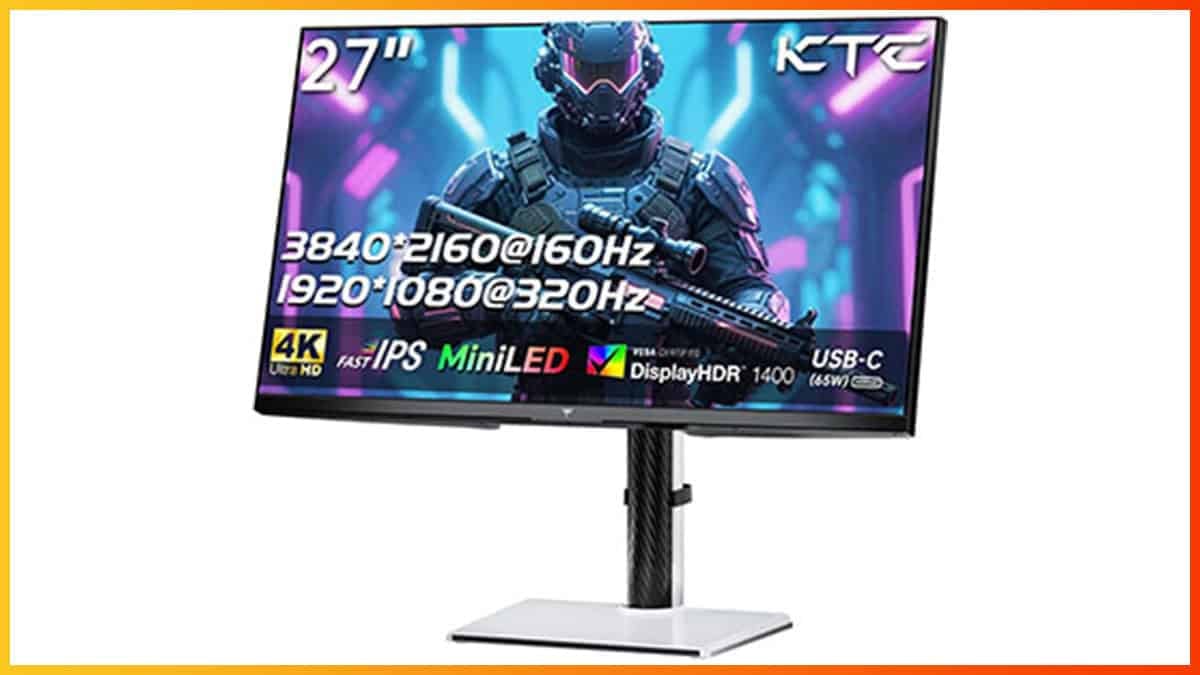
Maybe, but tthe quality on this thing is probably incredibly sharp :p https://www.displayninja.com/ktc-m27p6-review/
Display Ninja
The KTC M27P6 is a 27" 4K 160Hz IPS gaming monitor with a 1080p 320Hz Dual Mode, USB-C (65W PD), KVM, 1152-zone mini LED FALD, and more!
lament nymph
I have a 27 inch 4k 240hz oled ... I know all about sharp
and sharps is a shitty monitor brand

tv still better tho
ruby tusk
viscid wedge
Me, (well, C2 its older sibling) and a lot of people I know. 42" C-series is pea...
and yeah I don't blame you, HDR on Monitors can be a pain
lament nymph
but trueblack and peak are both marketing terms, one is just what it is, the other one is just what it can't do
upper sun
This monitor I have now was the first one i have where HDR was supposedly fine but guess its not KEKW~7 I dont even know where to begin seeing why it looks like ass cuz i never used HDR before getting this one
frosty fulcrum
Improved Auto Exposure supposed to look like this at night?

 lament nymph
and hdr400 was what comes first, invented to tell you that this fake non hdr capable is capable of fake hdr
ruby tusk
yeah basically fake hdr
 shy brook
42in c2 user here and can confirm it is amazing. Probably will never go back to a regular PC monitor
 blazing roost
is there good hdr yet for crimson desert?
sick monolith
hdr starts at 1000
viscid wedge
shy brook
42in c2 user here and can confirm it is amazing. Probably will never go back to ...
Same. Looking forward to C6. Nothing so far has been a compelling upgrade from my 3y/o C2 which looks incredible still.
165Hz may be nice
 lucid thorn
blazing roost
is there good hdr yet for crimson desert?
lucid thorn
blazing roost
is there good hdr yet for crimson desert?
Yeah nights are perfectly dragons dogma
frosty fulcrum
cant see shit
lucid thorn
lament nymph
my food looks so good with this lighting
Perfect medieval simulator
sick monolith
lament nymph
my food looks so good with this lighting
need for speed frying pan
frosty fulcrum
better off just turning your monitor off and playing with sound for the true dark night experience
sick monolith
frosty fulcrum
better off just turning your monitor off and playing with sound for the true dar...
brother it's a toggle.. you can turn it off if you dont like it
ruby tusk
viscid wedge
Same. Looking forward to C6. Nothing so far has been a compelling upgrade from m...
Yeah I thought I about getting that new 5k2k panel from LG but decided not too, been chillin on my G85SB for about the same time

 lucid thorn
 frosty fulcrum
sick monolith
brother it's a toggle.. you can turn it off if you dont like it
frosty fulcrum
sick monolith
brother it's a toggle.. you can turn it off if you dont like it
I know, the game just lacks any lighting to make it playable like that
viscid wedge
 quartz flame
what display

 flat bear
how did u get it that dark
lucid thorn
new reno haha
sick monolith
lucid thorn
all we need now is a flashlight mod from lazorr
lucid thorn
sick monolith
all we need now is a flashlight mod from lazorr
may as well call it the bat signal
lament nymph
 sick monolith
lucid thorn
may as well call it the bat signal
sick monolith
lucid thorn
may as well call it the bat signal
no not that bright 
lament nymph
this graphics suck doodoo
help me oh dear god this is the ugliest game of this year
eager epoch
Looks great on the PG27AQWP-W 540hz tandem OLED! GRT WORK
sick monolith
lament nymph
<:Stronge:1442285847951970557> help me oh dear god this is the ugliest game of ...
don't worry u going back to console to play gta6 by the end of the year
lament nymph
unless somehow rockstar went crazy, no chances gta 6 looks sloppier than this
lucid thorn
I don't know how they get gta 6 to 60fps on ps5/xbox series
viscid wedge
lucid thorn
I don't know how they get gta 6 to 60fps on ps5/xbox series
extreme upscaling
flint moss
sick monolith
don't worry u going back to console to play gta6 by the end of the year
Wait don't tell me its ps5 exclusive?
lucid thorn
flint moss
Wait don't tell me its ps5 exclusive?
console exclusive
flint moss
WHAT
ruby tusk
upscale from 360p
sick monolith
flint moss
Wait don't tell me its ps5 exclusive?
console first.. not exclusive
lucid thorn
well
 ember tulip
lucid thorn
Maybe, but tthe quality on this thing is probably incredibly sharp :p https://ww...
ember tulip
lucid thorn
Maybe, but tthe quality on this thing is probably incredibly sharp :p https://ww...
I have the T6 1400nit model of that I've been happy with it it will flash bang you though
lucid thorn
console exclusive for a year
viscid wedge
its Rockstar, its always console first
crude marsh
if anyone wants to tell me if this works, pretty much anything that is fire should have much more light (back up your files first)
 flint moss
Omg so another year for pc then shit
lament nymph
lucid thorn
I'm so indifferent on gta it doesn't mae a difference to me 😄
flint moss
Laz is cooking 🔥
blazing roost
lucid thorn
Yeah nights are perfectly dragons dogma
Install Instructions
- Download the latest version of the mod and place in the bin64 folder of the game
where dowmload?
sick monolith
crude marsh
if anyone wants to tell me if this works, pretty much anything that is fire shou...
dumb me actually opened the file.. 
ruby tusk
crude marsh
if anyone wants to tell me if this works, pretty much anything that is fire shou...
I got you bb
blazing roost
can someone point me plz to the mod?
crude marsh
its in the pins
viscid wedge
blazing roost
can someone point me plz to the mod?
ruby tusk
#1469072401450012774 message
blazing roost
crude marsh
its in the pins
i see np download button
lament nymph
can someone mod my eyes to see all graphics as bootiful
ruby tusk
jesus christ
 real stag
lmao
crude marsh
 true dagger
 crude marsh
the file
upper sun
oh this time windows got mad at the addon, how was it you exclude a folder im stupid
 plain fractal
blazing roost
i see np download button
plain fractal
blazing roost
i see np download button
 real stag
at this point people are probably just trolling
blazing roost
plain fractal
https://tenor.com/view/riddler-paul-dano-new-rockstars-does-he-know-gif-26833694
OH above the link lol
 flat bear
blazing roost
i see np download button
flat bear
blazing roost
i see np download button

 fresh field
not everyone has heard of reno or mod their games as frequently as we do
plain fractal
blazing roost
OH above the link lol
Yes, you can just download the file via discord when clicking on it
ruby tusk
fresh field
not everyone has heard of reno or mod their games as frequently as we do
it wasn't about that but sure
paper oriole
crude marsh
anywho here is my town with the file I posted above
it's hard to tell just like this, but is the radius larger, or mainly just brighter?
real stag
it's because literally just above there was a message to check the pinned message
true dagger
the difference is insane

 crude marsh
paper oriole
it's hard to tell just like this, but is the radius larger, or mainly just brigh...
crude marsh
paper oriole
it's hard to tell just like this, but is the radius larger, or mainly just brigh...
both
paper oriole
crude marsh
both
will give it a try in a sec with auto-exposure on and off
plain fractal
Maybe some people are coming from console or are 'modding' their games for the first time, considering this is a long awaited release for some people
plain fractal
true dagger
the difference is insane
Is this with fixed autoexposure enabled?
 compact sedge
why my antivirus says there is Trojan32 in the RenoDX file?
plain fractal
compact sedge
why my antivirus says there is Trojan32 in the RenoDX file?
False positive
paper oriole
plain fractal
Is this with fixed autoexposure enabled?
surely?
plain fractal
you can view the entire code on github
true dagger
plain fractal
Is this with fixed autoexposure enabled?
second image yes, firs tone is with off
sick monolith
game dont want to run when i use the 0011 files
ruby tusk
compact sedge
why my antivirus says there is Trojan32 in the RenoDX file?
False positive, just set it to ignore in Windows AV
compact sedge
ok thank you
 lime bridge
Got some artifacting on the horizon in this foggy weather with the sun/moon enhancements. (on/off for comparison).

 plain fractal
true dagger
second image yes, firs tone is with off
plain fractal
true dagger
second image yes, firs tone is with off
Can you do a test indoors? Maybe this improves the missing light inside buildings, caves etc.
true dagger
plain fractal
Can you do a test indoors? Maybe this improves the missing light inside building...


 true dagger
nah this to me actually looks so much better when it's dark, great work @faint bobcat ty for this
crude marsh
yeah it doesn't look like day 100% of the time
faint bobcat
plain fractal
Can you do a test indoors? Maybe this improves the missing light inside building...


they tried to do lighting with auto exposuyre
pretty much
isntead of with lighting
so the end result is nukes
and major brightness fluctuations
and day night
paper oriole
does laz's fix affect the indoor lighting? if so, are these with or without the increase?
plain fractal
Thanks to you both. This looks amazing now
crude marsh
there is some indoor lighting it would impact
true dagger
btw exposure we keep at default 50 in the ingame settings or is there any specific value to be set with reno?
crude marsh
I only changed "fire"
paper oriole
so like that fireplace would be brighter with your mod? could be a great middle ground
plain fractal
faint bobcat
they tried to do lighting with auto exposuyre
This could be worse than MH Wilds lol
crude marsh
yeah fireplace probably would I think
blazing roost
my post is gone?
crude marsh
granted
quartz flame
viscid wedge
what display

See the TCL 34R83Q superior picture quality monitor. It contains TCL QD-Mini LED technology, and up to 1100 Local Dimming Zones. Click to see details.
plain fractal
crude marsh
if anyone wants to tell me if this works, pretty much anything that is fire shou...
Is this the build used for the screenshots?
quartz flame
windows cant decode hdr pic even in 2026 🤦♂️
plain fractal
Ok thanks, trying this one now
 vale scarab
SO auto exposure is better on or Off for now ? have an oled monitor
low crane
I think Improved auto exposure on is a tad too dim/dark in some places. Much better than that nuclear explosion tho.

 viscid wedge
quartz flame
https://www.tcl.com/eu/en/monitors/34r83q
viscid wedge
quartz flame
https://www.tcl.com/eu/en/monitors/34r83q
can it do 2000+nits 10% window? Unless this was done at a joke, I think you need to re-run the HDR Calibration app
crude marsh
low crane
I think Improved auto exposure on is a tad too dim/dark in some places. Much bet...
basically the answer is increasing the radius and intensity of lights now methinks
ruby tusk
Definitely need to use HDR Calibration app
lucid thorn
im slowly learning about HDR while lazorr dismantles the game 🙏
viscid wedge
i'm patiently waiting until night. I've seen nothing extreme as some of these shots people are taking thus far
quartz flame
viscid wedge
can it do 2000+nits 10% window? Unless this was done at a joke, I think you need...
even on 60% can do a little over 2k nits ya
paper oriole
crude marsh
basically the answer is increasing the radius and intensity of lights now methin...
I agree
crude marsh
I could try a flat 2x on all lights (fire at 4x), and then tone down some things as needed
 gleaming marlin
lament nymph
what kind of shadows are like this
gleaming marlin
lament nymph
what kind of shadows are like this
What the ass is that terrifying entity in the corner? Is that shadow from you?
quartz flame
its crazy bright and has no ABL at all but it gets a little warm with all that brightness
lucid thorn
gleaming marlin
What the ass is that terrifying entity in the corner? Is that shadow from you?
tahts his sleep paralysis demon
viscid wedge
quartz flame
even on 60% can do a little over 2k nits ya
you may want to run the calibration again either way. Clearly you've got something set far too high
quartz flame
viscid wedge
you may want to run the calibration again either way. Clearly you've got somethi...
the screen i mean i had to add a small usb fan bellow it to cool it down
blazing roost
Game freezes on startup with reshade full addon suopprt.... 🙁
sick monolith
quartz flame
it's not the monitor.. something is wrong with your reshade or renodx.. your cie chart is expanded to oblivion
 quartz flame
viscid wedge
you may want to run the calibration again either way. Clearly you've got somethi...
quartz flame
viscid wedge
you may want to run the calibration again either way. Clearly you've got somethi...
no think u got it wrong, that pic looks completely blown out washed out bcs its a hdr printscreen and windows cant decode hdr pics.
flint moss
There is like 0 light coming through the windows even though its 1000 nits outside. RaYtRaCiNg
quartz flame
in game looks totally diff
plain fractal
blazing roost
Game freezes on startup with reshade full addon suopprt.... 🙁
Maybe take a look at the reshade log
lucid thorn
quartz flame
no think u got it wrong, that pic looks completely blown out washed out bcs its ...
use reshades' picture taking
quartz flame
lucid thorn
use reshades' picture taking
it can do proper hdr print screens that look ok in windows?
lucid thorn
quartz flame
it can do proper hdr print screens that look ok in windows?
I think so, it's what I've been using
viscid wedge
quartz flame
no think u got it wrong, that pic looks completely blown out washed out bcs its ...
i'm not wrong that it can't hurt to re-run the calibration considering you're seeing 2000+ nits in that shot, but ReShade should be used for HDR screenshots using PrintScreen. Its all in the ReShade settings.
quartz flame
i see
sick monolith
quartz flame
it can do proper hdr print screens that look ok in windows?
press print screen.. the hdr pic will be saved in game folder beside the exe by default
viscid wedge
If you run the calibration, ReShade will pickup on the peak brightness automatically (unless you've set it manually, then just hit reset)
quartz flame
ya i nv used reshde for print scren and im using reshade from 2017 think lmao
paper oriole
windows alt printscreen also takes an hdr screenshot (in windows 11)
you can make a macro for it.
viscid wedge
snipping tool does have this option but its still broken as hell for gaming.
 paper oriole
viscid wedge
snipping tool does have this option but its still broken as hell for gaming.
paper oriole
viscid wedge
snipping tool does have this option but its still broken as hell for gaming.
yeah this is only correcting
not actual hdr capture
you need to use gamebar for hdr capture
 abstract hawk
quartz flame
it can do proper hdr print screens that look ok in windows?
abstract hawk
quartz flame
it can do proper hdr print screens that look ok in windows?
It won't look okay on Windows, you have to view it in a Chromium browser if you want to see HDR.
viscid wedge
Gamebar looks like crap. ReShade and SpecialK get it right
abstract hawk
And make sure your SDR brightness slider is set at 31 for it.
Discord will also show it fine.
Since it's Chromium.
paper oriole
viscid wedge
Gamebar looks like crap. ReShade and SpecialK get it right
these are not native tools, which obviously is what I am talking about.
viscid wedge
I thought we were talking about HDR screen capture
abstract hawk
viscid wedge
Gamebar looks like crap. ReShade and SpecialK get it right
Game Bar takes screenshots in JXR for HDR, it's the source truth.
Well, 'source truth' is funny but that's accurate.
paper oriole
viscid wedge
I thought we were talking about HDR screen capture
no I was only replying to someone asking if printscreen was hdr
abstract hawk
It just is horrible to share among others.
blazing roost
viscid wedge
snipping tool does have this option but its still broken as hell for gaming.
where did you find dthis i look snipping tool it not there
quartz flame
abstract hawk
It won't look okay on Windows, you have to view it in a Chromium browser if you ...
i see ya fck crazy windows even in 2026 it doesnt have a app or tool to get proper hdr picture decoding its that hard for them to do it. makes 0 sense
viscid wedge
abstract hawk
It just is horrible to share among others.
its horrible to do anything with
quartz flame
 viscid wedge
blazing roost
where did you find dthis i look snipping tool it not there
viscid wedge
blazing roost
where did you find dthis i look snipping tool it not there
snipping tool settings. Its possible you're on an old version, even though this was added well over a year ago.
abstract hawk
quartz flame
i see ya fck crazy windows even in 2026 it doesnt have a app or tool to get prop...
There is one, but third-party.
blazing roost
viscid wedge
snipping tool settings. Its possible you're on an old version, even though this ...
im on 24h2
abstract hawk
Soon™
blazing roost
owell
abstract hawk
quartz flame

quartz flame
abstract hawk
There is one, but third-party.
i rem i used some 3rd party app at some point
abstract hawk
quartz flame
i rem i used some 3rd party app at some point
SKIV?
paper oriole
yeah the looking at the actual picture part is actually more difficult without third party tools than taking the actual screenshot is.
viscid wedge
blazing roost
im on 24h2
probably why
 quartz flame
to convert see proper hdr printscreens
 covert shuttle
quartz flame
covert shuttle
quartz flame
 abstract hawk
quartz flame
to convert see proper hdr printscreens
abstract hawk
quartz flame
to convert see proper hdr printscreens
SKIV, yes.
quartz flame
abstract hawk
SKIV?
dont rem the name but was from msstore 3rd party app
abstract hawk
Oh, nvm then
SKIV isn't on MS Store.
I have the app under review rn
Should be available in few hours.
Quick HDR PNG shares.
crude marsh
LetThereBeMoreLight
- Back up 0011 folder in game root and then overwrite with files above
- 2x all light sources, ~5x fire light sources
- For use with autoexposure fix
May only need to replace the .paz file
viscid wedge
Yeah the JXR's you get out of gamebar and Nvidia for that matter converted to PNG just look like crap. Nothing like what I see in person. ReShade and SK look fantastic.
abstract hawk
Keybind to controller, or keyboard, etc.
faint bobcat
crude marsh
# LetThereBeMoreLight
- Back up 0011 folder in game root and then overwrite with...
abstract hawk
viscid wedge
Yeah the JXR's you get out of gamebar and Nvidia for that matter converted to PN...
Are you talking about the converted to PNG by Game Bar itself, the SDR variants?
If so, yeah. Their tonemapping is horrible for SDR.
paper oriole
viscid wedge
Yeah the JXR's you get out of gamebar and Nvidia for that matter converted to PN...
why even convert?
abstract hawk
paper oriole
why even convert?
Cause JXR won't preview nicely on any app.
Apart from Windows Photos app.
viscid wedge
paper oriole
why even convert?
You can't share the JXR's anywhere without annoying people.
paper oriole
oh yeah, but for your own usage, it's fine.
abstract hawk
So, if you share it over Discord, it won't show the scene, you have to download it etc
Yeah, for record keeping it's fine.
If you wanna revisit later and work with it, touchup, etc.
It's more efficient than HDR PNG.
 paper oriole
quartz flame
paper oriole
quartz flame
woah that's like 7890 nits!
jade spruce
quartz flame
 quartz flame
but gets warm hot especyally in summer time
i had to add a small cheap usb fan to cool it down
tawny raptor
I tried turning off HDR after trying out this mod and now my game is way too dark and oversaturated, what's going on? I tried launching after renaming ~dxgi.dll to disable reshade but that didn't fix.
 crude marsh
clear shaders perhaps
compact sedge
How do i actually install RenoDX in crimson desert? where do i have to put the renodx file?
crude marsh
next to exe where reshade is
 spark oriole
is there a TLDR somewhere best steps to de-smear this game...
compact sedge
can i have ReShade installed at the same time tho?
crude marsh
it uses reshade to inject
compact sedge
oh okay
quartz flame
ahh shit i found that app

Microsoft Store - Download apps, games & more for your Windows PC
View popular high dynamic range (HDR) image formats, including OpenEXR, Radiance (.HDR), DirectDraw Surface (.DDS), and JPEG XR (.JXR), in their full quality on a capable HDR10 display. Both Windows and Xbox HDR game bar screenshots (.JXR) are fully supported.
For best quality, you need the latest Windows 10 update and graphics driver, and a ...
this any good?
i was using this few years ago
crude marsh
but dont run any random ass shaders with it
compact sedge
so all i have to do is run the game and select the preset from reahsde menu?
 manic finch
crude marsh
# LetThereBeMoreLight
- Back up 0011 folder in game root and then overwrite with...
manic finch
crude marsh
# LetThereBeMoreLight
- Back up 0011 folder in game root and then overwrite with...
I was just thinking about this while I was using the latest reno file. Beautiful work, about to try it out now!
abstract hawk
quartz flame
this any good?
It's for viewing pictures, for that SKIV is overall better anyway.
quartz flame
i see ya need to try that i nv. used yet.
paper oriole
xnviewmp supports jxr
abstract hawk
If you're looking to view images in JXR, Windows Photos app is fine.
paper oriole
if going the third party route
abstract hawk
For HDR PNG, you can view it in Chromium browser if you use one.
paper oriole
and yeah windows photos is fine
quartz flame
abstract hawk
For HDR PNG, you can view it in Chromium browser if you use one.
im using google chrome
quartz flame
i see nice!
plain fractal
crude marsh
# LetThereBeMoreLight
- Back up 0011 folder in game root and then overwrite with...
This really improved the fixed auto exposure setting, looks even better now 
crude marsh
awesome
quartz flame
this the brightness my monitor can deliver according to some Russian review site.
 plain fractal
Is it possible that the lighting change impacts performance?
 covert ruin
crude marsh
# LetThereBeMoreLight
- Back up 0011 folder in game root and then overwrite with...
covert ruin
crude marsh
# LetThereBeMoreLight
- Back up 0011 folder in game root and then overwrite with...
looks really good it brings life back to highlights
viscid wedge
plain fractal
Is it possible that the lighting change impacts performance?
worse?
crude marsh
costs a bit more when there are a lot of lights yeah
covert ruin
do you guys think all this is straying from creators intent or nah?
lucid thorn
Let's see if I can run it
tawny raptor
The games in our hands now, who cares
lucid thorn
Imo it retains creators intent more than dlss5 so..
plain fractal
viscid wedge
worse?
I noticed a big impact when standing before a burning house at night for example. But it does look really good
crude marsh
I can also probably make a version with less light that costs less if needed
really damn stupid that increasing light amount is actually costly
 worldly vapor
how costy
 crude marsh
I mean I tested it
just not the fps
I only noticed it costed more when I had fire at like 30x
plain fractal
They probably did some of the lighting via exposure to save on performance lmao
covert ruin
am i crazy or is there no light actually in the lantern when it’s lit up
upper sun
the lantern seems completely different with the auto exposure setting thing on xD
covert ruin
no but even with it at default there’s no light inside the lantern
lucid thorn
Even nights in the forest are more visible with the light change
 azure mauve
the renodx tab isn't appearing on reshade, it was there yesterday
crude marsh
AV probably
covert ruin
check anti virus
 wanton falcon
windows could have flagged it yeah

 boreal thunder
Guys I am on a trip and have to play on my 4090 laptop with IPS screen for the next two days 😭 Should I still install Reno for it or don’t bother?
covert ruin
lucid thorn
what is visible?
worldly vapor
dont play for the next 2 days
lucid thorn
Not sure why the screenshot killed that tbh
worldly vapor

 naive terrace
worldly vapor
dont play for the next 2 days
naive terrace
worldly vapor
dont play for the next 2 days
play now
 lucid thorn
Performance did take a hit tho even in the forest. I'm just testing the og one to see if it's just this spot in the forest
worldly vapor
 lucid thorn
crude marsh
they do have area lights in places
lucid thorn
crude marsh
they do have area lights in places
I kinda wonder if it was the moon

 daring orbit
boreal thunder
Guys I am on a trip and have to play on my 4090 laptop with IPS screen for the n...
daring orbit
boreal thunder
Guys I am on a trip and have to play on my 4090 laptop with IPS screen for the n...
Its for sdr now too
boreal thunder
daring orbit
Its for sdr now too
My laptop has hdr screen but it is so crappy I’d rather play on sdr tbh
azure mauve
covert ruin
check anti virus
yup you was right, got it back now cheers for that!
boreal thunder
Going from S95F and C4 to this thing is an eye sore
 modest hatch
Idk why but the HDR for this game feels washed out
On oled I’d rather just have the colors even if it’s SDR
lucid thorn
One last test
azure mauve
modest hatch
Idk why but the HDR for this game feels washed out
seen a few people say it looks off
boreal thunder
Idk HDR looks glorious with Reno for me on my TVs with RR on
crude marsh
vanilla HDR is bad for sure
plain fractal
Huge Display Commander update just dropped
eager epoch
crude marsh
# LetThereBeMoreLight
- Back up 0011 folder in game root and then overwrite with...
 plain fractal
At least the changelog is long
crude marsh
eager epoch
working for others so idk
quartz flame
modest hatch
Idk why but the HDR for this game feels washed out
on my monitor the HDR didnt felt wash out in this game ,but def. had dim colors and needed more brightness to.
covert ruin
guys are torches unusable? i have one in inventory but cant equip it
viscid wedge
modest hatch
Idk why but the HDR for this game feels washed out
It isn't. Its all in the configuration of the game and your display.
flint moss
I only just realised I can climb down by pressing l3 by the edge...
modest hatch
NGL SDR on a qd oled looks quite nice
Glad I didn’t get a W oled
Although the rdr 2 mod was great , as well as cyberpunk
viscid wedge
modest hatch
Glad I didn’t get a W oled
How much experience do you have with both?
modest hatch
viscid wedge
How much experience do you have with both?
It’s my first , but I asked a lot of stuff before getting it lol, was a hard decision
daring orbit
flint moss
I only just realised I can climb down by pressing l3 by the edge...
How i played for 30hrs not knowing this
quartz flame
if we didnt had the renodx for this game i would 100% stick to the SDR mode. but the renoDX addon really helps here and with some minor extra tuning can look v good. not the best i seen so far ,but still way better then the vanilla hdr in this game
flint moss
daring orbit
How i played for 30hrs not knowing this
Haha 50 for me so u good 😂
daring orbit
modest hatch
It’s my first , but I asked a lot of stuff before getting it lol, was a hard dec...
Bro, just use reno dx
upper sun
After testing some it does seem my problem in HDR is whatever happens when VRR is engaged and the framerate is low compared to the 240hz its not that bad when it gamma shifts in SDR but in HDR its apparently pretty big
eager epoch
crude marsh
working for others so idk
Any suggestions on how I might address this?
 crude marsh
eager epoch
Any suggestions on how I might address this?
crude marsh
eager epoch
Any suggestions on how I might address this?
can maybe try with your original pamt
modest hatch
I thought I was playing this game too much till I saw some ppl online
crude marsh
I think there is some timestamp fuckery potentially
covert ruin
i’m still in first city 55 hours in lmao
crude marsh
if you have the timestamps from my files it should work though
daring orbit
modest hatch
I thought I was playing this game too much till I saw some ppl online
Yeah its amazing
upper sun
Im at 63 hours just about getting ready to leave hernand
lucid thorn
daring orbit
Or what whatever this is
Action adventure
crude marsh
they do get the worst technical implementation I have seen award
 primal estuary
crude marsh
# LetThereBeMoreLight
- Back up 0011 folder in game root and then overwrite with...
primal estuary
crude marsh
# LetThereBeMoreLight
- Back up 0011 folder in game root and then overwrite with...
just so i understand, the auto exposure fix referred to here is the setting built into reno at this point?
crude marsh
yeah
azure mauve
damn just opened renodx, loads has been added since yesterday holy
lucid thorn
Okay so my main performance problems are the fsr 4 int8 thing
It takes 10fps
Don't think the lights are impacting me in this area
daring orbit
How this isnt an rpg, but e33 is 😆
crude marsh
I miss looking at like, a specific minor issue and fixing it
like oh man, the skeletal mesh LODs are a bit poor
some slight flickering here
abstract hawk
LOOOOOOOL

 burnt dew
Anyone knows what DLSS auto-exposure does in this game? It's off by default and i'm not talking about renodx auto exposure setting
lucid thorn
crude marsh
they do have area lights in places
I did one kinda silly drawback of the light mod tho
It's not really a drawback
just looks silly
crude marsh
burnt dew
Anyone knows what DLSS auto-exposure does in this game? It's off by default and ...
nothing with RR or DLSS 4.5, haven't actually tried with 4.0
but in general it should reduce ghosting and kill some highlights/specular noise
flint moss
so i was fixing the kiln but had an accident 😭
 lucid thorn
might not even be 'cause of the lights, either. The blue lantern twitch drop (maybe the default lantern? I don't use it anymore) shows you the things that the swords' R1+L1 shows you, and this just looked funny
 crude marsh
you know, I didn't know that was a thing
low crane
Before/after @crude marsh Fix. Much better

 lucid thorn
crude marsh
you know, I didn't know that was a thing
lucid thorn
crude marsh
you know, I didn't know that was a thing
it might be exclusively the twitch drop lantern, but I haven't seen anybody else mention it
crude marsh
low crane
Before/after <@162283147277369344> Fix. Much better
very nice very nice
restive roost
lucid thorn
maybe that's default I dunno
i had that with a vanilla game, dont recall if drop or normal lantern
lucid thorn
The actual effect looked more uh, pronounced - maybe it did pre-mod tho
quartz flame
HDR appears to be broken in Crimson Desert, with HDR "Off" actually being HDR On, and HDR "On" weirdly muting colours and vibrancy. Least on PS5 Pro.
LG OLED off screen video.
#CrimsonDesert

 X
·
X
·
ya the first thing i noticed using HDR in this game how muted the colors where
abstract hawk
lol
restive roost
Typical unclamped SDR user
quartz flame
In SDR its super ultra colorfull while in HDR vanilla looks almost dead black and white like
def a bug
lucid thorn
a bug in my crimson desert? unbelievable
digital elbow
who is gonna tell him
quartz flame

i am missing something?

I am looking into the RenoDX Mod for this game as well. Stay Tuned :-)
 subtle sinew
HDR is supposed to be less saturated
lament nymph

and I did it within 1 hour of testing!!!!
Requirements:
• OLED TV
• Dynamic Tone Mapping - Enabled
• NVIDIA GPU
This guide should result in a super clean and pixel perfect image resolve in HDR also aiming to create immense ease of use and a more streamlined experience for Windows HDR users.
✅ Gamma Curve
✅ HDR PQ
✅ Colour Rang...
crude marsh
ACESv2 is also just not good for games
worn ibex
quartz flame
https://x.com/nib95_/status/2036570161314963567
LMAO
lament nymph
crude marsh
I mean hell all of the lights in vanilla are pink
restive roost
Not really, people just have their SDR monitors in wide gamut unclamped so its oversaturated and theyre used to it
eager epoch
crude marsh
can maybe try with your original pamt
Only with paz it works, so am I missing something?
subtle sinew
I lost like 3 fps to fix the pink nights with a magenta color shift and an effect mask to only affect the highlights
quartz flame
so u guys liking the Vanilla HDR in this game?
crude marsh
eager epoch
Only with paz it works, so am I missing something?
nah should be fine
daring orbit
Why tf would we be here if we liked vanilla hdr 😆
subtle sinew
The peak brightness works well in vanilla hdr but that's about as good as it gets
quartz flame
daring orbit
Why tf would we be here if we liked vanilla hdr 😆
just earlier some people defend it said it suppose to look like that
subtle sinew
the blacks are doodoo
crude marsh
subtle sinew
I lost like 3 fps to fix the pink nights with a magenta color shift and an effec...
I mean fix is built into reno in 2 different ways now
subtle sinew
crude marsh
I mean fix is built into reno in 2 different ways now
I haven't been able to try them yet but really stoked to hear that
daring orbit
quartz flame
just earlier some people defend it said it suppose to look like that
Not a fan
 daring orbit
Thats fukin not true
quartz flame
i maybe blind then ^^
ruby tusk
Best HDR Settings
Moves 2 Sliders
daring orbit
Kcd2 actually does have good hdr
restive roost
quartz flame
i maybe blind then ^^
did you watch the video?
lucid thorn
i like his content 🙁
quartz flame
restive roost
did you watch the video?
ya but not enterely
i missed something maybe?
restive roost
quartz flame
ya but not enterely
thats the point of the title then, to get you to click
 quartz flame
lucid thorn
quartz flame
lucid thorn
missing a little shadow detail here and there ^^
lucid thorn
quartz flame
missing a little shadow detail here and there ^^
It's proper in game! Screenshot ate it haha
quartz flame

daring orbit
lucid thorn
It looks real good in game. With the light mod I could actually see enemies
Wait what fukin light mod?
quartz flame
anyway jk, even if the devs fix the hdr in this game, i think it cannot made it look better then the renoDX addon we already have
daring orbit
POST THE LINK!!
ruby tusk
It won't be better even if they "fix" it cause they'll continue to use ACESv2
crude marsh
nah reno is fixing a ton of shaders too
lucid thorn
daring orbit
POST THE LINK!!
Are you on latest reno
quartz flame
ruby tusk
It won't be better even if they "fix" it cause they'll continue to use ACESv2
i see ya then i gonna forget about that, not even try to use vanilla hdr later on with further updates.
crude marsh
daring orbit
Wait what fukin light mod?
 daring orbit
lucid thorn
Are you on latest reno
daring orbit
lucid thorn
Are you on latest reno
Oh yea lol
ruby tusk
quartz flame
i see ya then i gonna forget about that, not even try to use vanilla hdr later o...
Yeah no point really imo
lucid thorn
daring orbit
Oh yea lol
It's a mod that is used with latest reno
ruby tusk
unless you just prefer ACESv2
 wise flax
Is there a big difference between yesterdays mod and the updates today?
crude marsh
massive
wise flax
Howso?
lucid thorn
oh yeah, night and day
azure mauve
interior lighing without RR is awful in this game
lucid thorn
literally
crude marsh
literally night and day lmao
wise flax
okok you convinced me
ruby tusk
wise flax
Howso?
I got you with the patch notes
lucid thorn
nights are dragons dogma nights
ruby tusk
 lucid thorn
buildings aren't overblown
daring orbit
Nice thats good
wise flax
Hell yeah I like stuff
ruby tusk
Same



 daring orbit
Its like lux for CD
viscid wedge
maybe thats not working for me. I just fought through the quarry at night, looked the same as it always has afaik
lucid thorn
it might be from the amount of lights 😂
daring orbit
Lazzor will be Cd MA number one, on nexus
wise flax
So drag and drop the new reno file and then follow the instructions for "LetThereBeMoreLight" and thats it yeah?
lucid thorn
I fought in two bandit camps at night in the forest. one with mod and one without, and one I could see and one was pitch black
ruby tusk
wise flax
So drag and drop the new reno file and then follow the instructions for "LetTher...
pretty much
crude marsh
wise flax
So drag and drop the new reno file and then follow the instructions for "LetTher...
yeah, also make sure to update reno settings
 pearl goblet
20:14:47:068 [92940] | ERROR | Failed to load add-on from 'F:\SteamLibrary\steamapps\common\Crimson Desert\bin64\renodx-crimsondesert.addon64' with error code 193!
From the latest reno in pinned. Do I need to clear shaders or something?
ruby tusk
and backup your 0011 folder
viscid wedge
well its 6am so I gotta wait again.
crude marsh
pearl goblet
```20:14:47:068 [92940] | ERROR | Failed to load add-on from 'F:\SteamLibrary\st...
antivirus
primal estuary
crude marsh
yeah, also make sure to update reno settings
what settings are we using for reno, or just defaults after update?
crude marsh
more or less defaults
ruby tusk
defaults and click recommended
crude marsh
ye
ruby tusk
and adjust to your liking
wise flax
If its windows defender you have to click allow and then take action or something like that. Just clicking allow doesn't do anything...
primal estuary
ruby tusk
defaults and click recommended
clicking recommended seems to do nothing, the vanilla button turns all the stuff at the bottom off
primal estuary
gotcha making sure im not missing anything, thmk ya
lucid thorn
primal estuary
clicking recommended seems to do nothing, the vanilla button turns all the stuff...
it defaults to recommended
yeah haha
ruby tusk
primal estuary
gotcha making sure im not missing anything, thmk ya
yeah no worries
wise flax
Anyone know if todays' Nvidia driver did anything for this game?
I read the notes and didn't see anything, but they sometimes put random shit in and don't mention it
viscid wedge
Ctrl-F'ed through this thread a little bit ago, nothing stood out. https://www.reddit.com/r/nvidia/comments/1s2e7z2/game_ready_driver_59597_faqdiscussion/
Game Ready Driver 595.97 has been released. Driver Article Here: Link Here Game Ready Driver 595.97 Direct Download Link…
 Reddit
flint moss
Reddit
flint moss
lazzors fix is way better, legend!
viscid wedge
wise flax
Sometimes they shadow fix shit without mentioning it...
what I mean is, from people playing the game.
wise flax
Gotcha, I haven't checked it in a few hrs so if there's nothing yet then it likely means no changes.
crude marsh
its nice that 1 out of 100 things I have tried with this game have worked
upper sun
Also the game looks really nice with the light mod just got around to installing it PogU

 wise flax
Hey 1 is better than 0 eh?
crude marsh
true
I could post it on nexus but also reno is required so
🤷
not like i care about nexus
 elfin hollow
Do the render improvements work okay with DLSS?
wise flax
My game scared me and gave me a little stutter while loading with the mod update.
It looks good though
crude marsh
elfin hollow
Do the render improvements work okay with DLSS?
pretty much everyone using dlss
wise flax
DLSS is literally a requirement if you want to run RR...
lament nymph
at night white ppl become yellow
 wise flax
Unless you're ok with 20-30 fps on a 5090.
lament nymph
crude marsh
lament nymph
at night white ppl become yellow
wouldnt that be.... the color of the light
lucid thorn
crude marsh
its nice that 1 out of 100 things I have tried with this game have worked
again, thank you for everything 🙏
naive terrace
mmm HDR still doesn't convince me in this game. after testing with latest Renodx
elfin hollow
Just recalling that Endfield's improvements only worked on DLAA. But all good, thank you 🙏
 alpine bear
snow areas with improved auto exposure really hurt my eyes

 final imp
i got dlaa working with hdr, rr and framegen on 5090. For me it was as simple as setting everything up and restarting the game after the black bar appears
lucid thorn
alpine bear
snow areas with improved auto exposure really hurt my eyes
looks accurate to me
lament nymph
 lucid thorn
lament nymph
lucid thorn
lament nymph
I'm sorry, day 67
wise flax
@final imp For me the black bar appears every few minutes and I'm not patient enough to watch that cutscene every 5 minutes...
lucid thorn
how many hours do you have
lament nymph
lots
lament nymph
and I hate this game ...
lucid thorn
29.4 hours played
wise flax
Random question did the lantern always look like it's turned off and light is magically coming from around it somehow?
I legit don't remember
lament nymph
 final imp
wise flax
<@270284530005442560> For me the black bar appears every few minutes and I'm not...
final imp
wise flax
<@270284530005442560> For me the black bar appears every few minutes and I'm not...
Its been okay for at least an hour now, one thing is tabbing out seems to bring it back and I got to restart again
lucid thorn
huh, okay
lament nymph
just for the sake of criticizing games I don't like I usually finish it, maybe plat-ed if reasonable ... so ppl can't say " u only play for a few hrs then hate "
lucid thorn
lament nymph
just for the sake of criticizing games I don't like I usually finish it, maybe p...
there's no shot you're going to plat this game
this estimated 100% time is like 200-300 hours
because the achievements are geared towards like, completing things
lament nymph
I mean all the trophies seem reasonable
lucid thorn
ye reasonable just time consuming
alpine bear
alpine bear
snow areas with improved auto exposure really hurt my eyes
And with vanilla exposure it's too dark. Who tf implemented their auto exposure and though "yep, that's it"
 low crane
@crude marsh Is it possible to up the light some more? I still think its a litle too dark.

 lucid thorn
low crane
<@162283147277369344> Is it possible to up the light some more? I still think i...
lucid thorn
low crane
<@162283147277369344> Is it possible to up the light some more? I still think i...
What's it look like with your torch
crude marsh
tf is that location
wise flax
So improved auto exposure makes night time actually dark af yeah?
lucid thorn
Someone's house I think
lime bridge
Some Auto Exposure fix on/off comparisons.


 lucid thorn
wise flax
So improved auto exposure makes night time actually dark af yeah?
lucid thorn
wise flax
So improved auto exposure makes night time actually dark af yeah?
The lighting mod then helps lights work
wise flax
Gotcha I turned it on to test out in the wilderness and immediately couldn't see shit
low crane
crude marsh
tf is that location
Glenbright Manor, lol
lucid thorn
Hahaha yeah
lucid thorn
low crane
Glenbright Manor, lol
Gotta rename it. Shits glendark manor now