#Crimson Desert - CHECK PINS FOR ADDON
1 messages · Page 23 of 1
 lucid thorn
 small ferry
Thanks, that's within the Color Grading of RenoDX itself?
 jade flame
DLAA broken when HDR is also on.
https://www.youtube.com/shorts/41LYLiLkC7M
 lucid thorn
small ferry
Thanks, that's within the Color Grading of RenoDX itself?
lucid thorn
small ferry
Thanks, that's within the Color Grading of RenoDX itself?
Yeah, there's a few. Shadows might be one part, I'm trying to remember what the other one was
 karmic quest
Dont want to play the game anymore though, off to sleep.
lucid thorn
jade flame
DLAA broken when HDR is also on.
https://www.youtube.com/shorts/41LYLiLkC7M
It's fucking hilarious that's timed with your slashes
You hit the guy so hard you broke your screen
 naive jackal
@modest hatch It'll be like the 4090 where some people were taking out loans or using buy now pay later schemes
 sick monolith
jade flame
DLAA broken when HDR is also on.
https://www.youtube.com/shorts/41LYLiLkC7M
sick monolith
jade flame
DLAA broken when HDR is also on.
https://www.youtube.com/shorts/41LYLiLkC7M
i don't have that issue. 576.88
lucid thorn
karmic quest
Dont want to play the game anymore though, off to sleep.
Take care
jade flame
lucid thorn
It's fucking hilarious that's timed with your slashes
Executions and blade flash (L1 + R1) are the most common triggers. But not the only triggers.
lucid thorn
jade flame
Executions and blade flash (L1 + R1) are the most common triggers. But not the o...
It's similar to when my screen ate itself last night but that was a one off
jade flame
sick monolith
i don't have that issue. 576.88
What gpu?
 ruby tusk
$5 says hes on 40 series
sick monolith
jade flame
What gpu?
5080 x 4080
 lament nymph
I need a better looking helmet
lucid thorn
sick monolith
5080 x 4080
Like at the same time?
sick monolith
lucid thorn
Like at the same time?
5080 render 4080 fg
lucid thorn
sick monolith
5080 render 4080 fg
How much power draw does your pc consume
ruby tusk
karmic quest
DLSS Quality better
not with the way they do upscaling in this game
looks blurry
karmic quest
Anyone has good HDR settings for RenoDX ?
sick monolith
lucid thorn
How much power draw does your pc consume
300+ watts for the render gpu when maxed
100+ watts for the fg gpu
ruby tusk
yeah the default settings
 faint bobcat
nope, its ogre
lucid thorn
ruby tusk
looks blurry
The textures or something are tied to the resolution but it uses the render resolution before upscaling doesn't it?
faint bobcat
neesd engine side, I can smooth out the pop in but thats it
ruby tusk
lucid thorn
The textures or something are tied to the resolution but it uses the render reso...
Yeah
naive jackal
@karmic quest On 4k or 4.5 maybe but it looks quite blurry to me when using 1440p dlss quality compared to what it's like in other games
 viscid wedge
ruby tusk
I noticed 40 series doesn't seem to have the DLAA + HDR bug
viscid wedge
ruby tusk
I noticed 40 series doesn't seem to have the DLAA + HDR bug
I was gonna say, for the first few hours when I was playing on DLAA I never had this issue. I couldn't handle the lighting and moved to RR.
 outer furnace
karmic quest
Anyone has good HDR settings for RenoDX ?
outer furnace
karmic quest
Anyone has good HDR settings for RenoDX ?
peak brightness to your, well, displays peak brightness, paper white to what you like (250 seems good to me) rest default
lucid thorn
ruby tusk
Yeah
Right, so now aggressive upscaling means lower base resolution, this lower textures
ruby tusk
yep and looks like shit
lucid thorn
faint bobcat
neesd engine side, I can smooth out the pop in but thats it
Tell me more 👀
viscid wedge
Upscaling is 🐐 when done correctly.
ruby tusk
viscid wedge
Upscaling is 🐐 when done correctly.
Facts
lucid thorn
viscid wedge
Upscaling is 🐐 when done correctly.
I'm on a 7900xt I'm better off eating the performance hit most times 😂
jade flame
sick monolith
i don't have that issue. 576.88
That is a very old driver.
viscid wedge
lucid thorn
I'm on a 7900xt I'm better off eating the performance hit most times 😂
Oof
 final imp
Dlss is so broken in this game. And dlaa gives me the black bar flicker
naive jackal
RE9 1440p dlss quality looked good to me, but with CD anything past an arms length starts looking mushy
outer furnace
when turning off upscaling entirely, will the game use shitty TAA?
since DLAA isnt an option with the glitch
naive jackal
Haven't tried the game with todays new driver though
jade flame
outer furnace
since DLAA isnt an option with the glitch
I find DLSS Q is the nexct best thing unfortunately since Custom Scaling doesn't work either with this game.
sick monolith
outer furnace
since DLAA isnt an option with the glitch
how come i dont have that glitcgh
outer furnace
naive jackal
Haven't tried the game with todays new driver though
didnt change anything
small ferry
What might cause this? Flickering inside shadows
naive jackal
Yeah i tried custom scaling and just got a black screen
 fresh field
small ferry
What might cause this? Flickering inside shadows
fresh field
small ferry
What might cause this? Flickering inside shadows
your settings/set up?
outer furnace
sick monolith
how come i dont have that glitcgh
idk, you mentioned your driver so I assume you arent using the newest one, possibly because of that
small ferry
fresh field
your settings/set up?
wasn’t happening before renodx install
sick monolith
outer furnace
idk, you mentioned your driver so I assume you arent using the newest one, possi...
yeah i stuck with it since it gave the best re9 performance
karmic quest
wtf? devs patched dlss 4.0 with fg having no rain? I SEE RAIN!
naive jackal
Wasn't the reason it was giving better Re9 performance because it couldn't render the volumteric effects?
karmic quest
 ruby tusk
no rain was caused by RR
 thin kelp
karmic quest
thin kelp
karmic quest
shield giving mystic knight vibes from dragons dogma
sick monolith
karmic quest
wtf? devs patched dlss 4.0 with fg having no rain? I SEE RAIN!
they say sometimes it vanishes still.. maybe when it's less intense
karmic quest
I had Rain with DLSS 4.0 and no FG, when I turned it on it disappeared.
fresh field
ruby tusk
no rain was caused by RR
rain works with RR but it dont look good cause i think the denoiser still trying to remove it as 'noise'
but it works lol
ruby tusk
yeah
karmic quest
thin kelp
shield giving mystic knight vibes from dragons dogma
Dragons Dogma 2 had so much potential
devs fumbled it
viscid wedge
I've had RR on for probably 25 of my 30 hours, I've seen rain a few times.
fresh field
thats cause Dragon's Dogma wasnt named Monster Hunter
also them using RE engine for an open world game was yikes
not made for that lol
 tawny ravine
karmic quest
devs fumbled it
tawny ravine
karmic quest
devs fumbled it
Dont worry the DLC will save it 
naive jackal
Capcom crippled the devs on DD2, the DD and DD2 creator left the company afterwards and founded a new studio
viscid wedge
fresh field
rain works with RR but it dont look good cause i think the denoiser still trying...
at times the whole screen looks to be pixelated, its terrible
 true dagger
jade flame
DLAA broken when HDR is also on.
https://www.youtube.com/shorts/41LYLiLkC7M
true dagger
jade flame
DLAA broken when HDR is also on.
https://www.youtube.com/shorts/41LYLiLkC7M
oh what the fuck i have never seen this even when i was testing DLAA and i have hdr on all the time
 neon whale
karmic quest
devs fumbled it
neon whale
karmic quest
devs fumbled it
I think that there are some rumors about a potential DLC
viscid wedge
true dagger
oh what the fuck i have never seen this even when i was testing DLAA and i have ...
what GPU
fresh field
viscid wedge
at times the whole screen looks to be pixelated, its terrible
yes, luckily it doesnt rain much
true dagger
viscid wedge
what GPU
4090
viscid wedge
true dagger
4090
I think we're seeing a trend that this is not affecting 40 series
ruby tusk
Yep
outer furnace
neon whale
I think that there are some rumors about a potential DLC
nooo give wilds Grank expansion first
 sand vector
i wonder if its worth running RR with ultra performance
true dagger
50 series classic
 flint moss
I find myself thinking about this game all the time when I cant play 🫠
sick monolith
viscid wedge
what GPU
it seems like 50 series is borked. intel is borked as well
lucid thorn
flint moss
I find myself thinking about this game all the time when I cant play 🫠
Me all day at work
naive jackal
I hated the game to begin with but it turns out the meme is actually true with this one, it gets better after X amount of hours
karmic quest
Any HDR expert could suggest some good color grading settings pretty plesae?
 lucid thorn

 steep vine
is the crimson desert mod available? and where can i download it.
lucid thorn
karmic quest
Any HDR expert could suggest some good color grading settings pretty plesae?
Good good news you're already there
ruby tusk
karmic quest
Any HDR expert could suggest some good color grading settings pretty plesae?
Calibrate your display , and use defaults
viscid wedge
karmic quest
Any HDR expert could suggest some good color grading settings pretty plesae?
Nope. Depends on you, your display, and your lighting environment. Defaults work in most cases.
sick monolith
karmic quest
Any HDR expert could suggest some good color grading settings pretty plesae?
bruh the expert already set it to that, no need to change it
lucid thorn
Do you want more contrast? Like what are you looking for
 upbeat magnet
for initial setup, do I need to adjust the base HDR game values at all, or are they completely overwritten when you install reno?
karmic quest
viscid wedge
Nope. Depends on you, your display, and your lighting environment. Defaults work...
Yeah true, really liking colors already.
 late marlin
great hdr mod so far. I think this game has just a naturally overexposured look, especially when going from inside a house to outside during day. thats just normal
viscid wedge
upbeat magnet
for initial setup, do I need to adjust the base HDR game values at all, or are t...
The only slider in the game settings that works is the UI brightness with Reno installed
sick monolith
karmic quest
Yeah true, really liking colors already.
all you need to match is the peak nits
steep vine
Guys where can i download this mod?
lucid thorn
Could do contrast at 55/60 to give it a small pop if you want it a bit more oomph I guess
flint moss
naive jackal
I hated the game to begin with but it turns out the meme is actually true with t...
Yup I developed bipolar disorder for the first 15ish hours lol
karmic quest
Thanks for the patience and help everyone wouldn't have done it without you guys, bless.
late marlin
pinned message
ruby tusk
you just need to make sure your display is using calibrated windows hdr profile so RenoDX can pull from those values @karmic quest
lucid thorn
karmic quest
Thanks for the patience and help everyone wouldn't have done it without you guys...
I'm happy me shit posting got you there in the end
viscid wedge
karmic quest
Thanks for the patience and help everyone wouldn't have done it without you guys...
wait I thought you went to bed lol
karmic quest
sick monolith
all you need to match is the peak nits
yh since I run true black hdr setting on monitor I set peak to 450 and game to 390
ruby tusk
if you haven't done that, you need too
karmic quest
ruby tusk
you just need to make sure your display is using calibrated windows hdr profile ...
Yeah I do have it.
lucid thorn
karmic quest
yh since I run true black hdr setting on monitor I set peak to 450 and game to 3...
Yo same
sick monolith
karmic quest
yh since I run true black hdr setting on monitor I set peak to 450 and game to 3...
game setting is ignored when you have reno
karmic quest
 lucid thorn
I've been giving true black and peak 1000 a try lately
lucid thorn
karmic quest
We got the same panel almost
karmic quest
sick monolith
game setting is ignored when you have reno
no the one in the setting for renodx
late marlin
it looks amazing on lg c4
karmic quest
there is game setting also
lucid thorn
late marlin
it looks amazing on lg c4
That's an explosive
upbeat magnet
First attempt at using this on the AVP, config is gonna be weird
flint moss
lucid thorn
I've been giving true black and peak 1000 a try lately
Is peak 1000 any good here? Ive always hated the abl so true 400
sick monolith
lucid thorn
I've been giving true black and peak 1000 a try lately
don't you get a lot of white blobs?
late marlin
lucid thorn
That's an explosive
i had to think for 20 seconds what that means but i get it 😄 c4 😄
karmic quest
lucid thorn
We got the same panel almost
Windows is annoying me with this though, I disable HDR usually when doing other stuff.. and when I do this and reenable with the HDR Profile it starts throwing me this I need to delete the profile and then make a new one again for it to not throw errors in HDR, it works tho lol
 lucid thorn
flint moss
Is peak 1000 any good here? Ive always hated the abl so true 400
lucid thorn
flint moss
Is peak 1000 any good here? Ive always hated the abl so true 400
Ngl it's a preference thing. I don't know if I see much of a difference.
I think true black is a bit brighter overall than peak 1000 (on my display), but 1000 has better brightness in the 10%.. Whatever. I'm gonna be real honest, I half understood
lucid thorn
sick monolith
don't you get a lot of white blobs?
I don't think so?
sick monolith
flint moss
Is peak 1000 any good here? Ive always hated the abl so true 400
mismatch will cause clipping
lucid thorn
Not that I noticed
naive jackal
@flint moss If you have an MSI qd-oled you can always try eotf boost
flint moss
lucid thorn
Ngl it's a preference thing. I don't know if I see much of a difference.
I *thi...
Yeah peak is higher but everything else becomes darker
lucid thorn
I'm on an aw2725df
lucid thorn
flint moss
Yeah peak is higher but everything else becomes darker
Right, and I don't mind that
I usually play in all black room and don't really notice the lighting difference
flint moss
naive jackal
<@1303776640047779911> If you have an MSI qd-oled you can always try eotf boost
Lol i actually do 😂 heard its not so good tho?
sick monolith
lucid thorn
Not that I noticed
if your paper white is 203 and your true black is 400..
you have 204-1000 for highlights then you clip the highlights early at 400 UNLESS your have DTM on top of HGIG
lucid thorn
sick monolith
if your paper white is 203 and your true black is 400..
you have 204-1000 for h...
I don't believe you that those are real words
late marlin
Now there is only 1 mod i need. Hide hats
lucid thorn
late marlin
Now there is only 1 mod i need. Hide hats
That exists I think
Wait does it
late marlin
Not yesterday
sick monolith
lucid thorn
I don't believe you that those are real words
huh?
lucid thorn
I know you can hide swords, shield s, stuff like that
lucid thorn
sick monolith
huh?
Sorry haha I don't think I have hgig or dtm
 radiant oriole
What preset yall using
ruby tusk
D
sick monolith
lucid thorn
Sorry haha I don't think I have hgig or dtm
you do have at least one of them i'm sure
steep vine
uhm is there some tutorial video how to set this tool up?
late marlin
E and disabled dof. This way i get almost No artifacts during cutscenes and its way sharper during motion.
ruby tusk
 lucid thorn
sick monolith
you do have at least one of them i'm sure
lucid thorn
sick monolith
you do have at least one of them i'm sure
Uh how do I know
radiant oriole
What are the best settings for this game? Anyone with a list?
ruby tusk
Wassup
sick monolith
lucid thorn
Uh how do I know
monitor model?
 narrow frost
radiant oriole
What preset yall using
narrow frost
radiant oriole
What preset yall using
DLSS: K
RR: E
late marlin
radiant oriole
What are the best settings for this game? Anyone with a list?
Benchmarking on yt does really good settings optimization. I think his vid for Crimson Desert is out
sick monolith
radiant oriole
What are the best settings for this game? Anyone with a list?
DLSS OFF
lucid thorn
sick monolith
monitor model?
aw2725df
late marlin
sick monolith
DLSS OFF
Oh hell No 😄
 primal estuary
late marlin
Benchmarking on yt does really good settings optimization. I think his vid for C...
primal estuary
late marlin
Benchmarking on yt does really good settings optimization. I think his vid for C...
it is not, check out Harware unboxed, but there really isnt much to play with
ruby tusk
narrow frost
DLSS: K
RR: E
Have you not noticed issues in cutscenes with preset E for RR?
lucid thorn
radiant oriole
What are the best settings for this game? Anyone with a list?
Do what mad says but I use

 pallid hazel
lucid thorn
aw2725df
pallid hazel
lucid thorn
aw2725df
As someone who also owns this monitor I do believe it does not have hgig or anything like it. You have pretty much peak 1000 and true black 400
late marlin
There is no way i am playing this game without dlss, ray reconstruction and multi frame gen
lucid thorn
pallid hazel
As someone who also owns this monitor I do believe it does not have hgig or anyt...
Yeah that's my understanding
They look good
primal estuary
lucid thorn
Do what mad says but I use
this, see how its all basically maxed?
lucid thorn
I don't even know what the other stuff is haha
lucid thorn
primal estuary
this, see how its all basically maxed?
Ye? Aha
narrow frost
ruby tusk
Have you not noticed issues in cutscenes with preset E for RR?
Not as far as I can tell, you?
ruby tusk
narrow frost
Not as far as I can tell, you?
yeah I get these weird shadows textures when using Preset E for RR during cutscenes
primal estuary
using your response for some other lad, thanks for posting that lol
pallid hazel
lucid thorn
I don't even know what the other stuff is haha
I believe hgig tells the monitor not to tone map the image at all and let the game and windows do all the work
lucid thorn
pallid hazel
I believe hgig tells the monitor not to tone map the image at all and let the ga...
Oh that's handy
 weary tangle
ruby tusk
yeah I get these weird shadows textures when using Preset E for RR during cutsce...
weary tangle
ruby tusk
yeah I get these weird shadows textures when using Preset E for RR during cutsce...
You have to disable dof when using E
ruby tusk
Really?
late marlin
When i have hgig active i can actually cap the peak nits through the HDR calibration Windows App the right way
lucid thorn
pallid hazel
I believe hgig tells the monitor not to tone map the image at all and let the ga...
Tbh I'm still very green with hdr. I dunno what I'm doing haha
sick monolith
@lucid thorn up to what do you see here?
lucid thorn
sick monolith
<@147187969994784768> up to what do you see here?
Do you want me to use 1000 or true black
 lyric acorn
hey, i got black boxes around charakters. Is this a bug ?
ruby tusk
weary tangle
You have to disable dof when using E
I'll try that, thanks
sick monolith
lucid thorn
Do you want me to use 1000 or true black
whatever you currently are on in crimson. do it in edge or chrome browser
late marlin
lyric acorn
hey, i got black boxes around charakters. Is this a bug ?
thats weird. you dont use a very old gpu driver, right?
lyric acorn
late marlin
thats weird. you dont use a very old gpu driver, right?
newest Nividia
final imp
weary tangle
You have to disable dof when using E
how to?
weary tangle
final imp
how to?
Ingame settings
upbeat magnet
Anyone stream with apollo/moonlight?
ruby tusk
final imp
how to?
Accessibility in-game
sick monolith
final imp
how to?
dof is in the very last tab to the right
lucid thorn
sick monolith
whatever you currently are on in crimson. do it in edge or chrome browser
1166 I think? 1080 is the least I can see clearly, I can kinda see 1166 though (if that's what that says)
I'm on the true black preset I had
sick monolith
lucid thorn
1166 I think? 1080 is the least I can see clearly, I can kinda see 1166 though (...
ok then you are HGIG
if dtm is on you will see up to 10k
lucid thorn
Weird
jade flame
true dagger
oh what the fuck i have never seen this even when i was testing DLAA and i have ...
What GPU you have? Because it seems to happen more with 50 series.
Though there was a person on Steam boards who said they had it happen with their 4090.
 stone comet
no lie why the hell doesnt glove abyss gears apply to every weapon apparently they only apply to unarmed attacks lmao
lucid thorn
sick monolith
ok then you are HGIG
So.. Is that good or bad
sick monolith
lucid thorn
So.. Is that good or bad
it's good for gaming
lucid thorn
Ah I see
I can tell you games look great on this thing
It's probably a little overkill tho
narrow frost
ruby tusk
yeah I get these weird shadows textures when using Preset E for RR during cutsce...
Is it only in cutscenes or are you able to get it in normal gameplay as well?
I know there is this weird issue I'm able to replicate (this is linked to RR in general so D or E does not matter), when scrolling into closest view so you can see your characters face up close:
Certain objects/volumetric lighting gets a duplicate of the reflection map for either the face or hair of the character.
I posted in here I think yesterday or two days ago, but as someone likely mentioned already its most likely DoF causing it (there are blur options under "Accessibility" in settings) be sure to turn off both DoF and blur as it gets rid of pretty much all the artifacting.
ruby tusk
narrow frost
Is it only in cutscenes or are you able to get it in normal gameplay as well?
I ...
I only had it happen in cutscenes
 steady orbit
Hi. Got anyone best settings on renodx in this game? Which tone mapping and other think? Thank you
steep vine
is this tool allready out? is this the one thats pinned? bcs i dont know how to open it lol
 lucid thorn
steady orbit
Hi. Got anyone best settings on renodx in this game? Which tone mapping and othe...
lucid thorn
steady orbit
Hi. Got anyone best settings on renodx in this game? Which tone mapping and othe...
Just run it default and have fun. Make sure you calibrate in windows and set the nits to that. Otherwise defaults are already good enough Imo
lucid thorn
steep vine
is this tool allready out? is this the one thats pinned? bcs i dont know how to ...
You need reshade
narrow frost
ruby tusk
I only had it happen in cutscenes
This is the issue I'm talking about (Look at the mountain in the background):
This also happens on certain tent walls (cloth).


it only occurs on close view*
ruby tusk
narrow frost
This is the issue I'm talking about (Look at the mountain in the background):
Th...
Yeah haven't had that
sick monolith
narrow frost
This is the issue I'm talking about (Look at the mountain in the background):
Th...
rushmore?
lucid thorn
steady orbit
Which reshade you recommented?
You don't need any reshade
 zenith belfry
narrow frost
This is the issue I'm talking about (Look at the mountain in the background):
Th...
zenith belfry
narrow frost
This is the issue I'm talking about (Look at the mountain in the background):
Th...
that happens in vanilla too
steep vine
lucid thorn
You don't need any reshade
lol? i need a better install instruction >.< dont get it
 regal tundra
Did the latest patch improve dlss blurryness
lucid thorn
narrow frost
This is the issue I'm talking about (Look at the mountain in the background):
Th...
Kliff really left an impression on that mountain (I think?)
narrow frost
zenith belfry
that happens in vanilla too
For me it only shows with RR enabled (close up view camera mode), when i turn it off it goes away 😄
sick monolith
 steady orbit
@lucid thorn so reshade install and renodx and this is it, right?
lucid thorn
steady orbit
<@147187969994784768> so reshade install and renodx and this is it, right?
That's right
lucid thorn
sick monolith
See this post, all you need to do
steep vine
sick monolith
ok and where to download rendox
sick monolith
lucid thorn
Download reshade then get the addon64 file from pins and you're golden
not really true for this game
regal tundra
lucid thorn
Download reshade then get the addon64 file from pins and you're golden
What about the directory he linked though?
lucid thorn
sick monolith
not really true for this game
Well then enable hdr
steady orbit
This last renodx file got some new stuff in renodx, i got more options
lucid thorn
regal tundra
What about the directory he linked though?
Which directory
upbeat magnet
regal tundra
What about the directory he linked though?
addon goes in the bin64 directory for the game
lyric acorn
i think i found "the Problem" with the boxes around charakters. Its the Rendering= Diffuse BRDF. For this makes the Problem
regal tundra
What about the github link with all the files
lucid thorn
That's just source
regal tundra
Ah
upbeat magnet
regal tundra
What about the directory he linked though?
steam\steamapps\common\crimson desert\bin64
regal tundra
Wow that is so simple how can’t everyone follow these instructions 😉
steady orbit
Yesterday file for renodx is latest, right?
lucid thorn
Soon™️
upbeat magnet
steady orbit
Whrn coming?
when its ready
lucid thorn
upbeat magnet
when its ready
Thanks cyberpunk
regal tundra
Does major game updates usually break Reno implementation?
steady orbit
So guys everything in latest renodx file leave to defoult, right?
lucid thorn
steady orbit
So guys everything in latest renodx file leave to defoult, right?
Correct
sick monolith
regal tundra
Does major game updates usually break Reno implementation?
if they change rendering stuff maybe
steady orbit
What about sharpness? I set to 50 lol
 quartz tendon
regal tundra
Does major game updates usually break Reno implementation?
quartz tendon
regal tundra
Does major game updates usually break Reno implementation?
Sometimes, sometimes not. Usually the reno file is updated within a day or so when this happens (game runs anyways - except RE9 had problems due to Denuvo updating something too if I don't remember falsely)
lucid thorn
steady orbit
What about sharpness? I set to 50 lol
That's your preference
sick monolith
regal tundra
Does major game updates usually break Reno implementation?
gameplay updates nah
stone comet
sharpness on 50 is crazy work
lucid thorn
I wonder if it would be possible to speed up game load
karmic quest
You guys think the devs will rework how RT works in this game and fix plethora of other issues that visually ruins the game
sick monolith
zero sharpness and use rcas instead?
 fleet jacinth
lol
steady orbit
I play on fsr 4 quality mode but why is graphics sometimes so ugly, textures
fleet jacinth
just like they fixed it for black desert online?
karmic quest
They never fixed it there did they
 deft pulsar
steady orbit
I play on fsr 4 quality mode but why is graphics sometimes so ugly, textures
deft pulsar
steady orbit
I play on fsr 4 quality mode but why is graphics sometimes so ugly, textures
Native AA is the only playable setting
sick monolith
karmic quest
You guys think the devs will rework how RT works in this game and fix plethora o...
they don't even now it's broken
 deft pulsar
some people say with DLSS inputs the game looks sharper via optiscaler but that wasnt the case for me tbh
steady orbit
@deft pulsar which gpu are you using?
deft pulsar
steady orbit
<@362284790214426646> which gpu are you using?
7900XT
karmic quest
sick monolith
they don't even now it's broken
Its driving me crazy that there are tens of reports in discord if not hundreds talking about this exact problem lol
steady orbit
@deft pulsar you play on 4k?
lucid thorn
just checked nexus
deft pulsar
steady orbit
<@362284790214426646> you play on 4k?
1440p
steady orbit
@deft pulsar i got 7900 xtx but native aa give me only 60 fps
 sterile sable
deft pulsar
some people say with DLSS inputs the game looks sharper via optiscaler but that ...
sterile sable
deft pulsar
some people say with DLSS inputs the game looks sharper via optiscaler but that ...
optiscaler does nothing, tested it second day after release.
However toggling DLAA once and then swapping to quality seems to stabilize image a bit
I for some reason get better image including indoors with new reno
sick monolith
karmic quest
Its driving me crazy that there are tens of reports in discord if not hundreds t...
they also know this discord exists to fix their errors 
deft pulsar
steady orbit
<@362284790214426646> i got 7900 xtx but native aa give me only 60 fps
yeah that's about right
sterile sable
maybe because of disabled VRS?
sand vector
how much programming knowledge this kind of modding requires?
deft pulsar
sand vector
how much programming knowledge this kind of modding requires?
considering this engine seems to be major spaghetti, a lot
fleet jacinth
sick monolith
they don't even now it's broken
I managed to stop crashing on HDR last update, fiddle with the settings, now the grass and everything has true colors. Game…
 Reddit
what do you mean its broken?
sand vector
deft pulsar
considering this engine seems to be major spaghetti, a lot
ohno, better finish my school then
fleet jacinth
the gamers love it
 nova cargo
G*mers
fleet jacinth
hdr is amazing, rt RR is working flawlessly
deft pulsar
a more streamlined, documented engine is definitely less work
fleet jacinth
its optimized and not UE5 slop
deft pulsar
fleet jacinth
hdr is amazing, rt RR is working flawlessly
it's not lmao
lyric acorn
somebody has to do some texture pack mod for this Game, espacially for Tarrain
fleet jacinth
these devs really knows their stuff, 7 years of optimization
all of this is shit i've read online
outer furnace
fleet jacinth
https://www.reddit.com/r/CrimsonDesert/comments/1s1q987/hdr_finally_worksgame_is...
why do you guys have to keep bringing up this HDR gore
im crying everytime
deft pulsar
fleet jacinth
https://www.reddit.com/r/CrimsonDesert/comments/1s1q987/hdr_finally_worksgame_is...
this actually looks like shit btw
fleet jacinth
turns out its just another game that runs like trash lol
karmic quest
I wonder if you can give yourself these armor pieces with the tool from nexus mods

 vivid iris
fleet jacinth
https://www.reddit.com/r/CrimsonDesert/comments/1s1q987/hdr_finally_worksgame_is...
vivid iris
fleet jacinth
https://www.reddit.com/r/CrimsonDesert/comments/1s1q987/hdr_finally_worksgame_is...
genuinely why do so many people take pictures of their screen
fleet jacinth
that PR guy they had doing the rounds really deserve his pay thats for sure
he did great work
lucid thorn
karmic quest
I wonder if you can give yourself these armor pieces with the tool from nexus mo...
Hey I paid for that
sand vector
deft pulsar
a more streamlined, documented engine is definitely less work
first year programmer student here but definetly interested in this kind of stuff
deft pulsar
fleet jacinth
he did great work
only thing that did great work is their money
ruby tusk
vivid iris
genuinely why do so many people take pictures of their screen
stuck in 2006
karmic quest
lucid thorn
Hey I paid for that
I could only buy deluxe on steam, dont blame me. 
deft pulsar
Digital Foundry definitely got an hefty sum
sand vector
also interested in game graphics so would be perfect
sick monolith
fleet jacinth
its optimized and not UE5 slop
at least UE5 you can bruteforce with a 5090..
 crude marsh
fleet jacinth
turns out its just another game that runs like trash lol
crude marsh
fleet jacinth
turns out its just another game that runs like trash lol
was briefly malding until I read this
fleet jacinth
the whole hype train on this game was pretty wild
the game is good though but man there were some beasts out there going buck wild
ruby tusk
crude marsh
was briefly malding until I read this
how we doin today, Laz?
vivid iris
I was under the impression that most people seemed to get that this game was a big mess lol
but maybe that's just my bubble I'm in
ruby tusk
You would think
final imp
always been a bit of slop
 ocean onyx
there is no consensus on anything about this game
vivid iris
I can see how a lot of younger people might think this game was gonna be the next greatest thing
ocean onyx
the people who love it are disagreeing with the people who love it
deft pulsar
vivid iris
I was under the impression that most people seemed to get that this game was a b...
yeah I mean you only need a pair of working eyes to see the technical mess this game is
vivid iris
I mean I love it so far but it's bad in all the ways I expected
ruby tusk
Same
ruby tusk
yep
fleet jacinth
vivid iris
but maybe that's just my bubble I'm in
the general opinion that i saw online was overwhelmingly positive
ruby tusk
welcome to pearly abyss
lucid thorn
I think I installed the camera mod
fleet jacinth
especially when it came to performance
sick monolith
crude marsh
was briefly malding until I read this
brother 
 lucid thorn
But I can't remember if this is default or mod tbh
vivid iris
fleet jacinth
the general opinion that i saw online was overwhelmingly positive
it did have a bit of a hype ramp up in the final couple months
lucid thorn
I'm so confused
vivid iris
but before that general sentiment seemed about right
upbeat magnet
"nIgHtS aRe AcTuAlLy DaRk LiKe DrAgOn's DoGmA"
sterile sable
I dunno how but for me turning on DLAA and then switching to DLSS Q fixes this weird shitty indoor glitches
upbeat magnet
4town
fleet jacinth
How can the nights be dark when the moon is actually a sun in this world?
ruby tusk

lucid thorn
Can someone send a picture of their game real quick I wanna check this Camara hahaha
upbeat magnet
lucid thorn
Can someone send a picture of their game real quick I wanna check this Camara h...
 lucid thorn
upbeat magnet
lucid thorn
upbeat magnet
Uhhhhhh
deft pulsar
this guy apple vision pros
lucid thorn
Thanks
upbeat magnet
😂
lucid thorn
Haha
sick monolith
upbeat magnet
r u on vr?
lucid thorn
I dunno if I installed this wrong but I think it's right
upbeat magnet
I use the AVP.
steep vine
guys what is wrong?

 marsh robin
How do I used reno on this game?
steep vine
what .fx file is it missing?
sick monolith
go to the reno tab
 ionic parcel
steep vine
guys what is wrong?
ionic parcel
steep vine
guys what is wrong?
its all fine, nvm the fx if you don't use any 😄
vivid iris
steep vine
guys what is wrong?
it's not a reshade preset, it's an addon file. You have the renodx tab there, that's where the settings are
final imp
upbeat magnet
do VR headsets have HDR? i have galaxy xr
marsh robin
im blind apparently lol
upbeat magnet
final imp
do VR headsets have HDR? i have galaxy xr
There are many flavors, depends on what you're trying to do.
 lilac violet
thanks king works for me now
steep vine
so this are the settings?
 upbeat magnet
final imp
do VR headsets have HDR? i have galaxy xr
upbeat magnet
final imp
do VR headsets have HDR? i have galaxy xr
I chose AVP because I don't care about VR, but wanted the best scalable display option available that I could stream content to over the network. AVP is a 5,000nit micro-OLED display per eye between 4k-5k res. Supports HDR10, Dolby Vision, etc. @ 120hz.
There are headsets that don't do VR, but allow you to connect them physically to your PC rather than streaming content over your LAN that support HDR, but there are limitations as they are essentially just display extensions and don't have their own dedicated operating system. Cheaper but good alternatives.
I just hate having to sit at my desk tbh.
steep vine
and last question why i miss this settings on mine?
 final imp
Yeah ill need to look into what the GXR can do, I've just used it for a bit of VR gaming, but playing crimson desert on it would be sick
 hoary knot
Man I wish DLSS 4.5 had a Ray Reconstruction version too
sick monolith
final imp
Yeah ill need to look into what the GXR can do, I've just used it for a bit of V...
and a headache.. auto exposure..
upbeat magnet
final imp
Yeah ill need to look into what the GXR can do, I've just used it for a bit of V...
Worth trying, for sure. I can't speak to the GXR, but gaming on the Vision is actually really sick tbh. Fully replaced me having to sit at my desktop, minor loss of perceptible quality vs. native depending on your hardware and your network throughput.
hoary knot
steep vine
and last question why i miss this settings on mine?
I think you don't have HDR on in the game settings? And if you do make sure it's not HDR 10+
steep vine
aaa i need to turn hdr on? in windows + game?
hoary knot
Yes
hoary knot
Oh.. then you don't want it
steep vine
hoary knot
Oh.. then you don't want it
HDR is only needed for that 2 settings i send above here right?
hoary knot
steep vine
bcs my screen always got gray when i put hdr on
RenoDX is usually for better HDR. If your monitor isn't good for it, better to have it off. Yeah HDR is only for those two settings
 crude saffron
hey guys, one question, if im using trueblack400 (465 nits) should i use default game brightness (203) or lower it?
sick monolith
 sick monolith
crude saffron
hey guys, one question, if im using trueblack400 (465 nits) should i use default...
sick monolith
crude saffron
hey guys, one question, if im using trueblack400 (465 nits) should i use default...
try 150+ to allow room for your highlights
crude saffron
sick monolith
try 150+ to allow room for your highlights
what would u recommend? or do i just leave it at 203
sick monolith
203 is the standard for 1000 nits as per ITU
steep vine
sick monolith
? are this the best settings? just default?
 mortal wolf
personal choice, 50 was tweaked for noticeable at 4K.
sick monolith
crude saffron
what would u recommend? or do i just leave it at 203
colorists usually do 1/3 of the peak
sick monolith
steep vine
? are this the best settings? just default?
they are default except hammon since many people say eon causes black boxes in characters
outer furnace
sick monolith
203 is the standard for 1000 nits as per ITU
there is no standard, its entirely personal preference and dependant on your lighting environment, its as if you would say TV volume would have a standard. this post explains it well:
https://www.reddit.com/r/HDR_Den/comments/1rwvd20/about_hdr_paper_white_hdr_reference_white_level/
To me, 203 is too little in CD, sky looks annuaturally dim in HGIG, I had to bump it to 250. Then in other games my eyes burn out at 203 and I have to lower it, there is no standard
First of all: I am going to use the term "reference white level" for "paper white" / "brightness" / etc. sliders in games…
 Reddit
steep vine
Reddit
steep vine
do more people have the problem, that when you use this mod the screen is not in full screen ? i see my toolbar?
 tame vault
Start at 203. Turn it up if you want brighter. Turn it down if you want dimmer. Done.
sick monolith
outer furnace
there is no standard, its entirely personal preference and dependant on your lig...
if you actually read the ITU paper it says 203 for 1000.. now if you have true black 400 and you set your paper white to 300 if that's your preference then u might as well turn hdr off
 digital quest
"Secret" sauce = crank everything up
https://x.com/Kleanisklean/status/2036498016404742403

Might of found the secret settings sauce for @CrimsonDesert_
Cinematic everything but use DLSS 4.0 Balanced and Ray Reconstruction on.
Basically looks native and very steady fps without frame gen. Averaging around 85 fps.
Really seems like this preset was made for RR.
 X
·
tame vault
X
·
tame vault
That's my exact settings
outer furnace
sick monolith
if you actually read the ITU paper it says 203 for 1000.. now if you have true b...
it is a recommendation, and only if youre in a pitch black room
fleet jacinth
i mean thats what i do, except performance instead of balanced at 4k
digital quest
sick monolith
if you actually read the ITU paper it says 203 for 1000.. now if you have true b...
Dont take that paper literally. There other factors like how is the room lit
 chrome sun
|| What the hell, found a random bear, that destroyed me, i still manage to beat it and now i can use it as a mount ||
 sick monolith
outer furnace
it is a recommendation, and only if youre in a pitch black room
sick monolith
outer furnace
it is a recommendation, and only if youre in a pitch black room
no ITU is guidelines for TV broadcast.. it assumes you are watching from a living room TV
lucid thorn
Guys I found a hilarious what I assume is a bug with timber
If you hit a tree twice with an axe it'll start to fall, if you hit it again while it's falling it'll teleport above the tree and upon landing will usually break a piece or two
outer furnace
then the ITU commitee is living in a chinese smog city where the sky is dimmed 24/7 i guess. I live rural and can take a look outside and actually see how bright a clear sky on a sunny day is supposed to be and in CD thats absolutely not the case at 203
crude saffron
fleet jacinth
i mean thats what i do, except performance instead of balanced at 4k
what FG setting, if you use it?
outer furnace
in other games 203 is just fine, in cd, imo, no
fleet jacinth
Fg on 2x cause 4090
outer furnace
it might be if the game didnt have that weird auto exposure effect
ocean onyx
outer furnace
then the ITU commitee is living in a chinese smog city where the sky is dimmed 2...
they were just reporting on common lighting conditions, not setting a standard
sick monolith
outer furnace
then the ITU commitee is living in a chinese smog city where the sky is dimmed 2...
this is why oled is bad for bright rooms.. it's not ITU's fault that you have an oled
ocean onyx
203 is made up
outer furnace
ocean onyx
203 is made up
yeah thats what im saying lol
ocean onyx
lilium's tl;dr on reddit really does just get to the heart of it

 hardy owl
Me waiting for Forge to release the autoexposure mod
 outer furnace
its a decent value to start off from but its not always "correct". then again its entirely subjective so if its correct to you, more power to you
chrome sun
chrome sun
|| What the hell, found a random bear, that destroyed me, i still manage to beat...
|| well it's a temporary mount, i just get off and it eat me and throw me against a wall like a bag of potatoes||
outer furnace
ocean onyx
lilium's tl;dr on reddit really does just get to the heart of it
this. and if the reddit gamers wanna turn saturation to 100000 and play Breath of the Desert, then so be it, if it looks good to them im happy they have fun lol
 hollow meteor
Should the "HDR10+ Gaming" setting be enabled?
 barren pasture

 sick monolith
outer furnace
this. and if the reddit gamers wanna turn saturation to 100000 and play Breath o...
sick monolith
outer furnace
this. and if the reddit gamers wanna turn saturation to 100000 and play Breath o...
why are we trying to fix this game then.. i'm pretty sure the mods here adhere to a set of guidelines for hdr
outer furnace
first and foremost to combat overbrightening which is often the case with native HDR implementations
sick monolith
everyone here says grass is cooked in the reddit post
so if i say that looks good to me so be it??
fleet jacinth
barren pasture
<:kekpepehands:1409649023870173377>
LOL i was waiting for the picture to load into full resolution
outer furnace
YES! thats the point man XD
fleet jacinth
i guess ill be waiting forever..
sick monolith
lol no
outer furnace
if u like 203 then good lol
 worthy kernel
barren pasture
<:kekpepehands:1409649023870173377>
worthy kernel
barren pasture
<:kekpepehands:1409649023870173377>
doom eternal on switch 1 be like
 steel wolf
Did you do anything else to get this kind of darkness other than reno mod? My game is no where near as dark, although I decreased contrast from 60->50 because it was making shadows overly dark during the day.
 sick monolith
you do understand that a number from 0 to 203 or even to 400 will make that grass look cooked or raw,,
 vestal flicker
outer furnace
there is no standard, its entirely personal preference and dependant on your lig...
vestal flicker
outer furnace
there is no standard, its entirely personal preference and dependant on your lig...
Well actually when it comes to hdr, 203 is kinda standard. You can obviously go higher for ambient light compensation but in a dark room, the good practice is that you can go lower, but never go higher as it does definitely messes with intended contrast and reduces perceptual saturation.
sick monolith
u say do 203.. turn the lights off.. then you adjust to try to match what you saw when the lights were off
faint bobcat
steel wolf
Did you do anything else to get this kind of darkness other than reno mod? My ga...
current build doesnt have it
sick monolith
not preference
faint bobcat
this WIP
vestal flicker
worthy kernel
203 is too bright when in a pitch dark room
Pitch black yes but I said dark ! Pitch black is great obviously but I wouldn't recommand doing that all day😅 ... Not great for your circadian rythm.
sick monolith
vestal flicker
Pitch black yes but I said dark ! Pitch black is great obviously but I wouldn't ...
nobody here has a pitch black room.. all your walls are white.. nobody has gray walls here lmao
 steady stirrup
ive installed reshade and copied the addon file to bin64 but theres no reno section showing in game weirdly
hardy owl
steady stirrup
ive installed reshade and copied the addon file to bin64 but theres no reno sect...
Did you install reshade with full addon support?
steady stirrup
i believe i did yea, ill run anotheer install of reshade and make sure i do that tho
chrome sun
there is a bandit camp with like 30 bandits, I kill two of them and they suddenly all flee in every direction what the hell
lament nymph
this game during the night is almost unplayable
because not only it's dark lighting shifts stupidly all the time
faint bobcat
# SLOP DROP 4: The Crimson is Deserting
As a heads up, virus total also hates this build. It's a false positive as always and the code is available to review. https://github.com/OopyDoopy/renodx/commit/51d54dae9267113beb4aa83fe15cf3ccedf5111e
- Added stuff
 faint bobcat
**# SLOP DROP 4: The Crimson is Deserting**
As a heads up, virus total also hat...
steel wolf
faint bobcat
faint bobcat
**# SLOP DROP 4: The Crimson is Deserting**
As a heads up, virus total also hat...
steel wolf
ah nice
 modest hatch
faint bobcat
**# SLOP DROP 4: The Crimson is Deserting**
As a heads up, virus total also hat...
modest hatch
faint bobcat
**# SLOP DROP 4: The Crimson is Deserting**
As a heads up, virus total also hat...
What’s this
 thin forge
Stuff and … things?
sick monolith
faint bobcat
**# SLOP DROP 4: The Crimson is Deserting**
As a heads up, virus total also hat...
so is it 203 or nah 
thank you so much for all your work
modest hatch
thin forge
Stuff and … things?
No way
I thought it was non existent conceptual entities
 thin forge
MOAR DOTS
modest hatch
lament nymph
Isn’t this with the focus mode
stone comet
new update lets go
 lament nymph
modest hatch
Isn’t this with the focus mode
lament nymph
modest hatch
Isn’t this with the focus mode
just light the lantern up and it's like that
vestal flicker
sick monolith
so is it 203 or nah <:Stronge:1442285847951970557>
thank you so much for all yo...
You can go lower if you like the added contrast but should only go higher in bright room if you can't see shit. Does that help ?😅
steady stirrup
hardy owl
Did you install reshade with full addon support?
Must have done something wrong but it's working now, thank you
sick monolith
vestal flicker
You can go lower if you like the added contrast but should only go higher in bri...
nah i'm fine.. i do 3k nits in a dark room
stone comet
at least you dont have to manually delete shaders every time on cd just does it for you
jade flame
faint bobcat
**# SLOP DROP 4: The Crimson is Deserting**
As a heads up, virus total also hat...
Lmao. That change log.
mortal wolf
the right is adjusted still, or raw scene linear? sorry, I, uh, might have forgotten if you told me
final imp
I hit reset settings on the menu and crashed 😱
outer furnace
why the hell does antivirus think a renodx plugin is fishy lol, like actually interested where it draws the connection
stone comet
I think its cause a lot of people downloaded it?
outer furnace
cause the hooking is done by reshade itself no? thats where I could see a false positve happening
stone comet
It doesnt trigger until it hooks into it yeah
mortal wolf
outer furnace
why the hell does antivirus think a renodx plugin is fishy lol, like actually in...
2fast2furious
crude saffron
what would you guys think looks "cleaner" between these two? https://imgur.com/a/5JAVC2k (DLAA+RR off)
https://imgur.com/a/mgwb9jQ (performance+Ray reconstruction)
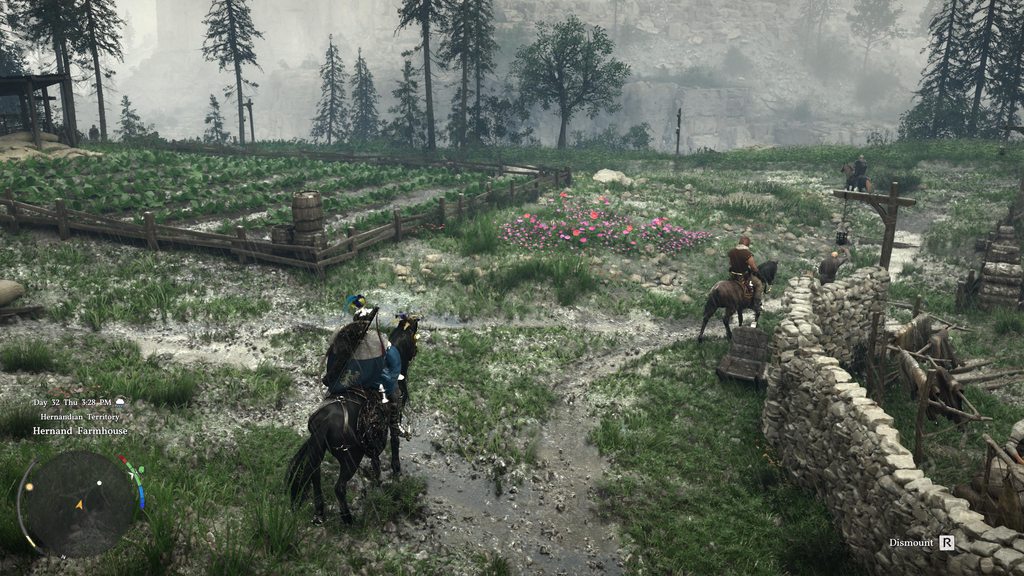
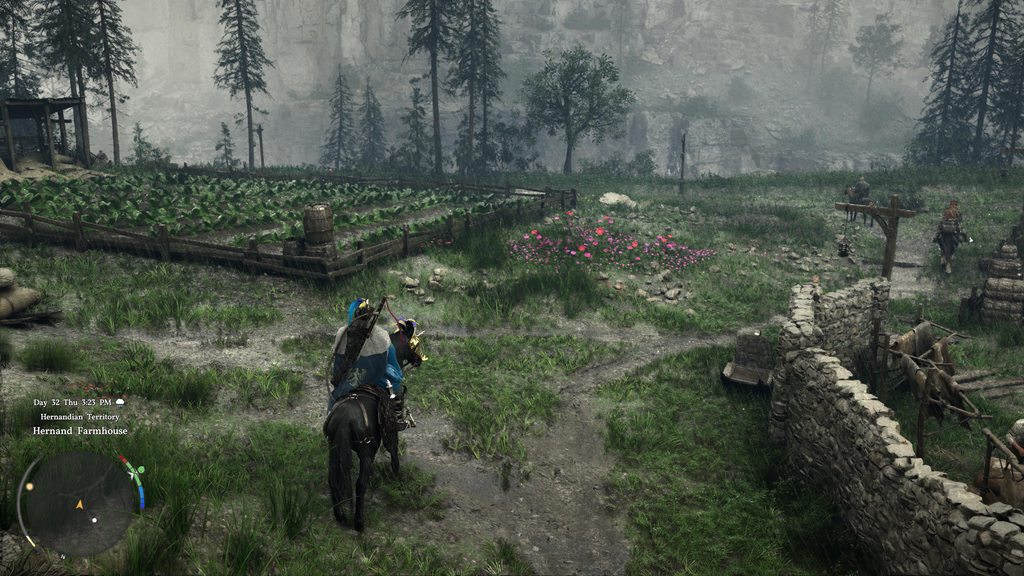 mortal wolf
outer furnace
cause the hooking is done by reshade itself no? thats where I could see a false ...
mortal wolf
outer furnace
cause the hooking is done by reshade itself no? thats where I could see a false ...
there's no hooking at all, it just doesn't like us. at worst it loads directx 

 supple summit
crude saffron
what would you guys think looks "cleaner" between these two? https://imgur.com/a...
supple summit
crude saffron
what would you guys think looks "cleaner" between these two? https://imgur.com/a...
Are these thumbnails you uploaded ?
 worldly vapor
crude saffron
what would you guys think looks "cleaner" between these two? https://imgur.com/a...
worldly vapor
crude saffron
what would you guys think looks "cleaner" between these two? https://imgur.com/a...
whatver u prefer mate
faint bobcat
mortal wolf
the right is adjusted still, or raw scene linear? sorry, I, uh, might have forg...
left is base game with crank auto exposure which turns nights into days and the interiors get utterly fried with nuclear adaptation
right is modified so nights look dark + no more nukes
crude saffron
supple summit
Are these thumbnails you uploaded ?
if u press on the pic it goes to full res
supple summit
crude saffron
if u press on the pic it goes to full res
apparently not, it only shows me a 540p image
faint bobcat
faint bobcat
left is base game with crank auto exposure which turns nights into days and the ...
Raw scene is giga cranked
mortal wolf
faint bobcat
left is base game with crank auto exposure which turns nights into days and the ...
fixed scaled, or some adjustment? basically interested in trying some real math where you eye/brain does gain as if you were there (no camera stuff)
faint bobcat
I adjusted their existing settings using the tools they had
they have sky visibility
interior visibilty
that sort of thing
mortal wolf
are lights globally consistent at least?
faint bobcat
// Auto exposure tuning (hardcoded defaults to save cbuffer space)
#define AE_DARK_POWER_OUTDOOR 0.25f
#define AE_DARK_POWER_INDOOR 0.55f
#define AE_BRIGHT_POWER_OUTDOOR 1.0f
#define AE_BRIGHT_POWER_INDOOR 1.0f
#define AE_ADAPT_SPEED_BOOST 3.0f
#define AE_EV_BIAS (-1.0f)
// Tonemap highlight dimming (hardcoded defaults)
#define AE_TRANSITION_THRESHOLD 0.0f
#define AE_KNEE_ADAPTED 0.0f
#define AE_KNEE_TRANSITION 0.0f
#define AE_COMPRESS_MAX 0.0f
flint moss
stone comet
Is that the auto exposure fix I see? 😍
mortal wolf
hmm
sick monolith
You know it's forged when shaders take long to compile
faint bobcat
mortal wolf
are lights globally consistent at least?
yes, its just that RAW scene with no auto exposure is giga cranked
also they tie emissive properties of a ton of materials to auto exposure
so those glowing rocks
 solar bone
I hate how clouds just look bad in general, same with smoke, and anything which passes through it gets insane ghosting
faint bobcat
some lights
mortal wolf
yeah, but i can put a flat scalar. ideally i do the natural eye adaptation and don't need those numbers, but values have to be reasonable
contrast as a flat number is technically wrong
outer furnace
solar bone
I hate how clouds just look bad in general, same with smoke, and anything which ...
if you use any kind of upscaling clouds and smoke are fucked yeah
faint bobcat
mortal wolf
yeah, but i can put a flat scalar. ideally i do the natural eye adaptation and d...
we shall see, RAW also has giga dark interiors
solar bone
outer furnace
if you use any kind of upscaling clouds and smoke are fucked yeah
Laz managed to fix it in other games but this one sounds rough
faint bobcat
so its cranked brightness outdoors, and pitch abyss indoors
 quaint cove
Quick question should Generic Depth and Effect Runtime Sync be left enabled?
 ruby tusk
nah
quaint cove
Aight, thanks
ruby tusk
^
 quaint cove
LOL
worldly vapor
p diddy was here
stone comet
feat. random fizzling on the side
upbeat magnet
stone comet
didn't you see the NPC sweat mechanics based on temp? they really thought of everythind didnt they?
ruby tusk


faint bobcat
stone comet
AINT NO PARTY LIKE A DIDDY PARTY
mortal wolf
stone comet
doll for sale
 ruby tusk
he has been reslopped
faint bobcat
fix one issue, 7 more spawn

 barren pasture
faint bobcat
**# SLOP DROP 4: The Crimson is Deserting**
As a heads up, virus total also hat...
barren pasture
faint bobcat
**# SLOP DROP 4: The Crimson is Deserting**
As a heads up, virus total also hat...
why slop drop 3 though? Thats 4th iteration of mod
barren pasture
yeah i downloaded each 
fresh field
 barren pasture

faint bobcat
jade flame
Lmao. That change log.
 flint moss
guys my game crashed when i try to "reset all" on the new renodx. do i need to delete shaders or something?
stone comet
faint bobcat
LOL?
faint bobcat
I shipped a zip bomb
upbeat magnet
faint bobcat
LMFAOOOO
faint bobcat
which is why resetall crashes
stone comet
did you actually work at remedy
stone comet
yeah its just a bunch of different people most of the time?
sick monolith
RR on LEFT
RR off RIGHT


 eager epoch
Tnx for the feedback! I appreciate that
crude marsh

mortal wolf
stone comet
yeah its just a bunch of different people most of the time?
it's all musa
there's musa jonmusa forgemusa and ritsumusa
narrow frost
Musa inception.
 paper oriole
sick monolith
RR on LEFT
RR off RIGHT
paper oriole
sick monolith
RR on LEFT
RR off RIGHT
I hope the borked parallax with RR gets fixed in the next update (of the game).
supple summit
sick monolith
RR on LEFT
RR off RIGHT
personal preference for me it looks better on the right without rr .
ruby tusk
digital quest
"Secret" sauce = crank everything up
https://x.com/Kleanisklean/status/203649801...
I tried to tell him to get ReShade and RenoDX for even more secret sauce and bro said "eww reshade"

sick monolith
supple summit
personal preference for me it looks better on the right without rr .
With RR is left
 abstract hawk
mortal wolf
there's musa jonmusa forgemusa and ritsumusa
abstract hawk
mortal wolf
there's musa jonmusa forgemusa and ritsumusa
Musa and his personalities.
supple summit
sick monolith
With RR is left
i changed it already, but thanks 😉
abstract hawk
 supple summit
Thank you to all people involved in this project. I can finally enjoy Crimson Desert. Big Kudos !
crude marsh
no RR is so bad but like everything else is also bad with RR just less so
paper oriole
crude marsh
no RR is so bad but like everything else is also bad with RR just less so
except for rain and pom 😉
stone comet
mortal wolf
there's musa jonmusa forgemusa and ritsumusa
real
crude marsh
eh the POM looks silly either way
faint bobcat
jade flame
Lmao. That change log.
You should check out Wall's changelogs
 flint moss
wait the moon became like 5x bigger with the new preset xD. toggling it on and off is hilarious. is it the overblown exposure that made it look so small before?
paper oriole
flint moss
wait the moon became like 5x bigger with the new preset xD. toggling it on and o...
moon size is a setting
upbeat magnet
 mortal wolf
moonmaxxing
jade flame
faint bobcat
You should check out Wall's changelogs
Jesus. Lol
flint moss
i legit thought i was in day time before installing but apparently its the middle of the night lol
flint moss
paper oriole
moon size is a setting
ooh cool
mortal wolf
barren pasture
cant make 100x larger, bad mod
you can actually key it in with tab or ctrl+click
paper oriole
barren pasture
cant do proper slop
for proper slop, uninstall reno
mortal wolf
barren pasture
nah, im just kidding
but now i want to see it at 10,000
 drowsy shoal
what is the best setting for reno so far?
barren pasture
mortal wolf
but now i want to see it at 10,000
i even dont own a game 
im waiting until its fixed
barren pasture
drowsy shoal
what is the best setting for reno so far?
defaults i guess
creators (Forge) intent
stone comet
its so nice not getting flashbanged anymore
 paper oriole
drowsy shoal
what is the best setting for reno so far?
paper oriole
drowsy shoal
what is the best setting for reno so far?
default, set max nits to match display if it didn't autodetect
jade flame
New version of RenoDX for CD. Am getting ghosting at the edge of the screen when I move my camera.
Am uploading a YT video now.
flint moss
this is nuts, the atmosphere changed completely,, its awesome
faint bobcat
solar bone
I hate how clouds just look bad in general, same with smoke, and anything which ...
because Pearl in their infinite wisdow decided to use temporal reprojection for the whole ass sky box.
So distant LODs for instance near the horizon all shimmer because of their TAA jitter
narrow frost
stone comet
its so nice not getting flashbanged anymore
I just got off to eat something, will definitely hop back on afterwards lmao. 😄
 zealous dock
eager epoch
Tnx for the feedback! I appreciate that
zealous dock
eager epoch
Tnx for the feedback! I appreciate that
I noticed an issue with the mod too.
disabling the tessellation causes what looks like vertex explosions that pop for a frame or so
stone comet
narrow frost
I just got off to eat something, will definitely hop back on afterwards lmao. 😄
Posted the new added settings as well #1469072401450012774 message
eager epoch
zealous dock
I noticed an issue with the mod too.
disabling the tessellation causes what look...
Yes I know, still unfixed properly
 hidden ivy
Reset all button kills the game now 😄
barren pasture
hidden ivy
Reset all button kills the game now 😄
i think game deserved it
vivid iris
SLOP DROP 4 Hotfix: The Crimson is Desertinger
As a heads up, virus total also hates this build. It's a false positive as always and the code is available to review. https://github.com/OopyDoopy/renodx/commit/51d54dae9267113beb4aa83fe15cf3ccedf5111e
- Fix reset all
- Fix missing Hue Restore slider
stone comet
It cant be reno causing the weird shadow parts pushing through right?

 jade spruce
faint bobcat
You should check out Wall's changelogs
vivid iris
stone comet
It cant be reno causing the weird shadow parts pushing through right?
jade spruce
faint bobcat
You should check out Wall's changelogs
vivid iris
stone comet
It cant be reno causing the weird shadow parts pushing through right?
I wasn't sure if this was a weird effect in the game or a bug, have not checked without reno yet
paper oriole
stone comet
It cant be reno causing the weird shadow parts pushing through right?
that looks like preset e
jade flame
Edge ghosting with latest version. Easiest to see at the right edge of the screen.
Can skip to 00:17 if you just want to see the symptom.
https://www.youtube.com/watch?v=qW-C2X79LgA
 paper oriole
stone comet
It cant be reno causing the weird shadow parts pushing through right?
paper oriole
stone comet
It cant be reno causing the weird shadow parts pushing through right?
using rr?
paper oriole
stone comet
Oh it is set to E on rr
there you go my friend
paper oriole
stone comet
is D the better option then?
for this game, yes
vivid iris
vivid iris
# SLOP DROP 4 Hotfix: The Crimson is Desertinger
As a heads up, virus total al...
stone comet
Swagggg appreciate it
outer furnace
time to bench bitdefender for 5 mins, again
lament nymph
only in this game do animal poachers and wolf poachers have their own army x.x
stone comet
@paper oriole You tested much with just the general DLSS presets?
I've mostly just went with game default
 rotund raptor
Yall know you can just white list your steam folder so you dont need to worry about false positive viruses right?
paper oriole
stone comet
<@712922305034059786> You tested much with just the general DLSS presets?
No I've only ever played the game maxed out. I did try preset e to see if it was better (it is in many ways, but then it has crazy issues as you demonstrated)
stone comet
Yeah E is a bit fucked LOL
weary tangle
stone comet
It cant be reno causing the weird shadow parts pushing through right?
If you're using E you have to disable dof to get rid of those shadow things
paper oriole
stone comet
Yeah E is a bit fucked LOL
it fixes the waterfalls, it looks better, the shadows are more stable, but then anything close to the camera let's shadows show through
stone comet
Oh if disabling DoF is the fix that might be goated?
paper oriole
weary tangle
If you're using E you have to disable dof to get rid of those shadow things
did not know this, but would never do this personally.
karmic quest
paper oriole
for this game, yes
Wasn't D default for dlss 4.5? Could be mistaken
paper oriole
karmic quest
Wasn't D default for dlss 4.5? Could be mistaken
d is dedault for rr in this game. DLSS is separate from RR.
jade flame
Can anyone else confirm this artifact with the latest build?
#1469072401450012774 message
narrow frost
stone comet
Oh if disabling DoF is the fix that might be goated?
I always had it disabled so never experienced any issues with it. xd
paper oriole
karmic quest
Wasn't D default for dlss 4.5? Could be mistaken
technically the latest RR preset is e, on dlss 4.0 level tech.
karmic quest
paper oriole
d is dedault for rr in this game. DLSS is separate from RR.
Yh, Im running DLSS 4.5 Quality with RR. Tho I need to reset at some point because it randomly becomes blurry
paper oriole
karmic quest
Yh, Im running DLSS 4.5 Quality with RR. Tho I need to reset at some point becau...
You are not. There is no way to run dlss 4.5 with RR. Yes I know the menu seems to let you do that
karmic quest
Also someone tested and mentioned that there are memory leaks that could be causing the inconsistencies in graphics too
paper oriole
but when you turn on RR, you are using DLSS 4.0 level tech
 viral snow
is it possible to run on linux ReShade+reno dx?
stone comet
narrow frost
I always had it disabled so never experienced any issues with it. xd
Yeah fairs, I do think game benefits from dof a bit since it's a bit too clear when you can see the entire planet
karmic quest
paper oriole
but when you turn on RR, you are using DLSS 4.0 level tech
What if I force it with DLSS Swapper tho
Should run 4.5
jade flame
Not how that works
paper oriole
DLSS and RR are mutually exclusive. Think of RR as a specific version of DLSS (because that's what it is)
 restive roost
karmic quest
What if I force it with DLSS Swapper tho
restive roost
karmic quest
What if I force it with DLSS Swapper tho
RR uses its own upscaler
karmic quest
paper oriole
It is impossible to run both (and nonsensical)
 woven ice
and we should force preset D over E with RR when using HDR, right? from what I've read here
paper oriole
woven ice
and we should force preset D over E with RR when using HDR, right? from what I'v...
no need, that's the default
karmic quest
Is there a fix to the image where it just after some time just becomes blurry then?
paper oriole
Just don't overwrite the default with preset e
narrow frost
stone comet
Yeah fairs, I do think game benefits from dof a bit since it's a bit too clear w...
Yeah makes sense, but i tend to look across the screen a lot so becomes a bit distracting. 😄
 woven ice
paper oriole
Just don't overwrite the default with preset e
woven ice
paper oriole
Just don't overwrite the default with preset e
thanks mate
rotund raptor
lament nymph
.............
dont pay it then
karmic quest
lament nymph
Who can you trust if not the bank. 🤣
jade flame
Just gonna @faint bobcat this.
Hopefully it's not just me.
#1469072401450012774 message
lament nymph
next they gonna tax my horses
sick monolith
improved auto exposure left

 paper oriole
I haven't double checked this, but logically, the in-game dlss presets are:
4.0 -> K
4.5 -> M
4.5 (L) -> L
RR -> D
worldly vapor
damn it is dark
karmic quest
paper oriole
I haven't double checked this, but logically, the in-game dlss presets are:
4.0...
There was an app you could run and it'd tell you what dlss version ur on
sick monolith
karmic quest
There was an app you could run and it'd tell you what dlss version ur on
it's within the nvidia app statistics
outer furnace
paper oriole
I haven't double checked this, but logically, the in-game dlss presets are:
4.0...
4.5 (so M and L) only exist for performance and ultra performance by default, DLAA quality and balanced still use K which is 4.0
karmic quest
sick monolith
it's within the nvidia app statistics
Or that yeah
faint bobcat
jade flame
Just gonna <@377729668448780288> this.
Hopefully it's not just me.
https://disco...
adjust toggles
which one solves it
outer furnace
you can force the new presets to the other modes but thats hit or miss
jade flame
faint bobcat
adjust toggles
Testing. brb

 karmic quest
Can anyone comment whether the nvidia app settings do anything in game? Like if I enable Anistropic x16 in there would it do anything in game.
sick monolith
jade flame
Edge ghosting with latest version. Easiest to see at the right edge of the scree...
must be one of the cinematic settings.. i'm using all ultra and i dont have ghosting
karmic quest
sick monolith
must be one of the cinematic settings.. i'm using all ultra and i dont have ghos...
Is there a specific reason why run all ultra?
Ik 2 settings on cinematic could cause issues
hidden ivy
jade flame
Edge ghosting with latest version. Easiest to see at the right edge of the scree...
I have it as well
supple summit
karmic quest
Ik 2 settings on cinematic could cause issues
which 2 ?
paper oriole
outer furnace
4.5 (so M and L) only exist for performance and ultra performance by default, DL...
So just to make sure we're on the same page, you are claiming that in this game, if you select DLSS 4.5 (L) and DLAA it overwrites the user decision and selects K? Or are you simply talking about what the origin of the presets are (their intended use)? Or are you making a subjective claim that L is unnecessary above High Perf?
woven ice
btw I noticed ghosting issues (esp. grass) on HDR RR RenoDX only with DLSS quality, other modes are fine
narrow frost
karmic quest
There was an app you could run and it'd tell you what dlss version ur on
There is a option within the settings of DLSS Swapper as well - that has the script built in to toggle it in Windows, a debug overlay shows on all games that is actively using DLSS files.
 sick monolith
karmic quest
Is there a specific reason why run all ultra?
sick monolith
karmic quest
Is there a specific reason why run all ultra?
in hardware unboxed video he said some cinematic settings are borked.. so i just assumed all of them are borked.. better safe than sorry
karmic quest
supple summit
which 2 ?
Model Quality / Lightning Quality, though With RR I dont think it matter much.
 alpine bear

 karmic quest
I was just basing it off hardware unboxed optimized setting video.
drowsy shoal
stone comet
its so nice not getting flashbanged anymore
what setting you changed?
supple summit
karmic quest
Model Quality / Lightning Quality, though With RR I dont think it matter much.
thanks i use cinematic settings with RR
 lapis smelt
Is there a huge impact in performance by disabling VRS?
sick monolith
karmic quest
I was just basing it off hardware unboxed optimized setting video.
yeah he said keep some at ultra instead of cinematic.. i just assumed all cinematic are broken
paper oriole
lapis smelt
Is there a huge impact in performance by disabling VRS?
not a measurable one on my end
 plain fractal
Anyone else getting a black screen with only HUD showing when using RR and setting a custom DLSS scaling value via NVIDIA App or Display Commander?
karmic quest
Im gonna play with Shadow quality still, lowering Model Quality I think affects also the render distance so pop ins were worse from my experience.
eager epoch
A dumb question but what is the best practice installing the addon? Can I just switch the files or should I clear driver cache and other things
lapis smelt
eager epoch
A dumb question but what is the best practice installing the addon? Can I just s...
Just overwrite files
paper oriole
eager epoch
A dumb question but what is the best practice installing the addon? Can I just s...
switch file, reset settings
supple summit
I noticed variable resolution when using dlaa, that sharpness slider eliminated that issue on my end, thanks.
sick monolith
plain fractal
Anyone else getting a black screen with only HUD showing when using RR and setti...
u can't do that.. the game dislikes it
can only change preset letter in nvpi
solar bone
@faint bobcat Is fixed auto exposure not possible without killing all lights indoors?
faint bobcat
no
solar bone
dang
supple summit
plain fractal
Anyone else getting a black screen with only HUD showing when using RR and setti...
yes, i get a black screen with only hud visible if i try to force any resolution etc. within profile inspector
solar bone
shitty effect
sick monolith
faint bobcat
no
can we increase intensity of light sources indoors so they at least light up rooms?
i like the dark sky
eager epoch
supple summit
yes, i get a black screen with only hud visible if i try to force any resolution...
For me with higher res it works if I put some small res its black
faint bobcat
having non blownout exteriors whilst indoors
and
having dark nights
and
having bright interiors
inst possible without
-
Reworking their entire auto exposure system and every other downstream pipeline aspect
-
Reworking weather so nights are actually dark at source
 open swan
forge spent so much time fixing slop and people still hate sad forge 😭
eager epoch
But dlssinspector seems to ignore my change if res, it still shows the usual res
sick monolith
lol nobody hates forge
faint bobcat
sick monolith
can we increase intensity of light sources indoors so they at least light up roo...
tried, break ReSTIR
karmic quest
faint bobcat
having non blownout exteriors whilst indoors
and
having dark nights
and
...
Sad that you dont work for pearl abyss.
faint bobcat
causes noise
 drowsy shoal
do i have to enable any effects in reshade menu?
or just activate the reno preset and done?
outer furnace
they arent lying when they say nights are actually dark now, cant see shit lol
eager epoch
drowsy shoal
or just activate the reno preset and done?
Just reno, thats all we need
narrow frost
outer furnace
they arent lying when they say nights are actually dark now, cant see shit lol
Yeah I noticed in the startup lol.
 outer furnace
but damn do the nights look good now
 lime bridge
sick monolith
can we increase intensity of light sources indoors so they at least light up roo...
lime bridge
sick monolith
can we increase intensity of light sources indoors so they at least light up roo...
just accept you won't be able to get the lighting "perfect" when devs make decisions like the auto-expsure there is only so much you can do. I spect way too much time trying to "fix" W3's lighting. Better to just pick which option you find more acceptable and accept the trade off
sick monolith
lime bridge
just accept you won't be able to get the lighting "perfect" when devs make decis...
forge will make perfect lighting. how dare you. this is 3 days of work and already like this
stone comet
bro these earthen hexen warriors got hands what the fuck
karmic quest
narrow frost
Yeah I noticed in the startup lol.
Why are y'alls game so dark, what are you guys running
 fossil scroll
any reason why i would be getting all sorts of black lines and stuff with hdr on?
karmic quest
Tower Shield is the meta pick
vivid iris
new auto exposure gonna show a lot of people that their panels black crush lol
fossil scroll
started after using the reno shader mod
karmic quest
fossil scroll
any reason why i would be getting all sorts of black lines and stuff with hdr on...
Do you have DLAA on
lime bridge
sick monolith
forge will make perfect lighting. how dare you. this is 3 days of work and alrea...
Would be cool. I'm just saying from experience it's better to just not expect that.
sick monolith
stone comet
parry 10 enemies good luck
u are supposed to hold R1 against packs like an MMO
plain fractal
vivid iris
new auto exposure gonna show a lot of people that their panels black crush lol
How bad is it to use fixed auto exposure while not using RR?
vivid iris
haven't tried personally
sick monolith
vivid iris
new auto exposure gonna show a lot of people that their panels black crush lol
true black oleds they say
fossil scroll
even with the files removed, i still can't turn on hdr without the screen freaking out. how do i force it to recompile the shaders?
sick monolith
plain fractal
How bad is it to use fixed auto exposure while not using RR?
at night it's ok.. but days will be dark too
 quartz flame
this addon is still a work in progress or its pretty much the final build?
quartz flame
we def need this for this game the Vanilla hdr looks bad in this game
fossil scroll
should we not be using dlss as an upscaler with this mod running?
lament nymph
the zoo in this game sucks, I picked up a rabbit cause I wanted to pet it and I got reported as a thief
worldly vapor
not a petting zoo i guess
quartz flame
worldly vapor
literally says WIP in github title
ya i saw that but in the description says its pretty much done
lime bridge
quartz flame
we def need this for this game the Vanilla hdr looks bad in this game
the actual HDR aspect is pretty much final as far as I've seen. So you can use it for that no problmem
sick monolith
fossil scroll
should we not be using dlss as an upscaler with this mod running?
u dont need an upscaler if you are not using RR
quartz flame
i got a crash earlier using this addon but not sure if was from this or the game itself
actually was a image freeze and i had to force close the exe
ruby tusk
I be tryna tell people about RenoDX and they act like I'm tryna sell drugs to their kid
I'm just tryna help you make your game look better
narrow frost
4:50 pm is not far off from what night normally looks like. 😄
 jade flame
ruby tusk
I be tryna tell people about RenoDX and they act like I'm tryna sell drugs to th...
jade flame
ruby tusk
I be tryna tell people about RenoDX and they act like I'm tryna sell drugs to th...
People don't understand because they probably haven't seen good HDR.
ruby tusk

flint moss
1 much prefer these darker nights, gives a totslly different atmosphere
flint moss
ruby tusk
I be tryna tell people about RenoDX and they act like I'm tryna sell drugs to th...
Just use one of the reshades on nexus instead xd
upbeat magnet
tried giving reno a run after install and this lmfao
 narrow frost
...
 smoky sigil
for some reason with the new addon i have black screen with rr on
steel wolf
Holly shit

 narrow frost
smoky sigil
for some reason with the new addon i have black screen with rr on
narrow frost
smoky sigil
for some reason with the new addon i have black screen with rr on
Weird, no issues here. 
jade flame
upbeat magnet
tried giving reno a run after install and this lmfao
Are you trying to force a DLSS scale from outside of the game? (NV App, NVPI)
quartz flame
jade flame
People don't understand because they probably haven't seen good HDR.

they like
lament nymph
a gator too
 ruby tusk
flint moss
Just use one of the reshades on nexus instead xd
ruby tusk
flint moss
Just use one of the reshades on nexus instead xd
one dude I told about it said "eww reshade", I'm like man, you just need it to inject RenoDX, don't have to actually use a reshade
karmic quest
steel wolf
Holly shit
Might as well go sleep, good luck defeating smth in that pitch black night
upbeat magnet
jade flame
Are you trying to force a DLSS scale from outside of the game? (NV App, NVPI)
Not that I recall, no.
sick monolith
jade flame
People don't understand because they probably haven't seen good HDR.
is dolby vision good hdr?
supple summit
ruby tusk
one dude I told about it said "eww reshade", I'm like man, you just need it to i...
the average IQ is below 67 these days ... ¯_(ツ)_/¯
flint moss
ruby tusk
one dude I told about it said "eww reshade", I'm like man, you just need it to i...
Ignorance is truly bliss. Once u go reno, everything else is shit
ruby tusk

hidden ivy
aren't lights a bit too weak now?
 supple summit
hidden ivy
aren't lights a bit too weak now?
supple summit
hidden ivy
aren't lights a bit too weak now?
finetune your reno settings
karmic quest
Are these new reno settings for the hdr or smth?
steel wolf
What is there to adjust? I think the darkness is awesome and very realistic but the latnern giving like 2ft of light makes nighttime borderline unplayable
karmic quest
Might need to make night vision mod for this game at this point.
outer furnace
hidden ivy
aren't lights a bit too weak now?
yeah they definitely are too dim. the lantern still looks fine when you press L1 but the other light sources are too dim
upbeat magnet
jade flame
Are you trying to force a DLSS scale from outside of the game? (NV App, NVPI)
issue from reshade itself. persisted even after i removed renodx
 carmine stump
I don't like the rain in this game. Makes it look like way lower res, especially background
lime bridge
hidden ivy
aren't lights a bit too weak now?
And this is why devs do what they do with visual/brightness settings.
sick monolith
hidden ivy
aren't lights a bit too weak now?
turn it off if you want brighter days and nights
 karmic quest
carmine stump
I don't like the rain in this game. Makes it look like way lower res, especiall...
karmic quest
carmine stump
I don't like the rain in this game. Makes it look like way lower res, especiall...
Yeah, we need ghost of tsushima rain.
jade flame
upbeat magnet
issue from reshade itself. persisted even after i removed renodx
Very odd.
Maybe remove ReShade.ini and start over.
upbeat magnet
Install all addon checkboxes after selecting +addon support install, yes?
lime bridge
sick monolith
turn it off if you want brighter days and nights
to be fair the default should probably be off for something so drastic
hidden ivy
sick monolith
turn it off if you want brighter days and nights
I don't want that ... just brighter lights inside houses. Torches on walls do very little now.
upbeat magnet
even then, they're not enabled by default so not sure why those would have any impact
outer furnace
hidden ivy
I don't want that ... just brighter lights inside houses. Torches on walls do ve...
this pls
karmic quest
upbeat magnet
Install all addon checkboxes after selecting +addon support install, yes?
No
outer furnace
shopkeepers literally sitting in the dark now lol
jade flame
upbeat magnet
even then, they're not enabled by default so not sure why those would have any i...
All you can really do is experiment.
Or nuke ReShade and start fresh.
sick monolith
hidden ivy
I don't want that ... just brighter lights inside houses. Torches on walls do ve...
can't have both right now.. it's a toggle as the mods said
deft pulsar
looks fine to me tbh

 karmic quest
Simply redux with full addon support -> select game -> select direct x 12 -> next -> select nothing -> next -> select nothing -> next @upbeat magnet
upbeat magnet
cheers
sick monolith
deft pulsar
looks fine to me tbh
wait till night time and find another dark indoor
lime bridge
lament nymph
bank only loses money
you know what you must do.. (but really wtf)
karmic quest
The drop the mod reno file in game folder and done, but your pc might try to block it
deft pulsar
sick monolith
wait till night time and find another dark indoor
purposufelly chose the room with no windows
sick monolith
deft pulsar
purposufelly chose the room with no windows
yeah but this room has multiple light sources
upbeat magnet
karmic quest
The drop the mod reno file in game folder and done, but your pc might try to blo...
testing again now, i figured + addon support meant approving all the addons during install as well
lime bridge
Many people only think they want their game to be actually dark. you learn this very quickly
steel wolf
If they can just make teh main character lantern brighter when its hanging on your waist that would fix everything for me
idk if thats in the scope of this mod tho
sick monolith
stone comet
something like this house @deft pulsar
 golden scaffold
Any else has their game hard stuck at 58 fps no matter what setting they choose until they turn on FG?
upbeat magnet
karmic quest
Simply redux with full addon support -> select game -> select direct x 12 -> nex...
that fixed it :) appreciate you
karmic quest
lime bridge
Many people only think they want their game to be actually dark. you learn this ...
Yeah until its so dark and you dont understand why you stopped moving 🤣
In caves going inside without a lamp is already a guessing game
Let alone having a mod this dark for the entire game
golden scaffold
I get 55 fps with DLAA and 58 fps with Ultra Perf somethings not right..?
stone comet
my fps gets cut in half on dLAA so deffo doesnt seem right lmao
karmic quest
Probably settings not applying
golden scaffold
Only when I turn on FG it doubles but it's pretty much stuck at 58 without it wtf
karmic quest
stone comet
my fps gets cut in half on dLAA so deffo doesnt seem right lmao
I mean DLAA is native pretty much.. so makes sense if you go from DLSS Quality to DLAA
I go from 90-110fps to 60
stone comet
yerrr
restive roost
golden scaffold
I get 55 fps with DLAA and 58 fps with Ultra Perf somethings not right..?
i had that happen to me , had to restart game
lime bridge
karmic quest
Let alone having a mod this dark for the entire game
what kind of monitor you playing on? Bright or dark room?
karmic quest
lime bridge
what kind of monitor you playing on? Bright or dark room?
AW2725D and mostly dark room.
golden scaffold
restive roost
i had that happen to me , had to restart game
Hmm already did
karmic quest
Tho Im running true black hdr 400 setting on the monitor
ruby tusk
Vanilla > RenoDX
3:42 AM

 sick monolith
karmic quest
Tho Im running true black hdr 400 setting on the monitor
sick monolith
karmic quest
Tho Im running true black hdr 400 setting on the monitor
black crush for sure
karmic quest
The Windows HDR is buggy asf and idk how to fix.
karmic quest
sick monolith
black crush for sure
Wdym, its the most accurate I can get on this monitor 😭
sick monolith
karmic quest
Wdym, its the most accurate I can get on this monitor 😭
wdym accurate? did you calibrate with a probe?
karmic quest
If I go higher or disable true black setting it just turns blacks into not blacks.
golden scaffold
restive roost
i had that happen to me , had to restart game
Oh now it fixed itself. Now it's on vsync range
Seems to gets stuck sometimes when messing with settings
worldly vapor
blacks should always be black on a oled lol
unless there black raise in the game/app itself
lime bridge
ruby tusk
Vanilla > RenoDX
3:42 AM
I wonder if they actually made a last minute auto-exposure adjustment in response to reviewers complaining about brightness or something.
sick monolith
karmic quest
If I go higher or disable true black setting it just turns blacks into not black...
turn on liliums hdr analysis.. if the min cll is not zero and you see black it means you are crushing
crude marsh
I wonder why they didnt just make lighting that works
 scenic adder
That'd be too simple
karmic quest
sick monolith
turn on liliums hdr analysis.. if the min cll is not zero and you see black it m...
Is it within the reno mod?
crude marsh
ok if I cant make anything else work maybe I can adjust lights...
 upper sun
the night looked super weird for me it was like dark but in a very grey way xD kinda felt like all the color was just sucked out but i could still see everything it was just grey 02think Idk if its how its supposed to look KEKW~7

 smoky sigil
still black screen with rr on even after reinstaling reshade
lament nymph
giving the bank last chance or I'm withdrawing all my $
 dire pilot
I thought I read the DLAA/HDR thing was fixed but nope lol
sick monolith
karmic quest
Is it within the reno mod?
it's a shader you check when you install reshade.. lilium's hdr analysis
jade flame
dire pilot
I thought I read the DLAA/HDR thing was fixed but nope lol
Yeah, no.
Not even on their list of bugs atm.
karmic quest
sick monolith
it's a shader you check when you install reshade.. lilium's hdr analysis
I'll take a look tomorrow tho. Ty
lime bridge
crude marsh
I wonder why they didnt just make lighting that works
I blame devs/publishers being incentivized to cater to the lowest common denominator of consumer/gamer, tbh. (people gaming is super bright rooms with old LCDs)
golden scaffold
can someone actually notice which one uses RR? is it worth half the dps in outdoors?

 stone comet
Should you generally use the color profile you setup through windows hdr or just leave it default?
 worthy belfry
golden scaffold
can someone actually notice which one uses RR? is it worth half the dps in outdo...
worthy belfry
golden scaffold
can someone actually notice which one uses RR? is it worth half the dps in outdo...
right is rr
 sharp moon
@faint bobcat can we add a sdr toggle
jade flame
golden scaffold
can someone actually notice which one uses RR? is it worth half the dps in outdo...
Outdoors the only difference is AO.
Indoors is the biggest difference.
outer furnace
golden scaffold
can someone actually notice which one uses RR? is it worth half the dps in outdo...
not worth at all imo, only indoors which isnt a place youre in very often in CD
narrow frost
The moon looks great, holy. 
 golden scaffold
worthy belfry
right is rr
golden scaffold
worthy belfry
right is rr
yeah shadowing on grass is much better but worth the performance for this scenario?
lime bridge
golden scaffold
can someone actually notice which one uses RR? is it worth half the dps in outdo...
#2
worthy belfry
golden scaffold
yeah shadowing on grass is much better but worth the performance for this scenar...
nope
 golden scaffold
what is actually different besides better shadows on the grass?
worthy belfry
but we cant just toggle it on and off whenevr we walk inside rooms
well i guess we can
worthy belfry
golden scaffold
what is actually different besides better shadows on the grass?
the ao on the wagon
golden scaffold
its what I was doing
worthy belfry
loool
tbf im turning off auto exposure inside rooms sometimes cause i cant see things for puzzles loool
crude marsh
@faint bobcat should I just crank lights
    <Unit Name="Lux">
        <Light Name="Sun" Value="1000"/>
        <Light Name="Moon" Value="0.1"/>
    </Unit>
    <Unit Name="Lumen">
        <Light Name="Candlelight"             Value="12.57"     ColorTemperature="1850"/>
        <Light Name="Candlelight_02"         Value="16.57"     ColorTemperature="1850"/>
        <Light Name="Candlelight_04"         Value="25.14"     ColorTemperature="1850"/>
        <Light Name="Candlelight_06"         Value="37.71"     ColorTemperature="1850"/>
        <Light Name="Candlelight_08"         Value="50.28"     ColorTemperature="1850"/>
        <Light Name="Torchlight"             Value="62.85"     ColorTemperature="1850"/>
        <Light Name="Campfire"                 Value="75.6"     ColorTemperature="1850"/>
        <Light Name="Chandelier"             Value="128.4"     ColorTemperature="1850"/>
        <Light Name="V_In_Down_sp532p"         Value="3600"     ColorTemperature="4000"/>
        <Light Name="V_In_Down_sp146p"         Value="3240"     ColorTemperature="5000"/>
        <Light Name="V_In_Down_LD20R6"         Value="1900"     ColorTemperature="5700"/>
        <Light Name="V_In_Spot_HeadLight"    Value="18000"    ColorTemperature="6500"/>
        <Light Name="V_In_Spot_pt320t"         Value="1901"     ColorTemperature="2200"/>
        <Light Name="V_In_Spot_LTL12C4W"     Value="1432"     ColorTemperature="3000"/>
        <Light Name="V_Out_Spot_by950"         Value="4550"     ColorTemperature="6500"/>
        <Light Name="V_Out_Spot_LDR31"         Value="3976"     ColorTemperature="4000"/>
        <Light Name="V_Street_LR150MS"         Value="17370"     ColorTemperature="5000"/>
        <Light Name="V_Street_360_ofmt1"     Value="2140"     ColorTemperature="4000"/>
        <Light Name="V_LightHouse"             Value="380000"     ColorTemperature="5700"/>
        <Light Name="V_In_Down_Booster"     Value="250000"     ColorTemperature="4000"/>
    </Unit>
    <Unit Name="Nit">
        <!-- 촛불 면적 10cm x 5cm 기준, 200 nit (1 cd) -->
        <!-- 횟불 면적 50cm x 10cm 기준, 200 nit (10 cd 가정)-->
        <Light Name="CaveStone" Value="3"/>
        <Light Name="LED" Value="45"/>
        <Light Name="Down" Value="65"/>
        <Light Name="Aura" Value="200"/>
        <Light Name="CandleFire" Value="2500"/>
        <Light Name="Candlelight" Value="3000"/>
        <Light Name="fire" Value="3500"/>
        <Light Name="FireFlakes" Value="4500"/>
        <Light Name="Breath" Value="160" AutoExposure="True"/>
        <Light Name="Beam" Value="800" AutoExposure="True"/>
        <Light Name="Lightning" Value="1000" AutoExposure="True"/>
        <Light Name="Lava" Value="2500" AutoExposure="True"/>
        <Light Name="WildFire" Value="5000" AutoExposure="True"/>
        <Light Name="Magic" Value="10000" AutoExposure="True"/>
        <Light Name="Spark" Value="60000" AutoExposure="True"/>
        <Light Name="Explosion" Value="100001" AutoExposure="True"/>

        <Light Name="Burn" Value="15.01" AutoExposure="True"/>

        <Light Name="BackgroundLED_Small" Value="1.5" AutoExposure="True"/>
        <Light Name="BackgroundLED" Value="5.0" AutoExposure="True"/>
        <Light Name="BackgroundLED_Large" Value="100.0" AutoExposure="True"/>
        <Light Name="BackgroundNatural" Value="15" AutoExposure="True"/>
        <Light Name="BackgroundLava" Value="8.0" AutoExposure="True"/>
        <Light Name="CharacterLED" Value="25" AutoExposure="True"/>
        <Light Name="CharacterLightning" Value="600" AutoExposure="True"/>
        <Light Name="CharacterDecalLED" Value="3000.001" AutoExposure="True"/>
        <Light Name="CharacterElement" Value="2.0" AutoExposure="True"/>
        <Light Name="TrapLED" Value="1.1" AutoExposure="True"/>
    </Unit>
</LightPreset>```true thats much better actually
jade flame
golden scaffold
what is actually different besides better shadows on the grass?
Go into a building or a lit cave and compare.
karmic quest
golden scaffold
can someone actually notice which one uses RR? is it worth half the dps in outdo...
Yes and I see it immediately lol
golden scaffold
jade flame
Go into a building or a lit cave and compare.
oh I know. it's why I was switching
crude marsh
fuck it lets just like 5x the lights and see what happens
upbeat magnet
Is there a fix for the DLAA flickering?
upbeat magnet
karmic quest
DLSS 4.0 Quality only fix
will give it a go, probably fine too since ill be streaming it anyway
lucid thorn
Oh nice new update
dire pilot
hot damn, y'all cooked with that auto exposure fix - looks so good now
upbeat magnet
10/10 fix
outer furnace
crude marsh
fuck it lets just like 5x the lights and see what happens
sounds about right
golden scaffold
compromise: 60-70 fps in ultra performance with RR - can you tell which one is lower internal res, worth it? I get 40 fps in performance mode RR vs 80 no RR which was the original comparison 💀


goddamn i should have at least tried to capture the same angle
worthy belfry
golden scaffold
compromise: 60-70 fps in ultra performance with RR - can you tell which one is l...
uhh i think left is ultra performance??
what if u do 1800p performance
lime bridge
golden scaffold
compromise: 60-70 fps in ultra performance with RR - can you tell which one is l...
why not just do performance and frame-gen?
worthy belfry
tehee
golden scaffold
worthy belfry
uhh i think left is ultra performance??
it's right 💀 sorry for the angle it messed up
golden scaffold
lime bridge
why not just do performance and frame-gen?
i wanted to but it feels very bad because it's fram gening from 40
worthy belfry
golden scaffold
it's right 💀 sorry for the angle it messed up
im playing on 1440p balanced so itll be better than mine im pretty sure
restive roost
golden scaffold
goddamn i should have at least tried to capture the same angle
dude why are you asking us tho? is it worth it to YOU?
karmic quest
golden scaffold
i wanted to but it feels very bad because it's fram gening from 40
Ah thats unlucky.
sick monolith
crude marsh
fuck it lets just like 5x the lights and see what happens
forge said he tried but broke restir in the process
lime bridge
golden scaffold
i wanted to but it feels very bad because it's fram gening from 40
gotcha, that is about the cutoff.
crude marsh
sick monolith
forge said he tried but broke restir in the process
think he tried a different way
golden scaffold
restive roost
dude why are you asking us tho? is it worth it to YOU?
I'm just curious what others think/see
(and checking if i'm not crazy if i can barely tell a diff)
sharp moon
Anyone using a 30 series card here?
restive roost
golden scaffold
I'm just curious what others think/see
i understand that but youre the one playing the game
golden scaffold
actually that guy spotted AO on the wagon which is something I wasn't aware of, so that was interesting to learn


 restive roost
golden scaffold
actually that guy spotted AO on the wagon which is something I wasn't aware of, ...
restive roost
golden scaffold
actually that guy spotted AO on the wagon which is something I wasn't aware of, ...
armor looks different as well
restive roost
and i see some more light bouncing on the back in the mountains, but its all personal preference
golden scaffold
why is it so low res looking without RR???
outer furnace
golden scaffold
I'm just curious what others think/see
pls compile and share the second u got it, i already cant go back to turning the auto exposure option off but in most nps are sitting in the dark indoors cause their candles dont do shit lmao
crude marsh
basically without RR a ton of stuff is missing shading
because the GI don't work without RR
golden scaffold
yeah, true.. it adds GI, but damn...
crude marsh

 golden scaffold
I just remember RTGI doing very little effect in Outlaws
crude marsh
this is one of my favorite examples
flint moss
sick monolith
black crush for sure
Peak 1000 os better u think? Doesnt it get even darker, or im not understanding
lucid thorn
golden scaffold
compromise: 60-70 fps in ultra performance with RR - can you tell which one is l...
What's your contrast
golden scaffold
crude marsh
this is one of my favorite examples
altho honestly this is almost a subjective difference here. at first i thought the right one was RRed then i noticed the reflectons on the stone? actually here a lot of people could have been fooled. worth the cost?
restive roost
flint moss
Peak 1000 os better u think? Doesnt it get even darker, or im not understanding
depends on the scene and how much ABL bothers you i guess
crude marsh
golden scaffold
altho honestly this is almost a subjective difference here. at first i thought t...
of course the right is RR, it has GI
golden scaffold
lucid thorn
What's your contrast
55with 120 game brightness
crude marsh
left is totally flat
golden scaffold
crude marsh
of course the right is RR, it has GI
but where did all the shiny stuff on the circular thing go
lucid thorn
golden scaffold
55with 120 game brightness
Interesting it looked more colorful than I was expecting
sharp moon
Cant rr work with cinematic lighting instead
scenic adder
sharp moon
Cant rr work with cinematic lighting instead
The lighting quality isn't the only thing it changes
golden scaffold
lucid thorn
Interesting it looked more colorful than I was expecting
I am sorry forgot i was on the other preset. it's 55/55 contrast/sat!!
lucid thorn
golden scaffold
I am sorry forgot i was on the other preset. it's 55/55 contrast/sat!!
Ah that makes more sense! Thought I was going crazy
 mighty estuary
Do you guys think that the ilumination will ever be fixed by the devs themselves?
golden scaffold
no, they want it that way
sick monolith
flint moss
Peak 1000 os better u think? Doesnt it get even darker, or im not understanding
perceptively it must be darker but you won't crush shadows
sharp moon
In other games rr doesn't impact performance this much he'll sometimes it give lil bit more fps in cyberpunk
lucid thorn
crude marsh
it is its own lighting
👀 Interesting
scenic adder
sharp moon
In other games rr doesn't impact performance this much he'll sometimes it give l...
Because most other games don't change and enable this much stuff when you turn RR on
outer furnace
sharp moon
In other games rr doesn't impact performance this much he'll sometimes it give l...
because turning on RR turns on way more than just that, the menu isnt very transparent regarding that
lucid thorn
karmic quest
Tho Im running true black hdr 400 setting on the monitor
Can you run the windows hdr calibrating tool?
Also what's your brightness set at
flint moss
sick monolith
perceptively it must be darker but you won't crush shadows
Oh I see, and p1000 doesnt ig?
lucid thorn
I've been running true black and haven't noticed any crushed anything yet
 fresh smelt
the newest reno mod is pretty sick
 trim oasis
Does it happen to anyone else that Windows detects the file as a virus? Sorry, I'm new.
lucid thorn
trim oasis
Does it happen to anyone else that Windows detects the file as a virus? Sorry, I...
Yes
flint moss
lucid thorn
I've been running true black and haven't noticed any crushed anything yet
I haven't noticed either but tbf I don't really know what to look for. Perhaps for the best 😂
lucid thorn
flint moss
I haven't noticed either but tbf I don't really know what to look for. Perhaps f...
Perhaps!
sick monolith
let me word it properly, hdr 1000 is perceptively a darker image due to the contrast from 0 - 1000 nits. but in this mode you dont get a lot of shadow crushing since the full 1000 nits is not compressed to 400 @flint moss
it's "washed" but not crushed
flint moss
sick monolith
let me word it properly, hdr 1000 is perceptively a darker image due to the cont...
Ooh I get it ty! I did swap now to p1000 in a cave, I can definitely see that blacks aren't crushed as much 🤯
lucid thorn
sick monolith
it's "washed" but not crushed
What if I don't notice a difference between 1000 and true black 🤔
trim oasis
Does anyone have an LG G2 to give me some tips on its HDR settings in the game?
deft pulsar
flint moss
Ooh I get it ty! I did swap now to p1000 in a cave, I can definitely see that bl...
shouldnt affect that
flint moss
Om seeing stuff in the shadows now lol
flint moss
deft pulsar
shouldnt affect that
Ok im tripping? 😂
deft pulsar
it should only affect how brights the highlights are, in an ideal scene
lucid thorn
deft pulsar
shouldnt affect that
Fixed his colours so much it changed even his perception
crude marsh
lets see if multiplying the lights by 100 works
deft pulsar
minimum brightness is still 0 nits in peak 1000 hdr
it only changes, well as the name says, peak brightness
sick monolith
lucid thorn
What if I don't notice a difference between 1000 and true black 🤔
i'll try to find the video sec
deft pulsar
peak 1000 generally refers to the 2% window
lucid thorn
sick monolith
i'll try to find the video sec
😭
deft pulsar
so highlights like torches, stars, fireflies
crude marsh
ok multiplying lights definitely works
 deft pulsar
crude marsh
ok multiplying lights definitely works
deft pulsar
crude marsh
ok multiplying lights definitely works
lmao that house catching on fire
crude marsh
time to hand tune the values
karmic quest
quick, get the water buckets
lucid thorn
Is the work your doing gonna be in its own mod or 👀