#Arknights + AK Endfield
1 messages · Page 12 of 1
 median robin
median robin
median robin
so the only real "benefit" with VK right now would be a slower ram leak?
 woeful raven
not sure if there's even a benefit
 unkempt pulsar
i got the impression that vk has a lot less micro stutter?
unkempt pulsar
cool
woeful raven

 gloomy tulip
woeful raven
than dicks 11
gloomy tulip
woeful raven
than dicks 11
I noticed that too
The framepacing is bad
When I booted up dx11 it locks to 75hz on my monitor refresh rate
But it’s smoother than 120 in vulkan
 dusky wave
Non zip bomb version
- cum glass fix doesnt freeze the game anymore

 meager igloo
testing rn, seems identical to dx11 usage
woah DLSS FG in VK mode messes up all the colors
woeful raven
seems about the same
meager igloo
also the UI brightness slider affects the whole picture
woeful raven
just with extra stutters
dusky wave
I am going to add a min floor, so if the ambient colour of a scene is very low instead of getting close to black you'll still have atleast 15% of the probe at any time
woeful raven
meager igloo
woah DLSS FG in VK mode messes up all the colors
duh?
dlss fg isn't supported in reshade vulkan
gloomy tulip
Ngl I think reno should disable the pipeline logging without debug level 0
dusky wave
VK reshade doesnt support FG
meager igloo
yup, silly me
gloomy tulip
It’s constantly logging while you are playing now
meager igloo
I've been mixing optiscaler/reshade testing in a bunch of games this week, messed up my head
 twin haven
meager igloo
I've been mixing optiscaler/reshade testing in a bunch of games this week, messe...
twin haven
meager igloo
I've been mixing optiscaler/reshade testing in a bunch of games this week, messe...
have you got optiscaler OptiFG working with renodx?
woeful raven
twin haven
have you got optiscaler OptiFG working with renodx?
it won't
meager igloo
in some games it doesn't work with HDR period, RenoDX or not
woeful raven
why are you even attempting
meager igloo
it works in RDR2 though (!)
twin haven
Black Myth it worked last i played
twin haven
meager igloo
it works in RDR2 though (!)
interesting
woeful raven
black myth has native hdr
meager igloo
well, I have an NVIDIA GPU so no need for OptiFG in Black Myth
woeful raven
getting optifg working on a game where you need is upgrade the sdr path
is a fool's errand
twin haven
i see
woeful raven
need to add ritsu to the special thanks list for vk
median robin
@dusky wave did the latency bar toggle break in newest update? Not the vignette thing, but the latency icon just doesn't disappear when toggling it to hidden
at least in Wuling EDIT: seems to be everywhere
 warm island
You guys are wizards
gonna try RenoDX+ with anti-semen glass right now
unkempt pulsar
forge gonna wake up in the middle of the night with sweat all over their body from the latency icon nightmares
 dusky wave
- Added a 15% min floor to cubemap maffs so you dont end up with scenarios where ambient light proccs close to 0% for probe resulting in black metallic surfaces
dusky wave
dusky wave
- Added a 15% min floor to cubemap maffs so you dont end up with scenarios where...
warm island
I had never played a gatcha game before. Saw that it just came out, was free to play and looked good
So I immediatly went to the RenoDX page to see if there was a HDR mod for it and there was
That's the only reason I downloaded the game and now I'm hooked, mostly because it looks so good
So if I end up broke and homeless it's you guys fault
woeful raven
Endfield RenoVK
vulkan is shit use dx11, no updates will be provided
- **Only HDR & color grading sliders will work right now, other stuff will come later (or never) **
note:
- must use scRGB
Instructions to install:
#1440801914165002322 message
woeful raven
woeful raven
Endfield RenoVK
vulkan is shit use dx11, no updates will be provided
- **Only HD...
back to dicks 11 i go
 rustic echo
dusky wave
- Added a 15% min floor to cubemap maffs so you dont end up with scenarios where...
rustic echo
dusky wave
- Added a 15% min floor to cubemap maffs so you dont end up with scenarios where...
Not bad, that some nice engineering tweak. I can now see yvonne's paint isn't black, just black enough to know it isn't black. And I can read the endfield logo on the console now
twin haven
warm island
I had never played a gatcha game before. Saw that it just came out, was free to ...
don't worry they will reimburse ya with $67
 dusky wave
median robin
<@377729668448780288> did the latency bar toggle break in newest update? Not the...
dusky wave
median robin
<@377729668448780288> did the latency bar toggle break in newest update? Not the...
werks on my end

median robin
interesting
woeful raven
Now that vk shaders have warmed up
It isnt as bad
Still not as smooth as 11 though
At least this shit doesnt leak like the plague
rustic echo
woeful raven
Still not as smooth as 11 though
but Miru's AO code~
what you lose in pacing, you win in not getting a 2ms+ hit on RTAO
woeful raven
im using modded gtao now on 11
rustic echo
grrr
 unkempt pulsar
CANNOT believe i’m stuck at work when i could be trying arknights endfield renodx cum glass begone edition
median robin
it is quite the beauty
 strong vault
Forge cooked again 
rustic echo
unkempt pulsar
CANNOT believe i’m stuck at work when i could be trying arknights endfield renod...
I think the make metals great again change is more better. though that's a "can't fix everything" situation because level designers relied on those settings.
one you see it you can't unsee it~


 sturdy osprey
bruh the skybox is not affected by effects
dusky wave
sturdy osprey
bruh the skybox is not affected by effects
wdym?
reshade bypass will do that, since we're applying before skybox onto deferred lighting shaders
sturdy osprey
dusky wave
reshade bypass will do that, since we're applying before skybox onto deferred li...
I meant for example prod80 stuff only affects the game objects
extreme example of changing tint

its like the skybox is processing on different layer ?
i just realized that it doesnt affect the character either lol
 loud rover
Anyone able to get 3dmigoto working without making the color washed out?
Other than this everything else worked fine
RenoDX+OptiScaler+3dmigoto

 fluid patio
Newest addon version makes my computer fans spin instantly, I already don't use most of the new features so I'm switching back to the 2/3 build
median robin
loud rover
Anyone able to get 3dmigoto working without making the color washed out?
Other ...
haven't tried yet. Gonna wait until the official xxmi tools are out, and then try injecting reshade with that launcher instead
median robin
loud rover
Anyone able to get 3dmigoto working without making the color washed out?
Other ...
nvm I tried cause I was curious. It works fine but I didn't use optiscaler. I used inject64. Migoto loader first, then inject64, then launch the game. Spiwar made an AIO .bat for the inject64. It's somewhere in this thread
dusky wave
sturdy osprey
i just realized that it doesnt affect the character either lol
thats by design
reshade bypass eg 'reshade before UI' applies reshade fx right after deferred shaders
This is done so ambient occlusion shaders dont apply on top of UI, DoF, FX and so on
gloomy tulip
Forge, I found that the game already modulates the cubemap reflection with GI luminance in shader
But the math is really weird XD
twin haven
what makes HDR work in the RenoVK? it seems the UI is also brightened up im just curious btw
loud rover
median robin
nvm I tried cause I was curious. It works fine but I didn't use optiscaler. I us...
Yup it was OptiScaler
Working now
and for some weird reason
ReShade won't inject with Inject64 if the game is launched from Steam
median robin
Launching games from steams adds its own hooks like the steam overlay etc. Might conflict with inject64s hook
dusky wave
gloomy tulip
But the math is really weird XD
what they doing?
because in Power Plateu it also applies to the cliffs
it looks borky
gloomy tulip
Its a bit modified from unity I think
fluid patio
Does anyone know of a reshade shader that adds a crosshair to the middle of the screen? I need to know where the middle is so I can take centered pictures
rustic echo
dusky wave
- Added a 15% min floor to cubemap maffs so you dont end up with scenarios where...
Seems the ambient link may have a range limit. In wuling at the begining down the stairs it spontenously stop applying after a certain camera angle, them flips back the moment you move in. I'll see how often this happens. Something to do with the probe sampling?
gloomy tulip
dusky wave
what they doing?
Without vs with their modulation

 dusky wave
rustic echo
Seems the ambient link may have a range limit. In wuling at the begining down th...
dusky wave
rustic echo
Seems the ambient link may have a range limit. In wuling at the begining down th...
vid?
gloomy tulip
gloomy tulip
Without vs with their modulation
i think its this from unity
GitHub
Unity Graphics - Including Scriptable Render Pipeline - Unity-Technologies/Graphics


 gloomy tulip
POG
rustic echo
POG indeed
median robin
W
 brittle abyss
fluid patio
brittle abyss
fluid patio
When is that ? I literally got everyone exept pog and lifeng. I wanted pog or lifeng. I'm being set up
Hooo... It's tomorow. Nice !
 grizzled herald
brittle abyss
When is that ? I literally got everyone exept pog and lifeng. I wanted pog or li...
grizzled herald
brittle abyss
When is that ? I literally got everyone exept pog and lifeng. I wanted pog or li...
Those are the only 2 I got haha. 2 Pogs actually.
Might just get the 3rd.
 sudden nest
fluid patio
sudden nest
fluid patio
 sudden nest
median robin
<@377729668448780288> did the latency bar toggle break in newest update? Not the...
sudden nest
median robin
<@377729668448780288> did the latency bar toggle break in newest update? Not the...
me too
is it only for 4k?

 spiral imp
Yes
brittle abyss
grizzled herald
Those are the only 2 I got haha. 2 Pogs actually.
I'm actually jealous. In gachas I tend to like having the MC in my team. Makes for better immersion. I don't like him not being there and suddenly appearing every time I talk to something. But in this game, not only is he cool looking, but he's actually good to. I definitely want an endmin team.
To be honest, I generally think the default characters are super cool looking in this game. Chen is cool enough, but I think Perlica and Wulfgard in particular have very stong designs.
grizzled herald
If only the world had the 1/3 the level of quality as the character models... Haha.
median robin
sudden nest
is it only for 4k?
I'm on 3440x1440
But it wasn't a problem on Forges side, so I have no idea
sudden nest
median robin
I'm on 3440x1440
yeh im also on uw, maybe its only for 4k rn
 stable lava
1440p 16:9 does hide everything correctly on my machine
dialogue vignette is not turning on and off on a whim
and uid/latency text doesn't reappear during forced camera pans
brittle abyss
grizzled herald
If only the world had the 1/3 the level of quality as the character models... Ha...
It's getting there. Patience my friend
median robin
sudden nest
yeh im also on uw, maybe its only for 4k rn
It did work on that resolution like 2 updates ago, so not sure what happened
 idle loom
RenoDX looks awesome here, but I am somewhat reluctant. How likely can you get flagged / banned for the injecting? (that is if it works this way)
median robin
idle loom
RenoDX looks awesome here, but I am somewhat reluctant. How likely can you get f...
No one knows how HG will deal with this type of injection
Going by other 3D gachas, they don't give a shit
It's in the same category as 3DMigoto injection, and people only get banned there if they are careless and share screenshots with UIDs etc and get reported
But yeah, we don't know what kinda stance HG has yet
idle loom
median robin
It's in the same category as 3DMigoto injection, and people only get banned ther...
Yeah, so far I have tried RenoDX and 3DMigoto in Zenless and nothing so far. Some people on the release said that Wuwa detects it and flags, but I havent faced any issues
Really enjoying this game but it looks too gray in HDR cause of lack of implementation
median robin
If you wanna be more certain, you should probably wait a bit longer and see, but yeah
idle loom
Yup, you are right
So for the Vulkan version, do we just toggle an option in Reshade before the installation?
rustic echo
Endfield has neither pvp nor co-op. I doubt anyone would get banned ever
the only people that get banned are RMT account sellers, that regularly use tools to speed up their rerolling and multiboxing accounts.
This was a common thing gacha developers had to clamp down on because it was getting out of hand, when they had hundreds of thousands of new accounts being constantly created and automated, then sold out to users to "bypass" paying the money on gacha-ing.
So not zero, but pretty low as there's literally no stake for HG to ban people reshading, except for skipping texture/scene loading on rerollers.
dusky wave
median robin
I'm on 3440x1440
Rip, I guess 21:9 has different coordinates
16:9 regardless of res works
median robin
dusky wave
Rip, I guess 21:9 has different coordinates
I guess that makes sense. As mentioned it did work before the last rework to sort out the vignette problems
but honestly idm the latency bar personally
 waxen delta
The only gacha I've seen that's crazy is hoyo's anti cheat but it just refuses to launch if it detects reshade which is why you have to use a launcher that injects it outside of the process but even then, there are anecdotes that it can catch it which is why I'm reluctant
I've spent too much money to lose my account lol
median robin
play the game
dusky wave

dusky wave
gloomy tulip
going to try my hand at this
woeful raven
dusky wave
what do I do today?
VK
twin haven
VK stuttered hard in my HDD (i moved it yesterday due to storage issues in my SSD)
but in dx all fine
strong vault
dusky wave
what do I do today?
beg to crosire for vk fg
woeful raven
dusky wave
You said theres more stuttering
Bettah when de shader cash warms up
Besides
Stutter is the fact of life if we want rt down the line

grizzled herald
strong vault
beg to crosire for vk fg
Is this theoretically possible? Just on ReShade's end? If ever done it'd be huuuge.
 dusky wave
grizzled herald
Is this theoretically possible? Just on ReShade's end? If ever done it'd be huuu...
dusky wave
grizzled herald
Is this theoretically possible? Just on ReShade's end? If ever done it'd be huuu...
Ritsu asked today in the server

 silent gazelle
lkl
woeful raven
but yea make no mistake
dx11

does technically have better frametimes

when you're not hitching
woeful raven
set up your factory line
and gear production
before opening up vk
when you come back you'd be gainmaxxing with gold gear
strong vault
1st class edging right there
brittle abyss
dusky wave
I am never getting passed Wuling
I'm not even out of valley IV yet😂
 mighty palm
i think in vk it makes my cpu run at 80°C a bit later than with DX11 🙃 ...but the game currently has a bug that it suddenly starts "stress testing" cpu after few minutes and it will be stuck at 78-80°C no matter what im doing currently in game...no game had my cpu run this hot like Endfield, truly peak optimization...it is a known issue, hopefully fix is on its way...very soon
woeful raven
mighty palm
i think in vk it makes my cpu run at 80°C a bit later than with DX11 🙃 ...but t...
Its your vram bleeding out bud
Restart the game
mighty palm
woeful raven
Its your vram bleeding out bud
dont think so

also it happens like 3minutes into the game, restart is very temporary fix lol
if I went to a map that would be 1x1 square meter big, with nothing in it, it would probably still drain my cpu
yeah even in login screen lol

peak
 woeful raven
mighty palm
also it happens like 3minutes into the game, restart is very temporary fix lol
woeful raven
mighty palm
also it happens like 3minutes into the game, restart is very temporary fix lol
then thats a you issue then
until my vram fills up the cpu usage is fine
mighty palm
woeful raven
then thats a you issue then
yeah a me issue and thousands of other people too, even devs acknowledged it, lots of reddit posts about it too
making it really annoying to play, with the fan noise and heat coming out of my pc all the time
woeful raven
mighty palm
yeah even in login screen lol

something something
Works Fine On My Machine
i have the same cpu
mighty palm
woeful raven
i have the same cpu
maybe you are missing some gradual win11 amazing update
woeful raven
turn off dlss
mighty palm
i am on taau
woeful raven
probably still the same vram leak issue then
taau takes like 2x 3x the time for me to leak
mighty palm
also it runs fine for me too, but just for a 3minutes maybe...so login screen is good at the start of the game...but once im ingame and run for a bit, it starts destroying my cpu...and then when I go to login screen the cpu is still stuck on high usage...
woeful raven
but once it starts filling my cpu will be pinned at 108W
mighty palm
hmm, i dont know how this all works, but its interesting to have vram leak, but not seeing my VRAM being filled
woeful raven
i would say try using dlss and you'll see your cpu usage climb to max even earlier
but you're already maxxing out at 3 minutes
so
mighty palm
🙃
anyway, pls RenoDX team, fix this issue for me too ☺️
renodx-mod that fixes hdr, graphics and optimization 
dusky wave
@woeful raven Zhuang Fangyi intro theme that plays during that pre rendered sloppa and Wuling City combat track is rent free for me

Valley IV was buffer
spiral imp
she's gonna be the first unit I purposefully pull for
i hope that transformation is part of the kit
mighty palm
that reminds me of my endfield cpu situation

(so far im enjoying my few minutes of quiet with cpu at 64°C 🙃 )

 mighty palm
woeful raven
88W after 1 hour of running
mighty palm
woeful raven
88W after 1 hour of running
it just started cooking for me 🙃 I guess it took a bit more time than just few minutes now...
like 30minutes maybe
mighty palm
🙃
can I type fake nitro emojis through vencord extension without being timed out/banned here for spam? 
woeful raven
i dont know
 woeful raven
i see the camellya icon
mighty palm
yeah It showed up for me on phone, but on my pc its broken for some reason...something just broke on my discord 🙃

oh
 glacial kayak
So everything in vk for hdr is working correctly now? It's only the extra AO/UI stuff that's not working?
woeful raven
glacial kayak
So everything in vk for hdr is working correctly now? It's only the extra AO/UI ...
ya
QOL stuff is not there
but the hdr part of renodx works
but i've found VK to be stuttering more than dx11 anyways 💀
glacial kayak
Always seemed the opposite for me
Back to vk forever then since I have no interest in the other stuff
woeful raven
glacial kayak
Back to vk forever then since I have no interest in the other stuff
its there if u want to use it ya
dusky wave
glacial kayak
Back to vk forever then since I have no interest in the other stuff

Me spending time working on allat
glacial kayak
i respect and appreciate the grind for the betterment of everyone other than me
glacial kayak


 spiral imp
prob enjoys the tinkering more than playing
dusky wave
spiral imp
if you're worried about progress, wuling is pretty short
can finish the main quest and set up factory
and keep working on the addon afterwards

 glacial kayak
hmmm the hdr doesn't work in vk, not sure what i'm doing wrong
 fast topaz
I believe VK is highly experimental.
dusky wave
Forgeslop is too busy playing the game
And
Spiwarslop is too busy dealing with the new 'HDR' in Wuwa with 500nit UI text
No VK HDR for you
glacial kayak

 grizzled saddle
Vulkan addon will need the custom reshade as well
dusky wave
glacial kayak
dope
woeful raven
glacial kayak
hmmm the hdr doesn't work in vk, not sure what i'm doing wrong
How are u installing
Reshade vulkan layer
Is the way
D3d12.dll wont work
glacial kayak
i was using inject64
woeful raven
ok
- run reshade installer, choose endfield.exe, use vulkan as an install option
- replace ReShade64.dll in C:\ProgramData\Reshade with the dll from #1440801914165002322 message
- install addon
- ???
glacial kayak
alright once more unto the breach
woeful raven
then u can just run the game as normal
other than the custom reshade installation is even more brain dead
 glacial kayak
did this to yourself
spiral imp
it's here
 gloomy tulip
F I found out that the ping indicator model does change with aspect ratior
Today's update banned nsight finally lmaoThey banned frame debugger not graphics capture
dusky wave
gloomy tulip
F I found out that the ping indicator model does change with aspect ratior <:des...
Ultrameme users in shambles
gloomy tulip
Need to figure out how the model is scaled based on aspect
gloomy tulip
gloomy tulip
Need to figure out how the model is scaled based on aspect
21.5 - 1200 * (height / width)
this is the formula hmm
gloomy tulip
Why is the game cursed like this

 idle notch
woeful raven
idle notch
woeful raven
yea
this game is stressing the RAM like crazy
mine's a laptop but the sticks are touching 125 celsius
glacial kayak
that sounds concerning
gloomy tulip
gloomy tulip
21.5 - 1200 * (height / width)
this is the formula hmm
 idle notch
glacial kayak
that sounds concerning
idle notch
glacial kayak
that sounds concerning
yea
130 is the limit though before the system crashes
 delicate escarp
Sometimes it freezes up when I switch between interfaces too much.
twin haven
delicate escarp
Sometimes it freezes up when I switch between interfaces too much.
are you ssd
 robust wagon
is anybody know how can i use the renodx? plz help me
robust wagon
This is new denoiser build for VK
endfield.7z
renodx-endfield.addon64
use this? if i want turn on hdr only
robust wagon
ok tku!
rustic echo
dusky wave
vid?
sorry for tardiness, here's the vid, area 1st teleport you reach wuling
but tbf, i haven't had it visable to anywhere else so far so, it's either rare or a one off location for a mis-probe
and not exactly a location you will go to


 delicate escarp
twin haven
are you ssd
delicate escarp
twin haven
are you ssd
yes
stable lava
strong vault
SSR looks horrible here <:Despairge:1148941316194046052>
SSR looks horrible*
ftfy
 lone onyx
twin haven
robust wagon
can i use renodx-endfield-vk.addon64 for hdr enabled?
lone onyx
twin haven
robust wagon
can i use renodx-endfield-vk.addon64 for hdr enabled?
yes it's experimental though some slider no work
 timid marten
I can't get reshade effects to work with Reno on vk, any idea why? The Reno window doesn't open as well. Tho the addon is visible in addons tab
strong vault
dusky wave
Those who have problems with VK did they got the custom reshade for it?
strong vault
robust wagon
can i use renodx-endfield-vk.addon64 for hdr enabled?
Yes but its for HDR only doesnt have other rendering improvements
robust wagon
strong vault
Yes but its for HDR only doesnt have other rendering improvements
which one is for vulkan? Is the installation process the same as with DX? Just put in d3d12.dll?
strong vault
woeful raven
1. run reshade installer, choose endfield.exe, use vulkan as an install option
2...
Installing process for Vulkan is here
Vulkan build is at top of pins
robust wagon
tku! It seems like d3d12.dll is no longer needed.
stable lava
d3d12 injects for dx11
programdata injects for vulkan
so depending on what API you want to use, d3d12 can be required
robust wagon
that's right
I tried the official ReShade Vulkan before, but the anti-cheat flagged 'dxgi.dll' as unauthorized and closed my game, so I didn’t dare use it again.
robust wagon
What is a good setting for game brightness?
 sturdy osprey
robust wagon
What is a good setting for game brightness?
sturdy osprey
robust wagon
What is a good setting for game brightness?
whatever fits your enviorement and display specs
median robin
robust wagon
What is a good setting for game brightness?

This is generally what is recommended
But also adjust according to how bright your room is etc
robust wagon
Thank you for your suggestions. My monitor supports HDR1400, so should I set it above 250 nits?
 balmy ember
robust wagon
Thank you for your suggestions. My monitor supports HDR1400, so should I set it ...
balmy ember
robust wagon
Thank you for your suggestions. My monitor supports HDR1400, so should I set it ...
I never go above 200 on my 2000 nit tv
I say that's a hard no
"when everything is special, nothing is".
The higher you raise your base brightness the less HDR impact you'll have
twin haven
robust wagon
Thank you for your suggestions. My monitor supports HDR1400, so should I set it ...
is it miniled?
robust wagon
right
twin haven
if miniled maybe 220-230 since the small highlights are dimmed
but i use 250 because i feel it's right
unkempt pulsar
i too never go above 203 paper white unless i'm on a train with my steam deck 
unkempt pulsar
but at home, on my tv, i usually do 150-200
balmy ember
My actual norm on oled is actually around 150. And that's on the 2000 nit.
twin haven
there's no dimming with oled in low abl so it's perfectly fine
balmy ember
But it's true setting it to 200 or 250 on my C2 (700 peak) it feels dimmer and just worse HDR obviously than a 2000 nit set to 150 because ABL
robust wagon
When will we finally have affordable HDR monitors with quality similar to smartphone displays?
twin haven
funny enough smartphone displays doesn't abl as aggresive as monitors
it still abl but not severe (i don't have oled monitor btw)
twin haven
robust wagon
When will we finally have affordable HDR monitors with quality similar to smartp...
maybe 2030 where hdr becomes mainstream and oled becomes mass
balmy ember
Depends on device but my phone will shift gamma and reduce output by 70% once it overheats stays like that until it cools down it's purely a temperature thing I think - it gets easily triggered in the sun very quickly
twin haven
oh forgot about heat
balmy ember
Otherwise it's incredible HDR looks better than on my TV most of the time
But put it in the sun its literally dying
twin haven
robust wagon
When will we finally have affordable HDR monitors with quality similar to smartp...
(2)
robust wagon
Smartphone OLED screens really have excellent quality, don't they? They don't suffer from such aggressive ABL, and their black levels are superior
twin haven
miniled abl + oled perfect undimmed small highlights zone
twin haven
robust wagon
Smartphone OLED screens really have excellent quality, don't they? They don't su...
exactly
balmy ember
robust wagon
Smartphone OLED screens really have excellent quality, don't they? They don't su...
Only as long as they stay cool
unkempt pulsar
their black levels are superior
what do you mean by this? black is black
twin haven
robust wagon
Smartphone OLED screens really have excellent quality, don't they? They don't su...
w8 elaborate on the superior black
strong vault
robust wagon
What is a good setting for game brightness?
203 but I lower it to like 170 if im playing at night with no lights
robust wagon
unkempt pulsar
> their black levels are superior
what do you mean by this? black is black
It's the black level performance without an ABL
robust wagon
This is how I have it set up right now: I've noticed that if UI Brightness is lower than Game Brightness, the image gets overexposed—but when they're equal, there's no overexposure. It's strange.
 robust wagon
unkempt pulsar
black is off
what does abl have to do with it
robust wagon
unkempt pulsar
black is off
what does abl have to do with it
I think I got it wrong—my bad
twin haven
maybe you were talking about MiniLED? because the blacks isn't gonna be pure black when high ABL
 stuck sandal
-# I think phones often juice up the contrast so the black level might look "deeper" because of that
stuck sandal
lol
twin haven
i got xiaomi g pro 27i and in high ABL blacks really are like hazy but still miles better than standard IPS
robust wagon
twin haven
maybe you were talking about MiniLED? because the blacks isn't gonna be pure bla...
yeah Mini-LED's local dimming works like this: at higher brightness levels, you can achieve excellent black levels, but the ABL (Automatic Brightness Limiting) is quite aggressive.
twin haven
yeah depends on the monitor manufacturer too, if blacks-biased (aggresive dimming) or light-biased (not aggresive for brighter small lights)
 unkempt crypt
wait we have reno working on vk now?
robust wagon
yes i'm using reno on vk
unkempt crypt
robust wagon
yes i'm using reno on vk
great in trying it now
robust wagon
vk s memory usage is much lower than dx11
However, it seems that VK's HDR isn't working properly—when I adjust Windows' SDR brightness slider, the game's brightness is affected. This doesn't happen with DX11 Reno
unkempt crypt
tried pinned file and get black screen
game is running properly from the background sound
robust wagon
I'm using this file.
 unkempt crypt
gloomy tulip
You need a separate reshade build
unkempt crypt
gloomy tulip
You need a separate reshade build
i see, and what does "must use scrgb"mean?
robust wagon
gloomy tulip
You need a separate reshade build
oh so it not working on reshade6.7.1? 0.0
i dont understand scRGB too 
twin haven
anyone getting ghosting in the yellow lines here too? dlss enabled
funny enough TAAU makes the top thin lines very invicible lol
dlss
TAAU
robust wagon
The preset is telling us not to use DLSS, but to use TAAU instead

 arctic echo
robust wagon
The preset is telling us not to use DLSS, but to use TAAU instead
arctic echo
robust wagon
The preset is telling us not to use DLSS, but to use TAAU instead
Only matters if you turn that on, which is for using Reshade effects. Mainly AO. And the stuff besides HDR isn't actually in the VK build anyway.
Though the DLSS implementation in this game seems to be borked in several ways anyway.
robust wagon
robust wagon
fortunately my PC has enough performance, so don't need DLSS
stable lava
you can use DLAA then
arctic echo
DoF seems better on TAAU. Probably on DLAA also? So long as it's native res. But I tried switching to DLAA yesterday and ran into system borking from the leak(?) after a few hours. So that's also a problem, at least on DX11.
woeful raven
robust wagon
The preset is telling us not to use DLSS, but to use TAAU instead
Only matters if you use reshade
woeful raven
robust wagon
However, it seems that VK's HDR isn't working properly—when I adjust Windows' SD...
Works fine
Sounds like a you issue
 robust wagon
woeful raven
Works fine
robust wagon
woeful raven
Works fine
unkempt crypt
I'm having issue on renovk as well
can load the game no prob with modded reshade, however the plugin seems to do nothing to the game
I‘m not sure if there's anything missing since i still dont understand the scrgb thing
robust wagon
woeful raven
Sounds like a you issue
- Install ReShade 6.7.1 to the game EXE, using Vulkan.
- Replace
reshade64. - Load it.
For me the game runs fine too, but HDR has no effect.
woeful raven
unkempt crypt
can load the game no prob with modded reshade, however the plugin seems to do no...
If the plugin is doing nothing then you're doing something incorrectly
I.e. have an existing reshade install in your game folder
robust wagon
is it right?
 unkempt crypt
woeful raven
I.e. have an existing reshade install in your game folder
unkempt crypt
woeful raven
I.e. have an existing reshade install in your game folder
I’m pretty sure that's not the case but ok
robust wagon
 median robin
@dusky wave any chance Miru's fixed ping icon code can be implemented for us ultramemers? #1440801914165002322 message
dusky wave
rustic echo
sorry for tardiness, here's the vid, area 1st teleport you reach wuling
Let me check, might have missed a shader here
dusky wave
median robin
<@377729668448780288> any chance Miru's fixed ping icon code can be implemented ...
no

I'll check
spiral imp
anyone here using steam recording for endfield... cant seem to set it up


 woeful raven
spiral imp
anyone here using steam recording for endfield... cant seem to set it up
woeful raven
spiral imp
anyone here using steam recording for endfield... cant seem to set it up
if you want to record hdr use obs
spiral imp
Obs makes my game stutter when recording idk why
But not really interested in hdr recording, it's mostly for sharing clips with friends
I think it might be smth to do with freesync but I'm not sure
robust wagon
I find out why
 stuck sandal
robust wagon
I find out why
stuck sandal
robust wagon
I find out why
that's not true
woeful raven
^
stuck sandal
I think chatgpt got confused because windows auto hdr does stuff in scrgb iirc
woeful raven
plz uh dont spread slop misinfo
if your SDR content brightness slider affects the image
then that means the game is still using an sdr swapchain
ergo your addon is not working
dusky wave
rustic echo
sorry for tardiness, here's the vid, area 1st teleport you reach wuling
fixed this, shader was lacking the ambient link code
robust wagon
I didn’t mean to spread misinformation, sorry. reno works fine for me with dx11, but I run into this issue with the vulkan version, so I asked gpt about it.
woeful raven
woeful raven
1. run reshade installer, choose endfield.exe, use vulkan as an install option
2...
sudden nest
why use vk now
woeful raven
dusky wave
Just stick with DX11, avoid Spiwar VK unfinished slop
true
i should unpin this if so many users are gonna have trouble installing it
robust wagon
It might just be an issue with my sys env, so I’ll stick with the dx version of Reno for now : )
sudden nest
no point in using vk now anyway
woeful raven
sudden nest
why use vk now
the build is there for those who want to use it
less memory leak
and shit
i don't even use it
woeful raven
sudden nest
yeah but it still leaks
way slower than dicks 11
robust wagon
sudden nest
why use vk now
someone on reddit said that dx11 has a memory leak issue. i’m not sure if that’s actually true, but ideally i’d prefer to use vulkan if possible.
woeful raven
either way
glacial kayak
woeful raven
i should unpin this if so many users are gonna have trouble installing it
maybe just add the instructions to the pin
and maybe word the message more firmly that vk is a side thing
sudden nest
robust wagon
someone on reddit said that dx11 has a memory leak issue. i’m not sure if that’s...
both leak
even vram leaks
sudden nest
woeful raven
way slower than dicks 11
honestly looks the same to me and hitches more
woeful raven
sudden nest
honestly looks the same to me and hitches more
duh
which is why im not using it
but it;s there
woeful raven
glacial kayak
maybe just add the instructions to the pin
done
sudden nest
id say add a warning or smth for people
glacial kayak
⚠️ Vulkan is a side project and will not be updated/supported at the same cadence as DX11
or something like that
sudden nest
or uhh vk is shit use dx11
glacial kayak
that's the default assumption for all vulkan games
woeful raven
sudden nest
or uhh vk is shit use dx11
amazin
it's inevitable
that you're gonna have this stutter fest
when they get rt working
 simple nacelle
I can’t use DLSS 4 on DX11, so I’m forced to use Vulkan.
glacial kayak
?
woeful raven
you can use dlss 4 on dx11
glacial kayak
no fg but that's not a huge price to pay for most builds
since the game isn't pushing much
woeful raven
fg is not even a question beacuse reshade doesn't support vk fg
sudden nest
woeful raven
when they get rt working
i mean im already used to it thanks to wuwa
woeful raven
and upscaling model M/L is supported in dx11
dusky wave
woeful raven
fg is not even a question beacuse reshade doesn't support vk fg
TrustTM the plan. VK goat Ritsu will get it working
(once Crosire responds)


 muted thorn
Hear me out

 glacial kayak
buy a 2nd gpu and run 2 instances of lossless scaling on both gpus
simple nacelle
Okay, I guess I’m just used to FG. I’ll try DX11 and see how it performs without FG
strong vault
muted thorn
Hear me out

muted thorn
For some reason Lossess feels worse than just smooth motion
sudden nest
muted thorn
Hear me out
 muted thorn
I tried the two on here
woeful raven
simple nacelle
Okay, I guess I’m just used to FG. I’ll try DX11 and see how it performs without...
FG is not even supported when using renoVK
glacial kayak
his FG is built different
woeful raven
amazin
sudden nest
simple nacelle
Okay, I guess I’m just used to FG. I’ll try DX11 and see how it performs without...
abandon slop generation, you'll get used to it
muted thorn
But muh 240hz 
glacial kayak
the human eye cannot see fps over 15
sudden nest
its not cs2 bro
woeful raven
sudden nest
abandon slop generation, you'll get used to it
I'll force slop generation on just for you
muted thorn
I paid for the whole speedometer so I'm gonnna use the whole speedometer
sudden nest
woeful raven
I'll force slop generation on just for you
waiter waiter more slop please
x4 variant thanks
sudden nest
not even the dynamic one?
woeful raven
never dynamic
 woeful raven
you always get 5 slop frames
sudden nest
vk 240 fps 1% 5 fps
simple nacelle
Honestly, I’m not familiar with this area. Why isn’t Endfield using DX12?
robust wagon
I noticed this red text. If I want to use DLSS, what should I do?
 robust wagon
so
dlss on = before ui on
dlss off = before ui off?
woeful raven
robust wagon
so
dlss on = before ui on
dlss off = before ui off?
holy
woeful raven
strong vault
If you want to use DLSS keep it at off
^
robust wagon
stable lava
muted thorn
Hear me out
absolute sloppa
dusky wave
simple nacelle
Honestly, I’m not familiar with this area. Why isn’t Endfield using DX12?
Mobileslop cant into DX
So they used VK for both PC and mobile as its easier
Problem for us is that VK has shenanigans
rustic echo
so umm smooth motion...is "fine" but make sure you lock it to 60, in this case. it's basically old genshin tactics...cause genshin
The more annoying part is smooth motion is a global setting ad eats a ton of vram just having it on, but that's a QoL issue, if you want your frames or not.
robust wagon
However, ARK’s optimization is still quite good.
dusky wave
welllllllll
Me, Spiwar and Miru have looked under the hood
the reason why the game is so 'well optimised'
isnt becasue of super secret sauce
the game has
- 3 meter draw distance
- Abysmal 3 polygon LODs
- SSR, GI, GTAO are running at 720p or lower
- half rate shading
SSR, GTAO and DoF all have wobble wobble
The art design and material PBR/NPR work is what is currently carrying the game
muted thorn
rustic echo
so umm smooth motion...is "fine" but make sure you lock it to 60, in this case. ...
I honestly only have it on to hit 240
unkempt pulsar
dusky wave
the game has
- 3 meter draw distance
- Abysmal 3 polygon LODs
- SSR, GI, GTAO ...
shadows also look dogwater
robust wagon
dusky wave
SSR, GTAO and DoF all have wobble wobble
The art design and material PBR/NPR wo...
but the game seems to have decent visuals.
The most important is: why are HDR and rt exclusive to iOS? Our PCs have such strong performance—why don't we get these features? Ugh...
unkempt pulsar
game doesn't do hdr on ios
robust wagon
iOS A19pro andM5
dusky wave
robust wagon
but the game seems to have decent visuals.
The most important is: why are HDR a...
The game has good art design and their PBR/NPR is fantastic
but if you look closer you'll see a lot of 'slop'
sudden nest
twin haven
is it better than Lossless?
should be the same? Lsfg is more customizable tho
dusky wave
sudden nest
and you can run it on a second gpu
rustic echo
no way is smooth motion and LSFG the same
dusky wave
sudden nest
rustic echo
no way is smooth motion and LSFG the same
dunno I tried a while ago and looked similar
dusky wave
unkempt pulsar
the game also stutters out the ass and leaks both ram and vram
dusky wave

unkempt pulsar
i wouldn't call that particularly optimised
dusky wave
It just runs at 120FPS locked on 'highest' settings on a toaster
so its 'optimised'
but their 'highest' settings would be low on another title
particularly distant LODs and draw distance
and well SSR,GTAO ect all being 720p or lower
rustic echo
sudden nest
dunno I tried a while ago and looked similar
they're totally different. on first glance you can feel similar on high enough frame rates, but you notice quick something is off with lostless. Especially input latency. People have done deep dives into lossless tech vs other. LSFG fundamentally does not use complicated frame insertion, or hardware specific support. It's basically just interweaving.
Smooth motion on the other hand is very limited, but it's pretty good at what it does in that limit.
Smooth motion also has a trick that it can buffer frames internally, so it's a different pipeline then LSFG
muted thorn
twin haven
is it better than Lossless?
For me it is, I've tried almost everything when it comes to messing with Lossless and it's still worse for me. Maybe there's some golden setting I haven't messed with that'll make it as good as smooth motion for me
sudden nest
rustic echo
they're totally different. on first glance you can feel similar on high enough f...
chill bro i tried a while ago for 5 minutes😭
rustic echo
muted thorn
For me it is, I've tried almost everything when it comes to messing with Lossles...
game specific, but smooth motion will have better results with no fps lock games. In general you should be locking frames on either tech
it's mostly whatever nvidia is doing with it's frame buffer internally, lostless can't
muted thorn
I only use it in 2 games at the moment, luckily they both tend to stay at 120 so no weirdness on my end
rustic echo
I mean if you really deep dive into the tech, there's a few long segments that goes into it pixel by pixel. but it TLDR to LSFG basically adds a motion blur frame to frames, where nvidia adds the frame with only changes to to specific pixels. So smooth motion feels "better" because Nvidia is really faking portions of the frame, not a full frame like LSFG.
robust wagon
does enabling 16x anisotropic filtering help improve image quality?
rustic echo
robust wagon
does enabling 16x anisotropic filtering help improve image quality?
modern games are control engine side. reason nvidia app labels it as legacy.
 fleet socket
HOW TO OPTIMIZE YOUR GAME: make it look like shit with super low settings and call them highest
unkempt crypt
dusky wave
so its 'optimised'
Modern graphics api are optimized so there's not much developers can do other than make less things render at real time. Like baked lighting and beautiful hand draw texture, and that require workhour
stable lava
fleet socket
HOW TO OPTIMIZE YOUR GAME: make it look like shit with super low settings and ca...
 unkempt crypt
So "optimization" nowadays usually doesn't mean wizard tech work, just more manpower pouring into the project
fleet socket
unkempt crypt
Modern graphics api are optimized so there's not much developers can do other th...
this is true but its worth noting that developers love using said apis in the worst way possible
stable lava
Endfield could look much better and not run much slower
it's just a mobile port without much effort put into it
fleet socket
i honestly don't understand how people can play games like endfield, wuwa, etc on mobile
sounds extremely painful
fleet socket
unkempt pulsar
i like doing dailies and checking on my factory on my ipad
yeah doing dailies etc is fine. but actually playing the game properly??
rustic echo
I mean we hate it cause it scales badly on hardware not because its unoptimized
unkempt pulsar
idk man it does stutter a lot, even if average frame rate is high
rustic echo
It has its mistakes not all of them in the name of optimization… but its runs this well on piss poor hardware at this fiedeldity is a good thing
fleet socket
i don't really have stutters other than traversal ones
rustic echo
As usual of mobile slop, it just stops giving at a certain spec
unkempt pulsar
well i traverse the map a lot
stable lava
rustic echo
As usual of mobile slop, it just stops giving at a certain spec
wuwa does scale far higher thanks to its RT
stuck sandal
unkempt crypt
Modern graphics api are optimized so there's not much developers can do other th...
Not really. Vulkan, DX12, and Metal are actually lower-level than older graphics APIs like OpenGL or DX11. This means they give developers more control and more responsibility for optimization.
unkempt crypt
stable lava
it's just a mobile port without much effort put into it
This i agree, even no option to turn off the motion blur and DOF on PC
unkempt pulsar
stuck sandal
Not really. Vulkan, DX12, and Metal are actually lower-level than older graphics...
early dx12 and vulkan titles pretty universally ran like shit because of this
stuck sandal
 robust wagon
fleet socket
HOW TO OPTIMIZE YOUR GAME: make it look like shit with super low settings and ca...
robust wagon
fleet socket
HOW TO OPTIMIZE YOUR GAME: make it look like shit with super low settings and ca...
nonono, make it look like cake with super low settings and call them highest thats cool
rustic echo
robust wagon
nonono, make it look like cake with super low settings and call them highest th...
Or just cap internal resolution and call it native
Or if you’re nioh, cap fps at 30 and call it 120
robust wagon
Has anyone played Helldivers 2? The game recently hired a third party to optimize it, and its size was reduced from 135 GB to just 30 GB—wow!
stable lava
(they just de-duplicated assets because they thought it mattered for HDDs)
twin haven
muted thorn
For me it is, I've tried almost everything when it comes to messing with Lossles...
is the warping of UI like you see in Lossless also there or not as severe?
muted thorn
It's there but I'd say rare
robust wagon
Actually, it's not important at all—in fact, it just wastes SSD space. I feel wuwa is too large now; it's already up to 130 GB...
twin haven
i thought it's predownload as others says, it's getting in leagues with triple A games lol
i thought it's gonna be halved
woeful raven
robust wagon
but the game seems to have decent visuals.
The most important is: why are HDR a...
hdr is not on ios
glacial kayak
HDR is a lie invented to sell more tvs and monitors so they don't need it on ios
rustic echo
glacial kayak
HDR is a lie invented to sell more tvs and monitors so they don't need it on ios
Ironic because that’s the only place YouTube hdr works outside of the ytapp
Android doesn’t even let you watch. HDR without jumping through hoops
No need to mention autohdr
dusky wave
- fixed missing cubemap ambient link for deferred shaders
- disabled debug logging (I dont know if this will help with CPU perf or not)
twin haven
 dusky wave
- fixed missing cubemap ambient link for deferred shaders
- disabled debug loggi...
woeful raven
rustic echo
Android doesn’t even let you watch. HDR without jumping through hoops
dusky wave
dusky wave
- fixed missing cubemap ambient link for deferred shaders
- disabled debug loggi...
woeful raven
rustic echo
Android doesn’t even let you watch. HDR without jumping through hoops
Android is ok
dusky wave
Tested disabling SSR denoiser
And yh, DLSS stops the shimmering
But the problem is that areas around the reflection now shimmer

Might be something with their temporal neighbour code
brittle abyss
dusky wave
And yh, DLSS stops the shimmering
That's hilarious
dusky wave
Well which of the two is going to be better
-
basic ass Unity denoiser
-
Jensen's super duper AIslop upscaler that's specifically designed to work well even at 240p
@stuck sandal
By disabling I mean modifying the shader code
There's no easy toggle for the game yet
Let me see if I can fix surrounding areas shimmering
Otherwise toggling off SSR denoiser and just using DLSS trashformer preset 'Focus M' will get you cleaner and no shimmer reflections
@gloomy tulip
You might be interested in playing around with this as well
their native denoiser is also cutting out a lot of reflective detail
Now I want to try fixing the surrounding shimmer
let me check other areas to see if their griefed
stuck sandal
I was wondering if people were going to try to disable denoising with reno lol


 rustic echo
Well the RR plugin is installed on endfield I think even if it’s not doing anything
It’s going to be a perf hit and preset k slop but if theirs a unity code to switch to RR pipeline… it may solve everything at cost
I’ve solved a ton of UE artifacts this way ramming RR in
dusky wave
Running DLAA increases the SSR g-buffer res and SSR denoiser off looks 'playble'
rustic echo
Like shadow artifacts suddenly fixed it self with RR
I am not sure if unity even has an auto RR toggle though like UE
strong vault
Which model did you try Forge, K?
dusky wave
Preset M
strong vault
We are cooked
dusky wave

 strong vault
if rrlite cannot solve it
dusky wave
reflections do indeed end up cleaner and more prominant but theres still a bunch of fireflies artefacts everywhere
rustic echo
strong vault
if rrlite cannot solve it
The digital foundry people made a vid on it, apparently DLSS4.5 doesn’t play well with in game slop denoisers on top, cause AI is so good it just wants the raw data, not that temporal slop
strong vault
Yeah I saw that
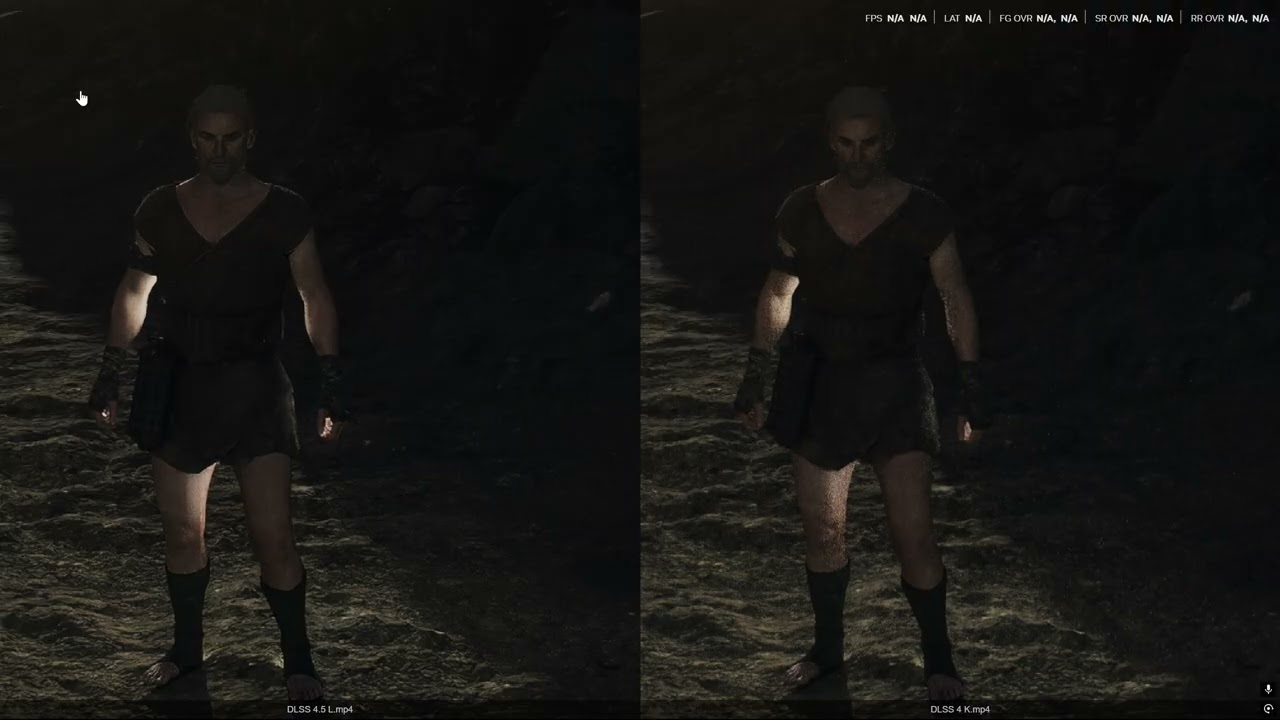
The game engine has no denoising for this path tracing, so DLSS is doing everything.
It can even denoise PT to some extent which is wild
rustic echo
So… interesting fact you can use DLSS- native (ish) without dlaa overhead
dusky wave
I'll try and see if I could add a little bit of denoising just to tackle firefly artefacts but still keep it cleaner than base SSR denoiser


 gloomy tulip
dusky wave
Otherwise toggling off SSR denoiser and just using DLSS trashformer preset 'Focu...
gloomy tulip
dusky wave
Otherwise toggling off SSR denoiser and just using DLSS trashformer preset 'Focu...
I don’t really want to run preset M or L on my 30series
rustic echo
Certainly improved but how is it in motion?
waxen delta
thank you for the work on the VK add-on, I know it was a pain in the ass and y'all didn't want to do it but I appreciate it nonetheless 🙏
rustic echo
gloomy tulip
I don’t really want to run preset M or L on my 30series
Ram in RR? I think they have the DLL there just for funnies?
Well anti cheat doesn’t care about those streamline files anyway. Like other ACEs
woeful raven
gloomy tulip
I don’t really want to run preset M or L on my 30series
It also works on preset k to a certain extent
woeful raven
dusky wave
I'll try and see if I could add a little bit of denoising just to tackle firefly...
More slop you'll have to move to vk eventually

dusky wave
@rustic echo I'll share a build with the experimental SSR denoiser toggle
I managed to reduce firefly artefacts well enough
woeful raven
Slop it out bud i'll be home with me london fog soon
Time to see my 540p SSR become pristine
dusky wave
if the SSR was atleast 1440p
it would actually be kino
rn with my toggle
No fireflies and no shimmer
but cleaner
woeful raven
just use native res
gloomy tulip
Dunno how it deals with the bad ssr upscaling gap
woeful raven
And get 1080p ssr
rustic echo
gloomy tulip
Half res ssr <:kekpepehands:1409649023870173377>
half res ssr is standard config no? I think it has more to do with improper scaling.
gloomy tulip
rustic echo
half res ssr is standard config no? I think it has more to do with improper scal...
Yes but this developer is not competent, they don’t use full resolution depth to upscale
It’s like standard method from 2011
 rustic echo
This is what you get moving away from 2d pixel scrollers from the webbrowser age
rustic echo
I have yet to be able to boot up NTE, but we'll see if all the engine gimmicks in the world can just beat plain old good assets and design
streams of CN NTE does not inspire me confidence


 gloomy tulip
Hmm that looks kinda weird, as if the stone blocks on the wall become fully smooth
woeful raven
 dusky wave
gloomy tulip
Hmm that looks kinda weird, as if the stone blocks on the wall become fully smoo...
dusky wave
gloomy tulip
Hmm that looks kinda weird, as if the stone blocks on the wall become fully smoo...
its metal
do you mean the copper ones?
bronze or whatever
I can play around with the strength and reduce it
dusky wave
Let me check
I am embracing early RT is all
make everything into a mirror
have to market RT reflections
dusky wave
gloomy tulip
Yeah the bronze
I did
Truly
I did the meme
'GTA 5 wet road reflections'
woeful raven
 stuck sandal
gloomy tulip
I think you might’ve disabled the roughness filtering for ssr hmm
stuck sandal
gloomy tulip
I think you might’ve disabled the roughness filtering for ssr hmm
-# I thought the same thing lol
since the wood here is so reflective
https://discordapp.com/channels/1408098019194310818/1440801914165002322/1469095594957213727
dusky wave
vanilla / better trashformer denoising / kino super duper reflection edition (I dont care if its not physically correct) 


 stable lava
all this effort going to waste once 1.1 hits and we get pt
stable lava
the wuwa strat
woeful raven
stable lava
all this effort going to waste once 1.1 hits and we get pt <:soyjakGrin:13091863...
rt is lucky
pt is maxcope
stable lava
i will cope pt into existence dw about it
dusky wave
dusky wave
vanilla / better trashformer denoising / kino super duper reflection edition (I ...
@gloomy tulip an ideas how I would go about targetting roughness filter?
I want my Control super duper reflective surfaces in areas like the lab but I dont want wood to become polishmaxx3000
dusky wave
@woeful raven i am sorry to say
removing denoiser does fuck all
it was all a placebo
of me removing roughness filtering
woeful raven
kek w
dusky wave
dusky wave
removing denoiser does fuck all
it helps a bit with vanilla fireflies
gloomy tulip
dusky wave
<@262441995153178625> an ideas how I would go about targetting roughness filter?...
Its hard to determine which, because the filtering includes both roughness filtering + spatial filtering
dusky wave
yes, thats were I messed up
because I saw blur and thought hur dur
lemme remove
now I realised it was controlling roughness filtering

Full placebo
gloomy tulip
My half res assessment isnt fully correct tho, it uses half res + blended full res for roughness > x surfaces
And below that would use full res
I think the roughness threshold is 0.25
Maybe you can try disabling the spatial blur when using lower mips
Its this pass
 dusky wave
I really need to use Nsight, I am doing everything via devkit like some neanderthal
rustic echo
dusky wave
I really need to use Nsight, I am doing everything via devkit like some neandert...
Dem stonemasons were cheating with future tech confirmed?
gloomy tulip
DX11 is hacking tool 🙁
It seems like denoising is done during the temporal pass as well
Looks like a blur kernel


Before vs after temporal


Maybe you can disable the temporal to let those noises in XD
gloomy tulip
Yeah SSR temporal
It does variance based smoothing of previous SSR, then blend to current one
Maybe if you disabling that smoothing it would be more raw noise
gloomy tulip
Ngl I coundt see XD
dusky wave
gloomy tulip
Maybe you can try disabling the spatial blur when using lower mips
this works
vanilla / modified

 woeful raven
dusky wave
I really need to use Nsight, I am doing everything via devkit like some neandert...
woeful raven
dusky wave
I really need to use Nsight, I am doing everything via devkit like some neandert...
thats why you need to move to vulkan bud
embrace the inevitability
woeful raven
alright
dusky wave
dusky wave
uno memento por favor
ok I got good enough denoising and increased reflective amount for the surfaces I want but others like wood arent mirrors
Decent enough copeTM solution until RT
sturdy osprey
strong vault
https://www.youtube.com/watch?v=G0qyNCVMUNg
this is crazy
i swear dlss is the most useful thing that came out of all this ai nonsense
they are going to pack dlss 5 so hard that its gonna recreate almost flawless 4k image from 1080p
rustic echo
SSR plus ultra
is this specific to reflections or did lighting get a bump from SSR quality up?
not sure if the game has reflection capture etc type of system
dusky wave
Just SSR here
It should have less flickering and existing reflective materials will have more reflectionsTM
Wood, stones and other stuff in-game that are reflecting shouldnt be mirrors now
woeful raven
dusky wave
Wood, stones and other stuff in-game that are reflecting shouldnt be mirrors now
cubemaps ambient link kinda fuck with some senvironments though
they really rely on that shit
too dark with ambient link here tbh
dusky wave
- Added experimental SSR mode
dusky wave
woeful raven
they really rely on that shit
yes, they use it to overbrighten some areas meanwhile other ares end up borked
What I can do is increase the min floor further
so instead of 15% I make it 25 or something
woeful raven
then again some of the other areas look abysmal
with the ambient link
one sec
let me grab the latest build
maybe I was using the one
without the floor fix
rustic echo
dusky wave
yes, they use it to overbrighten some areas meanwhile other ares end up borked
I found it's mostly with iconic scenes, probably related to cutscenes or quests. Whatever f-up interns do always affects downstream work, like clockwork.
 rustic echo
15 is ok, if you like spooky, but ya, i also feel it needs a little more.
woeful raven
the details are still there on OLED
rustic echo
at 15, you can tell "it's not black" black
woeful raven
but looks a bit too dark
dusky wave
woeful raven
yeah i'd say need a slight tweak to the floor
stay in that place, I cant go there again
let me do 25%
 woeful raven
guess u could just slap in
20 or 25
and then wait until someone finds an issue area with it

 rustic echo
spi just realize a new problem with civil engineering?
 dusky wave
- Added experimental SSR improvement mode
- Raised ambient link min floor to 25% (stops previously grief areas from being too dark)
dusky wave
dusky wave
- Added experimental SSR improvement mode
- Raised ambient link min floor to 25%...
gloomy tulip
woeful raven
I think bro spent all his time modding
gloomy tulip
dusky wave
- Added experimental SSR improvement mode
- Raised ambient link min floor to 25%...
Hmmm did you see my earlier slop code fix for ambient reflection darkening
Seems to work quite well
gloomy tulip
gloomy tulip
Slop solution ughhh
Oh I saw that you reacted to it XD
rustic echo
Wuling threw me for a loop too...I was like, i'm rich....nope, not in wuling. you poor bum. Seperate inventory, separate currency...WTF do you mean you don't take my bills here! Fffffffffk
gloomy tulip
rustic echo
Wuling threw me for a loop too...I was like, i'm rich....nope, not in wuling. yo...
WTF
Why
Thats so dumb
rustic echo
gloomy tulip
Thats so dumb
Lore? haha
I feel like by 2.0 Endfield will turn into Apple. They are not just a customized engineering company, they are also a financial and logistics company.
Take over every part of economy, one patch at a time. Cause no one else wants to.
@dusky wave 25 looks like the sweet spot

this was vanilla and zero
gloomy tulip
Stole that from SSR temporal shader


 gloomy tulip
Math has always been based
They created the sigma male before the world even knew what a simga was
dusky wave
gloomy tulip
Hmmm did you see my earlier slop code fix for ambient reflection darkening
which one? I am losing track with the amount of stuff going on
the sky luminance one?
Dunno, I think I fudged up somewhere
it looked borked on my end
so I just went back to the older method
gloomy tulip
Yeah the one in my replied message
rustic echo
dusky wave
- Added experimental SSR improvement mode
- Raised ambient link min floor to 25%...
I think you borked the SSR mode. It's fireflying everywhere on or off, and no reflection difference
dusky wave
Reflections difference will only happen on certain materials
check the hub base that I had
in the vid
fireflying shouldnt be happening
wait, you're saying its happening with it on or off?

 dusky wave
Dijon has a shader I havent patched
They have two shaders there that changed depending on where you are on the ship
let me do it now
rustic echo
but artifacting with it off, means the orginal denoiser is off permenently regardless of toggle?
let me check hub
dusky wave
no
off means vanilla code runs
thats why I didnt name it 'off'
but rather 'Vanilla'
dusky wave
dusky wave
rustic echo
trying to boot up an old version of addon
Vanilla is still causing fireflies?
rustic echo
dusky wave
Vanilla is still causing fireflies?
you unpinned old version, so give me a sec lol
rustic echo
dusky wave
Vanilla is still causing fireflies?
nope, it seems you had it right, it was just vanilla jank that was always there. My mind played tricks on me looking good
dusky wave
Its wierd
I think we've been memoryholed
I thought vanilla SSR was fine
but now, you just see fireflies everywhere and it looks shimmery
rustic echo
dead pixel theory again
dusky wave
- Added experimental SSR improvement mode
- Patched Dijon SSR shader to work with above
- Raised ambient link min floor to 25% (stops previously grief areas from being too dark)
dusky wave
dusky wave
- Added experimental SSR improvement mode
- Patched Dijon SSR shader to work wit...
rustic echo
hmm so even DLSS-Q is kinda bad, resolution wise, now that we have mirrors
Let me see if I can force DLSS 99% 88% my bad
aka DLnotAA
at least reflection wise, still not winning the fps/visual difference of TAAU, though reflections up is nice
trying preset L, since it suposely has better noise resolve
still have DLSS jank, and hard to beat TAAU in performance, but the shiny reflections work regardless of TAAU
dusky wave
TAAU can handle the fireflies?
woeful raven
taau isnt too noisy
dusky wave
If it works then I might as well remove the warning
rustic echo
dusky wave
TAAU can handle the fireflies?
have to test other places, but so far...it's doing fine on higher reflectivity
TAAU blurring is saving it I think
dusky wave
should I default toggle to 'Improved'?
rustic echo
I would say yes, TAAU is not losing anything so far I've tested, let me head over to wuling
woeful raven
dusky wave
should I default toggle to 'Improved'?
Do it
 rain sundial
what are the pros and cons using the vulkan reno vs the dx11 reno (if i only care for the hdr/color sliders)?
dusky wave
VK reno has only HDR
woeful raven
none
dusky wave
DX11 has rendering improvements
woeful raven
Forge time to slop over dicks 11
dusky wave
VK reno is Spiwar slop
DX11 is Spiwar / Forge coop slop
woeful raven
Use the script i gave u
dusky wave
I said I wont until I finish Wuling story
rustic echo
ok so found a spot, DLAA was superior to TAAU in reflections
so TAAU can't always win
so i would say "as it should" fix now
still DLSS weird jank on other areas, so whatever their DLSS implimentation is, it's weird
gloomy tulip
I think the game could be using jitter that's not nvidia DLSS's
That could explain why temporal resolve isnt as good
DLSS also caused lumen boiling in other games than TSR iirc
rustic echo
In terms of performance, forge's latest patch, at least makes things regular
5-10% spread between DLAA - TAAU - DLSSQ-B-P
and appropriate quality drops
so reflections is a matter of taste, which most people will take. it is indeed temu-RTR
DLAA is very clear, where TAAU is blurry, and DLSS suffers from resolutions
robust wagon
wow
dusky wave
You could say its not 'creative intent' but I know damn well they will decrease roughness with RTR anyways
To sell the reflections
Atleast I am now targetting materials better than a blanket roughness removal causing wood to become a mirror
Reno HDR / Reno with all~~ improvements~~ deprovements

 stuck sandal
could be a $15 next gen upgrade :p