#archived-modded-support
1 messages · Page 646 of 1
 crude seal
 tall wagon
Yeah try that
 keen moss
Give people time to answer, yes 3.7.2 fixes the issue with modded recipes not showing up in the cooking menu
tall wagon
Mhm
 native dragonBOT
Can you upload your SMAPI log to https://smapi.io/log (see instructions on that page) and share the link here?
tall wagon
I was gonna say that
But i thought logs were only a android thing lol
Hence why I was talking about if he was modding on android
Then I went to say if the terminal also went down
Just trying to help 😅
 normal shadow
@normal shadow
Get cjb cheats menu
@tall wagon ok i downloaded it
 spice mirage
there a mod to increase the amount of zooms?
normal shadow
how do i get to Stardew Valley/Mods
tall wagon
how do i get to Stardew Valley/Mods
@normal shadow
Are you using steam or another?
spice mirage
and os
normal shadow
Steam
spice mirage
what os?
 ashen elbow
did you install smapi,,,
normal shadow
Yes i have it
ashen elbow
well you should have a mods folder
normal shadow
How do i get to it
normal shadow
Yes
spice mirage
open the terminal window that launches with the game, and type
show_game_files
normal shadow
C:\Users[USERNAME]\AppData\Roaming\StardewValley\Saves
spice mirage
try
C:\Program Files (x86)\Steam\steamapps\common\Stardew Valley
ashen elbow
since you downloaded it via steam, it should be somewhere in steamapps
ashen elbow
no
normal shadow
D:
spice mirage
C:\Program Files (x86)\Steam\steamapps\common\Stardew Valley <- here
crude seal
just right click on stardew valley on steam, go to properties and then go to browse local files
 heavy sail
Extract the zip into the Mods folder
ashen elbow
yes
 heavy sail
That isn’t right
crude seal
put the folder containing all pf the cjb stuff in the mods folder
normal shadow
So i dont extract
 lapis void
no, you do extract, you just extract the whole folder
keen moss
(Also while it's good to be offering help, I'm an experienced modder and I'm getting confused back reading chat because 3+ people are all trying to explain the same thing to one person)
 supple echo
resists joining the pile of explanations
tall wagon
Lol
spice mirage
is there a mod that adds zoom levels?
ashen elbow
that's vanilla isnt it?
heavy sail
If the vanilla feature doesn’t suit your needs, there is a mod for a wider array of zoom levels.
spice mirage
yeah 75% isn't enough
heavy sail

Nexus Mods :: Stardew Valley
Adds keybindings to adjust the zoom level and lets you zoom in/out past the game limit.
 exotic hemlock
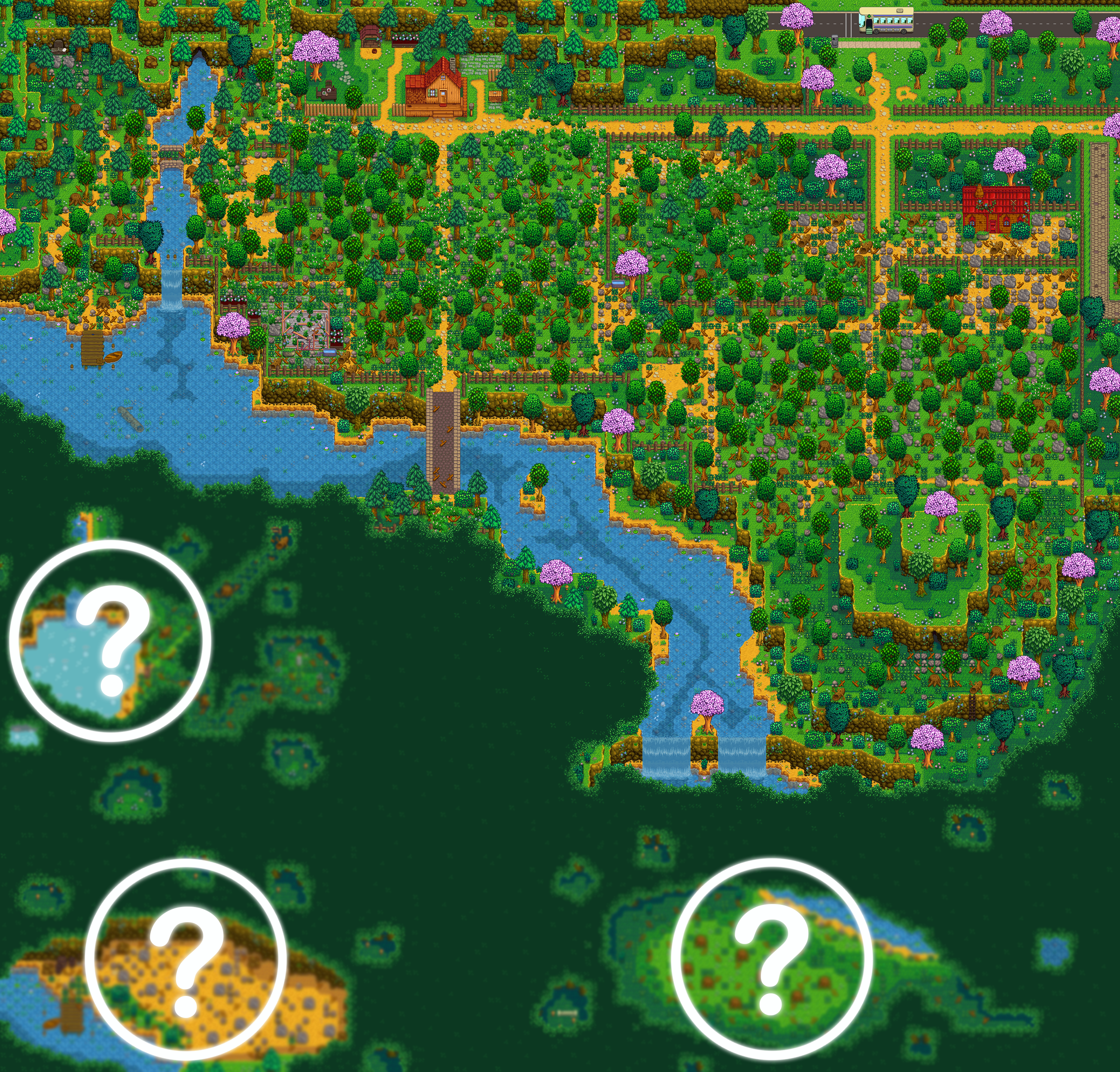
Hello all. Quick question that in having trouble finding information on. I'm trying to get the SVE immersive farm 2R to work but its giving me issues. When it load a new game and check the map it just shows the SVE map not immersive. What step am I missing. (I have all required support mods and started on standard farm)
ashen elbow
are you using npc locations?
ashen elbow
!log
native dragonBOT
Can you upload your SMAPI log to https://smapi.io/log (see instructions on that page) and share the link here?
exotic hemlock
 shy orbit
i don't know, is it possible that MTN is interfering with it?
exotic hemlock
i forgot i installed MTN today....but even before MTN i wasn't getting the immserive map
lemme try it real fast without MTN
 orchid vector
Question:
Can a Mac user play multiplayer with a windows user, but here's the kicker, both using Stardew Valley Expanded? The mod.
heavy sail
It should work @orchid vector
orchid vector
It should work @orchid vector
@heavy sail
Thank you! The Mac user is completely new to playing mods and doesn't understand how to install Stardew Valley Expanded. I have no experience with Apple products and can't help.
Does anyone know if installing Stardew Valley Expanded on Mac is different than on windows? It's there a guide for it, or does Nexus Vortex handle everything for them?
exotic hemlock
still gives me the SVE map, not immersive map without MTN installed. do i need to start the game single player first and then host it???
heavy sail
I wouldn’t recommend using Vortex, manual installation would be better.
Installation should be the same however, just the game folder being in a different place.
exotic hemlock
to get immersive, it is the standard farm you have to select right??
thought so, but for whateverr reason it's not working.....is there something i have to do in game to get the proper map?? or is there another way i could tell if it's the immersive version or not?
so the map that's shown on nexus of the immserive doesn't get shown in game??
heavy sail
Oh, odd. I’ll double check it real quick.
 heavy sail
Hmm, did you add it in an existing save?
heavy sail
Could you send a picture of your farm? Just to clarify the problem.
exotic hemlock
i'll have to find the screenshot folder real fast, one sec 😛
supple echo
@orchid vector Vortex doesn't run on Mac, and manual install is more reliable anyway. Is your friend still on vanilla? There's a getting started guide for mods on the wiki, and SVE also has an install guide, but I'm also on Mac and can get you the Steam file path/answer questions in a couple minutes when I'm back at my laptop. :)
exotic hemlock

Steam Community: Stardew Valley.
tall wagon
I'm back
heavy sail
That looks correct, the IF2R map should look something like that.
exotic hemlock
so the map i posted above doesn't get displayed in the game then? Have you played the IF2R?? i'm just curious if there's something i could do at the start of the game to verify that it's IF2R and not just standard SVE
 rare quest
That is the IF2R map.
IF2R is too big to display on the world map hehe... (I tried my best)
shy orbit
you could take a picture of the farm map using the screenshot tool in the game options tab. or just walk around a bit to see that it isn't the vanilla map
exotic hemlock
i can tell it's not vanilla, but doesn't SVE change the vanilla, not just IF2R?
or is it only IF2R that changes the vanila farm?
shy orbit
yeah, IF2R replaces the vanilla standard farm, SVE doesn't do anything to it without IF2R
exotic hemlock
well, good to know that I had everything working right to begin with....i was just expecting something that doesn't exist 😛
and hi flash 🙂 thx for the info bro, much appreciated
 real sage
are there mods that do anything with flowers artisan-wise?
not honey, but the actual flower once picked
 dusk gull
there's flower jelly and flower meads mods
shy orbit
artisan valley and farmer to florist at least
dusk gull
can't remember the actual names of those though
real sage
thansk
 shy orbit
@dire fractal you're on linux, but are launching the game by targeting StardewModdingAPI.exe?
 dire fractal
yes
shy orbit
have you tried using the StardewValley launcher?
shy orbit
ah well, i don't know what to do in that situation
keen moss
There’s not many Linux peeps around here sadly but also posting your log to the parser rather than GitHub makes it more readable.
!log Here’s a link to the parser
native dragonBOT
Can you upload your SMAPI log to https://smapi.io/log (see instructions on that page) and share the link here?
 potent helm
I'm trying to play SVE and some other mods with my friend but me nor him have any experience modding and some mods are not working so i was wondering if anyone could help me out???
shy orbit
!ask
native dragonBOT
Feel free to ask your question or describe your issue here, and someone will help if they can :)
potent helm
!ask I'm trying to play SVE and some other mods with my friend but me nor him have any experience modding and some mods are not working so i was wondering if anyone could help me out???
native dragonBOT
Feel free to ask your question or describe your issue here, and someone will help if they can :)
shy orbit
what it's saying is you can just describe your problem here and people can help with it if they can
shy orbit
so for example what mods are not working and so on
potent helm
ok
nvm my friend gave up and now he wont play with me 😢
thanks for your help though
shy orbit
well you're welcome, even if it wasn't much
 inner river
Where should I go to use mods and buy use them I mean install them
supple echo
Do you want to play Stardew Valley with mods? This guide is for you!
inner river
Thx
 mellow bobcat
Guys can someone help me? ; -; i'm new to modding and i don't know how to install furniture mods, either cp or cf, can someone link me a tutorial or teach me themselves?
I can only find tutorials on how to create furniture packs, not how to install them 👉 👈
 fair vessel
The process is same as any mod
- install SMAPI
- download, unzip, and place the required framework mod (CP or CF) in Mods folder
- download, unzip, and place the furniture mod you want in Mods folder
mellow bobcat
oooh it's the same process for both?
fair vessel
Yes. You've already installed SMAPI?
fair vessel
Ah then yeah, it should all be pretty familiar
fair vessel
🙂
 echo bone
Can anyone here help out with something?/
Trying to use Stardew Valley Expanded but I get this error on the Mod Manager which instantly crashes to desktop when I try to load in game
 naive drum
The mod manager is outdated and cannot handle newer content patcher mods.
Install manually bu unzipping the mods and putting them in your mods folder.
 grand lotus
What happens if you install a bigger map replacement, then join a multiplayer game that has the smaller original map - are you still able to place stuff outside the normal boundary?
Or only if it's the host that has the bigger map?
 royal arrow
Depends if they both replace the same farm type or not
!mpmods But for more details on mods in multiplayer, check this
native dragonBOT
See https://stardewvalleywiki.com/Modding:Player_Guide#Do_mods_work_in_multiplayer.3F for details on how mods work in multiplayer. :)
naive drum
It will locally apply maps you have installed
grand lotus
I read that and it says that other players will see you walking through walls, but what if you start planting crops etc out there? And could you do that, even if you aren't the host?
naive drum
If you have more maps than the host then you going into the extra maps puts you in a black soft locked void with endless snaps errors
A d yeah you can do that even if not the host, it will look to other players like you're planting crops in out of bounds
It may also look like you're avoiding random areas (because they have walls or something on your farm map), placing crab pots on land, or any of a number of other weird things.
grand lotus
That's interesting. It seems like the server host doesn't really enforce anything
But I guess all data still goes through the server, or is it peer to peer?
naive drum
It's more peer to perish?
Uhg phone
Peer to peer or steam-handled iirc w/ host having the save files
grand lotus
Like
World changes | global | That includes any mods which edit things in the world — durable fences, monster stat changes, etc. These mods affect all players, no matter who installs them.
That's interesting that any connecting player can control stuff like that
naive drum
If mods lists are too mismatched you get version mismatch connection errors
(Or just game crashes)
fair vessel
Yeah there is no server for stardew multiplayer. It's all P2P
grand lotus
Oh, that's interesting. So the host is more like a "master" owning the save, I guess
fair vessel
Everyone runs their own instance of the game, affected by the mods they have installed, and multiplayer messages keep the data for everyone synced (but not most of the underlying game behavior)
grand lotus
There was a mod that added a new location and the host could go there, but other players would crash when trying, even though they had the mod as well
naive drum
Oh noo what a mess ruukas
fair vessel
Yeah location data is synced weirdly for farmhands
spice mirage
is custom critters not loading?
grand lotus
I was kind of thinking about the possibility of a public server, using unlimited players, instanced farmhouses and maybe instanced greenhouses, and I guess the dedicated server mod
But that wouldn't work well, if it's peer to peer
At least it would require some rewriting of the network protocol, then
naive drum
Main mp maps issue I've had is host forgetting to unzip a mod and then when I tried to show her the map it put me in the soft lock zone
fair vessel
People often do make setups like that, using Always On Server mod and Unlimited Players mod.
Plus Anti-Cheat (or Multiplayer Mod Checker) help to make sure people who connect are using compatible mods
naive drum
With better ranching spamming an error every frame
fair vessel
I think there's a mod that gives all players their own greenhouses too
naive drum
I don't know why it was better ranching of all mods that did that...
grand lotus
Yeah, mods like these inspired me to perhaps try something like that
But it would be way too easy to cheat
Would have to trust the players to a certain extent
Even with the anticheat measures
fair vessel
Yeah you can escape notice of Anti-Cheat mod pretty easily if you know what you're doing
It's only good for deterring casual cheaters or just preventing game crashes by accidental mod mismatches
grand lotus
There would have to be a strict server to really be cheat safe (still, to an extent)
shy orbit
@spice mirage there is a link to an unofficial update to custom critters on top of your smapi log. however that's not probably the problem. the mods for custom critters need to go inside the Critters folder that is inside the CustomCritters mod folder
grand lotus
But I like peer to peer, usually performs better
fair vessel
There's no good way to detect farmhands who have renamed manifest files through SMAPI
grand lotus
Yeah, there's really not much you can do
Or they could probably edit the anticheat mod to send spoofed messages
fair vessel
Anticheat mod works host-side only
SMAPI has an API for getting the loaded mod uniqueIDs for all other connected players
grand lotus
That's a bit harder to circumvent then, but again SMAPI is open source, so you could modify that on the client as well
 tired apex
oh so thats what ya meant by p2p, not pay to play <-> whoops
fair vessel
Haha there's really no need, that would be way too much effort. All you do is swap the uniqueID for a banned mod for the uniqueID of an approved mod in the manifest.json.
grand lotus
Right
fair vessel
It ultimately comes down to trust
I mean even without any fancy mods, you can cheat stuff in with Console Commands if you only have smapi's defaults installed
grand lotus
One of my Minecraft mods is kind of cheat-ish, it's not too bad as it's a Creative tool that only works in creative mode, and let's you modify the attributes of items. Forge (the minecraft modding api) by default sends the clients mod list to the server on connection, and I might have modified that packet to be able to connect to a server that had blocked the mod.
shy orbit
@spice mirage and more about the error message, it just means what it says, that there's an empty folder in the Mods folder (not sure if smapi ignores any file types when determining the emptiness though), on its own it doesn't cause problems, and maybe you already installed the custom critters mod (the content pack for custom critters) correctly
grand lotus
I trust my friends in multiplayer, but I wouldn't trust everyone on a public server, so it probably wouldn't work
naive drum
Smapi ignores .doc, .zip, .rar, .png, various types of OS organizational files, and anything named "readme"
 forest vessel
playing expanded mod with a friend, I'm the host, if I marry sophia the game won't crash for him or anything right?
 wide wasp
Weird I got this mod called Upgrade Empty Cabins
it’s supposed to let you open the seed box in the cabins but it still thinks it belongs to someone else even though I’m in singleplayer
grand lotus
Kitty, did you follow this To remove seed boxes from all unclaimed cabins, type remove_seed_boxes in the SMAPI console?
grand lotus

rare quest
@forest vessel Hosts can marry custom NPCs in multiplayer.
heavy sail
Save Anywhere is known to have problems, it might be a conflict or just a plain error
!log
native dragonBOT
Can you upload your SMAPI log to https://smapi.io/log (see instructions on that page) and share the link here?
 inner charm
can i use mods for sdv through twitch?
 late nebula
Twitch has mods for SDV?
grand lotus
A few
late nebula
(I wouldn't recommend it personally.)
grand lotus
61 mods
I wonder why it's not more widely used by modders
At least I like CurseForge (twitch) for Minecraft
Before modding Stardew Valley I think I had only used Nexusmods for Skyrim
late nebula
I think we're just set in our ways. But also, a lot of mods for SDV have special install instructions where you have to merge folders and stuff (which is a bad practice anyways). There's a lot of standardization, but enough outliers to make mod installers not be a good idea sometimes.
It especially was impossible back in the days before Content Patcher.
heavy sail
@meager lodge Deep Woods conflicts with Save Anywhere. You might have to choose one or the other.
fair vessel
A lot of errors caused by mods show up labelled as "game" errors in logs.
It just means a mod(s) changed something that caused something in the game code itself to break, rather than something in the code of the mod
Perhaps it's another conflict then? Save Anywhere is incompatible with a lot of mods
If DeepWoods says it's been updated for Save Anywhere compatibility, then that's less likely to be causing the problem
 livid bronze
could I ask someone for help I have an odd issue
fair vessel
!ask
native dragonBOT
Feel free to ask your question or describe your issue here, and someone will help if they can :)
livid bronze
!ask So my friend and I are playing with a bunch of mods and every time we touch the kitchen it bugs out. Were pretty sure the problem is the more recipes mod but were not sure why
native dragonBOT
Feel free to ask your question or describe your issue here, and someone will help if they can :)
heavy sail
!log
native dragonBOT
Can you upload your SMAPI log to https://smapi.io/log (see instructions on that page) and share the link here?
livid bronze
native dragonBOT
Can you upload your SMAPI log to https://smapi.io/log (see instructions on that page) and share the link here?
heavy sail
So, you’re missing some mods, and there is a mod that’s causing a conflict.
livid bronze
oh 😅
heavy sail
Train Station, Artisan Valley, Hybrid Crop Engine, Shop Tile Framework, Custom Furniture, Anti-Social NPCs, etc.
You also have duplicate mods.
A duplicate of More Trees
royal arrow
If you're new to logs, you can check out this guide to learn more about how to read them o:
.quote 5031
 devout pumiceBOT
[#5031] "If you're looking to learn more about how to read your error log, there's an annotated one here  https://m.imgur.com/SRfOvKB" - LenneDalben (30 Aug 2020 @ 11:43:35 PM UTC)
 shrewd gate
Should I do homework? Orrrr download 20 mods and fight them forever to work? Hmmmm 
supple echo
.choose Space does hw, Space wrestles 20 mods
devout pumiceBOT
Space does hw
shrewd gate
Noooooo
supple echo
Uberbot has spoken 😉
shrewd gate
Fuckin’ Uberbot
supple echo
haha
dire fractal
There’s not many Linux peeps around here sadly but also posting your log to the parser rather than GitHub makes it more readable.
@keen moss the smapi log has nothing in it, nothing pointing to a error
i already linked to the parser twice
search for links from me
it just completely crashes everything
royal arrow
Uber bot, encouraging productivity, I like it
PurringChaos, you can also quote your message with the log, or link to the message as well, if you didn't want to re-post
dire fractal
livid bronze
Thank you @heavy sail
royal arrow
Thank you for sharing your log, PurringChaos! You may have answered this already, but does it crash before even loading a save, or after loading the save?
dire fractal
before it can even get to a menu
royal arrow
Ok, did you at any point use any XNB mods? They would have gone into your Stardew Valley > Content folder, rather than the Mods folder
dire fractal
nope
only extracted into mods folder
i also grep'd history and someone else had the same issue with pytk
some mono weirdness
royal arrow
Ok, my next question was going to be "does vanilla still load? If so, time to test removing all the mods and slowing add them to figure out which one is doing it."
Have you checked on the PyTK mod page and comments, any suggestions there, or was it more like "doesn't work on Linux, merp"?
dire fractal
vanilla still loads, modded still loads
modded + pytk does not load
i havent found any otherinfo
mono version: 6.10.0.104-1
pytk version: 1.18.9
stardew valley: stardew_valley_1_4_5_433754439_36068.sh from gog
forest vessel
on expanded farm map, can I place buildings on those far away places, like the area where ores spawn? and what can I use that open space to the right of the mushroom cave(not the cave with stone spawn, just the open space before it) for?
royal arrow
@shy orbit hiya, hope it's ok I pinged you for some Linux help, if not, sorry :c
User purringChaos#7398 is on Linux and has a problem with PyTK. They're able to load mods fine, but as soon as they add PyTK to the mix (which they need for SVE), the game crashes before ever getting to a menu. Any ideas?
Their log is https://smapi.io/log/dc389cb3fb2d4db6ba3cc8eeb2d1dac7, and they provided additional info about their set up here https://discordapp.com/channels/137344473976799233/678284714829807636/753406104830083072
dire fractal
also on arm64 if that helps
so, yeah
more than happy to help with debugging stuff

GitHub
A collection of mods for Stardew Valley. Contribute to Platonymous/Stardew-Valley-Mods development by creating an account on GitHub.
other harmony patches work
but i dont know which broke
might just need to add some prints and see where it dies
will see if i can setup a dev env
however it'd be a lot quicker if someone could build it for me
feel free to PM and ping me
 lean pecan
Hey what’s the name of that really big mod a lot of y’all use? It adds new characters & areas. Also I think it does some beautification?? Finally bought sdv on pc 🥳
keen moss
Probably Stardew Valley Expanded but it's recommended to play through the game at least once before installing it. Otherwise you won't really know what's modded vs vanilla
royal arrow
yup, the mod author of Stardew Valley Expanded (SVE) recommends playing through at least year 3 before installing SVE
rare quest
(yep)
dire fractal
Otherwise you won't really know what's modded vs vanilla
*laughs in memory problems*
 snow wraith
a blessing in disguise, I get so many more hours out of games with that condition
lean pecan
I’ve been playing unmodded for a few years, so it’s time to bump up 💕💕💕
royal arrow
I mean, there are mods that are of such a high quality that they feel like vanilla content that could have been there all along, those are great 
I think Paradigm was more referring to people who have never played SDV and immediately start modding it, but have lots of questions about "wait, was that a mod?" and a general  confusion lol
 humble fox
ive never liked the idea of just jumping into a game with a million mods
normally just enjoy the vanialla game first
rare quest
This was my experience with the Witcher 3. I beat it without mods, then beat it again with a lot of mods! Experienced the game in a new way.
dire fractal
give it a day and its a whole new experiance for me anyway
snow wraith
ey, flash. just curious, if you're still here. does Expanded do anything stats-wise to the galaxy sling or just reenable it and change its description
 inland pasture
@analog verge Just got on my pc since we last talked, thanks a million dude I will install it tonight and follow up if it works ❤️
rare quest
@snow wraith SVE only adds it to the game with a different description, letting players know they should ||probably use iridium ore as ammo||.
snow wraith
understood.
I also had the 'better slingshots' mod which changes how they function some and had just wondered if there might be any minor conflicts I wasn't seeing. but likely not.
 kind ore
!log
native dragonBOT
Can you upload your SMAPI log to https://smapi.io/log (see instructions on that page) and share the link here?
 broken frost
re: unmodded vs. modded
I have SDV on Switch for an unmodded experience, and PC for mods.
shrewd gate
Same. Except I also have it on playstation and iphone and my chromebook because I need it
 gilded cedar
!ask I'm having issues with mods not working because their dependencies "couldn't be loaded" even though I have them installed?
native dragonBOT
Feel free to ask your question or describe your issue here, and someone will help if they can :)
 robust bison
!log
native dragonBOT
Can you upload your SMAPI log to https://smapi.io/log (see instructions on that page) and share the link here?
gilded cedar
native dragonBOT
Can you upload your SMAPI log to https://smapi.io/log (see instructions on that page) and share the link here?
royal arrow
Likely the dependency isn't loading even though it's in your Mods folder, your log will give us more deets
 restive zodiac
(You don't need to use the !ask !log etc commands unless you actually need the information from the bot, hehe.)
gilded cedar
Noted, my bad XD
robust bison
oh wow, that's a lot of unloaded mods
well first off you have duplicate copies of a mod
restive zodiac
- Fruits and Veggies for JsonAssets because you have multiple copies of this mod installed. To fix this, delete these folders and reinstall the mod: Mods\[PPJA] Fruits and Veggies\[JA] Fruits and Veggies, Mods\Fruits and Veggies-1598-2-0-13-1598712128\[PPJA] Fruits and Veggies\[JA] Fruits and Veggies, Mods\PPJA Mega Pack\[PPJA] Fruits and Veggies\[JA] Fruits and Veggies.
gilded cedar
It was worse earlier... first time playing modded
robust bison
and that mod is a dependency for several other mods
it looks like you downloaded the PPJA mega pack as well as one of the separate mods that comes in the pack
gilded cedar
So should I delete the lone copies and keep the ones in the pack?
gilded cedar
I think I got all of them, hopefully I get less red angry text this time
shrewd gate
I'll give this one to UberBot, I only just now finished my homework and am fiddling with my updates, I'd never get to play today if I downloaded a bunch of new stuff. Good bot
Saved my graduate career
royal arrow
Hurray for productivity! 
The bot helps me with reminders, both to try out new mods, but also "remember to email JD" 😂
 olive sequoia
god i have no idea why i thought vortex would be better for stardew.
 deep totem
Welcome to manual,, :3
shrewd gate
I thought it was the greatest tool ever. And then everything died. I still have it because I don’t want to move 130 mods, but slowly getting rid of it
robust bison
yeah best to abandon it
 small snow
a very weird question, has anyone had trouble using portrait mods in tandem with npc map locations? i booted up my game using pencilstabs portraits but decided i wanted something more vanilla so i removed all of the stuff from that one and switched to kamirose's character portrait overhaul and gone and broke it somehow. 😔
The map went transparent. I could still see the NPC heads on the "map" but the map wasn't there and the minimap was the same issue. It's been a year almost to the day since i've played, let alone modded, so i was wondering if i did something wrong to totally break it or if it's worth bringing up to kamirose and/or bouhm. All of them are up-to-date of course.
ashen elbow
!log
native dragonBOT
Can you upload your SMAPI log to https://smapi.io/log (see instructions on that page) and share the link here?
ashen elbow
ive never had trouble, and i use like,, 4 different portrait mods, sometimes all at one
small snow
https://smapi.io/log/d59237142c3642fa9b8aee487ce6ff34
it says there's no errors when i do the save and parse thing, on the link. 🤔
I played a bit with the map all transparent so i'm sorry if you have to comb through that; i was on the daily fishing and mining grind and didn't really need the map too much.
ashen elbow
can you show a screenshot of the map?
small snow
i closed the game to figure out what was going on since i needed the map a bit. let's see if rebooting was the fix? If not, i'll make sure to send a picture of what i mean.
Alright so! I think a reboot of the game was all it needed. Not sure why. Maybe it hit a bump somewhere along the way that made it go transparent and get stuck? I dunno. But if someone has a similar problem, I suppose that's the answer for it 😅
ashen elbow
lol
olive sequoia
is there a mod that auto turns on lamps and braziers?
supple echo
I think once braziers are lit they just… stay lit? Usually anyway (I remember having some trouble in the greenhouse once). Pretty sure lamps in your house go on/off according to whether it's day or night already 
olive sequoia
lol okay fair enough. it just seems odd to have my brasiers on all day xD
supple echo
haha fair. That's what I do with mine, so I don't know if there's a mod to light/douse them for you. If you can't find one you could always submit it to mod suggestions :)
https://github.com/StardewModders/mod-ideas

GitHub
Submit ideas for mods to create, or find your next mod project! - StardewModders/mod-ideas
shrewd gate
For those of us who have really good ideas when they become annoyed at midnight that they have to watch long events for the billionth time because they keep playing Stardew, while they’re eating cold Chinese food and want to have auto play to focus on eating, or other non specific examples
real sage
hey! i use texture mods to change the look of basically everything in my game, but there were some things that noticeably don't have decent texture packs, like monsters and fish/shells. does anyone know about good packs that do that? i use better foraging/better crops/better minerals for my items
these ones, i got the names wrong https://www.nexusmods.com/stardewvalley/users/38715215?tab=user+files

 eager solar
Hey guys I have a problem going on rn and I think its mod involved :((
robust bison
!ask
native dragonBOT
Feel free to ask your question or describe your issue here, and someone will help if they can :)
eager solar
so im using the latest version of smapi, and i am using the latest versions of the CJB Cheat menu and Item Spawner. yesterday when i played there was no issue, but now I cant use WASD instead I am just walking infinitely to the left
ashen elbow
that happened to me once, except i was moving backwards, and i wasnt playing sdv
!log
native dragonBOT
Can you upload your SMAPI log to https://smapi.io/log (see instructions on that page) and share the link here?
eager solar
well i just fixed it...
i unplugged my keyboard and replugged it
so im just an idiot
eager solar
nvm its still happening its just to the right now
tired apex
Stick drift but for pc oh no
eager solar
like its not reading my input
eager solar
nah its brand new ://
tired apex
Hm
eager solar
i'll keep troubleshooting we'll see
tired apex
Alright
spice mirage
hm.... gunther has become invisible.
supple echo
…you know, that happened to me on one of my saves after uninstalling "befriend Marlon and Gunther." had you done that by chance
spice mirage
yep. i figured that was exactly what happened
fair vessel
@eager solar does the issue go away when you run the game vanilla?
eager solar
yes it does
supple echo
I don't know why Gunther vanishes, mind you… maybe the mod makes him invisible to put in a custom Gunther and then you can't really make him re-visible?
eager solar
i set it so when i open it thru steam it opens the modded version that’s how i launch the game
 flat moss
How do I not crash my laptop when using mods
fair vessel
Depends how many mods and which mods you're trying to run. I know that if I have too many other programs or internet tabs open at the same time, my modded game will hit OutOfMemoryExceptions pretty quick.
small snow
i use a laptop and find that using the really big mods or a lot of mods at once can bog it all down. pick and choose the ones you absolutely need or want and get rid of ones that aren't doing much for you besides things like aesthetic changes. And also what jonqora said eheh
fair vessel
It allows grass to survive in winter
flat moss
Huh
fair vessel
The biggest resource users are usually mods that unload and load a lot of new textures (like seasonal villager outfits or Portraiture) or mods that run a whole bunch of new logic at very frequent intervals (like automate)
 tulip steeple
Oh yeah, I never asked before, but is it okay to talk about modded Stardew outside of the mod channels?
robust bison
yeah, to a certain degree
ashen elbow
uh? as long as?
it's not game support
fair vessel
Especially in places like new-farmers (but also to an extent in seasoned-farmers), it can be confusing to players who don't know whether content is from a mod or vanilla. So it's thoughtful to mention that stuff is from/made possible by a mod when sharing or discussing modded content or accomplishments.
tulip steeple
Gotcha! I just wanted to make sure I wouldn't be breaking any rules
robust bison
its all good
olive sequoia
dont get me wrong SVE is great but they cut out a lot of good features from the original Immersive Farm mod
 bleak venture
Can you not replace the SVE version with the fixed original version of Immersive Farm 2?
olive sequoia
i guess i could.... hmmm
 analog verge
rare quest
analog verge
rare quest
@olive sequoia If I may ask, which features?
olive sequoia
AHHHH its you. I love the mod. Like a lot. XD but the main things i was thinking of are is being able to get on top of the hill that leads to the caves (i put my lightning rods up there), the extra bit of river that i circled and the waterfall area on the bottom. There are other things in the new mod that I LOVE, like the spa is WAYY better and the quarry is also great.
the new forest is also bomb.
rare quest
Ah I see. I was going for a more "natural look" for IF2R rather than having pre-placed objects on the map, giving the player more of an ability to decorate. Then again, I suppose I could add additional configurations but that does take time XD. I'll look into adding different dirt in the IF2R quarry. It's actually something I've been wanting to do but have been busy with other elements, especially with SVE 1.11 coming out soon. I could also look into a config that'll place ladders for the hill.
olive sequoia
i have an irrational love or that hill xD also for that western branch in the original. it is WAY out of the way but its beautiful lol. and i meant i like YOUR quarry better. ALL AND ALL though SVE is hands down my favorite mod in ANY game ive played
rare quest
Thank you
olive sequoia
THANK YOU
rare quest
I'll take your feedback into great consideration! Might be able to sneak in an extra config or two... to the already 4 coming! :p
olive sequoia
IM SO EXCITEDDDDD. I havent EVEN begun to explore all the goodie in the current version. I cant imagine how great more would be
does anyone know of a mod that allows you to place inside furniture outside
bleak venture
Does the furniture anywhere mod still work?
olive sequoia
ooooh ill check
bleak venture
And now I need to go look at both the immersive farm maps.
bleak venture
I didn't realize the SVE version changed that much.
olive sequoia
it doesnt change a whole bunch. It does add a bunch of cool stuff to the farm map. TBH the old IF was realllyyy big. My favorite part of it took a whole in game hour to get out to and back
flat moss
Brb imma see if this helps
@flat moss back
It helped
Alot
Imma go back to playing SV now
Thanks for the help y'all
olive sequoia
enjoy xD toodleloo
bleak venture
What type of stuff was added?
I noticed some of the changes like the ones you mentioned earlier.
olive sequoia
there a really cool forest spot along with an extra cave system, the spa was updated and is way nicer. it is a bit smaller, but some do prefer that as the old IF was HUGE. uhhhhhhhh it also has debris that restricts were you can go until you upgrade your tools which I REALLY LIKE. the old IF just had the greenhouse there but with IF2R FlashShifter made the greenhouse unlockable again instead of available from the beginning. The quarry also actually works, whereas the old one was a bit weird.
 odd magnet
Hey all.
So I'm thinking of making a modpack to play on multiplayer (I know Multiplayer mods are possible, I'm not sure some of them though). But I want to get some help to double check if there are any incompatible content between the mods. I'd appreciate it if anyone can help.
Here is the list of mods:
https://docs.google.com/document/d/1fio5TdDqtrgIBwEEXgII31S4SGN9dpwqxEE1pZzB6OQ/edit?usp=drivesdk

Google Docs
Content patcher SAMPI Farm Type Manager Json Assets PyTK SpaceCore TMXLoader Stardust Core Stardew Hack Mail Framework Mod Shop Tile Framework Expanded Preconditions Utility Content Patcher Animations UI Info Suite Winter Grass Bathroom after 2nd upgrade Simple Crop Label Hap...
Please ping me if there are problems with the mods
late nebula

Nexus Mods :: Stardew Valley
Your personal fishing assistant that makes you can fishing even without clicking
There are several
I've used that one in the past though
dire fractal
How do i add mods?
late nebula
Start by reading this page: https://stardewvalleywiki.com/Modding:Player_Guide/Getting_Started
Do you want to play Stardew Valley with mods? This guide is for you!
And let us know if you have any questions
 fickle siren
Would someone mind taking a look at my SMAPI crash log? I thought I had everything set up without issue but it's crashing when trying to start a new game, after completing character creation.
olive sequoia
!log
native dragonBOT
Can you upload your SMAPI log to https://smapi.io/log (see instructions on that page) and share the link here?
olive sequoia
this site will parse the log and make it easierto read
fickle siren
oops of course I'm sorry
olive sequoia
does the game crash when you load a save or does it crash at a specific place?
fickle siren
so far just when creating a new file. Loading seems fine
olive sequoia
can you try removing your 'sundrop city' mod for a moment and see if that works? it may have been installed incorrectly and that could be causing the issue with SMAPI
i would also make sure to update TMXL Map Toolkit
if neither of those work there are a bunch of people here better at this than me lol
fickle siren
That seems to have worked. 🙂 I actually rolled back TMXL deliberately as the newest had a bug which made one of the games soundtracks play all the time
olive sequoia
OH I KNOW THAT ONE XD
i have never used sundrop city before so im not sure how compatible it is with SVE.
if its a complex mod it may have to be installed a specific way so if you do want to use it still make sure to install it the way the creator says.
fickle siren
Hmm I thought I did but will double check. Maybe its because its in alpha state?
Thanks for your time/help 🙂
olive sequoia
maybe. it could also honestly be because of SVE. I have had a few mods that add maps and areas and they just dont work. honestly SVE adds so much you prob dont need anything else xD It may also just not be compatible with the version of TMXL your using especially if its a new mod. and no problem its my pleasure 🙂
 young mural
hey guys, is the IF2R mod for SVE multiplayer compatible? ive been trying to host a server w my friend after buying a cabin from robin, but it crashes :(
heres the error log if anyone could help https://smapi.io/log/54f96d33e8cd4b91a0400b45368539ba
olive sequoia
does your friend also have SVE and IF2R installed?
young mural
yep he does
olive sequoia
do either of you sue Vortex to manage your mods?
young mural
no we manually installed them into the mod folder
olive sequoia
okay. and the game crashes when you load it or does it just freeze?
young mural
when i try hosting it a coop server, it crashes when loading :(
we can get SVE to work when we use a vanilla map, it only happens with the IF2R map
olive sequoia
hmm okay this might be a shot in the dark but trying running the game directly through the SMAPI launcher but choose 'run as admin'
young mural
oook ill try it thank you! does my friend need to run as admin as well?
olive sequoia
both of you should yes
im not sure if it will work for you guys but thats how i get SVE and IF2R to work for me in solo
Also try to play in windowed mode
maybe?
young mural
thank u for the help!! and sorry if this a dumb question but how do u run smapi as admin
olive sequoia
no prob, C:\Program Files (x86)\Steam\steamapps\common\Stardew Valley go here in your file driectoy if youre using steam and right click StardewModdingAPI and select run as admin
young mural
will try it now and let you know, hopefully it works, thank you 🙂
olive sequoia
good luck lol and no prob
young mural
oh it worked!!! thank you so much
dire fractal
@late nebula the mod u gave just sets the thingy to mad but doesnt help with the mini game]
real sage
i'm having a fun bug where none of my animals will leave the barn, ever
the coop is fine, but the barn animals just will not leave
late nebula
https://www.nexusmods.com/stardewvalley/mods/866
https://www.nexusmods.com/stardewvalley/mods/6403
https://www.nexusmods.com/stardewvalley/mods/4929
https://www.nexusmods.com/stardewvalley/mods/2697

Nexus Mods :: Stardew Valley
Fishing rework with complete customization. Adds a large focus on perfect catches, even making it possible to catch iridium-quality fish! Comes with an API in v2.0+.

Nexus Mods :: Stardew Valley
Allows user customization of the Fishing mechanics included in the game, with features like difficulty, rewards and condition tweaks, as well as Auto-Reeling the hooked fish and overriding fish types


Nexus Mods :: Stardew Valley
Do fish laugh at you while escaping with your bait and tackle? You can now catch them without any struggle. Just hook them when they bite and you're done!
@dire fractal There are some others. I've only used Teh's and the one I linked before.
So can't speak for any others.
real sage
shane's barn also straight up breaks my game in a neverending loading style
dire fractal
I use Zoryns fishing mod
late nebula
(There are even more than that. Just search "fishing" on Nexus.)
dire fractal
I think pathos maintains Zoryns mods now??
But yeah they simple and get the job done
real sage
actually im going to follow up on this tomorrow, i need sleep
 outer turret
@real sage there's not like a random seedling or bit of debris in front of your door is there?
Have had that happen to me before.
 hollow cypress
I opened SVE content.json to reactivate the cut content, and now SMAPI is giving a bunch of problems. JSON validator says the problem is in a line I never changed, I dont get why it isnt a valid JSON now
^if anyone knows how this works
shy orbit
@hollow cypress try deleting the */ on line 7053 maybe
shy orbit
the json validator shows a different one for me
hollow cypress
but thats not the issue the page found
and Im scared of screwing the whole file up
shy orbit
you can always download a new one
but if you deleted the opening /* you'll need to delete the corresponding closing */ too
shy orbit
well, it's the same thing
hollow cypress
so do I get rid of it, or do I also change it for //?
shy orbit
both works
shy orbit
the SVE download
hollow cypress
you mean to reinstall the whole mod?
shy orbit
you only need the content.json of the (Stardew Valley Expanded) folder if that's the only thing you edited
so you can just grab it from the new download and replace the edited one
hollow cypress
yeah nvm for some reason I thought content.json was an suto generated file once smapi was opened
im slow today
shy orbit
but yeah, if you want to try it again just delete the /* and */ around the cut content part
hollow cypress
alright
shy orbit
or at least that seems reasonable to me
hollow cypress
just by deleting it is enough?
cause in the same line, it says "cut content", I guess I'll have to remove that too
shy orbit
you're welcome, now let's hope just doing that works
shy orbit
i meant more that the events will work normally
hollow cypress
oh yeah, I hope so too
its not the big deal, as long as the game works as intended xD
outer turret
Crikey i never realized how much Sheila diskiked Marnie!
I thought she just spent all her time stalking Sam
 runic frost
hey guys, can you save your mods onto a usb stick safely and then upoad them to another computer
or is it safer to just get the mods through steam and delete them from my own computer files
and omg what sheila doesn't like marnie??
 crystal spear
im pretty sure you can do this !! dont take my word for it tho > hey guys, can you save your mods onto a usb stick safely and then upoad them to another computer
@runic frost
grand lotus
Yes, you can do that with no issues
If there are issues, make sure the other computer has right version of smapi
runic frost
cool thanks guys!
 obsidian cloud
any good clothing mods lmao
grand lotus
I haven't tried them but you can see https://www.nexusmods.com/stardewvalley/mods/5044

And under Requirements > Mods requiring this file
 turbid wren
i have a question about mods, i want to take a screenshot and whenever i'm using mods f12 to take a screenshot doesn't work, i tried searching online and it didn't rlly come up with anything helpful
so how to take screenshot w/ mods?
i am on mac (btw command+shift+4 doesn't work bc it counts as a click in sdv and i want to ss the current moment w/o clicking)
shy orbit
have you tried the screenshot function that's on the bottom of the game options tab?
grand lotus
You need to follow "Part 2" of the installation https://stardewvalleywiki.com/Modding:Installing_SMAPI_on_Windows
This page explains how to install SMAPI (the tool which lets you use mods) on Windows. See also:
Otherwise, you won't get steam overlay or steam achievements
@turbid wren
shy orbit
Cinnamon's on mac so that doesn't apply
grand lotus
Ah, didn't see that part. Sorry
turbid wren
have you tried the screenshot function that's on the bottom of the game options tab?
@shy orbit i want to ss in a menu sometimes so yeaa
grand lotus
I use this mod to have daily screenshots taken

Nexus Mods :: Stardew Valley
Automatically takes a screenshot of your entire farm when you exit your house for the first time each day.
You can configure a keybinding for it
It screenshots the whole location, though
turbid wren
unfortunately that isn't rlly what i'm looking for
i want to take a ss just like the ones u can take with f12 in vanilla
shy orbit
isn't that steam overlay stuff though?
grand lotus
At least F12 is default steam screenshot button
Not sure if it's default for Stardew as well
shy orbit
if so, do you get the overlay at all when launching the game with smapi?
turbid wren
wdym by overlay
grand lotus
You can use Command-Shift-3
That takes the screenshot on mac without any further input
F12 can be used to take screenshots through steam on any steam game
I don't own mac, but as far as I can tell command+shift+4 is a snipping tool, where you have to mark the area you want to screenshot
But command+shift+3 will just take a screenshot of the full screen immediately
shy orbit
in this case it's probably smapi suppressing the overlay if it works with vanilla sdv. there isn't a great solution to it as far as i know
grand lotus
command+shift+3 should be a mac feature and independent of the game
similar to windows key + print screen
shy orbit
sure, if it works well, with games they can often have problems
grand lotus
command+shift+4 is snipping tool similiar to windows+shift+s on windows
turbid wren
yeaa command shift 3 did what i wanted, ty y'all
grand lotus
Good 🙂
shy orbit
i haven't found a way to take a screenshot on linux that works well (outside of the in-game one). there is often strange visual distortions
grand lotus
Maybe your gpu driver has a way
 vital spade
Is there no print screen button on linux?
obsidian cloud
is this intended or the wallpaper on the sink is bugged
shy orbit
there are screenshot utilities, but they just can have problems with games and result in visual problems with the screenshots
 digital ore
Game crash. Already performed mem test
obsidian cloud
is this intended or the wallpaper on the sink is bugged
??????????
 stray star
I'm so late back to report, but @royal arrow IT WAS ACTUALLY LEVEL EXTENDER LOL
heavy sail
@digital ore Can you run your log through log.smapi.io?
 bright ocean
I'd update everything to begin with
royal arrow
@stray star glad you worked it out! 
stray star
Thank god, I didn't want to troubleshoot 538 mods LOL
dire fractal
anyone who can, can someone build https://github.com/Platonymous/Stardew-Valley-Mods/blob/7930d3bd39fd2067d051147d4021a84e4c0149e3/PyTK/PyTKMod.cs#L441 but add a log print after and before every patch in this function
GitHub
A collection of mods for Stardew Valley. Contribute to Platonymous/Stardew-Valley-Mods development by creating an account on GitHub.
so i can tell which one is failing
i am unable to build stuff
crystal spear
does anyone know a mod that pets the cattle
im sick of having to go around the barn and coop having to pet all of them manually
dire fractal
GitHub
Having a SISGEV error when loading the mod with SMAPI 3.4.0. ================================================================= Managed Stacktrace: ==================================================...
ah
crystal spear
oh
tired apex
I saw Ubuntu and that was the only thing i understood there
shy orbit
@crystal spear there is one that makes scarecrows do it i believe, but i don't remember the name. then there's helpful spouses that can make your spouse do it
crystal spear
oooo thank u sm!!!!
royal arrow
Huggable Scarecrows is the one Vibel was referring to
I personally use Animal Sitter (there’s an unofficial update, you can find it in mods.smapi.io), but that requires a hotkey press. Huggable Scarecrows is passive once you install it and put a scarecrow inside the coops / barns
 high fulcrum
So I'm having an interesting problem that's got me stumped. If I try to update a mod after running the game at all that day (delete the mod folder and slide the new one in) then I get a fairly typical "This file is in use by StardewModdingAPI.exe" message. However, I don't see it at all, even in task manager. So I have to reboot my whole computer to be able to update mods. Anyone have any ideas about it?
royal arrow
This is a really obvious question, but just to confirm: was the game closed at the time you tried to update?
high fulcrum
Yes, and there were no remnants of any processes that I know of in task manager
Should probably mention that the issue only occurs in mods that have a .dll
royal arrow
Do you use the multi-desktop feature in Windows 10, where you can have different desktops set up?
high fulcrum
I've never really even heard of that feature. So unless it's on by default, then no
royal arrow
Alright cool. I am stumped too then 😅
high fulcrum
Huh, so figured it out. Apparently there were "hidden" SMAPI processes. They're not visible in task manager but I could see them in Process Lasso. Weird.
royal arrow
It's odd though because I use C# SMAPI mods (the ones with dll) and I'm able to update those mods without needing to reboot
Which version of SMAPI do you have?
high fulcrum
I'm on 3.7.2 but it occured on 3.7.1, 3.7.0, and whichever was the latest before 3.7
royal arrow
So it happened even in 3.6.2? Interesting o:
(I'm still on version 3.6.2)
I recommend leaving a comment on the SMAPI mod page on nexus with the details, so Pathoschild can try to help troubleshoot
high fulcrum
It doesn't seem to be very consistently reproducible. Tried loading up the game and closing it again to see if phantom processes would still pop up and got nothing. Until it happens again, I'll leave it here as some sort of weird system bug.
heavy sail
Does anyone have any recommendations for custom NPC mods?
shy orbit
i think most of them are worth a try and it depends mostly on what you personally like
real sage
okay i am alive now, i started this topic last night but i needed to get some sleep
my barn animals won't leave their barn, this is a fairly recent thing though I don't know what did it exactly since I had made mod changes
shy orbit
is anything blocking their warps inside or outside the barn?
real sage
dont believe so, there's nothing inside and the outside has pathways in front
its both barns too, not just one of them
so nothing could have spawned in the way
shy orbit
yeah, doesn't seem likely
royal arrow
@heavy sail I think all the ones I have, you already checked out o: Herbert, Jade, Denver, Mister Ginger, Lucikiel, and the Boarding House mod adds a few NPCs as well
heavy sail
I feel like I have almost all of the NPC mods, a few exclusions here and there.
deep totem
Some more NPCs are coming,
 cursive wharf
Hello Sirs and Ma'ams.
Does anyone happen to know where I may find Functional versions of
https://www.nexusmods.com/stardewvalley/mods/2597?tab=description and
https://www.nexusmods.com/stardewvalley/mods/2057?tab=description mods?
At least the brewery says there's an unofficial update somewhere. MUST BE COMPATIBLE WITH SVE/IF2

Nexus Mods :: Stardew Valley
Uses SMAPI. Adds a Winery building to be purchased in the Carpenter Shop. Casks can be used inside the building. All kegs and casks work 30% faster inside the building and show time remaining & pr

Nexus Mods :: Stardew Valley
Adds a new decoratable Brewery building to Robin, including a large cellar where you can place casks!
royal arrow
!compat this is one site to search
native dragonBOT
See https://smapi.io/mods for a list of mods updated for the latest versions of SMAPI and Stardew Valley. :)
royal arrow
This is another site to search https://stardewvalleywiki.com/Modding:Using_XNB_mods
shy orbit
the unofficial update for sauvignon has quite a bit of issues though, read this comment chain https://forums.nexusmods.com/index.php?showtopic=6871307/#entry75370113

The Nexus Forums
Page 1 of 25 - Sauvignon in Stardew - posted in File topics: Sauvignon in Stardew
Uses SMAPI. Adds a Winery building to be purchased in the Carpenter Shop. Casks can be used inside the building. All kegs and casks work 30% faster inside the building and show time remaining on...
cursive wharf
Ah. Thanks for the answers, I'll have a little look
spice mirage
tfw a mod adds text that has poor grammar
dire fractal
English isn’t everyone’s first language!
spice mirage
i'm aware of that, and i'm not knocking the devs. i'm actually incredibly thankful for all the amazing mods available.
it just makes me want to crack open the mod and fix the errors
royal arrow
You can if it's stored in json files, with any ol' text editor (Notepad or Notepad++) o:
fair vessel
Yep. Good reason to make any SMAPI mod translatable, even if you don't have any translations to release! The texts become more accessible for fixing and tweaking.
spice mirage
or sublime, since i'm on mac
since i've added so many dialog mods it's hard to tell what comes from what though
royal arrow
I know that feel 
I have 1 completely bugged Jas dialog line, but for the life of me can't find it 
Only 29 dialog mods installed 
spice mirage
i remember a few years back there was a jas mod that gave her a bit of a horror theme, but i can't find it anymore
fair vessel
@royal arrow what's the bugged line? Does it display any searchable text?
spice mirage
that's a cute jas, and ui
royal arrow
Actually, heck, you had responded then, Jonqora! O: lol you had suggested it might be a mod that adds a check for whether I have the movie theater, but it didn't seem to (because in that save, I didn't yet have the movie theater)
Thanks, Name! It's Seasonal Villager Outfits (SVO), Garden Variety UI, Flower Decorative UI, Overgrown Flowery Cursors, and More Stardew-y Relationship Icons 
(also UI Info Suite)
grand lotus
Which os are you on? Do you have bash?
royal arrow
I'm on Windows
grand lotus
Alright, I am as well. But I was hoping you could use the grep command
Not sure that windows has that
royal arrow
I'd have to check if I have bash (I'm away from my computer right now)
grand lotus
Nevermind, it doesn't seem to be out of the box on windows
I'll think of another way to search for the string
Try searching for this inside your Mods folder file:*.json content:**enter
Assuming that the dialogues are in .json files
Hmm, it might not be working as I expected. It can't find a file with a string that I put there myself
 subtle canopy
The meat recipes came back!
fair vessel
I use grep from command line on windows!
deep totem
wait, is it possible to search a string inside json?
fair vessel
with the right tools yes
 hybrid galleon
System.NotSupportedException: The given path's format is not supported.
   at System.Security.Permissions.FileIOPermission.EmulateFileIOPermissionChecks(String fullPath)
   at System.IO.Directory.InternalCreateDirectoryHelper(String path, Boolean checkHost)
   at System.IO.Directory.CreateDirectory(String path)
   at StardewModdingAPI.ModBuildConfig.DeployModTask.CreateModFolder(IDictionary`2 files, String modFolderPath)
   at StardewModdingAPI.ModBuildConfig.DeployModTask.Execute()    CustomReminders
recently reinstalled windows on new drive and tried building the mod project again. Mod used to work, so problem is with the build config seemingly.
The stardewvalley.target generated after launching the game once, the path seems right. Have no clue what's the problem
   <PropertyGroup>
        <GamePath>C:\Program Files (x86)\Steam\steamapps\common\Stardew Valley</GamePath>
   </PropertyGroup>
</Project>
targets file.
EDIT: removed the targets file and kept fiddling with the nuget package and it ended up fixing itself somehow
spice mirage
holy. . . a witch just appeared on my farm
i think she's related to the cropbeasts. . .?
deep totem
most likely,, some cropbeasts appear in the farm?
spice mirage
yeah, my rice became a beast
royal arrow
I use grep from command line on windows!
@fair vessel I will be available momentarily, how I do dis 👀?
fair vessel
mmm i forget if I had to install something for it or not 🤔
fair vessel
but in git Bash:
grep -r --color -i "phrase to search for"
-r makes it search recursively (all files and folders in current folder)
-i makes it case-insensitive
--color highlights the thing I was searching for in red within all results
deep totem
Opening in VSCode seems more viable than learning git...
fair vessel
some characters are special so you have to escape them. E.g. can't search for "#$e#", you have to search for "#\$e#"
This isn't git
deep totem
I'm lost here
 torn mason
git bash is mostly used for git stuff but in the end it's just another terminal
fair vessel
(And git itself is indeed a scary beast. But there's no fear of merge conflicts or accidental hard reset when using grep commands )
torn mason
merge conflicts is the one reason i use in built IDE git integration instead of just command line
fair vessel
The great thing about grep is that I can search the entire content of all game code files and Contents folder in less time than it takes to open everything in VSCode
torn mason
fair lol
fair vessel
The only time it's failed me yet is when I was searching the code for mentions of the Statue of Endless Fortune (big craftable ID 127)
and unbeknownst to me, every integer instance of that number in the code had been decompiled as sbyte.MaxValue
torn mason
thats hilarious tho omg
royal arrow
im lazy so i just open my mod folder in VSCode
and use its search feature
I'm lazy as well, will attempt this first lol
fair vessel
All y'all lazy butts doing the thing that takes longer 🙃
ashen elbow
hjonk im about to frankenstien two baby mods
royal arrow
But Jonqora, git is scary 
fair vessel
is not git 
royal arrow
Listen, git bash, git proper, all of it is  to me
to me
deep totem
Just installed vscode... and can feel that the navigation to diff json is alr an improvement compared to notepad++
fair vessel
git bash is "a thing you can do git in but can also do a lot of other non-git things"
royal arrow
Yea VS Code was a big step up from Notepad++ for me
Especially with version control~
deep totem
What is version control?
fair vessel
git is version control 😀
royal arrow
I linked up VS Code with my GitHub, so that I can make changes in increments and keep the previous versions
fair vessel
very unhelpful sorry
royal arrow
I also got very used to it from work, where you can "check in" and "check out" documents and see previous versions, and with fancy Word Track Changes on, you can even see in highlights what was added/removed/etc
 rigid hatch
So many errors
Let me reload and get my smapi log
royal arrow
with VS Code, you're able to have that for your mods, rather than having 130459 copies of the mod file, and later wondering which was which
fair vessel
version control is like being able to do ctrl-Z, ctrl-Y for HUGE blocks of changes in a document or set of documents at a time.
And to always be able to keep track of all versions, even branched versions, and never lose any past version of the work you did even after changing a bunch of things.
And after closing/reopening, transferring between computers, coming back to something after years...
deep totem
That sounds nice, this would require linking to github then?
torn mason
nope
rigid hatch
!log
native dragonBOT
Can you upload your SMAPI log to https://smapi.io/log (see instructions on that page) and share the link here?
fair vessel
nah, github is just a service to host and store [and share, and collaborate on] projects that have this sort of version control
hence, a hub for git things
royal arrow
I put my mods up on GitHub, so that's how I use it, but as you can see from our sweet blacksmiths, there are other ways to do it
torn mason
basically all your git stuff you're doing locally on your computer
but you can optionally back it up somewhere else as well, like on a website like github
royal arrow
(also Jonqora, if that's seriously what it stands for and not just a happy coincidence, it went right over my head until you pointed it out lol)
Jack, you have a domino effect happening here. Probably 1 to 2 mods didn't load properly, so the rest didn't either
It's a matter of finding which were the ones that initially didn't load that kicked off the domino effect
deep totem
Hmm, I should spend time reading up how it works then,, likely more productive than asking without prior base knowledge
royal arrow
My money's on this one
Color Mania - Mizu's Flowers for JsonAssets because you have multiple copies of this mod installed. To fix this, delete these folders and reinstall the mod: Mods\[PPJA] Color Mania Mizus Flowers\[JA] Color Mania Mizus Flowers, Mods\[PPJA] Mizus Flowers\[JA] Mizus Flowers.
rigid hatch
" [PFM] Champagne Wishes 1.0.2 because it needs the 'Champagne Wishes' mod, which couldn't be loaded."
??? I don't get the error here
royal arrow
and this one
Even More Recipes for JsonAssets because you have multiple copies of this mod installed. To fix this, delete these folders and reinstall the mod: Mods\[PPJA] Even More Recipes\[JA] Even More Recipes, Mods\PPJA Mega Pack\[PPJA] Even More Recipes\[JA] Even More Recipes
fair vessel
There should be another error then about just "Champagne Wishes" (no [PFM]). What does it say about why it couldn't be loaded?
royal arrow
It couldn't load because Artisan Valley Machine Goods didn't load
which didn't load because of the Color Mania - Mizu's Flowers issue
fair vessel
⛓️
royal arrow
yup, sadly, there is no domino emote O: ⛓️ will have to do
royal arrow
that's what the error message says
fair vessel
(the issue is that you installed the PPJA mega pack, which includes a bunch of mods, but then also installed extra individual copies of one or more of those mods)
deep totem
It's one of the common issues...
rigid hatch
Ugh I knew that Mega Pack would get me in trouble
One of the mods required it so I downloaded it
 torpid idol
does anyone know what all the red is about? https://smapi.io/log/a7c5d608ecf64553ae6fd5145ade8ef9
fair vessel
So it's best to decide whether you want to go with the mega pack (and remove the individual duplicates) or remove the mega pack (and install each mod it includes individually)
rigid hatch
I uninstalled the MEga Pack and the individual dupes
And am going to reinstall the individuals
fair vessel
royal arrow
you could technically keep the mega pack, and place the individual mod updates within the mega pack folder o:
fair vessel
@torpid idol I'm not sure about all the errors, but I do know about 2 of them.
The SpaceCore error you can ignore
And the greenhouse error - you need to install Spacious Greenhouse a special way to be compatible with IF2R: https://github.com/FlashShifter/StardewValleyExpanded/wiki/Troubleshooting#custom-greenhouse-interiorsexteriors-if2r
royal arrow
although with all PPJA mods, I think the procedure to update is always to delete the older folders, then install the newer folders
torpid idol
ok thanks
rigid hatch
Crossing my fingers
fair vessel
I don't know what the Json Assets Honeysuckle error is about 🤔 Nor the game errors.
rigid hatch
Tada! It worked
Tysm everyone 🥺
Alright now to close out of everything so my game doesn't lag
royal arrow
as an update: thank you Cherry for reminding me VS Code has the power to open folders! I was successfully about to search! but it didn't find the bugged dialog line for Jas 
so I have no idea where it's coming from 
supple echo
what line?
royal arrow
supple echo
oh no 😄
ashen elbow
enter something here
royal arrow
I tried searching for "enter something" and "something here", both came up with no results
fair vessel
u try grep yet? 
fair vessel
(I mean, it's possible that the dialogue could be buried in a .dll file somewhere, in which case none of this will be able to find it)
royal arrow
LennesLaptopHehe MINGW64 /c/Program Files (x86)/Steam/steamapps/common/Stardew Valley/Mods $ grep -r --color -i "enter something"
fair vessel
(but unlikely)
royal arrow
is that right?
really the part I typed in was after the $, and nothing seemed to happen o.o'
fair vessel
Looks right
deep totem
LennesLaptopHehe MINGW64 /c/Program Files (x86)/Steam/steamapps/common/Stardew Valley/Mods $ grep -r --color -i "enter something"
That line can run in cmd?
fair vessel
Try searching for something you know is somewhere in a mod folder somewhere, to make sure it's working?
like if you search "Jas" you should get a bajillion hits
royal arrow
I did that with VS Code and it definitely found stuff, but not what I'm looking for, testing with git bash now (it was git bash btw, itsbenter, which is a type of terminal or command line)
ok trying Jas worked
fair vessel
try "take me to the movies"?
royal arrow
still nothing :c
fair vessel
damn. Sounds like it's a C# mod with embedded strings.
royal arrow
but now I know, hoo and ray, that I can search my mod folder using VS Code, it's so nice~ lol
I mean, git bash works too 
fair vessel
maybe you can narrow it down to mods that affect Jas and have .dll files... can't be too many
log btw?
royal arrow
sure one sec
fair vessel
As long as it's using IAssetEditor on game dialogue files (as opposed to... intercepting or displaying dialogue directly), it should show up in Trace 🧐
Does the funny dialogue show up when talking to Jas normally on certain days?
royal arrow
I think it was only on that particular day that I saw it, which per the screenshot, was Summer 13 and I had max hearts with Jas https://discordapp.com/channels/137344473976799233/678284714829807636/753685702000115712
also, just to preemptively note, this was for a save I haven't used in a while, so there will be a gabilllion mods that need updating, plez don't panic, my current Mods folder is in much better shape >_>
https://smapi.io/log/e4a4fe5802c34c94aafe03ed178c1278
(aaand there's stuff messed up as well, like the QF mod and the Jade house lol)
fair vessel
@royal arrow ah, I think that log ends too early for any Jas dialogue files to be loaded. You'd have to talk to her and then grab the log.
royal arrow
alright cool, take 2
fair vessel
(I just hope it is indeed in the normal Jas dialogue and not in like some weird extra dialogue file)
royal arrow
yea I was wondering if your trusty 🔨 patch export might come in handy
torn mason
It would help see what the key is for the bugged line
fair vessel
(that should cause everything that edits it to appear in the Trace log also)
royal arrow
New log after talking to Jas: https://smapi.io/log/4016360244224ca0901dde291c39fc99
patch export Characters/Dialogue/Jas: https://pastebin.com/SQpTRDUd
omg it doesn't even show up in the patch export .-.

 ashen elbow
well fuck
royal arrow
maybe Jas is haunted lol
fair vessel
or maybe it's coded to only show up anywhere on certain days or something 
royal arrow
and the funny thing is, when it happened, I also tried searching every single json file that had dialog for Jas manually, and I didn't find it then either
so ya, maybe it's somehow coded I:
fair vessel
Next time you see it, immediately get the log and pause your game to do every relevant patch export we can think of
torn mason
Spooky
fair vessel
Can you patch export the equivalent of the entire game Contents folder 
or ask pathos to do a search for "enter something here" through his entire mega-stash of mod files and source code
royal arrow
I just...could it be vanilla somehow  ?
?
Surely, it's a mod, but idk now O_O
royal arrow
I wouldn't dare O: !
fair vessel
🤣
royal arrow
I did that only twice: once for cockatiel chickens, before I found the CP conversion (and I had backups!) and well, my very very first mod I installed, to make fishing easier 🤣
fair vessel
I looked though your entire list of non-content-pack mods and I can't fathom which might be doing it
royal arrow
the fishing one got removed when the game updated on me, and now I use Teh Pers Fishing Overhaul
fair vessel
You're certain you're searching through the right Mods folder and all?
😅 👉 👈
royal arrow
yus, this was the OG mods folder
at that point, I hadn't created all the mod groups yet, just had the one folder
now look at all my chickens
snow wraith
Community day
if sve wasn't best mod ever before this, it is now
royal arrow
I could get fancy with it, make new chicken icons to add in the brown and blue chickens into the mix 😂
fair vessel
also, just to preemptively note, this was for a save I haven't used in a while, so there will be a gabilllion mods that need updating, plez don't panic, my current Mods folder is in much better shape >_>
@royal arrow I was just wondering cause you said this
But then were grepping inStardew Valley/Mods
supple echo
CHICKENS
royal arrow
hehehe, my current Mods folder is Mods - Chests Anywhere and Colorful
royal arrow
(I did also search in that mods folder for good measure, nothing found, I'll try all of Stardew Valley)
scrolls to find the commands
fair vessel
If you press up arrow in console you can scroll through previous commands 
royal arrow
I closed it though o.o does it still remember o: ?
fair vessel
Ah, I dunno then. Maybe?
royal arrow
either way I typed it in again, it's thinking lol
fair vessel
I like... never close mine
ashen elbow
ah fuck it im too tired for this, all the kids are gonna look like seb now
seb looks close enough to the wizard in the mod im using, so it shouldnt be too awkward,,,
royal arrow
still nothing, by the way, Jonqora
guess I better go play the game! see if I can make it happen again
ashen elbow
XD
royal arrow
also Forsythia, you reminded me that I'd started a project for myself to merge these 2 baby recolor mods together, and my filenaming structure here has my in tears 🤣 (I'd completely forgotten about this)
gonna try again now that I have aseprite, should be faster 🤣 (for context, the baby originally had the green clothes and I simply wanted to make it that beautiful gold)
 long trout
finally got mods to work i am so glaaad
grand lotus
now look at all my chickens
@royal arrow I need something like this
Does it still run with steam overlay?
royal arrow
They're just shortcuts for mod groups, yeh they run with Steam overlay o:
!modgroups
native dragonBOT
See this link for how to load different mod groups: https://stardewvalleywiki.com/Modding:Player_Guide/Getting_Started#Can_I_have_different_mod_groups.3F.
Do you want to play Stardew Valley with mods? This guide is for you!
grand lotus
Oh great, thank you
royal arrow
Omg walking my SO through how to get their log and download mods is so amusing 😆
"what do I do now?" "Follow the instructions on the site, plez I: "
royal arrow
"wait, was SVO the only one I need to delete the old folders before installing the new ones?"
Me: "you gotta read with your eyes, the install instructions and update instructions tell you"
"ughhh whyyy"
Me:  "because the file / folder structure and naming sometimes change, and sometimes they don't"
tired apex
They sound like a disgruntled boomer not wanting to cooperate-
royal arrow
They're also being silly
spice mirage
i've got a "festival" where lewis judges our animals. . . anyone know what mod that's from?
royal arrow
Animal Husbandry I think o:
spice mirage
ah cool. i'll have to crack it up and clean up the grammar issues. ty
 sturdy locust
I can't find any good mods for Joja mart. I want to be a corporate slave, just like Andy.
There's one (Joja crop bundle) but it isn't compatible with sdv:e
supple echo
poor Andy
rare quest
@sturdy locust Your wishes just might be answered.... in SVE 1.11
sturdy locust
Ooo exciting!
royal arrow
All the Joja-related mods I can think of are already lowkey included in SVE, so I am no help 
sturdy locust
I kind of want exactly what the Joja crop bundle has. Just adds blue verisons of everything ahaha
supple echo
I think I might grab the one that makes Joja actually have cheaper prices for my non-SVE save
royal arrow
Also, mouse if you're around, thank you for recommending Multiplayer Time, it's the best I can thoughtfully pause while my SO takes forever to get through events 
Yea Lore-Friendly Joja Prices is a good one 
(also Joja Has Extra Stock and Joja Always Has Seeds 😉)
 tepid blade
Join us. Thrive.
sturdy locust
Join us. Thrive.
@tepid blade I would y'all had some better mods to download!
royal arrow
Be the change you want to see in the world, ExieTheBestie~ join the cheeto gang and make some mods
We're friendly and helpful in the #making-mods-general channel, if you wanted to give it a whirl~
tepid blade
I just downloaded the Joja takeover mod
sturdy locust
I just downloaded the Joja takeover mod
@tepid blade That ones way too OP. 500g base value? D:
tepid blade
Dude thats what i call a deal
sturdy locust
Be the change you want to see in the world, ExieTheBestie~ join the cheeto gang and make some mods
We're friendly and helpful in the #making-mods-general channel, if you wanted to give it a whirl~
@royal arrow I appreciate it, but no thank you. College plus work plus playing sdv is already eating all of my time. I can only imagine the rabbit hole of modding ahaha
I have quality artisan products installed and think its a bit too cheat-y for me. If I delete it, will it cause issues with having things that aren't normally in the game (EG, I have gold star coffee)?
fair vessel
...well, you're not wrong lol
And no, uninstalling it will not affect any oddly high quality items you've already obtained
 rugged hazel
so im having some issues with a mod atm?
like im sitting up here downloading the latest mod for the mod pack and its just like... keeps telling me that I have the old version
royal arrow
If you know for a fact you have the latest version, it's possible the manifest.json file hasn't been updated with the new version #
It happens and it's harmless
If you want to get rid of the message, you can manually update the manifest.json file yourself using a text editor (Notepad or Notepad++ work) and changing the version # to the latest version
rugged hazel
Yea. I just seen it. The manifest.json file still has version 1.3.3 on it instead of ver. 2.0
Thanks @royal arrow
 mint current
anyone know a good modpack for a different and fun experience?
ive basically 100%ed the game and im looking for something to do on the game while waiting for 1.5
snow wraith
you played with stardew valley expanded already?
mint current
heard of it, but no
snow wraith
adds quite a bit of content
royal arrow
!sve
native dragonBOT
Stardew Valley Expanded (https://www.nexusmods.com/stardewvalley/mods/3753) is a mod which adds a lot of new content and areas to the game. It has many dependencies, so be sure to follow the install guide which is on the github wiki along with FAQs and troubleshooting steps for common issues: https://github.com/FlashShifter/StardewValleyExpanded/wiki
mint current
ill give it a shot, thanks man
native dragonBOT
Can you upload your SMAPI log to https://smapi.io/log (see instructions on that page) and share the link here?
rugged hazel
https://smapi.io/log/89e707656f164317be6632bd2bad995b
File saying im running two Content patchers
But I swear i uninstalled SMAPI 3.6.2
Found it... but I wonder why these two are clashing with one another when they wasn't to begin with...
dire fractal
I need help with modding on mobile.
I have my mods downloaded, as well as their respective requirements and a port of SMAPI but when I load the edited v. of the game they don't work.
Can anyone help me?
fair vessel
Did you get the ZaneYork port?
native dragonBOT
Can you upload your SMAPI log to https://smapi.io/log (see instructions on that page) and share the link here?
fair vessel
Also, which mods? (Some mods don't work on Android)
dire fractal
Yup, gimmie just a sec. Also, I'll give you a list, hold on. 😅
fair vessel
Oh, the log will take care of the list actually lol
dire fractal
Oh, ok
I can't find a subfolder called errorlog or wherever
I can ss to show you what I see?
I have the following apps downloaded: SMAPI installer, SMAPI Stardew and regular Stardew
Idk, sorry. I'm not new to Stardew Valley but I am to modding it. 😅
fair vessel
Hmm. If you don't have an ErrorLogs folder, you might not have run the game with smapi yet. When you start it with the new SMAPI app shortcut, do you see the black screen show up?
dire fractal
it won't allow me to screenshot in the short cut for some reason, but it seems to load normal. I get a allow access to storage pop up, but it works. (I already allowed access to storage)
fair vessel
🤔 I wonder if that pop-up is a sign of something not working right
Is your SDV game installed on internal drive or SD?
dire fractal
internal. I didn't have the pop up issue with the "official" download of SDV
fair vessel
Yeah, the access to storage might be for some permission it needs to write the ErrorLogs files. But I've never seen that pop-up efore 🤔
dire fractal
I'll try deleting everything and reinstalling? I've got plenty of time to kill
fair vessel
When your game is running (from the modded app shortcut), can you see a semi-transparent button in the top left?
Yeah, you could try that
dire fractal
Oh, yeah, no. That was the weird thing. I kept waiting for that to show up.
It never did. :/
fair vessel
Ah damn. Sounds like it's well and truly Not Working then. I was hoping we could access the console through that button if it was there.
so sure, try a reinstall of everything. Make sure you grab smapi from this link (in case it's not the one you used already) https://github.com/ZaneYork/SMAPI-Android-Installer/releases
dire fractal
Okay. I'll get back to you when I've got everything basically installed.
Ty, btw.
To specify, I'm using a amazon tablet which I think SDV became available on late last year? (1.4.5.144)
I download the compat right?
naive drum
Galaxy or Amazon store, not the 1.4.5.137 one
outer turret
does anonw here use boardinghouse and can't get the coffee machine to work?
dire fractal
popup that I hit yes to
after booting the game up a second time, this pops up yet it still loads normally
so, now to re-download mods...
dire fractal
took a break to eat dinner lol
sry
im still having the issue where the semi-transparent thing won't show up
fair vessel
What settings were you able to find with regards to switching on storage permissions?
dire fractal
wdym?
also, I kinda gave up lol
i'm just gonna use a save editor.
I think it's because sdv is relatively new to kindle and also amazon is notorious for producing s*** products
I don't at all blame smapi or sdv
fair vessel
and ah, I meant when you go into Settings > Apps > Stardew Valley on your device, what can you find?
And is there perhaps a separate one for Settings > Apps > SMAPI ?
 blazing slate
Question, has anyone had issues using Joys of Efficiency on multiplayer? I keep crashing while fishing among other things
 viscid temple
Does anyone know how to play multiplayer in smapi? Everytime I try to play my gf gets a mismatched version
Error
 serene tendon
Hello everyone! I play this game with my 7 year old multiplayer. Everything is great! But she saw a youtube with someone using a unicorn and so I installed a number of mods. Now when using the mods its slow to load and crashes. Playing without the mods is fine so the game itself isn't corrupted. I installed, manually:
-Stardew Valley Expanded--3753-1-10-14-1598033533.zip
Content Patcher 1.17.2-1915-1-17-2-1598665301.zip
Farm Type Manager v1.11.0-3231-1-11-0-1591830554.zip
Horse Replacements-3169-1-1-3-1582829203.zip
Immersive Farm 2 Remastered-3753-1-10-10-1592152431.zip
JsonAssets 1.6.2.zip-1720-1-6-2-1583105276.zip
PyTK - Platonymous Toolkit-1726-1-18-9-1598727786.zip
SMAPI-3.7.2-installer.zip
SpaceCore 1.4.5.zip-1348-1-4-0-1597626561.zip
TMXL Map Toolkit-1820-1-18-1-1598979452.zip
Winter Grass-1601-2-0-1-1576388280.zip
For installation SMAPI I extracted and ran the .bat file for windows, the rest I unzipped and placed in the /Mods folder and did nothing else.
robust bison
!log
native dragonBOT
Can you upload your SMAPI log to https://smapi.io/log (see instructions on that page) and share the link here?
serene tendon
Sure I'll boot it up and get it to crash thanks
looks like it can't find a whole whack of keys
Games install directory was: C:\GOG Games\Stardew Valley unsure if the bat file found it successfully
olive sequoia
what does this mean? im not familiar wit this mod yet
Hello everyone! I play this game with my 7 year old multiplayer. Everything is great! But she saw a youtube with someone using a unicorn and so I installed a number of mods. Now when using the mods its slow to load and crashes. Playing without the mods is fine so the game itself isn't corrupted. I installed, manually:
-Stardew Valley Expanded--3753-1-10-14-1598033533.zip
Content Patcher 1.17.2-1915-1-17-2-1598665301.zip
Farm Type Manager v1.11.0-3231-1-11-0-1591830554.zip
Horse Replacements-3169-1-1-3-1582829203.zip
Immersive Farm 2 Remastered-3753-1-10-10-1592152431.zip
JsonAssets 1.6.2.zip-1720-1-6-2-1583105276.zip
PyTK - Platonymous Toolkit-1726-1-18-9-1598727786.zip
SMAPI-3.7.2-installer.zip
SpaceCore 1.4.5.zip-1348-1-4-0-1597626561.zip
TMXL Map Toolkit-1820-1-18-1-1598979452.zip
Winter Grass-1601-2-0-1-1576388280.zip
@serene tendon if youre using SVE sometimes the simplest fix is running SMAPI as an admin straight from the folder