#archived-modded-support
1 messages · Page 541 of 1
 robust bison
Even the butter colored dirt?
 dire fractal
Lol i mean i haven't really explored the texture change mods
:P
Even the butter colored dirt?
@robust bison ill check that out
robust bison
I reccomend eemie's map recolor then
robust bison
or a toned down stardew valley
dire fractal
Someof these texture mods are awesome
I reccomend eemie's map recolor then
@robust bison ty
im using this less yellow dirt mod
robust bison
yeah, and Seasonal Japanese buildings is awesome
 neat pagoda
new stardew valley expanded update on friday:)))
robust bison
nice
dire fractal
nice
nice
@robust bison yo when should i use sve im confused
this is like my 2nd playthrough
i feel like it will be too much for me
but it looks nice
robust bison
I've asked, and people reccomend at the start of a new playthrough, but at most before completing the community center
I don't use it though
dire fractal
ah ok
I don't use it though
@robust bison why?
I think ill make a new save later to try it
thanks for the help
robust bison
there's a mod that adds machines that let you make a ton of different sodas, I think it would be fun to try to finish the game by producing soda
Also I really like soda
dire fractal
sounds fun :P
robust bison
🙂
 verbal canyon
Any idea if SVE and Longevity are currently compatible?
dire fractal
is this normal
i looked for these but like the updates are not available?
except the bathroom one but the update is in BETA so im not risking it(lot of bugs)
 flat knoll
try mods.smapi.io?
dire fractal
oki
try mods.smapi.io?
@flat knoll no i meant is it fine if i don't update these mods
for the busStop and custom ones there is no new version online(on nexus atleast)
and the bathroom one has an update but its in BETA and it has bugs
flat knoll
yea, should be fine still?
dire fractal
hmm alrighty
 wispy laurel
Hi everyone, does anyone knows the NPC CHILD FOR SVE mod I am having a little bit of trouble with it it doesn’t seem to be working
dire fractal
Hi everyone, does anyone knows the NPC CHILD FOR SVE mod I am having a little bit of trouble with it it doesn’t seem to be working
@wispy laurel not even loading in-game?
wispy laurel
No, it’s just that when I start playing normally the mod works when the child is old enough and starts walking for 83 days soo after 83 days the game was bugging
dire fractal
Oh im sorry. I don't think I can help. Hope you find a fix tho!
wispy laurel
It’s ok thx tho
dire fractal
It would be helpful to post it in nexus mods forums, the bug report section in case you cant find a fix @wispy laurel
wispy laurel
Ok I will
wispy laurel
Thx for the help
dire fractal
np
 frosty needle
Any nice mods?
dire fractal
Any nice mods?
@frosty needle https://www.nexusmods.com/stardewvalley/search/

all time popular mods
frosty needle
Thanks
dire fractal
np
 gilded venture
I'm trying to help someone on Reddit resolve exactly 61 SMAPI errors of SGame._draw "Object reference not set to an instance of an object" with and without their mods installed. I checked mod compatibility and didn't see issues. Thread here https://www.reddit.com/r/SMAPI/comments/fwjfda/help_smapi_errors/ any tips on how to help this person further?
 ivory wraith
 formal knot
just downloaded SDVE for the first time
i love sophia. so much.
 gloomy tree
I am having a problem getting a couple of PPJA machines to appear in game. I have installed the mods required....and even had it running on a farm in previous incarnation but I updated the SVE and maps, added the boarding house and started a brand new game. A bunch of the PPJA machines are there (foreign cask, dryer, etc.) but I don't see the still nor the infuser. Here's my smapi log: https://smapi.io/log/55736adc7da948228ffbac894c0dc1e7 Any suggestions
Dani, I use the butter churner in PPJA to turn slime into slime butter...which gives a real purpose to my slime hutch. Also...ever notice that slime and smile are almost identical?
 tender leaf
what year are you in?
you get the recipes in your mail depending on the year andd such
i also love the butter churn
i make nut butters, butter, slime butter, sunflower butter
 queen saffron
Guys IK its not really related to support but is there an alternative way to have animal goods ? To buy
not by that shopping cart its really expensive
gloomy tree
I am still in the first year. Just started winter. Do you think they aren't there because I'm not far enough into the game?
dire fractal
@queen saffron there is a mod where you can cheat it in game
but none that I know of where you can buy
queen saffron
Thanks
 mighty solar
@queen saffron i saw yesterday a mod where you can buy animal goods at Marnie's...the bad news is that i don't downloaded and neither tracked the mod...but im sure if you search it you'll find it.
 dense yarrow
Any good alternative to Teh Fishing Overhaul?
Every other fishing mod i found is.. too much
i dont really want an additional fish, just to make it less frustrating, but still a challenge and rewarding
queen saffron
@mighty solar Thank you !
 glass pendant
Does anyone know if Shiko works with Jade, SVE, Sorren and the Boarding House mod
 summer rock
Anyone know if there are any mods that help make fishing a little easier that are compatible with SVE?
New to modding, but have everything working so far and unsure whats compatible with SVE. Any help is appreciated.
 restive zodiac
@dense yarrow I don't know. I haven't really seen anything that is the same kind of thing. I really like Teh's streak mechanic :( There was an experimental unofficial update awhile back but some people still reported problems with it, and Teh when around is doing a total rewrite.
dense yarrow
hey mousey, havent seen u a while, or more like i havent been in here for a heck long time
restive zodiac
@glass pendant Should be, since she just lives in the saloon without editing it. There's an edit you need to change in her content.json, though, as the author edited a general file instead of the character specific one. The load of MarriageDialogue just need to be MarriageDialogueShiko
dense yarrow
but yeah, last he say anything about updating that mod is like last year and still nothing after that, i guess real life does take priority but guess he will at least keep us updated than a long silence like this
even if its a straightup saying he wont be updating it anymore is fine by me
restive zodiac
@summer rock Gameplay mods should all be fine - SVE is all content. Mainly you want to stay away from anything that touches the same maps
@dense yarrow Teh pops in from time to time, eg last post here in Discord was just a week ago.
summer rock
Alright, I'll just pick one and give it a go. Thank you @restive zodiac
restive zodiac
You should also pickup NoClipMode if you are going to install any additional NPCs/events, in case there are any events you'd get stuck in because of unexpected map edits!
glass pendant
@glass pendant Should be, since she just lives in the saloon without editing it. There's an edit you need to change in her content.json, though, as the author edited a general file instead of the character specific one. The load of
MarriageDialoguejust need to beMarriageDialogueShiko
@restive zodiac So should I just rename it to add Shiko at the end?
restive zodiac
You don't need to edit anything except the Target, just change it from MarriageDialogue to MarriageDialogueShiko
glass pendant
alright thank you
restive zodiac
No need to rename the file
dense yarrow
ah really mousey? i havent visit this server in so long with everything thats going on
thats good to hear then, hope it got fix soon, his fishing mod is the best out there
restive zodiac
When it's mentioned it sounds like it is still hung up on the core mod/framework so I'm not really sure it will be, but there's always hope 😄
dense yarrow
aye
glass pendant
Sorry to be annoying (I'm new to modding and wanna make sure everything is working) but with Romanceable Rasmodius do we copy the .dsdtore file too?
restive zodiac
No, those are Mac junk files like the MACOSX folder that might be there
 fathom crescent
Hi guys,
I use SVE with Immersive Farm 2 Remastered,
How do I override the greenhouse and "change the entry coordinates"?
restive zodiac
You have to use the override folder, coordinates will be adjusted automatically for the majority of custom greenhouses https://github.com/FlashShifter/StardewValleyExpanded/wiki/Troubleshooting#custom-greenhouse-interiorsexteriors-if2r
 sleek ice
I downloaded a lot of mods and some of them are the PPJA that has a lot of new seeds and such. I planted some parsley and when I got them one parsley sold for 2000?! Is that correct? I did play and planted and then updated the file and continued playing, could this have done anything?
restive zodiac
That doesn't look right  https://mouseypounds.github.io/ppja-ref/crops.html
(wonders if anchor links would be useful for the reference pages)
sleek ice
I just tried to create a new file and just buy a parsley seed and plant it and it gave the correct after it had grown... hmm I just have to grow a new one in my normal save and see if it's fixed. It might've been bugged if I planted it and then patched before it was done growing?
 white schoonerBOT
Can you upload your SMAPI log to https://smapi.io/log (see instructions on that page) and share the link here?
dire fractal
@sleek ice
frosty needle
Um
I have a REALLY BIG problem
So
I was playing with CJB cheater
But I wanted to play without cheats
So deleted mod
sleek ice
As I said it looked completely fine but I can do that yes
frosty needle
But even without this mod I have unlimited money
I have unlimited monet even AFTER FACTORY RESET (yes i did that)
Sooo
Can anyone help me?
sleek ice
https://smapi.io/log/cf94ba34c275468cb36bedf905406bb0 Here is the log, but it didn't show anything wrong last time I tried it so it should be fine. I'll come back to you all if it's still wrong as it was in a multiplayer save we had problems.
frosty needle
I'm playing on phone
gloomy tree
@fathom crescent I upgraded my greenhouse on the SVE immersive farm using Wren's expanded greenhouse (https://www.nexusmods.com/stardewvalley/mods/5431). Go to config.json in Mods/Wren's Expanded Greenhouse and replace 'default' with 'alternate'. To get it working with IFR2 do this:
Step 1: Place Greenhouse.tbin from Wren's mod into the [CP] Immersive Farm 2 Remastered/Overrides' folder.
Step 2: Go to /Mods/Wren's Expanded Greenhouse and edit the content.json file to remove this section:
{
"LogName":"Load custom greenhouse",
"Action":"Load",
"Target":"Maps/Greenhouse",
"FromFile":"assets/Greenhouse.tbin"
},
 split patrol
Anyone that uses SVE, are there worm/artifact spots or am I just really unlucky. I don't think I've seen one and its been 2 in game months
 rough oracle
Does using UI info suite work with stardew valley expanded?
 humble pelican
@split patrol unlucky
dire fractal
I'm not looking for anything wrong @sleek ice , looking for other mods that could affect the price
split patrol
Oh goddamn, I literally have not seen one artifact spot, i am really really unlucky then ;/
dire fractal
Hmm I can't find anything but why do you have Entoarox Framework, Fluke?
@split patrol in any location, or a specific area?
split patrol
Anywhere, I could've missed some I suppose but I doubt it
Unless I have a mod that changes the way it looks...
sleek ice
@dire fractal Might've been a mod I deleted that used it
split patrol
Yeah I have Foliage redone and it doesn't change the look of it im pretty sure
dire fractal
Can you post a log?
glass pendant
Does anyone know if Deep Woods and Stardew Valley Expanded work together? I know they both modify the forest
dire fractal
You'll need to check the deep woods mod page @glass pendant. As far as I know SVE isn't compatible with things unless the other mod makes a compatibility patch and I think Deep Woods is still on an unofficial update.
Unless Protector updated it
restive zodiac
@glass pendant Yes, it should work fine. SVE does not edit the woods and Deep Woods is recommended on the mod page, or was for a long time.
glass pendant
@dire fractal @restive zodiac thank you 🙂
restive zodiac
There's a list of all the maps SVE edits here: https://github.com/FlashShifter/StardewValleyExpanded/wiki/Troubleshooting#incompatible-mods, if a mod you want to use edits the same ones, you'll need to take care. If they just make small edits, it will just depend how well they fit together (like an NPC mod editing in a path into the forest should work, but a tree could be in the way). If it replaces the map with its own version, it's totally incompatible.
dire fractal
I stand corrected
restive zodiac
It's a common misconception.
split patrol
This is my log: https://smapi.io/log/dee20090daa644f58c98c8ed28ba2716
And I have a lot of "No output found" cause i removed some machines and items from Artisan Valley lol
dire fractal
Oh mouse, I hardly come here much but I got this Textexpander app to let me ask question lightning fast like you and Pathos do
Can you upload your SMAPI log to https://smapi.io/log (see instructions on that page) and share the link here?
see
restive zodiac
Those updates 
dire fractal
That's the first thing I added to the app lol
restive zodiac
I don't actually use one, so you will be faster than me now :P
dire fractal
I know you don't
restive zodiac
I experimented with it on mobile but the default didn't allow enough characters and I hate wading through recommendations and shady apps for solutions...
I asked Pathos because I think he uses/used clippings but he didn't have anything for mobile 😔
dire fractal
I'm using Alfred but that's a mac thing.
Troubleshooting on mobile is /r / nextfuckinglevel
uber why
@split patrol I don't see any mod that should mess with artifact spawns at least on first glance. Update your mods, and try resetting your content files just to be sure.
I wonder if Tree Transplant does? 🤔
I think the consensus is that Crop Transplant Mod is better https://www.nexusmods.com/stardewvalley/mods/2594 but that's another issue
split patrol
Oh I haven't seen that mod before ill check it out thanks! i'll also try what you said and see if it helps 🙂
dire fractal
!reset
white schoonerBOT
See https://stardewvalleywiki.com/Modding:Player_Guide/Troubleshooting#Reset_your_content_files for instructions on resetting your game files! You may also want to check this list of XNB > Content Patcher conversions (https://stardewvalleywiki.com/Modding:Using_XNB_mods#Alternatives_using_Content_Patcher) to see if there are already replacements for any XNB mods you may have been using :)
dire fractal
this is how you can reset your content files aka verify file integrity
split patrol
I actually did that a few days ago but I had an XNB mod from long time ago that changed the furniture but it still shows
Like the item says "Bear" or something and the image is something different
and do you happen to know if Crop Transplant is compatible with tree transplant? since CT doesnt move fully grown trees
dire fractal
That shouldn't mess with artifact spawning but we recommend against XNB mods in general
!xnb
white schoonerBOT
XNB mods often break the game and are not recommended. See https://stardewvalleywiki.com/Modding:Using_XNB_mods for more info (and a list of Content Patcher alternatives), and https://stardewvalleywiki.com/Modding:Player_Guide/Troubleshooting#Reset_your_content_files to fix problems caused by XNB mods. For mod creators, see https://stardewvalleywiki.com/Modding:Editing_XNB_files for help unpacking & editing them (including for use with Content Patcher).
dire fractal
Hmm, I haven't used it personally so I can't help you there!
split patrol
Yeah i installed them before CP, etc was made so a really long time ago lol I will try updating and see if it works, thanks for the help!!
split patrol
Yeah still no artifact spots... ;-;
split patrol
At this point thats what im thinking lol I wouldn't mind it if not for the fact some artifacts you can only get from the spots
 gray palm
Hello hey somone knows if the Fast travel mod is not longer working?
 rugged oyster
Hey all random question, I downloaded the artisan valley mod but im not sure how to make cloth using cotton. someone said the spinning wheel was removed since the loom can be used instead now, but I cant place cotton in the loom, only plant fiber. Am I missing something?
Also for some reason, the meat from the Fresh Meat mod are selling for CRAZY high prices. Like I saw its supposed to sell for around 60 goldish but pork for example is selling for 975.. anyway to fix this?
gray palm
foun the non official update , somoene that have the vanilla map can hanlde me the config for warp points?
 halcyon ledge
Hmm, when using Adopt'n'Skin and Elle's barn replacement sprites, Marnie's animals (in her farm, wandering in her garden) are partially/not converted. Are Marnie's cows different from the ones in the farm? And would using both the AnS file for me and the CP for Marnie's cow cause problems
 plucky field
You're not supposed to use any reskin mods with A&S, Marnie's cows use the same file as farm cows
I'd double check and make sure animal skinner is the only animal reskin related mod you have installed
 cobalt tendon
what was the mod name that improved the functions of hammers and daggers?
split patrol
Well, it's official. I don't get any artifact spots to show, I used a increased artifact spots mod and I still have none anywhere
cobalt tendon
found the mod i was looking for but turns out its not what i want
 oblique wing
i can install apks but when i try to have the SMAPI installer install the SMAPI app itself, Chrome OS blocks it; so is it possible to make the android unofficial port of SMAPI an apk file?
i'm also thinking of using the official SMAPI and installing it via terminal
robust bison
is there an option in settings to enable downloads from uncertified sources?
oblique wing
mmm no
i enabled the android debug bridge setting though
so i can install stuff via terminal
lemme double check
i don't think so
 safe spade
need a littel bid help https://smapi.io/log/941d66f5599146b681a882047e75f7b3 i cant open the cheat menu idk why (ignore the ui info errors those were becose i remogved a mod that added plants and i still had some plantet and ui didnt know what that were)
robust bison
CJB cheats right
robust bison
I can see the error, but I don't know how to fix it. But you can type debug everythingshop into the smapi console to bring up a catalogue of every item for free
Is there a mod I can use to reduce the price of the autograbber?
oblique wing
I figured it out!
dire fractal
I'm still having trouble with my base files objects not showing up
I've updated everything I could, I think there is a mod interfering with something but I don't which one
 prime lagoon
Does anyone know of a mod that organizes the crafting screen? I used to use better crafting but it seems to be dead
white schoonerBOT
Can you upload your SMAPI log to https://smapi.io/log (see instructions on that page) and share the link here?
prime lagoon
You're missing coremods like json assets and pytk
oblique wing
ok
how do i get those
i should download form the nexus
not the TMX loader right?
prime lagoon
The links are in the log. They're on Nexus. Also make sure you follow the stardew valley expanded installation guide.
prime lagoon
I recommend installed expanded first because of all the steps and then addi g the other stuff you want after it.
prime lagoon
Yep. Follow that. Make sure you read the descriptions of any mod you want to see if there are steps.
Nexus also has a drop down menu at the top of the mod page called "requirements" it'll tell you if you need any core/library/prerequisite mod. Usually. It's sort of up to the mod author to fill that out properly but the stardew community tends to do a pretty good job with it.
oblique wing
should i delete all my mods first?
prime lagoon
In your situation I would say yes. Start fresh and go step by step.
oblique wing
got it thx 👍
dire fractal
https://smapi.io/log/575588effd294087bc283d85a64ba33d I'm having trouble with my mods, I think one is interfering with the others but I don't know which one
prime lagoon
From the looks of things you've installed a lot of the asset mods incorrectly.
oblique wing
also btw
i have these mods that came preinstalled with the android port
what should i do with these
i got rid of virtual keyboard mod
cuz it just got in the way of the ui
robust bison
keep those mods
oblique wing
ok
should i have removed virtual keyboard?
(i'm on chromebook)
so i don't really need it right
dire fractal
asset mods?
robust bison
well you need it if you don't have a physical keyboard
robust bison
You need it to use mods that require keys
oblique wing
it's on nexus
robust bison
Same thing
dire fractal
I've reseted my files already, so I don't know one is messing up
oblique wing
ok
thx for helping me out 👍
ugh i think the mods are putting extra strain on my system
ok time to close all my apps

so what's this
it's just smapi right?
prime lagoon
@dire fractal you need to follow the instructions for installing the assets. It looks like you just took the assets and out them in the mods folder. They need to be extracted to the right place.
@oblique wing yes that's just smapi. You seem to already have that installed so you can ignore most of the warnings for it on Nexus.
dire fractal
I know that, but I need to know which ones
prime lagoon
Follow the guide for installing expanded. Once that's working I would recommend going one by one.
oblique wing
ok
dire fractal
Cause i've been looking at this for almost three hours
prime lagoon
@dire fractal yeah it can be a pain. If you look on that log page you'll see a bunch of errors for "not a smapi mod" or "missing manifest.json". Start with those as they are most likely the assets you need to get instructions for.
oblique wing
should i also get immersive farm?
safe spade
you can it a good map (i use it myself)
dire fractal
I might just delete them
prime lagoon
@oblique wing If you want something other than the other farms. Some people don't like it. I personally do but I like to build and decorate.
dire fractal
Kinda tired of them
safe spade
unistall it
oblique wing
ok
robust bison
you can also move it to a new folder or deactivatedMods
oblique wing
got it
prime lagoon
@dire fractal you do you. I would recommend you follow the advice I'm giving to Stuff. Copy all your mods out and take it one at a time.
oblique wing
i thought that stardew valley mods could never be used on chromebook
but then the update today came out 😄
robust bison
Yeah, ChromeOS kinda sucks
prime lagoon
Android gaming sucks
robust bison
Still better than apple gaming
safe spade
at least you can mod it
oblique wing
true
 short hemlock
how do i install SMAPI?
safe spade
you cant mod on apple XD
robust bison
That can be fixed with LP
short hemlock
windows
short hemlock
i have the zip file open idk what to do with it
safe spade
and i know that personally as i play on my ipad and on my pc
robust bison
This page explains how to install SMAPI (the tool which lets you use mods) on Windows. See also:
safe spade
i might also installed tooo many mods XD like 511
oblique wing
😮
prime lagoon
@safe spade post a log. I wanna see what you're running
safe spade
i know i just recently aomhow broke farm type manager XD (had to reinstall it)
short hemlock
ty
safe spade
need a littel bid help https://smapi.io/log/941d66f5599146b681a882047e75f7b3 i cant open the cheat menu idk why (ignore the ui info errors those were becose i remogved a mod that added plants and i still had some plantet and ui didnt know what that were)
@safe spade i refer to this massage as it has a log from me
prime lagoon
Well that's just a wildly unbalanced collection of mods
prime lagoon
Never been a fan of kitchen sink packs. But I'm also an immersive type player.
safe spade
my farmhouse looks commpley diffret
robust bison
Is there a good mod where you can change prices of things?
I want to change the price of the auto-grabber
safe spade
as far as i know no
robust bison
ok
oblique wing
so when im installing the SVE mod
do i use the collective folder or the sub folders
feel free to ping
robust bison
I don't think it matters, since SMAPI scans all folders until it finds a manifest
cobalt tendon
Does IF2R not have a farm cave....
I cant find it
ah I found it
I don't like the placement of it....
oblique wing
welp
i think it's a graphical issue
maybe android doesn't have powerful graphic chips
dire fractal
So for some reason this mod https://www.nexusmods.com/stardewvalley/mods/2995?tab=posts is breaking

Nexus Mods :: Stardew Valley
Have you ever felt like the whole game, though beautiful, needed a new coat of paint? Well, apparently some people have because a number of people have shown interest in the one I made for myself. So
This was the mod that was interfering with my files
oblique wing
!log
white schoonerBOT
Can you upload your SMAPI log to https://smapi.io/log (see instructions on that page) and share the link here?
oblique wing
@dire fractal with your SMAPI log, it's much easier to spot errors and problems
dire fractal
Now my shit's gone again
It's not easier for me, it doesn't outright tell what's the issue
or doesnt make it simple rather
here's the log anyway
robust bison
what items again?
dire fractal
I did
robust bison
so that's the old log
robust bison
ok, can you post a new log then
robust bison
try launching your save without mods first
robust bison
One errors I'm seeing is seasonal wildflowers
dire fractal
That was the first thing I did before going through the mods
I keep seeing that one too
robust bison
I would start by updating all of your mods and making sure they all load
dire fractal
But it worked before
robust bison
your log still says mods can be updated
robust bison
Ok, try to get all of your skipped mod to work then
dire fractal
what mod shows the current age casks are at?
robust bison
like how much longer?
robust bison
I'm pretty sure UI info suite will show you the remaining time
dire fractal
ahright ill look it up ty
robust bison
ah, I'm not sure then
dire fractal
Okay so far everything is working, I've got like 30 left
dire fractal
Hi Guys, I installed Khadija Recipe SHop because Artisan Valley, PPJA and Starbrew added sooo many recipes and machines. According to Khadija all of that should move over to them and the vanilla shops will be cleaned - Piere is still selling a bunch of new trees and fruits and Ive still got my machine.
Did I do somethink wrong?
 bright ocean
Trees and fruits don't move and existing recipes remain learned
 stuck vector
yo i'm using SVE, and my save file just kinda poofed
:(
any ideas how to fix?
dire fractal
I've been working on my mods for the past 4 hours, something broke within the past month
stuck vector
now i'm trying an older backup which sucks but w/e and when ever i try to launch the old file it just crashes
dire fractal
I've been having similar issues
dire fractal
stuck vector
not sure what to do with that tbh
dire fractal
can you post your log too?
Trees and fruits don't move and existing recipes remain learned
@bright ocean I just installed the mods, I have not learned the recipes
I want to do a comparision
stuck vector
how would i do that
dire fractal
!log
white schoonerBOT
Can you upload your SMAPI log to https://smapi.io/log (see instructions on that page) and share the link here?
dire fractal
click that link and read the instruction
stuck vector
bright ocean
What did you mean by machine then? If you bought one, that will also remain. And not all of the things are moved to Khadija
stuck vector
should be it
dire fractal
What did you mean by machine then? If you bought one, that will also remain. And not all of the things are moved to Khadija
@bright ocean Inside the Craft menu there are two new sites with artisan machines - will they stay there?
bright ocean
Check the reference guide, there's a lot of machines and it's hard to tell without seeing it. I just popped in briefly, I'm still on hiatus
!ppja
white schoonerBOT
Project Populate Json Assets (https://www.nexusmods.com/stardewvalley/mods/1935) is a collection of content packs for Json Assets that add new crops, flowers, trees, and recipes. (Also see https://mouseypounds.github.io/ppja-ref/ for a collection of references for PPJA and associated packs.)
dire fractal
I'm gonna post my actual files
Check the reference guide, there's a lot of machines and it's hard to tell without seeing it. I just popped in briefly, I'm still on hiatus
@bright ocean Ah oops - thank you!
bright ocean
Some things like F2F still come via mail etc
dire fractal
F2F?
bright ocean
Farmer to Florist
 rancid badger
Are there any Android mod users watching the channel right now? I have an odd question
frosty needle
Em
Guys
I have some problem
With mods
I deleted SMAPI
Made phone factory reset
Reinstalled game
But mod effect is still active
And now I downloaded game on second phone
There was never before SV downoladed
 naive drum
what's the 'mod effect' you're thinking of?
frosty needle
And here that effect is
naive drum
it sounds like whatever it was got added to vanilla
frosty needle
Money from CJB
naive drum
ah. that's added into the save file.
the game doesn't care how you got the money, it's just adding money.
frosty needle
Mhm
naive drum
go long as the actual cbj menu doesn't pop up then the mod is gone.
restive zodiac
@stuck vector You have several updates to do, try doing those first and then grabbing another log?
naive drum
but no amount of uninstalling smapi etc will make vanilla items/skills/money you got from a modded source vanish
rancid badger
If you feel guilty about the ill-gotten gains, you could always buy a bunch of Gold Ore from Clint and dump it in the town river. Give Willy something to pan for
frosty needle
xd
dire fractal
Dang, I give up, I've wasted too much time on broken mods
 mystic tartan
Hello, I am experiencing this error:
System.NullReferenceException: Object reference not set to an instance of an object.
   at PyTK.Extensions.PyMaps.setColorForTiledLayer(Layer layer) in D:\Programming\Games\Mods\GitHub\Stardew-Valley-Mods\PyTK\Extensions\PyMaps.cs:line 147
   at PyTK.Extensions.PyMaps.drawLayer(Layer layer, IDisplayDevice device, Rectangle viewport, Int32 pixelZoom, Location offset, Boolean wrap) in D:\Programming\Games\Mods\GitHub\Stardew-Valley-Mods\PyTK\Extensions\PyMaps.cs:line 237
   at TMXLoader.TMXLoaderMod.<>c__DisplayClass52_0.<showBuildablesMenu>b__1(SpriteBatch b, UIElement e) in D:\Programming\Games\Mods\GitHub\Stardew-Valley-Mods\TMXLoader\TMXLoaderMod.cs:line 1216
   at PyTK.PlatoUI.UIElement.PerfromDrawAction(SpriteBatch b) in D:\Programming\Games\Mods\GitHub\Stardew-Valley-Mods\PyTK\PlatoUI\UIElement.cs:line 556
   at PyTK.PlatoUI.UIElement.PerfromDrawAction(SpriteBatch b) in D:\Programming\Games\Mods\GitHub\Stardew-Valley-Mods\PyTK\PlatoUI\UIElement.cs:line 559
   at PyTK.PlatoUI.UIElement.PerfromDrawAction(SpriteBatch b) in D:\Programming\Games\Mods\GitHub\Stardew-Valley-Mods\PyTK\PlatoUI\UIElement.cs:line 559
   at PyTK.PlatoUI.UIHelper.DrawElement(SpriteBatch b, UIElement element, Single opacity) in D:\Programming\Games\Mods\GitHub\Stardew-Valley-Mods\PyTK\PlatoUI\UIHelper.cs:line 245
   at PyTK.PlatoUI.PlatoUIMenu.draw(SpriteBatch b) in D:\Programming\Games\Mods\GitHub\Stardew-Valley-Mods\PyTK\PlatoUI\PlatoUIMenu.cs:line 50
at StardewModdingAPI.Framework.SGame.DrawImpl(GameTime gameTime, RenderTarget2D target_screen) in C:\source\_Stardew\SMAPI\src\SMAPI\Framework\SGame.cs:line 1573```It occurs when I open tmxl's build menu (F2 by default, F3 for me) and try to select the only buildable there. It flashes the building's ghost for a moment then the whole ui closes. I can re-open the ui, but the situation repeats again when I click on the buildable
restive zodiac
Can you post your whole log?
mystic tartan
let me narrow down my mod list for you first
restive zodiac
(https://smapi.io/log has instructions for how to share your log so it's parsed all nicely)
(It looks similar to an error you'd get from having PyTK out of date, but the full log would clarify that and more :) )
mystic tartan
Here is with the minimum reproducible mod list:
https://smapi.io/log/c14192cf0754476099c68e775587a89c
it does look like I should be able to update pytk
glass pendant
Anyone know how to fix the missing Prismatic Tools in the unofficial update?
mystic tartan
except, when I look at nexus, that is the latest version listed in the files section. Unless I am misreading that
looks like it was that it needed an update.
so updating pytk fixed the cannot select the building issue. Now we are getting to my alteration to the mod, so I am not sure if further troubleshooting questions should go here or in making-mods. For now, I am getting the following stacktrace https://smapi.io/log/0a4076db073f4976834bafebb218ba70 but the file it is complaining about is there in the assets folder. here is my ls output:
kstimson@DESKTOP-PDJ3OQS:/g/SteamLibrary/steamapps/common/Stardew Valley/Mods$ ls
 CJBCheatsMenu   PyTK   TMXLoader  '[TMX] Buildable Greenhouse'
kstimson@DESKTOP-PDJ3OQS:/g/SteamLibrary/steamapps/common/Stardew Valley/Mods$ cd \[TMX\]\ Buildable\ Greenhouse/
kstimson@DESKTOP-PDJ3OQS:/g/SteamLibrary/steamapps/common/Stardew Valley/Mods/[TMX] Buildable Greenhouse$ ls
assets  content.json  manifest.json
kstimson@DESKTOP-PDJ3OQS:/g/SteamLibrary/steamapps/common/Stardew Valley/Mods/[TMX] Buildable Greenhouse$ ls assets
 AceDecor.png      'Buildable Greenhouse Interior Tilesheet.png'   GreenhouseInterior.tmx   GreenhouseTilesheet.png
 AceWallFloor.png   GreenhouseIcon.png                             GreenhouseOutdoors.tmx   paths.png
try updating TMX
mystic tartan
tmx updated, same error
new log file: https://smapi.io/log/7c6e19c420b24e69be853988200111fa
robust bison
check the assets folder of the buildable greenhouse and make sure it has the files that SMAPI is complaining about
mystic tartan
I already posted the directory contents
 AceDecor.png      'Buildable Greenhouse Interior Tilesheet.png'   GreenhouseInterior.tmx   GreenhouseTilesheet.png
AceWallFloor.png GreenhouseIcon.png GreenhouseOutdoors.tmx paths.png```Here it is again with one entry per line:
total 352
drwxr-xr-x 1 kstimson kstimson   4096 Apr  7 19:31  .
drwxr-xr-x 1 kstimson kstimson   4096 Apr  7 19:31  ..
-rwxr--r-- 1 kstimson kstimson 215445 Jun  3  2018  AceDecor.png
-rwxr--r-- 1 kstimson kstimson  89670 Apr  6  2019  AceWallFloor.png
-rwxr--r-- 1 kstimson kstimson  12615 Nov 10 22:27 'Buildable Greenhouse Interior Tilesheet.png'
-rwxr--r-- 1 kstimson kstimson    544 Nov 10 11:07  GreenhouseIcon.png
-rwxr--r-- 1 kstimson kstimson   8870 Apr  7 19:24  GreenhouseInterior.tmx
-rwxr--r-- 1 kstimson kstimson   1762 Nov 12 08:27  GreenhouseOutdoors.tmx
-rwxr--r-- 1 kstimson kstimson   9338 Nov 10 17:33  GreenhouseTilesheet.png
-rwxr--r-- 1 kstimson kstimson   5906 Oct 25 08:13  paths.png```

AceDecor.png is on line 5Is AceDecor in the assets folder?
 inner geyser
is there a way to change name of the buildings on Chest EX? like for example .. i want to change "Farm" to "Shipping Box" cause i keep accidentally shipping my tools thinking it is the chest in my Farmhouse
mystic tartan
Yes, it is named AceDecor.png
 shy orbit
and the image source has that name too?
mystic tartan
Not sure what you mean.
shy orbit
in the tmx file
mystic tartan
I suppose Tiled isn't finding that tileset unless I link to it specifically
oh wait no, strike that. The only thing Tiled can't find is townInterior.png, which should be a vanilla file
This is the line in the tmx file: <image source="AceDecor" width="192" height="1000"/>
Is it supposed to have .png in it? why would it have saved without it if it is?
 indigo spoke
can someone help me with a little thing...? for some reason part of the map is not loading, but it just happens with a specific save:
see that tree? this is how it should look
 robust bison
are you using SDVE?
indigo spoke
no
robust bison
I tried to use it in the past, and now I have bushes clipping into cliffs
white schoonerBOT
Can you upload your SMAPI log to https://smapi.io/log (see instructions on that page) and share the link here?
indigo spoke
there's no warning / error in the console though
robust bison
yeah, but it helps to see your mods and if any need to be updated
indigo spoke
those warnings are from npcs, also my gf, which has been playing with me and has the exact same mods as me, sees it normally
at first i though that maybe i deleted the front layer or hide it when i was editing the map, but didnt
robust bison
were you map editing?
indigo spoke
nop
robust bison
Try that, it could work
indigo spoke
but the same tree is like 30 tiles away, and it looks perfectly fine
robust bison
not sure, but doesn't hurt to try
indigo spoke
move'd it 1 layer up and it shows now, i'll try with a different tree in the same layer
nop, even a different tree in the same layer doesnt appear
robust bison
did you make sure it's above the layer of the cliff?
robust bison
hmm, it could just be something in your save file then
robust bison
I think its something in your save then
unfortuneately I don't know how to help you with that
or maybe it's just that kind of tree
indigo spoke
yep, also though it had to be a save related thing but its quite weird why it only affects the "front" layer and only in that specific point
i mean, it breaks nothing but still i would like to know what could be the reason for that, so if anyone knows i would like to know
inner geyser
i edited the same map .. took forever to get things looking good ... that looks like somehow the cliff got put on always front and the tree got put on front ...
tree on always front *
i looked at mine on tiled just now and for some reason the tree is on both front and always front which was odd .. so i deleted the front ... still shows fine in my game
@indigo spoke
cobalt tendon
That is a weird glitch because I'm using the exact same farm and it works for me...
indigo spoke
its not in my case, it is where it should be
inner geyser
that is really weird ....
indigo spoke
its more weird when i think that my gf has my exact mods folder and she sees it normally
inner geyser
i am running tons of mods .. including SVE :/
indigo spoke
yep, same here, and i tested it with just the IF and the mods it needs
inner geyser
i know i did have lots of issues editing mine .. like warps messing up and clipping ect .. took weeks to get it to look decent .. and i still find a spot that needs touched up here and there
indigo spoke
same xDD but that never happend, and i really dont think is a map related thing, coz it just happens in the save i'm playing rn, but not in other saves
inner geyser
i completely edited out the busstop ... which was my main issue ... 😄
indigo spoke
i added a zone in the bottom right part of the map
inner geyser
hard to see but i am actually proud of it
cobalt tendon
I've only been playing with this map for a few hours on a new save, so I haven't made any adjustments. Only thing I did was make my own spring tilesheet to match the recolor im using
indigo spoke
IF has 3 tilesheets from retexture mods
cobalt tendon
yeah
im using daisyniko's earthy recolor, which they don't have compatability for sadly
so i made my own
or well, im working on making my own
i still need to do the other three seasons
inner geyser
i am just using one of the ones it had tilesets for .. and that is starblue
i am terrible at making recolors
indigo spoke
this is what i did, that zone at the bottom right, red arrows are connected and yellow one takes u to the town
inner geyser
but yea .. that is a really weird glitch ... and when u say u only edited the bottom then it isn't something u did ... have u tried the map first before editing to be sure everything worked ?
cobalt tendon
I noticed you have exta layers. Those added with PyTK, yes?
indigo spoke
u mean now that i'm having that glitch or at the begining?
nop
just made it draw one over the other
cobalt tendon
Because if the tree is on a custom added layer it won't show in game
indigo spoke
(i dont know if it needs pytk tbh)
cobalt tendon
unless you have PyTK
cobalt tendon
ok idk then x.x
indigo spoke
xD
inner geyser
hmm editing a house once i had a lot of issues getting new layers to work correctly ... and yea .. before u even tried to edit it .. did u install it and play on it as the original mod map
indigo spoke
yes, i've been editing it in the time we were playing
inner geyser
i dont see how the extra layers caused that either cause all the edits were done on the bottom ...
indigo spoke
yup, never touched that tree
till now, that i had to move it to front2 to make it appear
but, like i said, i play in multi with my gf, which has my exact mod folder, and she sees the tree perfectly
inner geyser
hmm ... really weird .. i never edited the tree either till i seen u had this issue and noticed for some reason the tree was placed on two layers ... but even so it never showed a problem ..
that is what i thought might have happened to you .. cause u may have seen it on both and just deleted it off the front layer instead of front .. but either layer should show it above the cliff which is on building
indigo spoke
i moved many things that where in alwaysfront to front or front2 layers, coz we had like a map tree overlaping an ingame tree when the map one was behind
but... the thing is this only happens there
just in that section of the front layer
inner geyser
hmm ... might try putting the tree back on the original AlwaysFront layer ... be sure the cliff is on the Building layer ... if you havent tried it ... maybe it just wants to be stubborn with new layers
indigo spoke
lemme check if in the if i have it's as u say
inner geyser
all my trees are on either Front or always front while the base of the tree is building or front depending on what it is close to
indigo spoke
yep, as u say is in both, alwaysfront and front
but i remember seeing the tree till now
even after removing it from af
inner geyser
hmm
indigo spoke
and like i said, it's only in a save in specific
inner geyser
i am at a loss
indigo spoke
x2, i mean, if it happen'd in every save...
but nop, just in the one i'm playing
i'll try removing it from the alwaysfront layer in the original one, and testing in that one to see if i see it
inner geyser
and i use every mod u have so it isn't as far as i would think .. a mod conflict
okay ..
if all else fails u can send me a copy of it and i can see if it messes up in mine
indigo spoke
nah i dont think it's a map related, coz like i said, it happens only in that save and only to me, coz my gf is playing with me in that save and she sees it

see?
indigo spoke
yep
inner geyser
oh
indigo spoke
she has my exact mod folder
try'd with original one removing the tree from alwaysfront, leaving it just in front layer
same thing
cant see it in my save, can see it in another save
inner geyser
i believe this would be considered making mod issue as u are trying to edit one ... maybe someone there can take a peek at it ... i know Mouse helped me quite a bit with mine
but right now i don't believe any one is on that helped me
cause i am just completely baffled
that one tree wold run me up the wall till i either fixed it or chopped it down and said to heck with it
( OCD peeves)
inner geyser
i spent a week trying to get extra lamps on mine to actually work ...
indigo spoke
if it is that the tree is not geting draw or is drawn before the building layer
okey... lets try without base too
inner geyser
when u have it up in tiled does the tree show normally
inner geyser
yea now that is strange
indigo spoke
well, for some reason, anything in the front layer in the range of 31 6 to 35 9 just dont get draw
coz also try'd with a different tree
inner geyser
u can go the long route .. copy the original map ... rename it something else ... then load it and the one u edited both up ... completely delete everything on the original map and copy layer by layer of urs over making sure every thing is on the right layers ..... maybe it will work out what ever kink happen ...
but that would be a total last resort
you and ur gf has the same save file right
nvm .. my idea wont work ... i forgot the names would be different it will load her game not urs
sorry i am unable to help u solve this .. again u can try the making mods channel later on when more people are up and they may be able to sort it out .. 😦
 topaz patrol
how do i make the stardew valley outfits work on festivals, i mean it loads the sprites per season but doesnt seem to load the specific festival sprites intended thanks
 ashen elbow
yall got any good mod reccomendations? im looking for stuff that adds aesthetic uwu
cobalt tendon
@topaz patrol that's a known issue with SVO right now
hopefully it will be fixed in the next update
topaz patrol
thank you! i thought i just couldnt make it work
robust bison
@ashen elbow ohodavis anime portraits and seasonal japanese building
I also like the I'm a hoodie hit myself mod
ashen elbow
i already have portrait and building mods tho,,
robust bison
ok then
dire fractal
ah man
I think I have run out of mods to download. Lol how do people have 400+ mods
cobalt tendon
Depends on what you want
robust bison
Well, some mods require mods that require mods that require mods so you end up downloading at least 10 to get one mod
like Artisanal soda makers
ashen elbow
cough cough sve
robust bison
lmao
ashen elbow
if it werent for sve i would only have about 70
 north rock
Hi, has anyone had an issue with mods causing global tokens not to load? I was hosting with a friend, and her patch summary showed "tokens not ready" for hearts, years, relationship, etc
ashen elbow
does your friend have the same mods as you?
north rock
i think she might have installed a wizard portrait/romance once that I don't use
north rock
mmk i'll try it the next time we play, thanks
ashen elbow
np
 astral trout
Is there a way to quickly update mods without deleting them downloading the new one and putting that in on PC and android ( mostly need android now)
robust bison
I don't think so. There might be a way with a mod manager, but I don't use one so I'm not sure.
astral trout
Thanks anyway!
astral trout
Ok I'll wait
 signal latch
Has anyone tried the "fix" for the anthro mod yet? And if so, how does it work?
 spring phoenix
What's the best place to get stardew valley mods
robust bison
Nexus
dire fractal
uh sprite master looks weird to me lol
robust bison
github and starbound forums I guess
dire fractal
I mean its like way too clear
spring phoenix
Does anybody know how to play the expansion mod on android
robust bison
just make sure everything is installed properly
robust bison
lemme see
dire fractal
lemme see
@robust bison if that was for me, i mean the original game looks pixelated now
lol
robust bison
yeah
 sharp belfry
I mean. it is.
dire fractal
yea
spring phoenix
But the problem is is that tmx loader needs the updated version of smapi but android smapi does not have the latest version
robust bison
hmm
dire fractal
wait until it gets an update? Is there even any other option
dire fractal
oh
spring phoenix
Give me a sec I'll show you what happens
Here see what happens
Idk what too do
Plz help
ashen elbow
its because android doesnt support smapi 3.4.0 or later
spring phoenix
I know
ashen elbow
you cant do anything
spring phoenix
Ok
robust bison
maybe try using versions of the mods that are supported by pre 3.4 SMAPI
ashen elbow
its simply incompatibe with those versions
spring phoenix
I have already tryed to use a different version but then the expansion mod needs the latest version this is all just a confusing puzzle
dire fractal
Is it possible to play vanilla after getting used to gameplay changes/additions?
And few texture changes
75 mods
Friend wants to play with me but he is new
So don't wanna ruin him so early
robust bison
You mean launch the game without mods?
robust bison
It's possible
dire fractal
hm oki :P
robust bison
but depending on hoe much you depended on mods(like automate), it can be really hard to get used to
dire fractal
ah i getcha
ashen elbow
i use alot of retexture mods, and the vanilla colors are so jarring, idk if i can ever get used to them
 finite bison
they have their own charm, but retextures are really pretty so why ever stop using them
prime lagoon
Does ppja recipes get in the way of better balanced recipes?
queen saffron
they have their balance
prime lagoon
I don't know what that means in context of my inquiry
glass pendant
Does anyone know if theres a version of NPC map locations which works with SVE and the Boarding house together?
spring phoenix
Not that I know of
 exotic plover
There is an optional file on noc map location mod page i think @glass pendant
 slate oak
https://i.imgur.com/sFa1YAz.png this doesn't work, it seems
my friend's stardew game doesnt even have mp working thats why we r trying it this way
does anyone know what i shld do?
 peak fulcrum
@fast river sorry for the ping...but i was using magic mod and learned haste...found out you can cast it multiple times to stack the speed buff, instead of it overwriting. i thought it might be food buff stacking mod so i removed that, but it still went ahead and let me cast it as many times as i want for +3 speed each cast
prime lagoon
I'm getting an oom error but I'm definitely not out of memory. Waddup with that?
@peak fulcrum does that sound like a bug or a feature?
peak fulcrum
insufficient memory
how much ram do you have?
the game might not take much, but windows likes to use 5 gigs just to run
prime lagoon
Lol I was referring to haste stacking. I've got 32gb.
peak fulcrum
another 1 gig for discord
hrm
oh, i think its a bug personally
it doesnt really take any mana either
maybe try reinstalling custom music
that seems to be the part its getting messed up on
or just removing whatever audio replacers you do have
prime lagoon
I found the issue. Trying to start a new farm while it was still loading the music. Hung out on the start screen waiting for it to crash. Seems good now.
 broken frost
Man, I kinda wanna play SDV Android again, but what I dislike about SDV modding is having to manually update everything. I'd play on PC, but my laptop's dead and I don't know when I'll get a new PC
It could be within the next couple months, or it could be the end of the year depending on if the US government gives me a stimulus check.
prime lagoon
So there's a thing called wabbajack. If you have a premium nexus account you can maintain a modlist and reduce the hassle a little.
restive zodiac
It still requires Vortex, though.
glass pendant
@exotic plover I’ll look into it thanks
oblique wing
SVE is lagging on my android platform; is there a way to stop the lag? (
prime lagoon
@restive zodiac it does but you can still pull the files to do manual installs and just let it handle downloads.
 supple spruce
is NexusMods running slow right now, or is it just me?
 sacred solstice
I haven't had any issue with it.
Heyyy, I have a question about configuring json files for portraits. Does anyone have any experience with those?
prime lagoon
I do but youll have to help me as well
sacred solstice
With? I can try.
prime lagoon
I'm getting extreme stuttering when I'm on an outside map
There's no error in the logs and my perfmon isn't showing anything weird. Temps are good
I was just messing with you. I'll help you out regardless. I'm pretty sure I know what caused my issue.
sacred solstice
Haha.
Good 'cause that was alien to me.
Any time I've tried to add DCBurger portraits (once through Portraiture for hi res and the other were more pixelated versions through content patcher), I can't get Marlon's portrait to change at all.
I ended up using content patcher version instead of the hi res portraiture version because with Portraiture I have to pick the alternate photo every single time a dialogue starts (is that normal?).
So my question was just about editing the config/content json. I left everything default for now. But if I wanted an alternate portrait, and the values list multiple things (default, variant1, variant2, variant3, disable), what can I edit to not mess stuff up. Like, do I change the order but leave them all there? Do I erase everything but the version I want? Do I leave 'disable' in there as a value? I know if it's the only value it cancels the mod override. So basically, just how to change portraits when there are a bunch of values listed.
Also if anyone has any clue why Marlon hates his portrait changed that would be cool.
prime lagoon
Okay so which mod are you wanting to run? The hi res through portraiture?
sacred solstice
Not anymore. I really got tired of having to hit p and cycle through the portraits every single time a dialogue was instigated. Lol.
This is just the content patcher low res version. It has a content file that has every character with a set of values underneath referring to the portrait names.
prime lagoon
You can change the default portrait group in the config
sacred solstice
A couple, like Harvey, have multiple variants available and all of them are listed. The default, listed first, gets used if it isn't changed.
But I'm wondering how to prioritize an alternate instead.
Normally I'd just replace one value with the other but all values are listed. Is the file just prioritizing the first one listed?
prime lagoon
Rename the variant to Marlon.png
And delete the ones you don't want.
Or don't extract em
sacred solstice
Hm. That one won't help.
Everything is working fine, I just need to figure out how to change to a variant.
Marlon's is set up the same way as everyone else's and the file names match, it just won't use it.
"Action": "EditImage",
"Target": "Portraits/Harvey",
"FromFile": "assets/Portraits/Harvey/{{Harvey}}.png",
"When": {
"Harvey": "default, variant1, variant2, variant3",
This is an example
This is Harvey's
If I just let it go and run it, the default portrait is the one that shows up.
prime lagoon
My recommendation is to use the hi res version and edit the "active:" config in portraiture. It'll look better and it's less hassle.
sacred solstice
I'm wondering if I switch variant1 and default, will it take variant1 as priority instead of default since it seems to be reading them in order.
You can make portraiture active all the time?
prime lagoon
Yeah. In the config there's a line that defaults to "active: vanilla"
sacred solstice
AHHHHHHH.
prime lagoon
Just rename it the folder name of the high res portraits
sacred solstice
So replace vanilla with the folder that all the portraits contain?
Let me go look at that real quick.
prime lagoon
Download portraiture > copy to mods > extract your portraits to the "Mods/Portraiture/Portraits" folder. Run game to generate config and edit.
sacred solstice
OK, mine doesn't say vanilla under active
it says
Maru
{
"changeKey": "P",
"menuKey": "M",
"active": "Maru"
}
This is all the config file says
prime lagoon
It should be the name of the folder you added to portraits
sacred solstice
So I have Portraiture > Portraiture > Portraits >
And then under that every single character has a separate folder
Should I replace it with the folder 'portraits'?
Is it OK that every character has their own folder or should they just be together un-foldered under Portraits?
prime lagoon
The format should be "Mods/Portraiture/Portraits/DCBurger"
sacred solstice
The separate Portraiture folder is to separate the files from Seed Bag. That's how it was set up originally.
prime lagoon
Inside the dcburger folder will be a whole bunch of images. Rename any variants you want to use to name.png (without all the variant information)
sacred solstice
The only thing I added were individual folders for the characters. DCBurger wasn't a folder in there by default.
So un-folder them, put them together, change the names from default to the character name, and then -- delete anything I'm not using? Is that right?
prime lagoon
Dcburger is a folder in there by default.
Open the archive and click on the folders til you get to the images.
sacred solstice
Inside portraiture?
It wasn't there. If you mean inside the original DCBurger folder, then yes maybe. But I don't remember. Let me go look at the original mod.
prime lagoon
Yeah. You can't add the cp version to portraiture. I mean you can but that would involve some extra steps.
sacred solstice
Ahhh. Mmmk. So just copy the entire DCBurger folder under Portraits instead of what I did.
And then rename the files.
prime lagoon
Yep. Portraiture will only look for name.png so all the other crap will be ignored. And then change the config to have dxburger as the active and you should be good to go. Make sure to delete the cp version
sacred solstice
And delete any extra variants I'm not using since only one will be named with (name).png
prime lagoon
You can leave me if you want. They won't do anything here
sacred solstice
Crossing my fingers this worked. Lol
I've been having a similar issue with the cat replacement mod too. Same idea, changing the json file values to refer to files in a folder. I think it's supposed to change the skins of the first cats you pick, but it didn't change mine and everything was set up like the instructions said. I think jsons just hate me. LOL
prime lagoon
Do you know json syntax?
sacred solstice
Enough to do the edits.
I think anyway.
OK that didn't work. Lol. I changed the value that said 'Maru' to DCBurger and replaced the original config file.
Aaaaaand all the portraits are default game portraits.
prime lagoon
Talk to someone and press p
sacred solstice
I did.
It just says 'vanilla' with no portrait options.
Maybe DCBurger isn't the folder I needed to have the target as.
prime lagoon
Okaym that means you haven't installed the portraits correctly.
sacred solstice
Let me go double check
prime lagoon
Mods/Portraiture/Portraits/DCBurger/[a whole bunch of png files]
sacred solstice
I found the issue
Fiiiiixxxeeed
So when I save the game, and I come back, will I have to hit 'P every time to set the default or will it remember I prefer the DCBurger portraits every time I log in?
prime lagoon
Should remember it. Works fine for me. Also what was the issue?
sacred solstice
Also THAAAAANKKK YOUUUU. I love how patient everyone here is, you're all amazing.
For some reason when I put the file over it didn't properly house under Portraits and was existing alongside rather than inside the Portraits folder. I didn't realize because I'd closed it out before double checking.
prime lagoon
Nowbtry to add seasonal buildings to stardew valley expanded.
sacred solstice
Lol, I looked at that and went 'maaaaayyyybe not'. I should try though.
But I'd probably be bothering yall for more help.
Oh my gosh these portraits are so beautiful. They're my favorite alternate portraits on Nexus.
prime lagoon
No sve support. I dont like having a bunch of different portrait styles.
And he doesn't seem open to anyone adding to his work.
sacred solstice
I know, it's really sad. 😦
I think he had some issue that made him hide a lot of his files from Nexus because a lot of the links are broken and listed as hidden.
 dawn tulip
hey, i recently reinstalled stardew. How do i get SMAPI to launch again?
None of the mods are loading thru terminal again
sacred solstice
thought I saw something about people messing with his work or re-uploading it other places or some other trouble.
Are you launching the game through Steam?
dawn tulip
yes
sacred solstice
You have to go into your game properties inside the Steam library for SDV and change the launch address.
So SMAPI will launch the game.
dawn tulip
properties?
sacred solstice
Properties > Set Launch Options > replace current address with your file location for StardewModdingAPI, for example mine: "H:\SteamLibrary\steamapps\common\Stardew Valley\StardewModdingAPI.exe" %command%
Include %command%, don't remove.
prime lagoon
I would recommend copying your stardew valley folder somewhere else and modding that folder. Steam updates could break your game.
sacred solstice
Yes, rightclick the game title
And a drop down list will come up that says Properties
Also, with all of that ---
dawn tulip
hmm, it seems that nothing happened
sacred solstice
Marlon's portrait still will not change even though it's present in the DCBurger folder. LOL And it's definitely properly named.
Ugh.
I wonder if for Marlon it has a different target name
Make sure you right click within the Steam library on the game title.
Nothing will change, but when you double-click the game to launch it, SMAPI will come up first when the address is correct.
dawn tulip
what folder should i path should i use
sacred solstice
As long as it's properly installed.
dawn tulip
im on mac
sacred solstice
It's whatever location your StardewModdingAPI.exe file is in.
dawn tulip
/Users/artmukhin/Library/Application Support/Steam/steamapps/common/Stardew Valley/Content/MacOS/Mods
sacred solstice
Yes, but make sure you include the entire file name starting with the harddrive location, like C: or H:
sacred solstice
I don't know how Macs work, but on PCs the storage has a location. C: drive or H: drive like I use.
or D: drive for others.
You have to include the entire address from beginning to end, starting with the harddrive location for PC. I don't know Mac rules.
dawn tulip
macs a bit diffrent
sacred solstice
I figured. I've never been able to use them. Lol.
MAAARLOOON WHY WON'T YOUR PORTRAIT CHANGEEE. 😩
dawn tulip
uhhh what do i dooo
prime lagoon
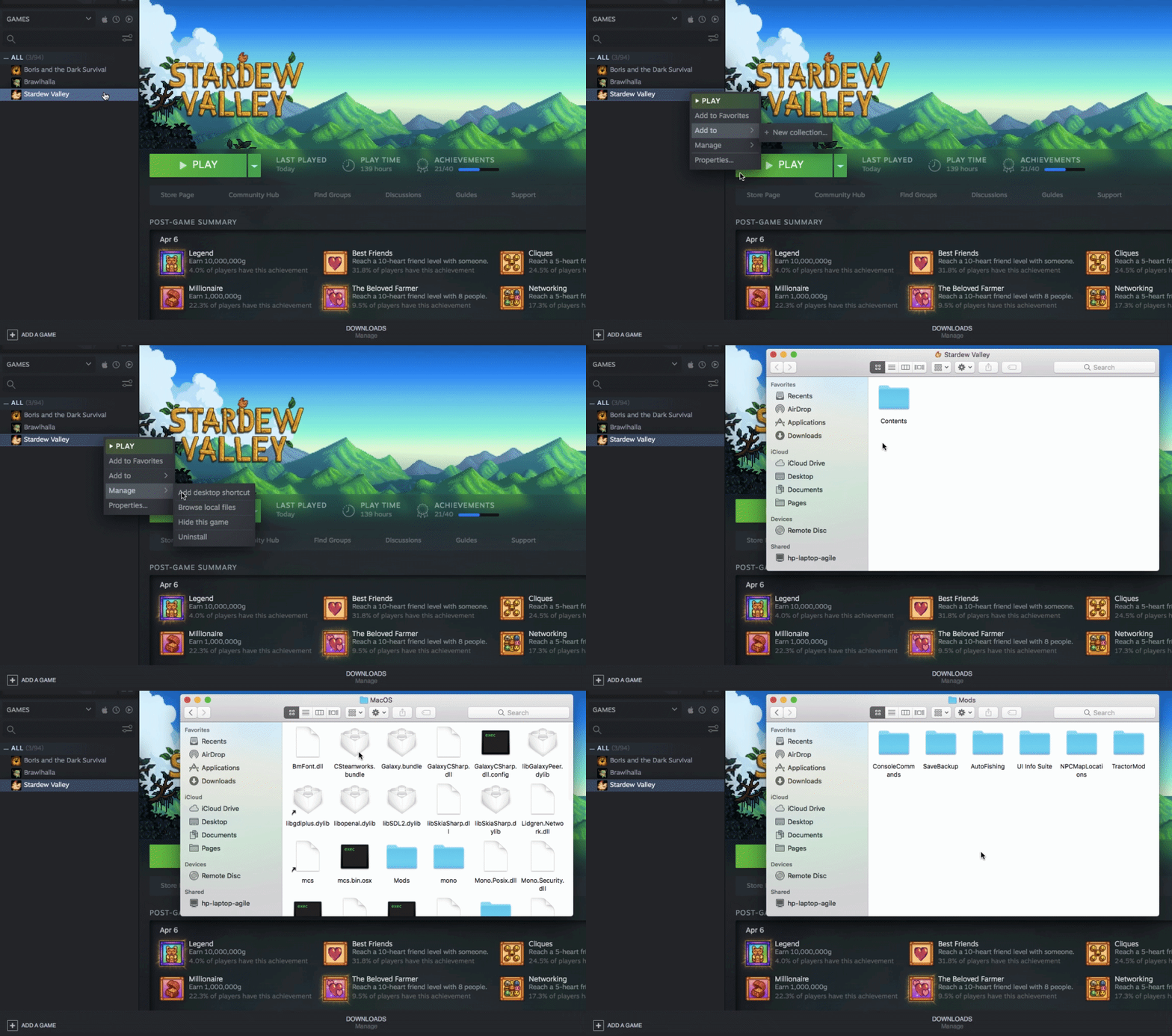
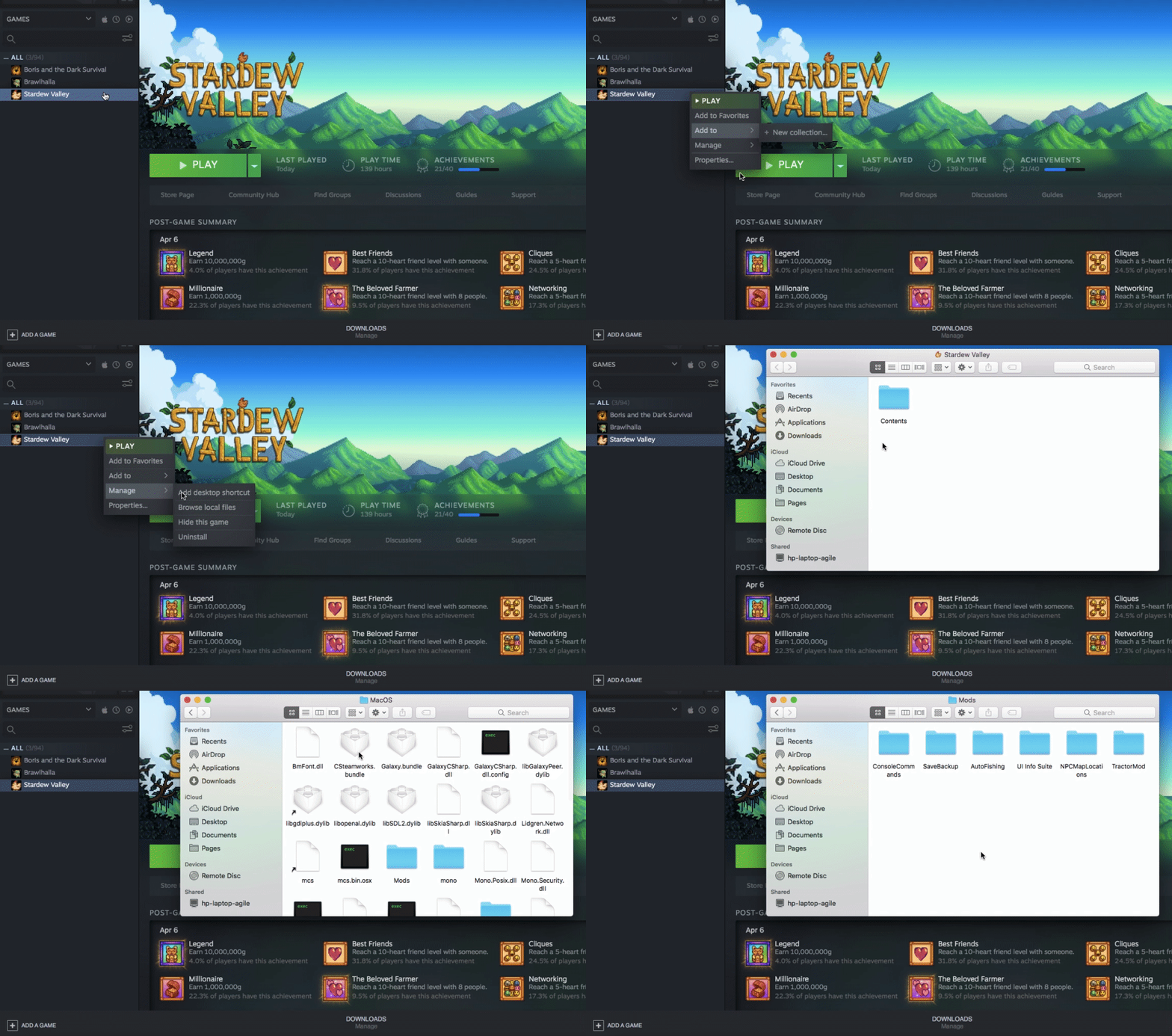
Right click in steam > browse local files > double click smapi


 restive zodiac
@sacred solstice @dawn tulip Only Windows users need to edit launch properties after installing SMAPI. (A bit late, but we do have OS-specific install guides https://stardewvalleywiki.com/Modding:Installing_SMAPI_on_Mac#Install 😅 )
restive zodiac
You just open them again like you did to add it, and erase what you put in :)
dawn tulip
wait so you're telling when i open the game from steam it should automatically open SMAPI
i mean im back to where i was
restive zodiac
If it's installed correctly, yep. SMAPI has to replace the startup script on Mac/Linux. Can you run the installer again following these instructions https://stardewvalleywiki.com/Modding:Installing_SMAPI_on_Mac#Install and take a screenshot of the last screen where it says SMAPI was successfully installed?
sacred solstice
Thanks Mouse!
I have friends that use MAC so I'm glad to know there's a resource I can direct them to.
 icy solar
hello
so Im trying to get this to work, I followed all the steps. but can seem to launch it with steam.
okay so i dont get the error on smapi but it wont load.
icy solar
nvm i got it, installing via vortex doesnt drop them directly into the stardew mods folder
 tepid blade
!log
white schoonerBOT
Can you upload your SMAPI log to https://smapi.io/log (see instructions on that page) and share the link here?
robust bison
I don't think it's a mod thing
oh wait
you're on android
SVE can make mobile really laggy
 steep folio
Imma throw a suggestion out there, and I'm uncertain if it'll work: The mobile build of SDV has an array of differences due to mobile devices. In addition, mobile devices prioritize saving energy. If you try SVE on a mobile device, make sure you're on Performance mode.
This may help, as SVE requires some more computation.
(Note that Performance mode will not try to save energy, so it will chew through battery life. Be plugged in.)
tepid blade
Whats performance mode
Also it didnt lag before I updated farm type manager and after I did this happened
 heavy slate
Anyone know if this is a mod or what. I found a screenshot of a dude's farm and he has 2 types of fence, one of them looks wider than the other and I don't know which fence is that. Look how close to the greenhouse hoof it is, neither wood or hardwood fence does that.
in fact on the same pic there is looks like a hardwood fence and you can see it's smaller.
tepid blade
No but I get really bad lag
 near wave
oof
 tawny kindle
@tepid blade When you installed the new version of FTM, did you unzip/copy it over the old version, or did you move/delete the folder?
tepid blade
Wait I fixed it
tawny kindle
(The reason I ask is that mobile SVE users often seem to use the "MonsterLimitPerLocation" setting in config.json to reduce lag)
tepid blade
The monster spawning was set to null
tawny kindle
Yeah, that'll do it, SVE seems to be spawning over 600 monsters in your log~
 toxic ruin
is there a lot of room to be creative with the automate mod? like can i make mass processing systems using it? or is it small systems only?
robust bison
you can get pretty big
toxic ruin
is there any where for people to post their automate farms that i can look at?
robust bison
I don't think so, but it just automates stuff you would have done anyways, so you don't really need to look at examples
toxic ruin
isnt there a way to make lines using tiles or something?
robust bison
Yeah, flooring is used as connectors
think of flooring as redstone dust or something
toxic ruin
okay thats more my language
 ornate quail
Alright, time for me to dice into the world of mods... Any recommendations?
Currently planning on adding SDV Extended and the Artisan Valley
robust bison
automate, Artisanal soda makers, Seasonal Japanese Buildings, NPC adventures, cooking skill, etc.
shy orbit
SDVE has some recommended mods on the nexus page, i suggest those
or is that a different mod than stardew valley expanded, i don't actually know
just noticed it said extended instead of expanded
ornate quail
I mix up those words often, I think we're talking about the same thing. sorry n_n
naive drum
Pathos has an image of automate testing where he had connected over 400 machines together
robust bison
where? on nexus?
sacred solstice
@ornate quail I have screenshots of my complete list of mods that definitely all work together if anyone wants to see them. It's almost 75 mods so far.
ornate quail
oh damn
robust bison
133
ornate quail
I'd love to see that, but that might be a tad overkill n_n
shy orbit
i wouldn't add too many to begin with
you're pretty good with SVE, artisan valley and the recommended mods on the SVE page
ornate quail
I'm mainly looking for some new crops, and SDVE looks super cool
robust bison
Yeah, you want Artisan Valley and PPJA then
shy orbit
for new crops the PPJA packs are probably the best. they have lots of new crops
ornate quail
ppja?
robust bison
project populate Json Assets
shy orbit
don't get the fantasy crops necessarily though
ornate quail
I'll look into those, thanks!
omg the "required mods" rabbit hole is pretty long T_T
shy orbit
yeah, they can be, but on the positive side the requirements are often mods that are required by a lot of other mods too
ornate quail
yeah
I've got over 200+ hours in the game, but I'm a complete n00b when it comes down to modding
robust bison
It seems scary at first, but once you get into it, it's not super difficult
same with making mods
 tired brook
Coming in CJB Cheats Menu 1.24: instant slime incubator.
robust bison
Nice
sacred solstice
Yeah. A good chunk of those 75 are the prerequisite mods you had to have in order to have the mods I wanted. Lol.
You definitely don't have to use all of them, but any you pick from the list would work and not interfere with any other mod in the list.
ornate quail
Well, I got Smapi working through Steam, I'd love to hear about any must-have mods!
 clear minnow
Has anyone encountered an issue with the Junimo Village map in SVE in multiplayer? It appears when I load solo but not when a friend joins my farm. Is it possible the farmhand has to individually meet certain requirements to trigger it to appear?
robust bison
Do you want to play Stardew Valley with mods? This guide is for you!
Do they have the mod?
clear minnow
yeah we're running all the same mods
clear minnow
yeah. we downloaded everything at the same time actually 🙂
but my farm is at year 10 and the farmhand is new (i'm hoping that's the problem - if so we'll just start a new farm)
robust bison
any log errors?
clear minnow
We went Joja mart route on our farm together and that means it won't trigger for our farm (from what I've read). I was just trying to show him the village on one of my other farms
robust bison
Idk
robust bison
I think you should wait for someone who actually uses SVE
clear minnow
will do 🙂
 gilded crater
Anyone know of any nice ui overlay mods?
dire fractal
im using better junimos mod but my junimos arent doing anything, they exit the hut then just stay still
ive looked over config, all looks fine
any suggestions?
robust bison
are all of your mods updated?
dire fractal
yes
robust bison
check for any mods that might interfere with it, then try contacting the mod author
dire fractal
okay
sacred solstice
Lol So I've had a funny bug with the sprites/portraits?
All sprites and portraits are fine (except Marlon's that refuses to show up for no reason at all). But Elliott's sprite bugs out and has a quickly shifting image of his default portrait instead of his sprite when he walks sideways.
dire fractal
can someone recomend not so common decoration mods?
 rugged timber
Anyone here familiar with using and installing content to the Get Glam or to work with Get Glam? I'm Currently using a DIY CP Mod for the Farmer only, but I am seeing a lot of cute shirts and skirts coming out and I'm trying to decide which would be easier to work with. I am not bothered with going to the Wizard, and I would actually prefer to NOT have yet another item of furniture in my house I can't just pick up and more where I wish. I'll have discord open, but will be off screen likely, so pings are most welcome. Thanks in advance. I have downloaded and installed Get Glam and have a config file in place, but otherwise have done nothing with the mod.