#vanilla-tech-support
49 messages · Page 33 of 1
 split quest
nope
 full knoll
(you might need to restart your computer chaos)
full knoll
you updated your driver and restarted so quickly? wow
split quest
Yeah
full knoll
@hexed apex i need the log of the other player as well please
were you host or client?
full knoll
can you give me her log as well please?
 hexed apex
She's gotta install it and everything first
split quest
Alright
full knoll
Did something go wrong with your game? This is the page for you. (This page isn't only for players who use mods!)
can you try this please?
split quest
me or yami
full knoll
you chaos!
hexed apex
so when you say you want her log, do you want her to get on the farm and have me try to connect?
split quest
nnnnope
full knoll
still looking, i'll ping you when I have another idea!
split quest
alrighty
full knoll
@split quest do you own terraria?
split quest
Not yet
full knoll
let me see which othe games uses XNA...
full knoll
Celeste apparently uses XNA
split quest
Dont have it...
split quest
sure thing
I dont have any of them :(
This is a really new pc, I built it like a month ago
and so Im really new to steam
 split quest
my previous laptop couldnt support it lmao
full knoll
did you build your pc yourself?
split quest
yeh
full knoll
Try this:
- Press Windows + R to show a 'run' dialogue.
- Enter this command:
dxdiag
Does a "DirectX Diagnostic Tool" window appear?
split quest
affirmative
full knoll
I'm gonna switch to Window 10 and get back to you in five minutes
split quest
Alrighty
full knoll
alright I'm back, did it finish loading yours in between?
split quest
well there was a progress bar in the lower left vorner that finished its thing
full knoll
nice
split quest
is that it?
full knoll
yep. Can you screenshot the DISPAY tab please?
full knoll
that's a lot of sound tabs! lol
hexed apex
split quest
ill do dms
full knoll
perfect
hexed apex
this is her, the hosts file of when i tried to connect
full knoll
when she tries to connect to you as a host, does it do the same thing Yami?
hexed apex
yeah, the issue goes both ways
when i try to host, she can't connect
when she tries to host, i can't connect
full knoll
can I have a log when YOU are the host please?
@wary quartz I think you're good with computer, building wise, no? else I'll ping pathos
something is wrong and I really don 't think it's the game
 wary quartz
What's a computer
full knoll
ian istg
hexed apex
That might take awhile cause she's away for a bit, i'll get it when i can
full knoll
@hexed apex no worries, I'll try with you in a second
@copper hollow mind taking care of Chaos' issue? I am out of ideas and it's really not a thing I've ever seen. https://discordapp.com/channels/137344473976799233/337774601696313347/617022809188729023
I have their dxdiag info log as well
wary quartz
Which issue am I supposed to be looking at?
I'm at work and bored enough reading emails
split quest
._.
wary quartz
Well, firstly
for Chaos, they need to restart, re-install XNA framework
then restart again
full knoll
already done :(
split quest
ye
wary quartz
And you HAVE restarted? I work in an industry where that's a normal thing and more often than not people lie, I'm not saying you're a liar, just being certain.
split quest
Ye s
wary quartz
Okay good
You need to find your installed XNA package, uninstall it, and then uninstall SDV
Backup your saves
wary quartz
Download and install CCleaner, and after restarting, do a registry clean
split quest
I just bought it and it went "hmmmm, nah" and shut down
wary quartz
Restart one more time, then install XNA, then SDV.
wary quartz
It's neither good or bad, uninstall SDV next, and then----- You're running smapi right?
split quest
coz the installer still can leave some files left over and I wouldnt even know
wary quartz
Did you set your launch options?
split quest
yes
but uh I dont think its working properly
so
Im just using the stardew valley folder
and from there running smapi
wary quartz
Well either way, uninstall smapi, then uninstall SDV, then clean your registry with CCleaner AFTER you restart
split quest
lemme get my notepad for this holy crap hold on
wary quartz
Backup up the deleted registry items is up to you, you can if you want to, it'll ask you
full knoll
you think it might be useful for this? 
I'm just wondering if it's not an issue with the CPU
wary quartz
I'll go the software direction always, if it were their hardware
a lot more shit would be going wrong with other games
split quest
how does one uninstall sdv
wary quartz
Via steam
wary quartz
it's coo
split quest
Okay its all done
Now
How do I clean my registry
I never used ccleaner
@wary quartz
wary quartz
Well it's installed right?
wary quartz
Scan
It should come up with all the broken registry items
and offer to remove them
split quest
There are a lOt
wary quartz
Uninstall CCleaner unless you wanna use it more then restart
split quest
Ill use it probs
wary quartz
Then install XNA, followed by SDV, and attempt to run it without the launch options and without smapi
wary quartz
I suppose
split quest
via steam or via the app itself
 median crypt
@full knoll What's with the window size changes in trace?
wary quartz
Well you need to drop the launch options you will have added to run Smapi
after that steam or direct launch shouldn't matter
split quest
okai
split quest
alright cya soon with an update
full knoll
@median crypt that's why I was kinda worried it was not the game
split quest
I have experience with coding
split quest
Its almost done
Nope
Still dead
It still does not work
Im about ready to give up
Worst thing is
It works perfectly on my gfs pc
The exact same game
Works perfectly on her pc
split quest
Its all up to date, I have no clue what it could be
full knoll
19.03 should be the latest W10 update
wary quartz
Yeah broski, windows update, followed by driver update for your graphics card
split quest
Oh uh
Okay so
I just checked the update for windows
Oh hoho
Okay I think i found the problem
full knoll
!!!
split quest
It was .net all along
full knoll

full knoll
yeah, go update
split quest
Reset and come back with an update
full knoll
🎉
median crypt
(Need a puffer-suspense emoji.)
 split quest
Me rn
full knoll
me too honestly
median crypt
Maybe frantic zooming in and out shots :P
split quest
Alright its done
I never wouldve thought to update it here but alright I guess
Theres another one sigh
...
...fuck.
Nothing
It just refuses to work with me
And the same error is present
Okay big brain time
Im gonna go do some extreme googling, and come back with anything I could find tied to xna and texture2d
Coz I am not letting this little shit be in the way of me and my girlfriend getting married in a fantasy world of farming
full knoll
don't worry I'm coming back to help as well soon
I just have to get diner and some papers
split quest
alright
 copper hollow
@split quest That error usually happens when the game window is resized (or moved between monitors / GPUs) while it's initialising graphics. I see a series of quick window resizes within the two seconds preceding the error, so that seems likely. Can you try this?
- Press
Windows+Rto open a 'run' box. - Enter this command:
%appdata%/StardewValley - Delete the
startup_preferencesfile. - Launch the game through SMAPI again.
- Post a fresh log if it still happens.
split quest
Well
I check all the boxes
If
You include overclocking?
@Ian @full knoll
@wary quartz
It worksss
Omg
copper hollow
😄
split quest
Pathos you genius
split quest
Ugh
I feel really relieved finally
Okay thats one out of the three issues im having with this pc out of the way
Tysm mate i appreciate this
copper hollow
Welcome!
 zealous hull
can i be the party pooper now and tell you that you cant marry your gf in a fantasy world of farming? lol but congrats! I know well enough how frustrating it is not to be able to get in easily!
 hidden cairn
of course they can
zealous hull
for real?
split quest
Yeah
hidden cairn
yes, in game with MP there is the zuzu ring
hidden cairn
it's expensive to craft, but totally allows player/player marriage
zealous hull
ah thats so cool! Thanks guys!
hidden cairn
it's different, you don't have heart prerequite, but the ring require iridium and such things. If you have other questions, it's better in #stardew-spoilers (we are kinda off topic 😄 )
zealous hull
lol i gathered! Thank you tho!
 next plover
so i'm on my first days of year 4 and i really would like to activate the grandpa's shrine. i've earned 17 points but still every time i put a diamond on it the rest of the candles are extinguished and nothing happens. the most annoying thing is the grandpa dialogue that occurs at the night repeats over and over again but nothing happens in the morning! it's like i haven't earned enough points (less than 12 as there is 3 candles burning) and i keep trying on the diamond stuff... but i really have my 17 points though. what should i try to do?
 upbeat violet
i'm having a real problem with right clicking on my macbook air
i have tried pressing x instead of clicking, doesn't work. i have tried changing the gesture for right click (two finger tap vs bottom right hand side of trackpad), doesn't work. wireless mouse, doesn't work.
last ditch attempt and remapping from x to spacebar seems to have worked
but it's very very frustrating that the left click on the trackpad does not work
*right click
upbeat violet
the other thing is that it works sometimes but maybe 5% of the time ultimately
full knoll
@next plover please do not say such things, it can upset people
I will take care of your issue tomorrow, likewise with Sara, if nobody does tonight
upbeat violet
sounds good. to add, even using the spacebar i can't get into the fish guy's shop despite being in there earlier that day. edit: i guess the hitbox for the door is smaller than i thought. that might explain some of my issues
split quest
hey uh
steam support
sucks donkey dick
and is slow as all hell
u guys are smart so
does anyone know how to help me with a non working overlay
 indigo wyvern
okay i'm having an interesting problem- whenever i try using the additional artisan goods/ the things you use to create them, it messes with my inventory? it makes all of my items scroll when I shift between the three hotbars? it's a bit frustrating because I enjoy using these mods and having to go back and fix my inventory every time I use something with them is getting a bit frustrating
 tribal nacelle
Hi, modding help goes in #making-mods-general please!
indigo wyvern
ah dang that's right, sorry!
 hollow mirage
Hello, I was wondering if this issue has already been modded/can be fixed:
the button that 'interact' is mapped to doesn't advance/proceed with dialogue and stuff
i heard it used to work before v1.2
full knoll
@split quest steam support is terrible. If the game isn't sdv feel free to DM me.
 wanton thicket
yo i got a question. i got the game awhile ago on my pc. my pcs a little older but the game still ran well. one day i cant remember exactly what happened but i tried to put the game into windowed mode and now the game wont open at all?? its been like a year because i dont use my computer that much but like ive deleted and redownloaded it and it still wont “open” at all so ?? any ideas/help would be cool haha
full knoll
@wanton thicket
Try this:
- Press Windows + R to open a 'run' box.
- Enter this command: %appdata%/StardewValley
- Delete the startup_preferences file.
- Launch the game again
split quest
yeah?
full knoll
I know this solution works when you touched window sizes heh
full knoll
@hexed apex all of these are outdated
or missing links/information
@hexed apex see https://stardewvalleywiki.com/Modding:Player_Guide/Troubleshooting for up to date informations and such!
I also already pinged that person with a solution, so it's kinda useless to give such vague links
hexed apex
oh, my apologies! I’ll delete them right away
full knoll
no worries!
I'm glad people want to help
but usually it's better to try to help people who haven't been helped yet
hexed apex
Oh, yes, I didn’t realize they already recieved help. My apologies again.
full knoll
no worries at all!
wanton thicket
@full knoll thank u sm! ill try this as soon as i can :)
 small arrow
Hi all, pretty sure this question is asked gizzilion times, but my friends are experiencing issues with sdv multiplayer. They constantly disconnect within the game, especially when we all go to sleep. We use invite code through steam. We are all friends on steam, but I set up the the configuration to allow invited players from the invite code.
Any suggestions for a possible fix? We’ve tried checking integrity, and I’ve also disabled my firewall (I’m the host)
tribal nacelle
Have your farmhands also disabled their firewall/antivirus?
small arrow
I don’t think they have.
Is there a way to disable just for sdv? I know one of them doesn’t like the idea of disabling it completely.
tribal nacelle
Have them google how to whitelist a program for their antivirus
small arrow
Ok, thanks!
tribal nacelle
Welcome! Let us know if that doesn't help, we have some other stuff we can try
small arrow
Will do. They are all offline right now, so I'm looking at port forward. Has that been a solution to anyone before?
tribal nacelle
Hamachi has been a solution, yes, but usually a last resort
The devs are actually looking into cases where people can only connect using Hamachi
small arrow
Ahhhhh I see. Good to know!
full knoll
or port forwarding!
if you need help to port forward let us know, I have the website for it
small arrow
May I please have the website? :> I just want to read over the set up while troubleshooting
full knoll
small arrow
Anyone familiar with the format of this port? Do I use both?
There are multiple port values, do I just pick one?
tribal nacelle
Looks like pick one of the sets?
small arrow
Cool beans
 sacred juniper
Question from a friend of mine: Has anyone else been able to get native PS4 controller support from Steam to work with SDV?
He's having to resort to use DS4Win, which he didn't expect
 solid shoal
I've done it both on Mac and PC before @sacred juniper
I seem to remember it just working out of the box on PC, but that was a while ago. On Mac I had to disable the SMAPI window
@sacred juniper What sort of issues is he getting with the PS4 controller? Is it like... unresponsive unless he holds down the PS button and moves the joysticks?
sacred juniper
certain buttons not working at all
Square for example just doesn't work unless DS4Win is running
solid shoal
Hmm odd. And he's on PC?
sacred juniper
yup
solid shoal
What are the controller settings in Steam? Did you check the PS4 Controller Support thing? And which config are you using?
sacred juniper
He's taken off for now, I'll ask again later
solid shoal
Okay!
hollow mirage
I guess there isn't a fix for my problem?
tribal nacelle
Falafel, that may be an official bug, have you tried remapping that button?
next plover
anybody w a solution for my problem
tribal nacelle
Lomein, what system are you playing on?
 radiant onyx
you guys know about the flower honey glitch?
next plover
pc
radiant onyx
ye
tribal nacelle
What flower honey glitch?
Lomein, I would try maybe grabbing the Event Repeater mod and forcing the cutscene? SMAPI itself might be helpful alone too, as we could see if it's failing somewhere
!installforlog
 tulip islandBOT
Try this:
- Install SMAPI: https://smapi.io/.
- Run the game through SMAPI.
- Upload your SMAPI log to https://log.smapi.io/.
- Share the log link here.
(You can remove SMAPI later, we're just using it to see what the problem is.)
radiant onyx

reddit
0 votes and 5 comments so far on Reddit
tulip islandBOT
If you've checked that it's not a mod bug, you can report bugs to the Stardew Valley developers here: https://community.playstarbound.com/forums/stardew-support/. Make sure to do a quick search first, so you don't report something they're already looking into.
next plover
thank you very much for your response, i'll try it asap and let you informed.
tribal nacelle
No problem! Make sure you try to trigger the cutscene before uploading the log. You don't need to quit the game to get the log either
next plover
so i downloaded smapi, content patcher and event repeater. but there is no errorlogs file to share the log link here
just those two
tribal nacelle
Did you run the game with SMAPI?
next plover
no not yet. should i?
tribal nacelle
You won't get an error log without it 😛
 ashen crystal
SMAPI makes the log, so you won't have one if you aren't using it
next plover
that sounds correct...
oh god wait my mistake
im so scared..
still 3 candles despite my 17 points tho haha jeeezz
tribal nacelle
Can you try giving another diamond and then sleeping before posting another log?
tribal nacelle
Hmm, and still only 3 candles?
ashen crystal
can you upload a copy of your save?
tribal nacelle
^
tribal nacelle
Nope, your actual save
The game saves progress when the in-game day ends, i.e., when the farmer goes to bed, collapses from exhaustion, or collapses at 2am. All progress during a day is lost if the player quits the game without ending the day.
next plover
how can i
hidden cairn
it's explained on the link
next plover
idk if i did it right
tribal nacelle
Yeah, that's good
ashen crystal
that's fine. taking a look
ashen crystal
So I calculate 10 points on that save, which is consistent with 3 candles
It is weird that it currently lists no candles though, as Min notes
next plover
on steam it says i've earned 18 points out of 40 tho
next plover
sometimes i play online and offline. maybe it does not count the offine ones
ashen crystal
next plover
whaaaaaaaat
tribal nacelle
(i guessed you ran it through that mousey XD)
See this page: https://stardewvalleywiki.com/Grandpa
Stardew Valley Wiki
next plover
fuck
tribal nacelle
Or the stardewcheckup
ashen crystal
The screenshot is from https://mouseypounds.github.io/stardew-checkup/
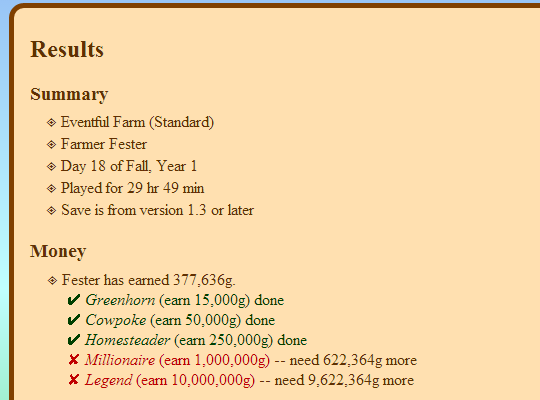
An app to read a Stardew Valley save file, check the progress of various achievements and milestones, and list what's missing.
tribal nacelle
Some of the achievements count towards points, but not all of them. And some of the points are from achievements
next plover
the last link will be very useful for a moron like me
so everything is alright w my game
the real problem was me lol
tribal nacelle
Feel free to keep SMAPI and the SaveBackup and ConsoleCommand mods installed, or uninstall SMAPI using the installer. SaveBackup keeps backups of your save files for a week, so it can be helpful if you run into issues 😄
next plover
Thanks to both of you, i took your time and effort for nothing, very grateful.
ashen crystal
No worries. Happy to help.
hidden cairn
some things can be confusing, especially without way to know what is the exact score we should have. The link sounds really convenient, i'll try to remember it when need to check stuff
tribal nacelle
Stardew Checkup is lovely, Mousey did some good work there~
hollow mirage
@tribal nacelle yeah I've remapped the button -- i've seen some old forum/reddit/support threads about this issue as well, but is there a better place to post this issue to alert the devs?
tribal nacelle
!officialbug Falafel#5215
tulip islandBOT
@hollow mirage If you've checked that it's not a mod bug, you can report bugs to the Stardew Valley developers here: https://community.playstarbound.com/forums/stardew-support/. Make sure to do a quick search first, so you don't report something they're already looking into.
 worthy olive
I think it would be great if the current controller support of the mobile version were better. Just like the PC or console version. It pretty much unplayable rn, and the UI is just horrible. This is a excellent game to play on a TV :)
full knoll
@worthy olive for mobile bug reports and such see with Shu#4598 from chucklefish, as they are the one publishing the port
or in
!mobilesupport
tulip islandBOT
This is support from the community, but most of us play on PC. For mobile issues/questions, you may have more luck asking on Reddit (https://www.reddit.com/r/StardewValley/comments/b0syp7/stardew_valley_now_available_on_android/) or the forums (https://community.playstarbound.com/threads/stardew-valley-android-ios-known-issues-and-fixes.153425/) which the mobile developers are monitoring.
 idle spade
I need some assistance. me and my girlfriend kept getting connection failed error. It usually takes 1-2min for it go from connecting to connection failed. We are in same internet and was able to play together few hours before. Maybe, the mods are the issue, but even after deleting the mods and reinstalling stardew valley did not help. We tried IP address connection and Enter Code option. Both of are online on steam, tried firewall.
this me who is trying to join
host log is this one
full knoll
@idle spade what happen if you switch host/client?
It usually takes 1-2min for it go from connecting to connection failed. timeout is 30 seconds, so it might be your internet. Did you try restarting both your router?
idle spade
it might be just 30 sec
same issues occur when we swith host client
we cant reset router since its under apartment complex internet
but we were able to play
and then couldnt during the same day
full knoll
it often is like this sadly
it might be the router, like I said, sadly. Part of the MP problems are linked to the router not allowing some peer-to-peer games like SDV 😦 (iir the info correctly)
I imagine you can't try port forwarding as well
idle spade
Thats too bad =(, never done port forwarding but i do not have access to router either
hexed apex
Someone can help me? The just don't open. I have reinstall de xna and framework apps and the directx too
Don't have any mods, too.
 arctic cove
copper hollow
arctic cove
copper hollow
@hexed apex See https://stardewvalleywiki.com/Modding:Player_Guide/Troubleshooting#Could_not_load_file_or_assembly for help with that. Seems like you might need to do step 2 there, unfortunately.
 violet pendant
Hello
copper hollow
Hello!
copper hollow
First, can you post a screenshot of your Saves folder?
copper hollow
The contents of the Saves folder.
(Don't need the contents of subfolders though, just that one for now.)
copper hollow
That seems fine. It doesn't appear at all in-game?
copper hollow
Can you post a zip of the Kalvus_202331992 folder?
violet pendant
Is a zip just a copy paste?
I’m not that good with the technical stuff
I don’t really know much with computers
Lol sorry
also now im on discord on pc so it will be easier
copper hollow
No worries. Here's how to do it:
- Right-click on the
Kalvus_202331992folder. - Choose "Send to > compressed (zipped) folder".
- Click the new file it creates, and drag it onto Discord to post it.
copper hollow
Yep. I'll take a look.
violet pendant
ok
copper hollow
The SaveGameInfo file is corrupted, but fortunately that file isn't important (it's just used to show the save info on the load screen). Try this:
- Delete
SaveGameInfo. - Rename
SaveGameInfo_oldtoSaveGameInfo. - See if it appears in the load menu now.
(I also suggest making occasional backups in case it gets corrupted. If you install SMAPI https://smapi.io/, it will keep ten days of save backups automatically.)
copper hollow
Welcome!
violet pendant
also i think somethings wrong with my computer
because the same thing happened to my terraria character
multiple times
i didnt care about it as much because i was in a multiplayer world with my friend so he would just give me extra mats
copper hollow
Is it possible the save is getting interrupted somehow (e.g. you exited the game or it crashed while it's saving)?
violet pendant
no
i save and quit
and then turn off the computer then the game
its strange tho, it never deletes right away, like i could turn off the game for lunch or something and come back and it would still be thre
it only goes away after a day or so
copper hollow
And you're not playing it on another computer? If the save is disappearing later without you having played it, you might be having hard drive issues. You could try performing a hard drive scan: https://www.lifewire.com/how-to-scan-a-hard-drive-using-error-checking-2624497.
violet pendant
that would make sense
my computer is pretty bad
and i cant let my computer sleep because when i use it again after it goes into sleep mode my computer flashes colors
copper hollow
You could also try HDDScan to run more tests: https://www.lifewire.com/hddscan-review-2624562. Those issues do sound like hardware failure, possibly in the hard drive or RAM.
violet pendant
it says that there are no errors
but
how could hardware failure even happen?
ive never done anything sketchy with my computer
copper hollow
Viruses and such usually cause software issues; hardware issues are usually due to physical damage, or they can just deteriorate over time.
violet pendant
also do i need to do anything special with the SMAPI or do i just download it like anything else
copper hollow
See https://stardewvalleywiki.com/Modding:Installing_SMAPI_on_Windows for help installing it.
violet pendant
well i dont really use my pc other than playing stardew or skyrim so i dont know how it could be virus. and this computer came out 2016 so i dont think its taht old
also when it says to put the SMAPI file not into the game folder, where do i put it then?
copper hollow
(It's probably not a virus, since it sounds like hardware failure.) The computer doesn't necessarily need to be old, hardware can fail with even newer computers. Hardware failure isn't really predictable unfortunately.
copper hollow
You can just unzip the download anywhere (in your Downloads folder is fine); the installer will add the right files to your game folder for you.
And yep, this will let you install mods too if you want.
violet pendant
its fine i dont really use this computer much anyways and im planning on getting a new pc when the next console generations comes out anyways
and ok
This looks good?
I mean is this right
@copper hollow
and i put that one line of text into the thing on steam
copper hollow
Yep.
violet pendant
thank you so much
that was probably the most technical thing ive ever done on this computer
lel
copper hollow
Welcome!
violet pendant
so the SMAPI thing came up
when i tried to launch the game
and nothings happening
lel
copper hollow
So the game window doesn't appear? What does the SMAPI window show?
violet pendant
it says its starting the game and stuff
it says its the "SMAPI home mods go in this folder starting game"
copper hollow
Can you post a screenshot of the SMAPI window?
violet pendant
copper hollow
You have text selected in the SMAPI window, which will freeze the app. (It's an annoying 'feature' of Windows.) Hit enter to clear the selection and it'll resume.
violet pendant
oh lol
ok ONE last question
when downloading mods do i just drag a zip folder or somethihng into the stardew valley/mods folder?
copper hollow
You'll need to unzip them, and drag the unzipped folder into Mods.
violet pendant
cool
and i use the nexus right
i remeber trying to add mods to new vegas when i was like 11 and i couldnt do it, so doing it now would make me feel much better about myself
copper hollow
Yep, you can download mods from Nexus. (You don't need to use a mod manager though.)
You can use ModDrop to install mods and keep them updated automatically: https://www.moddrop.com. Most mods aren't on ModDrop yet though.
copper hollow
Welcome! Feel free to ask if you have other questions.
(It's 3am here, but I go to bed later than that.)
copper hollow
Yep. The first time you launch the game each day, it'll create a backup under save-backups in your game folder.
(It'll keep up to ten days of backups by default.)
violet pendant
something isnt working
theres A LOT of red text
like a lot of it
and the game is has taken about 2 minutes loading
copper hollow
Can you upload your SMAPI log to https://log.smapi.io (see instructions on that page) and post a link here?
violet pendant
just the log that shows up when you boot up stardew?
copper hollow
Nope, there's a separate log file. See that page for instructions finding it.
copper hollow
You can post the URL here.
copper hollow
Seems to be corruption in some of your other save files.
violet pendant
well those ones dont matter
they arent mine
i have two accounts one is my cousin one is mine
copper hollow
In fact, seems to be corruption in your Kalvus_202331992 save too. Was it working after you fixed the SaveGameInfo earlier?
violet pendant
but the save files on my cousins went onto my copy of stardew
but they arent mine
and my cousin hasnt played since 2016
and yes Kalvus was working
copper hollow
Oh, I do see the corruption in the save you sent me.
Try deleting your Kalvus_202331992 file in the save folder (not the folder itself), and rename Kalvus_202331992_old to Kalvus_202331992 to fix that save.
violet pendant
ok
and what should i do with the other files
delete them? or do the same thing?
copper hollow
You can delete those if you don't need them. (You may need to launch the game, then delete the folders while it's still running so Steam Cloud syncs the deletions.)
violet pendant
done
hope it works now
we are good the game loaded
AND the mod is working
once again thank you
gn
copper hollow
Welcome!
violet pendant
You’ve probably just helped me get addicted again to stardew especially with these new mods
copper hollow
😄
violet pendant
Got any recommendations?
copper hollow
violet pendant
What’s a more big game changer mod
Not just quality of life stuff
Does that exist?
copper hollow
Sure. Depends what you want. For more content, Stardew Valley Expanded is probably the biggest: https://www.nexusmods.com/stardewvalley/mods/3753 (though you need to follow its install steps very carefully). There's also plenty of dialogue expansions, which are easy to install.
 obtuse basin
upbeat violet
obtuse basin
upbeat violet
it's all random chance
it's unlikely you'd get 10 heads in a row on a coin flip, but it could happen
 unborn jacinth
idk where to put this but i had stardew in a window, and now when i full screen it the task bar thing won’t go away? i’ve tried making it bigger, full screening in game and it just won’t go away? idk if this is a laptop glitch or the game?
i restarted my laptop to see if that helped
h nevermind it’s a laptop thing, not a game thing
hexed apex
So for the bee house, are the flowers the ones you plant or? I keep accidentally harvesting my flowers.
hidden cairn
this channel is for help with crashes and bugs, #stardew-spoilers is the one for tips and questions about the game 🙂
hexed apex
Oh crud by b
On that note though, is it a bug that my character changes position when I use a tool?
 spiral dew
If they are moving forward very slightly by a pixel or 2, that's normal
hexed apex
She turns in place/rotates
If I'm facing west to fish, she'll cast south. If that makes sense
spiral dew
Are you on the computer version?
spiral dew
where your mouse is can affect where your character uses their tool, like if they are facing south, but your mouse is to the right of them, they'll hit right towards the mouse
hexed apex
That makes sense. Thanks. I'll have to be more aware of where my mouse is. Being a Sims player, one would think I'd already be accustomed lol
spiral dew
np, it threw me off at first as well
hexed apex
Hey can anyone help me? I downloaded the Stardew Valley expanded update, replaced the files, and now my game won't open and says that the "MenuTiles.xnb" is missing from the maps folder in "Content"
did I totally fuck up my game?
ashen crystal
Did you overwrite Content instead of merging?
hexed apex
buhhh probably
ashen crystal
OK, you'll need to reset your content files first then: https://stardewvalleywiki.com/Modding:Player_Guide/Troubleshooting#Reset_your_content_files
Did something go wrong with your game? This is the page for you. (This page isn't only for players who use mods!)
hexed apex
thank you SO much
ashen crystal
You only need that part of SVE if you want to start a new save and watch the intro as wel
 urban ruin
guys any news about mobile mp update?
tribal nacelle
Nope
 torn peak
What about console's
full knoll
@torn peak check CA's twitter to know about the console updates
@urban ruin There will most probably be no MP on mobile.The info is pinned on the Chucklefish's server if you want
 finite locust
guys :(
i need help
i gave my pickaxe to clint to upgrade more than 2 days ago i think but i still havent gotten it back!
i get it back in the mail right?
hexed apex
I think you should go to him idk
tribal nacelle
You have to go pick it up from him
 potent apex
Well the dreaded thing happened to me and I can't launch my game. Ive tried all the tips on steams support page and even reimaged my disk... No luck. Any help?
Never mind I figured it out.
 swift elbow
no date yet

Just heard back about the XBOX/PS4 MP update. There are further technical issues that are being resolved. I can't say definitively when it will be ready. As soon as I know anything about a concrete release date I will let you know immediately. Thanks again for your patien...
Retweets
335
Likes
5693
 Twitter
hexed apex
Twitter
hexed apex
gr8 Xbox being updated
 split gull
can i post a mod thing here?

 lyric hawk
is there any upcoming patches for the switch
full knoll
@lyric hawk it's Chucklefish which takes care of the switch version, you can ask them on their server or twitter
But iirc the switch version is up to date
swift elbow
almost is up to date
full knoll
My bad
lyric hawk
yea, it's a POS to play on
full knoll
A what?
 sinful sparrow
The Switch is missing some foriegn language support and a few small changes, no game content though
sinful sparrow
 valid tulip
Okay
 barren pewter
Curious question. I bought Stardew on my Switch maybe a month ago max really enjoyed playing it but just had to sell my switch. Anyway I can transfer that credit over to a pc or iPad version ? It’s a long shot I know lol
tribal nacelle
Nope, Switch saves aren't compatible if I remember correctly. And please change your nickname in accordance with #445729663885639680 😄
barren pewter
Forgot my name 🤦♂️ I’ll change it thanks
upbeat violet
Is there anyone who can help me troubleshoot controller support for a macbook? xbox one controller, 2018 macbook air
relevant details: xbox one controller connected to computer through bluetooth. steam big picture mode responds to the controller. i downloaded a configuration (tried a couple actually) from the community for sdv and the controller and applied it. when i launch the game it simply does nothing to control the game, although it says "gamepad mode activated", none of the controller buttons do anything at all. i don't have an appropriate cord to plug the controller in at the moment, so that's not an option.
finite locust
about to go into winter year 1!
any tips? hehe
hidden cairn
(tips are in #stardew-spoilers 🙂 )
finite locust
kk
hidden cairn
(sadly Sara i know nothing about macbook or controler support)
 wind kite
are there any hints or tips for getting the resolution to stay the same? 1080p, 2k, and 4k all revert each time i exit
tribal nacelle
You can try to edit the startup_preferences
wind kite
how do i do that?
tribal nacelle
Open it with a text editor and look for the resolution settings. It's similar to save editing: https://stardewvalleywiki.com/Saves#Edit_a_save
The game saves progress when the in-game day ends, i.e., when the farmer goes to bed, collapses from exhaustion, or collapses at 2am. All progress during a day is lost if the player quits the game without ending the day.
wind kite
do i do it to each save game?
tribal nacelle
I don't think so
 forest ice
hey, so my friend is still having issues connecting to the multiplayer, are there any confirmed fixes for it? like its not their wifi because their sisters laptop joins fine but their desktop wont do it 😦 we tried that library download from windows that people said fixed it but that didnt work 😦
wind kite
Are they joining thru steam?
and just to be clear, is it a new farm, or a farm with an empty house for them to join?
upbeat violet
if anyone has a solution or support for my controller issue, please dm or tag me, i might not notice a post in here. but might just switch computers
 viral tendon
From what I remember controller support isn't very good right now.
wind kite
I use an Xbox one controller and it works fine. I don't use it much though to be fair
 novel copper
In the files whats the chracter file called
 neat dagger
if i fence off the spouse activity place, will my spouse be glitched/stuck in any way? im planning on putting a fence across to the mailbox but kinda worried
sinful sparrow
I'm not 100% sure on that, but I do know if you block your spouses ability to get places within the farmhouse it has a negative affect. You can always try it any find out? Worse case you lose a heart and maybe they break one of the fences. Or you can add in a gate
Also, general gameplay questions are best for #stardew-spoilers, this channel if more for getting help with glitches and technical issues :)
hexed apex
Hi someone told me I can get help fixing my corrupted save here?
hidden cairn
yeah
first step is usually finding your save file
The game saves progress when the in-game day ends, i.e., when the farmer goes to bed, collapses from exhaustion, or collapses at 2am. All progress during a day is lost if the player quits the game without ending the day.
hexed apex
So basically here is the backstory to my problem: so a few months ago i got up and as usual, wanted to play stardew valley but it wouldn’t load. It got frustrating so I just put it down for a few months and now I’m back to it and it’s still not working. So I connected that old phone to my laptop and took it upon my own hands to try to fix it but it didn’t work 🤷♀️ I tried transferring the file to my new phone and yeah still broken. I have a video of what happens when I try to load it but basically when I click the check it just goes back to the beginning screen.
copper hollow
Can you post a zip of your save files here?
 mystic wadi
Hey! I have a question concerning to the controller I use to play Stardew Valley.
I play Stardew Valley using my Switch controller off Steam. Works perfectly fine! However, when I downloaded mods and load them (the mods work fine), I noticed that even if I change the directory for Steam to open the game it just opens the one without mods, and when I open StardewValleyAPI, it loses my controller support.
Is there a way around this, or do I have to map my controller to keyboard controls (yes, I know how to do that)?
hexed apex
How do I do that exactly 😅
copper hollow
@mystic wadi There's a few fixes you can try: https://stardewvalleywiki.com/Modding:Player_Guide/Troubleshooting#Controller_doesn.27t_work_properly_with_SMAPI_.28Steam_only.29.
@hexed apex Do you already have the save files transferred to your laptop or PC?
mystic wadi
Thank you~
hexed apex
Yeah I do
mystic wadi
Oh I fixed it! I had to put %command% after the directory. Thanks though!
copper hollow
Welcome!
@hexed apex Try this:
- Right-click the folder containing the files and choose Send to > compressed (zipped) folder.
- Click the file that creates and drag it onto Discord to post it.
hexed apex
Alrighty I’ll be back brb
hexed apex
here we go:
copper hollow
When you copy it back, make sure the folder name is exactly Glo_201985739, not Glo_201985739 2. Otherwise I'm getting an obscure error loading that save; looking into it.
hexed apex
I think I tried that and still not working
copper hollow
@hexed apex This version should be fixed:
hexed apex
I just tried and it works! Thank you so much! 😁
copper hollow
Welcome!
 vivid gale
Hello all! Was wondering if I could run a PS4 issue by you folks and see if anyone else has experienced it! I hope I'm in the right place
tribal nacelle
You can run it by us, but we're mostly PC users here. We might be able to figure it out though, so shoot 😄
vivid gale
Yeah of course! So my wife wanted to start up playing again and started a new save file... Everything works fine untill you try and talk to either Gus or Caroline the game will immediately crash. We've tried waiting days, doing different activities, starting different saves and get the same result a crash when you talk to one of these NPCs. It doesn't seem to be an issue with our older saves.
We've also tried an uninstall and reinstall\checked for updates
tribal nacelle
Hmmm. Anything weird with the farmer name? Like the item ID trick or the same name as an NPC?
vivid gale
Hmmm yes, I believe she does use the item ID trick. Like the bracket with numbers in it?
tribal nacelle
Yep, that one. Can you have her try without using that?
vivid gale
Will do! I will report back, thanks a bunch
tribal nacelle
No problem! Let us know if that solves the issue, as we can report it to the console team
vivid gale
Okay great! I always ribb her about using that cheat lol but is it super common and accepted?
tribal nacelle
It's pretty common, yeah. The Switch version has it patched out though, as it can cause crashes on that version
viral tendon
It's about the only "cheat" on ps4
vivid gale
So it looks like the item ID trick was the culprit!! With a new save with no ID numbers the game has not crashed so I think that was the issue
tribal nacelle
Glad we solved it! Go ahead and report it here, though it may not be fixed in the 1.3 update that's in the works, since that's just pending approval
!officialbug
tulip islandBOT
If you've checked that it's not a mod bug, you can report bugs to the Stardew Valley developers here: https://community.playstarbound.com/forums/stardew-support/. Make sure to do a quick search first, so you don't report something they're already looking into.
swift elbow
Heard from the porting company, there are still technical issues with the console updates. They give an estimate that it will be ready within a couple weeks but I can't personally guarantee that. All I can say is that I'm truly sorry this is taking so long
Retweets
270
Likes
5692
Twitter
hexed apex
Hello (sry don't know where to put this message)
Small question, you know when the french translation come on Console (Switch)?
The IOS and Android already have it...
tribal nacelle
Nope, no word on Switch updates
hexed apex
Ok, thx for answer ^^
novel copper
for android and ios is there a reason why they didnt add multiplayer in the first versions
tribal nacelle
Likely due to the difficulties in implementing multiplayer on phones. I doubt we'll see it anytime soon
novel copper
ok
copper hollow
French support was added in a minor update on PC, so the Switch developers might be waiting to add it as part of the next major 1.4 update.
 tropic summit
So when the update comes is there anything specific I need to do? Windows user
tribal nacelle
Nope, Steam will auto-update when you launch the game
 sinful compass
Does anyone know how to make it so the default res for the game is 1920x1080...i have to keeep adjusting it in the game lol its always set to like 1400x900
 viral sundial
I feel like there's probably a config file somewhere for that.
Saw a forum post suggesting that it might be in %appdata%\StardewValley
@sinful compass
sinful compass
ohh okie ;o
 uneven zinc
How to change the aspect ratio?
sinful sparrow
Once you load a save there's a setting for that Haller, press E then click the second to last tab on the right with the controller in it
 open canyon
anyone know if the seperate money thing is out?
tribal nacelle
Not until the 1.4 update, which won't come until after consoles get 1.3. There are some split money mods on PC if you are playing on that
open canyon
ok thx
 agile geyser
Is anyone runnin iOS
tribal nacelle
Likely not, but if you tell us what the issue you are having is, we can try to help
agile geyser
When I try to put crab pots in the ocean all the slots are too far away and I can’t place them
tribal nacelle
You should be placing them directly in front of you. It'll look like they are going on the ground. Can you show a screenshot of trying to place them if that doesn't work?
agile geyser
I got it, the problem is that the slots to put the crab pots in are slightly off set so I have to click above it
 sweet ridge
Is support planned for HiDPI type displays? I have a 4K display and 125% is still not quite enough zoom level. I've installed a mod to continue to zoom past the normal limit but vanilla support would be nice
 open walrus
Hey, I'm playing on Steam and running into an issue where the game will not boot. Every time I click "play", Steam tells me it is running, but then quickly moves to "synching" and nothing happens.
I can run the game from local files no problem, but doing that seems to disable any multiplayer ability.
I've already reinstalled and verified integrity of game files. What should I do next?
hidden cairn
verify your launch options maybe ?
open walrus
Not sure how to do that, but it's a fresh install.
tribal nacelle
Open your launch options and make sure it's completely empty
open walrus
It sure is
Funnily enough, it's working on GOG just fine. So definitely something up w/ steam
full knoll
but then quickly moves to "synching" and nothing happens does it STAY on Synching?
open walrus
Nope. It syncs, nothing to sync presumably, and lets me do w/e I want. Boot up another game, if I so choose.
full knoll
My question is more: what does steam say about the game?
open walrus
The syncing either doesn't happen or happens extremely quickly because there is presumably nothing to sync
tulip islandBOT
@open walrus Try this:
- Install SMAPI: https://smapi.io/.
- Run the game through SMAPI.
- Upload your SMAPI log to https://log.smapi.io/.
- Share the log link here.
(You can remove SMAPI later, we're just using it to see what the problem is.)
open walrus
How do I run it through SMAPI?
I installed it, but I don't see anything in the readme about how to set launch options to enable achievements. @tulip island
tribal nacelle
Lewis is a bot 😄 and the installer gives you the directions to set launch options after the install is complete
tribal nacelle
Copy that entire line, including the quotes and %command%
open walrus
oh okay
tribal nacelle
Then go to Steam and right click on SDV > Properties
Launch options are in that window
open walrus
That literally made it boot just fine.
all of the online options are available after installing that.
tribal nacelle
Awesome. So there may have been an issue with your launch options then. You can remove SMAPI and delete the options if you want OR leave SMAPI installed. It comes with a Save Backup mod installed that keeps backups for seven days, even if no other mods are used
open walrus
If nothing's broken, I'm not gonna worry about fixing it. Things seem to be juuust fine now.
hidden cairn
this chan is for issues, crashes and so on, question about game are in #stardew-spoilers
🙂
 tropic pumice
🤙
 proper crane
Hi! I’d like to know whether we may catch legendary fish (aside from the Legend) one per save file or one per person in a multiplayer farm. This info isn’t on wiki. Thanks in advance!
tribal nacelle
Hi, gameplay questions go in #stardew-spoilers
proper crane
I was the one who directed this question back to game support because no one in that channel can answer
I’m sorry I know it’s not about broken savefile or crashes but an in-game feature. Not sure if we could ask in modding. I just assumed modder peeps know about this.
tribal nacelle
This channel is for bugs. I could go code diving to see if I can find the answer, but it would be most easily answered by just testing it in game
proper crane
Thanks Minerva!
I’m gonna delete those messages to prevent clog then 
 merry bobcat
I just wonder if stardew valley on switch is cross multiplayer platform
tribal nacelle
There is no cross platform at this time
 vocal estuary
I'm trying to play with my friends but I don't see the "enter game code" button
Does anyone know how to fix this?
tribal nacelle
Try these things:
Common troubleshooting steps:
- Firewalls and antivirus off for all players
- Everyone logged onto Steam
- Do a content reset on Steam for all players: https://stardewvalleywiki.com/Modding:Player_Guide/Troubleshooting#Reset_your_content_files
- Restart all PCs
- Restart all routers
- Try reinstalling .NET Framework 4.5.2 and XNA Framework 4.0 (see https://stardewvalleywiki.com/Modding:Player_Guide/Troubleshooting#Nothing_happens_when_you_launch_the_game for links).
Did something go wrong with your game? This is the page for you. (This page isn't only for players who use mods!)
hexed apex
When using Deepwoods Mod the game crashes with a StackOverflowException on Loading the savegame/starting a new one
full knoll
@hexed apex #making-mods-general please
 next mountain
how can I get steel
swift elbow
(I answered it in town square)
 alpine radish
Hey when will multiplayer be here for ps4 someone sent me here
To ask
Also how do I check my level
hexed apex
welp, I'm using a mod or two and I'm getting a crash
the very first line is in turkish for some reason, very roughly translates to ''Given key wasn't in dictionary''
anyone know what's exactly causing it?
I've been playing on this save for a while now, I'd hate it if I had to abondon it
sinful sparrow
@alpine radish
Hey when will multiplayer be here for ps4 someone sent me here
https://twitter.com/ConcernedApe/status/1169655606849835008
Heard from the porting company, there are still technical issues with the console updates. They give an estimate that it will be ready within a couple weeks but I can't personally guarantee that. All I can say is that I'm truly sorry this is taking so long
Retweets
344
Likes
7114
Twitter
Also how do I check my level
Type !lvl in #governors-mansion
Also, this channel is more for technical support, general questions are better for #stardew-spoilers or #town-square
median crypt
@hexed apex and @hexed apex Upload your SMAPI logs to https://log.smapi.io (see instructions on that page) and share the link in #making-mods-general so someone can take a look :)
hexed apex
well the thing is
the mod doesn't run with smapi
I had installed it using the good old method of overwriting contents files
median crypt
It's still a modding problem either way, not a vanilla issue :) We don't recommend xnb mods for a lot of reasons, but you're uploading text and showing snips of the console where parsing the log and sharing it will give us a lot more information! (Plus being readable, especially for those of us on tiny screens, hehe.)
hexed apex
mouse
smapi literally refuses to load the mod
I even tried with content patcher
the launcher refuses to load the mods I have
I can post the vanilla logs and I did post them, but anything related to smapi is out here
tribal nacelle
Talk about it in #making-mods-general please, mouse did ask for you to go over there
hexed apex
right
 keen patio
hello
does anyone know why my game crashes after the intro? i downloaded stardew valley expanded and it crashes after the intro
tribal nacelle
Hi, please bring a log (https://log.smapi.io) over to #making-mods-general! This channel is only for vanilla issues
keen patio
oh ok
 blazing kayak
So i was just working on my farm and then i see my dog just got past the fence is this a bug or is this normal?
tribal nacelle
Could be a bug. Are you playing vanilla or with mods?
tulip islandBOT
If you've checked that it's not a mod bug, you can report bugs to the Stardew Valley developers here: https://community.playstarbound.com/forums/stardew-support/. Make sure to do a quick search first, so you don't report something they're already looking into.
blazing kayak
Ok thanks
tribal nacelle
Welcome!
blazing kayak
And btw will there be anytime soon some update for Stardew Valley?
tribal nacelle
Concerned Ape has tweeted about the status of the updates, you can see them in #bulletin-board
blazing kayak
ok
hexed apex
i bought my friend a copy of stardew valley to play together and he can not seem to play it co-op with me. After connecting on the same game as each other after a few minutes it will say server connection lost. I was wondering if their is any way we can fix this. We have tried many things and at this point the only thing i can think of is the fact that i bought both copies with the same card so that may be effecting it.
 rose urchin
sorry for being stupid, but does anyone know the status on the console updates?
i read the board im excited
tribal nacelle
What's in #bulletin-board is the most recent updates 😄
@hexed apex have you tried all of these things?
Common troubleshooting steps:
- Firewalls and antivirus off for all players
- Everyone logged onto Steam
- Do a content reset on Steam for all players: https://stardewvalleywiki.com/Modding:Player_Guide/Troubleshooting#Reset_your_content_files
- Restart all PCs
- Restart all routers
- Try reinstalling .NET Framework 4.5.2 and XNA Framework 4.0 (see https://stardewvalleywiki.com/Modding:Player_Guide/Troubleshooting#Nothing_happens_when_you_launch_the_game for links).
Did something go wrong with your game? This is the page for you. (This page isn't only for players who use mods!)
hexed apex
Yes
tribal nacelle
All of them, for all players?
tulip islandBOT
Try this:
- Install SMAPI: https://smapi.io/.
- Run the game through SMAPI.
- Upload your SMAPI log to https://log.smapi.io/.
- Share the log link here.
(You can remove SMAPI later, we're just using it to see what the problem is.)
tribal nacelle
Okay, let us know. I may not be on, but someone will help when they are able. Make sure to play long enough to get a disconnect before uploading the log
 hasty goblet
Hey so I just bought the game and installed it but the game wont start
Its a fresh install and everything
I couldnt find anything on google that would fix it
tribal nacelle
What are your PC specs?
hasty goblet
AMD Ryzen 5 1600
16gb of Ram
Nvida 1060 6gb
Windows 10
tribal nacelle
Hmm. Do you have speakers or earbuds plugged in?
hasty goblet
Yea I have speakers and my headset plugged in
tulip islandBOT
Try reinstalling .NET Framework 4.5.2 and XNA Framework 4.0 (see https://stardewvalleywiki.com/Modding:Player_Guide/Troubleshooting#Nothing_happens_when_you_launch_the_game for links).
hasty goblet
Nope
tulip islandBOT
Try this:
- Install SMAPI: https://smapi.io/.
- Run the game through SMAPI.
- Upload your SMAPI log to https://log.smapi.io/.
- Share the log link here.
(You can remove SMAPI later, we're just using it to see what the problem is.)
tribal nacelle
Looks like the drive you installed to is write protected
hasty goblet
Weird
tribal nacelle
Try disabling your antivirus and firewall and try again
hasty goblet
I closed out of MalwareBytes yet it still happens
tribal nacelle
Don't just close out, disable it entirely. iirc MalwareBytes doesn't like SDV
hasty goblet
I mean I quit it and everything not just closing the window
hasty goblet
Yep
tribal nacelle
I'm out of ideas, short of installing it somewhere else and see if that works
hasty goblet
Alright
Reinstalled to a different HardDrive and I get the same error
Reinstalled the Game and SMAPI
tribal nacelle
I think you're going to have to wait until one of the others comes online. Antivirus is one of the big causes of that issue, so I'm not sure what else to try. You can also try the forums
tribal nacelle
Can we have the log for the farmhand too?
hexed apex
dont have it
tribal nacelle
We need both to troubleshoot disconnect issues
 still cobalt
Hello, I play coop on the switch with 2 others (myself, wife and friend) we have 1 farm with the 3 of us, 1 farm with my wife and I, and 1 farm with wife and friend) anytime we play on the farm with 3 of us we always get disconnected. It either freezes or it just kicks us out to the main page. Anyone know what might be causing this? This doesn't happen on any of the other farms
tribal nacelle
Can all three of you try clearing the cache on your switches before playing the next time?
still cobalt
Haven't tried that yet, will give this a try. Is this the sdv cache?
tribal nacelle
It should be system cache iirc. It won't harm your save files or anything though :)
still cobalt
OK will give this a try Thanks
tribal nacelle
Let me know how that goes, we have some other stuff we can try too
still cobalt
Thanks I'll report back later today
hexed apex
Anyone here wanna do a big farm project
 hot sun
 tawdry pewter
Hi there. I have an issue loading SDV on PC through Steam. Once the game launches, it goes to a black screen. Any ideas?
tribal nacelle
tawdry pewter
Appreciate the help! Thanks 🙂
tribal nacelle
Let us know if those work 😄
tawdry pewter
It ended up working, thanks! Only issue I’m running into now is getting my mods to load. Some say they work but a bunch say failed to load on SMAPI
tribal nacelle
Go ahead and hop into #making-mods-general. I'll ping you a link there!
 vernal vapor
I'm on mobile, and I switched apps for a bit, then came back. It asked if I wanted to restore from where I previously left off, and, uh, now I'm trapped up here.
tulip islandBOT
This is support from the community, but most of us play on PC. For mobile issues/questions, you may have more luck asking on Reddit (https://www.reddit.com/r/StardewValley/comments/b0syp7/stardew_valley_now_available_on_android/) or the forums (https://community.playstarbound.com/threads/stardew-valley-android-ios-known-issues-and-fixes.153425/) which the mobile developers are monitoring.
tribal nacelle
That second link is for mobile reports
vernal vapor
Thanks!
 molten skiff
i’m curious, if i could get my xbox data onto a thumb drive, could i go onto a pc, transfer the data from the drive, and edit my farm on the pc?
i asked in #farms-and-outfits but no one has answered me yet
tribal nacelle
I don't believe xbox saves are compatible!
One sec and I'll grab the link
The game saves progress when the in-game day ends, i.e., when the farmer goes to bed, collapses from exhaustion, or collapses at 2am. All progress during a day is lost if the player quits the game without ending the day.
molten skiff
wait no, i’m talking about useing the farm planner
i have no way to access the farm planet thing other than through and old pc that can’t run the game
tribal nacelle
Same thing, I think the formatting for consoles is different. The planner only uses PC saves
molten skiff
dang
viral tendon
Not only that but the Xbox saves are encrypted by the console.
hasty goblet
Checking back in from last night with the same error I was getting on a fresh install of the game (https://log.smapi.io/w5GCnFbZ)
tribal nacelle
Let me see if Pathos is available now. I think somebody mentioned something to try this morning. @copper hollow did you happen to take a look at Dark's issue?
copper hollow
That's a memory error in the graphics rendering code; could be an issue with your video drivers?
hasty goblet
I updated it last night
copper hollow
Do you have the Radeon Software app installed?
hasty goblet
I have a GTX 1060
copper hollow
Oh, misread your earlier comment. Do you have GeForce Experience then?
hasty goblet
Yes
copper hollow
The game should definitely work fine with the 1060 and latest drivers (I have the 1070). Do you have any other software installed that changes graphics (like RivaTuner, apps to force games into borderless mode, etc)?
hasty goblet
I have RivaTunerStatisitcs becasue of MSI Afterburner but thats about it
Closing out of it and MSI AfterBurner makes it work
well
copper hollow
Not sure what MSI AfterBurner settings you have, but it seems like the GPU driver is crashing with the way the game uses it. You could try tweaking the settings, or see if you can exempt Stardew Valley from the MSI AfterBurner changes.
hasty goblet
Ill see what I can do, I havent had this happen to me before
copper hollow
Let us know if you find a way to add an exception for Stardew Valley, it may help the next person with that issue.
hasty goblet
Will do
tribal nacelle
Pathos, how on earth did you figure that out XD I was stumped on that one
copper hollow
The crash happens in D3DXCreateEffectEx (Direct3D) and Microsoft.Xna.Framework.Graphics.* based on the logged stack trace, so it's an issue with XNA's graphics code or the video driver. The most likely reasons are an incompatible GPU (not an issue here), outdated drivers (eliminated that), or something interfering with the GPU (like RivaTuner or MSI AfterBurner).
tribal nacelle
Huh. Good to know, the only thing I could find based on that was antivirus blocking
Though specs was one of the first things I asked
hasty goblet
Well thanks a lot for all the help
tribal nacelle
No problem, glad we found the solution!
hasty goblet
Yep
 storm latch
Ok so this is gonna sound incredibly strange and I don't even know how to explain this. So I have a monitor that has a 75hz refresh rate, which naturally means I can select that in my graphics card settings on top of the typical 50 and 60hz settings. The issue I'm having is Stardew runs pretty choppy while I've got it set to 75hz, but otherwise runs perfectly fine and dandy when set to 60hz. Since Steams fps counter is reporting Stardew running at 60fps in both instances, I would make a guess in layman's terms that Stardew is trying to fit 60 frames into 75 spots in a sense. Anyone hopefully know of any way to fix this by any chance?
http://redd.it/4p143o Here's the only other case I can find if that helps, where the only solution seems to be tinkering with game code itself
 stuck condor
hey can someone help me with the stardew valley expanded mod
tribal nacelle
( #making-mods-general please)
copper hollow
@storm latch The game logic is tied to the frame rate, so increasing the time step will have strange effects like things happening faster or out of sync. It's weird that it's running choppily for you though; I just tried running the game at 100hz and 144hz and it seems to be fine, aside from the game itself still updating at 60hz. (My monitor doesn't support 75hz though.)
I wonder if there's a tool that can change the monitor refresh rate just when Stardew Valley is running.
storm latch
I was wondering that too, as I'm thinking its just because of such a weird refresh rate causing a problem somewhere along the line
I'm just at a loss on what the problem is exactly and what I could do to fix it outside of changing settings between sessions of Stardew Valley
copper hollow
I did a quick search and couldn't find an app to automatically change the refresh rate unfortunately.
storm latch
That's unfortunate to hear
While it is more subtle when recorded, I did grab quick recording snippet that shows a bit of stutter while playing with the 75hz refresh rate if it helps
copper hollow
Sure, feel free to post it here.
storm latch
copper hollow
Weird. 🤔
agile geyser
is this the right place to report it to?
ashen crystal
!officialbug
tulip islandBOT
If you've checked that it's not a mod bug, you can report bugs to the Stardew Valley developers here: https://community.playstarbound.com/forums/stardew-support/. Make sure to do a quick search first, so you don't report something they're already looking into.
ashen crystal
Since it looks like you are on mobile, that is the best place to report
agile geyser
thanks
agile geyser
I also got another bug to report, I checked on my animals one day and my baby cow duplicated
tribal nacelle
Same place!
tribal nacelle
The forums? Unfortunately, that's where the mobile team checks for reports, we're not official support here. I know there is one mobile dev that's here, let me see if I can find their name
Aha, first post in pins
 unkempt basin
How do I go about figuring out why my game is crashing on loading the save file all of a sudden?
tribal nacelle
What platform are you on, and modded or vanilla?
unkempt basin
PC/Windows, and modded
tribal nacelle
Come on over to modding then!
 terse quail
can someone help me with a game problem
i browsed through like every forum i could find but my game still doesnt start Q_Q help
hidden cairn
you play on what platform ? pc ? did the game started before ?
terse quail
its pc vanilla and yes it did but when i click on it now it only appears for a millisecond in the task manager and then nothing
hidden cairn
did you used mod before, or changed your launch options in the past ?
terse quail
i did use mods before and changing launch options? i dont think so
hidden cairn
ok, verify them
terse quail
verify what where 😅
hidden cairn
(i start steam trying to see where they are)
right click on stardew valley > properties > general. There is an option about "launch options" (my steam isn't in english, i don't know exact wording)
verify if it's empty
terse quail
its empty
hidden cairn
ok
i'm sadly not familiar with other options that could explain your issue so you'll have to wait until someone knowing better can help
terse quail
ok so if anyone like that comes online please tag me
( i am desperate)
Q_Q
 narrow yew
Hi guys.
I played for two weeks offline, and got a bunch of achievements, but somewhere in the middle there was a problem and they did not update when I went online.
I'm trying to edit my save file in various ways to reclaim these achievements, with some success, however, I'm pretty desperate for help about these two:
I've managed to change the monster killed counter, so I have 29/30 Duggies killed, but when I kill another one it doesn't trigger.
Looks like I should set something else to False, but I can't seem to find it.```
```Local Legend (complete all of the community center bundles)
I've managed to make one of the rooms uncompleted, then when interacting with the bundle it instantly completes it and the cutscene for the last bundle triggers again, but it does not grant the achievement once again.
Same as before, something else probably should be also set to false, and again, I can't find it```
Also, I've deleted all of the achievements on the save file, so it should be able to give them.
And of course, I backed up my save file prior, so no worries.
If anyone has any insight that could help me, I thank you so much, and sorry about the wall of text. exotic yarrow
Hey y'all, I've been scouring everything for an answer, but can't find a resolution.
Friends and I were trying co-op last night, game kept crashing every time one of us (other than the host) exited our own cabin (or the host entered the cabin).
Error logs keep saying: Index was outside the bounds of the array.
This happened to all 3 of us, no matter who was hosting. Is this a known issue? If so, how can we fix it? We're all on Windows 10.
tribal nacelle
Sounds like somebody has a broken mod @exotic yarrow. Follow the directions below for all players to reset their content files. If you are using SMAPI, being an error log (via https://log.smapi.io) to #making-mods-general
!reset
tulip islandBOT
See https://stardewvalleywiki.com/Modding:Player_Guide/Troubleshooting#Reset_your_content_files for instructions on resetting your game files! You may also want to check this list of XNB > Content Patcher conversions (https://stardewvalleywiki.com/Modding:Using_XNB_mods#Alternatives_using_Content_Patcher) to see if there are already replacements for any XNB mods you may have been using :)
tribal nacelle
@terse quail try uninstalling and reinstalling the game
terse quail
did that
tulip islandBOT
Try reinstalling .NET Framework 4.5.2 and XNA Framework 4.0 (see https://stardewvalleywiki.com/Modding:Player_Guide/Troubleshooting#Nothing_happens_when_you_launch_the_game for links).
terse quail
did that