#Lethal Quantities
1 messages · Page 6 of 1
 tough cradle
somewhere along the lines its taking the values and spiking them to an absurd number
i checked the regular scrap its normal
 tranquil patrol
Yeah this isn't an LQ issue at all. The defaults LQ is getting are probably from some placeholder or baseline scrap the corpse mod uses. LQ gets the values for scrap upon loading into a game, and I don't think the corpse mod is setting the scrap values before the game loads
I imagine it wouldn't matter what you change in the LQ config about the corpse scraps unless you wanted them to spawn in at round start
tough cradle
im just going to try a different scrap mod
 sharp dagger
Reclarification: @tough cradle You know defaultly the value for scrap is multiplied by .4 across the board. Putting it to 1 sets the minimum and maximum to be exactly what is seen in the scrap list - however, if you do not check the box - even if it's a parent or not, specific generations can multiply the value further
for example: Scarlet Devil Mansion (SDM) - ups the rate, LethalProgression multiplies the value, as well as many other mods could potentially stack on top of your set values in some way
So if you set a parent to be 1, but don't set the price of the scrap - the scrap value itself could be influenced by something else and then multiplied by the "1"
Although I have 0 idea what could cause your scrap thing without a list of mods o- o... unless the list is up there somewhere
sharp dagger
okey ¯_(ツ)_/¯
 stuck juniper
okay according to my tests, setting the spawning curve for individual enemies to start in the negatives for the value (meaning it takes that enemy's rarity and multiplies it by a negative number, which I assumed would just prevent the enemy from spawning until the value went into the positives later in the day) is what was causing the broken spawning behavior, with more negative values for individual monster spawn curves exacerbating the issue until it somehow broke early spawning and caught up later in the day.
The reason I didn't think negative values would be an issue is because the vanilla game uses negative values for spawning curves already, particularly for the outdoor enemies master spawn curve, so I just assumed I could also use negative values for individual monster spawn curves as well, but apparently this isn't the case.
What's weirder is that I have used negative values for individual monster spawns through LQ on OTHER custom moons and it works perfectly fine and exactly as the numbers would suggest it would, but for some reason on my 2 Tolian moons PsychSanctum and Argent, negative values for the spawn curves tied to individual monsters breaks early spawning entirely. Perhaps the internal math has some sort of strange negative threshold and I was just happening to hit that threshold where it breaks for the Tolian moon custom monster spawning behavior but didn't reach that threshold on the other custom moons that also use negative values in monster spawning curves, so I am still not certain if it was somehow tied to Tolian moons specifically or perhaps just a quirk with Lethal Company I discovered by altering values in a way the game wasn't expecting from very specific spawning curves even though the vanilla game alters them this exact way for other spawning curves.
Never-the-less, it seems I've figured it out at least.
@tacit thunder if you have a known bugs section anywhere, it may be worth adding that apparently having the spawn curve for individual monsters going into the negatives AT ALL not-always-but-apparently-can-sometimes-have the capacity to break ALL spawning for ALL monsters, (even outdoor daytime ones like manticoils) if any of their >individual< spawn curves dip into the negatives.
I believe the behavior I was seeing where spawns catch back up later in the day was due to the fact the spawn curve for individual monsters dipped back into the positives since the negative value was put in place to guarantee that monster NEVER showed up period, even on eclipsed, until at least a certain portion through the day had passed.
In short, negative values for spawning curves are apparently fine for the master spawn curve of outdoor enemies, daytime enemies, and indoor enemies, BUT a negative value for the spawning curve of individual enemies breaks something internally, possibly just with how Lethal Company was built to manage monster spawning, and as a result the more monsters with negative values for their current spawning curve (at that current time of day), the more borked the spawning becomes by taking off from the max count of enemies that can successfully spawn.
Negative keys and values are fine on master spawning curves, but slowly begin breaking spawning behavior across the board if used on individual monster spawning curves.
What a weird niche specific stupid little thing, but at least I finally nailed it down.
 tacit thunder
hmmm yeah that's definitely an issue
the range should be capped between 0 and 1
but not sure if i can check for that easily
stuck juniper
well if you take a looksy here on March, you can see Zeekerss did this very thing, intentionally dipping the value into the negatives to basically shut down spawning completely past a certain point or before a certain point as the day progresses, this is why I just assumed I could do the same for individual monsters

the key is capped between 0 and 1 in function as near as I can tell, but apparently the value is not necessarily capped in its function the same way since it acts as a multiplier that can go beyond 0 and 1, and somehow putting the value into the negatives breaks things but only for individual monster spawn curves, except it breaks it slowly, not immediately, like negative values done in this very specific way slowly overload Lethal Company spawning systems until they stop working entirely until all those values dip back up to 0 or above
 noble crypt
is the giant specimens mod not compatible with this mod?
i dont have them allowed to spawn on embrion but they still do
in their config it says they can but i thought got overridden
tranquil patrol
tacit thunder
but not sure if i can check for that easily
Can you use some kind of modulo? It's not really doable to have the input values be clamped between 0 and 1 because with how cubic splines work that doesn't necessarily mean the values will never go below 0 or above 1
Like here, none of the input values are negative, but the curve still dips into negatives


And if I clamp the values to be under 1 as well, there can still be negative dips


Or just hard clamp the values, though idk how the invalid values would play


Or I'm overcomplicating things, and you could literally just go "if negative value, make equal to 0"
 waxen frost
stuck juniper
the key is capped between 0 and 1 in function as near as I can tell, but apparen...
waxen frost
stuck juniper
the key is capped between 0 and 1 in function as near as I can tell, but apparen...
the spawn curve for individual monsters is different. afaik it just multiplies the rarity with the curve value to get the probability during selection of monsters to spawn within a given wave. You can check how the negative curve values affect this on indoor enemies. The game prints the probabilities of all monsters in unity log. I would have guessed it just ignores the result's sign but if it doesn't it probably messes up the weighted random selection
tacit thunder
tranquil patrol
Can you use some kind of modulo? It's not really doable to have the input values...
im not sure, since as you showed the y values can all be positive but it can still be negative, which i can't really control myself
which is the #1 issue that i can't really resolve
it would be best if zeekerrs added in a check themselves
stuck juniper
yeah when I read this paragraph again from here https://lethal.miraheze.org/wiki/Mechanics I had a suspicion this was what was happening to me, I just wasn't sure how exactly until I started fiddling with it by starting from zero and working back up to the broken state I had.
I guess negative numbers break or confuse this weighted index selection for eligible entities and renders not just the enemies with negative values as uneligible but other separate enemies in the same spawning pool too.
I guess it does make sense now that I think about it. Technically both master and individual monster spawning curves are animation curves, but one functions with its value as the max count of enemies spawning tries to match, and the other operates totally differently with its value just being a multiplier to the monster's rarity number.

Lethal Company Wiki
This article is meant to give experienced employees an in-depth view behind various game mechanics such as entity spawning, game cycles, scrap collection and much more to come.
This article is still in its early stages and more information will be added in the future as our team gathers more behind the scenes intel. All the values and informatio...
 jovial pelican
I like how this is an issue i never had until sharktemplar brought it up. now nothing spawns with the same config that worked perfectly fine 3 days ago
stuck juniper
based, my nightmare saved someone else from the same nightmare!
You do have a bit of play with it, but the more individual monster spawning curves that have the curve dipping into the negative, the more 'ineligibility leak' takes place for all monster spawning for the entire map inside and out. During my tests, I had instances where I had only 2 monsters with negatives in their spawning curves and the result was that only about half of what I set the master spawning curve to in max monster count was actually spawning in, and adding more negatives for monster curves dropped it to 0, and removing them all made it obey the master spawning curve flawlessly down to the exact number. So, technically it's possible it was broken before but only a little and you assumed it was working fine because the issue wasn't exacerbated enough to be noticeable, but I can confirm it IS moon specific, so I think I was wrong when I said messing with one moon alters the spawning of another. What I had actually done was just make a few tweaks to monster curves without testing it which tipped it over into full-break mode and then moved on to another moon.
noble crypt
ok im trying to use LQ with giant specimens and it isnt working
i think the giant specimens config is overriding thw LQ file
but idk how to fix it
stuck juniper
noble crypt
i think the giant specimens config is overriding thw LQ file
could have giant speciments just NOT spawn anything through their configs and then have LQ handle spawning of giant specimens monsters for specific moons exclusively, that way there's no in-fighting perhaps
noble crypt
stuck juniper
could have giant speciments just NOT spawn anything through their configs and th...
i tried setting "do driftwoods spawn" to false and same with redwood and then had LQ make them spawn a lot but it didnt work
maybe if i do that plus removing their weights in config
but idk
noble crypt
stuck juniper
could have giant speciments just NOT spawn anything through their configs and th...
ok so i think this is unrelated but i had that thing happen where you can only vist a planet once and then if you try to return you get stuck on waiting for players screen
just wondering if you have any experience with dealing with this
stuck juniper
nope, probably something the game is trying to initialize but fails, and if it doesn't happen every time, then it's something that doesn't always initialize by default, so possibly spawns related, either scrap or monsters
noble crypt
hmm mk
also, im trying to mess around with embrion spawns
in LQ, it says the old birds are "outside" enemies but they are spawning immediately as statues
so does that mean you just put old birds in outside enemies and then they still spawn during the day and just wake up at night like normal?
stuck juniper
noble crypt
so does that mean you just put old birds in outside enemies and then they still ...
yes, in my experience that is how it works. Whether or not an old bird will spawn is decided at the start of the day, and if it is decided yes, a dormant old bird spawns in immediately and simply wakes up at the time it would 'spawn in' like a normal monster spawning in such as an eyeless dog
 placid thistle
which ones are indoor and which ones are outside?
tranquil patrol
noble crypt
so does that mean you just put old birds in outside enemies and then they still ...
Outside and Daytime are effectively the same thing. 0 - 1 for daytime is start of day - end of day, 0 - 1 for outside is start of day - end of day. They're only separated so they can have different power levels
tranquil patrol
placid thistle
which ones are indoor and which ones are outside?
Fairly sure all of them are outside
jovial pelican
the consensus is that daytime enemies are friendly (roaming locus, manticoils) and outside enemies are not. but both spawn outside.
(Interior enemies are inside)
stuck juniper
stuck juniper
<@282697035063361537> if you have a known bugs section anywhere, it may be worth...
okay so apparently all these tests I did to discover that negative values in spawning curves breaking spawning was true... but only for a specific custom moon called PsychSanctum by Tolian. Using the exact same supposedly broken spawn setup with LQ but placed on Experimentation instead has it behave normally. So... apparently you CAN use negative values and they work as you'd expect across the board... UNLESS it's a specific moon that has wonky spawning behavior somehow attached to it, because even when not using negative values for PsychSanctum, I am now getting too many enemies way too fast to the point it is blatantly violating the master spawn curve that is meant to limit the amount that gets spawned. So just for frame of reference, apparently some custom moons just do not enjoy having their monster spawns tweaked and I have yet to figure out why.
@tacit thunder if you added anything to any FAQ anywhere like I recommended, may wanna adjust it now. The main culprit seems to be specific moons that break in different ways depending on their monster spawn setup, rather than LQ simply breaking everything across the board when using a specific monster spawn setup (such as negative values on individual monster spawn curves, which apparently works fine on vanilla moons)
tranquil patrol
stuck juniper
okay so apparently all these tests I did to discover that negative values in spa...
Have you let Tolian know?
stuck juniper
tranquil patrol
Have you let Tolian know?
yes, but he hasn't said anything yet, he seems busy trying to update his multitude of moons to be of high quality so it makes sense that an issue that only pops up when someone tries to alter monster spawning on one or two of his moons results in their modded behavior not working right would be a low-priority concern for him
tranquil patrol
stuck juniper
yes, but he hasn't said anything yet, he seems busy trying to update his multitu...
For sure I was just asking cause if you hadn't I was gonna
stuck juniper
so far all I can gather is that PsychSanctum REALLY REALLY does not like doing ANY monster spawns early in the day, and telling it to even allow 2 monster spawns immediately instead of 0 causes it to freak out and start spawning like 13 before noon
it's SO weird, there's clearly rogue elements WILDLY, DRASTICALLY altering the math responsible for normal monster spawning behavior
but it's ONLY on his moons PsychSanctum, and it happened on Argent too but I've yet to do rigorous tests there like I have on PsychSanctum so far
and this behavior happened BEFORE he gave it the prettification update
so it must be some internal thing he legit just doesn't realize is even happening
doesn't happen on Celest or Crest or Bozoros or Infernis or Atlas Abyss
but it DOES happen on his moons
stuck juniper
interesting, seems using only 3 points for the master monster spawn curve for PsychSanctum gets it to behave the most consistently... but that could just be a weird red herring because if it's this broken then obviously the more variables of control you try to add, the less it will follow them consistently if each one is being altered by something else unseen
tacit thunder
stuck juniper
okay so apparently all these tests I did to discover that negative values in spa...
hmm ok, so it's because they have a custom spawning algorithm
stuck juniper
tacit thunder
hmm ok, so it's because they have a custom spawning algorithm
or something functionally of the sort, yes. I have ABSOLUTELY no clue why else one moon has wonky spawning behavior while LQ works absolutely perfectly fine on vanilla moons using the exact same set-up, negative values included
tacit thunder
rip
stuck juniper
ripperoni pizza indeed, at least I can get the behavior I want in a general sense since it loosely follows the true values
noble crypt
im still having these issues where the second i touch anything in the LQ json file, it makes it so i can only load a moon a single time
i cand land on moons perfectly fine but then the second time i try to return i get stuck on waiting for players
does it have something to do with the live changes from the json file?
stuck juniper
noble crypt
does it have something to do with the live changes from the json file?
to my current knowledge the json file cannot actually enact live changes, each change you make requires that you restart the entire .exe game itself or they don't actually take effect
but the one time I did try to do a live change and just reload the savegame instead of quit and restart the entire game itself, I didn't hang on landing, it's just that the results of the change didn't apply
that's why I suspect it's some other mod you have. I know for a fact HDLethalCompany breaks stuff you would NEVER guess it was touching. After the Black Mesa moon mod updated a night or two ago, suddenly multiple things were broken, and I quickly discovered thanks to a hint from someone that HDLethalCompany was very unstable and carelessly made, so I disabled it out of curiosity and sure enough the issues cleared up, one such issue was just hanging on the "Random Seed" screen while attempting to land on a moon, but that hang was first try not second
best you can do is probably just bite the bullet and start disabling mods you suspect may be the culprit until the second-landing-hang-up stops happening, then wittle it down until you find the true conflict
jovial pelican
noble crypt
im still having these issues where the second i touch anything in the LQ json fi...
We need your logs to begin resolving your issue
noble crypt
jovial pelican
We need your logs to begin resolving your issue
wait what are the logs? how would i send them?
tranquil patrol
noble crypt
wait what are the logs? how would i send them?
\AppData\Roaming\r2modmanPlus-local\LethalCompany\profiles\<profile>\BepInEx\LogOutput.log
Or if you're using Thunderstore, replace r2modmanPlus-local with thunderstore
noble crypt
after some testing ive noticed that when i disable only hullbreaker then i can load into the moon multiple times
but
no entities spawn besides old birds
(all of my testing has been on embrion btw)
yeah so with hulbbreaker, the game wont let me land on a moon twice
but without it, only old birds spawn
:/
tranquil patrol
noble crypt
but without it, only old birds spawn
That would make sense given that Embrion only spawns Old Birds
noble crypt
tranquil patrol
That would make sense given that Embrion only spawns Old Birds
i mean including the inside
so theres nothing inside
and only old birds outside (and i dont think they wake up)
im pretty sure this whole issue is from hullbreaker
i found a fork of it that says its LQ compatible which implies the orignial is not compatible
noble crypt
im trying to customize the prices of rend, dine and titan and it wont work
it worked for a custom moon but not those three
not sure as to why
 lament hemlock
hey guys is LQ compatible with Scaled Loot?
tranquil patrol
lament hemlock
hey guys is LQ compatible with Scaled Loot?
Haven't heard of that mod, what does it do?
lament hemlock

Thunderstore
ScaledLoot is a mod that allows you to make scrap have a higher value as quota increases.
its supposed to scale loot with the increasing quota. I was thinking i could set the base multiplier with LQ and this could increase them as the game goes on
tranquil patrol
lament hemlock
https://thunderstore.io/c/lethal-company/p/Madonox/ScaledLoot/
Reading the sourcecode it seems to apply value changes as they're being sold, so I imagine it would be compatible yes
Though presumably you wouldn't be able to see any value change UNTIL the items are sold
To test, make the "quota scale" config value something smaller than 130 (or whatever your starting quota is set to) and sell one scrap to see if you get more money than the scrap said it was worth
lament hemlock
Interesting… that’s not how I expected it to work lol. But thank you for the input, I’m going to try this!
noble crypt
guys what would cause LQ to be unable to customize the moon prices??
 turbid zinc
I have no idea tbh, never used that feature of it yet
jovial pelican
noble crypt
guys what would cause LQ to be unable to customize the moon prices??
the moon itself reoverrides the price afterwards
noble crypt
jovial pelican
the moon itself reoverrides the price afterwards
how would i do it then?
jovial pelican
change it in the moons config file.
noble crypt
jovial pelican
change it in the moons config file.
wait what config files? im trying to change asteroid, junic, rend, dine, titan and artifices price
jovial pelican
noble crypt
wait what config files? im trying to change asteroid, junic, rend, dine, titan a...
These dont have extra config files (I was talking about for example Ganimedes), but they should work with LQ and not reoverride the price
Which mods do you have installed?

 civic arch
why do roaming locusts keep appearing on rend and dine i did not add them to the daytime table
and no entities appear outside
tranquil patrol
noble crypt
guys what would cause LQ to be unable to customize the moon prices??
Which presets are you changing the prices in
 noble crypt
tranquil patrol
Which presets are you changing the prices in
noble crypt
tranquil patrol
Which presets are you changing the prices in
am i supposed to change it in global?
i tested the price changing thing on a new profile with only LQ so no other mods interfere and it didnt work
so i must be doing something wrong
tranquil patrol
noble crypt
Yeah all you're doing here is saying "the cost to travel to Asteroid FROM Asteroid is 2500". You need to set it to 2500 in every planet you want it to cost 2500 in
Unless you want planets to have different travel costs depending on where you are, I'd suggest hitting "Add all" under Prices on every planet, leaving the prices unchecked, and then set the price for each moon in the Global preset
noble crypt
tranquil patrol
Unless you want planets to have different travel costs depending on where you ar...
ohhh
so it'd be like
for asteroid
i'd put every other planet there and then put the price
but then on asteroid i'd make the price 0 so that you dont need to buy it again?
tranquil patrol
noble crypt
but then on asteroid i'd make the price 0 so that you dont need to buy it again?
Yeah, though there isn't really any need to put a price for Asteroid within Asteroid cause you only need to pay when you're changing moons. You wouldn't need to pay to land on Asteroid twice in a row
noble crypt
tranquil patrol
Yeah, though there isn't really any need to put a price for Asteroid within Aste...
is it possible to make it where you only have to buy once per quota? the permanent moons mod doesnt work anymore
tranquil patrol
noble crypt
is it possible to make it where you only have to buy once per quota? the permane...
Wdym by "once per quota", vanilla behaviour lets you do that? Unless you mean purchasing the planet once and being able to go there forever from anywhere for free, that's not possible no
noble crypt
tranquil patrol
Wdym by "once per quota", vanilla behaviour lets you do that? Unless you mean pu...
vanilla makes it where you have to repurchase with every change. there was a mod i used in v49 called permanent moons where you could keep the moon until the quota changes
i dont think it works in v50 so i was wondering if i could recreate it with the LQ settings somehow
tranquil patrol
Then no LQ can't do that. I usually just go to the same planet for each quota
noble crypt
yeah i would too but i have the random sell price mod and the weather multipliers
ill figure it out
civic arch
hello, anyone know how to get the time from key when making the nighttime curves? etc i want the time of the 0.6 key
 rapid bolt
oh god help me i gotta redo everything because recent updates duped my planet entries
its fine i can redo this lol
noble crypt
does LQ update the game live with multiple people
jovial pelican
civic arch
hello, anyone know how to get the time from key when making the nighttime curves...
18*{key}+6
tranquil patrol
noble crypt
does LQ update the game live with multiple people
LQ applies changes upon landing (might apply when you switch moons, I'm not sure) so yes it does apply semi-live
tranquil patrol
rapid bolt
oh god help me i gotta redo everything because recent updates duped my planet en...
Wdym when you say "duped", can't you just remove the extra presets?
rapid bolt
tranquil patrol
Wdym when you say "duped", can't you just remove the extra presets?
The new presets are more updated, the old ones are from a previous version
It's all good, i was able to clean it up
civic arch
jovial pelican
18*{key}+6
Ty!!
placid thistle
Yo is the rarity / spawn weight for modded enemies true to LQ settings or do some mods interfere?
I have the Jester set to 30 on lethal quantities but I was watching the console and it said the weight was 17
Wonderin if I should be worried about it (is the console right or is LQ true)
tranquil patrol
placid thistle
I have the Jester set to 30 on lethal quantities but I was watching the console ...
The final value changes depending on the time of the day. Think of the 30 as the default 1x, and throughout the day it can be 0.5x or 1.5x etc
turbid zinc
spawn curves, just to throw a wrench into what you think you know 😔
placid thistle
Does anyone know a good video for understanding spawn curves and fall off curves better?
I usually prefer written instructions with pictures but the lethal company stuff makes me frazzled for some reason
I guess a better questions:
Can moons affect the spawn curves or is it inherited from the enemy?
turbid zinc
funny question cuz I believe the answer is BOTH
but I think if you set a spawn curve for the moon, all enemies use that to determine at which points they spawn most frequent in
but in LQ you can set specific curves per entity
I imagine that if you go and do that, that entity will spawn on intervals seperate from the moon's curves
so say you set like, a bracken to most likely spawn at 9am or smthn
but in the moon's curve, entities only usually spawn at around 4pm
bracken will spawn at 9am, and everyone else, later
 buoyant gyro
placid thistle
I usually prefer written instructions with pictures but the lethal company stuff...
buoyant gyro
placid thistle
I usually prefer written instructions with pictures but the lethal company stuff...
Lethal.wiki's custom enemy guide the unity project section has an explanation on most if not all properties
tranquil patrol
placid thistle
Does anyone know a good video for understanding spawn curves and fall off curves...
I've been trying to get the confidence to make a video on all of LQ tbh but I've not been doing well recently so we'll have to see
noble crypt
do you guys know if menstalker works with LQ
 ornate mantle
Does the key on spawn curves always have to go up to 1 exactly? If i'm using a mod to make the days longer, will x = 1 always be 12AM and x = 0.5 always be half way through the day? or, for example, if the day is twice is long will I instead have to add x = 2?
ive read in places that x is just a percentage of a day so wouldn't go above, but it doesnt always feel totally right, and the outside / daytime x axis are sometimes completely different, particularly in outside enemies when it uses "-7.73696229e-"
tranquil patrol
ornate mantle
Does the key on spawn curves always have to go up to 1 exactly? If i'm using a m...
That entirely depends on how the mod you're using to extend the day works, not really any way to know from LQ's perspective alone
The value CAN go above 1 and below 0, it's just that values aren't chosen before the game starts and after the game ends, so it's effectively clamped in most cases, unless you can somehow force spawns to occur before and after the normal timescale. But depending on how the mod you're using works, it could either be 0% - 100% of your available time, or 0% - 200% of the vanilla time. It depends on the mod
Also "-7.73696229e-" is just computer gobbledegook for "really low number", probably due to an exponential
jovial pelican
"-7.73696229e-" is most likely just 0 + floating point error
lament hemlock
jovial pelican
"-7.73696229e-" is most likely just 0 + floating point error
Is it detrimental if I replace those with whole numbers?
jovial pelican
no, its completely fine
 severe harness
There should be a number after the e notation, it's scientific notation, something like "-7.73696229e-7" seems to be the default minimum value for the outdoor enemy curve for many vanilla moons
 tight quartz
if i create the LQ config files with all my moons, then disable some of them, will LQ just ignore the missing moons or can this create issues ?
severe harness
tight quartz
if i create the LQ config files with all my moons, then disable some of them, wi...
I think it'll just ignore them but if you do have concerns with the absent moons causing problems you can delete the ones that are no longer in the profile, you can do it like so:
In the Web UI, click Presets and you can select the moon(s) you want to remove from the roster manually, image below is how it'll appear
 tranquil patrol
tight quartz
if i create the LQ config files with all my moons, then disable some of them, wi...
tranquil patrol
tight quartz
if i create the LQ config files with all my moons, then disable some of them, wi...
It'll just ignore them. For example, LQ generates a config for Liquidation despite it not properly existing yet and nothing breaks there. Also TestAllEnemies generates a config despite it being a dev only moon
noble crypt
does anyone know what would cause a new modded planet to not show up in the json file as a present?
i joined and hosted a game with the mod and opened the present folder and yet it didnt appear
noble crypt
noble crypt
i joined and hosted a game with the mod and opened the present folder and yet it...
ok nvm i fixed this
i just did the same thing again
and it worked :/
noble crypt
im just wondering.. why ever use the scrap amount multiplier instead of changing the amounts yourself?
what difference does it would it make?
tight quartz
severe harness
I think it'll just ignore them but if you do have concerns with the absent moons...
It's just that some people have 8gb ram so when they play i have to disable some moons otherwise they crash, but if lq just ignore them it should be fine
tight quartz
tranquil patrol
It'll just ignore them. For example, LQ generates a config for Liquidation despi...
Btw could you explain TestAllEnemies in LQ ? That's the purpose of it ?
tranquil patrol
tight quartz
Btw could you explain TestAllEnemies in LQ ? That's the purpose of it ?
It's just Zeekerss' testing ground for dev stuff, inaccessible without specific mods, you can safely ignore it
tight quartz
tranquil patrol
It's just Zeekerss' testing ground for dev stuff, inaccessible without specific ...
Yeah i use the "vanilla" feature with lethalDevMode but why IS there a config for this in Lethal quantités ?
severe harness
Cause Zeekers prob set the location as a level that can't normally be accessed thru normal means
tranquil patrol
tight quartz
Yeah i use the "vanilla" feature with lethalDevMode but why IS there a config fo...
Just the way LQ collects the ingame variables. TestAllEnemies is labelled as a moon, so LQ lists it as a moon. Only thing to do to get rid of it would be to hardcode it out, or figure out how to differentiate between moons blocked by a paywall or blocked via dev means
And it's not really necessary to do that, so Banana hasn't done it
buoyant gyro
tight quartz
Yeah i use the "vanilla" feature with lethalDevMode but why IS there a config fo...
Use devtools not lethaldevmode
tight quartz
tranquil patrol
Just the way LQ collects the ingame variables. TestAllEnemies is labelled as a m...
So test all enemies is useless in LQ ? Like if i want to test ennemies i shouldn't touche it anyway it won't block me to Spawn enemies on testMoon ? Because some of my Monster won't Spawn on testmoon so i was wondering if lq was blocking it
tranquil patrol
noble crypt
im just wondering.. why ever use the scrap amount multiplier instead of changing...
Easy answer is that they're both variables Zeekerss uses, so they're available to edit. Personally I think it's useful for use with parent presets. You can set the minmax values in each preset then a multiplier in Global etc
tight quartz
buoyant gyro
Use devtools not lethaldevmode
IS that better ?
severe harness
Curious what enemies are you trying to test in this context if you don't mind me asking
tranquil patrol
tight quartz
So test all enemies is useless in LQ ? Like if i want to test ennemies i shouldn...
Idk what you're talking about tbh, but anything edited in TestAllEnemies should have literally no effect on any other moon unless there's a parsing error that's preventing LQ from eorking altogether, bit that's true for all moons
buoyant gyro
tight quartz
IS that better ?
Yes
tight quartz
severe harness
Curious what enemies are you trying to test in this context if you don't mind me...
Last one i remember was vile vending machine, no way to spawn it
severe harness
Ah ok, haven't played around with that enemy in particular but am familiar that sometimes LethalDevMode doesn't detect certain enemies
buoyant gyro
Depends on ur api, LL and LLL all should
Also people generally use imperium now
Rather than those 2
buoyant gyro
buoyant gyro
Depends on ur api, LL and LLL all should
@gusty vector if ur API isn't currently doing this, it should (patching the dev menu to add enemies appropriately)
tight quartz
severe harness
Ah ok, haven't played around with that enemy in particular but am familiar that ...
The thing Is that lethalDevMode detect it, when i click vile vending it show that it's spawning in thé console but i can't see it ingame
Never Saw it on all my games btw
tight quartz
buoyant gyro
Rather than those 2
Rather than devtools and lethalDevMode u mean ?
buoyant gyro
Yes
tight quartz
tranquil patrol
It'll just ignore them. For example, LQ generates a config for Liquidation despi...
i'm assuming it act the same for enemies btw, it will just ignore the disabled monster mod ?
noble crypt
the higher the door speed multiplier the quicker enemies open doors right? what would I need the multiplier to be in order for enemies to instantly open doors
noble crypt
what would i change in order to make it where monsters spawn more in the facility
besides the power value
i just mean
i want the inside power to be maxxed out earlier for my late game moons
like you enter the facility and immediately there are a ton of monsters
noble crypt
ive been making edits to a json file and suddenly it stopped working.. a previous version works fine and im not sure what is causing it

this could be related
artifice has no present on the right even tho there is one on the left
jovial pelican
press add preset, name it Artifice, drag it from the left-left to the right and drop it over No preset.
noble crypt
randomly LQ just stops having an impact on anything and im not sure why
 ruby fractal
jovial pelican
press add preset, name it Artifice, drag it from the left-left to the right and ...
ruby fractal
jovial pelican
press add preset, name it Artifice, drag it from the left-left to the right and ...
68 Artifice, to be precise
tranquil patrol
noble crypt
randomly LQ just stops having an impact on anything and im not sure why
If there's any json errors the entire thing fails. This can happen either because of direct json editing or if an invalid value has been inputted somewhere
Do you read logs when things fail?
noble crypt
tranquil patrol
Do you read logs when things fail?
yeah hold on let me get the logs
 primal oar
heya, apologies if this has been asked before (please god discord add a search function per post (unless I'm dumb and can't find it)) Has anyone else experienced DunGen desyncs when using the map size multiplier? Seems like dungeon generation becomes increasingly more desynced for clients if the map size multiplier is touched at all. From what I gathered it seems like all clients, or at least some, see the same interior, but it always differs from what the host sees
turbid zinc
primal oar
heya, apologies if this has been asked before (please god discord add a search f...
Oh yeah you don't wanna touch map size
insane desyncs caused by it
jovial pelican
turbid zinc
insane desyncs caused by it
since when? never had any problem with it in my 180 mods pack. at the moment i have it at 3 for all moons.
maybe an incompatibility with another mod?
primal oar
appeared to happen in isolation too (though used Imperium to verify), but I just found a post a bit further up stating that they seem to work correctly if inherited from a parent? #1213985212686532638 message
which would line up with CreepiMatze's situation too
ruby fractal
Uhh, counterpoint, what if all players had the same presets for LQ? Will it still desync?
noble crypt
if you make the outside enemy spawn curve high enough, they'll spawn during the morning, right?
i want to make a moon that has absolutely horrifying enemy spawns where its pretty much always an eclipsed moon
si could i ignore the daytime enemies tab if i have the outside enemy spawn curve really high immediately?
placid thistle
noble crypt
si could i ignore the daytime enemies tab if i have the outside enemy spawn curv...
or you could just set them as daytime enemies
yo so
So i set all my interiors to have the same weight / rarity.
ive been testing Central Config and i've noticed that it seems to be much more truly equally random, whereas with Lethal Quantities it seems like certain interiors never get chosen on certain moons or at all, and facility is much more common
is there something i should be doing in the LLL config in conjunction with LQ to achieve this?
i set this for every interior cfg and the LLL config as well but it doesnt seem to make it happen either:
everylevelname_in_a_comma_separated_string:300 or @300
primal oar
ruby fractal
Uhh, counterpoint, what if all players had the same presets for LQ? Will it stil...
to clarify, this was with everyone having the same configs, and it also happened when testing locally on LAN
I ended up making a new profile that touched only on dungeonflows, where I set the multiplier of each dungeonflow individually, then parented the moons where I wanted to scale interior size that way. Was able to get it to work without the desyncing part as far as I'm aware
 ruby fractal
primal oar
to clarify, this was with everyone having the same configs, and it also happened...
ruby fractal
primal oar
to clarify, this was with everyone having the same configs, and it also happened...
Oh, I don't actually use those specific factory size multipliers, I use the 'overall' map size multiplier above it. Does that not work?
primal oar
Not on the individual moon profiles, haven't checked if it works through a parent though
jovial pelican
ruby fractal
Oh, I don't actually use those specific factory size multipliers, I use the 'ove...
i use both in the parent preset and they work flawlessly
ruby fractal
But what if I just use the overall map size mult for each moon in multiplayer? Would this cause desyncs?
civic arch
for the interior sizes, does it override the map size multiplier like if I set facility to 1 and mansion to 0.6? and does the mansion interior size still get divided by /1.5?

sorry wrong ss
 jovial pelican
no. factory size is a multiplier. the final size of the interior is map_size * factory_size
civic arch
jovial pelican
no. factory size is a multiplier. the final size of the interior is map_size * f...
alr, so if did map size as 1 and facility as 1.3, the facility would be 1.3?, and if mansion was 1 it would be 1?
jovial pelican
yes. just make sure the result is above ~0.7 as low values lead to crashes
civic arch
jovial pelican
yes. just make sure the result is above ~0.7 as low values lead to crashes
alr ty for help!
noble crypt
having a higher door speed multiplier means enemies will open doors that many times faster, right?
ruby fractal
noble crypt
having a higher door speed multiplier means enemies will open doors that many ti...
That's how it works in the game, but I've never changed those values that via LQ, so mileage may vary.
 shadow wadi
Does LethalQuantities override levelLoader and the dungeons' individual configs?
ruby fractal
Yes, LQ takes precedence
noble crypt
have any of you guys experiences issues with using LQ with the sentinel mod
for me the health, spawn rate and power levels cant be configured and they always spawn on all interiors no matter what
LQ can be used to make them spawn outside tho but nothing else in my experience
 gusty vector
Yeah, the sentinel mod creator kidna did not follow what other where doing, so there is not much compatibility with anything sadly
They even created their own config system
So accessing the config is a pain
placid thistle
shadow wadi
Awesome, so the mods' configs will basically be ignored
yes but not for interior viability
ime
like even if you add every available interior to the global preset of LQ with equal rarity they will not be viable dungeons on moons they are not configured for in their mod config
shadow wadi
placid thistle
like even if you add every available interior to the global preset of LQ with eq...
ohhh, So I can jsut spam the list of moons onto the interior configs
LQ will take care of the weights and what will ACTUALLY load
placid thistle
shadow wadi
LQ will take care of the weights and what will ACTUALLY load
Yes
The weights yes
shadow wadi
placid thistle
The weights yes
Sick. And any interiors that don't have configs will just work without anything extra
placid thistle
shadow wadi
Sick. And any interiors that don't have configs will just work without anything ...
So for the oneshot moons, they don’t have their own config, and even if you use the LLL configuration to dictate which moons they are viable in, they were showing up as unviable interiors on moons aside from the oneshot moons for some reason
So for the most part yes
But apparently there’s exceptions to the rule
shadow wadi
OK cool. I'm not using those so hopefully all is well.
We shall see once I get the first tests goin ig
 cobalt aurora
gusty vector
They even created their own config system
cobalt aurora
gusty vector
They even created their own config system
How does it work? And does it work with profile codes?
lament hemlock
so im having an issue with the plague doctor and scp 1507. they both have behavior where they spawn monsters but using lethal quantities seems to break this behavior if other monster spawns are edited in the config. any advice?
gusty vector
cobalt aurora
How does it work? And does it work with profile codes?
Hum Aubaniro could tell you best, but in short, they implemented their own equivalent of Lethal Lib, so that it registeres their enemies. As such, Lethal Quantities might not be able to get things as they are
Can't help you more than taht
Really don't know exacly what they did
lament hemlock
here are my logs, im getting an error that seems to indicate the monster cant spawn the additional monsters like it is supposed to
 craggy patrol
anyone know whats going on here ??? 😭 had like a good amount of moons and it was perfectly fine but then i like added literally only like 3 more and now its doing this and wont register any of the modded moons in the terminal (also another thing is selenes choice broke too cus its not showing only 3 moons like it should)


oh wait nvm one of them i added had like lethallevelloaderv50 fixed or whatever it might be that hold on
yea that was it nvm LOL
placid thistle
lament hemlock
so im having an issue with the plague doctor and scp 1507. they both have behavi...
Can you elaborate? Wdym break?
If it’s like using Masked with Mirage, you should add whatever creature type the aforementioned enemies spawn in to the LQ preset but don’t check the rarity , power level, or max quantity box
Like that’s how u make it so the enemy is a viable creature for the moon but the spawn is handled by another mod
You cannot control spawn chances of those creatures with LQ and also have them be spawned by another mod ime
Even if it doesn’t seem broken it doesn’t math
Like for the Haunted Harpist
If you try to set a rarity with LQ it will just spawn like 3 of them every time early in the day
Just gotta add it to the preset and don’t touch anything except health/stun and door stuff
noble crypt
what are common causes of the LQ json file not affecting anything anymore?
i heard this can happen when one little thing is input wrong which causes it to stop having the changes to the json file affect the game
 inner light
craggy patrol
oh wait nvm one of them i added had like lethallevelloaderv50 fixed or whatever ...
inner light
craggy patrol
oh wait nvm one of them i added had like lethallevelloaderv50 fixed or whatever ...
yeah serenity's old so it still uses LLLfix
probably shoulda told you that teehee
severe harness
Only 3 moons I don't recognize in that list is "Glen", "Barrens", and "Refuge", no clue what mod(s) they originate from either cause Discord search is turning up nothing and all 3 of them don't turn up on individual searches
I'd say yeah avoid Serenity not only cause of the LLLFix part (ie, means if the moon has foggy weather then it might not be configured correctly and could crash game among one of the things) but I also had some, weird af bug where the map spams errors to the point I run out of memory and crash, somehow
No clue what's causing it still to this day
Interesting thing is tho, I don't see Serenity on that list that was posted above
jovial pelican
severe harness
Only 3 moons I don't recognize in that list is "Glen", "Barrens", and "Refuge", ...
oneshot moons
severe harness
Oh
inner light
severe harness
I'd say yeah avoid Serenity not only cause of the LLLFix part (ie, means if the ...
wtf really?
i literally played on serenity for a whole quota like 3 times during an all nighter and like
I didn't encounter any intense logging or anything
I just removed the LLLfix dependency and it worked fine
it also never had any weather for me, except #1241786100201160784's meteor shower cuz it can appear on any moon
inner light
jovial pelican
oneshot moons
peak mod honestly, wish it had a thread here
jovial pelican
inner light
peak mod honestly, wish it had a thread here
true
severe harness
It might've been caused by me doing goofy stuff
I also threw mental hospital and rehauled the spawns and I'm thinking it's that combo that made my game go kerput
Cause I loved using Serenity as a sorta Tulip Snake tutorial
tranquil patrol
noble crypt
what are common causes of the LQ json file not affecting anything anymore?
The error message you get in the log should tell you exactly where the issue is in the json
 vocal stone
what is lll
ruby fractal
LethalLevelLoader
 fleet bluff
is it possible to set list of scrap spawn on global for every moons ? (i want all moons to have the same scraps)
 shadow vessel
is it safe to use lq to modify the interior weights of modded and vanilla moons, or should i use LLL config instead (safe as in error proof)
severe harness
fleet bluff
is it possible to set list of scrap spawn on global for every moons ? (i want al...
Haven't tested it myself but I imagine what you can do is just remove entries for scrap on a per-moon basis and instead have all the scrap entries & weights in the "Global" preset
fleet bluff
severe harness
Haven't tested it myself but I imagine what you can do is just remove entries fo...
I have to remove scraps on moons page? Sure?
waxen frost
primal oar
appeared to happen in isolation too (though used Imperium to verify), but I just...
if you have any questions about this.. I probably tried everything
basically for now if you want to use map size multiplier just toggle the dungeon flows section as well and 'add all' dungeons. No need to change their rarity or factory size multiplier - just enable the section and you won't get any desyncs.
you can still use LLL to configure your dungeon rarities e.g. to have a functional simulate terminal command. Works perfectly fine.
waxen frost
fleet bluff
I have to remove scraps on moons page? Sure?
on the moon preset just add all in scrap section. It will inherit the value from from global preset but only if it's in the list.
civic arch
shadow vessel
is it safe to use lq to modify the interior weights of modded and vanilla moons,...
lq overrides lll
so use lq
tranquil patrol
fleet bluff
is it possible to set list of scrap spawn on global for every moons ? (i want al...
In the scraps list on each individual moon you can press Add All and then there should be a Disable All button or something of the sort, then Add All to the scraps list in Global and change the weights there.
fleet bluff
waxen frost
on the moon preset just add all in scrap section. It will inherit the value from...
okay thanks
fleet bluff
tranquil patrol
In the scraps list on each individual moon you can press Add All and then there ...
i have to disable all on each specific moon ?
tranquil patrol
fleet bluff
i have to disable all on each specific moon ?
Yes, by default each scrap on each moon will have their rarity value set per moon (seen by the tick next to the rarity). This means that the rarity value will be chosen from there rather than the Global preset. The rarity values need to be unticked on each moon for the Global values to take effect
fleet bluff
i see
lament hemlock
placid thistle
Like that’s how u make it so the enemy is a viable creature for the moon but the...
Thanks for the advice. Unfortunately I tried this and am still getting an error. I can't figure out why. Here are the logs if you're feeling generous
Particularly it seems like this is where it tries to spawn one but can't.
[Error : Unity Log] NullReferenceException: Object reference not set to an instance of an object
Stack trace:
SCP1507.SCP1507Alpha.Scp1507Alpha.SpawnNewFlamingo () (at ./src/SCP1507Alpha/FlamingoPort.cs:20)
SCP1507.SCP1507Alpha.Scp1507Alpha.DoAIInterval () (at ./src/SCP1507Alpha/Scp1507Alpha.cs:153)
(wrapper dynamic-method) EnemyAI.DMDEnemyAI::Update(EnemyAI)
maybe because it doesnt spawn them through vents? When working normal they just sort of spawn all around
 cloud peak
Sorry if this has been asked before, but I noticed the json file won't apply any changes anymore, I have an idea on why this happened however I noticed that the .json still has moons even though I uninstalled them already, how can I get a fresh .json?
Edit: well in case anyone stumbles upon my post and has the same issue, for a "fresh start" on the Web UI click "preset" delete everything, save it/replace the .json and boot up the game.
This will provide a fresh start with only current moons/interiors/monsters/scraps on the .json file
 rain kernel
Question
If in the global preset for all scraps, I don't set a rarity, but I edit other values like weight, conductivity, etc, and on a moon preset I add scraps and just change their rarity, that would keep the other changes from global and just override the rarity of the item, right? It wouldn't set weight and conductivity back to default because I didn't set them for the moon preset?
placid thistle
rain kernel
Question
If in the global preset for all scraps, I don't set a rarity, but I ed...
Correct
civic arch
rain kernel
Question
If in the global preset for all scraps, I don't set a rarity, but I ed...
changing rarities for other scraps on global you need to disable the rarity on every moon
noble crypt
if i give an enemy negative power does that mean it would make more monsters spawn?
wait nvm i just realized i couldnt
but hypothetically is that how it'd work?
cuz i like the idea of an enemy that spawns inside causing more enemies to spawn
 radiant shadow
if that was allowed, i’d imagine yes you’d get more enemies.. but more than you actually want.
i think spawning caps off once the sum of all spawned monster’s power reaches the moon’s power limit.
negative power could cause infinite spawns because the added sum will never reach the power limit.
that’s just my guess. idk for sure. 🤷♂️
jovial pelican
its still limited by how many monsters can spawn for each individual cycle. but yes, negative power monster will cause the game to never reach the power limit
 silk stream
Does lethal quantities overvrite peepers spawnrate?
ruby fractal
From what I've observed, I believe it does, but you can just re-add them easily
 verbal cosmos
does editing the risk level actually translate to a easier moon?
ex. the enemies outsid
 green narwhal
verbal cosmos
green narwhal
verbal cosmos
ok good to know
jovial pelican
you have to account for the placebo effect. a risk level of "OMG! WE'RE GONNA DIE!!" may increases the players stress which leads to them making more mistakes.
 tired stream
Im adding LQ to my groups modpack, are there any major issues I should know about before doing a whole bunch of settings changes? Ive been using LLL for spawnrates of item mods, moons, and interiors, I assume just leave that config default and use LQ instead?
noble crypt
tired stream
Im adding LQ to my groups modpack, are there any major issues I should know abou...
the second you put in any invalid numbers, the whole thing stops working
but you only need to worry about that if you fuck up
for me i put a decimal in a scrap spawnrate thing once and it fucked it all up
i just had to undo it once i figured it out but i would say save your progress and test it a lot
i usually like to change the moon's difficulty from B or whatever it is to B test1 and so forth so that i know the changes are actually workin
g
i also save the code of working files a lot just in case i cant figure out why it isnt working
ruby fractal
I don't think changing the moon's letter difficulty does anything, unless I'm sorely mistaken. I think it's purely a cosmetic change.
noble crypt
ruby fractal
I don't think changing the moon's letter difficulty does anything, unless I'm so...
yeah its just cosmetic, i just do it to make sure that my other more important changes have worked. if the moon's difficulty is switched from my changes then i know my other changes that cant be observed as easily have worked
tired stream
Looks like its working, just need to assign rarities to all the items now since quite a few werent working with LLL and werent spawning. Also looks like the simulate command in terminal doesnt work, not sure if thats terminalformatter or LLL, but LQ does work
tranquil patrol
tired stream
Looks like its working, just need to assign rarities to all the items now since ...
LQ changes aren't taken into account by the simulate command
tired stream
tranquil patrol
LQ changes aren't taken into account by the simulate command
Got it, appreciate it.
tired stream
If I set prices for moons in global will that be the default price? or am I misunderstanding
tranquil patrol
tired stream
If I set prices for moons in global will that be the default price? or am I misu...
Yeah that's right. If you set prices in the individual moons it only applies to that moon. Eg if you set Experimentation price to 100 in Titan's preset, Experimentation will cost 100 to go to only if you're going there FROM Titan. If you're anywhere but Titan, it will be free
verbal cosmos
[10:22:03.2200779] [Info :LethalQuantities] Loading global configuration
[10:22:03.2990330] [Error :LethalQuantities] Encountered an error while trying to load the configuration
[10:22:03.2995358] [Error :LethalQuantities] Please report this error to the LethalQuantities mod developers: System.NullReferenceException: Object reference not set to an instance of an object
at LethalQuantities.Objects.GlobalConfiguration.instantiateEnemyConfigs (LethalQuantities.Objects.GlobalInformation globalInfo, BepInEx.Configuration.ConfigFile fileConfigFile) [0x002a0] in <3d417d56a21746b39758c9436f818602>:IL_02A0
at LethalQuantities.Objects.GlobalConfiguration.instantiateConfigs (LethalQuantities.Objects.GlobalInformation globalInfo) [0x0003a] in <3d417d56a21746b39758c9436f818602>:IL_003A
at LethalQuantities.Objects.GlobalConfiguration..ctor (LethalQuantities.Objects.GlobalInformation globalInfo) [0x0005e] in <3d417d56a21746b39758c9436f818602>:IL_005E
at LethalQuantities.Patches.RoundManagerPatch.onStartPrefix (RoundManager __instance) [0x003c6] in <3d417d56a21746b39758c9436f818602>:IL_03C6
ruby fractal
Huh, I can't seem to actually get LQ to load myself either. I thought I wasn't having this issue, but I haven't played in a while, and it's not working for me either
I thought my config was bugged so I deleted it and let the game generate a new one, the only problem is, it's not generating a new one at all.
verbal cosmos
i get this error when everything else is working
ruby fractal
When you say everything else is working, what isn't working?
verbal cosmos
oh thats the same error
idk all the other mods arent having problems im going to roll back
actually i cant
ruby fractal
Also, quick question, are you by chance using GiantSpecimens?
verbal cosmos
no
ruby fractal
Okay, never mind
verbal cosmos
ruby fractal
Okay, never mind
I can get it to work on its own sooo
ruby fractal
That's odd, why does mine not work then
verbal cosmos
i disabled all my mods and im gonna enable half of them to cut down whats erroring
ruby fractal
Well, you had a big rework and I remember the internal names of the giants being very weird and I just had a stray thought of maybe you changed the internal names and perhaps LQ didn't like it and it was freaking out over it
Well, not exactly big rework, but notable bug fix update, not sure, like I said, it's been a while. And I normally woulda had the giants spawn via LQ but they aren't now because, as I said, LQ doesn't seem to be working currently
Can't load my config nor make a new one if I delete it
verbal cosmos
It was because brutal company minus updated
ruby fractal
Oh, BCM is responsible? What about it is conflicting with LQ?
I guess I can roll back BCM, one of the major things it fixed was the thousand-grabbable turret bonanza, but I that event disabled so I wouldn't encounter it in the first place.
inner light
hallo!! I'm here to make a suggestion, no idea if you're still updating this
but would it be possible to add a way to copy paste sheets like the moon prize sheet? I want to have all moons BUT the company have the same prices for other moons
actually... I think I can just set the global to what I want them to be for every moon and change gordion's so globals don't apply to it
nevermind heheh
 sand steeple
Hello!
I'm planning to use this mod for my modpack settings, is there someone that can help me with some questions?
tranquil patrol
sand steeple
Hello!
I'm planning to use this mod for my modpack settings, is there someone th...
I'm here I know all what do you require
sand steeple
tranquil patrol
I'm here I know all what do you require
Thanks, I noticed some good amounts of things that works
and others that not, specially the dungeon set
tranquil patrol
sand steeple
and others that not, specially the dungeon set
I do recall something about the interiors being problematic. I think the map size multiplier breaks things, so if you set that to 1 and use factory size multiplier it should work as expected
sand steeple
tranquil patrol
I do recall something about the interiors being problematic. I think the map siz...
I've change the dungeon to the CozyOffice made by Rosies, but none of the doors worked, I didn't changed nothing on the size multiplier
tranquil patrol
sand steeple
I've change the dungeon to the CozyOffice made by Rosies, but none of the doors ...
Hm, I don't think that could be directly LQ's fault unless there's a desync or some sort. What does the preset for that part look like?

 verbal cosmos
anyone know the text channel for brutal company minus? v0.13.8 breaks Lethal Quantities
nevermind i found it
tranquil patrol
sand steeple
It's not much of a problem, I can change it from LLL
Maybe try adding a factory size multiplier, default is usually 1.5
I'm not sure how the default values work when the option doesn't exist by default
 lusty jay
Does anybody have a good preset.json they could share? I want to customize the interiors to fit the moons but I figured I’m not the first one to do that
fleet bluff
lusty jay
Does anybody have a good preset.json they could share? I want to customize the i...
I can but I don't have the same mods as you
sand steeple
How does the weight System works?

I tried changing the anvil value to 1000 to 500 and it's not working
tired stream
sand steeple
I tried changing the anvil value to 1000 to 500 and it's not working
Is this in the General preset or the individual moon? I did all weights in general and unchecked all weights on moons and it seemed to work. Otherwise some other mods can overwrite it, I know lategame upgrades had a bug that was overwriting a few days ago.
sand steeple
tired stream
Is this in the General preset or the individual moon? I did all weights in gener...
hmm, I'll check it.
General is Global, right?
tired stream
sand steeple
hmm, I'll check it.
General is Global, right?
Yes, it is global. Any moon should have the parent set to global, then it will pull from checked values there. Weight seemed to be finnicky, best to leave it checked in global and uncheck any moons.
tired stream
Also good thing to note is global/general (I forget which it is) is your default value. I have a system of moons->parent categories->grandparent global for my scrap spawning, added the scrap I want to spawn and the weights in global, set the rarities and values in the different categories, then added everything in each moon but didnt check any values so it went up the chain from child to parent to grandparent to check each item for values, rarities, weights.
It also took like 3 days because I have over 620 pieces of scrap that I got to manually assign values to in my modpack, but I am insane and like spreadsheets so keep that in mind
sand steeple
tired stream
Also good thing to note is global/general (I forget which it is) is your default...
Thanks, I tried doing this but it didn't work yet, maybe I have something wrong
 sand steeple
tired stream
Also good thing to note is global/general (I forget which it is) is your default...
sand steeple
tired stream
Also good thing to note is global/general (I forget which it is) is your default...
maybe it could also works to disable scrap that doesn't work correctly
tired stream
sand steeple
maybe it could also works to disable scrap that doesn't work correctly
Any other mods? Best test would be set anvil weight and rarity in global, set anvil rarity as only item in any moon, experimentation works easiest IMO. Save and load up, run in and see if only anvils spawn and what the weight is. Any tools for spawning in items manuall work around LQ and dont use its values.
sand steeple
tired stream
Any other mods? Best test would be set anvil weight and rarity in global, set an...
quite a lot (166 mods)
civic arch
can someone send a fresh preset i want to see the new data of moons and entities for v55 and i cant access lc for a while
like v55 preset
tranquil patrol
sand steeple
Thanks, I tried doing this but it didn't work yet, maybe I have something wrong
This should work, what's not working about it?
sand steeple
tranquil patrol
This should work, what's not working about it?
Well, It only spawns anvil (I know why) but the weight it's not set right, it says 1
tranquil patrol
1 what? lb?
tranquil patrol
A couple things to look at maybe.. Is the weight value the same on every moon (or unticked everywhere but Global), are the moons Parent presets set to Global, are there two scrap items called "Anvil"
If none of that turns up anything, maybe a bug. Does the anvil weigh more when you're not using LQ?
civic arch
civic arch
can someone send a fresh preset i want to see the new data of moons and entities...
?
severe harness
Oya just to give a heads up regarding v55 (it'll be under spoilers for those that want to avoid the details below and discover it themselves)
||There's 2 new enemies in this update, 1 outside, 1 inside||
||The inside enemy "Barber" seems to appear on the enemy list just fine||
||The outside enemy "Kidnapper Fox" seems to have its own unique condition to spawn, which seems to be tied to RoundManager.WeedEnemies according to 1A3. It seems to be available in the dropdown just fine and can be added like any enemy, however in the initial list of outdoor enemies that's read in, it doesn't appear, even on moons (such as Assurance) where players have encountered it||
@tacit thunder Posted some details regarding v55 above if you wanna take a look
 silent whale
severe harness
Oya just to give a heads up regarding v55 (it'll be under spoilers for those tha...
silent whale
severe harness
Oya just to give a heads up regarding v55 (it'll be under spoilers for those tha...
||The "Bush Wolf" does actually appear when you want to add it to other lists under the name "Kidnapper Fox". It's just that the WeedEnemies list itself doesn't for obvious reasons. I have not tested how they work yet however so I can't vouch for any stability if you make the fox an interior enemy for some reason||
severe harness
silent whale
||The "Bush Wolf" does actually appear when you want to add it to other lists un...
||Thanks for the heads up, I edited the response to more accurately reflect what's going on||
severe harness
Yeah it's in beta branch as of a few hours ago, figured to ping you about it since there's something relevant between LQ and v55
tacit thunder
hmm yeah
ok ive been needing to catch up with my minecraft stuff but after that i'll start updating lq
severe harness
👍
ruby fractal
tacit thunder
ok ive been needing to catch up with my minecraft stuff but after that i'll star...
I know right now Brutal Company Minus 0.13.8 isn't compatible with LQ, but not sure if that's on your end or theirs. Just something to note.
tacit thunder
alright, ill look into that when im updating
ruby fractal
Aside from that and the continuing issues with inconsistent entity names, I'm not seeing any new issues crop up in my end
LQ seems to still be functioning soundly
(At least how I use it anyway)
sand steeple
tacit thunder
ok ive been needing to catch up with my minecraft stuff but after that i'll star...
I'm happy to know that this mod is getting updated, I'm doing something cool with it :]

Today I had the fear that this mod would be abandoned and this effort would be in vain
tacit thunder
oooh nice
yeah i dont like to abandon projects, but as a result i rarely start new ones
 crisp stone
@tacit thunder what minecraft stuff you doing?
glad to see your still hanging about 😄
tacit thunder
just some minecraft plugins i need to update to 1.20.5/6 and 1.21
sand steeple
Hello
I've seen that "Disable" means unchecked on the "rarity" section, If I disable one, does that item stops from spawning on a Moon?

I figured it out, anyway thank you
 waxen frost
sand steeple
I've seen that "Disable" means unchecked on the "rarity" section, If I disable o...
waxen frost
sand steeple
I've seen that "Disable" means unchecked on the "rarity" section, If I disable o...
adding an item but disabling it will allow inheriting rarity (and other values) form parent preset. If there's nothing to inherit it's like you said.
 tulip wharf
quick question about this, i kinda wanna get lazy :P
would there be any problem if i reuse the same config from v45 to v50?
severe harness
For LQ? Probably not, the only things you'll need to account for is these changes:
- New entities, there's 3 in v50 ||(Tulip Snake for daytime, Old Bird outside, and Butler inside)||
- You'll have 3 new moons to configure, Adamance, ||Embrion, and Artifice||
- Some slight balance changes such as the lowering of power levels for these:
Spider 3 -> 2
Baboon Hawks 1 -> 0.5 - There's a third trap that can appear in interiors
Most I would do is make a copy of it then do this:
- Keep the copy safe somewhere and have the original load into a v50 save
- Check to see if your preset from v45 populates with the new stuff and doesn't crash/hang loading your game
If something goes wrong when trying to populate it, you can do this
- For the v50 profile, generate a completely new preset on one web tab for LQ
- Have your copy populate a second web tab with your old preset and copy over any changes and just fudge in anything for what's added in v50
Fallback scenario is going to be tedious if you're someone who goes ham in let's say, installing every one of Wesley, Tolian, and/or Generic's moons (to name but a few), lots of scrap addon mods, and configuring everything to your hearts content
iirc you'll likely have to sacrifice any LE moons too unless they got ported to LLL (Wesley, Generic, and sfDesat's all have so no worries on that if you use any of theirs')
waxen frost
keep in mind that moons that got converted like wesley's now have a different name so it will regenerate in LQ. Same with ex LE items.
you should be able to reassign the presets i think
cloud peak
Can someone guide me? to my understanding this curve has a value of
X = Probability from 1 to 0 which translate to 8am to 11:59pm
Y = Probability from 1 to 0 which translate to rarity weight of 100% to 0%
but how does LQ use this and also where is Spawn Count fall off?
as to why? im using LQ to make special challenge moons
for example March will have no enemies, but a bunch of landmines, spikes and turrets
so i want to make the moon spawn roughly 7 turrets...but i dont know how
 buoyant gyro
For something like turrets
Which are generated on startup
There isn't gonna be an axis for time passed
I believe it just picks a random x value and checks the y value corresponding to that x value
So if u did smthn like.
0, 6
0.5 8
1 10
It'd be roughly 8
tranquil patrol
Yeah 😔
If you want it to always spawn 7 turrets, you can set it to
0 , 7
1 , 7
At least I hope, curves are weird
cloud peak
ah thank you both for answering! yeah curves are not as "easy to get" as the monsters
but with what you both given me it will help a lot, thank you X3!
sand steeple
small question...
What can I do on the Presets section
 waxen frost
sand steeple
small question...
What can I do on the Presets section
waxen frost
sand steeple
small question...
What can I do on the Presets section
You can create a copy of your presets. Useful when you want to get updated defaults for a moon. Copy the preset. Delete the original preset and start the game once to regenerate it from the current default values.
Also you can click and drag presets from the navigation bar (very left) to the boxes for each moon on the right. Useful when a moon changes name and you want to reassign your existing preset instead of the newly generated one.
waxen frost
of course you can also rename your presets and create entirely new ones.
For example if you want to use multiple levels of inheritance. Like Global -> Forest -> Vow
I think you are doing something with prices per moon. I used to use extra presets for each 'Tier' of moons which allowed me to set it up so travel inbetween moons of a certain tier was much cheaper than normal costs without having to do it on every single preset.
sand steeple
Regarding the price of the moons, I have decided to make my job a little easier but still feel a feeling of having unlocked something.
You must pay to go to a constellation, but all the moons in that constellation will be free when you are inside (with some exceptions)
sand steeple
waxen frost
of course you can also rename your presets and create entirely new ones.
But I think I know where to use this
waxen frost
Yes, that's very close to how I had it. So you can use presets for that. Just make one for each of your constellations. Set the prices for all the moons in that constellation in there and in the moons presets select the constellation preset as parent.
edit: you don't need to set all prices in the constellation presets. Just the ones you want to make free.
Just make sure you 'add all' to the prices section in the constellation preset and set its parent to the global preset where you have set all your default prices.
 bleak comet
Do you guys know how to copy particular maps settings to another map?
waxen frost
bleak comet
Do you guys know how to copy particular maps settings to another map?
You can use an online json editor to manually copy entire sections (or whatever) between presets. I've used this one in the past: https://jsoneditoronline.org/
Be careful to not rip the formatting tho. Make backups!
bleak comet
I see thanks a lot!
waxen frost
With LQ web editor you can only copy entire preset and assign it to a different moon or copy things manually entry by entry.
 dapper wren
Does this function with the V55 beta?
Asking before I spend 20 hours working on something
sand steeple
dapper wren
Does this function with the V55 beta?
Asking before I spend 20 hours working on...
idk if that is 100% working rn, but I've seen that my custom prices from LQ are working on v55
dapper wren

severe harness
Seems to work for the most part aside from 2 things I notice:
- ||No way to configure stuff regarding Vain Shrouds so no way to completely eliminate the Fox unless mod dev does something about it themselves||
- I don't see any Old Birds on modded moons where I increase their chances for them (e.g. Transmission should have the most chances for them yet that's the only thing I've yet to see as of v55)
fleet bluff
Hi how to set kidnapper fox and claysurgeon, it doensent appear in my preset
civic arch
@fleet bluff @severe harness ||its the beta still, so dont expect stuff to work and wait for a LQ update that will add comp for v55+, just use v50 for now||
fleet bluff
Okok
severe harness
||Claysurgeon appears internally as "Barber", should be able to find and set Barber just fine on modded moons with this info. LQ doesn't quite work with foxes due to the unique mechanic with the bushes tied to it||
||Subject to change cause y'know, beta, but does work out pretty well (aside from fox) if you wanna jump in v55||
fleet bluff
severe harness
||Claysurgeon appears internally as "Barber", should be able to find and set Bar...
Can't find barber on lethal quantities enemy selection
severe harness
fleet bluff
Can't find barber on lethal quantities enemy selection
Interesting, I wonder what that's all about cause it shows up just fine on the interior list as shown here on a modded moon nonetheless
 fleet bluff
severe harness
Interesting, I wonder what that's all about cause it shows up just fine on the i...
fleet bluff
severe harness
Interesting, I wonder what that's all about cause it shows up just fine on the i...
 severe harness
🤔
Dumb question for me to ask but you've booted up a run at least once in v55/56 yes?
fleet bluff
severe harness
Dumb question for me to ask but you've booted up a run at least once in v55/56 y...
Yes 3/4 shifts
severe harness
Interesting, not sure why it's refusing to crop up
bleak comet
Does this mod sync with clients? Does clients need the same presets.json file that host has?
civic arch
bleak comet
Does this mod sync with clients? Does clients need the same presets.json file th...
Clients need same file and mod
bleak comet
thanks
noble crypt
how would i make it where an entity can only spawn from between 10:00am to 12:00pm
something to do with spawn curves but idk the specifics
(this is an outside enemy btw)
silent whale
noble crypt
how would i make it where an entity can only spawn from between 10:00am to 12:00...
Spawn chance curves use normalized time values (basically a value between 0 and 1) as their "keys" which correspond to a day's entire length
0 is 6am (beginning of a day)
1 is 12am (end of a day)
this means each hour is 1/18 or 0.0(5)
0 to 1/18 is between 6am and 7am
1/18 to 2/18 is between 7am and 8am etc
in your case you should put a value of 1 for keys 4/18 and 6/18 and 0 for everything else.
in other words try something like this for your enemy's spawn chance curve
these values would create a flat "curve" which almost instantly jumps to 1 and flattens between 10:00am and 12:00pm and then drops down back to 0
if you'd want a gradual change then you could bring the second "key" closer to 0 and second last "key" closer to 1
or you could remove them altogether
keep in mind this doesn't mean your enemy will spawn
all the other enemies will still have their rarities set normally so they will be in the spawn pool when the spawn cycle commences
you could also set the opposite for all the other enemies to "guarantee" that only your desired enemy will spawn
or you could bump up these 1 values to something insane like 99999

reuploaded the image because I made a mistake in the last one
placid thistle
tired stream
Also good thing to note is global/general (I forget which it is) is your default...
So do I need to check “Outside enemies” for it to inherit the Outside enemies configuration from the Global parent?
 oak zinc
If i edit an interior to appear on certain moon and i delete the mod that adds it, does nothing actually happen or does the game crash/conflict?
I want to delete some interiors that could cause bugs on v56, thats why
severe harness
Only thing I can think of that might be a problem is the instances where the removed interior was the only interior present for the moon. iirc from testing with MANTIF it does a fallback to Facility if it detects no interiors, but unsure
oak zinc
Alr thanks
waxen frost
what violet wrote + LQ will remove the interior from the presets file when it's not registered in the game. So you have to readd it if you decide to reintroduce it to your profile.
silent whale
honestly in general if you want to assign interiors you should use LLL config instead
if you want to modify facility size for specific interiors then use the global LQ config, add all interiors to the list, and modify their facility size while making sure their rarity option is disabled
default size is 1.5 so just set everything to that and then test and change the size accordingly
cobalt aurora
does this work in v56?
civic arch
cobalt aurora
does this work in v56?
Yes
cobalt aurora
civic arch
Yes
niiiiice
civic arch
Just cant edit kidnapper fox because you know it uses a different spawn system
But barber can be edited
severe harness
Yeah Fox is directly correlated to the Vain Shrouds and LQ has no way (currently) of tweaking the bushes
 mighty marsh
severe harness
Yeah Fox is directly correlated to the Vain Shrouds and LQ has no way (currently...
mighty marsh
severe harness
Yeah Fox is directly correlated to the Vain Shrouds and LQ has no way (currently...
@tacit thunder
tacit thunder
hmmm yeah probably cant
id have to take a look at it in the future though
been sick this weekend so i couldnt get any work done on anything unfortunately
civic arch
tacit thunder
been sick this weekend so i couldnt get any work done on anything unfortunately
Get good soon!!
tacit thunder
thanks, i think ive been hit with double colds or something, since i got better but got sick again. im hoping to start updating tomorrow/wednesday-ish
fleet bluff
since i've added interiors and moons to my lethal quantities preset my firned keep getting desync interiors on the base interior only
i can't figure out what mod cause this
0190994b-c352-b331-119a-7eb5e836ba5b
silent whale
fleet bluff
since i've added interiors and moons to my lethal quantities preset my firned ke...
don't use LQ for interior weights
Only use it for interior size
silent whale
no idea why them specifically but I had these desync issues myself back when i tried setting interiors in LQ
using LLL for weights and LQ for interior sizes only helped
Specifically using the global config for interior sizes
just add all interiors and set their sizes without setting their rarities
fleet bluff
on some moons it stopped working overnight for me
silent whale
- if you use LLL then the simulate command actually functions correctly
fleet bluff
its not about wrong type of interior generated
its about same interior but different placement
silent whale
yeah, these are the issues I had myself before
waxen frost
fleet bluff
its about same interior but different placement
it happens when you use map size multiplier in LQ without setting dungeon flows. I played around with that. Let me find it
#1213985212686532638 message
fleet bluff
waxen frost
it happens when you use map size multiplier in LQ without setting dungeon flows....
Okay I'm gonna look into it later
fleet bluff
waxen frost
it happens when you use map size multiplier in LQ without setting dungeon flows....
Thanks a lot it was that
silent whale
Alright I am so confused rn. These are my turret configs for Assurance.
However for some odd reason when I do go there, the entire moon is riddled with turrets. this only happens on assurance and I have no idea why

 waxen frost
does it change the decimal point by region? In my region it would actually be a ',' but I see and use '.' in LQ web editor.. immediately though it looked weird in ur ss.
Otherwise these are nearly default values. Any other mods? event mods?
I can test this in my environment if you want.
ruby fractal
silent whale
Alright I am so confused rn. These are my turret configs for Assurance.
However ...
Only happens on Assurance? Do your other moons have similar curves?
waxen frost
can confirm. Definitely more turrets than it should be if we go by the keyframe values.
waxen frost
ig it might be something funky with curves. Try setting the key of the last pair to 0.5996..
silent whale
I think i figured it out??
I set proper 1.0 keys and their values at the end of both curves
does anyone know a way to visualize an animation curve?
Like with a website?
civic arch
silent whale
does anyone know a way to visualize an animation curve?
Like with a website?
Use google sheets and create a chart
Do what you did with lq such as:
Key Value
1 1
(Example)
Select that and the text, then press chart button
Sorry i am bad at explaining things
waxen frost
silent whale
does anyone know a way to visualize an animation curve?
Like with a website?
https://www.desmos.com/calculator/s5dmajojxa
https://tools.timodenk.com/cubic-spline-interpolation
These have been brought up in this thread before but I think we are still not entirely sure if they are 100% representative of what happens in Unity. Like you mentioned these tools only give you the entire curve when adding start and end points but vanilla curves don't seem to have those..
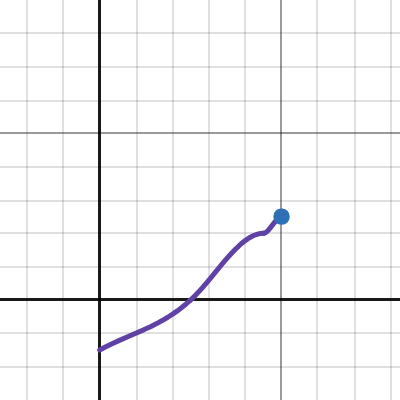
Performs and visualizes a cubic spline interpolation for a given set of points.
 austere nova
is this mod still the most viable
cobalt aurora
austere nova
is this mod still the most viable
Imo ye
placid thistle
austere nova
better than central config?
They aren’t mutually exclusive but I use LQ and Loadstone instead
(Loadstone mentioned for the interior generation improvements in comparison to those offered by Central Config)
cobalt aurora
What gen benifits does it have
austere nova
placid thistle
(Loadstone mentioned for the interior generation improvements in comparison to t...
i already use loadstone
would central config clash with that?
placid thistle
cobalt aurora
What gen benifits does it have
Both Loadstone and Central Config generate interiors differently than default LLL which is supposed to improve larger dungeons loading correctly for all players in multiplayer and scrap distribution
I don’t really know the technicalities
placid thistle
austere nova
would central config clash with that?
Only if you turn on Dungeon Generation Overhaul
I believe
I’ll be completely honest I tried using Central Config for weeks and kept getting anomalies and errors
austere nova
i havent booted the game yhet so hopefully i dont encounter that
ruby fractal
It might be my glitchy modpack, but for whatever reason, when I was trying the v55 beta, I found that only Old Birds and Barbers were spawning with LQ enabled. Again, trying to use a large modpack and bug hunting for why entity spawns were not working, so take that for what you will.
Probably not due to LQ, but could be, not sure
placid thistle
ruby fractal
Probably not due to LQ, but could be, not sure
I have a huge modpack too and seemed like only a few entities were spawning even tho I have all interior enemies enabled with varying rarity
But haven’t been able to play enough to be sure
Saw demogorgan every single time tho even tho it has less rarity than a bracken or loot bug
Some modded entities are just quirky with the spawn rates and don’t work well with LQ. The haunted harpist spawns way too much when added to LQ
ruby fractal
I noticed the harpist as well, and I have him toned way down
Nonetheless, all entities, modded or otherwise, were pretty much not spawning, just mechs and barbers
placid thistle
ruby fractal
Nonetheless, all entities, modded or otherwise, were pretty much not spawning, j...
When I landed on Artifice there was like 30 old birds
ruby fractal
I only got a tenth of that
placid thistle
I think LQ isn’t working with spawn curves effectively or something on the new update
ruby fractal
LQ could most definitely do with another update, at least to work out some kinks
placid thistle
I want to switch to Central Config but I got tired of being one of the few bug testers , I just want to play the game atp tbh
Need more people testing Central Config to dig up all the bugs, cuz the dev is very on top of patching and updating when bugs are reported
austere nova
placid thistle
Need more people testing Central Config to dig up all the bugs, cuz the dev is v...
im using it and i havent encountered any issues so far
placid thistle
austere nova
im using it and i havent encountered any issues so far
Online co-op?
tranquil patrol
ruby fractal
LQ could most definitely do with another update, at least to work out some kinks
The dev (unfortunately for us) does mostly Minecraft stuff, so when they're not busy they're usually doing that, they also don't know much, if any, Unity so hard to really say when/if there'd be any changes
placid thistle
austere nova
still testing my pack alone atr the moment
co-op is a whole other beast
placid thistle
tranquil patrol
The dev (unfortunately for us) does mostly Minecraft stuff, so when they're not ...
that’s unfortunate, I actually really like the web editor
tranquil patrol
placid thistle
that’s unfortunate, I actually really like the web editor
Well ynever know
placid thistle
There’s a few quirks rn
Interiors also show as Unviable on certain moons even if they’re added to LQ and assigned a rarity
Have to do it thru LLL config which feels wrong if the dungeon has its own separate config like LC_Office
cobalt aurora
placid thistle
Have to do it thru LLL config which feels wrong if the dungeon has its own separ...
Ive had unviable interiors spawn XD
placid thistle
cobalt aurora
Ive had unviable interiors spawn XD
wait now that u mention it
Yea
Same
Idk it overall feels clunky
rn
Why’s it show unviable but still can be chosen
with Central Config the viable dungeons reflect accurately
ruby fractal
The web editor is the reason why I came back to LQ
cobalt aurora
placid thistle
wait now that u mention it
Its jank but I prefer it over LLL and CC
placid thistle
cobalt aurora
Its jank but I prefer it over LLL and CC
for the web editor or because of reliability ?
cobalt aurora
placid thistle
for the web editor or because of reliability ?
Both kinda
placid thistle
I like the web editor, but im really just biding time to switch to Central Config once it seems like everything is ironed out. It looks promising now, im gonna do extensive testing on Friday
the interior enemy spawns with LQ aren’t satisfactory for me atm
cobalt aurora
placid thistle
I like the web editor, but im really just biding time to switch to Central Confi...
Just dont like how CC is formatted so I just deal with a lil jank
placid thistle
LQ seems to try and separate its config values to its own system which I think is causing inconsistency with the new game updates
Since it was compiled for v50
cobalt aurora
placid thistle
Since it was compiled for v50
Def needs a v56 compile for better functionality
silent whale
waxen frost
https://www.desmos.com/calculator/s5dmajojxa
https://tools.timodenk.com/cubic-sp...
that would uh... explain the abnormal turret count

(it's my animation curve for turrets)
tranquil patrol
silent whale
that would uh... explain the abnormal turret count
Yeah upon testing, it does seem like the curves made in the desmos are accurate to Unity, which explains the weirdness of seemingly simple coordinates. Just try to build a curve you like rather than get bogged down with specific values, cause chances are the curve's gonna be all out of whack if you try to be normal
Cause cubic splines aren't normal ig
silent whale
honestly serves me right for just tweaking values instead of properly learning how the curves work
Now all that is left is to... remake every single curve in my config 
fleet bluff
How do you show animation curves?
civic arch
waxen frost
https://www.desmos.com/calculator/s5dmajojxa
https://tools.timodenk.com/cubic-sp...
@fleet bluff
fleet bluff
Nice
silent whale
Do you guys have any suggested interior sizes for various modded interiors to bring them closer in size to the vanilla facility?
cobalt aurora
silent whale
Do you guys have any suggested interior sizes for various modded interiors to br...
usually I go for 0.6-0.8
silent whale
cobalt aurora
usually I go for 0.6-0.8
for which interiors specifically?
cobalt aurora
silent whale
for which interiors specifically?
pool rooms, mental hospital, castle and school
waxen frost
- i used to use 0.6 for poolrooms but for a while now (I think since they added the new big entrance hall..?) it generated way too small for 1.4 moon size mult.
- Like every single time I found my self walking across 3-4 rooms before I reached the (actual) pool room with 2 fire exits and the apparatus room. That kind of small.
- Mental I also have 0.6
- CozyOffice 0.8. Can't go too small or it will have trouble generating (blocked entrances)
- Skkarj 0.8
- Oobl Lab 0.5
- SCP 2
- Office 2.3 (might be outdated again. way back office was huge, then it was tiny when it had 3 floors, now idk)
silk stream
Guys do i have to set the spawn for kidnapper fox on LQ or not?
silent whale
silk stream
Guys do i have to set the spawn for kidnapper fox on LQ or not?
currently the fox is uneditable
it will spawn normally regardless of your config
silk stream
silent whale
it will spawn normally regardless of your config
because for now i have never see her with LQ
dunno why
placid thistle
waxen frost
* i used to use 0.6 for poolrooms but for a while now (I think since they added ...
Which mod is Skkarj from?
cobalt aurora
placid thistle
Which mod is Skkarj from?
unreal
silent whale
silk stream
dunno why
zeekers nerfed the foxes with the last v56 patch and they no longer instantly cover the entire map in shrouds. I assure you that they do in fact spawn
silk stream
Oh ok thanks
silk stream
silent whale
zeekers nerfed the foxes with the last v56 patch and they no longer instantly co...
Does It works also with modded moons?
silent whale
silk stream
Does It works also with modded moons?
technically?? LLL is currently a bit bugged with foxes. they don't treat various planets as different ones for tracking vein shroud spawns. basically this means that the swarm of shrouds will follow you wherever you go
placid thistle
silent whale
technically?? LLL is currently a bit bugged with foxes. they don't treat various...
I haven’t seen shrouds at all
The fox doesn’t even show up in devmode or LQ
severe harness
Debug Panel DOES have fox, it's just named "Bush Wolf"
Similarly Barber is on there, named as "Clay Surgeon"
severe harness
I think Kidnapper Fox fits more than Bush Wolf, esp with how the monster acts more like a Fox than a Wolf, minus the weird stretchy tongue it has for whatever reason
 carmine crater
Hey
uhm
where is Barber?
Im trying to configure barber spawns but I can't find him nor it's code name "Clay Surgeon"
Never...
Mind...?
Yeah nevermind
ruby fractal
It should be 'Barber'. I can see it just fine
inner light
 covert frost
I mean it is a fox not a wolf
covert frost
I mean it is a fox not a wolf
other than being orange it aint too much of a fox
like it can be both
it's a stylized canine
carmine crater
Does making Kidnapper Foxes spawn make Vain Shrouds spawn?
So like
When you edit Kidnapper Fox's settings your technically editing Vain Shroud Settings?
or like
mgjnrsbsr
you know what I mean right?
cobalt aurora
carmine crater
Does making Kidnapper Foxes spawn make Vain Shrouds spawn?
nope that would just spawn the fox with no bush
placid thistle
cobalt aurora
nope that would just spawn the fox with no bush
Which is pointless because the AI relies on the bush right?
cobalt aurora
placid thistle
Which is pointless because the AI relies on the bush right?
like maybe id do it for shits on a gimmick moon if he worked without the ai
noble crypt
does the kidnapper fox work with LQ?
i have ooblterra and LQ and in the file thing i think the fox's internal name is switched to Ghost Oobl
the Oobl Ghost is separate
but when i look up bush wolf Ghost Oobl comes up instead
noble crypt
cobalt aurora
nope that would just spawn the fox with no bush
so do they just not spawn at all with LQ? or are the shrouds a separate system
carmine crater
cobalt aurora
nope that would just spawn the fox with no bush
The hell?
Wait but wouldn't it kill it right away?
or make it disappear?
with Imperium you can't spawn it in, it just instantly displays a message saying it died
 errant iron
Do me have to set all global to true? or me can set specific moon to make the preset config work? Because it keep reset back to default. (´・ω・`)
placid thistle
carmine crater
with Imperium you can't spawn it in, it just instantly displays a message saying...
The fox need the bush
placid thistle
noble crypt
so do they just not spawn at all with LQ? or are the shrouds a separate system
the ai relies on the bush
someone would need to make a patch for the AI
placid thistle
errant iron
Do me have to set all global to true? or me can set specific moon to make the pr...
What keeps resetting back to default?
carmine crater
placid thistle
The fox need the bush
Yeah which is why im confused why there isn't a Vain Shroud setting on LQ
placid thistle
carmine crater
Yeah which is why im confused why there isn't a Vain Shroud setting on LQ
Cuz it hasn’t been updated since long time
carmine crater
Ah
placid thistle
It’s not an enemy object it’s a map object also
placid thistle
IF this mod ever gets updated i wouldn’t be surprised it he doesn’t bother trying to include fox things
placid thistle
carmine crater
I'll stick to KidnapperFoxSettings for now
Yea
placid thistle
tacit thunder
thanks, i think ive been hit with double colds or something, since i got better ...
How are you feeling?
tacit thunder
my coughs are gone, im busy with work this week but i finished my other projects so i can start next week
is my plan
placid thistle
tacit thunder
is my plan
U have no idea how happy this makes me😂😂
well for when you get to it, something I’ve noticed is that LQ just ADDS to the rarity of modded enemies as given by the .dll and .cfg of the respective mods
I’m not sure if it’s always been like this and I didn’t notice before or if it changed with the new game update
So if the cfg for Demogorgon has a rarity of 20 and you set the rarity to 40 in LQ it will actually end up 60
tacit thunder
it should definitely just set it
severe harness
Oh God that explains why Shockwave Drone is like, everywhere in my runs lol
So any place I have it normally set to like 35 weight is actually 70 since I have it as default on some places at weight 35
placid thistle
severe harness
So any place I have it normally set to like 35 weight is actually 70 since I hav...
Yes afaik
tacit thunder
it could be that the other mods have changed how they added weights, or some other thing might have changed, but ill need to take a look at it
placid thistle
tacit thunder
it should definitely just set it
Maybe it’s because LQ is not using the enemyName property?
Idk
cobalt aurora
tacit thunder
it could be that the other mods have changed how they added weights, or some oth...
Would make sense since l lib has been updated a few times
tacit thunder
lethallib has probably changed how/when they add custom enemies to levels, and the same enemy entry may be there more than once, especially if they add it after lq
placid thistle
Once LQ is updated i think im gonna make an FAQ video
tacit thunder
it will probably take a bit though, since im going to try and implement all the missing features in the web gui and whatnot
placid thistle
all good. The fox will be a tricky one
cobalt aurora
tacit thunder
lethallib has probably changed how/when they add custom enemies to levels, and t...
I think thats true because when v50 dropped the old spawn weight method broke spawns
So they changed it
tacit thunder
cobalt aurora
I think thats true because when v50 dropped the old spawn weight method broke sp...
that makes a lot of sense
yeah ill have to take a look at how the foxes and baboon hawks are implemented now, but i think there should be some options available
cobalt aurora
tacit thunder
yeah ill have to take a look at how the foxes and baboon hawks are implemented n...
Other options?
cobalt aurora
tacit thunder
more options i mean
Ohhhhh
placid thistle
Oh also another thing to look at is that the moon pricing works MOST of the time when set in the Global section but randomly will stop and the terminal will display the default prices until you travel to another moon then it fixes itself
this is when not using LLL or CC to configure moon pricing
Or any other config mod like CustomMoonPrices
errant iron
placid thistle
What keeps resetting back to default?
The presets file, me was editing through file directly just to test out and when start the game, the settings seem to revert back to default.
placid thistle
Use the web editor
errant iron
Right now, me following the webui thingy and see if this will change anything.
The global settings in configuation need to be set to true as well? Preset parent settings are all in Global in web ui.
Some moons are not having anything set, would them using the vanilla setting by default?
errant iron
Do me have to disable settings in Lethal Level Loader?
errant iron
Will give it a go (´・ω・`)
placid thistle
I’d be happy to test any new updates for this mod if needed
errant iron
So far it work fine.
placid thistle
errant iron
So far it work fine.
There’s some updates needed he said he will possibly start on it next week
civic arch
yay
carmine crater
noble crypt
but when i look up bush wolf Ghost Oobl comes up instead
wait huh?
errant iron
Me got a weird spawn in Dine where a red giant speciment spawn inside the mansion, if the enemies are not set int the settings, do they still have chance to spawn in?
placid thistle
errant iron
Me got a weird spawn in Dine where a red giant speciment spawn inside the mansio...
No, that’s pretty weird. Are you sure you didn’t add it to the “enemies” section? You only want to add the Redwood Giant to the “Night” section
errant iron
Night section? There're just Interior, Outside and Daytime for me in the Web UI
placid thistle
errant iron
Night section? There're just Interior, Outside and Daytime for me in the Web UI
Outside is night
Couldn’t remember the exact name
errant iron
Just Forest Keepers and Eyeless Dogs on Dine setting for me, that's strange.
Might be some other settings from other mods, maybe?
placid thistle
errant iron
Me got a weird spawn in Dine where a red giant speciment spawn inside the mansio...
Also just so you know as a friendly tip, you should use “I” instead of “me” for this grammar situation. I’m only telling you because I’ve seen you use “me” several times and thought you may want to know, haha
errant iron
Just an old habit, can't quite fix that, unfortunately.
placid thistle
Wow
That’s my bad that’s funny though
I had thought I was being helpful
If English wasn’t your first language
All good
placid thistle
errant iron
Just Forest Keepers and Eyeless Dogs on Dine setting for me, that's strange.
What about “Global”?
errant iron
There's nothing set in global

It's me vod, the giant spawn around at 00:25:58
Or should me put the presets to let ye see the file itself?
placid thistle
errant iron
It's me vod, the giant spawn around at 00:25:58
That is so weird… I’ve never had that happen
Double check your Giant Specimens cfg
errant iron
Should the giant setting turn off or set to 0?
placid thistle
errant iron
Should the giant setting turn off or set to 0?
Send a screenshot of the config
noble crypt
does the roller enemy not work with LQ? i cant seem to find it in the file
 indigo pewter
it worked for me
severe harness
Try loading up any run, whether it be existing or new then check your LQ preset
waxen frost
I have arrived. LQ Endgame
[21:26:52.2887251] [Info   :LethalQuantities] Importing data
[21:26:53.9560767] [Info   :LethalQuantities] Generating level presets
[21:26:54.7973578] [Error  :LethalQuantities] Encountered an error while trying to load the configuration
Couldn't extract exception string from exception of type OutOfMemoryException (another exception of class 'OutOfMemoryException' was thrown while processing the stack trace)
Lmao
Never seen that
waxen frost
btw It's not a LQ problem. Just my large pack kinda pushing it. the game commits over 30gb memory on startup and I'm running out of disk space for pagefile occasionally xD
placid thistle
waxen frost
btw It's not a LQ problem. Just my large pack kinda pushing it. the game commits...
Are you using BepInEx_Faster_Load_AssetBundles_Patcher?
placid thistle
waxen frost
yea
How are you using so much memory?
I have every interior and 73 moons and almost every enemy n im at 10.5gb peak
waxen frost
placid thistle
I have every interior and 73 moons and almost every enemy n im at 10.5gb peak
hmm.. 81 moons, 33 interiors, lots of enemies too
LR, CelestialTint are also contributors ig
placid thistle
waxen frost
hmm.. 81 moons, 33 interiors, lots of enemies too
Still seems insanely high I feel like 1 of the mods might be in a crazy error loop
Idek
But 3x as much
Seems like sum ain’t right
waxen frost
Haven't observed anything unusual. Some stuff is just not very optimized ig. Do you have Mantif too? moon and dungeon is over 1gb alone.
ram usage also drops down to 50% ish after the game is up for a while. (if it doesn't crash :D)
 winter flint
waxen frost
hmm.. 81 moons, 33 interiors, lots of enemies too
winter flint
waxen frost
hmm.. 81 moons, 33 interiors, lots of enemies too
Can you drop that interior list, didnt realize there were that many
winter flint
Thank you thank you
 jade token
waxen frost
jade token
waxen frost
is my dungeon really the only one whose name doesn't end with Flow
placid thistle
jade token
is my dungeon really the only one whose name doesn't end with Flow
Yep
Hipster
placid thistle
winter flint
Thank you thank you
In my opinion TranquilityManor is a cool idea but very poor execution
Also for some users MentalHospital causes a lot of Unity crashes on launching modded
placid thistle
waxen frost
Haven't observed anything unusual. Some stuff is just not very optimized ig. Do ...
Only the interior
I know MentalHospital is going kinda haywire rn, not sure if it would cause a spike in ram usage though
winter flint
placid thistle
In my opinion TranquilityManor is a cool idea but very poor execution
Yeah i gave it a whirl last week & i’m keeping it on the watch list for the moment. Huge potential.
No issues with hospital atm tho.
waxen frost
placid thistle
I know MentalHospital is going kinda haywire rn, not sure if it would cause a sp...
interesting I'll give it a try without hostpital once I have my presets file set up and see if it changes anything.
waxen frost
placid thistle
In my opinion TranquilityManor is a cool idea but very poor execution
i've yet to actually play it in a game. Is it actually only the main hall that's different from mansion? I thought there was more like back and forth between the two vanilla interiors but when I tested it briefly most tiles were just mansion.
placid thistle
winter flint
Yeah i gave it a whirl last week & i’m keeping it on the watch list for the mome...
It works fine once the game is loaded it just made my game crash on launch with like a 70% chance
Hella annoying tbf
placid thistle
waxen frost
i've yet to actually play it in a game. Is it actually only the main hall that's...
When I tested it in Imperium it generated to massive proportions haha
Basically HauntedMansion and Level1ExtraLarge smushed together
With not much intermix
More like mansion with facility on the outside edges
waxen frost
placid thistle
More like mansion with facility on the outside edges
ah, that makes sense. and that's even tho the size multi on tranquility is 1 by default. have you tried fiddling with the factory size mutliplier for the dungeon flow?
btw how big is your LQ presets.json? I just noticed it's actually committing quite a sum of memory when lq is processing it. mine is 30mb
placid thistle
Nah I didn’t realize that’s all it was when I added it, once I realized I was like, meh deletes
placid thistle
waxen frost
btw how big is your LQ presets.json? I just noticed it's actually committing qui...
I’ll check in 1 sec
carmine crater
Hey
so lets say that I configure a locker for example to spawn on ooblterra
But I don't check off the rarity
will the mod it came from or the game in general take care of the rarity for me?
placid thistle
carmine crater
will the mod it came from or the game in general take care of the rarity for me?
Yes
It just means LQ won’t touch the rarity but you can still configure other attributes and add it to the spawn pool
But if the mod config doesn’t have a rarity for that moon or tag it still won’t spawn
carmine crater
Ah good
carmine crater
Can somebody explain this to me?

Something tells me this is correct

Ooooh wait
wait
im confused
Wait so
is the Spawn chance multiplier X
and the Time of day Is Y?
Wait its the opposite
wtf??
okay okay
so Time of Day is X
and spawn chance multiplier is Y
got it
Think I got a better understanding now
sand steeple
yeah it's not easy to understand it at 1st
I'm here with other numbers lol
 tranquil patrol
carmine crater
and spawn chance multiplier is Y
tranquil patrol
carmine crater
and spawn chance multiplier is Y
Exactly, though the curve doesn't always come out as you might expect it to, so always worth checking it on one of the cubic spline calculator tools
 tranquil patrol
Cubic spline is just the maths term for the curve itself
silent whale
carmine crater
Think I got a better understanding now
Key is time of day
0 is 6 am
1 is 12 am
Value is just a spawn rarity multiplier. it can go above 1 if you want to make certain thing spawn more at a set time of day
tranquil patrol
carmine crater
Something tells me this is correct
So this is what these values make
 silent whale
yup
silent whale
key is the time of day
carmine crater
What the fuck?
carmine crater
carmine crater
Something tells me this is correct
so that means these have to be opposites?
tranquil patrol
Depends what you want tbh
silent whale
X is left to right
Y is bottom to top
X is time of day and Y is the multiplier
silent whale
carmine crater
so that means these have to be opposites?
usually you want the first key to be 0 and last one to be 1 so that the curve goes over the entire day's duration
carmine crater
Ah I see
silent whale
also I use this to visualize my curves when I modify them
https://tools.timodenk.com/cubic-spline-interpolation
I learned the hard way that just tweaking some values can severely break how things spawn
Performs and visualizes a cubic spline interpolation for a given set of points.
carmine crater
Oh wait
waxen frost
I think what hasn't been said to DarkFedora is that Y is the amount of enemies
carmine crater
so I don't have to put
0
0.25
0.5
0.75
1
waxen frost
but maybe it was. I just marked server read by accident :x
carmine crater
if I just do
0
1
the spawning will go on through the entire day?
waxen frost
There spawn waves at fixed times throughout the day
silent whale
waxen frost
I think what hasn't been said to DarkFedora is that Y is the amount of enemies
depends on which curve we're talking about
a moon's spawn curve uses Value as the amount of enemies to spawn while an individual enemy's spawn chance curve is a multiplier to their rarity
carmine crater
the only reason I need to know is because for no reason at all without Quantities my monster spawns are busted
waxen frost
for every wave it will evaluate the curve and get the enemy amount to spawn
silent whale
carmine crater
if I just do
0
1
the spawning will go on through the entire day?
you want at least 2 points for a working curve
waxen frost
silent whale
depends on which curve we're talking about
a moon's spawn curve uses Value as th...
the other ones are called spawn chance curve tho. Not Enemy spawn chance curve. I agree it can be confusing lol
silent whale
think of it like: at this point in time how many enemies do I want spawning?
carmine crater
silent whale
think of it like: at this point in time how many enemies do I want spawning?
Ooooh okay
silent whale
and USE a cubic spline visualizer of sorts like desmos or the website I sent
if you don't you risk screwing up your curve in a way you wouldn't expect
carmine crater
Wait but I can just leave it unchecked and it'll do the curve for me?
silent whale
carmine crater
Wait but I can just leave it unchecked and it'll do the curve for me?
it will use the default curve
tranquil patrol
Eg this, where it dips into negative despite none of the values being negative

 carmine crater
silent whale
it will use the default curve
carmine crater
silent whale
it will use the default curve
yeah
silent whale
so whatever a moon's dev put on it
waxen frost
also keep in mind that the Enemy spawn amount range will be aplied on top of your Y value from curve to randomize the spawn wave size. Higer range -> more random, simply put
silent whale
yeah and remember the range goes in both directions
ig if Enemy spawn amount range is set to 2 then you'll get between -2 to +2 enemies
tranquil patrol
Zeekers make a simple enemy spawning system challenge, impossible
carmine crater

 atomic geyser
am i misunderstanding this feature? i was trying to use it to tweak the values of specific scrap under 'global' so i don't have to update each moon manually, but it doesn't seem to actually take effect (even when those values aren't selected on the moon itself) unless i select those values on the moon itself and change them there


if i am misunderstanding it, then is there a way to tweak the values globally without having to update them per-moon?
placid thistle
atomic geyser
if i am misunderstanding it, then is there a way to tweak the values globally wi...
There are issues with the global section on the current version
Some parts work some don’t
placid thistle
atomic geyser
do we know what parts work or is it inconsistent
uhhhhhh factory size multiplier doesn’t work, enemy rarity, and apparently whatever you’re tryna do with scrap
I just use it to change enemy power level and spawn amount
And double down on the rarity I want for the interiors
atomic geyser
placid thistle
I just use it to change enemy power level and spawn amount
good to know it works for this still
i thought maybe i was just doing something wrong, ty
tranquil patrol
atomic geyser
am i misunderstanding this feature? i was trying to use it to tweak the values o...
Assuming LQ is working as intended (idk how well it's working rn, haven't played LC in a lil while) then this should work fine so long as all the values you have ticked in Global are unticked in the moon presets, which it sounds like they are. So you're not doing anything wrong, mod's just been collecting some dust
severe harness
Uh I wanted to inquire about something, so I recall messing with map size has some sort of desync problem but I also have a second dilemma where an interior I wanna use (in this case, CozyOffice) has a problem where sometimes entrances (Main and any Fire Exits) would get the "x appears blocked" and prevent the player from entering the interior
Is there any sort of workaround to adjusting sizes that's friendly towards clients either on an interior's size (via LLL's parameters as Rosie's interiors do not generate their own unique config file) or via LQ's end?
waxen frost
severe harness
Uh I wanted to inquire about something, so I recall messing with map size has so...
yes there is. wait a sec
waxen frost
tranquil patrol
Assuming LQ is working as intended (idk how well it's working rn, haven't played...
I'm using all of these. They should be working. Like you said @atomic geyser you probably don't have a list with everything but unticked in the presets that inherit from global. That being said it might not be possible to change the Meteorite since it doesn't spawn naturally but idk. maybe it works. I know it works for casino chips that I add to the scrap list with a rarity. Since they spawn naturally in those levels they respect the values I set. The chips in the casino at the company obviously don't respect the values I set.
waxen frost
severe harness
Uh I wanted to inquire about something, so I recall messing with map size has so...
#1213985212686532638 message
so basically if you only change your factory size multipliers for dungeons (in the global preset) there shouldn't be any desyncs.
but if instead you only change the map size multiplier for a moon preset it will cause desyncs.
You can avoid that by also ticking the dungeon flows box (either in the moon preset or in global) and Add all dungeon flows to it. No need to change or tick anything. Just add them and you should be able to change the map size multipliers with LQ just fine.
Regarding the cozy office problem. From what I've heard and seen myself it happens when the dungeon generates too small for the amount of fire exits on the moon or sth. Try to keep that in mind when choosing the sizes or dungeon rarities.
atomic geyser
waxen frost
I'm using all of these. They should be working. Like you said <@2805010786243051...
i wasn't testing it with meteorite specifically, i just screenshot something random
i couldn't even get it to work with vanilla scrap, even when all of the options were un-ticked
maybe it's a mod conflict then
inner light
has the enemy spawn weight config issue been fixed or nah?
severe harness
waxen frost
https://discord.com/channels/1168655651455639582/1213985212686532638/12388655671...
Oh heyo, I was actually looking at your notes regarding the desync issue last night before heading to bed. I'll put my method into text format rq and I was wondering if this might be a safe option:
-
Go to Global, enable "Dungeon Flows" and add all to the listing
(Image provided of this step is on left) -
Go to the desired moon (in this case, Experimentation & Assurance) and set the "Map Size Multiplier" above 1.0 to avoid the exit generation issue present with CozyOffice (I set it to 1.1 for context, Image provided below of step is on right)


I basically never touch the "Factory Size Multiplier", just Map Size Multiplier
waxen frost
severe harness
Oh heyo, I was actually looking at your notes regarding the desync issue last ni...
Yea, I think that should work. Whether it resolves the CozyOffice issue with those values idk.
waxen frost
severe harness
I basically never touch the "Factory Size Multiplier", just Map Size Multiplier
You can use the factory size mult if you want btw. Well, I should rather say: You don't have to not use those. I use them for all dungeons (in global preset) instead of the LLL size scalar thing.
severe harness
It seems to work for Experimentation so far, I'm doing a run where I'm going for like several days on JUST Experimentation & Assurance to see if it crops up
placid thistle
inner light
has the enemy spawn weight config issue been fixed or nah?
No
 placid thistle
inner light
bananapuncher save me...
placid thistle
inner light
bananapuncher save me...
CentralConfig works™️
buoyant gyro

 inner light
placid thistle
CentralConfig *works*™️
inner light
placid thistle
CentralConfig *works*™️
not configing everything again
also i've heard it breaks stuff and or is kind of unstable
so i'd rather wait
placid thistle
inner light
so i'd rather wait
Lethal Quantities (v89) gonna go crazy
CC works fine just don’t touch interiors with it
atomic geyser
waxen frost
I'm using all of these. They should be working. Like you said <@2805010786243051...
i tested it more and it seems that the price works fine globally, but the weight will convert to 1lb unless you set it on the moon itself
sand steeple
I'll be using LQ because it is the tool that I understand the most on my modpack.
I am aware that some configurations might not work as expected, but in some future update of this mod it is expected to be fixed.
 placid thistle
sand steeple
I'll be using LQ because it is the tool that I understand the most on my modpack...
placid thistle
sand steeple
I'll be using LQ because it is the tool that I understand the most on my modpack...
afaik all these settings will work fine
but i havent done extensive testing with every setting
besides moon price, definitely bugs out atm
 frozen magnet
Would it be possible to get variable intro messages for moons, i.e. varying temperature or wind speeds relating to conditionals like weather? Or is that kinda, too advanced for the game to handle?
Like, imagine if you were able to control different sets of the same moon, sometimes it's more risky, sometimes it isn't. May not necessarily random but one would imagine different weather conditions would affect different spawn rates for certain enemies, even if it's the same enemies. I dunno, I think that'd be a unique idea.
I guess the way I could imagine it realistically would be that different weather conditions would register as sub-class of a main preset of the moon so that you don't have to re-do all the stuff you've already done but can still tweak aspects of the moon to better fit the context of a weather event.
atomic geyser
is there a way you can get lethalquantities' routing prices to be prioritized over a mods own config's? i'm trying to give ganimedes conditional routing prices, but it seems to ignore them
severe harness
What do you mean by conditional routing prices exactly?
As in if you're in an "adjacent" moon already (e.g. Artifice) the cost to route to the moon is 0 or smth?
atomic geyser
exactly that yeah
lq's feature that allows you to set moon prices per moon
it doesnt seem to get along with ganimedes, which has its own config for price without the option of per moon pricing
 heady cliff
Does LQ's enemy weights take priority over LLL's?
placid thistle
heady cliff
Does LQ's enemy weights take priority over LLL's?
No
sand steeple
placid thistle
No
What happens if I disable completely the spawn system in LLL?
severe harness
How I usually have my things set up between LQ & LLL is this:
LQ:
Enemy weight,
scrap weight,
map size,
route cost,
curves for enemy spawns & traps,
Risk rating & description (e.g. Changing Ganimedes from SS to something like S++ or S+++)
LLL:
Interior weight
Whether or not a moon shows up in the terminal*
- (Moons that are edited in such a way have 0 edits from LQ's end)
 upper sable
is editing interior spawns with LQ working?
carmine crater
I just edit it with their respective mods
upper sable
carmine crater
I just edit it with their respective mods
a few mods don't have configs for their spawn rates outside of the LLL config, and i believe the LLL config requires you to turn on config configuration to edit the interior spawn weights which i don't really want to mess with
carmine crater
upper sable
a few mods don't have configs for their spawn rates outside of the LLL config, a...
Yeah
What interiors don't have configuration?
upper sable
carmine crater
What interiors don't have configuration?
wesley's interiors, unreal interiors, lc_office, etc
lc_office technically does have a config but it's an outdated rarity config that doesn't work
carmine crater
upper sable
lc_office technically does have a config but it's an outdated rarity config that...
A h
carmine crater
upper sable
wesley's interiors, unreal interiors, lc_office, etc
Wesley's interiors
upper sable
grand armory my beloved
carmine crater
more like
fucking nuclear explosion in grand armory
that fun house one better frfr
upper sable
you're a hater
heady cliff
placid thistle
No
Is there a way I can make LQ have priority over LLL for this type of stuff?
sand steeple
heady cliff
Is there a way I can make LQ have priority over LLL for this type of stuff?
I'm disabling this manually per moon
 heady cliff
sand steeple
I'm disabling this manually per moon
heady cliff
sand steeple
I'm disabling this manually per moon
So I just delete wherever I don't want LLL to affect?
sand steeple
heady cliff
So I just delete wherever I don't want LLL to affect?
I'm not sure if it's 100% working
frozen magnet
I'm pretty sure LLL only affects things if you change the config to true
placid thistle
sand steeple
I'm not sure if it's 100% working
It won’t those settings aren’t actively handled by LLL they just show up in the config for display
LLL just does interior stuff
heady cliff
placid thistle
It won’t those settings aren’t actively handled by LLL they just show up in the ...
Wait, so none of those settings in @sand steeple's screenshot work??
sand steeple
placid thistle
It won’t those settings aren’t actively handled by LLL they just show up in the ...
Oww
Welp
 woeful cliff
I know you can set the cost of travelling from specific moons using this mod but how do you just set the overall price?
To go to a moon
woeful cliff
I figured it out
 lost finch
Hello!
I have a weird bug with LQ.
I have 25 interiors installed and I want all of them to have equal chances to spawn on all moons and i've tried everything, dungeon injection in LLL (content config = true) , i've tried using a preset on every single planet that puts all interiors at equal chances using LQ, I have CC but i don't really understand how it works because when i set dungeon override to true and start the game it doesn't give me an config options. and even after leaving every mod on it's own with the others it still doesn't work and I don't really know what to do now. (to test if the mods works i set one of the interiors at the weight of 9998 on Experimentation [Experimentation:9998]) but LLL doesn't seem to work even without LQ and CC, LQ doesn't work and if i delete CC my friend have void fog and can't join me. I did try all:9998 and All:9998 and Vanilla:9998
weirdly enough LQ works with mob spawning weights and animation curve , moon price but not with the interior weights and i did test this because i set one of them as 10000 and it didn't spawn.
they told me i should ask in this channel.
covert frost
lost finch
Hello!
I have a weird bug with LQ.
I have 25 interiors installed and I want all ...
have you tried making a new profile with ONLY Lethal Quantities installed, and changing the interior values?
Because configuring interiors works fine for me using Lethal quantities
lost finch
covert frost
have you tried making a new profile with ONLY Lethal Quantities installed, and c...
Yes
covert frost
lost finch
Yes
can you send me a screenshot of how you configured it in the web editor?
lost finch
k