#▫️Cyberpunk 2077
1 messages · Page 2 of 1
 true saffron
 whole girder
i would assume it's a particle emitter 🤔
true saffron
I just have no idea what the particles would be. 😄
whole girder
that's an env or weather? ... i'm not sure where particles are used in there 🤔
whole girder
no me either!
paper or debris...? wind effects...?
sosuine might know
do you know him or want me to ask?
true saffron
It's not that urgent. I just removed it for now and made no visual difference. 😛
Should you happen to bring it up in conversation at some point, it would be nice to know, but don't go out of your way to look into it.
whole girder
they may not actually be used
i do remember sosuine had some kind of god rays in hiw Alternative Weather mod, but they looked 100% like voxels to me, not particles
... my money is on debris ... i think debris (paper etc) is triggered by the weather
you could look inside his new debris mod for confirmation
(the floating paper / bags is definitely particles)
true saffron
I guess I wouldn't have noticed then. I'm using my Trash Begone mod haha.
true saffron
whole girder
you could look inside his new debris mod for confirmation
Was there already a mod that removed those? 😬 I don't look into things when I have random ideas. I just make something.
whole girder
true saffron
Was there already a mod that removed those? 😬 I don't look into things when I ...
no!! i'm so sorry i was confusing your mod!
true saffron
Ohhh 😄
whole girder
true saffron
I guess I wouldn't have noticed then. I'm using my Trash Begone mod haha.
you're so pure 😊
true saffron
I only use the particle remover because it looks weird with DLSS/RR.
whole girder
it really does
i'm experimenting with the variable rate shader settings, because that's exactly the kind of thing VRS is supposed to fix
my understanding is VRS looks at motion vectors and if they are high, it uses more/faster rays for that part of the frustum
true saffron
Oh, interesting! Would it still leave some artifacts before it's initially able to calculate the motion?
whole girder
(but i'm not convinced it's properly integrated with path tracing)
maybe a single frame... ?
and also keep in mind motion vectors can be calculated slightly off scene ... in most (good) game engines, all meshes have an imaginary box around them that's slightly bigger than the mesh, so as it comes into view, the occlusion system knows to start rendering it
when you play unreal games and there is white flashing of meshes at the edge of the screen as they come into view, it's because the devs don't know how to use unreal
(***cough Jedi cough hogwarts)
true saffron
😄 I guess I haven't really looked that closely at those specific things but, especially when you're trying to tweak them, they do leave an impression on the overall visuals.
whole girder
(so basically motion vectors should start as soon as the larger mesh box touches the view frustum)
oh absolutely
there is a LOT CP does correctly
they are very knowledgeable. as much shit as people give them, CDPR really know what they're doing
their problems are process & testing problems
true saffron
Plus they have the full backing of Nvidia, I'd assume. It's basically an Nvidia showcase.
whole girder
in unreal you need to set r.ExpandAllOcclusionTestedBBoxesAmount ; Amount to expand all occlusion test bounds by
tbh though, these are things Epic should set for people. unreal has a lot of very dumb (***cough WRONG cough) default settings
whole girder
true saffron
Plus they have the full backing of Nvidia, I'd assume. It's basically an Nvidia ...
yes exactly!
but to my eyes, they have also very much trusted what nvidia have said "here, use this!" without playing with it too much
 south verge
@whole girder I'm getting fog pop in, about 100m out. Any suggestions on how to fix?
whole girder
south verge
<@184939081585786880> I'm getting fog pop in, about 100m out. Any suggestions on...
on the new ultra fog?
south verge
Yep
whole girder
south verge
Yep
take a phone shot?
south verge
Wondering if its just a mix of weather and time of day thats giving issues
Game just crashed of course, will see if I can get you an example
whole girder
oh crap 😂
okay, what am i doing wrong ... i created this neutral (Davinci auto) LUT, which works perfectly for me.
- fiddled in reshade
- captured the reshade as a PNG LUT from Lightroom
- converted to cube
- added the LUT to the neutral LUT in Fusion
- *exported as PNG and converted to DDS in the usual way
- *exported to Ultra Noir archive
- everything is almost flat blue

it looks fine in fusion and in PNG ?
south verge
Notice the line, pushes forward while walking down the street

This occurred after setting weather to foggy then switching to deep blue. 6AM
whole girder
south verge
Notice the line, pushes forward while walking down the street
do you have a weather mod as well?
south verge
Will have to see if it pops up with other weathers
No weather mod
Just weathermancer
whole girder
in that scene there is no volumetric fog but there is a lot of distant fog
true saffron
Sorry to cut in here but would anyone happen to know which weather envparam is linked to this:

I've tried heavy clouds, heavy clouds new, etc. Nothing is working when I change those.
whole girder
could you try
GameOptions.SetBool("Developer/FeatureToggles","DistantVolFog",false)
south verge
whole girder
in that scene there is no volumetric fog but there is a lot of distant fog
So more of a vanilla issue then?
true saffron
Well, distant fog is just a large translucent plane at X distance from player.
It's going to move with you.
south verge
I can live with it, just wasn't sure if it was a bug with ultra +
whole girder
yes ... but i thought i'd moved it to between 500 to 1000 metres away. that looks like about 100 metres
south verge
That's what I was wondering
whole girder
whole girder
could you try
`GameOptions.SetBool("Developer/FeatureToggles","DistantVolFog",f...
it could be. ultra+ should turn off distant volumetric fog entirely, but the command above will check
(really, ultra fog is designed to be used with ultra+)
south verge
With the 2.1 version you posted here earlier it seems volfog was set to true. That was probably it.
actually, volfog was set to true but distantvolfog was false. So idk lol
It's whatever, rarely see full on fog anyway lol
 whole girder
south verge
actually, volfog was set to true but distantvolfog was false. So idk lol
whole girder
south verge
actually, volfog was set to true but distantvolfog was false. So idk lol
it's possibly a typo/ommission ultra fog, i'll check soon 😊
@true saffron do you know what i'm doing wrong with my lut?
south verge
Did you make sure you have it flipped? or not flipped? I had the same issue when I was experimenting with luts a few weeks ago
true saffron
whole girder
<@130831719858176000> do you know what i'm doing wrong with my lut?
Not unless I have access to your display feed. 😛
whole girder
true saffron
Not unless I have access to your display feed. 😛
what do you need to see?
true saffron
Oh, were you referring to past screenshots?
whole girder
whole girder
okay, what am i doing wrong ... i created this neutral (Davinci auto) LUT, which...
no to this
true saffron
I thought you were going to post something.
true saffron
whole girder
okay, what am i doing wrong ... i created this neutral (Davinci auto) LUT, which...
Ah, yes. Conversion aren't reliable. I would do your best to recreate the changes from Reshade into new nodes in Resolve. The colorspace game is a tough one and it gets messy when you use external sources.
true saffron
Probably that the cube you imported wasn't converted to 3D.
Change the header parameters.
whole girder
it looks 3d to me 🤔
true saffron

Make sure that is 3D.
Best way to import is to make sure the DDS is the exact name as the file you want to replace, then click load settings in the import window before importing it (as long as the source file is in the same place in the folder structure).
whole girder
okay. yes it's identical file name and is set to 3d
but every time i import in wolvenkit something different happens
i'll try the load settings
south verge
NPC enjoying the new cig smoke
 whole girder
south verge
NPC enjoying the new cig smoke
whole girder
south verge
NPC enjoying the new cig smoke
it's looking a bit lumpy
?
that was a question ... phrased as a statement (wrapped in an enigma) 😂
whole girder
yes like ... the smoke doesn't look nice and smooth, it looks like little particles 🤔
@true saffron 😭
 south verge
Looks great to me
true saffron
Oh, that looks like a vflip issue.
whole girder
true saffron
Do you have NVTT?
yes
oh really?
okay
i totally don't remember doing that for the neutral lut
true saffron
WK used to have a vflip option in it but has since been removed.
true saffron
whole girder
i totally don't remember doing that for the neutral lut
Oh, that's odd.
whole girder
does this look right ?
 true saffron
Yeah that is backwards.
whole girder
this is unflipped ... what i was originally using (that didn't work)
 true saffron
Is this the LUT from Reshade or the combined one from Resolve?
whole girder
the combined one
true saffron
Ah ok, something went wrong in fusion then.
It's backwards, not flipped.
Can I see the Reshade LUT?
Send me the file, I mean.
whole girder
(left) is combined lut ... (right) is neutral lut


sure!
just the reshade component
 whole girder
(combined)
 true saffron
Actually, I guess you don't need to.
I usually do my LUTs vertically so I'm still trying to figure out what's going on here. 😛
whole girder
(1) neutral .... (2) reshade only) ... (3) combined


 whole girder
up/down or left/right ?
 whole girder
ehrmagherd 🤦♀️
true saffron
That's my NVTT preset, too.
whole girder
does this look right?
 true saffron
Yes
whole girder
should i have that vflip in there?
whole girder
hmm now idk if my original cube generated from reshade is inverted too
what do you use to convert to cube?
true saffron
I don't convert to cube, usually.
Maybe import it into WK and export as cube from there? 😅
whole girder
i think this looks correct now ... neutral vs mine

 whole girder
true saffron
Maybe import it into WK and export as cube from there? 😅
whole girder
true saffron
Maybe import it into WK and export as cube from there? 😅
rrghh i hate everything 😂
 true saffron
whole girder
rrghh i hate everything 😂
true saffron
whole girder
rrghh i hate everything 😂
Is yours more saturated?
true saffron
Looks like it's working then. 🙂
 true saffron
whole girder
you didn't have highest quality in your preset
true saffron
whole girder
you didn't have highest quality in your preset
Yeah, I tried with all of those settings and didn't notice a difference so I didn't bother.
You're talking about compression, right?
whole girder
yes
i mean tbh, there is very little difference in texture compressions for dds 7
(and oodle compression is crazy, as an aside)
well i've never seen that before

well the game is no longer broken but there's also no lut
true saffron
whole girder
well i've never seen that before
That's the nightly update that added cube support. 🙂
whole girder
ahhh
it will also directly load dds in there
it's working (left) ... but i now know my original neutral LUT wasn't working at all (right + reshade)


 true saffron
These are all my versions of Nova. 😅

Definitely not the horror vibes I get from the one above.
true saffron
Didn't lift. It's just AgX.
true saffron
Did you convert to ACES?
whole girder
yes
true saffron
I guess it's just supposed to be dark. 😛
Unless you have any other ENV changes happening to exposure?
Oh it's your fog.
Removing vol fog makes it a lot darker.
 true saffron
¯_(ツ)_/¯
whole girder
i know! 😂
true saffron
There are so many varibales at play, it's hard to pinpoint the one cause.
whole girder
yes exactly
true saffron
I'm trying to figure out why changing the sky dome color slightly will cause my game to look like a nuke went off.
whole girder
the davinci neutral lut (ACES) has a var wider histogram
whole girder
true saffron
I'm trying to figure out why changing the sky dome color *slightly* will cause m...
some of those values are suuuper sensitive
whole girder
@true saffron do you have a neutral AgX i can mod?
(idk wtf i did with the original lut - it looks great, but i can't recreate it 😂)
true saffron
whole girder
<@130831719858176000> do you have a neutral AgX i can mod?
Haha yeah that would be Nova Pure 2.2. 😛
Actually, AgX has some color shifting which is why I made supernova to color match.
I can get you a straight AgX LUT though. Will have to be in a bit, I'm just about to head out.
whole girder
supernova ❤️
that's so cool haha
no you're fine, no rush at all! i can also make it i just thought you might have one laying around
true saffron
@whole girder Hera yah go.
This is just a DCTL node with default AgX.
Well, it's LogC3 encoding with linear output.
whole girder
true saffron
<@184939081585786880> Hera yah go.
oh wow thank you!
true saffron
If you want the unadulterated version of AgX with an sRGB input instead of log, let me know.
It's really dark though.
Again, the magenta and greens are quite off with AgX so be forewarned. 😄
 gilded summit
south verge
So more of a vanilla issue then?
gilded summit
south verge
So more of a vanilla issue then?
This is happening in vanilla, sammi's Ultrafog Full 1.0 fixes this
whole girder
yay i didn't break something for once 😂
whole girder
gilded summit
This is happening in vanilla, sammi's Ultrafog Full 1.0 fixes this
um. what did i fix? 😂
whole girder
south verge
Notice the line, pushes forward while walking down the street
also, why is fog so brightly backlit in RT/PT
it's not physically based, it's just "there is fog, therefore there's light!!"
south verge
whole girder
also, why is fog so brightly backlit in RT/PT
Think its more of an HDR issue + env exposure changes
whole girder
south verge
Think its more of an HDR issue + env exposure changes
no it's not... the fog isn't done in ray tracing or path tracing, it's done in raster and there's a "backlight" I'm pretty certain, that determines how bright it is
I think I really need to find a specific weather env and change the weather to it so I can work this out in detail
south verge
whole girder
no it's not... the fog isn't done in ray tracing or path tracing, it's done in r...
Gotcha. I just noticed fog isn't lit the same way in SDR. More natural looking
whole girder
south verge
Gotcha. I just noticed fog isn't lit the same way in SDR. More natural looking
yes I think this is why... they're not adjusting the backlight depending on hdr or sdr. it's the same for particle FX (smoke, gas, liquid nitrogen, steam, etc)
gilded summit
whole girder
um. what did i fix? 😂
With PT enabled fog gets really ugly because there is a clear line visable on buildings and such wher the fog starts
your mod seems to fix that
whole girder
gilded summit
With PT enabled fog gets really ugly because there is a clear line visable on bu...
oh great. CyanideX told me how!
gilded summit
i quite like the fog with his ENV pure HDR, and the lastst nova lut for hdr

is this a cruel joke, or is the website not working correct for me?
true saffron
Hey @whole girder, do you happen to know which distant fog (near or far) the density and densitySecond are linked to? Or what they do?
whole girder
gilded summit
is this a cruel joke, or is the website not working correct for me?
nope, that's the guide I've been following 😂
whole girder
true saffron
Hey <@184939081585786880>, do you happen to know which distant fog (near or far)...
I believe density second is the farthest one
true saffron
I tried setting one of them to 100 and the other to 0 and then swapped... same look. 😄
I don't know what I'm missing.
whole girder
yes I haven't done explicit testing
it looks like exponential height fog is implemented too
that could look amazing, I'm surprised no one has tried it
(if it works)
true saffron
What would it do?
whole girder
it gets denser towards the ground, like...
 true saffron
Oh really?!
whole girder
ya
true saffron
That's what I want!
true saffron
I was testing some things the other day. Looks kinda pretty but not useful for me.
 whole girder
so the secondary height fog value is critical

An overview of the height-based, distant fog system.
true saffron
Can you be the one to mess with this first and then come to me when all the hard work is done? 😛
whole girder
from the settings I've seen in the env, I would expect you'd want to change height fog from 0.5 to maybe 1 or 2, and secondary from 0.5 to maybe 3 or 4
I'm totally guessing (but edumacated guesses)
hahah
I think we should just join forces at this point, it seems like we have similar goals
true saffron
Sounds like a plan! 😛
true saffron
I'm doing overall weather states though, not just fog. I'm not a fan of the current pollution state so I'm tweaking the fog.
whole girder
all good, I'm just doing fog and particle fx, not weather
true saffron
Finally figured out that sun color alpha determines light/shadow intensity. 😅


 whole girder
I've been modifying distant albedo and simpleColor to make the distant fog have more blue (like with real photon re-emission)
true saffron
I'm aiming for this. 😄
 true saffron
whole girder
can you change the colour of the shadows?
true saffron
whole girder
can you change the colour of the shadows?
Hmm, I don't think so.
whole girder
oh that should be possible
true saffron
That would be LUT.
whole girder
some engines have the ability to change shadow colour
true saffron
Although, I think ambient color would determine the shadow and the sun light determines... the sun light color. 😄
whole girder
true saffron
I'm aiming for this. 😄
this won't be easy though, but is possible... silverLining would be low, maybe 0.1 ... the backlighting value (I'll have to look up what it is) should also be fairly low. yellow/grey albedo? low blur. I read this as pollution, not water-vapour fog
whole girder
true saffron
Although, I think ambient color would determine the shadow and the sun light det...
possibly. probably in PT yes
idk I learnt in art school "shadows are purple/blue". of course the reality is not that simple, but pure black shadows in game engines bug me 😂
oh! I have one question about overrides... so if I modify one value in an blah.env, and another mod modifies a different value in blah.env... does the engine combine the changes? or does the whole env get overwritten?
I want lamb Rogan Josh 🤔
whole girder
true saffron
I'm aiming for this. 😄
actually blur is about 0.03
true saffron
whole girder
oh! I have one question about overrides... so if I modify one value in an blah.e...
Depends on the environment and time of day, though.
whole girder
really? f..
true saffron
I tried various blur settings when I was making my scanner mod and it was a whole viewport effect. 😛
true saffron
Of course!
 bleak karma
true saffron
Of course!
bleak karma
true saffron
Of course!
Just had a look at the HDR Nova version wow it looks outstanding dude
 true saffron
Couldn't have done it without all of you. 🙂

 true saffron
It's not bright on my end.
Depends on the display, I guess.
It was designed around the black floor being black (as it can be) at midpoint 3 but I can certainly adjust the overall curve.
bleak karma
Blackfloor never reaches 0 regardless of value
true saffron
I know, I'm just saying people can't complain about "black crush" when it's designed around it.
Were there any other things that stand out to you? Something I can improve on for other users?
bleak karma
Well black still LOOKS crushed compared to the SDR presentation even at 3.0
bu I havent really spent much time, just those screenshots
tonemapped to SDR, but in person it's basically entirely black as lights behind make it hard for your eye to adapt

need better eyeballs
 vale orchid
very likely they didn't know what they were doing with HDR. SDR has lower black floor than HDR
i bet if you just replace the HDR lut with the SDR one it'll look better in practice
true saffron
bleak karma
tonemapped to SDR, but in person it's basically entirely black as lights behind ...
Yeah, the blacks look crushed on yours. 😕 For me, there is still visible detail in that scene. Odd.
vale orchid
HDR captures are darker when converted
 teal imp
vale orchid
i bet if you just replace the HDR lut with the SDR one it'll look better in prac...
teal imp
vale orchid
i bet if you just replace the HDR lut with the SDR one it'll look better in prac...
Would LUT affect the UI too? I'm taking like menus, not HUD
I'm asking since all the menus look lifted compared to SDR
whole girder
@true saffron did you do the ini change for the latest nova?
true saffron
teal imp
Would LUT affect the UI too? I'm taking like menus, not HUD
Nope.
But HDR mode does do something weird to the menu.
vale orchid
teal imp
Would LUT affect the UI too? I'm taking like menus, not HUD
They should be separate.
whole girder
true saffron
Nope.
does it make a difference for HDR?
i'm going to have to buy an hdr monitor aren't i
true saffron
What INI changes are you referring to?
whole girder
Size = 128                    ; (48)
MinRange = 0.000000000001            ; (0.01) expand bottom of histogram   <-----------
MaxRange = 100.0                    ; (100.0) actual max is probably 1.0
Oh, right. I forgot about that!
whole girder
true saffron
Oh, right. I forgot about that!
***cough tell them to use ultra+
true saffron
It will be a recommendation!


 gilded summit
teal imp
I'm asking since all the menus look lifted compared to SDR
gilded summit
teal imp
I'm asking since all the menus look lifted compared to SDR
do you normally play in SDR? The menu might emit more light when running in HDR compared to SDR
teal imp
gilded summit
do you normally play in SDR? The menu might emit more light when running in HDR ...
No it's washed out vs actual SDR output (not windows SDR in HDR) , with the darker parts being visibly more gray
I will post some comparisons later
gilded summit
no need
i know it looks like that
been this way since day one 😄
vincent teo made few vids about it too
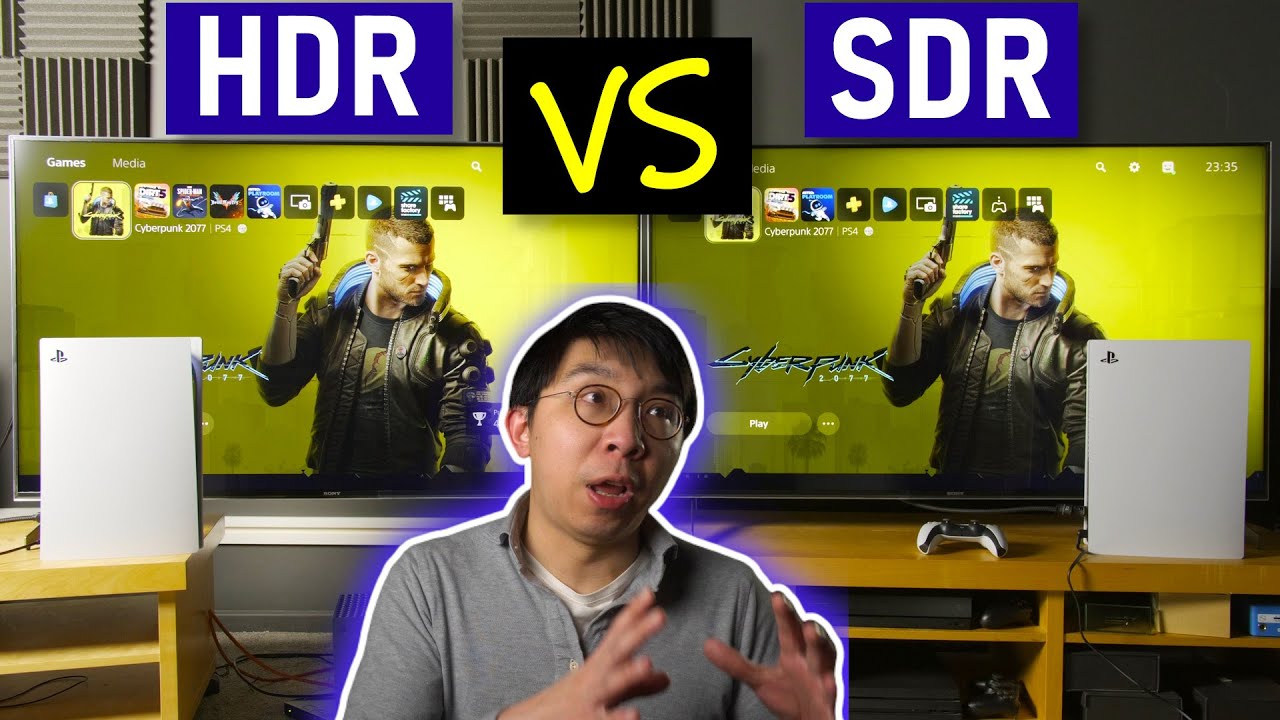
We compare the HDR vs SDR presentation of Cyberpunk 2077 on the Playstation platform, using two Sony XH90 (also marketed as the BRAVIA X900H in the USA) 4K LED LCD TVs, two Sony PS5 consoles, as well as two copies of Cyberpunk 2077 PS4 version.
Our HDR vs SDR comparison was done after installing hotfix/ patch 1.05 on two PS5s.
================...
the game was in a much worse state then though
bleak karma
teal imp
I'm asking since all the menus look lifted compared to SDR
I noticed the same
whole girder
 whole girder
gilded summit
https://youtu.be/ms-qPkvpXrQ?si=tjJm_H5CZldr7d7T&t=212
whole girder
gilded summit
https://youtu.be/ms-qPkvpXrQ?si=tjJm_H5CZldr7d7T&t=212
it can probably be edited in base / gameplay / gui / fullscreen
gilded summit
well i looked at it for the last hour or so
still on 0 adjustments
lol
im a bit under the weather so my brain is working far from optimal
vale orchid
whole girder
i'm going to have to buy an hdr monitor aren't i
Monitors lean on being overpriced compared to full 3840x2160 and 42". You'll pay the same amount for 1440p gaming at 27" just because it slaps the word "gaming" on it.
teal imp
bleak karma
I noticed the same
I know that I love to blame sRGB for everything, but really I'm sure that sRGB is at least, like, part of the problem here
SDR/HDR/HDR 2.2 emulation


 vale orchid
teal imp
I know that I love to blame sRGB for everything, but really I'm sure that sRGB i...
vale orchid
teal imp
I know that I love to blame sRGB for everything, but really I'm sure that sRGB i...
I noticed something similar when using SpecialK to upgrade the SDR to scRGB. Seemed to work right at 2.2 not sRGB
#cyberpunk2077-dev message
#cyberpunk2077-dev message
Check out the images and the top right (2.2/2.4)
teal imp
vale orchid
Check out the images and the top right (2.2/2.4)
Yeah, I remember them
technically, 2.2 should be correct for most displays
vale orchid
microsoft handles it very well for you automatically, but you need to mark your textures properly. microsoft will convert your SRGB textures to 2.2 for you if the DirectX textures are marked properly. but CDPR is doing their own thing for texture decompression and surface updating, which is why this is all wonky.
DirectX default surface is 2.2, so it could be a last step failure, from CDPR custom to DirectX
teal imp
vale orchid
microsoft handles it very well for you automatically, but you need to mark your ...
I think that's true for SDR only? At least that's how I remember Joshie explained it
lemmie find his post on SK discord
vale orchid
i researched it, but i forgot. maybe @mystic shadow remembers. the idea is all your assets are in SRGB because you used Photoshop or grabbed them from common assets (eg: web). So your textures are in sRGB. then Microsoft outputs a default 2.2 surface, and something something DWM does translations before going to your monitor. (no game ever does real exclusive fullscreen anymore)
 mystic shadow
vale orchid
i researched it, but i forgot. maybe <@262398316032163851> remembers. the idea i...
mystic shadow
vale orchid
i researched it, but i forgot. maybe <@262398316032163851> remembers. the idea i...
I'm really only familiar with the SDR inside HDR issue. That one is pretty straight forward. Windows just simulates the srgb piecewise gamma EOTF when showing SDR inside HDR. I believe this is what the SDR Black Floor Emulation shader is for. It's simply for emulating srgb shown on 2.2. I don't think that the SDR emulation is the correct tool for fixing native HDR issues. I think the manual HDR black floor fix tool (same shader, below the sdr emulation option) is better for that.
I'm not familiar with textures and srgb sorry 😦
teal imp
vale orchid
microsoft handles it very well for you automatically, but you need to mark your ...
Can't find the post now, but IIRC in SDR windows converts sRGB to gamma 2.2, but in HDR it converts it straight to PQ
mystic shadow
Can someone tldr; bring me up to speed on what you guys are trying to figure out?
vale orchid
#1186114072027074651 message
on SDR, black floor is right if you consider it a 2.2 signal
on HDR it's off
mystic shadow
teal imp
Can't find the post now, but IIRC in SDR windows converts sRGB to gamma 2.2, but...
I don't think Windows converts shit. I think it's just that in SDR, your panel is calibrated to 2.2, and the devs used 2.2 panels probably, so everything is fine
in HDR, it goes straight to PQ like you said, and windows assumes (incorrectly) srgb eotf
vale orchid
i think in HDR, DWM is in scRGB? i think?
mystic shadow
I thought we determined that the raised black floor is simply CDPR being dumb?
i don't think it's any sort of srgb/2.2 mismatch
it's just that the tonemapping is fucked up in HDR
plain and simple
ha
teal imp
mystic shadow
I don't think Windows converts shit. I think it's just that in SDR, your panel i...
I believe dogelition said it does convert srgb to 2.2 (or backwards depending on your display) as long as the content is flagged correctly?
mystic shadow
So I think the black floor adjustment is what's needed, just as JDSP's settings instruct
mystic shadow
teal imp
I believe dogelition said it does convert srgb to 2.2 (or backwards depending on...
For ICC profile color space stuff maybe
probably
idk about games tho
vale orchid
 teal imp
mystic shadow
i don't think it's any sort of srgb/2.2 mismatch
teal imp
mystic shadow
i don't think it's any sort of srgb/2.2 mismatch
#1186114072027074651 message
mystic shadow
teal imp
https://discord.com/channels/1161035767917850784/1186114072027074651/11990123609...
Yes I saw this
mystic shadow
vale orchid
Makes sense. Linear gamma is just basically like srgb passthrough right?
DWM is always srgb yea
vale orchid
if you're using an scRGB DirectX surface (HDR), it should be transitionless for DWM, which is the point.
no conversion needed. if the surface is a "SDR" surface (SDR-in-HDR), then it gets parsed as sRGB
mystic shadow
teal imp
it sure looks like it to me
Yea, it does. So are you saying that all we need just simply the SDR emulation checked? I thought we looked into this multiple times ha.
are you guys trying to figure out why that might have happened?
like what CDPR messed up?
vale orchid
overwrite the HDR lut with the SDR one (which has lower black floor) and do some gamma fixes and see if they output the same
but that won't work because wtf is "tonemapper midpoint"
or maybe using that, you can find out what value "tonemapper midpoint" means "do nothing"
vale orchid
(1.0 ?)
mystic shadow
teal imp
yup
Gotchya, sorry, took me a min. I came in late
teal imp
vale orchid
(1.0 ?)
Seems to be the closest to the SDR default
vale orchid
you would have to replace the HDR lut to know for sure
i can do that pretty quickly with wolvenkit
mystic shadow
Wasn't JDSP going to look into modifying his shader settings to use the SDR Emulation?
or was going to investigate that?
Could have sworn we tested this a million times and determined that the sdr emulation wasn't what was needed, but maybe i'm going crazy
teal imp
I believe he said he prefers his settings more
Mainly because even with SDR emulation, game doesn't always reach 0 nits
Which turned out to be due to wonky LUTs
mystic shadow
makes sense
vale orchid
it's not the LUTs alone unfortunately
mystic shadow
I'm trying to get a 4080 super so I can run this game with PT and shit......so if/when I can get a new GPU, I'd be happy to help you guys investigate/test shit
vale orchid
i made an all black LUT and it still didn't hit 0
teal imp
So I think it's double whammy of back raise caused by the LUTs and sRGB/2.2 mismatch
vale orchid
and gamma is irrelevant because pow(0, 2.2) is still 0
mystic shadow
Just make sure you're not crushing anything with the 2.2 emulation
teal imp
vale orchid
i made an all black LUT and it still didn't hit 0
Remind me, that was with film grain on or off?
vale orchid
off
teal imp
hmm
vale orchid
yeah
mystic shadow
Turn dlss off too
vale orchid
i disabled as much as i could. HDR is a flat gray output (not true black)
mystic shadow
gotchya
So yea I guess could be some sort of mismatch like earlier in the pipeline
to do with textures
vale orchid
SDR always had some noise, where HDR didn't with the same exact settings
mystic shadow
idk enough about it to say either way 😦
vale orchid
HDR could also just crush black values and then raise
so the noise could be removed in HDR (black clip), and then raised
mystic shadow
If you just make a LUT to simply do the same thing as the srgb 2.2 conversion box, it's still raised slightly?
vale orchid
but an HDR lut that is the SDR LUT can clue us onto what it's doing different.
vale orchid
mystic shadow
If you just make a LUT to simply do the same thing as the srgb 2.2 conversion bo...
doesn't make sense. if the LUT is all 0 values, then 0 ** 2.2 or srgb(0) is still 0
teal imp
vale orchid
HDR could also just crush black values and then raise
Yeah, vanilla kinda does that, even with the shadow lift there is very little detail in the dark regions
Sammi mod seems to fix that
mystic shadow
vale orchid
doesn't make sense. if the LUT is all 0 values, then 0 ** 2.2 or srgb(0) is stil...
Oh right, true. 0 is still 0, you're absolutely right
so I don't think this is a simple srgb to 2.2 mistmatch then
if 0 is raised
vale orchid
with postprocess (shader), you can't restore what was deleted though. just lift what's there
mystic shadow
unless the devs conciously decided that the HDR black floor should NOT be 0
which is what it looks like ha
unless there's an egregious mistake (very likely also)
mystic shadow
teal imp
I know that I love to blame sRGB for everything, but really I'm sure that sRGB i...
So is this test accurate then? Because 0 shouldn't be raised if there is an object that's 0. So idk if the emulation is the correct tool for this job?
i'm confused haha
Why is the black floor so high
teal imp
vale orchid
with postprocess (shader), you can't restore what was deleted though. just lift ...
Correct, but clipped yet milky shadows are also an issue in SDR
HDR just makes it worse
 vale orchid
mystic shadow
Why is the black floor so high
vale orchid
mystic shadow
Why is the black floor so high
^
mystic shadow
hence the confusion
not a simple srgb/2.2 mismatch, otherwise 0 black wouldn't be non-zero
so somethihng else going on (could also be a mismatch tho but wouldn't cause the black floor itself to be raised)
could be srgb/2.2 mismatch plus another issue raising the black floor in general
teal imp
mystic shadow
So is this test accurate then? Because 0 shouldn't be raised if there is an obje...
dunno, maybe?
SF confirmed that menus aren't affected by LUT, and with SDR emulation it looks more or less the same as SDR
Yet bottom is still raised a bit, why?
mystic shadow
exactly
very odd
I think CDPR just went full "i dont care" when doing this
likely just some stupid fuck-up early in the pipeline
or "artistic intent" problem?
vale orchid
SDR lut as HDR lut
vale orchid
teal imp
dunno, maybe?
SF confirmed that menus aren't affected by LUT, and with SDR emula...
I haven't touched the menus actually. maybe i misspoke.
i don't know if there is a lut for the menu, i doubt there is
mystic shadow
teal imp
dunno, maybe?
SF confirmed that menus aren't affected by LUT, and with SDR emula...
So the menus are okay in HDR, not raised?
even weirder
is this a case of "artistic intent"?
vale orchid
replace the menu image with a full white one and see what nits come out.
teal imp
mystic shadow
I think CDPR just went full "i dont care" when doing this
Dev team on this game was a rotating door of people that were asked to crunch until they couldn't anymore and were replaced until that happened again
It's less "I dont care" and more "I have no idea what the least person did"
teal imp
vale orchid
I haven't touched the menus actually. maybe i misspoke.
ahh ok
mystic shadow
teal imp
Dev team on this game was a rotating door of people that were asked to crunch un...
Yea that could very well be the case and was my original guess
HDR in this game is just wack
vale orchid
teal imp
Dev team on this game was a rotating door of people that were asked to crunch un...
yeah, but you only need one person to know what they're doing and watch over the minions. that's how management is supposed to work. i can't be assed to do menial tasks for big projects, so sometimes i hand it off to underlings. but i check their work
teal imp
mystic shadow
So the menus are okay in HDR, not raised?
No, they are, unless you use SDR emulation on the game, then it more or less match
vale orchid
i'm being condescending, but the language is for emphasis
teal imp
vale orchid
yeah, but you only need one person to know what they're doing and watch over the...
Yeah, but what if management IS the problem
vale orchid
fail upwards
teal imp
vale orchid
fail upwards
Isn't it how it works most of the time?
mystic shadow
In theory, srgb gamma and 2.2 should have the same 0 black, correct? In other words, black floor should be identical right?
If so, then yea i'm confused on this game ha
no clue what's going on
vale orchid
way too common "i've been coding games for 20 years, i won't be educated by these new fangled kids". 20 years ago there was no HDR
mystic shadow
I mean if the SDR emulation checkbox is enough to fix the issue, then we should just use that and be done with it, ha
or some similar fix
Just because the game doesn't always reach 0 with the sdr emulation, it could still be ok. It's hard to get that right with all LUTs. If you're making sure it's ALWAYS 0, then you're likely crushing detail in some areas, no?
Like in Luma, there are some LUTs where mincll isn't 0
and that's fine
or so i thought
vale orchid
i dropped the SDR in HDR lut here, if somebody wants to test... #1186114072027074651 message
south verge
vale orchid
i dropped the SDR in HDR lut here, if somebody wants to test... https://discord....
I'm pretty sure all the old CP LUTs that said HDR compatible were basically SDR in HDR.
But absolutely will test 🙂
vale orchid
they're different.
HDR luts have more raised black value
oh, you mean mods
yeah, maybe
south verge
Yeah, mods like vanillaplus and some of the older community released luts
They all never looked truely HDR, and most didn't have anything but Rec.709 colors
vale orchid
but the idea for this is to see what makes HDR look exactly like SDR (peak nits and tonemapper midpoint and gamma fixes)
south verge
I see. Will take a look
south verge
vale orchid
i dropped the SDR in HDR lut here, if somebody wants to test... https://discord....
Game crashes on load with that lut
vale orchid
neat
i'm using the latest nightly wolvenkit which i haven't tested. maybe it's that.
doesn't crash for me.... over Remote Desktop
south verge
Hmm... Guess I'm confused whether its an HDR lut or SDR
Or maybe its just another mod conflict issue, installed a few earlier
Think its a mod issue. Crashing with other luts as well
Always photomode animations XD
teal imp
Works on my machine
screenshot shortly
Vanilla/SF LUT


peak 790, midpoint 1, film grain disabled
teal imp
on it
vale orchid
also, if you use photomode and hide the UI, you'd get true minCLL
(that minCLL is the UI)
teal imp
vale orchid
also, if you use photomode and hide the UI, you'd get true minCLL
It doesn't load different LUT?
vale orchid
the sdr and hdr lut are the same file, (using SDR file)
south verge
vale orchid
also, if you use photomode and hide the UI, you'd get true minCLL
Yeah, the UI wrecks havoc on max nits.
teal imp
vale orchid
i'd like to know SDR / HDR, what can make them look identical
midpoint 1.5 is as close as I can get histograms to overlap

 teal imp
300 in game
vale orchid
how are you getting SDR screenshots with lilium's shader?
teal imp
SK SDR -> HDR, profile 3 at 100 nits and gamma 2.2
vale orchid
can you snap the SK settings?
i think setting SK to 300 nits is better, and see if you can get it to line up perfectly
it kinda messes up the science because how SK will stretch to 300, there's a lot of variables
 vale orchid
yeah, that looks right
teal imp
vale orchid
i think setting SK to 300 nits is better, and see if you can get it to line up p...
but that will stretch entire range, not just peak
I mean, I can try if you want to
mystic shadow
Yea that's what I'd use too
vale orchid
yeah, that's kinda what we want, because the HDR picture on the right has a curve past mid gray (hard to describe)
well, we want SK to stretch 0-100 to 0-300, not raise. but more info the better
i wish lilium's shader could parse SDR just for the histogram data, even if the peak nits mapping is "fake". @devout mirage is there an easy way for this? we just want to make histogram comparisons
teal imp
HDR at 300/SDR at 300

 gilded summit
these are my results

 vale orchid
what tonemapping midpoint value?
gilded summit
for me i set them at 1
vale orchid
@gilded summit what's the comparison? (left/right)
vale orchid
yeah, that confirms the HDR lut is brighter than the SDR lut, which parsing the LUT told me.
but this also says that the HDR lut is in the same format as the SDR lut if there no real color differences
vale orchid
the textures are all in bt709/srgb, so that's expected
@gilded summit and this dropped your peak nits to half? 400?
vale orchid
so SDR lut is peak 3.x and HDR is 19. something something math
but it's best to disregard all of what HDR looked like before and try to get HDR to look the same as SDR first, because that's really what they originally graded for.
you can make HDR your "hero grade" and then make an SDR version of that, but they didn't. they made the SDR the hero grade, and did something to "satisfy" hdr users
once HDR can look like SDR 1:1, then we can work on making upping the HDR, which should just be uncapping the SDR nit limit (100/203)
vale orchid
teal imp
HDR at 300/SDR at 300
This is tonemapping midpoint at 1.5?
teal imp
vale orchid
This is tonemapping midpoint at 1.5?
yes
vale orchid
does any changing of the values make it as bright in average to SDR? sorry to be a pain
the windows on the right are consistent enought to guage since the signage is variable

 vale orchid
so midpoint 3 is possibly "neutral". interesting...
the other test is setting to 1000 in both in-game HDR and special K sdr
and see how 3 holds up
gilded summit
thats one of my major gripes with cp's hdr implementation
vale orchid
it shouldn't have any affect since i didn't change anything there. it's just the dds. but maybe the HDR lut is malconfigured for some reason
but what we're doing is essentially throwing out their HDR lut
gilded summit
midpoint changes blows away all highlight detail
vale orchid
yeah, but it does that in SDR as well, no?
 devout mirage
vale orchid
i wish lilium's shader could parse SDR just for the histogram data, even if the ...
devout mirage
vale orchid
i wish lilium's shader could parse SDR just for the histogram data, even if the ...
Game outputs 10bit SDR?
teal imp
vale orchid
the other test is setting to 1000 in both in-game HDR and special K sdr
SDR/HDR

 vale orchid
devout mirage
Game outputs 10bit SDR?
vale orchid
devout mirage
Game outputs 10bit SDR?
8, so we're hijacking with SK to get it to 10bit just to see the graph
vale orchid
teal imp
SDR/HDR
what tone mapping works "best" with 1000?
and by best, i mean matches SDR
or not high enough?
vale orchid
so 3 is okayish at 300 nits, and you'd need more to match SDR for 1000. dare i guess 10
teal imp
1.5 was okay for 100 nits, so .5 for every 100 nits?
vale orchid
so, let's pretend, it's pow(x, toneMappingMidpoint)
devout mirage
vale orchid
8, so we're hijacking with SK to get it to 10bit just to see the graph
SDR analysis in the future
vale orchid
devout mirage
SDR analysis in the future
🙏 You spoil us.
devout mirage
It's just a few things I need to change and was requested before
vale orchid
🙇
that's enough research to know we have to disect the engine/shader. next step is to dump shaders in SDR. dump shaders in HDR. and then see what shaders are only running when in HDR (if any) and decompile them
that can be done with Reshade 6.0.0 with Addons: https://reshade.me/downloads/ReShade_Setup_6.0.0_Addon.exe
(no SK required)
mystic shadow
Excited to see what comes of this
To finally solve the question of "what the actual fuck is going on in HDR"
🙂
vale orchid
@teal imp one test, if you set lut/maxrange in the ini to 0.5, does it change sdr and hdr? we said 1.0+ is ignored? that's tedious but i think there's a console option for live editing?
teal imp
vale orchid
<@292977505789280257> one test, if you set lut/maxrange in the ini to 0.5, does ...
which .ini?
vale orchid
To change the value of these settings, create/open the "engine\config\platform\pc\user.ini" file & add the section name + setting name/value inside it.
the pastebin has all the defaults for v2.1
text says 1.04, pastebin title says 2.1 🤷

somebody said 100 and 1 are the same, so i'm wondering if 0.5 halves brightness
teal imp
vale orchid
somebody said 100 and 1 are the same, so i'm wondering if 0.5 halves brightness
so max range at 50?
vale orchid
well, try 1.000 first and see if it changes anything, then less than 1 like (0.5000)
teal imp
vale orchid
well, try `1.000` first and see if it changes anything, then less than `1` like...
It's not doing anything
not on my end at least
teal imp
worked fine to me, but for some reason reshade + SK didn't
had to downgrade to 5.9.2 or whatever
vale orchid
it worked before, but i installed 6.0.0 just now to get add-on support and it crashes.
i'm on remote desktop, so might need to try on the physical pc (though rdp worked before)
mystic shadow
Did you guys try 6.0.0 as a SK addon?
vale orchid
i did not
mystic shadow
That should help compatability (I think)
I can send instructions on how to do that if you need
Reshade DLL files go here
 vale orchid
but i didn't want (or need) SK
mystic shadow
shaders to here, just make sure you grab the 2 reshade files that are circled
 vale orchid
the less layers the better
 whole girder
vale orchid
https://www.bestbuy.com/site/lg-42-class-c3-series-oled-4k-uhd-smart-webos-tv/65...
whole girder
vale orchid
https://www.bestbuy.com/site/lg-42-class-c3-series-oled-4k-uhd-smart-webos-tv/65...
it's huge! 😂
I'm only little 😂
but yes that makes sense
teal imp
whole girder
it's huge! 😂
more bigger=more betterer
whole girder
teal imp
more bigger=more betterer
lol, i do all my work on a ProArt 17" and ProArt 14" 😜
vale orchid
whole girder
it's huge! 😂
I deskmounted my 55". The 1440p 34" it replaced fits inside of it. But I might move my 55" to the bedroom and get a 42" for the PC
whole girder
wow


 true saffron
Any non-jxr files? 😅
bleak karma
No, but I will just upload the video to Youtube
true saffron
It's all good, I downloaded them. Maybe some day we can have native HDR format support.
What am I looking at in these comparisons?
bleak karma
Nova top, stock bottom
true saffron
Gotcha
bleak karma

Lilium Reshade Shaders in use:
Nova:
Tonemapper
BT.2446a (800 output, 3000 input)
Blackfloor Fix
0.006 Old point / 0.25 midpoint
Stock:
Tonemapper
BT.2446a (800 output, 4500 input)
Blackfloor Fix
0.08 Old point / 40.0 midpoint
HDR processing probably nxt week or something
south verge
NovaLUT is so beautiful! No going back to PreemLUT now lol
I say that but in reality, I'll probably be swapping back and forth
Gotta keep things fresh
mystic shadow
bleak karma
https://www.youtube.com/watch?v=mcWzaONuErM
Is this a WIP video? It doesn't show up on your main page.
devout mirage
whole girder
lol, i do all my work on a ProArt 17" and ProArt 14" 😜
42" is really nice for productivity 🙂
Really like my 42C2
devout mirage
vale orchid
i can't run Reshade 6.0.0 with Cyberpunk 2077
It needs something special.
iirc it's just renaming the ReShade dll to d3d12
vale orchid
devout mirage
It needs something special.
iirc it's just renaming the ReShade dll to d3d12
I'll give that a try
devout mirage
vale orchid
I'll give that a try
Also if you have the GOG version try disabling the overlay and maybe skipping the launcher
vale orchid
devout mirage
Also if you have the GOG version try disabling the overlay and maybe skipping th...
IIRC I did because Special K would crash with it enabled.
mystic shadow
Might be some bullshit with FG too
just a guess
That can cause crashes with anything it seems ha
vale orchid
I'm a poor 3080 user
mystic shadow
same!
whole girder
i think when my work reaches the next milestone i'll buy myself an actual gaming computer and probably an HDR screen 🤔
true saffron
bleak karma
https://www.youtube.com/watch?v=mcWzaONuErM
Can you message me when HDR is done processing? 😅 Would love to share this video.
whole girder
true saffron
Can you message me when HDR is done processing? 😅 Would love to share this vide...
it's done!
true saffron
Looks awesome! Thanks for the comparison @bleak karma. Mind if I post this to my page?
 whole girder
does anyone remember where i'm supposed to meet Hanako again?
bleak karma
Yes but bare in mind this is not fully representative of how the mod and stock footage looks as I've used Liliums shaders to bring the overall brightness and clipping point down
I've also adjusted the black floor slightly
@true saffron ^
mystic shadow
bleak karma
https://www.youtube.com/watch?v=mcWzaONuErM
Is there any reason why you don't mention the gamut compression value in this video? It's in your pinned settings
bleak karma
Because I forgot
mystic shadow
🙂
Also, why do you like rgb in pq the best? Lilium has ICTCP labeled as (best quality)
bleak karma
Just like the look, for that video I used ICTCP though
mystic shadow
Gotchya thx
Hoping to snag a 4080 super when it releases so I can play this game with path tracing etc
vale orchid
Reshade was crashing because it was dumping shaders, which it did. and they extracted well, it seems
whole girder
mystic shadow
Hoping to snag a 4080 super when it releases so I can play this game with path t...
same
the 3070 on my laptop only just manages it
whole girder
- Fixed an stall where vanilla game runs out of RT acceleration structures
- Fixed crazy skin on some NPCs
- Disabled negative mip bias because I believe CDPR are doing this in-engine already in CP 2.1
- Re-enabled underwater screenspace rendering
- Fixed a stall streaming in new sectors when driving at high speed
- Slightly tweaked brightness of vehicles, skin, foliage, weapons
- Enabled path tracing for hair so hair no longer has to rely on environment probes for its lighting
- Adjusted streaming threads
- Adjusted RTXDI / ReSTIRGI samples to better balance performance and quality for Fast / Full / High
- Slightly reduced PT edge (disocclusion) noise in most scenarios by adjusting sampling radii and variable rate shading
- Reduced SHARC frame blend bias for Fast to account for lower FPS and to reduce smearing
- Fixed some non-breaking typos
- Disabled character rim enhancement. Everything looks better without it
- Reduced bloom clamping to fit better with Ultra Fog
this version has been really good in testing (ty especially to @ocean wren). fixes so many random problems with PT, including that CDPR is mostly using NVidia's settings which are designed for higher real frame rates, so I've adjusted SHARC / ReSTIR settings to match CP's actual performance to help reduce smearing and disocclusion (edge) noise.
"Fast" very much prioritises PT speed above all else. "High" prioritises quality and reducing PT noise.
bleak karma
What would the hierarchy in terms of Image Quality be?
Fast
Vanilla
High
Full?
And in terms of performance (best to worst)
Fast
Vanilla / high
Full?
whole girder
bleak karma
What would the hierarchy in terms of Image Quality be?
Fast
Vanilla
High
Full?
that's a good question! Fast will be higher image quality than vanilla. it should be about the same speed as vanilla (if you want faster than vanilla, use the PT20 Fast version of ultra plus on nexus, it's significantly faster)
Full is slightly slower than vanilla, but less noise and smearing again
High is no compromises quality (but without going bananas) and will be several fps slower than Fast.
and they all have the same bug fixes with PT — reflections, translucency, skin, relative brightness, hair, etc.
true saffron
Yeah I was a little confused with the names at first. 😛 I'm used to Full, Default (or Standard/ Main), and Lite.
vale orchid
I can replace shaders. Need testers #cyberpunk2077-dev
whole girder
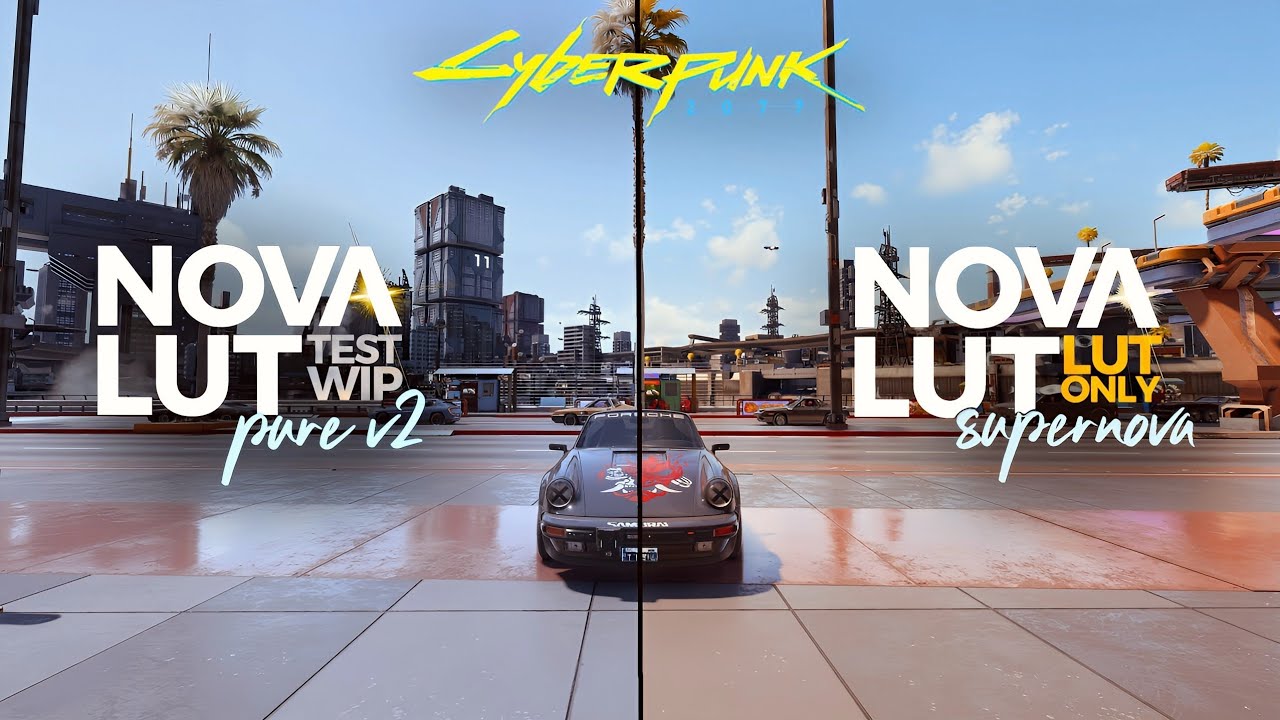
My lighting mod showcase of the Nova LUT Pure 2.2 and Supernova 1.2 by theCyanidex. Cyberpunk 2077.
Nova LUT Lighting Mod Page:
https://www.nexusmods.com/cyberpunk2077/mods/11622
Graphics Settings:
- Resolution: 2880 x 1620
- SDR with Gamma at 1.0
- All Raster Settings Maxed
- Psycho SSR
System Specs:
Powercolor 7900 XTX Red Devil
AMD Ryzen 7...
whole girder
Krush is a legend
true saffron
Truly is.
south verge
⚙️ We are aiming to have a new patch for #Cyberpunk2077 out sometime next week. It will tackle the most common issues reported by players, including finisher animations.
Stay tuned for more info coming after the weekend.
 Twitter
·
mystic shadow
Twitter
·
mystic shadow
Shortfuse, any insights you found from investigating the code?
on the black level raise
vale orchid
mystic shadow
Shortfuse, any insights you found from investigating the code?
Not yet. Still haven't found the tone mapper. just a matter of time. i'm trying to simplify the search
mystic shadow
good luck!
gilded summit
south verge
https://twitter.com/cyberpunkgame/status/1750903999530774982
I had a feeling it wouldn't be all that long
 sturdy goblet
south verge
https://twitter.com/cyberpunkgame/status/1750903999530774982
sturdy goblet
south verge
https://twitter.com/cyberpunkgame/status/1750903999530774982
wow, seems like the game is still very broken by the comments
sturdy goblet
vale orchid
Not yet. Still haven't found the tone mapper. just a matter of time. i'm trying ...
have you checked with PIX or RenderDoc?
vale orchid
sturdy goblet
have you checked with PIX or RenderDoc?
nope
sturdy goblet
vale orchid
nope
that would probably help u find the shader. I'm tempted to start playing the game now.
vale orchid
no idea how to inject pix
vale orchid
oh i've tried starfield and it never works, but seems to work here
sturdy goblet
vale orchid
oh i've tried starfield and it never works, but seems to work here
there's RenderDoc (my fav), PIX and Nvidia Nsight. Maybe some others as well.
Each works with only some games unfortunately.
RenderDoc is a lot more intuitive IMO, and also offers the same, if not more functionality.
teal imp
sturdy goblet
wow, seems like the game is still very broken by the comments
The entire engine seems to be a series of jenga towers that fall apart like domino as soon as devs miss the smallest mistake
I can't really blame them for switching to UE
Not that UE guarantees bug free game
vale orchid
well, i found the ACES code. it's been a while but it's pretty familiar. though i'm not sure if it's in use anymore since I though the LUT had ACES baked in


 olive ether
vale orchid
OpenDRT at ~800 (maybe)
olive ether
vale orchid
OpenDRT at ~800 (maybe)
Love how the neon signs don’t just clip to white now
vale orchid
olive ether
Love how the neon signs don’t just clip to white now
That's an option I had disabled completely from Starfield. I would still need to tune to match Vanilla
south verge

 whole girder
i wonder where the Trouble in Haywood VR game LUT is in the game, i would happily play the whole of CP with this 😂
it's not labelled obviously 🤔
 formal lodge
god that's shaping up so well
south verge
Been following along in the dev channel, yall are wizards I swear 😄
vale orchid
mystic shadow
<@115289688037785602> is cyberpunk the next luma?
I am compelled to fix bad HDR.
The worser the HDR, the more I must fix.
mystic shadow
Quick, get this man the shittiest most busted HDR you can find.
Looking forward to any work you do on cyberpunk :-). I can help you test if you need test subjects
whole girder
mystic shadow
Quick, get this man the shittiest most busted HDR you can find.
fallout 3?
 whole girder
this may actually fix CP 2.1's issues.
i've been wondering why by default the game engine is configured to unstream everything up to 16km away.
what this means is, when you turn around, the engine unstreams it. when you turn back again, it has to stream it in.
when you open the map, it unstreams everything. close the map, it streams it all back in. why ???
i thought maybe there was something i was missing. i don't think there is. i disabled this behaviour and the game's been perfect since
whole girder
small update. this makes particles (steam, smoke, fire, etc.) part of path tracing
gilded summit
when running pathracing (maybe ray tracing too) the unstreaming doesn't seem to happen. At least not for lower level lods (aka not highest level). I do notice the occasional ray of sunshine going though an unstreamed building. I do run countless of LOD mods though mostly from sosuine. So I don't know if this is purely vanilla + PT behaviour, or that it works because of these LOD mods + PT
whole girder
gilded summit
when running pathracing (maybe ray tracing too) the unstreaming doesn't seem to ...
you won't usually see it because it only happens for around 30 degrees behind you, but it's happening constantly
gilded summit
but that would completely destroy pathtraced reflections
you cannot do severe culling like that if the world behind you gets reflected
whole girder
path traced reflections are considered part of the view frustum... they're specified by RayTracing/Collector/VisibilityCullingRadius
but if they're not in that radius, they're unloaded immediately
gilded summit
i c, still most of the time i don't really have the sun shining though (where should be) solid buildings
whole girder
if you want to check this for yourself, set RayTracing/Collector/VisibilityCullingRadius = 200 (for example) ... you will see them unload and reload as you move around
no, you won't. that's not the problem this fixes
gilded summit
ah ok, i misinterpeted what your fix does then
whole girder
😊
gilded summit
mb
whole girder
the problem it fixes is the massive and constant resource load the engine is under due to streaming and unstreaming things over and over
if you have 16GB of vram, you probably won't notice it
if you have 8 - 12GB, it will kill the performance
gilded summit
yeh i got 24gb and run in 4k dlss quality (1440p) i think the horsepower of my GPU is still the biggest bottlenek with the settings i run with, not the vram
whole girder
... try ultra+ if you haven't. it fixes almost everything
gilded summit
i have no issues with vanilla 😄
gilded summit
rtx 4090
its nearly impossible to tell what vram is actually in use (allocation is ez) but actual use you need very specialised software for that
whole girder
you will likely get higher fps with it and less path tracing noise, but it doesn't sound like you care 😊
gilded summit
i tried your mod quite a few times, i still prefer the vanilla pt
whole girder
yes i know
gilded summit
looks more pleasing to my eyes
whole girder
to this
 sullen charm
What are the game parameters for controlling bounces and ray sample counts in a world with Ray reconstruction, ReSTIR et al in PT 2.1? I tried fiddling with the ones I've found in the PT native UI settings mod, directly through CET, but only some of them seem to have an effect... Using Ultra+ PT21 High btw
whole girder
sullen charm
What are the game parameters for controlling bounces and ray sample counts in a ...
there are no bounces / rays with ReSTIR. not configurable anyway
whole girder
sullen charm
What are the game parameters for controlling bounces and ray sample counts in a ...
try the new 1.9.9 above. it stabilises the image more than i've been able to before
ReSTIR and RTXDI use samples of the scene. from memory they distribute rays across the whole scene using a probabilistic density function (PDF), and then that's sampled into RTXDI and ReSTIR
i think cyberpunk is using RTXDI's new diffuse method (with SHARC to help denoise it), and ReSTIR's global illumination
so ... High takes a lot more samples than Fast
bleak karma
gilded summit
its nearly impossible to tell what vram is actually in use (allocation is ez) bu...
Special K will tell u
sullen charm
whole girder
try the new 1.9.9 above. it stabilises the image more than i've been able to bef...
I am looking forward to trying out 1.9.9 later today, the disocclusion noise in certain situations (photo mode mostly, lol) has been bugging me
whole girder
sullen charm
I am looking forward to trying out 1.9.9 later today, the disocclusion noise in ...
yes same
with this version i've been having to check PT is actually enabled
it's there a little at night, i might be able to do something with that... but i'm hopeful it's improved
i never really know until everyone else tries it 😂
and tells me what i broke lmao
sullen charm
Hah, well I think 1.9.1 was definitely an improvement. Bearing in mind I only started with 1.8, and didn't really have points of comparison between 1.8 and 1.9 so can't say if it got better or worse... But 1.9.1 did clean up characters noticeably to my eye
Is there a way to dynamically switch presets in-game, or do some of the options only take effect on a game restart?
bleak karma
With 1.9.9 and 24GB of VRAM, the max I can see is 13GB usage via SK
whole girder
sullen charm
Is there a way to dynamically switch presets in-game, or do some of the options ...
to switch between ultra+ versions in-game?
no unfortunately ... some of them require a hard engine restart
whole girder
bleak karma
With 1.9.9 and 24GB of VRAM, the max I can see is 13GB usage via SK
that's sounding much better
sullen charm
Ah that's a pain
bleak karma
And withouit the 24GB ini its 12-13GB
whole girder
sullen charm
Ah that's a pain
BUT
yes ... it may actually not need the GPU ini any more, i'm not sure
sullen charm
I typically sit around 11-12GB on 1.9.1 on a 4090
whole girder
yup
sullen charm
Then again I've not engaged in much actual gameplay with it 😂
whole girder
you can probably force the higher mip bias now too with your card
if you want to see the difference between v1.9.1 and v1.9.9 noise ... i'll grab the command for you
teal imp
@whole girder Dumb question, but should one use RR with your mod? Or do you recommend regular DLSS instead?
whole girder
to go back to the old version (basically same as vanilla
GameOptions.SetInt("Editor/RTXDI","BiasCorrectionMode",2)GameOptions.SetInt("Editor/ReSTIRGI","BiasCorrectionMode",2)
to go to v1.9.9
GameOptions.SetInt("Editor/RTXDI","BiasCorrectionMode",1)GameOptions.SetInt("Editor/ReSTIRGI","BiasCorrectionMode",1)
whole girder
teal imp
<@184939081585786880> Dumb question, but should one use RR with your mod? Or do ...
definitely RR if you can. AMD users of course can't
i don't think it's a dumb question. there's a bug in CP 2.1 that makes the skin look worse with ray reconstruction
unfortunately (imo) everything else looks worse without RR ...
teal imp
whole girder
i don't think it's a dumb question. there's a bug in CP 2.1 that makes the skin ...
I think it's an RR issue since it happens in AW2 as well
Seems like RR breaks SSS somewhat
sullen charm
Does the game options toggle for RR still work when using Ultra+?
sullen charm
whole girder
to go back to the old version (basically same as vanilla
`GameOptions.SetInt("E...
Thanks, will try it out later!
teal imp
whole girder
it seems to ... but weirdly only for some characters??

YouTube
59 seconds · Clipped by koklusz89 · Original video "Alan Wake 2 PC Path Tracing: The Next Level In Visual Fidelity?" by Digital Foundry
gilded summit
bleak karma
Special K will tell u
This might seem like semantics. But it seems like Allocation/Usage/IN use might be what I actually ment. You need in engine tools for the IN use metric.
using the dx api, can only show allocation/usage imho
certain blocks might still be allocated while being market for replacement/overwrites
whole girder
teal imp
https://youtube.com/clip/UgkxjkNb3gtYHB6jSioG_zf6BMZmsM4TU_eU?si=EJ41WqM52GN0xI9...
mm, so i'm pretty sure AW is using ray tracing + path tracing for diffuse... the same as ultra+ RT+PT
i could be wrong, but i think that's why it has so much less disocclusion and smearing noise
hmmmm i don't see much SSS there either 😜
whole girder
gilded summit
This might seem like semantics. But it seems like Allocation/Usage/IN use might ...
oh you're talking about Nsight and Frameview etc.?
gilded summit

Describes the current video memory budgeting parameters.
i think special K uses this
whole girder
yes... but it's still pretty obvious when your GPU is swapping back and forward between CPU memory
gilded summit
yes "D
whole girder
yes i would trust special K's methods
gilded summit
that will grind your pc to a halt
whole girder
SK complains starts complaining before anything goes wrong with vanilla 😂
gilded summit
it seems to be the most accurate way of measuring it, without having full acces to what the engine is doing indeed
whole girder
yes!
bleak karma
gilded summit
This might seem like semantics. But it seems like Allocation/Usage/IN use might ...
That is why we use SK and no DX apis to see what is actually being used, not allocated
gilded summit
o i thought special K uses this dx api
whole girder
gilded summit
that will grind your pc to a halt
yes and this is what's been happening on <=12GB cards ... it's not only streaming assets repeatedly, the vram is also eventually going OOM and then swapping to system memory while still trying to re-stream assets
gilded summit
misinformation on yt maybe 😄
whole girder
which causes an eventual freeze or CTD
gilded summit

In this video, I'm going to test the RTX 3070 in a range of games and see how much vram they use. I'll be using both MSI Afterburner and Special K which both have the ability to monitor vram usage.
Chapters
0:00 Intro
0:52 MSI Afterburner VRAM monitoring
4:00 Special K VRAM monitoring
5:33 Resident Evil Village
7:04 Metro Exodus Enhanced Editi...
stamped
"poorly"
man maybe i need to stop talking when still having a fever
teal imp
whole girder
mm, so i'm pretty sure AW is using ray tracing + path tracing for diffuse... the...
Speaking of which, is there any way to get AO or shadows on props with RT?
https://www.resetera.com/threads/cyberpunk-2077-ot-welcome-to-night-city-read-the-op-before-you-post.340270/page-712?post=112962374#post-112962374

ResetEra
Forgive the potato quality jpeg. But the lighting gets its point across.
Notice that the lighting with RT closely matches the Path tracing in a lot of respects. But ambient occlusion is nearly completely gone, making the image look far flatter than the RT Lighting Off version. In a lot of...
whole girder
teal imp
Speaking of which, is there any way to get AO or shadows on props with RT?
https...
hmm
you could try enabling RayTracing/EnableShadowCascades = true which is off by default ... all cascade shadows are done via raster even if they're set to RT in the UI
but i don't think CP considers "NPCs" to be cascade shadows ... i've heard people refer to them as contact shadows
(in UE, they're called capsule shadows)
for debris / clutter, you can use this https://www.nexusmods.com/cyberpunk2077/mods/10903

which basically makes me think those NPC meshes aren't tagged as RT ?
oh! also, you can try RayTracing/CullingDistanceCharacter = 40 (for example)
the default culling for NPCs is 15 metres in RT ... but i don't know if any of the distance stuff is working at all in CP 2.1
teal imp
whole girder
for debris / clutter, you can use this https://www.nexusmods.com/cyberpunk2077/m...
I did, but that only works on the clutter, doesn't change the fact that the game seems to be straight up missing AO pass with RTGI
It only has like a large scale AO
whole girder
yes, they're not in some RT views
teal imp
I will try the settings you suggested later though
whole girder
i think the most promising is RayTracing/CullingDistanceCharacter = 40 ... or 30 metres should be reasonable
and yeah, i think a lot of things were using env / lighting probes and weren't actually part of ray tracing, and now they're going and fixing all that (or they've just forgotten)
teal imp
whole girder
i think the most promising is `RayTracing/CullingDistanceCharacter = 40` ... or ...
Raster/RT/RT+PT/PT


Sadly, that ain't it
gilded summit
whole girder
and yeah, i think a lot of things were using env / lighting probes and weren't a...
bababooye is doing a few of these to in his upcomming gits, removing some fake raster lighting


one example
the guy is an absolute unit for the amount of work he does and things he fixes
he's also working on objects that don't emit light etc he posted some WIP on his GITS page https://www.nexusmods.com/cyberpunk2077/mods/9274?tab=posts

i rarely donate, but for people that invest so much time + effort i think its a no brainer
even more talk in cyberpunk 2077 modding community discord - showcases gits 3.0
whole girder
teal imp
Sadly, that ain't it
boooo
whole girder
gilded summit
this is so much work. saying this after just spending 100 hours on the engine lol
this is the most disocclusion noise i can get with u+ 1.9.9 ... it's basically a worst-case scene ... it's dark, with foliage, and a lot of movement. this is the worst of several screenshots (the blur at the bottom of the screen is AMD FG)

noise at 100kmph is almost none
 whole girder
i have actually checked whether PT was enabled because it was so little noise
i wonder if i can do this for the CP 2.0 path tracing method (ReLAX + RTXDI)
gilded summit
Another hack/trick that might reduce noise is nvidia DSR (digital super resolution) Aka render the 3d image in above native resolution. Then use DLSS which can use the 3d generated image to downsample to a quality level lower. I have tried it from 8k back to 1440p. But ran into trouble (while recoding with OBS). But in theory it allows DLSS to base the upsampled picture from more information.

 sullen charm
https://youtu.be/dKXPeCS4jxA really interesting, wonder if the new driver improvements have originated from the work on the upcoming game patch?

Testing Windows Insider Build 26040 and NVIDIA beta driver 550.09 in Cyberpunk 2077.
Settings: 4K, max settings, path tracing, DLSS performance mode.
**Ray reconstruction is not supported on the beta 550.09 driver, so ray reconstruction is disabled
00:00 - Intro
00:32 - FG OFF Benchmark
01:51 - FG ON Benchmark
03:10 - Benchmark Results Summa...


Massive pinch of salt of course, but a 17% uplift in the benchmark on a 4090 with FG off and just the driver update is unusually large


 vale orchid
contrast and highlights are still starfield-like, but we at least it respects peak nits now
gilded summit
sullen charm
https://youtu.be/dKXPeCS4jxA really interesting, wonder if the new driver improv...
Later part of the vid is puzling. His 4090 uses less power, gets less usage but has higher fps. Maybe its the optimisations in WDDM 3.2 and the driver utalising it
sullen charm
I've heard of that before to be honest
gilded summit
its using consistently 30 to 40 watts less
like its undervolted but not underclocked
sullen charm
The gap narrows down to 15W at points
It's a very non-rigorous test scenario though, and there aren't any frametime or frequency graphs to show the general performance profile
But yeah it all depends how the driver is boosting performance I guess. If it's making more effective use of the full width of the 4090 (dual issue etc) then it's conceivable you'd get a power and perf improvement simultaneously
gilded summit
I havent looked into wddm 3.2, if there is even any info out yet
apperently h23 already has this, likely need the driver to benefit from it
im not going to try that dl link though 🙂
whole girder
sullen charm
https://youtu.be/dKXPeCS4jxA really interesting, wonder if the new driver improv...
that driver was released in September '23
wait, the older driver is getting faster FPS than the current on ???
what's going on there
ray reconstruction isn't working on the 550.09. the author says this, however because of this i don't think the comparison is meaningful. some parts of the driver aren't working, that's why it's faster


 south verge
sullen charm
Massive pinch of salt of course, but a 17% uplift in the benchmark on a 4090 wit...
south verge
sullen charm
Massive pinch of salt of course, but a 17% uplift in the benchmark on a 4090 wit...
Until I see frametime graphs color me skeptical. The last 8 driver releases have been horrid in that realm.
whole girder
south verge
Until I see frametime graphs color me skeptical. The last 8 driver releases have...
yes ... there is no magic, the beta driver is missing things
windows insider i believe, simply because some games run 10%+ faster on linux
south verge
whole girder
yes ... there is no magic, the beta driver is missing things
Just saw your comment above
whole girder
windows insider, my expectation is they've made some intelligent changes to windows security for game mode
since control flow guard and core/thread integrity can significantly slow down some gaems
GAEMS
south verge
Still a little leary disabling control flow guard, especially with how many mods I've installed
whole girder
south verge
Still a little leary disabling control flow guard, especially with how many mods...

a lot of these security features give a false sense of security
meaning people are more inclined to do stupid things, thinking they're protected
... btw don't disable CFG ... just exclude CP from it
south verge
Ohh absolutely. It's all about understanding what they do first
I have in the past for pubg, but never really noticed a huge difference in performance
south verge
whole girder
https://tenor.com/sOy0.gif
That video was sooo cringe
whole girder
it really is lol
i'm sorry 😂

my background is security btw
i cut my teeth hacking into *cough* large networks
south verge
Sammie "Ms. Robot" Lucia
whole girder
haha
when i went to uni i took over their network
it took me a few days... i hadn't been assigned an account yet
a lot of people lost their work 🤔
south verge
Good ol ethical hacking. Hopefully they compensated you 😄
whole girder
they finally found me after a few weeks and i had my account suspended ... a week before it was given to me
i probably still hold the record for the fastest account suspension ever there 😂
whole girder
lol, um, no
but not 'cause of that ... they didn't have any evidence on me lol
i wasn't really a uni kind of girl back then lol
whole girder
i did do one assignment though. that year
gilded summit
@whole girder incredibly tiny filmgrain, barely noticable but 0 banding

this is an sdr pic of a hdr image, which normally makes it worse
i think filmgrain size is the determaning factor here, but idk for sure


these are the settings i changed
full disclaimer, results are in 4k dlls quality. no idea how this works out in lower res
whole girder
gilded summit
<@184939081585786880> incredibly tiny filmgrain, barely noticable but 0 banding
that's how it's done!
no that seems about right, I was experimenting with 0.5 size (which was still a bit big?) I'll try yours on sdr 😊

 whole girder
the film.grain is applied after dlss upscale so should be the same for any screen size
gilded summit
yes thats how i set it up too, i do run into banding on bloom though. Not sure if its the bloom settings that should be changed to reduce this or the filmgrain. I tried upping it and it does reduce banding a little. My knowledge/experience is limited, and the info on these things are non existant. But from my observations blooming lights in dark area's especially have banding even at 0.3 strenght. I might mess around with grain a bit more, but i personally prefer 0.1 since it works for the skybox without being visible (the grain that is)
mystic shadow
@vale orchid I got a 4080 super today so I can start testing stuff for ya soon in cp77 🙂
for whenever you're ready to release a beta (if you are trying to do that)
vale orchid
mystic shadow
<@115289688037785602> I got a 4080 super today so I can start testing stuff for ...
Stuff to mess around with at #cyberpunk2077-dev
gilded summit


that moment you start trouble shooting your whole modlist, while not realizing you cycled though quality settings on accident, and you have to go to the main menu to select highest texture resolution again..
mystic shadow
is anyone using that cyberpunk hd reworked mod or nah
i haven't actually tried it yet
it seems that without the hd reworked pack, maxed out at 1440p, cyberpunk uses no more than like 9gb of actual usage as per SK
south verge
Yeah using CPHD with a 4080. No issues.
Haven't updated to 2.11 yet though so who knows
mystic shadow
I thought there was like a vram/texture issue or something
using more than 16gb etc
mystic shadow
Is anyone forcing 16x AF via drivers instead of using cyberpunk's in game AF? Apparently it's better with driver forced?I
vale orchid
spec version of ACES HDR spec to try:
#cyberpunk2077-dev message
whole girder
gilded summit
<@184939081585786880> incredibly tiny filmgrain, barely noticable but 0 banding
nice!
i'm cautious of such small particles due to performance, i've been experimenting with larger
there's two ways to create a "film grain" effect that i'm aware of (there's probably many more), one is to have a 2D or 3D noise texture and move it around pseudorandomly. the other is to generate the noise on the CPU. i would guess bc we can specify grain size it's probably the latter
this is the following settings 🤔


 vale orchid
whole girder
there's two ways to create a "film grain" effect that i'm aware of (there's prob...
vale orchid
whole girder
there's two ways to create a "film grain" effect that i'm aware of (there's prob...
You can also do it as a shader like we did in Luma. no texture needed. seems to work out pretty well. the hard part isn't getting the pattern. it's applying it based on pixel luminance
what we did for Luma ended up being faster than using a texture and people liked it more
whole girder
vale orchid
You can also do it as a shader like we did in Luma. no texture needed. seems to ...
is this a reshade preset?
yes there's also a few approaches ... additive and subtractive ... additive only ... chroma only ... chroma and luma ... luma only
my knowledge is from digital pre-press printing gradients, which you generally use colour additive noise
vale orchid
that's how starfield did it. and it raised black level because it's... additive
i didn't port to reshade, despite people asking me to, but the code is here: https://github.com/EndlesslyFlowering/Starfield-Luma/blob/bf167404f3aeb24efba5987d2cdebbf2da17f2c6/shaders/FilmGrain/FilmGrain_ps.hlsl#L147
whole girder
... so is the plan to integrate your work into CP directly? (sorry i haven't kept up, work is nuts)
whole girder
vale orchid
You can also do it as a shader like we did in Luma. no texture needed. seems to ...
i have a feeling in CP it's a shader already for the main screen vignette
vale orchid
i don't have a place to inject it other after tone mapping or final output (over UI). i think film grain doesn't run if it's disabled, so i could do it as final output pretty easily. i think Starfield painted film grain over UI
the only problem with the film grain i wrote is it's per-pixel, so it's not very blocky. and it kinda goes for fine film grain, but as it would appear on real film. the research is taken from https://www.imaging.org/common/uploaded files/pdfs/Papers/2003/PICS-0-287/8583.pdf
whole girder
how is this game running faster at 2560x1600 than 2560x1440 (0.67 DLSS)
vale orchid
maths? integer division? maybe it doesn't like the resolution
whole girder
vale orchid
i don't have a place to inject it other after tone mapping or final output (over...
right
lmao starfield 🤦♀️
mm, there are parts of the engine i think mostly raytracing that don't seem to scale with resolution well
so frametime for 0.33 scaling is similar to 0.67
but i haven't done a full frametime analysis
there's definitely things in there that can be optimised
vale orchid
if it does it in blocks, (eg: 40x40) maybe there's a partial block, and making it split it up is extra work. and per frame it adds up
whole girder
mm idk. it still seems to happen in path tracing, which in theory should reduce total RIS samples as sceensize scales
so maybe it's in RT / PT prep
sturdy goblet
whole girder
how is this game running faster at 2560x1600 than 2560x1440 (0.67 DLSS)
FOV is more square, less things in view?
whole girder
that's a good point
idk if it just clips the top and bottom or changes the FOV. somethings weird leading up to RT or PT is my guess. now i'm super curious
path tracing should scale and i believe it does Editor/Denoising/NRD/EnableScalingCompensation = true ; default even though this is for NRD which is no longer used, i think they're still using this setting for RIS
idk changing resolutions and DLSS scaling doesn't quite give expected results for me
maybe you're right Pumbo i'm so sick of trying to work out this engine lol
vale orchid
@whole girder do you have film grain texture size and/or what it looks like?
whole girder
vale orchid
<@184939081585786880> do you have film grain texture size and/or what it looks l...
yes hold on i'll grab some screenshots
also i'm an idiot ... regarding fps i was running the PT diffuse layer at half res 🤦♀️
@vale orchid this is a quick preview
#1186114072027074651 message
don't mind my lut lol


 whole girder
the lut from the Big Trouble in Heywood AR game
 gilded summit
whole girder
i'm cautious of such small particles due to performance, i've been experimenting...
gilded summit
whole girder
i'm cautious of such small particles due to performance, i've been experimenting...
in photomode you can adjust the size, there is a slider there for grain going from 0 to 100, seems to adjust the size only
whole girder
testing with a less crazy lut


i can't see any grain or banding. it's a little hard for me to see though because i have visual snow
ummm
 formal lodge
that looks like normal cali stuff to me idk
gilded summit
whole girder
i can't see any grain or banding. it's a little hard for me to see though becaus...
i do see the grain though
55 inch screen does that i guess
gilded summit
it might also be compression blocks
the bright grain particles being turned into bigger blocks
just compression artifacts

Its going to look different on different screen techniques too i guess