#pc-gaming
1 messages · Page 75 of 1
 full flint
 coarse pond
i was planning on originally getting a 3080 but now i was planning on getting the 6800xt and wanted a cpu to match with it so the 5800x seemed like the better option
full flint
don't worry, amd actually knows how to ship product, they should be pretty ok (except for the 5950X) before christmas
what cpu do you currently have? none?
coarse pond
also my current pc won't handle cyberpunk well, don't think it'll handle ac very well either
full flint
if a product is newly launched don't expect to get it until a few months after release
coarse pond
i5-6400 😂
coarse pond
1050 ti
full flint
5600X is a better choice than the 5800X for your use-case (purely gaming right?)
coarse pond
well dark i was gonna just get a 2080 super and 3800x months back but everyone was saying not to
full flint
and you should be able to snag one at your retailer of choice in the next 1 - 3 weeks based on just how many some stores got
5800X will take longer for stock to normalize, its a higher bin
 snow blade
@snow blade is your account verified?
https://account.live.com/reputationcheck yes it is
full flint
5600X is less than 5% slower for gaming than the 5950X, there's no spread between the stack in gaming perf
coarse pond
Mostly for gaming, I do multitask with having other windows and applications opened on the side for other stuff though, running 1440p 1440hz monitor too
full flint
that's fine, background tasks wont matter that much
coarse pond
dual monitors, if that matters too
full flint
if you spot a 5600X in stock, jump on it, as for board choice, you want something like the MSI B550 gaming edge wifi, or something else in that $140 - 150 range
that particular board is best bang for buck if you also want wifi out of any board on the platform right now
but yeah, 5600X is just as viable for a gaming rig as a 5800X, and you can use the stock cooler, something the 5800X lacks, saving even more cash
at 720p the gap between the 5600X and 5950X widens a little bit, but its like, all 4 chips still beat the 10900k for gaming, and at 1440p there's no difference between any of these chips and half of intel's 10th gen stack, so it doesnt really matter at all, so jump on a 5600X if you spot one
 smoky flame
I'm still somewhat considering the idea of the CPU upgrade swap. It hit me that the sooner I get that part done, the better. GPU can wait a little. Not like it is going to change as fast as Nvidia seem to be talking of new GPUs already 😄
full flint
Cant wait for those Ryzen 4 Threadrippers
er
Zen4
god I'm tired
5700XT you currently have is in great shape for the next couple months while you wait for 6800XT stock to normalize sub, your 6700k is literally half as fast multithreaded as a 5600X, and like 20%+ slower for cpu bound games, so it kinda matters
smoky flame
yeah, so I should expect to see a nice little boost in performance from the CPU upgrade?
full flint
if you're lowering settings to try and get high framerates, yeah, in some games you'll see a big jump
flight sim you'll see like, a 40% jump in framerate 😂
its cpu bound even at 4k its so bad
smoky flame
I don't lower settings. I go all out maxed settings at 1440p
full flint
ah, then you wont notice any change, but if you put a 6800XT on that 6700k you'll find you barely get a performance uplift vs your 5700XT
coarse pond
I was really looking to go high end with my pc so when/if i choose to get a 1440p 240hz monitor later on or 4k i'd have more power to run it, i already have my case, ram sticks and m.2 ssd drive too i've had for months just sitting in a box
 past tiger
riri, $1000 is not enough, you're better off with a ps5 or xbox series X than with any pc that costs less than $1500 today, and i'm 100% serious
@full flint thanks
full flint
5600X and 5950X have no performance delta for gaming at 1440p and definitely not at 4k Snack, there's no reason to get anything other than the 5600X for a pure gaming rig. it was the same story for zen2, and zen, where the 6c midrange part was the clear choice for gaming only and the rest were more for productivity oriented use-cases that still wanted to game
smoky flame
I'd say around £1500
past tiger
oh
so just another 500? ok thanks
can anyone reccomend parts
i literally know nothing
i’ve heard building a pc is better then buying a pre built one
smoky flame
Depending on where you are it may cost a little more and if you need stuff like a keyboard, mouse, monitor etc even more again
full flint
1800 is the sweet spot for a decent rig.
the parts we would reccomend are sold out at the moment
but you can do 1500 just fine
past tiger
i’m in london
i’ll try 2 grand
you guys are amazing thanks
my xbox is alright but i really want a pc
full flint
the ryzen 5 5600X is sold out for the moment, and amd's gpu stack launches on the 18th. nvidia's new cards are out but they might as well not be, there's no supply and that isnt changing anytime soon
past tiger
rip
full flint
you're going to be better off trying to build right after the new year, the next couple of months are going to be a battle in terms of getting all the parts you need
past tiger
ok
i was planning on doing that anyways
basically i live in a flat
and after 2020 we were planning on buying a house
so i can get my own room
and not play everyday in the living room :/
coarse pond
yeah the 5900/5950s sold out as fast as 3080s did and the 5800x lasted only a little bit longer
past tiger
umm
full flint
hit us up when you have 1500 quid onhand and we'll put together a list for you of in-stock items for a balanced high end build at that time
coarse pond
i actually saw 5600x in stock but i didn't try buying one cause i already gave up at that point 😂
coarse pond
I had the 5800x in my cart for checkout like 8 different times before it said it was sold out
past tiger
rip
coarse pond
it never would go though tho
full flint
Snack, 5600X will restock first and the numbers will be the highest, so just when you see it, order it
past tiger
you guys are amazing
smoky flame
if I was quicker I could have had my hands on a 5600X + other components ready to upgrade. Hopefully I can put my name in for the next batch of 5600X as quick as possible tomorrow (even though they are out of stock)
past tiger
thank you ❤️
coarse pond
i couldn't even find a link for it on amazon, newegg and amazon they didn't show up in search terms
so i was only using newegg
past tiger
also sorry just wondering can u switch parts later on?
let’s say i have the worst pc ever
can i switch like a bad storage thing with a better storage thing
or nah
smoky flame
GPU can be switched in and out pretty freely. Only thing to keep in mind would be how good the PC's power supply is. Otherwise that is probably the easiest part to upgrade. Most challenging (only because I have yet to do it myself) is probably a CPU upgrade but AMD have made that all pretty easy since they launched Ryzen and made their motherboards work with CPUs across multiple generations rather than require a new motherboard like every second year or whatever it is/was with Intel
full flint
SUB, https://www.overclockers.co.uk/amd-ryzen-5-5600x-six-core-4.6ghz-socket-am4-processor-retail-cp-3cc-am.html order it, get in queue NOW

Overclockers UK
100-100000065BOX, 6 Core with 12 Threads, 4.60GHz clock speed, 7nm FinFet Process, 32MB L3 Cache, Dual Channel DDR4 Controller, 3200-3600MHz RAM Recommended, 3 Year Warranty
past tiger
cuz if i have stuff in my storage how do i upgrade storage
full flint
if you have the spare cash to place the order that is
smoky flame
depends on which storage really
past tiger
ok thanks
full flint
they JUST re-enabled queuing up for one
past tiger
wait so what do i do if
full flint
ebuyer has disabled the option atm
smoky flame
I'll be ordering it elsewhere, giving up my 3080 order in place of the CPU upgrade, Shad0w
full flint
yeah but ebuyer wont let you backorder it on the website, will CS do it for you?
smoky flame
they might, will find out tomorrow some time
full flint

Ebuyer.com
Get a great deal on a AMD Ryzen 7 5800X AM4 Processor as well as thousands of products at Ebuyer!
smoky flame
I don't mind waiting tbh, as long as that wait doesn't mean christmas or early 2021
full flint
you can backorder a 5800X for delivery on nov 27th, if you care
full flint
fair enough
smoky flame
thanks though 🙂
full flint
ha...hahahaha i'm dying over here
the minimum framerates on the zen3 cpus are almost higher than the average on the intel cpus for esports titles like valorant and CS:GO
that's absolutely mind blowing
its no big deal, it only beats intel's fastest cpu by.... 160fps 😂
smoky flame
that's insane! 😮
full flint
yeah, its nowhere near that kind of obscene number in most games, but its hilarious to see in the competitive esports ones
smoky flame
I wonder how the Zen 3 CPUs do in The Division 2 at 1440p and maxed settings. Right now my 6700K and 5700 XT cannot maintain over 60 FPS
smoky flame
I'm basically relying on this CPU and GPU upgrade to get me over the 60 FPS average at the same settings and I expect it to do it without smart access memory. That will just further sweeten things
full flint
gimme a sec
smoky flame
what was that with anyway?
full flint
i think a 3080
yeah, the 6700k is the limiting factor for you, 5700XT can do 77fps at 1440p ultra with a 1% low of 66
had to dig it out, because it was tested in april 😂
what are you getting in the game?
your 5700XT can hold out a couple more months, your aging platform needs replacing before you'll notice much uplift
the 6700k is limiting even a 5700XT at 1440p for you, quad cores dont do well in 2020
smoky flame
at best I can get similar to what is shown on there but FPS does drop way below 60 in some areas plus that is ultra. idk how much more the custom maxed settings takes out of a system. I wouldn't think all that much though tbh
full flint
a LOT more
run ultra preset, and you can tweak a couple settings downward for huge gains at no noticable loss of visuals, one sec
https://youtu.be/ekZQcGK3Prw watch this video, he tests every single setting and the performance loss that setting has, while showing the visuals side by side for those settings, and at the end gives you the best choice for no visual quality loss, but a huge perf gain

Support us on Patreon: https://www.patreon.com/hardwareunboxed
GeForce GTX 1660 - https://amzn.to/2ClTuOe
GeForce GTX 1660 Ti - https://amzn.to/2BHQpYr
GeForce RTX 2060 - https://amzn.to/2W6k0Dr
GeForce RTX 2080 Ti - https://amzn.to/2D9Antn
GeForce RTX 2080 - https://amzn.to/...
6700k will still bottleneck you a bit though
smoky flame
also, that benchmark is based off DX12 which unfortunately I use DX11, which may also be why performance is lower. DX12 is known to crash a lot on The Division 2 so for the sake of stability I keep it on DX11
full flint
these settings give a big perf uplift at no appreciable quality loss
the quality mode is the one you want
smoky flame
I'm just awkward though in wanting to keep it maxed settings 😄
full flint
play where's waldo and try and spot a difference in the side by side
there's a 30 percent performance gain to be had, and i can't tell the difference, i'll wager you cant spot a difference either
smoky flame
tbh I can't tell a difference either
full flint
yeah, run those settings above in the quality column (keep dx11 if you must), see what kind of framerate you get
smoky flame
I could also enable radeon image sharpening to further enhance how the game looks. idk but RIS looks better than the in game sharpening option
only thing idk is what the best figure for RIS is. Default is 80%, I often set it to 100% and at least to my eyes neither option oversharpens the game
 plucky marsh
The reflections in the water in the second picture are very slightly different. But I had to really look for something
full flint
the best figure for RIS is usually the default
the slider is there for those games it doesnt play particularly nice in
smoky flame
brb, going to try these settings but before I do that I will benchmark at the settings I play currently then compare to these settings
full flint
yeah Albzi, reflection resolution is slightly down, its like a 5% speedup all on its own, and there's like, 4 places in the game with any water, so its mostly irrelevant anyway
smoky flame
won't take too long though keep in mind RIS will impact FPS ever so slightly
could say in some way I've been playing "beyond maxed"
this is at "beyond maxed" settings
now to apply HUB quality settings (minus DX12) which annoyingly requires me to restart to apply settings before I can do another benchmark 
full flint
beyond max you're hard gpu bound, you'll probably be a lot more cpu bound at the optimized settings, still mostly gpu though
full flint
yup, cpu still dragging you down, you'd be at 77 on straight ultra preset otherwise
this is 30%+ more perf and you're not even catching where ultra should be, and DX11 vs DX12 doesnt make up that gap, cpu is killing you here, still, you're over 60 for now
you can get close to 95 with the 5700XT and those settings when not cpu bound
smoky flame
so this is a CPU bottleneck?
full flint
its both
you can see cpu and gpu performance in those graphs, and you're hard cpu bound during some portions of that test
its why your gpu utilization dropped from 92% (still slightly cpu bound) to 88%
if you're hard gpu bound your gpu percentage in that test would be 99 or 100%
smoky flame
I thought being GPU bound was a good thing? That's where I got the idea of running at maxed settings - Higher settings should mean less CPU bound work on an already slow CPU, at least compared to what's available today
full flint
you want to be gpu bound, rather than cpu
you're not gpu bound in this game, not completely
anyway, you're over the 60fps mark now
once you get over 60fps CPU and GPU will matter equally
anything over 120hz is very much CPU restricted as the CPU has to process that many individual frames in an exceptionally short amount of time
here's a side by side example of cpu bound vs gpu bound. that 980Ti is gpu bound, hard, that 2080Ti is being kneecapped by that 1800X though
smoky flame
damn and my monitor is 240Hz
full flint
directstorage will help
in that CPU won't have to work to decode textures
so that'll free up some CPU resources
but 240hz+ is basically only bleeding edge gaming CPUs
unless you drop pretty much everything it has to load down to low
2080Ti can do like, 140fps at 1080p in this title, its being hard crippled by that 1800X, and you can see the gpu utilization percentage for the run being low (76%), the 980Ti meanwhile is perfectly capable of hitting its limit in the game with the 1800X, so you see it at 97. your 5700XT is at 88% on the new settings youre using, meaning you're giving up probably 15 - 20fps on average, and this is confirmed by the fact that a 5700XT on those settings gets 92 - 95fps in the title when not tested on a quad core cpu from 2014
smoky flame
one other setting I have heard that can improve FPS is lowering resolution scale to 85%. That should increase performance somewhat all while reportedly barely impacting on the visual quality
full flint
85% is pretty noticable
that's what most dynamic res games on consoles run at
that's dropping the rendering resolution, 85% is 2176x1224, roughly
most dynamic res games on consoles run higher than that, even on ps4 pro
I meant base models
oh, those are significantly lower than 1224p in dynamic res, or even in native
I meant 85%
oh, fair
most one S games are run at 900p vs ps4 versions native 1080p, and you can very, very, very easily tell them apart
something dropping to 90-ish% of 4k is less noticable than 85% of 1440p
and that's the kind of resolution scale gap we're discussing
since there's more leeway
since 90% of 4k is still more than 1440p
get your upgrades, get that 5600X, and enjoy a much smoother overall gaming experience while you save up for and wait for stock to exist for the 6800XT
smoky flame
I've tried it while in game once and I didn't really notice textures lowering in quality. Kind of curious to see how maxed settings + 85% res scaling would be like on the benchmark
full flint
6800XT will roughly double your performance, so a huge upgrade, but the 6700k you're rocking will kneecap it, hard
resolution scaling doesn't effect texture quality
it's the actual internal display-resolution
1224p inside of a 1440p container
it's like running 720p on a 1080p screen
smoky flame
yeah, Shad0w. Based off this I will definitely go for the CPU upgrade!
full flint
you notice it
6800XT will be drastically harder to get before new years than a 5600X, so it makes the decision even easier
smoky flame
odd thing is it is still about as clear as 1440p was. No joking, I barely notice the difference
full flint
dropping resolution only helps if you're gpu bound, btw
cpu bound scenarios will still be limited by the performance of the cpu, and as you're partially cpu bound here, your lows will be just as crummy, and it'll be an unpleasant experience
anytime an explosion happens and physics has to exist, you'll notice the stuttering
smoky flame
I'll try it anyway. Brb with the result. Half expecting it to not be that great. Probably somewhere in between maxed settings and HUB quality settings
full flint
probably about the same 70fps, HUB settings at 85% scale will probably get you to 80 - 85
full flint
heh, didnt even get you to 70
you need that platform upgrade my guy, and you need to also run optimized settings until you have that flagship gpu
you're better off on the optimized settings at 100% res based on that result
smoky flame
yeah  hopefully I can get it done tomorrow
full flint
at least once the platform is done, the gpu is a drop in and done upgrade once you can find stock on it
the other way around is a lot more painful
oh and btw, the nvme drive goes into the m.2 slot thats closest to the cpu socket for optimal performance
smoky flame
agreed and that is what I suddenly realized plus my system should be a little lighter having no sata SSD or HDD
full flint
order thermal paste just in case, the cooler has paste pre-applied to it, but if for whatever reason you screw it up, have paste on hand
smoky flame
I don't think I'll mess up. Usually very careful with these things (maybe a little too cautious)
full flint
always always always have paste on hand, its a cardinal rule
smoky flame
ok, I'll get some thermal paste 😅
anything I ought to know about an AMD CPU install compared to an Intel CPU?
full flint
its a 10 pound investment to save 3 days of pain and waiting if you accidentally screw up, just saying
smoky flame
yeah, I get that
smoky flame
I don't often drop things so I should be fine
full flint
there's a dot to indicate install direction, but the ryzen logo orients to face the ram slots here, to make it easy
lift metal lever, put cpu in, close lever, install cooler (take the plastic clip mounts off, the 5600X stock cooler bolts directly to the backplate, it doesnt use those clips)
the 2 cooler mounts you see next to the socket come off, cooler bolts into the backplate using those holes
easy enough, yeah?
smoky flame
sounds easy enough, yeah
full flint
spring loaded, you have to push down and turn to get a screw started, get them all started before tightening them down, and go diagonally in a cross pattern a little at a time until its tight
no big deal, standard practice on anything that you dont want uneven pressure on
dead simple really, and yes, that really is enough cooler for a 65w amd cpu, despite how tiny it looks
smoky flame
nice
full flint
you're only leaving like, 3% performance on the table not putting a 50 quid air cooler on it, its not worth it, and that's only in cpu bound games
1440p at the settings you like to play at? forget it, no difference from the extra 100 - 150mhz boost you'd get with a bigger cooler
smoky flame
what about the bios, will that be easy to set up right from the start?
full flint
on the msi board? go into the bios, go to the memory section, enable A-XMP, save and exit, and never go into the bios again (except to enable smart access memory once you have a 6800XT)
smoky flame
what about bios updates though?
full flint
to update the bios, get the newest beta bios for it, put it on a usb stick, put it in the marked usb port, press the usb flashback button (with no cpu installed), then just wait
after that you can update it from inside the bios itself
Welcome to the MSI Global official site. We are the top Gaming gear provider.
you'd grab 7C91v14 there, the newest, and flash that onto it, the manuall will describe the flashback process if you need help
chances are 100% it wont have that bios on it by default, it only came out yesterday
https://youtu.be/cU7ZMmSmu20 @smoky flame watch this if you're worried

#msibios #msiflash #biosflash #msigaming
You can use the BIOS flash button on MSI motherboards to update the UEFI BIOS to support newer AMD AM4 processors with MSI flash back USB ports.
So let find out HOW TO use MSI Flash BIOS Button!
TOP TIPS
Download the CORRECT BIOS for ...
that's for a b450 gaming plus, but the process is 100% identical
its pretty easy, give that a watch
smoky flame
ngl, that scares me a little
I think this was the very thing that put me off going Ryzen sooner
might see if ebuyer can update it for me then all I have to do is install the CPU and off I go pretty much
full flint
its not a big deal dude
its no more risky than doing a bios update via normal means
ebuyer can possibly do a bios update to the latest bios for you though, ask CS, if you're that worried about it
OCUK definitely could have and would have done it for you, im not familiar with ebuyer and how tech savvy they may or may not be
smoky flame
I think I've been a little spoiled with my current motherboard (Asus Maximus VIII Hero Alpha). As I got told a good few times it was ridiculously overkill for a user of my understanding then and even now 😄
full flint
you just put a file on a flash drive, and if you're worried about it, photos of what you did is all i need to verify you did it correctly
then you put it in, hit the little button, and wait a couple minutes as you saw in the video
smoky flame
Could I have it all set up in the case besides having the CPU in and still do it or best do it before installing it into the case?
full flint
does your case have a cutout so you can get to the back side of the cpu socket?
if the answer is no, you cant install the cpu cooler while its in the case
smoky flame
think it does, yeah
full flint
its FAR easier to install the cpu and cooler outside of the case
smoky flame
Corsair 400C
full flint
simply becaus of the pressure you have to exert on the springs to get it to catch, you need to have that backplate down on a solid surface to make it easier on yourself
aka on a table, rather than trying to hold the backplate in 1 hand
so just do the bios update outside of the case, and instal the cpu and cooler for it
then put it in your case and hook up the rest
smoky flame
think I'll definitely ask ebuyer to see if they can do this tomorrow. If they can do this it cuts out me having to do this. I'd rather just get the system up and running as quick as possible
full flint
you still need to install the cpu and cooler while the board is on a table, and not once its in the case
and if they can do the bios update for you that's great, if not, dont stress about it ok?
smoky flame
yeah, I know
full flint
you have a usb stick laying around to make an up to date windows install stick?
zen3 doesn't play nice with older builds of windows 10, performance wise
smoky flame
I'm a real mix of emotions right now 😄 Excited for the CPU upgrade that will hopefully happen way ahead of what I expected, some worry about it all too and a bit sad to see my 6700K will soon be coming to an end, at least with this system. I've grown very attached to it over the past 4 years I've owned it. Parting with it may be difficult
I can create that on my brother's PC. On the 20H2 update right now
full flint
intel's cpus only play nice on old windows 10 builds because the last time there was any change at all to intel's architecture and fabrication process was a year before windows 10 came out, nearly 7 years ago
just sayin 😉
20H2 will be fine, 2004 is the one that's required for zen3 optimized scheduling
you dont wanna run your old install, install fresh, to the nvme drive, so make that stick regardless
smoky flame
at least this time I have Discord to help out. That wasn't the case last time and I plan to correct all errors I made back then and still have a great performing system
full flint
yeah, just make sure i'm onhand when you get ready to do your think and i'll answer any questions you may have
https://youtu.be/WbvKjsuznBk watch this 2 minute video real fast, to answer an earlier question
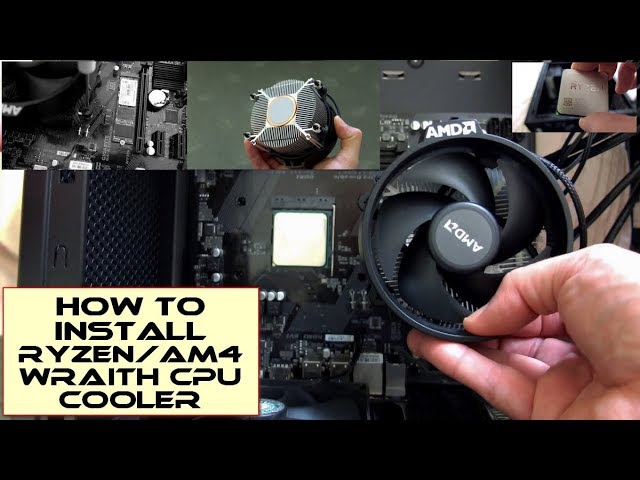
A clear and quick guide to installing a Ryzen CPU and the stock heatsink/fan/cooler supplied with many AM4/Ryzen CPU's.
The AMD Wraith coolers come boxed with many CPU's but require the brackets to be removed from the motherboard to fit the cooler which screws directly to th...
super straightforward, yeah?
 rotund cairn
Hi
smoky flame
yeah, far easier than what I had to put up with when getting my AIO installed in my current system. That was terrifying
full flint
yeah, its dead easy, and that's the hardest part of the entire build
he did it in the case, i dont reccomend it, its more fiddly, and the cooler isnt big enough to hinder mobo installation, so just do it on a table
smoky flame
definitely not touching that AIO again. Would need an AM4 bracket for it anyway
full flint
also plug in your 8 pin EPS connector before you install the mobo, its hard to get to otherwise, being right up in the corner of the board, yeah?
smoky flame
Hi Icy 🙂
all of that should be sorted before I get around to installing the motherboard, yeah. Seems I'll have a little more to do than just install that second 8 pin for the GPU. Removal of the SATA cables now too. Really don't fancy anything unnecessary getting in my way
full flint
its not that big of a deal though
https://www.amazon.co.uk/Thermal-Grizzly-Kryonaut-thermal-grease/dp/B011F7W3LU/ here, order this, its the best paste on the market, and that's a good price, you wont need all of it, and you wont need to use their spreader, and this assumes you need it at all, but it doesnt go bad and its good to have on hand
smoky flame
when I update the bios will I ever need to take apart my system again for future updates or can I do that with the CPU installed and all that like I'm used to?
full flint
and saves you 3 days of pain waiting for the post if you screw up 😄
yeah, you can do them the normal way after that
well, you go into the bios and you go to the m-flash section with the bios file sitting on a usb stick (dont have to rename it for that one), and tell it to flash the bios for you
smoky flame
yeah, that's the way I'd be used to updating the bios for sure. Glad to know that hasn't changed any
full flint
nah, but new asus boards can update it via the internet from the bios, which is neat
smoky flame
I think mine has that option too but I guess it has to be connected to the internet via ethernet as I haven't been able to use that feature in some time
full flint
correct
first time might not be needed, it may have the one from august that's compatible enough for it to boot up (not ideal), but you'd have to install the cpu to find out and if its not, have to pull the cpu
so like, dont do that, just update it via the flashback button, because why would you do that?
smoky flame
yeah, sounds best to update it then know the bios is up to date and ready to go rather than faff around cleaning the CPU and cooler wasting the pre applied paste
Definitely going to give this a go myself. Building myself up already
full flint
its not hard, that video showing the process was very straightforward i think
 covert eagle
Anyone else having trouble with game bar?
full flint
https://youtu.be/ISmyfzlf8SY gamersnexus doing live LN2 overclocking livestream

We're overclocking the new AMD Ryzen 9 5950X 16-core Zen 3 CPU with liquid nitrogen and will be trying to get as close to 6GHz as we can.
Sponsor: ASUS X570 Crosshair VIII Dark Hero on Amazon (https://geni.us/jsG5Lbj)
We only have a few X570 Metro posters left! We got one las...
full flint
fascinating demonstration that a stock amd cpu will just keep clocking itself higher, fully in spec, the colder you get it
so a 5950X stock will hit 4.35ghz all-core in a heavy avx load before it can no longer handle the cold, at stock voltage fully in-spec, fun info
manual OC 4.6 on AIO is easy, 4.7 possible on 280, 4.8 possible on 360 or custom loop, sounds about right for all-core, they seem really nice, and fun to play with compared to basically everything else in recent memory in terms of headroom
 floral quail
are the Asus B550-F and MSI B550 Tomahawk similar enough that there shouldnt be any real difference?
full flint
tomahawk is better, it also doesn't actually matter, because they're both excellent, and overkill for any cpu you can put in them
consider the msi b550 gaming edge wifi if you want wifi, and a really well priced board
floral quail
they are probably super overkill for a Ryzen 9 3900X
full flint
what country are you in?
full flint
how much do they have it for?
if its more than 15,669, i have a better option for you
floral quail
and they dont have the H100i platinum cooler but they reccomended a 240mm cooler by "deep cool" is deep cool a good and reliable company?
full flint
you dont want anything from deepcool
how much do they have the b550-f and the b550 tomahawk for?
full flint
https://www.amazon.in/dp/B08B4V6H3N get this
floral quail
and they dont have B550-F
full flint
15,699 on sale right now
floral quail
they should have it
floral quail
they say to not buy from amazon becuase sometimes the items are damaged/dont work
full flint
ok
floral quail
gotta wait another week for them to get de rtx 3080
I need my PC before November 25th
because I need to play fortnite and grind challenges for as long as I can
and the season ends at nov 30th
They are asking what size I want my motherboard
I guess I will say ATX ?
full flint
yes
 autumn sluice
how much would yall sell an r5 2600 and 1650 super used for? less than year old and no oc in cdn bucks
full flint
depends what else is there
or is it just the cpu and gpu
smoky flame
@full flint sorry to ping you but its happening!!! 
 devout remnant
🔥
full flint
👀
full flint
ah
I'd sell seperately but around $150 for gpu give or take
Some models go for $200
autumn sluice
Ty
full flint
@smoky flame what is happening?
@smoky flame dont ping me bruh why would you do that? 😂 😄

https://www.youtube.com/watch?v=01EhbmJAW-k ayyy GN 5600X review

Our review of the AMD R5 5600X CPU is now up. We're testing it mostly in gaming vs. the Intel i5-10600K crown-holder, the AMD R9 5900X, 5950X, and many others. 5800X next.
Sponsor: Buy the Corsair 4000D Airflow on Amazon (https://geni.us/aMBA1r)
Our Wireframe Desk-Sized Mouse...
oh look, still faster than intel's flagship, even when that thing is overclocked
also, overclockers out there, the 5600X is the chip to OC if you want to boost performance across the board, as 4.7 - 4.8 is easily doable on 280mm AIOs, and that's an increase to single AND multithreaded clockspeeds, meaning that when overclocked the 5600X will be, and infact is, the fastest gaming cpu in the zen3 lineup, as seen here. stock its still good though
stock vs stock its 20 - 30% faster than its direct competition for games 😂
smoky flame
my CPU upgrade is happening. Ebuyer got back in touch with me and yeah, sorry about that ping. I was just really excited, again 😄
full flint
they put you on the list for next batch?
did you grab that board,, ram and storage too?
and are they updating your bios for you?
i was trolling you about the ping, i dont mind
i thought picard giggling like a little girl gif would have given that indication
smoky flame
think so, just need to wait and see what they say. Made sure to add the other stuff too and I'd have to call a number to ask about the motherboard
smoky flame
they haven't said anything yet. Just waiting on an update
full flint
ah
but you said they got in touch with you, so im confused 😂
lol, your 6700k is slow enough that it might actually not be on a chart with modern high end chips anymore, its really close to being pushed off completely (10100 is 6700k performance almost exactly)
and yeah, once hardware unboxed add 5600X and 5800X figures, there wont be any intel quad cores left on their application benchmark charts
smoky flame
oh yeah, they just got in contact from yesterday as I left it a little too late to do the swap but that's me started it. I just hope it all goes through ok
full flint
yeah
ayyyy, i love this chart. for those questioning why everything got a price increase vs last gen, this is why. cost per frame remains the same or better vs last gen even when compared to the MUCH lower retail prices of zen2 chips today, not even compared to their MSRPs which would skew this further in zen3's favor
smoky flame
HUB probably should have also added somewhere the core counts as people will probably think Intel are still great when that 10900K is 2 cores less, for the same price as a 5900X. Honestly, if I could afford it and there was a reason to own a CPU with core counts greater than 6 cores just for gaming, that 5900X would probably be what I'd pick but 6 cores is still plenty, at least for now
full flint
yeah
smoky flame
I'm guessing on top of making sure my motherboard's bios is up to date before installing the CPU and getting the system up and running I'll want to make sure I have the latest AMD chipset drivers too?
full flint
nah
@smoky flame you can install those after the system is up and running, no need to pre download them
the only thing you need to do before building is do a usb flashback to the latest bios on that board
everything else can be done once its assembled and you get windows installed
smoky flame
nice, also the joys of installing all those launchers and games again. That'll be fun but I sure can't wait!
this time I'll have to go a little more sparing with the games though since I only have 1TB NVMe but as it stands I'm not even using 800GB total between the SSD and HDD just now so I should be fine. Avoid BOCW and I should have nothing to worry about 😄
full flint
that's only 85 gigs without the ultra HD texture pack which you cant really run well on an 8gb gpu anyway
so if you wanna play cold war, play cold war, its not that big 😂
smoky flame
wait, it's not 250GB?
full flint
Ok guys I don't know if this question is relevant to this chat but I just wanted to ask if i can downlaod windows 10 on an xbox one s. I tried to download the media creation tool but xbox doesnt support exe files. is there a soltution to this? Thanks
 thorny cypress
No, you can't download Windows 10 on an Xbox One S. You need to use a PC to download the media creation tool (and no, you can't use that media creation tool on an Xbox either)
full flint
Ok thanks for helping tho :)
no sub its not 250GB, its 135GB with the ultra textures and like 85 without it
smoky flame
well then, that's not bad considering MW eventually exceeded 200GB (before the option to install certain parts of the game was a thing) I'll probably still avoid BOCW though. Didn't like how the beta felt and MW had me turning into one really bad loser 😄
smoky flame
something I don't think I have yet asked. How's the installation of an NVMe SSD? Anything I ought to be aware of or is that easy to do too? Whole lot of "firsts" for me with this PC rebuild. First time since building my PC that I will have upgraded, first time owning an AMD CPU and building on AM4 and first time I have bought an NVMe
full flint
https://www.youtube.com/watch?v=j8V5VVDW2-Y watch this 56 second video

A simple less than 60 seconds guide to installing an M.2 SSD drive in a motherboard.
M.2 SSD's Amazon UK - https://amzn.to/2CknutB USA - https://amzn.to/2luA0Bo
Take note of the spacer position on the board and move if needed (as shown in the video)
😄
smoky flame
heh, wow is that really all there is to them?
full flint
yep, your board may have the screw in a bag in the mobo box rather than in-place, and it has a heat spreader you have to take off to get to the slot
but like, thats all self explanatory, installation is a breeze too
smoky flame
besides the bios and some cable management I think I'll have this rebuild done pretty fast. Probably be waiting longer still for Windows to boot up and to get things set up to a point I can start gaming
full flint
yeah
the bios update takes 5 minutes, you can prepare the usb stick for it now if you want, and i can view screenshots of what you've done to verify you're good to go
did you bookmark the video i linked on the process?
smoky flame
no but I can revisit it once the time comes. For now I'm going to try and not let teh continuous excitement get to me too much. Just hope I get as emotional as I did the day I built the system I'm gaming on now. That was some day 😂
those are meant to be happy tears btw
full flint
lol

The dev team knows how important it is for you to be able to tweak and customize your own experience and that really shines through in all the settings they've implemented. In this video we're going to break down the settings you’ll find in Assassin's Creed Valhalla.
BUY ASSA...
smoky flame
I still don't get how volumetric fog/clouds can't just be like an on/off toggle setting with a much lower impact to performance. Past a certain point, as it has already been proven on at least one other Ubisoft title (The Division 2) Volumetric Fog becomes ridiculously demanding all while showing little to no improvement visually
full flint
because that's how settings go in pc games
Volumetric fog on higher settings adds more...volume
quite literally
it adds more points of depth to the fog
yeah, and most people can't tell the difference, so medium is the ideal setting to use nearly every time when it comes to volumetrics, because performance gains are MASSIVE
smoky flame
they can still add more volume etc being a toggleable setting though. off = no volume of course and on = the equivalent to say medium or high, adding volume all while keeping the performance impact down to a minimum - at least compared to how it is currently implemented in most games
full flint
the higher settings are there for the future, not so much for today
running those on their maximums in a couple of gpu generations will be no sweat, and there ARE minor improvements
some people  should learn that max settings isn't helpful or required most of the time for an optimal visual experience
😉
smoky flame
might not be and going by HUB graphics optimizations guides I do see that now but I just don't see any point in there being some graphics settings within games that impact performance futher than they do improving visual quality and it has taken me the best part of the past 4 years of gaming at ultra and maxed settings to slowly realize this...
full flint
the reason is because there's no extra work required on the part of the devs to support those higher settings, and it helps games hold up visually for longer. there ARE differences between every setting all the way up, and the optimal settings, they're just not worth their performance cost on gpus at the time of those games release. you can run AC odyssey on everything all the way maxed on gpus now, where you would get like, 25fps doing it with a 1080Ti at release
the optimal settings are for playing games when they're new, max is for games that are 18 - 24 months old
forza horizon 4 on day of release, you could use optimized settings and gain like, 25% performance at barely a quality loss. on todays upper midrange and high end gpus just max all the things because you have more than that gain from the gpus themselves of today
smoky flame
ahh, so the devs just throw some of these settings in as extras? if so, now I see it
full flint
yeah, there are settings that aren't realistically usable today, but will be eventually
like running a 60+ chunk distance in minecraft
which is absolutely soul crushingly brutal on cpus, but a few years from now? go for it
the perfect example of this kind of thing is Crysis, from 2007
this is 2007, it isn't so far out of place even for today overall
you couldn't run this at a playable framerate at these settings in 2007
tbf you barely can now
it's still not locked to 60 on max
well yeah, cryengine is heavily single threaded, but you couldn't even get like, 15fps at release at these settings on the fastest gpus, now integrated graphics could do it, if cpu single thread performance would catch up.... aaaand someone needs to bench crysis on zen3 because its 20%+ faster than intel's current gen single threaded, locked 60 might actually be a thing now 😮
smoky flame
heh, my poor 6700K has been subject to so much maxed settings gaming. Was always convinced if I pushed games to the max graphically the load on the CPU would reduce while the GPU is the one getting all the serious work thrown its way
full flint
i mean, your 6700k up until the last year and a half or so was fine, its just starting to get to where quad cores just aint enough anymore
crysis remaster is a really nice upgrade though
also soul crushingly difficult to max out
another decent example is, everquest 2 in 2004 could not be run anywhere near max at anything approaching a double digit framerate, it was 4 - 5 years before you could do it, but the game is an mmo and is still active now, they pushed their engine beyond reasonable limits for the future
smoky flame
oh, btw. I should have the stuff for my CPU upgrade by November 27th
full flint
nice, did you get a reply about the 5600x?
smoky flame
yup, the swap was done and the order updated. No more 3080 waiting game
full flint
so you're in queue for a 5600X? and its going to arrive on the 27th?
smoky flame
mhm
full flint
how much cash did they end up refunding you?
around 90 quid like we thought?
you got ssd, cpu, mobo, ram right?
also, did you find out how the cash back on the mobo is supposed to work?
smoky flame
yeah, idk if I can apply for it since this is done through finance. I probably should have asked them. Will have to wait until Monday now
full flint
fair
you still saved 85 pound either way, which takes the sting completely out of the 5600 non X not being a thing for a bit
smoky flame
and yeah, around £90 though idk if that still applies now since I swapped it. They did say I could swap items of an equal or lesser value but not much else
full flint
they wont keep the difference in cash, that makes no sense
if its financed they'll take it off your balance
you just cant go for items of higher value because they extended you a specific line of credit
that's how that works
so in addition to 90 pound less owed by you (confirm that on monday when you ask about the board rebate), you also saved 40 pound on the SSD and 40 - 45 on the ram, so you're in good shape while you wait for 6800XT stock 😄
smoky flame
heh, yeah good point and I may end up selling the 5700 XT after I get the 6800 XT I want to further lower the cost. Sure, I'll be spending £600+ but I should be able to get at least £150, probably more back on the 5700 XT, which is at worst a quarter of the cost of the 6800 XT back
full flint
yeah 150 - 200 sounds about right
the RX 6600 should end up around 5700XT levels of performance at around the $229 - 279 mark, if the trend with stack performance holds
so up to $200 sounds about right for that, if you sell it before those drop
smoky flame
I'll have to wait on that. Won't be selling the 5700 XT until after I get a 6800 XT. May yet manage that this year. If not I'll be going after it as quick as I can from the start of next year. I really want to make the most of all this new hardware
full flint
we don't expect the 6700 until january at CES, might be feb or later for even lower end cards
so you have a bit of time, we also dont expect nvidia's 3050 series before then, since they cant even sell, well, anything right now at all
smoky flame
I will see an improvement in performance with this CPU upgrade alone right?
full flint
yeah, a bit in the division 2, for the rest it depends on what you play
assassins creed is absolutely gross on quad cores ever since origins
watch dogs legion is also brutal
basically, ubisoft games? you'll notice in all of those 😂
good thing you have ubisoft+ lol
smoky flame
I just play whatever I can get my hands on. Got access to Ubisoft+ and Xbox (PC) Game Pass plus I'll have Godfall to look forward to real soon (that I got as part of the 5700 XT's promo!)
full flint
godfall will be purely gpu bound, probably looking like high preset or so on that one for 1440p60+
which is fine
all the ubisoft stuff? dumping the quad core will be a notable improvement, if not to average framerate by a lot (it'll be a little bit based on your division results), then absolutely to minimums and reducing stutter
smoky flame
ngl, when I get the 6800 XT the temptation to go back to my old ways of maxed settings will be pretty great I think. 16GB video memory and 32GB ram. I won't have to care so much about any memory limitations, at last not for some time anyway
full flint
not really a memory issue for you atm
and at 1440p, maxxing all the things is fine, except in games with raytracing, where you'll need to walk a fine line to balance it out if you want high framerates
5700XT was a max all the things 1440p card for most of the last year too, just not when you have it bolted to a potato from 2014 😉
i mean, here's a spread of framerates, so games without RT? go ham
135fps at 1440p ultra in the division 2, that's about double 5700XT
smoky flame
only awkward thing my next upgrade will be factoring in is DDR5 (idk why I'm already thinking ahead, lol). I'll likely be sticking with 32GB there too until that becomes part of the requirements in gaming, to which I'll be upgrading to 64GB once 32GB gets common enough. Though I think we're some way off that
yeah, don't worry. I'll be going ham + still got smart access memory to include that I don't think that chart showed so I should see further gains. Until I start taking games into maxed settings and throwing on RT on top of that... Really hope AMD's equivalent to DLSS isn't too far away. I'll be needing it 😄
 azure flicker
does amd rewards send you an email with the download code for a game that comes out
or i have to go to their website to get it?
smoky flame
should be the retailer (if part of the qualifying promo) sends the code sometime after purchase
azure flicker
like on release day of the game?
smoky flame
no, retailer should give out a code some time after purchase (up to a week I believe) to which you redeem through AMD rewards. Depending on what that reward is and when it releases you won't receive a further update until that reward releases. I'm waiting on Godfall and WoW Shadowlands from AMD's last GPU game bundle (that I believe is no longer active)
azure flicker
im waiting for assassins creed
smoky flame
did you purchase from a qualifying retailer?
smoky flame
oh, you are past the part I thought you meant. Yeah, just wait until it releases
azure flicker
okay making sure since this is my first time using amd rewards
full flint
Your key won't be distributed until more or less the day of
smoky flame
was my first time too. Only ever redeemed one other GPU promo in the past and that was some time ago with the 1080 Ti, was bundled with Ghost Recon Wildlands at the time
full flint
SUB, what else did you need for your pc other than the gpu?
smoky flame
I think that was all really. CPU upgrade was "the big one"
full flint
nice
full flint
i can't see gracemont helping them, trusting the windows scheduler to keep game threads off those cores is uh.... yeah, no
8/16+0 would be less of a disaster for them, unless microsoft somehow does a linux and learns to put workloads in the right place
but hey, plenty of time for that to be worked on, so it might work out
but they're gonna be up against a zen4 with another like, 10%+ ipc increase, probably another nearly 20% one if amd hits on its roadmaps, with another clockspeed bump and even more cores
5nm will let them do 24 and 32c mainstream parts if they choose to do so, and i don't see how intel comes back from that with 8 core parts
full flint
yeah, but they won't have the ipc gains to beat zen4, they'll barely be ahead of zen3 with alderlake if they come in in their predicted range from 2 years ago (that may not hold today, a lot changes in 2 years, especially when you have to throw your node in the garbage and start over with it like 15 times)
so if they dont have the ipc, and they dont have the clockspeed, and they don't have the cores, what's left?
zen3 is already boosting over 5ghz out of box (5.05 - 5.1ghz for 5950X, 100% stock, per every reviewer so far), intel no longer really holds a clockspeed advantage, with the 5800X doing 4.7 all-core sustained, they've beaten then 10900k's sustained turbo in-spec, and matched it if you bypass PL2 duration limits for intel
 surreal moss
That doesn’t really have anything to do with alder lake but ok
full flint
do we expect intel to actually start to gain clockspeed again at some point? 10nm hasn't come to the desktop thus far because it clocks like crap compard to 14nm and they lack the ipc to make up for it with cove cores so far
we do however expect zen4 to pick up a further 10 - 15% more clockspeed based on tsmc's node performance. so intel won't have the clockspeed, ipc, or core count to compete. alderlake is interesting but doesnt seem very competitive in the face of a 4.5+ all-core 24 core mainstream part that turbos over 5ghz during gaming loads, and has double digit percentages more ipc than zen3 already does
surreal moss
Bro the whole throw 3 paragraphs at me for one point is getting old
I’m not even reading half of this
Ya boy is going to the gym
 cedar elm
I know this is crazy, but I know a lot of you guys know about gaming and streaming. I been spending the last month trying to finalize my PC streaming settings in Streamlabs and the help I am getting just isn't working. Googling and Youtube is just giving me different settings. I feel comfortable talking to you guys....wondering if you guys would allow me to post screenshots and help me figure this out. I dont want to waste another weekend working on streamlabs setting. Please. It would mean a lot.
 ruby spear
We can't give you image permissions, those need to be earned over time.
You can upload somewhere like imgur, or similar, then paste the URL.
cedar elm
ok
cedar elm
I think I figure out the settings.,....any chance I could get some help in just viewing my stream. i want to see if it looks solid to viewers
devout remnant
Fast CPU when.
 pliant notch
Hey guys, I was wondering if anyone could genuinely help me. I have a One S controller, and I want to use it with my pc. I have a Bluetooth dongle (listed as KOGA, it is USB 4.0 and on a non USB 3 slot), and I can connect the controller wirelessly. Though, it's very hard, takes many attempts, and whenever I turn the controller off, whenever I turn it on It just blinks , says it's paired obviously, but never connects. I have to always remove it altogether, and try 2-3 times until it connects again. And I have to do that every time. I updated the controller via usb cable, tried every possible solution, it is just infuriating.
full flint
@pliant notch I'd just get the microsoft dongle, it's the only way I fixed my bluetooth pairing problems 😐
it also adds audio support
pliant notch
Thanks, but I'd rather find a solution to this with the bluetooth.
past tiger
oh sorry didn’t know i can’t swear
ruby spear
Behave
past tiger
i just wanted to thank shadow
ruby spear
Swearing or not, you keep it civl in here
ruby spear
That's not how you thank people. I can see what you wrote.
past tiger
yes sorry
ruby spear
Sure
 hollow solstice
 ♂️
full flint
♂️
full flint
@hollow solstice English-only, please.
 dark trail
can i record from xbox more then 1h
full flint
i have no idea, but that's more a question for #general-chat, this is the pc gaming channel
full flint
yes, you can stream from the xbox to the pc using the xbox console companion app, and then use whatever software you want to record the console companion app
dark trail
how?
full flint
plenty of tutorials online
 versed dune
I need help, I have a monitor with only one hdmi and a vga port, and I want to plug in speakers but my Xbox use the HDMI port, could I get a. HDMI to VGA adapter and the Xbox work?
full flint
in theory you can, in practice you dont want to
that will give you hdmi passthrough plus 3.5mm audio output
versed dune
Ima just do what the other guy told me it’s cheeper, ima get a new monitor for Christmas anyway I just need something cheep for rn
full flint
what other guy?
versed dune
My bad i thoufht I was on a different server
versed dune
To get speakers thst have an optical input to plug into the back of my Xbox
full flint
you can do that, cost you more than $20 though
series X and ps5 dont have optical audio output, so if you are planning on upgrading to a next gen machine, they wont be of any use to you
versed dune
That’s a good point
full flint
the $20 doohickey i linked you will work on them fine
it passes the hdmi signal through (including its audio), and has a 3.5mm jack to also output that audio into any standard speakers
versed dune
Dope thx
Best Buy told me I could plug the speakers into my controller
But that don’t sound very good tbh
full flint
https://www.amazon.com/NEWCARE-Extractor-Converter-Optical-Adapter/dp/B083DDGGZ4 hold up, this one is better, and in meaningful ways
it also has optical audio on it, and supports more display resolutions, which will be useful for the next gen machines if you're going to use a 4k tv
versed dune
Oh yea speaking of monitors what’s the best choice for the new gen consoles
full flint
that's the one you want if you're going this route, sorry about that 🙂
well, that depends
how much are you trying to spend?
versed dune
It would probably be fore Christmas so proabaly under 500$ but I doubt anything would get that high
But the thing with the 4K monitors none have 144hz j could find
versed dune
27
full flint
versed dune
But if they 2500 I ain’t getting thst lol
full flint
xbox series X can do 1440p output, so you can 1440p at 120hz with this monitor with the series X
its higher quality than any 4k monitor you can afford
1440p 144hz monitors aren't that expensive anymore. 4k is another story
versed dune
Yea and if it was 4K most games couldn’t get up to 60 FPS I Hurd
So this the best monitor for my price for the next gen counsel?
ruby spear
Depends on the specs of the PC and what you want from it.
 tepid fable
the consoles tend to win when they come out for price to performance but a pc has a lot more uses than a console, so it depends what you want
if you wait though the pcs will catch up too
like right now with 1k i could prettyh easily match the current gen consoles
since i have a pc i just need the gpu
ruby spear
Right now, unless you have a 3080/90 in your PC, the Series X is a better choice looking at a purely gaming perspective.
Or whatever the AMD equivalents are.
ruby spear
It is
tepid fable
like im already pretty close performance wise with a 2060 super
smoky flame
my upgrades I have planned, part of it is in progress as we speak will end up costing me around £1300 total and it is not a full build but close enough. Probably looking at another £200-300 on a whole system with the same specs
tepid fable
2080 ti is a big jump let alone the 3080s
ruby spear
But my point is that you would need a PC with a 3080/90 for it to be worth it compared to the SX. No point building a PC with a 2080 in it now.
Not if you want it to last. Whereas a Series X will get you 6-7 years.
tepid fable
you probably wont ever need the 3090
its overkill for its time and will prob be bad later
the reason the series x lasts is because you're almost stuck with no upgrade path for 8 years
however this also allows for weaker pcs to last long too
smoky flame
3090 definitely isn't worth it if only gaming. Gains in performance over teh 3080 aren't that great, +20% at best maybe and you get 24GB GDDR6X but the extra cost over a 3080 (pretty much double the price!) definitely makes it a hard purchase
tepid fable
i could still game with a gtx 970 and only upgraded recently because it was overheating a lot
lasted about as long as the xbox one and was still better graphically
when it came to real price the pc was around 2k(was prebuilt too), xbox being around 900 not including broken controllers
smoky flame
for the price of one 3090 someone could build a whole AMD system near enough that features one of their latest CPUs (Ryzen 5 5600X) 32GB ram (16GB would work too and lower the cost a little again, just be sure to get 3600MHz CL16 kit where you can) and their latest upcoming GPU, 6800 XT that features 16GB GDDR6 and can throw down with both of Nvidia's flagship cards (3080 and 3090)
tepid fable
i think you couldve made the pc with 1.4k if you got it yourself
and i did a lot more with the pc, such as graduating college and gaming so to me that was worth more than the xbox
surreal moss
It’s really down to ease of use for most people, they just don’t know it.
tepid fable
at that point its up to you
just dont forget that the xbox is not just its sale price
makes it seem cheaper than it is
surreal moss
I know two people who own PCs with 1080s and still choose console because they can just plug in and go
tepid fable
pc is pretty easy gaming wise all things conisdered
surreal moss
No driver updates no mismatched monitor output no stuttering or random issues
Just hop in
tepid fable
at worst you plug in something to a port
surreal moss
It’s easy for many, but not all.
tepid fable
windows does the rest
surreal moss
It will never be as easy and simple as a console
tepid fable
whats hard about it may i ask
surreal moss
It’s not what’s hard about pc, it’s about what’s easy about consoles
You literally just buy the thing and plug it in, buy the game and done. It plays at max setting and gives you a solid experience
tepid fable
well windows is made primarly to make computers easy, so it follows a lot of its footsteps
its not like its linux
surreal moss
Windows is not easy for a lot of people
I understand it’s easy for you, but that’s not the case for everyone
smoky flame
ngl, every GPU driver update excites me. Always the chance of some new features and improvements
tepid fable
consoles are hard for some people too
such as people whove never used controllers, that seems hard for some people
surreal moss
If a console is hard for them a pc will be 10x harder
tepid fable
some people dont get how the tv inputs
and nah, my parents all know how to use pcs but cant turn on a xbox let alone play it
surreal moss
That’s input related, that’s entirely different. Also if they don’t understand tv inputs they won’t understand monitor inputs so that’s a moot point
tepid fable
well a monitor generally uses the same port so its easy
displayport is just more used
smoky flame
heh, I can type ok on PC but gaming with keyboard and mouse? nah. I prefer the Xbox One controller
surreal moss
Many people do. I probably play against more controller players on mcc than I do kbm
tepid fable
you can use a controller on pc too, its a usb port on both ends afterall
there isnt a whole lot of logic behind these things so i think if people tried they would get it overtime, itd be different if they had to like make it themselves and install all their drivers alone
but most stuff is just automated
i even got a hard drive with no os and installed an os and had my device drivers auto install when detected
tepid fable
im saying its not hard to use a pc
ruby spear
I sense someone who has never worked in IT support 😄
smoky flame
some day I want to try to get used to gaming on PC with keyboard and mouse but I know there will be types of games that want a controller, or other type of device to work. Like racing simulators would prefer the gamer uses a steering wheel for example
tepid fable
i am working in IT, the difference is playing ona computer isnt work related with a bunch of problems end user wise
lots of things can go wrong when it comes to programs
games are just kinda plug and play
ruby spear
They're really not.
surreal moss
That’s another great point. On console it’s all fixed for you. If you crash randomly on a certain game, you’re on your own with pc unless it’s affecting everybody.
tepid fable
i havent had an issue outside of hardware in years
since windows 7 really
i have had issues with xbox though that were more technical like drive failures and random crashes i couldnt fix if i tried and knew how
so i stopped using my xbox one, ran into too many problems
 tepid fable
too bad it was on xbox
i could probably fix anything hardware wise the xbox ran into problems with but of course thats not allowed so i never would anyway
had to keep buying more and more controllers
surreal moss
Repairability is a whole different thing
smoky flame
I've had a few issues since I got into PC gaming but nothing major (depending on what counts as major) as yet. A few game crashes and BSODs but that's about it
surreal moss
I’m still talking ease of use
tepid fable
when i log in and need to reinstall my games (2tb worth) around 5 times its pretty unusable
new externals every time too
when my xbox is down because it is a target of a ddos its also hard to use
smoky flame
Haven't actually had a BSOD in at least a year, maybe two so I must be looking after my system well or doing something right
tepid fable
like theres lots of things that would annoy me on xbox i never experienced on pc yet
updates changing the ui every few months
ease of use i guess is subjective
i dont generally go out of way to avoid a ip pull on my pc afterall, stuff is usually encrypted
but i had to on xbox
i guess my point is neither of them are perfect lol
smoky flame
nothing is perfect really
tepid fable
i prefer the windows ease of use stuff
i consider linux easy so of course windows would be to me as well
smoky flame
oh and btw, on the subject of repairability. I'd be terrified to try and repair the likes of a GPU or motherboard myself. Have a friend on another server that likes to buy old broken GPUs and try to repair them. Sounds fun but looks pretty scary. Need the right tools too
tepid fable
and if something goes wrongi can fix it too, while i would consider that part hard when it works its pretty easy
when it happens on my xbox i have to buy another one
smoky flame
think one of his most recent purchases was a GTX 590. Dual GPU card. Bet that would have cost a fair bit back when it was new
tepid fable
yeah those were pricey back then
5-10 minutes of effort on my pc made my pc like my xbox one but better (in fairness its much newer)
i even use my controller on it
no drive failures i couldnt fix (or any at all) and im using 14 year old hdds compared to 5 month old externals on my xbox one
the hardest thing was installing a wifi card that came with picture instructions
smoky flame
those 14 year old HDD are probably about as fast as the HDD on the Xbox One (with the exception of the Elite's SSD)
tepid fable
i started learning about hardware by reading the motherboard, took me around a week to understand how to create a whole system from scratch so id say its relatively easy even building your own system
some things can be problematic though if installed wrong
thats me when i didnt know how to connect to my own router lol
smoky flame
When I first saw the motherboard I bought up close I was scared of building my system up. I still remember having doubts about doing it but kind of left myself with no other choice. Why on earth would I buy these things not to build and use it? in the end I got there and glad I did
tepid fable
when i think of ease of use i think of the random nurses and school kids using ms dos when windows wasnt around and using it well, like, when was windows harder than that
maybe its gotten so easy its hard now?
smoky flame
though that motherboard did cost quite a bit. Think it was like £230 at the time, wasn't aware it was pretty overkill and stuff for a novice like me - What I get for taking advice off someone over Twitter back then I guess 😄 . Least I have Discord now and it has shown me the errors I made on a number of occasions
tepid fable
yeah i wouldnt go by what people reccomend since everyone has a different opinion personally but i can judge what i want myself, like everything in this machine i want in some way
i think its best just in general to read up on what you buy if its pricey, like i know nothing about bikes but i picked out a good one by reading up on it for like 3 hours andm aybe learned more than i needed to know because i got curious later on lol
was an 800$ bike so didnt want to just fire and forget
smoky flame
yeah, I made sure to read up on stuff after I built my PC. For a while I think I was pretty well caught up on stuff but idk what happened to me the past year or so. I feel out of touch with PC hardware, only just getting back into it all now. Probably because I'm upgrading by the end of this month
tepid fable
i think im sticking with my 2060 super for a few years, dont think ill need the "new guy" or anything, games are still pretty easy to run for me
not sure about getting a series x since it seems pointless from my perspective but we will see when its out, like if i can play the xbox exclusives on pc and have cross plat on 3rd parties ill be set
if i cant i might get the series s or something
surreal moss
My monitor gets here tomorrow eeeeeeee
tepid fable
i hate paying for xbox live but i get why theres a paywall, its just like if iget it for two games or something then yeah
halo infinite should be on steam though
surreal moss
Wtf it’s an hour away from me
Why would that take a whole day
It’s been there for a whole day ALREADY
smoky flame
ooh, what monitor did you get?
surreal moss
Asus pg259qn
smoky flame
oh yeah, the 360Hz monitor
smoky flame
I have the Samsung Odyssey G7 (27" model) 1440p and 240Hz. Took me some time to really like this monitor but Samsung's latest firmware update might have just fixed the monitor's flickering issues and made a lot of people happy
tepid fable
i guess my thing is this is a 4k tv so if i wanted to go higher iwouldnt go down to a lower res
might wait for 144hz 4k displays to be affordable
or maybe get a 1440p one for gaming specifically
smoky flame
1440p will demand less than 4K. I could never go back to 1080p now but I'd still recommend that over 4K unless you have a very nice system
surreal moss
I’m going down from 27” to 24.5”
Kinda excited. I think for how close I sit the 27” is just slightly too big
full flint
hey SUB, does the extreme 1000R curve on the G7 bother you? it looks like it would bother the crap out of me
smoky flame
it may be strange me saying this but no, it doesn't bother me at all. In fact, I hardly notice it. Only when I move away from looking at the monitor that I'm reminded it is curved
full flint
are they shipping your parts all together with the cpu or are you getting some of them early?
smoky flame
shipping it all together I think. So I may be waiting up until November 27th before I receive this CPU upgrade
smoky flame
I already preloaded it
full flint
yeah, i think it can be played right now
smoky flame
oh wow, really?
full flint
im seeing people benchmarking it and putting youtube vids up
smoky flame
not playable for me 😦
smoky flame
probably and I don't plan to do that. I'll wait
full flint
should unlock tomorrow for the rest of the world
its a day early with ubisoft+ unless they stopped doing that
smoky flame
not sure what's up with it. the ultimate editions used to give 3-7 days early access but WD Legion and AC Valhalla don't do that
full flint
3090 can't do 4k60 on absolute max settings
if the idiot turned volumetric clouds down to medium he would get like, 85 fps
smoky flame
lol
full flint
and you wouldnt be able to tell the difference
https://youtu.be/8q52rKXsDlI if you're curious waht it looks like on absolute max, and what it sounds like in russian
 smoky flame
tbh I'd be the same sort of idiot cranking up those settings soon but at 1440p 😄
full flint
its a huge step up from odyssey though
smoky flame
I'm keeping myself away from watching anything on the game until I can play it so I'll see for myself in about 2 days just how much this game demands
smoky flame
By the sounds of it though, this CPU upgrade can't have come sooner
I'll try to though 😄
full flint
😂
smoky flame
I may only have the 5700 XT for about another month before I can upgrade to the 6800 XT
full flint
hardware unboxed will have an optimization guide within a couple days of the games launch, i'll share it with you after you get sad that you can only do like, 45fps at max
smoky flame
I can suffer with poor performance a little while longer then the CPU and GPU upgrade will fix it all (I hope)
full flint
mostly turning shadows down a single notcha nd turning volumetrics to medium will give you like 30%+ more performance in that engine
barely notice a difference too
smoky flame
that is still what gets to me. Guides like HUB show we can get better performance with no visual impact. Basically meaning these other settings beyond what HUB recommend under their quality preset are pretty useless
so why do devs honestly bother including them when they are likely not to be used because of that extra hit to performance?
surely excluding a bunch of over the top graphics settings wouldn't take much if it meant a better game overall for everyone? Stuff like volumetric lighting/fog, that I already touched on not that long ago seems to always be a heavy hitter when set past high in Ubisoft's games with the difference between even medium and high being negligible but still providing a little extra performance when set to medium
full flint
because those settings can be noticed in some situations
mostly at higher resolutions
something you might not be able to tell apart at 1080p, you can at 4k
so as we move to 8k as the years go by, it will be a thing you can notice there
excluding settings doesnt make it a better game for everyone
people just need to learn to turn stuff down and stop trying to run everything as high as it can go
and get out of the mindset that anything less than every setting maxxed out = garbage
the pcmasterrace crowd has warped the perception of how things should be
for them, if its not absolutely maxxed out and cant still do over 60fps at 4k maxxed out, the game is trash or the gpu is trash
and that mindset is toxic
smoky flame
that isn't quite my mindset. I just wanted to crank settings up as I felt I could. Especially when I was gaming at 1080p on a 1080 Ti. 1440p on a 5700 XT is definitely different, yet it is supposed to trade blows with the 1080 Ti (and the newer 2070 Super)
full flint
its as fast as the 2070 super, and faster than the 1080Ti on average today
it was a few percent slower than a 2070 super last year, its made up all of that ground, at all three major resolutions
smoky flame
nice
I'm still really impressed with this GPU. All those putting AMD down. Just shows I really shouldn't listen so much to some of it and see for myself (if I can afford to anyway)
full flint
tends to do very well in assassins creed, which is gonna help you out
1440p60 on ultra preset is possible, not worth it, but possible on the 5700XT with odyssey
valhalla seems to be a bit more demanding
smoky flame
either way I can't wait and since you showed me HUB's guides I've stuck with those settings. Even gave WD Legion HUB quality settings a try so maybe I can change yet 🙂
full flint
oh you went and found their guide on it?
they'll do one for valhalla, its a big enough game that it'll get coverage, and it will replace odyssey in their test suite most likely, just as odyssey replaced origins
smoky flame
yeah, even tried their GR Breakpoint guide too
full flint
no amount of tweaking will save that disgustingly terrible game
wildlands was great, breakpoint is gross
smoky flame
yeah, I have to agree there
full flint
they have an RDR2 guide as well, and a bunch of others, you should be able to find them on their youtube by searching their channel for guide
there's even a forza horizon 4 one, though its not really needed on a 5700XT class gpu, since you can do 4k60 on max settings without an issue
smoky flame
yeah, I'm going to have a look at their other guides. That RDR2 guide definitely interests me. Though I will probably wait until I upgrade my CPU and GPU to try that and of course I will have to be a little more careful which games I install. RDR2 will end up taking over a 10th of my 1TB NVMe and yeah, I know it will be more than that since 1TB doesn't actually equal 1000GB, especially factoring in space lost from installing windows, drivers, launchers etc
full flint
https://uk.pcpartpicker.com/product/kQZzK8/adata-xpg-sx8200-pro-2-tb-m2-2280-nvme-solid-state-drive-asx8200pnp-2tt-c heh, add a 2tb SX8200 or something to the second m.2 slot later on
or, you know, regular hard drives if you care about huge amounts of storage, but gaming off a hard drive is pretty awful these days
smoky flame
yeah, I'm avoiding the SATA SSDs and HDD now. Upgrading to 2TB+ on NVMe as it eventually gets cheaper and faster is so much easier too. I'm still laughing at how easy and hassle free it is to install an NVMe/M.2 storage. SATA storage days must surely be numbered
full flint
i mean, you wont be replacing your 1tb, you'd add this one, the board has 2 m.2 slots
sata storage is fine, you can get much larger drives than will fit in an m.2 slot
smoky flame
tbh, if and when the pcie 4.0 storages become important I'd rather just replace the top slot and make sure it is at least 2TB. That second m.2 slot will be slower so I'd rather not use it. I don't mind all the hassle of reinstalling windows, drivers, launchers and games again at a later time if it leads to an even snappier system
full flint
wont really be slower when using gen3 nvme drives
gen4 storage won't really become important before you replace that pc entirely
the drive you ordered is faster than the one in the series X, and, at least in that primary m.2 slot, will work with direct storage with your 6800XT
smoky flame
I see, so this system, once built will be at the bleeding edge of PC tech pretty much? even without owning a 5950X, gen 4 NVMe and 6900 XT or RTX 3090
full flint
yes
5950X is less than 5% faster than a 5600X on average for gaming, its not worth thinking about, and thats when you artificially impose a cpu limitation by testing at 1080p on medium settings with a freakin $1500 gpu
5600X is faster than intel's flagship still
gen 4 nvme drive wont really be faster than a gen 3 one
smoky flame
I thought they were coming in at double the speeds overall? Samsung's 980 for example
full flint
there's barely a difference between sata SSDs and gen3 and gen 4 drives on this list
here, a game you know
they are twice as fast, at copying files, they're not the bottleneck for game loading performance though, the cpu is
sata SSDs at 24.5 seconds, gen3 drives at ~22, and gen4 drives at ~18 - 20 seconds load
hard drives over 30 seconds, the bottleneck isn't storage once you've got some kind of nvme SSD really
smoky flame
still, those lesser load times are nice and a few less cables is even nicer
full flint
oh, your SX8200 pro is on that list, right below the 2 gen4 drives, if you missed it 😂
smoky flame
no, I seen it
full flint
for real, gen4 storage is useless for gaming if you have quality gen3 storage already, and they arent even THAT much faster than sata SSDs for game loads, at least until directstorage becomes a thing games use, then the nvme drives (on any ryzen, or intel 11th gen or newer) in the primary cpu connected m.2 slot will pull away
intel 10th gen and below? sorry, no directstorage for you, your m.2 slots are running off the chipset
smoky flame
ouch
man, I don't think I need to get any more excited about this upgrade but I am 😄
one drawback though. I asked my friend from another server (same guy that likes repairing broken GPUs if you caught me saying that earlier) about the ram I bought and he says it may be a mixed bag
full flint
gen4 storage becomes useful for people using it as scratch space for high end video editing or rendering work, or scientific workloads that are i/o bound
its not particularly useful for gamers vs quality gen3 stuff
it is a mixed bag, it wont overclock worth half a crap, probably has micron E die chips in it
it'll run its rated timings, and thats all you need to care about
just load the A-XMP settings for it and forget about it
i didn't reccomend it because it was an amazing kit for manual tuning and overclocking, i reccomended it because it'll run at 3600 at its rated timings and it was 45 pounds cheaper than any other 3600 kit for sale in your country at the time
smoky flame
ahh, I see. Thanks. Just what he said had me a little concerned. Especially since he found someone with a 3700X running into compatibility issues and that is Zen 2 so I hope Zen 3 is fine
full flint
always a chance it has some issue, but then you have consumer protection laws and retailers that abide by them, so exchanging it isnt a big deal
but uh, odds are pretty good that it just works as intended
smoky flame
I have my fingers and toes crossed it will work. Honestly just want to get this upgrade (once it arrives) up and running as quick as possible. Don't fancy any issues getting in the way
full flint
considering that kit uses the same chips that most other 3600 C18 kits do, including gskills trident Z RGB kits at those timings, you'll be fine
and yeah, 3600 C16 would be a couple percent better in purely cpu bound games, but at 1440p that list is exceedingly short, and its not worth paying double for the ram for it anyway
smoky flame
ok, I guess that's my concern about the ram out the way then 🙂
Just to wait for it all to arrive
oh, one thing I forgot to ask. Does this NVMe come with anything to help it stay cool or is that already supplied by the motherBoard?
full flint
it doesn't need anything
uhhh
depends on the models
some models have a heatsink and non-heatsink variant, some boards come with a heatsink others don't
its an SX8200 pro, it has no heatsink, it requires no heatsink
https://download.msi.com/archive/mnu_exe/mb/E7C91v1.1.pdf page 32, the little cover on the b550 gaming edge has thermal pads on it (it instructs you to remove the plastic before reinstalling said cover
so, if you're actually worried about it, use their little heatsink
but uh, gen3 TLC drives don't actually get very warm anyway, so it mostly doesnt matter
you can use the little metal sticker they include if you want too, but dont put that on if you're using your motherboard's heatsink for it
smoky flame
hmm, ok. Thanks once again 🙂
full flint
You should always use a heatsink unless the product explicitly states
sometimes even when
the cooler the NVMe, the better it performs. (to certain threshold)
the nand likes to be warm, the controller likes to be cool, so its a balancing act
the motherboard's m.2 heatsink will work fine
if the motherboard has an M.2 heatsink
as previously stated
🙃
if you're using the second slot or a motherboard that doesn't come with a heatsink you'll need to get one
almost all motherboards only ship with 1 heatsink
not really, gen3 nvme drives dont require additional cooling
adata ships a thin metal sticker to use as a "heatsink" if you really feel the need
by definition that metal "sticker" is a heatsink. because it has all the properties for heat dissipation
it's also a heatsink plate with adhesive pad
not a metal sticker
oddly enough, cooling the nand down hurts write performance, but letting the controller get hot hurts performance, so it might have actually been better for them to have a heatsink only for the controller rather than the entire drive
also
MSI is on fire
but that looks weird i guess, so i can see why they dont

eTeknix
MSI represents one of the largest hardware and peripheral manufacturers in the world and as such, they clearly have both a highly sensitive and exceptionally busy production line. It seems, however, that the company may have a major supply issue on their hands moving into 2021...
sucks to be them
sucks to be anyone that purchased their products on pre-order too
smoky flame
damn
full flint
wont really affect sub's motherboard purchase though
smoky flame
I think that was a pre order
full flint
nah, board is in stock 😛
depends on how it's stocked
the only part that isnt in stock at ebuyer is the cpu
oh, it went out of stock finally
this only effects things not distributed from manufacturer already
smoky flame
when I checked on it the day I done the swap it said "expected November 6th"
full flint
yeah, that means they already had parts in transit
smoky flame
so I may have got lucky before that gone and happened?
full flint
it only would have effected things weeks out
smoky flame
Sure hope no one was hurt 😦
full flint
i mean, their launch allocation of gpus launching 10 days from now have already left that factory too
smoky flame
brb getting food
full flint
and actually, their reference models are the only ones available for the first 2 weeks, so they never even entered that factory in the first place
they put cards amd makes into a box of their design and ship it
dark trail
@full flint welcome
full flint
why am i randomly getting pinged?
dark trail
because you are the last one had send message
and i wanna know if you here
if you here === true {
how can i record xbox screen from pc
}
 obsidian bobcatBOT
Please refer to #233805809346150400 for support related issues. Do note that this is community sourced support and there is no official support here on discord. As such, people will assist if/when they are able to but if you have issues regarding your account and/or billing, please reach out to official support for assistance.
dark trail
@obsidian bobcat ok bro
full flint
hey sub, you around?
 slate jackal
Hey shadow how much is an ROG strix 1080 8GB worth in 2020?
full flint
hi Sara, you selling one? probably about $150 - 175
slate jackal
yeah to a classmate (hope that isnt breaking the rule) for $300 but he agreed to pay it tho
full flint
its slightly slower than a 5600XT or 2060 non super, and those cares are around $250 brand new
so if you dont want to rip him off, give him a better deal
coarse pond
New secret shopper video from Linus. Watching it now lol
slate jackal
i mean he was happy with the deal, and when i have sold it im gonna move to console 
full flint
fair enough
smoky flame
yo, Shad0w
coarse pond
Also yeah 150-170 is what they should be going for a strix 1080, but in the current market they are even selling for 350 used on ebay
full flint
that makes no sense when brand new 5700 XTs are less than that, and in stock readily, and literally 45% faster
slate jackal
 coarse pond
the market is messed up right now man. people even buying 2080 supers for more than MSRP
full flint
SUB , here's a little example of what volumetric clouds do in the AC engine, i found the slide i wanted finally
coarse pond
Used even.. i dont get it either
full flint
from ultra to medium is a 45% performance increase from a single setting
even high would be fine, if you want a little bit more visual depth
very high and ultra dont look better than high though
slate jackal
btw Shadow why he wanted to buy my 1080 is bc he overclocked his 1050 and doesnt know how to change it back
full flint
your friend is stupid, enjoy the $300
slate jackal
smoky flame
damn, yeah that is some ridiculous hit to performance
slate jackal
your friend is stupid, enjoy the $300
thanks i will enjoy the $300
full flint
console versions use medium too incase you're curious SUB
XSX version of valhalla is likely also using medium volumetrics, eating a third of your framerate for slightly fluffier clouds makes no sense afterall
coarse pond
idk what the msrp of 5700xts are but they are 400+ on newegg atm
full flint
the 3090 averages 55fps at 4k ultra in valhalla, with clouds on medium that jumps to nearly 77fps
Snack
$375 is the cheapest one on newegg, including the mail in rebate
they bounce around the $350 - 375 mark constantly, and have for almost a year now
coarse pond
i guess it also depends on the model, im just looking at the aibs rn
full flint
that's the mech OC
which model is the cheapest varies day to day, my point is a $350 used 1080 vs a new $350 - 375 5700XT isn't really a choice, and the used market makes no sense
coarse pond
the asus tuf is 419
same with gigabytes
ik what you mean, lot of people don't like waiting/or will pay an upcharge for something they want
full flint
the used cpu market makes even less sense
coarse pond
like if they are just nvidia fans
full flint
ryzen existing makes the entire used cpu market worthless
coarse pond
theres actual people that have been buying scalper stuff on ebay too with 30 series and 5000 series
full flint
people are asking $250+ for used quad core i7s, you can do a platform rebuild with a ryzen 5 3600 for not much more than that and have like, 2x+ the performance , so yeah the used cpu market is stupid
coarse pond
People can waste their money though if thats what they want to do with it lol
The whole used market is just crazy right now, lots of things are more than what they should be
slate jackal
what is my i7-8700k worth then
full flint
you can get over $200 for it, its slower than $160 brand new ryzen cpus though
smoky flame
I just wish there were more game optimization guides like what HUB do then I could maybe put my old ways of wanting maxed settings in every game I play aside and enjoy games at a more optimal selection of settings all while still getting great performance
I uninstalled GR Breakpoint earlier. Finally gave up with it 😄
 stiff sorrel
Hi, can we ask about PC builds in this channel?
smoky flame
I think I may be on the look out for a new router. One I use just now is from my ISP and it only supports up to wifi 5. Had hoped they might have released a new one by now that better supports their new high speed packages but nope so it looks like my only option appears to be to get some 3rd party router
full flint
if you get your own router, you're going to need your isp to swap your modem/router combo unit for a straight normal modem
you wont get wifi 6 speeds through the floor to your upstairs room, most likely, btw
What
That’s entirely dependent on ISP
Not a requirement
I could swap mine with a compatible unit that supports wifi6 and it would be just fine
he said his isp does not have wifi 6 routers
You can use your own combo unit
That’s the point I was saying
The ISP wouldn’t inherently be required
right, if he gets his own router, his isp has to supply a regular modem, because you cant disable the routing in isp modem/router combos
or he can get his own combo unit, or his own modem, if his isp allows it
some isps restrict you to using their own equipment, as weird as that sounds (looking at you suddenlink/altice)
Yes you can lmao
It’s, again, ISP-dependent
I use my own Router/Modem combo
stiff sorrel
Thanks! For now, I have this build : https://de.pcpartpicker.com/list/TVnLsX
The price is not correct on PC Part Picker, and is around €1773. It's for playing on a 1440p 144Hz monitor, and I'd like to know if it's worth the price, if some components (I have doubts about the PSU -the price looks pretty expensive, and I don't know if 750W are really needed, the storage -should I take one 512GB M2 SSD + 1TB SATA SSD for around €140, or just one 1TB M2 SSD for around €90?, and the case -I'm looking for the case with the best airflow at that price) need to be changed. Also, should I buy more fans, or are they included with the case?
Sorry, I have a lot of questions, this is my first build, and I read a lot of different things on internet. 😅
stiff sorrel
Gaming, mostly. Some web development too.
full flint
I’d hold off on getting a 5700XT
wait for 5600X to come back in stock, its dramatically faster than a 3700X for gaming, and about as fast for non gaming tasks too, at the same pricepoint
Other than that it looks fine
don't buy a 5700XT right now, in january, amd has its replacement being announced, should be a decent chunk faster, and has newer features like raytracing support. nvidia also has the 3060 coming soon in that same kind of price range
rest of the build seems fine
The PSU is probably right where you’d want it. It might be a bit more expensive but there’s a PSU shortage currently
Never heard of the brand though
So I can’t vouch for quality
be quiet straight power are top notch units
Seems regional
So I’ll take your word
its A tier in the psu tier list, https://linustechtips.com/topic/1116640-psucultists-psu-tier-list/
Linus Tech Tips
PSU Tier List 4.0 rev. 14.4 Last Update: 10-09-2020 Gold - best units in the tier (includes requirements for blue color in tier A) Blue - quiet operation under moderate load Green - small form-factor See spreadsheet for changelog, methodology, detailed description of colors, s...
stiff sorrel
I'd like to buy it during Black Friday, as I'm already waiting since this summer (people were telling me to wait 'till the release of RTX 3000, then 'till AMD conferences, now 'till 2021 to get the newest). 😂
full flint
I’d remove that CPU cooler
The stock cooler that comes with that CPU is better than that one
stiff sorrel
The cooler given with the CPU is enough?
full flint
yes, the cooler it comes with is enough
The stock cooler is a vapor chamber-based cooler
RTX 3060 Ti is supposed to be announced in a week or so, and should be in the same pricerange as that 5700XT. not sure you'll actually be able to BUY one, but that's another matter entirely
It’ll perform better than a standard pipe cooler. But not as good as an AIO or custom loop
stiff sorrel
Oh I didn't know that, I often heard the stock cooler wasn't enough for the 3700X.
full flint
the stock cooler amd ships with any given cpu it sells is enough for that cpu
stiff sorrel
That's the problem with the newest cards, I think we don't have a lot of stocks in France, and it disapear within few minutes. I won't be able to catch one, that's why I turned myself to Ryzen 3000 and RX 5000.
full flint
The only exception is if you’re overclocking. At which point you should use a watercooling solution
stiff sorrel
I don't plan to overclock, so I'll stick with the stock cooler.
full flint
are you actually ordering this stuff from germany?
smoky flame
on the points about my ISP. Luckily they are fine with me using my own equipment though I am required to use the FTTP WAN connection they have installed in the house and it may require some extra setup going by what I have seen from others on the same package tier as I'm on. I only went with the ISP router as it isn't too bad plus it is free so I can't really complain too much I guess
full flint
Oh. That’s what they want you to think