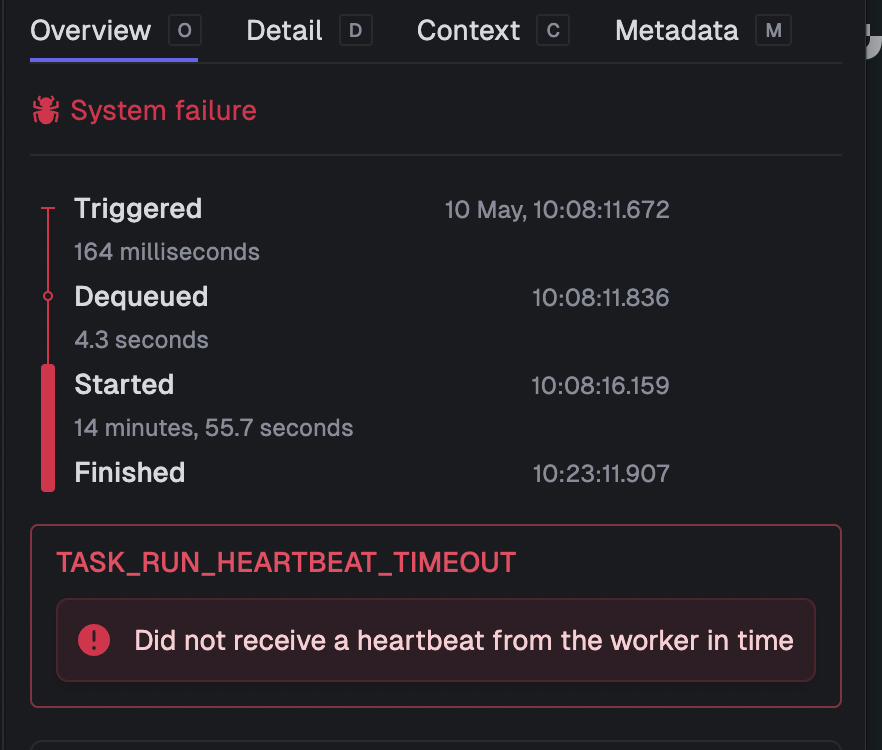
#Heartbeat timeout
1 messages · Page 1 of 1 (latest)
 digital crater
 jaunty mulchBOT
Hi @digital crater. I'm kapa.ai, your friendly support bot. I will try to answer your question by searching through the knowledge base. :wave:
I understand you're encountering a TASK_RUN_HEARTBEAT_TIMEOUT error with your CPU-intensive 3D workflows after about 15 minutes, despite setting a max duration of 2 hours.
Your assessment is correct - this is likely happening because your CPU-intensive computation is blocking the main thread, which prevents Trigger.dev from sending heartbeat signals to its task manager.
Possible Solutions
1. Use the Checkpoint-Resume System
Trigger.dev has a Checkpoint-Resume System that allows tasks to pause, checkpoint their state, and resume seamlessly. This is ideal for long-running tasks:
import { task, wait } from "@trigger.dev/sdk/v3";

export const longRunningTask = task({
  id: "long-running-task",
  maxDuration: 7200, // 2 hours in seconds
  run: async () => {
    // Break your computation into smaller chunks
    for (let i = 0; i < totalChunks; i++) {
      // Process one chunk of your computation
      processChunk(i);

      // Checkpoint after each chunk (even a short wait will allow heartbeat to happen)
      await wait.for({ seconds: 1 });
    }

    return results;
  },
});
The Checkpoint-Resume System allows your task to periodically yield control back to Trigger.dev, which can then send the necessary heartbeat signals.
2. Split into Subtasks
Another approach is to break your computation into subtasks:
import { task } from "@trigger.dev/sdk/v3";

export const parentTask = task({
  id: "parent-task",
  run: async (payload) => {
    // Split computation into smaller subtasks
    const result1 = await computeSubtask.triggerAndWait({ part: 1, ...payload });
    const result2 = await computeSubtask.triggerAndWait({ part: 2, ...payload });

    return combineResults(result1, result2);
  },
});export const computeSubtask = task({
id: "compute-subtask",
run: async (payload) => {
// Run a portion of your computation
return computePart(payload.part, payload);
},
});
When using `triggerAndWait`, the parent task is checkpointed and doesn't count toward compute usage while waiting, as mentioned in the [Wait documentation](<https://trigger.dev/docs/wait#page-title>).

### 3. Configure a Larger Machine

If your computation requires more resources, you can configure a larger machine:

```javascript
export const heavyComputationTask = task({
  id: "heavy-computation",
  machine: "large-1x", // 4 vCPU, 8 GB RAM
  run: async (payload) => {
    // Your computation here
  },
});
Trigger.dev offers various machine configurations that might better suit your computational needs.
4. Self-Hosting with Checkpoint Support
If you're self-hosting Trigger.dev, you might want to enable checkpoint support, which allows for saving the state of a running container and restoring it later. This is particularly useful for long-running tasks. See the checkpoint support documentation for setup instructions.
Recommendation
For your specific use case with 30-40 minute synchronous computations, I recommend implementing a combination of approaches 1 and 3:
- Use a larger machine configuration to provide more computational resources
- Periodically yield control using small waits (even 1 second) to allow heartbeats to occur
This should allow your long-running computation to complete without timeout errors while maintaining the synchronous nature of your algorithm.
Note: you can ask me a follow up question by @ mentioning me again :speech_balloon:
@digital crater Kapa.ai is still learning and improving, please let me know how I did by reacting below.
digital crater
What if we do not have control over the computation its a 3rd library running a synchronous wasm algorithm, we can't just slip a wait inside it. Is there an option to increase the heartbeat timeout on certain tasks?
 spice sierra
You could try using a worker thread. Because worker threads just load a JS file using a string path you need to make sure you add it to additionalFiles otherwise it won't be included in the bundle. https://trigger.dev/docs/config/extensions/additionalFiles#additional-files

Trigger.dev
Use the additionalFiles build extension to copy additional files to the build directory