#Hi How can I import a mask? if so how?
1 messages · Page 1 of 1 (latest)
 uncut kayak
Every terrain mat needs its own surface mask for the import, so a greyscale image 8-Bit png
So the mask you have is from another project? Maybe A3 or something?
 gritty coyote
uncut kayak
Every terrain mat needs its own surface mask for the import, so a greyscale imag...
gritty coyote
uncut kayak
Every terrain mat needs its own surface mask for the import, so a greyscale imag...
yes from Dayz
uncut kayak
So firt I think you should extract every color into a separate black/white file. Maybe a little difficult if you have blending between the colors
Then in the terrain tool -> Paint tab: In the bottom you can set a path for your export / import folder. This can also be in the same directory as your project but doesn`t have to be
gritty coyote
Thank you for your help
uncut kayak
well its not quite that easy xD Now you have to get the exact dimensions for your surface masks.
In the terrain tool -> Info&Diag take a look at your surface map total size:
https://i.postimg.cc/CLsfxJ1t/screenshot-148.png
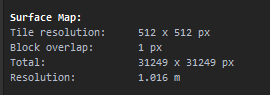

for me it`s 31249x31249 pixel for you maybe different. Thats the dimensions for your surface maps if you wanna go full resolution
if you have to scale bottom left is 0,0 so align to bottom left and then scale up and down from the top right corner