#arma3_gui
1 messages · Page 9 of 1
 nocturne cave
 opaque lynx
I am trying to add items to a list box. I can do it through the debugger, but attempts to do so through the parent dialog onLoad event do not work. what might I be doing wrong? my logging indicates that there are indeed items that should be added to the LB.
 ocean hazel
I don't really know if the child controls are already created by engine when onLoad gets called. Try to see if the listbox control is null
opaque lynx
I'm testing for isNull, it seems they are there. or is there a better event I can respond to in order to do that?
ocean hazel
generally if you just createDialog/createDisplay and then instantly start adding data to listbox, it should work
it's really weird, if the control is there, then it must work 🤔
opaque lynx
I'm not seeing one, https://community.bistudio.com/wiki/User_Interface_Event_Handlers, if it isn't onLoad I do not know which one it is. I put some systemChat messages in, and the controls are there.
ocean hazel
Allright, maybe you could show some code?
opaque lynx
I persuaded it... on the LB onLoad rather than the dialog onLoad.
question re: class inherited properties... is there an enable = <bool>; or enabled = <bool>; property?
ocean hazel
I am not sure what you mean. Do you mean if GUI config classes have an enabled property which would enable/disable the control on load?
opaque lynx
correct. I can respond easy enough on the event itself, but I'd rather do it in the class out of the gate if I could.
saves me a few less event handlers.
ocean hazel
I don't see this at the wiki page so probably no
 tranquil iron
there are no bools at all in config :kappa:
 deep loom
🤖 0⃣ 1⃣
 mental trench
You can write bool in config
tranquil iron
"bool"
ocean hazel
duh just use the lovely preprocessor #define TRUE 1
opaque lynx
concerning the onLBSelChanged event, https://community.bistudio.com/wiki/User_Interface_Event_Handlers#onLBSelChanged ... what is the form for LB_MULTI style? based on empirical evidence, it clearly is not params ["_control", "_selectedIndex"]; ... when I say params ["_ctrl"]; lbSelection _ctrl; in my event handler, I get a message Error lbselection: Type Array, expected Control.
ocean hazel
Probably it's faster to dump _this into diag_log and see what is being passed to this event handler
Than to wait till someone answers the question here...
opaque lynx
_this passed from the .hpp is indeed the control.
and the lbselection message is not mine. that came from within lbselection.
hmm, I wonder if that has to do with A3 parameters engine? does it see one value and try to jam the two callback arguments in there? operating on that hypothesis ...
appears that maybe that is the case.
the form appears to be different from single selection to LB_MULTI, these are the parameters I am receiving... _ctrl: [Control #7212,0], _1:
the _this happening in my .hpp class, onLBSelChanged = "[_this, _selectedIndex] call KP_liberation_dialog_shareLoadouts_unitsListBox_onLBSelChanged"; appears different. perhaps in the multi use case, they forgot to deconstruct the tuple?
hmm, that's interesting, took it out of LB_MULTI, the form appears to be the same. the tuple is passed as _this.
so if I wanted to break that out, I would need to do something like this, onLBSelChanged = "[_this select 0, _this select 1] call KP_liberation_dialog_shareLoadouts_unitsListBox_onLBSelChanged";
ocean hazel
onLBSelChanged = "[_this, _selectedIndex] call KP_liberation_dialog_shareLoadouts_unitsListBox_onLBSelChanged"```
when this event handler gets called, it gets called without any context (that is, any other local variables) except for _this, which is an array of the form `[_control, _selectedindex]`.
You, however, tell arma to pass _selectedIndex local variable straight away, before it is created anywhereso instead you should do like
onLBSelChanged = "_this call ...";
opaque lynx
ah, I see the difference... so the tuple is the call parameters. thanks for noticing that.
mental trench
duh just use the lovely preprocessor
#define TRUE 1
No need you can write
property = true; or false
It then depends on what is expected of this property to be
There is no getBool for scripts so you can’t directly convert property into true or false, but getNumber will give you 1 and 0.
opaque lynx
question about the timing of the onLBSelChanged event... it feels to me more like a onLBSelChanging event than a onLBSelChanged, seems to me that the state of the selection is lagging behind the actual event.
I've tried several ways to ask about the selection, from the _selectedIndex coupled with lbIsSelected, lbSelection, etc, and the state is a step behind the actual event.
which to me makes it kind of futile to respond with button enabling control, because you cannot depend upon the state being current.
has anyone experienced this? or can anyone suggest any viable workarounds?
additionally, given that this is the case, all you are provided is [_control, _selectedIndex], you cannot determine what the actual state of the selection is, whether the index was selected or unselected, for example.
opaque lynx
ah I see. I'll try that thanks @ruby swallow
so if I understand correctly, spawn adds the handler to the scheduler, so we have state refreshed and waiting when the handler finally hits the ground running?
would'ya look at that. predictable behavior! sweet. 😄
ocean hazel
spawn adds the code to scheduler, yes, and the code will most likely run at the next frame, or after two frames, or three, or three hundred... depending on how much loaded it is
You can replace spawn with cba wait and execute or its analogues when you make it work with spawn
Then it will be totally predictable one frame delay
opaque lynx
I'll check that out, thank you.
ocean hazel
How is arma text scaled? If I set text size to 1, does it make all character images have size of 1 in abs units, or is it different?
 barren apex
sizeEx is the size relative the control where the text is put iirc
ocean hazel
If all text size was relative, then each control would have a different text size... makes no sense
 astral narwhal
Im having some issues with a screen display i have created. on my screen and most others it is up against the right side of the screen as intended but for people with really wide screens we have issues. below are links to the code for display and the two images for how its supposed to look and how it looks on really wide screens. I really could use some help on this.
Code
https://pastebin.com/6g0HmPWr
How it should look
https://imgur.com/a/S2n2kiz
How wrong it goes
https://imgur.com/a/haOqIV4
barren apex
Look at https://community.bistudio.com/wiki/SafeZone. Here you're doing 0.6 times the screen width + the screen left border horizontal coords (0.6 * safeZoneW + safeZoneX) but you should instead do the screen left border horizontal coords + the screen width (safeZoneX + safeZoneW) and substract your controls' width so it will always be in the bottom-right corner.
astral narwhal
@barren apex thanks im going to try that now.
astral narwhal
@barren apex that worked. thanks mate
 agile sinew
is pixel grid system/can be done in screen percentage?
 quiet arrow
@astral narwhal Your width is set in absolut values, that's why I doesn't scale with that 21:9 ratio.
 vernal quest
is possible to disable scroll on controls group?
barren apex
 stoic delta
is it possible to modify the nature of how autoscroll works? Instead of the control group fading and returning to top, I'd rather just have it immediately return to top w/o fading in/out
 fickle atlas
when you select a new item in a combo box does it fire the 'action' line of the comboBox?
ocean hazel
I don't really know but you can add a great deal of event handlers through ctrlAddEventHandler
fickle atlas
okay I'll look into it thanks
ocean hazel
Look at the bottom example
I think you need this one:
onLBSelChanged = "systemChat str ['onLBSelChanged',_this]; false";
fickle atlas
yeah was just reading that
fickle atlas
do I have to restart the entire mission for the dialog changes to take hold?
ocean hazel
if you need the game to re-read the mission config, yes
actually you need to go back to editor
then start it again
AFAIK a restart doesn't make it re-read the config
...that's why I like to configure dialogs through SQF, because you can recompile the code while the mission is running
fickle atlas
Ah I see
ocean hazel
so instead of doing it in config, you can run a script when dialog gets opened, in that script you can add event handlers through ctrlAddEventHandler
fickle atlas
yeah that sounds like a great idea - antistasi takes a bit to load up each time
 ornate thistle
My dialog's default button is flashing, and I can see no refernce to such behaviour in the Biki, can anyone point me in the direction of making my buttons NOT flash ? 🙂
mental trench
Let’s bring that crystal ball 🔮
ocean hazel
You mean it is changing color periodically?
You have not set up all colors of it I suppose
https://community.bistudio.com/wiki/DialogControls-Buttons
Check colorFocused and colorBackground
 pale jetty
How do I make it so I can move in a dialog but still be able to click the dialog?
I am trying to add more options to the eg spectator camera so I want a display over it hiding the normal display of eg spectator cam
But I can only move my camera with scroll and not wasd
 restive girder
you cant
all those camera dislpays have actual script to let you move camera
i guess you could call whatever the normal spectator thing uses
pale jetty
I've seen it on a video before, not sure what they used for camera if it was splendid or eg spectator, but they had a moving camera with a custom dialog that has a player list etc.
(no mods)
Any idea how they did it?
ornate thistle
Sparker. After some trial and error it has something to do with the background active and focused. I am getting a "blinking" effect which is not what I want at all.
ocean hazel
If you set the same colors, you will not get blinking
pale jetty
I changed my code and instead of using an existing free cam I used this to create the free cam. (works fine)
        _camera = "CamCurator" camCreate eyePos player;
        _camera camCommand "maxPitch 89";
        _camera camCommand "minPitch -89";
        _camera camCommand "speedDefault 0.1";
        _camera camCommand "speedMax 2";
        _camera camCommand "ceilingHeight 5000";
        _camera camCommand "atl off";
        _camera camCommand "surfaceSpeed off";
        _camera CameraEffect ["INTERNAL","Back"];
        cameraEffectEnableHUD true;
Anyways, I can still not control wasd, I am guessing the dialog I made is blocking it somehow.
How can I solve this?
pale jetty
Fixed this by making camera controls from scratch, still don't know how eg spectator did it. Haven't found any code of their movement not even the splendid camera one. Been looking for it for months.
mental trench
still don't know how eg spectator did it
If only one could see BIS source files... oh wait
pale jetty
I did find the eg spectator files
Didn't find anything about their movement
Haven't found any code of their movement
pale jetty
How do I set individual colors for my Toolbox (type 6)? I have 5 Images and I want specific colors for them.
stoic delta
can an R2T Texture be applied to a Static control with ST_PICTURE as the style? I can't seem to get it working in my script
mental trench
It can
stoic delta
I know ice done it in the past but for some reason it won't work for me now
I'll send the dialog control class and script when i get a chance
stoic delta
here is the class:
                class helmetCam_r2t_st : RscPicture
                {
                    idc = 2306;
                    x = 0.74375;
                    y = 0.556;
                    w = safeZoneW * 0.2;
                    h = safeZoneH * 0.2;
                    text = "#(argb,512,512,1)r2t(helmetCam_r2t,1.0)";
                    //text = "#(argb,8,8,3)color(0.6,0.6,0.6,0.5)";
                    tooltip = "Helmet Cam Feed";
                    style = ST_PICTURE;
                };```
and here is the script
```sqf
if (isNull _unit) exitWith {
    if (!isNull cain_helmet_camera_object) then {
        cain_helmet_camera_object cameraEffect ["Terminate", "BACK", "helmetCam_r2t"];
        camDestroy cain_helmet_camera_object;
    };
};

//Create camera if not present
if (isNull cain_helmet_camera_object) then {
    cain_helmet_camera_object = "camera" camCreate [0,0,500];
    cain_helmet_camera_object cameraEffect ["Internal", "BACK", "helmetCam_r2t"];
};
You variable is undefined, so nothing will work. You need to execute cain_helmet_camera_object = objNull; somewhere before you try anything
vernal quest
Hello! Is possible to hide mouse cursor in dialog?
 vital warren
That looks good @silver nacelle
 silver nacelle
Thanks @vital warren
vernal quest
@silver nacelle looks great
 smoky hatch
How do I setup the scriptPath for BIS_fnc_initDisplay? The only reference to CfgScriptPaths on the whole wiki is on the wiki page for BIS_fnc_initDisplay
I also couldn't find any results on the forum for CfgScriptPaths
 idle radish
path is either in the Engines internal folder structure or the mission folder acts as the root folder you can run scripts from
what is it that you are trying to do?
smoky hatch
Im modifying the splendid camera and running my own function to limit where it can go
Going to recreate the arma 2 construction interface
Here is the original display class for the camera:
    scriptPath = "GUI";
    onLoad = "[""onLoad"",_this,""RscDisplayCamera"",'GUI'] call     (uinamespace getvariable 'BIS_fnc_initDisplay')";
onUnload = "[""onUnload"",_this,""RscDisplayCamera"",'GUI'] call (uinamespace getvariable 'BIS_fnc_initDisplay')";```So I'm guessing scriptname is literally just the sqf file name?
GUI would be the folder its contained in
Or would scriptname be the function name?
smoky hatch
aha, I found it. Scriptname is the name of the file, path is the variable defined in CfgScriptPaths. in the ui_f.pbo
ocean hazel
I'm lost!
What is the correct style of a static text which can be selected but can't be edited?
Oh nvm it's not style, it's a canModify property of an edit-type control
 hollow rose
When creating a custom gui, through the ingame gui editor: Elements position gets defined as "somevalue * GUI_GRID_....". When trying to show the UI ingame, my display gets created, but I cant see any of the elements. Any thoughts?
Changing the position to use "somevalue * safezone... + safezone..." makes it show up
barren apex
You need to define GUI_GRID_WHATEVER with a macro iirc
hollow rose
Great, I'll try to find out what it should be defined as 🙂
Found it! Didnt find a shortcut to export it directly, but using Ctrl + S -> select "Grid Macros" as format -> Paste clipboard into defines.
barren apex
👍
agile sinew
how do you newline again in a standard text element, or you need a different control / structured text for that?
ocean hazel
In static text you mean?
It must have a multiline style
And lineSpacing property IIRC
Example
			idc = -1;
			x = 0.00000066;
			y = 0.05000038;
			w = __WIDTH;
			h = 0.08;
			style = 0+16+512;
			text = "Enemy radio cryptokey was found!";
			font = "PuristaMedium";
			sizeEx = 0.04;
lineSpacing = 1;```Then newline is the usual "\n" in string
Or if it doesn't work then
_endl = toString [13,10];
@agile sinew
ocean hazel
Yes, plus the noframe style(or how is it called), otherwise it has this weird frame around it
 polar bronze
Can anybody teach me whats different between GUI and IGUI?
ocean hazel
GUI is a graphical user interface
What is IGUI then?
quiet arrow
interactive grafically user interface
quiet arrow
so a static text would be a GUI and a button and IGUI
that's how I define the difference
but then again, it doesn't matter in arma
ocean hazel
One assumes user to push something, another one doesn't? 🤷
agile sinew
@ocean hazel do you have the noframe part at hand please
ocean hazel
sure 🤔
ahh the wiki is ded
Should be this thing #define ST_NO_RECT 0x200
yes, or 512 style as I mentioned above, should work, doesn't it? does it still show the annoying frame?
so should be
style = 16 + 512; (or its equivalent with defines)
style = ST_MULTI + ST_NO_RECT;
agile sinew
tx
polar bronze
@quiet arrow thank you for the answer
Was wondering where i can find handle for chemical detectors screen and spectrum device's screen.
 empty mountain
for ctrlCreate is there a way to create the control in the background controlGroup, I noticed you can input a controlgroup but not sure how to put it into the default background one
reason i'm trying to do this is I have some controls already defined in the display class, and I don't want these new controls created via ctrlCreate to display over it
empty mountain
got it working creating a dummy control group that i add to with ctrlCreate
empty mountain
although if anyone has a better way of doing it ill be glad to hear it because doing it that way screws up all the positions of the UI elements 😦
ocean hazel
You mean it screws up all the positions of the elements you add into the dummy control group you've mentioned? Positions in the group are relative to group's origin, not display's origin. Therefore if you align the position of the group with display origin, the coordinate systems will be aligned. @empty mountain
empty mountain
Yeah, I did that but I got some weirdness where elements were getting cut off despite the group/display taking up the entire screen
ocean hazel
Cut off with the group switching on its scroll sliders?
empty mountain
No I used the control group without sliders but maybe
this is how it looked: https://cdn.discordapp.com/attachments/515032784549445632/640775720783839252/unknown.png
and how its actually meant to look(after i did another workaround) https://cdn.discordapp.com/attachments/515032784549445632/640790518527426570/unknown.png
ocean hazel
Ah yes I understand, if group is positioned at (0, 0), it's actually not the top-left of the screen, but top-left of the 'viewport', that's why :(
empty mountain
like the first one was x = 0, y = 0, w = safezonew, h = safezoneh etc
ohhh
is there a way around it?
ocean hazel
Sure
empty mountain
like it doesnt matter now as I just made dummy controls for the two controls with the layering issue and that dealt with it
but for future reference
ocean hazel
X = safezonex; y = safezoney; will put the group in the top-left corner.
But then you will have to take into account this offset in all the child controls of course.
empty mountain
mmm yeah when I did that i got this : https://cdn.discordapp.com/attachments/515032784549445632/640775238342279199/unknown.png
but I didnt try offsetting the child controls
I thought I was just missing something with the control group
ocean hazel
Well, if you tried, then it would work.
empty mountain
would it be as simple as adding/subtracting safezoneX etc from the child controls positions?
ocean hazel
Yeah
vernal quest
is any event handlers for rscEdit ctrlText changed?
ocean hazel
If not, you can compare previous and current text on each frame
Another alternative is to add keyboard event handlers
vernal quest
@ocean hazel @barren apex thank you! I will try that method
vernal quest
onChar is working, but have problems
i take ctrlText from edit and add _charCode
but when i use Backspace button to replace - script don't working
and taking this
i think the best solution on this case - just run script with onMouseMoving on with cycle
ocean hazel
Why not on each frame then?
vernal quest
i don't like onEachFrame 😄 when use that - getting low fps
ah, get it working, i think) just added event for Backspace
on edit control
but have another question 🙂
ocean hazel
Not rly if it's only active when your dlg is open, gettext and compare strings is less than 100 microseconds I believe.
Anyway I think that if you are having your own dialog, you should rather use the key down EH. I was thinking it would be getting too complicated to check if for instance the edit box is in focus or user is pressing the printable characters, but probably you can ignore these checks and just run your stuff regardless of these checks
vernal quest
as i understand - onChar is event handler special for rscEdit when is not focused - script it not working
barren apex
Use keyDown/Up to detect backspace then
 cosmic glade
https://i.imgur.com/XcUgWxG.png does anyone know how to create this kind of element? I want to use it for my module's attributes
 warped karma
can be done with a ControlsTable https://community.bistudio.com/wiki/DialogControls-ControlsTable
tranquil iron
Is there a way to trigger TreeView control filtering via script?
you can use idcSearch to a invisible Edit control and then via script change the text in that control to trigger a filter, but is there a scripted way without the seperate edit control?
I assume there simply is no way
quiet arrow
Not that I know of
warped karma
yep, I think there's no way to trigger it directly by script
but for me with bigger TreeTiew controls the idcSearch is pretty much unusable because it laggs/stops the whole arma exe
tranquil iron
Yeah thats my point. I want to fix that lag/freeze
warped karma
the rendering of the control itself is far from optimized, too
have a control with a few 1000s entries only slightly visible and I can hear my fans spinning up
quiet arrow
tree view control has alot of perf issues
ocean hazel
An edit box with lots of text slows down arma as well 🤷
Well, lots like... a hell lot, but still
tranquil iron
My focus is only making zeus usable without freezing for 5+ seconds everytime you wanna do whatever
If that means I have to optimize all treeviews, then so be it
agile sinew
make a new control type 😬
tranquil iron
someone be cray cray.
Custom control support is on my intercept todo list, but... I doubt that will ever happen
ocean hazel
Custom control which can stream pictures from outside of the game confirmed (not)
restive girder
I assume there simply is no way
Basically no
In my object placement mod the invisible control setting text filter with a delay is exactly what i do
even then with a lot of ptions in it its still just way too slow though
tranquil iron
bigger TreeTiew controls the idcSearch is pretty much unusable because it laggs/stops the whole arma exe
I think I have a fix for that, will be included in my zeus fix. Makes treeview filtering multithreaded
tranquil iron
And its done. Pushed into my Zeus caching mod.
It makes filtering for all top-level nodes in parallel. So if you only have one top level node it does nothing, but in Zeus where each faction has a node it works quite nicely.
restive girder
is than an intercept thing?
i probably should've just done my library searching in python.... seeing the library is loaded through python in the first place.
tranquil iron
no. Explicitly removed intercept dependency cuz I wanted it to be dependency less.
0 dependencies.
https://youtu.be/cV2S4qdXZtg Its this ridiculous.
Okey I forgot to write in the video which side is what, but its pretty obvious

Included in my ArmaZeusCache mod
tranquil iron
Yes! Exactly!
 burnt token
Awesome work Dedmen. It's a shame stuff like that has to be fixed by community.
mental trench
Is there a yt tutorial how to make guis for arma?
barren apex
 weary imp
That is not a yt tutorial though
barren apex
oh yeah right, but I think he edited his request
ocean hazel
I would say, there is no best way to make GUIs, best you can do to teach yourself is to get familiar with this page: https://community.bistudio.com/wiki/Dialog_Control
Then have a look at available types, and have a look at control API (all functions which start with ctrl, control, display, or have these words in them)
agile sinew
is there a way to make GUI the same size (elements and text) for all screen resolutions (excluding multi monitor setup) AND interface sizes?
so you have a button is 10% of screen (width and height, with text the same)
(not 100% precise but to keep the relation basically)
weary imp
Sure
barren apex
For same distance in % from the border:
(X * (getResolution select 0) / 1920) * safeZoneW + safeZoneX or something like that I think
weary imp
You can always scale control
barren apex
Did it like that actually: https://github.com/CoopR-Mod/CoopR-Mod/blob/fix/coopr-131/addons/core/coopr_gui_base.hpp#L23-L29
But this will not keep the ratio on the width and height but should be fairly easy to fix I guess
ocean hazel
0.1*safeZoneH is 10% of whole screen height
0.1*safeZoneW is 10% of whole screen width
you can set your text height as 0.04*safeZoneH and it will be the same size relative to screen height
@agile sinew
IF you want to try these numbers fast, try ADC (Arma Dialog Creator), it does rendering like in arma
agile sinew
thanks guys! to give some more context: from A2 days people recommended to use:
            x = "(7.5/100)    * SafeZoneW + SafeZoneX";
            y = "(7.5/100)    * SafeZoneH + SafeZoneY";
            w = "(85/100)    * SafeZoneW";
            h = "(85/100)    * SafeZoneH";```
to have this relative addressing with `sizeEx = "0.10 / (getResolution select 5)";` to scale textso with A3 the pixel grid stuff came up
however i was told that you cannot get UI elements and their text remain the same regardless of resolution and interface size
so size and positioning - most importantly in buttons, lists and other more complex UI controls
ive seen that A3 uses a combination of getResolution parameter for example for text size
to be very specific: https://i.gyazo.com/f45ad16f9c6e82f622d0e5d99d2346d5.png

can you make this look exactly/nearly the same - no matter RES/x-y relation+overall screen space and IGUI size (leaving multi monitor or other special cases out of the picture)
barren apex
I guess you can, you'll still have to deform some element if the aspect ratio of the screen changes but you can chose wich one you want to deform or not (some example: https://imgur.com/a/0lx2PQI)
For text there's surely a way to keep it the same
agile sinew
yeah, no way around that (unless you use the absolute pixel (grid approach)) from what i understand
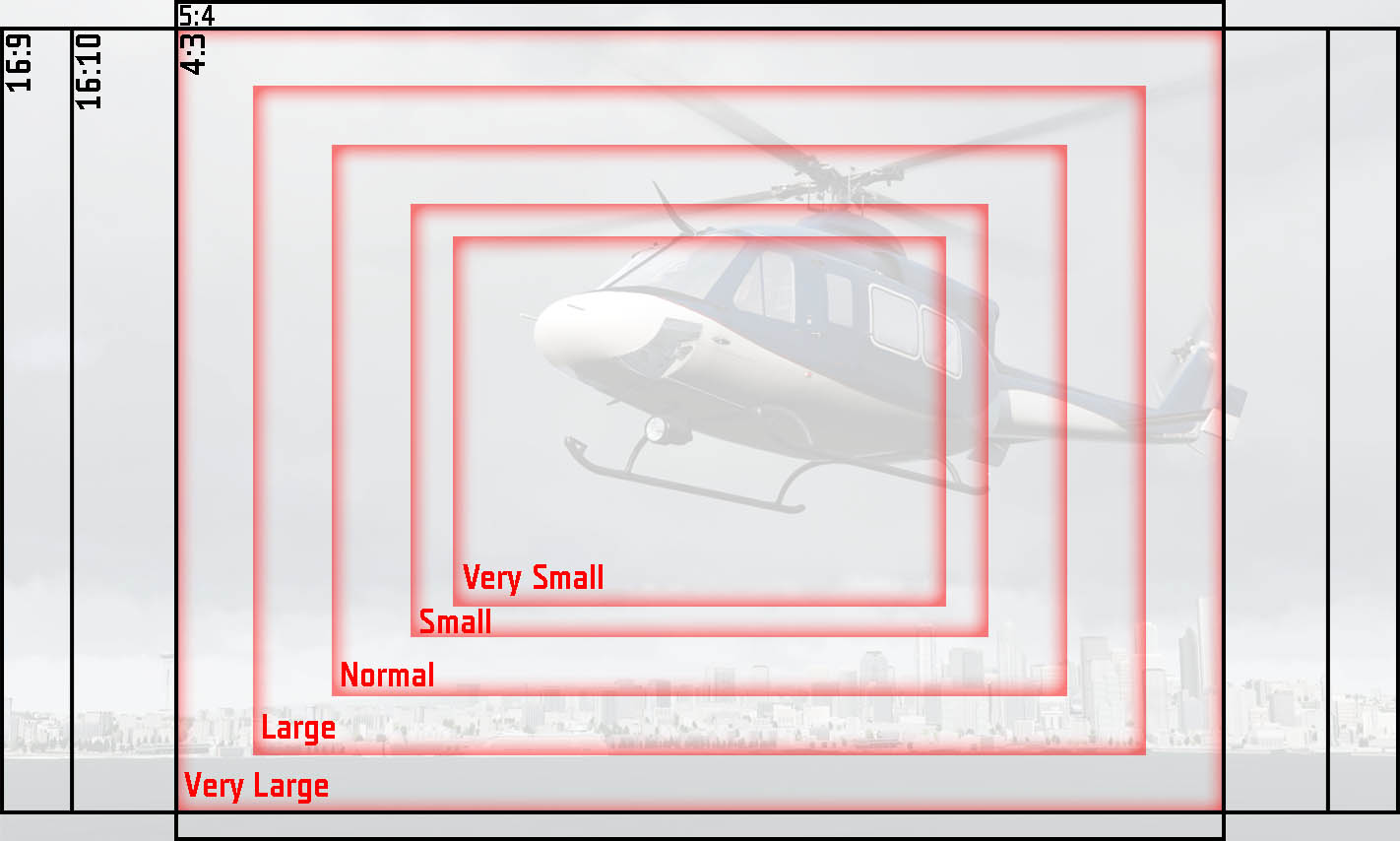
so you either get some stretching, or you leave a bit free area on the sides
barren apex
Definitely possible: https://imgur.com/a/70fsP86 (screenshot taken in arma)
A bit fastidious but at least, everything looks the same (or almost) on all screen
agile sinew
well make sure to show also text and use different elements like buttons, list, control groups, etc
their positioning of text is the tricky thing
barren apex
Yeah but I haven't figured out how to correctly convert text size yet Text is easy in fact, same way as you would to to set the height of your control
barren apex
Inside controlsGroup too since nothing changes except the position referent. Text seems to work too, in list at least, but sizeEx is sizeEx everywhere so no reasons for it to not work.
Here's the test GUI with a list and a button with text inside (some control are not aligned on resize but that's just because I didn't make them do that, take example on joinButton if you want): https://pastebin.com/ACQf9tND
agile sinew
preface: my last testing is from A2:OA days
the reason i am asking for these specifics and actually tested is that back then some of these controls didnt "center" properly (could have be just me too ofc)
so its not about theory, or what can be done, yet if it actually works or not
ocean hazel
Do you mean they might not align perfectly to pixels?
Like some are 1px wider, some have 1px gap in between them?
agile sinew
no not that small details
barren apex
No, you cannot make them looks exactly the same on all screen, you'll either have some free space or some stretching. What you can do is chose what will be stretched and how to make them look nearly the same.
I don't know what you mean by "not centering correctly" but if you say that a control should be 50% of the screen width and start at 25% of the screen, it will always do, maybe 1px of but that's all
agile sinew
as said aware that exactly same is not possible. its about the text positioning what i am asking someone to confirm
control size is also not the issue. that all works since A2, but as said back then certain controls acted weird with text positioning in different IGUI size - screen resolution combos
agile sinew
anyone has insights how to do the nearly 1:1 GUI regardless of screen res/ratio and IGUI/interface size setting?
ocean hazel
You mean... the problem you were describing above?
Maybe you can describe what is not working how you want it to?
weary imp
1:1 in relation to what, screen? Cant do that as screen could be different aspect and event triple head
you can absolutely do in relation to viewport
as it is always 3:4
but viewport depends on UI size
so the fonts depend on teh size of viewport
so your question is quite ambiguous
Maybe you can describe what is not working how you want it to?
I'll drink to that!
agile sinew
basically using getResolution in specific ways one should be able to adjust interface to all combos to be basically the same
yet it seems no one actually knows what it is
BI itself seems to use also different setups
barren apex
Make a 1:1 dialog on all screen is impossible, if the Aspect ratio of the end user differs from the aspect ratio on which the dialog was made, the element will be deformed (but not their position). You can do some math and then decide how you want your element to resize and place themselves.
agile sinew
as said "nearly"
again not 1:1
_resX = getResolution select 0;
_resY = getResolution select 1;
_currentResolution = getresolution select 1;
_coefRes = ((round ((getResolution select 1) / 180)) / 4) max 1;
_currentAspect = getResolution select 4;
_coefUIScale = getResolution select 5;//_currentUISIze

_pxW = 1 / (getResolution select 2);
_xMod = (getResolution select 2) * 0.00001;
_pxH = 1 / (getResolution select 3);
(_this / (getResolution # 5)) * 0.7
case ((getresolution select 5) > 0.8): {}; //--- Exit on Large and Very Large UI sizes, there's no space on the screen

///

rowHeight = "DDD * (1 / (getResolution select 3)) * pixelGrid * 0.5";

size = "DDD * (1 / (getResolution select 3)) * pixelGrid * 0.5";

sizeEx = "DDD * (1 / (getResolution select 3)) * pixelGrid * 0.5";
sizeEX = "DDD * (1 / (getResolution select 3)) * pixelGrid * 0.5";

sizeExUnit = "DDD * (1 / (getResolution select 3)) * pixelGrid * 0.5";

///

x = "((getResolution select 2) * 0.5 * pixelW)";
x = "((getResolution select 2) * 0.5 * pixelW) - (DDD) * (pixelW * pixelGrid * 0.50)";
x = "((getResolution select 2) * 0.5 * pixelW) + (DDD) * (pixelW * pixelGrid * 0.50)";
x = "((getResolution select 2) * 0.5 * pixelW) + (DDD) * (pixelW * pixelGrid * 0.50) - ((DDD) * (pixelW * pixelGrid * 0.50))";```this is BI usage in A3
barren apex
/* CHANGE THOSE 2 BELOW IF YOU'RE DESIGNING YOUR GUIS IN ANOTHER SCREEN FORMAT */
#define ORIGINAL_SCREEN_WIDTH   1920
#define ORIGINAL_SCREEN_HEIGHT  1080

/* HORIZONTAL ADJUSTEMENT MACROS */
#define X_POS(X) (((X * (getResolution select 0)) / ORIGINAL_SCREEN_WIDTH) / (getResolution select 0))
#define X_FROM_LEFT(X,W,H) (X_POS(X) + WIDTH(W) - WIDTH_FROM_HEIGHT(W,H))
#define WIDTH(W) (((W * (getResolution select 0)) / ORIGINAL_SCREEN_WIDTH) / (getResolution select 0))
#define WIDTH_FROM_HEIGHT(W,H) (((W / H) * ((H / ORIGINAL_SCREEN_HEIGHT) * (getResolution select 1))) / (getResolution select 0))

/* VERTICAL ADJUSTEMENT MACROS */
#define Y_POS(Y) (((Y * (getResolution select 1)) / ORIGINAL_SCREEN_HEIGHT) / (getResolution select 1))
#define Y_FROM_BOTTOM(X,Y,W,H) (Y_POS(Y) + HEIGHT(H) - HEIGHT_FROM_WIDTH(W,H))
#define HEIGHT(H) (((H * (getResolution select 1)) / ORIGINAL_SCREEN_HEIGHT) / (getResolution select 1))
#define HEIGHT_FROM_WIDTH(W,H) ((H / W) * ((W / ORIGINAL_SCREEN_WIDTH) * (getResolution select 0))) / (getResolution select 1)
That's how I did it, it takes pixel as input because it's easier for me but as long as I use the correct macro for each element, the UI will basically look the same. Maybe not the best solution but it works great so far
And for text is use the same command that I used to define the height of the element but I change the Pixel height
And I may have forgot some steps in those but cannot get my hand on my latest iteration
agile sinew
this is what AWAR has been using: https://pastebin.ubuntu.com/p/tWG924s8xz/
@barren apex thanks. for my understanding: with these you hardcode to a specific screen ratio, no?
#define ORIGINAL_SCREEN_WIDTH 1920
#define ORIGINAL_SCREEN_HEIGHT 1080
barren apex
Yep, the dimensions in which the dialog was made
And the other macros are just a bunch of Rule of 3 (idk how we call that in English ¯_(ツ)_/¯) to get how much of the new screen in percent this represents
weary imp
you have to deal in percentages, design your UI where each element size is a percentage of. height of the element is % of screen height, width is a % of screen width. only then your UI will fill whole screen and will align to aspect ratio. Of course you will have to show it only on the middle screen of the triple head
will suck if you have a strict circle or square to display
barren apex
Multiplying by (3 / 4) or (4 / 3) could work but then you may run into other issues
agile sinew
is there a way to adjust/test the ui scale withoug game restart?
barren apex
Windowed mod and then change the res in the video settings
agile sinew
sorry i think you misunderstood - the ui scale i asked
not screen res/ratio
// SizeEx = "(((((safezoneW / safezoneH) min 1.2) / 1.2) / 25) * 1)";
// sizeEx = "5.5 * (1 / (getResolution select 3)) * pixelGrid * 0.5";
sizeEx = "0.04 / (getResolution select 5)";
so i tried these three, the first two are from BI+A3, 3rd from A2 (BI?)
only the last keeps the text size same regardless of ui scale/IGUI size - which makes sense as getRes 5 returns the factor
weary imp
What Heyoxe said only change UI scale
agile sinew
can one call a function from these fields?
like to have not as verbose and repeating code?
barren apex
I think yes but doesn't hurt to try
agile sinew
idea is to have a switch case handling for aspect ratio to normalize any setup to an unified modifier
also any clue if for config defined (rather than mission specific) is "getResolution select X" evaluated only once at game start, or for every mission loading
barren apex
Every time you open the dialog i think
Every time you run the command to be more precise
agile sinew
hm will do some tests tomorrow
class CA_BackgroundWeaponTitle: RscText
{
    colorBackground[] = {"(profilenamespace getvariable ['IGUI_BCG_RGB_R',0])","(profilenamespace getvariable ['IGUI_BCG_RGB_G',1])","(profilenamespace getvariable ['IGUI_BCG_RGB_B',1])","(profilenamespace getvariable ['IGUI_BCG_RGB_A',0.8])"};
    idc = 1001;
    x = "0 * (((safezoneW / safezoneH) min 1.2) / 40)";
    y = "0 * ((((safezoneW / safezoneH) min 1.2) / 1.2) / 25)";
    w = "10 * (((safezoneW / safezoneH) min 1.2) / 40)";
    h = "1 * ((((safezoneW / safezoneH) min 1.2) / 1.2) / 25)";
    sizeEx = "0.8 * ((((safezoneW / safezoneH) min 1.2) / 1.2) / 25)";
};```does someone understand the BI system here?
safezoneW / safezoneH gives you the screen aspect ratio, the min 1.2 is probably a limiter for 3 monitor setup or 16/10
the first number for positioning and width/eight - but in what scale/reference
like 40/25 grid - how does his system work/translate to designing dialogs?
weary imp
These expressions are the result of preprocessed macros, so it might be difficult to see why when unfolded
agile sinew
well i have the macros, but these arent telling either
 granite berry
hi, how can I add a new "item slot" to the inventory which can hold one item?
similar to the radio/map slot but all types of items are allowed in it
agile sinew
@granite berry wrong channel - check #arma3_config
sizeEx = X * (getResolution select 4) / (getResolution select 5);
is what we have atm. seems to work across all screen aspect ratios and interface sizes/ui scales

 placid osprey
hey, i know that pic 😂
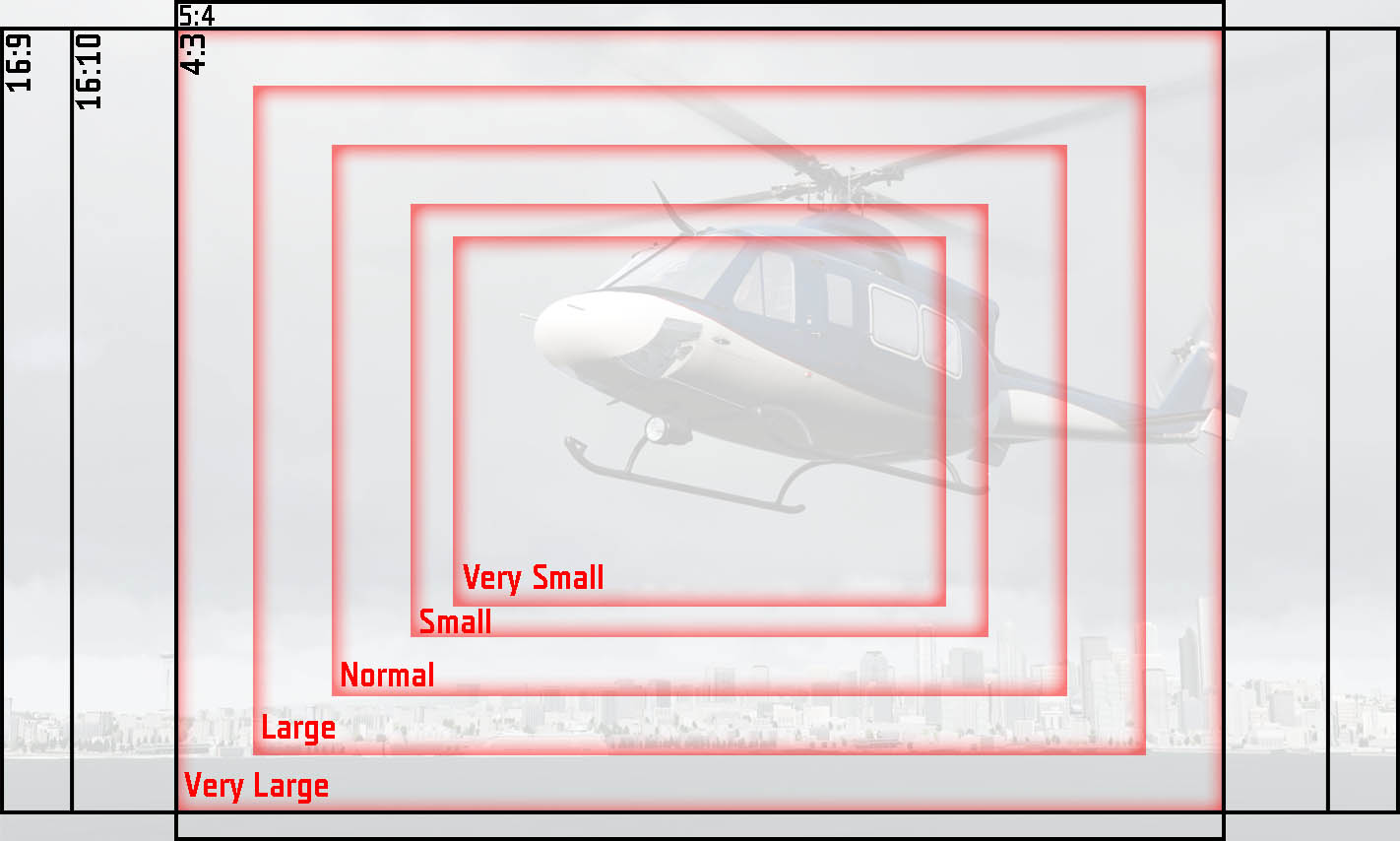
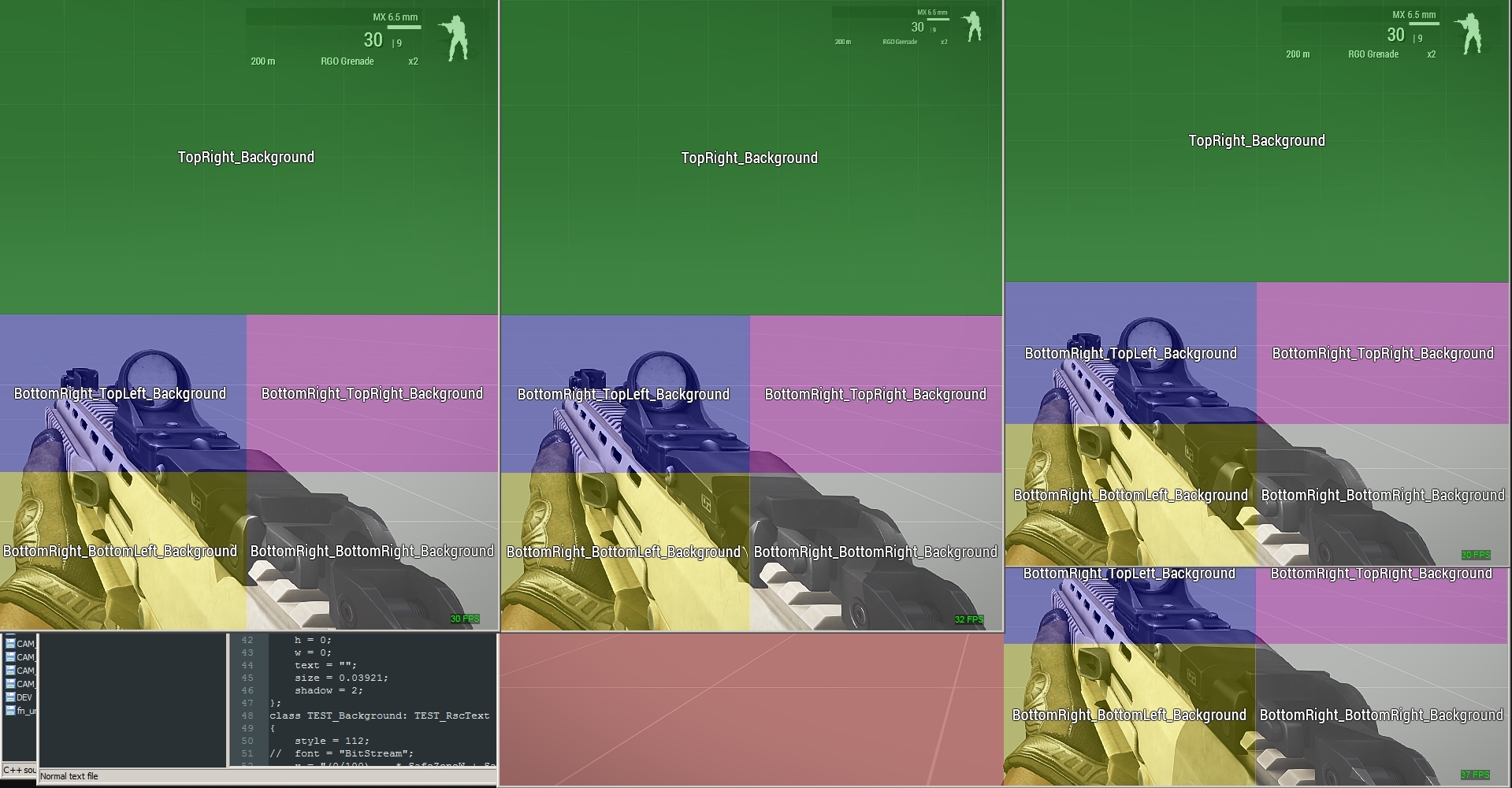
And yeah, this worked in Windowed mode and different Resolutions+InterfaceSizes.
- Left/Mid: 16:10 - InterfaceSize: normal + very small
- Right: 16:9 - InterfaceSize: normal+very small``` short grail
Hey so I wanna start into GUI making for my mission. To start off I have a script that will check the status of 5 helicopters, The Status are "KIA", "BUSY", and "AVAILABLE". I do I get this script to relate with the interface?
Here is the script in question ```sqf
_Area = Getpos CentreMass;
_HeliAll = nearestObjects [_Area, ["RHS_UH60M_d"],6000,true];
{
_landPos = (getPosATL _x select 2);
_SeaPos = (getPosASL _x select 2);
_HeliName = name _x;
_Status = "unknown";
_EngineStat = isEngineOn _x;
if ((_landPos > 1) OR (_SeaPos > 22.5) OR (_EngineStat isEqualTo True)) Then {
_Status = "BUSY";
if (!Alive _x) then { _Status = "KIA"; };
} Else { _Status = "AVAILABLE";};
Hint Format ["%1 is %2",_HeliName,_Status];
sleep 3;
}ForEach _HeliAll;
Here you have all the commands related to GUI: https://community.bistudio.com/wiki/Category:Command_Group:_GUI_Control
Assuming you're using a normal text, ctrlSetText is what you need
vernal quest
is possible to disable scroll on ctrlGroup control?
barren apex
Yep, set scrollSpeed to 0 in Vscrollbar, hscrollbar iirc
weary imp
Use RscControlsGroupNoScrollbars
 flat lark
Isn't the idc also the value which button is in front of the other and if button a's idc is higher then button b's it should trigger button a? with a buttonclickeventhandler
barren apex
I don't think so. Only the order in config matters
barren apex
They're drawn from top to bottom
flat lark
Thanks for the quick answer, it is working now
weary imp
Second goes on top of first, third on top of second,... etc
placid osprey
UNLESS you click on the first one, then it pops up to the front.
barren apex
^
placid osprey
So you background should go into
class ControlsBackground, not class controls
weary imp
Unless you use ctrlenable false on non interactive controls
placid osprey
is more or less "select"
with some limitation. You can use select instead, if you want
flat lark
ok i will accept that, but I' never heard about that
placid osprey
flat lark
oh wow
placid osprey
Yeps, i like it. Instantly switched over to use that, when possible (non-macro stuff)
flat lark
But, if I add this line, the button is kinda black shadowed
like in the gui editor black but it is set to transparent
placid osprey
check the colors
weary imp
Button is interactive element you supposed to press, why you want to disable it?
placid osprey
enable when ceratin conditions are met, for example
But for this case, i would go with ctrlEnable
flat lark
I would like to press it, but not that it gets moved in front, there are two buttons, one that covers the complete area and another one that covers only a certain area
weary imp
Doesn’t make sense
placid osprey
Yeah, not rly
flat lark
Ok give me a second
[link deleted]
I want to give a hint if you touch the area of the board. But I want to do something else when I touch the red wire on the right
placid osprey
hm
barren apex
Use the mouseClick EH and check if it's in the area
flat lark
that sounds good
weary imp
Buttons are a bad choice for this
flat lark
What should I use instead?
weary imp
Mouse moving
placid osprey
currently thinking about onMouseEnter
weary imp
Will give you coordinates
placid osprey
combined with inArea / inPolygon check
weary imp
Use inPolygon command
placid osprey
inPolygon = define the outer edges of the Red Wire -> if mouse is in there -> set a variable to "true".
In MouseEH -> if(var)then{dostuff}
flat lark
and how do I define the areas? The given coordinate are the one but the values to compare
placid osprey
(easiest example)
weary imp
You can log coordinates with some mouse click EH
flat lark
Oh yes that was too simple
placid osprey
☝️
Or let a hintsilent run constantly 😄
Okay, log when clicking is much easier :notlikethis:
weary imp
Use controlsGroup maybe so that it won’t be affected by position on the screen
flat lark
I'm a newbie in gui's I think you need to explain it a bit more for me
placid osprey
ctrlgroups is another set of nightmare (pretty usefull though)
weary imp
Elements inside controlsGroup are relative to the group
placid osprey
Means: You create 1 ctrlGroup at coords [0.5,0.5], each ctrl inside that controlgroup with X/Y = 0 -> Will be at [0.5,0.5]
flat lark
Oh that is perfect
placid osprey
It's kinda like, as if you create a new "safezone"
weary imp
Basically you need to experiment with UI stuff and EHs until you find what you’re looking for
placid osprey
Yeah. And don't get frustrated 😄
flat lark
Ok guys, thanks i highly apprechiate the your help
short grail
Hey. On my dialog I have 2 list boxes, both with variables, and a request button that links to a call. How do I get both of these lists boxes into [something from list 1, something from list 2] call Function?
weary imp
lbValue, lbCurSel?
short grail
you reckon this will work?
action = "[[lbText [1500,(lbCurSel 1500)]],[lbText [1500,(lbCurSel 1501)]]] Spawn Sov_Fnc_FlyTo"
No, second one reads from the same box as first
short grail
if I was to use lbValue instead of lbText. what difference would it make?
weary imp
When you set value you can’t see it unlike the text which you can see
short grail
ok. I'm not sure what I'm doing wrong. I have lbAdd for the text, But when I select the text to send to the script, it seems like it sends a string to the script in stead of the Heli
so when i check with Hint it says objNull, 0
objNull should be a Heli and 0 should be the marker where the lz is.
could lbSetData work?
weary imp
No
You can’t store object in lb but you can store variable name as string and use that later to get your object from a variable
short grail
ok so i'll change up my function to accept the string. but do i store it with lbSetData?
weary imp
Yes you can
weary imp
To do what? I have no idea what is your goal
short grail
Yeah, fair enough. My main goal is to create a dialog which allows the user to select a helicopter from a pool of helis on the carrier, then fly that heli to the LZ which the players selects.
weary imp
Is the helicopter already created or is created on demand?
short grail
already created.
weary imp
So it is AI helicopter you want to send on a mission?
short grail
yep
weary imp
Is it editor placed?
short grail
yes
weary imp
So you can give it a variable name in editor then access object through
_heli = missionNamespace getVariable [_yourlbdata, objNull]
Where lbdata would be variable name from editor
short grail
so i call _heli = missionNamespace getVariable [_yourlbdata, objNull]
in the script that opens the dialog or call it in function that sends the heli on its task?
weary imp
probably the last one. And let me assure you, I'm no claivoyant
short grail
Well I do thank for your assistance.
short grail
Ok so right now I am using
[[lbData [1501,(lbCurSel 1501)]],[lbData [1500,(lbCurSel 1500)]]] Spawn Sov_Fnc_FlyTo
this is meant to pass into my function. but according to hint I am getting nothing passed through.
placid osprey
For debuging:
In the listbox configs, try:
onLBSelChanged = "systemchat str _this";```Have you lbSetData your data?
short grail
@weary imp yep


 short grail
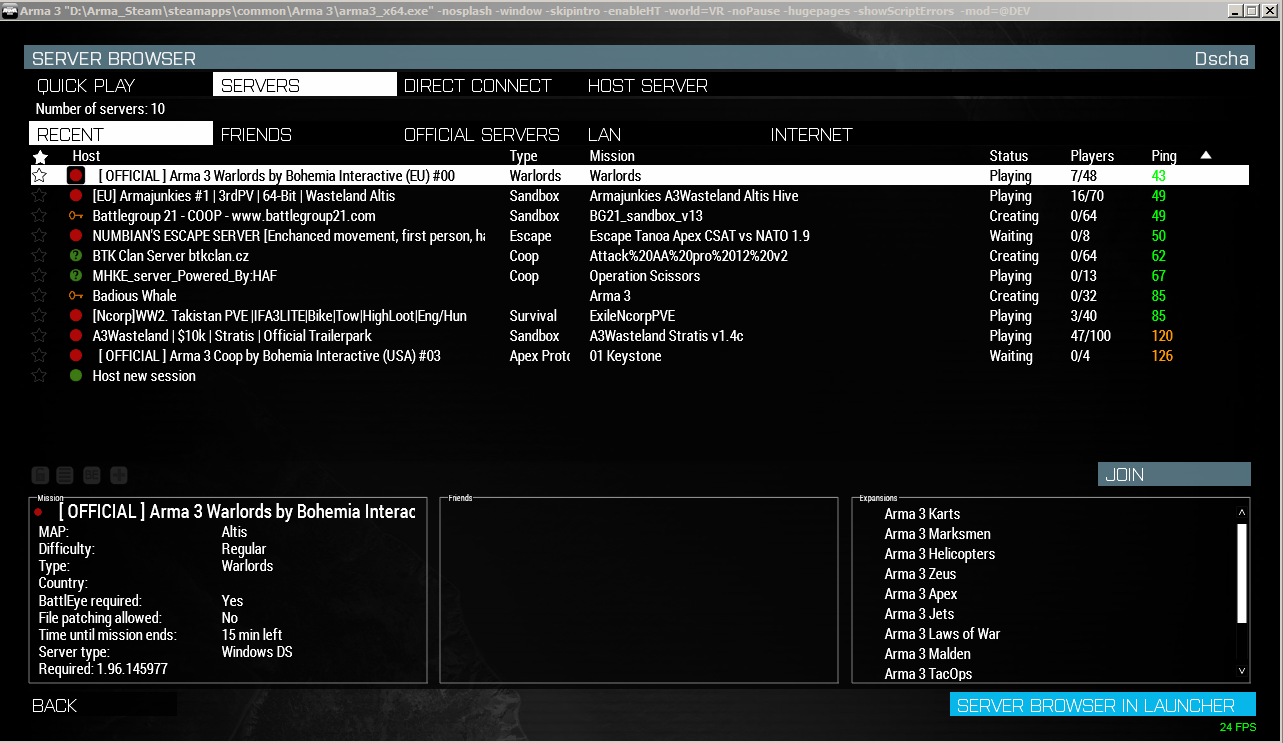
@placid osprey I'm pretty sure the devs said (somewhere) that they'll fix that. but anyway. my problems now looks like it isn't sending the lbData to the script when i call it.
placid osprey
Fix what?
short grail
the ping
placid osprey
Ah, kk.
Try the alternative lbData way
https://community.bistudio.com/wiki/lbData
Alternative Syntax
_control lbData _index```yeah i've tried that.
placid osprey
That's the one i am using all the time (currently too, btw).
Can't remember why i didn't used the main syntax 🤔
Check if it finds the ctrl systemchat str [_ctrl]; (why brackets? because: empty strings don't show up as msg 🙂 So even if there is an empty string ("") -> [""] <- output)
- systemchat ANYTHING, if you have no clue, where the problem might be. Begin from the start of the script, then go down, until you found it.
short grail
ok. i am on something. the ctrls are not showing up
SO. turns out the script can not find _ctrl = (findDisplay 99999) displayCtrl 1500;
placid osprey
systemchat str [_ctrl]; <--- !! Always use that 🙂
short grail
YES! YES! I found out what was the problem. it was because i was closing the dialog before it was sending the _ctrl's data
placid osprey
short grail
Nah mate. I'm feeling big brain after this.
https://encrypted-tbn0.gstatic.com/images?q=tbn%3AANd9GcSlJx7SgvTTD41LJ9TXiHu1-HH0kazuEU1tFJqwb9xBtfrXudc3
placid osprey
Since you closed the dialog and deleted every var in it ->
https://i.pinimg.com/originals/59/af/22/59af225e830dd7476b476c18a0369fe9.jpg
😛


(happens to everyone, all good man 😄 )
short grail
How do I update a RscStructuredText?
short grail
@weary imp thanks again pal.
placid osprey
@short grail
https://community.bistudio.com/wiki/Category:Scripting_Commands_Arma_3
bookmark it.
Press Ctrl+F -> type "ctrl" -> All the magic commands
vernal quest
is possible to make controls group in another controls group?
weary imp
Probably
placid osprey
Yep
 drifting rose
@short grail you can delete this post now https://discordapp.com/channels/105462288051380224/616327617725071373/650206518267871243
 valid dirge
Sup guys, I've been gone a while. Lost all my old files, and now im trying to do something I've done before but isnt working for some reason.
It's a UI on top of a camera view using create display. Im trying to use a a rscText to create a mouse area that can be clicked on. I know its most likely something really dumb.
Be grateful if someone can figure it out.
#define true 1
#define false 0

class RscRtsMain
{
    idd= 80000;
    movingEnable = false;
    enableSimulation = true;
    fadein=0;
    duration = 1e+011;
    fadeout=0;
    onLoad= "_this spawn RTS_fnc_InterfaceOnLoad;";

    controlsBackground[]=
    {
        RscBackScreen

    };
    controls[]=
    {
        RscMouseArea
    };
    objects[]=
    {

    };

    class RscBackScreen: IGUIBack
    {
        idc = -1;
        x = 0 * safezoneW + safezoneX;
        y = 0 * safezoneH + safezoneY;
        w = 1 * safezoneW;
        h = 1 * safezoneH;
        colorBackground[] = {0,0,0,0.2};
    };
    class RscMouseArea: RscActiveText
    {

        idc = 80001;
        text = "";
        x = 0.25 * safezoneW + safezoneX;
        y = 0 * safezoneH + safezoneY;
        w = 1 * safezoneW;
        h = 1 * safezoneH;
        action = "hint ""Good job""";
        onMouseButtonDown = "[_this] spawn RTS_fnc_MouseBtnDown;";
        colorShadow[] = {0,0,0,0.5};
    };
};
ive tried both rscText and ActiveText and also onMouseButtonDown and onMouseDown
also tried adding them through EH. That's the fnc that's called onLoad
The action on the active text works when i hit space bar over the ctrl
vernal quest
@valid dirge why u not use rscButton?
try add [_this] spawn RTS_fnc_MouseBtnDown; to action
valid dirge
Bc I also need mousebuttonup and for it to return which mouse button was pressed.
vernal quest
@valid dirge try just delete a action = "hint ""Good job""";
valid dirge
Working till later TN, but I'll check when I get home. Could swear I took it out for rsctext and tried but we'll see.
 weak jewel
does anyone have an up to date list of properties for the map gui control?
arma is giving me errors about missing stuff that's not in here https://community.bistudio.com/wiki/Dialog_Control_Map and it's kinda hard to fix it without even knowing what type the missing element is supposed to be
valid dirge
This mod has an option to export all gui base classes. https://steamcommunity.com/workshop/filedetails/?id=623475643
weak jewel
including the ones the gui editor export omits? i have that already but i just assumed it was the regular gui editor export
oh my, it does indeed, thanks a lot, this made my GUI editing about 1357% less tedious :D
valid dirge
The gui editor is trash
ocean hazel
Try Arma Dialog Creator, it's best of what I've seen
weak jewel
yea, i quickly found that one out, i've been making things by just text for now, with a ton of
1 start scenario
2 see what it complains about
3 put that in (often guessing the type/class)
4 repeat
i generally steer away from wysiwyg editors but since you recommend it i'll check it out :)
ocean hazel
In my practice, it lacks certain flexibility of plain config editing. I generally use it to place things initially. After that I do edits to the config manually, everything ADC could not handle. Then when I need to reposition stuff, I go back to ADC, reposition, export again, and copy-paste the positions.
Not ideal but... 🤷
Better than BI's provided "Tool"*
||*Can barely classify that as a useful tool, probably Ok for a project for several weekends||
weak jewel
does it support pixelgrid?
weak jewel
aw, then it's kinda out for me, i like the pixelgrid too much
ocean hazel
well... it can evaluate SQF expressions so it could be useful for preview with different GUI sizes
It renders stuff like in arma as I know
weak jewel
so i could basically paste the code in there and use it only as a quicker renderer? because that would actually be very useful
ocean hazel
sort of yes, I am not sure if it supports all the commands
placid osprey
@weak jewel remember to try pixelgrid in several InterfaceSizes, Resolutions and AspectRatios. You will be suprised :/
weak jewel
i haven't run into any trouble with it yet, but yea, i keep testing it in different modes from time to time
valid dirge
I usually draw something out in paint, get it all in game and then break out the calculator. The movement translation is way too much in the editor.
weak jewel
I usually start out with quick drawings on post-its and eyeball the coords from that, and then tweak it in place after it's all in there
valid dirge
can someone please tell me whats wrong with this?
_display = findDisplay 46 createDisplay "RscDisplayEmpty";
_mouseArea = _display ctrlCreate ["RscText", 8000];
_mouseArea ctrlSetPosition [0,0,1,1];
_mouseArea ctrlSetBackgroundColor [0,0,0,0.5];
_mouseArea ctrlCommit 0;
_mouseEH = _mouseArea ctrlAddEventHandler["MouseButtonDown","hint str _this"];
how i can import this to gui editor?```
/* #Luduwo
$[
1.063,
["1234567890",[["0","0","1","1"],"0.025/2","0.04/2","GUI_GRID"],0,0,0],
[1103,"line_horizontal",[1,"",["-0.00328125 * safezoneW","0.1795 * safezoneH","1.00289 * safezoneW","0.0015 * safezoneH"],[-1,-1,-1,-1],[0.3,0.34,0.37,0.8],[-1,-1,-1,-1],"","-1"],[]],
[1105,"group_prices_main",[1,"",["-0.0721878 * safezoneW","-0.0165 * safezoneH","0.549141 * safezoneW","0.6435 * safezoneH"],[-1,-1,-1,-1],[-1,-1,-1,-1],[-1,-1,-1,-1],"","-1"],[]],
[1106,"the_grup_right_infos",[1,"",["0.482109 * safezoneW","-0.0165 * safezoneH","0.216563 * safezoneW","0.6435 * safezoneH"],[-1,-1,-1,-1],[-1,-1,-1,-1],[-1,-1,-1,-1],"","-1"],[]]
]
*/
@valid dirge is working for me
return ```
[Control #8000,0,0.261364,0.421329,false,false,false]
just change RscText to RscStructuredText
as i understand RscText is something like background control
 ocean tangle
Hello I need help, I am trying to improve the HUD of my mission but I am struggling, my goal is to have an image as background under rsctext dynamic, I am trying with Rscpicture but I am doing something wrong
ocean tangle
- I don't know how to keep the aspect ratio
- I don't know how to put the image under the text at moment I changed idc or the definition order and still images is above the rsctext
- I dont know why crtlShow false hide the text but the image is always visible.
please help
ocean tangle
- ok I've found how to keep aspect ratio
- I managed to hide/show using setText and controcommit
- I've managed to put under the text
- I need to know how to keep the real size+aspect ratio of the image now, cos yes aspect ratio is correct but the size is not the same I am trying random value but I really wish there is a way to make it without this huge frustrating struggling.
ocean tangle
I did it but it's painful trying pixel by pixel, there is no way to keep size/aspect ratio of an image in GUI ?
placid osprey
You mean keeping the size (x,y) of an image?
ocean tangle
yes if one imagine is 512x512 I want to have it 512x512
keepaspectratio don't stretch the image but don't make it the same size as original PAA
placid osprey
So 256x256
Just simply divide it
- you need to recalc to 4:3
So if you with is 256 (4), the height must be 256*0.75 (3)
(or the other way around, i always mix that)
ocean tangle
are you expert with GUI would you like to save me some head banging on the wall
with this code:
class hudtopbar : RscPictureKeepAspect
{
idc=1201;
//style = 2096;
text = "";
colorText[] = {1,1,1,0.7};
x = 0.253892 * safezoneW + safezoneX;
y = 0.000 * safezoneH + safezoneY;
w = 0.485153 * safezoneW;
h = 0.495153 * safezoneH;
};
I got something close to the 512x512
so I guess it's the width that should be less than height
but
placid osprey
Play around with this:
x = 0 * (((getResolution select 4) min 1.2) / 40) + (safezoneX + (safezoneW - ((getResolution select 7) min 1.2))/2)
y = 0 * ((((getResolution select 4) min 1.2) / 1.2) / 25) + (safezoneY + (safezoneH - (((getResolution select 7) min 1.2) / 1.2))/2)
w = 1 * (((getResolution select 4) min 1.2) / 40);
h = 1 * ((((getResolution select 4) min 1.2) / 1.2) / 25);```For other examples: Check the unpacked UI_F Folder. There are some more informations.
- Those will be your friends too:
https://community.bistudio.com/wiki/SafeZone
https://community.bistudio.com/wiki/getResolution
placid osprey
as i said: Play around with the code i posted above.
placid osprey
Welcome to the world of UIs 🙂
Not "that" hard (when you understood the basics), just timeconsuming af.
ocean tangle
I am lucky I just miss 1 more image then the UI is complete
if you accept my friend request I show you the result
placid osprey
You know what's funny? change to WindowMode, change the resolution to a different AspectRatio (e.g. Resolution from 16:9 to 16:10) and InterfaceSize, restart your game.
Nah, off to bed in a sec.
ocean tangle
I knwo I will not do that,
my gui will be for smallsize ui
I don't plan to do for all other sizes
I don't want to spend the precious time of this life doing that
I am super convinced that there could be a much simple and wysiwyg mode
year 2020
ocean tangle
thanks for help
agile sinew
how to make a list/combo box with multi selection possible?
and how with that has three states (whitelisted, not selected, blacklisted)
ocean hazel
@agile sinew search multi selection, you will see you have asked that some time ago already xD
kju09/18/2019
is there a multi selection combo box or similar, or do you have to piece it together yourself?
sorry bad wording
i meant you have a list - normally its just on, off/selected, not selected. yet i need three states
think of a list of game modes to black or whitelist them
or tick on/off or any. see: https://dev.arma3.com/assets/img/post/images/oprep_2_concept.jpg


BI uses here three buttons (difficulty)
are two lists (one for whitelist, another for blacklist)
ocean hazel
Oh I get it I think. You can make your own advanced list box with a group and multiple rows of buttons then
Maybe you can do what you want with three listboxes if it will help get things more organized. So in the center listbox you have all items. 'Left arrow' button moves the item to the left listbox (blacklisted items), 'right arrow' button moves the item to the right listbox (whitelisted item)
weary imp
@agile sinew so you want list of game types and be able to choose which type you prefer to play, which you don't mind to play and which you don't want to play? Then have a normal list box, then on 1 click change item color to green, on second click to red, on third click to neutral (while also setting data on the item). Then in the end iterate through all entries and read data and do your thing.
agile sinew
@weary imp thanks. such virtual state list using colors is what we probably end up with
weary imp
you can also add to item description like
displayed: CTF
1st click - displayed green: CTF (Preferred)
2nd click - displayed red: CTF (Avoid)
3rd click - displayed neutral: CTF
or
use lbPicture and have empty box, box with a green tick, box with a red cross
agile sinew
true 👍
 wicked talon
Is there any way of identifying what RscDisplays are currently visible?
Got one showing up and I'm having issues identifying it
Image: https://imgur.com/a/Ut28Azk
agile sinew
tried to output https://community.bistudio.com/wiki/User_Interface_Event_Handlers#onMouseHolding yet ?
weary imp
Is there any way of identifying what RscDisplays are currently visible?
allDisplays
 nimble steppe
Is there a better action menu than the default one? In better I mean something that is more fluid rather having to remember numbers to get to say..."the radio menu without having to hit 0 twice?"
I guess what I'm asking for is there a replacement for the default action menu?
agile sinew
radial menu like in ACE or other standalone mods
ocean hazel
I think he means not the layout of menu as GUI framework... but rather a complete solution which replaces the default command menu
nimble steppe
The most I've used the ACE radial menu is when joining a squad in single player. I'm thinking more on the lines of what @ocean hazel stated
kind of like an all in one command menu, Didn't OFP have a radio command menu
ocean hazel
agile sinew
for AI commanding there are a few "replacements"
 plush root
Anyone around that time to make some ui's for a life server
valid dirge
You paying?
plush root
if they are good
barren apex
 left willow
Does anybody know of an GUI editor that just gives me coordinates?
I know about the Arma Dialog Creator Tool and I use it myself for quite some time now but cleaning the file it produces of everything except positions is very annoying...
Also it apparently does not support the pixel grid system which its quite sad since it makes more sense in my head then this weird safeZone stuff... (Id rather draw my UI on a piece of paper and just use calculator to get the anchor points but well... haven't found a formula to do that yet)
left willow
Like some way to convert "normal" coordinates from any WYSIWYG editor to ArmA 3 GUI cords would be nice
barren apex
Well ADC is doing pretty fine.
I've also made a tool but it's less complete than ADC (although it's easier for me to "template" my GUI and changing manually value if needed) but it's better when you have predefined some base class: https://forums.bohemia.net/forums/topic/225459-adobe-xd-to-arma-3-convert-your-adobe-xd-guis-to-arma-3-sort-of/
For some way to convert from "normal" (Pixels) coordinates to safezones
/* CHANGE THOSE 2 BELOW IF YOU'RE DESIGNING YOUR GUIS IN ANOTHER SCREEN FORMAT */
#define ORIGINAL_SCREEN_WIDTH    1920
#define ORIGINAL_SCREEN_HEIGHT    1080

/* HORIZONTAL ADJUSTEMENT MACROS */
#define X_POS(X) (((X * (getResolution select 0)) / ORIGINAL_SCREEN_WIDTH) / (getResolution select 0))
#define X_FROM_LEFT(X,W,H) (X_POS(X) + WIDTH(W) - WIDTH_FROM_HEIGHT(W,H))
#define WIDTH(W) (((W * (getResolution select 0)) / ORIGINAL_SCREEN_WIDTH) / (getResolution select 0))
#define WIDTH_FROM_HEIGHT(W,H) (((W / H) * ((H / ORIGINAL_SCREEN_HEIGHT) * (getResolution select 1))) / (getResolution select 0))

/* VERTICAL ADJUSTEMENT MACROS */
#define Y_POS(Y) (((Y * (getResolution select 1)) / ORIGINAL_SCREEN_HEIGHT) / (getResolution select 1))
#define Y_FROM_BOTTOM(X,Y,W,H) (Y_POS(Y) + HEIGHT(H) - HEIGHT_FROM_WIDTH(W,H))
#define HEIGHT(H) (((H * (getResolution select 1)) / ORIGINAL_SCREEN_HEIGHT) / (getResolution select 1))
#define HEIGHT_FROM_WIDTH(W,H) ((H / W) * ((W / ORIGINAL_SCREEN_WIDTH) * (getResolution select 0))) / (getResolution select 1)
Why do you limit yourself to fixed sizes?
left willow
@barren apex Sounds like an interesting tool. Never heard of Adobe XD though. Will look into it.
Those macros also seem to be very helpful. Though if I convert normal pixels to safeZones, isn't that basically what the pixel grids already do?
ADC also works quite okayish for me but its a bit annoying to use if I really only need to see and set the positions of my controls and nothing else.
opaque lynx
this is a more appropriate forum... Q: when you style = ST_RIGHT; on a textual UI resource, is that right aligned in the w of the resource? does that change the x component at all? i.e. your x is still "left of" the resource? or is the x then on the "right of" the resource?
ocean hazel
It should align the text inside the box to the right of the box, there are left/center/right options like you would imagine it to work with text alignment anywhere
opaque lynx
right I understand that much. but the actual x y coordinates are still the same?
just aligned within the w
ocean hazel
x,y coordinates of what? Of the text inside?
Or of the box?
Style of a control does not alter the x,y,w,h of the control
opaque lynx
of the resource.
ocean hazel
do you mean 'resource' - the control (button, static, etc) ?
opaque lynx
yes. so in other words, alignment styling just impacts within the w of the resource.
ocean hazel
yes, style changed only appearence, does not change the position of the control
opaque lynx
awesome that's what I needed to know. cheers.
ocean hazel
I assume you thought that, perhaps, arma can snap a button to the right of its parent control, for instance. No, arma does not have such layout capabilities.
placid osprey
ctrlGroup
ocean hazel
It's not what I meant
I meant like in some advanced layout UIs you can snap things to each other
placid osprey
Like, where you have a proper editor?
placid osprey
That doesn't exist, stop lying!!!!111
ocean hazel
Not at Bohemia, no 😄
placid osprey
😉
ocean hazel
Well, not for us at least...
opaque lynx
here's a question, how do you control tab order?
@ocean hazel the closest thing to a "layout" manager I have come by in A3 is to define your geometry up front, and interrelate as desired. so if I make an adjustment to resource A, the same adjustment is theoretically had by B without needing to touch a thing. then sprinkle those definitions in throughout the classes as needed.
however, for a layout manager, panels, stacks, etc, would be nice.
certainly would recommend against intense formulas in the resource definitions. far too brittle to layout changes.
ocean hazel
What do you mean 'tab order'?
Yes you can do a similar thing as you describe )with formulas) through script too, for instance I have made a 'window' (like in windows) which has the top bar, close button, and similar things, which resizes to its payload
opaque lynx
Tab order, literally what it sounds like. When you tab through a dialog, in what order the controls receive their focus.
This is like UI design 101, really.
I'm not positive, is that the controls[] = {} array?
valid dirge
Yes, Controls are added in order by that array no matter the order or idc you define in the classes
opaque lynx
Added in that order? Or "tab order"?
ocean hazel
Better check yourself. I think they will de added in that order, and you will tab through them in that order as well. IDC should not be relevant to the tab order.
I thought you meant like how to make some multi tab thing
weary imp
Yes, Controls are added in order by that array no matter the order or idc you define in the classes
Let’s straighten this up before someone gets confused. controls[] only valid if there is no class Controls, then the order of controls is taken from this array, if there is class Controls then controls[] is ignored and the order is the same as the order in which controls appear inside class Controls
Same for objects
 grand shell
hi there a way to learn how to customize ui? like tutorial or somethin?
grand shell
how to customize it like the hud and stuff I not sure how to explain but like let say health bar if I wanted to reposition and redesign it
weary imp
There is no health bar in Arma 3
barren apex
He's probably talking about the life healthcare or whatever. You can look KK's tutorials on GUI, it will give you a good basis.
 ruby swallow
The XML framework is there @ocean hazel
Only my time is not
mental trench
hello , i wanna make gui script ,mm.. ex: it can restart just user self by voting , so i wanna made this ↑↑↑↑ please help me !!
mental trench
mm i want to make in my server users can vote the restart also 50%up yes 50%down no
i want to make please help
weary imp
Voting is part of the engine, you can set it up on the server now
mental trench
@weary imp No... i want just some text pop out to everyone
that is my ques..
...
🙂
 ember gulch
Hey guys I want to modify e Arma GUI with an mod (add a button) but when I over write the Config name nothing happen. The GUI I want to modify is RscDisplayDynamicGroups. Is there some thing that I have to consider or add?
agile sinew
@ember gulch pastebin your config
opaque lynx
Q: when dealing with sizeEx, what is considered a 1, that is, base, nominal, default, whatever, sizeEx value? For frame of reference, in terms of the A3 displays GUI_GRID_X et al definitions.
in other words, I want to make it smaller, let's say, by some nominal, predictable dimension, i.e. 0.5 * GUI_GRID_X ?
placid osprey
sizeEx = 0.04 * safezoneW for example
So sizeEx = num * GUI_GRID_W is probably the line you are looking for.
Yet, i wouldn't use the grid-stuff, since it changes with the resolution and could end up in borked up interfaces on different Resolutions/Interfacesizes
opaque lynx
I think I got it sorted. So we go with something like (0.75 * GUI_GRID_CENTER_H) for our common H dimension. Then something like (0.85 * KPLIB_COMMON_GRID_BASE_H) for a sensible "small" dimension. For starters. And adjust from there, larger or smaller, accordingly.
@placid osprey Meh, I disagree. That's the point of using those definitions. You tame the resolution beast and arrest it in one place.
in fact I build on that through a couple of layers of definitions in order to isolate the "layout" aspect in one place.
placid osprey
"a couple of layers"
vs
0.1 * safezoneW + safezoneX to keep it in one place/size.
But sure, do what you think is the best for you. I won't stop ya. Just remember to test it in several Resolutions, Aspect Ratios and InterfaceSizes.
opaque lynx
@placid osprey Sure. Rinse and repeat that a dozen times and come back to me with the story of how brittle that is to responding to overall "layout" changes.
placid osprey
Dude, what is your problem?
weary imp
sizeEx 1 should make letter as big as height of viewport
ember gulch
@agile sinew https://pastebin.com/SZFbrWVA
agile sinew
@ember gulch where is your cfgPatches header?
mental trench
Can anyone show me or link a simple small script interactable menu that I can use to learn from. I’m not sure how to actually go about this.
Can be as simple as a background with 1 button lol. Anything is appreciated
mental trench
Hope this is not too much to ask^
placid osprey
Check the examples
Also:
https://community.bistudio.com/wiki/Category:Scripting_Commands_Arma_3
ctrl+F -> type "ctrl" -> F3 == Your friend forever
 austere mirage
Working on the pilotview for my aircraft.
What controls the marked points showing? https://gyazo.com/68baaae9614b4883cc15d8d87be86b77
Ive tried changing unitInfoType = "RscOptics_CAS_Pilot"; //rsc with DriverOptics elements driverWeaponsInfoType = "RscOptics_CAS_01_TGP"; //resource with Weapon UI elements that will be used when looking through the pilotCamera with 0 results.
 rigid sand
How would I go about making a mini-map GUI that doesn’t pause input
restive girder
RscTitles
"somethingsomething" cutRsc ["yourMinimapClass", "PLAIN"] ezpz
put your UI class within RscTitles
weary imp
Someone here asked before for a simple GUI example to start with. https://community.bistudio.com/wiki/ctrlCreate Example 5, knock yourself out
opaque lynx
hello, is it possible to add a picture to a button, literally is of type "button", that is, 0x1.
ocean hazel
Do mouseEnter/exit, buttonDown event handlers work with static controls?
opaque lynx
Hello, HNY for those where it is. Need to know, for an edit/input text box, is there an event that indicates "text changed"?
barren apex
i think so yeah
opaque lynx
hmm, well, I am reviewing, I do not see one? https://community.bistudio.com/wiki/User_Interface_Event_Handlers
I see for things like LB or LNB selections changed, that sort of thing.
I suppose I could watch for onKeyUp for the characters of interest and monitor that way?
opaque lynx
for that, basically. on the event, evaluate some other controls, enable/disable buttons, etc, in response.
barren apex
Oh okey, there's also this event: https://community.bistudio.com/wiki/User_Interface_Event_Handlers#onChar which only detect characters
opaque lynx
and are those ASCII _charCode?
barren apex
I think the code are these one: https://community.bistudio.com/wiki/DIK_KeyCodes
opaque lynx
perfect, thanks.
versus, I suppose, onIMEChar. does this happen in what relation to the text in the control having updated?
barren apex
I don't understand your question, can you rephrase it?
opaque lynx
what is the timing of onChar? i.e. before/during/after the control text having changed?
barren apex
[Key Press]-->[Control Update]-->[Event]-->[Key Release] seems to be the logical order to me
Yeah, I'm almost pretty sure that's the order I've sent, I was able to get the update text from the event callback
opaque lynx
perfect, works pretty well. now... if I wanted to constrain the key entry for a digits only? plus navigation keys, like TAB, etc... then I use key press? or key down? and respond with handled?
barren apex
Yep, keyDown
 olive schooner
If I use the Arma 3 UI editor, how should I define the parent classes for the controls like:
...
};```I know I can export the base classes from the editor. but should I include them for each dialog I create?
Or is there a smarter way?
 topaz talon
include it once before your dialogs, not once per dialog don't get me wrong.
 stark compass
hey, would anyone like to help me out on why the sidearrows for RscListNBox are not showing?
here is my dialog
https://pastebin.com/uQ4haTYw
and here are my defines:
everything else appears fine, but not the side-arrows
the dialog is nested in
class sah_inventory_dialog
{
    idd = 1999;
    movingEnabled = false;
    class controls
    {
        //////HERE!!!///////
      };
};```been there, tried that. It must be something i'm not getting
drawSideArrows is true and idcLeft/Right have valid idc's
stark compass
what is the practical difference between listnbox and listbox?
because as you can see, i have drawSideArrows true but it wont draw any arrows
it DOES reserve the space for the arrows
but it wont draw them
neither does interacting with the reserved space yeild any actions on the idc's
by this point, im willing to make a donation if somebody manages to make these arrows draw
ask for any code, it's an unlicensed project anyways
restive girder
listNBox is multcolumn
listbox is single
In general unless you're trying to do very basic stuff, a scripted setup with control groups is almost always better
there's a lot of inconsistencies and limitations with those listboxes that might start giving issues. One i always ran into was the lack of being able to set the size of pictures
stark compass
the pictures are perfect size for what im going for
couldn't have been better
some things i want to know

you see what im going for
and im struggling to get the side-arrows to appear
stark compass
slowly but surely
placid osprey
dat A2 feeling
stark compass
now if i just got these pesky side-arrows working
stark compass
no no, these side ones that are supposed to be draw next to the selection
really scratching my head on this one
to the right and the left, so i can use them for inventory interactions
placid osprey
uhm, mark it pls. I have no idea wich ones you mean
stark compass
can't get to the website right now
is down
@placid osprey can i DM you?
jsut the pictures, i cant send anything here
empty mountain
https://web.archive.org/ helps when wiki is (regularly) down
placid osprey
ah, nice
stoic delta
So I'm trying to make a toolbox and it is not representing the strings at all. here is the class:
class tb_vehicleClass: RscToolbox
        {
            idc = 1800;
            //style = 2098;
            style = 2;
            x = 0.25601 * safezoneW + safezoneX;
            y = 0.71 * safezoneH + safezoneY;
            w = 0.179782 * safezoneW;
            h = 0.084 * safezoneH;
            colorText[] = {0, 1, 0, 1};
            colorTextSelect[] = {1, 0, 0, 1};
            colorBackground[] = {0, 0, 1, 0.3};
            colorSelectedBg[] = {0, 0, 0, 0.2};
            rows = 2;
            columns = 3;
            //strings[] = {"res\LightVicApp.paa", "res\HeavyApp.paa", "res\BoatApp.paa", "res\SupportApp.paa", "res\HeliApp.paa", "res\PlaneApp.paa"};
            strings[] = {"Light", "Heavy", "Naval", "Support", "Helo", "Fixedwing"};
            checked_strings[] = {"[Light]", "[Heavy]", "[Naval]", "[Support]", "[Helo]", "[Fixedwing]"};
};```any idea why i am having an issue?
All I am getting is a toolbox without any strings on the buttons. Just the buttons themselves
stoic delta
Ignore above, i fixed it
ocean hazel
Is it maybe a known thing that main display event handlers get removed?
(finddisplay 46) displayAddEventHandler ["KeyDown", {
For some reason it starts to fail after several hours randomly
Or what is a safer way to check key presses... maybe cba has that, need to check
placid osprey
I assume some script removes it (by ID)
https://community.bistudio.com/wiki/displayRemoveAllEventHandlers
https://community.bistudio.com/wiki/displayRemoveEventHandler
ocean hazel
That would be a shame but that's the only way I know
agile sinew
tried inputAction yet?
tranquil iron
maybe cba has that
CBA uses keydown on the display. like you do
ocean hazel
Thanks @agile sinew I will try an on each frame handler with inputAction instead
agile sinew
@ocean hazel you can combine also keyDown with inputAction
ocean hazel
Oh wait, inputAction accepts arma actions, not raw keys...
agile sinew
raw keys is usually a bad idea due to ppl customized controls
barren apex
Yeah, using raw key is a bad idea, better stay with Arma Custom actions/CBA Keyhandler or write your own if you want more support than the CBA one offers (although I don't see much missing from the CBA one)
ocean hazel
Will look into cba, thanks
Btw... can't check now... which display is the virtual arsenal? Also 46?
placid osprey
ehm, lemme check, i got one open currently
Hm, as marked on the page "working with type=102 (CT_LISTNBOX=102)" -> Nope, i can see no diff here
burnt token
Maybe A2 only 
placid osprey
probably.
i tested
LineSpacing = 2.0;
LineSpacing = 1.0;
LineSpacing = 0.1;
No difference
@quiet arrow
rowHeight = int;
is the one, that should be used for that.
quiet arrow
Oh I missed that. Gone test that ty
 fluid oracle
Hello There! By any chance anyone knows the path (IDD/IDC) to the hint text?
placid osprey
uff, erm... wait a sec. I just remember that it was a structuredText
class RscHintGroup: RscControlsGroupNoScrollbars
{
    idc = 12957;
    class controls
    {
        class Title: RscStructuredText
        {
            idc = 11657;
...
        class Hint: RscStructuredText
        {
            idc = 11757;
...
I think it was this @fluid oracle
*
fluid oracle
yeah, found it. I assume it should be in #46 display? Does not seem to work though.
I have also found IGUI #301, could not find it
placid osprey
It's in
class RscTitles So without the name set in the ui namespace ¯_(ツ)_/¯
fluid oracle
tbh, what I really want to do is a handy custom hint function which makes the hint text appear only for a given time (in seconds), but for that I would need to check if the actual hint text changed
oh
placid osprey
RscAdvancedHint is also in RscTitles :/
wait a sec
class RscDisplayCommonHint: RscDisplayCommon
{
    name = "Common";
    onload = "uinamespace setvariable ['Hsim_RscDisplayCommonHint',_this select 0];";
    onunload = "uinamespace setvariable ['Hsim_RscDisplayCommonHint',nil];";
            class HintGroup: RscControlsGroup
        {
            idc = 2300;
            class controls
            {
                class HintText: RscStructuredText
                {
                    idc = 1100;
god... how many hint's are there?...
fluid oracle
that's why I asked, it is pretty difficult to find the actual one. The last one does not seem to work either 😄
nothing set for Hsim_RscDisplayCommonHint
fluid oracle
which is hintC , not the regular hint 😦
opaque lynx
is there a way to set the Z order of controls? I have "shadow" controls I want to be in the background. basically icons with shadow icons. Or better yet style the image itself with its own shadow? Thanks...
ocean hazel
Changing it - don't remember, but it depends on the order of control creation, which gets created first.
If you are creating them from config, try to swap their order there
restive girder
ctrlSetFocus works as well in some cases to change order
But whenever you interact with a button, it'll get pulled forwarded either way
opaque lynx
yes I don't need to change the Z order, just want to ensure that controls are forward that ought to be forward, etc. I'll try arranging their def order. thanks.
opaque lynx
yep, order in the controls array is the key. controls appearing later in the array have a more forward Z order; that is before events, etc, get ahold of anything, but for static images, shadow images, etc, that's the key.
agile sinew
anyone got these to work/knows what these are about?
or are these also old 2d editor commands
warped karma
I would have expected it to be a getter for menuSetAction / the corresponding action config value - i.e. for the new CT_MENU_STRIP controls
but it's not working for me, the return value is always an empty string - even so the action set with menuSetAction works just fine
tranquil iron
or are these also old 2d editor commands
added in A3 1.56? no, certainly not
agile sinew
p:\a3\3den\functions\fn_3deninterface.sqf
273 private _shortcutText = _ctrlMenuBar menushortcuttext _path;
275 _shortcuts pushback tolower (_ctrlMenuBar menudata _path);
thats the only use by BI it seems
(of the whole command family)
tranquil iron
thats the combo/titlebar menu
agile sinew
can someone think of ways to interact with the native AI command menu?
there is https://community.bistudio.com/wiki/showCommandingMenu but couldnt find any way to interact with it
quiet arrow
@agile sinew I might try to get a menustrip control to work and post some example. Just need to find some time
agile sinew
ty
opaque lynx
kind of a UI thing I think, trying to create some icons for use with ACE menus... I have the base PNG image ready, has a transparent background, saving from Windows paint.net as auto-detect.
I drag it into TexView2 and initially opens as RGBA+ARGB8888. I try to save as RGBA+DXT5 but it flips to ARGB4444.
Then in game the icon is appearing black instead of the color I chose.
any tips to ensure the correct pallete is being used?
and actually now instead of appearing black, the icon is kind of smudgy looking. I am trying to achieve the solid colors, or at least white, if possible.
restive girder
make sure its power of 2 resolution
opaque lynx
resolution? or size? i.e. 32?
stark compass
@opaque lynx if you have a lot of icons, i recommend ImageToPAA in the arma 3 tools, as it can batch-convert png to paa
opaque lynx
Q, the icon converted, more or less. I had it solid color like I wanted it once, but I'm not sure how I managed that. now the icon mask seems correct, but it is showing kind of smudgy. is it picking a pixel and using that as the color?
hmm, maybe Arma is caching the images...
opaque lynx
seems like Arma is caching the images. when I name it one that it was, appears like it was. when I rename it to a new name, it is correct.
stark compass
arma 3 indeed caches images
just rename it to "image_pp_Xx_v1" or something
and then keep going
idle radish
Use correct texture suffixes too
restive girder
Anyone know of some way to change cursor for a dialog?
 barren apex
It's profilenamespace getvariable "GUI_BCG_RGB_(R/G/B)"
 tiny spoke
listbox background and iguiback colors
barren apex
I think the default colorbackground is pure black with some alpha; look at the file the dialog you sent is from
placid osprey
@restive girder Can't think of one (scripted way) :/
If you find a way -> Hit me up, i would also be interested in it
barren apex
@restive girder @placid osprey Maybe not the best way but:
class CfgPatches {
    class Cursorless {
        name = "Cursorless";
        author = "Echo (Heyoxe)";
        url = "https://github.com/Heyoxe/A3-Cursorless";
        requiredAddons[] = {};
        requiredVersion = 1.96;
        units[] = {};
        weapons[] = {};
        version = 0.1;
    };
};

class CfgWrapperUI {
    class Cursors {
        class Arrow {
            texture = "\A3\ui_f\data\gui\cfg\cursors\arrow_gs.paa";
            width = 1;
            height = 1;
            hotspotX = 0.1875;
            hotspotY = 0.03125;
            color[] = { 1, 1, 1, "uiNamespace getVariable [""#CursorAlpha"", 1];"};
        };
    };
};
Then run uiNamespace setVariable ["#CursorAlpha", 0.002]; to hide the cursor or uiNamespace setVariable ["#CursorAlpha", 1]; to show it.
You cannot get the alpha <= 0.001 otherwise it shows it again
restive girder
Oh yea that should work like that, thanks a lot 🙂
placid osprey
hmmmmm
restive girder
@placid osprey
placid osprey
@restive girder 👋 hi
quiet arrow
Is there a way to change the height of a line in a multi line edit box?
barren apex
lineSpacing = 1; maybe?
quiet arrow
nope
quiet arrow
No. This was related to list boxes not CT_EDIT
 tepid pier
Hello GUI Cracks! Some of you might know the Timeline from Laws of War. Is it made with custom coding or are there functions for it inside of the game? I just need to know if it's a part of the game or if I have to learn gui coding as well.
I simply loved that feature
quiet arrow
You mean the bar at the top of the screen which is used to show the current time (past, present) during flashbacks? @tepid pier
tepid pier
@quiet arrow yes it's Hella chic but I did not find the right code in the mission :(
As my campaign will mostly be playing before the intro mission it would be a nice feature
quiet arrow
@tepid pier Did you unpack the mission pbos ?
tepid pier
Yep but I hoped there is a ready to go function in base game.
quiet arrow
I don't know any.
tepid pier
Ah ffs, took another look at the mission, seems to be two custom textures and a lot of coding
Could probably recreate it but there is a ton of coding integrated, have to filter out the animation part
vernal quest
Hello, is possible to make control with rounded borders?
vernal quest
as i remember in arma 2 was existing style to make this
barren apex
Yep, but in Arma 3 it can only be set across the whole game and by config iirc
Style 128
ocean tangle
Hello GUI makers, some time after respawn the alignment of guy get bugged text that should be on top of image goes on bottom, and you need to relog to fix that, it's possible to "reset" a gui in order to have proper layer order without logout?, or it's possible to prevent that to happen?
barren apex
Close and reopen the gui should work, but tbh I don't see how alignment can be messed up after a respawn. Gui coordinates are mostly static and unless you use sqf, controls shouldn't move
stark compass
I think he is talking about the Z coordinate
As in a frame being rendered atop another
In which cas ei would recommend putting all your stuff in a background or frame
But as Heyoxe said
barren apex
Oh, well that shouldn't change either unless the user clicks on a control that was behind and was not disabled
stark compass
Closing and reopening should fix it
quiet arrow
Does anyone know how the multiselection listnBox works? It seems to only return a number on onLBSelChanged where I would expect it to return an array with all selected rows.
warped karma
onLBSelChanged only returns the index of the curSel, not the selection - to get the later one you have to use lbSelection
listNBoxes have both, a curSel and a selection
quiet arrow
Oh I see
warped karma
in listNBoxes:
curSelis the latest navigated/selected/dselected row - e.g. when using [Ctrl]+[LMB] to select/deselect multiple rows then the last clicked one is the currentcurSel
so when pressing [Ctrl] and clicking row 5, 6, 7, 5 of a listNBox thencurSelwill be5but theselectionwill be[6, 7]- Arma will make sure that the
curSelrow is visible - i.e.lbSetCurSelcan be used to scroll the listNBox
quiet arrow
Alright. Thanks for the info. Gonna test that when I am at home.
warped karma
and both curSel and selection are visually marked in different ways
the selectionrows are solid white
while the curSel row has a thin black border
so a single row can have both, too
at least that are the colors for me, I would expect that it is (at least partly) configurable
quiet arrow
I think they are.
 grave dust
Hi all how would I make a dialog where it’s like a wiki. Basically it will tell you what to do and how to do it. So on my Altis life server there’s a fed so on the wiki menu it will say what u need to rob the fed and how to do it. Is that even possible?
So it would say Federal Reserver then a drop down menu would say what u have to do and all that
quiet arrow
@grave dust Like the field manual?
grave dust
@quiet arrow What does the field manual? In fact lemme just look it up real quick
YES WHERE CAN I GET THIS DIALOG
That’s nice
 quasi granite
quiet arrow
quasi granite
quiet arrow
Oh nice @quasi granite I forgot this was customizeable
Ups, it's advanced hints
Yeah that would work for him too I guess.
quasi granite
apparently advanced hints will also be added to the field manual
 pastel cradle
Hi all, i hope this is the right place but any idea why this is happening with my RscCombo ? https://imgur.com/a/5A4A4mH
quasi granite
looks like there is some input given elsewhere deselecting the combo. maybe some looped ctrlSetFocus? or a mousebuttondown uieh that intercepts the input.
quiet arrow
Combo boxes are bugged as hell. I just found out today that when you set a right picture to them, you can't click on that to select the entry. It will always select the control behind that. Very weird.
If you have space in your UI use a list box.
 digital creek
I want to add custom indicator to vehicle crew. Tried to add my custom control to RscUnitInfo, but looks like game ignores it (onLoad code is not executed).
So what should i do to make my indicator work? Add onLoad code to some default vehicle control (speed/alt/damage indicators) and create control manually?
agile sinew
pastebin your complete config
digital creek
uiNamespace getVariable "BloodVolumeInfo" returns control (in and out of vehicle)
uiNamespace getVariable "CrewBloodVolumeInfo" returns nil (in and out of vehicle)
digital creek
class CfgPatches
{
    class x_Medical
    {
        units[] = {};
        weapons[] = {};
        requiredVersion = 0.1;
        requiredAddons[] = {
            "A3_Data_F_Enoch_Loadorder",
            "A3_Data_F_Mod_Loadorder",
            "CBA_MAIN",
            "ace_medical",
            "ace_medical_feedback",
            "ace_medical_treatment"
        };
        version = "v3"
    };
};```

> RscUnitInfoSoldier for infantry
For infantry all works with how it's now, problem when you play as crew (driver/gunner) of vehicle.vehicles have their own class
digital creek
tried to move my controls to RscUnitVehicle but it didn't work.
Maybe adding my control to controls[] property for every child of RscUnitInfo is solution, but there are 63 classes 😣
agile sinew
you need to check inheritance and what defines controls itself
however most of those 63 should be irrelevant to your purpose
digital creek
Things are not getting easy 🙄
Anyway thanks for help!
agile sinew
use config dump
and regex to clear the definitions
delete all but: ^(?!.*?(^ *class|controls)).*\r\n
 earnest osprey
Would anyone know why this is happening?
https://gyazo.com/b28d0b1f0c14fc75fd4f890172439e61
The image is there but it is like opacity is like 5%. any ideas?
earnest osprey
Yeah the background
earnest osprey
Actual image
barren apex
Probably not in a (2^n)x(2^n) format (1024x1024, 512x1024, ...)
Or a script that changes the fading/alpha of the image ¯_(ツ)_/¯
ruby swallow
it is the first thing roughly 100% of the time that happens
the fix is rather simple: use the image program of your choice, upscale it to the next 2^n² and then downscale ingame by stretching it according to your likings
valid dirge
Am I missing something or is that image just a black picture?
 storm loom
@barren apex i tried your xd2a3 exporter just now , set the .svg file path etc, but when i click on download (https://xd2a3.heyoxe.ch/exporter) nothing happens. Any idea what could be amiss?
barren apex
There is no error on screen @storm loom ?
storm loom
@barren apex No error appears
barren apex
Doesn't seem to work quite well for me either, and errors aren't even working at all, do you mind sending me the SVG file in DM, I'll take a quick look
storm loom
will do
wicked talon
class Title : RscTitle {
    //idc = 832406;

    text = "TMF Loadout Jukebox";

    x = 0.404852 * safezoneW + safezoneX;
    y = 0.432309 * safezoneH + safezoneY;
    w = 0.190295 * safezoneW;
    h = SIZE_S * GRID_H;
    sizeEx = SIZEEX_PURISTA(SIZEEX_S);
};
Need some help here, adding the sizeEx property makes the text go invisible
Previously it was (((((safezoneW / safezoneH) min 1.2) / 1.2) / 25) * 1) which when run in debug console equals 0.04
quiet arrow
are those macros defined?
wicked talon
Yeah
quiet arrow
what number does the config viewer display?
quiet arrow
hmmm
That should work then.
What happens if you just put 0.03 in there, without any macros?
On another note, why are you using safezone for positioning put pixelgrid for text size? That might cause issues, or at least some weird looking UI for some aspect ratios
wicked talon
I'm switching over to pixelgrid from safezone
quiet arrow
I see. Good choice
wicked talon
I was looking at the wrong class, it says sizeEx = "any" instead
quiet arrow
Then it's the macros which is not available
Make sure to include #include "\a3\3DEN\UI\macros.inc"
wicked talon
It is included as the other macros work
wicked talon
That one isn't
quiet arrow
That's doing the calculations for SIZEEX
wicked talon
That would be it then
quiet arrow
SIZEEX_PURISTA is a dynamic macro. The text size gets calculated by "macrosexecs"
wicked talon
Yeah I was wondering where _fnc_sizeEx came from
quiet arrow
Now you know
wicked talon
Is there a wiki page for it?
quiet arrow
loadFile "\a3\3DEN\UI\macroexecs.inc"``` in the debug consoleand copy the stuff in your text editor
There is no wiki page about it.
quiet arrow
Better than any I suppose 😄
That shouldn't matter.
It should at least return str _sizeEx + "" * "" + _pixelH + "" * pixelGrid * "" + str pixelScale\ but never an empty string.
wicked talon
Well I switched it around and now it works🤔
sizeEx = "3.96 * (1 / (getResolution select 3)) * pixelGrid * 0.5";
quiet arrow
So the order does matter.
Yeah, it does, my bad.
#include "\a3\3DEN\UI\macroexecs.inc"```That's my order.Feels like there needs to be a wikipage for this stuff
quiet arrow
for preprocessor commands there is
wicked talon
Yeah but for the UI macros
quiet arrow
Well, they are not that hard to understand and now you know you can look at them with loadFile
wicked talon
The difficult part is finding out that they actually exist
I was playing around with the old grid system for an hour before stumbling upon it
quiet arrow
https://community.bistudio.com/wiki/Arma_3_Pixel_Grid_System I added them to the pixel grid system
wicked talon
Add that they need to be in that order 😛
agile sinew
why use pixel grid system over safezone, or maybe when to use each?
quasi granite
pixelgrid is better because you dont get artifacts which might happen with safezone values when the engine rounds up or down for not precise values bc you cant have "half of a pixel"
@agile sinew
problem now is that only the 3den editor uses the pixelgrid system so when creating guis on or modifying existing displays you'll have to use the same grid systems as the original display. Other problem is that when you are using baseclasses you'll have to pay attention to adjusting the attributes which contain grid values such as sizeEx or rowHeight.
wicked talon
Does this look good from a best practices perspective?
https://pastebin.com/BkmuStrR
barren apex
Maybe use macros for the IDD/IDCs so it's easier to get them in with scripts if needed
wicked talon
Sounds like a good idea
quiet arrow
@agile sinew [...]The problem here is that this number is not in pixels, it's in a percentage. This means the control could be drawn in between two pixels on the screen, which means the engine needs to then "guess" which pixel it should draw it in; often being not what the designer wanted. This leads to strange offsets across all controls on the screen, that can lead to crooked positioning, blurry text, perceived artefacts, and generally results in an unprofessional portrayal of the game and visual experience.[...] Source: https://community.bistudio.com/wiki/Arma_3_Pixel_Grid_System
agile sinew
so visual perfection vs complexity?
quiet arrow
It's not really complex
You just turn the % from safeZoneW/H into actual pixel count.
placid osprey
In reality, the % is barely visible/noticable.
- pixelGrid-stuff resized with resolution, so it's kinda annoying.
So: There is a reason to use both of them, depending on the case.
e.g.:
Overlay with fixed Positions: safeZone
Menu: Can be done with pixelGrid and SZ
quasi granite
You cant define x and y positions with pixelGrid only so safezone still has its use
barren apex
In reality, the % is barely visible/noticable.
And it's not that common, most users are not affected by that, most if the time it's those who use strange Aspect Ratios screens that are (so not 16:9 or 21:9)
quiet arrow
@placid osprey You can use pixelGridNoUiScale for that.
placid osprey
UIScale != Resolution
iirc noUiScale just took InterfaceSize in count
@quiet arrow
quiet arrow
Sorry I misread