#arma3_troubleshooting
1 messages · Page 113 of 1
 grim tinsel
 ornate bison
Ok thanks I’ll give it a try when I’m home
 keen sage
Can anyone help me, I'm struggling to load a workshop scenario
https://steamcommunity.com/sharedfiles/filedetails/?id=887418868&searchtext=Bosnian+war
It won't show up in my scenarios tab, and I have all the required mods
ornate bison
@grim tinsel @quaint jewel THANK YOU SO MUCH IT FINALLY WORKED
 grim tinsel
Ye
keen sage
Oof, I found it when trying to create a LAN game
Is there any way to port that to single player?
Also, none of the factions are showing up (in the Lobby screen)
grim tinsel
theoretically you can port it, but the mission may depend on being played through the MP server
and if the factions arent showing up you're missing mods most likely
check your rpt log
keen sage
How do I do any of that (I'm super new to modded missions, but they seem really amazing)
grim tinsel
rpt -> google
keen sage
But there was no crash, the factions just didn't show up
grim tinsel
rpt should be generated anyways
keen sage
Would it still show errors?
keen sage
Ok, cool, I'll try that, thanks!
grim tinsel
if you need help just pastebin the rpt log and post the link here
keen sage
Will do, thanks for your help @grim tinsel
grim tinsel
Happy to help 
 pure gale
Periodically I'm getting these crashes: 0xC0000005 - STATUS_ACCESS_VIOLATION while I'm playing. Does anyone know the cause of this? I verified the game files just this morning, and my squadmates don't seem to be suffering from the same issue
 quaint jewel
The cause of it is: "The game crashed for some reason"
Impossible to say anything more detailed with the info you posted
need the mdmp file from that crash
next to where the RPT file is
quaint jewel
yeah no mdmp generated then
pure gale
oeuf
quaint jewel
but I need that to see why it crashed
pure gale
I see
Is there anyway to force it to generate
or did I have to export a log manually?
keen sage
Basically it's loading into the lobby, I pick my role, I click play, and then it loads the mission. It gets to the point where it's showing the map, and then it once I click play, it just loads to about 90% (green bar at the top), and then it stops
quaint jewel
It should already. Don't know why it wouldn't
keen sage
It never actually crashes, it just doesn't load
pure gale
Strange thing is that I don't have a single mdmp
keen sage
Like, I hear game audio (troops giving orders, etc)
pure gale
not even ones from previous crashes
 forest ember
can someone help
every single mod is updating...
and i've got like 150+ mods
no
i just logged in
opened up arma and suddenly everything is updating
so i logged out before something bad happens
keen sage
Yikes, that's annoying
forest ember
do i seriously have to download them all again
quaint jewel
You already posted that above didn't you?
and you already pinged Pi
so why ping me now and Pi again?
Or do you just want to be annoying?
grim tinsel
Already looking at it, no need to ping again 
quaint jewel
No i cannot take a look at it I'm working on more important problems
forest ember
not to worry about my problem. fix: restart pc
ornate bison
@grim tinsel Ok I put my private key and public key on the keys folder but I realized I can load into the server with other mods which are not signed by the server?
So they ain’t signed?
verifySignatures = 2; is on
 willow furnace
hey everyone. I have a question, and that is: Why does my IFA3 and IFA3_LITE not work? It cancels my arma 3 startup or no reason.
quaint jewel
@willow furnace there certainly is a reason.
No error messages? Nothing in your rpt?
willow furnace
It pops up with a small windows error screen and says something like "Could not not find" so and so
i can reinstall it and tell you the exact log
and its only the AIO_LITE version too
all the others work
@quaint jewel im reinstalling ifa3 and ill see what it says on startup
quaint jewel
So.
You say for no reason.
But now you tell me there is a reason, that it tells you in a error message that you've just ignored?
willow furnace
i cant access a log or anything
quaint jewel
In everything IT related, just give all the details that you have from the start, that saves people from having to ask about it and wasting time
willow furnace
it just cancels the launch after the message
 maiden grove
how do i turn objects into Virtual Arsenals in the eden editor
 weary sky
https://community.bistudio.com/wiki/Arma_3_Arsenal contains all information you need
 viscid sun
Does anyone know why the modpack I was added as a contributor to wont show up in the publisher tool
 uncut trellis
Got a link? @viscid sun
quaint jewel
because thats not how steam workshop works
only the author can update
yes.. I know.. its stupid
Actually.. I think that is the case? or is it a publisher limitation? @cunning sierra should know?
 viscid sun
ok. Thats what I was starting to think, but he was confident that I would be able to
quaint jewel
Maybe thats a thing that should be tested
 cunning sierra
I can try 😛
quaint jewel
If it does actually work, maybe i can update publisher
cunning sierra
fails using steamworks
so won't work for publisher
I could try steamcmd as well but I don't think it will make a difference
viscid sun
That kinda sucks. The owner of the pack doesnt want to be involved with the project that much, and I dont want to have to bother him that much
I might just have to reupload and hope no one gets too angry
cunning sierra
yes, its a very annoying limitation of steam workshop
cunning sierra
leave 0.9, make a great new 1.0 non beta 😉
viscid sun
Maybe if I throw a 1.0, or 2.0 then no one will notice
uncut trellis
Assuming the mod pack is legit to begin with.
 vestal yacht
Is anyone else having an issue with RHS SAF that you cannot move the units in zeus, it says insufficient resources, but you can move vanilla units just fine?
vestal yacht
For anyone interested: this issue is solved by using the classnames of the units from SAF in the independant tab of the editor instead of the opfor tab. For some reason the _o_ in their classnames somehow breaks something making them imovable and undeletable in zeus
grim tinsel
hm odd, the thing with the resources is usually caused by stuff now being set up for zeus
@vestal yacht Can you check if theres a ticket for that on the rhs feedback tracker and if there isnt create one? Sound like a pretty big problem
vestal yacht
there wasn't, I'll add one later today or tomorrow
grim tinsel
Thanks
 green escarp
Not sure if this is the right place or not, but alas; My monitor is 60 hz & yet when i play A3 in fullscreen w/ vsync it runs at 75 fps. Yet in fullscreen windowed its at the 60 it should. Anyone know why or how to fix it? (I know its a non issue but still)
 chrome igloo
does it work still at 75hz?
green escarp
monitor isnt 75hz nor has the option. But the game is somewhat laggy when at the 75.
chrome igloo
well ya just found out it does support it. as for not allowing it gonna be on your GPU/windblows display settings as something is allowing it.
I'd start at gpu drivers/settings.
 acoustic gyro
Is anyone having issues seeing there units on the launcher dashboard or website/
?
grim tinsel
The units website has been having some problems recently
acoustic gyro
Gotcha thanks
 hard kayak
Hey I’m having an issue trying to load into my server. I have a video and picture of the problem however I just can’t post it in the channel. I will dm it if anyone is able to help
 wise barn
use any video hoster like youtube and post the link here
 trim olive
I can't play any scenarios I make. When I go to click play scenario when I'm done it does nothing, no error, no nothing, it's just like clicking a button that does nothing.
I have a screenshot of a simple battle scenario I wanted to do if anyone would be interested in seeing it and maybe knows the problem.
wise barn
you need to select one unit as player afaik
trim olive
Sorry, I thought it would be better in troubleshooting, i'll deletei t from editor_arma3
grim tinsel
Also that looks like SWOP stuff
trim olive
Yes it is, i've tried it with and without mods and reinstalled it, I can't play it
also what do you mean audiocustoms, i'm pretty new to scenarios
wise barn
as i said, iirc one unit must be set as player, not just playable
grim tinsel
theres a unit set as player
trim olive
the clone trooper sergeant is
wise barn
oh no... star wars mods...?
grim tinsel
Ye
trim olive
yes, i'm just testing with them
wise barn
no joy for you. discussion and distribution of all star wars related mods are banned on all official BI channels due to heavy IP and copyright infringements by the creators
trim olive
monkaS
wise barn
?
trim olive
do you know whats wrong though?
I can't start any scenario unless someone else made it in workshop so I think I'm missing something.
I'm just trying to make a singleplayer ai battle that I can play in.
wise barn
i already posted the only idea i had
wise barn
unload all mods and retry with the vanilla game. i'm not willing to help as long as you are using banned mods
trim olive
I have tried but I will do that right now so we can test
wise barn
👍
start with placing one unit, mark it as playable and try
if that works, move on from there
trim olive
ok, also thanks for helping, no one else in any other server has even bothered to help because i'm new to this
ok, new scenario
I'm at Tanoa and I placed a rifleman and made him player
wise barn
did it work?
trim olive
no it can't start
wise barn
tbh, no idea what your issue could be. i suggest you go through the BIKI (bohemia wiki) of the editor. maybe you'll find something that helps you
https://community.bistudio.com/wiki/Eden_Editor
trim olive
wise barn
as i said, no idea. sorry
trim olive
When I start up Arma 3 on 64-bit it crashes when started through arma x64 exe, and there is no mouse cursor when started through launcher with parameters and mods
 thorn pawn
I am trying to create a "zone" ellipse around a marker. How do i get that to happen?
_marker = createMarker ["dropMarker", position _crate];
_marker setMarkerShape "ICON";
_marker setMarkerType "hd_destroy";
_marker setMarkerText "Air Drop";
_marker setMarkerColor "ColorWhite";
_marker setMarkerSize [0.5,0.5];
_marker2 = createMarker ["zone", position dropMarker];
_marker2 setMarkerShape "ELLIPSE";
_marker2 setMarkerColor "ColorRed";
_marker2 setMarkerSize [5,5];
_marker2 setMarkerBrush "DiagGrid";
thats what i have but it does not work. The first marker creates just fine
 tired sable
anyonek know how to fix a no entry bin config error? doesnt let me start a mission after uploading it to a server
 lost copper
Isn't that the error when you don't have a an important mod loaded?
tired sable
weird, its just ace with cba
something to do with some minefields I placed, using achilles, I removed them and the error dissappeared
 cinder snow
Ummm sooo I am Having a very weird problem
Since Two Days I'm Trying to connect my UAV terminal with The drone
But so far without any success
I tried every uav combination with every Drone pack
Nothing works
I can only assemble the drone
I can't even open the uav terminal
However The civilian UAVs work fine and connect with their respective drones
 bronze rampart
hello i recently bought arma 3 and whenever i try to get into the game it for some reason has the cursor all the way to the left of the screen so i fi try to click on singleplayer or multiplayer it just hits the quit button can anybody help me sort this out?
 fringe salmon
anyone know what the actual deal is when joining servers (multiple different servers using the same mod) extended_base_mod keys are not accepted by the server? i have tried deleting the mod from workshop, and then letting the game resubscribe to it on server join
have also tried deleting my keys folder and letting game regenerate it
"files "path!workshop@Extended_Base_mod\addons\extendedbase.pbo" are not signed by a key accepted by this server
thing is, other people are playing on it, and this has happened to me multiple times
 shell grove
heyho ive struggeling with the use of the pboprefix, ive managed to get arma load the unpacked files from my mod, changes on functions are visible in the function viewer but are not applied, if i put the function in the debug watcher the function is still shows the one from the packed mod, addon is packed with the arma tools, unbin and added pboprefix.
shell grove
recompile all and mission restart wont change it, doubled check the cba_cache_disable.pbo and tested the CfgSettings disabling, nope
quaint jewel
So you are using cba then?
shell grove
yes
shell grove
quaint jewel
you said they are shown in functions viewer, CBA compiled functions aren't shown there.
 lethal marlin
Alright so Arma uninstalled on steam but not on my PC, which was fine as I was still able to subscribe to workshop content. But now after I tried again to let it install and let steam recognize the game again on my PC, it said it was locating existing files, but after it did it started to install Arma all over again. I still have it and it is playable, but I can't update/download any mods etc. Would prefer to find a fix that doesn't involve reinstalling it all since my internet speed is about 100-200 kbps on steam.
 errant venture
Alright, I have a Arma 3 Server that I purchased off Nitrousnetworks, and I run WW2 Zeus on it. Everyone that isn't in the zeus interface is completely unable to see the chat box/killfeed. Now, this leads to alot of problems regarding roleplay as I want to have some NPCs talk over the Chatter Module which utilizes chat. I presume a mod is causing this so here's my mod list: https://imgur.com/a/szdmXdJ
If you know which mod causes this, please tell me, and perhaps even if you know if I can disable it somewhere, thanks.
 desert isle
@errant venture Firstly do not use mods which contain pirated/stolen content in them (Radium's Custom Soundtracks).
quaint jewel
yes. pirated music probably
desert isle
Stolen from multiple games and Artists.
errant venture
Yeah so then why do music mods exist in the first place?
quaint jewel
Even says in description
Some music may have copyright, so please be aware if you use this in any sort of video.
200+ songs! ...from many different genres, and games!
desert isle
Because people are idiots
quaint jewel
Yeah so then why do music mods exist in the first place?
Why do murderers and thieves exist in the first place?
errant venture
I mean on the workshop
quaint jewel
I mean on the street
errant venture
Alright can you guys help me with the actual issue now or na?
desert isle
No, not really. The odds of those sort of mods causing issues are quite high. Additionally, since you don't seem that bothered by using stolen content, which is absolutely forbidden here... the answer remains the same.
errant venture
I know that both the Soundtrack and Soundpack mod are not the cause of this issue, as on other servers (the official Achilles Arma Server) the chatbox still exists.
Unless "those sort of mods" include every mod in that entire mod list.
desert isle
Well, you are running other stolen mods as well
desert isle
You really should should use due diligence
Blastcore Edited (standalone version) Edited and uploaded without the authors permission.
fringe salmon
i pressed delete on a mod in the launcher and it has not freed up any space
 daring tulip
So I was playing a COOP mission with 6 friends, I was the host, and one of my friends could not pick up weapons from the ground nor drop his weapon, pick up ammo etc. He was able to remove the magazine from his weapon but not add a new magazine in. Everytime he wanted to drop his weapon a duplicate of it would appear on the ground but his weapon remained bugged in his inventory
We were all using Arma 3's latest version, only mod was Ravage. It was happening to just that one player...
desert isle
Have him try with a new profile
daring tulip
Create a new profile in game? Or the Launcher?
desert isle
in game
daring tulip
will do, weird way to fix it but if it does then better than nothing
 proven forge
Hey there - not sure this is 100% the correct thread; please let me know if I should move it.
I just made my first patch to change the default loadout of the 'ITC Land' Sholefs. I've been testing it in Eden and believe I've ironed out most if not all of the kinks ... except I am now getting a CBA error. It popped up as I was loading up the mission, and I have no reference to chase it down.
From the RPT:
['\x\cba\addons\set>
23:01:10 Error position: <SLX_XEH_COMPILE_NEW;
['\x\cba\addons\set>
23:01:10 Error Undefined variable in expression: slx_xeh_compile_new
23:01:10 File \x\cba\addons\settings\fnc_addSetting.sqf [CBA_fnc_addSetting]..., line 5634
23:01:10 Error in expression <nit.sqf', 'cba_settings_fnc_init'] call SLX_XEH_COMPILE_NEW;
['\x\cba\addons\set>
23:01:10 Error position: <SLX_XEH_COMPILE_NEW;
['\x\cba\addons\set>
23:01:10 Error Undefined variable in expression: slx_xeh_compile_new
23:01:10 File \x\cba\addons\settings\fnc_addSetting.sqf [CBA_fnc_addSetting]..., line 5622
23:01:10 Error in expression < call SLX_XEH_COMPILE_NEW;
};
};
call cba_settings_fnc_init == 0
}>
23:01:10 Error position: <cba_settings_fnc_init == 0
}>
23:01:10 Error Undefined variable in expression: cba_settings_fnc_init
23:01:10 File \x\cba\addons\settings\fnc_addSetting.sqf [CBA_fnc_addSetting]..., line 5655```
This repeats for a couple seconds (10s if not 100s of instances in the RPT). Anyone recognize this, or can you point me in the right direction to figure it out?
TIA. wise haven
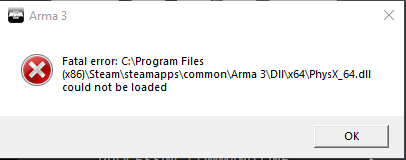
Update the arma server and getting a fatal error \arma\dll\x64\physx3_x64.dll could not be loaded
wise haven
The server was on profiling branch, now on stable
quaint jewel
yeah we have issues with profiling branch, fix should come in any minute
wise haven
👌
 thorny scroll
on my server is stable branch, but getting that error
quaint jewel
rerun the update in steam
wise haven
Steam or steamcmd? We simply uploaded a clients server x64 file to our server
quaint jewel
We simply uploaded a clients server x64 file to our server
That won't work
you need more than the server exe
you need the new physx libraries too
you need to do a full update with steam or steamcmd
wise haven
The dll's did update, the exe asked for the old one's though
When we tried to validate again it replaced the new exe with the old exe
wise haven
1.98.146.303
and physx_64.dll is 4.1.1.0
And if I rerun the upodate it reverts exe to 1.96.146.304
Dll's are still up to date
quaint jewel
so 1.98 binary is still throwing the physx3_x64 error?
wise haven
Well no
quaint jewel
1.96 should throw error yes, profiling branch hasn't been updated yet.
wise haven
With the new binary it works just fine
quaint jewel
yeah then you are on profiling, which is currently being fixed
wise haven
%STEAMPATH%\steamcmd.exe +login %STEAMLOGIN% +force_install_dir %A3serverPath% "+app_update %A3serverBRANCH%" validate +quit and steam branch is 233780
I was under the impression that was stable branch
quaint jewel
you might need to explicitly switch back to stable
if you were on profile
use
%STEAMPATH%\steamcmd.exe +login %STEAMLOGIN% +force_install_dir %A3serverPath% "+app_update %A3serverBRANCH%" -beta public validate +quit
maybe
wise haven
Will give it a go
quaint jewel
otherwise wait ~20 minutes till we fix profiling
wise haven
Sorted it, thanks ^^
 pastel vigil
so, profiling branch is broken right now?
quaint jewel
yes
pastel vigil
I like how the exit code is 0x0000DEAD
quaint jewel
Well I said above
otherwise wait ~20 minutes till we fix profiling
pastel vigil
woopsie, totally missed that
reswitching to profiling
same error as before
launcher still says the game is at version 1.96 tho
might just be steam that yet hasn't propagated the update
quaint jewel
┬─┬ ノ( ゜-゜ノ)
pastel vigil
launcher now reports the game version to be at 1.98, game still crashes at launch
quaint jewel
I hope launcher reports wrong then
pastel vigil
well, just to be sure I made steam verify the cache of arma 3 and the result didn't change
Game version: 1.98.146322
Branch: profiling
this is what my launcher is reporting
quaint jewel
I'm gonna assume the work is still WIP, but someone pushed an update, seems not the correct one yet
pastel vigil
"switching back to stable"
interesting how going from profiling to stable now is 1.5GB of download, while before it was 48MB or something like that
fringe salmon
Hey i'm trying to join my server but i'm just stuck in the arma loading screen
just the Arma3 logo in the middle of the screen
it usually takes around 30 sec to join or so
i been waiting for like 10 minutes now
quaint jewel
interesting how going from profiling to stable now is 1.5GB of download, while before it was 48MB or something like that
indicating the error
@fringe salmon your server probably didn't update yet?
 strange drift
will verify game be worth a try for this guy with PX.dll bugged?
https://forums.bohemia.net/forums/topic/228667-cant-play-since-update-14042020/
Bohemia Interactive Forums
Hi, so i did the update of 2,5GB on steam. And since this update when i launch Arma 3, this error appears https://gyazo.com/2c4d5d8278a60b692511b893b8c107ae , I have tried many things but nothing is working and i dont want reinstall Arma 3 cause of my connexion. Can you help m...
 native kettle
same when i want to open ob
strange drift
from the sound of it yes
native kettle
well, there's that too
https://i.gyazo.com/4ea94ffee6a53f930382426b5966ef28.png
native kettle
i'm on stable
quaint jewel
arma 3 tools doesn't contain the physx dlls
it grabs them from arma
copy your Arma 3/dll folder to your pdrive?
Arma 3 Tools/Binarize folder also has the physx dlls
 drowsy bay
native kettle
drowsy bay
native kettle
👌
 wintry plaza
The Arma 3 Tools EULA popped up today as if installing for the first time. It's already been running on my system for years. The language read acceptable, but I can't remember the older/previous EULA to understand the changes - if any. Were there changes to the license or was this just some anomaly?
wintry plaza
Previous updates have been behind the scenes, but this is the first time it asked me to re-agree. Seems strange.
uncut trellis
I always get it after a tools update
if I run the Arma tools launcher that is
which I almost never do
fringe salmon
@quaint jewel Yeah i updated my server still getting the loading screen
wintry plaza
Ok so that brings me to another question. I use Mikero Tools to compile, and I open the A3 Tools individually as needed, bypassing the tools launcher utility, "Arma 3 Tools." I was under the impression however that I need that little utility running when compiling or using the actual tools... Is that right?
 viral cargo
Oh, boy..what is VCOMP120.dll and why it is missing after Arma 3 update (thus preventing A3 from launching)
 brave hawk
go into the directory '~\Steam\steamapps\common\Arma 3_CommonRedist' and install each of the windows libraries from there.
from https://steamcommunity.com/app/107410/discussions/0/1727575977530967354/
@viral cargo
uncut trellis
@wintry plaza no you dont need it running
with mikero tools setup you need to run it only once to get the registry stuff it does on first run
viral cargo
Lou 🙂
Ok, I guess there should be something in those folders but mine are empty. Is this a case foooorr Verify integrity of game fiiileess
edit: Downloading and installing Visual C++ Redistributable Packages for Visual Studio 2013 helped to cure the situation
 ionic canopy
Could someone help me out? my mic isn't working in arma 3 for whatever reason
uncut trellis
you likely have wrong default input device set up in windows
ionic canopy
my mic works fine on everything else
i did a mic test on steam and chrome
worked fine
brave hawk
@ionic canopy perhaps, but is it the default sound input?
also, do you push to talk?
ionic canopy
i do push to talk, and it is the default @brave hawk
brave hawk
theeeeeen I don't know. unless you (un)plug it while the game is launched.
desert isle
Could also be a USB headset and the user is on W10
brave hawk
some have issues? dang (mine works, hopefully)
 frigid bluff
After the old man update,when I go to launch my game,it starts loading for 1-2 seconds and then it crashes,showing the "Arma 3 has stopped working message" (it does not instantly shut down).I have tried verifying the game cache and restarting steam,but nothing.Any ideas?
 sudden cipher

A whole bunch of our units in unsung just developed weird tattoos since todays arma 3 update
@quaint jewel any idea what changed that could have this effect on arma 2 character models?
uncut trellis
something to do with shadows
sudden cipher
It is not in all of our character models, only some
It looks to me like an unbinarized rtm or a broken shadow skeleton
But we havent built any pbos since the update
uncut trellis
have not seen rtm affect shadows only.
sudden cipher
So that rules out the tools update
uncut trellis
what shadow draw type they use?
sudden cipher
@jaunty cedar is exploring the files
 jaunty cedar
prefershadowvolume 1, and ShadowOffset 0.02
not sure what the later is about?
then there's ShadowVolume 0 and 10
uncut trellis
offset might be problem here? its not a default A3 parameter at all I think
shadows for the naked hands could be copied from the sample man I think
seems like CUP guys also had good ideas 😄
just if anyone else has similar error, they suggested HL or camo selections being present in shadowlod
 long ermine
Hi, my arma3server show this error: BEServer: cannot find channel #2092992006, users.card=0
And dont allow players to join
 eternal salmon
try disabling beye
 patent bear
Disregard
 wooden tulip
What does a status access violation mean and how can I fix it?
I get it every time I try to start a scenario from the Editor
uncut trellis
do you use USB headset or other USB audiodevice?
if yes, try unplugging it and see if that does anything
wooden tulip
I do. I'll give that a try
That didn't fix it
Anything else you can suggest? @uncut trellis
uncut trellis
verify game files and update gpu drivers come to mind. Other than that, nope.
 final pawn
Hi all, having trouble updating the dedicated server through steamcmd. My A3 client just updated through steam to 1.98 however when trying to update the dedicated server it says it's already update at 1.96... I'm using branch A3BRANCH=233780 -beta from the BI wiki which till this update has worked so far. Am I missing something or does steam take a bit to update the server packages?
fringe salmon
@summer moss try verifying game
Most likely something didnt update properly, had the issue on my server earlier
 summer moss
will try ty
Verify didn't work for me unfortunately.
Think I've resolved it, the update seemed to only partially download, will see after the rest of it downloads 🙂
 primal portal
I'm having an issue where the cba_settings.sqf file I believe is not being read as the recent rpt is showing [CBA] (settings) INFO: Userconfig: Ignored. and I'm not exactly sure what is going on as I normally don't have this issue. Server has -filePatching startup parameter added along with the filepatching allowed in the config.
quaint jewel
@summer moss @final pawn switch away from profiling branch, or wait a couple hours, should get fixed today
 humble comet
hello,i got this problem when i launch arma 3 0xC0000094-STATUS_INTEGER_DIVIDE_BY_ZERO
quaint jewel
If still broken, send me RPT and mdmp https://community.bistudio.com/wiki/Crash_Files
humble comet
mmm ok? idk what is that xD
quaint jewel
it contains the info about what exactly caused the crash
 ionic geode
Altis Server hosted by GTX Gaming, when anyone has been using a vehicle before the server restarts the vehicle seems to disappear back to a previous location, its like the sever is not saving in real time
quaint jewel
Profiling branch has been fixed on both windows and linux o7
eternal salmon
i have seen a few people(and myself) having divide by zero issues lately. going to switch to aware mode
 toxic valve
Any owner now why 2 server Show what for mods need on server and 1 server not show the mods ? Its only on my livonia server ! I reinstall server mods but not help ! Any idea?
toxic valve
found it its why make arma update without contact on A3serverBRANCH=233780 -beta contact
now all ok but why need contact to you cant use the folder its only single player or not ?
pure gale
Does anyone know why ARMA isn't generating MPMD crash logs? Currently, all I get are RPT logs even from the crash report save and so can't diagnose what's actually crashing the game.
ionic geode
Hello all, please can some one help me, im using DMS missions one of the missions "deranged doctors" has a vehicle that spawns insides the building and explodes it, how can i change the location?
 pastel sleet
since the update 1.98 one of the servers i am working with is having the problem that its like its running in the background
-server starts up but console window only pops up for a splitsecond
-after that the server is in the process list in task manager but isnt really initialized fully.
this is a server which had no errors whatssoever right before the update
verified integrity
everything
quaint jewel
check RPT
 arctic owl




 grim tinsel
Nope
pastel sleet
yeah,i did,its literally the same as before@quaint jewel . first thing you do is checking rpt. server is starting up,db connection is fine,its just that the process isnt really like before,its "in the background" with no console
pastel sleet
when started manually yes (bat file),when restarting through a watchdog it turns sh+t and isnt even accessible,starts twice and stuff like that
the thing is,the only thing that has changed is that i ran an update via steamcommand
quaint jewel
well we don't have any changes regarding that ¯_(ツ)_/¯
long ermine
hi can anyone help me? Same error as yesterday i cannot get into my server due battleye
pastel vigil
Guys I can't start up the legacy 196 build, it crashes everytime with error 0xC0000005 STATUS_ACCESS_VIOLATION
I verified the local cache from steam, and nothing, updated graphics driver, still nothing, tried out even the various 32/64 bit executables, variuos memory allocators and more... still getting the same error
weary sky
Run as admin?
pastel vigil
tried that also
long ermine
Anyone?? PLS
uncut trellis
what error you get, did something work yesterday?
best to provide as much information about the problem as you can when you ask to speed up the answering process.
pastel vigil
yesterday I was running the 1.98 build just fine, had to switch to legacy branch to play with a server still at 1.96
dunno, what other things I should say? Already said the error, the things I've tried..
My system has an intel core i7 6700HQ and a GTX950M GPU, 16GB of ram, game is on SSD, doesn't work with or without mods
uncut trellis
was talking to @long ermine
 sweet stump
can i ask questions about the arma 3 dedicated server app in here?
uncut trellis
sure
sweet stump
the dedicated server app just closes after a hour or so of playtime, and it doesnt give a crash report or log
 dusk nova
https://steamcommunity.com/sharedfiles/filedetails/?id=385577681 I did the top 4 categories of this guide, and now every second the game freezes and the game is impossible to play now
uncut trellis
well its 3 years old since last update. probably its not really valid anymore if it ever was
there are no magical optimizations you can do
you should just reset to default settings
and run autodetect in game
 nova marten
Whenever I load up my Old Man save the game crashes to desktop with no error message.
grim tinsel
From how long ago is that save? @nova marten
nova marten
Two hours ago.
grim tinsel
Huh
nova marten
Anyone know how to fix a corrupted save?
desert isle
@tepid lark We have rules here. please read them. You post has been removed due to profanity.
 latent locust
how do i know if my HC is connected and working in game using debug?
on the client side it says
16:25:17 Dedicated client created.
16:25:47 Client connected: 127.0.0.1:2302
16:25:48 > headlessclient uses modified data file
16:25:48 > Player headlessclient connecting
server side says
16:25:47 Player headlessclient connecting.
16:25:48 Player headlessclient connected (id=HC22756).
16:25:49 > Player headlessclient connected
but on the server RPT it says
17:03:53 ALiVE AI Distributor detected no HCs, idling for 60 seconds.
what gives?
dusk nova
how do I increase FPS
i bought this game and now I can't refund it :( so how do I get at least 60 FPS
quaint jewel
so how do I get at least 60 FPS
Thats not how Arma works
dusk nova
not very helpful
if u DM me i give system specsw
i wasted 40 dollars on this game, so i want to be able to at least play it
desert isle
You dont just adjust a slider in Arma to get 60FPS
Lets start with the basics like system specs
dusk nova
yes i cant post images
desert isle
We dont need images
desert isle
So, if you dont know your specs, how can you get angry at not getting 60FPS?
dusk nova
well doesnt DayZ run on Arma 3 engine
quaint jewel
no
dusk nova
ok
my specs are:
"AMD Ryzen 3 2300X Quad-Core Proccesor"
3.50 Ghz
32.0 GB Ram
64-Bit Operating System, x64-based processor
dusk nova
i wasnt keeping track but it definintely was under 50
under 20-30 if i wasnt looking in the ground
dusk nova
no
quaint jewel
are you using mods?
quaint jewel
You can check current frequency in task manager
proven forge
SP or MP?
daring tulip
And your video card?
dusk nova
idk
i upgraded my computers card thingy with the fan on it a while ago
but idk if that changes whats on the specs
where in task manager
do i find it
daring tulip
Well your video card is quite important, without knowing exactly what it is the experts have their hands tied when helping you
dusk nova
how do I find it
daring tulip
Do you have an nvidia option when you right click on your desktop?
daring tulip
but when you get to your AMD panel there should be an "about" or "system" option to know your exact GPU (Video Card)
search for GPU = Radeon XXX or something like that
dusk nova
Graphics Chipset
AMD Radeon RX 5700
dusk nova
System Memory
32 GB
daring tulip
No, not the system memory, the Graphics Chipset memory
daring tulip
What mission are you playing in Arma 3? Old Man? Or the regular campaign?
daring tulip
Your computer should be running Arma 3 above 50 Fps...
daring tulip
Do this experiment, set everything to ULTRA, but disable PiP and set your viewdistance to 1000 and object distance to 875
dusk nova
ok
quaint jewel
did you already do anything to try to improve performance before you came here? Like start parameters?
dusk nova
yes but that messed up the game so i removed htem all
if u read up that was what my original problem wa
desert isle
Always, always, always start with autodetect. NEVER change things when you don't know what they do.
desert isle
You missed the part about "NEVER"
Given that we may not know what you have messed up by following some random "guide" from the internet, my recommendation is to delete it Arma (and your local profile) and reinstall.
desert isle
Thats a whole lot of assumption.
quaint jewel
if all works fine why are you in #arma3_troubleshooting ?
dusk nova
also it doesnt lag as much now that i removed the start commands but followed the rest of the guide
@quaint jewel i already told u my original problem was something else
and i was asking about improving arma
desert isle
Throw that guide out the window and start fresh
quaint jewel
you come here asking for advice, are given advice, and just ignore it and say you know better than the people who you asked for advice.
Why are you here then really?
dusk nova
@desert isle i will if I get more FPS drops, im doing the first campaign scenario (after the tutorial) and it is getting high frames
daring tulip
Hey @quaint jewel don't allow yourself to be stressed by our current flow of discount noobs... you have more important things to do, let us the mere mortals to do your biddings here on the support area!
So you can take care of the big fishes to fry!
grim tinsel

So you can take care of the big fishes to fry!
Or just to take a break every now and then
 languid merlin
arma 3 download a mod and ran it in a campaign but it doesnt work and now campaign willnt play since i took mod out..now oldman will not run without it is there a way to go in save file and delete it from trying to find it
 novel aurora
how the hell do i join or invite friends to co op missions ?
i tried port forwarding, and hosting my own game
 glacial dragon
every time i join a server it takes about 3 minutes and then it just crashes without saying why what should i do?
 next verge
I'm currently dealing with a problem with Arma 3 Zeus.
Everytime I become Zeus, a memory reference crash occurs. The thing is, is that it happens at random moments in the game when i'm Zeus. Rarely, it doesn't happen at all. The memory references numbers are seemingly random. I might be wrong about this. All i know is that one of the reference numbers is always full zeros. The crash doesn't happen when i'm a normal soldier, or just anything that isn't a Zeus.
I searched online to see no solution, so i'm stuck to being here asking for help. If any of you could help, it would be greatly appreciated.
next verge
I can only provide the RPT at the moment, next time I crash I will try to write down the message since the crash message overlaps any screenshot software I have. Give me a second to grab the RPT.
Do I send it as a file or..?
For some reason it is not allowing me to drag it into discord.
grim tinsel
Upload it to pastebin and post the link here
next verge
fringe salmon
Hi guys, i run a dedicated server on a rented windows server 2012. Since the last update, ive been unable to make steam update my server, we're stuck at 1.96. When i run the updater - in admin mode - it just says the server is up to date. I can see that other servers are version 1.98. Any tips?
lost copper
i think i saw someone with the same issue somewhere
maybe it was in #server_admins
but maybe i am wrong
@fringe salmon
fringe salmon
Will take a look
quaint jewel
@fringe salmon steamcmd is probably installing into wrong directory
fringe salmon
@quaint jewel I reinstalled arma on the server, that seems to have done the trick. Thanks for helping
uncut trellis
@urban solstice this would be the channel to find out what the issue is.
 urban solstice
oh sorry
uncut trellis
One thing that comes to mind is that are you using USB headset
urban solstice
didnt see this
uncut trellis
no problem
theres just no slowmode here so its easier to communicate
but about that headset
uncut trellis
alright unplug that and try playing for a while
grim tinsel
I'd check first if it works without the flight stick connected
urban solstice
@grim tinsel already did
grim tinsel
Then do what HG says
uncut trellis
there is a proven to exist a bit random bug with USB audio devices and Windows 10 and Arma
which renders them un usable for some
apprarently getting rid of all realtek audio stuff and disabling the onboard audio chip from Bios can solve it but then you get audio out only from your headphones
urban solstice
So I cant hear when I fly?
uncut trellis
well for startes I would just test if it works
urban solstice
alright
Could it be my flight stick?
Friend is saying you need the program or something
uncut trellis
its possible too
urban solstice
joystick program
urban solstice
So i just did it without head set
and now I will download logitech gaming software for my joystick
uncut trellis
then its likely not about the usbs
urban solstice
whats the second option
uncut trellis
dunno, try verifying the game files in steam
urban solstice
taking a while to identify
prob missing a lot of files then lmao
3 files missing apparently
here lemme try now
Ok it works
phew
thanks lmao
grim tinsel
Good to hear that it works
urban solstice
Well I have another semi-issue
Whenever I try to lock on to vehicles in helis it dont work
Im on the editor
grim tinsel
Make sure you're using the correct missiles
urban solstice
Yea Skalpels
Im flying the kajman
also didnt work on wasteland
Do you just have to spam it until it finds it and lock
 strong apex
Is it jus me, or is doArtilleryFire extremely buggy in a Dedicated Server environment. It seems to work just fine in SP, and even in Hosted MP.
On a dedicated server though, it just seems to have a very high chance of just twitching the barrels of artillery units without firing, or just plain not working at all. Ex. giving 5 firing orders in SP will cause 5 fire missions, while on dedi it will work between 0-5 times.
It's very frustrating trying to host some kind of mission involving AI artillery for my group.
 cinder river
Vehicles are flying and explode for no reason since update.
quaint jewel
See #server_admins
Switch to profiling branch and see if that fixes it
 formal orchid
I cant get my rcon to work
I have the BESErver.cfg with the port and password
and it says its active but cant connect
 shy pasture
Issue moved to scripting.
brave hawk
that would be #arma3_scripting , and _unitP is undefined
also, remoteExecCall where player is local… doesn't need remote
shy pasture
"and _unitP is undefined"
" and passed params are ok (_unit,_selection,_instigator) - I've checked it with marker just before the function call line."
Of course it is defined, otherwise I would see no data inside 🙂
"also, remoteExecCall where player is local… doesn't need remote"
Of course it is needed, as the function is for server only - to be sure it is not executed locally.
I suppose it is the handler specific behaviour, but I still can't get it.
brave hawk
if it is server-side and you are running a dedi, player is objNull
and
player remoteExecCall ["OT_fnc_revivesystem", player]; // "call where player is local" is always true
player remoteExecCall ["OT_fnc_revivesystem",player]; - the "player" means it will be executed on instance where the player is local
brave hawk
player is always local to the client, so it is useless
this remoteExecCall says "execute OT_fnc_reviveSystem with player as param where player is local"
you could simply do player call OT_fnc_reviveSystem
shy pasture
Ah, this. Yes, of course it is not needed, but, as I said, the params are ok. This is what were passed before the function call:
[R Альфа 4-6:1 (name) REMOTE,"spine1",3.61772,bigboss,"LIB_B_792x33_Ball",4,bigboss,"hitabdomen"]
So it should be ok, but it isn't 🙂
brave hawk
if
The function itself:
is all ofOT_fnc_revivesystem,_unitPis undefined.
let's head to #arma3_scripting
shy pasture
I've told that it is defined, otherwise there should be no unit name inside )) Even more, below there was another code, which makes AI to run to the player and heal him - and it works too.
But yes, in my script it looks like it is undefined, as I cutted the top, sorry. Fixed.
desert isle
shy pasture
Ok
 mystic crater
Hello
I don't know if this is the place to inquire about mods
but my friend is getting this error
 grim tinsel
I had that a while ago with hoi, I had to unsubscribe from the mod and then manually delete the mod file, then install the mod again with the launcher open
(solution might differ for arma)
grim tinsel
have you tried deleting the file that the settings are saved in?
 nimble owl
?
i scanned arma 3 with steam to see if i missed some files but nothing
all my arma 3 launcher parameters reset every time i launch the game
nimble owl
Pls help
uncut trellis
could be steam problem
or windows problem
did you delete your arma profile folder under your userfiles
uncut trellis
you may need to delete it from the actual folder
nimble owl
Ok
 honest night
I am having a problem, downloading some mods, I get 'update cancelled'' after fully downloading them, and they vanish, making me have to download everything again. The problem is not having enough free disk space or not unupdated drivers, I have 170gb free and all of my drivers are updated
Yes, I have tried rebooting
Yes, I have deleted all the mod files from the steamapps/workshop and steamapps/arma/workshop
 sweet cloud
Out of curiosity would the ALiVE mod cause issues with CUP, RHS, or Project Opfor?
@ me if you know the answer
wise barn
@sweet cloud
what makes you think that?
sweet cloud
Just due to the moment we added alive. Cup and RHS we’re having a fit.
We removed alive and now it works again. Just wondering if it was incompatible
wise barn
not that i know. never had problems with alive and other mods like cup
what was the issue?
sweet cloud
Basically paused the server and not letting it boot up. Another one was where it kept creating fatal errors
 maiden swallow
https://media.discordapp.net/attachments/478818879427051520/700874379155996733/Untitled.png
getting this every time i open the game. anything i can do to fix it?

image didnt work
says 'Units data acquisition failed'
uncut trellis
the units service is offline atm @maiden swallow
maiden swallow
ah, thanks
honest night
I am having a problem, downloading some mods, I get 'update cancelled'' after fully downloading them, and they vanish, making me have to download everything again. The problem is not having enough free disk space or not unupdated drivers, I have 170gb free and all of my drivers are updated
Yes, I have tried rebooting
Yes, I have deleted all the mod files from the steamapps/workshop and steamapps/arma/workshop
uncut trellis
you may need to contact steam support about that
or try reinstalling steam over your old install
maybe its bugged
quaint jewel
missing mods
fringe salmon
no dosent work
fringe salmon
omg thank you so much
nimble owl
So cancelling the profile did not work can someone help me?
mystic crater
my friend has tried downloading mods for our unit and he is met with this error "Missing downloaded content"
steam will not complete its update
we have tried right clicking and repair but to no avail
a google search yielded nothing, any suggestions?
tried uninstalling and reinstalling as well
grim tinsel
Can you post a picture of the message that Steam provides on the download page? I might know tha problem
grim tinsel
Ah I assume the solution I told you earlier didnt work?
grim tinsel
Its an odd issue
mystic crater
yes
I believe I had it before but to my memory reinstalling the game cleared it up
but that isn't working here
we are going to try going to each individual workshop page now to resolve it
grim tinsel
Reinstalling didnt fix it for me either, I had to manually delete the mods files
mystic crater
hm
 frosty crypt
ah fixed it
long ermine
Hello, when i put signed addons on my server
On TASDT i select verify signatires v2 and allowfilepatching 2
And i cannot enter, i have introduced .bikey on ADDONS folder and server folder
grim tinsel
Whats the reason that you cant enter?
quaint jewel
i have introduced .bikey on ADDONS folder
Thats not where bikeys go
bikeys go ONLY to Arma 3 Server/keys folder
long ermine
I have introduced there to @quaint jewel
@grim tinsel some addons are not signed
But they are there
 light frigate
Getting a ace_medical_menu.pbo is outdated error message. I've tried unloading the mods and reloading them. I've tried repairing the ACE mod and deleted the mod to reinstall it.
fringe salmon
Hey, I enabled BE on the server and when anyone joins they get this error.
battleye initialization failed
 versed kestrel
https://prnt.sc/s1yt3h
Anyone able help me why am getting these ERRORS after installing ARMA 3 Thanks?
lost copper
@versed kestrel i don't think this is the best solution but I think it will work
Reinstall the game
The right error just says that the game crashed (at least i think so)
And the left one if I get it correctly said that there is a problem with memory and it can't read some file
So reinstalling should help
Maybe I am wrong
@fringe salmon have you got battleye enabled
And what about the guys that connect
uncut trellis
verifying the files could also be good idea
versed kestrel
I try reinstalling it see what happens first time got this ever but I see what happens chears guys
fringe salmon
I can't seem to connect to modded servers, I try to join and it sits in that map screen with waves sounds then just disconnects and gives me a "Connecting failed" message. I've tried reinstalling arma and the mods, verfified, repaired, etc. I can connect to unmodded official servers, and when I check .rpt I see a message saying "Skipping mods and signatures due to overflow flag being set." Also checked .pbo files and all are up to date and matching to my friends on the server
ok it seemed to work all of a sudden and i am absolutely clueless as to how
it seemed to happen to work after i unloaded all my mods and joined an official server
reloaded them all and tried to join the modded, then it works?
uncut trellis
are you joining through the launcher?
or in game server browser
as the launchers server browser is smart and loads only the mods the server uses
so you can get in
most servers will kick you out if you have mods that the server does not use loaded
it is bad to load aaaaaal your million mods at once
fringe salmon
i tried both and it failed both times
manually loaded only the mods the server uses
joined from list
and then after it didnt work tried the launcher auto mod setup
it failed everything I tried up until i joined some random unmodded official server
 vague oar
My friend can’t play arma 3, when they select play from the launcher the game crashes. They have reinstalled but the same issue still applies, how can i (or my friend), fix their game?
lost copper
@vague oar what does the error say (if anything)
vague oar
As far as I know there is no error
 arctic moss
Ive got a problem with one of my mods starting to download again after it finsihed downloading 1 second earlier. Ive tried stuff on the internet but it keeps on happening. Ive got really slow internet so its a pain to redownload the mod
long ermine
Please can anyone help me? i put signed addons on my server, On TASDT i select verify signatires v2 and allowfilepatching 2 And i cannot enter, i have introduced .bikey on server folder
vague oar
I’ll get back to you if I find anything
 random rapids
hi Team (sorry for my Enlgish) , I have a troubleshooting about my ArmaLauncher et my Arma Game ... I can't put my Launcher and my game in French (only English is available in the language choice). I've deleted and reinstall my game all afternoon... but nothings helps. I even forced the French language in the config file, but the French files cannot be downloaded on Steam.
If anyone has a solution, I would be very grateful.
lost copper
ahm
idk if this helps @random rapids but have you got steam in english or french
because if in english in some games they have the language based on steam
idk how it is with arma but it might help
random rapids
Thanks for your answer @lost copper , but my Steam is in French. Arma is the only game who French Language is not available. It's a mystery to me.
lost copper
than i cant help you but good luck finding the solution if there is one 🙃
random rapids
Thanks 😉
brave hawk
Yep?
@random rapids you can change your Launcher's language through the launcher itself (top-right), and the game language from Steam settings.
random rapids
Hello @brave hawk : No, my Launcher and my game show me only English in settings. It's crazy.
brave hawk
huh
random rapids
I don't have the Fr-fr folder in my Hard Disk
Steam doesn't want to install / download it visibly
brave hawk
wait, where do you expect it?
random rapids
Steam / Steamapps / Common / Arma 3 / Launcher
brave hawk
indeed, have you tried checking the game files in Steam?
brave hawk
also, do you have enough space on your HDD 👀
 plush vigil
My UI disappeared and my 3rd person won't work 😐
 uncut latch
Check your difficulty settings
lost copper
The problem will be there
 floral mirage
Hello! For one of my favorite servers from this weekend I started to receive a Connection failed error, when trying to join it from Arma 3 (if I try to join from launcher game just hangs)
How to diagnose this problem? I can ping server and no ban action was taken upon me
 torn relic
i keep getting access violations
uncut trellis
is it just that scenario or does for example campaign or the tutorials work?
uncut trellis
are you using USB headset?
torn relic
bluetooth
uncut trellis
USB transmitter?
torn relic
i have a bluetooth receiver usb
uncut trellis
then you have USB headset.
torn relic
ok
uncut trellis
quit Arma, unplug the USB and start Arma again
see if you can get any scenario running
 sage shell
anyone know if we can revert back to 1.94
uncut trellis
no
@torn relic well seems like you are one of the unfrotunates that suffer from Windows 10 - USB audio - Arma3 bug
there is no simple fix, but some people have had luck by removing all realtek audio drivers and disabling the motherboard sound chip from BIOS
it would mean you would get sound out only through your headset
floral mirage
also do you run mods?
@uncut trellis no mods, vanilla only, when I try to connect from game menu - I see message connection failed. When connecting from launcher game just hangs
uncut trellis
have you verified game files?
floral mirage
sure, I did, I also tried completely reinstalling a3
btw, I also do have a usb headset
but I am able to play single player scenarios and campaigns, and it was never a problem, I am using usb headset for few past years
uncut trellis
the USB problem hits randomly
floral mirage
let me try unplugging it
uncut trellis
connection failed is not really a symptom
the game crashes for people who have that bug
floral mirage
seems not related, also since i am able to connect to official bis servers - something weird between myself and my fav server
uncut trellis
possibly the server is just down
floral mirage
no, it is displayed as up, and my friend was able to connect
 opal laurel
So me and a friend are having issues with starting a server. It simply isn't showing up no matter what we do. Ever since Old Man released this has started happening. We have have done literally everything that the forums mention doing. we are running zero-mods. 100% vanilla.
eternal salmon
@floral mirage if you cant connect to an specific server, contact the server admin.
Perhaps they have configured bandwitdh limits (minBandwith) and you cant connect anymore.
brave hawk
@safe stone here
shy pasture
Question about graphical settings.
For me there is no halo circles around light sources, while on another PC, with the same settings, it is shown.
1060 for me, and GTX950 on the second machine.
What settings is it depends on?
weary sky
I believe it's bloom
shy pasture
Nope. Bloom creates a soft shining around objects, and it works.
 unborn wigeon
Hello
When i try to start old man i am in the loading screen but I get kicked out off the game and a error message pops up
And it says 0xC000041D - STATUS_FATAL_USER_CALLBACK_EXCEPTION
I need help please
 random plover
arma 3 hard freezes my computer every 5 minutes
quaint jewel
@unborn wigeon how much Ram do you have?
random plover
can someone please tell me how to fix it
i literally cant play i have to shut down my computer every 5 minutes
lost copper
@random plover reinstall arma maybe
random plover
i did and it seems to have stopped
grim tinsel
psst language #rules @scenic hinge
Fair, I was booting up my game to look but no need to spend my time on that
- Zero tolerance policy regarding offensive behaviour,
this includes harassment, name calling, racism, sexism, homophobia, other derogatory remarks (profanity) or any insults.
I've been on this server long enough to see that rule in action and it doesnt matter if its directed at someone or not, from what I know
 sacred trench
Trouble shooting Object builder; I had to reset my Pc and redid all the Arma modding install stuff (exactly as specified in PMC Wiki), Before I also already did a few models and last time I set it up exactly the same.
This time Object builder doesn't recognize any texture, It neither shows it anywhere and also shows me the texture as faulty in "Mass texture renaming". The model with the material was exported from Blender via THe Arma Blender toolbox.
I would have guessed that it is an issue with my texture or path(even though I tried it in any directory on my pc, yes also P:), but one of the textures is a basic color, It doesn't work either and also shows up as faulty in mass renamer. RVmats are there and linked.
Anyone had that before and can help me? I don't know whats happening as I just reinstalled but did everything exactly the same.
Edit: To be sure I went through reinstalling everything twice and it is still the same
 ebon estuary
alright so i just bought arma 3 but cannot get onto any servers... always kicked immediately with the message saying (battle eye restart required) ... Any Help ? please?
unborn wigeon
@Dedmen i will check after school
desert isle
!issuewarning @scenic hinge for offensive behaviour and profanity. You should have followed @grim tinsel 's advice.
 pallid krakenBOT
Done.
grim tinsel
Didnt Koala actually already get warned already though? Atleast I saw that Dedmen deleted some messages here
desert isle
I was removing the ban as another moderator just informed me. However, your behaviour indicates its clearly warranted.
quaint jewel
!purgeban @scenic hinge 60d continued profanity and ranting in DM
pallid krakenBOT
*fires them railguns at @scenic hinge* Ò_Ó
desert isle
Moderators are human, we make mistakes. As I didn't see a warning in channel, I warned the user not knowing that a warning had already been issued and text cleaned up. At 08:32 I was notified by another moderator that this had occurred and as such was composing the bot command to rescind the warning. And the rest..... the user in question continued with his inflammatory and profane outbursts which led to their ban.
Moral of the story: When you think you've been wronged, review your behaviour, then contact a Moderator via DM to discuss. If you're a moderator, review your behaviour and if you've made a mistake, rectify it... like I attempted to do. o7
lost copper
what did he do if i can ask?
quaint jewel
profanity, got warned by another member
"you are not a moderator, you have nothing to tell me!"
more profanity, got warned by moderator
crossposts, got warned by moderator again.
DM's moderator that neither is written in the rules
gets screenshot by moderator of it being written in the rules and that he was already told by another user about it.
Complains that the user is not staff and attacks moderator with more profanity via DM.
Get's banned.
desert isle
Wheaton's Law
unborn wigeon
It's not the game that I have trouble with it's the old man dlc that I have trouble with
Every time i am in the loading screen i get kicked out off the game to the desktop
It was fine until sunday i had no trouble
I have trouble
unborn wigeon
i have 16GB ram
quaint jewel
Yes somehow the savegames are so big, that when loading they cause out of memory error
I tried with 14gb yesterday and it wasn't enough to load one of the big saves
unborn wigeon
ok
do you know how to fix it
it was fine for å long time but on sunday it started
do i need to restart because I dont want to
unborn wigeon
ok
 timber pivot
My computer crashes when I open ARMA III with BATTLEYE
quaint jewel
Which windows version? have you contacted BattlEye support yet?
quaint jewel
Battleye doesn't support insider builds
quaint jewel
I'm set to DnD so what do you think?
Also didn't I already tell you to NOT send random friend requests?
timber pivot
sorry
uncut trellis
if battleEye dont work for your windows version you got to play without it. Which will limit your options for servers.
Or you need normal version of Windows.
timber pivot
ok thx
 undone nova
i there please help me i cant start arma 3
brave hawk
have you tried to check Steam file cache?
also, try starting Arma without mods (through the launcher)
undone nova
i cant start arma 3
cant play
i tried to check tis
i give you screenshot
in dm
brave hawk
@undone nova here
undone nova
error this
unexpected error occured
'System.Windows.Baml2006.TypeConverterMarkupExtension'
i send screenshot in dm
please help me there
brave hawk
→ have you tried checking Steam file cache?
brave hawk
no idea then. wait here until someone knows
fringe salmon
Hi, can i ask for help here?
undone nova
i give to return this game 😦
brave hawk
@fringe salmon don't ask to ask, ask ^^
fringe salmon
ty <3
Anyway, my scenario isn't shown in the list at all of scenarios,
And yet, the mission.sqm is in my document folders
Any chances to fix this?
brave hawk
your scenario should appear in the Eden Editor, not in the Scenarios list
\Arma 3\missions\mission.terrain\mission.sqm
fringe salmon
I'm confused
When i attempted to actually try and find it in Eden Editor
I couldn't find it at all
But when i did try to overwrite it, it gave me a choice to overwrite it over my disappearing scenario.
brave hawk
what is the full path of your sqm file?
fringe salmon
Sorry for it's rude name but
brave hawk
then yes, if your mission.sqm is in there you should be able to see your mission in Eden when you Ctrl+O try to open a scenario
fringe salmon
Thank you so much!
 deep gate
Anyone got any ideas as to why im not getting sound whilst playing arma in 64 bit? 32 works fine. I've tried to update sound drivers, reinstalled the game and deleted all mods and player profiles to no avail
 sick escarp
Windows' Default sound device is the one not playing sound?
deep gate
Sound doesnt work no matter what device is selected, no luck with speakers or headphones
 thorn swift
Fr though, is In It Together bugged? Its flagged for me as 86,400/86,400 (or whatever it breaks down to) but incomplete, no updates whenever I'm in a tank with other players.
 brave venture
So ive got a question'
well problem
when I load into eden editor the screen goes to like a black and white effect
lost copper
Have you got any mods @brave venture
sick escarp
Or is the view mode set to one of the thermal modes?
lost copper
Ahm try clicking N
brave venture
Ill try that when I load it up in a few min
lost copper
You can go through normal night and thermal with it
The same in zeus or on ground
N is for nvg or thermal vision
 dark grail
Using ACRE 2 Im having issues with my 343 radio - the transmission ends instanlty after press capslock - any ideas?
appears to be all radios actually
sick escarp
Running TS as admin?
dark grail
Im unsure
but it was working and just broke mid mission
tried reloading the plugin and I didnt work
lost copper
Idk if it will help because I use task force so try reinstalling the plugin
It helped me
 weak lion
I just started a server and I get permanently stuck in the loading screen with no progress
it says creating in the server list
rpt logs say server error: player without identity [username]
not running any mods
 fathom nimbus
when you start the game there is a picture of a person in the top right corner
next to the exit button
change your username from user to something you like
 shy barn
getting an error code whenever i try to load up Old Man
fathom nimbus
@weak lion
wise barn
what error code?
shy barn
a config one gimme a sec ill get it up
quaint jewel
Are you sure its when loading Old Man, not when just starting the game?
shy barn
i cant post pics? ok
wise barn
use imgur
quaint jewel
can post links
 wise barn
you where playing old man with some mod enabled that is no longer loaded. even if you reload the mod in question, your savegames are corrupted.
i got a possible solution for you, gimme a sec
quaint jewel
AiA Terrain pack
shy barn
ight cheers
wise barn
hold on
quaint jewel
that thing is like... how old?
Also I recommend you have a read of our #rules regarding profanity
shy barn
ight srry but arma is like a r18+ game and 1 of the rules is profanity
yikers thats a confusing 1
wise barn
you go to ...\Documents\Arma 3\Saved\A3\Missions_F_Oldman\Campaign\Missions
you will find a folder called Oldman.Tanoa
make a backup of that.
once the backup is done, remove all files in Oldman.Tanoa so that the folder is empty.
once done, load all mods you had loaded prior to your crash and restart the mission.
wait until the intro is over and save the mission. then close the game.
go to your backup folder and look for the autosave.Arma3Save file. copy that to the Oldman.Tanoa folder.
launch your game with all the mods, resume old man and then load the autosave file
i'm off to work now, so any other troubleshooting will be not realtime and a little delayed
keep in mind, as soon as you change any of the previous mods you have loaded, your game save will get corrupt again
shy barn
I don’t know what mods I had on before the crash cos I was tryna load into the popular OCE exile server and had to download a few of them and validated my files like 80 million times
All goods tho
wise barn
Well, you're out of luck then. This means a clean restart without mods of Oldman for you then
desert isle
Old Man really shouldn't be played with mods
weary sky
- Use the Auto Detection feature in the settings to get optimal settings
- try #hardware_vs_arma for specific hardware questions
shy barn
@desert isle I’m not to sure on how to actually load up old man without mods, just downloaded some mods to play on an exile tanoa map with my mate and I relive Frankie’s vids but we kept hitting barricades with the mods and some stuff not downloading properly
uncut trellis
you just start the game without mods and play Old man
you dont have to run all the mods you got all the time you know.
shy barn
Ye I figured that after I screwed my saves anyway, just reset the game cos I was only up to the part where u blow up da blue house anyways
quaint jewel
Saves can be fixed, but I guess only about a handful of people even know theoretically how
fringe salmon
my game will not luanch
forest ember
Why is my monitor disconnecting from my PC all of a sudden whenever I play Arma?
Computer becomes unresponsive too. Spotify music still plays.
It was working fine about an hour ago.
uncut trellis
perhaps your GPU overheats
forest ember
It stays at around 64C
 vocal basin
Hello everyone, there is always an error "out of memory". Swap file 16 GB on the SSD and 16-24 on the second HDD. 16 Gb RAM. How can I fix it?
fringe salmon
@forest ember check if your VRM is overheating
If that areas too hot it can cut out power to your monitors
long ermine
My player slots look like they are IA, any solution?
quaint jewel
@vocal basin when do you get that. And which out of memory message specifically
fringe salmon
I need some help, my game will not luanch. i have tried everything even reinstalling steam
fringe salmon
hello i have a problem when i play some altis life and i go to take some appels and i pres win key dont work some one can help me pls
uncut latch
Go see the staff of the server you're playing on
fringe salmon
ok but i go on 6 diferent servers and i have the same problem
uncut latch
Maybe broken Windows key, I think there is a key that you can assign to override that (User 10 or something like that)
fringe salmon
ok but where i can se that key bind on setings?
uncut latch
In Configure > Controls > Custom (I think) > ...
fringe salmon
ok thx
 last acorn
I keep getting status access violation