#arma3_troubleshooting
1 messages · Page 112 of 1
 modern arch
nah
the gpu is usually fine
it runs other games smoothly
arma 3 is just not very well optimized to be frank
i tabbed out then it crashed
i assume thats why
 wise barn
it is a GPU issue, no other way
modern arch
i'm not gonna update the drivers
then its even worse
i had to revert
and only when i reverted it worked
 uncut trellis
¯_(ツ)_/¯
wise barn
what GPU do you have?
modern arch
nvidia geforce gt 730
modern arch
i mean the thing can support it
i dont max out my settings
i play on low graphics and everything else
but it's genuinely other issues that i encounter more
like 0x0000dead before i reverted
uncut trellis
its still hardware/driver issue
modern arch
yeah drivers
but i think i know why it crashed
i tabbed out while i was in eden
and i'm pretty sure thats the reason why
as i had 0 issues before i did that
wise barn
pretty much. that and in combination with a GT730... well
modern arch
the gt730 holds up well
it runs fh4 without a single problem
so i trust it
it can hold up arma 3
not on high graphics, but on low graphics
uncut trellis
well no magic fixes available if you cant update stuff
wise barn
low graphics just shifts load to the CPU and does worse than autodetected arma settings
modern arch
i have 1.1k hours on gta 5
so the graphics card is decent
genuinely yeah
arma 3 is buggy
wise barn
no it's not (as you might think). the GT730 can't barely hold up to the recommended minimum specs for arma
wise barn
it is what it is. as i said, the GPU is barely reaching minimum specs. don't expect wonders to happen. if you update your drivers and it fails, it still is a GPU issue. time to upgrade or play 10sec at a time
modern arch
upgrading the drivers doesnt let me play the game, which is up to nvidia
where as the older version works fine
so yeah no point in updating
wise barn
no point in keeping the card at all. it was released 6y ago and even then it was... well... meh...
 shut swan
Where do I post to feedback on Arma 3 Tools (development)?
wise barn
#arma3_tools might be a spot
uncut trellis
@shut swan do note that Arma 3 tools have not received much in the way of updates in the past few years so dont get your hopes up.
 quaint jewel
read the error message before the 0xdead
modern arch
it just said that nothing else
quaint jewel
Ah yes. Of course.
modern arch
yeah i was in eden
game crashes
then 0x0000dead
it says that i apparently dont have memory or something
not sure why it does that
quaint jewel
read the error message
it just said that nothing else
it says that i apparently dont have memory or something
So. It doesn't say anything else, but it says something else. So what now?
Do you want help, or do you just want to waste peoples time
modern arch
i just told you
it said 0x0000dead then it said not enough memory or some stuff like that
i closed the error popup so i cant exactly go back and read it
quaint jewel
or some stuff like that
Waste peoples time. Ok.
To be clear. 0xdead means "I crashed because of what I just told you in the error message that you clicked away"
0xdead is absolutely worthless. The only useful information is in that message box
 fringe salmon
hello
can someone help me fix a problem i'm having with the game?
The game thinks i'm holding the Sec. Mouse button too quickly, so if I want to just tap it so I can aim in with my sights, i'd need to do it in less than a nanosecond or else the game will think i'm holding it and zoom in. I disabled the zoom in setting for now until I can fix it. I tried it with different mouses and it's still the same.
 lost silo
0xC0000135 - STATUS_DLL_NOT Found
Already saw that site, but non of this worked, though I cant reinstall DirectX as Im using Win10
Help would be very much appreciated
wise barn
let's try this by rephrasing your post without profanity, and also more details on what you want to tell us
@lost silo
wise barn
did you try to google it?
lost silo
Yes Ive been on the official help site
wise barn
lost silo
But as uninstalling DirectX aint possible for Win 10, and Ive got no clue what happened in the dependency walker im running out of options
wise barn
did you read my link?
lost silo
Yes, Ive been there already
wise barn
you are missing
https://www.microsoft.com/en-us/download/details.aspx?id=40784

Microsoft Download Center
The Visual C++ Redistributable Packages install run-time components that are required to run C++ applications that are built by using Visual Studio 2013. For an updated version of these redistributable packages, see KB 3138367.
also get the one for 2015/2017/2019
https://support.microsoft.com/de-de/help/2977003/the-latest-supported-visual-c-downloads
restart your computer after installing them
wise barn
happy to help, but this clearly shows you did not read the link i posted. nor did you do google work. it took me literally 10s to find out what your issue is. please, for the sake of us and yourself, do some proper google work beforehand.
 forest ember
When I'm trying to host an Arma server rn from my computer, everyone is stuck on the loading screen apart from me. I managed to spawn in completely.
In-game, their names are all "Unknown" but their actual name comes up when you hover over them.
Why has this suddenly happened?
 eternal salmon
Hi.
Anyone could tell me what each #monitords param means? (url for doc much appreciated!)
22:47:29 Server load: FPS 45, memory used: 1536 MB, out: 404 Kbps, in: 63 Kbps, NG:0, G:0, BE-NG:0, BE-G:0, Players: 7 (L:1, R:0, B:0, G:6, D:0)
22:47:32 Server load: FPS 47, memory used: 1535 MB, out: 104 Kbps, in: 42 Kbps, NG:0, G:0, BE-NG:0, BE-G:0, Players: 7 (L:0, R:1, B:0, G:6, D:0)
22:47:35 Server load: FPS 49, memory used: 1535 MB, out: 341 Kbps, in: 52 Kbps, NG:0, G:0, BE-NG:0, BE-G:0, Players: 7 (L:0, R:0, B:1, G:6, D:0)
22:47:38 Server load: FPS 48, memory used: 1535 MB, out: 477 Kbps, in: 45 Kbps, NG:0, G:16317, BE-NG:0, BE-G:0, Players: 7 (L:0, R:0, B:1, G:6, D:0)
22:47:41 Server load: FPS 48, memory used: 1535 MB, out: 820 Kbps, in: 56 Kbps, NG:0, G:0, BE-NG:0, BE-G:0, Players: 7 (L:0, R:0, B:1, G:6, D:0)
22:47:50 Server load: FPS 4, memory used: 1535 MB, out: 162 Kbps, in: 59 Kbps, NG:0, G:23882, BE-NG:0, BE-G:0, Players: 7 (L:0, R:0, B:1, G:6, D:0)
22:48:17 Server load: FPS 0, memory used: 1535 MB, out: 59 Kbps, in: 46 Kbps, NG:0, G:33580, BE-NG:0, BE-G:0, Players: 7 (L:0, R:0, B:1, G:6, D:0)
22:48:20 Server load: FPS 47, memory used: 1535 MB, out: 910 Kbps, in: 59 Kbps, NG:0, G:60, BE-NG:0, BE-G:0, Players: 7 (L:0, R:0, B:0, G:7, D:0)
22:48:23 Server load: FPS 48, memory used: 1535 MB, out: 87 Kbps, in: 46 Kbps, NG:0, G:16761, BE-NG:0, BE-G:0, Players: 7 (L:0, R:0, B:0, G:7, D:0)
22:48:26 Server load: FPS 48, memory used: 1535 MB, out: 153 Kbps, in: 57 Kbps, NG:0, G:60, BE-NG:0, BE-G:0, Players: 7 (L:0, R:0, B:0, G:7, D:0)
22:48:29 Server load: FPS 48, memory used: 1535 MB, out: 267 Kbps, in: 52 Kbps, NG:0, G:60, BE-NG:0, BE-G:0, Players: 7 (L:0, R:0, B:0, G:7, D:0)
22:48:32 Server load: FPS 48, memory used: 1535 MB, out: 164 Kbps, in: 54 Kbps, NG:0, G:60, BE-NG:0, BE-G:0, Players: 7 (L:0, R:0, B:0, G:7, D:0)
Seems the G increased suddenly, causing FPS down to 0...and I'll love to know what happened.
quaint jewel
I answered that just a few days ago
there is a post from Dwarden explaining it, try discord search you'll find it
 cloud geyser
hi im having trouble getting mods to work for antistasi. i did all of this already
Install mods to server
Copy Bi keys to keys folder
Enter each mod folder name to the command line, making sure it's an exact match
Launch server
exactly as said and it will not allow mods on the server
im 90 % sure this is a server problem
 tiny imp
G means guaranteed messages, so you seems to have message / queue storm (e.g. some event spam)
quaint jewel
a3.bikey is 0 bytes
thats definitely wrong
where is that keys folder?
does the server have read/write permissions to the keys?
eternal salmon
@tiny imp thanks. I'll have a look tomorrow. by any chance...are NG udp and G tcp?
I guess i could try messing with https://community.bistudio.com/wiki/basic.cfg values.
Can i use -netlog or something else to guess what's causing that?
As stated by docs, "Guaranteed packets (aggregate messages) are used for non-repetitive events like shooting.". Would 10 people firing 200 rounds against a wall increase the G, hence replicate the issue?
tiny imp
everything is udp for the game netcode
 unborn cloak
is the a way to find which mod specificity is causing the game to crash?
 weary sky
- check log files to see what is causing the issue
- disable all mods, and enable one-by-one till it crashes (last one added is the guilty one)
unborn cloak
the game runs fine, but crashes after about 45 min of playing, no real direct action (placing units, etc) that i can tell is causing it. @weary sky
 patent delta
Anyone else having issues with ACE arsenal not letting you back into the arsenal and only lets you save and exit
 chrome igloo
are you trying to use a loadout? could ask something like that on ace's slack channel
chrome igloo
answered.
 unborn silo
Is there any info what happen to A3 Units service and when it will come back?
chrome igloo
dos window tracert units.arma3.com make sure it goes thru. website doesnt seem to be down/non-functional atm as of this post from my location could be routing/DNS issue? @unborn silo
unborn silo
Oh it works now. But was dead for more than a week
chrome igloo
https://units.arma3.com/my-units << if you can get to the site and log-in without isues... then could be the similar issue I have with the A3 launcher/arma when in-game click on 'manage profile' hit edit on my units, then switch to none, hit refresh. then pick again and save/ok. Never figured out why other then maybe caching issue?
nah its been up.. was down last weekend twice I believe. next time try what I said if you can see the webpage (bookmark it 🙂 )
good sign its the same issue I get occasionally is... no icon pictures for the units you in. then refresh brings them back.
unborn silo
I don't care about web page. Main issue is that arma server hangs when it can't fetch players XML. Week ago we wait for 15-20 minutes to get on server.
chrome igloo
yeah try refreshing your groups when that happens I get the same simliar problem
esp when joining I dont see my Beye UUID msg showing up fairly quick. first thing I do typically fixes it
unborn silo
This is not about update. Service was down completely. Only disabling Units in game profile helps
chrome igloo
again it wasnt down been playing all week.
was def down last weekend cuz didnt have group tags maybe. up to tuesday? I'd have to check my stream. but def not wensday was hanging out in my old pub with squad tags
just trying to give ya a trick I use, again its in game not the website Im talking refreshing the profile right on the main page click your head top left. that way Im refering to where you pick your user name/profile you want
 red maple
I'm having a problem with the ACE3 medical system, not being able to provide treatment as no medical items appear on the interaction menu nor the medical menu (and I do have medical equipment). What could be the problem?
chrome igloo
might wanna hit up http://slackin.ace3mod.com/ for that specifically. but under addons configure, check medical tab. if you have autoswap vanilla items off or on and if you cant even get any ace gear make sure you not using a black/white-listing arsenal (and it wasnt updated to include ace stuff..)
red maple
@chrome igloo
I checked something else: probably missed that part because I was unaware it workes like that - while previewing my mission, all the ACE3 settings I changed were not applied to the mission when I set the "overwrite mission" boxes on through the editor, but had to do that again manually while previewing and now it works
chrome igloo
got your cba cfg file in your mission top folder?
red maple
Yep. I'm trying some other solutions
chrome igloo
make sure when you exporting to copy paste you using the correct tab in terms of server/mission/client
red maple
Well, apperantly I'm an idiot... I forgot that I set the "Holster Required" to "Holster Only" and everytime I was trying to treat someone I was aiming my weapon instead on putting it on holster 😫
Guess Imma be jumping off a bridge
chrome igloo
giggitty dont sweat it, esp when dealing with ace. its cfg hell.... esp when you see your server/client logs crying 'oh this cba setting is invalid..' defaulting.. and Ace has quiet a few
red maple
Sure is. Well, sorry for the trouble but thank you anyway 😅 next time I'll remember my actions
chrome igloo
nah no trouble was a valid question. and you figured it out... 👍
btw lil tip if you own contact, ace does work in SP campaign if you turn it on in Ep.2
red maple
@chrome igloo
I don't own Contact but thank you 👍
fringe salmon
Hey guise, I have a strange problem of arma3server_x64.exe not parsing the -mod parameter properly. It used to work some time ago, but now it just parses everything wrong.
I suspect it has something to do with spaces in mod names and quotes but not entirely sure.
Here's how parameter looks like: "-mod=!Workshop\@CBA_A3;!Workshop\@CUP Terrains - Core;!Workshop\@CUP Terrains - Maps;!Workshop\@CUP Units;!Workshop\@CUP Vehicles;!Workshop\@CUP Weapons;!Workshop\@dzn AniMeme Face;!Workshop\@dzn Vehicle on Fire;"
I've tried to move the quotation marks behind the = sign, as in -mod="<mods>" instead of "-mod=<mods>" but that doesn't seem to help.
chrome igloo
@fringe salmon gimme sec loading up some mods by hand to see what the args is exactly so I can type it out correct for ya
fringe salmon
@chrome igloo Thanks! My full command is: "D:\SteamLibrary\steamapps\common\Arma 3\arma3server_x64.exe" -name=serverProfile -port=2302 "-cfg=C:\Users\Personal\Desktop\a3srv\config\basic.cfg" "-config=C:\Users\Personal\Desktop\a3srv\config\server.cfg" "-profiles=C:\Users\Personal\Desktop\a3srv\config\Users\serverProfile\" "-mod=!Workshop\@CBA_A3;!Workshop\@CUP Terrains - Core;!Workshop\@CUP Terrains - Maps;!Workshop\@CUP Terrains - CWA;!Workshop\@CUP Units;!Workshop\@CUP Vehicles;!Workshop\@CUP Weapons;!Workshop\@dzn AniMeme Face;!Workshop\@dzn Vehicle on Fire;!Workshop\@Pook Soviet Air Force Pack;"
chrome igloo
and exactly what does your server .rpt say on the 3rd line when you boot up the server
re: == "E:\GameFiles\steamapps\common\Arma 3\Arma3_x64.exe" -skipIntro -noSplash ... line. long as you got your semicolons there, and you " -mod= .... " quote it you should be good. unless the mod keys needed is the issue.... then thats another story...
does the dedicated even have a !workshop folder? o.O mine dont.
fringe salmon
3rd line:
== "D:\SteamLibrary\steamapps\common\Arma 3\arma3server_x64.exe" -name=serverProfile -port=2302 "-cfg=C:\Users\Personal\Desktop\a3srv\config\basic.cfg" "-config=C:\Users\Personal\Desktop\a3srv\config\server.cfg" "-profiles=C:\Users\Personal\Desktop\a3srv\config\Users\serverProfile\" "-mod=!Workshop\@CBA_A3;!Workshop\@CUP Terrains - Core;!Workshop\@CUP Terrains - Maps;!Workshop\@CUP Terrains - CWA;!Workshop\@CUP Units;!Workshop\@CUP Vehicles;!Workshop\@CUP Weapons;!Workshop\@dzn AniMeme Face;!Workshop\@dzn Vehicle on Fire;!Workshop\@Pook Soviet Air Force Pack;"
Yea, mine does, the paths are valid
In fact, it worked couple of months ago
And now for some reason it doesn't. 😕
chrome igloo
using keys? double check they havent changed?
I mean I duno I dont keep my mods in a !workshop folder for dedi just leave'm in the top server folder as named so not sure...
after ==== Loaded addons ==== in your log absoluely dont see any mod pbo's being loaded? or under ===== List of Mods ==== ? section farther down?
 onyx mango
Hey! My friend's game today started crashing -only- when he gets into vehicles, what could be possible reasons for that? We're only running CUP and it worked fine yesterday
this is the image he gets
wise barn
@onyx mango
are you on win10 and using an USB audio device?
onyx mango
I'm not the one with the issue, but yeah he's on windows 10 and using a controller as an interface to make his mic work
It was working fine for him yesterday all night, only would crash if he unplugged it
fringe salmon
@chrome igloo Turns out the problem was in symlinks. Expanding them to proper paths seems to have solved the issue.
Thanks for your help!
chrome igloo
awesome sauce
forest ember
does anyone have problems with the mod “Dual Arms”?
after adding it, my server could not run properly and clients were stuck on the loading screen
after removing it, the mission I had made still didn’t work but a fresh blank mission on Altis seemed to work
eternal salmon
Looking at https://discordapp.com/channels/105462288051380224/141866231362879488/693616103682736179 just realized our VPS has 300Mb down/4Mb up bandwidth. Are https://community.bistudio.com/wiki/basic.cfg params considering both bandwith parameters? Shall we use the "low 4Mb" limit then?
quaint jewel
up is more important metric for a server
 valid belfry
I've been playing arma recently with no mods just dlc and the game would freeze up and every now and then or my FPS would drop but now its at the point where the entire game freezes on launch and trying to setup a multiplayer server with my freinds and now i cant even get through the options to setup port forwarding or change the server name.
 distant oar
I cant get teamspeak to work at all help?
 native onyx
my units arent loading, on the launcher or the website. how do i fix it?
wise barn
BI Units site is down, known issue
native onyx
oh ok, thank you
 dark vortex
I get "Launcher is unable to load library 'streamlayerwrap.dll' Try to reinstall Visual C++
When turning on the Arma Launcher
Error code is -105
quaint jewel
did you try to reinstall visual c++?
dark vortex
Yep
quaint jewel
verified game files via steam?
quaint jewel
Arma 3\Launcher\SteamLayerWrap.dll should be there
dark vortex
It is there,
quaint jewel
filesize about 1MB?
dark vortex
423KB
quaint jewel
delete it, then verify files via steam again
 rigid veldt
Guys, I have problem witch my mouse in object builder like this https://www.youtube.com/watch?v=Z4xutwnaTeI&feature=youtu.be How can I fix it?
uncut trellis
enabl DX draw mode
rigid veldt
@uncut trellis with dx problem not fix yet
uncut trellis
that is the only known solution
dark vortex
Doesn't seem to be working Dedmen
dark vortex
I managed to fix it, for some reason my AV kept on blocking steam files for some reason
 acoustic knoll
Wondering guys, does anyone know what could cause enemy shots to be inaudible but player shots are fine? Supersonic cracks and bullet impacts still seem to be fine
Also seems to be working for most players on the server but only not working for some
 midnight wedge
hi could anyone help me please ping cause discord id acting up but arma 3 my ace interactive menu is not loading straight away it takes like 5 min of running around in game before it works???
and it talks about like error under addons in my files?
then once that loads TFAR doesnt work
 grim tinsel
Can you tell us the error that you're getting?
midnight wedge
yeah i will get it up now
now it just wont show up an error its being really weird
wise barn
welcome to arma
midnight wedge
I’ll dm them to you because I can post photos in here
grim tinsel
Can you share with me how you installed TFAR? @midnight wedge
Also is the problem just in one mission or all?
midnight wedge
all, i downloaded the latest versoin of tfar opened addons and double clicked that team speak thing, i set that up then i dragged the TFAR file into my file, Arma 3 directory and got the steam work shop mod
grim tinsel
then i dragged the TFAR file into my file
can you explain that more?
midnight wedge
th tfar file that i got from the download page just the entire file but unzipped
midnight wedge
????
chrome igloo
ts3 plugin for tfar is autoinstalled just by double clicking on it. only other real step needed other then installing the mod from steam.
could ask in TFAR's discord for some specific help on this topic.
grim tinsel
Yes I meant what you did with that file, as in where you moved it @midnight wedge
midnight wedge
C:\Program Files (x86)\Steam\steamapps\common\Arma 3 @grim tinsel
midnight wedge
???
onyx mango
why did he unplug it?
@wise barn now he's crashing with wireless usb headphones lol
wise barn
Because he's using _another _ USB audio device. He's one of the lucky guys where Microsoft autumn's creator update from 2017 shows full potential. He can do following: use only 3.5mm for headphones and mic. He can try to remove all Realtek software and disable on board sound in the bios for USB only audio
onyx mango
thanks you very much for the information!
quaint jewel
@acoustic knoll sound mods, JSRS/Enhanced Soundscape. Some players running them but not all.
@midnight wedge not a tfar bug, you got some weird radio in your radio slot. Something is messed up with the mission/game
midnight wedge
oh ok would you know how to fix that?
quaint jewel
remove the soundmods, or let everyone load the same soundmod
midnight wedge
does it say what is the sound mode?
quaint jewel
what
I haven't seen anything besides your error description. And as far as I am aware you haven't said what sound mod, so.. no?
Wait
You are a different guy :U
No I don't know. The RPT Pi asked you for 6 hours ago might hold an answer
midnight wedge
Could you take a look at your dms real quick please
quaint jewel
You just sent me the screenshots that you already posted here which are completely useless.
I asked for the RPT yet again.
I don't have time for that.
quaint jewel
midnight wedge
We’re should I post the photo?
grim tinsel
you dont need to post a photo of the rpt, you can just upload the text of the rpt file to a website like pastebin and then post that link here
midnight wedge
when im in the arma3 file from appdata i dont see anything saying rpt
fringe salmon
Hi, my friend is downloading arma 3 mods but when he opens arma after they're downloaded they become un-downloaded. Although they are downloaded and taking space
 desert isle
First things first:
https://support.steampowered.com/kb_article.php?ref=2037-QEUH-3335
Article "Verify Integrity of Game Files"
fringe salmon
alr
 fierce snow
https://prnt.sc/rpfng3
How can i make that i can click on other players in zeus?
I tried putting that if (isServer) then { { _x addCuratorEditableObjects [allUnits,true]; _x addCuratorEditableObjects [vehicles,true]; } forEach allCurators; }; into the game logic module, but it didnt seem to work.(https://forums.bohemia.net/forums/topic/190498-make-all-playersobjects-appear-in-zeus/)
quaint jewel
How can i make that i can click on other players in zeus?
What do you mean by click?
_x addCuratorEditableObjects [allPlayers,true];
should make their icons show up
fierce snow
yeah that their icons show up
do i even put that code in the game logic?
or somewhere else
it says gamemodule. is that it?
chrome igloo
Is there any way to extract/recover the data inside <profilename>.vars.Arma3Profile ? or any advice on backing it up to avoid complete loss of loadouts and such (I believe its stored in there correct me if Im wrong pls.)
eternal salmon
@chrome igloo do u have access to filesystem?
chrome igloo
the person Im helping does yes.
I mean in terms of backup will just copying this work. if its corrupted I think hes SOL anyway. if its corrupted any fix? is basically where Im standing
eternal salmon
afaik, profile is just a file...i have migrated server copying the file on linux
chrome igloo
the text one yes, talking the vars file which is binary.
eternal salmon
sorry, don't get it
chrome igloo
all good 🙂 yeah this why Im even like ummm I can ask and hope there something.
eternal salmon
please, explain me a bit and i'll try to help
you can probably back it up using a sqf and some minor post-processing, but if you elaborate, maybe we can find a better solution
chrome igloo
since its binary I cant just look at it and go 'oh okay just copy and dup it as a backup' not sure if where it is is critical or if it has unique data to that profile as in. so not sure a copy and copy/move to recover it another day would work. at this point think hes stuck making everything over but to avoid this was asking about backup same time thats all.
eternal salmon
linux server?
chrome igloo
nope PC user client issue not a server problem.
quaint jewel
@chrome igloo
Is there any way to extract/recover the data inside <profilename>.vars.Arma3Profile ?
They are just variables in profileNamespace, if you want to get it do a getVariable on it.
I mean in terms of backup will just copying this work.
yes.
if its corrupted I think hes SOL anyway.
depends on corrupted how
chrome igloo
not sure person cant get any of their loadouts to show up its almost like they been wiped out. mentioned something about keybinds also so Im kinda at a impasse now cuz I know those are text stored in the .arma3profile (just got that bit of info now) so now Im leaning on wrong user profile name or something else hard to remote debug for someone.
quaint jewel
well probably gone then
chrome igloo
that was my first conclusion why I asked about backing up the vars one will it cause issues down the road if its yanked from archive if that ever happened again.
yeah user verified they in the right profile/files changed one setting checked 'last modified' date to make sure in the right place. so yeah now its a matter of knowing if it can be somewhat avoided again by backup method.
quaint jewel
no, its just a config file with the profileNamespace variables in it
chrome igloo
so where loadouts hiding at? getting the impression you saying they not there. or you saying 'no' to there wont be problems. sorry still drinking my cofefe
quaint jewel
in profileNamespace.
will it cause issues down the road if its yanked from archive if that ever happened again.
no, its just a config file
acoustic knoll
@quaint jewel thanks for that info yesterday, do you know if its necessary for the server to run the soundmods as well?
or if its necessary to load it under -servermods vs. -mods
quaint jewel
Dunno. I would recommend running the same mods everywhere
acoustic knoll
Will try it
I had previously issues with players not hearing other players and that was to do with mods
But this is the first time its happened with not hearing enemy AI's
fringe salmon
i need help
my game wont start up
It keeps saying arma 3 exited in an unusual manner
fringe salmon
ok
desert isle
Lots of questions to be asked:
Does your PC meet the recommended specifications (not minimum)?
Are your drivers (and PC) updated to the latest version?
Has it ever started correctly?
If it has, what changed between then and now?
These are basic troubleshooting questions.
fringe salmon
it has started correctly but i havent played it in a while
desert isle
Article "Verify Integrity of Game Files"
fringe salmon
ive done that aswell
desert isle
Ok, these are things you should state upfront or else people will ask questions about steps you've already performed.
fringe salmon
ok sorry
desert isle
So, the only questions you have answered so far is that it once started up correctly and at one point you've verified the integrity of the game files.
fringe salmon
my pc is on the latest version
desert isle
Sending DMs when not asked is considered rude. Also, it deprives other users from assisting you and from learning from your issue. Have you tried Googling the error message you've received?
fringe salmon
First things first:
https://support.steampowered.com/kb_article.php?ref=2037-QEUH-3335
@desert isle Yo did that, but "download inturrupted" keeps on coming while downloading mods.
I've tried with and without the arma 3 launcher open
uncut trellis
have you restarted your computer and tried again?
its possible you have some file locked up in your system
if its open in some other program or something like that
and the integrity check download can not replace it
resulting in fail
desert isle
Article "Update & Installation Issues"
The "internet" is the largest knowledge resource in the world, to leverage this, everyone needs to learn how to search or else we'd just be Ask Jeeves.
 dreamy quarry
So after some amount of time my Arma will go full screen tan color and crash without giving an error message, any solutions?
i can send the latest RPT files
 hushed oriole
wasn't sure where to put this but when i drag and drop the settings for my helicopter movement key binds it doesn't show up and then said that they are clashing when i selected different one for each section e.g Mouse Down and Mouse Up but it thinks there the same
^fixed its because i had my controller plugged in and it was bugging out
 fathom nimbus
Can someone help me host a server for me and my friend?
 clear cape
I have a respawn script set up on a dedicated server:
respawn = 3; respawnButton = 1; respawnDelay = 30; respawnVehicleDelay = 60; respawnOnStart = -1;
And a respawn_west set to blufor infantry.
multiplayer attributes listed as respawn on custom position. Only box checked in rulesets is show respawn counter.
AI revive where they died. respawn_west is synced to ALL playable units. Why are they not respawning at base?
description.ext is in the same directory as the running .pbo
 quaint cargo
how do i join my friend? I go to friends and it doesnt show up, we are trying to play on our own server. I look him up in direct connect nothing, internet, nothing.
uncut trellis
he needs to set up portforwarding
uncut trellis
google has answer for that I think.
uncut trellis
I dont know the answer
quaint cargo
I’ve been asking people for the past few weeks everyone says google it and it never shows me how
uncut trellis
https://lmgtfy.com/?q=arma+3+port+forwarding found this
For all those people who find it more convenient to bother you with their question rather than search it for themselves.
seems like the "how to" depends on the router/modem your friend has so no-one can really tell you exactly how its done in your specific case.
quaint cargo
It’s the same for me
How the hell was it working perfectly fine for the last 5-8 months and all of a sudden it requires this?
wise barn
it is also possible that his ISP moved from real IPv4 to DSlite IPv4. if that's the case, no joy for you guys. he has to make sure with his ISP
quaint cargo
Don’t even know what that is
whats the point of having a troubleshooting channel when all yall say is pretty much "google has the answer"
and again how come me nor my friends had to forward a port to play together a few months ago?
Why all of a sudden do we have too now?
uncut trellis
we do not know
and it is totally impossible for us to know
audiocustoms there had a wild guess that what might have happened.
the commonly working method of getting network hosting to work is to set up port forwarding
if that does not work it might be your internet connection cant do it
perhaps your friends connection has changed
This is troubleshooting channel yes, but not magic-everything-is-known-here channel.
Also we are all just gamers just like you, we are not paid support technicians
wise barn
Don’t even know what that is
the ISP does
whats the point of having a troubleshooting channel when all yall say is pretty much "google has the answer"
because that's what we do all the time also to help others. we don't know all the answers, just where to find them
and again how come me nor my friends had to forward a port to play together a few months ago?
only the person hosting the server has to. and always will have to
Why all of a sudden do we have too now?
as i said, if the ISP moved from real IPv4 to DSlite IPv4, the regular user usually doesn't knows it because there is no change in "general" usage. only users that rely on real IPv4 (like arma server hosting) feel the difference
my ISP did it in the middle of the night without me notifying. i was going nuts for days until i reached somebody at my ISP who actually knew what was going on. i had to go through countless steps to get my real IPv4 connection back. when i moved i had to get a new contract and then they told me that non DSlite connections are reserved for company/business owners exclusively. so here i am, not able to host anything at all that needs real IPv4 connections because of that
dreamy quarry
could somebody tell me what went wrong
i keep getting the same crash every time i play arma
theres another one
uncut trellis
could you upload those to pastebin.com
wise barn
@dreamy quarry
what's te message you get when crashing?
dreamy quarry
DXGI_ERROR_DEVICE_REMOVED
wise barn
every driver drops out from time to time. that's totally usual and normal. but OS' prior to win10 hat a higher time threshold when the driver drops out until the system recognized it as an error. the time in win10 is way shorter, so even very small dropouts of the GPU driver generate an error that doesn't have to be one
dreamy quarry
yea i saw it was around that area, ive tried common solutions and cant find the right one
wise barn
i'm not sure how, but it is possible to increase the time threshold until the system reports an error
you need to google that one
i've seen a tutorial long ago
dreamy quarry
im a noob LOL im sorry
wise barn
well, yes. you add more time to the threshold value so the driver can catch up again before the system reports an error
wise barn
that i don't know. you need to google that
as i said, there must be at least one tutorial (not necessarily arma related) that explains this
dreamy quarry
i think i found one
wise barn
got a link?
dreamy quarry
wise barn
yes, you are on the right path there
it would be perfect to find one for win 10, but basically the way to do it is the same
but remember: before you do anything to your system -->> BACKUP
dreamy quarry
sounds good, thanks man. I really appreciate it.
 sterile iron
I have the
-> RHS addons
-> Ace addons
But the healing system doesn't work.
 vapid shuttle
Ive got the same problem as Gloak, its so annoying
grim tinsel
@sterile iron Can you explain some more what actually doesnt work?
sterile iron
Any medic action.
Applying "tourniquets"
morphine.
anything
The progress bar shows up.
But no progress.
I'm not sure if its the server side or client side.
Like the animation starts -> finishes
Then i'm just there waiting for a progress bar to finish (that never starts) unless I cancel the bar
Also being able to carry any first aid/med kits doesnt work. Carrying them from the arsenal just doesn't apply the change.
wise barn
@dreamy quarry
do you have an OC card? did that work for you?
chrome igloo
just google the error itself its not just arma, and its actually possibly not directly related to the GPU/graphics card also. thats a windows error saying the card stopped responding for the reason above which is DX: texture load fail, then it reset the connection. TdrDelay and TdrLevel registry entries are also reportedly fixes this as well. Im not suggesting that fix either you'll have to be the judge, but just offering some more info to search for. if you google them terms as well you'll find similar topics regarding the DX error.
https://docs.microsoft.com/en-us/windows-hardware/drivers/display/timeout-detection-and-recovery info directly from MS regarding this also. read into the links below on that page hope this helps.
desert isle
To paraphrase what I said yesterday folks "use your brains".
The "internet" is the largest knowledge resource in the world, to leverage this, everyone needs to learn how to search or else we'd just be Ask Jeeves. No one person here will have every answer, we're just volunteers. We are not your personal tech support, especially if you are unwilling to do basic troubleshooting or at least search for the answer yourself.
For those of you that plan on (or in some cases, continue) saying, "just give me the answer", "just give me the link", "do it for me", "I can't be bothered searching myself" or "just tell me what to do"... I personally will not help you. If you don't have the basic decency to attempt to learn how to help yourself, why should we help you? This is not me being mean or selfish, this is a warning against wasting our time, resources and compassion.
Links below (so you don't have google)
https://edu.gcfglobal.org/en/computerbasics/basic-troubleshooting-techniques/1/
https://www.spiceworks.com/it-articles/troubleshooting-steps/

GCFGlobal.org
Computer troubleshooting is essential to fixing technical issues. When troubleshooting computer lessons like this can help.
Let's look at how you can create a standard system for working through common IT issues.
fringe salmon
why do i get kicked off every game
grim tinsel
Thats a rather broad question, also I recommend playing some SP before you jump into MP so you gave a feel for the game @fringe salmon
fathom nimbus
i made a server for me and my friend but he cant join
port forwarding is setup
but he cant find my server in friends
wise barn
give him your IP+port so he can try to direct connect. if that still doesn't work make sure you have IPv4 and not DSlite IPv4 (check with your ISP)
chrome igloo
your public viewable IP if you behind a router.
wise barn
https://www.whatismyip.com/
it doesn't tell you if your IP is real IPv4 or DSlite IPv4 tho

See your real public IPv4 and IPv6 address. Make sure your VPN or Proxy are masking your IP address details. We provide IP address tools that allow users to perform an Internet Speed Test, IP address lookup, proxy detection, IP Whois Lookup, and more.
chrome igloo
oh IPv4 over IPv6... was wondering what DSlite was...
wise barn
yes. a lot if ISPs here in germany for example use DSlite by now. if that's the case, applications that need a full IPv4 connection like arma server won't work anymore
chrome igloo
I dont even know where they pull their IPv4 on my connection my modem dont even get configured for it its purely IPv6 only
wise barn
the applications on your PC that use IPv4 will be packed into IPv6 packets
it's all happening within the IPv6 protocol
chrome igloo
yeah I just dont have tunneling so dunno how they doing it other then maybe temp assigning IP's on their side who knows cuz Im going thru gateways technically.
wise barn
tbh, i have no idea how exactly this stuff works
i just know, arma doesn't work on DSlite
chrome igloo
cable internet the really only hardware stuff I dont know cuz it didnt exist when I was in the field. but I can tell ya how to vampire tap thicknet ethernet...
fathom nimbus
if someone has some free time can you help me. Just call me on discord
desert isle
Troubleshooting is a two way process: you explain everything in detail and others submit input. Input that you then act on. I've yet to see you come back and say "I've found my public IP"
fathom nimbus
I have two routers one for the living room and one for the bedroom. The one in the living room is the main one. I want to host a server on the second router.I have opened the ports on both of them but icant configure the ips. I need to forward the ports in the main router to the seconds external IP address.But i dont have a clue how to do it. I am using tp link router.
desert isle
Have you had a read through this? http://www.pcwintech.com/how-setup-two-or-more-routers-together-port-forwarding-port-triggering
 quartz sand
Hi I'm trying to run #Arma3server_steamcmd_example.cmd with the correct credentials (username password) and it even pops up saying username found but the password is not. Any help would be appreciated
if this is a common issue I apologise, I am inexperienced and trying still
I currently have steamCMD running and logged in (authenticated)
password is 100% correct by the way and double checked
fathom nimbus
@desert isle Thank you very much. This helped alot. The problem was in the dmz settings. You were right about the troubleshooting. Thanks!
desert isle
You're very welcome. Honestly, we aren't being jerks by taking this approach, we just want users to learn to help themselves and in the process learn to be able to help others. 👍
quaint jewel
@quartz sand well I don't have a problem with my password. Maybe yours has characters in it that aren't supported
wise barn

Microsoft Download Center
Die Visual C++ Redistributable Packages installieren Laufzeitkomponenten, die zur Ausführung von C++-Anwendungen erforderlich sind, die mit Visual Studio 2013 entwickelt wurden. Ein Update für diese Redistributable Packages finden Sie im KB-Artikel 3138367.
(2015 / 2017 and 2019)
the ones i linked you are needed for a lot of other things too. so not the worst to have them
quaint jewel
It you have x64 system you probably want the x64 one
Use makepbo, it lets you pack pbo without project drive
Not as powerful, but enough if you just wanna pack stuff
 pallid krakenBOT
Done.
desert isle
Theres nothing funny about it.
- Zero tolerance policy regarding offensive behaviour,
this includes harassment, name calling, racism, sexism, homophobia, other derogatory remarks (profanity) or any insults.
Incorrect. As the one who co-wrote them, I'm aware of its intent
!purgeban @mystic minnow 0 abusive behavior
pallid krakenBOT
*fires them railguns at @mystic minnow* Ò_Ó
uncut trellis
well that went about as expected I guess. 😑
grim tinsel
Why do they always get angwy when I'm not looking 
uncut trellis
Perhaps its because of that exactly.
grim tinsel
Guess I gotta look at the discord 24/7 now
uncut trellis
Yis.
desert isle
One thing the military taught me was to " know whose house you were in, and behave accordingly". The "I don't care what you think, I'll act how I want" attitude does not fly here.
We're thankful that most of you know the difference.
 main gust
Hi, we are using custom insignias on our units and sometimes when we load the insignias they disappear from the shoulder and appear to change the shoes texture of the RHS uniforms
https://cdn.discordapp.com/attachments/461952629808037900/695583720283045938/unknown.png
uncut trellis
You may need to report the bug to RHS
main gust
Where can I contact them?
uncut trellis
their website or the release thread on BI forums I suppose
 glacial mason
yo, what the fck, it just downloaded 45GB mods and when it completed it showed "update concelled" and I pressed resume and it started downloading everything from 0
what is goin on and how do i fix this?
is it gonna make me download everything for 3rd, 4th, 5th... time?
uncut trellis
do you have enough disk space?
 queen shuttle
Can't think of a better way to phrase this, but did you tell steam?
glacial mason
I moved it thro steam
Right click on arma 3 -> proporties -> local files -> move to new directory
queen shuttle
What happened when you moved it? Did steam simply state "this has been moved" or did it start loading things the way it does when installing things? I haven't moved anything between drives myself, but if the former happened I'm willing to hazard a guess that steam simply rewrote the path but didn't actually relocate Arma.
glacial mason
I had error "not enough disk space" when trying to download modpack. So I moved game, then pressed for workshop download to retry install, it showed 0/0kb installed and then download started. I expect that in moment he showed 0/0kb installed he recognised which mods i have subscribed to and where arma 3 is installed
https://steamcommunity.com/app/107410/discussions/1/135510194254064583/ This one didnt help either
I just tried it, it only made my mods going corrupt
Especially since i did it with both, C drive and D drive install locations and i saw changes only when did it to D drive config file
which means workshop items are installing @ correct location
can someone help me?
Do i nee to launch arma 3 next time he shows that error or what? I dont have the fastest net and its annoying to redownload everything multple times
uncut trellis
try repairing the mod from the Arma 3 launchers modlist
again a very good reason why modpacks are bad
they get very big and this stuff can happen any time
steam collections is the way to go
if repairing it does not help, then you have no other choice but to redownload it
but also if it contains illegal reuploads it may be taken down anytime
so you might be wasting your time anyway
glacial mason
@uncut trellis but it is steam collecton
uncut trellis
link?
uncut trellis
then likely its just that your moving stuff around broke the download
glacial mason
Yeah but why add move button to your program if it doesnt work like supposted
uncut trellis
you used it wrong
if Steam was in the middle of processing your files its more than likely it got fried
glacial mason
I did not use it wrongly
- installed arma 3
- subscribed to mods which showed error of not enough space
- moved game
- restarted steam
- restarted download
@ which point i did wrong?
uncut trellis
Then there is no problem? its working as intended
you did not have room for the downloads so they never got into your arma install
queen shuttle
Computers are finicky things, there's a good chance you can do everything as intended and still have done it wrong according to the computer.
glacial mason
@uncut trellis nonspace error was before restarting download
The thing im braggin is @ 6.th step
uncut trellis
Im not following.
in any case. looks like you have no other option but to redownload them
glacial mason
- restarted download
- download complited with UPDATE SUSPENDED 45/45GB downloaded
- I press download
- starts from 0
Do i need to launch arma 3 launcher when download completes instead of doing 7th step? @uncut trellis
uncut trellis
dunno. might be worth trying
glacial mason
Hmm, are there logfiles for steam so i can see what is causing problems?
queen shuttle
@rare otter so this one
 rare otter
okay thanks
queen shuttle
So it works in discord?
rare otter
yeah
queen shuttle
Righto
I'm actually a new player with another hour on my initial download, so I can't help you with in-game troubleshooting lmao
queen shuttle
Do you have a built in mic then that the game prefers?
rare otter
idk
queen shuttle
Do you have a laptop or a PC?
rare otter
pc
queen shuttle
Most likely not then
queen shuttle
What I was trying to figure out was wether you have a built in mic the game might prefer
rare otter
okay
queen shuttle
If you could just hop into the general_voice channel to make sure your mic works while I google-fu things that'd be great
rare otter
okay
queen shuttle
whilse teamspeak and steam could properly detect my microphone and its transmissions, ARMA would not transmit any sound, but i have now found a working solution
Right click your sound icon in the lower right part of the screen, and click "Recording Devices".
check your default device, if it is anything other than your microphone (for example, my sound card was selected as the default device), then right click your microphone and select "Set default device"
this shouldn't even need an ARMA restart, it seems ARMA uses your default recording device for VOIP rather than your default communications device
potential solve 2: I recently installed arma 3 and noticed that my friends could barely hear me, even though I have the in game config Mic sensitivity maxed out.
The issue should be with steam. In the steam menu, click on 'steam' in the upper left. Then select settings. Go down to the voice tab. Under voice, you should see an option to 'Boost Microphone Gain'. You can test your mic now and you should be able to hear your own voice.
Success with fix number 3: unplugging all USB devices and plugging back in (starting with headset)
uncut trellis
where?
 ember gorge
Always crash when i get into arma
Into a game
whether it be in a zeus server on official
or flying around in a ghosthawk in editor
I get a status access violation everytime
I've got 4000 hours on this game and never have come across it
uncut trellis
do you use USB headset?
ember gorge
Why?
uncut trellis
or any USB audio device
because your problem sounds like what is caused by using USB audio device
queen shuttle
Is that seriously a thing?
uncut trellis
yes
queen shuttle
yikes
ember gorge
I have a USB wireless connector
uncut trellis
something something win10 update broke something something
ember gorge
that connects my headset to PC
uncut trellis
some time in the past
queen shuttle
oh screw win10 updates
uncut trellis
then try without it
well win10 updates occasionally improve the platform and security so its risky to not do them
queen shuttle
win10 took so long trying to update on my win8 computer the free win10 license expired, so I'm still on win8
uncut trellis
yes just unplug the usb and see if it crashes
assuming you have win10 that is
there is no fix for it on windows or game side though
you can look up the earlier debugging convos on this channel for same issue if you are interested in the more indepth description
assuming of course that your game runs ok without the usb being used
ember gorge
I mean how would I be able to hear and communicate, buy a wired headset?
uncut trellis
well, yes.
but first just test if it is actually that issue you are having
drop ghosthawk and some other stuff in editor so things are happening and then go fly around for a bit
ember gorge
rog
uncut trellis
oh also
maybe test it first with the usb plugged in
so you actually get the crash
and time it so when you test it without the usb you know that is the cause if you can play longer doing same stuff
ember gorge
Testing without rn
Hasn’t crashed yet
Gonna try MP Zeus now
No crashes
dam ok
so order a wired headset
order
orrrrr what
uncut trellis
that might be the only solution unfortunately
quartz sand
hey guys my server worked fine, now im launching it and it's saying that it can't located the mod folder (any of them) for whatever reason
went fron working to not working a few hours later after launching the dedicated server
no errors on the console, when i log into the server (after entering password) it says that the addons aren't but they 100% are there and it was working before
no idea why my server isn't loading any mods, any ideas?
I have all the mods listed in the startup parameters in both -servermod and -mod
quartz sand
solution: accidentally deleted vanilla arma 3 server bikey
 inland horizon
Hey
i have problem with changing my profile name
i change it and cant click apply
 sweet basin
For some reason I can't interact with anything, even when I'm using the scroll wheel all I get is a reload option
ain't the best thing for a medic in a server :0
 deft zodiac
I have the following problem: the arma3.exe does not launch/open properly anymore when I click on 'Play' in the official Arma 3 launcher. It says it's starting BattleEye and loading mods/addons etc. but the game doesn't start like it used to. I checked my processes via TaskManager and there the arma3.exe as well as the arma3battleeye.exe show up but they don't do anything.
That is a direct copy/paste from this thread; https://www.reddit.com/r/arma/comments/4e0sel/arma_3_doesnt_launch_properly_anymore_only_as_a/ (notice the timestamp)
and it is my exact problem. Only the quoted text applies to me. No mods at the moment after trying a few fixes. Removing mods seemed like the first step. Just like everything I've found on the web, game worked fine and then didn't.
Why I would have a three year old problem, which two days of Google can't help, is baffling. I've found older references to such an issue as well but still no viable solution.
Anyone have any ideas? Appreciate it.
fierce snow
is there a way to change the view distance in arma without a mod on a multiplayer server?
grim tinsel
do you mean for just yourself or everyone?
fierce snow
for just myself
grim tinsel
the video settings?
fierce snow
i don't get that wall of fog further away
I want to provide cas, but with a view distance of about 500 meters, isn't working
grim tinsel
Hm odd
wise barn
server settings overwrite local settings iirc
 round plover
hi, uh so me and a friend purchased arma 3 yesterday. I hosted a few servers without any problems, but my game kept crashing - so i reinstalled it. but now he doesnt see my hosted servers anymore. I haven't changed anything in my settings since i reinstalled it, but now it wont work.
also, when he's hosting all I get on his servers are 5 - 10 fps, contrary to my average 80 fps which makes it impossible for us to play properly with him hosting
uncut trellis
@round plover this is likely the better channel for you question, but please delete the other one
round plover
Will do
red maple
In the ACE3 addon options menu, while running a mission either through SP or MP, I'm unable to access the "Client" configure settings. How it can be fixed?
Actually, its the entire addon options menu that I can't access through the Client even when nothing supposed to overwrite it...
 cunning cosmos
Hello, If i could please speak to a admin about something serious please and thank you.
uncut trellis
@cunning cosmos
quaint jewel
and its not "something serious" aka high priority


 brisk river
I am having some trouble running my mission, is this the right place to ask for help?
uncut trellis
Well you can start here. @brisk river if better channel is available we can point you to continue there.
 tawny girder
Im hearing you mate
brisk river
So, i`ve build a mission with mods and when i try to play it on my PC (MP & SP) it works just fine but whenever i try to laod it onto the server it crashes and loads the "standart" map
Heres the error i get: https://pastebin.com/ZmXYQ3Wi
uncut trellis
you are possibly missing some data or have corrupted mod files on your server. try repairing/reuploading the mods
brisk river
Everyone else building missions (using the same mods) dont crash, thats why im curious
uncut trellis
then hard to say. Perhaps you need to build it in smaller pieces and save and test it
clear cape
My arma server is booting people who have cup vehicles, units and weapons.
@CBA_A3;@ALiVE;@CUP_Terrains_Core;@CUP_Terrains_Maps;@CUP_Units;@CUP_Vehicles;@CUP_Weapons;
that's the server mod= parameter
what am I doing wrong
wise barn
make sure you have the right keys in your servers keys folder
clear cape
thanks, that's probably the issue
deft zodiac
Appreciation retracted.
 pseudo folio
Why has units.arma3.com been down for the past few weeks
 quick wigeon
So I banned my friend from a local host a while back, and we are trying to play on it now, but I dont know how to unban him. Online says the ban.txt file, but there is not a ban.txt file in my Arma 3 directory
 subtle frigate
this is probably a common problem, but 7 out of 10 times I open my map while playing the campaign, I crash
I've verified my game files and it still is happening
crash report
quaint jewel
@quick wigeon check appdata, also look for kick.txt
uncut trellis
@subtle frigate do you use USB audio device? If yes, try without it (unplugged)
 native iris
Lately Arma is acting strangely FPS-wise. I load into the editor on Tanoa. Fps is around 60-65, which is arguably quite low for an empty map. It goes to 85-90 from the very moment I shoot a rifle.
After a while it drops again, but solution is to fire a rifle again.
Any ideas as to why this happens?
 vestal yacht
And your problem that needs troubleshooting is?
grim tinsel
The weird FPS behaviour that he just described I assume
native iris
^^
uncut trellis
perhaps some sort of automated on demand gpu clocking going on.
native iris
I can see in afterburner that one of the threads seems to be almost maxed out - firing a rifle causes this to stop
I've already ruled Arma itself out
as in doesn't happen without mods
It seems to also resolve itself after a few seconds
But it's weird nontheless
uncut trellis
hard to say then.
native iris
yep, testing mods one by one 😛
Also, I don't seem to be able4 to solve it with every gun, the MX doesn't do anything, but at the same time the p99 does..
https://media.discordapp.net/attachments/349510613766111232/696694972438675516/unknown.png?width=970&height=546 - FPS when loaded in around 95

https://media.discordapp.net/attachments/349510613766111232/696695207973879818/unknown.png?width=970&height=546 -FPS after shooting the MX rifle - same fps

https://media.discordapp.net/attachments/349510613766111232/696695303901937694/unknown.png?width=970&height=546 - FPS after shooting P99 - 130FPS+

This is super odd
 hallow needle
anyone know how to fix my fps getting capped on 6fps on arma 3
uncut trellis
have you used autodetect for video settings?
chrome igloo
depends also if you using mods like CHVD and putting draw way too far up... basic specs of your system would help on advice.
 sweet cloud
I actually have a question for a Bohemia guy if they have time
It’s about one of the servers I admin and there seems to be a major issues and I have a photo of the issue
weary sky
for issues with the game or server you could make a ticket on the feedback tracker, or post it in #arma3_feedback_tracker
sweet cloud
I could. But I’m here and the server owner already put a ticket in. I am doing everything I can myself
weary sky
just keep in mind that most BI employees are in Europe, and it's 3am at the moment 😉
sweet cloud
That’s why I’m waiting. 😂
 fallen swallow
Hello I keep getting "0xC0000005 - Status_Access_Violation" and dont know how to fix it
anything will help
weary sky
it's obviously a permission problem of your Arma installation, so try to run Arma 3 as an admin
and Google has a lot of results (and possible fixes) on those errors/crashes
fallen swallow
would i run jsut the launcher as admin
weary sky
yes, or Steam
weary sky
these are the official possible fixes: https://community.bistudio.com/wiki/Arma_3_Unusual_process_exit#0xC0000005_-_ACCESS_VIOLATION
uncut trellis
@fallen swallow if you are using USB headset or other USB connected audio device, unplug that and try playing to see if th crashes the same way
uncut trellis
some windows10 update introduced a thing that bugs with usb10 audio drivers and Arma3
cant remember the exact details
fallen swallow
how can i fix it
fallen swallow
so just play with no headphones?
uncut trellis
that or use analog plugs
uncut trellis
unfortunate yeah.
fringe salmon
how would i go zooming with the targeting camera if i have a tenkeyless keyboard
uncut trellis
rebind your keys
fringe salmon
i did, but it didnt work, im also using CUP models
it does work with other vehicles such as BTR80A
 echo flare
Just bought Arma 3 I meet all the system requirements to be able to run the game, when I start up the game after the launcher it brings me to the main menu where you can select multiplayer or singleplayer etc but as soon as I move my cursor the game freezes can someone help
 brave hawk
and don't forget to delete in #community_forum, thank you.
echo flare
Just did sorry about that 😏
 undone glen
Hello, asking for a friend who is having troubles with multiplayer.
He can connect to a server that I'm hosting (says he connected just fine as usual), as well as the other players, but he is stuck in the loading screen, which would be normal until I picked a scenario for us to play. When we are all in the lobby, we show up just fine, but he doesn't show up in the lobby screen, and can't seem to select a slot, as he is still stuck seeing the loading screen for a map. When he tries to host a server himself, even on LAN, he can't seem to see the slots in the lobby either.
We've tried this both on Stable and Dev branch, with and without any mods loaded. He's verified his cache on steam, but that didn't fix anything unfortunately.
We've tried all the usual basic fixes, the only one we haven't tried is to reinstall the game, but we wanted to save that for if we ran out of options.
grim tinsel
does he have all the mods loaded?
undone glen
Yes, all the same mods we had loaded. Also tried without mods too.
grim tinsel
has he looked at his rpt?
undone glen
He has, and has found nothing unfortunately.
quaint jewel
Is his steam open?
undone glen
Yes
quaint jewel
Failing to connect till lobby, is usually steam authentication not working (server and client verifying the users current steam account)
when he is stuck at connecting but doesn't get through to connected
undone glen
He can't host LAN either though. He's tried hosting offical, steam workshop, and self made missions. None work.
quaint jewel
Is he using Arma 3 units?
undone glen
No. But uhh he's talking with you in the BI discord, so I'll leave him to that.
Thanks though, I appreciate the help. 😁
 tough verge
Is it possible for a player to link the rocket of his (hand held) launcher to the laser mark provided by a darter or laser designator, and if so, how?
chrome igloo
dont think vanilla has shoulder lazer locking launchers
grim tinsel
Mmh cant the titan lock onto lasers?
Metis aswell
although that might be with ace, not sure
chrome igloo
Im thinking ace maybe and in that case maybe also jav's
hoping in vr to check vanilla
tough verge
source 1: >> https://www.reddit.com/r/arma/comments/6b9y9g/quick_question_on_laser_designation_with_launchers/
Quick question on laser designation with launchers.
Are there any man held launchers in vanilla arma 3 that can lock onto a target that is laser designated? If so, which ones?
Titan AT missiles can lock onto laser targets but the AP cannot.*
The PCML can*
source2: >> https://forums.bohemia.net/forums/topic/180569-how-to-lase-targets-for-the-titan-with-the-new-remote-designator/
How to lase targets for the Titan with the new remote designator.
The Titan launcher with AT rounds can lock onto a laser dot as well as the conventional vehicles. If you connect a remote designator to the UAV terminal, you can lase a target with it and then hit it with a rocket. Even if it is a building or a person. Uncheck the autonomous checkbox in the uav terminal and then press CTRL-T in the designator to lock the turret onto a target.
I AM CONFUSED 🤨
chrome igloo
not sure what ctrlT is for a binding name default mines changed likely why I never see that
test in VR...
tough verge
because of the indistinctness of the information i found so far, i'm looking for a clear "yes" or "no" answer and a how-to.
i tried va/vr and serveral scenarios (eg Jesters Showcase) but didn't succeed with my efforts.
ty, sycholic for ur efforts
🙂
chrome igloo
np time for sleep gl
 feral stream
according to wiki titan can't lock on a laser
for others that don't use sensors look in ammo config for laserlock: https://community.bistudio.com/wiki/Arma_3_Targeting_config_reference#laserLock
tough verge
hmm... 😕 but TY, uzhjok.
 shy pasture
Got some problems with restoring server variables for savegame.
Here is the script:
params [
    ["_data",profileNameSpace getVariable [OT_saveName,""]]
];

{
    _x params ["_key","_val"];
    if (_key isEqualTo "server") then {
        {
        if (!(count _x isEqualTo 0) && {!((_x select 0) in ["ot_artillery","ot_radars","ot_wantedvehicles","ot_deadbody","ot_recruiting","ww2_mgrof_vararray","qs_st_map_vehicleshowcrew","rydffe_myfo","lib_total_crew","ot_modetarget","ot_landing","ot_takeoff","cff_temptation"])} && {!((_x select 0) isEqualTo "")}) then {
                _x params ["_subkey","_subval"];
                if !(toLower (_subkey select [0,4]) in ["cba_","bis_","test"]) then {
                    server setVariable [_subkey,_subval,true];
                };
            };
        } foreach (_val);
    };
} foreach (_data);```
On load it says:
```13:53:46 Error in expression <};
} foreach (_val);
_set = false;
};
} foreach (_data);

sleep 0.5;

private _a>
13:53:46   Error position: <foreach (_data);

sleep 0.5;

private _a>
13:53:46   Error foreach: Type Number, expected Array
I look at the _data array and see that all is correct. It is the array, consists of arrays. No <NULL-object> entries, no objects at all.
I tried to findif/select elements (_x, _x#0 and _x#1) that isEqualType objNull, and there was -1 always.
But for server it defines only ~50 variables and throw that error. Overall number of server variables in _data is >500.
If I try to execute the code above in a console (server exec) - all server variables defines well.
 maiden grove
I cant edit the parameters on my dedicated server, do I need to give myself perms for it?
grim tinsel
you need to be logged in as an admin
maiden grove
yeah i found it thanks
i just enter my admin key in chat right?
not working :I i used my admin password in the chat and it said iw as logged in as admin but it didnt work
quaint jewel
@shy pasture sqf highlighting would help readability alot, see pinned messages.
How are you calling that function, what parameters are you passing to it?
oops, pinned messages in #arma3_scripting that is
shy pasture
@quaint jewel The load functions called by the player, with "clientowner remoteExec ['OT_fnc_loadGame',2,false];";
Then, the load script starts from the lines above - takes the saved data from profileNameSpace.
quaint jewel
clientowner so you are passing clientOwner as argument. clientOwner is a number.
you then put clientOwner into _data, and try to forEach on a number
Just as your error says
Error foreach: Type Number, expected Array
shy pasture
Aaa-a-ah... Thanks a lot 🙂
grim tinsel
@maiden grove Make sure that the mission isnt running before you try to set the parameters
maiden grove
how would i go about doing that?
grim tinsel
You just cant have been loaded into the mission before you try setting the parameters
maiden grove
if i join the server and im in the role assignment menu does that mean its running already?
grim tinsel
Not necessarily
Try stopping the mission using #missions and then starting it again by selecting it through the mission list
grim tinsel
No worries 
 errant venture
So, I've just bought a Arma 3 Server today, installed the addons I want on it, then went into EDEN, placed a group unit for the players, and an officer unit for the Zeus with of course the Game Master Module attached to him via variable. I tested it inside of EDEN Editor Multiplayer, there it worked just fine. I uploaded the mission .pbo to the server, selected the map on the server, then the mission, got in, but all of the Roles that worked just fine in EDEN weren't there anymore.
Anyone know how to fix this?
And yes, I checked if there are any issues addon wise, such as the mission having different addons than the server.
grim tinsel
check the rpt log
errant venture
And which one?
grim tinsel
the one generated by the server when you tried to play the mission
errant venture
How do I tell it apart from the others
grim tinsel
theres a date and time in the name of the log file
errant venture
Okay, I have it open
grim tinsel
check if there are any errors
if possible upload it to pastebin and post the link here
errant venture
I'll send you a download link#
hhold on
here
its wetransfer
its the direct file
@grim tinsel
grim tinsel
Why cant you just post it to pastebin?
errant venture
file
size
limit
and cutting it "in half"
will take so long for me to scroll down
grim tinsel
This is some funky stuff
quaint jewel
that sounds like there is some heavy rpt spam going on
which sounds like mods, which makes me think missing mods
grim tinsel
18:08:28 D:\Games\SteamLibrary\steamapps\common\Arma 3!Workshop@IFA3_AIO_LITE\addons\ww2_core_f_if_system_tanks_f.pbo - 00000000
18:08:28 D:\Games\SteamLibrary\steamapps\common\Arma 3!Workshop@IFA3_AIO_LITE\addons\ww2_core_f_if_system_tank_interface_f.pbo - 00000000
18:08:28 D:\Games\SteamLibrary\steamapps\common\Arma 3!Workshop@IFA3_AIO_LITE\addons\ww2_core_f_if_system_tank_interface_t.pbo - 00000000
18:08:28 D:\Games\SteamLibrary\steamapps\common\Arma 3!Workshop@IFA3_AIO_LITE\addons\ww2_core_f_if_system_test_f.pbo - 00000000
18:08:28 D:\Games\SteamLibrary\steamapps\common\Arma 3!Workshop@IFA3_AIO_LITE\addons\ww2_core_f_if_system_trucks_f.pbo - 00000000
18:08:28 D:\Games\SteamLibrary\steamapps\common\Arma 3!Workshop@IFA3_AIO_LITE\addons\ww2_core_f_if_system_wheeledapc_f.pbo - 00000000
18:08:28 D:\Games\SteamLibrary\steamapps\common\Arma 3!Workshop@IFA3_AIO_LITE\addons\ww2_core_f_rds_system_boltaction_f.pbo - 00000000
Odd
errant venture
huh
grim tinsel
Restart the server and try loading the mission up again, if it doesnt work shut down the server and take a look at the new rpt log and tell us if its similar @errant venture
errant venture
ok
grim tinsel
I cant remember seing that many messages like that in an rpt before though
quaint jewel
-maxvram=128 What the literal
128 megabytes of vram? Arma 3 minimum requirement is 512
Remove all these parameters -cpuCount=4 -malloc= -maxvram=128
quaint jewel
launcher
start parameters
Also missing slots is a server problem, need the server RPT.
Also your RPT doesn't show that you are trying to join a server
grim tinsel
128 mb of vram
errant venture
I definetly have more than that
quaint jewel
Yes. I sure hope so
errant venture
I'll try and find the server rpt
quaint jewel
but you are telling Arma "I only have 128MB, please don't try to use more than that"
quaint jewel
Your server isn't loading any mods
errant venture
o
quaint jewel
And it says you are missing mods, to play the mission that is on a terrain that the server doesn't even have
errant venture
the mods are all installed on the server though
quaint jewel
So lets go back 35 minutes to see how much time we could've saved.
And yes, I checked if there are any issues addon wise, such as the mission having different addons than the server.
Oh really. Is that so? Mh.
But they are not loaded
the RPT is not lying
quaint jewel
Because you have it on client
grim tinsel
Are you using a web interface to interact with the server?
grim tinsel
check if theres a section that lets you set up the mod parameters
grim tinsel
the mods being installed doesnt meant they're being loaded
errant venture
Oh
I contacted their support
Lets see if they find a solution
Hey
uh
quick question
I found something in one opf the cfgs
its a setting called MaxCustomFileSize
And its set to 0
Is that a big bad
quaint jewel
no thats normal
errant venture
Ok the support guy told me I have to add them to the commandline
so
thanks anyway
and sorry for wasting your time
fringe salmon
0xc0000135 status dll not found gettting this error
win 10
updated still getting this error
chrome igloo
https://community.bistudio.com/wiki/Arma_3_Unusual_process_exit#0xC0000135_-_STATUS_DLL_NOT_FOUND and please try and make an attempt at looking just literally googled 0xc0000135 status dll not found and that was the first hit...
chrome igloo
so what did MDW say is wrong?...
eternal salmon
Any idea why this would happen (disableAI "move" on Linux):
https://github.com/sethduda/AdvancedUrbanRappelling/issues/11
ie: why it seems to fail on Linux but not on Windows?
 red badger
guys I have a small problem with arma 3 Apex dlc, whenever I try to download it, it tells me Disk write error even if I have enough storage
wise barn
you need at least double the download size of free space on your drive
not just arma related but all steam downloads
 long ermine
Does anyone know why bulldozer crash with "Configuration file was not found"? I have pdrive installed, bulldozer and a3 data extracted
uncut trellis
Did you follow the PMCwiki way to set up drive and tools? @long ermine
long ermine
Yep
uncut trellis
Where are you starting buldozer from?
uncut trellis
This is not the PMCwiki way to set up the tools.
This is very bad way of doing it.
chrome igloo
also like 3 years old...
long ermine
https://pmc.editing.wiki/doku.php?id=arma3:tools:setup-p-drive @uncut trellis this one?
long ermine
Okey im gonna try @uncut trellis thx
uncut trellis
Read the whole guides too. There are few very important things people miss when they go too fast.
long ermine
I already gotta it @uncut trellis but now in bulldozer its says and error and i cannot close it xd
uncut trellis
what error?
uncut trellis
you may need to use tab to get the button active
and hit space or enter
what p3d does it mention
something is royally wrong if it says that
uncut trellis
cant help you if you dont give exact errors
there should be no errors on its startup
if there are you have made a mistake somewhere
you cant just disregard errors and expect things to work
red badger
I dont know why, but the game wont launch because of the bonus folder especially maps folder with pdf filles
but I can launch the game with the official launcher and not through steam
quaint jewel
because of the bonus folder
doesn't sound plausible to me
how did you arrive at that idea?
grim tinsel
^ Can you explain that some more?
red badger
gimme a sec
grim tinsel
Also daily name changes now D ?
quaint jewel
you can post links to screenshots
grim tinsel
You can upload them to an image hosting service and post the link here
quaint jewel
Tried deleting the whole bonus folder manually?
red badger
I tried but the game reinstalls and after it gets to a certain point same problem appears
grim tinsel
do you have enough space on the drive?
red badger
500GB
grim tinsel
is that total or free space?
red badger
free space
grim tinsel
then that should be enough, odd
chrome igloo
check your drive for possible errors?
long ermine
Does anyone know the solution of this problem https://i.gyazo.com/6da19f16fe1f8e4c9e8d5918300acfe9.png
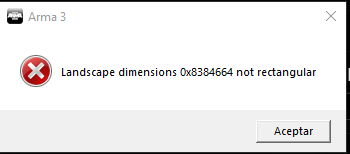 quaint jewel
how did you get that? never seen that
uncut trellis
u not following PMC tutorial
also @long ermine #arma3_terrain is the correct channel for terrain related stuff
uncut trellis
yeah those dont work
you cant skip learning how to use the tools by that
if you want to do terrains you got to do them right
long ermine
yep but i tried to make a map based on that terrain
uncut trellis
one of them life maps?
long ermine
yes
uncut trellis
basically the best advice I can give is: dont
the files for them are broken
and the maps themsleves are not even very well build
do something original
and better
also despite whatever you decide to do, you cant skip the learning of how the tools work and how the basic terrain workflow goes to do terrains from any material.
Might as well add that there is very little help available for using those files as they are all completely bonkers
 kindred hound
im having trouble with the eden editor
whenever i try to place the 9p129 missile truck from RHSAFRF with a crew, the game locks up. it only happens when i include a crew, but spawning an empty one works fine. any advice?
fringe salmon
Anyone know how to troubleshoot what causes steam authentication failed on servers?
kindred hound
are you trying to fix the problem or?
kindred hound
not sure then
 wide cape
my arma was uninstalled is there a way to stop it from happening
uncut trellis
I believe the files are still there but Steam occasionally bugs so that it does not recognize the install
shy pasture
In a log I constantly get the following (before "List of mods"):
Global namespace not passed during: false
Global namespace not passed during: false
Error in expression <false>
Error position: <false>
Error Local variable in global space
Global namespace not passed during: false
Global namespace not passed during: false
Error in expression <false>
Error position: <false>
Error Local variable in global space```
Where should I look for? Or it is not critical? ornate bison
I saw a post you done on the bohemia forums a while back about v3 signatures. I’ve signed my mods and I did not check the force v2 option. I’m the server.cfg on the verify signatures section I done 1 not 2 or 3. I’m still getting errors and ppl cannot join the server. Any idea? Am I doing it wrong.
"(v2) replaces obsolete v1 (since ARMA 2 version 1.10 and ARMA 2: OA version 1.59), v1 was deprecated as insecure"
https://community.bistudio.com/wiki/ArmA:_Addon_Signatures#Terminology
"V3 is the new one. and that should be used now" - Dedmen
https://forums.bohemia.net/forums/topic/222388-bisign-is-deprecated/
quaint jewel
@shy pasture someone stored {false} in your profileNamespace
@ornate bison verifySIgnatures 1 is invalid and automatically falls back to the default (2)
eternal salmon
Any idea why this would happen (disableAI "move" on Linux):
https://github.com/sethduda/AdvancedUrbanRappelling/issues/11
ie: why it seems to fail on Linux but not on Windows?
ornate bison
@quaint jewel I signed my mods with v1 and verified them and no error came up. It says my mods are not accepted by a key used on the server. I’m confused
quaint jewel
v1?
no you didn't sign them with v1
v1 doesn't exist anymore
is your key installed on the server?
grim tinsel
another new name
ornate bison
@quaint jewel There is no v3 option wdym?
quaint jewel
v3 is default
ornate bison
And there is no force v1 option so I just unchecked force v2 and signed the mods
And verified them
No errors came up
And when I put my public key in my mods and loaded up the server
With verifySignatures = 2;
It said mods are not accepted by a joe supported by the server
Do I have to put my private key anywhere?
grim tinsel
Did you upload the .bikey of the mod to the keys folder on the server? @ornate bison