@CBA_A3;@@Horror_Mod;@3CB BAF Equipment;@3CB BAF Units;@3CB BAF Vehicles;@3CB BAF Weapons;@3CB Factions;@south laurel;@south laurel 3 Extension (Animations and Actions);@ACRE2;@Chernarus 2035;@Chernarus Redux;@CUP ACE3 Compatibility Addon - Weapons;@CUP Terrains - Core;@CUP Terrains - Maps;@CUP Units;@CUP Weapons;@hardy parcel's ACE Ragdolling;@hardy parcel's STALKER-like anomalies;@Friths Ruin;@GRAD Trenches;@Immersion Cigs;@Jbad;@LAMBS_Danger.fsm;@LAMBS_RPG;@LAMBS_Suppression;@LAMBS_Turrets;@MBG Buildings 3 (Arma2 Legacy);@MrSanchez' Headlamps;@PLP Urban Packs- Barriers and Fences;@Project OPFOR;@Ravage;@RHSAFRF;@RHSGREF;@RHSUSAF;@RKSL Studios- Attachments v3.01;@Uriki's Mission Items;@US Military Mod;@Zombies and Demons;@Aftermath;@ Blastcore Edited (standalone version);@NIArms All in One;@NIArms All in One - CUP Compatibility;
#arma3_troubleshooting
1 messages · Page 111 of 1
 hardy parcel
oh hey
 broken siren
Oh sorry, xDD
I didnt meant to tag you, it is the file stuff
 south laurel
I done got spooked
broken siren
Sorry you too! <3
that wasnt meant to happend xDD
 wise barn
@broken siren
Good way to prevent tags: use discord markdowns
broken siren
Ehhh, yeah i have no idea how to do that sorry
I am just... like.. tiled and i wanna cry xD
That stuff is causing so much issues rn
 grim tinsel
 broken siren
Well yeah still no idea what i can do now .-.
 hearty hearth
@uncut trellis ye bohemia responded to the email i sent on friday today and they suggested deleting arma 3 then scanning and fixing the registry using ccleaner then reinstalling it. sadly it didnt work so im waiting for another fix. we gonna take this arma 3 down whether it likes it or not XD
btw they gave me other steps which i followed but just didnt bother putting them in for your sake XD
it actually messed up one of my integrated wireless adapters but i only use it when playing rocket league since it gets better ping than my other one XD but its an easy-ish fix anyways. kinda expected it to
 uncut trellis
odd problems
hearty hearth
ye ill just play battlefield 4 while i wait for either an idea to pop up or B.I. to respond XD
 last palm
i have a lockon for titan at. but i can't fire. the same unit, ai controlled can fire.
it feels like a bug some how
i also cant dump fire
last palm
well it was the foliage.
 loud hemlock
anyone know where i can ask questions about troublshooting a modded arma 3 server when its not starting?
broken siren
Yo so nobody can help me with that issue now? :/
broken siren
You csn scroll a Bit up, there is Everything stated
Cant type it on my phone rn
 fringe salmon
Didn't Grahame find the issue?
broken siren
I mean... I dunno? But what am i Suppost so do now?
My mates and me cant find any errors or issues...
It just doesnt work
fringe salmon
Make a 2nd mission with just the map and upload it to the server and see if it works and try to play it on the server
If it works load half the other mods on the server. If it still works load the rest
If it dosnt work then you mostly likely have a mod issue
If everything works properly theres something wrong with your mission.sqm on the other mission
broken siren
For that new mission, also with the framework i have in? Or just the sqm?
fringe salmon
Just the sqm first
Basically add things slowly untill you break it
Then once you find whats breaking it
Remove it
broken siren
Okay... well thats the thing:
We tested and tried a lot of fixing and we elminated some issues related to Cup Interiors and Ravage CUP but other than that the mission itself shouldnt make problems. Same with the scripts
Bc we use those scripts, the whole framework for other missions too and they work without any problem
fringe salmon
Sometimes the mission itself conflicts with the mod
fringe salmon
hello ! I have had this glitch for awhile , anyone know how to fix ? I have a amd radeon sapphire rx570 gpu . some say to reinstall drivers and some say disable ATOC. anyone else come across this before ?
wont let me add image ? ...... the glitch is where trees and bushes have a blueish/white fuzz over them
broken siren
@fringe salmon
Another questions, what exactly do you mean with "load half the mods"?
I will load in with all my mods for that OP, create a simple mission on that map (i.e. place like 4 dudes to play with) and save that?
Or how?
loud hemlock
my server wont go past the mission lobby it gets stuck on a loading screen
hearty hearth
@loud hemlock are you playing with mods?
hearty hearth
@loud hemlock does it happen to be star wars?
loud hemlock
<~< yess
hearty hearth
star wars opposition?
loud hemlock
yes
hearty hearth
swop has a bug where you will get an infinite loading screen, use to happen on my units server. endLoadingScreen was to command to get it to work but my guess is that your playing singleplayer
hearty hearth
ahh kk so can anyone get into it?
loud hemlock
im on it but im just staring at a loading screen and its stuck server cpu went to 0% and its not doing anything ]
hearty hearth
there is a file that you put into your mission file somewheres that removes that bug ill see if i can find it.
hearty hearth
^fixed btw
hearty hearth
@uncut trellis i think i got so more to add to the problem im having. so i had 2 games up at one and when i connected to an arma server i found that i lost connection on the other game and i tested a few more times and every time i connected to a server on arma and got connecting failed i would lose connection to the server i was already in on a different game (minecraft btw)
uncut trellis
possibly something wrong with your internet connection then
hearty hearth
i was thinking that to but then if it was a connection with my internet, i wouldve been able to connect to the server using my hotspot. what im thinking is something with my pc or windows settings cuts the connection when i connect to an arma server
hearty hearth
@uncut trellis it seems not even bohemia can figure it out XD. their fixes they send me once a day does not work XD
hearty hearth
@uncut trellis fixed arma 3 with a system restore tho i unplugged my hard drives other than my os ssd so that didnt get wiped either XD
uncut trellis
👌
 distant raven
14:10:22 Message not sent - error 0, message ID = ffffffff, to 1644380616 (TEST NAME)
14:10:22 NetServer: cannot find channel #1644380616, users.card=1
my rpt log is getting spammed with these messages, does anyone know what could have caused this?
EDIT: could've fix it, had the option skipLobby activated. this caused an endless loop on server connect.
fringe salmon
could someone please help me with terrain pop with the grass and tress, or do i just have to accept it
uncut trellis
can you explain in more detail what you mena?
 hollow quartz
Anyone here have a problem with the throttle slider in their Joystick only going 0-100% with no in between?
fringe salmon
like the grass just renders right in front of me
uncut trellis
perhaps you have to provide a picture of what you mean @fringe salmon
fringe salmon
thanks for trying to help man, but i cant really take a picture of it because as i move forward the grass starts flickering and popping in. could i send you a video to show you ?
@uncut trellis
uncut trellis
you can link the video here
however it does sound like the normal behavior of how clutter is drawn
fringe salmon
its a one drive clip, but if you dont want to risk clicking on it pretty much the grass is rendering like 5 to 10 feet in front of me, or in metric i think thats like 1.2 meters to like 2.9 meters or something . To me it looks like the terrain is rendering to close and its very immersion breaking.
@uncut trellis
uncut trellis
ummm
you are on hill
and the grass is that close to you
thats how its supposed to look
you dont walk on hill like this
and occasionally you zoom in to it as well
tall grass gets on your face in reality too
@fringe salmon
fringe salmon
but it also does that flickering on flat ground too, with the pop in of little patches of grass
uncut trellis
im not sure what you mean
can you pinpoint a timestamp where that happens?
the video quality drops quite a bit so its hard to see much
but I cant really spot any flickering
fringe salmon
30- to end
 desert isle
That makes two of us
uncut trellis
screenshot a frame and draw a circle to where we should look at
also if you are watching your original file, switch to the uploaded one
@fringe salmon
fringe salmon
ok ill do that, thanks for the help
uncut trellis
always best to watch the same thing you post when describing something
desert isle
Other than a low quality capture, I see nothing out of the ordinary.
uncut trellis
same
but it might get lost in the blur
could be the parallax effect since that does not show for very far
¯_(ツ)_/¯
desert isle
Could be that the user isnt used to the parallax effect too
fringe salmon
whats that ?
wise barn
what issue?
@cinder river
does it happen with the vanilla game?
guess not
no issue then
wise barn
retry with no mods loaded (vanilla)
also no mission framework
no scenario... pure vanilla.
go to the editor, place a heli and try
missions can interfere with that
uncut trellis
mod problem?
uncut trellis
perhaps synchronization issue. Have you made a bug tracker ticker?
do your friends run any local mods
if you dont make a ticket the info will likely never reach BI
theres link to the tracker in that channels description
 fringe salmon
this is whats happening to me, i tried low,med, high, ultra change settings i just dont know what to do https://youtu.be/OUI8c94eYNI
@uncut trellis @desert isle
 supple crystal
I don't see what's wrong..
Are you talking about the ground clutter (aka the little bushes, sticks etc covering the ground)?
@fringe salmon ^^
fringe salmon
yeah, its supposed to look like that ?
supple crystal
It only spawns in a smallish circle around you (the size of which i think is set by the map maker), it would cause to much of a performance drop otherwise to make it very large, especially for complicated clutter.
Some map makers do a very great job of disguising it like bludclot and temppa
fringe salmon
thanks i thought i was the only one experiencing it
supple crystal
after a few thousand hours you stop noticing it as well 😉
uncut trellis
yeh thats normal.
 void elk
i have a issue that i can't deal with, when im pressing START on steam to lunch arma, its not even starting to load, and its crushing, without errors, without any notification, and i already reinstall arma help me please...
uncut trellis
Did you run steam file check on the Arma 3 install on steam?
fringe salmon
with the T flight HOTAS X joystick. Is there a way for the throttle to be recognized as 1 axis instead of 2 buttons? no other game i use it with does this
last palm
i play with ACE a sp scenario. the NLAW is disabled and i can reload pcml's into it. but the ai doesn't. is there a way to disable the ace nlaw also for the ai?
 round stirrup
Why does my game constantly become 'not responding' when launching it? I have to launch it a couple of times for it to work normally.
supple crystal
CPU/RAM at 100% usage probably, try closing background programs like chrome, I get it with big modsets, usually if you don't touch anything and just leave it will come back to life, but if you click or anything it will CTD.
@round stirrup ^^
round stirrup
ok, thanks @supple crystal
round stirrup
oh and how do I make AI follow me?
supple crystal
¯\_(ツ)_/¯
I don't play with AI, i unbound all the command keys
I'm sure there is a bootcamp mission for it
fringe salmon
@round stirrup Tilda, and there will be an menu that pops up scroll to regroup, there is also another menu where you press tilda then 1 and you have return to formation. both do the same afaik
 austere kernel
A friend of mine has a glitch where if he plays with our modpack his entire screen is black and white.
Nobody else has this issue, only him
austere kernel
We use ACE, ACRE, misc World War II mods such as IFA.
He tried switching to a new profile but it doesn’t help
 buoyant patrol
ok so my friend had an issue about a year ago where his arma would get stuck on the loading screen. just today or wiped his computer to get a fresh start. now its giving him error session lost posts
1.Session lost - Verifying PBO failed: @CUP_Weapons/addons/cup_weapons_weaponscore.pbo 2.Session lost - File '@HVP/addons/77furycop.pbo
wise barn
CUP received an update today. Make sure local and server have the same version
buoyant patrol
where can i find that?
wise barn
Steam workshop mod folder changelog. Alternatively when arma is running in extentions settings
buoyant patrol
sweet thanks one more question. so last year his game would sit in the loading screen for hours on end and would never join in... ever heard a fix for the incase it decides to do it again??
buoyant patrol
the one that goes full screen just before joining the game
not the tiny one right after hitting the server
 quaint jewel
After selecting slot
before the map screen that comes up shortly after?
there are 2 loading screens after you select slot and join in.
Is it the first or second one
can you hear ingame sounds?
quaint jewel
you are running mods right?
its a broken mod, or a broken script in the mission
mods that are famous for that are MCC sandbox, Voyager compass
there are surely many more that are also broken
buoyant patrol
yeah i am. so basically even though he wiped his whole system and restarted he could still have bad mods?
i could*
grim tinsel
If you download and activate the same mods again, yes
buoyant patrol
ok ill keep my eyes on that.
thanks a million man. this has been a pain in my ass for a while now
round stirrup
what do you mean by 'tilda' @fringe salmon?
fringe salmon
Yes
 rocky ore
Is have the version 68 bit and i wil 64 bit
quaint jewel
and that doesn't work
why not
rocky ore
I do no
 crisp night
I try to host multiplayer and they can’t see my game
And I can’t invite them from steam
I’m pretty sure I ported everything right
 brave hawk
https://community.bistudio.com/wiki/Arma_3_Dedicated_Server#Port_Forwarding @crisp night to be sure
wise barn
@crisp night
make sure your ISP gives you a real IPv4 address. if not, no joy for you
if you are provided with an IPv4 connection via "Dual Stack (Lite)", you're also out of luck
crisp night
How do I check that @wise barn
wise barn
you ask your ISP
 arctic owl
fringe salmon
arctic owl
fringe salmon
Never seen that one, if you end up finding the fix let us now
 keen mesa
Anyone have a problem with the TFAR beta, trying to install the plugin says there's no associated program?
grim tinsel
From the FAQ on the TFAR discord
"I cannot open the ts3_plugin installers in TFAR's teamspeak directory"
"The plugin installer doesn't open correctly or asks what to open it with"Right-click the file and open it with the package_inst.exe in your Teamspeak installation directory.
@keen mesa
keen mesa
Alright, thanks. I'll pass that on.
wise barn
@cerulean rapids
general questions: #server_admins
about tools to use: #server_tools
if it's a windows server: #server_windows
if not: #server_linux
 spark mica
Anyone point me in the correct direction, Struggling with a version mismatch from ace, both client and server are running the exact same mods. I joined the server initialy, got the error, then continued to the game without issue, its only after leaving and coming back that I myself have been unable to get back into the game, any ideas?
Running 3.13.1.46, Server is running the exact same key, but getting the error saying the server is running a prior version
fringe salmon
Please help me I cannot stand this anymore!!! Every time I receive an update for workshop content after the download finishes it says "Update Cancelled" and takes up the space anyway, I don't know how many mods it has done this with but I have noticed my available space going down, please help!
spark mica
Unsubscribe from all workshop content, then re-download? - After unsubscribing allow a while for the mods to be uninstalled, similar to uninstalling a game this can take a short time depending on the speed of your hard disk
fringe salmon
No, it is just another update to one of the mods, about 86MB, it does this for every mod for some reason
spark mica
Maybe its keeping old versions downlaoded somwhere? I belive steam/steamapps/common/workshop is where all that stuff is kept, in a random assortment of folder names
fringe salmon
every mod update at least, if I have the launcher open when first subscribing and downloading a mod that seems to do it, but the part I don't get is it taking up space but cancelling, how do I remove this trash? Or at least make it work
Lemme send my workshop log
desert isle
Firstly, read our #rules (Particularly the bit that prohibits profanity) then edit your posts.
fringe salmon
Very, very sorry, but I cannot stand it anymore, it is literally eating away at my brain until i'll either smash my computer or my monitor, horrible issue
fringe salmon
FM would you happen to have some knowledge about this?
desert isle
Tetlys answer is correct and it solved a similar issue I had.
Patience is the key. Unsubscribe to everything, allow time for it all to be removed, then manually check to see if its been removed. Personally, whether it actually helps or not i don't know, but I shut steam down, then reboot my PC. Then I restart Steam. If everything looks ok, I re-subscribe one mod at a time.
supple crystal
@rocky ore
a) @'ing BI staff and other roles for tech support is against the rules.
b) Your question doesn't make sense, i assume you used google translate, maybe find a friend who speaks English to help translate your problem.
quaint jewel
and that doesn't work
I already asked you what exactly doesn't work and what you mean by that, you couldn't answer me with any useful info. So if you don't want to help people trying to help you, don't expect help yourself.
!issuewarning @rocky ore pinging BI members without any valid reason, spamming
 pallid krakenBOT
Done.
rocky ore
And who cane i it change it via launcher settings
supple crystal
you change between 32 & 64 bit in the Arma 3 launchers settings.
quaint jewel
he says that I need 64 bit version
who says? The Launcher doesn't check that or restrict it. Arma 32bit you can also run just fine on a 64bit machine.
supple crystal
misuse of pronouns Ded he meant object pronoun "it" 😉
I cant remember if servers warn you if you try to join a 64bit server running 32bit.
Its either that ^ or his PC is 32bit and he's launching in 64bit.
quaint jewel
Still, what is "it"
supple crystal
Arma, im guessing
quaint jewel
I cant remember if servers warn you if you try to join a 64bit server running 32bit.
no.
his PC is 32bit and he's launching in 64bit.
but then it wouldn't tell him that he needs 64bit...
Please explain in detail whats wrong, multiple sentences please.
rocky ore
Okay, I'm not home now so I'll solve it when I'm home
 proper pulsar
hello I've got a new pc had to reinstall all, including armatools, but I have a issue with textview, Missing registry entry... texture Convert, any hint to fix that issue?
quaint jewel
does it say what registry entry?
proper pulsar
yes, Sofware\BIStudio\TextureConvert
HKEY_LOCAL_MACHINE/Sofware\BIStudio\TextureConvert
quaint jewel
did you launch via the Arma 3 tools launcher? did you launch the tools via steam?
proper pulsar
I use to make a link to arma 3 tools launcher once installed from steam and I launch it by that, all other apps works except Textview2
quaint jewel
so did you launch via steam?
proper pulsar
no also in previous install it was not working
quaint jewel
then please do that Steam -> Arma 3 tools and then in tools launcher select texview
proper pulsar
I closed and launched by steam, it did first time install, and now seems to works Thanks that solved the missing ddl
@quaint jewel thank you very much
 lethal marlin
So I have an issue, I have ARMA3 installed to my PC still but steam does not show that it is installed. I was playing it the day before and then when I boot up my PC and check again it is still asking to install ARMA even though I can manually open the launcher and play.
This is causing me to not be able to update my mods which I need to have done soon so if anyone could help that would be great.
uncut trellis
steam bugs sometimes like that
have you tried restarting steam?
or your computer
fringe salmon
Hello
I factory restartet my pc and now arma crashes after i play like 1-10 minutes
I reinstalled steam arma and did a lot of stuff thats on the internet still dosnt work i gave arma more vram and all the stuff anybody knows how to help
? The game closes instant but my friend told me it is a steam ticket failed and a steam autentification fail
grim tinsel
Have you looked at your rpt logs to see if theres anything notable in them? @fringe salmon
grim tinsel
google knows 
fringe salmon
nothing wrong with that
i asked a friend to help me hes rly good with arma and arma problems and he checked all my files and stuff
fringe salmon
i have the steelseries artis pro wireless it is connectet via a dec but that one is concectet with usb
and i have windows 10
but i chanced my headset when i factory restartet my pc
my old one was wireless too tho
uncut trellis
windows 10 has problems with usb headsets and Arma has problems with that problem. Unplug the headphones and see if that works any different
fringe salmon
ok gonna try that thanks 😄
fringe salmon
Thanks @uncut trellis it was cause of my headset so does that mean i need to buy a new one ?
uncut trellis
That I dont know, sometimes the headset driver update has helped for example
you can search this discord for earlier troubleshooting of the same problem. something like "usb headset" on the search field should bring up stuff
fringe salmon
Thanks
lethal marlin
Yes restarted my PC and that as well
Not sure if there’s a way to validate files for it
fringe salmon
Boiis
Steelseries support helped me
After I was threatening to chance back to razer lol
Just chance the USB port
uncut trellis
did they tell why that would help?
loud hemlock
server mission wont start 19:28:28 Warning Message: Addon 'WW2_Core_c_IF_ZZZ_LastLoaded_c' requires addon 'WW2_Core_c_IFA3_BackwardsCompatibility4_c'
wise barn
you are either missing IFA3, or if loaded IFA3 seems to be outdated or corrupted
loud hemlock
hmm okay let me see
well im using https://steamcommunity.com/sharedfiles/filedetails/?id=660460283 IFA3 AIO LITE fresh from the workshop
i can give you a list of all mods im using its all in a steam coollection
wise barn
damn... could be any mod related to IFA3
loud hemlock
do you know what one is associated with 'WW2_Core_c_IF_ZZZ_LastLoaded_c' requires addon 'WW2_Core_c_IFA3_BackwardsCompatibility4_c'
wise barn
as i said, could be any IFA3 related mod you are loading... no clue
loud hemlock
oof welp guess i just gotta unload
IFA3 Liberation says this warning when i load it
wise barn
go to your workshop mod folder of IFA3 AIO Lite, look for ww2_core_c_ifa3_backwardscompatibility_c.pbo, delete it and then use the launcher to repair the mod
wise barn
then do this on the server
loud hemlock
client*
wise barn
either way, no matter how you do it, that pbo seems to be corrupted
loud hemlock
mk
wise barn
how did you install the mods on the server?
wise barn
hmmm.... got access to the mod folders?
loud hemlock
mhmm
am currently reinstalling the mod at the second tho
launching
same error 20:03:05 Warning Message: Addon 'WW2_Core_c_IF_ZZZ_LastLoaded_c' requires addon 'WW2_Core_c_IFA3_BackwardsCompatibility4_c'
loud hemlock
so instead of auto download should i use my client copy
one i downloaded from stem
steam
wise barn
if you don't have access to the mod folder and can't replace files manually, contact support
loud hemlock
i can
wise barn
ok, then delete ww2_core_c_ifa3_backwardscompatibility_c.pbo and replace it with your local copy
no need (for now) to replace the whole mod
wise barn
mod folder should be named @IFA3_AIO_LITE
loud hemlock
oh from IFA3 LITE
wise barn
yes
loud hemlock
the bisign file as well or just pbo
wise barn
just the pbo
loud hemlock
alrght ive dont it im going to boot the server
done*
same error
wait
it said ww2_core_c_ifa3_backwardscompatibility4_c.pbo
not ww2_core_c_ifa3_backwardscompatibility_c.pbo
in the error
wise barn
damn, i missed that... sorry. do it with that pbo
good eye btw 😄
ww2_core_c_ifa3_backwardscompatibility4_c.pbo
loud hemlock
should ill grab command line
it never gets to that point to show loaded mods, ill get rpt anyways
can i dm you the rpt?
wise barn
use pastebin.com please
wise barn
mod string is incomplete, RPT is missing boot up
loud hemlock
mk let me go through the command line again
wise barn
i think you reached maximum letters for the mod string
therefore not all mods are loading
wise barn
the string get's cut after @G
;@Flags WW2;@Fluid;@GEIST-A3 LITE;@G
loud hemlock
hmm how do you deal with that?
wise barn
contacting support
nothing out of my head that you could do
other than cutting down on mods
loud hemlock
mk
wise barn
no wait... IFA3 is in the mod string somehow. at the very beginning
but still, the boot up is missing in the RPT
so no way to verify if it even loads up
wise barn
this portion is missing from the RPT (just an example)
https://pastebin.com/ptiRUe3w
 loud hemlock
no i know that lol i figured the error was keeping it from progressing that far
wise barn
this is what a full report looks like.
https://pastebin.com/gtDs9uM9
even with missing addons error the bootup should be there
loud hemlock
launches just fine with @CBA_A3;@ace;@IFA3_AIO_LITE;@CUP_Terrains_Core
wise barn
ok... seems like those are fine
load all mods except liberation that you mentioned earlier
loud hemlock
thats what i though but
'WW2_Core_c_IF_ZZZ_LastLoaded_c and 'WW2_Core_c_IFA3_BackwardsCompatibility4_c' are both in IFA3
so ```20:03:05 Warning Message: Addon 'WW2_Core_c_IF_ZZZ_LastLoaded_c' requires addon 'WW2_Core_c_IFA3_BackwardsCompatibility4_c'
doesn't make sense?
loud hemlock
mk ill just keep adding untill something screws it
wise barn
i hope you'll find the smelly fish. i'm going to bed now, alarm goes off in 2ish hours.
loud hemlock
Le-7 standalone mod was causing it
quaint jewel
@wise barn
i think you reached maximum letters for the mod string
no, there is no real max
mod string is incomplete, RPT is missing boot up
no, RPT line length is limited, not the mod params
 minor dew
Hi ive got a bit of a proble
while making a game/server i keep geting 0 instance found for "opfor" or "bluefor"
could someone help
 fallow swan
!issuewarning @minor dew tagging groups for no good reason
 full compass
Hi,
I'm new to this server but not new to Arma.
I need some help,
Well, My loadouts.
About 200 saved.
On my normal account.
They're gone.
I checked the VA and they're gone, And in game.
IDK why.
I swapped to my other with a different user.
Then changed back.
uncut trellis
Your profile probably got overwritten.
Id wager using alt account on same computer could do that
why would you even want to do that?
full compass
?
Do what?
I have a Milsim account.
And then a main.
So, I just change to Milsim and join like that.
Then switch to main after.
uncut trellis
well it might have been switching that broke the profile.
full compass
Hmmm.
 200 VA loadouts
 loud hemlock
a3_characters_f```
Server wont load mission saying thisnope, must be another issue. this error is known and ignored by arma
loud hemlock
diffrent server
wise barn
still, there must be smth else causing troubles
minor dew
hi does anyone know about the 0 instances found for " division " problem ? ive been trying to fix it for quite some time now but it only gives me this message on CUP maps? any help would be great thanks.
wise barn
what's the full error message?
minor dew
let me load the server up 2 secs]
There are 0 objectives for this "opfor" please assign a civ or mil ovjective
even thou they are assigned to an obj it wouldnt spawn ai
grim tinsel
I assume thats coming from a mod? @minor dew
minor dew
yeah
the alive mod i belive
@grim tinsel can i get in a discord call with you so you can see?
grim tinsel
No.
grim tinsel
Nop, dont use ALIVE a lot
minor dew
can you suggest someone that knows bc i have other mods
its mainly when i use the cup maps
the other maps are okay but reeee
 formal star
Been trying to get my joystick working for flying in arma 2, and for some reason I can't get the joystick to act like a joystick.
It behaves more like a deadzone then a solid keyboard press when I use it instead of a joystick with a deadzone and fluid 1%-100% gradient in my turns. It's really hard to describe, which is why google probably isn't pulling anything up. Any ideas?
(I think the correct term for what I'm wanting out of my joystick is analog, but I could be wrong.)
quaint jewel
It behaves like a 1/0 button, so digital. Instead of expected analog
I assume its what you want to say
does it work right in the windows joystick thingy tool
uncut trellis
@minor dew best to ask in ALIVE discord
minor dew
@uncut trellis thankyou i shall go find the Alive Discord
quaint jewel
formal star
That's exactly what I want to say and now I feel dumb for not saying it like that. Lmao.
Yeah, in windows controller setup it behaves perfectly. The deadzone is perfect, no drift but still very sensitive and i can perfectly control how far I turn it(like analog), but ingame it's that 1/0 stuff.
 shadow mauve
Hi, I have an issue with my Arma 3, basically everytime I try to join a game I lose connectivity after like 5 minutes of playing. I tried pretty much everything, from uninstalling/ reinstalling and port forwarding the game ports. Anyone know how to fix this?
uncut trellis
Check if the RPT log tells you anything at the time of disconnect. Also are you using mods and what kind of servers have you tried?
 tropic zenith
I've had the same issue when I was on wifi, or connecting using a connection coming from the router (with built in access point) going wirelessly to a wifi repeater and then running an ethernet cable from the wifi repeater to my pc. Might try using pure ethernet if you're on wifi.
 finite nimbus
I keep trying to join a server and it just kicks me with no message
wise barn
You might be missing mods
Join the server via arma 3 launcher server browser
 stoic tulip
So my power surged and when I opened my Arma 3 I found that steam is trying to reinstall all 150+ of my mods that are already there
They all have the little orange update symbol next to the name, can someone please help me to fix this? I've done multiple reinstalls of the game and steam and all it's gotten me was all of my games uninstalled and back to square 1 with the mod issue still persisting
 silent python
Im having a really annoying bug with aiming
Whenever I press RMB to aim, the camera will quickly zoom in, zoom back out, and then go to sights.
theres like a full second delay between pressing rmb and getting the aim up.
silent python
no mods, and I havnt touched the keymappings for it
neeevermind, game crashed and restart fixed it.
uncut trellis
you might have GPU or some other hardware troubles
check your temperatures while you play
 delicate elm
And check your computer's too 😉
formal star
Does anyone know how to make my joystick analog in arma 2? Sorry for the repost.
 devout mural
Is it still impossible to host genuine LAN servers without something like Hamachi?
Every time I host one, the server both
-
Doesn’t appear in ‘LAN’, nor appears in ‘Friends’.
-
When trying to Direct Connect, it acts as if the server isn’t there.
I believe I am doing everything correctly already, because I can host LAN servers for siblings/friends on a lot of different games, however this particular game seems to be giving us grief.
Is this a problem with improper port forwarding? (And why would that be necessary for a LAN game?)
Is it a problem of something with my ISP?
Any help is appreciated. I’m not sure about using Hamachi for LAN on this singular game, so if there’s an ‘actual fix’ I’d prefer that!
( please @.mention me, with a serious answer :p )
I’m also trying to host this on a local network. Same room, same house, same WiFi connection.
quaint jewel
its not still impossible and afaik it never was impossible
make sure your hamachi network adapter is in top under the windows network adapter priority thing
devout mural
@quaint jewel The point is I’m not using Hamachi
quaint jewel
OH
devout mural
Don’t have it installed, never needed it elsewhere.
For some reason, hosting LAN on ARMA3 is ouch
quaint jewel
I use lan servers at home with my laptop as client, never had problems
make sure windows firewall is configured or disabled
devout mural
Any list of common problems to check for?
I’ll triple check that, may have changed during a windows update or something
 unique shadow
yoyo, does anyone have any advice on portforwarding arma 3 ports on a BThub. I've tried all the videos and it just doesn't seem to work >.<
 quaint cargo
Im having the same problem or something like that.
unique shadow
aye
quaint cargo
Just a few months ago it worked perfectly fine.
But now when I try to host a server for me and my friends to play on they say its not found. When they try to join me off friends list it says im not playing even tho I am.
quaint cargo
Did they change something? Because like I said it worked perfectly fine a few months ago.
unique shadow
maybe
quaint cargo
ik. I was really excited to get back into arma but I can't run my scenarios. : (
 weary sky
nothing changed in Arma, and as far as I know nothing changed in Steam either
unique shadow
it's probably something to do with the router my guy
have you had an upgrade recently?
quaint cargo
Me?
unique shadow
yup
quaint cargo
I can play them myself but my friends can't join me.
I did the command prompt to get my available ports and it doesn't work.
unique shadow
have you accessed your router settings?
quaint cargo
Ill have to ask my mother. She has it locked in her cabinet by her desk. She works from home and doesn't want anyone to mess w/ it. :/
unique shadow
lol >.<
quaint cargo
I also don't really know how that stuff works...
quaint cargo
How do I change the port?
 tiny imp
on client or server ?
quaint cargo
Im trying to host my server for my friends and I but it they say it says server not found or something like that.
tiny imp
you need open and port forward then those https://community.bistudio.com/wiki/Arma_3_Dedicated_Server#Port_Forwarding
quaint cargo
You need to open a port and the forward it? Is that what you meant?
Because a few months ago it worked perfectly fine. Never had these problems.
So what port should I use? I don't know a lot about internet and stuff.
tiny imp
make sure you have the BattlEye port covered, that was added in 2017
quaint cargo
I got the game ~ May 2018
Worked perfectly fine.
I really want to run my scenarios w/ me and my friends but I can't because when they try to connect it says server does not exist or something like that.
...
Okay, guess I can't ever play w/ my friends on my scenarios.
insert jeopardy main theme here
Ughhhhhhhhhh
Thank you soooo much for the "help".
I NEED HELP WITH THE SERVER!
Wdym by
make sure you have the BattlEye port covered, that was added in 2017
@tiny imp
quaint jewel
you need to forward 2302-2306, dwarden is saying that you shouldn't forget 2306
as long as you forward all listed on wiki you should be fine
also make sure windows firewall, or some addon antivirus firewall garbage is not additionally blocking stuff you forwarded in your router
quaint cargo
Ughhhhh, the email was faster.
desert isle
Patience goes a LONG way. This is not a "paid for" helpline.
devout mural
To whoever helped me, I think it was Dedmen, thank you! Finally got the multiplayer working- for some reason half of the players were connected to the wrong kind of network to play online, don’t know how I didn’t catch that until now.
quaint cargo
Could making a unit help
quaint cargo
Arma keeps crashing on launch. : (
Can someone please tell me how to fix this hosting issue?
Don't you just love that you never get real help from troubleshooting?
@quaint jewel Can you help me?
grim tinsel
Don't you just love that you never get real help from troubleshooting?
Okay dude we're not your personal servants and not being paid to help you, the people helping others here are doing it because they're nice so stop whining about not getting help @quaint cargo
grim tinsel
You missed the point of what I said, stop complaining that people arent helping you, they're doing it because they nice and not because they're getting something in return
quaint jewel
More details else no help
 vestal yacht
So my taskbar is on the left hand side of the screen instead of the typicall bottom, for a while I didn't run arma as fullscreen windowed because it'd either be under the taskbar or the entire window would shift the width of the taskbar to the right. I somehow fixed that a while ago, no clue how. Just now I was messing with some video settings (nothing related to the window, brigthness, view distance, etc) and it suddenly shifted to the right again. Anyone know how to fix this?
 opaque rover
Hello everyone... I encountered a minor problem which I also have found a way to kind of solve it. I wanted to report it though and see if there is a more... Official solution to it or it is some kind of bug that can be solved in a future update or something and also I wanted to see if anyone else around here had it before me. Here it is:
Every time that I change the logo of my unit on ArmA3/Units (online) it stops to show up on local host (at least... not in a unit these days to check it on a dedicated server) on my shoulder patch (even in vanilla suits that support it). I tried to restart, refresh, change a unit, then get it back etc. The only thing that solved it is to log in an official server. From the moment that I log in the patch starts to be on my shoulder patch again! Any ideas why and if I do something wrong here? Cheers. I hope that all your problems will be solved guys. Cheers!
fringe salmon
@opaque rover pretty sure a3 units only work on servers and not SP
We already know it shows up on official servers, so it should definetly work on dedis, Id say Try hosting MP from eden and see if it shows up
quaint jewel
@vestal yacht configure your resolution manually in Arma.cfg in your my documents/Arma 3
vestal yacht
I'll try that later today
fringe salmon
Hi my friend is now to playing on my server but he cant open the menu there is only a eye and a sound when he press z
(the menu where he can spawn things he cant open)
wise barn
Only possible if he got the rights to be Zeus. He must be in the Zeus slot iirc
fringe salmon
My microphone is really quiet using arma 3's voice chat system but it's fine on other things like discord. I've tried boosting the mic volume itself and maxing game settings. Any solutions?
opaque rover
@fringe salmon thank you for the reply mate. Maybe I wasn't really clear. But the thing is that after I change the patch to see it again, I have to connect to a server, otherwise it won't so up on local host not SP.
vestal yacht
So in relation to this comment from me from earlier: https://discordapp.com/channels/105462288051380224/141866231362879488/690310432489209908
I'm now using these params in my arma3.cfg file:
winX=0;
winY=0;
winWidth=1366;
winHeight=768;
winDefWidth=1366;
winDefHeight=768;
fullScreenWidth=1366;
fullScreenHeight=768;
refresh=30;
renderWidth=1366;
renderHeight=768;
And this kinda works. It's just if I open the video settings and close them the window will shift right again, meaning that part of the window falls off of the screen again
 cinder pewter
arma is not seeing my hotas warthog joystick but it works in windows. i've looked into the custom thing in the config instead of "disabled", but it's correct. anyone have suggestions?
cinder pewter
solved it. found a post that said that steam screws up everything with it's "generic gamepad support". this turned out to be true. it stops arma from detecting all peripheral devices i have except trackir
go into big picture mode and uncheck it and it'll work. note to self 🙂
grim tinsel
Neat, thanks for sharing the solution
 oblique hazel
Whenever i load up a scenario in multiplayer it doesn't have any roles or settings, it's just empty no matter what scenario.
oblique hazel
How?
It's any scenario
Like any even official
More accurate explanation the role selection screen is blank
weary sky
But you do have respawn locationa?
Because roles/loadouts are not required for the respawn system
 chrome cove
i try to launch the game- works fine without the mod pack but with it activated it doesnt work
stuck on black screen after u launch game from launcher
got a fix?
oblique hazel
Ping me if you find a fix for my problem
grim tinsel
@chrome cove propably an issue with the mods you're trying to load, take a look at your rpt log I guess? maybe it can help
@oblique hazel Can you post a picture of the problem?
grim tinsel
Uplod the picture to an image hosting website and post the link here
oblique hazel
Nevermind it fixed automatically
 knotty hedge
Anyone else getting an error when the launcher tries loading your units?
I cant even use the parameter to start with one.
 rancid ledge
anyone got contact to an epm admin, the epm DE#1 KOTH server is not working
kinda not loading the map for some reason
its working again ...
 visual plover
is anyone else having issues with Units? I keep getting an error saying it can't be reached
 frosty condor
I am having some problems with an overhualed faction I had made. I am not sure what the issue is but I used ALIVE's ORBAT system. Everytime I load the overhaul I get a crash. is anyone willing to assist me with this? I would say 90% of the work is done.
uncut trellis
what does your rpt log say?
frosty condor
can I DM you?
uncut trellis
drop it in pastebin and link here
wise barn
keep all trouble shooting to public channels so others can read up on it / learn from it
frosty condor
ok, I didnt want to clutter it. stand bty
wise barn
if you do as HG suggested and use pastebin.com all will be fine
frosty condor
I am trying to figure that out
uncut trellis
frosty condor
uncut trellis
👍
and it just crashes, no errors etc?
the log doesnt really say anything im afraid
how does your faction overhauld get loaded?
as an addon?
frosty condor
yes
I put it in my addons folder
I followed the ALIVE ORBAT guide in how to do it
I was overhauling RHS' USMC desert faction
uncut trellis
no dont put anything you make in the addons folder
any local mod goes into its own @gloomy lichendname folder
also how did you build the addon?
frosty condor
I named the modd "@myfaction"
then within that there is an addons folder
and the autogen.hpp, CfgPatches.hpp and config.hpp files are all PBO'd
config.cpp*
uncut trellis
what did you build the pbo with?
frosty condor
pbo maker available on armaholic
uncut trellis
does not sound good
uncut trellis
use pboProject and proper developement environment P drive packing
you have introduced some very bad bug into your addon most likely
uncut trellis
yahh thats poop
pbo manager is not proper tool to create pbos
unfortunately thats not common knowledge anymore
frosty condor
oh well. Thanks though.
uncut trellis
I would suggest you use Mikeros PboProject as it will give you a lot of debug info on typos and whatnot.
wise barn
@frosty condor
some stuff about tools for arma 3 modding.
https://pmc.editing.wiki/doku.php?id=arma3:tools
you can download all needed mikero's tools here
https://mikero.bytex.digital/Downloads
 marble geyser
hey does someone know how to make a friend admin on my local hosted server debug enabled
console*
wise barn
set up a server using
https://forums.bohemia.net/forums/topic/101123-tophes-arma-dedicated-server-tool-tadst/
and give him the admin pasword
 opaque basalt
Has anyone else been unable to acess Units for the last 24 hours or so?
wise barn
yes, known
 warm crow
Hello I have a problem when flying Jets and Heli, i cant seem to lock on to ground targets but i CAN lock on to aireal targets..? i feel like i have tried everything now but it just dosent work for me... any help is much appreciated!
warm crow
mb
wise barn
you lock capabilities depend on the weapon you use
air to air weapons can not lock on ground targets
ect
warm crow
Yeah i know but AG should be able to, right?
wise barn
yes
warm crow
You dont have anything else that might help? 😅
wise barn
sorry, not really
 chrome igloo
RE: #general_chat_arma @stone rover give your friend your 'public IP' and direct connect. if that dont work sounds like then ya behind a router... look into Port Forwarding/UPNP/DMZ configuration.
fringe salmon
help with my grass looking like this ?https://youtu.be/onkXRcLs440
fringe salmon
you see dont the grass rendering right in front of me ?
its like the lod are flickering as i approch
fringe salmon
what do you recommend because on altis after i downloaded ravage mod it stopped doing that for me n that terrain, but anyting else it does that. what should i do
 plucky shoal
I know this may not be totally an arma problem, but does anyone have an idea why the Cold War Mobilization Pack Compatibility patch just fails to install? Downloaded 21,2gb three times now but it just says update cancelled and removes the downloaded files when the download ends.
 silk plinth
hello

"required version: 1.96.146114 - your version: 1.96.146113"
there's no option to update that i know of
and i cant play on a particular server because of this
reinstalling the game is out of the window, just saying
quaint jewel
you are on perf/prof
no idea why they set the required version as that. But apparently they don't want you to play with perf/prof
Disable the profiling beta in steam, and go back to the basegame
quaint jewel
perf/prof is compatible with the basegame, seems like that specific server thought they can be extra smart by setting the minimum required build
brave hawk
@fervent whale go to Windows, Uninstall Program, remove BattlEye
brave hawk
@fervent whale https://www.battleye.com/downloads/ install BattlEye
 dark vortex
Out of nowhere while playing antistasi modded, my friend can't join me (hangs at loading screen) and I can't join him (hangs at loading screen). Problem doesn't occur with no mods.
 fervent whale
Start new sesion right?
dark vortex
We've tried turning off our firewalls, port forwarding etc...
fervent whale
@brave hawk
brave hawk
download, install, ???, profit
fervent whale
what is the ip address i needed?
brave hawk
go to your Arma 3 profile (usually Documents\Arma 3 (Other profiles))
edit the -yourname-.Arma3Profile
try to find the line battleyeLicense=
set it to 1 or delete it, start the game, enjoy
quaint jewel
screenshot of the eula message plox
 quaint jewel
Ah, its from Arma launcher
well you won't find the answer to a Arma launcher problem in your Arma game configs, or in your battleye installation
You said from the start on that it says you declined the license, but thats wrong
its asking you to accept the license, and the button for that is in the bottom right
Click that button
can't you just drag that window up, by the title bar. So you can properly see the buttons?
 fervent whale
so i click accept right?
quaint jewel
well if you want to accept that license agreement, then you can click accept
fervent whale
i should? because i need BE to play the game right?
quaint jewel
noone forces you
if you don't like that license or don't want to accept it, then you don't have to, just can't play with battleye then
 paper monolith
I have an issue with a server setup.
I've set the command line to use -autoInit and the config has persistent = 1; set, however the mission never loads on launch and when all users disconnect the mission reloads.
Anyone able to help me troubleshoot as i'm not entirely sure how to figure out what's going wrong.
quaint jewel
u sure that config is actually loaded by the server?
paper monolith
Uh this is the command line:
"-config=S:\servers\arma3\serverfiles\profiles\24_7\config.cfg"
This is the location of the file:
S:\servers\arma3\serverfiles\profiles\24_7\config.cfg
So yeah, it loads everything else correctly. The mission does load when a player connects. I added a MOTD message to confirm its using that config and it is.
It's like the autoInit or persistent or both just isn't applying.
paper monolith
Update: Changing mission files doesn't effect it.
 manic spruce
I've recently changed stuff in my computer and my Arma 3 no longer wants to save any of my settings, it used to show the 'may be set to read only' message but that doesn't show up anymore, my scenarios no longer save, my campaigns no longer save, is there any way to fix this? I've gone through looking it up and other stuff but nothing helps. (edit, posted in other channel and put it here, deleted other one)
paper monolith
Fixed my issue.
 thorn comet
hello is there any here that can help me with a problem i am having with getting the vindicta mode to work on my server
thorn comet
well the mission doent show op in the list of modes to choose form
do you know how to get it there
paper monolith
make sure you launch the server with vindicta in "-mod="
https://vindicta-team.github.io/Vindicta-Docs/setup.html is pretty useful.
thorn comet
yeah i got vindcta in -mod= and in the -servermod= should i take it out of the servermod or does it not matter
paper monolith
Does anyone know if the launch Parameters order on the server.exe matters at all?
paper monolith
Right, cuz -autoInit wasn't applying till i put it after -profiles
But that may have just been a fluke and now it suddenly works
I've rejigged everything so its in the order that it's mentioned on the wiki, hoping that fixes this stupid "persistent = 1;" issue that is making me pull my hair out.
I have persistent set, yet every time i leave, the mission unloads and restarts. Got -autoInit to work which is great:
12:09:31 Dedicated host created.
12:09:48 Game Port: 2602, Steam Query Port: 2603
12:09:48 Host identity created.
12:09:49 Roles assigned.
12:09:49 Reading mission ...
12:10:05 Mission read.
12:10:12 Game started.
12:10:24 N. Home uses a modified data file
12:10:27 Player N. Home connecting.
12:10:28 Player N. Home connected (id=76561198028420514).
12:12:51 Player N. Home disconnected.
12:14:04 Game finished.
12:14:05 Waiting for next game.
12:14:06 Roles assigned.
12:14:06 Reading mission ...
12:14:27 Mission read.
12:14:28 Game started.
Willing to try any debug tips at this point xD
Omg, done. ACEX headless had a setting to shut the server down after 60s
 halcyon adder
Anyone have experience with the "Include file a3\functions_f\Params\paramWeather.hpp not found." error? made a description.ext with params, when i try to host a game it crashes with that error. Deleting the mission didn't fix it, so I deleted every mission except for default. Still didn't fix, so reinstalling. I have backups of everything if you want to see the description.ext
quaint jewel
move the file into the mission pbo itself, and change your include to include that file instead
it is in some mission pbo, can't tell you where
wise barn
not until you told us what the matter is
 worthy falcon
When I start Arma 3 I got blue screen
wise barn
what's the error? (blue screen lower left corner in all caps usually)
worthy falcon
Kernel
worthy falcon
Where to upload picture ?
worthy falcon
Ok wait

i have dropbox
ok?
i did fresh nvidia drivers and dont help
i check all files in steam
i have all updated drivers
and when i run arma3launcher and then i hit play the blue screen appears
its the moment i think when BattlEye runs
wise barn
did you already try to google for the error?
fringe salmon
Can anyone help me with this error?
7:19:17 Warning Message: Addon 'HLC_COMPAT_RHS_AWC' requires addon 'rhs_c_weapons'
wise barn
you are missing RHS mods
fringe salmon
I just realised i am idiot and am missing half of them 🤦♀️
worthy falcon
wise barn
@fringe salmon
well... what can i say? 😄
@worthy falcon
seems like to be the same problem as you have. remove all traces of BE and reinstall it afterwards
worthy falcon
ok i try, thx mate
 fossil ginkgo
Hi, when im in a server i sometimes get randomly kicked with the message 'wrong signature for file' with the location of a file, thing is it changes everytime and is always a .pbo file. has anyone got a fix for this issue. some others on the server get it also
 fleet oyster
well. I'm trying to run a dedicated server with a custom mission and I keep joining the server only to be greeted with NO player slots. Any Ideas?
 wheat breach
Hi, me and my friends are trying to set up a dedicated server and we're having trouble with mod load order. Is there some sort of program that helps sort and set a load order automatically?
quaint jewel
Mod load order shouldn't matter at all if you use properly made mods
Allt he modders that know what they are doing know how to properly configure their requiredAddons
wheat breach
Well we have 78 mods that run perfectly fine ingame but when we try to run the dedicated servers we'll get random errors of missing addons despite having everything enabled.
Stuff like this:
13:37:39 Conflicting addon Mattaust_Objects in 'MM_Shopping', previous definition in 'MM_objects' 13:37:40 Conflicting addon fm12_respirator in 'fm12_respirator_ACE3', previous definition in 'fm12_respirator' 13:37:43 Conflicting addon A3_Sounds_F in 'a3\sounds_f', previous definition in 'mm_buildings\prison\sounds' 13:37:45 Warning Message: Addon 'mm_buildings2' requires addon 'mm_bank'
quaint jewel
Missing add-ons errors don't happen because of load order.
Looks more like you are loading duplicated/different versions of mods
wheat breach
duplicated?
delicate elm
Looks like a Life repack plus MattAust's ARMA 3 Custom Buildings maybe?
quaint jewel
Or you might just be running tons of ripped mod repacks
wheat breach
My friend has been copying the mods he has downloaded from the workshop to the dedicated server via ftp (we have been using a 3rd party server)
would that cause a problem?
quaint jewel
No? Yes? Kinda but not really
You have a folder full of broken mods, you copy that folder, now you load all mods inside the copy.
Did the copying cause the problem? Well, the problem was already there from the start so.. it didn't really cause it, but without doing the copying the copy wouldn't have broken mods inside, so yes it kinda caused it. But on the other hand not at all really.
wheat breach
Broken mods? But they work fine as a client and when i host non-dedicated?
quaint jewel
Server start parameters and rpt please. I check tomorrow. Good night :D
wheat breach
Like the command line?
quaint jewel
Yes. And logfile
wheat breach
I'll put it in a pastebin, I'd hate to flood this chat
quaint jewel
You'd get banned for spamming if you were to post the full rpt here :D
My idea was more like file upload
last palm
i don't know what i have done, but i cant repair or rearm a slammer with a hemtt repair and ammo truck. and i have no clue where to search for the problem
grim tinsel
vanilla or modded? @last palm
grim tinsel
Should props mention that then 
last palm
well maybe there is a common place to start
 smoky aurora
How to make aircraft carrier catapult work?
last palm
@smoky aurora use uss nimitz and the suggested extra jet mods
grim tinsel
Good work not answering the question
smoky aurora
but I cant use them on my dedicated server
grim tinsel
@smoky aurora if you spawn the aircraft carrier the catapults should work
smoky aurora
I cant spawn Nimitz on server
last palm
what? you asked if its vanilla or modded?
grim tinsel
I meant the question that Phish asked
last palm
sorry
smoky aurora
Vanilla aircraft carrier spawned through achilles Zeus
grim tinsel
Hm I never tested if they work with achilles, but I assume they would
make sure you're standing on the right spot
grim tinsel
hm odd, can you test if it works fine if you spawn it in an editor scenario? (independent of the server)
 acoustic knoll
Hey guys, I'm wondering if anyone has an idea what this error could be we are getting in our server at the moment?
People are crashing maybe 3-5 minutes into joining and this is what the console is saying
It seems it could be related to ACRE
As ACRE is throwing up an error when we load into weferlingen
 astral sky
hey guys, a player got this pic when he tries to connect 1 of my server, "You Banned", but he is not in banlist and he can connect another server placed on this PC-ServerMachine normally
https://sun1-95.userapi.com/US1gzEzkM2NO7GMt8N1ad-CJbtwiQzdmEGVTrQ/meKZ8wAYDL4.jpg
 quaint jewel
@wheat breach thats not the whole log? All the important stuff (listing of all loaded pbo's) is missing
It says ACE is missing. you are loading @ace@ that... looks weird to me, ace is usually called @ace
astral sky
hey guys, a player got this pic when he tries to connect 1 of my server, "You Banned", but he is not in banlist and he can connect another server placed on this PC-ServerMachine normally
https://sun1-95.userapi.com/US1gzEzkM2NO7GMt8N1ad-CJbtwiQzdmEGVTrQ/meKZ8wAYDL4.jpg
How player can be banned without any bans?
quaint jewel
did you try restarting the server?
 native vault
hi guys I'm not very technical when it comes to pc. i just brought arma last night. the game will load however when i try to join a game or do any task that differs from the main menu my game crashes. if anyone has a simple fix it would be greatly appreciated
quaint jewel
USB Headset?
native vault
no wireless
quaint jewel
with a usb stick as receiver?
Headsets that connect via USB are known to cause problems, I'd recommend trying to just disconnect that headset and seeing if it still crashes
If that doesn't help, go to Parameters in the Arma launcher, find the memory allocator setting and set it to "system"
 unborn silo
@acoustic knoll if you have issues with joining to server. Disable Arma3 Units in profile. Units are dead now and cause issues with lobby. Also heavy populated server can be DDOSed by players with enabled Units.
astral sky
did you try restarting the server?
@quaint jewel sure, 3-4 times through 12h
quaint jewel
did you check both banlists? And what does ingame chat say while user tries to join, and what does server chat say
native vault
thanks it worked
astral sky
did you check both banlists? And what does ingame chat say while user tries to join, and what does server chat say
@quaint jewel both? i thought arma server provides only bans.txt bans
quaint jewel
there is also a tempban list, for kicks. Because kick is actually tempban
check kick.txt not sure where exactly it is
astral sky
And what does ingame chat say while user tries to join, and what does server chat say
@quaint jewel Battleeye server: Player Banned
that's all. Same text sees the player
quaint jewel
I mean what other players see in chat
last time I had that problem, I saw in chat when someone else tried to join "player banned due to kick timeout - 93 seconds left"
astral sky
nope, just "banned" message https://sun1-95.userapi.com/US1gzEzkM2NO7GMt8N1ad-CJbtwiQzdmEGVTrQ/meKZ8wAYDL4.jpg
loud hemlock
No entry 'bin\config.bin/CfgPatches/cfgFactionClasses.units'. when loading a mission on a serverit gves this error the mission onl;y requires ac, cba, and operation trebuchet
uncut trellis
some mod is either broken or missing
loud hemlock
mk
fringe salmon
Sooo, I added a new profile in arma, and when i went back to my previous Profile which is my main, all my loadouts, missions, progress reseted, not for the first time but for the 5th. Any help?
I am quite pissed off
like excuse me but wtf
uncut trellis
make backups of your profiles if this keeps happening
or dont constantly switch profiles
fringe salmon
i had a backup
and this is the first time in a while that i switched
but poof
everything vanished
Ffs am tired of this bs, instead of fixing things BI gave us Aliens
uncut trellis
have you made a bug tracker ticker about this?
and verified reproducable steps to make it happen?
 hazy rock
Arma 3 Units Data Acquisition Failed anyone got a fix for this?
hazy rock
my bad
last palm
hello. i some how cant load any savegames anymore, i have lots of mods and it all worked well. maybe some one has a hint where i have to start my search. i deleted physical all savegames, restarted arma without mods, save load works then. but not with my mods. the GM campain for example throws this error if i load a save. no entry 'gm\gm_missions\gm_campaign_01\description.ext/campaign/missions/gm_campaign_mission_01.continue'
now ace and cba are known to cause that
but i cant play without both, and the reports where quite old too
last palm
it happens also with a fresh profile
the file continue.Arma3Save is there, it has about 30mb. \Documents\Arma 3 - Other Profiles\bleh\Saved\gm\gm_missions\gm_campaign_01\continue.Arma3Save
quaint jewel
@gritty zinc might know more ^
last palm
well that is fresh written at least. \Saved\gm\gm_missions\gm_campaign_01\save.Arma3Save
should one have different profiles for different mod combinations?
quaint jewel
I'd say no
last palm
ok. i can save load a continue.Arma3Save from a non-modded instance in my moded instance. but there the mods are not working.
quaint jewel
I don't know why it wants to see that descriptipn.ext config entry 🤔
https://community.bistudio.com/wiki/Campaign_Description.ext#Missions there is no continue here 🤔
last palm
C:\Users\bleh\Documents\Arma 3 - Other Profiles\bleh\Saved\gm\gm_missions\gm_campaign_01\continue.Arma3Save
quaint jewel
I'm not talking about your save file
I mean the
no entry 'gm\gm_missions\gm_campaign_01\description.ext/campaign/missions/gm_campaign_mission_01.continue'
last palm
ok. well maybe that loop doesn't has a error failsave
quaint jewel
no thats not how that works...
 open grove
hi guys, hoping anyone can help, I convinced my friend to reinstall Arma 3, but he keeps getting "0xC0000005 - ACCESS_VIOLATION" and wont start. Tried everything, memory allocators, security rights on folder etc, even just reinstalled windows and still happening. Has anyone got any ideas?
last palm
ok. a autosave gets loaded, but you cant move, and there is no hud
@open grove does he have default settings for cpu detection
try this start parameter -malloc=system
if this doesn't help, set the amount of cores manually
make sure all drivers are latest
maybe don't use windows update for that
quaint jewel
If nothing helps, get me the .mdmp from the crash and I'll look
 uncut solar
got a problem with my sound in first person keeps fading out when im still
last palm
@uncut solar is it slow, volume wise?
uncut solar
yeah fades for about 5 seconds to nothign
all sound fades out in first or third person but gunshots arnt loud in first person at all
last palm
well at least to a very silent volume this can be explainable. there is this kind of auto ducking if you use your voice mic, it reduces all other volumes of applications.
this isn't for all games the case some how, so its confusing.
desert isle
@uncut solar I recommend you change your name on this Discord as it violates our rules.
round stirrup
why isnt 3rd person working?
quaint jewel
might be disabled based on difficulty settings
round stirrup
the server difficulty is set to normal
quaint jewel
Maybe they use a modified one where it's already disabled on normal
desert isle
Still doesn't mean they haven't changed it since
round stirrup
I asked for help in the mod's server and they said to check difficulty and that's it
they didn't say it had changed
and they re-directed me here
apparently it is something about the difficulty settings but I don't know which settings
It doesnt even work in vanilla singleplayer
uncut trellis
can you find the difficulty menu in the game options? https://community.bistudio.com/wikidata/images/thumb/0/0f/20170725165627_1.jpg/800px-20170725165627_1.jpg
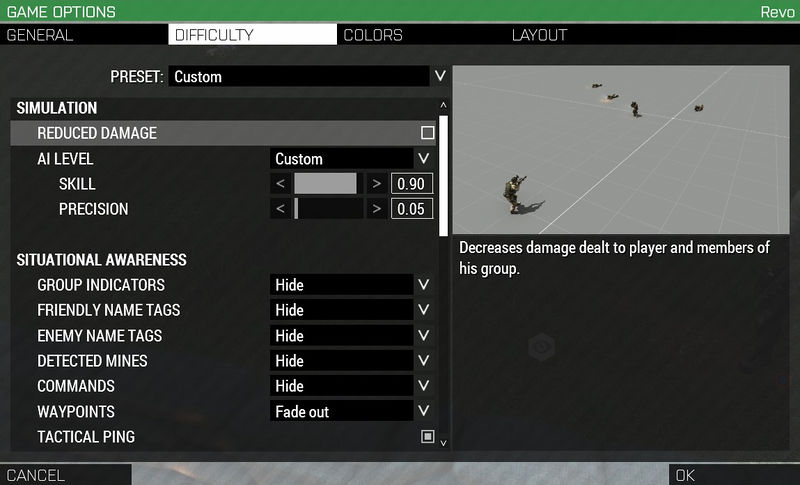

there should be a setting for 3rd person. what does it say for you?
round stirrup
let me check
I can't change it in-game @uncut trellis
what is 3rd person called in the normal control settings?
uncut trellis
probably this assumin wiki is accurate
round stirrup
it isnt in the camera settings for some reason
I think I am just going to re-install the game
see if that works
round stirrup
I am talking about the control settings @uncut trellis
round stirrup
all good
round stirrup
thanks
it was un-selected in the difficulty settings for some reason
thanks for your help @uncut trellis
for some reason though there is no crosshair now
uncut trellis
perhaps you changed some other setting now
fringe salmon
My sound is bugged I can only hear left and right nothing to the back and nothing in front. Help me please
I have checked if its my headset and it is not
I use a logitech G933
desert isle
USB?
fringe salmon
When using both usb and wireless @desert isle
desert isle
Windows 10 combined with USB (ie non-3.5mm jack) Headsets have issues with Arma. Also, don't expect 7.1 sound.
weary sky
it's not an issue with USB headsets... it's an issue of USB headset software and anything more than stereo output.
desert isle
Since day 1 there has been an issue with USB headsets, windows 10 and Arma.
Day 1 since Windows 10 I should say.
fringe salmon
So is there a way to avoid this issue
wise barn
Since day 1 there has been an issue with USB headsets, windows 10 and Arma.
No, it was the creators update from 2017 that intruduced this issue across many using USB audio devices in general. Not just headsets. I could pin it down to some issue with Realtek onboard sound chips
 zenith meadow
Does anyone remember an issue with the number 6, 7, and 8 menu interaction menus not working? I select a unit then one of those numbers and I get a switch to smoke or different throwing modes? Is it an ACE conflict?
grim tinsel
Yep ace conflict iirc @zenith meadow
 thick nymph
My ace self interaction menu doesn't appear when I press ctrl+windows
 silk yoke
reinstalled arma
cant seem to use fullscreen
i can only use fullscreen windowed
if i try and use fullscreen arma 3 locks me in at 4k
and if i try to switch to 1080p it crashes
i can use 1080p in fullscreen windowed
i have a3 set to admin permissions
i have a gtx 1070
and my drivers are up to date
uncut trellis
windowed fulscreen migth be better and stabler especially if you alt tab out of the game often
silk yoke
Yeah but its not stretching right in windowed
I think if I can delete my profile video settings? I have not played since I got the new card
I think they might be part of the problem
I deleted then arma3 config and changed the memory allocator to system and that fixed it
uncut trellis
windowed fulscreen migth be better and stabler especially if you alt tab out of the game often
chrome igloo
stares at discord being bad and not posting the last 2 posts saying it was solved, derp.
 vagrant dawn
im having trouble losing connection to A3 servers after a few minutes of play
currently had the issue on US warlords server
silk yoke
is the server kicking you?
vagrant dawn
no
i get the "no message received for x amount of seconds" message
and then i lose connection to host
 light jacinth
Hello! I'm trying to find a fix for spawning on the U.S.S Freedom/Liberty. When I go to spawn onto the ship(s) it always brings me into the ship, and I haven't found anyway to fix this. Any tutorial via reddit/youtube are based on the old mission maker, so I was curious if anyone knew a more updated version.
fringe salmon
hi is anyone else having issues with the server browser?
 modern arch
Eden editor keeps freezing for no reason whats so ever.
wise barn
i also keep freezing if i turn off my radiators and leave the fridge open...
a little more information on your issue would be welcome
modern arch
i load up into the game just fine
i load into the editor
after moving around in the editor for 10 seconds it freezes permanently and i cant do anything
wise barn
vanilla or modded?
uncut trellis
got any mods?
wise barn
try vanilla
modern arch
today it is not working at all
wise barn
and report back
modern arch
i tried that still does the same thing
wise barn
retry vanilla and report back. make sure ALL mods are unloaded for sure
uncut trellis
have you verified game data on steam?
modern arch
yes i have
uncut trellis
do you have usb audio device?
modern arch
i use headphones
uncut trellis
usb?
modern arch
no
wise barn
full screen or windowed mode?
modern arch
im full screen
uncut trellis
are you alt tabbing?
wise barn
try fullscreen windowed
uncut trellis
👆 worth a shot
wise barn
any error message?
uncut trellis
update gpu drivers
wise barn
GPU issue
uncut trellis
what gpu do you have?