#arma3_troubleshooting
1 messages · Page 104 of 1
 wise barn
 lucid valve
@wise barn oh alright, well i tried but other people got their stuff sent first, im just really trying to fix it, been tryna fix it for like 3 days and i cant, but ill delete the message here mate
wise barn
👍
 remote sable
anyone else getting an issue where they are in Zeus controlling a character, then when you press v it kicks you out of the character?
 fringe salmon
Is this resolved? https://twitter.com/Arma3official/status/1159116450860347392
 quaint jewel
@fringe salmon seems so yea
 round lance
Rest are most likely under maintenance, you can ask about it on #arma3_official_servers
 faint sequoia
it is always like that.
has been for a long time and i only know there are more because i recently went on travel and found out there were more than 20 of them
round lance
Well if you saw more than 20 before it could be a networking issue.
 normal rover
Hi, I have an issue where the trees, rocks and other objects on hill tops are floating. Any thing further than 1000m. I have all graphic settings set to ultra and view distances set to high.
I checked ACE View Distance Limiter settings which is configured with Video settings however the issue persists. Please help...
normal rover
Terrain Quality with other settings are on the highest possible
round lance
Plus the whole engine limitation where terrain will degrade itself with distance.
If you zoom in with weapons it should "fix" itself.
You can try the enhanced video settings mod if you want better than that
normal rover
Zooming in helps a bit but objects still floating
round lance
Try enhanced video settings, if it persists there then it might be an issue on your side rather than the game's.
normal rover
Will do thanks
 sinful island
You clearly didn't see the video he posted.
sinful island
Aimbot and ESP. Someone must have removed it or he did.
wise barn
well, bye then 😄
sinful island

 pallid krakenBOT
*fires them railguns at @late magnet* Ò_Ó
wise barn
🤘
sinful island
Because it takes more space than required to do.
round lance
Not just that.
lucid valve
Ok i got it fixed now, but it was a repair of a mod, that told me it needed 1.2GB of space, i ahd 5.6GB spare at the end, and it only tok up 600MB
round lance
Steam wants to have extra space usually
lucid valve
Greedy steam smh
round lance
So it doesn't flood up the drive too much.
In a situation such as yours for example, rar and zip files are physically impossible to extract.
Since they temporarily get stored in C drive before they get moved.
 blissful bramble
I created simlinks to another drive for the downloads and temp folders, so that it doesn't fill up C:\
 tepid frost
If anyone gets some time, added a few more mods to the server and cant get it to boot now. Got the rpt ready to send.
Conflicting addon Ind_Garage01 in 'ca\buildings2_c\ind_garage01', previous definition in 'Jbad_Structures\ind\ind_garage01'
Conflicting addon Ind_Workshop01 in 'ca\buildings2_c\ind_workshop01', previous definition in 'Jbad_Structures\ind\ind_workshop01'
Warning Message: Addon 'rhsgref_main' requires addon 'rhs_main_loadorder'
 hollow rain
I've disabled Fatigue in config_master, but when I reborn, I still get tired. Who can help me?
sinful island
Wrong discord for that, that's specifically a feature of Altis Life and you likely edited a file that is enabling fatigue on respawn. Just disable it again.
hollow rain
@sinful island https://sqfbin.com/jotemofimugirakahege I want to rebirth this file, but I deleted if (LIFE_SETTINGS (getNumber,'life_enableFatigue') isEqualTo 0) then {unit enableFatigue false}; and it didn't work.
 rare marsh
wise barn
rare marsh
wise barn
@rare marsh wrong mem points
go to #arma3_model for detailed help
@hollow rain
#arma3_scripting
@tepid frost
what mods did you load (name + version)
tepid frost
Jbad V.0.7.0917
updated .49 RHSUSAF+AFRF+GREF @wise barn
wise barn
post the rpt on pastebin.com and then the link here
tepid frost
https://pastebin.com/jq9Xhzha
after running the server for a while ended up with this .rpt https://pastebin.com/w9unNCGS
 grim tinsel
@tepid frost Make sure you have all rhs dependencies loaded
wise barn
what mods did you load (name + version)
Jbad V.0.7.0917
updated .49 RHSUSAF+AFRF+GREF
and this comes up..
@CBA;@CUPCORE;@CUPT;@Jbad;@ACRE2;@ace;@Lingor;@ACEAFRF;@ACEUSAF;@ACEGREF;@ACEX;@RHSUSAF;@FAWS;@FIRPC;@RHSAFRF;@RHSGREF;@VietHit;" -serverMod="@ATOW;@AR;@BOC;@SL;@Shack;@EM;
that's not how troubleshooting works 😉
where did you get the cup mods and jbad from?
tepid frost
@wise barn Whats the issue with that line? Got most of the mods from the workshop. Server is up and running now. I personally didnt change anything since posting, not sure whats going on lmao.
wise barn
so all good then?
 delicate elm
So, for people searching this discord... what was the problem? Hate it when someone just says "problem sorted" without saying why
wise barn
@tepid frost
tepid frost
Seems to be booting fine. Sorry was testing a few missions making sure everything was sorted still.
Not sure, Guess it was just taking its sweet time getting everything installed. Was almost a 4 hour down time.
 gusty plank
Anybody have a fix for ace3 medical with ryanszombies infection module? Zombies wont resurrect with ace 3
delicate elm
Place the module in the editor in Your mission.sqm and it works fine
If you mean players or AI resurrecting as infected
tepid frost
With the RHSUSAF update I noticed “GAU-21 HMG added to CH-53E ramp (model by nextanimationstudio, gifted to RHS by armyinf & co.)” but my model doesn’t seem to have it. Mods are for sure updated. I can see the other new vehicles.
 fervent kite
so im trying to set up a dedicated server for a milsim unit, but im having trouble with a mod called ASR AI3 and i getting an error message saying that asr ai3_config.sqf is not found
wise barn
could be corrupted
hollow rain
Hello, I want to ask how to query the cheating log of players, because someone sent me the administrator log, which shows the location of the module, I suspect that he cheated.
grim tinsel
@hollow rain Sorry, what do you mean with 'administrator log'?
hollow rain
@grim tinsel I mean he sent me an administrator's help message, but it wasn't normal information, it was a bunch of code similar to the location of the module, but I forgot the screenshot at that time. I wanted to find the information he sent me in the log. I suspected he was a cheater.
grim tinsel
- 'Location of the module'?
- Can you share what he sent you (if it doesnt include any important info that should not be shared)
fringe salmon
hey guys
so im really frustrated at this game right now
and i need some help
im hosting a server with Nitrado
and want top run mods on it
i ran it with a few mods days ago and it was fine
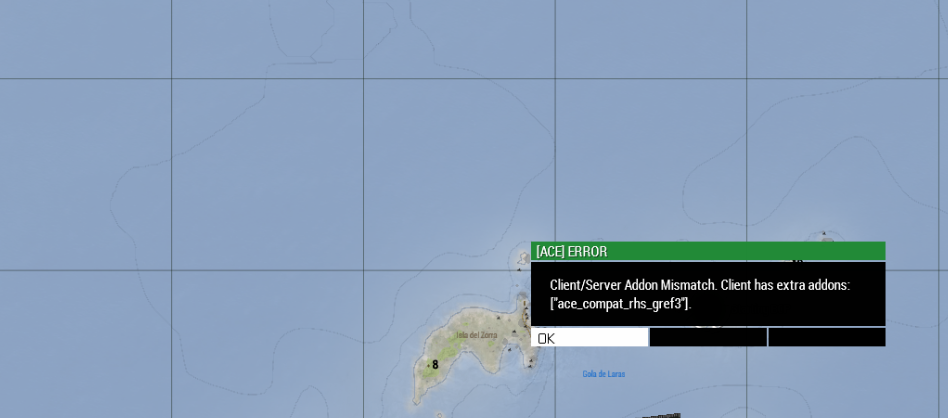
but now after uploading larger mods, i get this
every single mod has a signature mismatch
even though i moved the keys
the mods were uploaded from my pc to the server and then from the folder uploaded i moved keys to the key folder
i dont understand how the keys would mismatch now
when i files are literally from my pc
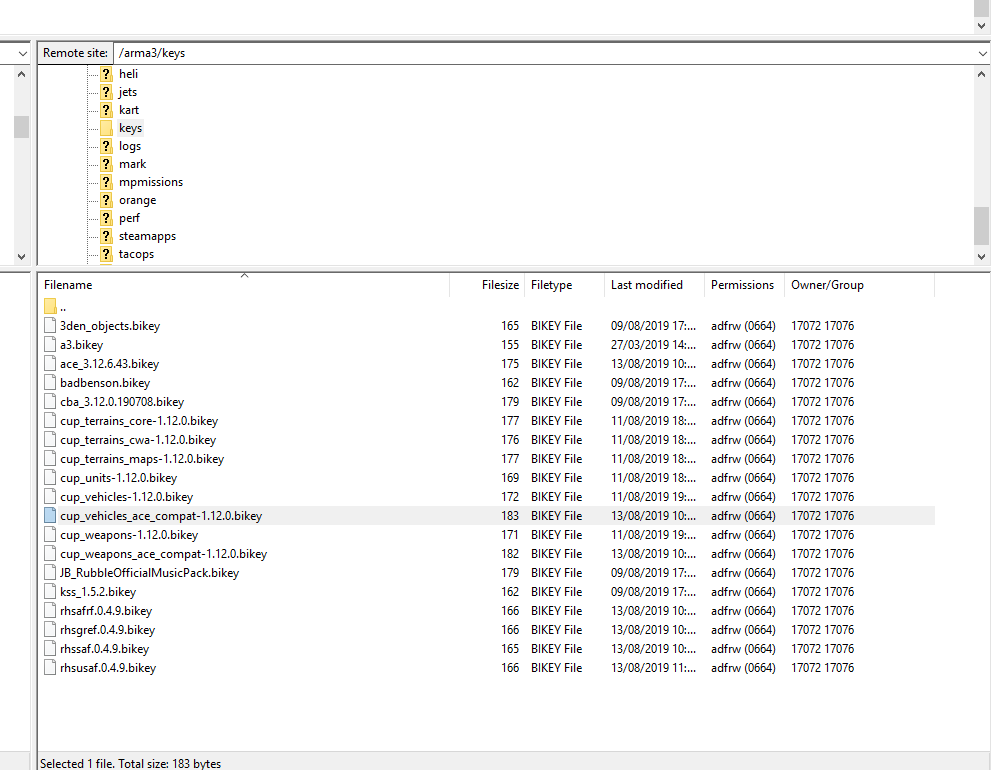
this is my key folder on the server https://i.gyazo.com/35b071f8d2bc4b9e9b7fd4ff0c13825c.png
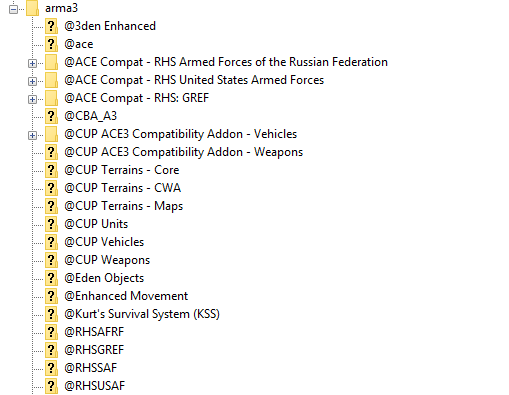
these are the mods that are enabled on the server https://i.gyazo.com/64feb65da84df406e2b9dbeb14b5f85b.png
this is the -mod= line @3den Enhanced;@ace;@ACE Compat - RHS Armed Forces of the Russian Federation;@ACE Compat - RHS United States Armed Forces;@ACE Compat - RHS: GREF;@CBA_A3;@CUP ACE3 Compatibility Addon - Vehicles;@CUP ACE3 Compatibility Addon - Weapons;@CUP Terrains - Core;@CUP Terrains - CWA;@CUP Terrains - Maps;@CUP Units;@CUP Vehicles;@CUP Weapons;@Eden Objects;@Enhanced Movement;@Kurt's Survival System (KSS);@RHSAFRF;@RHSGREF;@RHSSAF;@RHSUSAF;
im really confused and in need of some help if anyone knows whats going on
 frank apex
@fringe salmon
This forum post should explain the error your running into,
https://forums.bohemia.net/forums/topic/203122-how-to-get-required-addons-to-show-up-in-launcher/?do=findComment&comment=3254190
The message at the top of the launcher also explains the error
grim tinsel
^ 2muchMod4server
grim tinsel
Yes
fringe salmon
@frank apex
so i have 18 keys
i should be reducing the ammount to 15 or below?
i'll try to do that and see if it works
thank you for the responses everyone
frank apex
From what I understand from the thread.
The server should still work with the mods but the launcher won't show the correct information
frank apex
Through the launcher?
frank apex
That's why then
fringe salmon
i will try to join through the game then
frank apex
the launcher doesn't have all the information required
load the mods manually and try joining through the in game server browser
fringe salmon
i will try that
@frank apex
you were right
it only gives the error through the launcher, if i do it from ingame then it connects
frank apex
I would suggest making a preset of all the mods then share the html file it creates with your players.
fringe salmon
Yep, already on it
frank apex
👍
fringe salmon
@frank apex
ive ran into another issue
its saying that
but the server has the mod uploaded
and i have the same mod loaded
would that mean it only needs to be loaded o nthe server without the client having to load it?
frank apex
Triple check that the server is loading that addon.
Other then that there isn't anything else that I can suggest as I don't personally use ace.
fringe salmon
alright thanks
fringe salmon
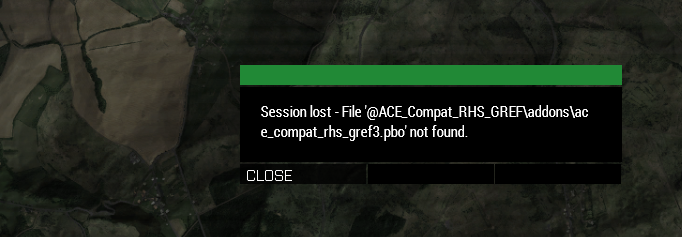
can someone please explain this to me
This is when i unload the mod - https://i.gyazo.com/43384e28dfc03789c601167d37ee1ac4.png
this is when i load the mod - https://i.gyazo.com/dba9a78a3c8e5c0e0ddb82ec6914dd8a.png
its my own server
i dont understand what is going on at all
 clear ledge
guys i need some help
my friend is getting this error: (...) gfsdk_ssao_d3d11.win64 could not be loaded.
 candid geode
Oh just noticed this channel exists so gonna post it here too
anyone know how tf to get ShareX to work while tabbed into arma cause it seems to block any hotkey i use for sharex
any way to stop arma from blocking hotkeys to other programs basically
candid geode
well i posted in general before realising #arma3_troubleshooting existed
round lance
Ask in one channel not two and it'll be fine



 candid geode
screenshot/utility program
i mainly use it just to quickly capture cropped images
without having to take a fullscreen pic and crop it in the editor
round lance
Also if you haven't already, running programs as administrator should bypass the restriction from arma
candid geode
tried that already
doesn't seem to work
arma 3 is the only game i have this issue with
:|
round lance
well i know teamspeak used to not respond to hotkeys whilst i play arma
i think i fixed it by either running steam or teamspeak as admin
if you run steam as admin it runs all the games as admin aswell.
sinful island
Yep, Teamspeak as admin would resolve that. ShareX as admin should do the same if that's what's happening. If you are in Fullscreen it wouldn't do anything anyway. If you have 2 monitors, tab out to another window on another monitor and take the picture.
candid geode
In Windowed Fullscreen with only one monitor and i've tried closing down sharex fully in task manager and reopening it in admin and that doesn't work
round lance
then that sounds like a ShareX issue
sinful island
Yeah, I don't think that is intended functionality to screencap while in games. There are a few games you can do it with (Overwatch works).
candid geode
Works in every game except arma 3
And fuck gyazo
No local storage and holds older pics hostage unless you pay a subscription fee
Also compressed as hell
sinful island
Chill on the profanity, mods don't allow it. I agree on Gyazo sucking though. Just steam screenshot and grab a quick snap of that with ShareX when you are done.
round lance
yep, could do that aswell.
candid geode
Ey? Don't see anything saying "no swearing"
 candid geode
Well in rules theres links to a short and long version of bohemia fourms rules and they don't outright say no profanity from what I can see but ok ban profanity on a discord server for a game rated M 17+ with strong profanity 😕
sinful island
I know they don't directly say it, they mention offensive. I'm not saying it's not silly, but that argument was already had a few days ago, so no point in rehashing.
candid geode
Of course
 ancient magnet
I know people will probably not help me here cuz this is a custom gamemode but i'll still ask... I tried the roleplay gamemode on some server and when i moved my camera the game felt like 20 fps even tho my framerate was at 50s any help please?
sinful island
Also are you running the game from a SSD or HDD?
ancient magnet
Idk but it my rig should be able to run it well @candid geode RTX 2060 i5 9600k 16GB 300 RAM
SSD @sinful island
round lance
300 RAM....?
ancient magnet
3000*
ancient magnet
MHz
candid geode
only an i5 processor but a 2060 gpu?
sounds like bottlenecking
though i don't know much bout intel cpus
round lance
i5-9600k is amazing.
candid geode
but im pretty sure i5 is old gen
sinful island
?
round lance
i5 means nothing.
the one you need to look at is the fourth and third digits in the four number digits.
sinful island
i5 = middle of the road, no hyperthreading (typically). It's perfectly fine.
round lance
not the i5/i7
round lance
ironically Pentium is probably the best for ArmA
because it's single core with high clocking.
regardless, the problem isn't the frames here, it's the feel of the game, which probably means input delay or script delay?
the roleplay gamemodes are jampacked with scripts so unsurprising you don't get a smooth experience...
candid geode
wondering what their view distance is set to
could make things worse if everything is set too high
candid geode
yeah ignore that
ancient magnet
it's the newest i5 btw
also why do people only look at the number in front of the "i"
candid geode
i thought it was generations
ancient magnet
like even an i3 9th generation is good
candid geode
:v
round lance
ignore that whole cpu thing man
ancient magnet
well guess i won't get any help here then
round lance
you could try something in the arma config and see if that works
in context of frametime issues
ancient magnet
i guess
sinful island
There's not much you can do. If it's fine in other game modes, you'll have to work with that server to see what might be happening.
round lance
lemme see if i can find it
ancient magnet
microstutters are spikes in frametime if that's what might help you
and microstutters are normal in this game... most people just don't notice them
round lance
could try adjusting GPU_MaxFramesAhead
sinful island
That's not entirely true. Short framerate drops are also stuttering.
ancient magnet
wdym by "short" fps drops?
candid geode
frametime = time to render each frame
more/bigger stutters in time to render makes the image feel less smooth
iirc
candid geode
yeah
ancient magnet
well that's normal in this game as far as i noticed...
but in the roleplaying server it was different
candid geode
probably the sheer amount of scripts if its just the roleplay server
ancient magnet
like if i was looking at sea it felt smooth but when i turned my camera to the city it got fucked up
idk
sinful island
Short FPS drops... What do you think I mean? Short bursts of lower FPS, not lasting long enough to be that noticeable, but causing micro-stuttering. It's realistically the same thing as poor frametime as objects are being rendered in would cause it.
round lance
looking from sea to city is a big difference
especially since cities in altis life are massive frame drops...
again, it's not a game issue, it's a lack of optimization on scripts from good ol' life systems.
ancient magnet
vsync causes that tho @sinful island
candid geode
you just gotta move out of the cities and live in the wild :v
sinful island
I wouldn't point to life directly, most likely the server.
Everyone loves thousands of useless loops and objects.
ancient magnet
well if i was moving the camera when looking at the sea it was smooth. when i turned my camera at the city my framerate was around 50s when i didn't move
once i started to move the camera it did what a regular microstutter does
it lags for a split second and the fps drop by a low amount for that split second (~5-10)
but it was constant
the fps dropped to like 35 and it felt even worse
round lance
you're not gonna be able to fix that
ancient magnet
so that's normal there?
round lance
yes.
round lance
which is why people don't play on those.
round lance
mostly people AFK-farming.
Altis life isn't actually used for roleplay
especially if it isn't whitelisted.
ancient magnet
so which RP server is good?
round lance
whitelisted ones.
ones you have to sign up to.
arma isn't the game you'd use for it though.
more GTA V as of late, together with other more unknown games like Space Station 13.
ancient magnet
i don't really enjoy RP anyway since there is no action but i'd like to try it out at least
okay
i don't wanna install FiveM as of yet
so GTA V must wait
when we're already talking about microstutters...
is there any game that is TOTALLY microstutter-less?
sinful island
Most of the big AL servers are straight up RDM fests at this point. Just shooting and that's it.
Sure, Rollercoaster Tycoon 2.
ancient magnet
oof
it's pretty sad no game is optimized well nowadays
we didn't have to check the frametime in the good ol' days
sinful island
I disagree. So many of those games terribly on original hardware. It's still the same.
round lance
yep
not to forget game policy back then wasn't to stress or achieve anything, but to mostly play safe.
ancient magnet
i guess... maybe i just didn't see those microstutters
but it's still sad
cuz even if the game is good... there's no point in playing it if the optimization is bad
ancient magnet
i've seen worse probably
round lance
then i suggest you'd stick to singleplayer.
usually the gamemode that runs the smoothest.
round lance
i can tell you for sure that optimizing a game perfectly is impossible
round lance
and these microstutters will probably exist in video games forever
ancient magnet
i mean GTA V did it well...
there are some occasional microstutters too
but i see it pretty positive
round lance
you're comparing an open world to a sandbox.
ancient magnet
arma is an open world too tho
round lance
plus rockstar is definitely a bigger company than BI is.
arma isn't open world, it's a sandbox.
its scenarios are open world.
ancient magnet
now that i think of it it wouldn't be a bad idea to have a nice trip to Prague to check their HQ out
it's not that far from here
ancient magnet
okay
wait
actually
if i'm not mistaken the most well optimized games now are probably fighting games
haven't seen any microstutter in FighterZ apart from the internet stutter
round lance
not much to optimize there.
sinful island
#other_games_chat Guys.
ancient magnet
sorry
hollow rain
Excuse me, what is this situation?Players enter the game display after signature files have been made. Session Loss-Verifying PBO failed:enoch/addons/fuinctions_f_enoch.ebo
 uncut trellis
enoch stuff does not have multiplayer keys if I recall right.
could be im mistaken
hollow rain
@uncut trellis So what should I do?
uncut trellis
I dunno really. I think the enoch things are not meant for multiplayer
hollow rain
So the signature file of the module suit can't be opened, so can't it prevent plug-in?
uncut trellis
I dont know what that means, sorry.
sinful island
He speaks in Chinese and the translation is brutal unfortunately.
hollow rain
np ,thanks a lot for helping me !
grim tinsel
make sure the server is updated to the newest version
Iirc that error or a similar one was caused by/after the last update
hollow rain
Do you mean to update the A3 server of the server to the latest version on step?
hollow rain
I didn't download steam CMD when I set up the server. Can I update steam A3 server on the server by steam?
sinful island
However you installed it I guess.
hollow rain
Sorry, I really didn't install it. I just installed Steam and steam, server tools.
delicate elm
Enoch PBOs are signed with the standard a3.bikey btw
hollow rain
But I have this a3. Bikey in keys on my server, which is displayed when the player logs in.
Good luck to all of you. The reason is that I haven't updated the server. Good luck to all of you!
 round slate
Hello guys, was wondering if anyone can help me here:
I am trying to build a mission on a modded map, if I try to place Zeus in, the mission just end up in unlimited loading screen if it runs on multiplayer.
round slate
we are running it on my friends PC, I will check as soon as I can, thanks
gusty plank
Anybody know howto keep ai drivers from trying to pass one another on the road
I.e, just stay behind the other vehicle if it slows down
 supple crystal
Search Google for convoys theirs a couple of scripted ones that work well
round lance
Column formation and set them to relaxed, together with normal speed.
Make sure the vehicle crews are grouped up together
clear ledge
my friend is getting this error: (...) gfsdk_ssao_d3d11.win64 could not be loaded.
can someone help me fix it
quaint jewel
verify files via steam?
clear ledge
i get no results in internet for it
quaint jewel
update nvidia drivers?
quaint jewel
i get no results in internet for it
I entered it on google and got 36k results.
clear ledge
i legit cant find a single post
quaint jewel
wtf are you entering in google
clear ledge
which is connected with arma
quaint jewel
Why does everything have to be connected to Arma
clear ledge
because it says directory of arma/.../ gfsdk_ssao_d3d11.win64 could not be loaded.
quaint jewel
have you checked if the file is there?
clear ledge
it is
quaint jewel
is battleye maybe blocking it?
quaint jewel
try disabling battleye
 vestal yacht
Yes but you first need to determine what's causing the issue before you can fix it
 atomic spoke
Is this the right channel for BattlEye Server Problems or should I use #arma_battleye
quaint jewel
use the battleye channel
 patent sparrow
I'm trying to join a dedi via lan, and keep spawning as a seagull. Everything tests out right in Eden, respawn=3 and I have respawnOnStart= -1. Anybody know what's goin on?
 wary knot
Okay need some server help, My unit is using TADST to manage our server btw.
Trying to run one of my basic Zeus Templates that has basically no dependency
https://cdn.discordapp.com/attachments/309438091771510784/611314218620157962/unknown.png

I get this on server launch
if I load Enoch (Contact) server side
https://cdn.discordapp.com/attachments/309438091771510784/611314648301568012/unknown.png

I get this when loading the mission.
grim tinsel
@wary knot Are you loading enoch or Contact?
Iirc enoch is the paltform update and Contact is the optional part
 wintry plaza
Hi all. I'm having a problem with using my F710 (calibrated, tested, recalibrated, retested, and confirmed in A3 sensitivity settings), and I noticed something weird when flying helicopters. It might be other aircraft, too, but the Hummingbird gives a visual indication as to what's going on.
When banking left (I forget the heli term for this), it gives about 50-75 % lean, compared to the right bank which seems to give up to a full 100%. The main rotor on the hummingbird tilts with the flight stick, so it's easy to see even when on the ground. AND It's more than just visual, because there is a noticeable difference in the responsiveness between left banking and right banking in flight. Fwd, Right, and Back seem fine. Rudders seem fine, too.
Testing the same controls using 'A' and 'D' keys shows different results. With keyboard input banking is 100% on both sides.
 chrome current
Make sure you only have a single joystick input bound to any analogue control. If you have more than one you don't get full range. @wintry plaza
wintry plaza
I'll have another look at that, but I'm almost certain there are no dble assigned inputs.
wintry plaza
I got it solved. I went through all the control menus and removed older input commands for my F310, which were all grayed out since it's not connected. I also removed a button ambiguity, which was weird in itself. It was left shift+controller button #2, and it was not grayed out. The thing is, I pressed that combination to remove it, but it added another instance right below it instead. Then I just used the "Delete" menu option (to clarify it wasn't the delete key) to remove both instances. Any way, the heli banking is normal, now. Thanks, @chrome current "&."
 lunar sinew
hey guys, I'm sure you've seen this a dozen times, but my headless client gets kicked due to an invalid ticket. i've 100% ensured the IP of the headless client is in the server.cfg and battleyeLicense is set in the headless profile.
no idea what else to try
quaint jewel
which IP did you enter in the server.cfg?
It should be 127.0.0.1
did you enter it once? or into both the config entries?
lunar sinew
headlessClients[]={"45.121.211.235"};
localClient[]={"45.121.211.235"};
the headless runs on a separate server
lunar sinew
strange that my server provider offers it then :/
quaint jewel
Battleye kicking it?
lunar sinew
nope, looks like the server itself I think..
19:53:18 BEServer: cannot find channel #1683215735, users.card=0
19:53:20 Server error: Player without identity headlessclient (id 1683215735)
19:53:20 Client: headlessclient - Kicked off because of invalid ticket: Invalid ticket - Ticket invalid
19:53:20 BEServer::finishDestroyPlayer(1683215735): users.get failed
oh wait
BEServer, duh
seems to be battleye yes, but have added the license=1 setting in the profile..
battleyeLicense=1;
quaint jewel
Battleye should ignore the headless client if it's correctly entered in server.cfg
lunar sinew
odd
I'll see if I can tell what IP the client is trying to connect from, doesn't appear to be visible in the server console
that's definitely the IP I was given, though
 rare marten
Hi, I have an issue where MCC Sandbox 3 is limiting the view distance to less than 1500m regardless if I set it higher using MCC or ArmA 3's video settings. Any idea what might be causing this?
I have attempted to request assistance on the MCC discord however it seems inactive.
round lance
Probably scenario settings or server related.
Try using TAW View Distance mod if you don't mind mod usage.
rare marten
TAW View Distance, haven't heard from it but I will give it go. Where would I edit or configure the scenario or server settings?
To add, this is for singleplayer
round lance
For singleplayer? That's actually odd.
It should usually abide by your graphical settings in that case.
Wouldn't even need a view distance mod.
If you're running a multiplayer server and playing it singleplayer though, that would explain the view distance issue.
Regardless, try the view distance mod and see if it fixes your problem.
rare marten
What I'm doing is creating a singleplayer scenario and then running MCC when I'm actually in the scenario
It's definitely MCC causing it
 hoary rampart
guys i need help with my server i want to load several mods but it only loads some not all, i have a complete command line put in with every mod every mod loads exept taskforce and project opfor. anyone know what could be the problem?
sinful island
https://sqfbin.com your server RPT and link it here.
 astral wharf
Im having an issue with the new RHS update, when i try to load it on my server the following happens:
Warning Message: Addon 'rhs_c_trucks' requires addon 'rhs_weapons'
And it ceases to load the rest of the mission/mods
sinful island
Does the rhs_weapons pbo exist?
sinful island
This a linux server?
astral wharf
Its hosted on Host Havoc, through a gamepanel, i think it is Linux but i cant be sure
sinful island
Yuck. Should be in one of the folders, I think HostHavoc's starts with an s from memory. Maybe sa or sc.
astral wharf
Theres a folder called SC which holds example configs and such
sinful island
Sure. And hopefully some .rpt files timestamped with when you run the server.
astral wharf
Nope, theres a battleye folder and then a user folder that is empty except for a profile file
So no RPT files
sinful island
Hmm, you may need to talk to their support and see. If it's linux, you need the log from the console. If it's windows, it should generate RPTs.
sinful island
Both's PBOs are loading, so it is loading the mods.
 blazing nebula
Hi all, i have a rented server running KP liberation and am trying to get my rented headless client to connect but for the life of me i cannot get this to connect ( i am fairly new to server admin but managed to get my dedicated server running) i followed the guide from my providor which is here as reference (https://streamline-servers.com/billing/knowledgebase/4226/Headless-Client-Setup.html), i also have mods running on my server and have added the mods via uploading them to the headless client as i did for the dedicated server. Do i need to add the keys to the headless client key folder as well or does it use the ones in the mod? Is there anything else i need to do when adding mods to a headless client? Thanks for any help in advance, this has scratching my head. Here is the link to the rpt file i get whenever i start my headless client if anyone could point me in the right direction 🙂 https://sqfbin.com/gegigitipowuvesawelu
 tough edge
I've been having severe issues with running Arma 3 recently.
Battleye log
8/16/2019 3:12:44 PM - Blocked loading of file 'D:\SteamLibrary\steamapps\common\Arma 3\arma3_x64.exe'
OK, run without battleye, and I crash upon attempting to load the editor for any terrain
I have an RPT ready
No, verifying local files didn't do anything. As far as it could tell, all was well
Arma x64 and Battleye are both whitelisted by Bitdefender
Last lines of my RPT:
Mods: A3;curator;kart;heli;mark;expansion;jets;argo;orange;tacops;tank;enoch Version 1.94.145977 Fault time: 2019/08/16 15:14:57 Fault address: E5AF038C 00:E5AF038C Unknown module file: Malden_intro world: Malden Prev. code bytes: B1 F0 00 00 00 48 85 D2 74 1A 08 8B 0D 23 88 4B Fault code bytes: 01 48 8B 01 FF 50 18 48 89 B3 E8 00 00 00 89 B3
I literally cannot play Arma 3 with this going on. Help!
 earnest mortar
23:15:17 Warning: Data compression error. Using a fallback option
Anyone know what is causing this?
I'm stuck loading trying to join my server
 vocal bloom
Errors occured while publishing:
! Validation errors: [Error] DLL with the game extension 'sharplib.dll' is corrupted (it's not valid 32-bit nor 64-bit DLL).
 - [Error] You have 32-bit and 64-bit game extension in your mod, but some of these are missing their 32-bit version: sharplib
Anyone know how to fix this? Extension approved by BE.
 cerulean fossil
I have an error that happens when opening a mp server. My loading screen freezes when it comes to loading into the mission select screen. If the mission is already picked I can load into the role selection screen but if a map isnt loaded I freeze on loading up the map selection
 regal oracle
Ok, so, Can someone help me? When I logged into steam today it told me to download Arma(even though its already installed) and there was no evidence of it ever being removed because the space it takes up is still taken up. So now it is installing and I have bad wifi so it might take... about one or two days, give or take.
 cedar crown
Physically still on the drive?
I'd try copying it places.
Then deleting the files in the Steam directory.
Then copying the backup back where it belongs.
And running a diagnostic via Steam.
sinful island
Deleting the files? You don't know how?
 brave hawk
Shift + Del key on the keyboard, to delete without going through the recycle bin
grim tinsel
Huh
TIL
I only knew that you can quickly delete messages in discord by holding shift
brave hawk
@regal oracle maybe try just a right click -> properties -> check game files or something like that
grim tinsel
^ Oh also about that issue, I had the same thing once and for me installing the game to the same location fixed it since it made steam recognise the already present files
fringe salmon
So, after the latest Arma 3 update my server list looks like this:
https://i.imgur.com/WrFGBye.jpg

This happens only for Official servers
round lance
Just press the official servers tab again and it will refresh and show correct ping.
fringe salmon
As much as I refresh it keeps showing like that. Fortunately, it looks like wrong reading. I just measured 50ms in-game 🙂
round lance
Hmmm
I know i had an issue like this before.
Don't remember how i solved this, might be a networking thing.
Could try opening your firewall for arma if you haven't already.
Or running arma as admin, always worth a try.
fringe salmon
Hi, i'm having a problem, i'm hosting my own server, everything is set up, one friend already joined the game, whatever, my second friend, gets disconnected as soon he joins the server, what could be the problem?
 snow igloo
i am having this problem with CBA. It saids that it requires A3_Data_Mod_Loadorder?
blissful bramble
What version of Arma 3 are you running? 1.94?
 leaden orbit
What's going on with this game I downloaded mods weighing 23GB and after a while I have to download them again and the disk space took away, annoying
grim tinsel
had that happen to me aswell, iirc its a steam thing
leaden orbit
i dont have enough space on disk now to downoload that XD
grim tinsel
try opening the arma launcher
leaden orbit
Terribly detracts from the game right now
leaden orbit
downoload by launcher ?
grim tinsel
ye just open the arma 3 launcher
that should make the mods download one by one
aka smaller filesize
 winter drum
hi guys, i have got an issue where my in game voip is not working. i press push to talk and my mic icon shows but my name doesnt and i can not be heard. i have checked windows settings and it should be alowed. The mic works in other applications and steam voip test works when in game also
any advice would be appreciated
round lance
change your in-game mic sensitivity/volume.
also make sure you're talking on the right channel.
hollow rain
Hey, guys, what I want to ask is why my game server is on, but the players go in and have a black screen, but they can operate with keyboards and sound. Player information in the database is not loaded. Any help will be appreciated.
winter drum
channel is correct and volume is full @round lance
I think your issue is that you have not set the correct mission to load at boot @hollow rain
round lance
try the other way around on the volume thing then.
hollow rain
@winter drum are you mean the mission? but the data base No player information loaded
round lance
also, make sure your mic is set as default communication device.
winter drum
mic is set as default, will try other way around now
@hollow rain if the mission isnt loaded then the people will be able to join just to a black screen. you as admin should be able to login using the command in chat and run #missions to get to mission selection screen
hollow rain
I think it's not connected to the database because the database player's information is not loaded.
@winter drum Would you please share the screen for me? Thank you very much.
winter drum
No, I can not fix the issues
Still no joy on my mic
Anyone any suggestions?
@round lance No joy, no matter where the slider is same result
round lance
hmmmm
you tried the regular stuff i'm guessing?
running arma as admin, allowing it through firewall, etc.?
winter drum
Yeah
round lance
got nuffin, then.
winter drum
ME EITHER
plus im meant to be a team lead in a vanilla op tonight. cant if i dont have in game voip. ffs
been trying to fix now for 6hours
winter drum
anyone able to help?
 true monolith
For some reason whenever i die or open my arsenal, i get stuck on a loading screen on my friends server.
hollow rain
Which folder of the task file I loaded is placed in my local computer, because I want to test whether it has been encrypted. Thank you.
 marble fiber
For some reason I cant click the blue recntagle over a group in zeus any ideas
fringe salmon
can someone help me with ai
cerulean fossil
I guess I'll never know the solution to my problem
 topaz comet
Having gotten back into mission editing recently, I am noticing some performance issues. Taking standard AI (no mods) and setting 4 groups vs 4 groups, with a S&D waypoint between them, I get a solid 40fps drop when they enter combat. I don't believe I use to get that kind of a performance hit. Does running the mission on a dedicated server make that big of a difference in this regard?
Because this is just Ed3N singleplayer testing
fringe salmon
playing antistasi one person keeps having the problem of their vehicles not saving in their personal garage? yet they save for everybody else?
 marble plaza
@cerulean fossil what is your problem
cerulean fossil
Basically what happens is whenever I try to open a server to the map selection screen it freezes on the loading screen
However if its loading to the role screen I load fine
marble plaza
anything immediately dodgy about your computer?
cerulean fossil
Nope
cerulean fossil
Yeah
cerulean fossil
Nope
Even without mods it fails to load
I basically have to have someone else choose scenario just for it to work
wise barn
@cerulean fossil
check your latest RPT file
https://community.bistudio.com/wiki/Crash_Files
delicate elm
Or do you mean mission selection? Answered my own question... 🙂
marble fiber
For some reason I cant click the blue recntagle over a group in zeus any ideas
grim tinsel
What do you mean with you cant click on it? @marble fiber
Is it not there? Does nothing happen if you click it? Does your game crash if you click it?
hollow rain
Excuse me, I set up a game terminal (lakeside) or (M island) on my server, but my players show black screen when they go in, but the database in my exdb3.ini is well configured. Why is that? Thank you!
vestal yacht
Which mission? Do there RPTs show anything special? Does the server RPT show anything special?
vestal yacht
Well ghost already told him what was wrong so ...
 late abyss
im using a game streaming service similar to shadow and stadia and the server im streaming from uses a vpn
but i tried joining a arma 3 server and it kicked me because of my vpn
grim tinsel
I doubt that you can disable the VPN on their end, I guess you could take a peek at all the settings and ask their support
late abyss
im currently trying different servers but will try that if it doesnt work
 crimson basin
So I'm getting a really odd bug
my game freezes, but I can still control everything
Like my screen freezes but I'm still able to move, shoot, look around, etc (according to a friend who I'm playing with)
hollow rain
One of my problems is that I set ini in exdb3, but when I entered the game, I found that contacting server for player information, I was desperate.
 magic plinth
A problem I have been having since I got the game in 2016 is that I can't host a server through Arma 3. I have been told to port forward but I tried and it just doesn't work. So if anyone can help me please tell me.
wise barn
@magic plinth
does your ISP provide you with IPv4 or IPv6?
magic plinth
What do you mean by this?
wise barn
does your internet service provider give you an IPv4 or IPv6 address?
if it's an IPv6, your out of luck
magic plinth
Its IPv6... Thanks for the help anyways.
 feral totem
Have there been recent cases about all the Loadouts disappearing? In my Unit it already happend to two people and we don't have any idea why
quaint jewel
corrupted profileNamespace, happens from time to time.
especially when running missions which fill it with garbage
feral totem
there is no fix I suppose? Can we take any preventive action? (besides not playing such missions)
grim tinsel
You can make a backup of the file iirc
feral totem
ofc but can I do something else that acutally prevents this from happening
quaint jewel
Don't play the mission
or manually delete the data it plugs into the profilenamespace
 tropic yarrow
profileNamespace setVariable["FavoriteColor","Green",true];
 terse hearth
so im having some fps issues, this is regardless of mods or vanilla, i can play arma on any map just fine at 60 fps even with 500+ ai, but whenever i play KOTH with more than 20 people im dropped to about 14 fps
wise barn
Welcome to arma
terse hearth
understandable
grim tinsel
or more accuratelly, welcome to Koth
 ocean star
File C:\User\fitor\OneDrive\Documents\Arma 3 - Other
Profiles\Blank\Blank.Arma3Profile, line 0: '.7: '?' encountered
instead of '='
Is what i'm getting when i'm trying to play arma
sinful island
Did you edit your profile manually to change some settings?
sinful island
Try moving that profile file out and see what it does, or make a new profile.
sinful island
Glad to hear! 
 velvet musk
hey guys so my virtual arsenal is bugged i was wondering if there was a way to wipe my previous saved loud-outs by going into the files of the game or something. any help would be much appreciated
quaint jewel
go to editor
and open debug console
and then
profileNamespace setVariable ["bis_fnc_saveInventory_data", []]
that'll clear your loadouts
wintry plaza
I witnessed something weird with the vanilla Slammer and the commander position turned out. I didn't test on other vehicles, but no mods needed. To replicate, follow these steps:
- You'll see it better with access to command view. For me, that means adding a subordinate NPC.
- Get into the Slammer's commander position and "Turn Out" in a 3rd Person view.
- Aim your character all the way to the right.
- Put him in the low ready (2x Ctrl for me). This should end up facing him forward in the turret.
- switch to command view and turn the camera to face his front-right, where it's more obvious to see the transition.
- switch back and forth from low-ready to aimed. As he turns from center to right, and back, he will skew and distort in a weird way.
fringe salmon
Why does my game crash after i get revived?
fringe salmon
wait nvm i figured it out
grim tinsel
And what was the problem and solution in case somebody else has it?
tepid frost
Alright, I did some pretty heavy editing to the custom preset for kp_liberation. But now Im getting errors in the rpt about lines that look to be perfectly fine. Anyone got some time?
Where the errors start and end: https://pastebin.com/fYeuaekm
My custom preset file : https://pastebin.com/sQGK8fUY
and the init_preset file : https://pastebin.com/7hBGMJQG
fringe salmon
So I have no mods loaded just trying to go into the virtual training thing and I cant go into third person like im clicking my toggle view button and its not wokring aNYONE HELP?
wise barn
check your difficulty settings
@fringe salmon
fringe salmon
Where will that be located @wise barn
wise barn
somewhere in your settings
fringe salmon
nvm I found it thank you
wise barn
never changed it
 wanton veldt
Anyone have an issue with Contact demining UGVs where swapping to gunner will lock out player input and stop you from doing anything besides respawning?
grim tinsel
Yep
quaint jewel
@fringe salmon please have a read of our rules, especially the "no crossposting" rule which you've just violated
 drifting marsh
when I try to Cargo lift "Device sling loadable" the heli drops down then goes along it's path but didn't pick the device
I tried it with a quad bike and it works fine idk what's going on
drifting marsh
even the sling load module doesn't work
hollow rain
If I use TADST to run perfectly, if I always make mistakes with. bat, who can help me?
 orchid grove
I'm running a dedicated server and whenever I go to start a game mode it immediately puts me back into the missions tab
It says this
Creation of object O Alpha 1-1 failed, state LOGGED IN
Creation of object O Alpha 1-1:<Empty main subgroup> failed, state LOGGED IN
Client: Nonnetwork object 954b9200.
Client: Nonnetwork object 9590a800.
Client: Nonnetwork object 954b9200.
Client: Nonnetwork object 9590a800.
grim tinsel
Can you pastebin the whole rpt log? @orchid grove
orchid grove
@grim tinsel Where abouts is that?
 hollow umbra
Is anyone experience the problem in eden where in the loadout you equip any favegear and then when you spawn in game the character is without that facegear? Also the only way to add the facegear is via script "addgoogles"
 spark shale
That is pretty much how I do it.
Only other way, is to set your profile so they don't start with any facegear.
hollow umbra
How?
tepid frost
Has anyone had issues with small arms being able to shoot through vehicles and hit crew? After a restart on a buddy’s server our abrams crew can just be shot out like it doesn’t exist.
tepid frost
There just using RHSUSF, multi-play uniforms, jsrs, enhanced movement, and advanced sling, towing, rappelling and urban rappelling.
wise barn
best to ask the RHS guys if anything changed to the armor
 soft siren
im having problems with my arma, its fine with going into editor and placing stuff around. but as soon i click play or go on a server i get this error.https://i.imgur.com/DMxTUR3.png i've tried all the solutions on the BI forums for this error. but it is still crashing
 uncut trellis
list all solutions you have tried so far
soft siren
Update the graphics card drivers to a newer version.
Check the temperature of your GPUs and CPUs.
Verify the integrity of the game cache using Steam.
Re-install DirectX.
Uninstall the Visual C++ 2013 Redistributable package (both x86 and x64 version), restart your computer and install the package again (do not use the Repair function).
Run a Windows System File Check tool to repair corrupted system files.
Reinstalled the game``` plucky ridge
I already posted in this channel regarding this issue and i found it in a video. It is regarding those glitching noises that happen regardless of mods https://www.youtube.com/watch?v=kjJpuAsJnes&t=390
still watching and it also happens around 11:00
as of now i have only seen it on ground vehicles
astral wharf
11:04:08 ErrorMessage: Warning: preNLOD format in object rhsafrf\addons\rhs_gaz66\rhs_gaz66_ammo.p3d

11:04:08 Application terminated intentionally

ErrorMessage: Warning: preNLOD format in object rhsafrf\addons\rhs_gaz66\rhs_gaz66_ammo.p3d
How does this error occur and how to prevent it?
 distant bane
@astral wharf you have some corrupted pbos - try verify mods
 fallow jetty
Hi everyone! So I'm fairly new to arma 3 but have been enjoying it so far with zombie mods, UNTIL, it started messing up for no reason. I've got the ravage mod downloaded as well as "The Altis Outbreak" scenario and all the required mods. I was playing a new game earlier today and everything was perfectly fine. I saved and exited the game and later on came back to it but now I'm getting an error on resuming my progress that says mod files were deleted and it is unable to play the scenario. Literally nothing has changed, I didnt update anything, I didnt delete anything. It wont let me play no matter what I do, the ONLY way to play it is to restart the entire scenario. Can anyone help me please?
grim tinsel
Can you provide the error please ? @fallow jetty
fringe salmon
Game is freezing a lot in map. Tree times today. Two times yesterday. Anyone is having that?
I use full screen window to have less bugs 😀
I also have verifyed files in Steam.
Dedicated server with the content: Cup Weapons, CBA A3, BRPVP_WIP. Mission is BRPVP Mission.
 ivory glen
Hey don’t know if any of can help me but a friend of mine is having an issue where he can’t join the server because it keeps changing the map to Livonia. Like he will have all the correct mods but it will still put him in Livonia. Just curious if anybody could help out.
Everyone else is able to join normally and it works fine. He just can’t see the map at all. A lot of other people are also getting a content required message but Contact isn’t required by the server at all.
uncut trellis
@ivory glen is he launching the game with the steam Arma3 launcher?
@fringe salmon could be pretty much anything when mods are loaded.
ivory glen
Yes he is
sinful island
You can set the world in the launcher. Maybe setting it to empty will help him (search in advance settings).
ivory glen
Thanks, I'll let him know about that. Hopefully it'll fix it for him, if not I'll probably be back.
orchid grove
My Logitech Extreme 3D joystick are no longer being detected in-game. Whether I turn the controllers on mid-game or have them on before I launch doesn't seems to matter.
I have verified the game cache and my mods are all in working order.
sinful island
Install the C++ redistributable.
 charred mural
just google it?
sinful island
Is this for the client or server?
See here https://arma3.com/requirements
If you have the 32bit already, install the 64bit just to be sure.
charred mural
a friend is trying to launch ARMA and it crashes and sometimes crashes his computer and he has to restart it
gusty plank
(!(_unit iskindof "man"))) then {
unassignvehicle pc1;
moveOut po1;
moveOut po2;
};```What have i done wrong here
I have this in the activation of a trigger
So if a single grouped vehicle driver comes across an enemy unit while driving they will get out and engage them
Wothout that they are a sitting duck, inside a vehicle. Can anybody help me?
grim tinsel
#arma3_scripting Would propably be a better place to ask @gusty plank
fringe salmon
I was alone in arma and while playing warlords, but when i looked i see that my sector where i am hiding in is taken by the enemy, but they dont know that im here and there is nobody in this sector.
What can i do to take the sector back while im alone
fringe salmon
i did
round lance
kill them, simple as that
fringe salmon
but its empty
round lance
warlords still works by voting which sector to attack, pretty sure.
fringe salmon
do u just take a sector by killing ppl?
round lance
i don't think, at least.
fringe salmon
or staying in the area
round lance
it needs to be active and you need to have majority units on it.
 next gull
for some reason I can't access or ping zeus on my server, despite it working fine in the editor and other mission
grim tinsel
How did you set it up? @next gull
Zeus that is
Or is it a premade mission you're trying to play?
astral wharf
I keep getting errors that break my server, some said it was corrupt files, i uploadet and verified new files, i changed server, i changed settings and yet the server still crashes at random times. This time the error is like this:
10:48:49 ErrorMessage: Bad animation file format in file 'cup\airvehicles\cup_airvehicles_ah1z\data\anims\kia_ah1z_pilot.rtm'.

10:48:49 Application terminated intentionally

ErrorMessage: Bad animation file format in file 'cup\airvehicles\cup_airvehicles_ah1z\data\anims\kia_ah1z_pilot.rtm'.
Can someone please help me, the server has not been working properly for 2 weeks now
 9:25:30 ErrorMessage: Include file a3\3DEN\UI\macros.inc not found.

 9:25:30 Application terminated intentionally

ErrorMessage: Include file a3\3DEN\UI\macros.inc not found.
11:00:07 ErrorMessage: Warning: preNLOD format in object rhsgref\addons\rhsgref_infantry\gear\head\rhs_ssh68_cloth.p3d

11:00:07 Application terminated intentionally

ErrorMessage: Warning: preNLOD format in object rhsgref\addons\rhsgref_infantry\gear\head\rhs_ssh68_cloth.p3d
As you can see its more or less random errors, they occur when the server loads, when the game is going and someone takes a wrong helmet in the arsenal or a wrong vehicle is spawned in. The thing is they shouldnt be wrong...
next gull
@grim tinsel It's a custom mission, and I use the "create zeus" option from Ace
round lance
that's your issue then, most likely
pretty sure pings don't work with mid-mission injected zeus modules.
next gull
I tried using zeus from SSPCM , MCC , and NSS Admin tool
but the interface doesnt pop up on any
round lance

all you gotta do is put down the game master module
set it to allow all addons and mods or whatever
give it the owner(a variable name of your choosing to the unit that is supposed to gain access)
and done
round lance
hmmmm
alright
still though, no need to use create zeus modules from stuff like that.
next gull
I just use it for the sake on convienience
grim tinsel
Its not good practice though 
quaint jewel
@astral wharf corrupted files. Even if you reuploaded them, they are still broken.
uploading corrupted files twice doesn't make them less corrupt
astral wharf
I have verified them on my local machine before uploading them
That is what doesnt make sense, i have redownloadet the mods several times
blissful bramble
Are they actually downloading, or just checking against Steam's cache?
I'd clear cache first and then try again
 cerulean schooner
how can i find the surface type while in the editor?
orchid grove
Does anyone know why I can' t setup parameters on my server even though I've logged in as Admin, I can't do it when I choose regular or custom
fringe salmon
You have to be more specific and explain what you are doing and what happens
Or doesn’t happen
fringe salmon
Good Morning Fellas, we need some Help with our Server. The AI cant deal us any Damage ( feels like a GodMode). and only 1 Person is able to get inside a Vehicle.
we use the following Mods CBA_A3
CUP Core
CUP Terrains Maps
CUP Vehicles
CUP Weapons
CUP Units
wise barn
i suspect a mission issue...
create a simple zeus mission with some playable slots, upload it to the server and do some testing
orchid grove
@fringe salmon What I'm doing is I'm joining my server logging in as Admin changing the mission to zeus then attempting to edit the parameters, the problem here is if am able to edit parameters they when I get into the game it reverts back to default, sometimes I can't even change the parameters
round lance
could be a server config thing.
make sure your server doesn't automatically start missions.
despite not having any players on.
parameters cannot be edited if the server has started the mission.
orchid grove
I get the same problem even if I restart
fringe salmon
My game hangs a lot when i open the map, what can i do to help BI fixing that?
uncut trellis
Which terrain? got lots of mods running? lots of markers on the map?
hollow rain
excuse me
Failed to sign 161 files
Why did I always fail when I tried to authenticate my module's signature?
grim tinsel
Your module's signature? @hollow rain
 tropic zenith
My Radeon Drivers keep crashing in Arma, Radeon drivers 19.8.2 Optional, didn't happen before on integrated graphics
quaint jewel
if you need #arma3_troubleshooting then it would be benefitial if you'd say what your problem is. In detail.
 weak copper
i have a question about in game stuff
my map keep freezing when i open it
idk why?
quaint jewel
what does freezing mean?
weak copper
like i want to check where im heading and i open it and the map freezes (stops)
quaint jewel
running any mods?
wise barn
@weak copper
easy my dear... you get answers as soon as somebody has answers
wise barn
dude, read what i wrote
grim tinsel
if you can figure it out you dont need our help 
wise barn
you get answers as soon as somebody has answers
uncut trellis
@weak copper is your computer powerful enough to run arma? Are your drivers up to date? is Arma installed on HDD, SSD or perhaps external driver, what scenario are you running? does it happen in MP or SP.
orchid grove
Would anyone know why, whenever I add mods to my server, my server doesn't show up when I direct connect?
 summer snow
how are you adding mods
orchid grove
@summer snow FTP
It says "ErrorMessage: Data file too short 'C:\Servers\7\6_arma3@CUP Vehicles\addons\cup_airvehicles_uh1h.pbo'. Expected 67538112 B, got 38044857 B"
uncut trellis
well it does not copy all the way
 summer wigeon
Anyone ever ran into the issue "Application arma3_64x.exe has been blocked from accessing graphics hardware"? That message has been popping up in my windows notifications while playing Arma, and although I haven't experiences any crashes from it, it does seem to be impacting my FPS ingame (Though not as drastically as one might expect). I have reinstalled my video drivers, tried tdr edit in regedit, and few other solutions from the limited information I've been able to find, and so far nothing has worked. Any suggestions?
fringe salmon
Can anyone help me? I have 3 issues with my server that I haven't been able to find fixes for.
-
Modded factions on my servrr aren't showing in Zues such as RHSUSF, and Zombies and Demons.
-
My custom missions from eden editor work fine until I upload them to the server then they show no slots once i've joined in the menu.
-
I can't access addon options ingame even as an admin.
grim tinsel
- Make sure you've enabled unofficial addons in your game master module
- No slots likely means the mission cant load correctly, check rpt log
- Make sure the mods are loaded correctly
fringe salmon
I can't find the rpt log.
fringe salmon
I have all the Expansions in my steam library enabled
but the game doesnt allow me to play
help
Do i need to do prolouge before i can play expansion?
is this what is causing my server to not allow me to join? (gray screen) core\skyobject\skyobject.p3d: No geometry and no visual shape
some people on a forum had also said that this wasn't responsible but i would be grateful if someone could confirm whether or not this error actually breaks the server Warning Message: You cannot play/edit this mission; it is dependent on downloadable content that has been deleted. a3_characters_f
also have a "looped for animation" error Warning: looped for animation:
fringe salmon
@summer wigeon If you're still having this problem try checking any anti virus software you have and windows firewall.
i think it had something to do with /sbin/ifconfig not being present on my arch linux server, once i installed the net-tools package all was well
hollow rain
https://sqfbin.com/fujuqusutocefigopume excuse me ,what's wrong isi t?
quaint jewel
_delay is undefined
_time is undefined
_credits is undefined
your commands are not correctly written
ctrlcommit -> ctrlCommit
waituntil -> waitUntil
ctrlsetfade -> ctrlSetFade
foreach -> forEach
you are missing private when declaring a new variable
your foreach is missing the opening {
the closing } in line 2 has no opening {
the semicolon before the closing } in line 2 is superfluous
you are missing tons of linebreaks and the indentation is also non existent.
hollow rain
@quaint jewel thanks ,This is complete. I found that I had lost one {is there any other problem besides this one?
uncut trellis
Does it run?
quaint jewel
is there any other problem besides this one?
did you just ignore everything I wrote besides a single line 🤔
yes there are other problems
I'd suggest just fixing your code style
uncut trellis
It's perhaps not appropriate to ask people to proof read a wall of code.
quaint jewel
if you do that, your problem will be obvious
fix your privates and indentation and you'll see it
uncut trellis
You get an error, that can be helped with
hollow rain
it's run but es, when I enter the game, I can't use any usable items (bandages, food, etc.).
quaint jewel
no it doesn't run
there is a syntax error
as I said, fix your indentation and get used to just do things correctly, and then you'll see issues on your own in the future without having to ask other people about it
 fading pulsar

Cannot change server settings even though I am logged as admin 🤔
Both on Linux server and windows server, tried new profile to no avail
Two different missions also
quaint jewel
🙃
Even without admin, you should be able to look at them
#define CAN_VIEW_SERVER_SETTINGS !isNull GVAR(server) // everyone can peak at those in multiplayer
https://github.com/CBATeam/CBA_A3/blob/d463421328609411fe44f67c128ea78c2e100401/addons/settings/initSettings.sqf#L16
it get's initialized and transmitted here
https://github.com/CBATeam/CBA_A3/blob/667299c473a1f9f03e9fe2e42b828b1fe091550b/addons/settings/XEH_postInit.sqf#L6 do yo umaybe have this warning in your RPT?
fading pulsar
I don't see the warning as of yet in rpt
Still weirdly unable to view server settings
Although it'd help if I loaded CBA on the server 🤦
I imagine the last server I was on, the guy didn't either
Weird, checking the RPT I can only see ACE loaded now, 🤔
That reminds me, does Linux still have difficulty with mod names involving spaces?
weeew, fixed it
Removed spaces in mod names and loaded CBA, Ty dedmen
round lance
@fringe salmon expansions may be enabled on the steam library, but in the context of Contact DLC, you need to enable it in the DLC tab on the launcher to play it.
fringe salmon
Can anyone help me? I've been able to upload custom missions only by loading in with no mods exporting them to my server and then play them. If I do it with mods loaded I load into the mission but no player slots appear i've tested both on a non-dedicated server before exporting and they worked fine.
quaint jewel
but no player slots appear
Missing mods on server
sinful island
Copy all mods to the server and use -mod= for them in the startup parameters.
fringe salmon
-mod=@Achilles;@Actionbuilder;@Advanced_AI_Command;@Advanced_Rappelling;@Advanced_Sling_Loading;@Advanced_Towing;@Advanced_Urban_Rappeling;@ASR_AI3;@CBA_A3;@Earplugs;@HMDs_RHS;@HMDs_MOD;@RHSUSAF;@VCOM AI Driving v1.03;@Vcom_AI_V3.3.3;@Zeus_Enhanced;@Zombies_and_Demons;
These are my exact startup parameters.
sinful island
Is that surrounded by " before -mod and after @Zombies_and_Demons;?
fringe salmon
No its not surrounded by "
sinful island
You have spaces.
Try:
"-mod=@Achilles;@Actionbuilder;@Advanced_AI_Command;@Advanced_Rappelling;@Advanced_Sling_Loading;@Advanced_Towing;@Advanced_Urban_Rappeling;@ASR_AI3;@CBA_A3;@Earplugs;@HMDs_RHS;@HMDs_MOD;@RHSUSAF;@VCOM AI Driving v1.03;@Vcom_AI_V3.3.3;@Zeus_Enhanced;@Zombies_and_Demons;"
unable to double click the recntangle is zeus any help
grim tinsel
Define 'unable to click' @marble fiber
grim tinsel
Can you interact with the units fine otherwise?
marble fiber
yeah i remote control
i can open up individual units via the blue circle
but not their rectangle
@grim tinsel
grim tinsel
grim tinsel
Yeah I dunno either
quaint jewel
why not join infistar discord then and ask?
quaint jewel
!issuewarning @autumn linden soliciting, attempted ban evasion, crossposting
pallid krakenBOT
Done.
 autumn linden
Yeah I did it ages ago and like I said it was dumb
I cant afford 25 btc
@wise barn bank transfer?
uncut trellis
@autumn linden if you did not yet notice, you got a warning for trying to evade a ban youve been given
so if you keep it up youll be booted
autumn linden
I just wanna play again man
uncut trellis
no one here can help you with that.
you messed up
only way is to clear it up with whoever banned you
autumn linden
I tried to but ovs I understand why they wont
So I asked around to try evade it
Bc if I do evade it I defo wont cheat again
sinful island
Which nobody will help you with for obvious reasons. If you do evade, you'll just be banned again. 
autumn linden
Not if I dont cheat
wise barn
#350 and the paypal friends transfer should have given you enough hints that my offer is none. plus the wink emoji.....
sinful island
He doesn't know #350 clearly. 
 void mortar
if anyone can help me out im having an issue with zeus
thanks
so basically when I go into zeus master of altis or stratis 48+2 I want to create units or spawn units but I cannot do this for both blufour and csat. I have all mods currently turned off. I was wondering if there is a solution to this.
if you take a look of this screenshot and notice the create tab nothing appears
 gusty snow
@void mortar Are you the ModeratoR?
round lance
@void mortar make sure you've set up the parameters to allow building of everything, and go into the Game Master slot, not the Moderator one. After doing so, place down a spawn point and then delete it a second later.
autumn linden
How do I delete profilenamespace?
quaint jewel
My documents\Arma 3\yourname.vars.arma3profile
delete that
autumn linden
Thank you
hollow rain
excuse me .. https://sqfbin.com/oritojiwojawateponur I don't know what the problem is.
quaint jewel
I think the problem is that Battleye server cannot connect to the Battleye master
hollow rain
@quaint jewel tks but how can I solve this problem? Is there a problem with my bat?
quaint jewel
not being able to connect to a server is clearly a network problem, nothing to do with start parameters, though you could just disable battleye
hollow rain
@quaint jewel tks!! and https://sqfbin.com/unoparakuruzaluqoxob I don't know what pass= is. Is it a 5DM encryption or a regular password?
hollow rain
tks!
void mortar
@round lance thanks ill try that and see what it does
 mental sundial
My game keeps crashing when I create a new ID .
sinful island
New ID?
tropic yarrow
Does the user account you are using have write permissions to your arma folder? Rpt may help, that would be my guess. That it doesn't have write acess.
sinful island
It's stored in "Documents". It would be odd if it doesn't, but worth a check. Steam Verify files too.
mental sundial
@tropic yarrow the user account isn't even showing.
marble fiber
Hey how do i get rid of that transparent cirlce
mental sundial
@sinful island I have done that (Steam Verify files) already and done that multiple times.
Could a ransomware or antivirus protection cause this? I
sinful island
Other profiles go into a different folder in documents, could be stopped by AV.
marble fiber
@sinful island can you help
sinful island
Transparent circle? Like the little visual hints of something being there?
marble fiber
yeah
sinful island
Difficulty settings: https://community.bistudio.com/wiki/server.armaprofile#Arma_3
marble fiber
How to do in eden editor @sinful island
sinful island
When you play a mission, there's a difficulty button that allows you to customize it. Otherwise you need to do that in the profile of the server.
mental sundial
Before I can edit the player profile. Now if i try to it crashes the game.
sinful island
Try renaming/moving/deleteing the arma related folders in your documents. Should force it to make a new profile (with ARMA closed).
void mortar
@round lance hey just checking in with you the deleting respawns thing did not work i still cannot create units
and ive selected what i need to be the game master everything always unlocked.
round lance
In order to spawn things you need to place down respawns
don't have to delete them afterwards
void mortar
didnt used to be like that?
round lance
not sure why you can't spawn anything.
are you certain you're in the game master slot and not the moderator one?
void mortar
100 percent certain
grim tinsel
Oky do you just want to play around with zeus or actually play with other people?
void mortar
play around in zeus
grim tinsel
Because of you just want to play around in zeus you can set yourself up a zeus in the editor in like 2 minutes and save yourself the trouble
void mortar
yeah but it forces me to play as something when i more or less just want to spawn things and watch them kill eachother.
and spawn things freely at will
round lance
not necessarily
round lance
Just go to the editor, go to triggers/modules, game logic, and put down a zeus unit
round lance
then give it a game master module with the same variable name
and force interface
also enable all addons on the module
grim tinsel
You can also just put down a civvie unit and mark it as player if you want to avoid the zeus logic module
grim tinsel
Either zeus logic or civ
void mortar
i went into virtual entities and put a zeus down
round lance
yep
and just place down a game master module
force interface on it
and allow all addons
and then just run it
void mortar
I guess i need to watch some turorials i dont fully understand
round lance
https://www.youtube.com/watch?v=Rrw2COUDQ48 @void mortar
this should be good
just change from all official to all addons including unofficial.
void mortar
thanks
hollow rain
Excuse me, how to exhale the mode console when infiSTAR_A3 is loaded in the module suit?
delicate elm
infiSTAR has a discord
sinful island
infiSTAR doesn't effect the debug console, but it has it's own with F3
hollow rain
Thank you, but if I don't load infiSTAR, when I enter the administrator's instructions to log in, press esc, and don't exhale the debugging console, should I set the relevant parameters in description. ext? Thank you.
sinful island
You probably need to #login as admin.
marble fiber
@sinful island the fix you posted worked thx
sinful island
Glad to hear.
hollow rain
Who knows how to change the player's visual distance in the game (now only 750 meters)? Thank you very much!
round lance
as in, the model's visibility or...?