#arma3_troubleshooting
1 messages · Page 98 of 1
 strong steeple
 uncut dew
so is this right? 17:52:42 Unit O Alpha 3-2:2 (0x838d8140) - network ID 2:4616 17:52:42 - no person
uncut dew
yup, two of them
one offloading A3XAI AIs, the other DMS AIs, i suspect that is something wrong with DMS HC
if I am reading this correctly it was offloading same AIs over and over again for some reason
can upload full rpt if needed
 coral gazelle
My microphone is not working on amra 3, i'm using a usb audio interface set by default in windows and the mother board's one is uninstalled.
 silent fern
@strong steeple Dont worry about it i sorted it out
 cerulean lance
@coral gazelle
Have you set Default Communications Device In Windows?
 muted sorrel
Hello guys, I need help. Every time I try to resume the WLA scenario I have an error that says "Too many virtual memory blocks requested". Can someone help me?
 frozen stone
How much RAM you have?
 quaint jewel
Too many blocks is usually a allocation count problem, not a memory space problem
Don't remember what specifies the max block limit.
strong steeple
Well, you need allocation of new memory because you need more and more
so something forces the game to request more memory blocks, no?
quaint jewel
Okey limit of blocks is 32 😄
Don't know how big such a block can be I think 2GB.. maybe..
muted sorrel
Excuse me if I answered you late, however, I play Arma 3 with GeForce Now so I shouldn't have any hardware problems. Maybe I need to change some settings in the Launcher?
quaint jewel
Id like to have a look on the crashdump. But if it runs on GeForce Now you probably don't have access to it
muted sorrel
Should I send logs?
muted sorrel
Access to what? (sorry for my stupidity)
quaint jewel
yeah. If you put it in a zip archive it should be small enough to send over discord
 tight wadi
hope that in A4 they will fix this, instead of/prior to working on better graphics/shadows
https://www.youtube.com/watch?v=rtID6UgC3gM
same when you're on the ground in a corner and your feet stick through the walls and this way you get killed from outside, or when light shines through the walls
don't forget you can also remove trees, grass and buildings
this is why I don't play PvP anymore
spend time looking for each glitcher, prove by recording, edit, report
as if we don't have anything else to do
strong steeple
ask for one-life KOTH 😛
 latent flicker
i have feelings that bis will copy and paste arma 3s content to the enfusion engine .......and voila thats Arma 4
quaint jewel
I hope they'll copy/refurbish arma2's content instead.
But.. Why is that #arma3_troubleshooting ?
 fringe salmon
Arma 2 ^ 2
muted sorrel
@quaint jewel https://drive.google.com/file/d/1GdFzXNjge_sKm7iC2ceSqT_Bx4pW8cEf/view here is the link of logs
quaint jewel
No permission to access
quaint jewel
Can't you just make it public ^^
muted sorrel
The file is too big oof
 crisp cove
has anyone see this or know of a fix basically when i die i get stuck in a forced look down mode when i have a gun in my hands its no the 2xAlt free look mode and I've tried setting my animations to normal but nothing works only fix is to relog
https://gyazo.com/b3b90299eeeadc0d0ee9b563fbb700d8
muted sorrel
@quaint jewel the limit is 8 mb oof
quaint jewel
Already told you. If you zip compress it it goes down alot
 swift musk
is it me or is everyone else getting high ping on arma 3?
swift musk
nvm fixed it. i was downloading like 2 things
@crisp cove Are you sure your not free looking? also sorry for tag.
 tropic yarrow
when i die, no.
swift musk
i dont read things fully all the time my bad
 granite axle
Hello all I have problem which seems to be totally random each time I try to reproduce. Got a new PC recently and tried to unpack addons into P drive with Arma3p but it stops at random pbos and gives me this error. Searching on google gave me nothing. Does anyone know the issue here or have experienced something similar?
Warning Bad Sha detected
Warning calculate = ............... '
Warning Should be = '........'
Content Warning extracted regardless
DePbo corrupted sha key "
quaint jewel
corrupted pbo
maybe steam failed the download
it's just a warning, you can probably ignore it
granite axle
I've also thought about that but it doesn't seem to move past it
fringe salmon
Uh
I’m stuck on Air Superiority Mission (RHS Campaign mod)
Once I clear the factory nothing happens
And I can’t go to LZ nothing happens then either
 quiet shoal
Anyone know what causes this rpt spam?
16:15:26 Ref to nonnetwork object Agent 0xc9aba140
16:15:26 Ref to nonnetwork object Agent 0xbd20a180```
The only real thread I found about it solved the issue by removing their Zeus modules, but I tried that and no luck
There's 100's of lines of this, same 3 agents. Is there any way to know what agents they actually are? viral cargo
What could be causing get support at spam in a multiplayer mission? See the picture below:
https://gyazo.com/6174eb0150248b246c9b92fcb643b4a2
The player experiencing that doesn't have AI soldiers in his group so where might the request come from
strong steeple
Is bravo 3-6 the player or is it spamming that from another group?
 tender dragon
Anyone else having issues with Arma3 Tools at the moment? Specifically trying, to start Object Builder crashes Arma3 tools instantly?
 blissful bramble
I don't think that most of us open Object Builder through the tools UI
tender dragon
LOL!
tender dragon
I think it's down to the fact it's been updated since I last ran it (so thinks it's a fresh installation) and opening it through UI tools does not allow the pop up to setup options to run correctly. Just browsing to the OB directory and running the .exe allows me to set options and after that, everything runs normally.
blissful bramble
I only ever open the UI thing when I need to quickly access the root folder for a tool or run the publisher. Have taskbar shortcuts for all the tools I use regularly OB, ImageToPaa, Game Updater etc.
muted sorrel
@quaint jewel sorry if I disturb you but now it should work https://drive.google.com/file/d/1GdFzXNjge_sKm7iC2ceSqT_Bx4pW8cEf/view?usp=drivesdk
muted sorrel
Okay no problem
 crystal zodiac
does anyone know how to fix arma saying I have to start a mission first so i can even edit my mod hotkeys?
 chrome current
You have to be in a "mission" to load the mods. Just use editor, or virtual arsenal
crystal zodiac
the issue is ill be in main menu, mission, or any other thing and it still doesnt allow me to.. even in actual story missions
chrome current
You can't find the options or the options won't allow you to change keys?
fringe salmon
Does anyone know
The air superiority mission (RHS campaign version) I seize the airfield but nothing happens
And same thing when I proceed to the LZ
crystal zodiac
the option is just locked telling me to start the mission first
 sudden cipher
since installing windows 10, My P drive won't start automatically
I have to manually mount it
any idea what caused this and how to fix it? it's well annoying
in arma 3 tools i have "mount p drive on startup" selected
also windows pops up a message
 uncut trellis
I always just drop by mapdisk.bat into windows startup
sudden cipher
each time workdrive is executed
uncut trellis
and also I dont use any of the Arma3Tools stufff
sudden cipher
there is no mapdisk.bat any more
just workdrive.exe
where is your startup folder?
i found mapdisk.bat in arma 3 tools root folder
C:\Users\Rob\AppData\Roaming\Microsoft\Windows\Start Menu\Programs\Startup
found it!
uncut trellis
I use the way described in the PMC wiki
with the simple subst commands in the mapdisk.bat
sudden cipher
i still get the windows popup "do you want workdrive.exe to make the following changes to your computer? yes/no"
it freezes my PC startup sequence, waiting for the answer
suboptimal 😉
sudden cipher
ok sorted it - thanks HG! I deactivated the workdrive app in the startup app control dialog, and added the mapdisk.bat (edited to remove all the old code and just have the two lines on the wiki page, and pointing to my armawork folder)
it now works as expected
could really do with bohemia fixing this as it will no doubt cause confusion for others
uncut trellis
The "use ArmaTools launcher as little as possible" way written in the PMC guide is what we collectively agreed to be the simplest and most reliable way to set these things up.
quaint jewel
@crystal zodiac fix arma saying I have to start a mission first so i can even edit my mod hotkeys
Arma doesn't tell you that. CBA does. There is no fix, there is a reason that message has been added.
 native mountain
i'm having some pretty serious flickering and artifacting in picture-in-picture, especially with i.e. tank 1st person views. it also sometimes shows up on mirrors. i have plenty of graphics power, so it isn't caused from overheating issues. no overclocking on the GPUs or CPU. I've tried messing around with the various graphics settings, but it's present at every level. I suspect that it's a post-processing issue, but, like I said, i haven't been able to find settings where it isn't present.
i take it back, i don't think it's post-processing issues, because i disabled them all with no effect.
muted sorrel
@quaint jewel hey sorry if I ping you but did you read the logs?
crystal zodiac
@quaint jewel
even with only CBA Downloaded through workshop it tells me that. so is the mod itself corrupted?
 broken pier
Trying to run a dedicated server and my client at the same time, ive done it before and never had issues but all of a sudden its crashing my client when I try to connect
quaint jewel
@crystal zodiac no. I just told you. CBA tells you that. And there is a reason for it. In that it's impossible for the mod code to work at that point.
Which is the reason it tells you to join a mission.
Just go into Virtual Arsenal via the button on main menu, and it'll work in there.
@muted sorrel nope no time yesterday. Maybe today. Sadly don't have the files I need at work. So have to wait till I get home
 digital lichen
Is it possible to analyze bidmp and mdmp files? Or can I ask someone from bohemia to do it
quaint jewel
Not possible for you. You could ask bohemia to do it but the expected waiting time is weeks if it's nothing important.
If it's a crash or reproducible then just file a ticket on the feedback tracker.
I can look into it and tell you roughly what happened, but if it's just a game crash then feedback tracker ticket would be better
digital lichen
Yeah I dont think people are going to be interested anymore in arma 2 for feedback tracker lmao
quaint jewel
oof Arma 2 :U
digital lichen
I am running our arma server through a second network adapter, a tunnel
But since ive added the tunnel, the server randomly crashes on beserver.dll
quaint jewel
Oof. That's not even Arma then, that's BE.
You'd need to message Battleye support, and I didn't hear alot of praise about their support recently
digital lichen
Lmao, ive emailed battleye 3 times like a year ago about something else
Never got anything back

quaint jewel
Yeah that's what I meant ^^
digital lichen
So, im fucked with this problem I guess then?
I dont need an exact error fix, I need to know what happened in the engine or whatever when it crashes
Then i can see if i can trace it back to the tunnel etc
 fierce snow
My Saving is broke, I cant save a mission, which is hosted to the internet. I hosted it on my PC, via "Host Server"
And thats bad, if everything is gone
strong steeple
Normally you can't "save" a mission in MP through the "Esc"-menu. That's (IIRC) for singleplayer missions only. Missions like Antistasi and Liberation have in-game buttons or save automatically.
fierce snow
Can you tell me where the Save button at Liberation is?
tropic yarrow
Take a look at what Nightstalker said. If you take a look at their site or upload site there may be administrative controls that allow this. But I doubt it.
fierce snow
There are "permissions" but thats the only "administrative"
tropic yarrow
Then I guess you're left to assume there is no save feature. Sorry.
tropic yarrow
🤷
fierce snow
If i join back to the server then, its back to default
or where is the save game
wait.
tropic yarrow
Sounds like you aren't running the server side mod then
fierce snow
its the new save game i have to host
tropic yarrow
That's what "server-side" likely means in this case, never touches client and indexed stuff to save. Server mod.
fierce snow
And how can I run the server side mod?
I can remember, where it already said "restart" where you can choose which map and game mode you want to play
strong steeple
I don't ever remember using a server-side mod. Liberation saves to the server profile's namespace (vars.profile) automatically every minute or so I believe
Check whether your server profile is set to read-only.
@fierce snow
fierce snow
Documents/Arma 3 - Other Profiles/(name)/Saved//steamMPMission/KP Liberation Takistan.takistan
there is apparently something
theres a mission.pbo file
uh
yea
oh no
im an idiot
the vehicles are gone,
but the captured stuff is still captured
but thanks for the effort of helping me xd
muted sorrel
@quaint jewel Don't worry, take your time
quaint jewel
@muted sorrel indeed caused by a script
quaint jewel
Does that happen when loading a savegame? or midgame?
Multiplayer?
Yeah it's a savegame load.
A script being compiled that contains a
private _something = {} and the code contains atleast 4 nested pieces of code.
Don't see anything really helpful though. Doesn't really indicate that it's caused by the script
strong steeple
@fierce snow if you have any further questions regarding missions and hosting, you can drop me a PM
fierce snow
aight thank you
muted sorrel
@quaint jewel maybe it's a mod?
quaint jewel
Might be anything script
 fathom kindle
Im hosting a server with just me and a friend and i want all missions to have respawns enabled how do i do that?
 desert isle
@fathom kindle Please dont cross post ```9) Do not cross-post
Do not post duplicate threads in more than one forum simply to get an answer quicker or to draw more attention to your post.```
muted sorrel
@quaint jewel well, thanks anyway
 lofty blade

 fringe salmon
@fringe salmon not a vanilla content, you should ask mod author
fringe salmon
yo
i have a small problem
ive spawned in some ai
in the editor
and i have made custom loadouts for them
but when i start and play as one of the ai the loadouts dont load in and they use the default loadout
quaint jewel
@fringe salmon #rules no crossposting. Choose one channel and delete the messages in the other
 toxic grail
Uh hey guys, ever since today's update, my arma and my friend's is having some issues booting up... its not launching properly, takes forever to initialize addons and when it gets closed it does a relatively lengthy download... anybody also having this issue? any ideas as how to solve it?
 plucky kettle
@toxic grail first thing id do is just try launching without mods
Just to narrow down the issue
Would anyone be able to help me out, I've created a mission for arma 3 and put it on a dedicated server, but when i go to play it the role select screen like flashes and says something about a "land fort_watchtower" no longer existing
It works when i boot up the mission locally hosted, and its also not the first time ive had the issue with it flashing but im not sure if its a mod or the way ive made the mission
 strong hollow
hello. i just bought Arma 3 last night and been playing the single player missions. I noticed though that the quality of images on the distance/range is very low. how can improve the quality? my specs is ryzen 3 2200g, rx570, 2x4gb ram, 480gb ssd, 1tb hdd.
https://ibb.co/qCPCCzy here's the link on sample image
i hope some can help
strong steeple
increase it in the settings (Video)
 tawny vapor
Heyyyyy so why can't I hear my friends gunshots in multiplayer? I know devs and smart people lurk here more than some of the 3 year old forum posts
strong steeple
Using a sound mod?
 wind ember
https://imgur.com/a/PrCio4j
Okay so basically for the last few months, both my modded and vanilla experience of the loading etc. in this game looks like this. I do not have a slow computer which could be lagging and I stay on top of updates.
Specs: I7-7700K, 16GB 3200mhz RAM, GTX 1070 - OS is on my M.2 Drive (970 evo), arma on the SSD (860 evo)
I've done the verify integ after each update, even reinstalled the game. still didn't fix my issue.
So why am I so bothered about it? It takes FOREVER to load when it does do this bug. (70% of the time and at game boot, 100%)
After it's done it's loading, it's fine and works normal, just takes a while (30 seconds to a minute to get past it)
Any ideas?
 wise barn
That's pretty normal. Never experienced other.
wise barn
I always had a “long“ loading time since arma 2 compared to other titles. Also most of the folks in my old unit. So nothing that really concerned us
It differs to what and how many background processes are running through
Can be 30s to two minutes
wind ember
The image indicates a render error no?
wise barn
Anti virus software and the configuration, dropbox, gdrive, svn or git clients, the list is endless
wind ember
^
wise barn
Oh, must have missed the link...
Might be a render error, yes
 sacred bramble
Hey we've been getting idle kicks just recently, has been fine just days ago. where do we change this?
we're not using battleye, modset didn't change (I think)
"xxxx kicked idle for too long"
wise barn
Server config
 solid ferry
Hello everyone
Me and my friends are trying to make a squad, but we can't get our logo to show in the game
We tried with our own hosting, ArmaSquad, but the image still doesn't show in the player list in briefing
wise barn
Arma3Units
Arma 3
Experience true combat gameplay in a massive military sandbox. Authentic, diverse, open - Arma 3 sends you to war.
Easiest way
iirc you then can select the unit in the launcher
solid ferry
We kind of want to avoid the Bohemian Unit System
(Becase we migth want to updates our settings a lot, and if we can reduce the numbers of middlemen we would prefer)
wise barn
well, if your admin maintains some weird squad xml stuff of the units page, what difference does it make...?
the BI units stuff works out of the box
¯_(ツ)_/¯
 fierce kelp
btw, logo wont show on linux a3 servers. Its a known bug for years
solid ferry
Right now, we host with our own computers using UPnP (All playing on Windows)
Our .paa works in game (when we load the file into the game), but it just don't show in briefing
fierce kelp
what format / is the image? arma something has trouble with anything but .png or .paa
solid ferry
We tried png->paa, tga->paa, and using the .paa provided by ArmaSquads when I uploaded the .png
fierce kelp
the logo shows up in the menu though? (on your profile in the top right)
solid ferry
You mean when I edit my profile ?
(When we converted ourself, we tried armake, and Arma 3 tools)
fierce kelp
i mean like this: https://i.imgur.com/Dzr5Vwn.png
 solid ferry
Nop
We achieved to show the icon on vehicules, but for this we need to place our file inside the Arma 3 directory
https://cdn.discordapp.com/attachments/169855527340343296/568528757447458816/unknown.png

(Just in case, I'm trying everything without any mods, on the stable branch)
fierce kelp
what are you profile settings for the unit? or rather, whats the link you are using for the xml?
solid ferry
http://arma.cola.tf/squad.xml
fierce kelp
it seems your player ID is missing in the xml, it is need for the game to know, who is who
or cant i see the ID? hm
solid ferry
Everything works, except the icon
https://i.imgur.com/TAxG50a.png
 fierce kelp
did you try public servers if it shows there?
 fierce kelp
who is hosting your server? or rather is it running on linux?
solid ferry
We run the server from the game itself
On our own computers
And we both play on Windows 10
I run without mods, on stable
fierce kelp
maybe try arma 3 server tools, or setup a dedicated server. Your squad xml is working (as you saw) Im assuming its having the same issues as linux there. Otherwise ull be out of luck
solid ferry
Yup, thanks !
fringe salmon
Hey guys i have a huge issue since launch of the game. Just came on the idea today to search for a arma discord server and ask for help there
I have over hunderd thousand play hours and still i have a issue with locating shots.
Like, there is a enemy straight at my left and he shoots at me and also fails. I am keep looking in front of me, then at me right and then at my back and then i am dead already.
I am using a logitech G933 if it matters btw
Arma 3 king of the hill btw
fringe salmon
yeah i disabled it already
playing on stereo
It makes way easier now to spot choppers etc.
but i dont hear guns shots baasically
If you fire a gun, there are 2-3 different sounds you hear. The one is from the weapon itself, the one from the "air", and the one from the bullet when it lands. I cant sort them all.
Can someone link me a video where i can train my ears ?
i think a video would help a lot. Tried editor etc. as well but solo its not worth it or with fake AI
quaint jewel
I also can't really locate shots if they are too far away such that you only hear mostly the air crack
fringe salmon
I have even problem with enemies who are 1m next to me and shoot
quaint jewel
but if he's right next to me the actual sound of the gun is usually louder than the crack
fringe salmon
I play like "shroud". If i see a enemy, i instant flick my mouse and hit the enemies head. My aim is really good. I am global in csgo, diamond in rainbow six siege and so on.
But in arma 3 i had only issues
Thank you. If thats true, then i may have a game bug ? i feel like i dont hear players guns if they are next to me or very close
A Video or clip would help so much
let me check out for gameplys and watch them and listen carefully to the sounds
Ok just checked for gameplys. I only hear these "clicky" sounds. Not the more darker sound from the gun itself or i never noticed it hm. I gonna try now a game again.
fierce snow
Hey uh. Maybe can one of you guys help me with an error, I get when joining onto my Dedicated Server. https://imgur.com/a/7MX3u8v
All the .bikey files are in the keys folder
quaint jewel
add the bikey for that mod into your servers keys folder
it might not be the correct key
or the bisigns might not match the pbos
quaint jewel
the author supplying the key doesn't necessarily mean it matches
fierce snow
So i cant use this mod
quaint jewel
maybe ask the author if he can check that the bisigns and bikey are correct
maybe your workshop download was corrupted, try redownloading
fierce snow
Uh, do the Mods, I add to the server, have to be in the Server Folder, or is it enough, if I just write in the start bat file, "-mods=@CBA_A3;@ace" etc..
quaint jewel
for the server to load the mod, it needs to be in the server folder
otherwise it won't find it
fierce snow
oh ok
i just copy the mod folder, from the !Workshop folder in the main arma folder, into the Root Server Folder. right?
fierce snow
ok
strong hollow
'A3_Map_Stratis_Data_Layers' deleted
How do I address this issue? This appears every time I open the game. I can't also play any SP scenarios. Is there a way to download the missing add on?
 vestal yacht
@strong hollow first try to launch without mods. If that doesn't solve the issue verify the integrity of your game files through steam (https://support.steampowered.com/kb_article.php?ref=2037-QEUH-3335)
 astral prism
why my arma adn my A3 dosent get on 1.90.145471 update....
fringe salmon
Linux/Mac?
astral prism
win
fierce snow
When I get onto my Dedicated Server, I can't choose a squad, i want to play in. https://imgur.com/htib7qn
chrome current
Make sure your server is loading a mission. Role selection comes afterward.
fierce snow
well i have the mission pbo in the mpmissions folder
and then i choose the map and the mission at the start when i join
how could i change that in the bat file, that it directly loads into the mission?
i have it like that right now: -world=empty
chrome current
Mission rotation is set in the server.cfg file
fierce snow
how can i disable it? There's no mission rotation parameter
oh wait
i need this. right? https://gist.github.com/bramjam/f21c9267f37296b49be9
chrome current
yup
wise barn
you are missing RHS mod(s)
fierce snow
i have the required tho
wise barn
then one of the RHS mod might be corrupt
vestal yacht
or out of date
fierce snow
I'll just redownload them and look if it works then
redownloaded them, and still the same error.
 vestal yacht
Now it looks like you've got an object in your mission that isn't in any of your mods
 mint venture
I'm trying to play on a official Warlords server.. but everytime i join i get "Kicked off: custom file "face.jpg" too big", mind you my custom face is only 51KB so i dont get it
astral prism
where i can get performanse dowload update to 1.90.145471
 dreamy dew
Server mod list for server showing unkown mod.
fringe salmon
So I have a problem, I keep getting "Cup Afghan Data Required" yet I don't have any CUP Afghan mods, and when I play an RHS Campaign Mission (Peacemaker mission to be exact), if I die I have to start the whole mission over because it says "Cup Afghan Data missing, cannot play/configure game"

 quaint jewel
your cup files might have gotten corrupted in the steam download
fringe salmon
So what do I do?
quaint jewel
redownload cup terrains
fringe salmon
I already uninstalled, hopefully this works. Thanks btw
astral prism
help?
im hawin proplems whit thees missing - file'addons'anims_f_mod.pbo'
'bin/config.bin/RscCustomInfoMiniMap/controls/MiniMap/controls/CA_MiniMap.widthRailWay'
anyone hads suggestions?
fringe salmon
@quaint jewel Thanks, that worked
mint venture
whats the point of a custom face if its dependant on the server allowing a percentage of custom data... I cant join any server with my custom face
astral prism
where i can shange my widthRailWay 0.4 to widthRailWay 1
quaint jewel
ask the mod author who wrote that mod
astral prism
its not a mod and my arma cant fix it by him self
 sacred wing
anyone know how to solve "a3\functions_f\Params\paramDaytimeHour.hpp". I have a custom mission in the mpmissions folder and whenever someone joins i get this error msg pop up
quaint jewel
Since 3DEN editor was added, #include'ing external files in description.ext of missions is broken
only real fix is either removing that #include completely.
Or manually grabbing the file, putting it into your mission directory, and editing the #include path accordingly to use the local file in the mission directory.
sacred wing
would you be able to help me do that since i have no idea what that means
quaint jewel
If you made the mission you should know why that #include is in there. If not you should probably tell the mission author about the problem
strong steeple
Then don't download that mission 😉
sacred wing
i already figured it and got it working thanks tho
right now im trying to figure out why my server isnt reading my config file and how to edit it. would you know how to do that
astral prism
anyone hawe idea why my 'bin/config.bin/RscCustomInfoMiniMap/controls/MiniMap/controls/CA_MiniMap.widthRailWay' is missing
strong steeple
because someone didn't update a mod
astral prism
already updated.............. and too many times
strong steeple
your own mod or one from the workshop?
astral prism
my a3l is missing addons and alot of them
because its codont make replicate of a3 own addons some how
strong steeple
Go complain with A3L then. Not much that can be done here.
astral prism
i cant find them own discord anywhere
strong steeple
That's though then
blissful bramble
What version of Arma 3 are you running?
astral prism
1.90.145471
blissful bramble
anims_f_mod.pbo was IIRC part of the ADR-97 mod that BIS made. But now it's in the base game
astral prism
i fixed that already now my warlord addons hawe proplems
hmm weird now normal a3 works beter than before 200fps at 20km view distnce
sacred wing
my config doesnt seem to do anything idk if i have it set up wrong
quaint jewel
right now im trying to figure out why my server isnt reading my config file and how to edit it. would you know how to do that
It's a text file. You edit it like any other textfile. Did you add the correct start parameter to load it? Did you read the wiki page about server.cfg?
@sacred wing
 covert basin
He and I have gone over it multiple times. We are using the Arma 3 server setup and put in the start parameters and edited them mulitple times. We are not, however, able to get the configs to activate or work in any way, shape, or form. Is there somewhere elswe we should be putting the start parameter? I personally have tried looking up the problem and can not find a single result.
@quaint jewel
quaint jewel
No idea
I cannot see your start parameters from here
My spy satellite doesn't have big enough magnification to read the text on your monitor.
covert basin
Lmao, im waving 😃
quaint jewel
sure
sacred wing
@echo off
color 0a
title Server Monitor
:Serverstart
echo Launching Server
e:
cd ""
echo Server Monitor... Active !
start "Arma3" /min /wait arma3server.exe -cfg=basic.cfg -config=config.cfg -mod=@Advanced_Rappelling;@Advanced_Urban_Rappelling;@CBA_A3;@CUP_Terrains_-Core;@CUP_Terrains-CWA;@CUP_Terrains-Maps;@CUP_Units;@CUP_Vehicles;@CUP_Weapons;@FA-18_Super_Hornet;@Oshkosh_M-ATV_by_Burnes_Armouries(matv);@RHSAFRF;@RHSGREF;@RHSSAF;@RHSUSAF;@Sab_Secret_Weapons;@UH-60_Pack_A3;@CBA_A3;@Vurtual's_Helicopters -servermod= -config=C:\Program Files (x86)\Steam\steamapps\common\Arma 3 Server\config.cfg -port=2302 -profiles=Admin -cfg=C:\Program Files (x86)\Steam\steamapps\common\Arma 3 Server\basic.cfg
ping 127.0.0.1 -n 15 >NUL
echo Server Shutdown ... Restarting!
ping 127.0.0.1 -n 5 >NUL
cls
goto Serverstart
quaint jewel
-config=config.cfg
-config=C:\Program Files (x86)\Steam\steamapps\common\Arma 3 Server\config.cfg
What now? two configs? That makes no sense.
You did the same with -cfg.
Also if you have things with spaces you need to put quotes around it.
Also -servermod= That parameter does nothing if it's empty.
sacred wing
Would i need to put quotes around around the entire address like "C:\Program Files (x86)\Steam\steamapps\common\Arma 3 Server\config.cfg"
quaint jewel
yeah
quaint jewel
what are your parameters now?
Just the "start" line
sacred wing
start "Arma3" /min /wait arma3server.exe -cfg=basic.cfg -config="C:\Program Files (x86)\Steam\steamapps\common\Arma 3 Server\config.cfg" -mod=@Advanced_Rappelling;@Advanced_Urban_Rappelling;@CBA_A3;@CUP_Terrains_-Core;@CUP_Terrains-CWA;@CUP_Terrains-Maps;@CUP_Units;@CUP_Vehicles;@CUP_Weapons;@FA-18_Super_Hornet;@Oshkosh_M-ATV_by_Burnes_Armouries(matv);@RHSAFRF;@RHSGREF;@RHSSAF;@RHSUSAF;@Sab_Secret_Weapons;@UH-60_Pack_A3;@CBA_A3;@Vurtual's_Helicopters -servermod= -config="C:\Program Files (x86)\Steam\steamapps\common\Arma 3 Server\config.cfg" -port=2302 -profiles=Admin -cfg="C:\Program Files (x86)\Steam\steamapps\common\Arma 3 Server\basic.cfg"
sacred wing
which one should i delete
quaint jewel
throw a dice
also global path might not work. Might need to be local one
And have the file in arma directory
sacred wing
thanks i think its working
sacred wing
@quaint jewel Now we are getting "Mods on client and server don't match" this whenever someone tries to join (this is happening to multiple people)
sacred wing
Yea
And I removed all of them and the keys and in the startserver.bat
@quaint jewel
quaint jewel
maybe corrupt files
what do you mean by removing keys?
if it's a private passworded server you can disable signature checking
sacred wing
Would that be marked as 0
quaint jewel
I think so yea
sacred wing
Yea it’s already like that
quaint jewel
then you shouldn't be getting that warning I think...
 pseudo folio
https://cdn.discordapp.com/attachments/495745158415908866/569274997156085764/ArmA_3_Screenshot_2019.04.20_-_14.35.20.04.png anyone have any idea what causes this? It's happened on the past 3 maps my unit has had so I dont think its a problem with the maps themselves

its random
and keeps moving
weird blueish rectangle tearing distortion thing
v-sync doesnt affect it
tropic yarrow
Yeah it's a PP effect, chromatic aberration
pseudo folio
how can i fix it
pseudo folio
Yes
pseudo folio
no
look in the gyazo
even in zeus it happens
and it apparently happens when they are not in pain
tropic yarrow
Open your video settings, close it. See if that resets it
pseudo folio
nah
its happening with everyone in our op
i already tried doing the video settings thing
tropic yarrow
Conflicting mods maybe. Unload one at a time and reduce it
pseudo folio
tropic yarrow
pseudo folio
we're doing an operation right now
so
cant do that
ill try killing the post processing effect with console
strong steeple
just zeus bug I think
quaint jewel
@pseudo folio I also sometimes rarely see it. I thought it was my gpu acting up. Must be some very in-depth arma rendering bug.
@tropic yarrow Yeah it's a PP effect, chromatic aberration no it's not
quaint jewel
It's a flimmering random rectangle that floats in the terrain and causes a rendering glitch
Maybe some bug in some models then. I'm not using that mod and I rarely have it too
 frail pike
I found where the cheat came from (If I am allowed I can post it here)
Just wanting to know is there anyway to fix it
quaint jewel
Not allowed to publicly post cheats. Please PM @tiny imp about it.
frail pike
I've messaged him cheers, any idea of a fix for the mean time
frail pike
It doesn't seem to show in filters
tropic yarrow
@quaint jewel since it was never clear to anyone why it was happening, what is it?
quaint jewel
graphics bug
tropic yarrow
Not entirely convicning. But Ok
 shrewd ocean
Hi guys, I have a problem that I've been trying to tackle for a while now.
On my dedicated server when another player is firing a machine gun I am only able to see and hear single shots being fired.
This isn't just me though, everyone is having the exact problem in my unit.
I was wondering if anyone else has this issue and if so how do you fix it?
strong steeple
Could be a mod or connection issue
 chilly pagoda
What causes builds to fail, giving result code = 1?
Using the Arma Tools Addon-Builder
wise barn
 austere glacier
Recently ran into a bug, that makes players appear as "Player 1", "Player 2", etc. on Zeus interface. I was able to work around it by creating a new profile, but is there a reason why this would happen, and is there a fix?
strong steeple
I think it's "Stream-friendly UI"? @austere glacier
also dies player messages in chat
hides*
 lavish valley
Currently having an issue with server hosting. Port forwarding a server and many of us can join, however, one or two of us are getting the following error in our RPT every time we join. "Skipping mods and signatures due to overflow flag being set." Any ideas why this error may be occurring? Answers on forums tends to be all over the place...
We have four mods from workshop running, that being RHS (USAF, AFRF, GREF) and CBA..
 past nexus
So when I hop into a Blackfoot my game is crashing with a stack buffer overflow, steam verify comes back with no issues, what gives?
past nexus
Plug in analog and windows 10.
uncut trellis
could be some win 10 update messing with audio
past nexus
So its a sound issue?
wise barn
@past nexus
get your mainboard model, go to the company website, download all needed drivers (chipset, usb, lan, audio, ect) and MANUALLY install them. never let win10 install your drivers!
your issue sounds very likely to be audio related
past nexus
Sound driver or rather the lack of one outside a generic windows one was the cause.
wise barn
remember: never let windows install your (generic) drivers...
past nexus
Fresh machine still running into the occasional kink.
chrome current
Publisher is having some trouble while updating a mod, even though 2 others just went through with no problems.
--------------------------------
Steam Client failed to process the operation:

Steam error code: 8
Steam error message: InvalidParam - a parameter is incorrect
--------------------------------
Error
--------------------------------
OK
I tried checking local file integrity, but it seems every time I run Arma 3 Tools and then re-check, a file needs to be reacquired. Is that normal?
 weak bramble
@past nexus I've seen that happen to others, not recently though, it was usually when they were in 1pp
past nexus
1pp?
weak bramble
1st person
fringe salmon
guys i need help, i play arma 3 on maxed out (yes, everything maxed out) and i have a problem which i dont see in screenshots from other people playing arma 3 maxed out.
I have strange black lines which cover every object as you can see here:
https://steamcommunity.com/sharedfiles/filedetails/?id=1722014132
https://steamcommunity.com/sharedfiles/filedetails/?id=1722014160
what do i need to change in the settings to remove them ?
uncut trellis
@fringe salmon you can't, those are from one of the shadow draw techs.
quaint jewel
I think you can just disable shadows completely
fringe salmon
yeah disable shadows works, but honestly, this cant be the solution
was it always like this? i cant remember arma 3 had this problem in its early days
quaint jewel
since HDAO/HBAO or SSAO.. One of these was added I think
fringe salmon
ok thanks, now the last information i need to know is, which drugs BI took when they implented THIS
quaint jewel
Afaik it's a 3rd party algorithm that they just licensed
sacred wing
In my designated arma 3 server some mods will load and others won’t. Anyone know what the cause of this is or a way to fix it. All the mods are put into the server and the bikeys in the keys folder and all the mods are in the serverstart.bat
wise barn
Have you checked your server RPT files?
Take a look at it and make sure that the mods are acutually loaded
quaint jewel
show commandline maybe
sacred wing
Where are the RPT files and what do I do if they’re not loaded
 left iron
Server refusing to load up, giving the error
"18:30:24 Starting mission:
18:30:24  Mission file: USah_TestBlack (__cur_mp)
18:30:24  Mission world: sara_dbe1
18:30:24  Mission directory: mpmissions\__cur_mp.sara_dbe1\
18:30:24 Warning Message: No entry 'bin\config.bin/CfgWorlds.sara_dbe1'.
Sahrani is cup terrains CWA
left iron
I have it installed
quaint jewel
Take it back. Sahrani is not cup terrains CWA :D
It's just terrains maps
left iron
-mod=@CBA_A3;@CUP Terrains - Core;@CUP Terrains - Map;@CUP Terrains - CWA
quaint jewel
what does your serverlog say about it?
The default foldername is @CUP Terrains - Maps not @CUP Terrains - Map
quaint jewel
You'll go buy some glasses?
left iron
Possibly
Nope
Still broke
-port=2312 -world=empty -mod=@CBA_A3;@CUP Terrains - Core;@CUP Terrains - Maps;@CUP Terrains - CWA -cfg=basic.cfg -config=CONFIG_server.cfg -autoInit
Apart from a profile before that
That is my cmdline
@quaint jewel Would you mind if I DM you to use pictures, may be a little easier to describe
quaint jewel
you are missing quotes in your -mod parameter
parameters are split at the spaces
so if you have spaces it will think it's a new parameter
you need to put quotes around it so that it reads it as one parameter, instead of the 10 parameters that you have now
left iron
-mod=@CBA_A3;"@CUP Terrains - Core";"@CUP Terrains - Maps";"@CUP Terrains - CWA"
Like this?
left iron
-mod="@CBA_A3;@CUP Terrains - Core;@CUP Terrains - Maps;@CUP Terrains - CWA"
Around the entire param
Or individial
*individual
quaint jewel
like that ^
left iron
Lets try this
 ember dune
using TFAR, whenever i use shortWave radio, the direct talk remain active (different key for both ) and i have to tap it to stop the hotmic. (running TS as admin, different keys for each
quaint jewel
Shortrange radio.
SW is just a misstype basically.
Which TFAR version?
Voice activation or PTT in ts?
ember dune
PTT
quaint jewel
when you stop transmitting on radio. The ingame thing on bottom right shows that you stopped transmitting. But you stay active in TS?
Do you also keep transmitting over radio in ts or just direct voice?
ember dune
ingame the transmit ends, but direct talks continues
quaint jewel
oof. I know which line of code isn't working. But no idea how to fix that ^^
ember dune
okay. i'll keep testing around and make sure everything is up to date
sacred wing
where are the server RTP files located
wise barn
sacred wing
i found the rpt files what do i need to do with them. im trying to get CUP Vehicles to run and in the server they will show up in the vehicle arsenal but when you spawn it it doesnt spawn
uncut trellis
look for any errors/messages related to those vehicles
sacred wing
i see something that says "usable to initialize steam api" could that be my issue
unable*
sacred wing
does it matter if in my serverstart.bat when i put my mods in if its like -mod=CUP_Terrains_-_Maps;
or -mod="CUP Terrains - Maps" which is how the file is named
wise barn
it must be named as the @ folder
sacred wing
so use the "" instead because of closing every space with _
wise barn
-mod="Awesome Mod Folder"
should do the trick
sacred wing
alright ill try that and ill let you know
wise barn
from the wiki:
-mod=test;x\test;c:\arma3\test2
"test" is located in the arma3 installation folder ("Arma 3\test") (relative path)
"x\test" is in the installation folder ("ArmA 3\x\test") (relative path; subfolder)
"c:\arma3\test2" is in "c:\arma3\test2" (absolute path)
"Relative path" starts from, or is rooted at, the directory from where the arma3 executable has been started, and is not always the same where the executable is, like in betas.
Usually this is the same as the installation path and the same of what's written in Windows registry. But if you copy or symlink the necessary file and folders, you may have different roots. It's useful when have more dedicated server.```

https://community.bistudio.com/wiki/Arma_3_Startup_Parametersputting the mods in quotes did help and made all mods unresponsive, reverted to the _ in replacement of all spaces in the file name. still having errors with the mods im trying to fix
sacred wing
@quaint jewel i am able to load some mods but i am having issues with in particular CUP Vehicles. when i open the vehicle arsenal it will show up but when i try to spawn it it doesnt spawn.
past nexus
So... after a missile launched by a Xian hit a tank (T-100) on the ground I got the stack buffer overrun crash again.
quaint jewel
@sacred wing what "vehicle arsenal" ?
Did you check your server RPT if it doesn't show any errors related to cup vehicles?
Might aswell be a clientside issue
fringe salmon
What's wrong with steam workshop? I started downloading of 25 GB's of mods last night, today morning it was going to be done. but today i started steam and then it was downloading whole 25GB's from start! I checked workshop folder in steam library folder and mods were there but for some reason steam is downloading all of them again
IS there a way to fix it?
tropic yarrow
Not really. Steam bugn
fringe salmon
So i must redownload all of them?
Or i can somehow use the mods inside workshop folder that steam doesn't recognize them?
Or there is a way to force steam recognize them?
fringe salmon
They're not deleted
tropic yarrow
Some bug in the subscriptipn system
Not sure. Could be that it's verifying the 25 GBs worth.
quaint jewel
That stuff just happens when you use steam mods. Just randomly every now and then steam decides to redownload everything.
fringe salmon
So is there anything i can do to fix it?
quaint jewel
I remember someone saying restarting steam or deleting some specific file would fix it. Don't know what file tho
 mighty pier
Try logging out of steam first, then restarting it and logging back in. That fixed the perpetual download loop for me anyway. @fringe salmon
fringe salmon
Alright sure i will try it, but hey it will redownload them all, yes?
I was hoping for a way to use the current downloaded files
sacred wing
@quaint jewel I don’t even see cup vehicles in the rpt and no other errors that I can see
quaint jewel
upload your RPT somewhere. I'll look at it in an hour
fierce snow
If nobody is on the server, the AI gets deleted and everything resets to the mission default. how can I prevent that?
wise barn
Use this start param
persistent = 1;
Read about it here
https://community.bistudio.com/wiki/server.cfg
fierce snow
thanks
fringe salmon
Hey guys anyone know why vcom overrides my player in zues
strong steeple
VCOM overrides your player? It takes over your player character? Now that's something I've never seen happening.
fringe salmon
Yeah
It will like do things that i didnt input
like throw a smoke grenade
Or do the advanced movments
strong steeple
So, you spawned in as a player, and VCOM took over the controls and made you move around?
fringe salmon
i can record with obs and show you
strong steeple
Nah I rather you explain it better
strong steeple
that's not a player, that's an AI
fringe salmon
No ugh
When you remote controll a ai it turns off the ai for that person it is no longer an ai
strong steeple
so please call it an AI and not a player
strong steeple
so, you take over an AI and VCOM still issues orders that the AI carries out without you able to intervene?
fringe salmon
Yeah
strong steeple
yes that's a known bug/feature.
fringe salmon
And the dev just dosent care?
strong steeple
friendly reminder that the people who develop these mods are unpaid and do this in their free time.
fringe salmon
Yes i understand
But if its a known bug
That makes people not want to use his mod
strong steeple
they care, but haven't had the time to fix it
They can make demands that things need fixing when the dev gets paid. Until then, just wait.
Whether you use it or not, dev won't feel a difference
people who aren't entirely ignorant to the time a dev has available to work on the mod have the patience to wait
disable it temporarily and wait for the update to come or keep using it. All up to you, matey
sacred wing
@quaint jewel did you want me to copy and paste the server log into discord
well the RPT
17:34:27 Unable to initialize Steam API.
17:34:27 SteamAPI initialization failed. Steam features won't be accessible!
17:34:29 Initializing stats manager.
17:34:29 Stats config disabled.
17:34:29 sessionID: 11410965f9af27536974d29f5876e3415d5e110d
quaint jewel
no I wanted you to send it to me
 torpid junco
So yesterday I had to reinstall my OS and I have just downloaded arma 3 tools again and terrain builder and object builder seem to be broke. My steam was open and all the other tools work https://gyazo.com/1c242badf16c732de19592d2c59be6ec
wise barn
ton't run OB or TB from the launch menu. go to the install folder and run it directly, or create shortcuts to the executables.
try this
uncut trellis
fringe salmon
with ace u get white markers with player names, for some reason i'm still seeing the green riflemen marker on top of the ace marker anyway to get rid of it?
quaint jewel
It's some script of some mod or mission that you are running
fringe salmon
ah thank you for the reply we are running antistasi currently
 fresh hearth
Have just got a new server in the UK and once opening the firewall and setting up a server I have come into an issue. Seemingly those outside of the UK cannot /see/ the server. Those in the UK can connect and get into mission, however, those outside of the UK cannot even see the server listed. If the non-UK people 'view game info' on someone in the server it shows as "Server not responding". Any ideas to why this is happening? If you need any more info let me know.
cerulean lance
Did you open all the necessary ports? @fresh hearth
fresh hearth
@cerulean lance I opened them directly for 'any application' and even any for the server64.exe
The ports must be open for UK people (including myself) to be able to join it
cerulean lance
There's the firewall, and there's the router firewall
fresh hearth
Thank you! I'd been poking around in my provider's control panel, however, you gave me a eureka moment. OVH is blocking certain game ports by default and there is a specific setting you have to change. Thanks once again 😃
 tardy tapir
I never had an issue playing the game before but after buying both DLC bundles now suddenly the game doesn't want to launch. I've tried playing the game without mods loaded, verifying game cache and restarting my PC but I keep getting the same crash.
4/26/2019 3:42:28 PM - Blocked loading of file 'C:\Windows\System32\nvwgf2umx.dll'
DirectX 10 is not supported by your adapter
quaint jewel
@tardy tapir battleye.
It sometimes randomly breaks like that
fringe salmon
everytime i do alt tab it breaks arma 3
 rustic tusk
"breaks"
ok i'm assuming your computer snaps in half, catches on fire and punches you in the face
so please explain
"breaks" more properly so actual troubleshooting could be done, aight? 😉
strong steeple
Set the game to full screen window and that problem goes away
 regal cargo
hey i cant use my mic ingame, does anybody have an idea on how to fix this?
fringe salmon
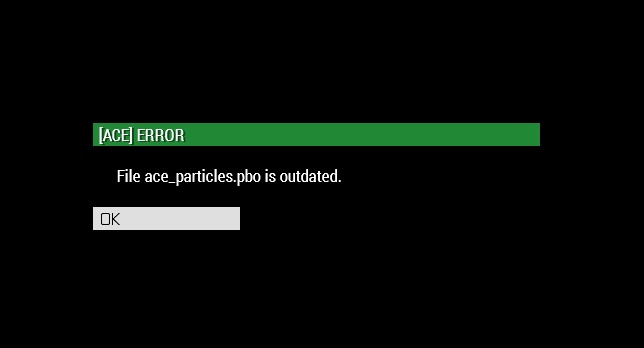
ace.pbo is outdated. anyone know what I need to do to fix this..?
fringe salmon
that doesn't fix anything
quaint jewel
Then you didn't do it correctly
I can tell you that ACE is not broken.
Otherwise thousands of other people would've already reported that, which they didn't
Make sure all files are properly deleted before you redownload
wise barn
Which might be a problem If it's part of a modpack. Are you using a modpack?
fringe salmon
uh don't think so
wise barn
Make sure, guessing is no option
fringe salmon
not sure what you mean by modpack
wise barn
Where did you get your mods, and how do you launch them?
fringe salmon
I get 99 percent of my mods off the work shop. I open my arma 3 launcher and load them like that
wise barn
Next: life mods?
quaint jewel
which pbo is actually the problem
as I said ace.pbo doesn't exist
Need the EXACT message you are getting in order to help troubleshoot
 quaint jewel
Can you send me your RPT?
%localappdata%/Arma 3
fringe salmon
uh, not sure how to do that
quaint jewel
Just send me a discord PM and drag&drop the file in
mighty pier
Is the mission set to persistent? In the server.cfg or description.ext....can't remember which
@fringe salmon
fringe salmon
@mighty pier yes we have persistent battlefield on
 sonic merlin
hey i trying to setup a dedicated server but when i try to run custom missions from the steam workshop they dont work at all
wise barn
they dont work at all
🤔
does the server start up: yes/no
does the mission load: yes/no
does the server show up in the list: yes/no
can you even join the server: yes/no
have you checked the server RPT files: yes/no
please be a bit more precise and provide at least some details...............
it's a bit exhausting pulling every bit of information out of peoples nose...
sonic merlin
yes the server startup the missions load up i can join and i have checked the RPT files
the only error ivies see is a unsupported English string
wise barn
so what exactly doesn't work then?
sonic merlin
me and my friend spawn in the water
and i feel like the scripts are not working but its hard to say
i can send you the RPT file if you want
wise barn
post it on www.pastebin.com and post the link here
wise barn
what mission does not work? the DUWS or Liberation?
wise barn
what did you change?
sonic merlin
DUWS is one of those random gen missions
wise barn
but still... randomly removing scripts leads to errors
sonic merlin
i didnt remove any scripts
wise barn
we just change the amount of scripts the missions had
?
sonic merlin
i mean by looks for different missions
wise barn
what does that mean?
sonic merlin
we tried like 30 different missions the past few days and so far none of them have really worked
most of the time its that the scripts are not loading
like the random gen missions
uncut trellis
are you using mods?
sonic merlin
5 mods
uncut trellis
have you tried without mods
sonic merlin
yes
wise barn
-servermod=@AdvancedUrbanRappelling;@AdvancedRappelling; -mod=@CBA_A3;@EnhancedMovement;@Removestamina;
sonic merlin
any standard arma3 missions like the apex ones work fine its just anything from steam workshop or armaholic
this is also a NFO server not sure that changes anything
wise barn
try this without mods
https://steamcommunity.com/sharedfiles/filedetails/?id=1518770193
sonic merlin
im in the missions but all its saying it waiting for the host to find an HQ
and i am login into admin
strong steeple
try using another mission than DUWS?
sonic merlin
this missions has worked the best but most of the scripts don't work at all https://steamcommunity.com/sharedfiles/filedetails/?id=1402462003&searchtext=Dynamic+Bulwarks
wise barn
no update in almost a year... what did you expect 😄
sonic merlin
but it happens for every single missions
sonic merlin
so far all the missions work when we load into a MP game that my friend host. but we want to run the missions on a dedicated server
that mission did not work
wise barn
spawning in water again?
sonic merlin
yeah
wise barn
RPT please
sonic merlin
give me sec
sonic merlin
strong steeple
tried re-installing the server? 🤔
sonic merlin
this is a new server host
strong steeple
server host != arma 3 server (installation)
strong steeple
that's so weird
because I played Bulwarks, Liberation currently with way more mods without issues
sonic merlin
we have a sever from host havoc about 6 mouths ago and bulwarks worked fine
strong steeple
are you sure it's the latest version from the workshop?
strong steeple
hmmm 🤔
I don't know what to tell you, the work fine for me
and the mods you use don't look very mission-breaking
sonic merlin
are you on a server host or local
strong steeple
I have my own dedi servers
wise barn
server RPT is inconclusive.....
i know that escape works, so i could be a server problem... no clue
strong steeple
y u gotta be a server problem Chris
sonic merlin
me and my friend are about to just get a virtual missions and do that way
strong steeple
the vanilla missions all work fine right?
strong steeple
hmmm
sonic merlin
only have problems with custom missions
i have notice im not getting the missions file
its been a really long time sense ive played arma
strong steeple
why aren't the mods read-only? They show that every time in my RPTs
sonic merlin
i dont know what that means
strong steeple
could also ask NFO to see if something's ruined on their installation
sonic merlin
yeah i will try that
 patent sparrow
Anybody else get the half black trees on some of the Jungle-y maps?
fringe salmon
my issue still hasn't been solved so im going to ask again
So after the last player on my friends dedicated server leaves and anybody else tries to join when there's no players on there they get connecting failed? that error persists until he restarts the server. Seems i have to stay on his server if i want to play later or it borks itself.
uncut trellis
Probably no players == the mission ends
fringe salmon
@uncut trellis we have it on persistent battlefield, whats the best solution?
uncut trellis
That I don't know unfortunately.
fringe salmon
ok thanks for your help that seems to be the most likely
strong steeple
Can you post one of your RPTs? The Connection Failed seems rather out of order. Even if the mission were to end, it should reload said mission when player rejoin 🤔
fringe salmon
sorry nightstalker where do i find the rpt
strong steeple
in the root folder of the ArmA 3 server installation if you have a windows dedi
fringe salmon
ok it is my friends server not mine
strong steeple
then you'll have to ask your friend for the RPT
fringe salmon
ok nightstalker will do
fringe salmon
@strong steeple i have the rpt file should i dm it to you?
fringe salmon
ok thank you
strong steeple
if you really want to DM it, that's fine too
fringe salmon
yea sorry having trouble with pastebin telling me i need pro edition feel like such a noob
strong steeple
oh probably because it's so much text xD
 knotty ravine
and i am dead
 median olive
ok i need some dev help here i updated the server using steam cmd now all im getting is it crashing when loading core is there something thats need to be done
median olive
median olive
i have reinstalled directx and run timeand validated files idk what to do i need some help
median olive
when i have the basic.cfg in my server start .bat it crashes the server
 fallen swallow
https://imgur.com/cw31dsC anyone know how to fix?
fringe salmon
Verify the game installation maybe
strong steeple
@median olive recheck the mods. One of those may be the culprit too. You can verify this by launching the server without any mods
@fallen swallow sign out of your PC account and sign in again. If that doesn't work either, just restart 😃
 clear ledge
I need some help, the British Police mod shows in Eden Editor but it doesnt show in Zeus
how can I fix that
wise barn
Enable all mods in the zeus module
wise barn
Jup
wise barn
🤘
clear ledge
1 more thing, is there a way to make it so i can press a key and toggle simulation on the unit i am playing as?
fringe salmon
PLs help i keep getting "update canceled" after finishing downloading a mod
 trail otter
i have bought the new dlc but when i press the download dlc in the launcher it just stops at random and i need to click it again please help
clear ledge
okay guys I need help again, same thing. EVERY asset is there except the one I need, british police
it is there in eden but it isnt there in zeus
I googled it but no result
all official and unofficial mods are loaded
bump
wise barn
Then the mod you can not find in zeus is not set up for it by the autor. Nothing much you can do beside contacting them
fringe salmon
scopeCurator in the config of the asset is probably missing so it is not loaded. Talk to the creator @clear ledge
 surreal frigate
hi, how can i fix battleye initialization failed
 karmic shore
Hi, I have a similar issue in Warlords. "You were kicked from the game, Battleye failed to initialize" or "Battleye client not responding". It has only started since the update a couple days ago.
 tranquil charm
I opened all ports according to the wiki, still no chance, what am I doing wrong?
https://i.imgur.com/6wZUEsG.png
 strong steeple
assign server to those ports? Disable UPNP?
fringe salmon
what that image is supposed to show @tranquil charm ?
 agile plinth
Can someone join me to see if my ports are working right?
strong steeple
How to get players on your server with RagefulGamer 😛
 dire phoenix
Hey can someone help me?
I'm running vanilla arma3 and whenever I enter a vehicle
It defaults to a death / dead posture
So when in first person, my camera is facing the floor since he's hunched over
I can operate the vehicle normally but in combat this is very frustrating
Same thing goes with mounted weapons
 round lance
Not using TrackIR or anything similar, right?
If not, try using things like ctrl+numpad(right side of the keyboard) to see if you can adjust your camera.
If this doesn't fix it or work, i'd recommend verifying your game files.
If it doesn't work even then, do tell me and i'll help you with figuring it out.
dire phoenix
It's not the camera
The whole humanoid is playing a death animation hence the issue with the camera
dire phoenix
I defaulted to reinstalling
rustic tusk
that'd help us actually understand what's happening
instead of just a vague description that might be something entirely different
dire phoenix
Sure thing
round lance
Could've verified your files instead of resorting to reinstalling
Just remember that next time.
 strange meadow
https://mail.google.com/mail/u/1?ui=2&ik=51f65c9c43&attid=0.1.1&permmsgid=msg-f:1632522462138364896&th=16a7e287a39a73e0&view=fimg&sz=s0-l75-ft&attbid=ANGjdJ8cZoGpWi-aFKu0ZSGksWxn3Tx_AX6EdzfaoSfaXAxdd-bGo4LGWh34R9BbKXIkX4l-SQjP5BqJgEALFCovaVtLJxB_oMaNZpxazHXHb4dNqCfVcl_HhrTztxE&disp=emb can any one tell me why i would be getting this message
rustic tusk
that's a nice 404, screenshot of the message please?
round lance
410, technically.
strange meadow
is says dangercausedby if deepdebug then diag_logformat error undefined variable in expressions ot_deepdebug
file/overthow_main/function/ai/fn_dangercaused.sqf {ot_fnc_dangercased} line 19
round lance
Why are you getting this message again?
Are you trying to launch up arma, using a certain weapon or vehicle, etc?
rustic tusk
we really need a exact picture of the error, context everything, mods no mods
etc etc
strange meadow
How would I go about putting the pic of it in here
rustic tusk
imgur, any photo hosting website
strange meadow
round lance
the hell is that gun?
definitely seems like a mod thing.
dangercaused also might be related to an AI mod you have on?
not sure.
strange meadow
It is a anti tank gun
round lance
i realized that.
the 20mm is a good hint.
if it's an issue that pops up with mods then that is moreso the mod devs' problems.
or specifically the combination of mods you have.
strange meadow
Ok that so much for the help ya I destroys any thing I throw at it in 3-4 shots
round lance
as long as it doesn't crash your game it's pretty okay I guess?
also for next time just take screenshots with F12 and post those.
no need to use your phone for that.
strange meadow
Ok thanks
 rocky dragon
https://imgur.com/a/7hJG7qe any idea why I can't map my controller? the mappings on the left are just blank
round lance
that's not where you map your controller, that's where you control your sensitivity.
you map your controller in the normal configurations.
round lance
no problem.
https://steamuserimages-a.akamaihd.net/ugc/791981691733714120/6965C59CC4D2BA329A275E46149CE123B1CC7D97/ @rocky dragon something akin to this.
rocky dragon
it still doesnt seem to detect any movement of the axis
hmm well it got it eventually
i see you need to push it the whole way
strange meadow
Lankier cool thanks for the help It was one of my mods that was casing the problem
round lance
@strange meadow no problem.
 dusky hill
Help! I can no longer locally host. UPNP was failing. Not sure why.... Ive opened up ports on arma 3, both my router and nothing has worked, ive tried validating my files, reinstalling and still nothing. Now it looks like it hosts, but no one can see my server and when they join through friends list says server is not responding....
strong steeple
if you open up your ports, you don't need UPNP
dusky hill
interesting.... Thank you i understand more day by day
surreal frigate
Hi, so people in my server are randomly getting session lost
14:59:43 Player Ben Smith: Wrong signature for file addons\characters_f_epa.pbo
we tried verify game files still getting random session lost
round lance
woops, forgot this isn't GM related.
well that means something is problematic server-related, not client.
quaint jewel
@surreal frigate try deleting pbo, and then verify files again
surreal frigate
did
round lance
server-side maybe?
surreal frigate
it just gives another file
 idle summit
getting an error message when i boot arma saying " corrupted settings it looks like your settings are corrupted. we will need to reset them to their defaults to continue" anyone have any idea, if verfied game and ive also reinstalled arma
ive*#
quaint jewel
sounds more like cba
my documents/arma 3/profilname.vars.arma3profile
try deleting that file. Be warned that it resets some of your ingame settings
 grizzled willow
I'm putting together a mod and I have permission from some people to use their assets so my question is this. When I add the pbo's do I need the bisigns as well or not? Am I missing something else that needed to? I don't want to screw this up.
round lance
You need to generate a new one yourself.
 gusty snow
All my Arma 3 loadouts were deleted, all of a sudden.
they had the GM DLC if that help's.
round lance
That happens sometimes at complete random.
Might be able to recover them in Documents > ArmA 3 - Other Profiles
Loadouts are profile specific
round lance
Yes, and you can see if your old profile has duplicated or anything similar.
gusty snow
I dm'd you a photo.
round lance
 soft jacinth
So today I wanted to re-play the Arma 3 campaign and started with the prolugue, once I was done with that I expanded the east wind then clicked "Replay" on the drawdown 2035 mission and was back into prologue.
round lance
drawdown 2035 IS the prologue.
unless you mean the actual literal prologue?
which is the bootcamp campaign?
soft jacinth
right, but when I start it brings me to the reality check mission
round lance
oh, that's odd.
soft jacinth
yeah
round lance
no mods, right?
round lance
did you try verifying files yet?
soft jacinth
yop
soft jacinth
When I created a new profile it just says continue :/
round lance
try what was said in these comments maybe?
round lance
still same result though?
soft jacinth
thanks anyways, have a good day
round lance
no problem.
fringe salmon
we are having an issue on our antistasi server where the friendly ai keeps killing us sporadically?
 fallow remnant
are you sure they're on the same side?
fringe salmon
Disable SkyNet
round lance
Teamkilling problems probably.
Specifically if you start shooting enemies immediately after undisguising i guess.
fringe salmon
Is there anyway to disable the debug errors
wise barn
-showScriptErrors
https://community.bistudio.com/wiki/Arma_3_Startup_Parameters
either this, or disable them in the launcher settings
fringe salmon
Where would I find it in launcher settings
wise barn
parameters > all parameters > scroll down to show script errors > deselect the field
(i guess that's what it is all called in english UI)
fringe salmon
It's already unchecked 🤔
wise barn
is it a black window in game showing weird stuff?
fringe salmon
Yup
wise barn
i only know of those two options...
fringe salmon
Huj
quaint jewel
@wise barn @fringe salmon it's enabled in 3DEN. Can't disable
wise barn
good to know, thx
uncut trellis
fixing the errors it pops up will make it go away though.