#arma3_troubleshooting
1 messages · Page 97 of 1
 quaint jewel
Did you per chance use my profiler mod previously?
Or my debugger?
There is a old file in Arma 3\intercept\SQF-Assembly that is probably what's crashing your game.
I don't know how that file got to there. But it's the old one year old version that's broken.
 zealous rivet
I never used it before. Lol.
What the heck. Ok. So when I get back home I'll delete it. Do i need to replace it with anything or can i remove it entirely
quaint jewel
Just remove the whole intercept folder in your Arma 3 directory
zealous rivet
Will do. So your script profiler usually does a good job at finding which mod is problematic?
quaint jewel
Well it can technically tell you which script function is causing havok. Never has been used for that in practice as that doesn't happen that often
zealous rivet
After work I'll definitely get back to you. Crossing my fingers
quaint jewel
Okey I looked into the mdmp. It's indeed caused by a bug in the old version of the sqf-assembly plugin. That broke with 1.90 and was updated 2 weeks ago.
You still had the mid-2018 version in your folder though, it loaded that and crashed on the bug.
zealous rivet
Maybe you uploaded that to the github release?
quaint jewel
Nah just checked. Atleast the latest release is correct. The others are older thus still have the old version
zealous rivet
I have a hunch my problem is with ALiVE itself but they can't replicate. At least if I can point to which script is crashing Arma I can have them pinpoint the problem.
 heavy osprey
my game isn't runnning smooth. Every time i get near buildings towers ect (like 250m) the game stops running smooth and goes from 35 to 15 fps. Anyone an sollution?
 uncut trellis
lower video settings or get better computer
 strong steeple
Don't get close to buildings, towers ect
 wise barn
@terse hornet
crashes
please be more specific
and continue here
 terse hornet
When I usually attempt to load into my units server
wise barn
¯_(ツ)_/¯
terse hornet
Thanks for making me remember
wise barn
np
 lost valve
hello lovely a3 community, i'm getting this error after launching a server (ingame server-host). I did a full file check, deleted the file and did a re-check too...any solution here? http://puu.sh/D2qmi/0952069974.png
quaint jewel
At server launch, or at mission launch?
Looks like bad mod. That dik codes file is in ui_f not 3den
Actually no.. It's in both. 3den has a copy of that same file
I assume that's a #include from a missions description.ext then
includes from description.ext are broken/bugged
lost valve
using vanilla, nothing mod or anything custom stuff...its crashing after pressing the 2nd time on host server (where you enter server details etc.)
quaint jewel
no custom missions in mpmissions folder either?
did you try verifying the game files via steam?
lost valve
sure, so it could really happens with broken mission files?
quaint jewel
Yeah. Some mission file has a #include with that file in it's description.ext
lost valve
oh wow yeah, after deleting the latest mission file it works
 sudden cipher
our crashes since 1.90 are fixed wit hthe latest profiling branch - wel ldone BI
also the guy who had white textures in buldozer - "Just had tick box on in view>viewers in OB"
ffs lol
 cerulean lance
I, looked at the arma tools and almost instantly said "Nope" 😄
strong steeple
and now we await the hotfix to stable 😄
zealous rivet
@sudden cipher What problem were you having again?
@quaint jewel I saved the trace of Arma CTD'ing. How should I send it?
zealous rivet
Since the file is too large for Discord I'll send you a mega.nz link. I appreciate it.
sudden cipher
- couldnt connect with sig checking, 2. everyone CTDing every 2 mins on the server
after we removed sig checks
all fixed now using latest profiling branch fro mdwarden
 grave mortar
Arma 2 BAF DLC attempts to run 'datacacheprocesser.exe' with admin, but when I approve it it only re-opens asking for admin all over again
it only recognizes it as the lite version
 fringe salmon
Huh?
quaint jewel
never heard of datacacheprocesser
fringe salmon
Just confirming again that the hotfix does not fix the issue we see (the black Arma 3 screen and does not progress to slots) and there is no error in the RPT that explains what is going on. Hotfix has not repaired the problem, rolled back again to 1.88.
 dire fog
@fringe salmon u're on a Linux server?
quaint jewel
Might be that battleye+mods thing that we're seeing lately?
I still suspect file limit. But can't be OS file limit.. Maybe battleye has a bug?
If you are on BE and linux @fringe salmon you could try disabling BE and seeing if that fixes the issues.
fringe salmon
On Windows, not using battle eye, signatures are set to 0. None of these is the issue.
 tiny imp
@fringe salmon need RPT logs from both client and server (plus console log)
quaint jewel
Wow.. Literally unticked all of my checkmarks :/
tiny imp
@quaint jewel @grave mortar the datacachepreprocessor.exe is the DLC installer, make sure you try start whole steamclient via 'run as administrator'
 uneven kettle
Hi! I'm suddenly unavailable to start up Arma. The loader gets stuck on "Loading core configs" and freezes.
I'm getting this error in the log.
17:26:09 Waiting for 'C:\Users\Andréas\AppData\Local\Arma 3\DataCache\cache_lock' to be available
 harsh elk
Hi, it's caused by special character in your profile. We are working on fix now. I am sorry for trouble. You can alternatively start the game with -profiles= parameter and some name without special character. For example -profiles=test
uneven kettle
Yes I've been having a lot of problems because of that! I'll be more careful next time i install windows.. =/
Are there any downside to that fix? do i loose mission progress for example?
Thanks for quick replies 😃
quaint jewel
Could be that you loose mission progress. But you can manually copy over your old profile files to the new directory I think.
Though apparently Arma sees profiles directory as appdata local folder?
That is not the same as the my documents one where your settings and progress are stored
uneven kettle
So where is the -profiles=test stored?
uneven kettle
It worked! Thanks so much for the help!
tiny imp
@uneven kettle @tulip scaffold etc. thanks for the reports, we're working on fix
 viral cargo
Tested on the 9th of March with both the client and game server on profiling branch version 1.90.145423 and back then the Session lost was gone.
Just updated both the game server and client to 1.90.145456 and now I'm shown
Session lost - File 'addons\air_f_rtd.pbo' not found.
when joining the server
cerulean lance
Uuuuuuh. So this just happened after I Clicked on "Scenarios"
https://gyazo.com/a037d831b48cf4012612e060db7eedc6
Verifying now. will check again in 5-10 mins
uncut trellis
you have a broken mission
quaint jewel
A broken custom mission.
cerulean lance
I Couldn't select any missions.
Litterally as I Click "Scenarios" It pops up with that
quaint jewel
yup
viral cargo
Removed both air_f_rtd.pbo and dubbing_radio_f_data.pbo from the server and now I'm shown File 'addons\dubbing_radio_f_data.pbo' not found..
So what are these then, files that are not needed anymore? Is the official "fix" to remove all that are not found?
quaint jewel
@spring rivet #rules no crossposting. No allcaps. I already told you that. And I already linked you to the solution for your problem
@viral cargo delete on client AND server
These are files that should've been deleted months ago. But steam is bugged and didn't delete them
 spring rivet
sorry but ... link's lead here
viral cargo
Will do if I found these. Couldn't though find any of those from the client
quaint jewel
The link leads to the message telling you the fix
viral cargo
Is there an official explanation about this, having to remove files that are not found?
spring rivet
omg i'm very ..... i made some space
ok so i'll try it
yep it's work thank u so much !!
cerulean lance
Missions/MPMissions have been removed, same thing pops up.
quaint jewel
Might be in your My Documents/Arma 3/missions or mpmissions too
cerulean lance
Vanilla client, no mods. Going to clear launch options and retry. I've just moved the ones that were there. Both MP/Missions folder contents for all profiles are removed.
exit code :0x0000dead
quaint jewel
0xdead == arma killed itself
reason is the message it already showed to you
maybe your RPT tells you more
viral cargo
I'm going at the sounds_f_weapons.pbo. I wonder if there'll be anymore weapon sounds
quaint jewel
Steam should redownload that file when you verify
viral cargo
That was the last one I removed from the server and now I finally got in on the server (with VerifySignatures = 2 that is)
quaint jewel
🤔 you shouldn't be able to join with missing pbo's. And sounds_f_weapons shouldn't be deleted I think
viral cargo
Just to recap I had to delete all these to get in on the server
dubbing_radio_f_data.pbo
missions_f_epb_data.pbo
missions_f_epb_video.pbo
missions_f_epc_data.pbo
missions_f_epc_video.pbo
sounds_f_weapons.pbo```
What comes to the **sounds_f_weapons.pbo** I can't locate it on my clientMaybe these files are even older, and that's why BI dev didn't have them on radar
@cerulean lance 22:15:50 Shutdown normally
Need to make your game crash for the info to show up
Btw that log you sent is almost 2 weeks old
quaint jewel
Might also be a mission that you have subscribed to in steam workshop.
cerulean lance
Will double check. Hold that thought 😛
Everything un-sub'd, same thing.
Worth posting a report?
quaint jewel
No. It's not a arma bug
Feedback tracker is for arma bug
you just need to find where that pesky custom mission is that's causing your problems
I can't find a file path in the rpt though
viral cargo
@cerulean lance Just a quickie: are you whitelisting missions in server.cfg?
quaint jewel
@viral cargo clientside crash. not server
So you removed everything in both my documents and arma directory missions/mpmissions?
Did you also remove in "my documents/arma 3 - other profiles"?
Check
C:\Steam Shit\steamapps\workshop\content\107410 and search for .bin files in there
these are missions from the workshop
cerulean lance
107410 is now empty, uno momento
Same deal unfortunately :/
Probably nothing a reinstall can't fix 😛
quaint jewel
I have no further ideas where missions could hide...
Well.. In mods.. But error doesn't look like mod.
cerulean lance
Fault address: 63EC9149 00:63EC9149 Unknown module
Memory error?
quaint jewel
no
Already told you. 0xdead == forced crash
Arma already told you what the error is.
the include file in some mission
spring rivet
guys please , i've made some spaces when i wrote " -profiles = test " and now spaces don't want to remove....
strong steeple
remove the line and retype it
 drifting path
my Arma stuck at "loading core config" both moded and without mods I tried steam verification restarting PC
quaint jewel
@drifting path Solution: https://discordapp.com/channels/105462288051380224/141866231362879488/557969519272788003
PSA: If you get stuck at loading core config or you get cache_lock not available
Then launch your Arma with the start parameter -profiles=test
BI is already working on a hotfix.
drifting path
ok thanks
spring rivet
@quaint jewel pleaaaase
quaint jewel
I don't know. Maybe just use the option in the arma launcher instead of adding the parameter manually
Parameters -> All parameters -> profile directory.
Under the world entry. Above the "Client" entries
 cunning loom
Hello i have a problem with arma 3, freeze on starting game screen and on .RPT i have this \AppData\Local\Arma 3\DataCache\cache_lock' to be available
quaint jewel
cunning loom
ok thx, i try
cerulean lance
Ok, so the game's reinstalled, all mods are unsub'd and deleted. Local/arma 3 files are removed completely
Any/All Modded maps have been deleted/backed up
And the error is persisting
quaint jewel
😕
quaint jewel
the mission has to be somewhere. But I have no clue where it could be
cerulean lance
Defines.hpp isn't actually there O_o
I Have
description
mission
PIC
roadsDBAltis.sqf
Saying that, there's no .hpp files in the "Templates" Folder
On another side note, why are they there after a clean install? O_o
quaint jewel
Defines.hpp isn't actually there O_o yes. That's what the error is saying
so you actually found the files?
cerulean lance
Mega facedesk
Ok, i'm a tit.
Apologies, t'is sorted.
Though, I Don't understand How the files got there...
fringe salmon
so what was it? @cerulean lance
cerulean lance
Ok, so the last time I booted up arma, I was playing on an Antistasi server.
Somehow, the files managed to make their way into the Arma install directory and ended up in the missions folder.
Do servers run mods with .hpp's?
fringe salmon
where did you find them, what was the path?
quaint jewel
You told me you cleared your missions folder though.. You assured me that multiple times ^^
cerulean lance
I know, sorry about that 😛 I Thought you meant the one in docs/arma 😛
@fringe salmon Base install dir for arma
Steamapps/common/arma/missions
fringe salmon
Singleplayer scenarios exported from the in-game editor are stored here. You can also place downloaded custom scenarios in this folder and play them from the Scenarios list.
cerulean lance
Right, but does joining an MP Server recreate those files to that directory?
fringe salmon
no idea
quaint jewel
shouldn't
 junior burrow
The last update made the CTDs even worse is anyway i can fix it
 tropic yarrow
CTDs?
quaint jewel
Crash To Desktop s
@junior burrow which CTD? what error code? any error message additionally?
 fast swan
Everytime i join a DayZ/Zombie game, i keep getting this issue with CBA, it tells me to remove files within CBA.
fast swan
I can't even find them
quaint jewel
which files?
quaint jewel
what is the exact message you are getting
Quite sure it doesn't tell you to remove cba common
fast swan
When i remove these files it asks me to remove, it won't allow me to join
It wanted me to remove, CBA_Common, CBA_Events, and two more
quaint jewel
"exact message"
fast swan
It actually wanted me to remove ANY cba file that didn't have numbers behind it
 desert isle
@fast swan What he means is "you need to post the EXACT message", not your interpretation of it. Without the exact message, we're just as clueless as you.
fast swan
I'll try testing something, if it wont work, i will take a pictre
picture*
My power cut off, I'll try again tomorrow
fringe salmon
@junior burrow try command line -malloc=system
havent seen those errors sincwe
and never use JEMalloc, it makes it worse
junior burrow
its not just me tho its fucking everybody
tropic yarrow
have you considered asking about it in their respective discords?
quaint jewel
sudden cipher
mystery of the day
since 1.90 unsung mod is crashing wit hcertain headgear
in the config file here you can see which headgear causes all clients a fatal memory crash
//CTD
it seems that it is all classnames inheriting something
could it be that iteminfo inheritances have become broken?
as that may explain why a series of connected classes crash
our headgear models have a few issues in binlog, but not the ones that crash lol
the headgear was also working fine up until 1.90
Since last update certain specific hats are causing an issue - very weird. when a player puts it on, and runs near other players, they all get status memory access violation - this is from our mod, which has had these hats running fine for 3-4 years in arma 3.
in uns_headgear we have
requiredAddons[] = {"A3_Characters_F","uns_main"};
since 1.90 we are seeing this in rpt
22:41:08 Warning Message: You cannot play/edit this mission; it is dependent on downloadable content that has been deleted. a3_characters_f 22:41:08 Animation a3\anims_f\data\anim\sdr\gst\gestureempty.rtm not found or empty
Could this be the cause?
uncut trellis
GestureEmpty.rtm is not in the game files by default
Something of a mystery file that one.
sudden cipher
22:41:08 Warning Message: You cannot play/edit this mission; it is dependent on downloadable content that has been deleted. a3_characters_f seems mad though ?
quaint jewel
ignore it. Doesn't mean anything
that's not since 1.90 either
15:29:33 Animation a3\anims_f\data\anim\sdr\gst\gestureempty.rtm not found or empty I have that too.
sudden cipher
so i'm scratching my head here
as blufor, putting on this hat and approaching another player
caused instant CTD
ever since 1.90 update
never before
uncut trellis
Does the hat work if unit is spawned with it?
sudden cipher
    class UNS_Boonie_VC: ItemCore//CTD
    {
        author = "UNSUNG";
        scope = 2; scopeArsenal = 2; scopeCurator = 2;
        weaponPoolAvailable = 1;
        displayName = "(UNS) VC Boonie";
        picture = "\uns_headgear\ui\boonie_vc_ca.paa";
        model = "\uns_headgear\uns_vc_boonie.p3d";
        class ItemInfo: HeadgearItem
        {
            mass = 2;
            uniformModel = "\uns_headgear\uns_vc_boonie.p3d";
            allowedSlots[] = {901,701,605};
            modelSides[] = {6};
class HitpointsProtectionInfo
            {
                class Head
                {
                    hitpointName = "HitHead";
                    armor = 0;
                    passThrough = 0.5;
                };
            };
        };
};```Have you tried making it use some different model?
sudden cipher
whereas this class does not CTD
 blissful bramble
p3d or model.cfg issue?
sudden cipher
    class UNS_Beret_MRF: ItemCore
    {
        author = "UNSUNG";
        model = "\uns_headgear\uns_beret_2";
        scope = 2; scopeArsenal = 2; scopeCurator = 2;
        displayName = "(UNS) NAVY MRF Beret";
        picture = "\A3\characters_f\Data\UI\icon_H_Beret_blk_CA.paa";
        class ItemInfo: HeadgearItem
        {
            mass = 2;
            allowedSlots[] = {901,701,605};
            uniformModel = "\uns_headgear\uns_beret_2.p3d";
            modelSides[] = {6};
class HitpointsProtectionInfo
            {
                class Head
                {
                    hitpointName = "HitHead";
                    armor = 0;
                    passThrough = 0.5;
                };
            };
        };
    };
Maybe some leftover A2 property that's hidden from view
Perhaps copying the lods to new empty P3d could help
And resaving textures as tga and reconverting them to paa
uncut trellis
I'd replace them all with the beret model to confirm it's not config
sudden cipher
we couldn't identify it due to al lthe other problems
roger good call!
on it thanks
sudden cipher
ok changing to default beret model, it doesnt CTD
so there's smething about 21 of our 50+ hats that is now causing a CTD since 1.90
i wonder what BI changed in the update, that could affect headgear models only?
I'm now recreating p3ds lod by lod
and removing textures and rvmats etc
to see what specifically is the cause
u can wearthe helmet, but if you go next to another player and he turns to look at you, bam! memory CTD
i guess that means it is likely a faulty texture
like an smdi
as i've seen something like that before
blissful bramble
clear all named properties except lodNoShadow = 1. from the LODs apart from the shadows which should have none at all. And the only other one you should have is autocenter 0 in the geometry LOD. Open the UV editor and make sure it has no extra UV sets other than UV Set 0, then check that the .rvmat is not looking for anything other than uvSource="tex";
Ideally, that'd give you the most "pure" model
 flint tiger
Anyone had similar issues? OB suddenly stopped loading textures. Bulldozer preview was configured 100% fine and working and then just stopped loading model textures on all models. I tried re-installing , verifying , double checking textures paths , double checking the default texture folder P:\ is set, as it was when it was working and then just this:
https://i.imgur.com/5bKBngL.png
sometimes this , with some visual artifacts
https://i.imgur.com/mYlyLGp.png
No textures, strange lines instead of smooth gray mesh (if textures are not set).
The only things I've noticed in the logs that it has some error logged: Invalid module. Missing link to InitPluginModule function (127)
Have no idea if it was there before, never checked since everything was working. That's it.
ObjectBuilder.log - https://pastebin.com/i33X5FKQ
sudden cipher
ambient[]={0.999999,0.999999,0.999999,1.000000};
diffuse[]={1.000000,1.000000,1.000000,1.000000};
forcedDiffuse[]={0.000000,0.000000,0.000000,0.000000};
emmisive[]={0.000000,0.000000,0.000000,1.000000};
specular[]={0.286275,0.286275,0.286275,0.600000};
specularPower=34.599998;
PixelShaderID="NormalMapSpecularDIMap";
VertexShaderID="NormalMap";
class Stage1
{
    texture="uns_east\data\officer_gear_nohq.paa";
    uvSource="tex";
    class uvTransform
    {
        aside[]={1.000000,0.000000,0.000000};
        up[]={0.000000,1.000000,0.000000};
        dir[]={0.000000,0.000000,0.000000};
        pos[]={0.000000,0.000000,0.000000};
    };
};
class Stage2
{
    texture="uns_east\data\officer_gear_smdi.paa";
    uvSource="tex";
    class uvTransform
    {
        aside[]={1.000000,0.000000,0.000000};
        up[]={0.000000,1.000000,0.000000};
        dir[]={0.000000,0.000000,0.000000};
        pos[]={0.000000,0.000000,0.000000};
    };
};
class Stage3
{
    texture="#(argb,8,8,3)color(1,1,1,1,AS)";
    uvSource="none";
};```i'd suggest maybe trying super shader, and putting procedurals in the maps you do not use
instead of PixelShaderID="NormalMapSpecularDIMap"; VertexShaderID="NormalMap";
sudden cipher
others on same CTD helmet use```
PixelShaderID="NormalMapMacroASSpecularMap";
VertexShaderID="NormalMapAS";
couldthis be it maybe?
class Stage2
{
    texture="#(argb,8,8,3)color(0,0,0,0)";
    uvSource="tex";
    class uvTransform
    {
        aside[]={1.000000,0.000000,0.000000};
        up[]={0.000000,1.000000,0.000000};
        dir[]={0.000000,0.000000,0.000000};
        pos[]={0.000000,0.000000,0.000000};
    };
};
note the end of the line
lacks ,AS
righty ho, i'll start rebuilding the helmets one rvmat at a time til it fixes it
thanks dtm
appreciate your help 😃
blissful bramble
pos[]={0,0,0};? should be fine AFAIK
and I don't think the texture type is too important in procedurals, but it probably helps
I have this as an example of a fully procedural super shader .rvmat https://pastebin.com/embed_iframe/SjPGA55c
obvs specular[], specularpower and Stage6 fresnel probably want adjusting per-asset after assigning _smdi, _nohq etc.
quaint jewel
dir[]={0.000000,0.000000,0.000000};
wrong.
It's a matrix.
Needs to be 1 across. So 0,0,1 dir
EVERYONE makes that mistake for some reason
blissful bramble
it's probably in some BI sample .rvmat somewhere
quaint jewel
I think it was wrong on biki too
 uncut dew
Hi can anyone help me with this error in rpt: Object Land_Cargo20_military_green_F can't have zero or negative mass! a3\structures_f\ind\cargo\cargo20_military_green_f.p3d
there are all kind of different objects mentioned, this is just one example
sudden cipher
looks like a bohemia model which has no mass assigned in geometry lod
uncut dew
is there a way to fix it? 😄
fringe salmon
help
I just brought arma and i keep getting this error
0XC0000005 - STATUS_ACCESS_VIOLATION
<@&105623147411202048>
sorry for the @
I need help
wise barn
@fringe salmon
No need to tag sysadmin
Make sure you have the latest driver updates. By “make sure“ i mean go to the company website and download the drivers there.
Motherboard
Chipset
Usb
Ethernet
Audio
Graphics
NEVER let windows install your drivers, do it manually
fringe salmon
Oh ok
Can I message you if I need further help
Because I will do it after I eat
No worries I’m doing it now
I cant find that on the website
I cannot see where on the website
i can download drivers
oh do you mean go to Like Nvidias website and download GPU
I downloaded the GTX 1080 driver
wise barn
Open your case and look for your mainboard model. Go to the manufacture website and download All needed drivers from there.
Same for the GPU, ect
wise barn
I'm at work so not always online
wise barn
That's the saves way. If you open your case you are sure what you have
fringe salmon
Hmm oh ok
or i can just do wmic baseboard get product,Manufacturer,version,serialnumber.
Ok so i have downloaded everything
Now i just need to know how to install it from the like Zip fuke
file*
fringe salmon
I litterally can change the Fans sound now xD
Oh ffs
I am still crashing
0XC0000005
that thingy
wise barn
Got win10 and usb sound device?
uncut trellis
Speaker plugged into computer with USB?
fringe salmon
nah
uncut trellis
Or just the normal game?
fringe salmon
i have 0
uncut trellis
Alright
fringe salmon
i want to join RPUK
uncut trellis
No idea what that is, but my guess is its not relevant for your current issue. Have you verified game files in steam?
uncut trellis
Try that next
fringe salmon
Server*
Ok will do
I’m trying to load in once more first
And there we go I crashed
im validating now
I don’t understand this glitch it’s really annoying
I buy the game try load in and crash 100 times
I get into a roleplay server I’m in it for 2 mins then I freeze and crash
uncut trellis
Oh wait
fringe salmon
I have a gtx 1080 aswell
uncut trellis
The game launches OK?
uncut trellis
So it's just the server?
uncut trellis
Does single player game start?
fringe salmon
I haven’t tried @
Wait am I meant to play single player before being allowed on multiplayer
uncut trellis
No
fringe salmon
Is that why it’s called Access violation
Oh
Ok
Why don’t the devs fix it so it never happens
Coz it happens to a lot of people
uncut trellis
But if single player works it is more likely it is some sort of network issue
uncut trellis
If it is due the latest game update then they are working on it
uncut trellis
But also server hosts can take steps to fix it
How do you know many people have it then?
uncut trellis
None of those are reliable sources
uncut trellis
Use the autodetect
uncut trellis
In the video settings there is a auto detect tool
And you should do the tutorials so that you know the controls of the game
wise barn
Video settings auto detection gives you the best performance
Since you are fresh to arma follow this:
- Play the so called vr tutorials
- Play the show case missions
- Play the boot camp missions
(4. Play the single player campains)
Once that you are good with the controlls and game mechanics - Play multiplayer
sudden cipher
fixed the unsung /A3 1.90 headgear crashing bug - cause was the presence of geometry component in the geo lod of certain helmet models
removing the component fixed the memory crash
we'll patch unsung this week
thanks t oeveryone here who helped wit hadvice! 😃
uncut trellis
👌
fringe salmon
So I have a problem with arma it says it’s corrupt when I try to download it and I have no clue how t fix it
uncut trellis
where does it say its corrupt?
fringe salmon
Yea all of my games on steam are corrupt
Should I just do a factory reset on my pc
fringe salmon
run diagnostic on your RAM and HDD first
 lean vessel
anyone know why i keep getting this with quite litterly every mod i load? https://gyazo.com/518287b7fa1abf4cd43f2bc89dabf1a5
tropic yarrow
Has to be with one of the mods. Unload them individually and then narrow it down
 hybrid pebble
Does anyone know what this message means in the rpt file? It caused my game to crash and I have no clue what i means
18:48:15 Subgroup O Alpha 3-4:<No leader> (0x2459d520) - network ID 8:833
18:48:15 - no leader
uncut dew
same here, hot huge rpts spamming those lines
but not on every server run, they appear aprox every 3-4 restart
and since last night I cannot run my 2 HCs, they both crash with a memory error (no changes made to both host or server)
server runs fine, only HCs crash
Edit: :
nevermind, it was just me being stupid, found a typo in both HCs mod line >,<
fringe salmon
I’m pretty sure the problem wasn’t with my pc it was with the external storage I was using because I can download it perfectly fine on my main storage but anything I download onto the external is corrupted
strong steeple
Maybe your external storage is damaged?
fringe salmon
I think so
hybrid pebble
@uncut dew are you saying headless clients caused that message? Just asking because the rpt was from my game and no headless clients crashed when I did
uncut dew
no, those appeared after 1.88 update, have no idea what is causing them or how to fix it
but when they do appear they fill both server and HCs rpts significantly
fringe salmon
I love Arma
uncut dew
server restart time is 3h, once rpt got 1.8gb because of those, usually is less than 10mb
they dont appear on every restart, but when they do it is noticable in server performance
would love to get rid of those 😄
hybrid pebble
Lol that can be tallied up as one of the weirder issues I've seen
Thanks for the help tho!
uncut dew
np 😉
fringe salmon
Bought myself a new external hope this works
strong steeple
Let us know the result 😃
 tight wadi
Max compass size on the opened map depends on game interface size?
Because @ 2k with small interface, the max size of the compass is really tiny.
Can't see degrees.
Same problem as in A2.
But there the issue was solved.
 chrome merlin
Anyone can help?
When I join a server Then I click on the team to join
When I click on the "Nobody" it doesnt work
tropic yarrow
@chrome merlin What? You need to select a unit on a team. Just click an empty unit and click okay in the bottom right
 stark patio
Hi all,
I really can understand how this ImageToPAA works ...
I saw in https://community.bistudio.com/wiki/Arma_3_Loading_Screens that my overview picture needed to be
Must be in PAA file format. 2:1 aspect ratio (different aspect are rendered correctly as well, but won't cover the whole area). Ideally 1024x512 pixels.
but when I try to convert with ImageToPAA.exe this is what I get :
Searching for files to add... Added: 1 Checking file list... Checking 'infantry_co' - Appears to be valid. File list checked. Processing infantry_co (631 KB)... Fail to process infantry_co Failed to convert 1 file(s)
quaint jewel
what is the exact pixel size of your input? and what format is your input?
stark patio
input is jpg / 1024x512 as recommended.
In https://community.bistudio.com/wiki/ImageToPAA it is said :
All input textures must have resolution 2^x / 2^y (e.g. 16 / 16, 32 / 32, 64 / 64, 256 /256)
then how do I do my overview recommended in 1024x512 ??????????????
quaint jewel
why how?
1024 is multiple of 2, and 512 is multiple of two. both correct
maybe try converting it to png first and then piping it into ImageToPAA, maybe it has a problem with jpg
also afaik you can just directly use jpg for loading screens
stark patio
Yes I can but it's heavier
quaint jewel
heavier? heavier than what?
Do you mean bigger?
stark patio
jpg is heavier than paa no ?
quaint jewel
what do you mean by "heavier" ?
quaint jewel
I don't know. Don't think so. PAA has multiple resolutions of the same image inside it.
And yes. You mean file size. not weight. files don't weigh anything
stark patio
sorry, that's just difference of words between countries ^^
But I confirm : my PAA file is now only 300 KB size
lol
fringe salmon
Hello!
I have problem with arma 3, if I play it while the game crashes, then comes black screen and monitor show's that the cable is not connected with pc anymore, only way is to restart pc. I have tried to reinstal arma 3 many times, verify game files, I don't have any addons or mods, I have even deleted decument files, used arma on windowd mode but nothing works.
PC specs:
Processor: Intel(R) Core(TM) i5-7500 CPU @ 3.40GHz 3.41GHz
RAM: 16GB
System type: 64-bit operating system, x64-based processor
Operation system: Windows 10
Video card: GeForce GTX 1060 6GB
Memory: 1TB HDD, 250GB SSD
 placid token
@fringe salmon That actually sounds more like a hardware issue.
It only happens with ArmA?
fringe salmon
yeah only with arma
placid token
Are your hardware drivers completely up to date?
strong steeple
I see nothing wrong with the specs, maybe drivers?
fringe salmon
there comes error aswell before the black screen comes but it's so fast that I can't read
quaint jewel
Sounds like GPU drivers yeah.
strong steeple
probably DX device detached
fringe salmon
I have updated my drivers
strong steeple
Latest ones from GForce experience?
fringe salmon
yes
strong steeple
Hm, maybe try reverting to the one before the update?
I assume it worked fine then
fringe salmon
well the problem started last summer but they have had many updates
lean vessel
Sooo uhhh trying to join a private server and this error doesnt like me because i get kicked ... what do i gotta do in that path for the config to fix it ? Anyone know? https://gyazo.com/03e0431de67a6bdceafd23b3dd9b0348
uncut trellis
some badly broken mod
wise barn
Ha, that's easy. I wonder why nobody told you this by now. The fastest and easiest fix for any kind of config errors:
Goats... a lot of them... bloody....
lean vessel
😢
fringe salmon
Hi, sometimes vehicles on the horizontal center of the screen have it sounds completely fade out.
If i move my sight to right or left, the sound of the vehicle fade in.
fringe salmon
I other words, if your crosshair is on a vehicle, you don't hear it sounds.
uncut trellis
mods or no mods?
uncut trellis
if you can reproduce it reliably you should write a feedback tracker ticket for the issue
Dont think anyone else has mentioned such happening
fringe salmon
@uncut trellis here a video: https://forums.bohemia.net/forums/topic/222655-vehicle-sounds-dont-play-when-it-is-cursored/
uncut trellis
I dont understand where the bug is
thats how directional sounds work
or maybe Im missing something
fringe salmon
@uncut trellis lol, it dont happens in the video...
Only in-game
I will try to make video with my cell phone
uncut trellis
if it does not happen on the video its likely your headphones
fringe salmon
no way
shot still make sounds
just the vehicle sound fade out
and my head phone knows nothing about my orientation in game
Where i'm looking to
how could? no way
Cell phone video done
uploading
PS: i'm not using head phones, i'm using sound boxes
 dry mortar
maybe check speaker configuration? what you're describing could be caused by eg. speakers set to 5.1 but you using only standard 2.0 device with less channels than the game (and system) outputs
uncut trellis
good idea
fringe salmon
@uncut trellis i updated the topic with cell phone video
@dry mortar i will check that
Thanks
 velvet wasp
Makes no sense, I have a geforce gtx 1080, intel core I7 8700K and 16gb of RAM, yet arma 3 gets lag spikes
 rustic tusk
USB headset?
quaint jewel
Hard drive instead of SSD?
uncut trellis
Lots of mods?
strong steeple
Dumb startup parameters?
 dreamy hinge
hey all...getting a couple of errors that im having a hard time troubleshooting/knowing why, could anyone be so kind to help a brother out? 1: "fx{ACE}(common) The following ACE compatibility PBOs are outdated....["ace_compat_rhs_usf3","ace_compat_rhs_usf3_sub"]. 2: No entry 'bin\config.bin/CFGVehicles/rhsusf_m1a2tanks_base.side"
desert isle
Are you running the most current versions of the actual mod and not some reuploaders crap version?
dreamy hinge
hehe. apart from steam/arma doing regular updates, my answer would be yes. and actual mod vs reuploader, how can i tell the difference?
strong steeple
the author
if it's not from here https://steamcommunity.com/id/acemod/myworkshopfiles/?appid=107410 it's not the real thing.
@dreamy hinge
dreamy hinge
got it. i still have to have the RHS from its author loaded as well, corect
dreamy hinge
lol, got it. somehow i had a mix of different authors of the RHS mods
strong steeple
Any RHS upload that is not by Red Hammer Studios account is actually illegal.
Really gotta recommend not getting involved with those mods
You want to use a mod; use the real thing. Not a reupload.
The original author will never fix issues found in a reupload. 😉
dreamy hinge
hey, thanks for the clarification, much appreciated.
strong steeple
May I ask the link to the mods you used before?
dreamy hinge
when it comes to mods like the RHS, i guess its easier to know who the mod author is, but what about other mods....?
strong steeple
Rather easy; check the BI Forums
dreamy hinge
sure let me see if i can find'em right quick i was deleting them as we spoke
strong steeple
Most legit mods on the Steam Workshop have a release on the Bohemia Interactive forums too
dreamy hinge
oh man, i didnt know. havent really looked into the BI forums. I was just going plainly off the steam workshop menus
dreamy hinge
lol. again, didnt know the difference. just saw what i would've like in my "assets" from the thumbnails and downloaded away.
strong steeple
Alright, just keep a closer eye on the legitimacy of the mods and you shouldn't get issues like that anymore 😉
strong steeple
2017 last updated
dreamy hinge
haha. will definitely do!! appreciate the insight
strong steeple
that's really not good
the last update for ACE3 was recently. If you see the last update for a compat that isn't after that, 95% chance it'll cause issues 😃
otherwise, just ask here 😉
dreamy hinge
good stuff! thanks again!
 knotty bluff
I have a very interesting issue I'm hoping someone can help me troubleshoot.
When I press my radio transmit button for TFAR (currently set to caps key but it doesnt matter what key it's set to) and transmit upon releasing the key I will continue to be able to direct talk without pressing any buttons.
In testing we decided to try ACRE as a hail marry pass. I had to press my transmit and direct chat button in that to be able to talk leading me to believe it could be hardware. But I've changed keyboard mouse and tried all USB ports on my PC. No change
Now I believe it to be software interference but I'm at a loss as to what software could be interfering with tfar and acre in such a way.
knotty bluff
to be clear I don't believe this to be a direct issue with TFAR or ACRE2
knotty bluff
Are you using a mod? If so are you using team speak? If so are you running it as administrator?
quaint jewel
@knotty bluff can you explain your problem in more detail
in TFAR you can talk after having made a radio transmission.
in ACRE you can do that too if you also press the direct chat button?
How's that related to hardware? Don't understand
knotty bluff
I dont believe it to be. I was just at wits end by this point because I tried all software related issues I could think of. I'll go into better detail shortly so that it's less confusing. Driving to work now I apologize for the confusion.
sudden cipher
Does anyone know what controls SVN upload commit speed?
like, what actual protocol it uses?
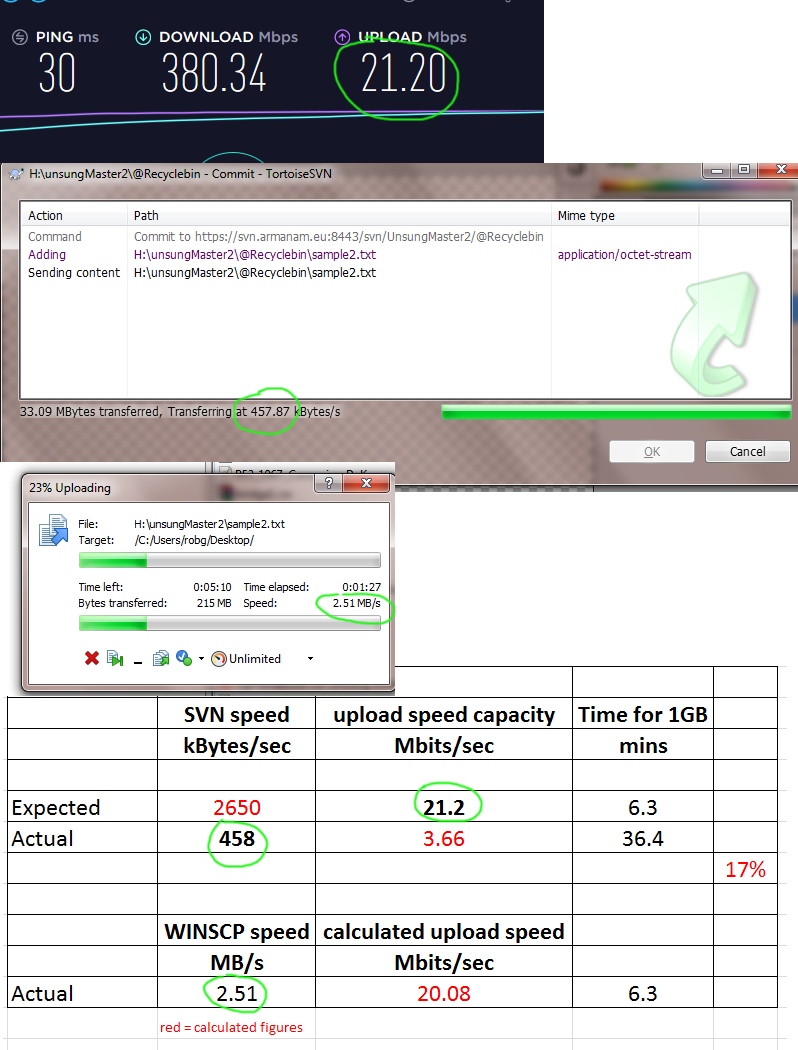
I am using SVN to upload a 500MB file and it is using only 17% of my upload speed, making commits very slow (2.5 Mbits/sec, or about 450 kbtes/sec).
When I use WinSCP it uploads at 20 Mbits/sec to the SAME HOST.
When I use a second PC connected to the SAME ROUTER in the same office, it SVN commits to the SAME HOST at 20Mbits/sec (about 2,500 kbtes/sec).
All of my colleagues in their remote homes can SVN commit at a speed that matches their WinSCP connection speed.
Disabling windows firewall and F-secure make no difference
Changing the cable makes no difference
Reinstalling the network card driver makes no difference
 tropic yarrow
Looks like you can use both HTTPS and SSH
sudden cipher
Tortoise SVN version:
TortoiseSVN 1.11.1, Build 28492 - 64 Bit , 2019/01/08 21:40:39
ipv6 enabled
Subversion 1.11.1, -release apr 1.6.5 apr-util 1.6.1
serf 1.3.9 OpenSSL 1.1.0j 20 Nov 2018
zlib 1.2.11 SQLite 3.23.1
ISP Broadband speed (tested): 380Mbits/sec DL and 20Mbits/sec upload speed.
Router connection: brand new cat 6 cable, works fine on second PC
Motherboard: MSI Z87-G45 GAMING (MS-7821) (SOCKET 0)
Network card: Killer E2200 Gigabit Ethernet controller
yeah we have tried both protocols, and neither fixes this issue
tropic yarrow
Strange
wise barn
That's something a few at CUP also experience with SVN, but nobody came up with an idea sadly
Doesn't matter if tortoise, smartSVN or other software is used
 rapid relic
No I’m only using discord while i play arma my mic just doesn’t go through even when my name pops up in the bottom left @knotty bluff
knotty bluff
Sounds like your discord is taking priority or your voice is muted in game
wise barn
make sure you selected your correct mic device in arma, discord and system settings (recording device). don't set it to standard/default
knotty bluff
^
rapid relic
How do I select the mic for arma?
quaint jewel
uses your default microphone in the windows sound settings
rapid relic
I have the mic set as default
sudden cipher
Thanks Chris. Well I've tried pretty much everything to fix it. New cat 6 cable, new router, upgraded ISP service, ISP fault checks, replaced the SVN client program, ethernet drivers, uninstalled any non-essential programs and drivers, cleaned up hard drive space, edited SVN config, edited network properties for the ethernet card, etc etc.
so far nothing works, except that changing the SVN config file has disabled timeouts, so that's a step forward.
still have 2Mbits upload speed instead of 20
The thing is, it wasworking fine about 3 weeks ago
rapid relic
This is a new headset my old one used to work
quaint jewel
USB headset?
desert isle
Arma + W10 + USB are a bad combo
Also, you were told about this at 07:59 UTC. Thats why its important not to crosspost.
knotty bluff
ok sorry guys it's been a long day but I'm typing a more detailed description of my issue now.
A little over a year ago I began to have an issue where my teamspeak would still have me talking through my PTT key (Tab) after I spoke over the radio utilizing TFAR while in ARMA 3.
This meaning when I'm in game and press Caps Lock and transmit then release the capslock to stop transmitting I could still speak and be heard through my microphone as if I were pressing my PTT (Tab) key.
The only way to stop this from happening is to press and release tab once. This immediately closed communications off.
When it first happened the only change that had been made was a new mouse and keyboard.
I tried a number of things including a full delete and re-install of ARMA 3, Team speak, TFAR and a full system restore on my computer.
quaint jewel
So a stuck-key issue? kinda?
Might be software issue. TFAR overrides your voice activation/ptt manually when you press the ingame transmit key.
I assume ACRE does the same. They have to disable their override to give you control back. Maybe that doesn't work for some reason
But same problem for about a year 🤔
knotty bluff
ACRE actually does something different.
Dedmen I know you're super busy but do you have a moment to voice chat? I can describe this better through voice sir.
the issue with ACRE is actually somewhat the opposite. In order for me to talk over the radio in ACRE I have to press both the Caps Lock and Tab key together otherwise nothing transmits.
quaint jewel
No I was in the progress of getting to bed.
Just being kept online by the wave of dozens of spambots joining the discord right now
knotty bluff
lol sorry man go get some sleep
quaint jewel
Launching teamspeak as admin?
knotty bluff
yes sir.
and TFAR is acting as it should with the only exception of the PTT "sticking"
I've re-installed it multiple times but I just can't think of what it could be.
if anyone knows I know it's members of the community here.
I'm at my wits end with it lol.
quaint jewel
@opaque crown you got idea maybe?
 opaque crown
you using PTT in TeamSpeak or voice activation?
there is certain setting that does funky stuff, and I keep forgetting about it
knotty bluff
ptt sir.
opaque crown
hmh not that then
knotty bluff
no sir lol.
I almost feel like there could be something interfering with the teamspeak interface somehow but I just don't know what it could be.
knotty bluff
lol you guys rest.
I'll pick brains about it when you guys have time and are free. Please feel free to hit me up and I'll do what I can to give any descriptions and information requested.
I have a workable work around that isn't a problem to use. I would love to fix the issue but I'm not about keeping people up later than they already are up fussing over the issue.
strong steeple
I've used a USB headset for ~4 years without issues in ArmA 🤔
got a proper one now though :/
rapid relic
Idk my old USB mic used to work
 median olive
Having a issue with my server starting it keeps crashing after 1.90 update
@everyone
median olive
strong steeple
How about you don't ping everyone? Take off all those mods and try.
 latent flicker
i can take off my pants ....but i cant take off arma mods they are soo cool
strong steeple
What? 😂
 gusty snow
@quaint jewel
quaint jewel
If you gonna ping me atleast give me a cookie
 still raptor
🍪
fringe salmon
Hey guys
I get this error
No entry 'bin\config.bin/CfgWeapons/arifle_MX_Base_F/single.displayName'
Can u help me?
Anyone can help me?
 kind cape
can anyone help me? Unable to connect to my own server. Was able to once but now I'm unable anymore. Says something about "erro receiving server version / data"
There's my rpt
It's an exile server
quaint jewel
@fringe salmon you're loading some broken mod
fringe salmon
OK im suspicious to one let me try it without that one
@quaint jewel thx man yeah it was one of the mods I ran the game without the mod it was good
now gotta find the broken mod
wise barn
@kind cape
Launch your server with a vanilla mission and no mods running. Connect to it with also no mods running. If that works, your server is fine and you have a mod/mission problem
desert isle
^
kind cape
I tried to load without the mods
and it still did not work
tho I did not unload the actual mods, only unloaded the extra server files and mission file
can check the mods later
Cheers 😃
 frosty crypt
Anyone got any ideas why I can't connect to Arma 3 Pub Zeus?
I've restarted my pc and when I join its just stuck on a loading screen
and yes. There are no mods loaded
wise barn
Well, a detailed error msg would help...
frosty crypt
its not giving an error message?
Its just on a loading screen, its not freezing or anything
I'll restart again I guess
maybe a startup issue.
wise barn
Maybe, maybe not... have you looked into your rpt files?
frosty crypt
Aren't they only written when the game crashes due to an issue with the game?
wise barn
First thing to look at if arma does not behave as it should
wise barn
Well, easier that expected 😆
frosty crypt
Steam servers are down for me atleast, but I was already in arma 3 when it occured so I couldn't connect to any servers
Oh well, thanks for the help :)
wise barn
NP
desert isle
Thats why troubleshooting always begins with the simple (is it plugged in?)
frosty crypt
I mean I restarted my pc, and steam logged in fine, but I restarted again, and it was down, I think I was just unlucky in timing.
quaint jewel
usual thirsday maintenance
frosty crypt
Can vary depending on the problem.
 runic goblet
alright gonna read a book
frosty crypt
Its Tuesday though...
quaint jewel
oh right
runic goblet
oh well
quaint jewel
I always mix them up
desert isle
"day of the week" maintenance
kind cape
Still having issues connecting to my server, unloaded all mods and started it vanilla. Still no idea why I get "Error receiving server version" here is my pastebin: https://pastebin.com/ahUiBN7C
knotty bluff
you said you unloaded all mods with that pastebin @kind cape ?
knotty bluff
well it doesn't quite look vanilla but I'm not well versed in the exile stuff. . .
kind cape
I have to have the exileServer and exile thingy on
or the server won't run
but I removed like niarms and tryk and all
It's just so annoying because all of this worked yesterday
the first time I joined it worked perfectly but now it's just
Confused
I removed all addons and still the same error
like what
knotty bluff
what changed between your first join and the second time you tried to join?
knotty bluff
is that hosted by a company or your own hosted server?
kind cape
my own
i'm planning to use a company but figured i'd save money by developing it on my own hosted server first
then transfering the files
knotty bluff
are the ports to that "server" computer forwarded properly still?
kind cape
They are not
but shouldn't be the issue as it worked fine the first time
and it's hosted locally on lan
knotty bluff
it's still showing up on the server list for you so yeah.
 worldly kettle
I realize what I am asking and with little information leaves not much expected help. I am trying to walk through figuring out my brothers crash error, 0C0000005 Status_access_violation. I've had fresh reinstalls, Win10 is a fresh install, added -marco=system in the launch, gone through a bunch of google searches, current dirvers for his amd480, he has plenty of pc to run arma3, more than I have. I know it is his system, his PC doing this. I'm just wondering if there is a process that is easiest to do to figure out the what in his system that is fubaring arma3
desert isle
-marco=system ?
@worldly kettle When troubleshooting, please start from the beginning.
What are the system specs?
When does this error occur?
worldly kettle
Again, I'll be giving shitty info and I realize that, i-7 (don't have specifics with me at work) FX480, 16gb of ram, win10 64bit
error occurs usually 5-10 minutes after joining a dedicated server that I run, or even when he plays SP on his own. With or without mods does not matter. Some instances where it is constant and we can watch it happen every time he does it are when too much is happening in the mission or he enters a vehicle.
and yes the -marco=system was just something I tried for him after seeing it mentioned more than once in the official forums and on steam discussions.
worldly kettle
ah shit, sorry, malloc. Again, going off memory and typing these questions at work.
What specifics are best for me to bring to the table to get help. I realize his system specs in more detail, but what crash report should I have handy?
desert isle
The crash itself may be related to his system, so that should be the first point of order.
wise barn
is a USB audio device involved?
desert isle
lol, that too
worldly kettle
There was a USB controller but I had him remove that. Also removed headphones that were plugged into audio jacks and ran it without them to try.
I'll make a effort this evening to get proper system specs and have him run on the server and forward me a crash report.
wise barn
look for the motherboard model: download all drivers from the company homepage and manually install them. same goes for GPU and any other device connected
never let windows install drivers
if that doesn't fix the problem: revert to win8.1
¯_(ツ)_/¯
something else to check: make sure the onboard graphics / i7 graphics are disabled on BIOS/UEFI level
 clear fox
hi ppl, are there any other ports than 2302 to 2306 that are needed to host a server?
clear fox
if i'm just hosting an Apex protocol mission, is it considered a dedicated server?
wise barn
Arma makes no difference if local or web hosted
clear fox
cause I've configured firewall & port forward and it seems to work because I can see that Arma creates upnp rules in my router but friends see can't connect to server when trying to get server info
wise barn
Does your ISP provide you with IPv4 or IPv6?
clear fox
v4
wise barn
Set your port forwarding as written on the wiki page, restart your router and game, let them retry to connect
Best would be direct connect.
worldly kettle
@wise barn Thanks, will do that,
 median storm
hello i require assistance with an issue i am getting with my game
my game is downloading the workshop mods over and over, giving me an update canceled after having basickly downloaded the mods twice
kind cape
anyone know why I can't connect to my server? It just loads a little then says "you were kicked off the game". RPT: https://pastebin.com/mCDQwSn1
 bitter blade
Has anyone come across the problem of Arma 3 taking screenshots whenever you move?
latent flicker
are you using windows 10 ?
bitter blade
He is using Windows 10. I haven't heard or seen this before. I'm at work at the moment so can't do a full check to see if he's done anything like a rebind. My initial thought was a stuck F12 but it only does it if he moves. Next thought was he's remapped it to 'W' or something but it doesn't matter in which direction he moves??
quaint jewel
Does the screenshot happen when he moves. Or when he presses W?
There are other movement keys besides W
bitter blade
Just double checking with him. He said it happens when he's moving irrespective of in which direction but I need to check that he means back and sideways not just N, S, E, W
We're both at work communicating via texts 😃
uncut trellis
game screenshots, steam screenshots or desktop screenshots?
strong steeple
Snapchat screenshots?
uncut trellis
that would be weird but I guess its a possibility
latent flicker
game screenshots ? i dont think arma have that option
latent flicker
or windows game bar ...because he is using windows 10
bitter blade
Thanks for all the suggestions. Will be trying them all to see what happens
 silver stream
Does anyone know how to steer the 'steerable' parachute?
wise barn
wasd
silver stream
dammit i have managed to mess up my keybinds, in fact I don't use wasd, I use fasd (forward back left right) and for some reason left and right will not work in the parachute
oh well i'll work on it for a while and see what happens
I would call this a bug except that I'm probably one of three people on the planet who doesn't use WASD
 vocal sequoia
So its probably well-known, but I kinda accidently broke the infantry showcase
The contact at the first point ended with just #5 and I (#2).... and the waypoints had us go to the village which completely ignored the first objective? And... it just sequence broke everything.
Ironically, this is the only time in dozens of tries I was even able to get to the village
I want to actually experience it as it is, and be immersed.
 proud storm
Why are you having so much trouble with it do you think?
@vocal sequoia
What difficulty level are you playing on?
vocal sequoia
Not sure.
If talking difficulty-wise: Im horrible at situational awareness. Maybe 20% small 13 in, 1366x768px screen and 80% im bad at enemy spotting
If accidental sequence break - squad leader never activated first task before dying. Everyone but I (2) and 5 died. 5 took command and just did MOVE commands to village
.
....I kmow youre a v. popular Arma YTer so ill be mocked bad... but im on recruit
Sequence break was on recruit w/regular ai
Sorry I took so long, I passed out from a long day. Barely ate b/c not enough time
Lastly about the situational awareness - I don't imagine my real life bleeding into game, but i'm nearsighted IRL extremely badly; like I cant read my screen after 0.75 armlengths
vocal sequoia
@proud storm Sorry if I shouldn't ping .-.
 lone sonnet
Hey, after leaving a vehicle in my Player gets REALLY slow and i cant find whats creating this bug
anyone had that issue before?
3den Enhanced
Achilles
Advanced Rappelling
Advanced Towing Steam
Advanced Train Simulator (ATS)
Advanced Urban Rappelling
Arctic Highlands Steam
ArmA 3 Custom Buildings - Original
Arma 3: ALiVE
BG21 Slaughter Assets
BW Frigates
CBA_A3 Steam
Complementary Police Weapons
CUP Terrains - Core
CUP Terrains - Maps
CUP Units
CUP Vehicles
CUP Weapons
Deliverance
'Demise' Operations ship
Em_Buildings
Enhanced Movement Steam
Esseker
FFAA MOD
Full Halo Music
HAFM NAVY Core & Weapons
Hellenic Armed Forces MOD - Submarines
Hellenic Armed Forces Mod (HAFM) - NAVY
HMCS Addon
My Modlist, there is nothing that edits movement speed
Or is there a init code i can use to change my movement speed?
Enhanced Movement stops working too so i guess its because of that^^
anyone knows incompatible mods with Enhanced Movement?
or known bugs?
 brave breach
does anyone have knowledge about always getting a message " you have been kicked from game" I get it on all servers I try to log into. I have even uninstalled the game and reinstalled all my mods have been updated and I still get the message this has been going on for a few days now !! any help would be helpful !!
 fluid furnace
Is anyone else having problems downloading workshop content?
My steam just says 0 mbs per second and after a while will work for like 5 seconds
 peak delta


 desert isle
@lone sonnet too many mods int here that each have issues.
@brave breach It depends on which servers you are trying to join. Unload all the mods you may have, then join an official vanilla (no mods) server. Do you still bet kicked? Whats your ping? Have you been BE banned?
brave breach
I have joined a no mod server and did not have any problems in playing the game the ping on the server I do play on does have low ping so maybe thats a problem too and no I have not been banned as of yet and I am talking to the server owners and they tell me I am not banned !
 heavy pier
hmm... funny... i cant join any server... i habe played for years now without problems, but got 3 dx11 errors in a row a few days ago, and now i cant join a server. (no its not my firewall, and everything is same as when it runned perfectly fine)
and my computer is perfectly fine, it runs prime 95, mem test and any stability test without problems
wise barn
and my computer is perfectly fine
wrong...
heavy pier
win10, i3 8350k @4,8ghz, 16gb ddr4 @3ghz, game and system on different ssds, ssds are good too (other games from said ssd run fine)
wise barn
your GPU as micro driver dropouts that win10 can't deal with
heavy pier
as i said, my pc runs every stability test you through at him^^
wise barn
any earlier OS can handle that, win10 can not. this is known since 2017 autum creators update
heavy pier
and this will show only in arma?!
i can play every other program and game just fine^^
and arma went good either
since some days ago
mistake must be somewhere else, seems fishy
wise barn
wait, hold on a minute...
what is the EXACT error msg?
heavy pier
i get no error message, when i cant join a server. just had a dx 11 error 3 times in a row some days ago
is there a folder, that safes recent errors?
wise barn
just had a dx 11 error
i need the wording of this error
heavy pier
where are the error logs?
wise barn
i mend this link, sorry
https://community.bistudio.com/wiki/Crash_Files
look for an rpt file when the DX11 error occured
heavy pier
the rpt files i have in there show no dx11 error
wise barn
Provocate another error, screenshot it, upload it to a picture hoster, share the link here
heavy pier
how, when i even cant join a server?
wise barn
This the other hand might be the cause for steam going bonkers atm
Also this error should also occur in SP
heavy pier
i made a video, after the 3 dx 11 errors, i reloaded the game, and this happened https://www.youtube.com/watch?v=a6EQ3lolpYc&feature=youtu.be
after restart of the game it was fine again
oh, wrong link
now its right.
wise barn
USB audio device?
heavy pier
yes , an audio interface
wise barn
meeehhh
desert isle
unplug
wise barn
win10 and arma do not like USB audio devices
heavy pier
it worked fine for 2 years 😄
wise barn
move to your onboard sound for testing
 dapper elk
wise barn
dapper elk
wise barn
well, that happens. it's windows after all
heavy pier
so i have to use my shitty desk microfon isntead of my nice xlr condenser mic?! 😄
desert isle
Just test it and report back
heavy pier
kk
wise barn
look up your mainboard model, go to the company website and download all latest drivers (chip set is the most important)
MANUALLY install all mainboard drivers.
it could be that your USB drivers are outdated
once you've done that, test it with onboard sound. if you get no errors, update the drivers for your USB audio device and test with that again
also check for firm ware updates (interface)
heavy pier
ok, steam seems to be fine.
im gonna download drivers, and install
"Intel Management Engine Driver" necessary driver? never heard of it
heavy pier
kk
wise barn
look for the regular stuff, like audio, usb, lan, chipset, ect
i'm out for dinner and only on mobile for the next 45min. answering your questions might take a while then
heavy pier
yeah, thanks for your advice
heavy pier
deleted mission files and about 1gb of useless squad xmls, and now it works oO
is there a way to get rid of squad xmls in the game?
i dont want the logo of every noob pve community, i saw once on a server on my pc
wise barn
you could try to set the folder permission to read only, but tbh i'm not sure how this could affect the overall game
heavy pier
goog idea, ill try that
its read only by default 😦
done it via security settings, lets see what happens ingame
fringe salmon
hey there i really need some help... i have been trying for 12 hours to host from in game for me and a friend on a vanilla mission, I can join his games but he can't even see mine
my router has upnp activated and automatically fowards the ports, im starting to give up, any other game i can host fine but not arma 3 😦
wise barn
@fringe salmon
make sure you have these ports forwarded
https://community.bistudio.com/wiki/Arma_3_Dedicated_Server#Port_Forwarding
if that doesn't help, check if your ISP provides you with IPv4 or IPv6
iirc arme dents to dislike v6
fringe salmon
just used port checker and when upnp was enabled turns out the ports werent being fowarded after all
@wise barn when i go to my router i have wan ports and lan ports which one do i need?
quaint jewel
What reason?
latent flicker
lol
quaint jewel
@vast gull you pinged me so I guess I count as employee? feel free to PM me with your issue
!purgeban @vast gull 0 witten, ban evasion
 pallid krakenBOT
*fires them railguns at @vast gull* Ò_Ó
 tawny crag

latent flicker
O_O
quaint jewel
I assume there will be more today.
 abstract agate
Anyone ever experienced a server wide crash that freezes up the game?
 fresh hearth
Having issues with SteamAPI initialization failed. any thoughts?
abstract agate
Maybe thats why it said 0 servers in the world on arma for me
wise barn
¯_(ツ)_/¯
 woeful garden
Hi, i have a problem when I want to join any server it show me the error message : connection with host has been lost. How to fix please ?
strong steeple
how stable's your internet?
wise barn
What's your ping?
 crude bronze
Units from addons aren't showing up in zeus but I have all addons enabled in the gamemaster module
wise barn
looks like cfgPatches from the mods that do not show up are not set up correctly. contact the mod creators
tropic yarrow
How would they not be setup correctly? Are all parameters required?
wise barn
if classnames are missing from units[] = {TAG_CLASSNAME}; of cfgPatches, it will not show up in zeus
@tropic yarrow
tropic yarrow
Oh I thought you meant altogether, no load instead of zeus
But you're right, curatorScope also solves this
wise barn
I think curratorScope is old tech
But true, should work also. Well If the creator has set up one or another
fringe salmon
i'm having problems with my map toolbar being grey instead of black? anybody know a fix?
 severe sierra
Has anyone else had this issue? I built a little multiplayer base mission for my friends and I to train and goof off in, and I have 8 slots available, but no matter what slot you join, say I select the squad leader and my buddy chooses the sniper, we spawn in with the same equipment, usually following whatever class I chose to be in the game
 swift berry
So, what the hell happened to CUP after this latest update?
strong steeple
Why don't you go ask in the CUP discord @swift berry
swift berry
No one responded.
 weak bramble
What's your issue Frank?
strong steeple
Check the changelog on their website or be a lot less vague about your question. @swift berry
swift berry
Ok, they updated the mod..the stuff shows up in the list in traders but. There's no pics or ability to purchase the stuff. Can't spawn it either.
strong steeple
CUP is in no way on earth responsible for what your trader can and can't do.
Ask whoever made that trader of yours.
It's CUP's issue if it occurs when only running CUP mods and nothing else.
uncut dew
Hi, need help troubleshooting, got rpt filled with 17:52:42 Unit O Alpha 3-2:2 (0x838d8140) - network ID 2:4616 17:52:42 - no person can grow up to a 2GB in size, it happens once in 5-10 server restarts and haven't notice this prior to 1.90 update
the usual rpt size is no more than 10mb in worst case
not to mention the fps drop while it happens
more info here: https://feedback.bistudio.com/T138284
weak bramble
@uncut dew #server_windows
uncut dew
thx, sorry 😃
wise barn
@swift berry
i can't see a question from you on our discord, nor that you ever joined it
strong steeple
oooooehhhhh.... plot twist
 kindred blade
Hey guys, just got a new PC and everything is great apart from ARMA
I've had a couple of random crashes where my screen just completely freezes and I cant do anything
My PC only crashes in A3, I have no problems in any other games including BFV, Squad, CSGO etc.
i5 9600K @ 5ghz, 16GB Ram and RTX 2060
I've had a look at the rpt although Im not really sure what Im looking for
wise barn
Win10, usb audio device?
wise barn
Arma doesn't like win10 and USB Headsets
Try your onboard sound for a while and see if you still get crashes
latent flicker
"Arma doesn't like win10" can i ask why ??
wise barn
It's not, it's the BS called win10. The crap that has been in beta since release...
@latent flicker
Because win10...?
kindred blade
I mean, if a USB headset causes crashes, that's pretty stupid...
wise barn
you can play arma perfectly fine on vista 32/64, win7 23/64, win8 and win 8.1. but not on win10. MS fucked up horribly with the 2017s creators update. that's when all this BS started to happen
latent flicker
but 6th and 7th + cpu generations cant run on windows 8.1 and lower ...only windows 10 ...Microsoft stopped supporting these new CPUs in the older version of windows to force them to use Windows 10
i have i3 7100 i tried to downgrade to windows 8.1 i received no drivers ...no updates ..windows update stopped working
wise barn
@latent flicker
that's just not true
sorry, read that wrong
scratch what i said
well, as you can see... MS is a bunch of a**hats
Fing up win10, deny all knowledge of Fing it up, blaim the users and 3rd party devs
but 6th and 7th + cpu generations cant run on windows 8.1 and lower
(but then again, why can i run my i5 9600k perfectly fine on win8.1.....?)
latent flicker
uh...what ? can you ??
latent flicker
maybe its only for 6th and 7th generations after all 🤔
wise barn
you're not completely wrong though. there are only win10 drivers for my board available. but except the onboard audio driver, i could install all others
and since i use an external sound device, i couldn't care less
latent flicker
and can you use windows update normally ?
kindred blade
I may have fixed my crashes
Was either down to a couple of mods or it was a profiles thing
access violation error etc
fringe salmon
with ace you get a nice white triangle marker with player names next to them, the problem i have is the green rifleman marker is also showing up so its a double up marker, anyway to remove the green riflemen marker?
 fast pagoda
hello there, does anyone know why this is happening? my server is working fine for most players, except a few who when connect seems to give a message that they are looking for port 2303 which is default port but non of my servers are on that port.
0:41:23 Skipping mods and signatures due to overflow flag being set.
0:41:23 Skipping mods and signatures due to overflow flag being set.
0:41:24 Skipping mods and signatures due to overflow flag being set.
0:41:24 Skipping mods and signatures due to overflow flag being set.
0:41:24 Malformed data. Total count differs. expected: 2, got: 3. serverip: -1534800657, serverport: 2303
0:41:24 Malformed data. Total count differs. expected: 2, got: 3. serverip: -1534800657, serverport: 2303
0:41:24 Malformed data. Total count differs. expected: 2, got: 3. serverip: -1534800657, serverport: 2303
swift berry
I guess it must not have been the offical CUP discord then.
 humble pike
anyone here who had to deal with a stucked shooting loop?
this is happens on our server and even played as vanilla too
of course i have tried to reinstall everything - it did not solve the problem
unfortunately both client and server logs do not show anything interesting
strong steeple
I thought that was an issue with server communication
humble pike
do you mean topper or me 😄
 silent fern
hi, my server keys are not working i put all the mod server keys in the server's keys folder and i still cant join the server those mods.
humble pike
i solved my problem, i had to to with a F.A.S.T generating wrong basic.cfg's