#arma3_troubleshooting
1 messages · Page 63 of 1
 vocal lantern
 strange drift
well BI changed stuff; mods have to adapt to that
 vague crater
Found the problem. Thank you for your effort folks 😃
 wise barn
i've got A3 when it was in alpha with all DLCs and expantions activated. but even in preview brand it tells me to purchase to apex... any ideas @here @biminions
 nova marten
anyone know why the virtual arsenal has a very limited amount of items on my mp server
 median rivet
I installed dev/ RC branch with the Arma 3 Tools beside my main installation. When trying to open Tanoa with these installations I get a "Please switch off the game, wait until Steam downloads the DLC and start the game again" message. Anyone knows how to get the dev/RC branch running with Arma 3 Tools? (yes I own the expansion)
 shrewd zealot
i have bound 'zero up / zero down' to many different single use keys, but it doesn't work (on scopes where it should)
Does anyone have a solution to that? I have a compact keyboard, don't know if that matters
shrewd zealot
Weirdly, it worked for 2 seconds in a game, the zeroing distance changed. But 2 minutes later pressing the zeroing key did nothing
wtf
 pine marsh
i just purchased apex through steam, but on dlc it says, apex not installed; i did verify integry of the game but still no apex download?
 fading sequoia
have you changed your branch? need to be on Dev, RC or Sneak Peek to get the content
pine marsh
nope, thanks for hinting that out!
pine marsh
when i switch to the dev branch or sneak peak, am i still able to play mods as usual?
 light flume
Is anyone having issues using Publisher
Everytime I try to start it it says "The communication and initialization of Steam client failed. \n\nPlease try to restart application."
restarted steam and still no dice
 chrome token
No issues here
 small fox
has anyone had any issues with CUP's keys? I can't get my HC's to connect when I have server keys enabled.
 cinder current
anyone out there?
 small falcon
I keep getting this Appication Error when trying to join a server? Can anyone help? Sometimes its a Integer divde by 0 and sometimes it is a memory could not be read.
 rich yoke
@small falcon Scroll up to Wednesday in the #arma3_questions channel, someone had a similar issue and I don't think we ever really got it resolved
@small fox you still having issues with the HC?
small fox
holy shit forgot I was working on that. I just got TrackIR in the mail and have been fucking around with it since lol. I have not figured it out yet. I'm out of ideas and thinking of moving over my HC into another Arma 3 folder
rich yoke
Nice, are you enjoying the TrackIR?
And is the HC able to connect when you have verifySignatures = 0;?
small fox
I am and yes it is able to connect with the signatures off
 fringe grove
hi there almight knowers of all things ARMA!!!! question...
Wrong signature for file addons\missions_f_epa_video.pbo
^^^
That error keeps happening. I'm the only person of many thats habving the issue.
-I've verified integrity of game cache on steam
-deleted file and key file in error then veriied the integrity of game cache.
Nothing has helped. Please help
 desert isle
What build are you on?
And are you getting it while playing without additional addons (vanilla)
A quick search shows that it seems to be an issue with Epoch and Exile
 tired lion
any idea how to fix this issue : 2:58:27 Attempt to override final function - rscunitinfo_script
getting that spammed n rpt log
strange drift
you cant
small fox
"you can't" - arma in a nutshell hahaha
I'm going to look at my HC issue later today and figure out how to get it connected
 faint dawn
start with the Parameter: " -nolog " 😄
tired lion
lol
why can't it be fixed?
Also is there a way to figure out what is causing desycn on my server?
tired lion
Super helpful
faint dawn
(hint: Check your scripts/Basic.cfg/Addons/CPU-Power)
Oh wow.. lemme finish my writing, before you complain.
Oh my...
faint dawn
aannnd another smartass for the ignorelist.
small fox
I would suggest using -loadMissionToMemory as well helps immensely since it loads the mission files into memory so that when a player joins it's not constantly doing that
tired lion
oh awesome thanks for that
@small fox that goes into the init correct?
or startup i mean
small fox
yes
 fringe salmon
when i start my ArmA 3 server i'm trying to launch it as the Development branch for Apex but it's still starting as 1.60
tired lion
is there an easy way to get a shooting target to reset on a trigger?
 muted light
Hi, has anyone found out the problem of where map markers are "Disabled by the server" even though the server config allows map markers?
 warm sinew
Anyone know what would cause vanilla Arma3 to start at 140 fps (with world empty on the main menu), gradually slow to 1-2fps, and then crash the graphics driver? Nvidia 770, win10 64. Similar to https://forums.bistudio.com/topic/190289-d3d-error-dxgi-error-device-removed-since-158-update/ but older drivers don't fix it, and it started randomly this week
desert isle
Start simple, heat? When's the last time the old PCs had a thorough clean?
 inland kayak
@warm sinew had that with the newest drivers, i'm running a 960
avoid alt tabbing when the game load, shouldn't crash.
 half plume
nvm, problem solved.
warm sinew
I checked heat, CPU/GPU/Disk usage.. all nothing before the game starts
GPU starts at 100% usage when the main menu comes up.. then decreases over 3-5 mins as the framerate drops. The others are pretty much idle. Tried not alt tabbing and windowed/fullscreen modes. Heat never got above around 45c on CPU or GPU (according to afterburner).
 knotty reef
the only true way to check the temperature of your GPU is by licking the heatpreader
 waxen coyote
uhm.. i'm having a problem with steam workshop and arma 3 since a few weeks
steam is trying to download an update for a steam workshop item(no idea which..i got 92 subbed)
it's always at 0b size..and it's always retrying
can't even download another game right now, cuz it's trying to update
desert isle
How long have you let it attempt to download?
desert isle
I had a similar episode but it resolved on its own.
I left it on overnight and it fixed itself
desert isle
Though I have once had to take note of my subscriptions, unsubscribe them, then add them back. Would be annoying to have to do that for 92 though.
waxen coyote
indeed..
well
i once published a workshop item and deleted it again..but idk if that's related
i had done that, for the achievement haha
desert isle
Have you been getting A3 updates (not workshop)?
desert isle
That's odd. Other than unsubscribe and re-subscribe I don't know what to suggest, sorry.
 cobalt ginkgo
@waxen coyote dont mess with !Workshop folder in Arma3 game folder
in case you did
cobalt ginkgo
I had a similar problem when I was switching branches
it fixed itself but lasted a while
waxen coyote
there's no !Workshop anyway
cobalt ginkgo
Uh? Not using A3 launcher?
cobalt ginkgo
dont know I have it
and I think launcher moves those to Arma3
one sec screen incoming
and then I got mod there... to which I subbed
waxen coyote
tbh i have no idea
i dont have that folder
i actually wonder where my workshop items are saved lol
cobalt ginkgo
hmm not sure about that anyone else not having !workshop folder there?
by default its in common\workshop
waxen coyote
E:\Program Files (x86)\Steam\steamapps\workshop\content ?
cobalt ginkgo
yeah
\steamapps\workshop\content\107410
for arma3
word of precaution... dont touch those
cobalt ginkgo
well one thing you can do is to delete all those
but make steam not running while doing it
and Arma3 Launcher...
then check to see how much GB is takes..
it will cost you time to DL everyhting again
once you delete files start steam again... it should start downloading mods again
or first check in publisher that mod of yours and see if that solves it
fringe salmon
@waxen coyote Try to unsubscribe, restart Steam (like really exit it), re-subscribe the mod and then verify integrity of the game cache. If that doesn't help, try to change a download region in Steam settings and repeat the procedure.
cobalt ginkgo
@waxen coyote wrong name to tag but... have you said you have a mod on workshop of your own or not? If not forget the Publisher thing I said.
cobalt ginkgo
and listen @fringe salmon hes a DEV
waxen coyote
well..
fringe salmon
@waxen coyote Then just try to verify the integrity of the game cache. It also checks the mods.
waxen coyote
i'll try that
waxen coyote
@fringe salmon verifying integrity didn't help it :/
since it's 9:38am here..i think i'm actually gonna go to bed
may you leave me possible solutions in a PM, or here, if possible?
thanks, cya ❤
cobalt ginkgo
@waxen coyote make sure launcher is not running or if it is running Steam ill never finish verification or download. Just had this problem. Also changing download region seem to helped. Just change it to somewhere closer to your location ( if possible )
inland kayak
anyone experiencing desynch issues while remoteExec is in mode 1?
I'm not sure if it's arsenal fucking up the JIP queue somehow or remoteExec safeties being wacky
 crystal elm
Hey guys! Why me always kicking by "Signature check filed" ?!?!? I did defragmentation, i did files check, my PC all ok, as always... How to solve it?
 round mantle
Assuming you are using mods, Some of your pbos are incorrectly signed.
Does anyone have any clue why a mission will work fine in editor, but when on a dedicated environment, it will refuse to load into the player selection screen, and immediately returns to the Server Browser?
round mantle
there is nothing there unfortunately. 😦
inland kayak
I also had a weird issue a few hours ago, my own server banned me for some unknonw reason
round mantle
inland kayak
running legacy ?
round mantle
This is the only data the comes up, no mod issues, nothing. The only thing that changed between the restarts is the mission file itself.
inland kayak
or linux branch?
round mantle
We are on linux
inland kayak
erf, the linux branch :/
round mantle
yeah.... :/
waxen coyote
uhm btw
@cobalt ginkgo @fringe salmon the issue with the workshop item still remains..
cobalt ginkgo
@waxen coyote go to steamcommunity.com/id/<YOURIDHERE>/myworkshopfiles/?browsesort=mysubscriptions&browsefilter=mysubscriptions&p=1 and unsubscribe them all... I dont know any other way of fixing it. Or you can try Steam support.
You can find all mods you subscibed to by opening Steam client, going to your profile, click on My workshop items, and them click on Subscribed items... same as link above just explaining in case you cant figure out how to get link working
cobalt ginkgo
perhaps next time make a collection out of it
cobalt ginkgo
But... I am not a dev neither the tech support for BI nor Steam, you can wait for Wizzard...
fringe salmon
@waxen coyote You might want to take a look at Steam logs (by default C:\program files (x86)\steam\logs), workshop or content log files might contain something useful.
The last option I know of is to "nuke" Steam configuration: press Windows + R, type "steam://flushconfig" and hit the Enter. But that will (most likely) cause re-download of all workshop content and it might be only a temporary solution.
 clever star
Is the newly implemented revive system functional in sneak peak build? If so, do i need to do anything to description or init to make it work? (Pardon my terrible editing skills)
oh poop, clicked on wrong section for this question ^
 mortal bough
Can anyone help me im getting a MASSIVE memory leak whilst playing exile with cup weapon, mas vehicles, cba and on NAPF this is my log - https://www.dropbox.com/s/399ro8iakdtse9h/arma3_2016-06-24_11-23-00.rpt?dl=0
desert isle
2nd memory issue with Massi Ive seen tonight!
waxen coyote
uhm
i narrowed down my workshop problem
[2016-06-24 09:04:11] [AppID 107410] Starting Workshop download job
[2016-06-24 09:04:13] Update workshop job for app 107410 canceled: Disabled (Suspended)
[2016-06-24 09:04:17] [AppID 107410] Get details for item 179250600 failed : I/O Operation Failed
[2016-06-24 09:04:17] [AppID 107410] Finished Workshop download job : Suspended
now how to find the workshop item with that id?
@fringe salmon sorry for pinging you again
i literally found it
i can't believe it
thanks @fringe salmon ..you deserve that name man
where can i donate you a coffee
fringe salmon
@waxen coyote Glad to hear that you sorted it out. 👍 Just enjoy the game, that is worth more than the coffee to me, but thanks 😃
 waxen elk
Hey, have an error on the forum : https://forums.bistudio.com/topic/186236-opx-life/page-2 can't see this page :
mySQL query error: SELECT tg.* ,t., t.approved, t.title as topic_title, t.posts as topic_posts, t.last_post as topic_last_post,m.,p.,xxx. FROM core_tags tg LEFT JOIN topics t ON (t.tid=tg.tag_meta_id) LEFT JOIN members m ON (last_poster_id=m.member_id) LEFT JOIN profile_portal p ON (p.pp_member_id=m.member_id) LEFT JOIN core_tags_cache xxx ON (xxx.tag_cache_key=MD5(CONCAT('forums',';','topics',';',t.tid))) WHERE tg.tag_meta_app='forums' AND tg.tag_meta_area='topics' AND tg.tag_meta_id !=186236 AND tg.tag_text IN ('Building pack') AND tg.tag_aai_lookup IN (SELECT tag_perm_aai_lookup FROM core_tags_perms WHERE ( ( FIND_IN_SET(3,tag_perm_text) ) OR ( tag_perm_text='*' ) ) AND tag_perm_visible=1 ) ORDER BY tg.tag_meta_id desc LIMIT 0,100
@BIMINIONS
@tiny imp
 drowsy current
they got a hangover dont expect to fix that soon
 frigid crow
Can anyone help me uninstall Arma 3 tools ?
it made a seperate disk but i can't run the installer
inland kayak
you mean P drive ?
frigid crow
yes
inland kayak
open the tools and unmount it
inland kayak
open it -> mount P drive
it works both ways
oh nevermind BI got the wonderful idea to break it
subst p: /d it is :p
 tiny imp
we know @waxen elk , just wait till fixed
 fickle plover
Trying to create an MCC Mission, for some reason nothing will stop it from saying that map markers are disabled by server. Is there a setting/config item I'm missing here?
I don't know if it's just crap chance, or what but the usual fixes aren't working
desert isle
@tiny imp @waxen elk BI team building hangover 🍺
tiny imp
@desert isle nope, i'm resistant 😀 can't talk for others tho
desert isle
🍻😂
chrome token
looks like you didn't sacrifice enough goats for the Tanoa's god
 sharp summit
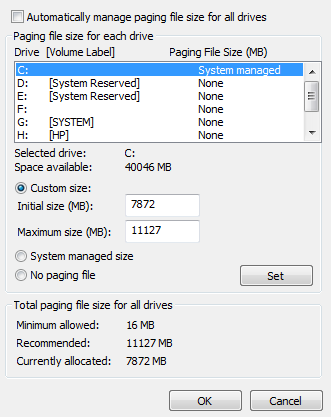
@sacred sable you need to increase your pagefile size for arma if you google how to increase pagefile size and after restart it should be good 😃
 sacred sable
@sharp summit so should i just do what it tells me, it recommends 11127 mb but i've only got 8192 mb of ram
@sharp summit here's a screenshot of the thing
@sharp summit https://i.gyazo.com/5e90c5b8900a1a5fff8e14f2ec0ec7fc.png
sacred sable
no man's land meaning?
inland kayak
aka the game had an error, you can't do anything about it
sacred sable
i assume it just diddled itself and it won't happen again, then.
sharp summit
Idk I had this error alot of times but I maged to fix it with pagefile size.
inland kayak
it's either what I mentionned above or a faulty driver
or an other application interfering
cobalt ginkgo
https://i.gyazo.com/5e90c5b8900a1a5fff8e14f2ec0ec7fc.png
thats weird... 11GB recommended page file... with 8gb of RAM?
4 gb RAM and 1gb recommended 3,7 allocated
I guess its SSD that makes the difference
inland kayak
page file is mostly used to store dumps, just checked the microsoft doc, they say that 3x ram or 4GB above your number should be used, whichever is larger
oh wait, maximum*
cobalt ginkgo
hey its system managed havent touched it... was 6gb when I had HDD for system drive
oops I got dumps disabled that must be it
tiny imp
out of memory @fringe salmon
tiny imp
@fringe salmon it can be anything, are you using the PROFILING branch performance binaries ?
hmm, the 1.62.137306 one ?
please 7z the .RPT and PM me the url for download
as temporary workaround i may suggest try use this custom allocator https://forums.bistudio.com/topic/191816-xtbbmalloc-a-custom-memory-allocator-for-a3/

Bohemia Interactive Forums
Page 1 of 2 - xtbbmalloc - A custom memory allocator for A3 - posted in ARMA 3 - COMMUNITY MADE UTILITIES: Hey guys,
I made a custom memory allocator for Arma3 and I want to share it with you. Originally I made this for testing purpose only but maybe it can improve performance in some cases.
Features
Based on Intels tbbmalloc 4.4 Update 5 (https://www.threadin...ingblocks.org/)
Support for large pages
Includes some special tweaks which can improve performance in some cases (o...
 hallow prairie
http://img4web.com/view/EM3CVB any ideas how to fix it ?
 grim wind
@hallow prairie switch Arma to english in steam
You are the second one here who runs into localization problem with BR mod
hallow prairie
already try it nothing happens. i asked in BR discord if someone got the same problem but no one answered
grim wind
it is a localization problem caused by incorrect stringtables in mod. Either uninstall mod or wait authors to fix this
But switching to English usually helps in such cases
grim wind
no, in Arma 3 properties in steam, select English as the language for Arma
hallow prairie
i already did nothing changed
hallow prairie
its fixed it was a issue in my a3 profile
 dry flame
anyone know why I wouldn't be able to see a server, in the server browser, that my son is playing on from the same internet connection. It's like only one of us can play on the server at the same time. I've never had this happen before with ArmA 3.
dry flame
Maybe there is something serverside where it is not broadcasting the dedicated server properly? Because it never shows up on a server list or recent tab. We always have to use direct connect.
desert isle
Try a lan connection maybe? My thought is that your external IP address will be the same otherwise (that of your router). Where as if it were a LAN match you would connect to his internal IP address. Just thinking out loud here.
dry flame
Thank you for the response. This is a dedicated server, at a server host. only one of us can see the server at a time. It is really strange.
strange drift
what happens if both of connect via ip?
dry flame
@strange drift I'm not sure what you mean. If he is connected to the server, It will not show up in my server list. Even if I try to use direct connect, it won't list it. Neither of us can find it in the serverlist using a filter for the name or mission name.
dry flame
It is confirmed that only one of us can see/join this server at a time. I'm hoping someone has com across this before.
cobalt ginkgo
@dry flame please report this issue on feedback tracker and explain thoroughly what happens. http://feedback.bistudio.com
Some quirk with server browser happens to me too all the time. If I change filters too often server browser will be empty and nothing will make it work. I have to restart game to see the servers again.
^ unrelated to two separate installs from same IP issue
dry flame
I will post this. Thanks for letting me know
 shut sedge
can anyone tell me why 'getText(configFile >> "CfgVehicles" >> (typeOf cursorTarget) >> "vehicleClass");' returns "container" but when im standing next too the cursorTarget (a container) 'nearestObjects[getPos player,["Container"],10];' returns '[]'
rich yoke
Because the vehicle class is not necessarily the same as the type of the object
I would imagine if you looked at the container and used cursorTarget isKindOf "container" it would return false
hint str ([configfile >> "CfgVehicles" >> typeOf cursorTarget, true] call BIS_fnc_returnParents);
That should give you a list of eligible types to use, and excuse me not using discord markdown for code as I'm on mobile
 heavy forge
Anyone know if this is a common issue? My ArmA seems to be reinstalling all 16 GB of mods I have loaded after a reboot. This has happened about 3 times now.
desert isle
As in the launcher says "loading mods" before you can press play? If so, that's common.
There's a ticket in the feedback tracker
warm sinew
Anyone got any ideas for this issue? (have asked in #headless_client already) https://forums.bistudio.com/topic/192277-windows-dedicated-server-headless-clients-disconnect-when-mission-starts/
 silver stream
anyone know, in arma 3, how to report your position?
if a boss asks me to report my position how do i do it?
 proven tapir
hu? like in scripts or radio protocol?
cobalt ginkgo
he got the answer, by posting in multiple channel... its hit 'thing' to get what he wants
anyway when Ai asks to report position there is no way to report back over comm menu / radio protocols
If you ask AI it wil respond with GPS coordinates
 ionic sand
Guys can someone help me with such erorr? http://puu.sh/pSCFQ/5da8340d6e.png
second link
grim wind
looks files are missing, did you verify game files integrity via steam?
ionic sand
y ofc
cobalt ginkgo
I dont see why would you have this error unless you are using some "people versions" which does not have karts DLC or is severily out of date
 jagged creek
sup guys, i recently tried to convert my 2d mission file into the 3d edtitor and it says it "works" but all the placed markers, npcs, objects etc. are gone. Anyone got a fix?
fringe salmon
Has anyone else been lagging in the cutscenes for the apex campaign?
desert isle
no
 tough wasp
@tiny imp @BIMINIONS The terms and coditions are broken 😉 https://account.bistudio.com/terms-and-conditions
 last hedge
hello
I get a "Memory could not be written" error when I try to play
I can play single player but I cannot play online
 gaunt flume
Try running in Administrator mode?
last hedge
I use A3 launcher
gaunt flume
Shouldn't matter if you set the ArmA III EXE to run as admin
Let me get you the path
last hedge
It says it runs as admin when I dont run Discord as admin, and I have to restart discord as admin
for the game ?
gaunt flume
C:\Program Files (x86)\Steam\SteamApps\common\Arma 3
last hedge
E:\SteamLibrary\steamapps\common\Arma 3
It worked yesterday
so maybe I should state that I just overclocked my computer today and played BF4. That runs fine
gaunt flume
Its the only new thing, yeah?
gaunt flume
So something f'd up with the overclocking.
last hedge
Maybe
gaunt flume
Best explanation I can come up with.
gaunt flume
I have no help aside from the basic crap. Turn it off and back on, run in compatability/admin, etc
last hedge
oky
thanks anyways 😃
Do you know if there is a parameter that I could use ?
to run it from A3 launcher as admin ?
gaunt flume
Uhm... I use a lot of parameters, wait one.
last hedge
cpuCount=8 -high -noSplash -maxMem=8192 -maxvram=2048 -exthreads=3
I use that, with "-" in front of cpuCount
gaunt flume
-nosplash -skipIntro -noPause -CpuCount=4 -maxvram=1812 -exThreads=7 -WinXP -malloc=system
(My computer is shit)
Hmm
Let me look up a launch param
last hedge
I have:
Gtx 680 4gb, 16 gb 1600 ddr3, i7 3770k 3.5ghz clocked to 4.2 ghz
gaunt flume
I use on-board graphics drivers.
I'm low-tech.
I can't find a parameter, but you could set the .exe to run as admin.
last hedge
i am low tech too :p
gaunt flume
Not nearly as bad as me.
I should be getting an AMD card here soon
The 7770 or some shit
Got it for $100
Need to talk to the guy
Cuz if he doesn't send it soon
I'm gonna tear out throats
last hedge
hehe
get your money back and wait for the 1060 economy card 😄
I am not that good with computers so I dont know what I am talking about 😮
gaunt flume
I'm about to take the cash back if it doesn't get here soon
last hedge
do you think its enough to run A3 launcher as admin ?
gaunt flume
Probably not. A3 doesn't need to, but I run it as Admin for faster downloads. (Don't ask why, but it worked for me.)
Anyway
Arma 3 should just need a setting edit to always run in Admin
last hedge
i will do a quick run in the bios
last hedge
hehe
no I just watched youtube
xmp or what it was called made it just chrash when I exited it. 😄
nvm, it still crashes.
What windows do you have ?
 slate turret
Anyone able to help me? Getting a grey screen when loading terrain in Bulldoser and then it crashes. Any ideas of whats going on?
 surreal vigil
Hey, I got a question my friend is having an Issue to when he uses Object Builder it somtimes randomly makes it to where he cannot click anything what so ever. Does anyone know about that ?
Click anything on his computer*
gaunt flume
Across his entire system?
surreal vigil
Yes
gaunt flume
Is he still running Arma when it happens?
surreal vigil
He said yes
gaunt flume
Tell him that I say he deserves a facepalm. Alt ctrl del, bring up task manager. It should minimize the game, giving him back his mouse.
¯_(ツ)_/¯
That doesn't work, just save your work and close the game.
surreal vigil
I sent him the message, But I remember him talking about Taskmanger not doing anything to help the issue
Because I told him to Open Task manger and close out OB but he said that didnt help so idk
gaunt flume
I've got nothing beyond that, sorry.
surreal vigil
ye, no worrys
fading sequoia
@last hedge have you tried without parameters?
 upper pier
So my buldozer started doing this again for whatever reason
http://puu.sh/pWWvI/ecb98062d8.jpg
Any ideas on how to fix it?
gaunt flume
I got nothing. ¯_(ツ)_/¯
rich yoke
It seems like you like to shrug
gaunt flume
¯_(ツ)_/¯
rich yoke
0.15 shrugs per hour
You just pushed it to 0.19
@upper pier when in doubt verify integrity of tools on steam
I was hearing a strange squeaking sound from the engine of my car
So when I got home I made sure to verify the integrity on steam
upper pier
Makes sense
rich yoke
Did you setup buldozer with Arma3P or from Arma 3 Tools?
upper pier
I've now tried both and verifying the game cache and it still does not give a fuck
fringe salmon
Hello All my mods are corrupted (CBA, CUP...) since Apex download. Any idea?
 quaint jewel
what do you mean by corrupted?
fringe salmon
In Launcher I have the red [!] icon "corrupted", all mods are 0 bytes, for Steam uploaded. Other mods in E:\ ..local folder.. (watched folder) have disappeared! I tried to unsubscribe/subscribe the mods on Steam. I obtain updated + corrupted icons. I can only reload my local mods, one by one, from the watched folder.
rich yoke
Try the repair function on the launcher and verifying the integrity of the game cache. It checks the workshop content integrity after you hit the "Ok" dialog once it validates Arma 3
 jaunty cedar
not sure if it belongs here, but https://feedback.bistudio.com/T118956 is about a crash when there's no res 0 lod in a p3d. I think arma should either die gracefully with a message in the logs or just log the problem and don't crash. Might be easier said than done
rich yoke
I don't really believe it's just that, I never used res LOD 0 as my first LOD
fringe salmon
repair function doesn't do anything. Integrity cache checked. Usual 1 file to be reacquired (then OK), proble is still here.
rich yoke
Is steam still doing something in the background?
It doesn't tell you it's checking workshop integrity but you can see that steam is still doing something and in the task manager it's accessing the disk
jaunty cedar
@rich yoke hmm, ok, the p3d that caused the crash had just a mem lod, so maybe any res lod fixes it. Gonna test it tomorrow
fringe salmon
No Steam activity. All is downloaded. Neither activity in launcher
looks like Steam/launcher doesn't recognize the mods in the steamApps\worshop\content\107410... folders
fringe salmon
It was already the case with 1.60
 sacred lily
Need urgent help, i get this everytime i try to host a server or play the new APEX campaign (solo mode) http://imgur.com/dubl9gi
It closes my game and gives me this message, when i click oke, it just closes the game and i have to restart it in order to have the same error again when i try to play the campaign
quaint jewel
verify game integrity via Steam
probaby the pbo Arma 3\Addons\functions_f.pbo is corrupted
sacred lily
did that coulpe times, still happens
quaint jewel
well the path in your error is correct and i have that file at that location inside the pbo
also tried deleting that file and then doing the steam check? that way you force steam to redownload it.. maybe it doesnt see the problem
 still raptor
Closed arma 3 and relaunched keyboard not responding in game, works in windows. Close arma 3 relaunch same thing. Anyone have that happen before?
Solved it by disabling controller in game.
fringe salmon
So, for addon folder issue (ALL MODS CORRUPTED), if this can help. Formerly my Steam mod storage was located on HDD E: (to make room in SSD). Since Apex, the mods were corrupted (0 bytes), but still present in steamApps\workshop\content\107410... folders. I had to "restore default" mod storage to recover all these mods. Now the question is: how to transfer several Gbits of mods to HDD E: ??
rich yoke
Did you use the move mod storage button on the launcher?
 brittle kelp
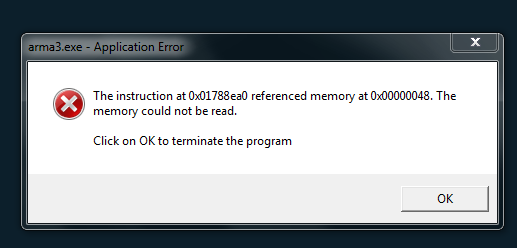
Hello, does anyone else have an issue on their game servers about a memory crash for clients? Specifically this > "The instruction at 0x009bfd77 referenced memory at 0x0310b425. The memory could not be read.
Click on OK to terminate the program"
desert isle
Is it a plain bone stock Arma server or are you running it for a specific mod? Exile perhaps?
brittle kelp
Vanilla Arma, nothing more.
fringe salmon
@penyworth. Yes I did
desert isle
I've seen that with Exile servers, but not in bog standard (vanilla)
brittle kelp
Yeah, I have no idea why its happenning. Tried almost everything I can think of.
sacred lily
@quaint jewel Fixed the problem thanks to Pennyworth, it turned out to be an very old mission i still had in my MPmissions folder that was causing it
quaint jewel
but how? the filepath seemed correct
sacred lily
yes, but an error like that only happens with custom missions, so i got rid of all the missions in there, some havent been updated for over a year, so that was likely causing it
 austere goblet
guys why can't i zoom out on credits screen?
austere goblet
LOL that apex end game showcase is bugged as shit
can't get past first checkpoint
because AI teammates get stuck in building
move commands dont do shit
once they walk into a building they can't get out
nice.
drowsy current
AI in the Apex campaign aint better heh
austere goblet
wait really? 😢 i've been meaning to play coop with a friend today
you think it's better to wait a bit for hotfixes?
drowsy current
it is Ok for the most part but enemy AI is cheating
just try it and see it - with coop it is more "enjoyable"
like anything really lol
austere goblet
true
 icy geyser
When I go to the mainscreen of Arma my GPU is at 100% load and gets up to 92c. It says I am running at 200 fps on the main screen, can I limit the fps somehow?
drowsy current
@icy geyser use VSync?
austere goblet
vsync just makes sure u aren't using your gpu more than u need it
icy geyser
vsync gives input lagg and should always be disabled unless you get screen tearing
austere goblet
i always use it, because why would i want my gpu to compute 200 frames, produce excess heat and waste energy if i only need 60 frames
icy geyser
that is why games like cs go have a max FPS command
drowsy current
input lag in arma - lol sure
icy geyser
did it with msi afterburner now
fading sequoia
does adaptive vsync cause input lag?
fading sequoia
well I was just interested about that in general really
drowsy current
in other games it can be noticable like in CS - adaptive vsync should deal with that lag
fringe salmon
Any Freesync user here that could confirm a problem for me we might have got with 1.62
 gentle shuttle
@here The -world=emty parameter is supose to remove background sound in the menu right? so, it works until you switch servers, then the "startup" parameter doesnt work. So my question is this, is there a permanent way to remove the background sound in menu, if not, could it be added.
rich yoke
That tag doesn't work for your group, and if it did you would have notified 600+ people online at the moment. I think the purpose of that parameter is just for when launching the game it doesn't load a world in the background
But once you back out of game that world is technically still loaded
gentle shuttle
whops, mistake sorry about the tag, just not used to wright here 😄
 hidden canopy
hello
quaint jewel
any known bugs in the coop campaign? task is not getting solved after destroying supplies
mission 3 that is
quaint jewel
Got a bugfix for yall... If on Mission 5 the boat doesnt come to the beach ... take an AT Launcher and shoot at it.. when you hit the boat.. it will start to drive
though i have to add.. That was only what probably fixed it.. before we swam out to the boat.. then some rounds around it and then drowned under it.. After respawning emptied some MG magazines into our teammates and threw all our grenades to their feet.. then respawn again and try to shoot the boat with AT
 abstract merlin
anyone having issues with HTML load since the update? I have: allowedHTMLLoadExtensions[] = {"html"};
in my config.cfg and i get this error:
22:09:55 Web address 'http://a3ap.com/server/rules.html/' won't be open. Current restrictions do not allow it.
abstract merlin
nevermind it has fixed itsself? odd
 violet venture
@quaint jewel thx i will try the "fix"
quaint jewel
For bohemia id suggest to unlock the boat.. so that when that "bug" happens again you can atleast board the boat and escape instead of swimming to it and then having to kill yourself
 vernal sandal
Hello, does anyone else have an issue on their game servers about a memory crash for clients? Specifically this > "The instruction at 0x009bfd77 referenced memory at 0x0310b425. The memory could not be read.
@brittle kelp you can (at least worked for me + friends) cirvumvent this by alt-tabbing out as you recieve the mission file.
 static yew
Arma launcher is crashing. cant start the game. "object reference not set to an instance of an object"
only started after the update to 1.62
well, sometimes it works. sometimes it doesnt
tiny imp
note: if anyone here has the massive performance drops to 1-2 fps in client, PM me...
 pastel reef
Hi anyone else having an issue where the group menu player names all show as [PLAYER] and you can not invite your friends, and the name tags in the Voice over network no longer show up
crystal elm
we have 4 troubles, and still cant solve it at long time :(
- Random ACCESS_VIOLATION crashes after 1.60 (previously never have it)
- -100 fps on Tanoa in some towns, just randomly
- Signature check timeout message in chat -> player kicked from server (before 1.60 patch all was fine, now its randomly permanent)
- still not find solution how to simulate kills likes "unitX killed by unitZ", here we need engine command/function (my idea/request, here description by commy2 suppoer and help please https://forums.bistudio.com/topic/151099-scripting-discussion-dev-branch/?p=3053444)
 silver prism
anyone else have the ingame webbrowser just ruin there internet connection? seems like i lose mine if i refresh it.
frigid crow
yes @silver prism
known problem
You can also go to steam settings -> In-Game and set the server browser to a lower number
still happens if you keep the browser open for a longer time
but it happens a lot less
Other problem, asking for a buddy.
He seems to have an issue with ingame sound dissappearing after:
- He dies and respawns
- He enters a building
After Alt+Tab the sounds are back
grim wind
hmm, after system restart by driver update - steam stated my Arma 3 not installed
fringe salmon
So. Does anyone have any clue as to why hosting a server might not work since APEX came out?
(Tested both dedicated and listen)
For the record, I have ports 2302-2305 opened.
I also have DMZ, UPnP and SIP ALG on.
I've tried with all firewalls down.
Could it be related to using a wireless router?
Or is this a widespread APEX issue?
 quasi osprey




 fringe salmon
Tried to. Found no results related to it.
Or at the very least, nothing that I haven't already tried.
fringe salmon
Doesn't list itself at all in ARMA; Steam does find it, but it's unresponsive.
Interestingly enough, this is Steam's response to it:```json
{
"response": {
"success": true,
"servers": [
{
"addr": "~:2303",
"gmsindex": 65534,
"appid": 107410,
"gamedir": "Arma3",
"region": -1,
"secure": false,
"lan": false,
"gameport": 2302,
"specport": 0
}
]
}
}```
fringe salmon
Nope, no response.
rich yoke
Are you just launching the server from the "host server" option?
fringe salmon
As I said, I've tried both the dedi server (arma3server.exe - Does the SteamCMD one work better?), the ingame browser, the launcher itself, and client parameters.
rich yoke
K I was just trying to verify you weren't starting with a port as a parameter
strange drift
@fringe salmon windows or linux?
also best ask in #server_admins #server_windows #server_linux
fringe salmon
Windows. And sure.
Sent mail to ISP to see if it's from their end.
 ionic sleet
Ok, interesting problem here.
Going to try word this the best I can. Our milsim community obviously recently updated to Apex, however everytime we try load Tanoa on our server however it crashes and loads up Altis instead. We've run heaps of diagnostics to see what the issue could be but nothing so far, we get no errors no nothing, just loads up Altis. I've concluded that it cannot be a mod problem as my mates and I can run Tanoa through our system and our own servers and it all works perfectly fine with the same mods but the official milsim server hits the shit. Every other maps works perfectly fine for us, so the mods work on them but Tanoa.. Haven't got a clue.. Would anyone have any idea why this would be happening, not a precise soltution but just in general what would cause something like this?
Also if this isn't in the right subthread just give us a shout and I'll post it over there
ionic sleet
Apparently we have narrow it down to weapon fire rate, that seems to have broken some things but not 100% atm
quaint jewel
did you download the arma server with a steam account that owns apex? @ionic sleet
ionic sleet
I wouldn't know I dont handle all the server side stuff
quaint jewel
Then better tell the guy that handles your server side stuff to get it fixed ^^
 fallen viper
hey guys, has anybody had the problem of objects being ultra shiny, glossy and reflective in ArmA? I'm not sure if it is something in my units modpack that does this or if it is a vanilla problem but I guess I don't have encountered the issue in vanilla
maybe someone knows which mod can cause this
 woven totem
ArmA 3 launcher won't open because i'm downloading a mod?
Yeah, i'm currently downloading a mod but I believe you can still open the launcher while downloading right?
it won
it won't let me*
fringe salmon
On closing notes to my previous hurdles;
It was my ISP after all. They had a restricted NAT, which is now opened.
And as to mods- Do you mean workshop mods? The launcher should open if it's workshop mods.
Are you sure it's not a game update?
 severe hedge
Hello, I am having issues with the exile mod saying cant devide integer by 0 everytime i try to run it
any ideas on how to fix it?
 brave crest
contact the exile mod maker?
fringe salmon
Its an issue with Arma :/
Alt+Tab outof game when loading into server.
grim wind
@fringe salmon I wish to know how you have found such work around
 patent bluff
have a issue where in my created map out of know where all players started to spawn in water off map
anyone know how to fix?
fringe salmon
did u place your units on solid ground?
 grave slate
Anyone getting kicked for wrong signature file. Its been coming to me from last 2 updates. After few minutes in every server i get kicked out saying wrong signature file. Even i verified my game cache and also tried to add exception in Antivirus and also in Firewall
Also ran Steam as Admin and kept Arma3.exe , arma3launcher.exe and arma3batteleye.exe to run as Admin
fringe salmon
are you trying to connect to a modded server?
 spiral compass
Anyone else having this weird Nintendo 64 textures after 1.62? I've tried to check integrity of game files, as well as backup the whole game and reinstalling. I've also updated my video drivers (AMD), but a friend of mine is having this same issue, he is using Nvidia. Pics related: http://imgur.com/a/Q5laU
rich yoke
@spiral compass Have you tried a different memory allocator? And what's your FPS when that kind of thing happens
There was a bug a couple of updates ago when using malloc=system where performance would slowly degrade and right before your game would crash it would look like that, but it has been fixed
cobalt ginkgo
I played two days ago using system memory allocator it was fine...
Now this ... does it happen in SP too? Do you play on low?
spiral compass
I play on Ultra, FPS on Stratis Multiplayer 35-50. I do not use any memory allocator. The low textures only appear on certain vehicles, Offroad, Hunter, Strider. But most of them are fine, trucks, hatchbacks etc. I tried the editor, it seems to be normal. I think it's only happening on MP.
cobalt ginkgo
this looks like a LOD issue... what do you think @rich yoke
seems like he is seeing a distant LOD up close...
Try a different server and a different mission see if it persists
in case it does report the bug on http://feedback.bistudio.com
also try to decrease the video setting a bit, let it Autodetect and see what that gets you
If you have Intel processor use -HT switch and disable C1E, C6 and see if CPU runs on max frequency
Ultra peggs both GPU and CPU
spiral compass
It is running on max frequency, i3570k @4,4 Ghz. The weird thing is, if there is an offroad besides a Suv, the Suv will have normal textures, like always, but offroads are always on that ugly low texture.
rich yoke
Is it happening right now? Try flushing your memory by pressing left shift and the - key on the numpad, and type flush
You won't see any text when you are typing it and I believe it should work in MP
fading sequoia
it's - not +
rich yoke
Oh good catch, edited it
grave slate
Vendar yes i am running Mods with it. all mods are same as server.
desert isle
Are the mods up to date?
grim wind
Has anyone experienced freezes after Apex update? Arma just freezes for 10-20 seconds which very disappointing in MP game
tried to walk trhough apex protocol again with friends without deaths, and that freeze was the only reason
fringe salmon
Hey guys i was having issues with my A3 Tools. So i uninstalled it and deleted everything from P drive and the arma 3 tools folder to start fresh
I remounted my P drive and reinstalled the tools but now my P drive is completely empty. I can do the "Extract Game Data" at all as it pops up with this error. https://gyazo.com/58385bfb6c4455296e3cf973b5ee8545
I also cant install bulldozer
So i messed up somewhere. Does anyone have any clue how to fix this?
rich yoke
Do you know what directory your P drive was created from before?
If you don't have a directory set for your work drive initially it will default to the directory shown in one of the errors, which is C:\Users\UserName\Documents\Arma 3 Projects. So perhaps that directory doesn't exist
If you open up Arma 3 Tools from steam and then go to preferences > options, you can uncheck the "Use default" box for the Path to your P drive and select your own
fringe salmon
@rich yoke I did just did that and this start spamming with errors when i went to extract game data
And heres my preferences after doing the chagnes
rich yoke
Well that's probably your issue then, it's a little confusing the way they word it. But your P drive is just a copy of a directory of your choosing, so my path to my P drive is E:\ArmaWork\
fringe salmon
hm
Well no more error. I created a new folder on my D drive labeled ArmA work so we will see how that goes. @rich yoke Once again thanks man I appreciate it.
If you need a model made hit me up, im always willing to help out those who took the time to help me
grave slate
Well basically all my mods are from Steam Workshop and plus everytime there is a different file that is having issues with SIngature Check
@fringe salmon What Screenshot do you want me to provide you ?
@fringe salmon I unistalled Arma 3 twice and reinstalled it , and still same Issue, If you guys think its a Antivirus Issue than my Antivirus is Norton 360 Premier
If anyone else found issue with Norton do let me know
fringe salmon
screenshots of the kick-msg
grave slate
It only says you were Kiced off from the game . I checked the server console and it sayed like
: Wrong signature for file a3\data_f\penetration\metal_plate.rvmat
: Wrong signature for file a3\data_f\penetration\metal_plate.rvmat
C:\Program Files (x86)\Steam\steamapps\common\Arma 3\kart\addons\anims_f_kart.pbo
Wrong signature for file addons\sounds_f_environment.pbo
Might be due to A3.bikey ?
fringe salmon
can u connect to other server?
grave slate
but i do get Error on all server
fringe salmon
try deleting all keys, verify game files and try again.
grave slate
BIsign or key ?
fringe salmon
both
grave slate
Deleted them and reverified the gmae same issue
Random Game files Steam Verification failed
Wrong signature for file a3\props_f_exp\commercial\market\data\woodencrate_01_stack_mlod_mc.paa
Wrong signature for file addons\dubbing_f_epc.pbo
fringe salmon
ebo are just some sort of encrypted pbo to protect the new campaign from being extracted afaik.
grave slate
I deleted all the bisign and bikey and verified it and still same issue
due to think its Antivirus or firewall ?
i have already added BE service and Arma 3 Services to allow in both AV and Firewall
grave slate
Yes
did 2 times
after the new update i deleted all my local files even including AppData and Documents file
grave slate
I deleted it from Steam
Yes
I used Delete Local Content
from Steam and than search for Arma 3 in Downloading including Workshop content
Also one of my friend is having ssame issue
fringe salmon
did you checked your a3 branch in steam? (arma 3 -> properies -> betas) ? make sure it's set to none. when this doesnt help I'm sorry that I don't have a proper answer for you.
grave slate
I downloaded arma 3 firston Apex Sneak Preview and after the update itbecame normal branch
Its on none already
desert isle
Check to see if there are any Arma folders in your "Documents" folder. And is the "Documents" folder synced to OneDrive.
That was an issue that I had.
fringe salmon
is Win10 syncing docs to Onedrive? lol
fringe salmon
Strange.
desert isle
Yes Vendaar, it did. Confused the heck out me!
cobalt ginkgo
@grave slate Try adding exception in Norton 360 for all arma related folders and files
Norton 360 is nasty ..
grave slate
Already did
cobalt ginkgo
and you say Steam verification fails?
I dont understand how is it failing for files inside pbo ( rvmat, paa or w/e ) it just cant be...
possible drive corruption?
Does this work or not > https://support.steampowered.com/kb_article.php?ref=2037-QEUH-3335
fringe salmon
Ofc it falls if pbos differ.
cobalt ginkgo
Random Game files Steam Verification failed
Wrong signature for file a3\props_f_exp\commercial\market\data\woodencrate_01_stack_mlod_mc.paa
Wrong signature for file addons\dubbing_f_epc.pbo```

wrong signature for PAA? That cant happendubbing_f_epc does not contain that file at all its from expansion
unless you are trying to hack in your way to use expansion
rich yoke
Those errors make me think you are trying to load those as if they were a mod
cobalt ginkgo
thats what people used to do with OA, <redacted> ... for safety
rich yoke
But what's odd is a3\props_f_exp\commercial\market\data\woodencrate_01_stack_mlod_mc.paa should be in an EBO to begin with so I'm now more confused
rich yoke
Vanilla, props are available to everyone
cobalt ginkgo
the signature verification on PAA file still baffles me...
rich yoke
Same
 next vapor

Anyone know what's causing this issue?
I've tried everything so far I only get it in random servers
desert isle
@rich yoke am I the only one seeing a connection between those memory errors and Exile?
next vapor
It's very hit and miss it seems on which Exile Server I play in tho
 mellow spear
UCJohn, do you have the problem in vanilla
next vapor
No but as soon as I add cups it goes to crap
or any other mod it seems
Vanilla runs good but it seems speratic as some people run modded servers like my gaming community we have Tanoa Modded exile and it runs flawless
mellow spear
Only thing I would recommend changing your memory allocator
next vapor
I go into another server that is running similar and there server is running but when I get to load it crashes
desert isle
Maybe connection was too strong a word on my part , more like "a high incidence of coincidence"
next vapor
I'm on Windows 10
mellow spear
Also, you didn't play with your page file did you?
next vapor
Running 16GB of DDR3 ram and running a R9 390 Club3D GPU and a 1300watt PSU
I tried using A3L
then I used default launcher
both do the same
mellow spear
it's in launcher, no clue about A3L, I don't use it
next vapor
A3L = Arma 3 Launcher by: Maca134
 next vapor
ok
mellow spear
if you still have issues, you have some wierd mod incompatibility
next vapor
Well this is the servers cmd line
"C:\TCAFiles\Users\dennisf\576\arma3server.exe" -ip=78.129.208.6 -port=2592 -profiles=A3DS -world=empty -loadMissionToMemory -bepath=C:\TCAFiles\Users\dennisf\576\battleye -config=exileconfig.cfg -cfg=@ExileServer\basic.cfg -mod=@Exile;@CUP_Terrains_Core;@CUP_Terrains_Maps;@CBA_A3 -servermod=@ExileServer -autoinit -nosound -nosplash -maxmem=2047
mellow spear
Move CBA to front of -mod
next vapor
ok
mellow spear
is dedi crashing or client
mellow spear
Anyways, that's would be my recommendation, 1) Switch malloc to system, see if that helps 2) Redownload the mods 3) No clue
next vapor
moving CBA to the front causes server not to load as Exile Doesn't require CBA but Cups does
mellow spear
I've had this issue with certain mod packs from certain groups
my current group doesn't have this issue thankfully
UCJOHN, then put it back, I doubt it's server side problem, it's probably client side
next vapor
my own personal server doesn't have that issue either
yeah I'm doing it now
damn I got so many screens open again lol
 crisp cove
any one know why a client would get
DX11 error : Saving of screenshot to file failed: : E_FAIL
when saving images witht he screenshot command
strange drift
window mode?
fringe salmon
E_FAIL means unspecified failure. did u tested it on only one specific client?
grave slate
Guys anyone found the issue to fix Arma 3 Signature check failed
Redownloaded whole arma 3
still same issue
Is it my old Arma 3 Documents ?
Wrong signature for file C:\Program Files (x86)\Steam\steamapps\common\Arma 3\expansion\addons\cargoposes_f_exp.ebo
Getting always error
fringe salmon
did u delete documents/arma3
and every arma 3 folder in %appdata% before reinstalling?
grave slate
Yes
Re doing today
i dont know what is the issue
most probably Norton i think so
fringe salmon
did u never try to deactivate it while downloading/reinstalling?
grave slate
Even i did that
desert isle
Are you using Exile?
If you are using Vanilla Arma (NO MODS) and have tried disabling your antivirus and this problem persists over any server, then I suggest making a post here : https://forums.bistudio.com/forum/153-arma-3-troubleshooting/
Bohemia Interactive Forums
ARMA 3 - TROUBLESHOOTING: This forum is for troubleshooting aspects of Arma 3.
 paper forum
heey guys i need some help with my unit
I created one and joined it, but can't see my emblem in multiplayer?
do someone have some advise for me?
rich yoke
I noticed the same thing, this post might be hopeful https://forums.bistudio.com/topic/186322-arma-3-units-feedback-thread/?p=3067708
I haven't tried it yet, but I'll let you know if it fixes the issue once I do
 manic cobalt
@paper forum is your unit selected in your profile settings?
paper forum
Yes
manic cobalt
do you see the unit tag after your playername?
paper forum
Nope :(
manic cobalt
try selecting your unit in the launcher
paper forum
But I see it in the unit tab in game
Yeah tried that the first time
And then I found out the tab in the profile section
@rich yoke I did make a PNG with office word 😅 and can't change the pixels
paper forum
Maybe.. But why are there restrictions, if it doesn't work with those..
I see the emblem in the launcher
But I'll try to make a 512x512 emblem in the weekend amd will let you guys know if it works
Thanks for listening and help! 😁
paper forum
@manic cobalt with office word you can make the background transparant 😇
@rich yoke I'll try it. Thanks man!
manic cobalt
fringe grove
@tiny imp hey i have an issue i can't get rid of missions_f_epa_video.pbo unsign file
sorry i dont know the name of the file entreyl
*entirely
i have found it in the past deleted and then verified integ of game cache, that didnt work, then i uninstalled everything related to arma including the game itself then reinstalled. same error
fringe grove
yes that one
thank you. i always have to ask someone for the error because i get kicked off signed mods servers
rich yoke
What does windows tell you the size is for missions_f_epa_video.pbo and missions_f_epa_video.pbo.a3.bisgn?
For me
missions_f_epa_video.pbo - 342,416,533 bytes
missions_f_epa_video.pbo.a3.bisign - 555 bytes
rich yoke
kk, and no one else on that server is getting kicked for that?
rich yoke
And you are definitely on the same branch on steam as what the servers are using?
fringe grove
yes
also interesting situation almost everytime i verify integ of game cache i DL some 3-7GB of data
i can do this repeatedly with the same results
rich yoke
That's odd, are you sure it's actually downloading that as well? Something you can try doing is from the Arma 3 Launcher go to Parameters > Advanced > Advanced > Check the "Check Signatures" option and then launch your game
rich yoke
If you go to yourSteamDirectory\steamapps\downloading\107410\ can you see what it's downloading?
fringe grove
dont have a 107... Dir
fringe grove
ran arma with check signatures, getting "Signature addons\missions_f_epa_video.pbo.a3.bisign is wrong. Err 0x22. Test FAILED!
@rich yoke
rich yoke
Well as a last ditch effort here is my PBO and bisign for those
PBO - https://drive.google.com/open?id=0BwA-UohiwA7CRVJxeEVuQ3JfNzA
bisign - https://drive.google.com/open?id=0BwA-UohiwA7CenF4LXZON1Uya1U
rich yoke
I wouldn't go that far yet though
fringe grove
hey no errors on launch
I think this was my comuters way of making me work on our website
small fox
lol
rich yoke
The silence could mean two things, either he is ecstatic to finally be able to play again, or he is reinstalling windows
paper forum
Haha 😂
fringe salmon
I have a huge FPS drop after latest arma3 update, any tips?
desert isle
Video card driver updates? Review your video quality settings? And are these drops on vanilla Arma 3 (No Mods). And does the FPS drop occur on ALL Servers or just some...
fringe salmon
I tested while playing BR and Wasteland, it occurs on all servers
desert isle
Many mods adversely affect FPS. Just as many servers are poorly managed. Test on an official Arma3 server with no mods.
2 killers of FPS are PIP and Vsync
Video deleted as it was a poor example
Remember, best looking may not represent best FPS
 umbral pawn
@desert isle PIP kills FPS even if you don't look at it? Or when you don't even have any vehicle with PIP on map?
desert isle
Tbh I'm not exactly sure "how" it works. All I know is that if I turn it off, I easily get a 10 FPS increase.
umbral pawn
wow, I need to try it
desert isle
👍🏻
desert isle
There ya go 😉
fallen viper
but driving without mirrors is dangerous and less fun
desert isle
Meh, it's all "in the past" anyway 😉
tiny imp
also feel free to try this allocator https://forums.bistudio.com/topic/191816-xtbbmalloc-a-custom-memory-allocator-for-a3/ may give you some frames and more smooth gameplay
Bohemia Interactive Forums
Page 1 of 2 - xtbbmalloc - A custom memory allocator for A3 - posted in ARMA 3 - COMMUNITY MADE UTILITIES: Hey guys,
I made a custom memory allocator for Arma3 and I want to share it with you. Originally I made this for testing purpose only but maybe it can improve performance in some cases.
Features
Based on Intels tbbmalloc 4.4 Update 5 (https://www.threadin...ingblocks.org/)
Support for large pages
Includes some special tweaks which can improve performance in some cases (o...
cobalt ginkgo
is that last realease with AVX instruction? Cause my CPU cant into AVX..
Note that pre-Buldozer CPU ( AMD ) does not support AVX @ all
about to find that out now the hard way
cobalt ginkgo
will do thanks
fringe salmon
Anyone know how to fix it when I try to join my server it says error loading mission
umbral pawn
@tiny imp tried it, none changes for me. Maybe because I have only 8 gb (which is small amount for arma lol)
cobalt ginkgo
nothing here either it wont work, I have 8gb too and I am sure there is more than 4gb free to allocate.
 hidden pier
Hello, a friend of mine can't change his key bindings.
While he can change them in the Menu (and presses okay) they do not work ingame.
He runs vanilla Arma 3. Anybody has an idea?
rich yoke
To just confirm, the original key bindings still work? They just aren't updating to the new keys he sets them to once he is in game?
hidden pier
Yes, but he discoverd something. This only happens in the editor. Meaning. When he drops a unit in the editor and starts playing the key binds don't work.
However, when he plays the tutorial (he said) it works fine with the new key binds
Arsenal does not work either
I might add: He already reinstalled
rich yoke
That's rather bizarre, can you also confirm that when he sets a new key bind he is definitely hitting the "ok" option to exit out of the actual screen where you set the key titled "Configure action". Then he hits "ok" again on the next screen where he see all of the current key bindings, that window is titled "Controls"
hidden pier
Yes he told me he did. Also the new keys do work in some occasions
rich yoke
It's easy to mess that up, I know I have many times because I was so use to hitting escape to get out of menus.
So if he checks the key binding in the editor menu it shows correctly, but when he loads in it doesn't work? Is it then shown correctly on the key binding list?
hidden pier
Shown correctly in game aswell but just don't work
Update: the only place where the keybinds work is the Tutorial
rich yoke
I'm pretty stumped to be honest, it's very odd to me that he could check the key binding, see that it's set correctly, and then the key doesn't work outside of the tutorial. What action and key is he binding?
hidden pier
Quote:
So he just said that its...for some reason working now. Sorry for that.
 raven badger
Can anyone give us a hand with this? the texture is working perfectly in bulldozer but fucks up completely in game.

 blissful bramble
what size are the textures?
raven badger
2048x2048
Never mind, we had a stray named selection that was overlaying the standard skin texture for some reason
 lapis arch
Hello. I was wandering if someone could help me install VAS?
grave slate
Virtual ammobox system ?
lapis arch
VA.?
Virtual Armory Anywhere?
The install worked now just try it in game.
Im really new to installing mods for Arma btw
I got it to work! Thank you very much
hidden pier
VA stands for BIs very own Virtual Arsenal (at leastI hoppe he means that ^^)
desert isle
🤘🏻
cinder current
I am using eden editor, i have viewdistance set to 12k, as soon as i launch as spectator it resets to like 1k why?????????
 wary hamlet
What exactly does headless client help with?
I remember it back in Arma 2 but i just do not know what it is suppose to help with. Like what are the benefits of using a headless client?
rich yoke
"Headless Client is used to offload AI calculations from the server" - https://community.bistudio.com/wiki/Arma_3_Headless_Client
This post also has a more detailed explanation in the PDF guide he links https://forums.bistudio.com/topic/178434-arma3-headless-client-guide/
wary hamlet
@rich yoke thank you
 formal umbra
I'm getting a temp memory leak if that makes any sense. It starts as frame drops then all textures go potato for about a min, then it's all ok after that.
Anyone know what's going on?
cobalt ginkgo
do you use any memory alocator different from the default one?
Do you have paging file disabled?
monitor cpu/gpu/ram/disk usage during play and see if there are any spikes
wary hamlet
So I want to skip the briefing screen for my mission I am working on and came across a bunch of post and stating that KK's code works. Issue is I do not know where to place the code and if that is the only thing I need to do? Can someone help? http://killzonekid.com/arma-scripting-tutorials-how-to-skip-briefing-screen-in-mp/
wary hamlet
This code actually CTD. Stated it could never find the file and would not even let me load my mission in eden
Is there another way to skip briefing in mp?
quaint jewel
wary hamlet
Im in trouble and it needs to be shot
 onyx glacier
guys, just got my pc back after an HDD crash, finished installing A3 , tools etc, but every time I try to extract the game date to P drive, I get an error that says "Main" error (0x50004003)
cancel, got it working now
 prisma chasm
my friend is having a problem with arma

stops him from launching the game completely
tried reinstallin
clearing out everything arma related
last hedge
I switch a lot between dev branch and regular.
is it any faster way to do it, than download it everytime _
I get that memory read/written error and that dev branch thing seems to fix it for a little time
 slow abyss
@last hedge Install Arma 3 Tools and use the Game Updater to keep both branches downloaded.
last hedge
but will it switch quick ?
because I dont play dev branch, i just use it to "fix" my memory error
last hedge
Sometimes when I try to play exile
it quits loading and give me a memory error read or write
diffrent errors
but when i doanload the dev branch
and then go back to normal, it is fixed for a little time
so I can play it
slow abyss
That shouldn't happen. Switching branches simply downloads the differences.
It's the same as verifying the game cache
If it really fixes your game, there's something really wrong with your computer
Like your HD is breaking
last hedge
my HD is not breaking
and this fail is a common fail
3 of my friends have it
and this works for me
desert isle
No, it's not common to Arma, but maybe be common to Exile.
fringe salmon
Try use the latest perf build, or alt+tab when loading into an exile server
fallen viper
hey guys, has anyone encountered maps, compasses, gps, etc. suddenly disappearing from inventory in MP? If yes, which mods do you use?
 untold fractal
Yea, we got it happening with maps.
mods: ACE ACRE CBA RHS 3CB alot more.
@fallen viper
fallen viper
so it is not a vanilla problem obviously...do you maybe know which addon causes this?
untold fractal
nope, we just ignored it really.
fallen viper
ok, we just want to find the source of this because it gets really annoying with everything just disappearing and people havng to carry multiple gps, maps, compasses, etc
untold fractal
Yea, one thing I know it happend after the Apex update.
also seemed to happen after the RHS update, but I don't think RHS touches stuff like that.
fallen viper
definitely happened for us before rhs update
untold fractal
Ok yea can't really confirm that, at least I know it happend after the apex update.
fallen viper
ok, thanks for your help 😃 we'll try to find the mod that causes this. Do you want me to inform you when we are done?
untold fractal
Yea, would be great 😄
fringe salmon
Many times when i zoom in a place i get some instants of low fps. When i zoom a second time there is no decrease in fps. Can i do something to fix that? I believe the low fps is due to LOD stages getting loaded from harddrive.
slow abyss
SSD would help a lot with that.
 sand scarab
Hey guys, having a small issue where afew clients cant see the server, it shows not responding in steam servers, ingame and join on friends but alot of our members can join just fine and have no issues. Its also intermittant and occasionally works just fine for those with the problem... any ideas?
fringe salmon
@slow abyss , thankyou for the answer.
cobalt ginkgo
@sand scarab might be routing issue between those users having trouble ( or their ISP ) and your server
let them change their DNS to google DNS 8.8.8.8 and check again
last hedge
That is so twisted
:S
can the error come of me having to low setings ?
Memory error
Can it be caused by too low settings ?
fringe salmon
What, Memory errors?
last hedge
My friend fixes it with having the visibility to 12000 and 800
fringe salmon
Not really. Memory errors are typically caused when a program wants RAM that's already in use.
"I WANT THIS RAM."
"You can't have it!"
and then the computer just kinda conks out and BSOD's
last hedge
I get a memory read/write error when I try to play exile
fringe salmon
That's probably an issue with exile itself. Have you tried reinstalling?
last hedge
yes. and it sometimes work
and then I get the error while downloading the map
so I can fix it with downloading the devbranch, then download the regular again
fringe salmon
Just to be clear, you mean memory and not storage, right?
last hedge
yes, memory
fringe salmon
Alright, way too many people think they're interchangeable.
My best advice would be to completely reinstall everything that may be used.
Do you get a 0x0800 error code?
or a 0x error code?
fringe salmon
That's Microsoft's way of telling you "Hey, something fucked up. Here's what you can google for an answer."
last hedge
ohh
I thought it was "Hey, here I have a errorcode for you, hope you went to the university of microsoft"
hehe
fringe salmon
Nah. I work in IT, I google those codes so much I know the ones i deal with by heart now.
last hedge
So you went to the said Uni then 😛
fringe salmon
Pfft.
desert isle
If you Google "Exile + Arma" you'll find that you're not alone. Meaning the problem lies with Exile.
last hedge
Well, there might be some people here who actually know what they talk about
fringe salmon
I'm not one of them.
don't look at me.
I got confused with the front plate on a dell prebuilt today
last hedge
 fringe salmon
Yep, that's a 0x error code.
last hedge
I thought discord would show the picture here
desert isle
Lol. It's much like asking a Mercedes service centre "what's wrong with my Ford"
fringe salmon
That's... A big-ass error code.
fringe salmon
Microsoft's database isn't giving me anything.
Uhh.
Your RAM is obviously good if your computer turns on
It has to be an issue with Exile.
fringe salmon
I need to go throw some RAM in end-users workstations. I'll be back later, and good luck to you!
last hedge
thanks
desert isle
Veterans and above have linking/pic permissions
desert isle
Nope
fringe salmon
Actually the Memory Error is Arma Fault 😃
Skip Lobby Feature seems to trigger it. That is why you see it so much on Exile, only people really using it plus a custom loading screen.
last hedge
I can fix it if I download dev branch and "roll back" but it takes 15 mins... and I have to do it each time
fringe salmon
Apparently Perf Build v10 fixes it
Or alt+tab outof game while it is loading, tends to help (if there is a popup warning i.e bad mod configs, then you need to startup arma & then remote connect to server & then alt+tab)
Or you create an addon to override exile and re-implement the normal lobby screen. But that means you need to host a server & all players need to use such an addon
last hedge
ohh
that addonpart is a nogo.
I am just a player 😛
I treid to alt+tab. but it didnt work
and I dont understand why it helps for me to download the devbranch thing. but a friend of mine just have to be sure that viewdistance is 12000/ 800
and we have the exact same PC (bought together)
fringe salmon
Just try the perf build etc
last hedge
what is the perf build (sry for being stupid)
fringe salmon
Look at perf_prof_branch channel
Or just enter the code CautionSpecialProfilingAndTestingBranchArma3
Into Steam -> Arma 3 Properties -> Betas & Select Profiling etc
last hedge
will I be able to remove that code ?
And play on normal servers ?
Thank you @fringe salmon for helping me!
fringe salmon
You will be able to join normal servers, perf builds are expermential so some times they will break stuff.
To revert you just change the dropdown box etc
desert isle
I know I'm probably being too literal, but, if Arma vanilla runs fine there is "no problem" if Arma +Exile gives you issues, it's Exiles fault. If I add an aftermarket turbo to my car and it blows my engine due to too much boost, it wasn't the engines fault.
If you couldn't tell, I like analogies.
fringe salmon
I have overridden a dialog & disabled skiplobby and memory errors at joining a server disappeared
No other changes
desert isle
@last hedge You are right in that you (luckily) found someone who has knowledge of your issue, but Exile mod forums may have been a better choice.
last hedge
Until Torndeco came 😄
desert isle
On the plus side, @fringe salmon has been around the block a few times 😉
fringe salmon
It prob would be nice if Exile released an update to disable skiplobby since its triggers memory issue. But i don't think that will happen
Anyway back to coding
last hedge
It is good that some people are willing to help. I have searched a lot on the internet, but nothing really seems to work. So this was my last resort, or I could joined a exile forum. But there are so many people that are wron.
Thanks !
 cinder pewter
@fringe salmon are you talking about the 3 fps memory leak issue?
 harsh rapids
If anyone has spare time could you try out the repro mission with what I said in my last comment and tell me if they get the same issue? https://feedback.bistudio.com/T119453 Just want to make sure I am not the only person getting this :/
 boreal loom
Antone else having issues with Arma 3 workshop mods?
ive been trying to download CUP and all the neccesisties but even after steam says its finished the download the A3 launcher says its waiting for steam to update mods and that none of the mods i have just supposedly downloaded are installed
cobalt ginkgo
Wait for Steam to finish, dont start launcher before it. If you do it will never get it done
boreal loom
ive done that
download is done and launcher was not opened before download was finished
cobalt ginkgo
See the launcher logs and steam logs and see if anything fails or hangs.
C:\Program Files (x86)\Steam\logs\workshop_log for SW
C:\Users\YourName\AppData\Local\Arma 3 Launcher\Logs
fringe salmon
@boreal loom Hi, you can create a ticket on https://feedback.bistudio.com/ and attach the logs, we'll take a look at it.
 gentle gust
Anyone willing to help me with some performance problems on Arma 3 ?
I'm currently running a i5-3470 @ 3.4ghz , 8 Gb's of RAM and a MSI Gaming X 1060 6G and intergrated GPU for the second screen , I've went to play King Of The Hill and I've had 13 to 23 fps on teh base with the settings at the medium low settings...
Even when I played with my GTX 650 1GB I got better performance than this.. What can I do to fix this?
Plus my GPU load is at 1 to 12 % all the time ..
 inland holly
intergrated GPU
gentle gust
Is arma 3 selecting the iGPU ?
inland holly
You cannot run both integrated and discrete graphics simultaneously, your motherboard is defaulting to the iGPU.
gentle gust
It's not. I play alot of other games, all in Ultra and High settings without a single problem..
And I've had iGPU and the 650 at the same time and I had better performance than I have now..
inland holly
The iGPU is the problem. Can you plug your 2nd display into your GPU?
gentle gust
Sadly not.. It's a VGA and a 1060 doesn"t have VGA's..
I"ll try to disable the iGPU go back to Arma 3 and see how it goes
If it's the same I don't know what to do..
With the 650 I was able to play KoTH with over 30 fps in cities and 60 in base. Now I cant even get over 30 in base..
I overclocked my cpu from 3.4ghz to 3.5ghz
Still the same.
30 fps in the lowest settings possible.
What. I decided to switch thing to high and I am on 50 to 60 fps
Arma pls. Well thank you!!
Still some drops though but its more playable now
inland holly
Yeah, Arma likes to put things on the CPU when stuff is set to low.