#arma3_editor
1 messages · Page 37 of 1
 hidden nymph
altis
 vestal perch
you need to make it player
vestal perch
you can upload screenshots somewhere and link them here
if you are in editor and hit preview it starts the game playing the unit that is set as the player
player and playable are different boxes
hidden nymph
 prisma oyster
perfect
prisma oyster
maybe a "respawn on start" setting in Eden
hidden nymph
where?
prisma oyster
in one of the top menus, maybe Mission Settings, I don't remember :\
vestal perch
I think if you want to spawn normally you need to disable the zeus stuff
or do you want to move the zeus location
vestal perch
you are not spawning in water, you are spawning as zeus which is a flying camera.
vestal perch
the character is in water?
then why your screenshots are from zeus mode?
oh the tiny blob in the sea is the character?
then idk. its probably the zeus that is messing it up somehow
hidden nymph
so its not possible to have the zeus thing and a normal spawn?
this pops up when i load arma
can this be effecting it?
@vestal perch
hidden nymph
ok
vestal perch
if you ever get popups like that they should not be ignored
broken mods lead to problems
vestal perch
turn them off one by one and see where the problem goes away
hidden nymph
ok
 broken inlet
I'd recommend trying without any mods first to see if it works then
broken inlet
Otherwise you might spend ages booting the game up again and again just to find out that its broken even without any mods
 torpid turret
Remove 1/3 of your mods at a time to quickly narrow down what group the offending mod is in. Alternatively, remove them all and start 1 by 1
hidden nymph
ok ty
hidden nymph
is there any way to make arsenal full? llike everything inside of it is infinet and available other then individualy clicking everything
??
broken inlet
do you mean when you're making an arsenal with something like an ammo box?
 last aurora
@hidden nymph
https://community.bistudio.com/wiki/Arma_3_Arsenal
 dim kindle
hi guys, is there any way to have a new flag marker without an addon ingame ? if not i could pack it in my island, but no clue how....
 half pendant
@hidden nymph is your spawn point on the water? If so then you can’t spawn there
hidden nymph
it isnt lol im not that dumb
dim kindle
anyone use the ACE mod know how to make it that everyone can see proper ACE information and not just medics?
like so a rifleman can get a pulse and see like "120/80" instead of "normal"
 fading goblet
simply make all units a medic
 haughty verge
when using the sector module and sector control modules, is there a way I can hide the objective on the map from my players until I want them to?
i dont think show hide works here
dim kindle
how do i enable debug console on multiplayer missions when admin logged?
 sullen mauve
Is there a way to fix ai where if you shoot near a large group of civs they dont just go into a big circle
vestal perch
what would you want them to do?
sullen mauve
Just randomly walk around an area
vestal perch
even after the shooting?
sullen mauve
Trying to make a mission where you have one shooter and you blend in with random civs
yes
its like a remake of a mission me and my friends played
vestal perch
Id guess you have to play with the disableAI script and possibly any other that affect their behaviour
not saying Im 100% sure it can be done as you want but maybe it can.
Might not be simple though
sullen mauve
Yeah would be hard I think
 loud hull
is this possible to do in the editor? make players spawn in a seat on a c-130, make it an arsenal and when they're ready they can select the halo jump command
vestal perch
sounds possible
loud hull
can you access ace arsenal inside a vehicle?
if said vehicle is an ace arsenal of course
vestal perch
Id say yes
loud hull
okay cool. gonna test it now. thanks
vestal perch
or the arsenal is something attached onto the plane thats positioned in front of the player
loud hull
like a strobe or something?
vestal perch
strobe would maybe look silly
but a box or backpack or something like that is what I had in mind
half pendant
Didn’t there used to be an option to walk around in the C-130 and the bigger planes
vestal perch
there has been static walkable versions of planes.
half pendant
i remeber being able to walk in it while it is flying
 small patrol
Nobody can help you since you provide nothing
prisma oyster
@hidden nymph if you don't state your issue, we cannot help indeed 🙂
hidden nymph
oh sry
so i made an arsenal in eden. Everything enabled
but when i host a server with that only a few things show up
but i just checked and it has everything infinet
i can send the export of the sqf and a screenshot if needed
hidden nymph
@small patrol @prisma oyster
prisma oyster
where do you run your sqf?
prisma oyster
…I will need more precise details though 😅
prisma oyster
oooh, ACE Arsenal.
 random kayak
Hey wot I need to have jet rearming in the mission at main base
err nm the hemitt ammo does it i guess
sullen mauve
How do I stop civs from walking through walls
vestal perch
what kind of walls?
are they real part of a building or placed by you
server lag can cause characters to look like they go through walls as their position tries to compensate
characters walking inside building path ignore objects in front of them
haughty verge
when you are doing your op missions, what do you guys like to do with the unused bases on the map?
do you make them all enemy?
do you leave them unmanned (then people probably ask why that base has no one in it)?
do you just hide the base?
 fallow whale
Depends where abouts it is, normally I leave them unmanned for reasons of fps. But I put a marker on the map stating you shouldn’t go near it or you’ll be killed or something. If you really want to, you can put a few static mgs or launchers just to steer players away, I wouldn’t recommend flashing it out if no one is supposed to go near it, just because of FPS
If the base is quite near an objective then yeah, put some enemies there, but not too many
haughty verge
yeah then if they continue to move where you dont want them you can just zeus in some more things to kill them off i guess
fallow whale
Yeah, or some light artillery near them (not near enough to kill them) but enough to scare them off
haughty verge
if I sync the respawn module to some units, will it only let those units use that respawn?
vestal perch
@sullen mauve placed objects, especially if there is a lot of them can get ignored more easier than terrain objects.
so you will need to make good path waypoints for the AI or accept that the pathfinding can get simple
sullen mauve
Yes okay thank you 🙂
haughty verge
anyone else having trouble using the Emitter 3ditor? It looks like the mod is broken.
haughty verge
i got the version that is on the workshop
any time i try to Alt-A an emitter i get a script error
can't change emitter classes for light emitters as well
vestal perch
judging by the comments on steam it may be broken atm
you can always join the developers discord and ask there.
haughty verge
i was just in there. last post was jan of this year
vestal perch
did you post yourself?
haughty verge
yes. we shall see how long it takes
vestal perch
if hes no longer around then you got to figure out something else
haughty verge
his last update for the workshop was Feb, he can't be gone yet lol
haughty verge
there an easier way of searching through the cfg viewer? because RHS's class wiki is currently not working
small patrol
configClasses
 sonic lava
Hey all! I have been trying to see how to create reinforcements that are called via radio. I don’t really know where to start and I could do with some help. Thanks!
 plain gale
Create a group -> set two waypoints
the first one in front of the group, the 2nd one where you want them to go
create a trigger and sync it with the first waypoint
Set the trigger to be activated by a radio
dim kindle
I need help. I've weatched tutorials but I don't have a modules option to set tasks. I'll be in then general chat
dim kindle
I've tried watching vids. Nothing works. I'm willing to stream and chat for troubleshooting
plain gale
What module are you using @dim kindle
dim kindle
Create Tasks and Respawns. No tasks work, respawn spawns me in ocean, doesn't let me select roles. Pretty sure this is just a busted game
plain gale
@dim kindle https://www.youtube.com/watch?v=JnCqml1OPQE
 vestal perch
@dim kindle are you running mods? If yes, turn them off and test if things work. It is possible for mods to break stuff.
plain gale
Can you post your mission so someone can take a look at it?
plain gale
I don't wanna watch a stream.
dim kindle
It's me actually in the editor in real time lol
dim kindle
It seems like in order to get any trigger to work you need to go into the game files in example. I have multiple classes to respawn in as, but in order to make them all available on death I need to go into the game files. Same with downloading tasks and killing targets. I've decided not to fool with it. Strange they have an editor but in order to use it you have to learn txt codes. Bad development move
prisma oyster
you need to go into the game files
huh?
dim kindle
Yarp. Got to go into your documents and edit your mission scripts
You can't just lay down a download set task marker, link it to a laptop, and lay a trigger. You got to do a bunch of other bulogna on the back end
prisma oyster
well, yeah - they provide a lot of stuff script-free, but at some point for advanced stuff, you need scripting
dim kindle
Welp I don't know this game's language so the editor is dead to me. Unsure why they didn't allow placing objectives through connections. Silly.
prisma oyster
you can learn or quit, sure
plain gale
Well I get what he means. Some of this common stuff should be plug & play. But yeah, you need to learn it.
prisma oyster
for the rest, there is Euroc- https://community.bistudio.com/wiki/Introduction_to_Arma_Scripting
dim kindle
All I want to do is have objectives. Kill this guy, download that, kill all enemies in area, escape, destroy item. that's it, that's all I want.
Place a trigger when dude dies, enemies spawn
You can't even seem to just simply have a waypoint you walk to to end the mission.
Operation Flashpoint on the Xbox had a better editor lol
prisma oyster
dissing the game just because it does not work as you want to is not doing anything.
have a waypoint, walk and end mission is possible and easy, look it up.
@dim kindle
dim kindle
It's merely just my experience. I've tried watching videos and they are always missing something or not explaining something. Nothing worse than watching a dude select options with no commentary.
Watched videos on how to end mission, it doesn't end. Tried watching a video on how to activate a task after one ends, it doesn't work.
I imagine the editor lost it's use after dlcs came out
It's 6 my time now. I've watched videos since 11am
half pendant
are you doing it right? I only have 200 hours and i can do that
dim kindle
I have no idea what right or wrong is, I'm sinply doing what videos show.
fading goblet
Arma is not an arcade game, nor is its editor... The possibilities are endless without many restrictions, so a simple "drag&drop" solution wouldn't work.
dim kindle
It would for what I want lol
fading goblet
And I can't tell if those videos are good or not, or if you made a mistake somewhere... But since many others manage to do it means it's possible 😉
dim kindle
Literally Operation Flashpoint did all of this with an xbox remote
prisma oyster
"OFP Elite had a better editor" yeaaah, riiiiiight!
if you need help, #arma3_scripting is there for you 🙂
dim kindle
I swear, everything that I want to do here that game did with a few clicks
Here I can't even walk to a waypoint, or even sync it with another objective
sullen mauve
Is there a way to make the mods server side i have this mod eden extended objects which is like 7 mb but it makes people who play the mission have to download it is there a way to make sure they dont have to
prisma oyster
not every mod no.
dim kindle
Can you not start music without some sort of trigger?
vestal perch
well something has to run the script commands to play it
how would you want it to play?
dim kindle
Literally in arma 2 and operation flashpoint you could lay down a trigger and it would work. Now I need 4 things to make a trigger work MAYBE
prisma oyster
no.
dim kindle
In order to have a kill target objective, I need to make 4 task pieces. It works, maybe. There's no task completion trigger, only mission end.
prisma oyster
in Arma 2 you didn't have task module, sooo
you are comparing apples and oranges, if I may say
dim kindle
Well the task module can kick the curb, it's made everything harder for no reason.
prisma oyster
don't use it - less triggers to deal with for you
dim kindle
Objectives in those games were easy, this is ridiculous
prisma oyster
okay
dim kindle
In order to make an objective you need to use tasks.
prisma oyster
and before…?
prisma oyster
there are no objectives through editor in Arma 2
dim kindle
Oh I walked there, mission ends.
prisma oyster
yep - whatever you can do in Arma 2, you can in Arma 3 (except waypoints in specific building locations iirc)
dim kindle
Except for 12 hours in editor and watching videos I can't do any of that
prisma oyster
it's the same, triggers and listboxes - you must do something wrong somewhere ¯_(ツ)_/¯
dim kindle
I wouldn't even know where to start. I have no clue why the other two games worked and this one sucks
prisma oyster
https://community.bistudio.com/wiki/Eden_Editor:_Trigger to help you - tell me when you have a concrete case where it was easier in Arma 2 than in Arma 3.
good night, I'm off.
dim kindle
I played it and did it lol
You're not going to convince me that having to set two tasks, assign a waypoint to an object and adding a trigger to it is easier than move there.
prisma oyster
call to popularity: everyone says that Eden Editor is way superior to the old 2D one (but hey, they must be all wrong), A2 or A3 - except maybe a couple of aspects as mentioned before.
You can still access the old editor if you want (Ctrl+E iirc)
I am still waiting for your example of something easily doable in A2 editor that is awfully complicated in Eden Editor.
 uneven badger
Is there anyway to get the time left on a countdown trigger?
dim kindle
Destroying an object is something that this game needs a billion triggers to do evidently
uneven badger
Oh I must have missed that one
fading goblet
tries to add a billion triggers in a mission ... crashes game
prisma oyster
@dim kindle all I read is mimimi. A real case please
dim kindle
The last time I played arma 2 I was 7 years ago, Flashpoint when I was 15. I could do those things in those games, I can't do any of them here. Even making a mission where you ahve to stand by a laptop to download intel has videos of people opening game files.
That's a bust
prisma oyster
You didn't answer my question. Now get your nonsensical frustration elsewhere, thanks.
dim kindle
I can't answer it with detail, what I could do in those games I can't here
That's enough to know
prisma oyster
that's absolutely not ¯\_(ツ)_/¯
dim kindle
Look if watching 12 hours of video, and reading hasn't allowed me to download intel there's a problem with the editor not Chrysagon
lol
prisma oyster
You are not making a single point from the beginning, all you do is complain that you can't do stuff that you could before. Well guess what, you maybe forgot how to do it, but the editor is not to blame!
dim kindle
It really is
Maybe ARMA 4 will let average joes make missions, it seems like the main mission makers on this game discourage anyone whose anyone from doing it because they want their content to shine
prisma oyster
what is asserted without evidence can be dismissed without evidence
I would like to believe you, but bring me -one- case where what you say is true - I don't know, convince me with something
dim kindle
I'm not trying to change your mind, unless you have made missions where you have downloaded intel lol, have objectives activate after other objectives, maybe even running multiple objectives, you can't tell me it's easy
prisma oyster
Just don't tell me that the editor is worse than before - that is simply nonsense.
Yeah,advanced features require scripting - big deal
dim kindle
It is worse if doing simple things is harder now
prisma oyster
No. Now stop speaking nonsense.
dim kindle
Why have I watched 3 videos on how to destroy an item and still can't do it
broken inlet
Look if watching 12 hours of video, and reading hasn't allowed me to download intel there's a problem with the editor not Chrysagon
Sounds like something you can do with 1 addHoldAction command
prisma oyster
@dim kindle don't know, don't care
broken inlet
Also the editor isnt at fault for personal failure 
dim kindle
Lol exactly
Well you know I don't know what failure or success is, all I have are these videos and they don't work
broken inlet
Okay tell us a thing you want to do
prisma oyster
So others can do it, you can't… everybody else is wrong then
dim kindle
I assume they don't know how to explain it
prisma oyster
and it somehow became the Editor's fault.
dim kindle
It is
Not a lot of people understand it
I've been saying I'd even stream my game editor and talk to people for guidance
prisma oyster
ANYWAY: this channel is about help in the editor. Quit complaining and start looking for help or solutions. If you keep this kind of spam that doesn't lead anywhere, you will be muted
You now have been warned.
dim kindle
Cool thanks for your help arma people
broken inlet

dim kindle
shrug
prisma oyster
Still waiting for you to ask a question.
dim kindle
Scroll back to the top
prisma oyster
30 minutes of nonsense for that? No thanks
dim kindle
Well this channel is for helping not being condescending and not helping.
prisma oyster
@dim kindle ask your precise question now 🙂
prisma oyster
Task module! You're welcome
dim kindle
Makes no sense
broken inlet
(Or alternatively the create task command if you want to do it inside a script)
prisma oyster
and just so you know, this was not doable in Arma 2 without "opening the files". 2h of ranting for this, you can do better
broken inlet
Just search for the 'create task' module in the modules page of the 3den editor and place it down
Then you can set all the relevant stuff
dim kindle
I create a task
Set a task state
add an object
add a trigger
none of those work
broken inlet
Are you using the module(s)?
dim kindle
Dude yes, I'm doing exactly what these videos show, none of it works
broken inlet
I dunno what the videos show
dim kindle
After watching more than 20 I don't think it matters what they show
broken inlet
and if you cant get a 'Create Task' module to work its definetly on you since thats just a few lines you need to type your own creative writing into
dim kindle
The msot I can do is stream my game and that's it
Creating tasks is worthless so far
Unless you know what to put into initialize good luck
broken inlet
its not since you need to do step 1 to get step 2 to work
And why would you need to put anything in the init
create task doesnt need anything in the init
broken inlet
Atleast if you're not going into a super complex mission straight away create task needs no init (afaik)
Thats the trigger not the create task module
fading goblet
this video explains it step by step and works without a problem when followed: https://www.youtube.com/watch?v=9iOsfmFCSZs
broken inlet
 more videos
dim kindle
I saved it and will watch it later, 10 minutes to make an object get destroyed is woof
 cloud sparrow
lol, nothing of this was simpler in A2 or OFP.
prisma oyster
@dim kindle example or shut up
cloud sparrow
and you had to actually use scripting commands for tasks as there was no task framework.
broken inlet
subjectively maybe, objectively not
dim kindle
I could do them in those games, not here
prisma oyster
Final, final warning.
cloud sparrow
you said you were playing it years ago, I guess you forgot stuff.
prisma oyster
@dim kindle in your dreams maybe
cloud sparrow
As there is NO functionality taken out from the game since OFP
so everything that could be done in OFP can be done in A3
and oh well, even more! (who would expect)
dim kindle
Look dude, I've watched these videos and have been on this thing for hours. Unless someone wants to join a stream and help this thing's a bust
I'm not overly excited to watch ANOTHER video
prisma oyster
!mute @dim kindle 2d trolling/not answering/flame baiting
 winged raftBOT
Silence!! ò_ó
...
I keel u, @dim kindle!! Ò_Ó
cloud sparrow
I'm sorry pal but if you need hours of videos for such simple thing I think you will only find more frustration ahead of you.
prisma oyster
Come back when you have some time, and a brain.
 eager hull
anyone knows how to rotate objects used in the keyframe animator?
oh and also of you know if it works in MP?
 manic mirage
i'm new to the editor, how do i open a saved map build?
small patrol
Ctrl+O?
manic mirage
do i do that in the map itself?
small patrol
Pardon? Your screen shows what? Are you in Eden Editor?
manic mirage
yes
small patrol
Then Ctrl+O
vestal perch
mission
map/terrain is the thing you load into, mission/scenario is what you build in the editor.
important distinguishion because both terrains/maps and missions/scenarios can be made
but the process is very different
 paper breach
Lol that conversation with Chrysagon is quite entertaining to read.
'arma 2 and ofp editors better!'
arma 2: this moveincargo heli1
arma 3: drag unit into heli
eager hull
when I see people saying the 2D editor is better I can't help but to squeeze their nose to see if it honks
last aurora
tbh, i use the 2d more than the 3d.
old habits...
prisma oyster
he will be back tomorrow, I count on everyone here to provide answers to his questions regarding the editor.
endless ranting/baseless criticism will still not be tolerated.
loud hull
if i put a carrier up in the air will it stay there? Or will it fall to the ground or water when the mission starts.
prisma oyster
stay (it's a building)
loud hull
okay. thanks.
i'm just trying to simulate a halo jump without actually needing a pilot. yeah i'll be using a halo script but want us starting off inside a plane
without the glitching/death it tends to cause by walking around inside the back of a moving c-130
prisma oyster
Operation Arrowhead had such a mission where the vehicle was locked on its position and was moved randomly to mimic the shakes
you then had to run to the ramp and jump
loud hull
yea i did it in the past. actually able to run out the back of a moving plane but that was in a pretty old version of arma 3
eager hull
I think cup has a static c-130
you can just sit in it
and with some camera shake it'll look just as the real one
broken inlet
Propably depends on the police car @sullen mauve
sullen mauve
It is a mod

 silver dune
Is that a brony emote?
dim kindle
when im trying to use unitcapture (recording unit vehicle) when i play the recording(for both vehicle) they spawn on each other and blow up. fyi its hard to explain. if u think u can help and need to see just dm me thxs for the help
prisma oyster
@dim kindle if it is the same unitCapture data you are using, just add some sleep before using it on the next vehicle - else they both will be teleported at the same place… and explode.

 ember nest
Trying to verify something from a couple of mission creation tutorials. Is it true that if that any mods are enabled while creating a mission they will be required for the end player even if said mods do not add any assets (e.g. nightvision adjustment, ai tweaks)?
fading goblet
even worse; if you use created a mission with mods enabled (and content from those mods are used in the mission) then you won't be able to run the mission without those mods present (client or server)
if you have mods enabled while working in the editor, but not using content from those mods, they won't be embedded in the mission and won't be required
ember nest
Ah okay, that makes more sense. Thank you!
dim kindle
@prisma oyster thxs now im have a problem with unitcap firing it wont cap the unit firing (using anti air from the enemy side) any code i need to fix _firingdata = ; [anti, _firingdata] spawn BIS_fnc_UnitPlayFiring;
prisma oyster
I have no experience with this one
dim kindle
oh thxs tho
prisma oyster
sowwy!
haughty verge
anyone use the ACE rallypoint module? the instructions on their documentation isn't the best
dim kindle
well i give up on editing arma
 graceful crypt
So, I’m trying to make a pretty basic mission for my friends who just got the game and don’t have any dlc or mods. I have the blufor and opfor bases nearly ready. i just need help with waypoints, objectives, and getting enemies to patrol and players to spawn. I’ve messed with the editor but only just to spawn stuff like 60 something jets but beyond that I’m clueless
Btw you might need to ping me cuz it’s midnight for me and sleep calls
half pendant
be more specific? @graceful crypt
loud hull
you might have to use zeus to make the ai patrol.
graceful crypt
I don’t even know how to turn on zeus in the editor
ember nest
Ok, I've been trying different things for about thirty minutes and can't turn up anything on search. Is there a way in eden to attach a second group of units to an existing series of waypoints or to copy the waypoints from one group to another?
prisma oyster
Copypaste the leader + waypoints, join group to the copied leader, then delete the leader @ember nest
uneven badger
Because the AI had the tendency of moving out of the vehicle, I had to switch from orderGetIn to moveInCargo and disableAI "MOVE"
haughty verge
any way I can increase the server timeout to where it starts the mission? Or even just prevent it? I don't want my players starting the mission till everyone is in the lobby.
half pendant
@graceful crypt by using 3den enhanced you can make your own patrols, or in vanilla you can just make the ai group "safe" and give them waypoints
graceful crypt
I see
Now how do I assign objectives to objects. The mission im making requires you to destroy 3 jets in the hangers and kill three pilots. Is there a waypoint to do that?
 split fiber
@graceful crypt my advice would be to look into syncing triggers to tasks. The triggers should reference the objects.
haughty verge
are you still able to import .sqf/.sqm text from zeus into your mission?
paper breach
yeah
MCC sandbox or Ares/Achillies have a function in-game for it actually
dont remember which ones have it exactly
just a button or zeus module that copies it to your clipboard
haughty verge
yes I use zeus enhanced and it has it. just wondering if I can still place that sqf in a init or something. I know 3den changed the structure of the .sqf a while back and I haven't done it since then
dim kindle
i wonder if BIS took out the feature that you can assign building positions via waypoints like in this video: https://www.youtube.com/watch?time_continue=377&v=G95yk-2ZexU&feature=emb_logo on the 2D map it does not show the buildings name for me also, sadly
small patrol
Because you don't need to use this feature anymore
dim kindle
but my AI is not acting well with the wp´s i set in 3D Editor....using Takistan Assets from Cup, right configured
small patrol
IDK about CUP, as I don't use, but it's really well working in vanilla
dim kindle
how can i add a animation to a npc
the animation name in the Animation viewer is UnconscioursReviveLegs_A
prisma oyster
see playMove/switchMove @dim kindle
dim kindle
ok thx
 spare portal
How do I make AI enemies hold their position/stay still, but still shoot at players if they see them?
uneven badger
Do you want them to stay still forever?
spare portal
Yes
Until they are eliminated
And if your able to
Any way to make an AI enemy walk in a certain pattern, for example pacing
uneven badger
There are two ways you can go about it. If you want them to be the "CSAT legless turret division" and not have them move EVER:
https://community.bistudio.com/wiki/disableAI with "PATH"
If you want them to not move at the start of the mission but then move when engaging:
https://community.bistudio.com/wiki/doStop (which I recommend, it creates more realistic encounters)
In regards to speed:
https://community.bistudio.com/wiki/setSpeedMode
Although I prefer to put them in Safe mode in the Editor, that way they will walk when they are safe, but will go full speed when engaging
spare portal
For the stay still but move when engaging
is there any way I can set a certain sized zone as to where they can move while engaging?
uneven badger
I do not believe so, but I'll summon the all mighty @prisma oyster
spare portal
_soldier1 disableAI "AUTOTARGET";
For the soldier1 part, do I just put the name of the AI there, so for example if I renamed the AI joe, it would be
_joe disableAI "AUTOTARGET";
Where are you putting this, in a script or in init?
spare portal
Id assume I'd put it in init, that is what it shows in the link
uneven badger
Are you creating a Sp or MP mission?
uneven badger
if it is to mp you should do
[this,"AUTOTARGET"] remoteExec ["disableAi"];
in the init
If my locality understanding is accurate
spare portal
So I whichever AI's init i paste that into it will Disable their movement?
I don't have to make changes to it or anything?
uneven badger
[this,"PATH"] remoteExec ["disableAi"];
spare portal
And in PATH I would put the mode I would like
In which case I would like Auto Target
So
Basically
Paste [this,"AUTOTARGET"] remoteExec ["disableAi"]; into an AI's init box and they won't be able to move
uneven badger
No, PATH is what you want, instead of AUTOTARGET
spare portal
But I want auto target
uneven badger
Oh ok. Then go for it
uneven badger
If you want an AI not to move and not to target anyone you could just do MOVE
It will only fire if someone crosses in front of them, because it doesn't disable targeting, but it won't move side to side, so
uneven badger
Is there any way for a trigger to set off another trigger?
fading goblet
 civic laurel
i seem to have run into an issue with keyframes. The preview plays out just fine in the editor, but does not start in the scenario, even if i tick the box to play from start
is it just broken or is there some magic to it?
"event started" field doesnt work
spare portal
Nevermind, it didn't work
civic laurel
the event fields in keys dont work
they trigger immediately when the animation is started, even if the key is not yet reached
if the animation is not set to loop, it wont even start
haughty verge
so I'm not sure why this is happening now but I can no longer delete enemy units as game master in my editor. I have the module setup zeus -> gamemaster and have all unofficial addons checked
specifically can't manage enemy vehicles
broken inlet
Vanilla or modded?
haughty verge
hmmm seems to be an issue with RHSSAF mod. I am unable to delete all vanilla and RHS and CUP vehicles placed in editor
i am able to delete RHSSAF units, just not vehicles
narrowed it down even farther. it has to do with RHSSAF units under the OPFOR tab
 lucid comet
Is there a possibility of making an object (with simulation turned on) hover/stay static at a certain position/altitude? Essentially, I want to have an AR-2 Darter hover at a certain altitude while being able to use its turret to scout around.
last aurora
@lucid comet
one of those iirc
https://community.bistudio.com/wiki/flyInHeight
https://community.bistudio.com/wiki/flyInHeightASL
lucid comet
Will check it out! Thanks! However, it sets the ceil and floor of the altitude for flights but does not make it "hover" or stay static at a specific position. @last aurora
I tried disabling the AI Pathfinding and also removing the AI from the drone but the drone itself just falls down from the sky.
 noble nexus
I have been working on a mission where you need to clear out a town and then it unlocks the next objective. I haven been able to get that part working well, but I would like to make it easier to find the last 3-4 guys hiding in the buildings. I think I have seen (in the DRO missions maybe?) the last few guys will get a marker above their head. Does anyone know a way to make this happen? Also bonus question, Some of the guys will wonder off even though they have a garrison waypoint, is there anyway to limit where a group of AI can go?
spare portal
Dont worry, got it working
noble nexus
@uneven badger Thank you I'll give that a shot and see if that works 👍
haughty verge
what do I need to do to make AI helicopters use their non lock munitions? especially modded helis. put all the pylons on driver or gunner?
prisma oyster
For the soldier1 part, do I just put the name of the AI there, so for example if I renamed the AI joe, it would be
_joe disableAI "AUTOTARGET";```
*beep* wrooong
joe disableAI "AUTOTARGET";
```_correct_
@uneven badger @spare portalanyone knows how the area scaling grid toggle works?
doesn't seem to affect area scaling or area tools
 stark pecan
How can I set custom name for a squad and unit in the multiplayer lobby? Tired of "Alpha 1-1, Team Leader"
uneven badger
If you're using CBA (which is mandatory) you can type unitname@squadname in the Role description box on a unit
the @squadname part only needs to be done on the squad leader, the other members you just type in the role name you want
Is there anyway I can check for an item is within a certain are? I want players to plant an IR Beacon close to some boats, but since I made the boats simple objects, they have to plant on the ground
prisma oyster
nearestObjects?
uneven badger
Another question that should make things a bit easier. If I place an addAction on an empty marker, would it work?
prisma oyster
no, markers are not objects
what you can do is add action to all the players, with a condition (player distance getMarkerPos "myMarker" < 5)
(for example)
uneven badger
If action is added to player, condition is evaluated all the time.
That's a bit bad for performance
prisma oyster
then check player's distance, add the action, if he goes away, remove it, etc
keep track of the id
or don't make the boats simpleObjects 🙂
stark pecan
@uneven badger I see thanks.
 unique drift
How do I add an image to a screen (EX : Rugged Large Screen)? Wanted to make my ops's briefings more immersive
prisma oyster
setObjectTexture or change the texture field in the properties @unique drift
last aurora
what do you mean with "map"?
terrain or mission?
as soon as you place them down, they are part of the mission
🤔
no, not possible iirc
this mapdata (objects like houses, roads, ect) is created while the map is terrain is created.
maybe exile is using markers, idk
last aurora
@kind prism
good find
 kind prism
Lose the brackets
 steel oak
How do I add an image to a screen (EX : Rugged Large Screen)? Wanted to make my ops's briefings more immersive
@unique drift
You can load an image into your mission folder (create a folder and name it images or pics or whatever) and then double click the rugged screen in the editor, scroll to bottom to the texture window, put the path like \images\myflag.paa
kind prism
{} these are braces. [] these are brackets
Look at the example for the function. No brackets.
You deleted the wrong brackets xD
_x call BIS_fnc_boundingBoxMarker
["test1", "test2", "test3", "test4", "test5"] if these are object variable names, they shouldn't have quotation marks.
unique drift
@prisma oyster thanks for the response, I tried setObjectTexture [0, "C:\folder\folder\texture.jpg"];, this didnt seem to work, do I need to put the image in the scenario file?
unique drift
Ok, I think im on to something. Entered that in, got an error message saying "Picture (name).jpg not found". I've put the image in the mission folder
small patrol
Check the path then
unique drift
I must've messed it up then
I actually tried C.Keonig's method, worked
thank you for your help @small patrol @steel oak
 knotty drum
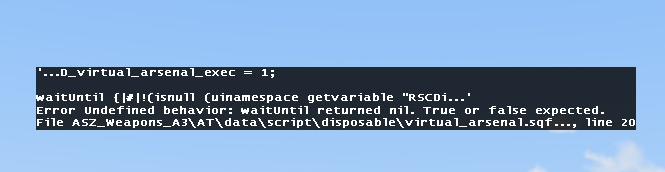
hey does anyone know why this error message keeps popping up? https://i.gyazo.com/b911ac606ce8b093f39ced47b6864f0e.png
^ is link to screen cap
small patrol
Show us the entire waitUntil code. Error says the error tho
knotty drum
@small patrol where would i find that?
small patrol
Your code
knotty drum
oh the error message just pops up when i place a soldier down on the map from the editor
dim kindle
OMG dude the guy with an ' for a username had me confused for the LONGEST time and I feel so dumb now
small patrol
Show me your code, or isn't a code by you?
knotty drum
i've put no code anywhere
i literally just drop a guy down on tanoa or any map
and it pops up
small patrol
Then that's a MOD issue
knotty drum
alright thanks
is there a way to hide the pop ups? i already ticked the option in the launcher but they still appear
small patrol
Editor shows it anyways
knotty drum
damn
plain gale
Might wanna report that bug to the mod author
 solar condor
I'm trying to manage a scenario where a some BLUFOR guards may have to shoot OPFOR raiders every once in a while, I'd like to make sure that any OPFOR units killed by these guards do not drop any items at-all, or alternatively remove their bodies/vehicles outright when killed/destroyed(to prevent players from simply luring raiders into the guards' territory/safezones, resulting in basically free loot :p ).
I wonder wether it's possible to do that by adding some code to the relevant guards in-example in their Init? or should I rather use a seperate script for that?
uneven badger
this addEventHandler["Killed",{[objectName] remoteExec ["deleteVehicle"]}] or something like this
Oh, you want it on the guards not to shoot opfor besides the raiders?
fading goblet
You can change the side of the guards to civilians to prevent them from shooting enemies.
When you send in raiders which should get shot, change side again to bluefor and when everyone dead, remove bodies and reset side again.
solar condor
I do want the guards to kill the raiders, as safezone protection (my players are CIV, i've taken Exile as a basis) i just want to prevent my players from using the guards' endless supply of ammo :p
uneven badger
Do not give them an endless supply of ammo?
solar condor
Right but then the guards will run out of ammo and no longer keep those raiders out of the safezone :)
I did at first just let all Opfor within a certain range of the safezone get deleted, but i'd prefer the guards to just shoot them and have any opfor who's killed by the blufor stripped of the gear upon death since hopefully that doesn't look as silly :p
 hard veldt
is it normal if I can't make a animation with Miller in the editor ?
solar condor
I try to avoid relying on just god-mode, in a previous scenario weve once ended up with a problem where the raiders would just stay in the safezone untill the players tried to get out 🙂 i guess for the sake of ease meanwhile i'll just resort to deleting the raiders instead once they get into the safezone itself 🙂
haughty verge
there a way to prevent respawning players from leaving their assigned group in the editor?
 void goblet
Hello boys. Can anyone tell how to use the old man modules ?
?
And new functions (BIS_fnc_OM_phone_incomingCall, BIS_fnc_OM_phone_addContact and other)
broken inlet
iirc documentation for the old man modules is coming soon
prisma oyster
Soon\™
 idle rivet
my units seems to have suicidal intents, i place them on a building with a guard order they move to the edge and fall 🤔
prisma oyster
they are moving back to formation I suppose
idle rivet
is there a way to not make them want to embrace the void?
if i disable the AI movement they do not rotate either and that's a problem
and even with the no keep formation they still go to the edge and fall
prisma oyster
doStop _unit;
```@idle rivetHow do i spawn bomb
I have an airplane that when it flies into a trigger i want a bomb to spawn
How do i do that?
 compact patrol
private _pos = getPosATL _object;
"Bo_GBU12_LGB_MI10" createVehicle _pos;
Maybe something like that?
 cloud token
@idle rivet if you spawn them in when holding ctrl they'll automatically fall into a formation, if you spawn them as individual units and not as a group then they should stay still
 last flare
what Edward said might not be directed at you? dunno
dim kindle
I think it was
dim kindle
Spawn a bomb when airplanes enter a trigger
compact patrol
Yeah I thought maybe you could enter that code in the trigger. Where _object is where you want the bomb to spawn
half pendant
With ace you can spawn bombs
dim kindle
ace?
half pendant
Advanced combat environment
dim kindle
And what does that doo
half pendant
Is a scripty tyat activate bombs
fading goblet
what? It's a complex mod not just a script...
cloud token
really?
cloud token
ace is like, super beginner friendly, it improves so much
prisma oyster
@dim kindle forget about ACE, it is not the solution to your issue.
cloud token
it makes the game just more accessible for a lot of people
dim kindle
k
cloud token
what
fading goblet
I would suggest to stop trolling in here...
cloud token
what happened there lmao
prisma oyster
I cleared messages unrelated to this channel. please carry on, nothing to see here
last flare
I have a few mods installed and cant seem to get the added vehicles in the Zeus interface
Currently dog sitting so I'll post what I mean soon
broken inlet
Be sure to set the addons in the game master module to include unofficial addons @last flare
broken inlet

broken inlet
Zen since ares is discontinued iirc
I think ZEN is still missing some features from ares but they're being added continually
fading goblet
Achilles is the successor of Ares
ZEN is completely new but has the same features
idle rivet
ok i confirm it seems to work the doStop
prisma oyster
oh ye of little faith
idle rivet
it was the "while still being able to turn around and even move to a new position if they see fit." in the wiki that made me doubt, pardon my weakness master kenobi of the editor 😛
prisma oyster
thou art forgiven, thou shalt go in peace 😛
idle rivet
now i have to change the markers of 30 units as i just discovered search and destroy do not make them move forward if they don't find anything
last flare
Welp, respawn dont work properly
Like I respawned in the middle of the ocean instead of back on the aircraft carrier
last flare
I think it respawned the player where the player died
last flare
type, side, show to and notification
 lost peak
I know the options available, I'm asking what you selected 😄
last flare
bluefor infantry and disabled notifications
and respawn on custom position in the multiplayer attributes
last flare
30 seconds
lost peak
so you see the map yes?
last flare
yeah, enabled the choose respawn, going to test
lost peak
Ensure you selected select respawn position you'll see the map and the respawn position where the module is with the custom name (if given) etc.
If it spawns you under the carrier and in the sea
maybe lift the module by a meter
but it shouldn't
last flare
thank you
lost peak
yw
last flare
now getting an odd issue, it's just spawning me as a random dude even when I select the Zeus slot
idle rivet
does the "get in" marker have to be placed then attached to the vehicle right?
like move it over and when the cursor is green release it
i'm puzzled, the AI unit have that WP, only one man go near the heli and then start rotating instead of getting in
idle rivet
ok further info: this happens only when they aircraft and the AI is on the aircraft carrier, if i move them to the ground it works
last flare
how do you export stuff like fortifications and such?
I've made a setup id like to use on different maps
only problem is that I've saved it as a custom but it's a ship with all the stuff on it for a base, when I place the custom setup the vehicles I placed on it sit underwater
idle rivet
alt and pull everything up
last flare
the ship is on the sea but everything else is at weird heights
vestal perch
you need to store the positions relative to the ship
normal composition stuff saves position by relative height
so if the ground shape changes it messes it up
last flare
aah, so any way to to that? @vestal perch
vestal perch
well Im sure there is but cant write such off the top of my head.
idle rivet
weird, the more i compose things the more they broke, example: AI have an helicopter, an hold point, a trigger attached to the radio to skip it, another waypoint away, if i enter the heli and run the radio everything is fine and the AI moves to the other waypoint, if i start the trigger while i am outside the AI starts the engine, goes in height but does not move to the waypoint
🤷♂️
idle rivet
is my experience considered normal, or I am just going crazy?
fading goblet
sounds like a locality issue (where hold trigger isn't triggered when the called isn't in the vehicle)
idle rivet
could be, but it is just doing strange things over strange things, like the aircraft carrier, heli on the AC with AI with WP to enter it does not work, move it to the land and it works, move it back it does not work again; i put a script on the init to disable the AI from moving and they still steer the aircraft, then i had to disable simulation from it completely and it worked, then i added another thing as "say x" and the disablesimulation was not working, removed the piece of code i added and it was still not working, delete the aircraft put it in again and it worked again
in some places the "flyinheight" is completely ignored below 50 but if you say 0 it lands, in other places it works
i am completely puzzled by the AI and the editor, my mind is burning
fading goblet
Well, the carrier is not a solid object so AI will think it's still trying to land/take off on water, which it can't.
and it's known that the AI doesn't always behave the way we expect, so trying to script them into doing very specific actions can (and will be) a pain
idle rivet
well i tried to make the helicopter land with the land command, it triggered after the waypoint and my pilot landed the helicopter straight into the water, but yes it's a big pain
idle rivet
new weird issue, the hold point seems to be skipped even without the trigger activation and the heli depart on his own :/
fading goblet
This waypoint type will cause the group will move to and stay at this position indefinitely. Only a Switch type trigger or script command will move the group from the waypoint. While waiting, any unknown targets are checked (group moves in the direction of the target) and any recognized enemies are engaged.
So you should have the AI stand next to the helicopter, set a HOLD WP next to them, on trigger -> move in heli and take off
idle rivet
heh, the move in heli does not work in the aircraft carrier
also i don't see how can the AI spot the enemies as not even the shore is visible
fading goblet
you could make a trigger which uses script to put the AI in the heli (moveInDriver, moveInGunner, moveInCommander, moveInCargo, etc.)
idle rivet
yep i think that's what i'm gonna do
but that would introduce the issue of players entering the pilot spot and the AI can't
i think i would just set the fuel to 0
nope now the AI just takes off and crash into the ship
and i don't mean on something on his path, it just takes off then lower to the sea level and crash in the ship or land on water, it doesn't happen always but it happened
it seems the pilot decide to eject whenever he feels like :/
let's see if the allowfleeing fix that
idle rivet
nope i have no idea why but the pilot keeps ejecting and the heli crash even if there is a copilot
idle rivet
weird i had to delete the whole group and recreate it and now it works
lost peak
now getting an odd issue, it's just spawning me as a random dude even when I select the Zeus slot
@last flare If you didn't get this working, if you're using the virtual zeus entities, you need extra setup alongside the gamemaster module to work correctly.
haughty verge
Achilles is the successor of Ares
ZEN is completely new but has the same features
@fading goblet
Do you know how to place objects with ZEN in the air? Achilles had a "specify position" option which is not there in ZEN
last flare
@lost peak it had somehow set one of the opfor guys as player
@haughty verge hold alt
 gaunt thistle
Hey guys, I'm using the editor combined with 3den Enhanced and I'm trying to give each player in a multiplayer Zeus scenario only one respawn ticket. In the Special States section of each unit's attributes, I set respawn tickets to 1. But, for some reason, I can respawn infinitely. Any help?
dim kindle
is there a way to delete something if something gets killed?
 woeful raptor
I want to use a basicweaponsbox as an object that gets placed (scripted) but it is defaulted full of weapons. I wish to use that box as empty when it spawns. Is there a way to do that? I thought about saving it as a composition but of course I need a classname.
haughty verge
@haughty verge hold alt
@last flare
That's only after you place the unit. I'm talking about before the unit exists you can change it in achillies
 tender vigil
any idea why AI tries to leave one open seat in vehicles and how to prevent that? I fill a vehicle with AI, and one guy always disembarks.
oh nevermind, they all are trying to disembark
 cinder hornet
hey dudes
i got a bit of an issue
im gettin this error
Warning Message: You cannot play/edit this mission; it is dependent on downloadable content that has been deleted.SSS_module
but i have the simplex support services module installed
prisma oyster
¯_(ツ)_/¯
cinder hornet
lol yeah thats pretty much my reaction
dim kindle
I wanted to make paradrop and when i put the pilot into the plane he starts spinning in a circle with the plane can anybody help me how to fix it ?
dim kindle
Its doing the same when i create a waypoint
dim kindle
The editor is broken
I placed down a squad of 3 civilians
They are supposed to get into a chopper with waypoint's
But 1 person in the squad never does
If im not the squad leader
then the squad leader will never board the chopper
and if i am
someone else wont board the chopper
how do i fix this
vestal perch
does it have enough room?
idle rivet
yep saying the editor and the AI seems weird is an understatement i have poured a solid 18 hours to get a chopper takeoff from the USS freedom and let units fastrope then come back and i'm still unsuccessful at it
vestal perch
is it a modded chopper?
dim kindle
Nope
idle rivet
mine or russians's?
 clever crystal
@idle rivet script its path with unitCapture and unitPlay
https://community.bistudio.com/wiki/BIS_fnc_UnitCapture
https://community.bistudio.com/wiki/BIS_fnc_UnitPlay
there are videos on youtube on how to use it correctly.
Note: tutorials from arma 2 work also in arma 3
idle rivet
oh so i can like join in, do whatever the unit must do, then save it and replay?
prisma oyster
Air units mostly
idle rivet
so like a non-ai unit that walk will not perform it?
like if I start it, walk in a path, then replay it on an AI
prisma oyster
it will slide on the ground
void goblet
Hey. I have a bug with a respawn point selection window. Has anyone encountered this? I thought that it basically doesn’t work for me in any mission, but it works (tested the apex protocol). in the video I demonstrate this: https://youtu.be/7ok3CcYkRXE
clever crystal
about the unitplay/capture, i played around with it when i found out about it, and tried with a hemtt....it doesnt really look/sound very good when the hemtt is moving, but the wheels dont turn, and squeak on the ground
idle rivet
i think it just setpos and setorientation
civic laurel
@void goblet is the bug that the respawn selector works?
void goblet
yes
civic laurel

I dont get it
I see that youre having issues with it
Can you share the mission.sqm in pastebin?
void goblet
okey
civic laurel
I assume you dont have any description.ext
void goblet
no and what?
civic laurel
?
What do you mean "what"?
There's one question there
Are you asking what description.ext is?
Tag me when youre back
void goblet
@civic laurel https://pastebin.com/Sz0hwBVN
civic laurel
And you have no description.ext?
void goblet
no, only mission.sqm
civic laurel
Ugh, ok
I'll check this when i get home
Im pretty sure it's just some silly mistake you made in the settings
idle rivet
how do i tell in param that i want to accept an object? with strings and numbers you just put a string or a number but for an object?
 grizzled scaffold
What’s a good way to determine a realistic insurgent camp location? I’m making a Tanoa campaign.
grizzled scaffold
Also, I’m looking to make a persistent mission to practice screenshots. What’s the most effective way to get AI to spawn repeatedly to keep the fight going?
 pastel salmon
Can anyone help me please
an error called picture d not found does not start the mission
last aurora
screenshot of the message to imgur and post the link here
last aurora
link does not work
pastel salmon
https://ibb.co/BsKhXFf try now
pastel salmon
ok but is this usually a major mistake in weapons and items or something else?
last aurora
this can happen everywhere when a path is wrong
go through your mission and check the paths you've set to images
vestal perch
only if you create a decal
there may already be some in game too
I recommend testing how the decals work when placed in editor beforehand though
 stiff hound
is it possible to disable a Module in 3DEN, without deleting it ?
broken inlet
define 'disable'
broken inlet
Do you mean that you only want to have a module activated under a certain condition?
Hm maybe you can use a trigger or something like that to activate it
Do modules have condition fields? not sure
stiff hound
if possible, but currently i just want to save it in the editor -- with the Attributes setup . they have System: Presence tab, but im not sure if it will work like this .
split fiber
Is there an easy way to filter out what goes in the arsenal. For example I want it to include everything but the items included in CUP
stiff hound
 sinful zenith
he wants to filter, not search 🙃
yes, you don't have to place down a full, unlimited arsenal
stiff hound
@sinful zenith its the same thing .
except that it filters by name, and not mod
sinful zenith
but you need to white/blacklist per classname
its the same thing .
no
filter != search.
filter prevents you from accessing stuff that the mission maker doesn't want you to access
stiff hound
its editor channel, not mission making
do you know the answer on my question above ? :)
sinful zenith
if you don't want a modules code to run, remove the placed down instance of that module
if there is no button for it, its probably not possible
but if you just want to pre-configure the attributes to use it later, save it as a composition
stiff hound
thanks
uneven badger
If I place Contact or GM or Apex assets/units on a mission, do players need to have said DLC to play the mission?
small patrol
No except GM
sinful zenith
for GM they'd need to atleast download the compatability thing from workshop
which is like.. 20GB download?
broken inlet
21 iirc
dim kindle
Does anyone know of a simple way to make backpacks placed in editor stay in the position they've been set in instead of just spawning flat on the ground as if dropped by a player?
eager hull
backpacks are particularly annoying
I think some mods have holders but don't remember their method
dim kindle
Disabling simulation still just drops it flat on the floor 😦
vestal perch
you would have to attache its groundholder to something and align that
or create is as simpleobject
cinder hornet
is there a way that I can monitor what is affecting mission performance
so i can see if specific mods or scripts are hving a negative impact?
 severe aspen
Dose anyone know why a (Place Comment) is consider a addon????? Even tho it's a part of the game.
broken inlet
a what 
kind prism
Every part of the game is an addon
I think he means the comment bubbles you can put
severe aspen
Okay but when I put it on my server it consider a missing addon.
small patrol
Never
severe aspen
small patrol
The error is not relevant to comments
severe aspen
HUH
fading goblet
Comments are base game and if attached to an add-on, it would be 3den related.
fading goblet
???
vestal perch
@lavish radish
 lavish radish
vestal perch
lavish radish
vestal perch
👌
 terse flicker
When you subscribe to compositions from the workshop where does that downloaded file end up?
vestal perch
probably same place all workshop addons go?
eager hull
wasn't aware you could download compositions from the workshop
its usually just empty missions with just the composition in it
 pseudo matrix
How to apply Custom Loadouts without Zeus in 3den?
haughty verge
make sure you have 3den enhanced
then you can right click on a unit and select edit loadout
@pseudo matrix
broken inlet
I think you can do that without 3den enhanced too
 muted shadow
3den enhanced should be mandatory
pseudo matrix
Yes, but I'd like to have the ability to enable custom loadouts in the MP Respawn Menu,so people can dynamically chose them to fit their needs.
uneven badger
pseudo matrix
I'll try that out, thanks 🙂
pseudo matrix
Hell yeah it works! I owe you a Beer @uneven badger 🍻 Thanks!
idle rivet
is it expected that the respawn tickets reset if the player logout and login again?
i have people that circumvent the ticketing system by logging off and on again
uneven badger
If I place a trigger with Any Player Present and Repeatable, will it trigger to every player that goes into it? Because I want to make sort of a medical zone that when players walk into it, they get setDamage = 0
muted shadow
that is what "any player present" does, yes. It should work.
though, if you use thisList in trigger activation, it will heal all players inside the trigger as soon as any player enters. you can probably work around that if its unwanted though
 empty oasis
does the show/hide module work globally? if so it will be extremely useful for multiplayer mission flow
fading goblet
Show/hide synced objects. They will become invisible and their simulation will be disabled.
Although the wiki page has not been filled (yet), so can't tell the exact ins and outs of it
prisma oyster
you could if you read the function! 😛
fading goblet
don't make me!
fading goblet
according to the script it's all global
 heavy lotus
hello
i need help i wan to create a parade video but i can't get the vehicles to move synchronized with infantry
 woeful hound
Might be a stupid question, but I am unsure on how to add weapons in eden so that I can move them around and place them anywhere.
In props there is a weapon tab, but it doesn't contain all the weapons available.
So, does anyone have an idea on how to insert a weapon in the editor regardless of which one it is?
small patrol
You meant pickup-able weapons prop?
woeful hound
Yeah
small patrol
So, like you wanted to place a weapon from, like a MOD?
small patrol
https://community.bistudio.com/wiki/addWeaponWithAttachmentsCargoGlobal
This is something you'll need I think
severe aspen
is there a way to turn off player vs player damge?
civic laurel
eventHandlers
when unit takes damage, check if unit causing the damage was a player
if true, return 0
paper breach
can you do custom map markers without mods? like taking an image and using it as a map marker
paper breach
Ah, i'll give it a shot. Thanks!
 short night
prisma oyster
short night
prisma oyster
@small patrol ↑ 😉
 timid granite
My missions always end abruptly upon reaching 0 tickets, can i just make it so when there are no tickets left the player just can't spawn in?
 vital maple
Is there any way to place down a functional door down in the eden editor (That's not a gate or otherwise already attached to a building)? Surely there must be a way? Any mods out there that do this?
prisma oyster
no for vanilla
maybe a mod on the workshop
vestal perch
Inside buildings and with ai compatibility, no.
Arma is not exactly Bob the builder sim
 wet kelp
Is there a way to turn something over in editor
prisma oyster
yes? rotation tool ("3" iirc)
wet kelp
Cool thank you
vital maple
@vestal perch Not necessarily inside buildings with AI compatibility, It's for a custom structure made with walls etc, and I was wondering If I could just place a working freestanding door and build around it
vestal perch
Only with mods.
vital maple
Do you know of any good ones for that? I haven't been able to find any :/
uneven badger
Why can't the simple object just stay ticked when i leave the game for testing 😢
small patrol
It's not compatible with that feature, some said before IIRC. Might wrong
uneven badger
I just tested the mission outside of the editor in an MP server and they were simple objects. So I guess they have to be the last thing you do before exporting
small patrol
It's an FAQ, you would find some in this server if you search
haughty verge
other than ZEC, ZEI, 3den Enhanced, what other editor mods do you like? emitter 3ditor is currently broken.
dim kindle
So out of curiosity, has anyone messed with the puddles from CUP?
I can't seem to find them in 3den
and I'm wondering if it's because I need to use scripts for them to show up
haughty verge
i just passed by those a second ago, let me see if i can find them
dim kindle
They're under the CUPS Terrains mod right?
haughty verge
oh the ones I passed by are the puddles from contact. which are under the search "water"
dim kindle
Ah dang, can't use those
I'm, trying to create a "sewer" system and wanted to include some shallow water for the players to walk through
haughty verge
cant use those because they are too small? or because wrong color
dim kindle
they're not actual pools of water, they're just a texture for the most part
They can only be placed on the ground itself, not on another object
haughty verge
ah I see. I'll keep an eye out for any cup puddles, but that may be a map terrain asset you can't access
dim kindle
That's what I'm thinking, but this guy on reddit made a vague post and made it sound like it was accessible from the editor
haughty verge
dim kindle
I saw that mod, was worried due to its lack of updates that it might be unstable
haughty verge
worth a test unless you want to go into the terrain builder, which is okay to do but then your players have to download your modified terrain
dim kindle
Yeah sadly not an option as I'm hosting this mission tomorrow lmao
haughty verge
been there lol
 opaque halo
hello I need your skills, when I launch my server I get this message: mpmissions__cur_mp.pja307\mission.sqm/Mission/Entities/Item6.type: Vehicle class R3F_DRAPEAU_FR_MIL no longer exists
and the second on another template: No entry 'bin\config.bin/CfgMarkers.Nimitz'.
opaque halo
thank you
kind prism
sinful zenith
Can I do something that new objects are automatically placed into currently selected layer? or are new objects always placed in root layer?
uneven badger
If you have the layer selected, they should go directly there
sinful zenith
do I need to do something special to "select" it? or just leftclick on it once?
sinful zenith
Welp can't get it to work, I give up ¯_(ツ)_/¯
prisma oyster
that's what sh—
 crude blaze
Is the "wake-up" ability for dynamic simulation working correctly? Cause i put an AI next to a lot of dynamic enable dudes and they still dont move ( i even checked with canTriggerDynamicSimulation and that is true). Still the other units dont move
prisma oyster
it usually works very properly yes
 mortal bramble
Does anyone have a discord community where its solely focused on Arma 3 Eden editor mission making in general?
Where I can also find some cool personal tutors or sources todo stuff?
small patrol
Why not here?
mortal bramble
I'm just wondering if there's an actual discord community where you actually talk together and discuss things on how it works
prisma oyster
…here?
small patrol
There's some actually but none of them are active as far as I can see
prisma oyster
Although, talking is writing here
mortal bramble
Any sources like decent youtube videos on how to create cool cinematics like people falling of from a tower and soldiers running from a strafing run that kind of stuff
I know that I could just type it in
But I wanna know the veterans recommendation
small patrol
If you know nothing about Eden Editor, first you'll need to learn the basics
mortal bramble
Already did but I'm pushing more into the moderate stuff
 rich folio
Yes that is correct to know the hypothetical is one of the fundamental analysis of the concept.
broken inlet
what
pseudo matrix
What as greater effect to optimize objects when they are not meant to be used: Disabling Simulation or creating as a Simple Object?
small patrol
https://community.bistudio.com/wiki/Arma_3_Simple_Objects#Performance
Super Simple Object is the fastest
broken inlet
Btw why is there a single Old man related module thats not in the Old man Modules folder
prisma oyster
I… don't think so, why?
broken inlet
the module 'Old man QRF' is in the 'other' folder for me
prisma oyster
oh
then: IDK


![https://i.ibb.co/VBpF75L/Desktop-Screenshot-2020-06-15-08-17-09-99.png[/img][/url]](https://i.ibb.co/VBpF75L/Desktop-Screenshot-2020-06-15-08-17-09-99.png%5B/img%5D%5B/url%5D)
 prisma oyster
email Maruk!
broken inlet
 sure, just gonna need you to gimme his email address real quick
dim kindle
Is there a way to make the camera move with an controller?
I have an Xbox One Controller
dim kindle
Will it be smooth or will the controls be similar to a keyboard
broken inlet
I doubt many people have tried that so you'll propably have to find out yourself
although i imagine that using 3den with a controller isnt all that great
kind prism
My ORBAT doesn't open the viewer on clicking in map. It opens fine when using BIS_fnc_ORBATOpen in Debug Console, and was copied from another mission where it works as expected. What mission things could be breaking the map click open?
It was ALiVE Advanced Markers
 vivid tree
How do you set a trigger off after a (hold action) is complete? Thank you
prisma oyster
You could use a global variable set e.g to true in the action
 modern locust
might be a quick question no idea but is it possible to port a workshop campaign in to editor?
prisma oyster
"port"?
modern locust
i guess edit
prisma oyster
extract them? but be sure to obtain permission first
modern locust
i wana find a prop that some guy used in a campaign
i was searching for hours cant find the name of this thing
or just the way that he built it
small patrol
You don't need to extract and open it in Editor to get a classname for something in it, you could check it with debug console
modern locust
really how
like what command or something
and until now didnt really know theres a use for the console
small patrol
typeOf cursorObject```?No all caps, sir
 ebon yew
I have some problems replacing textures.
When I create the images in png or jpg format via paint everything works as soon as i create the pictures via photoshop i get no output
prisma oyster
@small patrol not his fault if your username is allcaps :-p
@ebon yew are their dimensions 2^a × 2^b?
eager hull
permaban
prisma oyster
@eager hull?
small patrol
😩
eager hull
not his fault if your username is allcaps
prisma oyster
(oh ok. I feared it was about 'toshop)
small patrol
You surely set the texture for your desired something?
prisma oyster
well, idk - maybe a bit issue
ebon yew
I am pretty sure that it is due to the export setting
 somber pecan
Hello I'm trying to use the "Hide Terrain Objects" from EDEN for my multiplayer session, I have a bunch of placed modded buildings and items, vehicles, and such. Unfortunately when I put it onto the server and load into the game the stuff the "Hide Terrain Objects" was supposed to hide isn't hiding them is there a way to fix this on my end or?
 reef lintel
Can someone recommend a map that catches the african savannah/jungle feeling and has nice ground textures + good, walkable buildings?
Like Chongo and Kujari.
Please tag me, as i dont keep track of the chat
it does not have to be an arid map. surprisingly africa is not just a desert 😉
vestal perch
thats a lot of requirements
uneven badger
This may be a stupid question but I haven't found the answer online: is it possible to have 2 different activations on the same trigger? For example blufor present and opfor present?