#arma3_texture
1 messages · Page 39 of 1
 spark shore
yeah but for some reason its either extremely big or 1 meter wide
I've been using the blender object transform, can I resize it from object builder?
 frozen blade
not a blender user, but if you are using scale at object level, you need to collapse that
yes, OB can do scale on XYZ axis
frozen blade
but just like with max and maya that i use, you need to make sure you collapse/reset xform for the object
ahh, my bad, no idea what it is called, it's on my toolbar
spark shore
yeah it works, thanks
 full quarry
@spark shore you have to apply object scale in Blender before exporting
in object mode
spark shore
the ctrl+A thing?
full quarry
yes
spark shore
yeah had done it but it somehow broke it making it enormous, I've done it in Object builder so it works just fine
 chrome sand
Is the arma 3 contact PSD's available to the public yet saw this on reddit
"
level 1
YorisYan
BI - Project Lead (Amsterdam)
7 points
·
5 months ago
We do plan on publishing PSD templates for most relevant Contact assets, but it may take some time to prepare."
 severe rune
no
chrome sand
Ok cheers for the fast response 🙂
chrome sand
@pale bough yeah found that but was looking for the vest but its not there 😦
spark shore
what are the possible reasons a model can't find a texture?
the path is fine, maybe it can't be of a certain size?
no idea
if the path was wrong it would have said it way before in pboproj
spark shore
texture is the maximum 4096x4096
path is correct
frozen blade
copy paste path here
 fading marlin
Quick question - what is the base resolution : scale on arma textures? (I.e. what does it interpret as PPI or PPCM at the base level without added scaling?) I ask because someone in my unit is trying a coding test, and has asked for a specific sized (1cm) circle, but I'm not finding what that pixel measurement would be to create a quick png for him. Even if you can point me in the right direction, it would be appreciated. Thanks.
 junior berry
The one I am interested in seeing are the textures, though its gonna be a mixed bag since all the textures vary from each vehicle.
frozen blade
@spark shore yeah that';s why i asked you to paste it here...it ussually an extra / \
spark shore
I've tried with the \ at the start but still doesnt work
mhm, not sure why it doesnt show up now, maybe it didnt save correctly
brb
frozen blade
@full quarry actually, there is, it is called texel density
https://www.artstation.com/artwork/qbOqP

ArtStation
You can download the pdf here: https://gum.co/texeldensity
This time I wanted to explain another crucial topic for environment artists: Texel Density!!
I got few people to read through and they like it. hope you will like it as well.
Cheers guys, feel free to contact me if t...
@fading marlin the texel density is not uniform across all of A3 assets.
spark shore
yup, that was it, incredible the things you can miss when you're tired, looked at that path all night yesterday
full quarry
@frozen blade I know but its not really possible to use that without calculating uv Island size vs mesh part and object scale and thus thise things are not in metric scale unless you are just making 1 meter box. So I in the scope of the question and Arma models I don't think it's possible with reasonable effort.
frozen blade
there are tools that do that automatically
calculating texel size
but you are right, there is no way to get that without having access to mlods
fading marlin
@frozen blade thanks for the response. Is there a method of determining what the denisty of textures on specific assets are? Then I can make specific assets for the coder to use. (Sorry, as with many things, I know just enough to get myself I trouble)
full quarry
Perhaps if you tell more about what you are trying to achieve we might offer better help.
calculating anything from textures does not sound very precise
but if you make an object that is 1 meter x 1 meter x 1 meter cube and have 1 full texture on each side
then the textures pixel resolution width is 1 meter
so for example 512 px texture would be 100cm / 512 pixels = how many cm 1 pixel is.
@fading marlin
but if you have complex object with complex uvmapping calculating that gets way way more difficult
so what Im wondering is what you are trying to do and if you are approaching the idea from totally wrong direction
as this does sound quite odd way of doing anything.
frozen blade
@fading marlin there is no such way of determining texel density for A3 existing assets. But as @full quarry said, something seems off in the workflow
can be you be more precise about what you wanna do?
fading marlin
Sure. One of my unit members is trying to put together a hit registration code for rifle training, and is looking for ~1cm circles to appear at the impact registration. I believe he plans to put this into the unit string on various target types - but I'm just trying to help him w graphical assets, so I'm not 100% certain, not do I have any coding skills.
(And I suspect he'd be OK with "very small" markers - I'm just trying to fulfill the request and got interested in if there was a way to accomplish that so specifically)
So if the textures are being applied over a target area with 1.8m as it's largest dimension, 10cm = (1800/512)*10...? I could perhaps unwrap the generic targets in game.to get a reference...
full quarry
ok so your approach is totally in odd direction
you would just make a x cm wide mesh object
the textures size isnt really anything you need to worry about
the marker object itself would be correct size
you must however look up how unwrapping work first before overthinking it any further
if its for training purposes, using just a 3Dicon with Draw3D script command would be the simples solution
but there too the textures size does not really correspond to the metric dimensions
fading marlin
Copy. Yeah, I know the basic theory behind unwrapping, but like I said... Enough knowledge to dig myself a deeper hole.
OK, I'll tell him he should make a mesh object to apply, and I'll do some reading online. Thanks.
spark shore
is it impossible to retexture the Dome structures? I see they lack hiddenselections but is there really no other way?
severe rune
without hidden selections, no other way
spark shore
and I guess its not allowed to make a new object using the dome model
severe rune
you can't
spark shore
oof, I see
severe rune
Maybe ask the reyllrt gang if they can add hidden selections.
but its a terrain object right?
 distant rose
yep
spark shore
I've looked at it before, didn't seee anything regarding hiddenselections
full quarry
hidden selections dont work on terrain objects anyway so its not really a go to choice for buildings.
spark shore
what do you mean by terrain object
full quarry
object placed on the map/terrain behave differently than objects placed in the mission
spark shore
should it not be a problem only if I try to reskin that exact classname?
I mean, I don't want to change the Altis Domes, just make another variety of them
full quarry
that is impossible though as it was said bit more above
spark shore
but only because of the hiddenselections right?
full quarry
I suppose so yes.
spark shore
I see, shame
 odd crane
Is there any high quality texture templates of the bi NATO vehicles floating around?
 spring marten
Is it possible to apply textures for NVGs? I've done retextures for weapons and uniforms before, but for some reason, I can't get my retexture for the ENVG-II to work via hiddenselections.
distant rose
they have no hiddenselections set up.
 modern vapor
Hey everyone,
Sorry if I am in the wrong channel.
I'd like to make some building interiors prettier. Was thinking of placing textures on walls with setObjectTextureGlobal images of (public domain) paintings, graffiti, or similar. See example picture below from the CUPS buildings.
https://i.postimg.cc/nVmjgMMd/CUPS-poster.jpg
Seems like someone would have done this before. Does anyone know of a collection of formatted images like this?
full quarry
formatted how?
modern vapor
Appropriate size (2^x / 2^y pixels) and .paa or.jpg format. Basically whatever setObjectTextureGlobal tolerates for the user texture objects.
full quarry
Then I'm 99% sure there is no such collection.
modern vapor
Alright, thanks. The CUP mod (as shown above) has textures of paintings. Are there any other mods with such textures (appropriate size or not)?
full quarry
CUP may be the only one with such details.
 calm girder
Hi, I'm working on a certain model in blender. I've been having trouble figuring out how to create _ca, _as and _smdi maps. I understand Substance Painter is quite good for that, but is there an alternative?
full quarry
Blender can bake all kinds of texture maps too or you can draw them by hand even.
calm girder
I wasn't sure Blender could do that, since I wasn't able to find tutorial on it within ten minutes. I'll keep searching then, thanks.
full quarry
https://www.google.com/search?q=blender texture baking
frozen blade
I understand Substance Painter is quite good for that, but is there an alternative
actually SP isn't the best out there for creating SMDI maps, they always need manual adjustments for green/blue channels.
for _ca and _as maps, you could basically use any software that deals with pixels.
alternatives -
3D - Blender(free), Mari(free for NC), ArmorPaint, Sculptris(free)
2D - Photoshop, Gimp(free), Affinity Photo
@calm girder
 dense peak
How would i go about retexturing a mod? Its hard to imagine the wraps as it would show ingame, aswell as what do the p3d files do, and how do i use them
I guess im looking for standard procedure
severe rune
the p3d's will be of no use
you usually open the texture in photoshop or whatever, and just paint on it, and try to guess what's what
dense peak
My next concern is how do i upload the retexture to steam workshop to function with the original mod, the only way I can think of how to do it atm is reupload the mod with my edited texture but i dont want to steal original authors work
severe rune
you make a patch mod
a config patch, that creates a new subclass and uses hiddenSelectionTextures
dense peak
And that function enables you to go into edens garage and change it to the texture i made?
severe rune
yes
dense peak
Would making a new class name with the applied texture so it shows in any of the 3 factions violate anything?
dense peak
Alright that answers what i needed to know, Thanks. I wanted to retexture a Mech so it looks more realistic with the other mods(RHS). The original we'll say looks cartoonish
severe rune
also not every model supports hidden selections. Most of the bigger mods do, but especially single guy small hobby/fun projects often don't
dense peak
Would listing the original as a dependency to use mine force people to download/have the original?
severe rune
yeah kinda?
what u mean
ofc they need it as your mod requires it as you're retexturing it
full quarry
assuming the thing you are retexturing is configured to use hiddenselections
dense peak
I meant with a derivative of the original sorry for not clarifying
frozen blade
I wanted to retexture a Mech so it looks more realistic with the other mods(RHS)
no matter what you'd do to these textures....it won't really fit, will it?
dense peak
Not perfectly, but a us themed texture is better than having a giant red and yellow camod mecha running around... Lol
frozen blade
oh yeah, will perfectly fit if you stick some 'murica! textures on anything, agreed
https://twitter.com/rhsPuFu/status/1101936427917553664?s=20




 tidal fog
That looks really nice btw
frozen blade
it's been ingame since i got the Hs into a public release
tidal fog
I'm sure... while I sub to the RHSs I rarely use them in game
frozen blade
bad @tidal fog :))
dense peak
Lol I was thinking more something similar to wipeout texture but that should work great to 😂
frozen blade
star and stripes baby, everywhere
dense peak
Ill make sure it plays fortunate son whenever it gets spawned it to
Can't get more uncle sam than that
frozen blade
that's if, the original content has hiddenSelections set
dense peak
Worst case scenario ill script something into warlords for the song if possible
Was thinking about having soviet anthem play when your the nuke gets launched on the rhs truck... Lol
frozen blade
merica duck yeah - not safe for sensitive audience
||https://www.youtube.com/watch?v=U1mlCPMYtPk ||

AMERICA F*#K YEAH! MUSIC VIDEO from the move "Team America World Police"
Regular & Bummer Versions !!!!!!
tidal fog
BannedInc's version is better
dense peak
@frozen blade i concider that song as accual U.S Anthem.
 harsh arch
I was wondering, could anyone explain what could cause, in a retexture using hiddenselections, the new texture seeming to attach over the top of the old one?
Its like the old texture is still underneath and some of it shows through
 silver gull
rvmat
 cunning obsidian
I was wanting to retexture a uniform and wondered if anybody already had a template or knows where I can get it? The uniform I was looking to retexture was the one with a smock (hooded), same as the one the 3CB guys have in the royal marine mods. If not no bother.
 frigid isle
Really good question @harsh arch asked, how can i make a custom face replace the default texture, not just attach over it?

tried to do a custom face but it just attached over the top of the old one. How can we solve this rvmat problem? (Note: I have 0 experience with this sort of stuff)
Another question, I have a camo sample, but its not enough for a uniform (eg the spots would be too big and would not be authentic) how do you guys usually scale up camos?
 pale bough
generally you use a camo sample that tiles
so you can copy it and paste it above or below or to the sides and it's seamless
and by doing so you can make it bigger
what camouflage is it? maybe someone here can give a sample that tiles
frigid isle
thank you, it would be huncam
its like multicam and rhodie got a child
that likes paprika
pale bough
looks pretty neat, better than most multicam knockoffs, but I don't think it's very likely anyone will have a good tiling sample of huncam
frigid isle
yeah gonna have to solve that myself
harsh arch
@frigid isle definitely likewise, don't really know too much under the hood
full quarry
@harsh arch what are you retexturing and are you trying to make it look like something totally different material than what it originally is? post pictures (links to pictures)
@frigid isle how are you trying to add your texture on the face?
frigid isle
I used reflect.tech to faceswap an arma face with the face of myself, then i used the custom face guide and placed the face.jpg (1024x1024, less than 100 kilobytes) in my profile directory.
full quarry
Yeah the custom face jpg thing doesn't exactly work properly anymore I think.
frigid isle
Rip
full quarry
It's from Arma2 and when Arma3 skinshader stuff got updated I think it broke there. The skin shader relies on multiple textures combined to draw the face properly and the face.jpg basically just swaps the first layer. And you get the result you have seen.
frigid isle
Any workarounds?
full quarry
For proper custom face you would need an addon that adds your face textures to the identities list.
full quarry
Probably takes some digging to understand how the different parts work. So not a quick couple of hours job.
And I don't think anyone's written a guide either. There's a wiki page about the skin shader though.
Which can be helpful.
Also addon like that only works on custom servers
 jade grail
Hey guys, not quite sure where to find "supershader.fx" ?? for 3dsmax
full quarry
you sure there is such thing?
 jade grail
Yeah, all the tutorials seem to conveniently skip over that part...
full quarry
people dont probably use that kind of workflow anymore
jade grail
what workflow do they use now?
full quarry
If you mean for texturing, then many have turned to using things like SubstancePainter
jade grail
I mean for exporting rvmats properly
full quarry
I dont think anyone does rvmats in Max
jade grail
then how are they done in SubstancePainter? I use that as well
full quarry
they are not done there either
I do mine in text editor for example
basically you just plug your textures in correct stages and possibly tweak some of the parameters it contains
only realiable way to make them look right is by tweaking them and looking how that looks in game
jade grail
Yeah, that's all fine and dandy, I am all about tweaking things to get them to look right. But as far as actually creating the config file for the model, as well as the rvmats for the textures, it's well documented explaining what each class is used for, but I have no clue how to actually start the process.
frozen blade
start what process? supershader.fx is just a max shader to visualize in max viewport that shader
nothing less, nothing more
jade grail
I just mean there's no step by step tutorial specifically for the rvmats as well as the config.
I know I copy and paste my files into the quotes sheet, I know what ambient, diffuse, emissive, spec, etc.. I know what they mean. But to build a full on in depth rvmat and model config.
full quarry
there isnt really much anything for the rvmat except that
you plug in your textures into the correct stages and apply the rvmat to the objects mesh
jade grail
so what, everyone just magically ends up with a config/rvmat file?
Right, what does stage1, stage2, etc.. represent? gdepth buffer?
full quarry
That is not explained in depth anywhere I think. Why does it matter?
 full quarry
for config.cpp and model.cfg stuff there are BI wiki pages
that shader as PuFu above said has nothing to do with Arma files
it mimics the Armas render in Max
but does not fully transfer in any way
jade grail
It's literally explaining what the rvmat is using
jade grail
No, the script
full quarry
for Armas engine
jade grail
Okay, I finally understand it now, sorry man not trying to argue or anything. But you're wrong, that link I provided explains what I've been asking. I just didn't get it until right now.
The definition of individual stages - in a material -
- Normal map - this is class Stage 1
- Detail map - this is class Stage 2
3... etc..
You see?
So now I still don't know how the configs are built (I know, scripting cut and paste, yadda yadda) but to understand it
full quarry
Oh you meant that. I thought that was not the question since it reads there on the page
jade grail
Yeah haha, like I'm trying to understand why they're doing the things that they do in their files.
full quarry
for both config.cpp and model.cfg things there are BI wiki pages on the basic how they work
class structure, inheritance etc are explained there.
jade grail
https://community.bistudio.com/wiki/Model_Config yeah I'm here
full quarry
and there are examples in the Arma 3 samples on Steam
jade grail
but where the textures are involved is no where on this page
full quarry
also you will want to set up your tools and development environment with the PMC wiki arma 3 tools installation guide. That, while not official method, will make your modding life more easier
textures and materials are set up on the p3d model
jade grail
Yeah I've set up my own map and everything already. Got the sat images, terrain height files done, now it's just filling it with assets
full quarry
configs dont play part in that unless you want to configure them to be changeable live in game
jade grail
Right, like weapons and stuff. So for something like just a rock, I don't need a config file?
full quarry
if its just a simple terrain object with no functionality, then no
that needs only a p3d
jade grail
really 😮 But the rvmats are the same?
tidal fog
Always nice to provide them as Eden objects ofc
full quarry
rvmats and diffuse texture are assigned to the model
jade grail
Yeah definitely would be helpful to set them up for that as well
full quarry
that affects their simulation though
non config terrain objects cost the least performance
also terrain and editor placed objects can behave differently
jade grail
Wow, okay. That makes so much sense now. So right now I can just go ham and produce as many assets as I want, but down the road I wanted to make a whole list of assets that can be added I can then worry about config files for them?
tidal fog
E.g. Land_ classes provided for people to be able to place a map's custom terrain objects in points of interest for example
But not explicitely used in the terrain itself
full quarry
Land_ is needed for animated parts, lights, etc features to work on terrain placed objects
it has nothing to do with the mission editor
tidal fog
Talking of the old ARMA 2 MAP classes for rocks, trees, etc. and CUP's editor class definitions (probably using the wrong terminology) so old rocks, trees, etc. can be placed
full quarry
land_ plays no part in that
tidal fog
I know... I used the wrong terminology 😦
full quarry
and yes making them editor placed might cost some performance
and by editor placed I mean they have a cfgVehicles config
cfgVehicles config means they have simulationType X defined, which alters how they are simulated in the engine
jade grail
Okay, so for terrain builder, how do I need my model set up in object builder? Can I have two texture sets?
uv sets**
full quarry
a model/mesh can have as many textures/materials you want, but they will all share uvSet 0
and in some special cases can use uvSet 1
for alternate unwrap
what texture is drawn depends on what texture/material is assigned to a face of the mesh
jade grail
Okay, so I've textured them as two separate objects, then I attached the two together then exported as one obj
full quarry
from max I believe its preferred to use FBX
jade grail
right I meant to say fbx lol
full quarry
I use Blender myself and its been ages since I used Max so cant recall what was needed for it
but that sounds about right
Is it a big object as you have 2 textures for it?
jade grail
in object builder can I select by element? It's a building
full quarry
as there are some engine limits on big objects
jade grail
3700 polys
full quarry
I think you should explore Object Builder yourself for a bit.
but yes it can select parts by individual components
thats not a lot of polies
but by size I meant its dimensions
in meters
as Arma deals in meters and has some limitations on how big objects can safely be
1 unit in Max is likely to be 1 meter in Arma
jade grail
Yeah in max you can set it to be meters by default. I tried maya and blender, but max, zbrush, substance, and marmoset is my optimal workflow.
So, I see in surfaces - UVsets - add
Does this add the second uv set? Or do I need to manually apply that one as well? Should I just import the objects separately and assign textures individually?
Oh it has a full on uv editor 😮 https://i.imgur.com/iQ5LW86.png
 full quarry
it has but its quite poor in tool section
the uvset1 you have there is likely unnecessary though unless your object really needs 2 different looking unwraps on 1 rvmat
for instance a surface could be unwrapped to use continous texture on diffuse and the Normalmap stage but have different full object unwrap for Ambient Shadow stage texture
also for buildings it might be good idea to use the multimaterial shader rvmat
jade grail
Yeah, ofcourse, there's easier ways to do things. It would just be easier on my brain if I kept things organized. Cement textures - one uv, wood textures - one uv
Oh okay so there's a supershader and multimaterial shader?
full quarry
there are multitude of different shaders that can be used. Although supershader is most commonly used for vehicles and small objects
and multimaterial for larger buildigns
there is a wikipage on multimaterial that explains how its used
jade grail
yeah it's pinned
This RVMAT is rather self-explanatory. Just keep in mind the following texGens apply to certain colors used in your mask-texture: Definitely not self-explanatory
full quarry
with some experience it is.
just dont try to bite off too big a "first thing into game" project
do something simple and small first
then move into bigger more complex things
jade grail
Yeah, I'm trying to find out where that is right now lmao, went to school for game design, and they told me multiple uv sets, and that's how I learned.
full quarry
things like that vary from engine to engine.
for what you were taught that likely was the right way to do things
Arma is a lot older animal and does things in its own way a lot.
jade grail
It really does, I went from creating my own sliders and toolboxes for custom shaders in unity's drag and drop functionality in their menu. To what ever you call this xD
full quarry
this is modding though, not making your own game in open engine.
same kind of restrictions apply on all moddable games that are not made with open engines
jade grail
Right, which is why I took game design to begin with. I just thought that the 5 years somebody would have made a tool for all this
jade grail
well for the rvmats, you drag in your model with the textures, name them then hit export/build and it creates the folders and generates the rvmats and config
full quarry
possibly someone has made such tool for max, cant remember seeing a public one though.
for generating rvmats I dont really see a benefit there much since its very difficult to get 3D modeling software viewport look same as in Arma so your rvmat would likely never be accurate enough. you could perhaps plug in the filepaths automatically though.
for supershader at least.
config creation would be another animal altogether and you would have to set up all the parameters you want for your object anyway as they cant appear out of nowhere so its pretty much same work to manually build the config as it would be to tick all the possible boxes for different parameters
jade grail
Yeah that's true, there is a ton of work involved in creating your own mods. Which allows us to appreciate the ones that are up even more. But I swear if someones holding out on us with a program to automate this process, or make us pay for such a thing...
Yeah I would pay for such a thing lmao 5-20 dollar patreon project tiers
I'm just going to make a rock for now, get it in-game. If that works, then I'll try and get all my building textures into one uv. I think PBR is done through the multimaterial right?
Anyways, thanks for all the help guys
frozen blade
https://community.bistudio.com/wiki/Super_shader
did you have a look over this one? @jade grail
what you wanna make? because for structures and alike (or in fact planar UV mapping) multimats are a lot more convenient
jade grail
yeah I have the whole thing printed out on my desk lol @frozen blade
Right now I'm not really making anything, just grabbed an old file of mine, it's an outpost with some steps, with some vents and stuff on the outside of it. It's the simplest of the projects, just two objects, two texture files.
Right now I'm just going to create a seamless cliff-face with one repeating texture that rotates around the whole thing.
full quarry
for that I would suggest using multimaterial
jade grail
For multimaterial what is TexGen?
Material uses more than 8 stages (14) and must use alternative write for TexGen definition - with "class TexGenX". Details are visible in example. All CO maps may have own TexGen. Mask may have own text gen naturally too. Only first 3 SMDI maps may have own TexGen, fourth using TexGen identical with CO4. MC and AS maps using TexGen identical with mask. ```read forward
jade grail
what do you mean?
full quarry
the texgen classes are shown in the examples
frozen blade
if you are a max user, a texgen is just a number associated with a map/procedural imput - check any max shader that contains the source and eventually some basic UV controls
for multimats, i always find it easier to read multimats this way:
https://community.bistudio.com/wiki/Multimaterial#Alternate_layout
jade grail
Oohhh okay, I see so it's MATID's similar to substance, right?
jade grail
Funny you answered it back in a thread I just found lmao
https://forums.bohemia.net/forums/topic/185296-multimaterial/
The example you provided, the link is now broken
Can somebody explain what does what?
So the black channel for example
class TexGen0     {uvSource="tex";    class uvTransform{aside[]={1,0,0};    up[]={0,1,0};    dir[]={0,0,1};    pos[]={0,0,0};};};
class TexGen5     {uvSource="tex";    class uvTransform{aside[]={1,0,0};    up[]={0,1,0};    dir[]={0,0,1};    pos[]={0,0,0};};};
class Stage0    {texture="#(argb,8,8,3)color(0,0,0,1,co)";                                        texGen="0";};
class Stage5    {texture="#(argb,8,8,3)color(0.5,0,1,1,DTSMDI)";                                texGen="5";};
class Stage11    {texture="#(argb,8,8,3)color(0.5,0.5,1,1,NOHQ)";                                texGen="0";};```

class TexGen0     {uvSource="tex";

Do I replace 'tex' with the file path to the texture?

class Stage0    {texture="#(argb,8,8,3)color(0,0,0,1,co)";

For this, do I put the RGB value of the mask texture? So anything red will be (argb,136,0,0)color(0,0,0,1,co) ??uvsource refers to the models uvSet
tex = uvSet0
tex1 = uvSet1
the stage 0,5,11 you put the texture path of the given type _CO, _DTSMDI, _NOHQ
the last bit in the stage line texGen refers to which texGen class that stage uses
the uvtransform can alter the scale of your repeating texture and the uvsource as mentioned points to the uvSet
multimaterial objects have 2 uvSets, one for repeating textures and one for 1 uvspace filling baked textures like mask and ambient occlusion bake
(the special cases I mentioned earlier)
jade grail
This is awesome, I know what everything is doing now, but I am still confused as all heck.
full quarry
jade grail
Does the black refer to the black parts of the mask?
full quarry
this is useful too as an example
jade grail
Yeah no, that is the resource I've been asking questions about, I posted it, pufu posted it
full quarry
Bohemia Interactive Forums
Hello modders Got into terrain building and have the need for new buildings (we dont need another greek island do we?) and have moved into addon making.Ive become proficient enough with blender and OB to be able to make some structures and get them working in game with uv map...
you have this
jade grail
yeah that was referring to pufu's replies
but earlier I think I posted it too, either way I've read it lol
full quarry
👍
jade grail
It really needs an eli5 version
full quarry
eli5?
jade grail
explain like I'm 5 lol
full quarry
ah
that wont work in Arma modding
the learning curve gets very deep fast unfortunately
jade grail
I know I know, lol, I just mean I need to see it demonstrated step by step
full quarry
that also is unlikely to happen unfortunately. Making step by step stuff from this is very timeconsuming
the people who learn this stuff either quit out of exhaustion/get bored of it/ppl stealing their hard work or they get engaged in their own projects and dont have time to write stuff down
jade grail
{
 texture = "#(argb,8,8,3)color(0.5,0,1,1,DTSMDI)";
 texGen = "5";```

(argb,8,8,3) - can you break this down for me? Then this? (0.5,0,1,1,DTSMDI)Like what does the first 8 mean, then the other 8, then the 3, etc
full quarry
cant remember the term whats it called but lets say its the textures type.
that there is the default, neutral procedural texture
jade grail
they're all 883
full quarry
for DTSMDI type texture
yes thats rgb alpha somethingsomething type texture
its not something you need to worry about
jade grail
oh ok so I keep all that 883?
full quarry
the part after color is (R, G, B, Alpha, texture suffix)
and the procedurals often get replaced by your texture files
jade grail
And that I get from this?
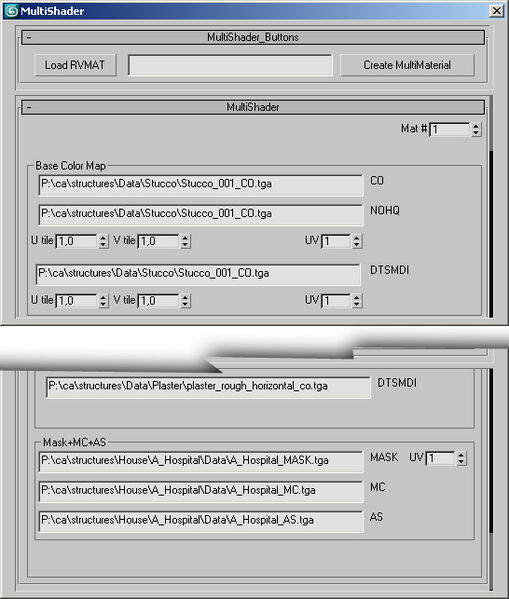 full quarry
but if not then you would keep them as is
no idea whats that from truth to be told
I do my multimaterials in text editor
jade grail
this is exactly why all this stuff needs it's own ecosystem. That way you could just tell me where and how lmao, it's all over the place.
full quarry
feel free to collect and curate it into new form now that you are learning it
jade grail
Yeah I'm documenting everything as we speak
it's the only way I can really explain it if someone asks
full quarry
To be honest I learned this stuff about 6 years ago when there was maybe half of documentation of whats there now.
jade grail
yeah I went to school because I thought I didn't understand it lmao, but no it's just a whole different ball game xD
full quarry
school can only teach you as much. The most valuable skill you can get from it is how to seek knowledge yourself and apply what you know in creative ways when you encounter a problem.
it probably gave you some good basics but those apply only to narrow scope of things that are out there.
like this case in Arma
jade grail
yeah they kept saying google was my friend and refused to teach certain things sometimes cause it was on linda.com lol
full quarry
thats exactly what I tell ppl most of the time.
well occasionally in a bit more words than that
sometimes even giving a hint on what to look for 😄
Basically all of this stuff is in the WIKI and BI forums. spread around in questions and answers
and had you experimented more with RVMATs before jumping into the deep dark end where multimaterial is you would be less confused
jade grail
I really wish I could not spend a week googling stuff.
Is there any way you could explain for a cube? Like lets say all the cubes sides are a different colour. Where does the mask go, and where the rgb values are?
full quarry
no im out of time. it would take hour at best and few if you need the 5 year old version.
experiment.
and experiment getting that cube in game and textured with something simple first
you are already getting ahead of yourself with this advanced stuff while basics are bit off
expect that you will need few weeks to learn "all" stuff
jade grail
Is there a video that doesn't skip the process?
full quarry
cant remember
jade grail
I watched a video that was 3 hours long, learned nothing, then 20 minutes into his next video, he casually mentions the terrain builder atlas, then I googled it, and bam had a map done and ready ingame in like 20 minutes lol
full quarry
terrain related videos are all useless
jade grail
Right? They skip VERY important details, too many to name
jade grail
and takes them houurrs to go through it
jade grail
unity, I can look up how to procedurally generate a building, and the videos aren't even near as long.
all in c#
full quarry
and there is a bit of truth in the struggle of learning being positive thing
jade grail
very real statement right there
This guy teaches you how to set up and rig ragdoll physics in under 20 minutes
full quarry
Id still prefer it in written format
jade grail
Same, that's how I first learned back in the day
but people learn differently, and honestly without his videos I thought I would never know how to script
full quarry
its far easier to get back to some part of written tutorial than trying to find that 1minute 54.4 second mark
jade grail
well - scratch the surface of it at least
jade grail
okay so maybe the model was just fubar'd because this cube I made is just fine out of the box.

https://i.imgur.com/GalBrvM.png

Annnnd the textures in the first rvmats I did work too. I'm just going to pretend yesterday didn't happen, because ofcourse everything works now.
probably just need to reset the xforms shrug
jade grail
https://i.imgur.com/fBHlPSd.jpg cubes are textured and now in!

... now how do I give them colliders? lol
full quarry
more a #arma3_model thing, but https://community.bistudio.com/wiki/LOD
also. open up the Arma 3 Samples from steam and explore them
 amber belfry
I'm using a custom NOHQ for a uniform reskin. I copied the vanilla RVMAT to change the path to point to my new texture_nohq.paa. The new normal map works, but the lightning of the model is now awful and too dark/bright.
Why is this happening if I only touched minor details on the nohq? Even 99% of the nohq is vanilla.
full quarry
how did you pack it?
amber belfry
I just tested and the same thing happens even if I just use the same vanilla normal map
I extracted the rvmat and textures from the base game
copied it in my mod folder, and used the Addon builder
the rvmat is unbinarised
full quarry
how do you apply it?
and what is the path you use?
are you packing the addon from P drive?
amber belfry
No, I'm not using the P drive, my usual procedure is just using the Addon Builder to pack my test modfolder.
The paths in my config are to my modfolder. Everything works except the normal map/rvmat.
If I just copy the rvmat in it's vanilla state and load it explicitly in my config with hiddenSelectionsMaterials[] it works correctly.
Basically I have a custom 2 part texture for the I_Officer_F model/uniform. The texture is set with hiddenSelectionsTextures
If I change the line in the rvmat to point to the exact same nohq, but this time from my modfolder where I copy the nohq.paa, the lightning gets messed up for the upper part of the uniform.
full quarry
Right. Cant help you further since youre not using the standard procedure.
amber belfry
Ok. I mounted my work folder to P:. Packing from P produces the same results.
amber belfry
rvmat is applied in config like so:
class mg_model_officer : mg_base_model_bdu
    {
        uniformClass = "mg_bdu_officer";
        hiddenSelections[]={ "Camo1","Camo2","Insignia" };
        hiddenSelectionsTextures[] =
        {
            "\mgaming_uniform\Data\mg_bdu_officer_shirt_co.paa",
            "\mgaming_uniform\Data\mg_bdu_officer_pants_co.paa"
        };
        hiddenSelectionsMaterials[] = {
            "\mgaming_uniform\Data\mg_bdu_officer.rvmat"
        };
    };
same path structure in rvmat
applied like that, with a copied vanilla .rvmat, everything is fine
The problem starts when I change the path to the mod's nohq
full quarry
the default model does not have more than 1 camo selection
I hope you dont have illegally edited the A3 models.
amber belfry
I'm not touching the models, it's just a reskin.
full quarry
you said youre using I_officer_F model?
amber belfry
I call it a "model" in my config, but I'm not doing any 3d work, just textures.
full quarry
as far as I can tell it does not have Camo2 selection
amber belfry
It's the AAF officer uniform, and it has a separate file for the upper and lower body.
full quarry
so its not the model that I_officer_f uses?
amber belfry
it should be
amber belfry
class mg_base_model_bdu : I_Officer_F // BASE CLASS
    {
        author = "Marius";
        scope = 1;
        displayName = "[MG] Uniform Base";
        modelsides[] = {3,2,1,0};
    };
This is the base class, beyond that, I'm not setting paths to any models or anything.
I'm simply inheriting I_Officer_F, and reskinning.
amber belfry
Yes, it has 2 parts.
full quarry
have you tried giving the second selection rvmat in the hiddenselections?
amber belfry
This works ok:
{
    texture="a3\characters_f_beta\indep\data\officer_spc_nohq.paa";```

But this not:
class Stage1
{
texture="\mgaming_uniform\Data\officer_spc_nohq.paa";
can you see a difference in how the path is written?
amber belfry
hmm, let me see
damn, this was the problem
I'm so sorry for wasting your time with this, and many thanks.
full quarry
👍
 dusk bone
Hey question for u all textur maker , i know the sun reflect on road only when the road is wet but for arma 3 we can create rvmat look like more metal plastic etc... But i see a map with a road speculing the sun like a plastic but that was beautifull , Do u prefer look more realistic or more beautifull
full quarry
I often feel the plastic look is weird.
dusk bone
I think same, but the Sun speculing on road when u turn look great but not realistic
frozen blade
since there is no real time wetness of surfaces in A3 when/after it rained
you can feel free to create your own artistic interpretation
 mellow star
@dusk bone Can you post a screenshot of your 'wet' roads (and the rvmat)?
 frank pebble
Technically texture stuff, but how would one go around making multicam the easiest way
 versed nacelle
Check https://www.dropbox.com/sh/my2vbm4t28wfn11/AAC8OJVtazNTPppJoEpZXGgua?dl=0 which contains a huge amount of patterns
 minor arch
Hey guys, is there a marker (similar to Sign_Sphere10cm_F) which is smaller? I am looking for something 0.5cm - 1cm in diameter (hard to get a grouping when the marker is 10cm wide hahah)
frank pebble
Thanks grez
 dreamy escarp
might be a dumb question but i’m trying to do a plane (ceaser) and a van (cargo) texture yet i cant find the templates anywhere
full quarry
BI never released templates for all vehicles
there is a community template list in BI forums that might have some
but if not then you would need to make your own
 old lodge
Hi, could anybody help me find the woodland and desert variant of the Nato T-shirt? I've been trying to find it for some time and couldn't.
 grand warren
you mean the file location?
old lodge
yes
like where to find it
so i can put it in gimp and texture it with my camo
i only found the combat/recon fatigues
grand warren
can't access the game atm. can you give me a class name? i have the "all in one" arma config open atm and could look it up for you
@old lodge
grand warren
👍
odd crane
is 2048x4096 ok for a weapon?
grand warren
        {
            author = "Bohemia Interactive";
            scope = 2;
            displayName = "Combat Fatigues (MTP) (Tee)";
            picture = "\A3\characters_f\data\ui\icon_U_B_CombatUniform_mcam_tshirt_ca.paa";
            model = "\A3\Characters_F\Common\Suitpacks\suitpack_universal_F.p3d";
            hiddenSelections[] = {"camo"};
            hiddenSelectionsTextures[] = {"\A3\Characters_F\Common\Suitpacks\data\suitpack_soldier_blufor_co.paa"};
            class ItemInfo: UniformItem
            {
                uniformModel = "-";
                uniformClass = "B_soldier_AR_F";
                containerClass = "Supply40";
                mass = 40;
            };
};```@old lodge
i hope this is what you are looking for
old lodge
interesting
well
hmm
i think i'm a bit confused as to where i instert this into my config and where/what do i replace with the name of my texture
ooh ok nvm
ik where to insert it
but, which one is the texture
grand warren
hiddenSelectionsTextures[]
old lodge
ahh yes.
 strong stone
@odd crane Ya, should be plenty
old lodge
Well, thank you very much.
grand warren
you're welcome
odd crane
Thanks trueblood
 robust vapor
hello, I'm trying to retexture the RHS SAF M10 summer uniform, are there any .psd resources that are available? or other templates?
full quarry
Likely not unless someone else has retextured it too. Mods rarely release such files I think.
grand warren
@robust vapor
check the RHS license first if you are even allowed to do so
robust vapor
yes I've read it a couple times, it's not one of the prohibited items
grand warren
While in general we choose to tolerate re-textures of our original content, as per RHS NoDerivatives End User Agreement , we reserve the right to enforce our IP rights at our own discretion upon certain or all files, in accordance, but not limited to, the original author desire.

.

List of files we do NOT allow 3rd party re-textures:
RHS ACU - base class name: rhsusf_army_acu_uniform
RHS ABU - base class name: rhsusf_airforce_abu_uniform
RHS BDU - base class name: rhsusf_army_bdu_erdl_uniform
RHS Bonnie - base class name: rhs_bonniehat_camo & rhssaf_bonniehat_camo
RHS 8point - base class name: rhs_8point_camo .
Notes
exceptions include, where available, insignia, identity and rank HiddenSelections```
better to ask first imojust to be on the safe side
robust vapor
alright, will do
frozen blade
@robust vapor yeah it’s fine
 fervent raven
So out of curiosity, is there something special to do when bringing textures from substance to arma or just the usual
full quarry
special how?
fervent raven
Like a specific parameter to adjust when exporting or just straight good to go
strong stone
@fervent raven
For my PBR metallic roughness workflow I use these export parameters. I also multiply the SMDI with the AS map.
https://i.imgur.com/nciwXJv.png

You have to do some color adjustment on metallic parts.
grand warren
@fervent raven
SP does not represent the lighting like in arma. CUP has a shader thingy (?) for SP that comes close to arma. you can ask for it
fervent raven
Ok I’ll keep that in mind for now I’m just trying stuff out on my side
full quarry
metallic-rough stuff wont work out of the box. Albedo and diffuse are different from one another too.
 silent onyx
you can use a normal diffuse spec and gloss workflow in SP too and that seems to turn out quite well when exporting it
 celest obsidian
There is a public shader available somewhere (on github ?). Metallic roughness always need tweaks, it just doesn't work really well in Arma, use spec-gloss as much as possible, it's easier.
severe rune
yes the.. thing that was always there is still on github
celest obsidian
Don't hesitate to make your own templates, export presets...etc.
silent onyx
 obsidian nimbus
Is there a way to find all references to a specific texture file within a number of .rvmats? Using moveobject I know you can find all model references to textures and materials, but I don't know of a way to check rvmat files for references as well.
I am essentially looking to move the location of several detail textures to a new directory, but I don't know for sure exactly which materials I used them in. Is there any simple solution to this?
Help would be much appreciated
severe rune
notepad++ find in files
obsidian nimbus
I was hoping there would be a better solution than that. It will need to search ~40,000 files
I'll just have to do it in different directories at a time. It crashed when I tried it yesterday
severe rune
well notepad++ does that for you in a few seconds.. soo..
Just obv add rvmat filter
 arctic cedar
I have a question for the texture artists out there....I was wondering if there are any tips and/or tricks to ensure a decent look for a splinter camo for use on vehicles, or is it pretty much "just draw a bunch of shapes however you want" kind of technique?
 frigid escarp
@obsidian nimbus agent ransack, powergrep, moveObject works also on rvmat
obsidian nimbus
@severe rune it's very slow for me if I'm doing over 1000 files at a time. I'm not sure why that's the case since I have had at least that many open at once before.
@frigid escarp ok, I'll look into it
@arctic cedar what I have done one the past is render noise clouds in PS, and then posterize them so they are pure black and white. I use the white as a selection, and use "smooth selection" until I get it smooth enough. I use this selection as the mask on a solid color layer, and then repeat the process for another layer, for every color I want. Also have a background layer with a color
Before you posterize the noise, you can use levels or brightness and contrast to get the white areas to be bigger or smaller, so you'll end up with bigger or smaller "clumps" of that color
obsidian nimbus
@frigid escarp I realize the reason it wasn't listing the references properly is because the path name is greater than 32 characters
Which is a limitation for unbinarized models from what I understand. Anyway, looking at the other solutions now
frigid escarp
moveObject? or what has this limitation?
obsidian nimbus
moveObject
actually the document says it is only for
ofp unbinarised p3d's (odol-sp3x) cannot have

    more than 32 character default path
    more than 32 character texture names
    more than 58 character proxy names


Wrp unbinarised ofp files (4WVR) cannot have

    more than 32 character texture names
    p3d model names > 76
    p3d model names <3


wrp unbinarised arma files (8WVR) cannot have

    less that 3 characters for p3d model names
so maybe it is a bug?
frigid escarp
what bug specifically?
obsidian nimbus
That the textures inside .rvmats of unbinarized .p3d's aren't listed by moveobject
frigid escarp
this is normal
rvmat data is only merged into p3d by binarize
so either you process ODOL p3d, or you run moveObject also on the rvmat itself
obsidian nimbus
I see. I'll just have to check unpacked data then
anyway, thanks @frigid escarp and @severe rune for the help
severe rune
@versed lagoon #creators_recruiting <-
move, not copy paste
 hollow oracle
Having some issues with weird reflectiveness on in engine assets. Usually can fix it with tweaking the SMDI but having no luck so far with this one and wanted to see if you guys had seen this before and how you fixed it
Previously I've had luck with boosting the contrast and range of the blue channel in the SMDI, but that's not cutting the mustard this time... Looks the same in game as it does in bulldozer

 acoustic dove
thats smoothing issue
full quarry
👆
hollow oracle
Hmm weird that it renders fine in other programs then
acoustic dove
you have to properly port the model in order to have proper smoothing groups in OB
and thats very finicky with OB
hollow oracle
Yeah
Okay well maybe I might have to insert some quick slices and see how I go. Any other ideas for pathways to fix this?
acoustic dove
well how you porting it?
hollow oracle
This model in particular I exported as an FBX out of 3ds and just imported through the normal import option in the top menu bar and scaled down
hollow oracle
Yeah checking I didn't miss a tick box somewhere
thanks for helping me narrow my search down
So many variables in this process 🥴
dense peak
Would someone be able to make a couple skins for the Mi-24p for CUP?
Some serious and some not so serious.
full quarry
you can try #creators_recruiting
grand warren
@dense peak
you can ask on our discord (CUP) if somebody has a PSD for the helo and you can give it a shot yourself
dense peak
Well if anybody is intrested or has a tutorial if its simple enough let me know please.
full quarry
there are plenty of tutorials on how to use Photoshop/Gimp or any other image editing program. You would just paint your changes into the texture
dense peak
I know that but how would i put it into the game?
I suppose that is not this department.
grand warren
it requires some config writing tho.
feel free to download my first ever mod. it was a retexture mod.
https://forums.bohemia.net/forums/topic/177423-tf47-desert-vehicle-pack-retex-wip/
unpack it and dig through what the configs look like
Bohemia Interactive Forums
http://abload.de/img/promok1rug.jpg (222 kB) IT IS FORBIDDEN TO REPACK AND/OR REUPLOAD THIS MOD TO THE STEAM WORKSHOP Introduction This is the first release of the TF47 DVP Desert Vehicle Pack. Basically it is just a retexture of known A3 Vanilla vehicles like the Hunter ect. ...
@dense peak
severe rune
aand gone. wtf
versed nacelle
yup... had a bad feeling about it... so it's good that he's gone now
severe rune
And ban evading second account banned too... 🙄
 rose minnow
did a guy get banned because of hex edititing texture paths?
is that bad? it used to be the only way to do it...
severe rune
Editing models that he can't, redistributing edited models which he doesn't have permission to, then stating he has permission that he has not, then ban-evading/dual-accounting
So yes, partly
rose minnow
"Editing models that he can't" but i think in this case (trees) that is rather a technological limitation that he was bypassing (no hiddenselections) than trying to steal/bypass forbid/etc. i mean just putting the offence in perspective if we wouldnt edit models that we technically couldnt there would have been no Arma/OFP modding in the first place... i dunno about the redistributing, i agree that might be a different story but a perm-ban based on hexing seems not so cool. I dont question the moderators, but just stating my opinion
the ban-evading i dont take into account also because that would not happen if the original ban wasnt there, but i agree if thats a rule its a rule
just saying that a lot of us OFP vets would be banned today if hex editing was wrong 🙂
 topaz talon
If my model has a texture and a normal map how do I apply the normal map to the model? I got the texture on it just fine but I tried making an rvmat with the normal and it just turned the whole thing black.
full quarry
You need to use correct formatting of rvmat. There are default examples in a3\data_f\
topaz talon
Is it okay to only have a single normal map? I see a bunch of stages with various textures in the samples
 solid tartan
Trying to get into doing retextures and such. Tutorial video I found said I needed Eliteness and TextView 2. I downloaded Eliteness but I can’t find a download file on the BI site for TextView 2. Does anyone have a link for it?
full quarry
you need to set up the full development environment and Arma 3 tools
PMCwiki has guide how to set them up
solid tartan
Okay, I already have ArmA 3 tools downloaded. I’ll check out PMCwiki. Thanks!
 lofty kettle
Just a tiny question, are sign textures (for billboards and such) subject to the same divisible by 2 rule across the board? (EG: a big billboard will work on a 512x512 and so to will a small billboard?)
full quarry
all textures are subject to that rule yes
what aspect ratio works for an object can vary though
1:1 2:1 1:2
 quick lance
Hiya, I'm having an issue where my material appears dark, as if in full shadow in buldozer and in game.
I've tried playing with my SMDI map and RVMAT values but the issue persists so I assume something is set up wrong entirely rather than a value being off but am unsure what.
I have all the textures, RVMAT and picture example in a google drive folder if it helps.
full quarry
are all your textures correct resolution? (power of 2/typically 2048x2048px)
what type of shaders are you using in your rvmat?
black can indicate also pathing error.
have you set up the P: drive and development environment according to PMCwiki guide?
quick lance
Textures are all 2048x2048, P drive is setup, no pathing errors I'm aware of. Do you mean vertexshader and pixelshader?
full quarry
yes
quick lance
Super shader for both
full quarry
Do you have all the correct stages in it?
quick lance
Looks so according to the wiki, 7 stages and stageTI
full quarry
If you replace it with the default supershader rvmat from a3/data_f/ does the texture show?
quick lance
Yes, My original diffuse texture still shows if that's what you mean. And issue of darkness persists.
full quarry
how have you typed the paths to your textures?
if you use the default supershader as base and replace each stage 1 by 1 where does it break?
quick lance
Hm, issue did not go away when everything was set to default but then when looking things over it went away at some point. I am unsure what I had wrong but RVMat is set back to what it used to be and is all working.
🤷♀️
Thanks for your help and how much time you put into helping people here, I scrolled through logs of the channel to see if anyone had found fix for it recently and you've provided a lot of help to people.
full quarry
👍 possibly there was some path issue somewhere. Good that its working now.
hollow oracle
Not sure if this belongs in this exact channel, but I'll start here.
Created a pistol, used very similar config to past weapons. Picture displays in arsenal, does not display in inventory. Error states cannot find my logo (same picture as displayed in arsenal, error only appears when relating to inventory)
Reference: Image successfully loaded in arsenal selection, image not loading in inventory, error from inventory opening, my line of code.
full quarry
Perhaps more a #arma3_config thing. @hollow oracle buut what are you packing with? Triple check paths for typos, copy paste the working path etc.
hollow oracle
Mikero's PBO project, path seems to be working fine as the arsenal can find the picture perfectly okay...
full quarry
Perhaps compare to some vanilla weapons path syntax for that if there's some certain way to type it. Like no / in the front
hollow oracle
Fixed, added the _ca suffix. Won't bother transferring to to #arma3_config since it's all tied up. Thanks for your help @full quarry don't know why it took me so long to clue on haha
full quarry
It's quite important to always include the correct suffix type.
 still ibex
daft and hopeful question, is there an rvmat/texture I can apply that would make anything behind a plane with it applied not rendered
for example i want to make a tank driver viewport, and wondering if there is such magic that would not render the rest of the tank behind a plane with said texture/rvmat applied
or am i going to have to cut out the viewport in the model
any help much appriciated
full quarry
I believe there is no such texture available so the view port needs to be in the mesh. However the viewLod is separate from the main resolution lods so you dont have to cut it into all of them, just into the viewLod
still ibex
aye i was wishfull thinking
still ibex
Yeah I know that just wondering if there was some rvmat trickery to avoid modelling a widening tunnel in my pilot lod
spark shore
anyone has an UV map of the finish gate from karts?
not trying anything sketchy, just want to see how the texture is laid out considering its completely white
spark shore
I can't see the finish text on the hiddenselection
could use that for reference at least
full quarry
apply a UV checker texture on it. thats likely the only way to get anykind of look on what part is where
or see if any of the other textures its rvmat uses have any clues
spark shore
guess so
spark shore
trying to convert an empty invisible texture from png to paa but imagetopaa always fails
pale bough
you using the _ca suffix?
full quarry
what resolution is it?
spark shore
2048x2048
and yeah tried with _ca aswell
seems to fail on other 2048x images aswell, even ones with no alpha
full quarry
try restarting computer? the tools sometimes go poop
has happened to me occasionally
oh also check you have not ticked any of the excludes
spark shore
tried that and that
I'm not sure yet but it seems that if I save the pngs with gimp instead of paint.net it works
spark shore
same for tga and jpg
full quarry
paint net could save them with some incompatible setting
tga needs to be without the RLE compression when saved in gimp for example
 bronze bolt
Also, as you were asking about the finish gate, it's at \A3\Structures_F_Kart\Civ\SportsGrounds\Data\Finish_Gate_cloth_CA.paa
full quarry
bronze bolt
that's the one
full quarry
to continue that a bit, comparing to other used textures can be useful. Like here the gate cloth texture is almost same grey all around, but the normalmap shows the shapes more clearly
 ashen plank
I want to obfuscate a pbo containing retextures for a mod.
Whilst I have permission to retexture, the original mod itself is obfuscated. Would I need to get the p3d (and rvmat) files to put on my P drive before I can obfuscate or have I misunderstood the limitations here?
versed nacelle
obfuscating only makes it harder to extract the pbo, but all the files inside are still accessible through the game, including the paths to files.
full quarry
To make a proper mod you would need P drive and properly set up tools anyway.
You don't need p3ds for retexturing
Only legit way to retexture is with new textures applied through hiddenselections in new config classes @ashen plank
You do not repack anything from the original mod
ashen plank
I have all of that, the mod usually works just by pboManager- but now I'm using pboProject it's complaining that certain files don't exist when they clearly do and even work in game.
full quarry
PboManager is not proper addon building tool.
ashen plank
Hence why I'm now trying to use proProject.
full quarry
For retexture config you only need to refer to your new textures in the config.cpp hiddenselections. And inherit the rest from the original mods configs and files by using it as required Addon in the cfgpatches.
If pboproject is looking for files other than your new stuff you got some unnecessary stuff in your configs.
frigid escarp
@ashen plank you can create dummy files on P drive for pboproject to pass
ashen plank
Thank you both. I'll try later to fix the issues 🙂
 lofty prawn
Anyone having a problem where Object builder just refuses to start up?
full quarry
Running it from the exe not from Armatools?
lofty prawn
Oh, running from Arma tools didn't work but running it from the folder works
but now it's crashing whenver i load a model into it
 errant palm
if you are trying to load a binarized .p3d it will crash
you need an unbinarized p3d
full quarry
Models from mods or Arma3 data are not accessible and not meant to be edited.
@lofty prawn
spark shore
Anyone knows the RGBA values of the blufor and opfor colors?
strong stone
@spark shore Just pop the co textures from the assets open and pull the colors.
spark shore
yeah was thinking of doing that
but found an even faster way
https://community.bistudio.com/wiki/Arma_3_CfgMarkerColors
strong stone
Oh, your talking for map markers?
spark shore
yeah I was looking for their distinct shades of blue and red
 fleet fjord
Anyone know why this might be happening:
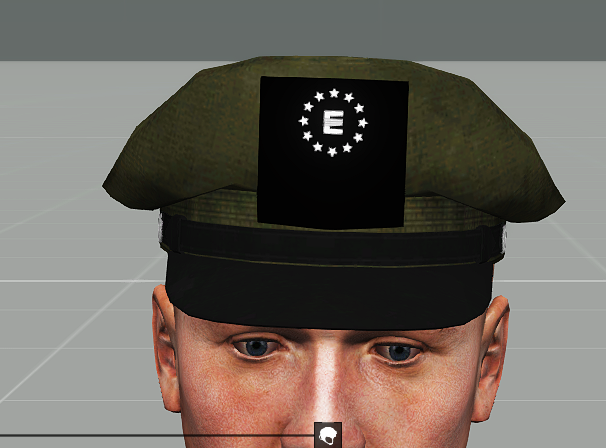
the texture is transparent
and the alpha channels show up in texview
Maybe I missed something in the rvmat?
full quarry
does the object origianlly have alpha texture
full quarry
on that part does it have an alpha transparent texture
fleet fjord
you mean in objectbuilder?
full quarry
well yes.
full quarry
are you converting your textures to .paa with correct suffixes?
well what texture have you made it to use by default
fleet fjord
do suffixes actually matter?
full quarry
yes
fleet fjord
and the default texture is the correct texture
full quarry
😑
fleet fjord
also I never thought suffixes matter
full quarry
🙈
fleet fjord
so I need to put _co after everything?
full quarry
 broken sun
does anyone know the names of the vanilla NATO Carrier GL vests in configs for retextures? or where they are located?
full quarry
characters pbos.
full quarry
you can also get the all in one config dump and look it up there
possibly, cant remember whats in each of them
broken sun
i swear i've combed it all through but yeah good point i will try the dumb instead
hey horrible,
would it be possible to remove the arm pads on it?
i assume that would probably entail diving into the 3d side of things...
bronze bolt
If it was just names you wanted, the Arma 3 assets page I always find useful. It unfortunately doesn't tell you which pbo the equipment is within though, like it does for vehicles and objects. https://community.bistudio.com/wiki/Arma_3_CfgWeapons_Equipment
broken sun
so is there a way to make the pauldrons invisible without editing the 3d model?
grand warren
Not possible without model editing
broken sun
aw man :c
bronze bolt
I've made parts of vehicles invisible before
Not sure what it is you're talking about, so don't know if it would work or not
oh, I know what you mean, I suppose you could maybe do it, but it would probably look weird
No, never mind, I just tested to be sure and it goes black. Must have been thinking of something else
 narrow tartan
Hey guys! How you doing? I wonder how to do config for 6b23 (6sh116) vest retexture from RHS. Any ideas?
grand warren
@narrow tartan
Read the RHS eula if you are even allowed to do retextures. When in doubt, contact them and ask.
narrow tartan
I've done it already
grand warren
What exactly?
narrow tartan
I checked the Eula, it should be fine with me
grand warren
"While in general we choose to tolerate re-textures of our original content, as per RHS NoDerivatives End User Agreement , we reserve the right to enforce our IP rights at our own discretion upon certain or all files, in accordance, but not limited to, the original author desire."
Better ask first
bronze bolt
I mean, if you have no plan to distribute it, then it doesn't matter
 visual agate
Considering there was just an article on RHS, id double triple check lol. There was a statement that the RHS crew took someone to court.
fervent raven
Tbh sometimes it’s the only way to make people learn that their actions have consequences
full quarry
what article was this?
spark shore
would a court behave professionally about these things?
or would they go IP theft in pew pew game is not a real crime
visual agate
full quarry
ah this one
that was CUP btw
the mentioned court case there
theres interviews from both CUP and RHS people
@dense peak is there something texture making related there?
spam is not very well tolerated here.
dense peak
i don't know what you're talking about
frozen blade
regarding RHS retextures - we do not allow any retextures retextures, we tolerate them. From a practical pov, it is more or less the same thing, with one big exception- it means we (RHS), and in particular me, can always ask you to remove these, or just drop a DMCA. I have done it before, pretty sure i will do it again.
 lone oxide
Hey! I'm trying to re-do some contact and global mobilization textures, but I need these to be loadable as a mod, so you won't need to add "scripts" to the vehicles and clothing, but they just work by themselves.
Anyone know a "legal"/"legit" way of doing so?
full quarry
its called retexturing via configs hiddenselections. basically, if a model is made so that its textures can be changed then you can create new config class for it and point the hiddenSelection textures to use your new textures that are packed into your new pbo
no original models are used for that
lone oxide
Okay. So it's just a .pbo containing a .paa texture and a config that points to the model?
full quarry
it inherits the original configs creating new version of that object/vehicle/thing and replaces few lines like name and the texturepaths
there are stuff about that on the BI forums
lone oxide
Okay. Thank you man!
visual agate
The model needs the hiddenselections though. Otherwise nothing happens
full quarry
Indeed
fading marlin
Not sure if this belongs here, or model makers, or scripting, but...
Is there away to grab the satmap texture of whatever map you're on and apply it to an object?
In practice, looking for "briefing room" prop that has the local map auto-applied.
full quarry
no
or well yes but not in usable way
the satellite image is split into 10s or 100s tiles that have x amount of overapp and usually are 20-40k pixels wide when put together
fading marlin
Copy, thanks. So the only effective way to do this would be to stitch those together and make a different prop for each map? Oof.
full quarry
no you that would not be user friendly. you would need a picture of the map in normal texture resolution
fading marlin
Sorry, that's what I meant - not to try to do it when applying the texture, but to create a larger image and save that as a resource. Either through stitching in a graphics program, or something simpler (if cringier) like screen capping at a decent resolution.
 safe needle
http://prntscr.com/rdnfb8
http://prntscr.com/rdnfwr
anyone can help ?
grand warren
you have class PoliceWOW defined two times
{
stuff
};
class PoliceWOW : PoliceWOW_base
{
more stuff
};```@safe needle
try this
wait... no... i misread...
post your whole config to pastebin.com please
full quarry
Steam Arma3 samples have a good base layout to work with.
safe needle
@grand warren
Thank you, I discovered this problem after I sent a help message and
I repaired it myself
 neat cape
Good evening (ye its evening on my time xP )
Got a little question and ill try it on the texturing section..
I would like to improve my buildings with some interior lights, and its working. But the lights are shining trough the other walls or sometimes also trough the whole building to the outside terrain.
While i was working with my helmet light, the flash cone did some weird light reflections. I have tried to add in the rvmat files of the building some masks and so the helmet flashlight cone did a well job on the surfaces, nothing weird looking.
Is there a way, to add any commands or masks to the rvmat files that the light doesnt shine trough walls? Or is it a arma engine bug?
If its a bug, is it possible to define the lights like a moon, or a sun? Cause these lights are the only lights that casts shadows and dont shine trough walls.
full quarry
Lights in Arma are quite basic, so you would need to them up so that they are not very bright and bleed through the mesh.
neat cape
So you mean, instead of adding lights to each room, i should do 1 or 2 lights at the top of the building with a hidden flare?
full quarry
No but dimmer lights.
And possibly not omnidirectional point lights, but directed ones that that point down.
silver gull
you cant block lights, its (for all intents and purposes) impossible
spark shore
how would I go as to simulate a plain glass texture
 desert raven
partial transparency?
spark shore
but of what
gray?
desert raven
nothing really depends on the glass you trying to simulate...
unless ya trying to make privacy glass textures or something with scratches, rust streakes or some other kind of surface effect other then a smidge of color for tinting, or towards black for tinted window.. glass is really nothing more then a white almost full transparency.
spark shore
makes sense
desert raven
example https://imgur.com/a/wa1Sgpi
thats a old factory glass pane texture you'd tile it over an area to make it look like individual pieces of glass. (basic but works for effect)
spark shore
now for a slightly confusing question
I'll try to phrase myself as correctly as possible
any hints as how to make that tinted side? https://imgur.com/a/mNnpkHQ
desert raven
the edging?
you can do the green easy. the effects you see on the edge of the pieces of glass is caused by internal reflections. you could just simulate it but...
not sure if arma is that high level of modeling that supports internal reflection/raytracing
as for making the basic texture for that edge use your same color but go a bit darker and a few bits more to solid that will make it appear the light has a longer path like it does looking thru the long edge of glass
spark shore
mhmm, I got the idea thanks
 rare dove
Hi, I have a problem with some textures in Unsung. They seem to be broken, cannot be opened in texview2 any longer. Any way to save their content? Sample is https://www.dropbox.com/s/fhphcgq67mfihzg/granaty_nohq.paa?dl=0
I guess I still have granaty.paa which works, so I best derive _nohq and _smdi from that?
grand warren
@rare dove
i got it open. seems like the mipmaps are 🦆ed up. want me to send you the result?
(as TGA)
rare dove
yes, please!
grand warren
1sec
here ya go
@rare dove
i think those textures might be created with the very old PAA plugin for photoshop
this can cause some serious trouble
rare dove
thanks! Any insights how to fix them? I have maybe a dozen of them in uns_east.pbo
grand warren
no clue tbh
since i couldn't open it with any of my image programs, i remembered that old PAA plugin for PS and gave it a shot. i could open it then in PS but it asked me to discard mipmaps. i exported it as TGA which should now be able to work with the files again
rare dove
argh, gimp user here 😦 guess I'm out of luck then
grand warren
i'm no texture guy, but i think mipmaps get readded to the file once converted to PAA
how many files are like this?
rare dove
let me see
grand warren
if it's not a gigabyte, pack them up and i'll try to convert them to TGA for you
severe rune
maybe my mipmap tool can unpack it?
severe rune
sec
rare dove
20 or so in uns_east
rare dove
ok, let me try!
rare dove
ok, thanks
grand warren
hmmm... strange
severe rune
This one works
no idea what the difference is... Latest release on github should be latest
grand warren
grand warren
¯_(ツ)_/¯
severe rune
you are running v8, the one I sent above is v6 which apparently works
severe rune
you prefer being able to move items in inventory around while sitting in a vehicle, or tfar beta being labeled as stable with no changes
severe rune
it always crashes when you don't supply -namestyle argument, and somehow noone ever noticed 🤔
grand warren
anyway, you can try working on the files with v6 of the tool, or pack it up and i'll batch convert it to tga if you like
@rare dove
i'm going groceries shopping now (no, i have enough TP still... and pasta...). tag me if needed
rare dove
@grand warren thanks, I drop you a link in dm then
grand warren
👍
severe rune
https://github.com/arma3/MipMapTool/releases/tag/v9 fix is up anyway. Plus param to only unpack one mip
rare dove
thanks, that worked nicely, for i in *.paa; do ../MipMapTool.exe unpack "${i}"; done
severe rune
if you just want the textures you could also script it to put them back together into a single paa. That one should be errorless then. Still dunno why texview and stuff crash on that
rare dove
pretty sure that's been recent, maybe last year or so, older tools I never had a problem with. And nowadays Mikero's tool check the texture, so the brokenness stops the build
 full cobalt
Idk if I should ask this here, so I'm sorry if this isn't the right category and I'd appreciate if you could guide me to a proper one.
I have a working icon/picture that's used for my objects (the one which shows up in inventory and next to the item in the arsenal), yet in-game I can only see the outline of it without any colour. Kinda like it's silhouette or something of the sort. I also noticed that I had a similar glitch when trying to make patches a few months ago, but I stopped that project. Any tips on how I should make my icon/picture in order for it to display properly?
 fiery wigeon
Hello all. So I know that u can create an smdi texture in photoshop quite easily but is there a tutorial or guide somewhere or does anyone know off hand how it would be done in GIMP? I've searched for it myself and came up short finding anything.
grand warren
it's old but might help
http://www.armaholic.com/forums.php?m=posts&q=8627
Armaholic - Covering the Arma series - Arma 3 | Arma 2: Operation Arrowhead | Arma 2 | Arma 2: British Armed Forces | Arma 2: Private Military Company | Armed Assault
fiery wigeon
this is for photoshop and for taxview im looking for one that shows how to do it with GIMP so i can automate it since i have 150 textures plus to produce to smdi and theres no way to automate with tax view and ps
grand warren
not a gimp user, but can't you translate that somehow?
fiery wigeon
im trying to atm but gimp is weird with the RGB channel editing much easier to do in ps
still trying ot figure out how to invert on only one channel and not all of them since the blue channel is supposed to be inverted
frank pebble
Anybody got any tutorials on weathering and dirt for ps
full quarry
its basically just painting
I dont think theres really any secret special ways to do weathering or dirt in PS since its just a painting/image editing program and not a model aware texturing tool like Substance painter forexample.
bronze bolt
Use fog/cloud/mist effects and just make it brown
maybe even search google images for smoke, remove the background, and then colour it brown
it works pretty well
frank pebble
Thanks
desert raven
https://www.youtube.com/watch?v=9M4lYZQEA8M simple example tut for dirt in PS
dense peak
Can anyone link me a good tutorial to learn how to retexture? and is using Bi's models allowed(id like to practice retexturing the kuma)
full quarry
no
retexturing is solely done by painting over the textures in gimp,paint,photoshop
you dont use the models for that
as in 9/10 cases you dont have access to the source models
silver gull
you can retexture BI models - if they are set up to be retextured. but not modify the models
full quarry
you cant use the models for something like substance painter though
dense peak
Okay that part is simpler than I thought, thanks. I googled a bit and saw i may need to use something like hidden selections or something along the nature so its confusing me a bit lol
full quarry
yes hiddenselections are the system that allows textures to be changed in config or in game with the setTextrue commands
if model does not have that set up, it can not be retextured
probably all BI vehicles, weapons and uniforms are set up for that though
modded content not always.
dense peak
If i wanted to make a retexture would I need a mod? or could i somehow get the textures and edit the original config
full quarry
you would need a mod yes
you would create a new unit/vehicle class that inherits everything from the original class of that object and then you change the name and texture parameters for your new ones
dense peak
Where would i get the file for the texture?
full quarry
some you might find as ready layered templates on BI forum or in the Arma 3 samples on Steam
or you can set up the mod development environment with unpacked game data and look through that
dense peak
sounds complicated, so if i create a new vehicle class that inherits everything would that create two seperate vehicles in editor? or does it just allow the original vehicle to have an extra texture to be selected
full quarry
that would create new vehicle yes
you probably can inject your texture into the available texture lists too
dense peak
I see this is going to take awhile for me to figure out because im bad at this, im going to go crash my arma for a few hours thanks for the help
full quarry
PMC wiki has steps to set up the dev tools and dev environment (P drive)
dense peak
i have it setup 👍
 languid umbra
so question am i able to texture a vest for a non modded server
full quarry
no
languid umbra
damn :/
visual agate
@languid umbra, youd need to make a retexture mod which has the retextures in it. But that would really be the only mod youd need.
dense peak
Question: On this guide im following for retexturing https://www.youtube.com/watch?v=qZoI7f0ApSI at 5 minutes he says he has a "template". does that mean I cant retexture without such a template or do i have to make one myself? And the
im using ia_soldier_01_clothing_nohq.png is some wierd bluish purple mess, How do i know what part of the texture corresponds to what body part?
full quarry
Templates typically are files where different details are separated on layers for easier management. A texture can be made without one.
nohq is the normalmap texture
you typically dont want to alter that if you dont absolutely know what youre doing
use _CO texture
thats where the color materials are
you can paste a UVtest grid over your new texture and apply that on the character in game with setTexture commands to see where different parts are
dense peak
Okay cool ill try what you said
With the colors now im pretty sure that i can understand what goes where now. That helps a ton
hmm this isnt as simple as paint bucket the squares on the uniform in photoshop lol
full quarry
nope.
Some models are made with retexturing in mind
some are not
and typically by todays standards the methods of retexturing like this are not anything like the texture creation process with original files and specialized programs
so it is quite difficult to make good looking new textures
dense peak
i see, I tried paint bucketing a specific section and the whole uniform got painted, this is going to take a decent while to do normally
full quarry
yes indeed.
The templates that are made for some textures make it easier when they have separated parts and detail layers. But those dont exist for all textures
dense peak
Are some if not all of the names of the textures corresponding to the c onfig classnames by chance?
full quarry
usually thats the logical way of nanming them
lone oxide
Is Contact DLC still in the e_ phase or can we retexture them now?
severe rune
still ebo
severe rune
yeah they are
for one, you don't need the current ingame texture to make a retexture. You can figure the layout out on your own.
Second you can display the texture ingame and screenshot it to find the layout
lone oxide
How would I display the texture ingame?
severe rune
¯_(ツ)_/¯
lone oxide
... well damn
full quarry
some sort of dialog that contains the texture in it or something like that
 teal briar
anyone got project zenith G2 texture templates?
full quarry
that one is cancelled I recall. So likely no.
Ripping models from other games and whatnot.
I suggest you steer away from trying to mod that one @teal briar
teal briar
the G2s arent ripped afaik
full quarry
who knows
 dapper spindle
Would i be correct in assuming it's not possible to retexture certain inventory items because....
- they have no hiddenselections
- the vanilla texture is read from the binarized p3d file
full quarry
1
full quarry
have you checked the model path in game?
should point you in right direction
also if you set up proper development environment with unpacked A3 data you can just use folder/file search for that
dense peak
https://cdn.discordapp.com/attachments/673316898733162541/689883591013826579/20200318130947_1.jpg Nothing special but at least i got it working
 full quarry
👍 yeay
spark shore
anyone can suggest a way to curve a rectangle into a circle (I need it for a texture of course)
spark shore
let me try to explain it
basically Im trying to bend a rectangular image so that one side touches its opposite one
creating a "donut"
Im using gimp
full quarry
I dont think Gimp really has way to do that
except just very tedious manipulation cutting etc
spark shore
mhm, guessed that
I'll find some other ways then, thanks
 primal spade
question, what is the best method to making a thermal mapping?
full quarry
drawing by hand
 vital pelican
Anyone happen to have the files needed to make skins for the MQ-4A Greyhawk, cant find them anywhere in the arma 3 addons folder
silver gull
best method? buy thermal camera, make photogrammetry by thermal images 😛 Most practical method - look for references on youtube, then draw by hand...
there is an addonmagingy you can buy for smartphones that has a thermal cam iirc (just because i stumbled upon it a while ago)
 coarse tree
not sure how that applies to arma terrain making anyway, there is not thermal material that gets used
https://apps.sentinel-hub.com/eo-browser/?lat=52.9743&lng=5.5939&zoom=12&time=2019-04-16&preset=CUSTOM&datasource=Sentinel-2 L1C&layers=B12,B12,B12&evalscript=cmV0dXJuIFtCMTIqMi41LEIxMioyLjUsQjEyKjIuNV07 there are some channels here you could mess around with to get something that at least would influence thermal levels
Sentinel-2 L1C imagery taken on April 16, 2019
fiery wigeon
hey so does anyone know what actual RGB values should be set at to make a proper smdi texture?
full quarry
theres a page about rvmats on BI wiki that explains what the different channels do
spark shore
apparently textures break a little if there are multiple transparent textures next to each other
is it possible to fix this?
full quarry
Possibly by alpha sorting the faces correctly. What is it that you are trying to do there?
spark shore
@full quarry trying to make holographic versions of vanilla buildings
where can I get info about alpha sorting?
spark shore
I made a _CA.paa and made a flat UV map with no overlapping faces
full quarry
yes but how do you apply it
spark shore
uhm with Object builder
pressed E and selected that texture
full quarry
what buildings are these again?
spark shore
@full quarry they are 3 of the vanilla altis civilian houses
bngalow
house big and house large
full quarry
the p3ds are binarized
spark shore
yeah I know made the models myself
full quarry
how?
spark shore
blender?
full quarry
so they are just in similar shape then?
spark shore
if you look closely they're not as detailed as the real ones
yeah I made them from scratch don't worry
I can send you the model if you dont believe me
spark shore
yeah added a slight emissiveness considering they're holograms
full quarry
what shader does it use?
spark shore
probably none