#arma3_texture
1 messages · Page 37 of 1
 buoyant beacon
Amen
 nocturne lake
Think it's just getting mipmapped. The Gripen's native alternate textures (the grey one and the blue pixel one) both looked blurry like that to me before I replaced my GPU with something that handles Ultra tex settings better
 full quarry
wee my GPU is not yet complelety obsolete xD
buoyant beacon
What's mipmapped?
nocturne lake
reduced resolution, high-compression version of the texture that is supposed to be shown at distance or when VRAM usage is too high to fit the full-resolution texture in memory
they're automatically generated as part of the .paa file
 silver gull
he's in VR - if the GPU is running out of VRAM in that already the whole game would look OFP textures on a normal island
 severe rune
dunno what other stuff might be running in background
silver gull
might just be that he isnt running it on ultra? Or that the mipmap "intelligent" algorithm is like some elitist bouncer "This is the 4k club, you dont get in without 8gig VRAM boy"
severe rune
the vanilla texture works fine tho 🤔
but i guess that's in vram first, so more space when it loads
silver gull
vanilla have VIP entry cards
severe rune
I'm suspecting a bug in hiddenselectiontextures stuff. like the material stuff with low lod
silver gull
whats that issue about?
severe rune
hiddenSelectionMaterials sometimes caused weapons to get stuck on highest(lowest? the worse one) lod
silver gull
ah oops... undocumented feature
 frigid escarp
wasnt this fixed with the recent hSM loading fix? @foggy torrent
4k textures appear to have various issues. not recommended to use
 foggy torrent
Yeah, hsm lod thing was fixed
 placid thicket
buoyant beacon
placid thicket
buoyant beacon
So, I tried the TGA files and they just ended up with a black background and some artefacts here and there, along with a faint outline of some of the details of the original texture, not even my one.
Anyway, it turns out it was actually my texture quality. For some reason it was Ultra before, High now.... anyway, fixed that.
Sorry for any inconvenience
 hardy atlas
Ultra is the only texture setting to make use of 4k
severe rune
still leaves the question why the vanilla texture looked good
nocturne lake
I don't think the green one is 4k
buoyant beacon
Good ol' Dedmen, always asking the real questions.
The original: http://prntscr.com/oq1p4w
It is 4K....
Maybe something with the mipmapping, as Monkey mentioned above
How do I check, edit that? Or is it an automatic process?
severe rune
mipmapping is automatic
I can make tools to export mipmaps/build mipmaps manually.. In about 2-3 hours of work.
But no thyme and noone cares anyway 😄
 wet sonnet
I do 
severe rune
You have tool developers that you can throw stones at to do it for you :u
full quarry
Me and @errant latch do care
wet sonnet
If I'd throw stones at them, they wouldn't do it 😢
full quarry
Try throwing gold
wet sonnet
 silver gull
try larger stones
 dense peak
when i convert my texture png to .paa via tex view it somehow screws up the colours
silver gull
resolution must be power of 2
silver gull
_co
dense peak
sorry
silver gull
np
dense peak
yeah i used the nohq to get the detail
silver gull
nohq is only for normal maps
dense peak
yeah
that worked
my bad
im pretty new to this
well
turns out the cup cz t72 textures are a mess in general
full quarry
What do you mean?
full quarry
What applies?
dense peak
part of the chassis are the texture for the acr tank
the other half for the chdky
chdkz
here are some screenshots
this is the normal cup version, not my retexture
full quarry
Well they might fix it at somepoint
dense peak
how do you apply uniform textures in the editor?
dense peak
Nvm, the thing I tried to retexture doesn't have hidden selections
 agile hazel
Any update on ebo->pbo?
full quarry
No
agile hazel
Sad ngl
dense peak
Cropping 20 different rows of molle, all with slightly different deformations, for a single vest really makes me appreciate the effort the original creators put into the mod
full quarry
Most of the time the original texturing is done with 3d texturing programs so it is not quite aems manual work as retexturing.
silver gull
still need to make the model though...
full quarry
well yes
what I meant that in the original creation workflow the texture making is very different than in retexturing workflow and usually a lot easier.
dense peak
Interesting
full quarry
that does not really help with retexturing though
full quarry
you would likely use normalmap for that
but creating a new one is quite difficult
which is why retexturing usually is only about changing the colors
full quarry
your colors are a bit bright
and at this distance and in this direct light, the normalmap wont really do much shading
dense peak
Yeah I guess
full quarry
you can see some in the sleeve wrinkles
but its also possible the shirt you are retexturing does not have any other details to it
dense peak
Well right now I'm just trying to help pookie to replace the arma 2 uniforms from the VME mod
First I'll retexture all the stuff and worry about colours later
I'm pretty new to this stuff
Maybe I should just learn how to do 3d work 🤔
full quarry
I dont think it will help in this case
would need access to source material to do anything
what does the original shirt look like compared to one of yours?
dense peak
Not on my computer ATM
full quarry
well when you can, take a comparison shot and we can see whats the difference
dense peak
Oke
dense peak
yee
full quarry
it looks like the originals may have some baked in shading to them
dense peak
yeah
full quarry
these were from A2?
nocturne lake
Does the source have a _as.paa map?
dense peak
no
nocturne lake
okay, well that's where most of the shading detail on the original texture is coming from. They baked ambient occlusion and added it as a multiply layer on top of the colours. If there's no separate _as map to extract the source ambient occlusion bake from, you will have difficulty recreating the shading
Some programs like nDo, xNormal, Substance Painter, will allow you to generate a pseudo ambient occlusion from the normal map (_nohq.paa) but it's not as authentic
dense peak
hmm
thanks for the help
ill has pookie if he can get in touch about it with the vme team
i think that at any rate my retextures are already an upgrade over the arma 2 uniforms anyways
dense peak
what is a smdi?
full quarry
 pale bough
you could use the blue channel from the original normal maps for some detail
dense peak
i use the normalmap for detail
well
i downloaded crazybump
and it allows me to quickly make a occlusionmap from the normalmap
its not great
but it works
 deft lantern
Having some issues extracting textures using TexView.
full quarry
go on
deft lantern
So, when I'm looking at PBO it isn't registering that that they are able to be extracted using TexView. I just get a blank icon. Copying and pasting them into a folder, and trying to open them with TexView that way, doesn't work either.
I've tried reinstalling both PBO and TexView to no effect.
full quarry
looking at PBO? what does that mean?
deft lantern
If I could post pictures it'd probably make more sense.
full quarry
you can post links to pictures
also please list what programs you use and what are you doing with them
I have a feeling you are not using correct procedure
deft lantern
One sec, I'll upload them to Imgur.
Right, so I've opened characters_f_exp in PBO, as seen here.
In theory, because I have TexView 2 installed, it should change the .p3d icon for headgear_beret02.p3d to the TexView 2 icon, indicating that it can be opened using that software.
It isn't doing that. Double-clicking the file produces the following; https://i.imgur.com/unu52Qf.png
Trying to c+p the headgear_beret02.p3d file out of the folder and onto say, the desktop, and trying to open it from there using TexView 2 produces the following; https://i.imgur.com/AVjnJ2G.png
I was uh, following the procedure given by JoshBologna on Youtube. https://www.youtube.com/watch?v=0HCqM_zspVc&t=207s
deft lantern
... that would explain the issue.
Aah, nevermind; it's the .paa files in the Data folder?
wet sonnet
Yes
deft lantern
Got it. Sorted. Cheers.
 dull sentinel
how to fix this https://imgur.com/rkaZFGF that encoding .rvmat files
severe rune
it's called binarization
if you unpack pbo's using a proper tool (like from mikeros suite) you won't even see that
dull sentinel
ok thanks i used PBO manager
full quarry
yeah thats not proper tool
@deft lantern for you too pbo manager is not the right tool for unpacking the data
and definitely do not use it to pack a pbo
pale bough
what's wrong with pbo manager?
full quarry
everything
it creates unbinarized pbos
its purpose is mainly to work with mission.pbos
if you want to do proper addons, use proper tools and workflows
dull sentinel
i have a same problem when extracting by Eliteness
 lofty dock
Inside of Eliteness you should be able to edit them in a text view, but extracted they may still be binarized.
full quarry
still not the correct way... 🙈
lofty dock
Didn't say it was. I was backing you up lol.
pale bough
I mean all I use PBO manager for is looking through PBOs and extracting single files
full quarry
yes but it does not extract all files correctly
pale bough
how so?
lofty dock
It doesn't unbinarize configs for example.
full quarry
it does not make rvmats, config etc readable
pale bough
good thing the arma 3 tools has a tool for that
lofty dock
Yep. That's an extra step not included in pbo manager, hence the warnings.
full quarry
Alright then, you do you. Im going back to work.
pale bough
ok
dull sentinel
yeah BankRev haven't noticed that tool before
full quarry
https://discordapp.com/channels/105462288051380224/105781923573456896/609007889977442306 @severe rune you think this coudl be a real thing?
severe rune
me forgoat
severe rune
not today. I wanted to sleep 40 minutes ago, and still haven't even started what I wanted to do and also had no food yet
full quarry
yeah dont worry about it
 silver gull
1/10 this goat is not horrible, false advertising
full quarry
silver gull
nah.... only 1.13/10. i made a quick paintover of your image https://abload.de/img/bestigor_web28ijwv.png
this is a 6.66
full quarry
🙈
dense peak
horrible Gowoat
 queen kiln
hi, how to remove alpha channel of texture
I see it as the left side, and I need to save it as seen on the right side
 acoustic dove
use _co.paa and before saving remove alpha channel
 mellow zinc
Is it possible to create a scrolling texture on something that ISNT a track, and without added some crazy scripting like this? https://forums.bohemia.net/forums/topic/221520-animate-paa/
I tried playing with the water shader and had some interesting results https://gyazo.com/66940fb0054c48558521f2d48466af6a
nocturne lake
UV animations are possible, yes
mellow zinc
Is there any documentation anywhere on this? Been searching and coming up empty.
EDIT: Found it, wasnt searching correct terms. https://community.bistudio.com/wiki/Arma_3_UVAnimations
 cinder halo
Does texture resolution have big impact when used by RV engine, lets say "hd" on today's hardware?
Many old ported models are blurry and have laughable low resolutions like 512 and max 1k (most of the time). If I to rescale and retexture most of the parts, lets say some Arma 2 building, how big of an impact it would be if use 4k textures for big and 2k for smaller parts?
mellow zinc
I believe 4k gets compressed to hell and and back when on anything but ultra and looks like garbage.
cinder halo
so no matter how high you go, it gets compressed anyway?
mellow zinc
Correct as far as im aware
If your making a building you should be using multimaterials
wet sonnet
Definitely
cinder halo
I was checking Livonia assets , and some parts are looking decent , but some parts as this door for example : https://i.imgur.com/DyOrhkR.png looks outdated as hell. I assume , it has such a low res for a reason?
lofty dock
That's a pretty good looking ARMA 2 door right there 
full quarry
could be just upscaled
doesnt necessary make it sharper
2K is safest to use
texture size wise
4K might have issues
cinder halo
Roger that. No point going beyond 2k.
 frozen blade
4K requires the use of ultra texture settings
it is gonna be the first assets to get mipmaped when engine feels it is struggling
anything less than ultra in the settings means the engine will use a lower mimaped texture (and mipmapped textures usually look worse than native 2k texture).
from a performance pov, a 4k texture is still better than 4x 2k textures (for the same resolution). modern hardware shouldn’t have an issue with these
it is just that rv likes to mipmap these quite a lot
if you wanna test a 4k asset, try my new scars from rhs usaf, see the tex difference between high and ultra
cinder halo
👍 Thank you for your detailed response, Pufu. I appreciate it. I surely will.
full quarry
there is a chance that we get a tool to inject our own mipmaps into the .paa which could make 4k textures look better even with the mipmapping
lofty dock
So what you are saying is, it's time to petition Dedmen and send him many roses to show our love.
pale bough
I heard beer is more effective 😛
severe rune
I don't really drink beer. But I guess I'll make an exception today!
frigid escarp
4k textures still have engine issues too, if i am not mistaken
full quarry
Other than the intense mipmapping?
frigid escarp
not sure. BI should have a list 🙄
 cedar lichen
wasnt the main one that after reducing from 4k to a lower mipmap was it'd get locked and never return to 4k?
frozen blade
yes, unless you change tex resolution again
nocturne lake
They still don't go back up to 4k AFAIK
acoustic dove
i thought they fixed that :/
pale bough
nope
 odd crane
Can someone explain to me what the adshq map is supposed to do?
 brittle cosmos
Do you know what an ADS texture does? The ADSHQ was added to increase the quality of AO textures by using different color channels. Tom has a comparison on his site http://tom4897.info/blog/2016/10/arma-3-ads-hq/. Here is the forum post about it https://forums.bohemia.net/forums/topic/143930-general-discussion-dev-branch/?do=findComment&comment=3108981.
full quarry
the channels used are listed here also
ADS contains both ambient shadow for close up shading and distance shading when real shadows are no longer rendered
HQ as penny said renders smoother
odd crane
I guess I never notice it. Should the other channels be much darker than the regular channel?
full quarry
in the wiki link its said green channel should be brighter than blue
wet sonnet
That reminds me I have WIP guide how to make ADSHQ for that
deft lantern
Quick question.
I vaguely remember someone mentioning there being software that allowed you to import a model and the texture, and then texture on there so you can see what you're doing a bit better. Does anyone know if that's legit, and if so, what it is?
severe rune
Substance painter
ArmorPaint
Quixel
ZBrush
3D-Coat
Choose whatever you like. I guess most people use Substance
wet sonnet
I like ZBruh better 
severe rune
That typo only existed for like half a second :U
wet sonnet
I've seen it 😛
severe rune
Actually he website I looked these up also wrote
ArmoryPaint 🤔
 cunning flare
Does anyone know what the path to the .p3d for the gorka is?
I know they are in ebo's, and cant seem to find it in config viewer.
Inheriting it in the config doesnt work either.
full quarry
make a full all in one config dump
deft lantern
@severe rune My man. ❤
frozen blade
quixel is best to be skipped by the way
is hasn't seen updates in years, and it is actually a slow running plugin for PS
silver gull
the only "pro" point it has is, that quixel is not owned by adobe... (except PS is...)
frozen blade
so you are just better of using substance, even if nowadays it is owned by adobe
silver gull
yeah
lofty dock
Especially if you are using Photoshop anyway and are already in that bag.
frozen blade
i feel these days it is better to pay 16$ for armorpaint rather than quixel
not even sure if they sell that plug anymore
i own it, but haven't used it since i switched over to substance
yeah they don't sell it anymore
silver gull
i find the whole "fully scan based" not a great selling point. Most of the time the materials are scanned at such detail/closeness that you can't even tile them properly for a 1m surface patch. It only looks good for AK's that you render for some portfolio
frozen blade
they are aiming for archviz / real time renders these days
and for getting assets fast into some indie games
all fine, i use quite a bit of their assets at work
silver gull
speaking of which, just checked substance source... they dont even have a "new" section anymore .... lol
no updates since forever
frozen blade
they added some signature collections
although for day to day use, these are hardly of any use
silver gull
they are just collections of already existing stuff, no? I already own a lot of their content
frozen blade
yes, they seem to be slacking there
there are a lot of good mats available on gumroad these days
silver gull
i dont think anyone would trade for my 380 substance source points
full quarry
perhaps pics would help
but such issues sounds like the texture is not actually correct for the model
severe rune
!issuewarning @elder canopy crossposting
 bleak bearBOT
Failed to PM @elder canopy
severe rune
Question was answered in #arma3_questions
For the mipmap tool.
I guess command line tool.
Ability to just drag&drop a couple paa files (would be much easier for me atleast) of different resolutions onto it, it will take the highest mipmap of each, pack them all together, and fill the gaps automatically with the mipmaps of the highest resolution thing you drop in.
I know you would prefer to drop png's onto it, but then I'd have to fix the DXT compression implementation, and also do things like texconvert.cfg and all that crap.
full quarry
that would work yeah
so dropping 4k and 2k .paas it would take the 4k from the first, then the 2k from the second and the rest from the 2k or just produce new ones?
working with PAA is fine.
severe rune
dropping 4k and 2k, would take the 4k res, then the 2k res as 2k mipmap, and the other mipmaps from the 4k one.
Or does it make sense to take the mipmaps that are closest to the original resolution? so take them from the 2k one?
full quarry
hmm possibly the 2k might have better ones since 1k in the 4k paa has already gone through the 2k reduction
but whoever is concerned about this stuff would then have custom 1k too if it mattered
 proper pivot
Struggling with some textures that contain partly transparent areas and noticed a comment from @full quarry on 05/22/2019 saying 'transparent and non transparent surface should not be mixed'.
(By 'struggling', I mean my texture is always 100% opaque in game regardless of whether converting with _ca etc.)
Does the comment by HG above mean you can't have parts of a texture sheet where the texture is 100% opaque and parts that are say 30% opaque? These should/would have to be split up onto different UV sets?
nocturne lake
That’s the way you should do it, yes
proper pivot
Thanks. So is that likely to be causing the issue I have where no transparency seems to work? Or do you think that's more related to the alpha transparency channel not being generated correctly? (I've tried a pure export of opacity on alpha from SP as well as export from PSP X9 forcing transparency to alpha.)
nocturne lake
Have you looked at the .paa's alpha channel in texview?
proper pivot
I think I've only just worked out how to check that properly... Standby
All looks OK in texview - my semi transparent sections have an alpha value in the 90 region
nocturne lake
Oh, also check your .rvmat to be sure that all the files referenced, are on your P:\ drive
proper pivot
Do you need something specific in the rvmat for semi transparent textures? I've just got the normal AS, SMDI and NOHQ which all seem to work OK
nocturne lake
Nothing in particular, but if it's missing a file like the env map or something, it doesn't encode transparency properly to the faces on the model. Like if you made a transparent glass window using BI's glass .rvmats it would show as black opaque if binarise doesn't have access to the .paa files used in that .rvmat from your P:\ drive
But you should still definitely separate the alpha parts. Because when you do get the alpha working, the parts you want opaque will be likely start to show signs of being transparent to SSAO
proper pivot
OK - thanks for the help.
proper pivot
One additional question - should transparency work without an rvmat at all?
I've separated off the semi transparent parts to their own texture but still have the issue.
So I've tried removing the rvmat completely and still have the texture ffully opaque. (And checks of the _ca.paa in texview show it does correctly have transparency.)
I'm packing with Mikero's pboProject 2.54, just for info
(And testing with AddonBuilder gave the same results.)
severe rune
Was the model p3d packed with the transparent texture on it?
The faces on the model store a flag whether the texture can be transparent or not. whether they need to be considered for alpha blending
proper pivot
Ah - no. They were set in hidden selections.
I'll try that now....
BINGO!
Many thanks - that's got it working
severe rune
mipmaptool "P:/wolflogo_co_mip256.paa" "P:/wolflogo_co_mip1024.paa" "P:/wolflogo_co_mip2048.paa"
https://s.sqf.ovh/VsDebugConsole_2019-08-17_15-22-52.png
If you use that format for input files it'll create P:/wolflogo_co.paa

It cannot generate new mipmaps, it only uses what it finds. So if you pack a paa from single-mipmap paa's, your output will only have these.
So you could pack a paa which only has a 4k mipmap and nothing else, I have no idea how Arma will handle that.
I think tex_mip1024_co.paa would be better right? that way you can still easily mass convert to correct texture format. I'll better change that
severe rune
MipMapTool is released now!
https://mipmap.arma3.io
Hav fun. I can make a linux build if anyone has a need for that.
Download under releases.

GitHub
Contribute to arma3/MipMapTool development by creating an account on GitHub.
full quarry
@severe rune than you!! I'll give it a go as soon as possible!
pale bough
how exactly do you use it?
severe rune
it's a command line tool. Github page says how
pale bough
nevermind I was dumb and didn't download the thing under releases 😛
it just keeps telling me the filename is the incorrect format, yet it's in the xxx_mip1234_yy.paa format
massifmulticam_mip2048_co.paa
that should be correct, right?
 burnt gale
hey if someone could help me with texturing my module I would be happy. the only problem is the rvmat
hardy atlas
What causes the _ca bug where objects become translucent when using _ca despite there clearly being no alpha there.
Or should _ca be reserved for purely alpha based textures. Not ones that have a little bit of alpha in them
nocturne lake
The latter. Only use _ca for things that are supposed to be transparent
hardy atlas
That's what I meant
So if I have a car door model for example
The glass should be seperate
frozen blade
yes
full quarry
well if its any condolence, we all have to make that section so you are in same performance level as everyone else with that
hardy atlas
Yeah, Does truly make you appreciate modern game engines even more though 😄
 ashen finch
hi, can somebody explain me how to use multiple textures on one model. For example i have 1 building p3d and want to have 4 different textured versions of this model. I heard somthing about hidden selections but i have no clue
full quarry
For terrain models hiddenselections do not work. Only for scenario objects.
Hiddenselections setup is the thing thar does it for scenario objects. It's mainly used on vehicles and characters.
A named selection on the model (often called "camo") needs to be defined in model.cfg sections array and then it can be used in the objects configs hiddenselections parameters.
ashen finch
okay thanks, im doing a terrain model :/
full quarry
Each variation then needs it's own p3d
 magic moth
hello
full quarry
👋
 zinc vessel
Does anyone know of a decent tutorial for how to add a spot for the hiddentexture "clan" functionality to show a squad.xml or Arma 3 Units image to a texture? Thank you in advance for any thoughts that anyone here might have :)
nocturne lake
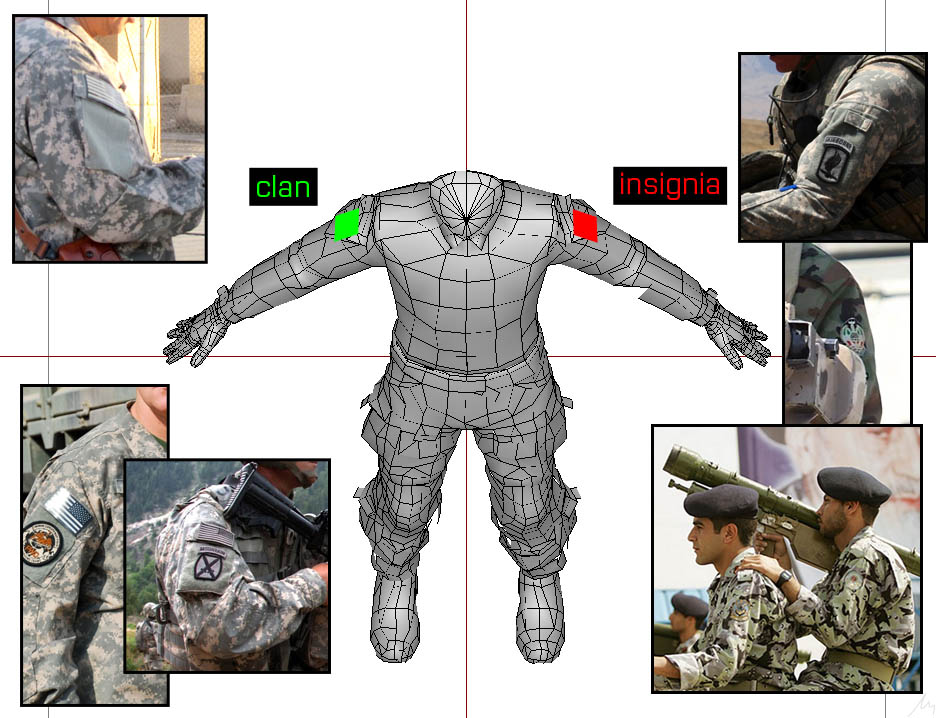
clan selection is a polygon surface in in the model, not really anything to do with the uniform textures https://community.bistudio.com/wikidata/images/0/0e/A3_insignia_infantry.jpg
 zinc vessel
Thank you, @nocturne lake . I will explore.
 lean crystal
im currently in process of making a shoulder patch mod, i build and test it throws /textures/texture_co.paa not found even though the .paa is in the pbo when i build im really new to modding
full quarry
Have you the development environment (tools, P-drive) set up and are you using proper tools to pack the pbo?
Just path /texture/file is not very good folder structure either.
full quarry
ok so create a proper project folder structure for your addon first
something like P:\madmax_myNewAddon\
for claritys sake it could be worth it to also use similar folder structure to Armas examples
so your textures would go into a data\ folder
 robust storm
Anybody got a good tutorial for unit patch texturing? I’ve created the insignia in PS but I want it to look like a patch not just a logo
full quarry
I rekon its too specific subject for a tutorial so lilkely no one has made one
robust storm
Hmmmm
full quarry
you might find something for general image editing on the internet
how to make pictue look like fabric or something like that
robust storm
Yea I’ve been looking for similar things. I’ve found some but not THE one yet..
Thanks tho
full quarry
in general the more specifc tutorial you want, the rarer it is that you find one
so often you need to figure out separate more general tasks that the thing can be made from
which in turn are documented in a guide or tutorial
robust storm
Got it.. I figured Arma guys got a guide for anything, it’s worth a shot to ask
full quarry
you should already know next to nothing arma related is documented
robust storm
What do u mean.. every time I got a question, u guys post all kinds of links.. they got retexturing guides but mostly for in game stuff
Hard to find.. yea.. but there’s stuff
full quarry
those only scratch the surface really 😄
robust storm
Very true.. plus u need a degree to understand them lol.. I got a embroidery guide for PS, I’m sure I can make it work
full quarry
something like that could be useful yeah
robust storm
Or I’ll ask one of the guys in my unit how they made ours
I try not to ask straight out like that cuz Arma guys don’t like to give away their secrets
 obsidian nimbus
So, it seems that hiddenSelectionsMaterials on headgear objects, or at least the baseball cap model, causes as bug with the shadow volume or something like that
What's odd, is that if I place two units that are wearing a headgear object that has hiddenSelectionsMaterials defined, the bugged out part of the shadow disappears, and everything seems to render normally. Deleting the second unit causes the issue to appear again
I tested with the vanilla texture and vanilla material defined in the config, and the bug appears there as well, so it isn't a problem with my material
I am on the dev build, btw
I'll just avoid using the custom material for now, but I am wondering if this is a bug or something I'm doing wrong on my end
wet sonnet
Do you have camo selection in shadow lod?
full quarry
Uuh quite odd one!
obsidian nimbus
P:\a3\characters_f\Common\capb.p3d
That's the model btw
it looks like the shadow volume and shadow buffer both have the camo selection in them
wet sonnet
Thank you, I'll look at it
obsidian nimbus
Appreciated
agile hazel
ebo->pbo any update lads?
full quarry
nope
you can pretty much see the files on your Arma install and if they area ebo or pbo
pale bough
I think he means if there's any news about when it's happening
 mossy blaze
It would be more understandable if he writes a full sentence
proper pivot
Going back to semi transparent textures again...
I've separated the transparent section of my model off onto it's own, UV sheet (hence a new selection.) Then have a _CA for the semi transparent texture and _CO for the opaque texture.
However, the part of my model that should be fully opaque appears to be very slightly transparent.
Does anyone know what might be causing this?
I've tried adding the property 'forcenotalpha = 1' to the LODs but it does not seem to make any difference.
full quarry
did you rename the source file as _CO and remove all transparency from it before converting it to _CO.paa
proper pivot
Although to double check, I could re-export from SP with no transparency...
full quarry
but whole model parameter
proper pivot
RT with regards to the forcenotalpha!
severe rune
Arma stores in the model if a face can have alpha, afaik that's per-face tho, so should be no problem to have alpha and non alpha on same lod
proper pivot
Ah - putting forcenotalpha on the geo LOD has fixed it!
Many thanks
wet sonnet
no prob 😉
 zealous pine
is it possible to texture the new vest Moduler?
pale bough
not really
Unless you wanna make a brand new texture from the ground up, you won't be able to reskin it as the original textures are still encrypted unfortunately
full quarry
well it is possible to draw the texture on a flat surface and take screenshots out if it, but its not very optimal method
nocturne lake
better to do it to UI/screenspace than an ingame surface
pale bough
hmmm, how would you do this? I'd love to be able to reskin contact stuff
lofty dock
Display the paa on a ui, screenshot it.
pale bough
I meant coding wise
nocturne lake
Something like with uiNamespace do { titleImage = findDisplay 46 ctrlCreate ["RscPicture ", -1]; titleImage ctrlSetPosition [_x,_y,_w,_h]; titleImage ctrlCommit 0; titleImage ctrlSetText "PATH\TO\texture_co.paa"; }; depending on your screen resolution and the texture resolution, you put in the x,y,w,h values to fit aspect ratio and size, and apply offset to move more of the texture in to the screen space (assuming the texture resolution is greater than the vertical resolution of your display)
Then it's just a matter of screenshotting and stitching the parts back together in photoshop, and making sure it's a proper 2^n texture size
pale bough
I guess x and y are screen resolution and w and h are texture resolution?
lofty dock
Width and height of the control. x and y are the position on screen.
pale bough
thanks
 mellow star
Is this a well-known issue that I've simply not noticed before (clutter alpha not correctly blended against sea/sky); https://postimg.cc/LhTbRL63 ???
frigid escarp
never seen this. tried different video options (ATOC especially) @mellow star ?
silver gull
it think it happened with other transparent stuff before, but i have no idea where and when (it was long ago). I seem to remember a jet canopy not appearing /appearing whit-ish when water was used as backdrop . Maybe on devbranch? Idk anymore
full quarry
tested and saw it happen
pale bough
oh yeah I've seen that happen plenty
seems to happen with any anti aliased edge when using FSAA
 leaden fox
Guys how do you export normalmaps for A3?
That's the result I get in OB:
https://media.discordapp.net/attachments/383933250596503563/617085551744516117/unknown.png
while that's Substance Painter preview:
https://media.discordapp.net/attachments/383933250596503563/617086962024841226/unknown.png
wet sonnet
That looks like broken smoothing rather than broken NOHQ map
leaden fox
the low poly model is all smoth
but with NOHQ added it looks mint in Substance painter
I've tried with smooth surfaces and ended up with that pixelart: https://media.discordapp.net/attachments/613762310930038784/617083812576493570/unknown.png?width=1065&height=453
increasing resolution to 4k didn't help, baking on sharp shading just doesn't really work
wet sonnet
all smooth? that doesn't sound right to me
pale bough
that is without a doubt broken smoothing
leaden fox
how to fix smoothing then?
Should I apply sharp edges to the low poly model?
Then I'll be left with what I posted above: pixelated normalmap on each edge
wet sonnet
apply one where it makes sense
leaden fox
then I end up with the pixel art posted above
nocturne lake
if it's all smooth in substance and you baked the normals to the all-smooth LP, it's perhaps that triangles aren't matching after import so the normals are not identical to what you baked with
But also, Arma usually uses normal maps with inverted green channel (-Y swizzle instead of +Y)
but generally it's pretty poor practise to model a hard-surface object with all smooth shading. You should use proper smoothing groups and make proper splits in the UVs along hard edges, then bake the normal map
leaden fox
I suppose it's bad practice for Arma, not in general
nocturne lake
Unless you're using face-weighted normals method, it's very unusual to have no hard edges in a LP model
leaden fox
Well
It baked perfectly in SP
Hard surface made with subdivision surface is all smooth shaded after all
silver gull
did you triangulate before export/ baking? And did you retriangulate with \ after import in OB?
leaden fox
Yea, the model was triangulated
silver gull
normals recalculated according to triangulated mesh before baking?
using proper smoothing splits (=hard edges) is key to have models look good in varied renderers
If you have a UV split, making a Smoothing split is "free" - using entire smoothed model wont benefit you in any way.
https://www.youtube.com/watch?v=ciXTyOOnBZQ 5:30 specifically (but all information in there is important if you dont know it already)
a normal rendered in Tool A, doesnt necessarily look the same as a normal displayed in Environment/ Tool B
looking at it more -> yes, the pixelated normal map is because you applied smoothing split, but not a uv split with padding. Have smoothing split -> have to have UV split.
leaden fox
Thanks, that sounds like a solution, I'll have a look on it tomorrow
 azure light
hey, i had a question if anyone could answer. Im starting to use substance painter and i don't know how to turn the PBOs into actual 3D images so i can use it in substance painter. Can anyone shed some light on how i would be able to do that?
nocturne lake
You can't get Arma models in to substance painter unless they are models you made yourself, or have access to the unbinarised model from the original author
azure light
ah i see. thank you for that info
full quarry
and if someone tells you otherwise they are working with unauthorized stolen models.
azure light
alright, thank yall for the quick response!
severe rune
Interesting discovery with MipMapTool (https://github.com/arma3/MipMapTool/issues/1)
A 4k texture in a uncompressed format, is too big to store the data size inside the paa file. The data size is only 24bit.
a 4k mipmap in uncompressed is 16MB which is too big to fit into 24bit, and the paa just writes a size of 0.
Not sure what the game does with that, but I would assume that it just doesn't load the mipmap. MipMapTool now warns about that when unpacking.
Might also be related to 8k texture issues? if the uncompressed/compressed tex is too big.
Actually.. It's 24bit SIGNED integer..
GG Arma, just as I expected. ofc having negative size mipmaps makes sense!
Man I wanna hug that programmer who wrote that.
severe rune
datasize is only used for dxt compressed textures, which is.. basically everything.
severe rune
might be interesting to @tender fjord too. length of paa mipmap is stored as signed 24bit int, meaning max mipmap data size can be 8'388'607 (that is after LZO compression)
That's only relevant for DXT type textures.
If size is too big, datasize will be 0. Not sure what Arma's reaction is to loading a 0 size mipmap, I'll try around a bit.
Added some output to MipMapTool for that
P:\>MipMapTool.exe info altis_mca.paa
MipMap Tool v4 OwO
file info:
Texture read "altis_mca.paa"
        Got tag AVGC of size 4
        Got tag MAXC of size 4
        Got tag FLAG of size 4
        Got tag OFFS of size 64
        PaletteSize 0
        MipMap Expected size: 16777216
        WARN MipMap Expected size too big to fit 16777216. This will create problems with DXT compressed textures
        MipMap data size: 0
        WARN data size is 0, but expected size is 16777216. Something is wrong with this mip. Using expected size instead
        Got mipmap size 4096x4096
Okey just tested with setObjectTexture on a billboard and single-mip paa's.
Good thing, single-mip paa's work.
Bad thing, the 4k one with datasize 0 simply doesn't load at all. I assume if you have a multi-mip one, it just uses the 2k mip.
Actually, doesn't load at all is kinda incorrect. It still displays a texture, but it's just solid color of the textures "avgColor" tag
The original texture with all mips inside it is doing something weird....
https://s.sqf.ovh/arma3client_x64_profiling_194_145986_v02_2019-09-01_16-27-22.jpg
It just fades into "avgColor" if camera is close enough. I think it tries to display the non-existent 4k mipmap and thus displays garbage

Interesting. ImageToPAA GUI tool converts my 8k png into a 4k paa 🤔
full quarry
umm Im not sure if Arma supports 8K textures
severe rune
well ImageToPAA doesn't let you convert it atleast.
full quarry
4K improvements were introduced with Apex
severe rune
Can nicely see mipmapping with my test texture :D
512, 1k, 2k, 4k
https://s.sqf.ovh/arma3client_x64_profiling_194_145986_v02_2019-09-01_16-46-41.png
 full quarry
chuul
severe rune
Texture settings on veryhigh don't load 4k at all. Only Ultra does, and only very close to camera
full quarry
I can already see crazy ideas for this!
yeah
the main problem I think has been that the 2k mipmap has not been very good
so now that it can be imporved it can help a lot with 4K texture quality
severe rune
full quarry
magnifico




 full quarry
this is very cool! @severe rune Thank you so much for this!
severe rune
I guess some documentation about the TexConvert.cfg entries would be useful too?
Listing what errorMetrics dies and what options it has, and what mipmapFilters are available such that you can make your own texture format for your purpose 🤔
severe rune
errorMetrics= Eye, Distance, DistanceXY
mipmapFilter=
Default
FadeOut
NormalizeNormalMap
NormalizeNormalMapFade
NormalizeNormalMapAlpha
AlphaNoise
NormalizeNormalMapNoise
AddAlphaNoise
limitSize=number max size, default 4096
hm I wonder if I set that to 8k...
https://s.sqf.ovh/TexView_2019-09-01_17-30-34.png
🎉

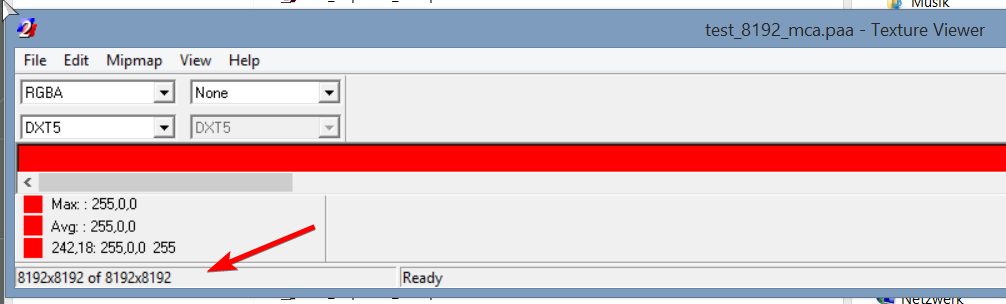
packing mipmaps...
        4->     "test_mip4_co.paa"
        8->     "test_mip8_co.paa"
        16->    "test_mip16_co.paa"
        32->    "test_mip32_co.paa"
        64->    "test_mip64_co.paa"
        128->   "test_mip128_co.paa"
        256->   "test_mip256_co.paa"
        512->   "test_mip512_co.paa"
        1024->  "test_mip1024_co.paa"
        2048->  "test_mip2048_co.paa"
        4096->  "test_mip4096_co.paa"
        8192->  "test_mip8192_co.paa"
🙃
17:33:07 Wrong color format
17:33:07 Wrong color format
17:33:07 Wrong color format
17:33:07 Wrong color format
17:33:12 Extreme texture size (8192x8192)
17:33:12 Texture init failed.
😢
autoreduce=true in TexConvert.cfg automatically reduces texture down to 4x4 if it's solid color, even if input is 4k, and even auto removes alpha.
https://www.google.com/search?q="TexConvert.cfg" Wtf is that 6 year old github repo on my githhub account that uploaded TexConvert.cfg 🤣
severe rune
 tender fjord
might be interesting to @mikero too. length of paa mipmap is stored as signed 24bit int,
I wasn't aware of that. my code treats whatever value is in there as unsigned and perhaps i should reject anything with bit23 set.
A small clarification here. That 24bit value refers to the size of the following data packet, not, the size of the mipmap and it is used by all formats.
the dxt series of formats are generally uncompressed until you hit mipmap data around the 512x512 size, making mipmap size and 'data' size generally the same.
when compressed it uses LZO for arma2 engines and beyond.
all other formats (P8, AI88 etc) use unconditional LZSS compression regardless of size.
things other, than dxt are still in use. they may be legacy, but they're very much alive and kicking.
ps @severe rune , 😍 your description of texconvert.cfg
severe rune
until you hit mipmap data around the 512x512 size
Hardcoded limit is 256x256, that is the last compressed mipmap, everything lower doesn't use LZ
silver gull
animated textures (with image catalog, like particles)
full quarry
💦
severe rune
I don't think the engine can do that :U
full quarry
wet dream
I wonder how the caustics textures play
probs some speciality of the water shader
severe rune
yeah in shader, offset based on time
if you want image catalog stuff, UV animations?
4k single mipmap texture to force it not being mipmapped down, then only display a 1024 chunk of that per image in the catalog?
silver gull
based on time -> it would have to be quantized, not "analog" (so there is no smooth movement but skipping in steps)
and you would need to overlay 2 UV animations (not sure if thats already possible?) - one for X one for Y
severe rune
Guess you need to do that with script anim source. Unless you can script in rvmat? Like.. adding a "round" to the time float
silver gull
considering animations are broadcasted over network, this seems like a bad plan
full quarry
Reyhard did not manage to find solution to it either
doesnt mean necessarily that there isnt any
severe rune
For one that sounds interesting. Tho if reyhard couldn't do it........
Script will work for sure, each frame handler setting scripted anim source on integer increments :/
We can do ultra cool model.cfg animations with the max exporter stuff and using direct source.
That ....
🤔
I don't know much about model.cfg animations.
Maybe
from time 0.01 to time 0.999 move texture from 1,1 to 1,1 thus interpolation won't do anything.
then on 1.0 to 1.999 from 2,2 to 2,2 🤔
Need to look at how model.cfg stuff works before I can think about that further 😄
full quarry
I tried that with time as animation source so it would scroll indefinitely
cant recall if I tried a scripted one
jumping like that might even work though
so the animation would have to be run once on game start
 dusk blaze
Tall or wide? Is it better to make a 512x1024 or a 1024x512?
I've read in the past, and with other engines, that wide is less efficient - something that the first number allocates a predetermined file size, thus making a wide image only half effective
full quarry
I think both are used in Arma vanillla stuff
 heavy apex
So I have got most of my cockpit done texture wise but wonder how to make night time indicator illuminating text.
That is just the CO on it for editing purposes so,...
 tired vortex
does anyone have a way to view the the tanoa map textures or have a sample config file for the tanoa map textures. i can't seem to extract and see the way it is set up.
please @teal scroll to get my attention regarding this
frigid escarp
@tired vortex SAT/MASK or surface textures from Tanoa?
tired vortex
surface/ground/ building
frigid escarp
@tired vortex you should be able to deduce the texture names from cfgSurfaces, the common naming schema and the path from the pbo name and common naming/path schema
if you would then set up fake structure on your p drive with dummy files
or you could try to extract the data via loadFile or config includes and export the data
full quarry
@tired vortex set up your P drive with the steps in PMC wiki tools setup guides
 brave wedge
Howdy, texture makers. I am currently just doodling around with a face, trying to make a facepaint. However, all my colors turn out kind of faded / odd, even though they are pretty solid in the photo editor. I.e. an area that is close to pitch black turns out kind of purple-ish.
What can be done to circumvent this?
silver gull
propably the skin shader that does this ? its not quite straight forward
brave wedge
Could be? It's just a custom face, I'll see how this next attempt looks, I made the colors more... "Solid".
It's just that the colors translate kind of weirdly, which is a shame, but eh. It'll work.
full quarry
the skin shader indeed is combination of many things
how are you trying to use the texture?
silver gull
the skin shader actually has 3 textures combined https://community.bistudio.com/wiki/Skin_shader
 drowsy oak
does anyone have a texture template for the RHS hmmw?
frozen blade
there is no such thing
we didn't release, nor plan releasing templates for any of the RHS content
@drowsy oak
drowsy oak
so how do people do their retexturings for them then?
lofty dock
Rip the texture, draw over it?
silver gull
severe rune
I always thought retextures were done with the original texture as a transparent background template thing, and then you just create new texture ontop of it
silver gull
only if you make a complete redo. Most people dont have the skills to do that, instead they just recolor stuff in a psd that was supplied to them...
severe rune
Well. What I wrote above would be the correct way to do it ^^
The retextures in my unit have also been made by just slapping a pattern over the original with some transparency
nocturne lake
doesn't really work so well if the original diffuse texture has a camo pattern on it
99% of the retexture templates in the community are user generated anyway rather than source .psd etc. Tend to be made by converting the normal map to a kind of greyscale diffuse shading map/cavity map etc., overlaying the ambient occlusion map, cropping details from the original _co that one might want to preserve (like bare metal parts that will be the same on all retextures)
often need to repaint mud and general wear etc.
severe rune
Sometimes I think it would be nice to just make a tool that lets you import p3d into substance, but sadly we have too many bad guys to ever make such a tool public. Or even public-ish
There's probably some guy sitting in his cave with such a tool, and doing some sub-par retextures for his unit. But he knows that the world couldn't cope with it.
silver gull
i consider that a hint...
full quarry
If only people we awesome to each other.
pale bough

dense peak

textures are really blurry
but i cant be arsed to do a better job with the unwrap
 full quarry
what resolution texture are you making there?
silver gull
why spend 10h on a rifle model if you cant be bothered to spend 1h on proper UVing and in turn make a shitty texture because of it ?
dense peak
true
2k
well
mainly because due to it being my first bigger project tthe topology is kinda awful
and i want to move on from this project and start something else with the knowledge i gained
silver gull
hokay🤷
dense peak
ill probably return to it some other time
plus i told someone i would try to make something
and its for a mod im pretty excited about
 still elk
Does anyone know what tools Arma3 USES to make the texture of the model
Or how is it rendered🤔
 grand warren
Internal Tools afaik
silver gull
arma doesnt MAKE texture
still elk
Okay
severe rune
please explain what you really mean
still elk
Bringing pbr-rendered models into Arma is always disappointing😂
full quarry
Totally different texture pipeline than the current pbr metalness etc workflow
Arma uses older diffuse, specular, normalmap combination
And it does take quite a bit of work or proper export settings to get close to what you might see in PBR render
still elk
confirm👌
 shut sparrow
there must be some guides to convert textures from pbr to conventional workflow
you could use this one, it's the other way tho https://marmoset.co/posts/pbr-texture-conversion/
full quarry
depends what programs you use
I recall theres export settings for Substance Painter for example that are quite good
 tight tapir
Anyone know of any good Caesar BTT templates?
pale bough
Doesn't arma 3 samples come with a template for it?
 spark shore
is there a difference between UV maps and Bump maps?
severe rune
yes.
they are completely different things 🤔
bump map (normal map) is a texture
UV map is the definition about how the textures are applied to the model
spark shore
I think I understand
I'm not so sure anymore of which of the 2 gives the effect of fake 3d
severe rune
normal map
severe rune
#arma3_texture == #particle_makers :D
Can someone explain me what the forcedInitialOrientationDir particle vector does?
frigid escarp
@broken idol or ALIAS#3048 might know, or reyhard as usual 😛
dense peak
bump map != normal map
bump map has one channel
normal maps have 3
arma only has normal maps afaik
but they both create an illusion of displacement
 broken idol
@Dedmen IIRC forceInitialOrientationDir forces the SpaceObject particle orientation, before this addition the particle was always created with random orientation.
severe rune
Thanks. Sounds reasonable 🤔
tight tapir
Totally forgot to check there, will check when I get home.
 oak cedar
Hey folks, We are trying to clean up a old pack of uniforms we made for a unit. We just want to repack it and remove some uniforms we no longer use, everything works fine on one build but when we pass the mod to another user to test, they are getting tons of missing textures.
Really, I am just looking for advice on how to troubleshoot the config.cpp and get some info as to what may be happening.
If we missed textures or models in the move, or if it's something else.
When equiping some uni's the player model simple vanishes.
severe rune
have you checked whether the missing textures are actually in the pbo?
oak cedar
Should I be getting logs for the missing textures?
I am only testing by loading it into VA from main menu, and seeing if I can use them in Arsenal
If I could get logs or something telling me X texture or p3d not found, that would be awesome.
full quarry
yeaaah AddonBuilder packs what you give it. If your stuff is not 100% correctly made, it wont tell you. but it will be broken in game
oak cedar
ahh
Okay
Can you maybe get me a link
I ended up on mod DB from the BI wiki
Mikeros?

Getting this when running, uninstalled and reinstalled.
oak cedar
Oh, do I HAVE to have a pdrive?
It's not letting me select my folder.
Found the settings
severe rune
no
full quarry
youre making addons without P drive?
I mean sure you can, but basically no one can debug your issues if you go against the common procedure
full quarry
yeah i think it wants you to set up the development environment correctly
if youre packing stuff without P drive I wager the problems with the texture paths come from that and from the fact that you got all the basics messed up
PMC wiki has steps to set up P drive and tools in easy and fool proof way.
you will want to follow that to the letter
and youll be on your way in a jiffy.
oak cedar
hmm
severe rune
I'd recomend DokanPbo for pdrive.. saves you like.. 40gb of disk space
@oak cedar the textures that you are missing, are they in your own pbos?
oak cedar
They should be.
oak cedar
They are just a group of retextures, they worked before we removed some older ones.
severe rune
did you unpack the actual pbos the user had, and checked that the textures are there?
oak cedar
So we removed a pbo that had old stuff
took two things from the old pbo, merged it into a new config
and tried to pack it.
Now everything is broken (no models at all showing) so my first guess was pathing.
Whats' weird is the output I did get from pboProject is even less helpfull
WARNING***:lod 1: trailing space(s) detected in property 'lodnoshadow  ' = '1'
WARNING***:lod 1: trailing space(s) detected in property 'autocenter ' = '0'
WARNING***:lod 1: trailing space(s) detected in property 'odnoshadow ' = '0'
WARNING***:lod 1: trailing space(s) detected in property 'odnoshadow  ' = '1'
WARNING***:lod 0: trailing space(s) detected in property 'lodnoshadow ' = '1'
WARNING***:lod 0: trailing space(s) detected in property 'lodnoshadow  ' = '1'
WARNING***:lod 0: trailing space(s) detected in property 'autocenter ' = '0'
WARNING***:lod 0: trailing space(s) detected in property 'odnoshadow ' = '0'
WARNING***:lod 0: trailing space(s) detected in property 'odnoshadow ' = '1'```searching for those props returns nothing in the config / mod I am trying to pack
Does anyone know what _generalMacro is doing?
severe rune
they are model properties
means properties in your models are broken
odnoshadow isn't even a property at all. It's missing the l at the start
oak cedar
What would cause them to break moving from one pbo to another?
Missing / Corrupt texture headers?
oak cedar
Oh
So that's not the culprit then.
Sucks it don't tell me which model we broke.
Now I have to look through all of them.
severe rune
maybe check logfiles, they might tell you more
oak cedar
I figured it out
mod/addon/PBO_ROOT/data/sub
within the config.cpp, I was looking for 'data/sub' instead of 'PBO_ROOT/data/sub'
Thus, no textures found.
full quarry
what kind of help?
severe rune
uh 🤔
afaik you are not even allowed to use "the yurapetrov" mod. so....
And for sure not port them to arma 3
full quarry
@normal mist delete that
full quarry
that mod is forbidden to use
nocturne lake
The guy who made it, said no
severe rune
RHS too I think, quite sure
But either of these you should only touch if you know how to make retextures correctly. without actually modifying the original mod
Arma 2 data files probably has a blackhawk too right? it has to..
 tidal fog
It does
 arctic owl
hi im trying an experiment with my terrain texture and learning how to use gimp. by some chance can anyone tell me if theres a tool that would allow me to fade one layer into a second one? as im trying to trace something from from my second layer onto my 1st . sorry if that sounds oddly confusing im just spending a bit of free time trying to learn image editing 🙂
 fading shard
You could lower the opacity on the first layer so you can see the second layer and then trace it, once your done increase the opacity back to 100% and Bob's your uncle @arctic owl
arctic owl
thank you !!!
 timid nebula
A guy who made a Finnish M62 Uniform for DayZ has said that it can be ported to ARMA 3 as long as he gets the proper credit. Since there's no image posting option, you can DM me to see the permission screenshot. Is there anybody here who might be able to port it over?
nocturne lake
If it's just retextures for a DayZ model that doesn't exist in Arma, it can't be ported
severe rune
I expected dayz to have a different skeleton and also not the old uniform==body method anymore. Don't know tho
 hazy mauve
Hey so i decided to be really smart and work myself past the state of exhaustion and stright into delerium. Basically i was painting on gimp until i suddenly doze off and jolted myself awake (im weird like that) i believe when i jolted myself awake that i might have hit a key on my key board or something because now when i paint i need to go over the same area 3 times until it is the color i want it to be. Ex: 1st time i make a green line , its green but visably transparent 2nd time its about 50% darker but not quite a solid color and 3rd times the charm its a full green color. I have no idea what i did to cause this but does anyone happen to know how i can fix it?
severe rune
you probably set the transparency of your brush
 lofty prawn
hello! Could anyone help me with breaking up textures for pockets etc on textures?
people have told me to do so but i don't know how to do it. I use Gimp
Here's the texture i made
(Yes i know there's a line near the middle there)
full quarry
What do you mean by breaking up pockets?
lofty prawn
I figured out how to do it. thanks though 
zinc vessel
Hello, fellow modders! Would someone here be willing to run Mikero's "DeTex" on 3 texHeaders.bin files for me -- or otherwise unbin them? I can send them straight to you by PM.
This is for a retexture for which I have full permissions as part of my unit's mod (https://github.com/Eutyches/Praetorian-Security-Operations).
P.S. If you would like a little something as a way to say "thank you," just ask. This is the only time that I have ever needed access to Mikero's premium suite, and I strongly doubt that I ever will again.
full quarry
you dont need to touch those files for retexturing
you just need configs that point to different texture files using hiddenselections
@zinc vessel looking at your git description you are already borrowing stuff without permission.
and jonzies stuff is more than questionable
zinc vessel
Negative, HorribleGoat. The only assets in the mod that fall under that category are tweaks to the Military Gear Pack, but we intentionally require subscription to that mod on the Steam Workshop. Jonzie has a CC BY 4.0 license for all of his work.
But thank you for the information about retexturing.
full quarry
doesnt matter what jonzie has lisenced his stuff with if his stuff is ripped from other games
zinc vessel
Oh, I genuinely had no idea. I will address the matter stat.
Thanks for that information.
Man, transparency is key.
May I ask what your proof is? That way, I will know what the problem is exactly and how to address it. Feel free to switch to private message, since this may not be the best use of this group chat.
full quarry
been years since that stuff was discussed. so no
also this part is troublesome
if you have no permission. you dont touch stuff
this is not the right way to do things
and if you ask someone to permission to retexture, that generally means you use configs and hiddeneselections to do it, not haxxing the models
just so that its clear
zinc vessel
Well, thank you.
I will address the Jonzie situation. I have not been involved in Arma modding for "years" -- only about 1 year, and only more seriously for a month or 2.
I never understand why folks feel compelled to be rude to newcomers, especially those of us who openly strive to follow proper protocols.
full quarry
Dont mistake my bluntness to rudeness. Youre just not first one to make mistakes so its faster to get to the point.
this stuff comes up evernow and then
so just to summarize, retexturing in general is done with configs and hiddenselections and is totally nonviolative to the original work. You just need to load the original mod as a dependency and thats it.
theres pretty much just 1 thing in RHS out of all mods that you cant retexture like this without even asking. because the said non violative means
but its of course polite to ask
if source files are released for editing then those can be used according to their licenses but uploading to Steam workshop will still requrie the permission of the original maker
due to Steam Workshop EULA
zinc vessel
Brilliant. Yes, that is what I have done most places.
However, there are some extremely messy configs that we inherited, with horrible file structures and things pointing in 10 different directions. The leader of my group actually purchased Mikero's premium tools just now, and, believe it or not, it looks like, because the configs and file paths are such a mess, having the texHeaders.bin files be unbinned will be helpful for what I have been asked to do.
full quarry
then you should be doing a config patch that uses the models and whatnot but does not touch anything inside the original work
there is no reason to unbinarize addons
if addon is set up for retexturing, then the models have hidden selections set up and those can be used.
if not then the orignal maker is the only one who will ever get anyone to debin his stuff if he has lost the orginial files
otherwise if he gives you permission to modify the files then you should ask for the original unbinned files to work with
severe rune
having the texHeaders.bin files be unbinned will be helpful for what I have been asked to do.
That has nothing to do with what you are doing. you don't need the texHeaders for anything
full quarry
it may be you have not had all the information available but this is how it should be done.
zinc vessel
Thank you, folks.
full quarry
your inheritance class would just need to overwrite the parts you want to change and it can use files from your own set up file structure
basic retexturing steps can be seen here
bit old but seemed valid by quick glance over
heavy apex
has anyone every used the sensors feature to place on texture such as an indicator
I have a missile warning indicator that I would like to use the existing sensors information
full quarry
place it where?
heavy apex
So the standard Jets DLC sensors addon to a texture source in OB
full quarry
OB?
full quarry
mm what am I lookin at?
heavy apex
Have the SENS be drawn on to that indicator
its my cockpit to the Pavehawk I am working on
heavy apex
Its ok just wanted to have less static indicators thats all.
dense peak
Hey, I know this might be a pretty frequent question, but I did look for it and couldn't find it. I know how to retexture an already existing object and duplicate it, however, is it possible to also replace the NOHQ map on the new object as well as the CO map? Thanks
full quarry
you dont duplicate objects if you retexture them
unless they are your own objects
then you can do whatever you want
but you can only retexture objects that have hiddenselection configured into them
@dense peak
so lets go over your current workflow. What is it youre doing?
dense peak
I'm extracting the paa textures from an already existing mod item
Changing it, then making a config to add it with a different name and the texture I made
Then just making a mod with the .cpp and the .paa
full quarry
alright then that is the right way
dense peak
And the point is to duplicate it in this situation, not giving it a secondary texture
full quarry
you can also try the hiddenSelenctionMaterial chaning
but I still cant remember if it was fixed
dense peak
I know, but it's uniform so that'd remove blood stains etc etc right?
full quarry
no, not the setmaterial command
theres same kind of array in the config for materials as there is for the textures
dense peak
Ok
full quarry
but it might not work right
dense peak
So that way I can replace the NOHQ?
full quarry
no you must replace the rvmat
dense peak
Ok
full quarry
and there you replace the nohq path
dense peak
Ok, but how do I set it to look for the new rvmat?
dense peak
Oh, alright.
full quarry
rvmat == material file
dense peak
Thanks man, as always. I'll try it out and tell you if it worked
dense peak
If it doesn't, how else would you recommend doing it?
full quarry
you cant
dense peak
Ok. Thanks
 dusk notch
whats the best file format for a mask and sat image? jpg, png or bmp?
full quarry
bmp or tiff are the fastest
jpg is not good for any texture work
png is nice since it takes a lot less disk space
but its slower to process
dusk notch
thank you goat man
 obtuse current
hi!!!,
which is the best option to make the mask?
it becomes very complicated to paint a very large map by hand, Is there any way to make it automatic?
full quarry
@obtuse current what mask?
if youre referring to terrain mask then best to keep terrain related questions on #arma3_terrain
grand warren
Ask jim carrey. He knows a lot about the mask
dusk notch
@obtuse current do you have qgis?
you can also make a quick one in l3dt, it wont be totally accurate but itll get the job done if ur not too texture picky
obtuse current
@dusk notch im using it, is really nice, thanks!!
 plucky onyx
I'm using the Ian Banks shader in Substance Painter and copying over all my RVMat settings into the shader settings. However, it looks much brighter in SP than in Bulldozer. What could I be missing?
It's mostly pretty 1:1 and I'm impressed otherwise 😛
severe rune
I think the default lighting configuration in buldozer might be different than the Arma terrains that you're probably playing on
plucky onyx
ahh so I should really check it in-game to be sure
it's like 2-stops brighter in SP than Bulldozer
severe rune
you can select the lighting mode in SP in the shader settings
silver gull
lighting settings for map can make significant difference - Altis looks much more desaturated/ flat because of lighting compared to VR map or Tanoa.
plucky onyx
Wow yeah, Bulldozer is way darker than most maps
SP + Ianbanks shader looks pretty bang-on to Livonia for example
Substance: https://imgur.com/TZE3Drr
matching position of key light as best as I could
silver gull
is that a plane with flesh hull and a scar/mouth on the wing? wtf 😄
plucky onyx
lol great for checking appearances of textures tho
not the real texture
it's a default material in substance
full quarry
id wager its as close as you can get it between studio and game lighting
theres always some differences
since they both render in different ways
and have different lighting
full quarry
possibly with the setObjectTexture command
or by creating a new unit config for it that inherits from the original and then replaces the hiddenselection texture lines with your new textures
drowsy oak
i got it working
brittle cosmos
If you have no alternative to using Buldozer, you can modify the lighting to look almost identical to the in-game lighting https://github.com/pennyworth12345/A3_MMSI/wiki/How-to-get-updated-lighting-in-Buldozer. That's using the Tanoa/Altis/Stratis lighting, but it's not too different form Livonia's.
full quarry
if you have not found any, then I doubt there are
drowsy oak
😦
full quarry
There is always the possibility that you make some yourself from the vanilla textures.
drowsy oak
i have a texture for the RHS 6b13, what do i have to do to retexture the vest ingame?
grand warren
Some rhs stuff is not to be retextured. Read the license
full quarry
vests you cant retexture in game, you will need to write a config with new class that uses your new texture for them
pale bough
pretty sure all vests are free game for retexturing, as far as I know the only RHS things you are not allowed to reskin are a few uniforms
severe rune
Creative Commons Attribution-NonCommercial-NoDerivs 4.0 Unported License
No derivatives basically == no texturing.
Generally.
But
drowsy oak
@full quarry how would i go about doing that? i have no experince of configs or addons
full quarry
I think there are some basic tutorials on BI forums and/or on the BI wiki
and also the Arma 3 Samples on Steam have example configs for most things
drowsy oak
ah nice
frozen blade
@pale bough note that we tolerate retextures, we do not allow it
pale bough
same difference
drowsy oak
if it bothers you guys, i can totaly use some other armor. i really appreciate your work
frozen blade
that actually means you do this on your own risk = we can always drop a hammer
we have done it before
silver gull
how do you qualify for getting hammered? ^^
nocturne lake
Removing credits/watermarks that might be in the void UV space, etc.
dense peak
@frozen blade what is forbidden besides ACU and M61s?
 versed nacelle
Simply read the EULA if RHS... It's all there
versed nacelle
I've got a very strange problem...
At the moment I have several models which use the same textures and they all show up correctly.
However, if I add another (new) model, with the same textures, they all turn up blue in-game.
silver gull
you have reached your free account texture limit, have to upgrade to premium 😛 sry no clue what the issue is. Blue/different tint is generally associated with non-powerby2 resolution textures, or alpha blending (depending on what kind of blue)
versed nacelle
The textures/rvmats are correct, since they work without a problem.
But the moment I add this new model they all break...
I can see the correct texture under the blue, so perhaps it is something wrong with the rvmats and the alpha...
severe rune
them all breaking definitely tells me either some tooootally weird user error. or its above my level
versed nacelle
99% of computer errors are caused by the user 😉
1% by the programmer
ok... I've changed the PixelShaderID and VertexShaderID in .rvmat, and now they all show up correct... Guess that these values were never updated before (after changing them in the past), and now did...
full quarry
How many models is there with the same texture?
versed nacelle
4 models which have the same textures, only rvmats are different (due to shadows)
full quarry
What shader do you use?
versed nacelle
no idea 🤣
or do you mean:
PixelShaderID = "Super";
VertexShaderID = "Super";
PixelShaderID = "Detail";
VertexShaderID = "Basic";
the "Super" were originally in the rvmats, and I changed them to "Detail/Basic", which worked
After the blue issue, I changed them back to "Super" and it works again
full quarry
what are you packing the addon with?
 hard basalt
Hey, think this is a texture related issue, on a house I have made when I look through the glass out the glass effect seems to be ok however when I look through the window at custom textures I have made the glass effect seems to go, was wondering if I needed to do something like add a rvmat to my textures or something, any help would be appreciated. https://gyazo.com/8c06ebed78becdbd0dcc978aac4f3191
full quarry
Yes you need rvmat to get glass looking surface
hard basalt
I have a rvmat on the glass texture, do I need it on the other textures or should it just be the glass that needs a rvmat?
full quarry
well all surfaces benefit from an rvmat so that they actually look good in game
 nimble field
I've just put together my first helmet mod and the textures in game come out as a jumbled mess - any ideas what the possible cause may be?
full quarry
that a new helmet model or retextures?
what did you pack the addon with?
textures correct resolution?
nimble field
my own model and packed it with addon builder
full quarry
I would recommend Mikeros tools and PBOProject for better build debug
addon builder basically lets through anything so the issue can be everywere
did you test the textures in buldozer?
nimble field
Ok I'll give that a look, it was all fine in surface painter and exported correctly, but yeah nailing quite what's happened between there and the game is not easy ^.^
full quarry
did you test it in Object Builder/Buldozer?
nimble field
ah yeah, just noticed they're screwed up in there too.
full quarry
you might have multiple uvsets on the model for example
Arma uses UVset0 for all textures
and UVset1 can be used for alternative unwrapping for special texture layers in the rvmat file
nimble field
Got it fixed, you were right, somewhere I'd shrunk the textures. Thanks for the help 🙂
dusk blaze
Just a quick check. I'm using ImageToPAA to convert textures. Sometimes it's for mass converting, and sometimes it's for one or two or just a handful. Is this way the best? Are there any other ways that don't Texel-ize the textures quite so much? I can try to increase the noise, but I still want to know if there are better options.
dense peak
@dusk blaze I use TexView 2 when I need to convert individual images to .paa and when it comes to bulk conversions I use ImageToPAA
pale bough
Texel-ize?
severe rune
Yeah pls explain what you mean by texel-ize and "quite so much" ?
ImageToPAA uses TexConvert.cfg which lets you configure conversion settings
nocturne lake
I imagine he means the compression algorithm
dusk blaze
Texel-ize... might be a Scot-ism, now that I think of it. It's the clumping and averaging of pixels in a set of 16 (4x4), or texel. When pixel variations are subtle, they can average out within the texel, creating the misperception of a low res texture mixed with a high res.
The problem gets compounded when texels themselves begin to look clumped into even bigger blocks. A good way to fight it is to use a noise overlay to ensure a texel has a better chance of picking distinct colors. In diffuse, you'd use a color noise, and in smdi you'd use grayscale noise for the G and B channels, each (although I find using in just G has better results). The downside to using noise is that sometimes you might need a solid color for the best look, so it's a huge compromise.
It seems I'm using inaccurate terms to describe my understanding of what's going on. I can't find the pages that first explained all this to me, atm. @dense peak That's the way I've been doing it since 2013. I just wanted to quick check if it was still the preferred way, just as using Addon Builder/Breaker is not the preferred way. Is there a Mikero tool that automagically converts TGAs during the binarize process, with better results preferably?
severe rune
The compression method is the same everywhere, as Arma uses it internally. So everything should produce practically the same results
 stray relic
@dusk blaze You have no choice with the tga to paa compression unfortunately and it is quite aggressive, especially problematic on dark textures with surface detail such as gun metals where you can get purple blotching. If you use _co tga's in your p3d (so that you can see the textures in Object Builder), you can just throw them into your data folder and pboProject will convert them to paa's automatically on build, if not present already. (_smdi, _as and _nohq need to be converted manually either by tex2view or imageToPaa).
One way around the issue is to move your surface detail (scratches etc) to an _mc layer, referenced in the rvmat stage 3.
dusk blaze
I've looked at that layer, but never used it. So is the _mc basically just a diffuse overlay, or does it have some lighting properties, too?
stray relic
I'll quote from the wiki, as I can't claim to be an expert
Macro texture contains alternative data to basic texture. Representation of basic texture and macro texture for given place is selected by macrotexture alpha channel (1 means only macro texture , 0 means only basic texture). RGB is calculated as LERP with basic map. Detail map is applied on the end (last) thus overlay original and macro map.```If you are using Ian Banks Substance Painter thingy, it can output _mc layers for you.
severe rune
referenced in the rvmat stage 3
depends on shader
stray relic
yes, true - super shader
silver gull
apply some noise, add sharpen filter -> less compression issues.
frozen blade
this ^^
dense peak
How are textures for weapons and vehicles(assuming the model is premade) Any recommended programs/tutorials?
Dont know if this is the right channel correct me if im wrong xd
pale bough
how are textures what?
 silent onyx
substance painter,photoshop
Substance Painter is the better option makes it alot easier to make textures if you have a model with the correct uw's
silver gull
apropos substance painter... they will phase out the option to "buy out" of your subscription fee and get a perpetual license when you cancelled. October 2020 i think is the nail in the coffing. From then on, its subscription only. As was to be expected from adobe 💩
 somber pier
@silver gull Let me guess, that sub is going to be like $199 a month or someshit in good old Adobe fashion?
silent onyx
i pay 24.88 $
acoustic dove
its 19.90$ monthly under indie licence
silent onyx
19.90 without VATS so depending on the country mine was 25%
acoustic dove
oh ok but still you get all substance programs so its still worth it
silent onyx
yep its all worth it if you use it alot 😉
acoustic dove
of course why else you would want it 😄
silent onyx
🤔 😄
acoustic dove
if you want to just test it , you got a 30 day trial
silent onyx
yep 😛
 lapis anvil
Did someone use this software?
https://store.steampowered.com/app/1140360/TextureWorks/
dense peak
@silent onyx is it basically a wrap that you retexture? Not sure tbh
silver gull
well it is now... there is no guarantee that it remains at 25. Value of product stays the same, price increase when big corps swallow a smaller studio
 cosmic tundra
Hi I need help editing this custom building. There are some things on the building I’d like to remove. I don’t know how to remove it. I haven’t made the building and I’m new to Arma 3 developing. Does anyone know how I’d remove an object from the building?
silver gull
- you ask the original creator if he allows such modification
grand warren
- you invest a lot of time in tutorials on your favorite 3D software to get the basics of 3D modeling (i suggest blender)
cosmic tundra
@silver gull @grand warren Ok thanks. Also he has given me permission. I just don’t know how to make the building go in blender. Sorry that sounded confusing
grand warren
if you have permission and the unbinarized source files, arma 3 toolbox for blender
cosmic tundra
@grand warren Idk man he said I have permission to do anything with the files. The kind of files I have are pbo and bisign or something like that files
nocturne lake
You can't make model edits with those kinds of file. You need unbinarised .p3d files
The .pbo most likely contains binarised .p3d files which can't be opened by the tools
 prime olive
Hey guys, I'm just wondering if there are any public guides on how to create materials for your objects. Seeming I have managed to create some texture maps from my base texture, however I have no idea how to really configure them into an rvmat.
stray relic
@prime olive https://community.bistudio.com/wiki/Super_shader
prime olive
Thanks!
cosmic tundra
in arma 3 object builder how do i move around
like with my mouse
to see
Idk if people understand what i mean
stray relic
@cosmic tundra In View > Projected:
Mouse scroll wheel to zoom (or Alt + Left + Right mouse buttons)
Alt + left mouse button to pan
Alt + right mouse button to rotate
cosmic tundra
@stray relic When I click projected nothing happens?
stray relic
Projected is the 3D view. You may already be in it. Try clicking View>Front and see the difference.
cosmic tundra
@stray relic ahh i understand im in projected rn but i cant move around with my mouse for some reason...
 storm dune
Hi guys! So I'm having issues with a destruction rvmat on my object. I'm testing with a rvmat I haven't done myself. (Pointing to one of the base game with setobjectmaterial) when I apply it to my object the change is barely visible (I only see it because I'm looking at the object when executing from the console) same rvmat applied to a different object works fine. My model cfg and hidden selections are correct applying other textures works fine) any ideas ?
 ebon plinth
Hi, how can I change texture of ebo/zbo packed models, this packs encrypted and I can not see UV map or currently used texture.
full quarry
With lot of patience and trial and error. You can't see the uv layout on PBOd models either. The textures do help with the quessing though.
@storm dune I'd suppose that damage rvmat is not designed for your object.
storm dune
@full quarry it's not indeed but in one of the stages of the rvmat for example there is a rust texture if I just apply it to the object with setobjecttexture it covers the whole object. So it should still show in the rvmat correct? I don't know much about rvmat isn't there like s generic damage one can use?
full quarry
Well setobjectmaterial command does not work if the said material is not present on the model when it's binarized
So it may not behave as you think.
Best approach would be to actually configure the damage texture system and use it for testing
storm dune
I have with same results
Also setobjectmaterial does work as long as a material is set on the model
I mean set a material to the object when you binarize then change it with set object material
storm dune
thing is doing this:
cursortarget setObjectMaterial [0,"\a3\data_f\destruct\default_destruct_exterior.rvmat"]
On vanilla vehicles, works no matter what the vehicle, while it doesn't work on my object (i mean the aspect does change a tiny little bit but nothing like what it shoould
full quarry
perhaps your vehicle is lacking something