#arma3_texture
1 messages · Page 34 of 1
 nocturne lake
 odd crane
yup, it's my tds
I'm going to try to make the texture a _co and see if that fixes it
Yup, worked. Hopefully I can get it out today.
 empty lance
Ah @odd crane good to see you still active
 frank swallow
what would be default values for diffuse and ambient colors for surface materials, for darker ones (grass, dirt) and lighter (bright concrete and limestone)?
 frozen blade
diffuse and ambient should be 1,1,1,1 since visual upgrade
odd crane
@empty lance yup, too poor, too dumb to do anything else 😬
 feral tapir
Is it possible to edit helmet's, mask's or armor's texture without modding? Example; Changing armor's flag
 full quarry
In theory you could pack the texture into your mission and use setTexture commands to apply it.
But if you want units that are in editor lists and all that then you would have to make an addon out of it.
nocturne lake
seobjecttexture commands don't work on cfgweapons items like armour and helmets
Only way is to make new config classes with hiddenSelectionsTextures
it works on uniforms and backpacks since they're cfgvehicles
full quarry
if vehicle proxies can be setTextured if they are configrued in CfgNonAIVehicles could character proxies be too?
we do lack commands to get the object though
so no
nevermind
then again you can just swap different colored helmet
nocturne lake
vehicle proxy retex worked on the basis of the hiddenselections of the proxy model, being defined in the vehicle too. So I guess that'd be too complex for weapons etc. where the model assigned to the proxy is constantly changing and would potentially have different named selections
or if the uniform/unit model and weapon both have the "camo1" selection
 hardy atlas
Should Multi Material make use of all 4 colour channels or can you get away with just using 3?
I assume all 4?
odd crane
You can use just 3 in the mask
You still have to have 4 in the rvmat but the 4th one can be a duplicate
hardy atlas
👍 thanks
 dusky sundial
Evening all
Was wondering if someone could potenially direct/aid me with content in relation to creating map markers as a mod?
 lyric dagger
How do you make something glow in night vision? I want to make something like the cateyes
full quarry
I dont think there is any material property for that
is there anything that behaves like that in vanilla?
empty lance
@nocturne lake ive tried hiddenselectiontextures to make uniform patches show up automatically in config files... It's not working for me... Is there something I might be missing?
empty lance
I'm prepared to say that this 'hiddenselections' syntax for automatically applying custom insignias to uniforms is broken...
i have tried these lines of syntax with "camo1"."camo2" and other derivatives, and no matter how many times i try, my patch will absolutely not show up automatically without an init call in the object window for the scenario file. im not satisfied with that
    ```hiddenSelections[] = {"Camo","insignia"};
    hiddenSelectionsTextures[] = {"","\CommCon\Nod_(OPFOR)\NodPatch.paa"}; // Patch isn't showing up automatically...```
when my AI soldiers die, they respawn WITHOUT the patch...even with the [this,"NodPatch"] call BIS_fnc_setUnitInsignia; set in the init object field AND the init On Respawn field
i have experimented with this for literally all last weekend without success...so if someone has actually managed to succeed with this, id like this person to please pull me aside and demonstrate what was done. i have investigated other mods which have patches and i cant find any differences...
 stiff pendant
Hey anyone can share a guide about how to make all the necessary textures (_co, _nohq, _sa, _smdi) for an object i'm making?
full quarry
@empty lance I believe unit insignia is run by the engine so the engi e mechanic overrides whatever you do in the config.
frozen blade
_co is diffuse
_nohq is normal's map - that is baked
_sa is ambient occlussion basically - that is baked
_smdi is a mix of gloss (blue channel) and specular (green channel)
stiff pendant
The question is how to make the _sa and _smdi. The _co and _nohq are quite obvious, but the former ones are problematic
empty lance
@full quarry are you suggesting that the scenario description file overrides the mod config file?
full quarry
@empty lance yes
empty lance
Interesting...
full quarry
Unit insignia is not meant to be set in config
It comes from the players unit info I think
empty lance
Thats one option
But i know you can call a function in config to have it show up
I did it with the flags but i forgot how
I think its an event viewer class
full quarry
There's 2 badges. Which one are you trying to use?
empty lance
Just a regular shoulder patch like an American flag or 101st patch for example. Or to put it in game terms, the Zeus patch
Its a custom patch i made. It shows up in arsenal based on mod config.cpp file. Shows up on my mission with an init function (but sources the image from the scenario file). But i want to add it to my mod config file as a more permanent solution. The hiddentextures syntax doesnt seem to call it, or maybe im not setting it up right
full quarry
Unit or insignia patch?
full quarry
I would say it's likely that the engine overwrites it.
It might not also like your filepath
empty lance
if it didnt like the file path...wouldnt it fail the first time outright?
empty lance
well, good news: i found it
well, for my flags - ill try my patches in a minute XD
problem is my flag is appearing as the wrong color XD
empty lance
there's an issue with posterizing colors right? like, ARMA cant handle anything above 24 bits compression i think i heard
any truth to that?
frozen blade
@empty lance wrong colors =
a. not 2^n size
b. no suffix
arma can handle 32 bit files (8bit/channel) just fine
empty lance
gotcha. actually i stumbled upon something outrageous
now addressing flags
https://cdn.discordapp.com/attachments/393783973131583488/553742271280054272/20190308195329_1.jpg
second from the right used the following function and worked!
    {
        scope = 2;
        accuracy = 1000;
        displayName = "Brotherhood of Nod Flag Event_JPG";
        author = "[TLS] Commander A9";
        class EventHandlers
        {
            init="(_this select 0) setFlagTexture ""\CommCon\Nod_(OPFOR)\NodFlag.jpg""";
};```EventHandlers successfully drew from a .jpg of all things instead of a .paa and actually rendered the image accurately
the blue-symbol flags attempted to draw from .paa files as is tradition and came out blue, when they should have been red
food for thought
frozen blade
.jpg is a file format that better die sooner than later, just like .3ds should
empty lance
@nocturne lake if i try paa it doesnt show up. Scale is perfect, i dont need to use init calls in mid scenario. Ill take it
Now lets see if i can get patches working this way :)
Ill let yall know how it goes
full quarry
Scale is perfect... Soo what resolution image is it?
.PAA works only with power of 2 textures. Also the texture suffixes are necessary.
empty lance
its a 600x280 surprisingly enough
what do you mean 'no suffix?'
like, what specifically should my syntax say otherwise?
file name: NodFlag.paa
file path: \CommCon\Nod_(OPFOR)
full quarry
The resolution is wrong, won't work.
Texture suffixes _CO, _CA, _NOHQ etc are used for different types of objects.
hardy atlas
Texture resolutions should aways be 2^n, i.e 512x512 or 1024x512 etc.. Make yours 512x256, Empty pixels will compress fine when stored as .paa so its better to have lots of empty space in your image then use a wierd non 2^n resolution like 600x280
GPU's handle non 2^n numbers a lot less efficiently
and you can get wierd visual artifacts
nocturne lake
Empty space isn't going to serve well on retextures like the flag texture though, since the model is mapped to the full UV space
Though I think the flags might support alpha textures now
full quarry
Wait are we taking about wavy on top of flagpole flags or shoulder patch flags
full quarry
Ah. Missed the link.
nocturne lake
But anyway, can confirm the flag proxies support alpha textures since they were updated: https://i.imgur.com/uVfcrle.jpg I remember trying to do this with a flag pack in A2 and the alpha area just showed as solid black
empty lance
well if it doesnt work, then why can i see it?
nocturne lake
because it's jpeg and doesn't undergo the encoding process that .paa do. The 2^n rule is necessary for .paa's sampling algorithms used in compression and mip-map generation
but using .jpeg instead of .paa is bad for performance of ingame textures
empty lance
im not noticing any difference
nocturne lake
You probably wont on a single object
but the fact that the game will be telling your gpu to render mip maps that don't exist for that .jpg, is a waste of resources
empty lance
what do you suggest for scale then?
nocturne lake
Has to be 512x256, 256x128 etc. etc.
that's what 2^n means. You keep multiplying 2 by 2, by 2, by 2 etc. and it will give you all the valid dimensions 2, 4, 8, 16, 32, 64, 128, 256, 512, 1024, 2048, 4096
those numbers the only dimensions that are valid
nocturne lake
nah, not sure why that's not working - pretty sure it would require scripting and adding init eventhandlers to the units but I don't know anything about scripting
empty lance
thats what im attempting
[this,"patchname"] call BIS_fnc_setUnitInsignia; is what you use in a soldier's init box to make a patch appear mid mission
{
init="(_this select 0) setFlagTexture ""\TF13_UNflag\tex\flag_1_co.paa""";
};```

an example of how the UN Flag mod worked

trying to apply similar logic since hiddentextureselections (sic) doesnt seem to want to cooperateWhat resolution was your patch texture?
If vanilla texture works, then the problem is your file.
You could try copying the UN texture to the place you try to load your custom texture and rename it as the texture you try to use and see if it loads
Also are the textures in an addon or how do you load them?
And if they are in an addon, how do you pack that addon as pbo?
@empty lance
If I have asked this before pls refresh my memory.
empty lance
its ok. we're crossing 2 different issues
flag issue im considering resolved
issue with patch/insignia is that i cant get my AI soldiers to respawn with it on them
it shows up in arsenal
[this,"patchname"] call BIS_fnc_setUnitInsignia; successfully calls the patch into the scenario
but im trying to figure out how to get it to automatically show up by using the config file. I tried hiddenselectiontextures, but that doesnt seem to work unless im not configuring it properly. the file is a .paa 128x128
i tried copying the syntax into the soldiers' On Respawn window, but that isnt working
 soft anchor
Ive been working on a retexture of a RHS weapon (for a retexture mod pack I'm working on that re-creates a MW2 theme) And I need a little help, It's just to identify some parts of the weapon on the texture map that I'm unfamiliar with, If you could lend assistance that would be brilliant! Please reply or DM if you can help
empty lance
are we talking identifying weapon nomenclature?
like 'what does this part of the rifle do?' kind of thing?
soft anchor
@empty lance What part of this rifle is what 😂 You avalible to DM?
full quarry
Draw colors on different areas and see where they land on the model.
soft anchor
@full quarry been doing that for 2 days, It's frustrating as hell as I've got other things to do lmao
nocturne lake
apply this as a texture, https://i.pinimg.com/originals/c3/72/49/c37249cb860d95a9a5139137b52cc97f.png
soft anchor
I don't even know what that is mate XD
full quarry
It is uv mapping test texture
Numbers and colors show where different parts of the model are unwrapped on the exture
soft anchor
oh, I was thinking just retexture the actual weapon texture to this, Configs are a hasstle for me lmao
full quarry
Nope
That is the wrong way
@soft anchor config retexture are the only proper way to do retextures.
soft anchor
I've got no clue when it comes to that mate, every retexture I've done up to now has been that way lmao
soft anchor
I'll try it the config way, I'll check YT
 fickle dagger
anyone knows how to remove the blood screen when getting shot itsn"t realistic and very annoying to be honest :3
Kju already made that but for arma 2 :/
empty lance
i found that you can set an insignia by default in a soldier's attributes...but AI soldiers respawning do not retain the selected insignia - they respawn without it. I thought that would have been otherwise...unless I'm missing something
 hasty echo
ok so i'm a complete noob to this, trying to follow mondkalb's tutorial but it's annoying that the links are all broken.
I'm just trying to make a static model first, which i can get to appear in game but untextured. I'm just wondering, what's the most basic way I can add a custom texture to the object? As in, I have a custom .paa file, but rvmat documentation is pretty confusing. I don't care about mapping beyond what the bare minimum to see it in game, just to see that it works. any help appreciated
 frigid escarp
hasty echo
frigid escarp
hasty echo
thanks
hasty echo
my texture is showing up as transparent brown/red for some reason, when i mess around with it, it sometimes goes white and sometimes goes back to transparent. any clues what i did wrong?
ok, so i changed the texture to a random one off the web ( a picture of grass) and now the color is green. maybe my UVs are messed up
ok nevermind, i don't know what I did differently, but now i have an ugly grass looking model so it's all good i hope
full quarry
You could look up EL_Tyranos tutorial series.
Also PMC wiki tools and development environment setup is a must.
And most test stuff require you don't skip any steps, so hurrying will likely do no good in the long run.
soft anchor
Could anyone tell me where the texture of the AK12 is located?
 acoustic dove
weapons_f_exp
soft anchor
Thank you b x
I only have _epa / _epb / _epc even though I have bought Apex lmao
Maybe I'm in the wrong folder
acoustic dove
just use search in the arma 3 folder , you will find it
 wet sonnet
Yes, you are
soft anchor
Found it, Mong moment on my side lmao
wet sonnet
haha
 golden niche
@dense peak
- Wrong channel. You are looking for #arma3_terrain
- Do the basics http://pmc.editing.wiki/doku.php?id=arma3:terrain:ultimate-terrain-tutorial
 cunning flare
https://cdn.discordapp.com/attachments/496666778735214602/554447968128729128/unknown.png
Any idea how to fix this? This tan part is not linked to any hiddenSelections... Do I have to alter the .p3d or something?
 cunning flare
Welp. So there is no other way then?
And yeah, dont wanna get 
wet sonnet
So if you'll wait for next patch, it will be fixed
cunning flare
Good stuff 👍
I guess this has already been reported then?
wet sonnet
I fixed it now, it wasn't
cunning flare
Thats great! I appreciate you 
wet sonnet

 coarse scaffold
https://imgur.com/10VqZrM What may be causing it?
frozen blade
@coarse scaffold rvmat most likely pointing towards a secondary uv set
that doesn't exist
coarse scaffold
Could I fix it in OB?
full quarry
@coarse scaffold where does that error come from?
And you can make ne uvsets in OB but perhaps would be better to set the rvmat to use only 1 uvset instead
 severe rune
Error comes from arma diag build.
rvmat seems to have a tex2 uv stage while there is no second UV set in the model
Or was it tex1 that was second uv stage?
And tex is first stage?
full quarry
Tex is uvset0 and so on
coarse scaffold
Big thanks, changing tex1 to tex for Stage 3 fixed the issue
 junior badge
how do i fix a texture not loading onto a part of a model
full quarry
make sure the part is unwrapped and the texture is actually assigned to it.
junior badge
because i have modified part of the chestrig and the cosmetic magazines which are on the chestrig doesnt load textures
without the modification it loads
even tho i didnt touch that part of the model which has the magazines
do i have to assign a texture to that group again ?
full quarry
it is possibe your modifications broke the uvmapping
pictures might help to identify the problem
junior badge
gona fire up my game sec
full quarry
they should show up in buldozer too
junior badge
full quarry
looks to me either it cant find the texture or there is no texture on them at all
junior badge
ye i think it cant find a texture for it because before the modification it loads textures
full quarry
wheres the chestrig from?
junior badge
vsm
junior badge
what do you mean by banned version of vsm
full quarry
I recall it was vsm mod that got into trouble using ripped models
also how are you editing it?
junior badge
ye i think i know what you mean wasnt it that one which had dayz models ?
full quarry
dunno what all it had
I recall BF3 models
but also as I've asked a couple times already, how are you editing it?
cunning flare
@full quarry
It is not that version. It was that experimental one that featured those.
full quarry
what are you referencing to? @cunning flare
cunning flare
There were two different VSM mods, made by the same guy. One of them contained the ripped assets and was removed from the workshop. That vest he is retexturing is from the version/addon that is currently on the workshop.
full quarry
whatever the first one was does not matter in this case. But also I hope this retexture project has already ended as it was done in totally wrong way.
in way that would, if continued end up like the first vsm
 silent mortar
@cunning flare it was not an experimental version lol... it was the main VSM release
stiff pendant
hey guys, can you recommend on some texturing sites where I can get good textures from? and also, is that possible to extract/get online the textures of the a2 buildings(The takistan's ones)?
full quarry
@stiff pendant what kind of textures? Arma 2 stuff sould be found inside the Arma 2 public released files. Or you have to own copy of Arma2
stiff pendant
I've made a basic building, and I would like to use the exact texture BI used when they made takistan. I'll find the a2 public files, i'll probably find it there.
anyway, do you know/recommend websites that share textures for different materials?
@full quarry
full quarry
I've used textures.com
stiff pendant
thanks
stiff pendant
Why do we get only rvmats from the a2 sample files? is there any way to get their textures?
'Maps - configs, scripts, scenes and source RVMATs only'
full quarry
you then need to own the game to get those I think. If theyre not in the released files
what is it that you are trying to do?
stiff pendant
I'm trying to make building that are similar to those we got on takistan and such.
full quarry
not sure if CUP has enhanced the textures on their ported set, but might be worth checking that out or asking them for tips
since most people will use CUP stuff anyway
migth be good to try to match what they have
stiff pendant
I can just use their stuff? or do I need to ask for permission?
full quarry
well if you dont copy their textures into your addon but use them directly from the CUP files then it should be kosher without asking.
as it then just makes your addon dependant of their addon
stiff pendant
I see.. and how do I do that?
full quarry
ehhh... a big question this early in the morning xP
stiff pendant
Well I have been making very simple objects, using most of the LOD's, i'm new to this world, but I have imported some objects into the game so far
full quarry
alright so you would basically just unpack the CUP stuff into your P: drive
and point your texture paths to their files
and add the addons the textures come from as required addons in your cfgPatches class in your config.cpp
hopefully you are using mikeros tools
as they are the easiest to get your development environment set up right
full quarry
for buildings you would need to use multimaterial .rvmats
nothing is simple in Armamodding
but once you get the hang of it, it will get easier
stiff pendant
i guess
stiff pendant
thanks for everything, i've had great difficulty understanding .rvmats concept
full quarry
they can be complex indeed
frozen blade
complete guide on what?
rvmats in general or multimats?
here is a example of multimat i did, maybe it is easier to understand
unpack 7z in your p drive
stiff pendant
I didn't understand how you know which class Stage to choose
in this example:
class TexGen0     {uvSource="tex";    class uvTransform{aside[]={1,0,0};    up[]={0,1,0};    dir[]={0,0,1};    pos[]={0,0,0};};};

class Stage0    {texture="a3\Structures_F\Data\Concrete\concrete_bare01_CO.tga";                texGen="0";};
class Stage5    {texture="a3\Structures_F\Data\Concrete\concrete_bare01_DTSMDI.tga";            texGen="5";};
class Stage11    {texture="a3\Structures_F\Data\Concrete\concrete_bare01_NOHQ.tga";                texGen="0";};
you used 0,5 and 11, but in the second texture:
class TexGen1         {uvSource="tex";    class uvTransform{aside[]={1,0,0};    up[]={0,1,0};    dir[]={0,0,1};    pos[]={0,0,0};};};

class Stage1    {texture="a3\Structures_F\Data\Plaster\Plaster03_4x4_Office_CO.tga";            texGen="1";};
class Stage6    {texture="a3\Structures_F\Data\Plaster\Plaster03_4x4_Office_SMDI.tga";            texGen="6";};
class Stage12    {texture="a3\Structures_F\Data\Plaster\Plaster03_4x4_Office_NOHQ.tga";            texGen="1";};
you chose 1,6 and 12. can you explain that to me?
@frozen blade
frozen blade
@stiff pendant i find it easier for me to work based on this multi.rvmat format that the default one that is arranged differently based on stage number
this one is arranged based on MASK colors
.mask is a RGB + Black color texture file
if you check that rvmat
it's broken down into parts
class TexGen0     {uvSource="tex";    class uvTransform{aside[]={1,0,0};    up[]={0,1,0};    dir[]={0,0,1};    pos[]={0,0,0};};};

class Stage0    {texture="a3\Structures_F\Data\Concrete\concrete_bare01_CO.tga";                texGen="0";};
class Stage5    {texture="a3\Structures_F\Data\Concrete\concrete_bare01_DTSMDI.tga";            texGen="5";};
class Stage11    {texture="a3\Structures_F\Data\Concrete\concrete_bare01_NOHQ.tga";                texGen="0";};```

```// RED
class TexGen1         {uvSource="tex";    class uvTransform{aside[]={1,0,0};    up[]={0,1,0};    dir[]={0,0,1};    pos[]={0,0,0};};};

class Stage1    {texture="a3\Structures_F\Data\Plaster\Plaster03_4x4_Office_CO.tga";            texGen="1";};
class Stage6    {texture="a3\Structures_F\Data\Plaster\Plaster03_4x4_Office_SMDI.tga";            texGen="6";};
class Stage12 {texture="a3\Structures_F\Data\Plaster\Plaster03_4x4_Office_NOHQ.tga"; texGen="1";};```class TexGen3 {uvSource="tex"; class uvTransform{aside[]={1,0,0}; up[]={0,1,0}; dir[]={0,0,1}; pos[]={0,0,0};};};
class Stage3 {texture="a3\Structures_F\Data\Brick\cihla_dark_co.tga"; texGen="3";};
class Stage8 {texture="#(argb,8,8,3)color(0.5,0,1,1,DTSMDI)"; texGen="3";};
class Stage14 {texture="a3\Structures_F\Data\Brick\cihla_dark_NOHQ.tga"; texGen="3";};```class TexGen2 {uvSource="tex"; class uvTransform{aside[]={1,0,0}; up[]={0,1,0}; dir[]={0,0,1}; pos[]={0,0,0};};};
class Stage2 {texture="a3\Structures_F\Data\Metal\Metal_white_lightrust_CO.tga"; texGen="2";};
class Stage7 {texture="a3\Structures_F\Data\Metal\Metal_white_lightrust_SMDI.tga"; texGen="7";};
class Stage13 {texture="a3\Structures_F\Data\Metal\Metal_white_lightrust_NOHQ.tga"; texGen="2";};```
```// MASK, MC, AS/ADS
class TexGen4 {uvSource="tex1"; class uvTransform{aside[]={1,0,0}; up[]={0,1,0}; dir[]={0,0,1}; pos[]={0,0,0};};};
class Stage4 {texture="example_multimap\data\example_MASK.tga"; texGen="4";};
class Stage9 {texture="example_multimap\data\example_MC.tga"; texGen="4";};
class Stage10 {texture="example_multimap\data\example_ADS.tga"; texGen="4";};
otherwise, you can read the default layout, found here - https://community.bistudio.com/wiki/Mondkalb's_MultiMaterial_Tutorial#Step_Three:_RVMAT
like so
texgen - allows you to modify rotation, scale, orientation of the textures - although in general should be kept @ default values, it allows one to blend/ overlay some stuff completely differently, even when using the same texture i would assume that is for randomization purposes
stages:
b. stage1 - diffuse texture (_co) - *RED* areas in the .mask file
c. stage2 - diffuse texture (_co) - *GREEN* areas in the .mask file
d. stage3 - diffuse texture (_co) - *BLUE* areas in the .mask file

e. stage4 - mask texture file

f. stage5 - (detail) + specular /gloss (or spec power) texture (_dtsmdi / _smdi) - *BLACK* areas in the .mask file
g. stage6 - (detail) + specular /gloss (or spec power) texture (_dtsmdi / _smdi) - *RED* areas in the .mask file
h. stage7 - (detail) + specular /gloss (or spec power) texture (_dtsmdi / _smdi) - *GREEN* areas in the .mask file
i. stage8 - (detail) + specular /gloss (or spec power) texture (_dtsmdi / _smdi) - *BLUE* areas in the .mask file

j. stage9 - mc (macro) texture file (4x8bit channel texture = 32bit)

k. stage10 - ADS (ambient details shadows) texture (3x8bit channel - 24bit)

l. stage11 - DX normal's  texture map(_nohq) - *BLACK* areas in the .mask file
m. stage12 - DX normal's  texture map(_nohq) - *RED* areas in the .mask file
n. stage13 - DX normal's  texture map(_nohq) - *GREEN* areas in the .mask file
o. stage14 - DX normal's  texture map(_nohq) - *BLUE* areas in the .mask file```

.it's precisely the same thing, just differently formatted - as you can see, there isn't a set of rules that apply for the order from start to finish if you have the stages in alphabetic / numbers order
stiff pendant
the stages are fixed? I mean stage 12 can't be a _co texture, right?
frozen blade
stages are fixed for all rvmats, yes (just like with the default supershader rvmat for instance - https://community.bistudio.com/wiki/Super_shader#Default_Values)
stage 1 = nohq
stage 2 = dt
stage 3 = mc
stage 4 = as
stage 5 = smdi
stage 6 = fresnel values (n/k)
stage 7 = environment
stage TI = thermal
rvmat stands for RV (the engine) Material & ATtributes
you cannot modify (just like with other set shaders and material files) the order of the input data
stiff pendant
@full quarry
I've just unpacked cup files and I can't open any file.. it gives a quick error on the top-left corner of the screen, and I can't even read what it says(can't capture it on print screen also,.weird). Do you know what might go wrong?
I'm talking about p3d files
stiff pendant
rvmats as well I see
frozen blade
what did you use to unpack the data?
full quarry
@stiff pendant don't tell me you use pbomanager...
stiff pendant
😦
stiff pendant
I got the textures I wanted.. I'm just confused a bit about how to use them
full quarry
that does everything for you
stiff pendant
I think I need to learn the whole process of texturing
full quarry
the unpacking needs to be done properly so that you can use them
stiff pendant
That's not it
stiff pendant
I made a good high quality texture using photoshop, and it seems pretty good. The thing is, when I import it into game it gets really ugly
I've been using seams and all the stuff I need to get a decent uv map for my object
still it seems very bad in game so i'm trying to figure out what went wrong
full quarry
well can you post a example of a texture youve made?
it sounds like you are missing some important steps
stiff pendant
uv map:
https://imgur.com/UrtCeFr
texture I made:
https://imgur.com/yJ0P7fZ
the whole thing together:
https://imgur.com/qtRSRcy
I know it's not perfect, but it should look fine in game.. right?
full quarry
well not quite
best way to produce buildings in Arma is the multimaterial
https://community.bistudio.com/wiki/Mondkalb's_MultiMaterial_Tutorial
most buildigns use it
and also your uvmap is wasting quite a bit of space
and those odd shaped parts will just never look good as they are too deformed
stiff pendant
I think I get it now
I need to color the texture to simple colors, and then config those colors to actual textures, right?
full quarry
in essence yes thats how multimaterial works
the colors are hardcoded to BLACK, RED, GREEN, BLUE
full quarry
in one multimaterial
often 1MM is enough for a buildings basic structure
and then details are done separately into a more normal supershader using material
Object can use as many materials and textures you want
but it is adviced to keep the numbers as low as possible
as they will start to hurt performance fast
stiff pendant
and the supershader is supposed to be inside the multimaterial rvmat?
stiff pendant
so how do I load different rvmats into one object?
full quarry
apply them to different parts of object
what do you model with?
I strongly suggest you look up some tutorials for whatever program you are using
and perhaps the El_Tyranos tutorial series
it covers a lot of things
and while it might not have exactly what you are doing, the same principles apply to all modeling and arma objects and configs
frozen blade
from a modelling/UV point of view
there is a fuckton of tutorials out there, including structures
i already sent you an example for multimats
should have you covered in terms of how you assigned certain textures to certain parts, using a single rvmat
stiff pendant
I'm using blender, again i'm new to this whole concept, mainly learning from mistakes I do along the way
I know the basics but I need to practice a lot to get some result
full quarry
then the El_Tyranos tutorial series is just for you
wet sonnet
OB > Blender 
full quarry
🤔
wet sonnet
Haters 
acoustic dove
lol , make the OB read PAA in editor window 😛
wet sonnet
Why? Use TGAs as source? 
acoustic dove
well its pain its the rear to convert PAA into TGA again
especially when i got like 500 things ha
 cunning flare
Any known issues with RVMAT's not loading correctly?
Or at least not consistently?
full quarry
Wrong kinds of textures, wrong stages, typos, wrong paths, wrong P setup.
cunning flare
Thinking specifically of the no_hq here
Everything is correct, restarting fixes it
cunning flare
foxcoat_nohq.paa
https://media.discordapp.net/attachments/556099961280921663/556867841031274541/unknown.png?width=1442&height=451
"broken after a while" version
cunning flare
So I noticed that i was able to reproduce it after being in the arsenal and trying out different outfits
After restarting lo and behold it fixed itself
Resolution is 2047x2047
🤔
The .png is 2048x2048... as it should be
Probably some wierd .texview stuff. Its probably still 2048x2048 in the .paa aswell
full quarry
what did you convert it to paa with?
paa resolution should indeed be 2048
also Im not quite sure how its broken?
the views are too different
and its possible lighting changes in the VR if you spend a lot of time in it
cunning flare
Let me get one with a better angle
Okay, same as before, working first, then broken
https://cdn.discordapp.com/attachments/512740167644217344/556894894162182145/Skjermbilde1.PNG
https://cdn.discordapp.com/attachments/512740167644217344/556894914869461022/Skjermbilde2.PNG
I am using the texview2 from the arma tools.
Also, pretty certain the time change had nothing to do with it
I think the resolution issue is a red herring. There has to be something else going on imo
frozen blade
@cunning flare convert that PNG to TGA
let O2 to convert it itself
O2 = object buiilder
cunning flare
Gotcha. It is however just a retexture of the AAF uniform with custom mats. Would converting it in O2 break any rules? I assume so?
frozen blade
ahh ok, won't be able to do that
nocturne lake
hiddenSelectionsMaterials doesn't work 100% of the time. There's not a lot you can do about it with regard to getting custom .rvmats on existing character and gear models
frozen blade
^^ this, damn ninjaed me
full quarry
aah its a retexture
hiddenselectionmaterial is reliable only if the all materials used are present in the model p3d when its binarized
severe rune
I wonder 🤔
Can you include fake materials into the binarized p3d that are never actually used.. and will that work 🤔
full quarry
how would one do so?
severe rune
Use a custom self-written binarizer 😄
full quarry
Ah! I knew some sort of black magic would be involved
frozen blade
i think it is possible to assign a material for a single vertex
that won't render anyways
say goodbye to draw calls as well
severe rune
Yeah that's my problem with putting material in model.. You F your section count.
Custom binarizer could solve that with a model.cfg entry that links the materials in without actually being used on a vert. But dunno if that's enough for hiddensel
 silver gull
does it need to be defined just in the model once (p3d) or in each LOD to work?
otherwise you can just use some custom lod number that is never used...
full quarry
I think having them in edit lod was enough
cunning flare
Well this conversation just went well above my head. Gotta read up on this stuff I suppose. Thanks for the help anyways 😘
 random hemlock
what's the easiest way to mass convert paa files to tga or png, and viceversa?
severe rune
images to PAA -> ImageToPAAGui
Other way around.. uh...
 trail venture
does somebody know the sizes of the blank signs available in the eden editor ?
 lean osprey
@trail venture I generally just take a screenshot of the signboard for the aspect ratio then add the image you want via Photoshop (or paint) ... once you happy then convert the image to 1:1 ratio and apply desired size. Generally I go for 256x256 if its small sign. 512x512 for bigger signs and 1024x1024 if the images needs detail like finer texts.
Once done export as png (still keeping the 1:1 aspect ratio) and using textviewer (arma tools) save it as .paa.
Doing this way over jpg or png will make the custom text load on mission start and not like with jpg only if you are close enough.
Reason to use 1:1 aspect ratio is it avoids the inverted colour issue and the game will stretch the image to fit
 placid thicket
if you're baking a helmet is it a good idea to include the head model you're using so you can bake AO from the head? 
placid thicket
aight
 dense peak
Yo d00ds, question:
I'm hunting for a method to maintain uniforms details (stitching, knee pads, etc...) but simply selecting and editing the camo patterns, I'm noticing that similar uniforms have the same stitching with camo patterns over it. I reached out to another discord that deals with 3d modeling but I figured I'd come thru here as well. I've attempted trying to do threshold maps and working from AO maps, but it's not capturing details like others
I'm seeing that people are slapping camo over G3 uniforms no problem with maintaining the details, and am baffled on how they're doing that to the UVW maps.
full quarry
I would say there is no way to just select and edit camo patterns on flattened texture image
you would need layered texture source to properly do stuff like that
or recreate the detail layers from the available data if possible
dense peak
So I’m only asking cause I’m seeing individuals recreate cryegen g3 uniforms with seams in the same place and new camo; is there a template I am missing? Is there a workflow I can look into?
dense peak
Well what I've found to work is - desaturating from Normal map > creating a new colormap from there and > manually create details like stitching, just curious how everyone is getting these G3 uniforms with the details to maintain
 lone oxide
Hey, having some trouble getting the A3 vehicles to substance painter or blender. Does anyone know an easy way to do this?
nocturne lake
You can't
converting models from the game to editable formats is a breach of the EULA
lone oxide
Oh, wasn't aware. How do you guys view textures for default vehicles then?
full quarry
in game
lone oxide
With Buldozer?
nocturne lake
photoshop+setobjecttexture ingame
lone oxide
Okay, I'll try 😃 Thank you
nocturne lake
It's a pain in the arse honestly. But it's the way everybody did retexturing and indeed most original texturing, before anybody had software to paint in 3D
lone oxide
I'm used to custom models, which is easy to import to 3d software, sadly it's a little harder here :D
Where would I find the Ifrit and the orca in my a3 folder?
full quarry
one is a car so somewhere in the soft_f stuff I recall
and other is a helo so one of the helicopter folders
lone oxide
Okay. Does anyone use custom made models as placeholders, to be able to use stuff like Substance Painter, or would that also break EULA?
http://prntscr.com/n1ijdn Is this what I'm looking for?
nocturne lake
custom models wont work unless the UVs match exactly
severe rune
what do you mean by placeholder?
Cant resonably remake a model with exactly matching UV
wet sonnet
Ifrit
lone oxide
Perfect, thx 😄
lone oxide
Anyone have a UV map for the ifrit?
silver gull
a UV map is transfering 3d locations onto 2d. If you dont have access to the 3d model you cant have a UV map. so no
severe rune
but if it is in the samples. Then I assume that's the version with UV
full quarry
it is not in the samples unfortunately
some of the texture templates are collected on a BI forums thread I recall
lone oxide
Figured out I didn't actually need it 😄
What's the thing to put before "SetObjectTexture"?
lone oxide
no in the init, it has a "starter" thing before it 😄
severe rune
don't know what you mean
lone oxide
SetObjectTexture [0, "C:\Users\mathi\Documents\TexturingJobs\ReaperIfrit.paa"]
lone oxide
If i set it in the vehicle init, what do I put then?
severe rune
in init script in editor. The object is in this
severe rune
uh..
nothing
the object is this you need the object
thus you just put this there and be done.
severe rune
the path to the texture is invalid
Arma can't resolve global paths
it has it's own internal filesystem
put your texture into your mission
or into a mod's pbo
severe rune
My documents/Arma 3/missions or mpmissions
there's your mission
just put your texture into there
and then just use the filename in your setObjectTexture
lone oxide
this setObjectTexture [1, "C:\Users\mathi\Documents\Arma 3 - Other Profiles\LCpl%20M%2eWestergaard\mpmissions\ReaperIfrit.png"];
no work lol
it's a png...
paa doesn't work either :/
severe rune
and then just use the filename in your setObjectTexture
you are not using just the filename
and that's also not your mission directory
mpmissions is the folder that contains all your missions, you need to put it into your mission, not next to it
also you are missing the _co suffix on your texture
name it ReaperIfrit_cp.png before you convert to paa
lone oxide
cp or co?
lone oxide
thx
Okay, made a mpmission, threw the "ReaperIfrit_co.paa" into it, used this: this setObjectTexture [1, "ReaperIfrit_co.paa"]; but still no skin...
lone oxide
Changed to 0, still nothing showing up. No error on screen
severe rune
error in RPT though?
lone oxide
RPT?
full quarry
what resolution is the texure?
severe rune
Arma RPT. Logfile.
lone oxide
2048x2048
full quarry
and what did you convert it to .paa with
severe rune
%localappdata%/Arma 3
lone oxide
23:53:49 a3\weapons_f\binocular\nvg_proxy_off.p3d: No geometry and no visual shape
23:53:54 a3\structures_f_exp\signs\companies\cornerads_01_v2_f.p3d: No geometry and no visual shape
23:54:00 Placement slopelandcontact failed on model a3\structures_f_exp\walls\net\netfence_01_m_8m_nolc_f.p3d. Missing landcontact or no points in it.
23:54:02 Weather was forced to change
23:54:02 a3\data_f\proxies\flags\flag_auto.p3d: No geometry and no visual shape
23:54:09 Loading movesType CfgMovesButterfly
23:54:09 Creating action map cache
23:54:09 MovesType CfgMovesButterfly load time 26 ms
23:54:10 Loading movesType CfgMovesBird
23:54:10 Creating action map cache
23:54:15 a3\map_vr\data\obloha.p3d: No geometry and no visual shape
23:54:15 a3\3den\objects\cursor.p3d: No geometry and no visual shape
23:54:49 a3\data_f\proxies\flags\flag_alone.p3d: No geometry and no visual shape
23:55:15 Error in expression <SetObjectTexture [0, "C:\Users\mathi\Documents\TexturingJ>
23:55:15   Error position: <[0, "C:\Users\mathi\Documents\TexturingJ>
23:55:15   Error Missing ;
23:55:15 Wrong color format ```This is the latest, about 20 mins ago
severe rune
Error Missing ; 🤔
lone oxide
That's at the end, copy pasted from the link you sent me
this setObjectTexture [0, "ReaperIfrit_co.paa"];
severe rune
out of ideas
lone oxide
Thanks for the attempt anyways
So uhh, you apparently just have to play the scenario lol... @severe rune



 lone oxide
I figured, why not just try it. Vehicle turns gray, I'm like wtf is this, then realize that's my ugly ass texture on there
So, the ifrit has two files... How do I make the second one go on the back?
Not the biggest fan of tires on the roof...

 cosmic sand
im uhhh trying to texture a road but ..... how do i convert a paa to jpg?
 pale bough
open it up in texture viewer and then Save As
set it to file type All Files and then add .png
don't think it works with .jpg
cosmic sand
ahh oki thank you very much ❤ was wondering becayse of jpg not working i was confused a.f
full quarry
Jpg is not a file format generally used in game development
 true pivot
Better of using .png
dense peak
Can anyone explain the stages in rvmat?? Do the directly coorilate to spec/AO/etc?? Or can they be all willie nilly and placed in any stage
severe rune
each stage stands for a specific texture
depends on which shader you are using
And for all other shaders: https://gist.github.com/dedmen/90691e56c2dd77bc152ce0a48caf47ba
 cobalt wind
can anyone direct me to a how-to on retexturing rhs afrf uniform?
all i am ending up with is the default model uniform 😦
full quarry
edit texture
create new class that uses that new texture in the hiddenSelections array
full quarry
or texture path or texture type
cobalt wind
`class cfgWeapons {
class UniformItem;
class rhs_uniform_flora;
class msi_ia_brownbase_uniform: rhs_uniform_flora
{
dlc = "TES UNIFORM";
displayName = "Brown";
scope = 2;
scopeArsenal = 2;
hiddenSelections[] = {"camo"};
hiddenSelectionsTextures[] = {"iamsifaction\data\msi_ia_brownbase"};
class ItemInfo: UniformItem
{
uniformModel = "-";
uniformClass = "B_INA_Section_Commander_01";
containerClass = "Supply40";
mass = 40;
};
};
};`
like this right?
iamsifaction\data\msi_ia_brownbase.paa thats the texture.
full quarry
uniform item is the thing you see on the ground and in the inventory
it is not the character you look like when you put on the uniform
you would have to create a new cfgvehicles unit class that inherits from that character, apply the hiddenselectiontexture there and then create a cfgweapons uniform class that uses the new looking character
cobalt wind
i just realized, created unnit is BLUFor and uniform is OPFor. that gonna make a difference?
cobalt wind
`class B_Soldier_base_F;
class B_INA_Section_Commander_01 : B_Soldier_base_F {
author = "xBloodshed";
scope = 2;
scopeCurator = 2;
displayName = "Section Commander";
side = 1;
faction = "B_MSI_INArmy";
    identityTypes[] = {"Head_TK","LanguageENG_F"};

    linkedItems[] = {"rhssaf_vest_otv_md2camo","rhsgref_fieldcap_ttsko_forest","ItemMap","ItemRadio","ItemCompass","ItemWatch"};
    respawnlinkedItems[] = {"rhssaf_vest_otv_md2camo","rhsgref_fieldcap_ttsko_forest","ItemMap","ItemRadio","ItemCompass","ItemWatch"};

    weapons[] = {"rhs_weap_akm","rhsusf_weap_m9","Binocular"};
    respawnWeapons[] = {"rhs_weap_akm","rhsusf_weap_m9","Binocular"};

    magazines[] = {"rhs_30Rnd_762x39mm_bakelite","rhsusf_mag_15Rnd_9x19_JHP","rhs_30Rnd_762x39mm_bakelite","rhsusf_mag_15Rnd_9x19_JHP"};
    respawnMagazines[] = {"rhs_30Rnd_762x39mm_bakelite","rhsusf_mag_15Rnd_9x19_JHP","rhs_30Rnd_762x39mm_bakelite","rhsusf_mag_15Rnd_9x19_JHP"};

    uniformClass = "msi_ia_brownbase_uniform";
    camouflage = 1.6;
    hiddenSelections[] = {"camo"};
    HiddenSelectionsTextures[] = {"iamsifaction\data\msi_ia_brownbase"};
};`
not like that no.
full quarry
you need to inherit from the character that uses the correct model
cobalt wind
ah!
lone oxide
With the Ifrit, using the setObjectTexture, how do I make one texture the back, and the other the front part?
nocturne lake
aye: 0 = first hiddenSelection, 1 = second hiddenSelection etc. etc.
lone oxide
So 0 is the main, 1 is the back?
cobalt wind
o man. still can't get this to work.
here's d edit's in the cpp
`class cfgWeapons {
class UniformItem;
class rhs_uniform_vdv_flora;
class msi_ia_brownbase_uniform: rhs_uniform_vdv_flora
{

    displayName = "Brown";
    scope = 2;
    scopeArsenal = 2;
    hiddenSelections[] = {"camo"};
    hiddenSelectionsTextures[] = {"iamsifaction\data\msi_ia_brownbase"};
    class ItemInfo: UniformItem
    {
        uniformModel = "-";
        uniformClass = "B_INArmy_Section_Commander_01";
        containerClass = "Supply40";
        mass = 40;
    };
};
};
class cfgVehicles {
class rhs_vdv_flora_rifleman;
class B_INArmy_Section_Commander_01 : rhs_vdv_flora_rifleman {
    author = "xBloodshed";
    scope = 2;
    scopeCurator = 2;
    displayName = "Section Commander";
    side = 1;
    faction = "B_MSI_INArmy";

    identityTypes[] = {"Head_TK","LanguageENG_F"};

   --------

    uniformClass = "msi_ia_brownbase_uniform";
    camouflage = 1.6;
    hiddenSelections[] = {"camo"};
    HiddenSelectionsTextures[] = {"iamsifaction\data\msi_ia_brownbase"};
};
}` Where di i fk up? 😦
nocturne lake
@lone oxide probably but you can test by doing vehicle player setObjectTexture [0,"#(argb,8,8,3)color(1,0,0,1.0,CO)"];vehicle player setObjectTexture [1,"#(argb,8,8,3)color(0,1,0,1.0,CO)"];vehicle player setObjectTexture [2,"#(argb,8,8,3)color(0,0,1,1.0,CO)"]; etc
and see which parts are Red, Green, blue etc.
lone oxide
Oh, thank you.
 bold kayak
Can we share screenshots of our designs here?
severe rune
Sure yes
bold kayak
I made a N7 Ifrit, just had to show it off.
https://i.imgur.com/1Q4ImlA.jpg
https://i.imgur.com/Sn9Soaf.jpg

 nocturne lake
carbon fibre 👍
bold kayak
Yeah, its pretty. Ill post more designs since its okay when I make them. o/
severe rune
Did you paint that in 2D?
I think the ifrit in the samples doesn't have UV right?
I don't think I could do that in 2D 😄 all the edgewear hrr
full quarry
Ifrits texture is quite straight forward
bold kayak
Ifrit texture is one of the easier ones to work with. Its fun to map out and find all the parts. And yeah I create my own templates and they are pretty good textures.
Taru is the hardest for me so far, but I did complete making a good design for that one.
Espically if you have a big design wrapping around the vehicle, and trying to get all 3 textures to line up and look seemless.
placid thicket
can anyone give me some texture crit?
frozen blade
on what
placid thicket


ay yeah it would probably help if it just wasn't some random discord link ;~;
some kinda chinese steel pot from the 80s
placid thicket
aight, I can mask some of that out then
silver gull
the colors look very vivid (too satured) but idk - maybe thats how it actually looks in your reference...
 ashen finch
Can someone tell me why the texture is ingame bad and in object builder 4k ?
https://cdn.discordapp.com/attachments/556833649383964682/559725817584812042/20190325140727_1.jpg
https://cdn.discordapp.com/attachments/556833649383964682/559725668267589632/unknown.png

 full quarry
Could be your video settings or lack of machine power
Arma by default uses 2k textures and use of 4k should be limited
asset like that for example should use multimaterial and 2k textures
ashen finch
other objects show up the same in ob and ingame and i will try 2k
full quarry
pls
DO NOT use that much 4k textures
it is bad practice
structure objects like that work best with multimaterial
ashen finch
same result with 2k textrue, any other idea?
full quarry
well it also looks like your normalmap is not applied
are you following the correct texture suffix naming protocol?
are you packing with AddonBuilder or PboProject?
(pls dont say PBOmanager.....)
ashen finch
https://pastebin.com/t8ZusiUz the rvmat
suffix should be right, pboProject
wet sonnet
And if it's really some bigger structure, just use multimat
stiff pendant
i've been trying to understand how to use rv mats and I came with a conclusion:
either i'm dumb, or this crap is overcomplicated
stiff pendant
is there any guide for mentally retarded people? I think that's the only one I can understand
i'm trying to understand how to multilmaterial rvmat works. I understood that I need to make a texture that is colorised to basic 4 colors - red,green,blue and black(?), and through this colors, I somehow set spesific texture to a specific color
Do I simple use RGB colors and(for example, red will be 255,0,0) and the rvmat will read that?
stiff pendant
Yes. I didn't understand why he uses texgens 4,5,6, etc. , when we declared that 0 is black, 1 is red, 2 is green and 3 is blue. what are the next texgens for? and is every texgen is constant?
full quarry
different texgens can be used for different texture scalings
severe rune
texGen just tells which UvSource to use
usually you have the uvSource entry inside the Stage
but there can only be X number of sources. And as multimat has more than X stages, it wouldn't work if each stage had a seperate source.
So you need to use texGen's, and reuse some sources for multiple inputs
full quarry
@stiff pendant you can search this channel for multimaterial discussion
it has been explained a couple of times in the past few months
stiff pendant
I'll see what you guys wrote in the past, and see if that helps
full quarry
there are aslo commented example rvmats
frozen blade
i thought i explained the multimats already @stiff pendant here - https://discordapp.com/channels/105462288051380224/105781923573456896/555321439369297920
what texgen allows, is to have different rotations/ scale etc for the same texture
say you have a noisy generic normal map, and you wanna use it that across multiple textures, you can do that
 vivid sentinel
Probably better suited in here:
Anyone have any idea about why the decal is changing colors when rotated, however?
https://imgur.com/a/YSobhf4
frozen blade
you rotating a normals map as well?
vivid sentinel
thats just rotating the object in Ed3n/Terrain Builder
frozen blade
by decal you mean something on the ground yeah?
vivid sentinel
correct
full quarry
possibly the shading of your decal is off somehow
is it flat or smooth shaded in OB?
vivid sentinel
I am not sure, tbh. How would I check?
I just followed Cringos simple decal tutorial
vivid sentinel
Bi textures
literally just the normal from the BI concrete texture, along with the texture itself
full quarry
is the RVMAT based on some BI decal?
vivid sentinel
correct
I think I fixed it
I changed the nopx to nohq when I was copying how BI did theirs, but obviously that's a dumb thing to do considering the Nopx contains info that the nohq isn't suppose to have
 white cargo
you can't use nopx on p3ds anyway
nocturne lake
also, just renaming wouldn't do the trick. You'd need to convert to .tga or something, rename it _nohq, then reconvert to .paa with the _nohq suffix in place, so that it gets encoded in the correct format
 tawdry plank
Wot
Oic
Yes I had to learn that the hard way too
Some would say I may still have to learn it
full quarry
git gud
tawdry plank
I actually completely forgot I made that vid lol
Oh you're overlapping... Oh I see what you're doing, I was trying to do something similar but I kinda got fed up and took a big break lol
I made some just for the edges
Which looked mostly fine up close, but super noticeable from distance
 static galleon
Any photoshop tips for achieving the nice looking blended edges onthe roads and paths? I've got the alpha process down; and have tried lighter shad for the edges in the alpha map without the same nice results that BI has for their game road textures. Any ideas appreciated
stiff pendant
I've seen that some people include in their rvmat file _co texture file, and some are reffering to the texture through object builder(and not mentioning it at the rvmat file). is that some kind of preference? or is there a reason for doing it?
severe rune
Don't know if _co aka Stage0 in rvmat even works. I think it has been tried out but i don't know what the results were
stiff pendant
I think I now understand how the rv mat works

Although I don't quite understand how to make things look really good. I guess that is the big difference between a rookie and a veteran
quick question : how do I apply texture to LOD's greater than 0? do I make a low quality texture, or I use the same I did for the first LOD? i'm talking about LOD 1,2 and 3.
severe rune
Same was as on lod 0.
And yes you generally use the same texture.
Your paa contains several resolutions of your texture. If it's farther away, arma will automatically choose a lower res version
full quarry
I'm pretty sure the Stage0 worked when I tried it.
@stiff pendant good work getting this far already! You have just passed the gate to bigger and better things!
stiff pendant
The next thing is to figure out how the multimaterial rvmat works
frozen blade
have a look over that example i sent you
 gusty nacelle
hey, my texture turns completely black when using this rvmat. https://pastebin.com/qAMcpvjT I'm just trying to get the normal map i made for it to work but i have no clue what's going wrong. thanks
when I test the model without using the rvmat the texture works fine
severe rune
dir[] = {0,0,0}; invalid. Should be 0,0,1
Needs to be one diagonal line of 1's from aside,up,dir
You are missing the other stages for "Super" shader. You need to implement all stages, even if you just use default values
gusty nacelle
ahh right thanks, is there a way to only include a normal map without the other shaders, or does that mess it up?
Thanks, just tried and it works 😄
severe rune
is there a way to only include a normal map without the other shaders without other stages you mean?
Not in Super shader no. But there are other shaders that use less parameters
gusty nacelle
ahh makes sense
severe rune
https://gist.github.com/dedmen/90691e56c2dd77bc152ce0a48caf47ba
Might aswell use the NormalMap shader. I never tried if that works. And no idea what Stage2 is
silver gull
@stiff pendant @severe rune lowest LOD does not always use same multimat as 0. Lowest resolution LOD's can have reduced multimat (no normal, no specular, just procedural) and also some have special low-res-baked textures. Vanilla buldings have them sometimes (with mlod in their name). How necessary/ usefull that is is... not entirely clear/ clean cut. You save on textures required for that LOD and on polygons required to apply different materials sometimes. But if you have the same texture already loaded because another building of same type is very close its not really usefull
 manic trellis
Is there a guide on how to get arma 3 configuration like this into my substance painter? I know its color coded but I just don't know how too.
The one on the left side I am trying to get to (mine) on the right
https://gyazo.com/8459df51688a348a28be80d50ed5c639
full quarry
There is no guides afaik but I think someone has shared a Arma compatible substance shader
You could try searching this or model makers channel for substance related chat
manic trellis
Okay thank you!
frozen blade
@manic trellis https://forums.bohemia.net/forums/topic/197417-3dsmax-substance-painter-object-builder-workflow-tutorial/?tab=comments#comment-3115627
Bohemia Interactive Forums
Hi guys, Ive made a short (relatively) video tutorial illustrating a max-SP-OB workflow that some of us at RHS use. It shows how to setup, bake, texture and export your object to OB in a manner that can speed up your workflow because you are able to go back and non-destructiv...
manic trellis
PuFu, lemme give you a big ol' kiss.
frozen blade
@manic trellis do NOT expect, even in gloss/specular PBR workflow to get 1:1 export from Substance Painter to Buldozer. Some tweaks will be required to the spec/gloss maps that are transferred into SMDI channels
stiff pendant
@frozen blade why is that? isn't substance painter designed to do just that?
nocturne lake
Arma is not PBR
frozen blade
@stiff pendant no
Substance tools are designed around PBR workflows (be it metalness -mainly and/or spec-gloss)
you can try and use old (non-PBR) spec-gloss, but that means most of the plus side of using existing materials from source, share, or 3rd party ones
is lost
you can still texture ok with it no matter what
stiff pendant
So with which software should I work if I want to texture objects for arma?
Which one is the most common?
wet sonnet
Well...either Substance or good ol' Photoshop
Or maybe Quixel? But that does PBR too, eh?
nocturne lake
Substance if you know how to edit the materials in such a way to make them right for Arma. Quixel's not bad for it either since it's photoshop-based
Quixel is actually pretty easy to adapt materials to diffuse
you just adjust the grey values for materials in spec/gloss to get something better for arma, and add specular colours to the base metal layers
and apply the "texture base" material for overlaying the AO and cavity/curvature map
But it's not as good for customising materials and 3D painting
frozen blade
@stiff pendant you can use SP just fine, but you need to manually tweak some values yourself (smdi especially).
please read what i write
stiff pendant
I understood that, I mean if there any software out there that is "meant" to texture objects for games like arma
frozen blade
there is no software out there meant to texture a single game for single RV engine
each engine is a bit different. you can use ian's substance shader to get 95% 1:1 viewport results between A3 and SP for instance
but then again, none of the sbsars will work with that shader
stiff pendant
so if I go and learn to use substance painter, for me to get good result I will need to tweak the textures I pull out of it, especially the smdi one?
frozen blade
yes
as well as the rvmat to some degree, or in fact both together
mainly because the way A3 can change spec and gloss (or well, spec power) via textures, sliders etc
severe rune
"rvmatto"
- PuFu 2k19
 mellow star
Just been looking for RVMAT documentation and what I found (on Biki) is pretty thin. Any better links?
Specifically right now I'm looking to understand;
- What stages are required/supported by which shader, and;
- How I might use UVTransform to make a texture repeat.
severe rune
Understand what stages are required/supported by which shader
https://gist.github.com/dedmen/90691e56c2dd77bc152ce0a48caf47ba
I think that's the most complete listing
mellow star
Excellent, thank you.
 prisma zenith
Ive got a problem with my apex shader in my substance painter viewport, anyone got Experience with that?
severe rune
Tell me about your problem
prisma zenith
for some reason my normals are not shown in my viewport, the export files are fine, its just the viewport
If i Switch my shader to anything different the normals are there, just not in apex shader
severe rune
Anyone know if that worked with older versions of the shader? maybe I broke that with the latest update
frozen blade
what do you mean by apex shader?
severe rune
Ian's Arma substance shader
prisma zenith
cant tell, Im started using it a week ago or so. anyhow Im at work rn so for specific troubleshooting I gonna answer later
anyhow I dont know why it comes to my mind just yet, maybe I have an outdated file. I gonna fresh download it later
full quarry
@mellow star uv transform can only scale the texture, it will always repeat if its tiling correctly
Baked texture on the other hand can never tile
mellow star
Thanks but you may have confused me with somebody who knows something. Is it possible to get a texture to tile (rather than stretch) when a model is scaled?
full quarry
probably depends on the model
and what kind of issue you are facing
take pictures
and do you mean dynamically scale the texture?
mellow star
Am fiddling with the IR Pointer model (would like to come up with a more convincing beam). One hurdle is that it works by stretching the model to the horizon on the player Z-axis which means any detail in the texture gets stretched. It's not necessarily a bad thing in at least one layer as it provides some texture animation as it moves but am wondering if it's possible to have a layer where the texture tiles rather than stretches (i.e. maintains a constant pixel-AR).
full quarry
I dont think what you want is possible
but if you have a beam, just make it all red
or use particle beam
most likely no one will be able to see the streched mesh at the other end anyway
mellow star
do you think it would be possible to animate that model using one of the Any (simulation) sources? i mean is it possible to have a model rotate of its own accord?
full quarry
rotate?
what part of it would rotate?
and yeah some models can use time as a source
would you explain in detail what it is you are trying to do?
mellow star
well, straying a bit off textures here, the vanilla beam is totally solid but in RL all beams have variation as they react with particles in the air. but those particles move so ideally those details (bright/dim points) in my replacement would also move, one way to simulate that would be to rotate sections in the model.
full quarry
ehh.. sounds like way too much hassel and quite likely not possible
the laser stuff in Arma is veeery basic
mellow star
indeed, and m'uh immurshun suffers for it
full quarry
well you are free to try of course. but I am farily certain that how the laser beam works will not support anything like that
prisma zenith
updated the shader, still no normals
full quarry
do normals show with other shaders? is it possible you have them just disabled in some view setting
prisma zenith
ye they do
when I export the textures they are also there
its just a viewport thing
dense peak
Anyone have had imagetopaa compain about .net framework?


 severe rune
You are missing the suffix of your texture
save it as ps_ca.png before converting it to paa
 oblique swift
@severe rune can you convert pls?
i litteraly give up
tried pga tga
every time white background
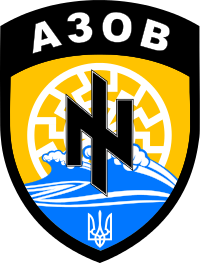
original source
severe rune
That image cannot be converted properly
all dimensions need to be multiples of 2.
Your image is 200x263 neither of them are multiple of 2
hardy atlas
It is also saved as .svg_.png
severe rune
it's png in the end so not a problem
hardy atlas
not an issue but not best practise.
that is a 256x256 paa for you
Worth checking out this page too as it details how to configure the insignia etc...
 waxen pendant
Hello guys. I have this problem I have not solved to this day...but Im sure its easy to fix
I have a glass texture and its pitch black
I do have an Alpha channel. it shows transparent in Gimp. But on the model its not transparent and the areas which should be are simply black
I am not sure how I save it as 32 bit in gimp though
and its 1024×1024
 shut sparrow
hi guy, Quixel Mixer 2019 is free during the beta https://quixel.com/mixer
full quarry
@waxen pendant is the file named texture_CA before converting to .PAA?
waxen pendant
@full quarry Im not on my computer right now but It is as far as I know
or...does it have to be upper case?
as in capital letters
full quarry
Nope
waxen pendant
Ill check in a few hours
full quarry
Test applying some vanilla _CA texture to it to see if it is texture issue
waxen pendant
yes it has _ca
nocturne lake
what .rvmat are you using on it?
nocturne lake
basically, you need the .rvmat and any .paa that is assigned to that .rvmat to also be unpacked on your P:\ drive when you compile the model
nocturne lake
so check you have a3\data_f\env_land_co.paa referenced in the .rvmat unpacked to P:\a3\data_f\env_land_co.paa
nocturne lake
the data is still used to determine if the .p3d will use 8-bit alpha or not
nocturne lake
and I assume the other LLW paths are correct? You can load/view them in the UV window with "Filter by material's texture"
waxen pendant
you mean the 3D view window in OB right?
nocturne lake
no I mean the UV editor
waxen pendant
whats the UV editor...?
nocturne lake
It's where you would edit the UV maps of models if you were insane enough to do it in Object Builder
nocturne lake
there's a toolbar button with "UV" on it
opens a new window where you can see the UVs and using the "Filter" tab you can see them projected on to various textures and materials used by the model
waxen pendant
yeah I can see all my textures there
nocturne lake
hmm, try one more time repacking the model. Make sure you have the option to clear the temp folder (Full Build) checked
In case it's trying to pack an old version of the model without the changes you've been doing
waxen pendant
I changed a detail in the model now (which had to be done anyway) to double chec k that
ok just checked in game
changes to the model are there
Glass is still black
RVmat seems to be doing it's work
since I see the effects on it
Ok so now im downloading the same texture from Delta gamer
packing
see what happens
Issue remains... ☹
hey!
In bulldozer all seems fine!
So its something in the packing process🤔
nocturne lake
@waxen pendant this might be a problem actually forcedDiffuse[]={0.05,0.05,0.05,0};
set it to {0,0,0,0}
waxen pendant
ok. will try later
but how come its all ok in BD?
nocturne lake
Dunno really. When I've encountered it before, it was always a matter of material .paa files missing from P:\
waxen pendant
the force diffuse didnt do anything
My textures are .paa before I pack
is that an issue then??
nocturne lake
shouldn't be an issue, no
hardy atlas
multimat rvmat here
#(rgba,8,8,3)color(0,0,0,1)
I assume the second set of numbers correspond to the RGBA
what do the first refer to?
hardy atlas
Ah thankyou.
full quarry
which stage has that?
does the model have what geometry lod named properties
do all the other textures of the rvmat open up in texview?
hardy atlas
you talkin to me?
hardy atlas
no lol just me asking noob questions
waxen pendant
it is in my rvmat however this is BIS stuff
Pulled it off the shelve
and fact remains...unbinarized its fine
im using BIS Addon builder because PboTool is giving shit unclear errors
not even related to textures btw
full quarry
ah
anything addobuilder related cant really be answered
😄
pboProject errors mean you have something deep wrong
which is why you should debug them first
hardy atlas
PboProject errors as in you can't launch them?
full quarry
@waxen pendant or what is pboTool?
hardy atlas
Yeah you really should be using those, Addon builder is broken beyond broken. What issues are you having with them?
waxen pendant
my specific example is in the model.cfg. 'cannot have externs'
and Im pretty damn sure I dont have them
neither the software is pointing out where theee enterns are
severe rune
extern classes
class MyParent; is a extern
full quarry
those errors are still there even if you use addon builder
and they might mask some other issue
waxen pendant
so yeah...since these errors even come up with BIS samples and mikero has no samples himself (as far as I know) it doesnt really give confidence
and. exactly this mod packed fine, like a year ago when I worked on it last
the source file hasnt chanced
anyway. enough complaining
Why would non-binarised the texture work fine amd binarised not?
nocturne lake
Like I said at the beginning, it's a matter of how the model's face properties encoded with those textures once it's binarised
waxen pendant
right face properties. Rvmat?
nocturne lake
all sorts of things really
waxen pendant
so...if I put this to the test
I would take DGs base files again...and all should work
theoretically
waxen pendant
right DG's Apache mod has the same issue. While back in the day when he last packed it, all was fine.
so something must have changed regarding textures
manic trellis
Soo question about Substance Painter, When I use PBR-Specualr Glossiness in SP, It won't let me poly fill anything..But if I use something else.. It lets me.
Please @ me so I know if I get I response.
frozen blade
what is poly-fill? you mean mask based on faces/uvs etc?@manic trellis
severe rune
Poly fill:
https://s.sqf.ovh/Substance_Painter_2019-04-01_13-24-31.png
That button

 frozen blade
should work no matter of the shader tbh
manic trellis
@severe rune I know how to poly fill, But when I do so it doesn't work.
severe rune
what exactly does "doesn't work" mean?
manic trellis
Could I put a gif in here? to show you
severe rune
Can put links
severe rune
uhh 🤔
Never used polyfill 😄 But don't see a reason for it to not work
manic trellis
When I use different shader it works.
frozen blade
no idea, i used it both in metalness and spec gloss and it worked
might wanna drop onto Allegorithmic discord channel here - https://discord.gg/chcqNA and ask
manic trellis
okay thank you
 deft bolt
@manic trellis one problem you might be having trying to apply the specular/diffuse to your UV map is you might actualy have you SP template set to PBR metal rough
Make sure when you start a new model you have the template set to PBR metal rough if using that workflow or PBR specular glossy if you are using that workflow. I ran into your same problem recently so i think this should fix it. Basically just make sure you match the right workflows and polyfill should work fine
coarse scaffold
I exported textures from SP, I think there is something wrong with gloss channel as areas around objects are white(where gloss map is black). Anyway to fix that, maybe somehow in rvmat?
full quarry
what shader are you using and what form of specular texture?
 mortal path
@coarse scaffold you can export directly the smdi channel
coarse scaffold
@full quarry I am using supershader, specularPower 50, in the area where it is white ingame, specular texture is same color as areas surrounding
Yes I know, I did that, but this is how it looks in SP
And this is how it looks ingame:
full quarry
Im not sure if speculatiry is the right way to do such details
i think they should just be in the diffuse
coarse scaffold
But specularity in this area is clear. Here is how specular looks:
This is how in the same area gloss map looks:
full quarry
oh wait are you talking about just the 2 different grey areas?
can you draw a circle where am I supposed to look at
full quarry
ahh ye ok
coarse scaffold
Shadow is not shadowy ;d
full quarry
are you sure its the specualrity thats the culprit?
frozen blade
gloss (which isn't really gloss) tbh
also, is that thing in direct light
?
you seem to expect that screw head to be visible just via smdi, correct?
that's not really how things work
for legacy shaders anyways
coarse scaffold
I expect the "shadows" around the objects to be black , not white
full quarry
what does the diffuse look like there?
coarse scaffold
And I am sure it is gloss channel which messes up
frozen blade
i wanna know how your smdi looks like, not sure how you exported these from SP to texture_smdi.paa / .tga
coarse scaffold
ok sure
https://imgur.com/yIVJ2HN
Green channel:
https://imgur.com/XXTfRTx
Blue channel:
https://imgur.com/G1l3gr3
frozen blade
also, gloss is not really gloss in Arma. that's why it is called specular power
@coarse scaffold 😄 - yeah, individual channels, cheers
coarse scaffold
I edited 😃
frozen blade
well, that's why you need to manually tweak these
green is the smdi, blue is gloss
what i can say is that the gloss is way too bright
coarse scaffold
Fixed it, turned out it was my mistake as one layer had inverted gloss channel. Thank you for help 😃
 balmy summit
Hi everyone, I have a problem where my normal map doesn't render the same on object builder and on Arma 3. Is that normal ? And if not, any advices on how to correct this ? https://image.noelshack.com/fichiers/2019/14/4/1554396022-sans-titre.png
https://image.noelshack.com/fichiers/2019/14/4/1554396065-20190404180647-1.jpg
RVMAT : https://pastebin.com/2niRh36f

 full quarry
@balmy summit the lighting in buldozer and in game are different so they will aslo look different
you should also make sure your normalmap directions are correct
as in many programs by default generate normalmaps in XYZ where arma needs it to be X -Y Z
you should also condsider using the super shader to its fullest with proper SMDI and AS/ADS textures
hardy atlas
regarding the Normals, as goat says inverted y axis (green channel) is necessary for Arma. Also make sure that your file pathing is correct in the packed version.
balmy summit
Ok, thx guys, i'm gonna take a look at those.
full quarry
and most importantly that its clear. OB buldozer and in game will not look the same
unless you fiddle with buldozer configs and make it load the new lighting
balmy summit
Was kind of aware about it not looking the same but as I don't have much experience, I wanted to make sure
But i'm still going to do as you said. I already inverted the green channel, and now i'm gonna take a look if it makes any difference.
full quarry
if the green channel is wrong way, everything that should pop up actaully look like they are holes
silver gull
depends on how you look at it 😛
full quarry
to me it looks bright
but you seem to have some brightness/gamma adjustments in your video settings
placid thicket
all at 100
placid thicket
I think it's 100
full quarry
could be just my 👀
frozen blade
@placid thicket afaik it needs to be a bit more shinny. also these dents need to have more variation, so does the wear of it
placid thicket
I was thinking of increasing the specular power but decreasing the specular a little
frozen blade
i'd add more wear to the diffuse as well
specularity and gloss highlights:
http://www.warrelics.eu/forum/attachments/headgear-steel-helmets-rkka-red-army-soviet-army/412753d1350848363-fake-original-soviet-ssh40-helmet-dsc01727.jpg


wear is not always perpendicular
https://i1.wp.com/frontovik.com/wp-content/uploads/2016/04/ssh40-helmet1.jpg?fit=640%2C480&ssl=1


 full quarry
maybe its new helmet
frozen blade
as in off the shelf?
thing is from the pics available online at a quick glance, it scratches pretty easily and rusts over time
this is advertize as new (low use) 1952 -https://i.pinimg.com/originals/57/a0/11/57a011c293ae688afc6e82ee8dff85d4.jpg


 full quarry
would be more natural as used yes, but off the shelf is not impossible choice either