#arma3_texture
1 messages · Page 33 of 1
 velvet fractal
@full quarry i have a question about textures, i've been following along the forum link you gave me earlier
that tutorial states that you want to open and extract the .pbo file that contains the item you want to retexture using eliteness, however, i am not sure which one mine is. how can i find that out?
velvet fractal
maybe anyone else who could answer my question?
 severe rune
how can i find that out look at the internal path of the file. Look at all the pbos that could be it. And take a good guess
 leaden fox
Hey guys, what workflow should one use to have seamless textures on A3 buildings/other big objects?
I'm used to UV-mapping stuff manually and applying textures on a set of textures, but seamless is just a completely different story
where do I even start with it?
 golden niche
multimaterial?
leaden fox
I don't know, that's why I'm asking 😄 Seems like multimaterial allows of mixing layers of different textures, does it allow applying seamless?
 fringe pivot
 full quarry
@fringe pivot thats pretty nice tutorial for MM
@honest pagoda could we get the 3 above links pinned?
 honest pagoda
full quarry
honest pagoda
full quarry
Thank youuu!!
leaden fox
Oh, such a nice tutorial, thx
 obsidian nimbus
https://i.imgur.com/TUsrg5v.png
Does anyone know why my ADS texture looks like this?
 knotty marsh
SSAO you mean?
fringe pivot
Increase the brightness of the black in the green channel.
@obsidian nimbus
If you see the sample in my tutorials I use about 50% gray instead of full black.
obsidian nimbus
I'll give it a try
non of the actual visible part of the texture is black
your ads texture is so bright
I try to make mine look closer to the vanilla ones
If I understand how ads works correctly, green channel is the standard AS, and the blue channel is what it looks like at a distance
is this accurate?
 frozen blade
@obsidian nimbus yes
 vagrant lake
Hey Guys would be nice if you could upvote the following Link so we maybe get a standard A3 Renderer in Substance Painter someday https://bit.ly/2zMVT2V
 onyx quest
2 hopefully simple question:
a) i seem to have trouble converting pictures to paa with the ARMA tools. why is that?
b) how can i make a texture for a flag?
 worn fog
Does anyone think they will come out with an arma 4?
severe rune
@worn fog do you think that should be asked in #arma3_texture ?
worn fog
@severe rune Maybe not. But there is nobody in general.
severe rune
there are 3500 people online.
#arma3_questions might be the channel for that. But I'd advise to visit #rules first
full quarry
everyone online are on all channels
not everyone speak on every channel
and the server does get more quiet in the middle of the night here in Europe
severe rune
Plus.. If everyone of the 15 thousand members would answer a "hey fellas" it would be pure spam hell here without anything productive ever getting done
onyx quest
it would be nice to see that once though
anyhow... nobody know why the stupid ImageToPAA thing returns me Failed to convert?
its jpgs and pngs. should work i thought
if i rightclick the file i see a warning that conversion may not work, and some X and Y coordinate
full quarry
Wrong dimensions probably
 stray relic
Image has to be size 2^m x 2^n
onyx quest
hmm i have one jpg here in 512x512 that doesnt work. and one 128x128 png that does work
there a max size?
 nocturne lake
is the .jpg 8 bits per channel or 16?
nocturne lake
hmm, that should be 8 bits per channel then
onyx quest
can i send you the pic to have a look at? its just a unit logo
stray relic
Have you tried converting to a tga and then using Texview 2 to save as a paa. That always works for me.
onyx quest
hm if i convert it to tga with gimp i cant even open it with texview 2
but i guess texview does the conversion from the jpg to paa without an issue...
at least i hope that is what just happened
stray relic
If you can't even open the tga in Texview it sounds like something is very wrong.
Two things, double check your file name is "myTexture_co.tga" or "myTexture_ca.tga" for a texture with transparency. Also double check the dimensions are exactly correct eg 512x512.
 wet sonnet
I think that GIMP uses RLE for TGA as default? I had some issue like that in past
onyx quest
well it seems to have worked now using the original jpg and texview 2.
that same conversion did not work with imagetopaa
 umbral shore
Does anyone have a high quality version of French CEU Camo that they would be nice enough to share?
 celest obsidian
@umbral shore Check your DMs 😃
 dense peak
Hey there guys!
I've been using Substance Painter for quite a long time for ARMA 3
I was recently repurposing a project of mine that used a PBR Roughness/Metallic set up (Was meant for UE4 but now I"m trying to export to ARMA 3)
I had an RVMAT export preset that uses Specular/Gloss
I was wondering if anyone has an export preset for Roughness/Metallic
severe rune
Arma uses specular. So no, you cannot just export metal/rough and use that
You can use Substance Designer or other tools to convert your texture from metal/rought to spec/gloss
dense peak
SP does allow for export to a different workflow, but I don't have a preset the translates Metal/Rough to Spec/Gloss then RVMAT
It has a native option to export PBR SpecGloss from MetalRough and vice versa
I just don't have one that does the same as the above then RVMAT
Its fine though
I'll figure it out somehow
Thanks @severe rune
severe rune
You could do the normal export to rvmat conversion in substance designer
Only thing you need to do that I can think of is combine the Specular map
vagrant lake
Friendly Reminder: would be nice if you could upvote the following Link so we maybe get a standard A3 Renderer in Substance Painter someday https://bit.ly/2zMVT2V
severe rune
I don't think allegorithmic will make renderers for every oh so special game in existance.
Also we already have the Arma shader for Substance painter
vagrant lake
yeah that dont work for newer versions 😄
i ask them on twitter, they said it wouldnt be a problem if there will be enough people that want them, and that i should make that entry i posted
dense peak
@severe rune So there's a shader for ARMA 3 made for SP?
severe rune
severe rune
But i guess broken after 2018.1
I'll see what I can do about that.. no promises
frozen blade
the a3 substance shader needa to be used from the start of the project btw
last i know
it doesn’t work indeed with 2018.1 + versions
severe rune
ian fixed it for 2018.1 so I guess that once works
frozen blade
isn’t ian about, maybe worth pinging the bloke
severe rune
Okey I got my painter updated to latest version.. Only took an hour 🙄
I see what's broken. Doesn't look too hard to fix
 white apex
Every programmer in the history of computers has said that 😂
severe rune
Okey I fixed all the errors it threw.. Now the output is black though 😄
yeah... black output makes sense if you use diffuse instead of base color 🤦
Please try out and tell me if you notice something wrong
https://github.com/ianbanks/arma_3_substance_shader/pull/1
severe rune
🤔 IRay uses a seperate MDL material to render.. We need that too so that we can render Arma shader in IRay...
Looks possible...
I'm not really a texture guru so help me a little here. I'd love to be able to switch back and forth between PBR spec/gloss and arma shader. The only real thing that's preventing me from doing that is that arma shader uses base color while PBR uses Diffuse.
Can I just change the arma shader to use Diffuse instead, or would that be a horrible shader abomination that noone should even think about doing?
 runic dagger
Is there anyone that happens to have a Sliding wooden planks smart material for Substance Painter?
Such as the one in this pic: https://gyazo.com/0a20b8f24addc5cfc027df145c2cb09c
frozen blade
@severe rune neah i think that would work, you can conver from diffuse to base color afaik
severe rune
Why didn't ian do that then, would make it alot easier to convert a existing PBR specGloss project over to the Arma shader. You basically only have to adjust the brightness of the existing diffuse to match what you expect.
I might try that later
ALso pls tell me if that shader works as expected :u
 gentle mango
Does anyone have the time to talk me through how to make a good smdi texture? Unfortunately due to absolutely terrible internet YouTube is pretty much a nil option. (I'm talking dial up speed internet)
I've used substance painter to make a texture and split it into the group's but it's coming up really shiney and I know that means reducing the blue channel but I can't figure it out.
Ping me a PM for more details cheers.
 silver gull
@gentle mango blue channel (gloss) is just how "tight"/"small" the highlight dot is, if you take a sphere as sample object. In addition, there is a multiplier for the blue channel in rvmat called "specularPower".
shiney can also mean too much light reflected in general, which means G channel (and the specular[] values in rvmat as multiplier. )
gentle mango
so in the blue channel the more whiter the shinier?
silver gull
shiny is a bad word. It can mean one or the other.
https://community.bistudio.com/wiki/RVMAT_basics Look at blue sphere. See how the highlight shrinks with growing specular power (or white in texture) of blue channel
red sphere is specular -> highlight size stays same, but intensity of light reflected rises with increasing value
severe rune
Okey I tested just changing the arma shader's base color over to diffuse.
Can now just switch back and forth between pbr-spec-gloss and arma3apex shader.
severe rune
checked RPT for errors? tripple checked that file paths are correct?
 ocean river
Theres only one texture for the headset
haha i don't understand why won't show the rest
this is the config
class CfgGlasses {
class BEA_Peltor_M81_glasses {
    scope = public;
    author = "BullsEyE";
    displayname = "Peltor Headset";
    model = "\BEA_Gear\Models\Peltor";
    hiddenSelections[] = {"_headstrap"};
    hiddenSelectionsTextures[] =
    {
        "BEA_Gear\Data\Peltor\Textures\BEA_Peltor_m81.paa"
    };
    picture = "\BEA_Gear\UI\Peltor\Peltor.paa";
    identityTypes[] = {"NoGlasses", 0, "G_NATO_default", 0, "G_NATO_casual", 0, "G_NATO_pilot", 0, "G_NATO_recon", 0, G_NATO_SF, 0, "G_NATO_sniper", 0, "G_NATO_diver", 0, "G_IRAN_default", 0, "G_IRAN_diver", 0, "G_GUERIL_default", 0, "G_HAF_default", 0, "G_CIVIL_female", 0, "G_CIVIL_male", 0};
};
};
stray relic
@ocean river Try renaming your texture to BEA_Peltor_m81_co before converting to .paa
"BEA_Gear\Data\Peltor\Textures\BEA_Peltor_m81_co.paa"
severe rune
also I see you are setting the hidden selection for _headstrap... Makes it sound like headstrap and earcups are seperate
ocean river
How do i make it into one?
severe rune
make a single selection in the model and model.cfg
ocean river
damn
full quarry
Odd that it does not have any default texture applied to it.
 rapid wasp
@severe rune when trying to use that shader in substance painter 2018.3.0 and 2018.3.1 i get the error below. I also noticed that there are no settings to change under the shader settings, it's empty.
[ResourceShader] arma3apex:396 | 6(396) : error C1115: unable to find compatible overloaded function "texture(struct SamplerSparse, vec2)"
obsidian nimbus
Why does the multimaterial shader have texgen = # as an option if you can't actually change it?
I remember someone saying it just couldn't be previewed in buldozer from object builder but even after it's binarized and in game it uses an incorrect texgen
I just need the normal map of one texture to use a different uvset than the texture itself
severe rune
I got that error yesterday too, but it worked fine 2 days ago 😄 And the texture call doesn't exist at line 396 🤔
There is a textureSparse at 397 https://github.com/ianbanks/arma_3_substance_shader/blob/893b7b6e5e001fda4dcee9c02107745b1dfa9202/arma3apex.glsl#L397
I have no idea where that error is coming from.
@rapid wasp
severe rune
Does anyone have experience with the SuperHair shader for hair rendering? I might want to have some fur on a silencer (don't ask) but I've never seen anyone use the Hair shader
 acoustic dove
there isnt much info on superhair other than Miller's head using it
it might have better transparency/shading with hair maybe
severe rune
It's a combination of Super Shader, with tree shader alpha.
Dunno... Probably won't really help me
nocturne lake
Hmm, can it use _ca without the shitty weird glowing effects?
severe rune
There is also SuperHairAtoc, I don't really know what it does
It's the same just "with atoc" ¯_(ツ)_/¯
Ah that's what it does. https://medium.com/@bgolus/anti-aliased-alpha-test-the-esoteric-alpha-to-coverage-8b177335ae4f scroll down to "Alpha to Coverage" it makes the edges softer
rapid wasp
@severe rune looks like its working properly again. the file i download yesterday must've been corrupted or something.¯_(ツ)_/¯ 😀
severe rune
Yeah I dunno.. Same thing happened with mine. But after painter restart it was fine again with no changes... Painter probably caches something somewhere and mixes them up
 faint geyser
Hi guys, I have some problems with ground textures normal maps that my friend created... As far as he knows, he created them correctly, but somehow these textures are totally flat in-game. Any clues what are the most common mistakes in creatin arma normal maps?
full quarry
Terrain material normalmaps also need the alpha layer component and need to be named _NOPX before converting to .paa
faint geyser
Are capitals necessary? I've renamed them before converting to .paa but did use lowercase
OK, it seems there was no alpha channel, will try adding it. Thanks for guidance 😃
full quarry
all lowercase is better
also dont use extreme ends of the greyscale in the normalmap
 vivid sentinel
So I am getting some pretty sweet pure blue tinted textures after switching my textures out on my map. Is this due to them being 1600x1600 instead of 2048x2048 (or 1024x1024?)
full quarry
upsclaing usually looks worse as it does not use all the pixels it can
but Id say test it out
 dire crane
I'm currently experiencing some difficulty with the specular, parts are dark where there should be light reflected on it, and vice versa. I bet it has to do something with the channels, but could somebody point it out? Thanks in advance!
severe rune
is your texture named _smdi before you convert to paa?
dire crane
yes
severe rune
green channel is the specularity and blue channel is multiplier. Usually blue channel is all 0xFF
dire crane
and what is red suppose to be?
severe rune
in SMDI it doesn't matter according to wiki. It's set to all 0xFF when you convert to paa
SMDI should be mostly red with shades of pink
full quarry
might need to flip the green channel
dire crane
Alright, I'll try that
I tried that, and didn't seem to change much
so either I completely screwed up my _smdi, or something in the .rvmat is not right
Bare in mind, I'm just a novice texturer
severe rune
maybe just show us the texture and rvmat so that we can see for ourselves
full quarry
also its possible your normalmap is not right
dire crane
Can I just post a link to google drive for you guys to download?
severe rune
ye
severe rune
Uh.. interesting.. When I downloaded the rvmat two doc files mysteriously appeared in my Downloads folder.. Although I never doesnloaded them 🤔
dire crane
Well, if me to upload it somewhere else?
severe rune
dir[]={0,0,0}; is technically wrong. Needs to be dir[]={0,0,1}; but I don't think that matters
dire crane
*if you want me
severe rune
your fresnel in Stage6 is missing the argument in the right parenthesis
Default is texture = "#(ai,64,64,1)fresnel(0.4,0.2)";
severe rune
specular[]={1,1,1,1}; maybe set that to null?
Is the problem that everything is reflecting?
dire crane
The problem is that reflection is inversed
dire crane
Nah, my stupid mistake. Green channel inverse did fix it, thanks!
full quarry
👍
dire crane
Guys, I just wanted to come back and say thanks again. After some tries I figured out it wasn't the green channel or the _SMDI, but it was the normal map's blue channel that needed to be inverted
Thank for your time!
*Thank you
full quarry
usually it is the green channel of the normalmap that needs inverting
@dire crane you sure it was the blue for you?
also what did you create the normalmap with?
dire crane
I'm 200% sure it was the blue
just changed it back and forth again, and it did work
Nvidia texture tools
I just mean photoshop btw
Anyways, it's solved now so thank you!
full quarry
dont use that myself and cant remember what way it made the normalmap axis
but if it works for you then 👍
 odd crane
I have like 30 magenta post-its on my desk. I thought "if I rendered this half of my desk would be invisible" lol
 tulip prawn
Hi all. Been doing some texturing lately and have made 2 so far, however with vehicles there is no specific layout that is transformed from one to another. Is there any anatomy tool used to identify what parts what on vehicles?
nocturne lake
Apply a UV checker to the model https://i.imgur.com/TJeCmcL.png
frozen blade
and/or use setObjectTextures to check what is what and where it is https://community.bistudio.com/wiki/setObjectTexture
tulip prawn
Thanks
tulip prawn
Oh fk. Whoops was finding a format to trade mark some of my missions. Lol
Was ment to be pasted into another discord as a clipboard
 slim elbow
Alright so I have a question guys so I am working on this texture and I am experiencing a weird issue. So I am doing a retexture of a mod with their permission as well as doing a default uniform retexture. The default uniform is correct and I made the vest with the same photoshop techniques. I even went as far as copying the rvmat to the vest (while maintaining my file paths to smdi and no_hq). However the uniform is substantially darker than the vest. I have a feeling that it has something to do with the rvmat. But I am unsure where to look at this point.
Vest rvmat https://pastebin.com/Ngwffe7B
Uniform rvmat https://pastebin.com/xQarhNkV
example of the two: https://gyazo.com/120c05158f8860643016661a336f6c47
full quarry
in the other ambient and diffuse values at the top are 1,1,1,1 and in the other 0.5,0.5,0.5,0.5
 heavy apex
hey guys, would anyone know why when I go inside a building the texture on the hat I made is completely black.
I figure it is a RVMAT issue but have been messing around with the values and no luck
i might have fixed it from the @slim elbow example
full quarry
probably bad ambient values or wrong kind of AS map
nocturne lake
should be white if it's to be unshaded
 sudden marlin
texture is appearing with some sort of yellow.
RVMAT: https://pastebin.com/iYR7SL0R
full quarry
so whats it supposed to look like?
why do you have such basic rvmat on it anyway
theres pretty much nothing in it
also youre probably missing all the relevant stages in it
sudden marlin
I'll make some of the other textures and try again.
full quarry
make proper rvmat too
also textures must be have right dimensions and they must have correct suffixes on them before converting to .paa
sudden marlin
I made sure of that, yes
sudden marlin
Um... well I fixed but I'm not sure how because I did multiple things: Re-exported from blender to p3d, added normal a specular maps, and rewrote the .rvmat file.
umbral shore
Hi Folks....I'm looking for some high quality Kamysh camo patterns...Woodland, Urban, etc. I'd greatly appreciate them if you could send them my way.
 rain crest
This is a retexture so the normals weren't flipped on the model or anything. Not exactly sure what's happening but the texture appears to only be displaying on the rear-side of some of the polys. Any ideas?
https://i.imgur.com/Z5aaAC5.png
https://i.imgur.com/xaI8fg3.png
 brittle cosmos
Is the texture size a power of 2 (e.g. 512x1024, 2048x2048)?
nocturne lake
looks like the texture doesn't have correct alpha channel
rain crest
@brittle cosmos yes, they're all 1024 or 2048
@nocturne lake I'm not sure that's case.... the black shape you're seeing is caused BY the alpha. The polys themselves are rectangles I believe
doesn't mean that's not the case but I'm not sure why it would show up in some places and not in others
@nocturne lake Everything looks as expected in textView:
https://i.imgur.com/wzfdozr.png
And the alpha itself:
https://i.imgur.com/5ia1VBE.png
Just a note, these are not true to size, they're screen captures
nocturne lake
is the texture saved as _ca or _co though?
nocturne lake
that might be your problem then, since the suffix tells the tools how to encode the texture
if the original is _co, probably best to use _co
rain crest
it's not
nocturne lake
_co is 1 bit alpha, _ca is 8 bit alpha
rain crest
this model has problems but it's the closest I could find to what I needed
as a matter of fact, it complains about a texture it can't find in the P: drive when you first load it but there's no way around it that I can find
now I have a _ca file that looks like this:
I'm thinking I may have just found my issues
nocturne lake
if it is looking for P: drive ingame, texture path is wrong
rain crest
yeah, but there's nothing I can do about that is there?
nocturne lake
file paths ingame should only look inside .pbo space
rain crest
These headaches make me question things like why BIS decided to have the stalker ghillie attached to another uniform instead of available to be placed over top all of them
rain crest
@nocturne lake If I manage to get the textures to actually function, is there anyway to rememdy the fact that the model is looking in P:/ for textures?
brittle cosmos
The model would only be looking for the textures in P:\ if the path for the texture within the model included it. All file paths should not contain drive letters like C:, or P:
rain crest
@brittle cosmos So you're saying it's in the model itself? It's definitely not listed in the rvmat like that but nothing in the config file I've setup looking drive P:/
full quarry
Where is the model from
If you're missing it's original texture or materials you don't have all ot it's relevant data unpacked
 gaunt kindle
is it possible to have an emissive texture in arma?
stray relic
Yes, set the emissive values in the rvmat.
full quarry
But do note that emmisive things just look glowing , they don't actually illuminate their surroundings
leaden fox
Do the body parts use multimaterial as texture?
Scince there is the "HL" hidden selection
But it changes the basic color of skin according to character's skin color
Yet the shadows and details are added to it somewhat
So is that multimaterial or some second level magic?
Asking science I'm considering making a naked torso model
full quarry
No the skin shader is its own thing
full quarry
And the identity changing is special too
Sure it should be.
Open up a skin material and see how it works.
As usual documentation is nil though.
rain crest
@full quarry I figured it out, I had to get the model loaded up and saw that it's LODs were referencing textures incorrectly. I've almost got this thing figured out
full quarry
👍
 toxic urchin
hey, how can i make a transparent texture?
i'm editing the texture for the shoulder pad vests, so only the shoulder pads are actually textured and everything else is transparent
full quarry
Texture needs to have alpha channel transparency and it needs to be saved in file format that supports it (tga) and named with proper suffix (_CO, _CA, _NOHQ etc, in your case "yourtexture_co.tga" and then converted to .PAA
toxic urchin
cool, thanks!
 white cargo
_ca is the suffix you need if there's an alpha channel on the texture
full quarry
No, in case of simple transparency, _CO is enough as it has 1bit (on/off) alpha layer instead of _CA that has the smooth 8bit alpha.
white cargo
ah I see
severe rune
So _co is a flip flop alpha going bit bop bip?
toxic urchin
okay so essentially, make a transparent texture (sans the bits i need) and then save it as .tga, add suffix _co, and then convert to .paa?
severe rune
.png should work too..
But yes.
toxic urchin
cool, thanks lmao
full quarry
Tga is more lossless format
severe rune
PNG is lossless too tho
 woeful magnet
https://i.imgur.com/62eNiAP.png from PNG to PAA
woeful magnet
Ye, but others which i Convert works
woeful magnet
Found the issue, it was the COnverter
 frigid escarp
is stage numbering important? like starting with stage0 vs stage1?
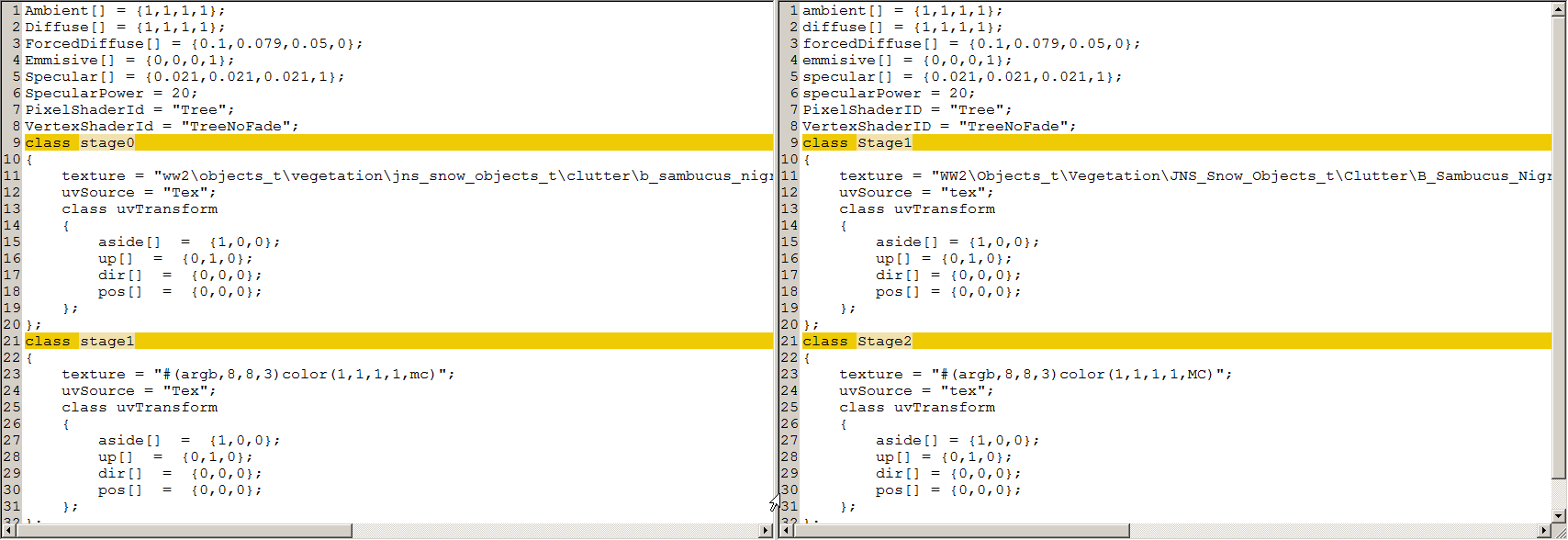
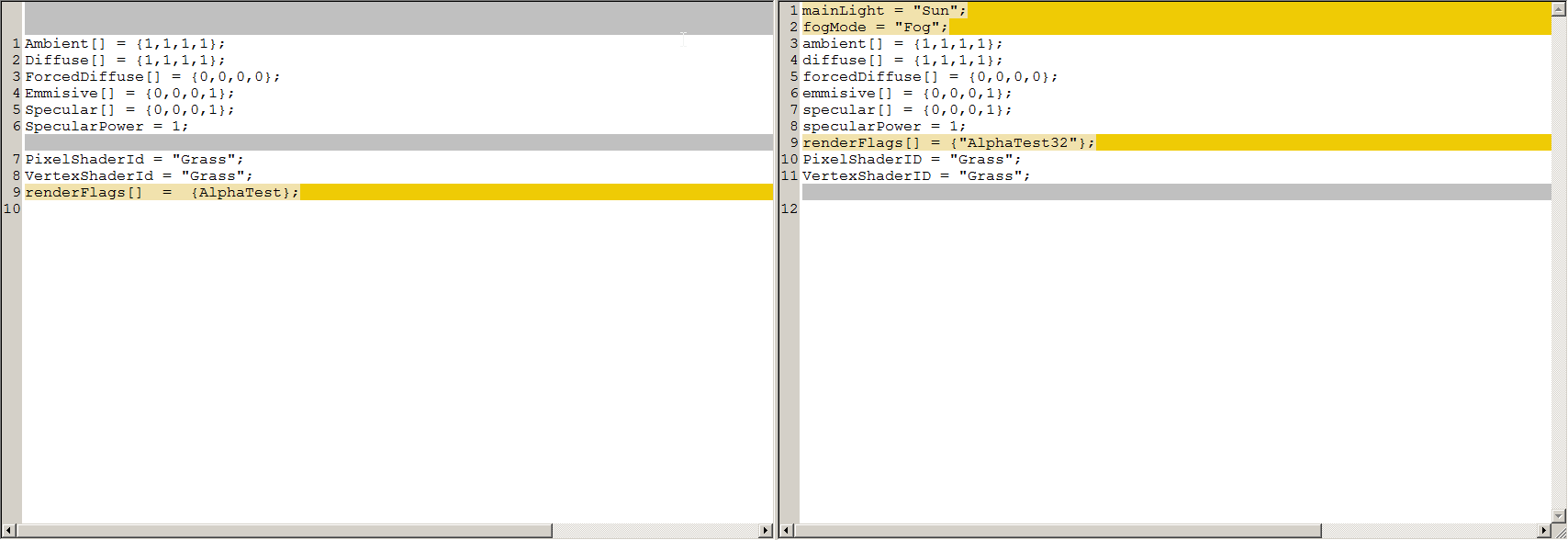
are mainLight and fogMode still relevant parameters?
and is renderFlags[] = {"AlphaTest"}; the same renderFlags[] = {"AlphaTest32"};?
https://i.imgur.com/BUrL8Cq.png
 full quarry
Stage0 would define the main texture?
severe rune
@frigid escarp is stage numbering important? like starting with stage0 vs stage1? no. It's read like a config. Actually it is a config
Stage0 is the diffuse defined in the model. I've never seen anyone use stage0 in rvmat and I never tested if it works aka overwrites the one set in p3d, But from memory I'd say it won't.
and is renderFlags[] = {"AlphaTest"}; the same renderFlags[] = {"AlphaTest32"};? No. https://github.com/dedmen/armake/blob/cpp/src/material.h#L126
AlphaTest doesn't exist.
And yeah mainLight and fogMode are still used for smth
frigid escarp
@tender fjord left side is DeP3d -Em output
texGen classes are like base classes to avoid duplicating code, right?
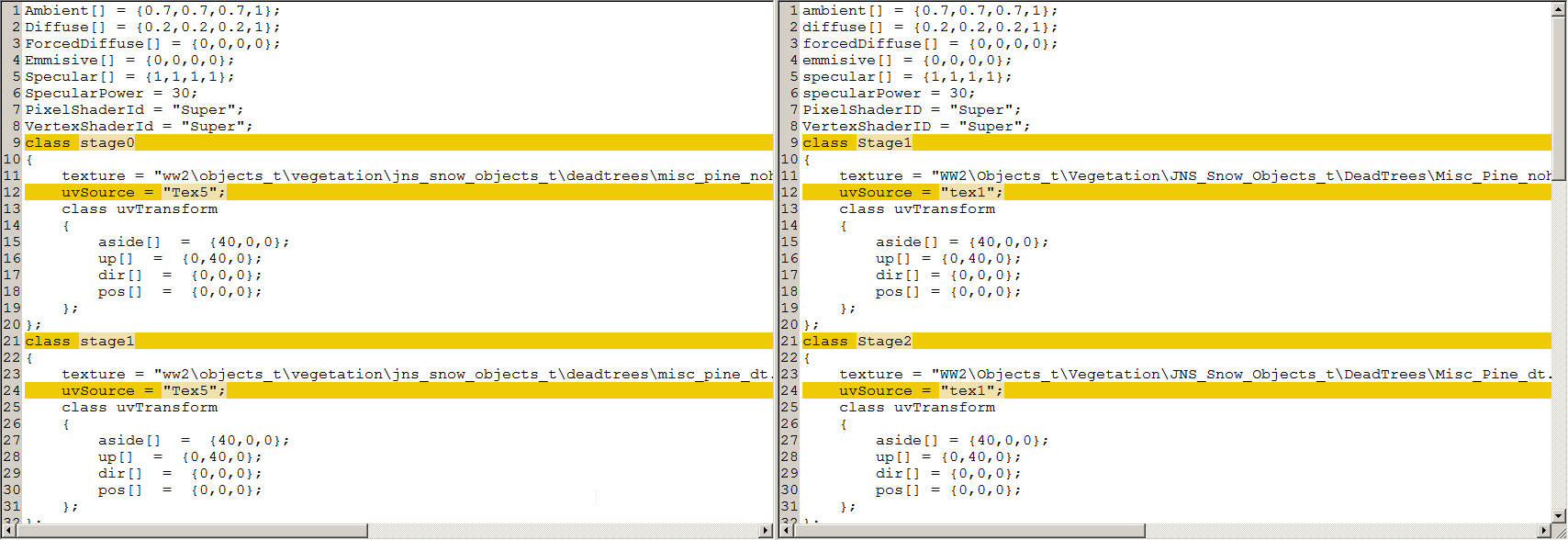
is uvSource="Tex5"; valid and is the mismatch indicating a bug?
here it doesnt mention Tex5
severe rune
yes
texGen entries are ignored if you don't actually have texGen classes in there
Also your uvTransform matrix is wrong
dir should be 0,0,40
frigid escarp
well this is coming from said mod (jones snow objects) - which should be basically plain A2
so either things have changed, or more likely its bad data from BI 😃
severe rune
We already know BI doesn't do everything correctly always 😄
The devs who wrote that stuff 10 years ago knew how to use it correctly.
frigid escarp
is anything in rvmat case sensitive?
 tender fjord
none
i have never seen mainlight or fogmode, and there is nothing in a p3d which bakes such items. It might have relevance to massaging the values baked into the p3d, but nothing detectable.
alphatestXXX are used solely for clutter, corrected alphatest to alphatest32. a gremlin crept in, or I was tired.
tender fjord
I'll have a look kju but as stated, this vars= are not baked into the p3d
frigid escarp
relevant for wrp creation maybe? seems unlikely clutter is read for it though
tender fjord
there's nothing in a p3d which refers to, or nuances, these names. with or without, the resulting p3d is identical.
frigid escarp
@severe rune can you tell what/how mainLight and fogMode are read from said clutter rvmat?
VertexShaderID = "NormalMapDiffuseAlpha";
not listed in here: https://community.bistudio.com/wiki/RVMAT_basics#List_of_individual_shaders
but in A3 data
p:\a3\map_data\gdt_concrete.rvmat
p:\a3\map_data_exp\gdt_asphalt.rvmat
p:\a3\map_data_exp\gdt_beach.rvmat
p:\a3\map_data_exp\gdt_forest.rvmat
p:\a3\map_data_exp\gdt_grass_short.rvmat
p:\a3\map_data_exp\gdt_grass_tall.rvmat
p:\a3\map_data_exp\gdt_reddirt.rvmat
p:\a3\map_data_exp\gdt_rock.rvmat
p:\a3\map_data_exp\gdt_seabedexp.rvmat
p:\a3\map_data_exp\gdt_vbeach.rvmat
p:\a3\map_data_exp\gdt_volcano.rvmat
p:\a3\map_vr\data\gdt_vr.rvmat
@frigid escarp can you tell what/how mainLight and fogMode are read from said clutter rvmat?
https://github.com/dedmen/armake/blob/cpp/src/material.cpp#L328
https://github.com/dedmen/armake/blob/cpp/src/material.h#L164
i have never seen mainlight or fogmode, and there is nothing in a p3d which bakes such items
wut? Written to p3d embedded rvmat right here: https://github.com/dedmen/armake/blob/cpp/src/material.cpp#L533
@frigid escarp Correct. That shader doesn't exist in Arma client
See https://discordapp.com/channels/105462288051380224/105462541215358976/523473653900247051
frigid escarp
thank you
"terrain exclusive shader" means read then by binarize for wrp creation?
 verbal briar
Hello folks, I am wanting to retexture a Vanilla Arma 3 building to another color, is this possible with hiddenSelections and hiddenSelectionsTextures within the config?
full quarry
If object has hidden selections configured such can be used for in game placed objects but terrain placed objects that won't work.
@verbal briar
verbal briar
So then the Research HQ and House can not be retextures then?
full quarry
no
verbal briar
thank you
 indigo trail
any good guides for re texturing?
full quarry
get the texture .paa file convert to .tga edit in insert your choise of image editor save and convert to new .paa and setup config classes for new items that use your texture in hiddenselections.
BIforum editing section has a pinned thread for the topic I recall.
indigo trail
Ok thank you very much sir
full quarry
but basically its just editing the texture or painting your own
obsidian nimbus
is there a detailed explanation of exactly how SMDI textures work anywhere?
severe rune
something something sun angle something fresnel something angle of incidence something something.
Anything specific you are looking for?
obsidian nimbus
Not really
I guess it would be nice to know how to create arma-friendly specular textures from traditional specular maps or material textures from textures.com
severe rune
I just convert my PBR specular maps directly
didn't notice problems with that yet.. I think. Though I don't look very closely
severe rune
Export from Substance using the preset thingy 😄
I guess otherwise I'd use substance designer to swap the channels around
obsidian nimbus
I don't use anything other than photoshop
obsidian nimbus
that never seems to work though lol
severe rune
does it looked right when compared to a known working smdi?
fresnel value in rvmat is also important
obsidian nimbus
using the metallic and roughness maps in any channel order never looks correct
or just using one or the other
I usually just take the fresnal from an existing .rvmat of a similar material
severe rune
using the metallic and roughness maps
smdi is specular map
metallic roughness vs specular glossiness
obsidian nimbus
what should go in which channel?
severe rune
R = 1
G = specular
B = glossiness
Substance Designer can convert metal/rough to spec/gloss I think
obsidian nimbus
why can't I do it manually?
dense peak
Guys I just bought corel draw and graduated with a diploma. But the most important thing is: what can I do with it about arma 3?
full quarry
Paint textures if you like.
More important thing is what do you want to do for Arma 3
dense peak
Custom flags
And icons
And logos
I think it's the same of painting textures
But the most important. How to don't get errors about colors and supported file format
full quarry
well since its a painting program you can do any image creation and editing with it.
Dont know what you mean about errors about colors and file formats though
silver gull
.tga or .png is fine - conversion is done with arma tools
full quarry
yah you cant open the .paa files outside armas tools
have to be converted to .tga or .png - edited and converted back to .paa
nocturne lake
.png is fine so long as it's not >8bit per channel
silver gull
textures always power of 2 pixel size (128, 256, 512, 1024, etc) otherwise you get weird errors ingame
thats all there is to it
dense peak
Ok thank you
full quarry
dense peak
Also if someone need a artist you can call me. I'm trying to improve my ability of corel draw
Though my approve points were 99% loved my corel draw class. But I am sad I couldn't be more longer than 70 hours.
😄
full quarry
thats unfortunately how school works. The classes end and you just have to continue on your own
dense peak
Yeah... also corel draw is easy to use
Better than photoshop some times
It depends on the job you want to perform
leaden fox
hey guys, what RGB channels should I invert to invert a SMDI?
nocturne lake
G if your inverting specular, B if you're inverting gloss
leaden fox
aye, thx
 distant hornet
full quarry
distant hornet
full quarry
Id compare to the vanilla patches and such
 proper pivot
On the subject of SMDI maps, I recently got IanBanks' Arma3 shader to work with Substance Painter. (SP Version 2018.3.1) However, as far as I can tell, I don't seem to be able to influence the spec/gloss or be able to replicate what the SMDI file would do with this shader. (E.g. if I change roughness of a part, there is no visible difference or if I add a specular texture layer and change its value/colour) it seems to have not effect. So it seems like all I see in SP is the equivalent of the what would be the _CO and _NOHQ in ggame. (I'm not sure I can tell the difference when I remove my AO in SP.) Is this to be expected?
severe rune
I recently got IanBanks' Arma3 shader to work with Substance Painter
https://github.com/ianbanks/arma_3_substance_shader/pull/1 yeah.
reflections should be working properly. Didn't try that out though
proper pivot
Ah!
Although just checking, the file I'm using is your modified one (https://github.com/ianbanks/arma_3_substance_shader/blob/893b7b6e5e001fda4dcee9c02107745b1dfa9202/arma3apex.glsl) as I ggot absolutely nothing working before tryingg this.
Is there something else I need to setup to get reflections to work? All I've done is change shader within SP.
severe rune
You need specular glossiness workflow. The shader should use the normal Specular/Glossiness channels
proper pivot
OK but I tried adding a specular texture set, adding a fill layer with specular values and changing the fill from all the way from black to white but it made no difference. Initially, I exported spec and gloss maps, then re-imported them onto spec and gloss texture set 'fill' layers and saw no difference - hence trying the black/white trick. So this still suggests I'm missing something!
Just giving it another try now to make sure I didn't fat finger somewhere....
severe rune
if you export them with the Arma preset, do the textures look correct too?
proper pivot
I'm not quite sure I know what you mean. I'm trying the shader on a project that's already 'finished' i.e. I have successfully got it in game and looking OK if that's what you mean.
But this project was one where I was really disapointed at how poor it looked in game compared to SP so I thought I'd try this shader to see if it could help me improve it.
severe rune
I'd have to check for myself if I can reproduce that. Won't have time today though
proper pivot
Understood and very much appreciate your time and effort!
 mellow zinc
Playing with ammo counters.
When in shadows the "colors" dissapear.
Which setting in my RVMAT are borked?
I tried playing with both diffuse, and forcediffuse (as I understand it one is for direct light, and one is for light in shadow) with not much luck
ambient[] = {1.0,1.0,1.0,1};
diffuse[] = {1.0,1000.0,1.0,1};
forcedDiffuse[] = {1,1000,1,0};
emmisive[] = {0,1000,0,0};
Working: https://gyazo.com/b69224a76a5d6044b758f477ac9dc6dc
Not working because of shadow: https://i.gyazo.com/ad15c3448753bd80dcdd750db256dca8.png
golden niche
ambient[] = {1.0,1.0,1.0,1}; try ambient[] = {1.0,1000,1.0,1};
golden niche
multiplies color values (color texture R,G,B,A) of the surface that is not lit by main directional light.
full quarry
Could use emissive if you want it to glow like that VR suits stripes.
 proper pelican
What is the best DXT1 or DXT5?
severe rune
use the one you are supposed to use
use the proper suffix and it'll choose the correct one
nocturne lake
Name your textures properly and use ImageToPaa instead of texView, then you wont need to pay attention to anything like that, and you can batch convert your files instead of doing them one at a time
proper pelican
hmm so what is CA for?
nocturne lake
glass mainly
 covert light
Hello a question is it possible with a Rvmat to adjust so only the white lights and the black not?
 ancient smelt
https://github.com/ianbanks/arma_3_substance_shader is working for SP 2018.3.0 courtesy of a patch from Dedmen.
nocturne lake
@frozen blade ^^
frozen blade
@ancient smelt great cheers man
proper pivot
I think I must be doing something wrong with that latest shader as I can never get it to show specular and gloss effects - just the base colour. Is there an "Idiots' guide" to using that shader anywhere? (As I clearly seem to be falling into that category!)
One possibility is that I'm using 2018.3.1 NOT 2018.3.0 so perhaps it's related to that?
 real summit
I just get black diffuse and can't see any of the materials, it's my first time using shaders in SP so I've probably done something wrong. I was on 3.1 and dropped to 3.0 didn't make a difference
 hardy atlas
I prefer to work in metal rough now and just convert the textures afterwards
proper pivot
That's my workflow as well but the final appearance in game seems to be somewhat hit and miss. I might be mis-understanding what the shader allows us to do but I had assumed that if you convert the metal/roughness to specular/gloss and apply that to the model in SP, you'd be able to see something much more like the in game effects directly within SP.
But as I say, I might have mis-understood the intention of the SP-Arma3 shader.
 chrome anchor
did anyone ever change the raindrop texture? 🤔
I am having some trouble to get the new one in without being totally strechted into one direction 😅
severe rune
same dimensions as original?
severe rune
🤔 maybe the original is stretched too. But compensated for that in the image file
chrome anchor
also the tranperancy doesnt really work (altho its even _CA)
not even the original one really has a transparent background
its basically just raining greyish squares now
severe rune
Maybe they don't need transparency and the engine does it's own processing on the image
your new rain texture should look basically the same as the old. Don't try to "improve" things by making it really transparent or such
chrome anchor
actually wanted to change it to snow and some other weather effects
I guess I will try to compensate some stuff with the texture, maybe that will work
severe rune
If arma expects special properties of the input image. Then you need to replicate that. Like if it get's stretched when rendered, you probably need to do the opposite in the input image
 tulip monolith
glass texture only showing on 1 side? in blender i made a "plane" as the glass panel, in object builder i set it to a color and added the rvmat. from the outside it works, but while inside looking out theres nothing. any ideas?
full quarry
Blender by default shows the backface of a face
you need to enable backface culling in Blender viewport to see how stuff actually work in game engines (usually use only 1 sided faces)
if you want 2 sides you need to duplicate and flip the faces
tulip monolith
so with the blender to arma weirdness its only showing up as 1 face. ok, thanks
tulip monolith
would a .0001 thick cube be better, then a plane?
nocturne lake
literally just duplicate the plane and reverse the normals
full quarry
easiest way 👆
tulip monolith
thanks!
 late geyser
Anyone that has a template for the MB 4WD?
frozen blade

Adobe Newsroom
SAN JOSE, Calif.--(BUSINESS WIRE)--Adobe (Nasdaq:ADBE) today announced that it has acquired Allegorithmic,
makers of Substance, the industry standard for 3D textures and material
creatio
severe rune
o no
frozen blade
you can forget about perpetual licenses
and most likely indie licenses will be canned
so from 20$/mo to 100$/mo
severe rune
Okey.
From allegorithmic staff: Adobe was at the board, meaning they had a power on every big decision happening in the last 2 years: rent to own, new products, Alchemist, etc... Adobe was part of all those decisions
frozen blade
yeah except the fact that they will now create subscription plans to cater this
Later this year, Adobe will announce an update on new offerings that will bring the full power of Allegorithmic technology and Adobe Creative Cloud together.
and for creative cloud it doesn't matter if you are indie or pro/bussiness
well, will see how this pans out
pity quixel didn't put up a fight in the same department due to financial reasons
severe rune
CEO of Allegorithmic is now lead of 3D department at adobe. So he still has his hand over that. But I guess creative cloud stuff is too big for him to decide
frozen blade
allego had one of the best licenses ranges out there
pay to own or perpetual, you could have either
i doubt the head of any department actually make meaningful decisions about how a product is sold
lol, there is an ongoing backlash about it, was expected, but whatever, doubt that anything will affect it since there is no direct competitor to substance anyways
ancient smelt
It won't take much to compete, much of SP's base code was other Open Source libraries. I think the only reason they didn't have competition was that the prices were so reasonable.
silver gull
FUCK adobe
"Adobe will empower video game creators, VFX artists working in film and television, designers and marketers to deliver the next generation of immersive experiences" i dont want immersion, i want tools that work well and dont cost an arm and a leg
 limber basalt
What is nice about substance is they give students a free copy if you can provide a valid ID
I suspect adobe won’t be continuing that practice
 crude skiff
is there something that could cause a paa file to not work in game?
limber basalt
Bad texture path is probably the most likely
crude skiff
that was my first thought, but im 99% sure its correct
thinking maybe something up with texview2? i remember some issue in arma 2 while back
an example of my paths, "clothing\data\bags\omni_moutain_black_hs_full.paa"
pbo is clothing, inside is data/bags/the paa files
severe rune
if the path is not correct then RPT would/should tell you
full quarry
Wrong dimensions, bad conversion, no suffix
 jaunty depot
Hello, I am trying to retexture another mods asset for my units mod. I got permission from the other mod maker but I have no idea how to path to the other mod if it’s possible. I know how to in my own mod files but have no idea how for another mod. Is that even possible?
frigid escarp
hardy atlas
The only plus side I can see to Substance being acquired by Adobe is potentially some fancy Photoshop integration allowing for better placement and manipulation of text / photo textures
silver gull
why would it need that? I like substance because i no longer need photoshop because of it 😄
 rough cradle
What is the best way to compress texture files while maintaining decent quality? Looking to implement some re-textured uniforms into a vanilla server through the mission file, and need to get the file size down.
full quarry
Not really possible to reduce the file sizes other than lowering the resolution.
Each suffix type has its set compression methods from source file to PAA
rough cradle
Had a suspicion that was gonna be the answer just had to make sure I wasn't missing out on some trick. Follow up question tho, I seem to remember reading something about re-texturing vanilla objects breaking with the EULA, is that a thing?
rough cradle
Ah thats good, thx for the quick answers 😀
 mellow star
@rough cradle Back in the A2 day I'm sure I used a command line utility that would create PAAs which are significantly more compressed than what TV2 will spit out by default. Can't find any trace on my hard drive but I'd ask @frigid escarp as I'm pretty sure he remains familiar with it. Perhaps more usefully, I recently ran across a mod that assigned (in config.cpp, but then it would probably also work via script) JPEGs to hidden selections - didn't actually test it but have no reason to assume it didn't work for that modder.
mellow star
kju has just reminded me that it's .\Steam\steamapps\common\Arma 3 Tools\TexView2\pal2pace - no switches required but IIRC the output is more compressed by default
severe rune
you can just edit TexConvert.cfg and define your own suffix with the compression that you want
rough cradle
Thx for the additional input lads, will give them a go and find out what works best
 cinder perch
Would anyone here have access to a workable version of the Prowler texture templates? The version supplied in the ArmA 3 Samples pack isn't retexture-friendly (in my opinion at least), as the colour and detail layers seem to have merged into one.
 waxen cargo
Hi guys 😀 I've just finish modelling and texturizing an object.
While creating the RVMATs and testing it I saw that they look fine when they are illuminated but they look completely black at shadow.
Does anyone know why this happens? Probably some RVMAT parameter that I don't know.
nocturne lake
_as is too dark
waxen cargo
That´s the RVMAT
@nocturne lake Just that? So I light it up or something?
Yes it was that, thank you very much 👏
 severe frost
Hello people, I am having issues with saving a .paa as DXT1. I was only ever able to get it working in res size in powers of 2 - but for my purpose I need a different ratio (in my example 512x335). Can anyone point me towards a solution?
full quarry
you cant have different ratio
at best 512x1024 and so on
but not odd ratios between
so if you need some exact pixel size you need to leave part of the texture empty
severe frost
I read that much about it, but I managed to find paa files in dxt1 from a while ago that a friend made and they are follow the specifications that I would like to have
full quarry
also it is usually bad to convert without proper suffixes.
why does it need to be dxt1?
severe frost
I was making images for the ace slideshow module for a mission, in any other mode I tried the red channel was black on the images
or turned out very blue ingame in other words
full quarry
feels like you may have been doing something else wrong there
severe frost
it must only be that i used 335 height instead of 256
full quarry
yeah that would mess up stuff
I recommend you try correct dimensions with _CO suffix
severe frost
will do, thanks again
 lofty quartz
Is there a place where I can find a texture map for the VR blocks in editor? I want to use them as custom walls but the textures I put on them never fit the block itself
 daring iron
who would be the best person to go to for a mod to be created with modern federal LEOs including homeland security, fbi, dea, and atf, uniforms and cars with lights and sirens? what should i expect to pay for it?
full quarry
you ask for real price?
I mean thats a lot of work
probably closer to 10k€
minimum
in general mods are made by people who are intersted in the topic and thus do it for fun (and free)
frozen blade
place a 2500EU average per asset, then do the total sum
daring iron
im clearly in the wrong business haha thats a butt load of money
full quarry
I dont really think mods as business
if it becomes business/commercial its not a mod, its a DLC
silver gull
"butt load of money"... erm its a butt load of work to create. "Make me half a game in assets" costs its price...
daring iron
actually its really just textures the cars with lights and sirens are open source its just uniforms and vehicle textures but i should have explained that
silver gull
99% of the time someone on this channel claims open source it is in fact not ...
proper pivot
2500EU per asset requires some as efficient at asset creation as the vets here like Pufu. If I tried to make a living at those rates, I’d have a very low hourly pay! My projects often have well over 100 hours of research before I even craft my first pixel. Which is why mod making is definitely a hobby for me...
frozen blade
i am not saying everyone should be using the same rates, i am saying that the real prices for game art creation is pretty steep for the aversge user
 placid thicket
Anyone know why an rvmat would fail to apply to a helmet 50% of the time on loading?
this helmet does have an rvmat that works
or at least the non-net version does
severe rune
hiddenSelectionMaterials?
placid thicket
it has hiddenSelectionMaterials, it's what I'm using to change the rvmat texture
severe rune
yeah. That's flaky
Not really reliable if you load a rvmat that wasn't on the model previously
placid thicket
but the model.cfg inherits from the default helmet config
I guess using a separate model with preset textures would work
severe rune
Don't know if there is a better trick that doesn't need a seperate model. I guess you could just have all materials on atleast one face on the model
then the hiddenSelectionMaterials should work fine
placid thicket
mhm
nocturne lake
stick it in an edit LOD
severe rune
but they should be gone after binarize. And materials are saved per-lod.
nocturne lake
we did it on a vehicle where the un-applied .rvmats were not being packed in the .pbo
but that was using VhC to change the mats
severe rune
rvmat's don't need to be backed into pbo usually. They are binarized directly into the p3d if possible.
Sounds more like a pboProject/Addon Builder bug
 robust dune
Any ideas why my texture mod would work one day then magically not the next? Randomly working and not for each person trying
full quarry
some other mod could be breaking it
full quarry
required addon dependency chain could be incorrect
full quarry
possibly if 2 or more addons try to replace same stuff
daring iron
I guess I’ll try to make them myself then, and the workshop maker and all of the mods that used the cars and sirens all said it’s open to use and I did not find them anywhere else so I’m going to go with it’s probably open source as claimed.(crown Victoria, Dodge Charger, Ford Explorer, Chevy Tahoe police models) if anyone knows otherwise that would be great information but I probably am just going to try to decently do them for my own use....after months of research and trial and error lol
full quarry
yeah well I would not trust those "open source" models
quality models are rarely free
and even if someone bought them I doubt they can be released as free
 slow schooner
Hey all, I made some substances mimicking the Independant and Csat forces camo patterns, link here: https://gumroad.com/l/hAEhK Only really useful for Substance Painter users.
Don't worry, they're free, just enter 0.

Gumroad
Here you will find two substances for Substance Painter, designed with Arma 3 in mind for the Independent and CSAT factions. Free for all, redistribute freely.
 bold kayak
I just wanted to say hi to all the fellow texture designers out there! Respect.
robust dune
Would anyone happen to know why i keep getting "Cannot load texture" when the same texture being loaded the same way on multiple computers is now not working on any of those computers without any changes?
 pale bough
Would anyone happen to know how I can get a paa in ARGB8888?
pale bough
tried that, didn't work
it made it ARGB4444 instead
and I need it because I have some small stuff that needs a good bit of detail
I'm not gonna make 2048^2 textures in ARGB8888 😛
I'm not stupid
robust dune
would anyone be willing to talk to me in DMs for a couple minutes as i try to diagnose the issue with my texture mod?
frozen blade
there is no need for DMs
this is the reason this discord server and more specifically this channel exists
robust dune
fair enough
screenshot dump then
wait nvm
i cant send images nor screenshare here
frigid escarp
upload to imgur/etc and post the links
rough cradle
This might be more of a scripting issue, but I'm trying to get a custom patch into my mpmission in the editor. And I can't for the life of me figure out how? All I need is to get the patch in-game so I can check the quality and make adjustments, anyone know how to do this in a simple manner?
Got this in my description.ext
{
    class Test
    {
        displayName = "Test"; // Name displayed in Arsenal
        author = "Ateir"; // Author displayed in Arsenal
        texture = "textures\Coyotes_ca.paa"; // Image path
        textureVehicle = ""; // Does nothing currently, reserved for future use
    };
};```Green in the AS layer is fine if the area will be transparent correct?
frozen blade
?
hardy atlas
I have a model that has alpha. The AS is exporting from substance with green in the areas that are transparent
I assume that is okay?
From what I understand it just means there is no ambient lighting in that area?
frozen blade
a. keep alpha textures separate from the rest of the textures
b. AS is basically AO - it just behaves differently
c. no idea what your substance exporter is
hardy atlas
Assuming my transparency is defined in the CA. Is it an issue that my AO exports from substance painter like this? Where the green circles are where the transparent areas are green
for reference this is the ca
my export settings are
never had an issue with them before, Just the first time I have been making use of opacity
nocturne lake
that means there's a black circle there in the R and B channels right?
that'll disappear when it converts to .paa
.paa will only use the G channel
hardy atlas
yeah the CA should be fine, Just wondering if the AS will be fine
nocturne lake
you can keep your _as.tga as black and white
if it's green there, it suggests it's black in red and blue channels and white in green. If it's white in green it wont have any AO shading regardless of whether the _co has an alpha there or not
so it'll be a non issue
hardy atlas
Okay great thanks
slim elbow
Random question, but can you apply a normal map to a patch (left shoulder, not Arma 3 units) to give the patch a more 3d feel?
slim elbow
I'll give it a try thanks for the quick response
 coarse scaffold
Hi I got an issue. I export textures from SP and convert them to ARMA. It looks like it doesnt even use gloss channel, here is comparison :
https://imgur.com/Hgp8hyh
https://imgur.com/a/5EzMNaX
Is there something I am maybe missing in rvmat?
severe rune
correct suffix? Fresnel in rvmat?
severe rune
your dir's are incorrect. Last number needs to be 1 too.
But seems like Arma doesn't care
https://community.bistudio.com/wiki/Super_shader#6._Fresnel_function
I guess yours looks fine, don't know how fresnel stuff works.
full quarry
what channels do you have used in the smdi texture?
full quarry
my advice is to copy a rvmat of an object thats close to what you have
and fill in your textures
coarse scaffold
will try now
full quarry
where did you get the current one?
coarse scaffold
I honestly dont remember, I think I based it on some other jet, F35 or something like that
But just to be clear, if everything is correctly set, the Gloss part should be variable right? Like in some areas it is shiny and in some it isnt?
full quarry
yes
coarse scaffold
I wish ARMA supported normal PBR
full quarry
too old for it
better to just not even think about such
also F35 is a mod plane yes?
tat rvmat has a bit odd feeling values here and there
coarse scaffold
Yeah, it is pretty old jet, it was called FC37 I think
full quarry
I recommend never to trust such sources as examples.
coarse scaffold
So I tried now with rvmat from F181 and everything looks the same :/
When I extract channels from smdi and put it back to SP it looks fine
mellow zinc
When creating stadiometric optic textures, is there any specific guidelines to keep our scale right upon going ingame?
full quarry
anything special about stadiomeric optic textgure?
mellow zinc
so all the mildots and and stuff. Everytime ive make one for ArmA its been....horrible off
full quarry
you could compare to the vanilla textures
mellow zinc
suppose that is true
full quarry
it also probably depends what optic model you use
mellow zinc
That is true
Goal im currently attempting is to recreate something like this but as a sniper
so the Distance, Compass, Bearing. Is that handled through a texture/p3d or more of a config?
full quarry
config aadn maybe p3d. not sure if the p3d contained memorypoints for certain dynamic elements
mellow zinc
Alright ill start looking there.
mellow zinc
Ill poke at that when im home
Rangefinder is pretty close to what im looking for, just different reticule and UI
full quarry
the rcs class is what defines all the dynamic stuff
 median anvil
hey guys. I don't know where to ask but what size should a camo picture be to use in texturing uniforms? i usually find small pictures don't really work because the pattern repeats too often.
full quarry
Depends completely on how the particular piece of uniform is unwrapped on the texture, usually patterns in similar size as what the vanilla uniforms have work best
median anvil
Vanilla is 2k right?
full quarry
yes but the pattern size is not tied to the image resolution
the image resolution matters not if your pattern does not repeat enough
median anvil
ok, im a noob at this
median anvil
The image i have right now is this one - https://i.imgur.com/i0k5el8.jpg
to make it fit i have to copy it to make it bigger
median anvil
yeah, but i didn't make the camo on my own, this was a picture of uniform that is in production
nocturne lake
I think your best bet would be to trace over it with path vectors in photoshop and try to make a tiling version that you can scale as big or as small as you want
full quarry
like how it is now it wont work for retexture purpose
median anvil
That camo is the new Portuguese camo they are testing, they sometimes post facebook pictures with the camo as background but has a lot of stuff over it, i was asking what size is best because im going to try and ask for a picture from them
I will try to trace as you said monkey
thx for the help guys
 mortal path
hi everybody , the normal map are in OpenGL or in DirectX ?
severe rune
dx
mortal path
thx
 edgy veldt
is it normal for substance painter to generate weird artifacts on mesh that is copypasted around? ambient occlusion has some really weird stuff going on and it seems to affect only the components that are copypasted around the model and mapped to the same UV islands
full quarry
If they share same uv but the locations are different the occlusion might be too
So yes
If it tries to generate multiple different occlusion on same texture space
frigid escarp
useWorldEnvMap=true; in rvmat - anyone knows more about it?
and what are envMaps are used for besides optics?
finally does class EnvMaps in world config relate to it too, or something different altogether?
severe rune
It's a entry in the texture. If you set it then it won't use the texture defined in texture but instead the env map from the world config as the texture.
Usually you define the env map stage as a texture path, but if you do that it's the same on every terrain.
If you set it to use world env map it will be different on different terrains.
It should also work in other texture stages but doesn't really make sense as a normal map or detail texture or whatnot 😄
Is there a shader type where you define the diffuse in rvmat? Multimat maybe? That way you could have the env tex as a diffuse... If you wanted to..
and what are envMaps are used for besides optics? Well SuperShader takes a env map doesn't it?
frigid escarp
useWorldEnvMap=true; seems to be used actually by most rvmat besides layers in A3 data
full quarry
stage 0 should work for diffuse texture
frigid escarp
however only VR worlds sets a custom one: envTexture = "A3\Map_VR\data\env_land_ClearSky_ca.paa";
severe rune
stage 0 should work for diffuse texture
Stage 0 is stored seperately in the binarized p3d as a plain string path to it, it doesn't have a special transform nor does it have the useWorldEnvMapFlag.
The texture path atleast.. Investigating.. I think there's a bug in armake 😄
severe rune
not enough time to look into that further, not sure if it does. ¯_(ツ)_/¯
Atleast armake doesn't let you.
Stage0 texture path is stored seperately. The Stage0 in the material is ALSO stored though, default's to empty texture path and stuff.
full quarry
Im fairly certain that stage0 has worked but could be my imagination
 left sapphire
Why are no camo patterns textured the same, every mod has it different
full quarry
what do you mean different?
silver gull
propably color tint, pattern size etc...
so it wont match if you add 2 things of same camo. 1st world problems
full quarry
yeah no point discussing it here
its on general_chat too
ist not really question related to making stuff
 robust trout
Anyone know why the specular portions of my rvmat are glowing blue rather than shining? I've played with a bunch of different settings in the .rvmat and assume it's something wrong with the texture or fresnel.
full quarry
drop your rvmat to pastebin.com and post link to it
and also picture to the problematic blue glow
robust trout
Top picture is what it looked like earlier before I tweaked it to the bottom result
severe rune
Line 9. You put specularity over your whole material. You probably don't wanna do that
if that doesn't fix it then look at your fresnel values
full quarry
missing as map will also not be good thing for proper material testing
robust trout
I have one, I just removed it for testing
full quarry
what did you make the normalmap with
full quarry
aright that should be ok
robust trout
I'll try the spec
full quarry
I think you might need to invert your smdi
it looks to me that the shine is in the concave bits not on the edges
robust trout
That may or may not be intentional atm
I think I did that to see what it would do
Setting the spec to 0 seemed to cause the normal map to disappear so I assume that just completely removed any specularity
I'm gonna bump it up slowly
at 0.5 the normal map shows back up
full quarry
compare to vanilla weapons rvmats too
and also make sure your diffuse is not too blue tinted
robust trout
Fooling with it again, I exported a texture from 3dcoat with no issue and then opened Krita to adjust the diffuse texture's levels and the blue tint came back. I think I might have saved the image in the wrong color space on re-export
Saving it as a _CA removed the tint
And modifying specularpower brought it back
frozen blade
@robust trout blue tint is usually a sign of non 2^n textures
robust trout
They're all 2048x2048
frozen blade
how do you convert your files from png/tga to paa?
robust trout
Texviewer
frozen blade
do you have the file named with the correct suffix before converting?
robust trout
_co, _nohq, _as, _smdi
I'm assuming I've buggered something in the .rvmat
Are the suffixes case sensitive?
wet sonnet
Shouldn't be
nocturne lake
if it was .png, was it 8 bit or 16 bit?
best to use imageToPaa really, because that will actually refuse to convert to .paa if you don't have the source image correctly formatted
texView will oblige to spitting out crap when you feed it manure
robust trout
They're all 8bit, I just ran them through imageToPaa
 ripe sparrow
Hi , I Google about Apex ghex carmo texture on Green but found not the right , maybe can help me . I need for Paint Skript
coarse scaffold
I am having issue with glass. I used same material and texture for glass as in Black Wasp but the result is that everything inside cockpit is black
limber basalt
It looks like you need to change how your alphas are sorted
coarse scaffold
What do you mean? I am not sure
limber basalt
Im assuming this is your own custom model, right?
coarse scaffold
Yep
limber basalt
if you go into object builder and select the glass you can go to faces and select sort alphas
it will sort out some of the alpha issues (assuming that is the issue)
coarse scaffold
Testing it now
Unfortunately it didnt help
Any special thing needs to be done to mesh?
coarse scaffold
@frozen blade
What do you mean by moving to top?
 blissful condor
Does the Arma 3 tools come with a program to convert text files to .RVMAT?
white cargo
you just rename the file extension from .txt to .rvmat
blissful condor
Okay, when I saved it from Code Writer, I saved it as ACV_body.rvmat, and it shows up like that but when I look at the file's properties, it says that the file type is ".txt". That threw me off.
white cargo
have you disabled the "hide extensions" thing in windows? otherwise you're just renaming just the filename
white cargo
common mistake
silver gull
microsoft should be sued for making hide extensions the default... propably millions wouldnt have been scammed if invoice.jpg would actually display invoice.jpg.exe ...
 buoyant beacon
^^
 dry otter
Just dropping this here in case it helps someone
frigid escarp


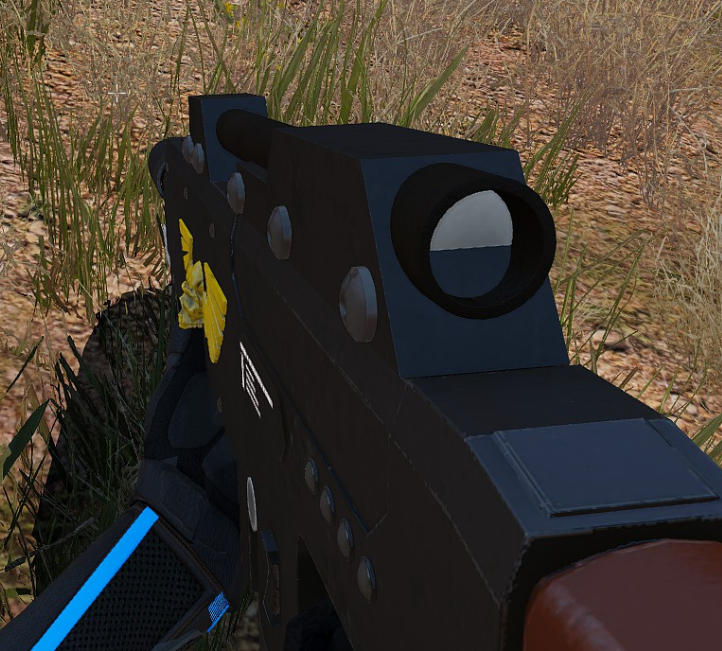


 dense peak
anyone using the arma3apex shader for substance? I'm having real weird results with the smdi, no matter what I adjust my objects are always overly specular on the whole object and not only on my metal scratch details.
severe rune
Deja'vu? We recently had someone with exact same issue
it's probably your rvmat
Check specular value and fresnel in your rvmat
dense peak
Yeah, I've literally copied the spec and fresnel values of items ingame that I wan't to replicate
It's as if the smdi doesn't affect the value at lal
 vestal sundial
I had issues with the Apex shader and newer versions of substance(2018.2.2 and up i think).. Has there been a recent update to it?
dense peak
Im using it with 2018.3 but I just recently started using the shader since I couldnt get my results as I wanted with the default specgloss
ancient smelt
@cinder granite Can you post an imgur of your channel setup in SP?
severe rune
Also just look at the texture you get out at the end, whether it looks correct-ish
 amber belfry
Where are the 2d scope reticle textures stored? In a p3d or a separate paa? I can't find any vanilla reticles.
amber belfry
Yep, I understand that, but what about the scope reticles?
They aren't projected anywhere, they appear on the screen directly
full quarry
no they are still projected on a plane thats shown on your screen
amber belfry
Right, I'll have a look
amber belfry
They aren't paas then?
full quarry
theyre in the data folder of that particular folder...
amber belfry
Aaa, thanks
mellow star
pretty sure they're selected on the ref in the reticle p3d (in which case you'd need to mod both if you're planning on revising existing reticles)
 solid mist
How do you know the size of the texture layer when creating a new mapframe?
full quarry
terrain related questions would be best to be kept in the #arma3_terrain, but generally you will want textures with 1m/px ration so if your terrain is 20480m x 20480m your textures for it would be 20480px x 20480px
solid mist
hang on ill ask you the next question in that chat
coarse scaffold
How could I use refraction texture?
full quarry
there is no refraction texture, there is refraction material however
where do you want to use it
coarse scaffold
On the window I would like to add rain water droplets
full quarry
mm I dont think there is any good way to do such in Arma
coarse scaffold
:/ I thought that If I repeat the reflect_ca texture(found in Particle textures) with applied correct rvmat few times I could achieve water droplets with refraction on surface
full quarry
well you can try but I dont think you can make that kind of pretty stuff in Armas engine
coarse scaffold
I tried but after applying rvmat, texture just wen transparent . ```
ambient[] = {1,1,1,1};
diffuse[] = {1,1,1,1};
forcedDiffuse[] = {0,0,0,0};
emmisive[] = {0,0,0,1};
specular[] = {1,1,1,1};
specularPower = 1000;
PixelShaderID = "Refract";
VertexShaderID = "Super";
did you have any texture on it?
full quarry
do you have normalmap for it?
full quarry
whichever turned invisible
also I think All A3 glass use supershader
the refraction stuff is possibly broken
coarse scaffold
Just wanted to give it a try, not that it is super important. Would have been neat effect
full quarry
it would for sure
odd crane
Any ideas how I can making something glow in the dark, but not glow during the day...since glowy stuff does work during the day...cause it's light????
full quarry
Animate parts to hide/unhide with clockHour24
Or try the windowlight shader from take on helicopters
coarse scaffold
Can I dynamically adjust texture transparency?
wet sonnet
Not really, maybe if you'd use procedural texture and with script change it
coarse scaffold
Yeah I know about those. There is no way to combine procedural with regular one?
full quarry
nope
 cunning flare
Having some issues with applying a new normal map to a texture i made.
(You might notice part of the texture is from VSM, this was used with permission)
I modified the AAF uniform's nohq in gimp, using the normal map plugin.
I believe i set up the config and rvmat to work correctly but it throws an error regarding the RVMAT:
"Cannot load texture \foxcoat\data\vkn_foxcoat_nohq.paa"
I've been scratching my head regarding this for hours now, so I hope I can get some help in pinpointing what exactly is wrong.
Could it be a fault in the actual texture? Or is it something in the config?
Anyways, here are some of the files im working with. This is the first time I'm experimenting with the RVMAT, so any glaring mistakes might get past me for the time being :)
Rvmat:
https://pastebin.com/vWRBMPA6
Config:
https://pastebin.com/Hqe3e1XJ
Textures:
https://imgur.com/a/AtcOhLC
full quarry
first of all you are doing the retexture in wrong config class
cfgWeapons class is the item you see on ground
not the uniform/character
you have to rexture the cfgVehicles class
next thing would be how is your development environment set up (P: drive, tools) and what do you pack it with?
cunning flare
I see. I started off with using vehicles, but when I did that it did not even show up in the arsenal, somehow changing it to weapons seemed to work, but apparently not. Not using a P: drive out of necessity, since my laptop does not have enough space to mount it (I know, I'm on vacation alright...  )
)
Im using the BinPBO personal edition to mount it, and I'm not binarizing it. The source and destination directories are correct, so that does not seem to be the issue.
full quarry
🙈
cunning flare
When I change it to cfgVehicles it throws "No entry 'bin\config.bin/CfgVehicles/U_I_CombatUniform.scope'.
full quarry
you may need to add correct config entries to the class..
full quarry
so what does your config look like?
Because I have an incling that U_I_CombatUniform may not be a cfgVehicles class
cunning flare
Correct, it is in cfgWeapons
Im trying to find the correct class in the vehicles now
I dont really know where to start looking though so im just scrolling through the config viewer right now
full quarry
the classname of the unit you want to retexture
full quarry
I think not
cunning flare
configfile >> "CfgVehicles" >> "I_engineer_F" >> "uniformClass"
Is the path if that helps
full quarry
then it might be the I_engineer_F that you want to edit
or use make a new class from
full quarry
I think your whole process is not correct.
cant really help when 9/10 of what you do does not follow the normal development process
cunning flare
I figured it was worth a shot. Thank you for the help anyways
Guess I'll sleep on it 😂
 ashen plank
What's the rules on retextures for a mod? If you add in textures that link to another mod's model (that you set as a dependency), without prior consent from the dependency's author, does this infringe on their intellectual property?
full quarry
there are few cases where mod authors have prohibited retextures in their license but I think if such is not declared and your mod does not contain anything made by the other author it should be kosher
 solemn peak
Is there a tool for mass PAA -> PNG/JPG/TGA conversion? ImageToPaa rejects paa files
 sudden quarry
Does anyone possibly have a texture template (psd preferably) for the Zafir/Negev?
 empty lance
@solemn peak im using Photoshop to save files as .paa's...it'll crash if your canvas isn't set to 128x128 pixels
empty lance
but the issue I'm having is that the 'shoulder patch' texture im using seems to be repeating itself along the sides
even though ive kept the canvas at 128x128 and reduced the size of the image, ARMA appears to be maximizing the actual image size...
frozen blade
@empty lance lol what? why would you save as .paa with PS?
empty lance
because thats what the tutorial said to do...
is there another file type that is also readable?
frozen blade
what tutorial?
- paa needs to be in 2^n format (128x128 / 128x256 etc)
- save it as tga with proper suffix and use imagetoPaa or texview to convert
the existing .paa plugin for PS is 100% absolete
even when it was newer it was creating more trouble than it was worth it
 delicate viper
hey, I was wondering if anyone knew where I can find the stock arma template textures (as compared to extracting the pbos and finding the right texture one by one)
full quarry
there are some in the Arma3 samples
there are not one for each model though
some you have to make yourself
delicate viper
aight thanks
empty lance
 solemn peak
In the name of Kane!
nocturne lake
just the env map I think
coarse scaffold
ok then, thanks
gentle mango
Hi all, followed good advice from Apollo WRT setting up my ARMA 3 export config and making a working smdi texture from substance painter and my current workflow is:
Extract to tga > open with texview and run the SMDI filter > save and open with gimp > adjust the blue/green channel a little darker > save and open with Tex view and then export to .paa
It works ok, but can be a bit difficult to get the balance correct. Is there anyway that I can improve on my method?
I know things like this will improve with time and experience but if anyone can see a little bit of an easier path then it'd be much appreciated.
 fading thorn
Anyone able to help out with getting a texture mod setup? I'm not sure how to find the right configs and edit them.
empty lance
im having issues too, like getting my custom insignias to show up on soldier uniforms by default in config files. im following what the wiki is saying...but im not seeing it when i test the Eden editor map im working on
i see it in the arsenal listing...and it exports a syntax code when applied to the full loadout...but i could use some guidance
 tawdry flare
I have a picture called file_co.jpg sized 300x100px and the Arma tool ImagetoPAA wont converte it. why so ?
full quarry
you resolutions are all wrong
tawdry flare
Why ? If I want it to be 300x100 how would I do it
tawdry flare
okay then I'll just stay in jpg then ?
tawdry flare
it's not a texture just a picture
full quarry
it is only suitable for the editor preview picture
tawdry flare
so that's fine
full quarry
suit yourself then
 full quarry
wrong kind of texture type in use or possibly badly configured rvmat
odd crane
it's a co
`#define ARMA
//Class clothing1.rvmat{
class StageTI
{
texture = "US_Military_Gear\textures\helmet_pasgt_ti_ca.paa";
};
ambient[]={1,1,1,1};
diffuse[]={1,1,1,1};
forcedDiffuse[]={0,0,0,0};
emmisive[]={0,0,0,1};
specular[]={0.34,0.34,0.34,0.34};
specularPower=51;
PixelShaderID="Super";
VertexShaderID="Super";
class Stage1
{
texture="US_Military_Gear\textures\helmet_pasgt_nohq.paa";
uvSource="tex";
class uvTransform
{
aside[]={1,0,0};
up[]={0,1,0};
dir[]={0,0,0};
pos[]={0,0,0};
};
};
class Stage2
{
texture="#(argb,8,8,3)color(0.5,0.5,0.5,0.5,DT)";
uvSource="tex";
class uvTransform
{
aside[]={1,0,0};
up[]={0,1,0};
dir[]={0,0,0};
pos[]={0,0,0};
};
};
class Stage3
{
texture="#(argb,8,8,3)color(0,0,0,0,MC)";
uvSource="tex";
class uvTransform
{
aside[]={1,0,0};
up[]={0,1,0};
dir[]={0,0,0};
pos[]={0,0,0};
};
};
class Stage4
{
texture="US_Military_Gear\textures\helmet_pasgt3_as.paa";
uvSource="tex";
class uvTransform
{
aside[]={1,0,0};
up[]={0,1,0};
dir[]={0,0,0};
pos[]={0,0,0};
};
};
class Stage5
{
texture="US_Military_Gear\textures\helmet_pasgt_smdi.paa";
uvSource="tex";
class uvTransform
{
aside[]={1,0,0};
up[]={0,1,0};
dir[]={0,0,0};
pos[]={0,0,0};
};
};
class Stage6
{
texture="#(ai,64,64,1)fresnel(1.32,0.94)";
uvSource="tex";
class uvTransform
{
aside[]={1,0,0};
up[]={0,1,0};
dir[]={0,0,0};
pos[]={0,0,0};
};
};
class Stage7
{
texture="a3\data_f\env_co.paa";
uvSource="tex";
class uvTransform
{
aside[]={1,0,0};
up[]={0,1,0};
dir[]={0,0,0};
pos[]={0,0,0};
};
};
`
I am using the hiddenSelectionsMaterials[] = {stuff}; which has been a pain in the neck
full quarry
yout TI textrue has both TI and CA
though that should not matter in this case
does the CO texture of yours have alpha channel?
full quarry
TI
odd crane
no _ca?
odd crane
ok, I'll make that change
full quarry
does the helmet have _CA textured parts?
and when you say you are messing with hiddenSelectionMaterials do you mean you are changing some other objects material with it?
as that can be buggy
odd crane
For the main texture I'm switching the rvmat with different _as because of the extra junk on the helmets like cat eyes, rhino mounts and elbows
oh, I also have a box with a transparent texture around the whole helmet
nocturne lake
that'll be the cause
odd crane
I hope not
nocturne lake
why do you need the box?