#arma3_texture
1 messages · Page 32 of 1
 plucky onyx
Wouldn't adding the AO map make it pink? Or do you mean to add a grayscale version?
 silver gull
grayscale of course
plucky onyx
OK I'll try all that right now
silver gull
guess why most game art use exaggerated wear maps-> because without good light shaders real life things just look really boring and flat
plucky onyx
I get essentially the same result overlaying curvature and AO maps on my diffuse map:
Bulldozer: https://imgur.com/a/9B0ulrl
Substance Painter: https://imgur.com/a/FDLzPJV
Except now I have lines from the curvature map in the normals which looks weird, so I'd take that out
I'm getting somewhat better results from making the _CA map just a fuck-ton more contrasty in Photoshop, but it'd require a lot of back-and-forth to get it right
 hardy atlas
okay
export
the ca
using the unreal engine 4 preset
and tell me how that looks in comparison
plucky onyx
So here's what I'm doing that seems to be working fairly well. I open the _ca in Photoshop and place on top of it 1) the _as in multiply mode and 2) the roughness map, inverted, in soft light mode. That both adds detail from other maps into the albedo which Arma seems to like as @silver gull said and darkens and adds contrast which works much better under Arma's flat lighting than Substance Painter's more realistic lighting. Additionally, I've learned that the blue channel in the SMDI, which contains the specularity map, needs to be inverted. All of that together and I'm getting results MUCH more in line with what I expected.
But if you think that means my problems are over, you're wrong! This is Arma!
Next question is: what are these diagonal lines that show up everywhere over my model?
 frozen blade
missing SVLod
or SVLod too close to the surface of the res mesh (as in the same plane)
 golden niche
should it be inside or outsude of res mesh?
golden niche
roger
 coarse scaffold
Soo, I am trying to make simple transparent texture, named it _ca, works fine in Buldozer, doesnt work ingame(texture isnt transparent). I am trying to use it with setObjectTexture
 nocturne lake
wont work if the model didn't have transparent texture to begin with
coarse scaffold
Oh thats why, ok thanks
nocturne lake
Yeah, alpha textures in the model has some kind of property to the model when it is binarised. Something to do with optimising how the model is rendered
coarse scaffold
Just tried, everything works , thanks again 😃
plucky onyx
I have discovered the clutch trick to making textures in Arma actually look good... baked-in lighting on the color map, which is actually really easy to do in Substance Painter with the baked lighting filter
Praise Substance Painter jesus
silver gull
you may want to keep your work files though-> next installment of Arma will very likely have PBR i would assume
plucky onyx
It's all non-destructive in SP 😃
silver gull
until there is an update or compat change or whatever that breaks it 😋
 exotic vault
@plucky onyx I should do that
 manic trellis
Hey guys I have a question texturing, Do I have to make the item in order to texture it or can it be sent to me?
 deft bolt
you can do either way it just has to be in proper file form (mine works best with .fbx)
manic trellis
Does anyone know any free models I could practice on texturing?
 stray relic
Have you looked at the Arma 3 samples @manic trellis ?
manic trellis
No I have not.
 spark shore
you can download them from steam
 full quarry
btw texturing and re-texturing are 2 different things. Typical model texturing workflow today involves very little "photoshop paint work" as the texturing is done through what is called baking from highpoly model to lowpoly model.
Or possibly in 3D painter program that allwos painting directly on the model.
re-texturing however is done by painting over excisting texture image
which can be quite difficult depending on how the model is made.
What im after here is to make sure what it is you are really wanting to do
manic trellis
Texture blank models.
full quarry
For Arma?
full quarry
well this channel is for Arma texturing mainly
manic trellis
Like I said I'll do anything giving to me.
full quarry
Thats not really how it usually works
people who make the models 9/10 also make the textures
due to how the creation workflow goes
since you seem to be using substance painter you should look up substance painter tutorials
so that you understand the different texture types that make up a game ready material
as there is more to it than just the colors
silver gull
turbosquid, cgtrader etc have quite a bunch of free models you can look for. Dont expect super high quality though...
 drowsy cosmos
 fleet fjord
Anyone got a good directory of uniform/gear PSDs?
 quasi gulch
@drowsy cosmos weapons_f\ammoboxes\bags\data\backpack_fast_mcamo_co.paa
exotic vault
@manic trellis I just bake all of my high poly stuff to low poly with xnormal
 mortal path
hi guys , i have a problem in game with texture , they are white triangles on the model
frozen blade
@mortal path do not cross post
mortal path
i finded the problem
deft bolt
so ive been working on some mc textures for a project, and i am consistently able to get the mc's to apply as wound textures, no problem there. however, when i go to overlay the main face texture in the material slot i consistently get either the default face or a white face with no error message
didnt know if this was a config or texture question so just put here
full quarry
overlay it how?
deft bolt
basically put the mc texture over the default head, so i dont make a unique texture for every head (ex. my mc map is a tattoo, i overlay tattoo onto all the heads instead of making a unique head for every race with the same tattoo)
full quarry
veteran priviledges
you can post links
but it does sound like a path error if your textures dont load
only diffference I saw in the face and face_injury rvmats was the MC stage
deft bolt
ya, when i try just the overaly with the basic blood texture it works but anything else dosnt
https://media.discordapp.net/attachments/450042917843894274/500342556740026409/20181006155850_1.jpg?width=719&height=405 thats the wound texture i have working
full quarry
ok so how do you apply that?
you have to compare your MC and the blood_MC and see if there are differences
deft bolt
throught the materialwound
 spark plinth
anybody keen to help me out with some icons for a mod? I need five icons that represent a soldier class. I found some stuff on the interwebs but well I am just not able to convert them to to .paa since the ImageToPaa Converter is crying about my filesize (4KB and 75x75 dimension)
nocturne lake
all images for Arma have to be 2^n
75x75 is not a valid size
would have to be 64x64 or 128x128
 empty lance
hey dudes 😛
im trying to simply make a new flag
im not sure where I'm going wrong....I can get the flag pole and the proper name to show up in my Props menu in Eden, but I can't get the actual flag to appear
the texture file was converted from .tga in TexView2 to .paa, and I think the config file is set up properly...but I don't know why I can't see my flag....I'd really like a step-by-step tutorial if someone can spare the time...
empty lance
@dusk blaze see ya here, sir 😃
 dusk blaze
gimme a hint where to find the UN Flags in the editor?
empty lance
Props, type in UN in the search field, and scroll down
theyre towards the bottom of the list
ill fire up ARMA and follow along with you
dusk blaze
Ok no need I had a look
empty lance
ja
dusk blaze
It's geometry. That means you will need to make a model of the flag, with animations, if you don't want to use theirs
Otherwise you could just use their model and place your image on it
dusk blaze
that's a different story, and your mod would need to indicate that it depends on that mod
dusk blaze
Simple enough, but I have run out of time here for now. I have to go feed my family
empty lance
thats cool 😛
dusk blaze
Meantime, you can start scouring the BIS forums or YT for tutorials on how to do a simple texture swap mod
stray relic
flag proxies have their textures changed using:
this forceFlagTexture "\a3\data_f\flags\flag_nato_co.paa"; // change path to your texture file
empty lance
right, but will this create an add-on i can share on the Steam Workshop, or will it simply modify it for the mission?
stray relic
It will modify it for a mission. You use the same code inside a config and packaged into a pbo to make an Addon.
stray relic
Made, and continuing to make.
empty lance
very good 😃
forgive me, my modding skills are next to nothing...but im eager to try new things 😛
stray relic
thanks - we have flags on most of our land vehicles
empty lance
i just have to be taught from almost scratch....
stray relic
Have a look at the Arma 3 samples first of all.
empty lance
right, break's over XD
empty lance
For the sake of mission processing, ill try to upload my flag as a mission only texture and see if at least that works
How hard is it to make a shoulder patch?
 knotty marsh
Quite easy - see Description.ext page, a bit of config + your image and you're fine 🙂
empty lance
Thank you. Ill check when i gethome
Eager to give life to the forces in Command & Conquer :)
knotty marsh
NOD4LIFE
full quarry
back when I started modding A2 I felt the same about C&C
well still do but my own concepts project has taken priority
 shut ibex
looking for a guy who know how to make textures from a picture i need polish vehicle paintjob, if you want to help shoot me a PM
dusk blaze
@full quarry is that C&C, or is that your own concept?
dusk blaze
Very nice work. My gosh, man, I'm sorry to just now be seeing this. I've had my head buried in my own work, as well. 99% of my time in Arma is testing my mod assets.
full quarry
😄 I know how that goes
full quarry
there is yes
empty lance
Right now, working on nod 01
full quarry
our stuff never got into release stage when we moved over to A3 and started our own project
empty lance
Perhaps it can be remade for arma iii
I was disappointed that the DPV wasnt in cup or rhs...
frozen blade
you can always make one yourself - the Desert Patrol Vehicle
that will cure the disapointment of not having someone else do it for you
empty lance
True. But my skills are lacking
Trying to get flags and insignias to work is frustrating me enough
Let alone figuring blender out to make a vehicle
full quarry
look up El Tyranos Blender to Arma tutorial series
full quarry
well I think its the most up to date and comprehensive one we got right now
dusk blaze
DPV reminds me of BF2
@empty lance you could just wait for these: https://youtu.be/uh5tdFHmF1Y?t=1050
dusk blaze
The shock buggy will have a different role than the scorpion did, for sure. The top launcher will fire grenades. If you want .50 cal action, the Puma will deliver a pair up top. I'll also be making a Hellfire launching version of the Puma.
I'm with you, though - a little surprised that no one has made the DPV yet.
Regardless of roles or authenticity, my buggy and jeep are a blast to drive!
 fading pagoda
a little news of the progress of my map https://forums.bohemia.net/forums/topic/212471-map-st-george-island/?page=2
 digital mantle
lmao i love how u put "nothing to do with st. george island"
dusk blaze
@shut sparrow That's pretty cool. Are you RealtimeVFXMike himself?
 shut sparrow
@dusk blaze nope
dusk blaze
AFAIK, Arma 3 only supports paralax for the ground. It'd be great for things like tank and truck wheels, and edifice decorations I think.
full quarry
👆 true
dusk blaze
All of that, or just the first part?
I wonder what would be the performance cost for paralax support on moving parts or buildings. 🤔
 glossy crown
Every engine use it on moving parts and building
RV is an old engine
Maybe in Enfusion
full quarry
@dusk blaze all of it! And yeah never engines use it a lot these days.
dusk blaze
I remember creating some paralax tank wheels for Cryengine, way back in 2008. One decade later, and here we are with RV...
full quarry
RVs roots are deeper
dusk blaze
BTW it didn't work for moving parts on that engine, at that time, either. But it DID work for more than ground...
True, despite its flaws, RV is still my preferred, free to mod engine for military settings.
Now, if Frostbite were ever unshackled... whole new story.
 spiral crag
Hello all, I know that some people here used the Arma3Apex shader for Substance Painter. I was wondering if anyone had direction on how to use it, or if it's still even functional. I've done my best to replicate all necessary channels and env map, but the object remains completely black.
I believe this was @ancient smelt who made the glsl. I'm running v. 2018.2.3
 ancient smelt
It should still be working, I haven't tried it in the very latest version but typically you'll get errors when it breaks.
spiral crag
Log says it loaded successfully, perhaps I'm missing something
Would the starting template effect the shader at all?
ancient smelt
You need special channels to be created though, like this:
// The channels used are:
//
//     Base Color (_co) [sRGB]
//     Height (_nohq) [L]
//     Specular level (_smdi) [L]
//     Glossiness (_smdi) [L]
Yeah, none of the existing templates are appropriate.
spiral crag
I was under the impression that a template was required
ancient smelt
I usually just start with Non-PBR (Specular Glossiness) and delete the channels that can't be used.
...and then add the extra channels.
There are some optional channels too:
//     User0 (Ambient Occlusion, _as green channel, Optional) [L]
//     User1 (Diffuse Occlusion, _as blue channel, Optional) [L]
//     User2 (Macro, Optional) [RGB]
//     User3 (Detail, Optional) [RGB]
//     User4 (Macro Alpha, Optional) [L]
I've tried with and without optional maps, but they seem to have no effect
Would the channel bit have an effect. I noticed that in your glsl you have [L] and [sRGB] but no distinction between 8, 16, or 32 bit
ancient smelt
Yeap, that doesn't matter.
spiral crag
I had specular channel instead of specular level, but it had no effect when changed. I'm stumped.
Are you running an earlier version of substance?
ancient smelt
Just tested it with the latest, sadly it looks like they've yet again broken compatibility with every shader.
As soon as I get some time I'll patch it up and mention the update in here.
spiral crag
Cool, thanks. I've never used it before but I hear good things about it.
ancient smelt
Yeah, the only problem with Substance Painter is they completely break shaders every few releases by changing trivial things like variable names. The last few releases have been really bad for it, too.
spiral crag
I wonder why, surely they know that it's going to mess with the community.
stray relic
@ancient smelt , a quick thanks from me for your shader - using it all the time. Luckily on SP 2017, so no problems with an update breaking the shader.
ancient smelt
Apollo: Cheers!
I always love to see pictures of things that were done with it by the way.
frozen blade
@ancient smelt ahh didn't get to try it
with the latest SP version(s)
is it broken then?
ancient smelt
Yeah, with the very latest version it is broken.
dusk blaze
What is this? I feel like I'm missing out on something that I never knew existed.
stray relic
I'm on 2017.3.3.
 dire crane
Hello, I am wondering if I'm able to get access to a template for the RHS FROG uniforms?
dusk blaze
Thanks, Ian. Looks like I would need Allegorithmic products to use this, correct?
frozen blade
@dire crane there is no such template (within RHS anyways)
dire crane
Alright, so there maybe an tutorial which I can follow, I'm still having trouble trying to retexture when there already is an camo on the uniform itself.
It always comes out off or just not natural
frozen blade
can't help you with that though, i have yet to do retextures on someone's else meshes.
i suggets you use convert the normal to cavity and use a mix of that plus AO to get the areas you need defined and work your way from there
i would only use the diffuse to verify stuff, not as the base on my PSD layer stack
@ancient smelt cheers, man, all up to date with SP, let me know if you need something quickly tested.
@dusk blaze - indeed, more specifically Substance Painter
dusk blaze
I'm deeply rooted in PS, unfortunately - like, over two decades of using the big electric cat.
frozen blade
¯_(ツ)_/¯
dire crane
@frozen blade Alright, thanks for your help!
ancient smelt
Rooster3D: Try the Substance Painter 30 day demo, you have nothing to lose.
Many of the same Photoshop concepts are in it.
empty lance
Some of the uniforms I want to use are clipping through the vests I also want to use. They come from different mods. I suppose there's no way to fix this without talking to the mod designers right?
full quarry
no
and they probably wont/cant do anything about it either
because each mod has its own standard pretty much
and gear is likely made to fit some type of uniform
 vagrant lake
Did u updated the shader ian ?
frozen blade
make some black pasgt vest then?
empty lance
..did not considerthat....interesting idea
How....hard is it to retexture a vest? As much of apain as retexturing a flag?
 unborn river
Hi guys. Part of my model gets transparent with water in the background -_-. this is the first time I've seen this. Im using the same rvmat as I've used on alot of other stuff. Anybody got a clue how to fix this?
check this:
https://gyazo.com/00c0ff85b05044ec757c2a0ea28847b7
full quarry
is there alpha transparency in the rockets texture or in the model?
unborn river
hm Im gonna double check. someone textured this for me. I know models can get semi-transparent if it is alpha in the texture, but here it happens with water only
what do you mean alpha in the model?
full quarry
some other part of it being transparent
if the rocket is _CO texture is there some other pat that uses _CA
 subtle cloak
Also, any good retexturing tutorials? Tried following one of the tutorials on youtube, followed everything it said, but not succesfully 😦
full quarry
retexturing is an artform of its on
cant remember there being any comprehensive step by step stuff as it basically relies on common image editing techniques that vary a bit depending on what software you have available
subtle cloak
I mean.. at least how to put the texture back in the game and how it actually works😅
full quarry
Bi forums editing section probably has that asked a few times. Cant remember for sure but its a common topic
unborn river
@full quarry ty gonna investigate
full quarry
I recall there being similar issues if the model has a lot of transparency it is then treated as tranpsarent and drawn on different pass and stuff like that happen there was some named property or rvmat flag that helped with it
unborn river
but I dont understand with what you mean about the model itself being transparent
its all closed
full quarry
yes but the engine treats it as transparent and (I guess) draws it on different pass with other transparent stuff
frozen blade
a. check if texture is using proper suffix
b. check the texture doesn't have a 1bit alpha (even if it is an 24bit RGB file)
c. check face properties for the entire mesh
unborn river
@full quarry I kinda found the problem. on my backpack Im using this rvmat for the jetflames:
a3\data_f\proxies\muzzle_flash\data\muzzle_flash_rocket.rvmat
when I removed that it fixed it..
but.....
I wanna keep it 😅
full quarry
yeah that part has transparency right?
unborn river
ye
full quarry
so that is making the engine now think its an alpha drawpass object (or somesuch)
but cant remember the fix for that at the moment xP
unborn river
damn.... cant really use attachTo either
since the backpack is using the .rtm animations
nocturne lake
@unborn river in your geometry LOD, add the named property forceNotAlpha = 1
nocturne lake
other alternative would be to put the flames in as a proxy model like muzzle flashes are in weapons
but I think you said you had some setobjecttexture script for them, so maybe that's not a good option
frozen blade
@unborn river oh yeah, if the orginal .p3d is not using a _ca texture and you add some _ca stuff to it, will break basically
because engine treats alpha enabled models differently
the proxy is a great idea if you could modify that original model
which as far as i know, you cannot
 leaden fox
Hello there, I've been having an issue with my textures: some parts of it are somewhat transparent and cause a flickering graphical glitch: https://media.discordapp.net/attachments/331575722411819008/502791443220529154/unknown.png?width=674&height=602
You can somewhat see through them
I've seen this a couple times now and I'm wondering what might cause it and how to fix this
full quarry
does the model have both CO and CA textures?
it may be the same thing Battlestad had above
so scroll up a bit
also @unborn river was yout problem solved?
leaden fox
The "forcenoalpha=1" didn't fix it
it only uses CA, I always use CA on models and this happens only very rarely
unborn river
@full quarry oh yes forceNotAlpha=1 did it. Sry
leaden fox
switching to CO dodn't solve the problem also
unborn river
@leaden foxyes it did
leaden fox
it didn't for me 😄
full quarry
@leaden fox you use CA even if the model does not have transparent parts?
full quarry
I dont know
but it may cause issues
CO and CA are different for a reason I believe
unborn river
I always use ca. Never quite understood the difference
unborn river
@leaden fox did you add forceNotAlpha in the geo lod?
leaden fox
yep
unborn river
Sokolonko, it seems to me that parts of your texture contain alpha. Try to add a completely black image on a layer below it and export
You are having a different case than I did. I've had your problem before, and that was because I had a few "holes" in my texture
@leaden fox
leaden fox
Yeah, I'll try to figure something out in SP
full quarry
when you used CO did the texture still contain transparent bits?
and did you convert it from file_CO.xxx to file_CO.paa or rename CA to CO
leaden fox
@unborn river was right
I had to put a black layer below all the other layers
so basically there were holes in the texture
so basically exporting the CO should also work, but I just re-named the file
full quarry
its the conversion with right suffix thats important
and then binarizing with rright kind of textures
nocturne lake
lol, don't use _ca unless you have to
shadows don't project on _ca
so if you stick your model in a shaded area it will look like it's glowing against the background
it's pretty much only good for glass and stuff
quite sure that's why they made the SSAO effects pass through it
golden niche
ahem, my trees have mostly _ca polyplanes and they are being shaded
nocturne lake
trees are rendered differently
dusk blaze
hey this brings me to a question I've wondered for some time now. It regarding window shadows. For most things, window shadows are unnecessary, but for something like a full glass canopy helicopter the shadow looks too simple. Is it possible to make the glass the same way you would make a tree? I've never made a tree, so I haven't experimented with the process.
perhaps the glass shadow is the only part that should be tree-like, while the glass itself should be textured as it normally is.
full quarry
you could try treescrownhader on it but Id guess thats about it
dusk blaze
Would it be possible to attach a tree to a vehicle as a proxy?
If so, then what about just proxy-izing all the windows?
stray relic
only on boats when they're beeched
dusk blaze
What, really? That's a strange exclusion
stray relic
full quarry
you can use treecrownshader on any object
its used in rvmat
no idea if it can be made to look like glass though
dusk blaze
Yeah, it's jus tme thinking outside the box...
I see the anti-aliasing in tree shadows (the leafy bits), and I think "I want that alpha in my window shadows."
I don't know how to achieve that, though.
 unreal cloak
Hi. Did anyone build a tool or an algorithm to predict the color difference between colors while editing texture pattern and in game colors of the same very pattern? Thx.
Or values to apply to a specific color in a psd file or another solution. Thx
full quarry
no i dont think such tool has been made
what you see in game depends from many other factors too than the color of the texture
threre are the material properties given to it
and then there is the lighting setup of the terrain in use
and daytime weather conditions on it
unreal cloak
Ok thx @full quarry
full quarry
fastet way to test colors would probably be filepatching
or buldozer preview can also get close to game environment look
but it has simpler lighting
unborn river
hi guys. Im making two very similar jetpacks, but Im getting a weird effect on the jetflame on one of them. They are both done the exact same way, and using the same rvmats. Please take a look at the screens provided
working one
not working
full quarry
possibly needs alpha sorting?
unborn river
how do I do that?
you mean faces->move top on the flame?
ahh
sort alpha
never saw that option before
hmmm that made the problem worse actually
now it flickers too
the one that is "working" actually has some issue too. two of the side boosters are visible trhough the flame
unborn river
so the jetflame should be on top or bottom?
frozen blade
top i would say
unborn river
hey it worked!
full quarry
ah yeah meant using the move to top 😄
unborn river
thanks!
full quarry
never got the "automagic" sort to work
unborn river
still dont understand why my first jetpack worked straight off the bat
didnt need to do this on that one
frozen blade
lucky i guess
unborn river
no wonder arma modding drives people mad 😄
full quarry
the fire effect just happened to align right
 jade creek
Anyone knows why this happens?
It's something with the rvmat, but I have no idea what happens there.
Basically the shadows are weird, they turn pitch black when turned away from the sun.
https://i.imgur.com/tZQOkDQ.jpg
digital mantle
That looks more like a issue with shadow volume.
jade creek
There's no shadow lod just for testing, same issue.
When I remove the RVMAT, it looks fine
digital mantle
Can you post the rvmat?
digital mantle
i'd say my best guess is that it has to do something with the AS map
jade creek
Yea, the path was wrong, forgot a . between the name and file extension
nocturne lake
paths in .rvmat could be wrong or you didn't name the normal map properly _nohq.### before converting to .paa
digital mantle
clap
digital mantle
meh
 errant palm
anyone use substance regularly?
dusk blaze
Phrasing
errant palm
cant get _as to export due to something with mixed_ao
https://images-ext-1.discordapp.net/external/37Komu7zsQ9EDc0OWI-tPHGkjuwYofU1E_xnsX0g3PE/%3Fwidth%3D960%26height%3D232/https/media.discordapp.net/attachments/267706483930562561/501544063808569345/44067578_1770290519767399_8444000751562260480_o.jpg
no ambient occlusion channel or mesh map
 limber basalt
do you have all the maps you need to export with that preset?
looks like your missing opacity and mixed ao
 slim elbow
Hey guys I have probably a quick question be was just curious if anyone has encountered this issue and knows the fix. I am pack my mod with ProjectPBO, in the past I have been able to pack it with out this new uniform. The uniform is based on the original model by Arma 3 so I call it in the Config. But when I am trying to pack it I get a bunch of errors like these.....
config.cpp : a3\characters_f\blufor\b_soldier_01.p3d
b_soldier_01.p3d : \a3\data_f\penetration\meat.rvmat
b_soldier_01.p3d : \a3\data_f\penetration\meatbones.rvmat
b_soldier_01.p3d : \a3\characters_f\blufor\data\clothing1.rvmat
b_soldier_01.p3d : \a3\characters_f\heads\data\hl_white_bald_muscular.rvmat
b_soldier_01.p3d : \a3\characters_f\heads\data\m_white_01.rvmat
b_soldier_01.p3d : \a3\data_f\penetration\meat.bisurf
b_soldier_01.p3d : \a3\data_f\penetration\meatbones.bisurf
b_soldier_01.p3d : \a3\characters_f\blufor\data\clothing1_nohq.paa
Does anyone have any ideas
full quarry
these dont look like errors
you need to paste the whole error
preferably to pastebin
full quarry
well you left out the important line
missing files
the packing cant find those files in your P: drive
so have you set up your p: drive with Arma3P
slim elbow
the terrian one yes
slim elbow
I'm I set it up correctly, let me just double check tho
spiral crag
paths have \ in front, which might prevent recognition, "a3\data_f\penetration\meatbones.rvmat" should be what it looks like in builder/rvmat
slim elbow
@spiral crag I just used the addon builder instead of projectPBo and worked fine thank you all
spiral crag
Yeah, if you use addon builder, you should check in game.
 dense peak
How many of you guys use substance painter for buildings? Would you recommend it and why? I know it's a very broad question, but I'm not really sure about the range of features it offers, and how well it applies to assets specifically for arma. I'd like some flexibility when it comes to texturing large structures, with the option for adding in precise dirt/graffiti/decals etc onto my buildings.
frozen blade
substance painter is not the best tool out there when it comes to buildings textures, mainly because arma structures are using tileable textures via multimats
substance designer is the better too here, but it has a bit of a steeper learning curve
i only used sp for accessories for houses, that were also using supershaders instead of multimats
spiral crag
Substance painter can be useful for setting up the mask and macro texture, but that's only 1 stage of the multiple textures typically used for buildings materials. I don't believe substance painter supports multiple uv stages, but by using duplicates of the same mesh with different uv scales, it might be possible to design the repeating textures as well.
 shadow lance
http://www.boundingboxsoftware.com/materialize/ is a good start for tileable textures
great part is, it's free. also here's some tutorials as well
hardy atlas
Like PuFu says, Steer clear of substance painter for buildings and models that require multimats if you can.
empty lance
Is it possible to replace a 'map' with a different map image?
empty lance
Ok :P
full quarry
if the model has hiddenselection for it the map then yes
empty lance
So its a partial script thing? Like a flag?
full quarry
yes
empty lance
hmm...interesting
 tacit nebula
Hey all, i know this isnt the dayz modding discord but rvmats are fairly similar, was wandering if you couldcould help me figure out why my rvmat seems to do nothing for my textures
its all setup correctly
from whati could tell
 severe rune
is the model configured to use your rvmat?
severe rune
what means it seems to do nothing? Normal maps just not showing up?
Can you post your rvmat?
Did you double check that the file paths are correct? pboPrefix and such?
tacit nebula
ah
now i think about it
the rvmat wouldnt work in object viewer right? because the rvmats locations wouldnt quite work as the pbo hasnt been built
severe rune
what is "object viewer"?
severe rune
If you have your P drive correctly set up. Then buldozer should find and properly display the rvmat
Same as with the Base texture
tacit nebula
i probably dont have my p drive setup correctly
the actual basis is there
where should my mod files be?
i currently have them on my desktop
severe rune
if your rvmat path inside the model is \stuff\materials\material.rvmat
Then you should have that file in P:\stuff\materials\material.rvmat
So basically P:\<ingame path>
tacit nebula
okay
so say my prefix is kuroakita\dayzplus
should i have the file hierarchy as p:\kuroakita\dayzplus\vehicles\truck\truck_smdi.paa
etc
severe rune
yes
tacit nebula
Welp i got the rvmat working now
but it certainly seems off still lol
the car is wayyy to shiny
 silk portal
should it be hard for someone who doesnt know anything about custom textures to create a custom flag pole?
for a milsim unit specifically
full quarry
all you need is a new texture you change on the vanilla flag
creating a new flag model would be very difficult for a beginner
 vale mauve
setObjectTextureGlobal, bam.
silk portal
with any resolution?
frozen blade
2^n
full quarry
@silk portal use the Arma flag textures as example
there are actually a nice empty flags there you can use as base
silk portal
i specifically want it to be in a mod because its for a milsim unit
full quarry
what I meant was you can draw on one of the Arma textures and pack that up with whatever other stuff you want for your mod
 muted creek
I'm looking into an issue with an invisible texture on the back of a uniform
Trying to repair an older mod.
Here's the config of one of the uni's and some screenshots. Putting this here as I'm not sure how to solve the issue.
class JO_Phiran_Cream: Uniform_Base
    {
        author = "j0zh94";
        scope = 2;
        displayName = "Phiran (Cream)";
        picture = "\JO_Afghan\data\ui\Uniform_3_CA.paa";
        model = "\A3\Characters_F\Common\Suitpacks\suitpack_blufor_diver";
        hiddenSelections[] = {"camo"};
        hiddenSelectionsTextures[] = {"\JO_Afghan\data\tak_civil04_5_co.paa"};
        class ItemInfo: UniformItem
        {
            uniformClass = "JO_Insurgent_Crew";
            uniformModel = "-";
            containerClass = "Supply90";
            mass = 50;
        };
    };
Screenshot?
muted creek
Apologies, I discussed the issue with the original creator and it is related to the 3D model.
My apologies.
 jaunty depot
I am looking for someone to retexture a modded vehicle to make it a police texture. The vehicle I'm talking about is from RHS AFRF. It is the GAZ-233011
I will be paying for it
 white cargo
anyone know what the blah_blah_Crown_mca.paa textures for trees are?
white cargo
mc already has alpha channel so what's the difference then?
 fiery wigeon
Hello all. Im running into an issue where I have a model made set and ready to go but when I go to pack it with pbo project its giving me an error saying its missing my texture paths. I checked the original folder many times now and my texture paths are sitting exactly where my paths are defined. I know this is kind of stupid but i cant get my pbo proj to find any of my texture paths for my model no matter what i do or what paths/folders i use. Is it somehow not updating somehow my new paths? Do u have to do something like somehow reset the texture paths in obj? Anyone have any ideas?
full quarry
give an example of a path that does not work?
also the textures are in p: drive yes?
fiery wigeon
yes everything is in my p drive i will post a YouTube link showing u whats happening to easier explain
full quarry
does the paths work in OB buldozer?
if you look at the paths in OB material/texture renamer tool are they red or black?
do you use pboPrefix file?
fiery wigeon
yes the texture shows up perfectly there which is why im confused because it shows up nicely in bl and they are red in the renamer tool
im starting off by using one texture atm just to one time get it in game successfully im working with the floor texture
full quarry
what was that application error when you opened OB?
and while im not expert in pboPrefix use I think you are not using it right
delete it and try packing again
fiery wigeon
i haven't had that happen to me b4 i think it was because i had already had the same file opened and will try now
i still get the same error
RS3_Mil_Barracks_L.p3d : \rs3_structures\data\rs3_mil_barr```

meanwhile as u saw in the video it was located in that exact path and it keeps changing the name of it at the end on its own for some reason maybe thats the issue?in the material renamer your path is red
means its not correct
youre not supposed to use open old p3d either in the export/import
you just save the file
with "save as"
fiery wigeon
oh and just use that file the one u saved?
full quarry
yes
it is p3d
now that were at it, where did you pick up the habit to use the export?
also do you have this in OB settings?
fiery wigeon
i may have picked that up on my own ill check my tut vids that ive been using if so ill send the link
full quarry
alright
I've just seen a few others do so in the past
trying to find out if there is a tutorial spreading bad info
fiery wigeon
yup will do ill search around for it and also for the settings i actually do not have that im changing that now
full quarry
odd as that should be the default value
in any case that means it uses the root of P:\ as a starting point for paths when they are loaded in OB related stuff
but in hte file it still saves the right path myaddonthing\data\mything.paa
so that it works properly in engine
your path looks alright though so it should turn black when you fix the path setting
fiery wigeon
alright imma try it now and also my texture path is now black in the rename option
full quarry
alright then show me a path in your rvmat
do you have a leading\ in front of the path?
fiery wigeon
no i do not have that will add now and rvmat path i will get
fiery wigeon
oh ok i left it out and for the
rvmats are another story for me also i have no idea how to set those up ive been just using some default ones but some of the stuff they have in there i have no clue what it does
so i have 2 versioon of the texture a nohq and a smdi version cuz the texture i got that from had those in and im using the rvmat from there and this is what it is ambient[] = {1.0,1.0,1.0,1.0}; diffuse[] = {1.0,1.0,1.0,1.0}; forcedDiffuse[] = {0.0,0.0,0.0,0.0}; emmisive[] = {0.0,0.0,0.0,1.0}; specular[] = {0.1,0.1,0.1,0.0}; specularPower = 120.0; PixelShaderID = "NormalMapSpecularMap"; VertexShaderID = "NormalMap"; class Stage1 { texture = "RS3_Structures\data\floor_tile_09_nohq.paa"; uvSource = "tex"; class uvTransform { aside[] = {1,0,0}; up[] = {0,1,0}; dir[] = {0,0,0}; pos[] = {0,0,0}; }; }; class Stage2 { texture = "RS3_Structures\data\floor_tile_09_smdi.paa"; uvSource = "tex"; class uvTransform { aside[] = {1,0,0}; up[] = {0,1,0}; dir[] = {0,0,0}; pos[] = {0,0,0}; }; };
full quarry
alright well that looks ok but you will need to figure out how to make them properly
to get most out of them
what does your PBOProject Settings look like?
fiery wigeon
so do they just control the detail of the texture like i know the normal map adds some 3Dish effects and the other one adds like a slight bit of shine but the original paa is not defined in there is isn't it supposed to be?
will check now
there pretty much default except i added my own bisign key to it
other than that i havent touched anything in mikeros pbo settings
full quarry
no the diffuse/color .paa is defined in the texture slot of the .p3d
fiery wigeon
ok
full quarry
fiery wigeon
so u technically dont need an rvmat to load a texture in game
fiery wigeon
gotcha
fiery wigeon
alright so it packed i think it was becasue of that setting i didnt know about in obj builder (im just learning obj) i had it set to nothing so thats why it wasnt packing
i spent over 2 days trying to figure out why it was reading it lol
full quarry
possibly
it may save the paths badly if its not there
also did you now save the p3d and not export it
fiery wigeon
yea i didnt export
fiery wigeon
for sure and thank u for the assistance as always ;)
i will link those tuts if i find the export flaw
full quarry
👌
 void tiger
I want to know the address of txture in A3
a sample
a3\structures_f\civ\infoboards\infostand_v2_f.p3d
I want to know how to find it.
Correct address
severe rune
GO in 3DEN. Place object. RIght-click. View in Config Browser. Check "model" entry
btw your question contradicts itself.. You want a texture address (real name is "path") but your sample is a model path.
What do you want now? Model or texture? I guessed model in my answer.
void tiger
Okay Thx
 acoustic dove
Is there any good tutorial or a method to create a good Thermal imaging TI maps for cloth?
full quarry
@acoustic dove not really 😄
arma + good tutorial is rarer than arma + tutorial which in itself is a rare beast
acoustic dove
i thought so xD
spiral crag
@acoustic dove You could, in theory, use a thickness map to create the heat source grayscale. It would simulate core body heat and the cloth would be cooler in areas where it's thinner, ie, not on the body itself.
spiral crag
I'd imagine the best result would be from using occlusion map, mesh thickness, and cavity(to really bring out the contrast of cloth folds) >> https://i.imgur.com/w8wtdNP.png
 left horizon
I made a few uniform textures but I can't figure out how to put them in game, I made them from .png to .paa and now they're in a pbo which I put in an addon folder to be used as a local mod but they still won't show up in game. I have BI tools but don't know how to config or script, any up to date tutorials, configs or tips would be awesome
digital mantle
@left horizon Are you retexturing an existing uniform or trying to make a new one?
more info would be nice
left horizon
thanks, my friend helped me I just had to use the setobjecttexture command
vagrant lake
any idea why this happens ? this half shine through https://i.imgur.com/tkYVA8I.jpg
nocturne lake
because you're using an alpha texture for the whole canvas cover. Not just the windows
vagrant lake
yeah because its a fabric tarpaulin any way to solve it when its the same object ?
vagrant lake
hm that suc**
doesnt have a hmmvw of rhs also a plane like that ?
the M1097A2 if i remember correctly
nocturne lake
Hang on, I'll get a pic
vagrant lake
alright
nocturne lake
the windows are separate from the canvas https://i.imgur.com/bq0JSRK.png
vagrant lake
ok thanks for the help good to know that 🍺
 obsidian nimbus
is it not possible to use custom textures on the AAF officer uniform?
I can on the CSAT one
as far as I can tell the AAF one is just a modified version of the CSAT one
deft bolt
for making folliage (custom trees) do you make just like a giant bubble for the models canopy and then apply a leaf texture +alpha areas?
deft bolt
will do
full quarry
if you cant find a jsdf mod on biforums or armaholic or steam workshop then likely not
 cunning berry
theres a jsdf mod, just doesnt have attack helis is my problem.
severe rune
Who asked whether we will get PBR?
DayZ tools material editor:
https://s.sqf.ovh/workbenchApp_2018-11-07_21-56-35.png
 full quarry
yy
acoustic dove
nice to see the PBR but does the dayz uses it? for anything yet?
severe rune
As far as I heard. No.
might not be implemented yet. But as they added the material type. They are definitely either implementing it currently, or planned it for the future.
 placid thicket
I hope we can get something like unreal's rendering for it
It's the biggest drawback of arma right now imo, we're using rendering settings from ages ago
vagrant lake
The question is do we Need rvmats when we have pbr?
nocturne lake
of course. How else do you assign the material paths and instruct it to use the correct surface shader techniques?
frozen blade
@severe rune where can i get dem tools? too lazy to search
severe rune
Steam Tools menu thingy. Same place as Arma 3 tools. Just called "DayZ Tools"
You need DayZ itself installed. Otherwise workbench says "DayZ not installed, exiting now.."
frozen blade
yeah i got dz instealled
i think anyways 😃
found it, just need toi figure out why i cannot install it, cheers dedmen
spark shore
I'm trying to retexture a longsword from operation trebuchet
don't wanna break rules, its just as a personal meme
can't seem to find the actual texture to open with textview2 tho
severe rune
What is the reason for not finding it? The folder where the texture should be is missing that one file?
Or you don't know how to unpack a pbo?
Or you don't know how to find the path to the texture file?
Does it have hiddenSelectionTextures in config?
spark shore
basically what I know is I need to open arma3/addons with pbo manager and from there select the texture from the folder
but I don't see it
severe rune
So you already know at which path the texture is? but the file is just not in the folder where it's supposed to be?
spark shore
yeah there is a folder literally named longsword so I figured it would be there
maybe its hidden somehow to prevent retexturing?
spark shore
probably not
I'll look more deeply as I get home
severe rune
check the config for hiddenSelectionTextures. If you can't find the texture path there. You have to look into the model (notepad++ is enough if you know how parts of the texture path will look like)
If you don't have hiddenSelectionTextures you cannot retexture without modifying the model though.
spark shore
well I just wanted to put pizza slices on the wings
won't cry if I can't
vagrant lake
is the arma substance shader still not working ?
stray relic
@vagrant lake It never stopped working if you were using a slightly older version of Substance Painter (2017 in my case). But I think Ian said that he'd updated the shader to work with the latest version, perhaps a few weeks ago.
vagrant lake
hm k, yeah i have the newest version of SP so for me it doesnt work, i read it few weeks ago that he wants to update it but it didnt read anything new about it thats why im asking here ^^
stray relic
Did you download the latest version of the shader and try it?
vagrant lake
yea
dire crane
I'm kind of new to ARMA 3 modding, but I'm wondering how I can get rid off some of the shinyness of my guns I added. I did look it up on the wiki about the RVMAT basics, but it only confused me even more.
stray relic
Shine is a combination of the _smdi texture and the rvmat specular & specular power. There's more info if you search for Arma and "super shader".
dire crane
Alright, I'll take a look. Thanks!
limber basalt
@spark shore the longsword doesnt have selections
spark shore
yup
looked it up
 proper pelican
Hello! What is the best quality in text2View? DXT5??
obsidian nimbus
is there any way to make a good looking greyscale texture without using _gs?
frozen blade
?
obsidian nimbus
I only want part of my texture to be black but want the other part to be colored
frozen blade
texture for what precisely
obsidian nimbus
https://i.imgur.com/W4nwpRC.png
in this case a building
it's the MC texture
_gs looks good but it takes a lot of memory and has no color info
the black part of the MC has zero color in it as well
you can see the compression artifacts so clearly on every black texture in the game
frozen blade
MC texture is a RGBA (4x8bit/chnl = 24bit)
obsidian nimbus
CO has the same problem
frozen blade
i do suggest you add a bit of noise to any larger area that is a single solid color
because that artifact is compression related indeed
i still don't get the question
any way to make a good looking greyscale texture
not really sure what _gs is, never seen one used on a structure before
obsidian nimbus
I didn't exactly word it well
I mean a texture that is black and white, like a black vest, or dark grey vehicle, or black roof, that doesn't have the added color of the compression artifacts but isn't entirely greyscale. Like there are small parts of the texture that have color
_gs is greyscale, looks really good, just doesn't have any color
I don't think it is compressed actually
Essentially I just want to avoid compression adding magenta and green to areas with zero color in the original image
frozen blade
can i see that texture that is giving you headaches?
as i said, the very easy way to get around the artifacts is to manually add a bit of noise
in order to break that solid color
that will compress a ton better and ideally without artifacts
obsidian nimbus
https://i.imgur.com/wMlWmTN.jpg
the helmet and vest in this pic are using _GS
this is the station house MC texture I am editing: https://i.imgur.com/IQaqab3.png
https://i.imgur.com/odIDHBJ.png that is the helmet paa post conversion
frozen blade
some of the shaders, afaik, do expect specific texture types btw
how does the alpha channel look on that MC map?
frozen blade
what is the resolution on this one 2k?
obsidian nimbus
yeah
frozen blade
as i understand from that alpha, you want to use the MC map completly change that ground texture
since it is full white
weirdly, the compression artifact shown there are a ton worse than what is visible at least in that MC texture (RGB channels)
obsidian nimbus
https://i.imgur.com/BkIXC9K.png
added some noise, makes a bit of a difference
color is still gross though
frozen blade
yeah, it shouldn't be pinkish
can you send me the .paa please via PM
the one before the added noise
obsidian nimbus
sent both
frozen blade
ok, so, the big splotches, if you ask me, have 2 individual reasons
a. texture compression - from the base 16MB tga to 1.2MB - something's got to give nothing much you can do about that except add some noise - maybe more subtle than the one you did
b. the texel density - because on these floors, walls etc you are using a full non transparent alpha, basically what you are doing is reducing a ton the pixel/sq m in these areas
each of these floors is around
b. the texel density - because on these floors, walls 650x400px, while i would assume the base texture used there is 1k x 1k if not 2k x 1k seamless texture
so it is around 4times smaller
i would guess the higher compression on the MC maps is based on the way these are used
as in blending/overlay instead of replacement, at least when it comes to structures
i would try reducing the alpha intensity in these areas if possible
and use these as blends
obsidian nimbus
With slight added noise and lowered white levels:
https://i.imgur.com/DNijKpJ.png
I could make the texture a tad darker if I wanted to match what it was before but this looks fine IMO
frozen blade
also, just to make sure you get rid of that pinkish, you could simply make a mask with a desaturate in PS or alike and make sure there is no reds/mangentas in these areas
frozen blade
because i checked your TGA and these areas have some pink in them
obsidian nimbus
just to be sure there was no color there
it does indeed
in PS it is completely desaturated so I guess that's just from the .tga
frozen blade
yeah no idea, there was some color info there as well
obsidian nimbus
I see a few scattered pixels of blue and magenta on my current one
frozen blade
last question, how do you convert the textures? manually or do you let buldozer do that for you?
obsidian nimbus
I have the image to paa gui open and convert every time I make a change
then replace the old texture with the new one in the actual data folder
frozen blade
hmm, why not let buldozer do it for you
?
you can manually open that TGA in texview and go through the compression list, you will definatelly see the more splotches and artifacts when switching from ARGB8888 to DXT1 and lower to DXT5
obsidian nimbus
I just keep buldozer open and have the textures as .paa files in the .p3d
I have tried playing around with TexConvert.cfg in the past but never really got anything decent
frozen blade
fair enough
so alpha channels needs DXT5 compression, so there's that
all i can suggest is add some noise, and lower the alpha intensity a bit
frozen blade
no worries
 lean osprey
hi all, i retexture some CUP gear for a mod im working on and im getting reports of the texture reverting to original at distance as in the pic...
https://cdn.discordapp.com/attachments/504995698744360960/512647632594927636/unknown.png
Is this user based details settings or is it something that can be addressed on my side?
frozen blade
most likely missing HS named selection on secondary lods in CUP's p3ds
nothing you can do
vale mauve
(make a ticket?)
lean osprey
@vale mauve might do that... for quick fix might be worth using diff model that hopefully dont have this issue?
vale mauve

CUP's discord is in #channel_invites_list in case you need that. Can ask there, make a ticket on their phab. Dunno if using a different model will help, could be the fault of all of the vehicle lods.
lean osprey
ill ask them thanks, was hoping its something i can fix...assumed it was some sort of LOD issues. Might try using similar colour cap thats more closely resembles the retex so if the LOD issues pops up that its not to distracting to players. Thats till issue can be resolved that is
dense peak
Is it possible to get hands on the Stealth Combat Helmet? Would love to texture it black for SCP Related things
 celest obsidian
Sure, Arma 3 root folder > Expension > Addons > characters_f_exp > BLUFOR > Data
then search for "H_HelmetB_TI_tna_F"
dense peak
Oo alright thank you
 grand warren
in case you guys haven't seen it yet, substance painter 2019 is on sale for 83,81€ on steam
 steel shell
Can anyone recommend a step by step guide to recreate berets
full quarry
@steel shell tutorials rarely cover such specific topics and focus more on the "how to use some tools" or "how to model anything"
Basically modeling a car and modeling a beret uses same tools and techniques, so what you might need is general tutorials on "how to use my 3d modeling program"
steel shell
@full quarry thanks for the tip, I'll look into that.
exotic vault
@steel shell I can try it out as practice
steel shell
@exotic vault that would be amazing
severe rune
Anyone know what mainLight and fogMode in rvmat's do?
mainLight maybe configure if/how light shines onto your object? Or color of the light? something?
 true fossil
@severe rune have you checked the wiki?
none - no fog
fog - fog used by usual opaque object, the more is object covered by fog, the closer is it's color to fog color
alpha - fog used by objects with alpha, the more is object covered by fog, the more transparent is
fogAlpha - combination of both above approaches, used for roads (alpha-out could be quicker than fogging)
which wiki page is that on?
true fossil
severe rune
Well GG 😄
light is not explained tho
severe rune
Yeah I did. That's the same Info I have too
true fossil
well, shit
 frigid escarp
@foggy torrent to the rescue? 🙏
severe rune
setting the mainLight to "None" makes the env map color modifier be "white" instead of the sun color
But I have no idea what all the others do.
Nor do I know what "env map color modifier" would be
is there a way to have a bigger color value than 255 in a paa?
I feel like my Emissive isn't bright enough. For the emissive entry in the rvmat you can just use bigger values as these are floats, but can't do that in a texture if max is 255.
severe rune
Okey.. I found out how to make it darker using some dynamic range thingy. Didn't really bring me forward.
Though that's nice to know. You can do color*(x*(1/255)) where x is also 0-255 color. Meaning you can get way more precise colors lower down the range.
I guess that's the TexConvert.cfg "dynRange" entry.
Seems like it's not possible to make it brighter ._. Bummer. In shader are colors are float anyway
A RGBA texture format where the A is a multiplier to RGB values would be nice 😄
Like the specular power on the _SM
severe rune
Problem solved. Read bottom.
Also burning question for @foggy torrent . Why does both binarize.exe and Arma itself not allow SuperExt shader when it reads a unbinarized rvmat?
For embedded rvmat's inside binarized p3d's it works when you try to use SuperExt. (When the p3d was not built using binarize.exe, because that also converts SuperExt to Super and then saves the embedded rvmat as super)
But non-embedded rvmat's don't work.
Same with setObjectMaterial command. Normal map and other stages clearly take effect. But Emissive stage on SuperExt shader doesn't.
Arma just automatically converts SuperExt to Super when reading it from a non-embedded rvmat.
Doesn't matter if the rvmat is binarized or not. Seems like it always fails when it reads from string.
Because embedded rvmat's just store the shaderID. And the non-embedded ones just store the string name
Okey I asked my Debugger for help. The shader is set to SuperExt. But Stage8 (emissive) is empty/not loaded from the rvmat.
AAAND I have the answer. If you don't use texGen's, Arma will only load the first 7 stages and leave the rest as default.
severe rune
@tender fjord that might be some useful check you could add to your tools.
You can only have 8 texGen's. If you don't use texGens then every stage (including Stage0) generates a texGen, and it will stop reading the stages after the 8th one (Stage7)
Combined with detecting it as error if one has more than 8 texGen's see #arma3_tools
That is probably also the reason why people told me that SuperExt is working fine with BI tools. Because yes, it does, if you use texGen's
Oh nice. Hello RPT spam
Error: Number of texgen stages is greater than the number of stages the engine can handle
A little late to tell me that now that everything "works"
for whatever reason my TWO! texGen's are more than 8 now.
forgot to put texGen entry in Stage8 🤦
 tender fjord
@severe rune , i'm unaware of what a texgen is other than it is used in mapping rvmats as a seemingly dumb way to say 'use this inheritence'
i specifically refer to the text statement
texgen=4;
I have never seen it used in an rvmat intended for a p3d and the baked in version has no such animal.
tender fjord
ulltimately it is nothing more than an inherited subclass
severe rune
It basically tells the Stage that "get your uvSource and uvTransform from this texGen class"
If you don't use texGen's, it auto-generates one for each Stage. But as there are only 8 texGen's, shit hits the fan when you get to your 8th Stage
I guess it's most used in multimat's. Because that's one of the situations where you have way over 7 stages
tender fjord
pass me an example please, i have never seen it used in any p3d or any rvmat for a p3d
tender fjord
thank you.
severe rune
When a texGen entry exists in a Rvmat stage. Then the uvSource and uvTransform entries are ignored.
The engine detects whether you are using texGen by checking if class TexGen0 exists.
my rvmat still has the uvSource and uvTransform because I'm packing with armake and that doesn't support texGen's yet, I just hacked a crappy workaround into it.
tender fjord
the engine does exactly what the vmat gui edtior does. it immediately treats it as an inheritence.
the stair p3d doesn't use them. it's a nornal baked in rvmat with uvsource et al for each stage
severe rune
nope
the baked in ones are binarized like this
num stages
num texgens
stage
stage
stage
stage.....
texGen
texGen
texGen
texGen
and each stage contains the index of the texGen it uses
tender fjord
ok, happy to look in my code, i can so easily be wrong
severe rune
Engine doesn't find texGen's.
Then it reads Stage0, set's it's texGen ID to 0.
And then reads the texGen0 config out of Stage0.
And so on for the other stages
tender fjord
yes that makes perfect sense (to me)
severe rune
So instead of reading texGen0 out of class texGen0 it just reads it from class Stage0. As it only reads the two entries, and they exist in both. That works fine
Problem just comes in when you arrive at Stage8. At that point it just says "no space anymore." and just skips the stages
severe rune
Originally found this because armake wrote down Stage8 with it's corresponding texGen8 (even though max is texGen7). Which crashed the game because it caused a buffer overflow
tender fjord
my impression is that bis binarise will automate this process where identical uvtransforms are stated.
severe rune
That's what I will add to armake. If the exact same uvSource/transform already exist, just reuse it's index. Instead of adding a new.
Looks like BS binarize doesn't do such intelligent things though
tender fjord
all i can currently say to you is that i have never seen a texgen stated in an rvmat file (binarised or otherwise) except for maps
i don't mean what's interpreted out of p3d, i mean the official, binarised rvmats, wherever they occur
(excuse typing. tired)
severe rune
Found it in your old pbodll source
DeP3d\Odolv7.cpp
LodStages::WriteStages
There you write the stages first. And then you do a io_WriteBlock with the StageTransforms.
These transforms are the texGen's
if nTransforms is bigger then 8. That's an error and will cause arma to crash on a buffer overflow
tender fjord
yes, no problem there. i understand the difference. but you are talking p3d
severe rune
Well they are not required for any shader that has 8 or less stages.
tender fjord
i have never seen the following statement:
texgen = anything;
in an officila rvmat
(except for maps)
severe rune
https://community.bistudio.com/wiki/Mondkalb's_MultiMaterial_Tutorial here. By Mondkalb also using them
Vanilla arma should have a multimat rvmat somewhere? Multimat's have to use them
tender fjord
as part of arma3p it automatically converts all rvmat back to plain jane. Using wingrep, the only rvmats with a texgen statement are in maps
foot in mouth
tender fjord
thanx
severe rune
Stores the texGen number as a string for whatever reason 😄
 warped spire
is it possible to unwrap a surface in oxygen2?
 wet sonnet
Sure
warped spire
I have this round surface thats already part of a bigger unwrap. But i wanna add a separate texture to it
its a flat round surface, but when I "unwrap" it in oxygen it totally deforms
it's like a flat circle
full quarry
you likely have to do it manually point by point. OB UVtools are quite basic.
frozen blade
@wet sonnet sure - barely is closer to reality

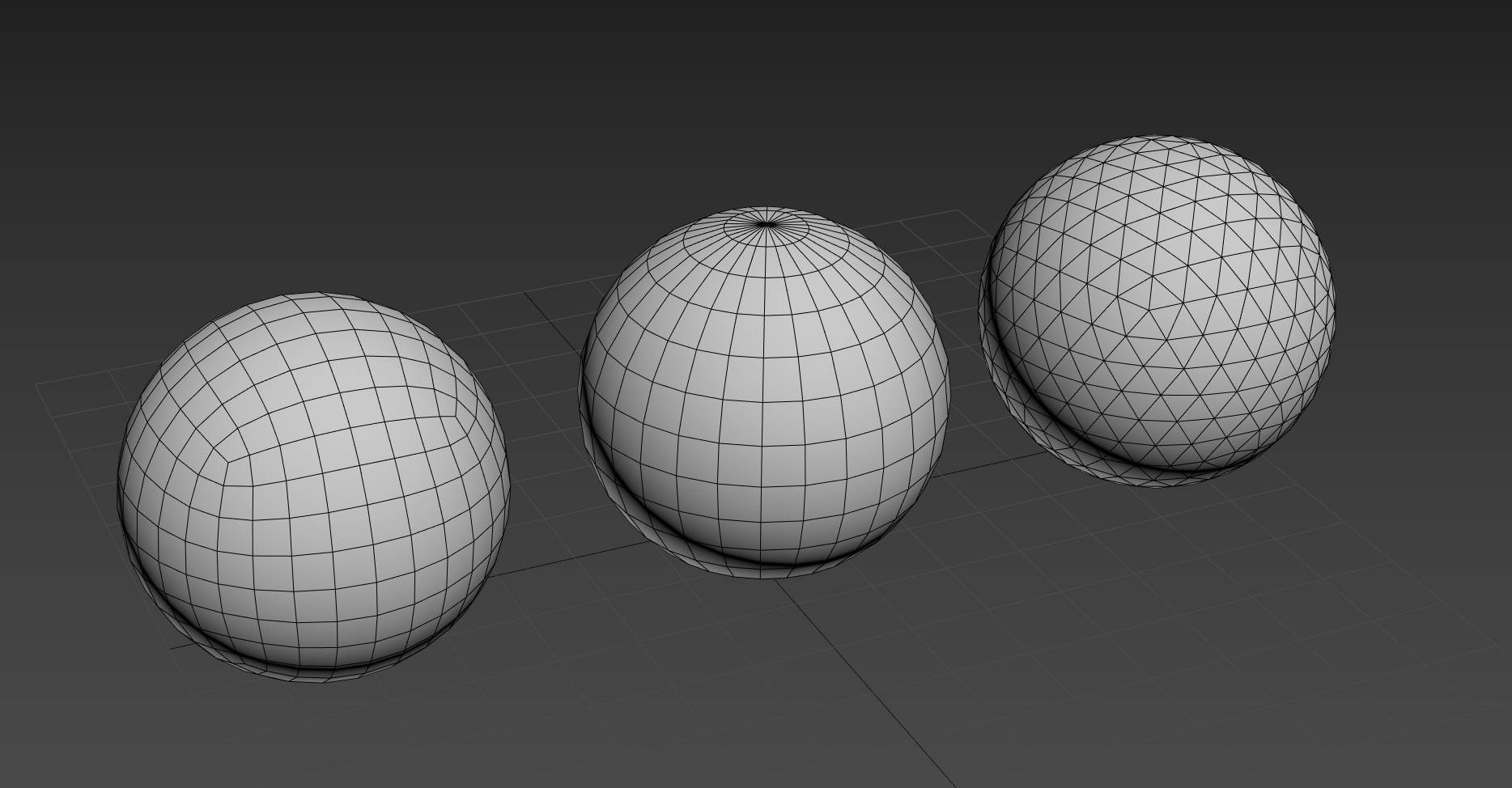 wet sonnet
Middle one is default sphere for OB
frozen blade
same for any other software out there 😃 doesn't make it wrong, but it doesn't make it right either
hardy atlas
You can make spheres like that in max my subdividing / turbo smooth a cube. I imagine a similar process in other programs
full quarry
@hardy atlas talk was about unwrapping stuff in OB
frozen blade
@hardy atlas + spherify 😉 but that was not the discussion, which was OT to this channel either way
obsidian nimbus
Was the story assault pack with the nametag ever fixed to be able to use custom textures?
It only ever worked on the first LOD
Also does anyone know why the APEX weapons are so over-saturated?
Like the ak's all have bright orange stocks and blue metal and it stands out compared to every other A3 asset
The RPG-7 looks like it is covered in hunter's orange
 vestal stratus
does anyone know how to mod a vest and is willing to help a guy out
obsidian nimbus
The haybale model from CUP doesn't have any transparency issues or anything, but I am trying to make my own version with new detail and color/blending so it looks more A3 aesthetic/quality
when I leave the texture as the standard CUP .paa it looks fine
but when I change it to my own, there are transparency issues around the edges of some of the textures
I even tried copying the CUP texture to my new directory so it uses the exact same texture, but even then the issues persists
switching the texture back to the CUP one in the CUP directory without undoing it but by manually changing it back fixes the issue
Anyone know what is going on here?
Sorting the faces/alpha has no effect either
obsidian nimbus
https://i.imgur.com/QhFjvLb.jpg
https://i.imgur.com/SrBxeIx.jpg
Waste of effort?
wet sonnet
Looks good
obsidian nimbus
thank you sir
acoustic dove
nice but you could use some bump detail 😉
 true leaf
:P
nah just texture resolution is enough to update any CUP maps! <3
keep up the good work Rylan
obsidian nimbus
thanks
it does have a normal map
just isn't too intense and isn't as obvious from the angle in the screenshots
 ancient lion
Hey, so im not sure if this would be just a texture issue or if it has something to do with the plane as well. So im working on a new road texture and im getting these white lines in between when i put the roads up next to each other https://imgur.com/a/WDmqupp. Any ideas how i would fix it?
spiral crag
Seems like a seam, caused by the faces of the two objects not lining up. You can avoid these most of the time by having faces sloped downward at the ends of the pieces, designed to intersect with other road meshes. You could also try adding black faces beneath the road so it isn't as noticeable. If you want to try without modifying the mesh, you may just need to line it up better in object builder so there's more uniform precision.
ancient lion
Its actually a decal so i cant really make a slope. Also it happens even when i have two segments on top of each other
ancient lion
I ended up shrinking the uv slightly and that seems to have fixed the issue
full quarry
could be 2 alpha textures overlapping and causing alpha sorting error
you could use the "move to top" face sorting tool on both in OB
silver gull
piece of advice - if you ever have a subscription for substance source (their allegorithmics substance market place) and dont want to waste your 'points' ... dont download products where the author is gametextures... 99% its just scans that tile extremely poorly and there is no actual "substance" in there. Just dozends of megabytes of image data. No or barely any procedural features.
silver gull
no idea... i have the subscription for a year now (painter+designer, source just comes along with it) and i have a lot of points over that i havent used yet, so it's not like i'm losing much, but still.
previously gametextures only did SBAR files (so i knew i would only get images) on there. Now some of their newer stuff also has SBS of rudimentary stuff but still relies heavily on badly tiling scans. They name it "grunge map" but its actually a scanned height/normal map in disguise...
 nova hatch
I find a lot of decent packs for textures on gumroad etc
Always noticed gametextures and had them noted in my sources list, will go elsewhere.. thanks
frozen blade
yeah make sure you grab the ones from allegorithmic
the rest are pretty poor
you find a ton better ones on gumroad and other places
 solemn peak
I have very serious question, guys! I have a model of single quad and a texture with some parts being 100% transparent, but some part are 100% filled. But in-game it has some weird sort of transparency
What should i do to make filled parts 0% transparent?
frozen blade
@solemn peak what is the suffix of that texture you are using?
solemn peak
no suffix. Should i use _co ?
solemn peak
tried with _co -- became 100% filled without transparent parts 😦
frozen blade
^^ - always use suffix
severe rune
No suffix == user error
solemn peak
No Suffix and CA - same thing - transparent part are transparent, filled are little bit transparant too
nocturne lake
that's what _ca is like
in general you should separate transparent parts on to a separate texture
solemn peak
wat? how can i separate empty area to separate texture? Sort of alphamaskOnly_ca.paa (or _mc) and imageOnly_co.paa? And how to apply them both to same quad?
nocturne lake
well if it's on the same polygon, you'll just have to suffer the weird semi-transparency
frozen blade
it is a single quad face?
so basically you wanna do a decal sort of thing yeah?
can i see that texture of yours? with the background as well?
@solemn peak
solemn peak
decal sort of thing yeah
Yup
 brittle depot
Hey, has somebody a good Texture Export Set for Arma 3 using Substance Painter? I think someone from RHS-Devs was showing a Vid or Pic but i can't find it anymore.
severe rune
https://s.sqf.ovh/Substance Painter_2018-11-30_17-46-22.png
https://s.sqf.ovh/Substance Painter_2018-11-30_17-46-41.png
I mostly use the spec gloss one

 brittle depot
Thankyou
frozen blade
note here - it still needs adjusting, don't expect a 1:1 viewport
severe rune
Yeah. Especially like.. Color saturation.
Here is a good comparison of DIRECTLY using my spec_gloss
https://dedmen.artstation.com/projects/xa2y4 scroll to the bottom.
There you have the substance IRay renders and the in-game view. It's kinda terrible
 split zodiac
Anyone knows if there is a built-in function for making the equipment icons?
Smiliar to the one for the asset previews
wet sonnet
Nope
 honest jolt
Can anyone help me out with this please??
I've been trying to put the det cord decl on my glass texture for a canopy but I can't seem to keep the transparency of the glass.
Can some one explain how to keep the transparancy and add the decal?
I use photoshop and I'm not all that familiar with channels at the moment, so if I need to use that, you might have to explain a little more detail.
Thanks folks.
frigid escarp
@split zodiac BWMod has an automated process using blender. check their public gitlab repo
dense peak
if some one could make me a mod were all the csat textures all were tan, nato textures were blue, and greenback textures are green, can some one do that,
 light terrace
I tried to make a .paa with texview 2 for a display dialog
But it has transperancy all over it
Anyone ever have this?
stray relic
Rename the file 520DfaU_co.png, then convert using Texview.
silver gull
file suffix .png_co 😃 🤔
severe rune
tools should throw warnings when given files without suffix 🙄
silver gull
or just be more intelligent and automatically pick the right stuff...
 velvet fractal
hello friends, i have been playing arma for many years and only recently thought about modding. i have always downloaded mods and thought "wow, it would be great if this came in another color", but instead of hoping for it to be released i just want to make them myself. could someone here point me in the right direction if my aim was to do a retexture of an existing armor mod or existing armor in arma 3?
silver gull
pretty sure youll find a couple of tutorials if you google on the forum or in general
velvet fractal
sorry, which forums? i googled and found a master post with a lot of information, currently using that. just figured i would ask some people in here if they had more precise suggestions
silver gull
bohemia interactive forum should have some stuff. And for technical details BI wiki (we call it biki)
😄 just seen this https://community.bistudio.com/wiki/PBR_to_Supershader solid start ^^
victor if you have a specific question (technical) this is the quickest place to get answers. If you are looking for broad general information... generally not so much.
full quarry
Bohemia Interactive Forums
NOTE: This guide will be updated to use the Arma 3 Tools once all relevant tools are released.
I've seen various guides on different stages of the textu...
Since I had the forums open @velvet fractal check this out too for starters
velvet fractal
thank you so much for this, that was basically what i was asking for! very appreciated
and i suppose i should also mention, all i want to do basically is create black/spec ops colors for the russian 6B armor sets.
in case that has already been made by someone lol
light terrace
I dno it's still transparent
Is there something special I have to do in photoshop when I export?
 valid quarry
i got a curious question
is it possible to edit weapon textures, as simple as it is to change car textures
let's say i want a purple mx. without modding
valid quarry
so only way is modding ?
light terrace
Found a fix to my issue. The .png has to be sized to the power of 2
ImageToPaa shows errors
texview doesn't
full quarry
@valid quarry yes, @light terrace 👍
split zodiac
@frigid escarp Thank you
velvet fractal
on a side note, has anybody made a black version of the russian 6B series armor sets?
 frosty fossil
Hi so im fairly new to the texture side of arma 3 and am having a bit of an issue on quality wise. Now the image i have attached is just a test and i was wondering on why the texture quality is so low, when i load the skin.
This is the RHSUSAF AH-64
I am currently using the ah in game and using script "this setobjecttexture [0,"test4.JPG"]" on a jpg file i have in the server folder.
https://imgur.com/a/vi2ANCE
frozen blade
@frosty fossil what is the resolution of the said texture
full quarry
could be .jpg does not also load very well into the game
or the .jpg itself is saved with bad quality
frozen blade
i missed the jpg part....
honest jolt
Can anyone help me out with this please??
I've been trying to put the det cord decl on my glass texture for a canopy but I can't seem to keep the transparency of the glass.
Can some one explain how to keep the transparancy and add the decal?
I use photoshop and I'm not all that familiar with channels at the moment, so if I need to use that, you might have to explain a little more detail.
Thanks folks.
full quarry
transparency is defined by the Alpha layer transparency of your texture
and that texture must be saved with _CA.paa suffix
so that the alpha transparency works in game
also you will need ot have correct .rvmat for the surface
supershader is often used for glass stuff and since you want also non transparent part in it, supershader might be able to do that
I am not sure though what you mean with the decal as Arma does not have such term for anything texture/material related
perhaps you mean its a decal you add to the texture in photoshop?
honest jolt
yeah the last bit. I want to create the det cord via texture on the glass. Saves me a headache with modeling a 6mm tube and bending it in all kinds of directions.
full quarry
should be possible yes just dont make that part transparent in your texure, save it yourtexture_CA.tga and convert to .paa
honest jolt
I've tried to merge the two together already in photoshop yet the colour of the canopy appears in ps. when I save it and put it back into 02 as glass_ca.tga and apply it to the model, it appears with a blue tint from the outside. you can't see inside. but when inside the model you can see out. bloody weird. I want to be able to remove the colouration. Its like photoshop applies the colour to it.
full quarry
the blue tint is a common problem with non-sorted faces with alpha texture
honest jolt
ya gunna say move it up the stack?
full quarry
select the parts with _CA texture on them go to OB - surfaces - move top
honest jolt
If thats the case I forgot about that.
full quarry
at least what you describe sounds like that
honest jolt
yeah ya probably right I didn't think about the stack order. I'll give it a shot. thanks
 tardy condor


 full quarry
pretty much all you can do is draw over the existing textures