#arma3_texture
1 messages · Page 31 of 1
 prime pewter
 full quarry
have you tried with no texture at all?
prime pewter
the issue is that i'm trying to do it all mission side. so i'm using setObjectMaterial/texture. but you can only change it, if there is one applied by default. adn the VR man seems to only have a material. and normal units are even harder to hide with all their selections and the whole head/face/identity handling
full quarry
fully transparent _CO could work. maybe some custom rvmat with all diffuce and whatnot values set to 0 alpha
 silver gull
i was under the impression that with setTexture you will not get any transparency, unless the map that is already applied by default is a map with transparency already
full quarry
refracting shader at least did not work with it
 bitter linden
What are the odds that we could find a texture template for those new SAM launchers
Specifically the CSAT ones
full quarry
theres a texture template thread on BIforums so you might ask there @bitter linden
bitter linden
@full quarry Which one would that be?
full quarry
something something community templates or something like that
bitter linden
Right on, looks to be the most recent/most recently replied to
full quarry
Could be worthvile to ask there. Template makers/users probably follow the thread
bitter linden
I'm a tad surprised the CSAT SAM/radar only come in the two hex camo patterns right now, since a lot of CSAT's other stuff has some variation, urban-grey or black
 molten kettle
hey guys just wondering if anyone knows why everytime i try open an assets texture file in texview 2 it gives me an error?
full quarry
@molten kettle pls dont ask on many places xP just answered you up top
this would be the better place though
continue texture talk here
molten kettle
just to a folder then i tried to open SUV_01_ext_03_CO with texview 2
sorry i used pbo manager @full quarry
full quarry
possibly it has extracted wrong. PBO manager I would not recommend to use if you got mikeros tools
if you have modding environment properly set up (P: drive and arma data extracted with Mikeros Arma3p) you dont have to mess around with any of that
molten kettle
oh okey ill try set all that up again thanks alot @full quarry
molten kettle
yes! its working thanks alot @full quarry
silver gull
2 p3ds, same texture, same material, same named model properties, "slight" quality differences... i'm confused
https://abload.de/img/track1xmewf.jpg
https://abload.de/img/track2vec8w.jpg

 silver gull
any ideas?
 nocturne lake
if it wasn't the same material, I would think there was some forceddiffuse applied to it
really no idea mate :/
silver gull
i think something may be borked with the other p3d as a whole. Copied the affected piece of the mesh into the p3d with the properly working texture - works fine
https://abload.de/img/track350ick.jpg
 silver gull
ok, no, p3d is fine, i'm just a moron. I had swapped the mesh of the texture for a different one (with different texture), but still had hiddenselectionMaterials defined for the old track, overwriting the material in the p3d... works fine now https://abload.de/img/trackswap3d8cqv.jpg

 karmic nebula
I might have bitten off more than a chew and I was wondering if I could ask some questions about configs? I made a retexture of Russian forces 2035 Gorka saved as PAA but now I’m on the config part and I was wondering if it is possible to just add the uniform in without assigning a character or anything? I’m watching about 2 different videos on retexturing and configs along with reading some tutorials but they seem to involve assigning units. I would just like to add the uniform in game as a garment that you can choose from the arsenal if that makes any sense
Sorry, i just started actually modding today and I really appreciate any help you guys can provide. I also really appreciate all the generosity you guys have taking the time out of your day to help others
 somber pier
@karmic nebula You can just replace the texture on a current uniform, thus anyone wearing that will have the new textures, but you wont have the older one. You'll have to make a new uniform if you want the new texture but keep the old texture as well
karmic nebula
Aw I see, I would like to add on a new one so that would involve doing configs then?
Can configs be found on mod folders as well? I would just like to copy one and add in the new texture somehow
karmic nebula
Understandable, so I would have to get the config template. Then start typing in stuff? I assume I would also have to find the models that correlate with the texture I want to use as well?
Sorry I’m so confused it’s hard to explain lol it’s like trying to learn how to speak an alien language
 hardy atlas
anyone familiar with substance designer?
 severe rune
Just ask away
hardy atlas
So i want to have the snow normal appear in the red of that image
and the other normal appear in the black
What would be the best way to do that?
severe rune
turn the red/black into a white/black mask
And then use the "blend" node I think
Don't have designer here to give exact values
you could just take the red output of that red/black mask. And use it as greyscale parameter for the blend node
and then blend between the two normals
hardy atlas
in the future i will probably have more than 2 colours as this is the satmask i am using
severe rune
you could just nest blend nodes. But there is probably a easier way
hardy atlas
hmm
 frozen blade
there is just a few people around here actually using designer in production. Indeed what dedmen says is correct, you can have multiple greyscale maps blended together
hardy atlas
kk
frozen blade
best bet is to try substance discord directly
severe rune
I use designer too. I could tell you what to do exactly if I could try it myself but I'm at work and don't have it here to try it out ^^
frozen blade
hardy atlas
ty
frozen blade
since there are a ton more people actively using both allego products
i for one use designer only now and then
hardy atlas
yeah, well ty for the help
 hexed cairn
hello i need a custom item for my clan to be textured, anyone can give me some info /advice? we want to model a centurion helmet, but kinda modernized, is it possible?
 vestal sundial
Start with a concept, usually sketched. Agree on the design. Create a 3D model/ UV Unwrap/Bake etc.. Texture the Model. Game configs. Testing/ Tweaking. Publish. Profit.
 spark shore
would it look bad to add an eyepatch to a face skin
can't test it rn
silver gull
yes, because it will look like painted on... obviously
spark shore
yeah but it should be an eyewear and I don't want to occupy that slot like for MGSR
spark shore
would be cool if I could change soldiers model
could do all kinds of stuff with that
 surreal hatch
So I've got a problem where my fabrics are kinda weirdly shiney, what should I be addressing in the RVMAT to make them less shiney and more like fabrics?
 golden niche
less specular and specular power?
frozen blade
ideally, directly the SMDI map
surreal hatch
Gotcha. I'm trying to look through what's in A3 and make the SMDI more like that
silver gull
ha.... A3 smdi are all over the place.
surreal hatch
It's like the reddish purple or something. I'll tone down the speculars as well
But I have an Arma 2 bag ported over that's also shiny... Didn't change the smdi so it may be the speculars
silver gull
https://youtu.be/hlAxkJGeAT0?t=2095 looks pretty neat what they have in the pipeline
 obsidian nimbus
https://i.imgur.com/sc4mI3y.png
https://i.imgur.com/3Tk2Abp.png
Photoshop's reduce noise filter is a miracle


the saturation is just there to help me see the changes and I didn't realize how drastic it was lol
 sudden marlin
Any tips for making textures from scratch?
full quarry
what kind of textures? new textures to be used to create new models, re-texturing something old, textures to create new textures...
hardy atlas
@sudden marlin Depends how you are doing it. Substance painter is a fantastic way to get good looking generated / real time painted results and you can get really nice normals / specular etc. Photoshop is also a pretty good tool.
obsidian nimbus
can you have more than 7 texgen classes in a multi material rvmat?
it doesn't seem that you can have more than 2 UV sets anyway so it wouldn't matter nvm
obsidian nimbus
I just baked the mask to a new uvset for my model so it would work with that problem solved
golden niche
is there any limitations on what shader you can use on roads? like, can you use super on the road?
golden niche
aha, but that default one supports specular map, right?
golden niche
yes, i ask because i think i heard that there are some issues with specular on the roads
 bitter oxide
Hi. I'm trying to edit some helicopter textures and I noticed that it's actually a collection of textures that are collated to create the final one. This must mean there is some file that specifies which textures are loaded. As I want to actually just remove a texture rather than change or add anything, just making it not load at all seems to be the best solution. I don't know the location of this file though. Can anyone help me?
severe rune
It's defined in the model and it's rvmats
full quarry
only way to change textures on a finished game running model is if it has hidden selections defined and you can set the new textures to it via config
creating a replacement or new vehicle version
Biforums have topics regarding to how the basics of it works
bitter oxide
What tool will allow me to open rvmat to check for hidden selections?
bitter oxide
I've tried opening them and it seems it has either a weird encoding or binary data inside of it.
severe rune
How did you unpack the pbo?
full quarry
and where is the model from?
full quarry
pbomanager is not your friend for this kind of work
basically what you want to do requires proper setup of the mod development environment and config editing if the particular chopper has hiddenselections you can use
and creation of new addon .pbo
bitter oxide
So CfgVehicles entry into my own pbo would solve this issue but only if there's a hiddenselection for the texture I'm attempting to remove?
severe rune
you can just check the helicopter in Virtual Garage. If you can change the texture then it has hidden Selections
then you just need to find out if the part you are trying to edit is part of a hidden selection.
You can open the helicopters class in config browser to find the path for hiddenSelectionTextures used. Just open one of these and check if they contain the part you wanna edit
bitter oxide
Thank you.
Seems like it is not the case. Oh well.
It is a bit strange that you cannot modify an existing vehicle class texture unless it specifically allows for the texture to be changed.
full quarry
not really, the files are packed into the binarized game ready packet
if you were able to change the textures at will you would break the game
for example you could edit all units to be bright red and glow on your screen
which would be cheating
bitter oxide
That's easily preventable.
bitter oxide
Unless my understanding is wrong though, I can't make my own mod for singleplayer now.
Without duplicating the vehicle class
Right?
full quarry
if it does not have a hiddenselection for that part you want to change then no
bitter oxide
That's the strange part.
full quarry
mm what does it do?
bitter oxide
It was added in the Encore update. It adds a marker reticle on the MH-9 Hummingbird and also AH-9.
full quarry
well I guess those are permanent parts of those choppers now
bitter oxide
Yup.
A game where you can edit the weapons configurations on a jet during runtime but can't use your sleeve to erase a magic marker on the windshield 😛
full quarry
you might have lead on the specific issue though and you would have got the answer right away 😄
bitter oxide
That is true, but I wouldn't have learned as much about how the game operates.
It was useful information regardless.
full quarry
well perhaps.. but it took quite a lot of time.. 😛
bitter oxide
Teach a man to fish...in a rudimentary way at least.
full quarry
well true I do like that analogy. 😄 hopefully you then put this info into good use
 stray relic
1 x 2k texture or 4 x 1k texture? for miscellaneous parts scattered around a vehicle
severe rune
less textures == less sections == better
stray relic
that's what I thought, but as they're scattered, all the parts might not be in scene at once, so there may be less texture memory consumed with the 1k's?
does less sections trump less memory usage?
severe rune
Even if you see just a pixel of the part at some point the texture will be loaded and stay cached in memory
99% of the time both of your textures would be loaded anyway
stray relic
oh ok, I assumed it would be dumped out of memory when not in scene - thanks
severe rune
Also 2Mb or so don't do match with todays graphics cards with 8GB or more memory
golden niche
For example, i have a tree model with 5 vis lods and shadow lod, each lod has 1 (or more, but by default 1) bark texture, bark mc and nohq and same for polyplane -- ca, mc and normal, so 6 separate texture files per lod, 5 lods+shadow will give me 30+ separate texture files + ton of rvmats. Is there any point of merging most of the textures to 4-5 atlases performance wise? Or is there any reason to keep them separate?
full quarry
@golden niche you dont use same textures on all vis lods?
golden niche
no
full quarry
oh
golden niche
in theory there might be possibility of sharing them but mostly no
full quarry
I dont quite understand why
surely it cant increase performance if it loads each texture into memory
golden niche
because silvador generates textures that way
but i mean, is there any benefit in having one big 2048 texture instead of bunch of 512s and 1024s
full quarry
yes
absolutely
as Dedmen just said above
less textures == less sections == better
golden niche
but the thing is that each lod will still have own sections count, sharing same texture file between different lods should not affect that, right?
frozen blade
how do you have access to silvador if you don't mind me asking?
silver gull
sharing the same texture file between different lods will make an impact on gpu memory and loading speeds. If every lod of a model would use a different texture and you look at a scene ingame, your memory and load times will suddenly skyrocket
idk if lod's are instanced seperately, or if instancing works cross lod's with the same material.
there is very little information about how instancing works in arma
full quarry
I've been under the impression that Silvador might not make the most performance friendly models
golden niche
i guess, but what exactly do you mean?
full quarry
I've never heard the specifics but I guess things like what you face now with each lod having their own textures etc
silver gull
if you can show us pics of what you get out of silvador we can propably help you. I dont think many of us have experience with that tool and it's options.
full quarry
I've only tried the demo that does not have export enabled xD
did not really tell me much
silver gull
could well be that an optimization pass in a regular modeling tool could be necessary before importing into the game...
golden niche
some test bushie
it's not very fancy, but enough get the idea
and, for example bi used to combine last tree lod to atlases
 fresh hill
An atlas for all trees, or per individual object?
full quarry
for all trees
fresh hill
I'm not convinced it brings any benefit. From what I understand and was told by a programmer who did the old tree shader, the trees are not aggregated into one piece at last lod.
There is a small benefit by only having one file in vram. I suspect that is however neglectable, but I dont have the data to say either/or on that. 😄
full quarry
fresh hill
Ah, catching up now with the earlier chat. Silvador has the problem of generating a full set of texture per lod, instead of sharing one set across all of them. This is purely bad for required memory, but doesnt impact the scene complexity.
I've been under the impression that Silvador might not make the most performance friendly models
You are correct.
This is why I chose to make my trees by hand in blender.
could well be that an optimization pass in a regular modeling tool could be necessary before importing into the game...
Absolutely. And from what I heard through the grapevine, this is the story of the BI's trees in Arma3
golden niche
There is a small benefit by only having one file in vram yeah, so i was wondering is there any of having all lods of single object in one file (where possible). Because if there is no benefit then it's gonna save lot of work
fresh hill
Yes.
golden niche
Yes, you mean there is benefit, right?
fresh hill
Yes, there is a benefit, as it will reduce the required amount of memory for the scene. Right now with Silvador's trees everytime a new lod is switched, a new set of NOHQ, MCA and CA are loaded. You'd want to avoid that.
Bi's trees are made up from a trunk material and a general branch polyplane. All lods make use of that. IIRC, the polyplane texture was even located in a dedicated folder called polyplanes or so.
I've followed this and set my trees up this way:
Resolution lods:
0 to 5 -> uses the generic polyplane material and generic bark material
6 -> uses a single bespoke material that has a fully rendered tree on it
golden niche
Yes, there is a benefit, as it will reduce the required amount of memory for the scene. Right now with Silvador's trees everytime a new lod is switched, a new set of NOHQ, MCA and CA are loaded. You'd want to avoid that. that is what i suspected, but i'm not an expert
fresh hill
"\gm\gm_plants\data\gm_fagus_sylvatica_polyplane_summer_ca.tga"
"\gm\gm_plants\data\gm_fagus_sylvatica_bark_co.tga"
And then in the last reslod:
"\gm\gm_plants\gm_trees\data\gm_t_picea_abies_04_mlod_summer_ca.tga"
Oops, mixed species. But you get the idea. 😄
golden niche
yep, the only thing is my trees will probably have 1st lod 2048 or 4096 (in exceptional cases) polyplanes, and other lods will go to 2048 atlas hopefully
fresh hill
Same here. my polyplanes are 4k
golden niche
plus shadow polyplane may share one of the polyplanes uv
fresh hill
But that texture is only loaded once across 5 variants of trees, so its easy going on the memory
golden niche
well, i can't share atlases between different species, it's rather within other lods of the model
because of how it generates stuff
fresh hill
Yes, the tool will limit you here.
The purpose for Silvador was to have a "blue print" tree template that you can generate trees off that always look the same (the plan), but you can vary their mesh/lod complexity, so that the tree may be used across different products and even simulators, but still looks the same
golden niche
or if you have skills to manually postprocess it in 3d editor
fresh hill
And 10 years down the line when processing power quadrupled again, better looking trees can be exported that still have the same branch layout.
golden niche
or you can even just render branches to polyplanes and then use them in 3d editor to manually assemble tree
but that's not me, unfortunately
fresh hill
or if you have skills to manually postprocess it in 3d editor
Never was the goal of the tool, but it did happen to go this way for some users. I noped right out of there and did it 100% in a 3D program, as I would have to end there anyway.
Yeh, Silvador might be a good half-way measure, and just use it to generate polyplane branches to then populate a tree with.
 white cargo
anyone here use adobe bridge?
frozen blade
@golden niche no, i wanna know how i can buy it 😄
silver gull
secret dealer
 silk rock
anyone here got a good tut for texturing? lost on how to get from the model to a textureable doc in either blender or OB 😕
golden niche
@frozen blade contact bisim, probably, via email🙂
hardy atlas
@silk rock Google UV unwrapping. If you are using blender I don't know any tutorials. But there is an excellent one out there for 3DS max if you google "3DS max grenade tutorial"
full quarry
I would think there are plenty of Blender unwrapping tools related stuff out there. The basic concepts are the same on every platform
somber pier
Yea, theres a pretty nifty Blender tool which auto unwraps for you, but you can change all kinds of parameters for it
full quarry
understanding how unwrapping and uvmap textures work is step 1. using the normal tools is step 2. and using fancy tools is step 3.
 plucky onyx
When texturing an Arma mod in Substance Painter, does it matter what shader I use? Further, any recommendations on how to export? I can get diffuse, normal, and AO maps out just fine, but opacity, specular, and gloss always come out blank.
The relationship between the shader I'm using, the channels I'm using (e.g. metallic vs. glossy), and the final output for Arma confuses me.
Also, how it all relates to rvmats
silver gull
ianbanks made a shader for arma for use in substance
silver gull
different shaders have different default channels. you can add more. Make sure while painting you have the channels activated for painting
severe rune
My Substance exports (spec,gloss) always come out too bright in Arma.
But I just can't get myself to use ian's shader for once because of the different channels and smart materials not liking these
 dry otter
best is to press C and look at diffuse only
it's the closest render you will have to adjust colours
then arma is making things oversaturated and brighter, about 10-15%
@plucky onyx
hardy atlas
There is a non pbr spec gloss shader out there which i use and works nicely. Not a fan of ians shader personally
plucky onyx
My issue is spec/gloss maps always come out blank. Surely there should be some detail in them, especially with my rough and scratched metallic surfaces? I'll post a screenshot example after work.
When using metallic/rough shaders
vestal sundial
If you're using metal/rough shader your spec/gloss will always come out blank as those channels have no information. You will need to convert them, the substance painter exporter has options for converting rough/metal to spec/gloss before export
 distant rose
lol they have typo'd Arnold renderer some on the preset list on that page 😄
Anorld 😄
vestal sundial
Also, I found that Ianbanks shader is useful in the following scenario: Export your basecolor/AO/metal/rough texture from your metal/rough SP project. Create a new SP project with Ians shader, import all appropriate maps, tweak the maps so it looks good in the shader. Export your _CO, _SMDI, _AS maps.
A little lengthy and tedious, but it allows me to leverage the awesomeness of substance painter's smart materials etc, with the accuracy of Ians shader.
distant rose
I let the substance guys know about the typo in the substance community discord 😃
plucky onyx
@vestal sundial Thanks for the help. I am using the converted channels on the bottom right of the export window. I'll screenshot everything later.
plucky onyx
I have successfully solved my problem. The answer is: there was no problem! I was expecting the SMDI maps to have detail in them for a certain material. But they didn't. I tried another material with more obvious variations in it and the detail showed in the SMDI maps. So the software was fine; my expectations weren't!
I have another question, moving right along in the workflow:
In Buldozer, the texture diffuse shows up fine when linked in Object Builder (although without the right spec, normals, etc.). If I also link the pastebinned RVMat, it shows as pink. What am I doing wrong?
Looking at the fuselage specifically:
https://pastebin.com/tsPwixhy
https://imgur.com/a/Vk6iqvG
https://imgur.com/a/5qpjDMV
plucky onyx
Not when I screenshotted that. Nothing selected. When I select things, it shows everything else as transparent.
full quarry
then you might have wrong kind of a texture somewhere
are all your textures correct size?
ie 1024^2 2048^2
plucky onyx
Yes, the fueselage specifically is 4096, which I've used successfully in retextures before
full quarry
did Buldozer convert them to .paa when you ran it?
plucky onyx
Yep they look fine
If I unlink the RVmat in Object Builder it shows the color map fine, too. I think it's something about the RVmat that fucks it up
full quarry
whats the base of the rvmat from?
plucky onyx
Firewill F-15E
full quarry
check that you have all the ; in place and so on
vestal sundial
Try an RVMAT from the A3 folder?
full quarry
true
does not matter if the textures are not for your model
as long as they dont show as pink
plucky onyx
ahmmmmm... using a default one doesn't make it pink, although it shows all the wrong normals obvs
vestal sundial
Use the rvmat editor in OB to assign the right textures
plucky onyx
I can't find references to a built-in RVmat editor online; how do I open it?
full quarry
I would say its not necessary to use that
use imageToPaaGUI to reconvert your textures to .paa
plucky onyx
I am comfortable just tweaking RVmats in Notepad++ and that's normally what I do. At least now I know it's some problem in my custom RVmat file.
I'll have to come back to this in a few hours though.
Thanks everyone for the help so far
distant rose
If you have the resource library window enabled in OB, navigate to current model > materials > double click on your rvmat and it will open in material editor
nocturne lake
meh, Notepad is the right way to edit them IMO
distant rose
Oh yeah, mat editor can fudge things no doubt, I was just letting em know how to access it without having to find the exe 😃
full quarry
oh also make sure all your paths are right
vestal sundial
I never had issues with the material editor ¯_(ツ)_/¯
nocturne lake
mostly it just annoys me because it has a tendency to make absurd decimal values from using the sliders
dry otter
IDK if it matters but your RVMAT has its stage in wrong order, DT and MC are stage 2 and 3 in default_super.rvmat
Just copy paste default super and replace the paths in it
(To your own textures) then tweak
frozen blade
it does matter
plucky onyx
OK I've got the RVmat working again. Next question:
What's the point of specular maps if the specular[] and specularPower parameters override them? It makes it really hard to get the shine of the metal to look like it does in Substance Painter
full quarry
substance painter by default uses the newer metalness workflow and Arma the older Specular workflow so they do mix
specular map can be used to control how the specularity is shown though

By Joe “EarthQuake” Wilson In this tutorial, I’m going to demonstrate how content created for traditional shaders can be converted to PBR shaders, how to convert content from one PBR workflow to another, and explain the various differences in modern workflows. This tuto...
plucky onyx
So I set the base value with the parameters, and all the map does is vary it in specific places?
full quarry
for example this article discuss the difference
silver gull
you cant get stuff to look the same in arma as it does in Substance with PBR. Impossible
full quarry
this explains how the specular works with different color channels
but yea they will never look 1:1 same
plucky onyx
I'm familiar with that page; what I'm asking is if we have a specular map that defines all this, why do we need the parameter at the top of the RVmat?
silver gull
because the range that you get with the map is not enough
if you have glass and concrete in the texture, one or both of them will look bad. You can try it out ingame yourself
plucky onyx
😦 it's frustrating that I can make it awesome and perfect in Substance Painter and just never match it with Arma
silver gull
use this as smdi https://abload.de/img/gradient_smdicofuj.png
and this as normal https://abload.de/img/sphere_nohq6wdts.png
try different specular and spec power settings in rvmat.
example https://abload.de/img/20160801014809_1tzfls.jpg


and yes it does suck.
plucky onyx
Does Enfusion use PBR workflows?
severe rune
DayZ does yes. They can still cut it out before Arma 4 tho ^^
silver gull
for authenticity reasons... "iconic arma look"
 shut sparrow
@silver gull right click -> save image as...
silver gull
wat?
silver gull
???
shut sparrow
you have posted images about smdi and what it looks like in arma
i found it very usefull so i saved it
silver gull
😄 ok, i thought you wanted to suggest me something
 glossy crown
Hey, I just want to know what's the difference betwwen _mc texture and _mca texture
severe rune
common sense would say one has alpha and the other doesn't
white cargo
_mc already has alpha
 odd crane
What does MC mean? Multiply Color?
odd crane
wow, i feel like a noob now. I should know better lol
 dense peak
can anyone help me out with some texturing questions
full quarry
Depends what the question is. Usually we find solutions here.
dense peak
Hehe so Im retexturing this chinook and when I load it something overrides the edited texture
dense peak
its RHS
full quarry
possibly you got some sort of config duplicate or something like that
full quarry
so how do you setup the texture?
dense peak
I take it and change it from paa to png, then edit it and change it back to paa from png with the same name
remove the old paa from the pbo and replace it with the new one
full quarry
retextures are done with hiddenselecetions
if a vehicle does not have any then theres no retextures
dense peak
how do I go by finding the hiddenselections
full quarry
Im pretty sure there are guides/topics about retexturing for that in the BIforums
dense peak
im so confused lol
full quarry
about what?
dense peak
the hiddenselections part
full quarry
did you look up the forums?
hiddenselections are parts of the model that are defined in the config and can be used to apply different textures on those selected parts
by making a new config class with appropriate texture paths
I dont know if the RHS chinooks has hiddenselections
I would assume RHS puts those everywhere
nocturne lake
The Chinook definitely has them, since we already have olive drab and desert texture sets for it
dense peak
I cant find a way to do it
 left horizon
I made a texture for the journalist clothes and I would like to see it in-game, how do I set up the texture to display in-game?I have zero scripting/coding knowledge btw
silver gull
there are retexturing tutorials on BI forum, and pretty likely also on youtube and other sites. look for those
glossy crown
Anyone already experienced the issue with calmwater shader, when you move the camera of eden above the surface, the calmwater shader moves. Only doing this with some types of pond
glossy crown
That's weird doing only on some p3d
Thinking, doing this because of size
Because copy paste one working, just changed size, and was not working anyway
glossy crown
Little size one
full quarry
how little?
go to admit that I have not tried it in anything less than 20m diameter
because no point 😛
full quarry
hmm is that unwrapped?
 left oyster
i want to reskin a vic, and have found the texture templates, but cannot figure out how to do it properly without having the actual model, painting it, and baking the UV....
full quarry
only way to retexture anything in Arma is to paint over the the existing texture or template and create a new config for the alternate texture version and use hidden selections to replace textures
left oyster
every skinning tutorial and vid i have looked has been a bunch of cut&paste over the template, usually camo patterns etc... nothing dealing with putting detail in very specific locations apart from a logo or text on large flat panel..
yeah.. thats what i thought
full quarry
tutorials usually go over the basic steps
also the vehicle has to be created with the hiddenselections and if it does not have them, retexturing is impossible
it may not be as simple as it sounds as you have noticed
left oyster
the term 'user hostile' comes to mind
glossy crown
The most weird things, with the problem of calmwater, working fine when placed with createSimpleObject command
left oyster
i guess i would be better off building a model from scratch and doing it that way
full quarry
perhaps. Retexturing is not the priority of any asset though
its a bonus
@glossy crown that is a good observation
does it apply on any sized water object?
glossy crown
Didn't tested yet, but I want to test a class = House and a land class
Right now using class pond
full quarry
let us know what you find out! Interesting to hear if it works properly on some class
glossy crown
After further test, this bug only appear when baked into a map
but all class into geometry doesn't change anything
full quarry
oh I'm pretty sure Ive seen it on objects I've thrown down in Eden
glossy crown
Tested with Eden placed one or createSimpleObject and working fine for me
full quarry
odd 😄 could have sworn the reflection moved oddly with Eden objects
glossy crown
Anyway, we will never have the calmwater shader without bug
dense peak
when attempting to convert my .png to .paa in game it turn the colors black. I use 32 bit png format. I also tried using tga and the same issue. Is there a way to solve this?
tried 256x256, 128x128, and 64x64
dense peak
just for ingame UI
full quarry
and are you sure you apply it correctly
hardy atlas
sounds like AO
dense peak
also not sure what that second line is :/
hardy atlas
oh
full quarry
what do you convert it with?
hardy atlas
does the PAA become black or does the game show it as black?
full quarry
so you need to covert it as _CA to keep the alpha transparency
so yourtexture_CA.png -> texview/imagetopaa -> yourtexture_CA.paa
dense peak
aight lemme grab smth
ok well then. Seems like the random angrybird is also black. I guess it could be my code
@full quarry fixed. Was code... Thanks
full quarry
👌
dense peak
So I retextured the end of the tail rotor on the RHS chinook with this setObjectTexture [1,"texturename.paa"] and the texture duplicated on the other side but its inverted


 digital mantle
They use the same texture on the model, most likely.
golden niche
what is correct procedural empty _mc map?
#(rgb,1,1,1)color(0.5,0.5,0.5,1,mc)
this?
and what about _dt one? I'm confused by wiki a bit
nocturne lake
texture="#(argb,8,8,3)color(0,0,0,0,MC)";
texture="#(argb,8,8,3)color(0.5,0.5,0.5,1,DT)";
pretty sure you want 0 alpha in the MC, otherwise it applies a colour overlay to the base texture
 odd crane
Anybody played around with _NS textures?
"_NS - normal map specular (normal map with alpha channel)"
It looks like a normal map that includes specular data in the alpha channel. Can anybody confirm?
white cargo
never even seen that, are there any ingame examples?
odd crane
Not that I know of, but then again I just found out about it. It could help with the multimaterial shader. You'd be able to use the _SMDI as an overall specular map, and the _NS specular for tiny specular detail
full quarry
it might be a remnant od soome older tech
👆 see above @foggy torrent do _NS textures work?
 foggy torrent
probably can be used with NormalMapSpecularMap shader
 coarse scaffold
Is there a way to use rvmat to make texture Greyscale ingame?
frozen blade
no
vestal sundial
Does anyone know of an Arma shader for Marmoset?
 placid thicket
Anyone here had an issue with substance painter flipping normals on import from 3ds max?

importing as .obj seemed to be fine
hardy atlas
invert y axis?
Direct X uses Y- (inverted green channel) and OpenGL use Y+
If your substance painter is set up for an Arma workflow it will be Direct X. So make sure your 3D's max is the same.
hardy atlas
Ah
nocturne lake
was it a duplicated/instanced object that had been mirrored?
placid thicket
yeah, I think the mirroring caused it
 scarlet isle
Can someone help me with setting textures onto weapons? Currently whenever I load my mod into the game it's just white. I've set the rvmat and texture in the face properties for all LODs and such, but it still comes out as white.
full quarry
you may have bad paths or you are packing it wrong or you have some sort of config/hiddenselection error going on
scarlet isle
I'm thinking it's a pathing issue.
full quarry
fix paths -> repack
scarlet isle
However I'm not entirely sure.
full quarry
well whats your path like? does the textures show up in buldozer? do OB mass textrue rename tool show them as black or red?
scarlet isle
OB mass texture show them as red, and only the co.tga texture from the texture field appears in buldozer.
scarlet isle
Select the faces and open them in face properties. Press the folder icon and navigate to the texture files. Select the corresponding file, apply, and press ok.
full quarry
that should work
do you have the development environment set up?
P drive
unpacked A3 data
scarlet isle
Yep.
Hold on.
The OB paths are no longer red.
Apparently it was missing a " \ " at the beginning?
Going to repack and try again real quick.
scarlet isle
The penetration bit is red for me, don't know what it is. And the Path for textures is similar except it navigates directly to the texture folder. I should probably fix that.
scarlet isle
Oh now I see.
So.
Path for textures was "P:\neg_weap\Textures\WeaponName".
Just set it to "P:" however.
full quarry
p:\
scarlet isle
The reason it was missing the " \ " was because I never put the slash at the end in the path.
scarlet isle
Yeah.
full quarry
👌
scarlet isle
Now for some reason .paa doesn't want to show the texture in buldozer.
Should I just go back to .tga?
full quarry
are the textures what resolution
scarlet isle
2k.
full quarry
2048?
full quarry
what did you convert it to .paa with?
scarlet isle
Yep.
scarlet isle
Nope.
full quarry
🙈
scarlet isle
Alright so.
How exactly do I restart this thing? Project Drive Management and then launch?
full quarry
wut?
scarlet isle
Buldozer.
scarlet isle
Ok.
scarlet isle
Ok I got it.
Texture appears in buldozer, but it's only the co.
I guess the rest will show up ingame.
full quarry
no they should all show
your paths in rvmat can be wrong
class Stage1
{
texture = "LoDR_Trees\Jungle\Data\LoDR_Jungle_Tree_01_Tentacles_NOHQ.paa";```Ok.
full quarry
ever P:\ in arma paths
scarlet isle
texture = "neg_weap\Textures\AK12\neg_ak12_smdi.paa";```Still looks the same. I might just be confusing things.
full quarry
does it have a normalmap?
scarlet isle
Yes.
full quarry
what shaders are you using?
scarlet isle
You mean the _co stuff or
full quarry
PixelShaderID = "TreeAdv"; VertexShaderID = "TreeAdvModNormals";
full quarry
no thats correct for your use
scarlet isle
Nice.
full quarry
Im fairly certain your gun is not a tree
😛
paste your whole upper section
with the diffuse and specular and whatnot
scarlet isle
};

ambient[] = {1,1,1,1};
diffuse[] = {1,1,1,1};
forcedDiffuse[] = {0,0,0,0};
emmisive[] = {0,0,0,1};
specular[] = {0.01,0.01,0.01,1.0}; //amount of glossiness - the higher the number,the higher the glossiness
specularPower = 120; //area of glossiness - the higher the number,the smaller the area
PixelShaderID = "Super";
VertexShaderID = "Super";```your specualr values are very very low
so no wonder you dont see any
and specpower is kinda high
so the highlight would be very sharp and small
scarlet isle
What would the general values be for a weapon?
full quarry
you can check what Arma weapons use
stray relic
try 0.4,0.4,0.4,1.0 and 40
full quarry
but it depends a lot from what kind of textures you got going
scarlet isle
Those values work.
full quarry
👍
scarlet isle
Alright. Going to repack and try this out.
model = "\neg_weap\neg_weap_AK12_F.p3d"; /// path to model No P:\ right?
Because right now the model doesn't appear.
full quarry
no p:
but
in model path
no ""
model = \LoDR_Trees\Jungle\LoDR_Jungle_Tree_01.p3d; // Path to model
scarlet isle
Really? Alright. The sample config had it. model = "\Samples_f\Test_weapon_01\test_weapon_01_F.p3d"; /// path to model
full quarry
samples can be wrong 😄
scarlet isle
Still not appearing.
Path is messed up.
File is located in P:\neg_weap. Have model = \neg_weap\neg_weap_AK12_F.p3d;
full quarry
what do you pack with?
scarlet isle
AddonBuilder.
full quarry
well its possbile it messes it up somehow
Id recommend using the mikero toolset and pboproject
as it gives you a lot more feedback on problems
full quarry
yeah never put p:\
because it might just bandaid your problem
does your weapon have hiddenselections?
scarlet isle
Nope.
full quarry
well cant really say much since youre using addon builder and it just lets everything go by
it expects everything to be perfect for it to work right
you could check the arma rpt log if theres anything about bad path or missing textures
do you run arma with the show script errors lauch parameter?
and is the whole weapon missing or just the textures on it?
full quarry
ok then that is likely a larger config error somewhere
get the mikero tools
the free version is enough
full quarry
no you need them all
they work together
well not all of them perhaps but its simpler to just get all of them
than to try to isolate the ones you dont need right now
scarlet isle
I open MakePbo and press a key, but nothing happens.
scarlet isle
It doesn't show the issues with the model.cfg.
scarlet isle
I already cleared the issues with the config.cpp
Now it won't pack because of the model.cfg
full quarry
well what does it say?
scarlet isle
Output is to P:\temp\neg_weap\config.bin
P:\temp\neg_weap\config.bin
1 File(s) copied
"model.cfgs for this pbo have errors"
That's it.
full quarry
do you have noisy output on?
full quarry
scarlet isle
binlogs doesn't have a model.cfg
full quarry
there should also be a packing.log
scarlet isle
Yeah. Packing log said "model.cfgs for this pbo have errors".
full quarry
if it does not open from the view outputs
full quarry
whats above that
and if so then your model.cfg is broken
pretty badly if it cant even start with it
scarlet isle
I simply took the model.cfg from the sample and modified it.
scarlet isle
It's odd because the animations worked fine.
full quarry
pastebin it
full quarry
could be it does not like that you dont have the weapon skeleton anymore
that the weapon class is using
scarlet isle
Probably.
I'm actually using the RHS weapon skeleton, but I have no clue how to "#include" it.
full quarry
you cant
scarlet isle
handAnim[] = {"OFP2_ManSkeleton", "\A3\Weapons_F\Rifles\MX\data\Anim\MX_gl.rtm"}; in the config.cpp
full quarry
thats not related to this at all
that is the weapon holding animation
the model.cfg is for the weapons animations
like bolt movement and such
the problem is in your model.cfg
not in your config.cpp
full quarry
{
    class neg_weap
    {
        pivotsModel="";
        isDiscrete = 0;
        skeletonInherit = "";
        skeletonBones[] =
        {
            "trigger",      "", /// not in this model, but good to use
            "bolt",         "",
            "bolt_catch",   "",
            "magazine",     "",
            "safety",       "",
            "muzzleFlash",  "",
            "OP",           "",
            "ForeSight",    "",
            "BackSight",    ""
        };
    };
    class Test_Bipod
    {
        pivotsModel="";
        isDiscrete = 0;
        skeletonInherit = "";
        skeletonBones[] =
        {
            "bipod_legs",       "",
            "bipod_leg_L",      "bipod_legs",
                "leg_L",        "bipod_leg_L",
            "bipod_leg_R",      "bipod_legs",
                "leg_R",        "bipod_leg_R"
        };
    };
};```these
and the classess below you have skeletons in use that do not exist
    {
skeletonName="Rifle";```like this
scarlet isle
Wasn't entirely sure if I could remove that or not without any issues.
I don't actually have a bipod.
scarlet isle
So what exactly should I do?
full quarry
that is a long story my 6am brain cant type
scarlet isle
I can make stuff, I just can't figure out the whole scripting bit.
I just removed the bipod stuff.
full quarry
once you get the hang of it, it becomes easier
but it will take time and practise
the sample config is too complex in my opinion
this could help you understand how it works
and then I suggest you compile it again in a simpler for with only the stuff you need
 lunar tapir
have a question, why does Arma change image color? I used png as original and used TexView to convert it to .paa
original image is orange, in-game is blue
frozen blade
2^n
lunar tapir
aha
full quarry
correct suffixes?
frozen blade
yeah or that ^
 wind gate
@lunar tapir Also check the size of your image, i cant be just anything.
lunar tapir
how do I find .pbo in which certain arma texture is residing?
for example : "\A3\Structures_F\Mil\Flags\Data\Mast_civ_CO.paa"
(I don't want to unpack everything)
severe rune
Structures_F
probably Structures_F<something>.pbo
Or use a DokanPbo P drive to have all pbo's unpacked without ever unpacking anything
lunar tapir
thanks
spark shore
hey quick question
I've applied a wood texture for a simble cargo box in blender and connected everything
but when I do the box turns a very dark brown
hardy atlas
I don't use blender but I imagine if you are talking about viewing in the blender you have either, Got the view window set to display shaded colours rather than textures. Or you have not unwrapped the box correctly.
@spark shore
full quarry
or there is no appropriate light
 oak oar
hi, how can you make the texture darker on the sunny side of an object? In the shade everything looks good, only on the sunny side, it is much too bright and especially from the top extreme.
full quarry
tweak the rvmat diffuse and ambient values
vestal sundial
Perhaps have too high of a specular value as well?
hardy atlas
Pictures would also help in such a situation
 tame heath
yes sir
the price i pay for reformatting my pc
rebuilding DustyRoads\config.bin.cfgPatches.units[]=...(altered)
Checking cfgSurfaces and clutter...cfgSurfaces,cfgSurfaceChars,or clutter is not defined
stuck on thos
full quarry
well it seems you dont have at least one of those in your config then
free or subscriber mikero tools?
tame heath
free dont bother with MT
tame heath
Mikero tools
full quarry
i dont quite understand the sentence above
this is btw more a #arma3_terrain issue 😄
full quarry
well its quiet at this time of night so its alright
since you are making such a big project I would suggest the investment on the Mikero tools. You would get more upgraded PBOProject with better checking etc
hardy atlas
So I borked my SMDI export settings on substance painter, And it's been so long since iset em up that I forgot how to get em right. Anyone got the right ones for me?
 rose sierra
https://i.gyazo.com/58616058b098ca7b5077b62798666c6b.png This one seems to be working well for me
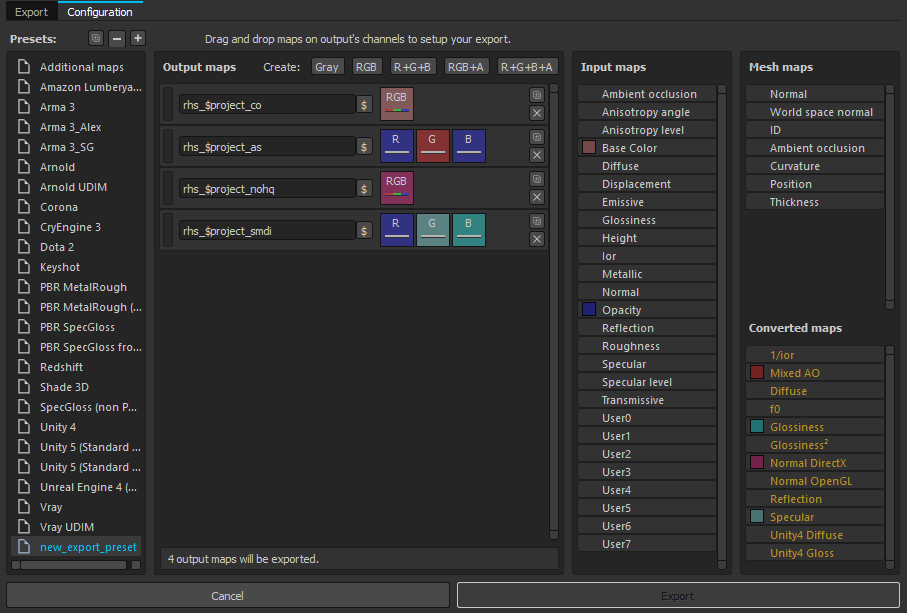
Courtesy of soul assassin
hardy atlas
@rose sierra https://imgur.com/a/vUbJufF
check out that
Was having no issues the other day, I don't know why it wants metal roughness
rose sierra
My guess would be to make sure you have the texture sets its moaning about in the the console
https://drive.google.com/open?id=1l1dqFMC6bVRY1KImKmkUS6KrKPaeJ-x6 Thats the template i use. Chuck it in Documents\Substance Painter 2\shelf\templates
hardy atlas
Oh yeah ty, I heard this has some issues though right?
rose sierra
Not sure, Ive used it for a few small models and had no real trouble with it. Im certainly no expert with it
hardy atlas
Ah well, that worked perfectly either way. Ty haha
 gritty onyx
How do I go around getting a texture file with multiple layers of skins then just the one?
frozen blade
what?
full quarry
no he wants a template file
and those are created manually
they do not magicallly just appear from somewhere
golden niche
k, back to resource optimization question.
https://cdn.discordapp.com/attachments/484746956858589184/491471387232305153/unknown.png
(PP means polyplane, GEO means branches geometry)
Let's say I have a tree with 5 LODS. If LOD1 polyplane's res is <=2k then in theory all similar types of model's textures could be arranged within 3 corresponding atlases (_ca, _nohq and _mc) instead of ~30 separate files. But if atlas is gonna be say square 4k, then in most cases not all of it's area is gonna be filled with useful information. For example, if, in relation to above picture, there is only BARK1 texture -- what is more preferable: having everything within 4k texture but with lot of empty space or having 2048x4096 atlas with 90% area utilization + separate 1024x2048 bark texture?
 frozen blade
single 4k texture
that being said, i don't think you need to have the same texel density between bark and leaves, so you could use a ton more of the UV space that is left available
golden niche
even if 2048x3072 of it contains no useful info?
frozen blade
i never tried 2kx3k textures, but i would stay away from anything that it isn't 1:1 and 1:2
frozen blade
ahh got it yeah
frozen blade
but why would you have so much wasted space to begin with?
golden niche
i mean in theory, i'll try to avoid such things
frozen blade
that is more than 1/4 of the entire available uv space
golden niche
yeah
frozen blade
can you show the UV islands
golden niche
so is it still better performance wise to have so much space wasted or just dump it to separate file?
if there is no bark2 and bark3
that's a draft of layout
frozen blade
question, since i haven't dicked with trees
why do you need to lower manually the textures for individual LODs
when the game engine mip maps it itself?
i mean it is counter intuitive if you ask me
golden niche
they are not handmade
frozen blade
as far as the knowledge about the engine goes
the main resource thing is loading and keeping texture file in buffer
the more textures loaded at the same time, the worst
golden niche
count wise?
frozen blade
yeah
golden niche
well, memory wise also probably
frozen blade
yes and no
as in it is always advisable to have a single 4k texture rathern than 2x2k textures
golden niche
count makes more impact, right?
frozen blade
yeah count makes the most impact
that is why for instance last LODs for buildings using multimats
is actually a single CO texture file that has the multimats baked into a single UV sheet
that is why it is advisable to drop RVMAts for last lods for whatever model you have
golden niche
so, in theory, if we're talking co only (other maps may have different layout), it's better to have square 4k texture with more than 3/4 of UV space wasted than 1024x2048 + 2048x4096 separate textures?
frozen blade
so the engine loads just the CO, and not the other maps used by the rvmat
yes ^^
but while for games that have both first and 3rd, it is ideal to have the same texel density across
for some stuff like trees, i would kick that rule in the shins and push the resolution to either bark or leaves
golden niche
hm, i see
frozen blade
making sure i fill that UV and make use of the available space
i mean for 1st person shooter only, the texel density is higher towards the camera and to the side you are seeing
for weapons anyways
one could do it for A3 as well, separating the UVs for pilot from the rest
but that would mean using different textures for 1st and 3rd and that is bad for performance
golden niche
isn't texel density still depends on how it is mapped (to certain degree)?
frozen blade
it is to some degree
say i want a texel density of 1 pixel per sq cm
then depending on the size of my object
i either split it into several parts or increase the texture resolution
real example - having higher resolution accesories than the weapon it is using said accesories
my case, having to split some parts from the AKMs across 2 UV sheets
to have the desired texel density
but that said, for stuff like trees, it doesn't count that much
golden niche
yeah, these polyplanes have different texel density in different lods (obviously) but they still are within single atlas
frozen blade
you will almost always be closer to the bark than the leaves
golden niche
so if i had say a tree with freaking 30+ separate maps+ rvmats and shit (raw output from the software) and after manual cleaning it will have 3 atlases: _ca, _nohq and _mc + 2 rvmats (for bark and polyplanes) that should be significant?
frozen blade
again, i don't get why you need to have that LOD setup on an atlas
especially since the texture is getting mip mapped
so you have the LOD1 @4k
golden niche
because it is generated that way
frozen blade
the game will lower the texture down for you incrementally - 2k, 1k, 512 etc
golden niche
different lods have different geometry
like, polyplanes are being generated at different points of hi poly tree
so they look different
frozen blade
ok i won't argue here, but that 512x512 resolution for LOD3
will be already mipmapped by the engine 3 times by the time it reaches that LOD
not sure if that makes sense
and as i said, i have nil experience with trees
@fresh hill might put his pennys into this one for instance
golden niche
well, game switches lods on trees pretty aggressively
from your general experience, what LOD3's resolution should be?
golden niche
texture
frozen blade
again, the engine mip mapps it itself
golden niche
another question, i've heard arma can utilize only certain amount of video memory, is that correct?
frozen blade
not really
golden niche
again, the engine mip mapps it itself ah, so even if LOD3's tex res would be 4k it's irrelevant because engine would just switch to 128 or whatever it thinks fits, am i getting this right?
frozen blade
yeah ^
so for instance, until recently 4K textures for arma wouldn't work
because the game would mip-map these first, and poorly
also if you set ingame texture settings to lower than high
everything will be mip mapped to 2k anyways
so there is an advantage here, being able to allow the user to set the texture resolution to lower if their rigs cannot handle these
again, i am talking about things that is worth the 4k textures
in general 2k is the aim
but for bigger stuff like tanks
you will always end up with several 2k textures
which is worst than having a single 4k
i would have a look over the way trees are done in A3 to be honest
i doubt they have the atlas spread the way you have these based on LODs
golden niche
small trees and bushes looks really good with 4k, but i'll try to stick to 2k, since then with 1 bark texture the whole model fits to 3 2048x4096 atlases (ca nohq mc) nicely
well, i have almost none modeling skills, and they are probably mostly handmade


i think that's the best i can
full quarry
it is possibly you will run into issues trying to fit both CA and CO into same texture
it will either be CA or CO with 1 bit alpha
and can cause rendering issues
golden niche
i'm not quite sure about whether i'm gonna stick to ca or use co
but there shouldn't be any issues if it's ca and some part of it contains just plain color?
fresh hill
I would advise against merging the bark texture with your branches. The mipmapping will cause unwanted color bleed at farther distances.
Going with two sections per tree per lod is perfectly fine IMO.
Last lod excluded, that once should be just a single section.
Re: what @frozen blade said: i doubt they have the atlas spread the way you have these based on LODs
Correct. Only the last lod of all trees is merged into an atlas. I doubt that actually brings any benefits (going on my understanding of things in A3).
The only area in the engine where I know that an atlas benefits are particle effects. All PFX using the same .p3d in a scene go in the same draw call (probably some higher split limit at around 128, but im just guessing that bit)
Thats why all pfx usually are on a single universal.p3d. 😃
silver gull
seems to me like draw calls for particles are the least of their problems. The particle lags primarily happen due to inefficient alpha blending or something (very noticeable when particles or effects are super close to the camera)
golden niche
thanks for the info, guys
coarse scaffold
Could anyone share correct Substance Painter export preset for ARMA 3?
severe rune
Am also interested. I made something that kinda works for me (atleast as much as you can do with the PBR spec/gloss shader) but I have no idea if that can be called "correct". I'll share when I get home
hardy atlas
@severe rune @coarse scaffold
That is the arma 3 template for substance
There is a Spec Gloss Non PBR shader available on substance share too
If you just want export settings
severe rune
My is essentially the same. But I use the "Input Maps" for Spec/Gloss/AO instead of "Converted Maps". What's the difference?
silver gull
there is no correct... if you do your stuff in PBR you have to do some serious adjustment to everything - it's not just a little bit of renaming maps and shuffling channels
only "correct" (as in WYSIWYG) is ianbank's A3 shader - i heard someone mention it doesnt work for the latest version (?)
imo it's much easier to work in PBR metal rough and convert from that, vs. PBR spec gloss. You just need to pull a non-pbr specular channel with it that you use just for export
and switch on "legacy enhancement methods" as in baked in lighting and stuff... because without it stuff looks awefully bland in Arma.
hardy atlas
The non PBR spec gloss shader works pretty well for me
I think the A3 shader is kinda borked and has issues
coarse scaffold
Do you use any particural rvmat that will make look ingame model as similiar as possible?
hardy atlas
Nah I normally just grab one from samples which is similar to what I am trying to make then fiddle with it lel
coarse scaffold
I hope that next engine will make use of PBR
hardy atlas
Enfusion supports PBR I believe
hardy atlas
Just a few more decades 😄
plucky onyx
and switch on "legacy enhancement methods" as in baked in lighting and stuff... because without it stuff looks awefully bland in Arma.
@silver gull can you expand on this?
silver gull
what should i expand on? PBR diffuse technically should be void of any highlights or shadows because it's physically wrong. Legacy shading with poor specular/gloss/normal requires it because reflection and stuff has not the same impact
just look at legacy shader games to get what i mean... all Stalker games for example.
 ionic idol
could you guys possible make green hex textures for the rest of the csat vehicles?
digital mantle
If you're asking for someone to make textures for you @ionic idol #creators_recruiting is the place to ask.
nocturne lake
@plucky onyx basically, the difference is that Arma uses Diffuse maps instead of Albedo maps
Diffuse is pretty much with the Ambient Occlusion "multiplied", and the Curvature map "overlayed" over the top of the Albedo map to give the surfaces more definition in rendering environments that don't use full PBR
There are also some colour adjustments to e.g. bare metals, since you no longer rely on specular reflection to colour the metal
you might notice that scratches are usually totally black in Albedo, but white/grey in Diffuse
plucky onyx
Are there any good general practice tips on getting as close to 1:1 between Arma and Substance Painter as possible?
hardy atlas
Non PBR spec gloss shader and good export settings and a non PBR workflow. There is an A3 shader but it is buggy and borked for some. This should get it very similar and further adjustments can be made via the rvmat
at leas that is how I work
plucky onyx
Hmm. I've been texturing my plane with PBR so far. Am I SOL?
I'm really struggling with figuring out how to get it to look even sort of right in Bulldozer. Using the export settings and converted maps recommended above here, this is what I get:
Substance Painter: https://imgur.com/a/RSPXVlw
Bulldozer: https://imgur.com/a/SaUumJE
There's a tremendous amount of detail loss in the albedo, the spec/gloss maps don't work practically at all, there's some weird shadow issue (but that might be LODs), but at least the normals worked right.
full quarry
all the bright worn edges are using metalness in SP?
plucky onyx
The worn edges are present in both base color and roughness in SP
full quarry
are you using NOHQ as normalmap suffix btw?
plucky onyx
Yes the suffixes in the export settings are as recommended: _ca, _nohq, _as, and _smdi and the file type is .tga
alpha information also works properly, so I've got normals and alpha working right now
I'm letting bulldozer convert from .tga to .paa
full quarry
does substance painter export normalmap with the right Y direction?
plucky onyx
yes, the vents in the above pics are only present in the normal and AO maps, and look as they should
plucky onyx
@hardy atlas @full quarry Here are my export settings:
I just went through the whole process again to make sure I'm not missing anything; same result.
New comparison screenshots for reference:
full quarry
cant really help with that since I dont use SP
silver gull
substance has directX or OpenGL option for Normalmap. You must use DirectX version
full quarry
Just had some ideas to throw around.
I think the normalmap is in right settings but something definitely is off at the round parts
plucky onyx
looks like mine are the same as yours, except I'm doing _ca with opacity
silver gull
propable mesh then. Not triangulated properly, and normals not or wrongly calculated (during bake)
hardy atlas
Make sure all the colour you need is on your base color and not diffuse
plucky onyx
I'm not so much worried about the mesh because I can fix that and know how. What worries me is that the appearance of the textures isn't even close to what it should be and I have no idea where to go to fix it
hardy atlas
as for the normals. yeah I am not sure whats going on there as it looks fine in SP
try using the arma 3 template
for SP
also that looks like more of an AO issue than normals
silver gull
your textures look wrong because your mesh is wrong (if that assumption is correct).
plucky onyx
My normals are not wrong, if that's what you're thinking
hardy atlas
are you using the same file for subs and obj builder?
plucky onyx
Yes
silver gull
have you retriangulated in object builder?
hardy atlas
check your maps look like that
it can be easy to bork the AS map
export your CO using the unreal engine 4 preset and see how different it looks
if at all
plucky onyx
_AS: https://imgur.com/a/FgM6BSQ
_CA: https://imgur.com/a/0aI5lIH
_NOHQ: https://imgur.com/a/PykXOfk
_SMDI: https://imgur.com/a/2Dbywop
hardy atlas
The edge scratches should be visible in the CO as we are working non PBR
or CA
I suggest bundling your layers into 1 folder
saving as smart material
actually wait
just go through your layers
and make sure base colour is being used
and not diffuse
plucky onyx
How do I check that? Do you mean in the SP layers window?
silver gull
so what do you actually perceive to be wrong Jester? Is it the shadow and shading artifacts you see? Or is it that the colors and details just look bland ?
plucky onyx
The colors look bland and the detail is completely absent
hardy atlas
so if you look there i have the base metal (material under scratches) assigned in the base color and diffuse
plucky onyx
The shadow artifacting is from the ShadowLOD I assume and a seperate issue
hardy atlas
you need to go through your layers in substance
and make sure for everything that is going on the CA
the Base Colour is the same as diffuse
if the diffuse is black and its a metal then it means it is a PBR material so you need to set base colour to a metal grey
you are using a non pbr shader right?
hardy atlas
yeah thats an issue
well it just makes life difficult
use the non pbr spec gloss shader
arma uses spec gloss
and non pbr
plucky onyx
I understand that but I see elsewhere many people using PBR -> spec/gloss for Arma with success
hardy atlas
It's not worth it imho. It just gives you an inaccurate representation of what your final result will be.
it is easy to switch shaders on the fly
its like painting a picture in a red lit room when it will be shown off in a gallery with green light
silver gull
doesnt matter what shader you paint in. Important is the exported end result
Arma (as i already said some days ago) is diffuse heavy.
You cant rely on normals alone to do the trick. You have to also paint the highlights in your CO/CA map, otherwise they will just be bland
also, PBR specularity (or roughness) doesnt work properly in arma. Arma requires more contrast in specular/gloss channel
add curvacture map to your diffuse (overlay blend mode), add AO map (multiply). Make sure any scratches or whatever material subtleties are not just in metalness/roughness channel, but also in diffuse