#arma3_texture
1 messages · Page 29 of 1
 merry marten
 frozen blade
I have made my map on my own and cars
really?
frozen blade
i have only seen a couple of cars made from scratch in ArmA3
merry marten
its really not that hard man
frozen blade
not my intention
merry marten
I'm here for help not to get told that I'm a lyer and a stealer
frozen blade
again, i genuinely wanted to give you help, because there are way to few people making new buildings for arma
i didn't call you a lier, or a stealer either
merry marten
nvm ill got get help some where else then bye and in the future not be a dick to people that are trying to get some help
bye
frozen blade
but i have reservations about you making your own cars (as in you made the assets all from scratch) since your question regarding changing a couple of textures for a building is pretty basic
are you using a multimat?
or multimats?
is the building unwrapped?
do you have 2 UV sets for it?

FP9Wally:
idk anything about this stuff [...] but idk how and i know i have the texture because a guy showed me how to put it on and i did but idk how to full put all the textures on etc.```have a look here, might be beneficial for you: https://community.bistudio.com/wiki/Multimaterial
have fun with it
frozen blade
no man, i actually don't like being a dick and i help people as often as i can. but i told you my own reasons, and then you went on trying to bullshit me. i don't like being taken for a fool
frozen blade
ok, listen, let's end this because it went OT long ago. I sent you the biki link for multimats, you don't seem to be able to tell me what sort of rvmat/textures that building is using either, if it is a supershader or a multimat etc, so well...
merry marten
you ever asked
frozen blade
i did
frozen blade
[1:48 PM] PuFu: are you using a multimat?
[1:48 PM] PuFu: or multimats?
[1:49 PM] PuFu: is the building unwrapped?
[1:49 PM] PuFu: do you have 2 UV sets for it?
[1:51 PM] FP9Wally: idk anything about this stuff :frowning: i just know i got P3D building are ready made into arma had a interior but somone used it and put a shit texture over it just to make it look like they made it im trying to use the default one but idk how and i know i have the texture because a guy showed me how to put it on and i did but idk how to full put all the textures on etc.```nvm im not going to talk to dicks anymore bye
 knotty marsh
^ hahaha
PuFu, how dare you 😀
knotty marsh
Shame on you trying to help really 😉
Entitlement, entitlement
frozen blade
because he has no idea what i was asking to begin with
but he did his own cars and out of everything out there a new map by himself
I have made scripts from scratch I have made my map on my own and cars idk why you think that i would steal a building
yeah ok
knotty marsh
"I know things! You don't. Fake news!"
frozen blade
yeah whatever, i sort of expected this to go this way after the : do you know project life question....
let's go back on topic though
 plucky olive
yeah I like alot of the selection there though and I havent actually learnt making normals from diffuse maps and stuff yet
frozen blade
normals is a machine "code" if you like
making it from diffuse is not the best way to do it
for most buildings, since the repetition is horizontal
plucky olive
see I dont actually know how bis does there wall textures where its not just a seamless texture and its like a full wall
plucky olive
oh
frozen blade
so they are seamless on U axis, not on V axis
which is what you should also be doing
plucky olive
but how would they achieve that do they take photos and make them from thjat?
frozen blade
for A3 they did it from textures and conbined them in PS, so have i for all my tanoa buildings i did for them
i wouldn't do it that way again
so if you have SP2, i would create a texture for a 2x1 plane, that would be the simplest way somewhat
plucky olive
right
frozen blade
if you have designer (which is a bit more complicated to get used to)
i would do it that way
plucky olive
I do
frozen blade
in any case, make your textures as you use them

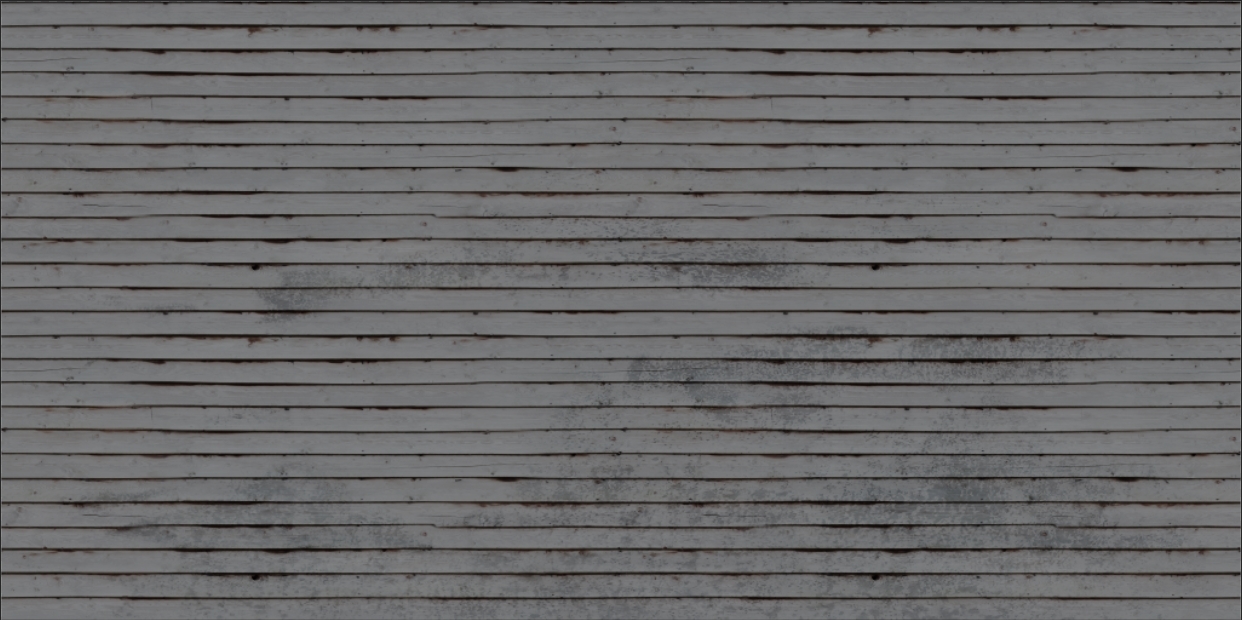
ie: wood planks - vertically non -seamless, horizontal seamless
plucky olive
right
frozen blade
so you use the entire height of the textures there, and horizontally they seam themselves
since designer v6, you can have 2x1 texture for designer i think
another way to do it, which is a bit more convulted and with a lot more manual work
is to export some textures you already done, crop individual planks
including all their own other textures and combine them (manually or auto)
designer is a software that deals with height information, just like substance painter
normals maps is just a result of that
plucky olive
ok ill have to try that
frozen blade
ie: here is a working texture i have
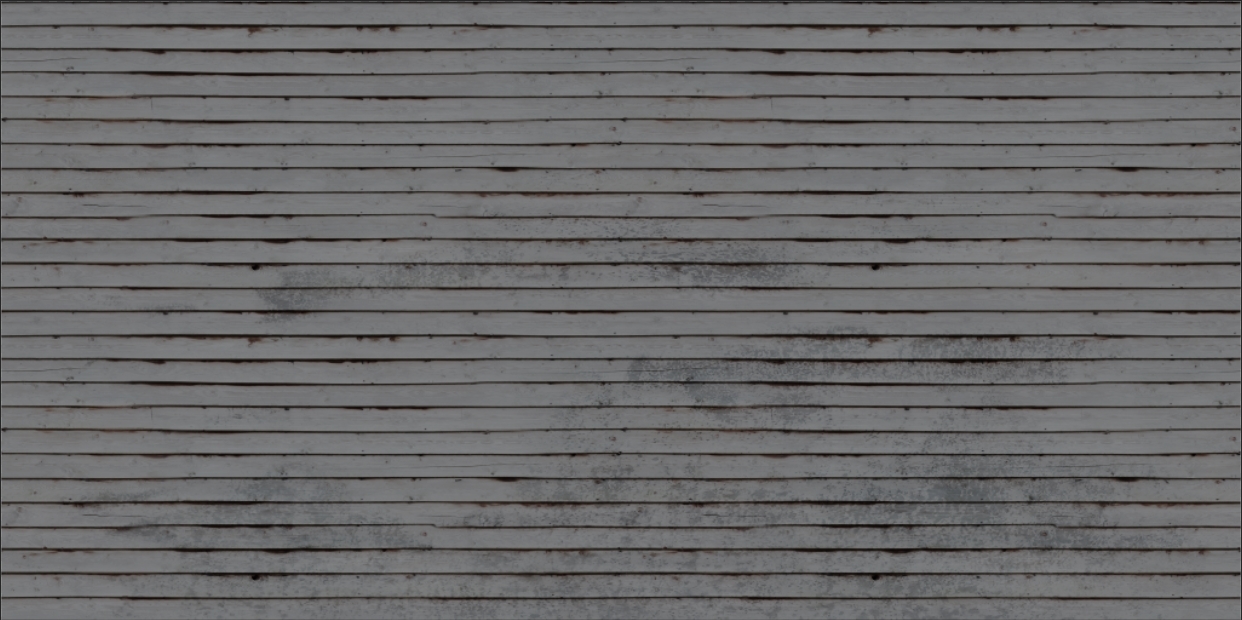
planks yeah - it is based on a 1:1 texture
you can notice some repetition horizontally yourself, which is bound to be fixed
that said, i broke that with a mask on top
i hope that makes some sense
plucky olive
yeah I think I get you thanks again for all the tips
 severe rune
@frozen blade That guy already used stolen cars from GTA on his server. And asked people if they can make him american style houses before. I guess he didn't find someone and chose to steal some.
He also spammed in multiple channels and then got toxic at the people telling them that @everyone doesn't work.
Also.. He made his own map? "I had 4k to build a server and I payed someone to make a map for me that costed 4,850" That's how you build a map by yourself nowadays. You pay someone else to do it and put your name on it.
He also wanted someone to make a police and fire department for him with full interior. While he didn't "have much money" being already 850 over his budget.
Kinda weird that he is still here. In december he admitted his unability to do anything and said he'll leave the discord.
severe rune
No. Wally from 1PM
frozen blade
@severe rune yeah man expected, i was not born yesterday
i smell fuckwits from miles away
 nocturne lake
is that because you spend so much time in my company?
nocturne lake
Depends how badly you want to hurt me 😄
 twin bane
hahaha
frozen blade
😄
 tawdry plank
Arma modding is driving me mental clearly..
 somber pier
Welcome to the party
 silver gull
yes, mental clarity, the bane of our existence
 gaunt kindle
severe rune
gaunt kindle
severe rune
I pick "pick one".
Seems the most reasonable to me.
 faint dragon
I found this earlier, looks like someone made an arma 3 shader for substance painter.
https://github.com/ianbanks/arma_3_substance_shader
severe rune
Yes he did. I think that should be pinned btw
 mellow zinc
Is it any good?
 quaint shadow
I've been using one of his older versions for months, and from my experience the previews are waaaay closer to ingame results than with any other shader
severe rune
The question is less if the substance shader is good. And more if the Arma shader is good 😄
quaint shadow
not in my opinion tbh, if the ingame shader had cell shading for whatever eason then I'd also want to have it in SP
I for one love WYSIWYG workflows
besides, it's unlikely anyone would ever go and change the in-game shaders - with Apex being a major exception, ofcourse 😉
severe rune
Nvidia Freestyle 😄
faint dragon
Yeah it really close to ingame results. I couldn't find any documention, I had to have to open up the glsl file in a text editor to see what channels to use and such.
quaint shadow
so far I've only used base color, gloss and specular level (all of which work with that shader), but you can probably use more than those (normal map comes to mind)
actually yeah I've used normal maps too
faint dragon
yeah. These are the ones mentioned inside the file
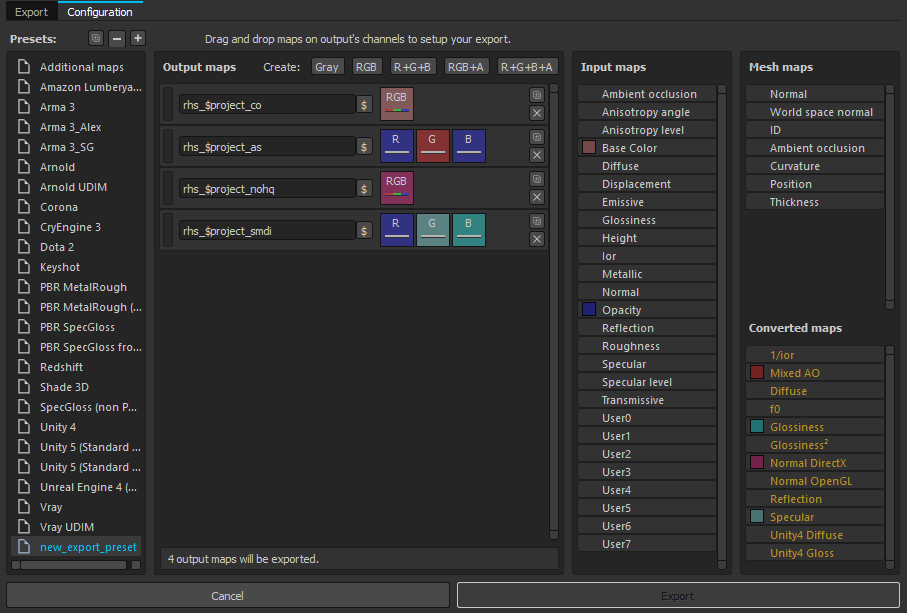
// The channels used are:
//
// Base Color (_co) [sRGB]
// Height (_nohq) [L]
// Specular level (_smdi) [L]
// Glossiness (_smdi) [L]
// User0 (Ambient Occlusion, _as green channel, Optional) [L]
// User1 (Diffuse Occlusion, _as blue channel, Optional) [L]
// User2 (Macro, Optional) [RGB]
// User3 (Detail, Optional) [RGB]
// User4 (Macro Alpha, Optional) [L]
//
// The environment should also be set to a regular ARMA 3 environment map, not a third party HDR
 vestal sundial
Normal maps painted in a layer or imported and assigned will not work with Ian's substance shader, Unless you assign it to the maps along with AO and Curvature, ETC. So it gets a little tricky when importing or painting with normals in substance because you can't see the results. They will however export without issues.
severe rune
Wait.. // Height (_nohq) [L] Really? Always thought that was a RGB Normal... BIKI also says it's RGB normal.
 ancient smelt
The default workflow in Substance is to use height maps and let it convert them to normal maps on the fly.
severe rune
That explains why my normals are always so crappy... scribbles notes down
ancient smelt
Oh, the one exception is the base normal map (that you select when you import the mesh). Then it blends your heightmap (which can go below 0) with the base normal map.
Much of the difference is due to post-processing that can't be reproduced in Substance Painter (like HDR bloom, which tends to tint objects even if they don't visually have any bloom).
 coarse scaffold
Can I apply to a selection diffuse texture and different emmisive one?
For example, I have a panel, which has white markings, I have rvmat and added _co,_as,_smdi and _nohq textures. How could I add an extra texture to make the markings green at night?
 full quarry
what shader are you using?
typically rvmat does not use _co
and no cant add stages into the materials
coarse scaffold
Currently Super one
My selection looks like this
So the way to go
Would be to create simple texture on top of the panel with markings , am I correct?
full quarry
yes
coarse scaffold
Ok thank you :>
full quarry
👌
nocturne lake
could try the PixelShaderID = "SuperExt"; VertexShaderID = "Super"; //more stuff class Stage8 { texture = "hsim\structures_us_h\city_buildings\04_offices\data\cb_04_em.paa"; texGen = "1"; }; setup that @brittle cosmos tested with ported ToH buildings
coarse scaffold
Will try
 white cargo
what's that SuperExt shader?
full quarry
was that the one with lights that come on at night
coarse scaffold
However with that approach , I wont be able to disable the glow with engine disabled I think
Damn, my Yoda english
nocturne lake
true, you'd have to script it to setobjectmaterial I guess to do that
 acoustic dove
I have to say the new substance painter looks even more like made by Adobe 😛
really cool
severe rune
Woah.... That looks nice.
They are hosting a livestream on yt in 9 hours
And they also have a video tutorial series about SP 2018 on their yt channel
frozen blade
which i actually wanna have a look over, for anchors if nothing else
ancient smelt
Speaking of SP 2018, https://github.com/ianbanks/arma_3_substance_shader is now updated to work with it.
quaint shadow
out of curiousity, @ancient smelt does your shader support opacity? it'd make some of my retexturing projects a tad easier
ancient smelt
Not at the moment, I did test opacity in SP recently though and it does seem to alpha sort correctly (as would be required for super shader).
severe rune
Painter crashes immediately on my work PC. But Designer works fine 🤔
vestal sundial
Ian you're the best!
twin bane
@severe rune there is a hotfix out for nvidia drivers. that is fixing much foo for people currently.
silver gull
391 ? i'm almost 30 versions behind then 😄
twin bane
lol
severe rune
Lol. Yeah wanted to write about that here yesterday. I installed the hotfix and it kept crashing. I downgraded and it kept crashing..
Then I started to think that maybe it's my mistake. And yeah. Turned out it was just user error.
severe rune
Nah. It's not something anyone would do by accident.
But I found another bug with sketchfab. That their developers were unable to solve since mid 2016.. (OpenSSL fail on Sketchfab login) I experienced that myself when using Qt. And I googled for the error once and immediately found it.
No idea what their developers are doing but I pushed the solution under their noses.
And their forum is full with 2018 issues currently so maybe it's better to wait a little before upgrading.
white cargo
is there a plugin for saving .paa in photoshop?
ancient smelt
Not one that works.
You're better leaving everything in .tga in any case, so that your textures aren't degraded.
nocturne lake
I think somebody made a new one. I'll have a look on BI forums - think there was a thread there for it
think it uses BI tools to do the actual conversion, so should be future proofed unlike Kegety's old .paa plugin
white cargo
my ground texture rvmats aren't converting .tga when I run buldozer
ancient smelt
Even if the .PAA's don't exist?
white cargo
yeah
 proud thicket
why does everything have to be so complicated for this game. Is there any good tutorials on how to retexture things. I'm looking to retexture some RHS gear and maybe some others. Mainly for personal use.
full quarry
There are some starter topics on BIforums on the topic. Re-texturing might be difficult because in most cases the methods used to create the original textures are very different than the "paint over old texture in image editor"
 dense peak
I'm having trouble adding texture to my model. I exported UV map from UV editor, edited it and want to load texture to object builder, but it says that it cannot load a bitmap. I tried .paa and .tga. Neither does work. Am I doing something wrong? This is my exported uvmap https://i.imgur.com/wN1QNwE.png
full quarry
where are you trying to load it?
simplest way to load a texture would be selecting the mesh you want to apply it and hit E
and theres 2 dialogs for texture and material
dense peak
I tried to load it in E menu, it does show up in UV editor on the list, but I can't see the texture and it does not work in game too.
When i try to select it - I've got "unable to load bitmap" error
full quarry
either your path is wrong or your texture is bad type
full quarry
it should still load I think
dense peak
Maybe my exported uv map is wrong?
full quarry
but the original files must have appropriate suffix for the .paa to convert the right way
no if thats what you see in the uv editor then thats what it is
uvmap does not matter at all regarding the texture image file
its just how the model then pics up what you have on the texture
if you open the mass material renamer tool
in "tools" menu
are the texture paths red or black
dense peak
it's red
dense peak
I've got it on my desktop
dense peak
All right, so I mounted P:\ drive and loaded texture from there, now it's black on the list
how can i preview it on a model?
Oh, ok it loaded in uv editor now. Now will it work if i add path to it in hiddenselections?
full quarry
yes it should
and you will want to run buldozer previewer from OB if you want to check it out in engine quickly
assuming you got all that set up right
dense peak
Unfortunately my bulldozer crashes on loading for some reason
full quarry
you will want to fix that. either reinstalling tools and setting them up right or whatever helps.
do you use Arma3 exe as buldozer?
OB can use only the 32bit
dense peak
I tried to fix it by replacing buldozer.exe on P drive with arma3.exe, but it didn't help
full quarry
you do this
and look up what else PMC wiki has to offer on tools setup
its very important to set everything up so they work
because only that way can you realiably build working addons
and it makes it easier for us to help you when you need it
dense peak
I've done what is on wiki, but it still crashes. Don't know what I'm doing wrong
full quarry
<steamPath>\steamapps\common\Arma 3\arma3_x64.exe do you have it like this in OB settings?
because OB needs it like this x:\steam\steamapps\common\arma 3\arma3.exe -buldozer -nosteam -name=Buldozer -window -noLand -exThreads=0 -noLogs -noAsserts -cfg=p:\buldozer.cfg
 digital mantle
try running OB as admin
digital mantle
32 bit ree
dense peak
Now it works, but all I can see is blue window and can't do anything with it
dense peak
my default lod for headband
digital mantle
so..
full quarry
and the controls are rather awkward to use
digital mantle
You can zoom in by using numpad+ or W, numpad+ will start to make the model disappear if you get too close, so get close enough to use W and then go in for more.
its annoying but controls can be changed at least lol
dense peak
So now that I can see it, it seems my texture wasn't applied
I have chosen it in E menu
dense peak
hmm, no matter what texture I choose it's just white
Now I can see that my rvmat file has 1kb, I don't think that's right
I created .rvmat file in UV editor by create material option, is that how you do it?
frozen blade
no
dense peak
Then, how would I create working textures and rvmat? Sorry if I'm asking stupid question, but i just started with this 2 days ago
I've got something like this as texture, but can't make it show up in Object Builder or the game https://i.imgur.com/0xPI4ZD.jpg
full quarry
for startes dont put any material on it just the _CO.paa you got on the texture slot
and how arma handles textures and materials can be found online either on Arma wiki or BI forums
then you can also explore the unpacked arma data for examples
 shadow lynx
Is there anyone that by any chance has a Gryphon texture psd?
 surreal lance
So what exactly does a MCO do,I understand that it multiplys the CO texture but whats the real reasoning/purpose for a mco if I could just open photoshop and make my texture darker?
More specifically asking how it affects terrain if that matters, as for thats what its required for in my case
white cargo
you can use it to add grit, dirt, graffiti etc.
https://s26.postimg.org/tzlh406av/Arma3_2017-08-26_06-36-07-00.jpg
the ads and graffiti on the building walls are added with mco
ancient smelt
Russellocean: It's for multi-resolution textures, you either use two completely different UV maps (one for the CO and another for the MCO) or you use a matrix transform in the .rvmat to give either the CO or the MCO a different resolution.
And in some cases (like damage textures) you use it at the exact same resolution but have it toggle on or off while the game is running.
Though that only tends to be useful when you already have multiple CO's for different vehicle variants and don't want 2x that for damage textures.
 viscid gazelle
@shadow lynx It's available in Arma 3 Samples.
shadow lynx
Yeah I have it now, I just didn't have any ability to access the samples at that time 😄 @viscid gazelle
 vagrant lake
is there any Arma 3 Enviroment map for Substance Painter for the Arma Shader ?
ancient smelt
It depends which one you're using on your object.
You need to grab the specific .paa that you will be using and convert it to .png
There can be big differences between them (particularly the HDR _ca ones).
Also if you use useWorldEnvMap = "true" then it ignores your environment map and uses a3\map_stratis\data\env_land_ClearSky_ca.paa or one of the other weather condition based ones instead.
vagrant lake
thanks good to know that didnt found that anywhere
 dire laurel
what values is wrong if i have model that seems in ob normal but when in game it turns redish when light hits that part of the model?
dire laurel
modifications in rvmat dont seem to help and there is no weird stuff going in textures neither
frozen blade
can you pastebin here you’re rvmat (as text)
plus your smdi tex map from texview or whatever
dire laurel
i had this issue earlier but cant remeber how i solved it 😄
 shrewd arrow
Hi, how would i go about creating a texture for my interior panels if they are lighted in the night with the rvmat a3\data_f\lights\car_panels.rvmat? Or how would i light them up in the night? I mean the lights on the drivewheel and so on
silver gull
i dont understand the question ... you create them like any other texture 🐍 oh wait, you dont create your models and textures, i forgot.
digital mantle
oof
shrewd arrow
@silver gull -.- I mean how can i light up my interior in the night?
dire laurel
Deleting rvmat and making new one solved my issue.
 unborn river
Hi guys. People have adviced me not to use 4k textures because of mipmapping scaling it down and it looks worse than 2048*2048. Is it ok to use 4096x2048?
full quarry
It should be ok now
4k use was improved with LAW dlc I think
they will cost more preformance though
unborn river
Nice to know. Wont having more sections be more of an impact on performance?
Would be nice to have fewer textures /rvmats overall
full quarry
well 4K textues take a lot more memory
but if I've understood right I suppose thats still better than lot of sections
unborn river
Yeah most people have more than enough video memory these days
full quarry
true
go for it
always can downgrade if need be 😄
or make a lowres patch
for those with lesser machine
unborn river
👌
silver gull
1x 4k does not take more than 4x 2k
@unborn river even if you have just 3x 2k you can still combine to 4k and just leave 1/4th black, the black area will take almost no memory space due to compression
unborn river
Ok thanks
frozen blade
if you use 4x2k instead of 1x4k - it means you will actually use 2x4 sections instead of 2 sections (read sections as draw calls, one per texture, one per rvmat). the difference between one and the other is not 3, it is 6. the lower section count the better
texture resolution is driven by game texture settings and performance by available vram. draw calls isn't.
 icy flare
It appears that the ImageToPAA tool in arma tools is giving me a big error and it's not converting my texture files to the .paa format. More specifically it is giving me a Microsoft .NET Framework error.
icy flare
It's a Unhandled exception now that I look at it.
you want me to give you the full details that it's showing me?
severe rune
Would certainly be more helpful than "a error"
icy flare
severe rune
It can't write to the target file because the handle is invalid... Dunno. Maybe write permissions in that folder
did you try the non GUI version?
severe rune
none
you should be able to just drag&drop your texture file onto it
and it should spit out a paa
icy flare
well it's not giving me an unhandled exception anymore
but it's stuck
oh nvm
it worked
thanks for the help
full quarry
what are your texture dimensions @icy flare
full quarry
here is disabled in this discord. You would not want to ping all the 10k+ ppl in here now would you
 polar rivet
10k+ wow
polar rivet
ok
full quarry
and you got to be more specific with your question
polar rivet
i'm trying to make a camouflage like in real life this link https://cdn.discordapp.com/attachments/389885152878133258/431570030795161631/image.png but doesn't appear like this in game not same color tone
full quarry
then you need to adjust your color balance until you get it right
if some arma textures have right tones you could check those out and use similar tones
polar rivet
sadly the colors we use no other army use it
full quarry
then just adjusting them is the only way to go
Arma does not draw colors exactly as you see them in your image editor
theres quite a lot more to it with all the lighting etc
what cou could do is make a texture with multiple variations of the colors
some more dark/light less/more saturated
and compare them like that in game
to see which direction you need to adjust them
polar rivet
is their like a known degree that the game change from the texture ( in image editor ) to the game play
full quarry
dont know. I think it could be pretty difficult to calculate due to how much It varies in diffetent lighting conditions
polar rivet
the background color is what bothers me .. see the pic to help me define it
i will be very thank full
polar rivet
because camopidia says background is khaki and i think it's more like coyote
full quarry
does it really matter that much if its 100% right?
and if it does then do as I suggested and paint different tones on a texture and test that in game to compare
polar rivet
ok thx
severe rune
@full quarry 11462 people are here 😉
 cinder hatch
hey all anyone know any great tutorials for creating retextures of mods such as FFAA AND RHS
cinder hatch
i have created a retexture for the FFAA Nh90 now i just need to figure out how to the rest to get it onto the workshop
full quarry
there are a few topics on the subject on the BI forums
generally about retexturing and not specifically for any mods assets though
 frigid escarp
@cinder hatch
- extract a reskin mod to see how its done
or - check https://community.bistudio.com/wiki/ArmA_3_Replacement_Config_Tutorial
and determine hiddenSelections+hiddenSelectionsTextures of said unit/class (via config browser)
cinder hatch
thanks man
 zealous pilot
hi does anyone know why sometimes the alpha layer shows black and sometimes pink, when it is set to "show" along with the rgb layer? is there a button or setting that changes this?
in photoshop
nocturne lake
double click the alpha layer and set the opacity value
silver gull
it schows as black n white if you edit the channel only (alt+click on layermask). It shows as pink if you have all other channels displayed as well
not aware of it beeing black while showing rgb as well. Maybe because your background is black, or because its a "background" layer instead of a proper layer?
 hollow sigil
Does anyone know where I can find a template of a NATO uniform with the US flag patch on the sleeve?
The only ones I can find are missing that part
 brazen iron
You can cut the patch from vanilla textures
hollow sigil
When I use vanilla textures I can never get the same level of detail I see people achieve in tutorials
Is there a certain way I need to be coverting the textures, or do I need to add all the intricate details like stitching myself?
The nohq file's details never look apparent enough when I overlay it
silver gull
details dont magically happen. Either you overtake them from vanilla or/and add some yourself.
zealous pilot
thanks x3 and monkey - that helped a lot
 dull junco
How would I go about making a texture similar to that of a heli pad marking? Im trying to make a parking stripes texture so that I can put it on the ground but im not sure the best way to do this. Like this: https://i.imgur.com/jNJyoE0.png
dense peak
Hi, does anyone know why would this texture have white edges like that?
https://i.imgur.com/WUKouEB.png
They doesn't show in the file itself.
It doesn't have those white edges if it's not transperent
severe rune
@dull junco I'd say look at helipad config class. Make a new one and edit the texture.
Maybe I'm missunderstanding? Don't know any other way. Besides making a new decal by yourself ^^
dull junco
Just to clarify, this is for a vanilla server mission by the way. I thought it might have just been a custom texture applied to a 10x10 user texture or something, but was just checking if anyone had any better options in mind
severe rune
Maybe setObjectTexture on the helipad object
full quarry
Ive been wondering this trend of "vanilla missions" with so much custom assets dropped into the mission folder
why cant they just be addons?
dull junco
Because then the users would have to download the mods to play the server
@severe rune Cheers for the help. Unfortunately setObjectTexture doesnt work on the heli pads. Tomorrow im going to just try a regular 10x10 user texture and try it with that. Hopefully that shouldnt be an issue
full quarry
they still have to download the same stuff packed in the mission
dull junco
You're right, but for new players or inexperienced players, whats easier? Downloading a mission simply by just joining and loading into a server, or by setting up mods with whatever method they choose?
full quarry
I suppose im more a "teach a man to fish" kinda guy then.
¯_(ツ)_/¯
each for their own
dull junco
I do know where you're coming from. For some, it may seem a lot simpler. But I've experienced first hand how difficult it is for some to sort out and install mods, even know its very easy.
silver gull
also, lazy people... they wouldnt even RTFM if it said so in giant red letters on the steam download page, that if they dont follow instructions it kills their computa.
 nocturne prairie
which color need the smdi?
for description. the black spot on the map is blood. The blood need gloss/specular (shiney) and the white color should not shine
https://cdn.discordapp.com/attachments/293362141879074819/434028611138224128/A3s_Head_Z_04_SMDI.png
Pls help meeee^^
vestal sundial
Your SMDI is missing a channel somewhere in there. Should be Red Channel blank (White), Blue Channel Gloss, Green Channel Specular
dull junco
Im currently using an rvmat material to produce a white glow effect on objects, but its a bit bright and I cant seem to lower the brightness without causing the glow effect to be completely removed. Im using this:
emmisive[] = {255, 255, 255, 1};
Any ideas?
knotty marsh
(isn't emmisive a typo or is it how the engine reads it?)
severe rune
typo
 fresh hill
Avoid high magnitudes for the emmissive vector, it will mess with HDR very severely.
dull junco
@severe rune Thanks heaps. Just lowered the first 3 numbers all to 50 and left the alpha on 1 and its perfect.
What would you consider high @fresh hill
severe rune
what did you try before? lowering the alpha?
fresh hill
- 25 even. Maximum I use is 10.
nocturne prairie
i dont know, maybe you can help me in this channel:
hm i have problem in my config.cpp.
I have a class cfgFaces. i use for my head a seperat body texture. The _CO worked great. but my material (rvmat) doesnt work. nothing in the arma 3 logs and not an error...
author = "Marshmallow";
head = "A3s_Z_Head_02";
displayname = "A3s_Z_02";
texture = "A3s_Zomb\Z_Heads\Z_Head_02\A3s_Head_Z_02_CO.paa";
material = "A3s_Zomb\Z_Heads\Z_Head_02\zhead.rvmat";
textureHL = "A3s_Zomb\Z_BodySkins\hl_skins\Z_Headskin02_Body\Z_Bodyskin_02_CO.paa";
materialHL = "A3s_Zomb\Z_BodySkins\hl_skins\Z_Headskin02_Body\zBody_02.rvmat";
textureHL2 = "A3s_Zomb\Z_BodySkins\hl_skins\Z_Headskin02_Body\Z_Bodyskin_02_CO.paa";
materialHL2 = "A3s_Zomb\Z_BodySkins\hl_skins\Z_Headskin02_Body\zBody_02.rvmat";
materialWounded1 = "";
materialWounded2 = "";
the problem is materialHL
 limber basalt
I had a similar issue @still isle
It seemed to me like custom rvmats will not work on ArmA man, even though the selection is there 😦
I could be wrong though
 boreal ether
Tom, of couse you can
nocturne prairie
@still isle 😂😂
@limber basalt hmm another method to change the rvmat? 🤔 idea?
 limber junco
anyone knows the transparent Color Code?
full quarry
colors are in format R.G.B.Alpha
full quarry
alpha is what controls the transparency
digital mantle
oof
 rotund glacier
hello there i have a problem with terrain textures (like grass and sand) not bumping out correctly i have generated the color map and the normal map still in buldozer/game they are showing flat but i see the texture lowering itself when i look closer but is like all the flat plane is bumbing in or out not the crucial parts like little rocks etc.... some advice? meaby the .rvmat?
full quarry
terrain textures use normalmap with parallax (terraintexture_nopx.paa)
where parallax is saved as greyscale heightmap in the textures alpha layer
there are examples in the vanilla maps textures
rotund glacier
so i already have a normal map (the bluish texture) what to do for generate the parallax?
full quarry
you can generate one from your texture, but that usually does not make very good px map
or you can paint it over
rotund glacier
what it is the right way to do it then?
i mean where come it from i dubt devs paint it manually
full quarry
they might generate it from a 3d model for example
or they just as well may paint it over
why not
rotund glacier
uhm ok so im tryng to generate one its mor elike a heightmap like the terrian one right?
rotund glacier
yes i will try it thanks also a quick question: its my impression or buldozer dont reads the rvmat s of anything
rotund glacier
i cant see any visible change when modify the rvmat and then going in to buldozer
rotund glacier
i do
full quarry
oh actually yeah
rotund glacier
only if i change the texture itself
full quarry
you also need to regenerate tiles
the terrain rvmat data is saved into the tiles when they are generated
so if you are testing out terrain textures/materials
I suggest you make very small test map for that
rotund glacier
uhm meaby i already have i called it matrix xD
like the white room in the film ahah
full quarry
construct?
rotund glacier
what do you mean sorry
full quarry
is the white loading space they jack into matrix from
rotund glacier
im italian so i dont know the english names of films etc
rotund glacier
oh i get it
rotund glacier
also its not possible to retexture vannila arma3 objects?
full quarry
no
not for map use anyway
some objects have "hiddenselectiontextures" like most vehicles
but map objects read the texture/material straight form the .p3d
so source object is needed for that
rotund glacier
if i manage to change a texture for a binarised object its "illegal" to place?
rotund glacier
😈
rotund glacier
i knwo but i cant find good assets <.<
full quarry
you get no help anymore in here
full quarry
good luck
rotund glacier
so its kind of working but im getting weird results
i cant find the white/black corret values
full quarry
got pics?
basically black is as far as down it goes and white is as far as up it goes
rotund glacier
im gettin the corre height now but the textures have strange black dots
full quarry
pics from both of your alpha layer and in game
rotund glacier
full quarry
and your texture?
rotund glacier
no tga with alpha layer
also i noticed the wrong shade
im tryng to redo the texutre
rotund glacier
ok i fix the black dots still a bit rough i need to soften a bit but overall its ok
thanks i will show you the final results
when its done
full quarry
this is about what you should be making
where the white is at the top of the dyne
and it darkens evenly to its sides
like a heightmap
rotund glacier
yes i noticed that eaither normal map and displacement need to be inverted
of what do you see in reality
full quarry
do not invert normalmap
thats not the right way
Arma only needs Green channel to be inverted
for normalmap to work right
Green invert is needed most of the time but not always. depends on what the normalmap is made in.
usually it is the case though
full quarry
hmm you got a buttload of artifacts in there
have you been using low quality source material?
rotund glacier
they are high resolution 4k that artifacts are simulated dirt 😅
full quarry
what do you generate it with?
rotund glacier
from photoshop but now im tryng crazybumb for the displacement
full quarry
cant put my finger on it but something about it feels odd
I guess you just have to test it out
rotund glacier
now its to low ._. but its ok i just need to raise it a bit but i noticed another problem
it makes a strange specular line
rotund glacier
its like a reflection moving when camera moves
full quarry
probably bad combination of rvmat values and textures
rotund glacier
yes i think the normal map is wrong i tryed the bis nopx for the desert and its totally different i need to regenare all normals
rotund glacier
now its good how do you think? http://prntscr.com/j5htrv
rotund glacier
how do you paste image directly on discord to make them show up?
full quarry
you got to have veteran status in this server for that
be around long enough/contribute to the community and you might get it
rotund glacier
i was making the same mistake with the inverted light now its perfect i think
now i will try the same process with the oters textures
thanks for the help
full quarry
👌
white cargo
I have to invert the green channel on normal maps? my normal maps look fine without that
I kinda feel like the one on the right looks best
acoustic dove
that rule goes mainly to the baked models
white cargo
oh, so if I just convert diffuse to normal it's not something I should think about?
acoustic dove
no , as long it looks good you are fine
white cargo
alright
full quarry
it depends really on what axis the normalmap are generated with
ancient smelt
The best way to check is to render a raised circle with a flat top and to make sure it looks raised after it goes through your pipeline. You also want to check that the top of it is flat because sRGB/linear mismatches can cause normals that should be pointing up to be bent quite a bit.
Another way to check that is to bake a completely flat normal and put it on a sphere, the sphere's lighting will look completely messed up if your pipeline has linear/sRGB mismatches.
 lean osprey
hi all, hoping some one can help me...ive recently started texturing in A3 and im still discovering what i still need to know. For instance im trying to reskin a CSAT Qilin but it not slapping on the texture for some reason. Can someone here spot my error ... much appreciated in advance
class cfgPatches
{
    class SANDF_LSV
    {
        author="[JRAS] Jakes";
        units[]=
        {
            "SANDF_LSV"
        };
        weapons[]={};
        requiredVersion=0.1;
        requiredAddons[]={};
    };
};
class CfgVehicles
{
    class O_LSV_02_unarmed_F;
    class O_LSV_02_armed_F;
    class O_LSV_02_AT_F;
    class SANDF_LSV: O_LSV_02_unarmed_F
    {
        author="[JRAS] Jakes";
        _generalMacro="SANDF_LSV";
        scope=2;
        scopeCurator=2;
        side=2;
        faction="SANDF";
        displayName="SANDF LSV";
        hiddenSelections[]=
        {
            "camo1",
            "camo2",
            "camo3"
        };
        hiddenSelectionsTextures[]=
        {
            "\SANDF_Mechanized\data\LSV_ext1_CO.paa",
            "\SANDF_Mechanized\data\LSV_ext2_CO.paa",
            "\A3\Soft_F_Exp\LSV_02\Data\CSAT_LSV_03_black_CO.paa"
        };
    };
};
any errors for missing textures?
full quarry
can you use the setTexture commands with your textures
you sure the textures pack with the config?
lean osprey
im not familiar with that (debug way just to check the textures?)
yup in data folder - packed in pbo
lean osprey
other textures work fine but not th eqilin (hunter, gorgon...and and and)
lol....recommendation then plz
full quarry
mikeros pboProject is what Id use
lean osprey
k
lean osprey
ok loads fine with car setObjectTexture [0,"C:\New folder\LSV_ext1_CO.paa"]; as test
@full quarry something to do with "camo" selections
full quarry
it is possible your config is messed up
or that your lucky streak with pbo manager ran out
lean osprey
ok... have pboProject now. Will see if it fixes issue....does my config look ok then
full quarry
oh yeah true that was the whole thing.
you could perhaps add required addons so that your config is read after the vanilla ones
full quarry
yeh that should be ok
full quarry
maybe you macro does not work
messes up something
are you sure the selections are camo1, camo2, camo3?
and not camo camo2 camo3
or something else
full quarry
where did you get the camo1 camo2 list?
you can check what the vanilla vehicle has in its hiddenselections list
lean osprey
a3 root files
made copy of entire qilin Arma 3 file...then removed not needed sections
for instance
Qilin (AT)
        memoryPointTaskMarker="TaskMarker_2_pos";
        hiddenSelections[]=
        {
            "Camo1",
            "Camo2",
            "Camo3",
            "camo_launcher",
            "camo_tube"
};```and your texture path there is absolutely correct?
since you used pbo manager
do you have the p: drive and the dev environment set up?
car setObjectTexture [0,"C:\New folder\LSV_ext1_CO.paa"];
you used this
to test
lean osprey
yeah
full quarry
but this reads the texture from your drive
not from the pbo
you should try the path you have in the config
full quarry
to test if your path works
because if the setObject worked like that
then the camo selections are correct
but your new paths are not
car setObjectTexture [0, "\SANDF_Mechanized\data\LSV_ext1_CO.paa"];
lean osprey
ill check it thx
full quarry
have you renamed your new textures or is LSV_ext1_co.paa vanilla name?
lean osprey
i renamed them
full quarry
make sure you have saved your own texture there too
 rose kite
Any ideas on how to retex the new bar armour/camo netting?
somber pier
If they're not a hidden selection you cant
However you'd need to open to encrypted ebo to get a hold of the .paa
rose kite
Ah rip. Thanks
lean osprey
so when do do you guys think will BI unlock Tanks DLC for us to mess with?
somber pier
Well they ONLY just unlocked the Jets DLC with the release of Tanks DLC
So give it maybe another year haha
lean osprey
😦
quaint shadow
I got lucky with the camonet; back when BI pushed the first part of the tanks DLC to the dev branch, it was still packed in PBOs - I haven't updated my dev branch since 😛
severe rune
If anyone needs Tank DLC stuff for modding then I'll gladly help.
They are ebo'ed to prevent people from stealing the whole addon and modifying it so that people who didn't buy the DLC can't get access to it.
But in the past BI didn't say anything against making specific files accessible to modders.
Just be specific what file you need and PM me
nocturne lake
camo nets and slat armour isn't in .ebo, they're in the old armor_f.pbo
e.g. A3\Armor_F\Data\camonet_###_CO.paa and A3\armor_f\data\cage_###_co.paa
BIS vehicles use the CamoNet and CamoSlat hiddenSelections for them
so should be entirely possible to make retextures with them
rose kite
Thanks!! That certainly heps
 lavish nymph
do medical trucks always have the red diamond? I retextured the back of a tempest to be white using the rgba and the red diamond was still there
 placid thicket
so I have an iraqi M80 helmet
just wondering if anyone has any pointers for using substance painter to make it look better
because right now the texture is pretty bad
 winged lily
apologies if this is the incorrect forum but how do i make/create the a "ui" paa for an item example icon_U_IR_CrewUniform_rucamo_ca
ancient smelt
You can take a screenshot from Substance painter if you're using that.
Mallowe: Are you using https://github.com/ianbanks/arma_3_substance_shader ?
severe rune
@winged lily There is a BIS function. I think BIS_fnc_exportEditorPreview or very similar.
You could ofcause just do it manually too. Might get better results than the autogenerated preview
placid thicket
I'll try that shader out
 ebon bramble
can anyone tell me if there is a website with arma 3s' texture files?
dense peak
Any script command to change change uv set ingame?
severe rune
there is a script command to change the material. Which.. could kinda do that I guess
placid thicket
@ancient smelt for me your glsl is just black
quaint shadow
are you using diffuse instead of base colour?
placid thicket
I am, I was working in the non-pbr standard preset before
quaint shadow
well there's your issue, ian's shader uses base colour
 opal vault
have you tried reducing the specular
placid thicket
not yet but I will try that
opal vault
I would try that it will reduce that plastic look if done right
placid thicket
Just wondering, does anyone have an export preset using that shader?
I'm currently using the one redpheonix(?) posted on the bi forums a while ago
But I don't know if that's for pbr or non pbr or something else
severe rune
There are
https://forums.bohemia.net/forums/topic/197417-3dsmax-substance-painter-object-builder-workflow-tutorial/?tab=comments#comment-3117778
https://i.gyazo.com/58616058b098ca7b5077b62798666c6b.png
and
https://forums.bohemia.net/forums/topic/189197-substance-painter-to-create-the-rvmat-textures/?tab=comments#comment-3036087
https://i.imgur.com/cgnBO5F.png
on the forums
I'm using the first one. But not together with Ian's shader yet
TBH... Someone should add the proper preset to biki...

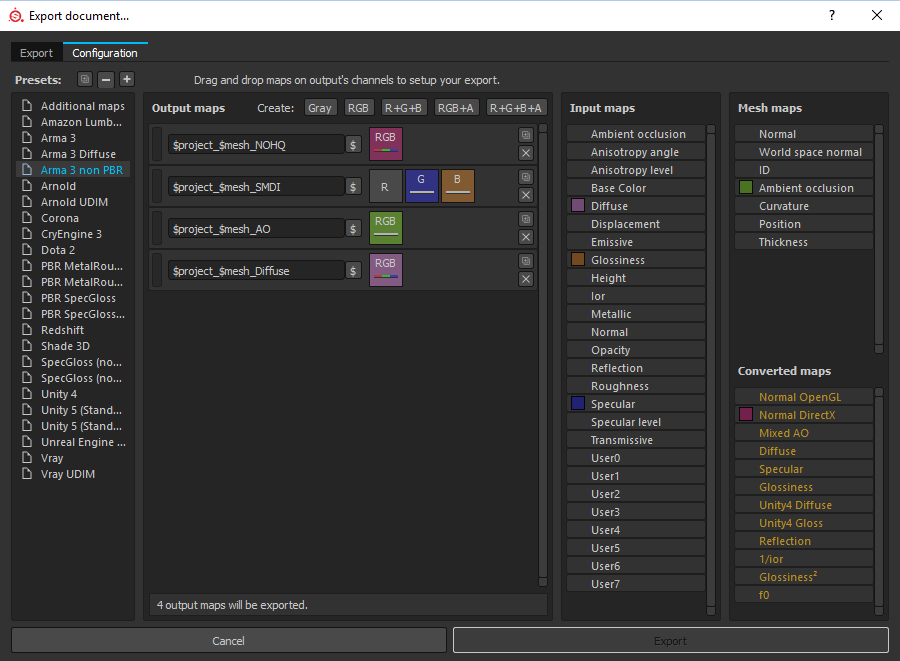 ancient smelt
Mallowe: If you open the .glsl in Notepad there's documentation at the top that describes which channels you need to use.
severe rune
I mostly use pbr mspecular glossiness if you mean that.
And the default substance shader for that.
I just didn't try ian's shader yet because I didn't do any Arma stuff since I found out that it exists 😄
placid thicket
👌
nocturne lake
bear in mind, the specularpower value in your .rvmat is going to have an influence on how big that highlight is
 coarse tree
add a base layer
placid thicket
Oh ye
coarse tree
i'm too lazy to open up sp, but i had the same thing and just having an extra layer that was filled did the trick
severe rune
Anyone know something about the issue in #arma3_troubleshooting? You guys would probably have noticed something like that first.
https://i.imgur.com/k9oZokx.jpg
Weird lines if shadows are on ultra. That's on vanilla textures
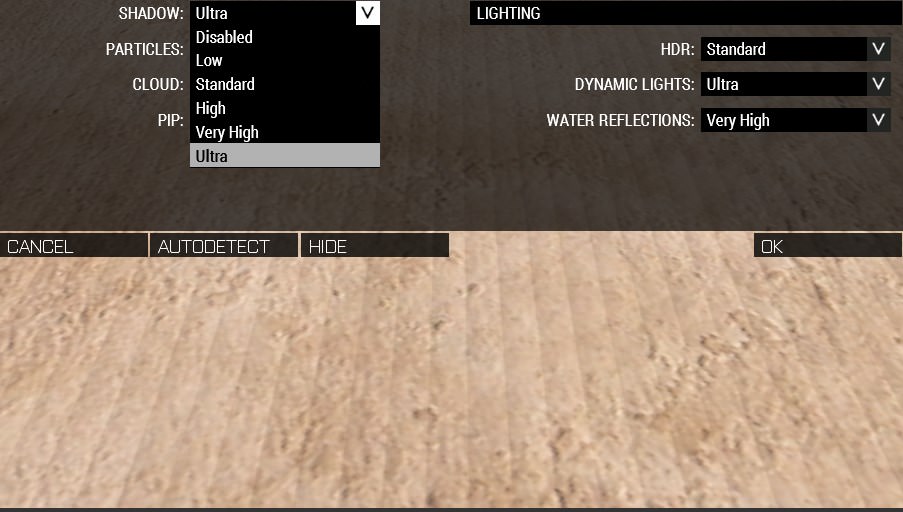 full quarry
Was that an issue with one of the shadow source types. sbsource = visualex perhaps
limber junco
Whats tools should i have for texturing (i got now photoshop)
full quarry
Basically you can do textures in just about anything that you can draw in, but you need to be more specific on what you are texturing /want to texture for more specific answer
dense peak
i want to retexture the black stealth balaclava (where the mouth area is) to have skull mouth on it. Anybody want to (if any) give me the mod to their retexutre before retexture?
 true pivot
You want the basic paa file of the mask?
nocturne lake
not the same issue
ADSHQ only gets rid of compression banding in the ambient occlusion map which only show when the object is already in shadow. The above issue is banding caused by the shadowbuffer itself, and is most visible on directly lit objects
severe rune
@light terrace your shadow issue. ^
 light terrace
 brittle cosmos
I don’t think they’re the same issue. The original posted image is almost certainly an issue with sbsource = visualex or the shadow LODs face being too close to a visual LOD. I’ve only ever seen that kind of banding in direct sun light.
While that ADSHQ banding is something you’d only ever see when that part of the model is in a shadow.
 sturdy phoenix
Is it possible to use setObjectTexture to apply transparent textures to objects in Arma3? I created a transparent .PNG with a slight grey tint in Paint.Net, then saved it as .PPA using the correct naming rules and alpha channel in TexView2. When I try to apply this to anything in the editor, I just get a solid grey color instead of the transparent tinted.
nocturne lake
depends if the model already had a transparent texture on it before, or not
frozen blade
when binned, the p3d behaves differently if there is a 32bit paa assigned or a 24bit paa.
sturdy phoenix
Nope the model was not transparent, that's what I'm trying to achieve. I tried both 32bit and 24bit PNG converted into PAA, neither worked.
silver gull
then it wont work, ever
only model that already had transparency in p3d will work with transparent settexture
nocturne lake
yeah, as PuFu and X3KJ said. It doesn't work because the model format encodes whether a polygon has an alpha or not, in order to optimise how the engine renders the model
sturdy phoenix
Thanks... So I would have to somehow edit the model itself of whatever I'm trying to make transparent?
ancient smelt
Plus it has to decide in advance if it's going to make the ocean-through-the-fence bug happen for each polygon. 😉
silver gull
if you are allowed to edit the model, then yes that would be the way to go
 red glade
Does anyone know how I could resolve this weird artifact? https://i.imgur.com/cRaPSDm.png
full quarry
the reflection?
red glade
the weird shadow artifact on the visor
red glade
yessir
full quarry
for future its good to draw some pointy lines/arrows to support your question
especially when you got a picture with million things in it
could be your AS map for starters
what is is supposed to be like?
full quarry
you got same kind of rvmat on it as the heli visor has?
red glade
yeah
i think i know the issue
im gonna do some experimenting and report back if i what i think will fix it works
 rugged cradle
so i have a question to who ever can help so my friend mad a mod and i was wondering how to be able to edit and stuff like the textures and how to get them
full quarry
your friend should have the source files. easiest would be to ask if you can use those
rugged cradle
i did and i have the mod but like how doi change the txtures and stuff
full quarry
what mod is it? if you have access and permission to original models and source textures you can edit the images in any image editor (paint, gimp, PS) and apply them to the models and pack them (preferably with new classes so they dont overwrite the other ones except if thats what is wanted)
if not it gets more tricky and the models will need to be configured for config changeable "hiddenselection" textures
as in they have had to be made that they support changeable textures
Im pretty sure BI forums had a topic about retexturing
 ocean river
Anyone here that can help me making an alpha image of a texture that i already have?
or any tutorials that i can follow?
I don't know whats the right name for the bump image
nevermind i got it
is the normal map
image
frozen blade
normals should not have alpha channel btw
ancient smelt
Especially since it swizzles one of the colour channels into alpha for slightly higher accuracy.
frozen blade
really? @ancient smelt which one?
ancient smelt
Red.
DXT5 has higher resolution for the alpha (8-bit instead of RGB565) and also while the RGB values are projected onto a straight line in the RGB 3D "space" the alpha is independent of that which makes a huge difference for normals.
Otherwise in each 4x4 block of pixels the "arrowheads" of your normals would have to be fitted onto a straight line. If you had a normal pointing up, one pointing north and one pointing east there would be no way to compress that without messing it up, unless you swizzle one of the normal axes out into the alpha.
full quarry
🤔
somber pier
What the fuck is that
 pearl copper
art
 solemn reef
No
pearl copper
yes
white cargo
lol
full quarry
So basically you've colored the whole car evenly grey and added the stars and the text right?
The stars look nice and even but the text on the side is not very well placed aesthetically speaking and its split between the front and rear door and the seam part seems to have been lost in your paintjob, which makes the quality look very poor.
The colors are not very complimentary either so Id reconsider them if you want your art to be taken seriously (which I doubt just a little bit) .
Sure its good that youre doing something creative with your life and thats a start but you got a long way to go to make great re-textures
pearl copper
thank you for the feedback
 tawdry pewter
He’s trolling
full quarry
me? no thats my honest opinion
tawdry pewter
@Donald Clinton#8406 is trolling with that edit
full quarry
ah yeah thats very likely
white cargo
is using an external SSD as photoshop scratchdisk a good idea?
red glade
u a thot
pearl copper
thanks dad
frozen blade
@white cargo yeah, as long as that internal doesn't get plug-out while PS is running
white cargo
thanks
I have a blending problem, basically I want to add rock texture to my mountain tops and I want it based on the white peaks in on the heightmap
how do I blend the rock layer with the grass layer, but based on the heightmap layer values?
nocturne lake
Using the height map as a layer mask and playing with the levels doesn't work?
white cargo
I'm not very familiar with using mask
but I think I see what you mean
will try later today, gotta bounce
 golden niche
use convexity algoritm on your heightmap in qgis to create peaks mask (but you'll need lot of research)
full quarry
while ago I made this blender material setup that uses mesh pointyness to crete mask layers
@white cargo would this be useful?
white cargo
I have to do it in photoshop because the sat is 100k
full quarry
sure but you might be able to render a mask out of this that you could just slap on to your texture
possibly even in 100k
though no quarantees about that
huuuge image
== anything can happen
would probably take forever too xP
white cargo
how would I go about making the heightmap into the mask in photoshop?
I tried pasting it, but it just makes a new layer
figured it out
barely ever had a use for masks so I had forgotten it's simply an alpha channel
hollow sigil
Anyone know where I can find the AAF's camo pattern?
nocturne lake
\Arma 3 Samples\Art\MarksmenDLC_Textures\VEST_IND_GL.7z contains a swatch of the uniform camo
I extracted it here: https://i.imgur.com/2c5hRg7.png
hollow sigil
Thanks!
 fading shard
@full quarry Didnt realize you were on here as well haha
severe rune
To nigel's shadow bug we talked about here a week ago.
Setting shadow from Ultra to "Super" was the fix https://forums.bohemia.net/forums/topic/212287-enhanced-video-settings/
https://i.imgur.com/o5n2J9p.jpg before, mind the lines
https://i.imgur.com/uR1uL7r.jpg after
full quarry
@fading shard im everywhere! 😄
fading shard
@full quarry Haha Seems that way
 ivory ruin
lol @fading shard since we both have almost the same name I also got a pin
full quarry
yeh discord though to ping you instead of timms altough I selected him from the list xP
 clear mica
hi, when I try to conver a .paa mask into a .png format using Texview 2, it gets written as RGBA color model only. Is it possible to only get the RGB without Alpha layer?
knotty marsh
nope, you have to convert it with mspaint for example
clear mica
if I open the .png in TextView 2 it still shows shows RGBA as well as RGB properly.
The point is that if I open the .png in any editor (gimp/paint), and remove the alpha layer, it removes the whole RGBA image. Like it only detects the RGBA color model in the .png file, while TexView 2 can view the RGB, RGBA, Alpha channel and stuff separately.
knotty marsh
are you sure you are not filling the Alpha layer with black? that would make the whole image transparent yes
clear mica
yes, it's black
and I want to change that
can I somehow do that by editing the .png exported from Texview ?
clear mica
but the point is that there is only one layer in the image
knotty marsh
:
Alpha all white = RGBA, show everything
Alpha all black = RGBA, all transparent
no Alpha = RGB
save your png with mspaint, it will save it as RGB iirc
clear mica
nah, it didn't work
knotty marsh
it does lose alpha, just tested
clear mica
I saved it through paint, and when I open it in TexView, it's all white
knotty marsh
and in paint it displayed right?
knotty marsh
…
open the correct RGBA with MSPaint → if it does display properly, save it as png → lose transparency → ??? → profit
in Paint, everything that is transparent will be turned into white.
clear mica
can I send you the .png? maybe it's just broken or smth
knotty marsh
it wouldn't go faster... if you open your png with Paint and it's all white, then your Alpha is all black (thus incorrect)
get your original working texture, save it as png, open it with Paint, save as = lose transparency
clear mica
I don't have the original texture, I'm trying to edit the .paa to remove / change the alpha channel to fix a mod
knotty marsh
so you do have a .paa that you can open and display properly
save that one as png and do as said above, will work
clear mica
if I open the .paa in TexView2:
RGBA = full white
RGB = actual colors (how it should look like)
Alpha channel = full black
etc etc.
if I open it in mypaint, it's full white (RGBA)
if I save it to back to .png and open it in TexView2:
RGBA = full white
RGB = full white
alpha channel = full white
knotty marsh
so your paa is broken, OK
it's faulty in the first place. send it to me, I'll see what I can do to restore your Alpha
clear mica
well, if I'm desperated I can just screenshot the TexView RGB view and make a new one lol
knotty marsh
can you send it as png plz?
clear mica
sure
knotty marsh
at work, don't have all the tools ^^
nocturne lake
tried saving from texview as .tga instead of .png?
frozen blade
dude, open that PNG in an photo editing software, and delete the alpha channel
resave as tga - 8bit per channel = 24bit TGA
clear mica
when I remove the alpha layer, it's all white
knotty marsh
remove the alpha layer, don't fill it with black
clear mica
but that's what I'm doing - in GIMP - I right click on layer > remove alpha channel
frozen blade
here you go
clear mica
and this is broken too, lol
it's white, while I need it to be colorized
as I sent in the image above
the RGB color mode
frozen blade
good grief is not broken
clear mica
frozen blade
you sent me a fucking alpha channel
send me that .paa instead
you have sent me this:
https://i.gyazo.com/44916f84f8f99ad935b2a65f4ba448ae.png
so well done there
frozen blade
deleted that alpha channel as i told you to do - one click
resaved it as 24bit TGA - second click
clear mica
after you deleted the layer, was it colorized or white ?
frozen blade
i delete no layer, i deleted a channel
clear mica
yes, that's what I ment, sorry
frozen blade
if you delete the alpha channel, there is nothing to "colorize"
also alpha channel is greyscale, not RGB
maybe i don't understand your question, but you do really need to have a look into how alpha file formats work
clear mica
I only know that RGBA is the RGB with alpha layer and some info, I thought that removing the alpha channel would make it look like RGB
severe rune
It does.
If all you do is removing the alpha channel without anything else
if your image editing program is so intelligent that it darkens/brightens the image based on the alpha channel and only after that removes the alpha. You'll probably end up with a completly black/white image at the end. Which sounds like what happend to you.
clear mica
I was using GIMP 2 to remove the channel
severe rune
That's the difference between "discard alpha channel" and "convert RGBA to RGB" I guess.
Never used GIMP. But it's probably doing what I wrote
vestal sundial
Ah, Alpha Channel woes.
 obsidian nimbus
https://i.imgur.com/hv9w9hs.png
anyone know what might cause this?
silver gull
morons cause this
obsidian nimbus
😦
white cargo
tried selecting the face then faces>move top?
obsidian nimbus
doesn't make much difference
also shouldn't sorting alpha faces order them properly?
obsidian nimbus
anyone?
 silver adder
no, it does some best guessing, but it is not perfect
 shut thicket
Hi everyone, I have a transparent ca texture to start on a model and when I use setobjecttexture to a co non transparent it still has a little transparency?
silver adder
I may be wrong but something to do with whether a face has alpha binned into the p3d, so you can't set it to be properly opaque?
 distant rose
was discussed on 29/04 in this very channel, scrolling up or searching would find the answer in seconds 😉
twin bane
that's too much like work man..
knotty marsh
Ctrl+F before: 👀 (just discovered the feature)
silver gull
hello plebs, hand me your knowledge on a platter... adorned with exquisite fruits
twin bane
lol
 digital dome
Any question that a mod has made or knows about that? I have a problem I am making a change of armor in the text. My question is when I enter the game in the editor and put a unit with my textured suit. Nothing appears as if I had nothing just happen to me with the suits and the vests with the backpacks, what can it be?
quaint shadow
not to sound harsh, but it could be a lot of things - anything from wrong model/texture paths to wrong or missing addon dependencies
you're likelier to get helped if you share your config so we can take a look at what you have, as somebody might find an error in it
severe rune
SMDI only uses G and B channel right? So I can do on R channel whatever I want?
The wiki says that. Just want to make sure it's right cuz it hasn't been updated for a loong time
silver gull
for supershader i think so. But iirc it was also possible to use a unique R channel, not sure if with supershader or not
nocturne lake
.paa conversion fills the red channel in white anyway
    class specular_diffuseinverse_map
    {
        name = "*_smdi.*";
        format = "DXT1";
        enableDXT = 1;
        channelSwizzleR = "1";
        channelSwizzleG = "G";
        channelSwizzleB = "B";
        channelSwizzleA = "1";
        dynRange = 0;
};```you could convert it with _co and rename later (or just leave it) for experiments
severe rune
Ohhhh. Never even thought of looking into the TexConvert config. Thank you. I guess I can just edit it if I want to put something into Red or alpha
severe rune
My Material Editor is only showing the "Basic" Vertex and "Normal" Pixel Shader. The wiki says other shaders should be listed there. Tried to repair my tools via Steam but there is nothing missing. But I suppose some file has to be missing 🤔
Okey https://pmc.editing.wiki/doku.php?id=arma:texturing:material_editor_tut (Would be nice if that would be on biki 👀) tells me I need "MatTemplates" folder. I'm not at home now but It wasn't in my OB folder yesterday. Do I have to get that manually from somewhere?
Could also ask directly. I wanted to use the material editor to find out how I can configure the UV set to use for a Shader Stage. I want to use a second UV set for my normal map so that I can combine my normal maps onto a single texture but still keep my co/smdi/as seperate.
Scratch that. Wiki says uvSource can be none, tex, tex1 I guess tex1 is automatically the second UV set then.
 unreal magnet




 fading shard
Hey guys quick question, The Watch UI element that comes up when you press 'O' where would I go about finding that in the Arma files
severe rune
It's Watch.p3d in I think ui_f.pbo
fading shard
Ah okay thanks mate
 restive harness
any one know off the top of their head what these holes are in my texture/ shity house model
https://imgur.com/a/WgeGtRD
white cargo
alpha mask you forgot to remove?
full quarry
also possible problems with uv map
 viral wedge
WIP FV-720 Mora texture https://gyazo.com/dfc830787b20e4c68d4dc78e86f64922
mellow zinc
So working on a large ship and im running into this issue where the texture is flickering or something? Anyone know what could be causing this? https://gyazo.com/beb724b9552b2e72a285f622ccb94862
nocturne lake
not using the correct _co texture naming
or having a significant portion of the model with a 32-bit alpha texture
mellow zinc
They are using _co and none of the pieces are using a alpha map
All files were converted from a 8bit tga to paa
mellow zinc
@full quarry Actually appears to maybe be a distance thing https://gyazo.com/17176fb7779933cbe729ae9a1469c778
full quarry
why so tiny tiled ones?
mellow zinc
Just a general test
mellow zinc
full quarry
how big is the ship?
mellow zinc
Around around 170m split into three sections
So theres three rv mats in total. One per piece
mellow zinc
Think it could be just that? Res going nutty?
full quarry
yes that very much looks like mipmapping to me
as in it draws the texture in lower resolution
mellow zinc
Hmm interesting
full quarry
like with objects far away
mellow zinc
alright ill scale it up to 4k for the MC and mask and maybe 2048 for the tiling?
Or 1024?
full quarry
well even arma3 rocks have 2k multimat tiling textures
full quarry
how complex are the 3 models you got for it?
full quarry
you could also try if triangulating the mesh helps
full quarry
👍
somber pier
@viral wedge Looks very nice
silver gull
so i just had a cruise around tanoa again to check out the textures there and everywhere i'm noticing those ugly diagonal line shading artifacts
https://abload.de/img/20180511220820_1ndu06.jpg ; https://abload.de/img/20180511220034_194uc5.jpg
Is there any way to get rid of them or reduce their severety (for custom assets)? I assume this is because of how the shadows are generated? Or can this be solved with graphic settings/ gpu driver tweaks?

 nocturne lake
Push the shadow LOD inside the walls
Tanoa stuff's using visual LODs for the shadows, isn't it?
silver gull
i think so?
removing shadows in graphics options gets rid of all those lines, so it's def caused by shadows, and i have never seen something like this on my stuff with stencil shadowlod
brittle cosmos
I'd be curious to know if you're only seeing those on objects with sbsource = visualex. My guess is that the shadow used by the game when using that name property is the same size as the visual LOD, and then shading/banding comes from the faces being too close to one another.
silver gull
it seems to only happen when the incoming light beam is almost parallel with the face (so a very shallow angle)
does nobody else get those artifacts?
nocturne lake
pretty sure we all do. And we all get it in Object Builder when modelling without making a shadow LOD, because the engine uses the resLOD to generate the shadow then
as Penny says, it's because the buffer shadows are generated too close to the surface
 sterile owl
Wonder why they chose to use the visual load for the shadow
Too much time to make the shadow lod lol
nocturne lake
Shadowbuffer is sometimes better performing than stencil shadows (because it's on the GPU, not CPU)
An optimised shadowvolume with shadowbuffer will likely have better performance than one from unoptimised visual/visualex. But as you say it's a matter of time and resources making the extra LODs
silver gull
i would love to use it, because it's super convenient - but with those eyestains i am reconsidering if i really want to go that route
i just cant unsee the issue
did any of you do more serious attempts at calibrating RV mat and texture values to a PBR reference sheet (ingame) - compared to just going with "what looks adequate" ?
silver gull
WOW fucking terrific... enter one wrong script statement in substance designer and it immediately crashes. Find out it doesnt autosave. 1h work lost. FML
knotty marsh
WWJD? Jesus -SAVES-. Ctrl+S is unfortunately a very needed friend. RIP your data 😦
full quarry
for that very reason I save neurotically all the time
been there done that many enough times
knotty marsh
a colleague of mine had this turning against him recently.
Ctrl+X, Ctrl+S, Alt-Tab… power shutdown.
Good thing it was a small piece of code, but still
 hardy basin
Hey what kind of programs/methods do you guys use to create parallax textures? I have been using GIMP but I'm curious what other people do
Can you do that with substance designer?
full quarry
I've done some parallax alpha heightmaps by making a 3D model and baking the displacement out of it
silver gull
of course you can do it in substance designer
silver gull
... if you want to do it procedurally/ with the variety of unique tools, as opposed to hand painting it.
viral wedge
does anyone no where the Atlis map texture located?
full quarry
the satellite texture?
viral wedge
yes
white cargo
it's in all the PBOs named map_altis_data_layers_etc