#arma3_texture
1 messages · Page 28 of 1
 obsidian nimbus
 ancient smelt
With Substance Painter.
 jolly peak
Is there any reason why my textures would look distorted on some models?
 quaint shadow
stretched UVs perhaps?
 copper hollow
Anyone knows how to get rid of the white pixels around an image if the background is transparent, in this case is for unit emblem. I tried a lot of solutions but so far non of them seem to work in arma. Any ideas ?
 severe rune
Are they white in the texture? Just set their alpha to 100%?
 hardy basin
question: how well does arma 3 handle 8k textures? Should I use them in my objects? I think they work but I can't remember ever using one
and also as far as optimization goes, I have a good pc but I want people with lesser machines to be able to enjoy my stuff too
 silver gull
to what i heard it doesnt work. Why not just test it out though? Simple checker pattern (2x2 px plack white tiled)
hardy basin
I'll test it out on this object and let you know how it works out!
 lavish lintel
@l4z0rr0b0tz#9079 As i know, A3 could handle 8k, but de facto it resizes it down ingame, and 4k looks better then 8k
 acoustic dove
why you need 8k anyway?
lavish lintel
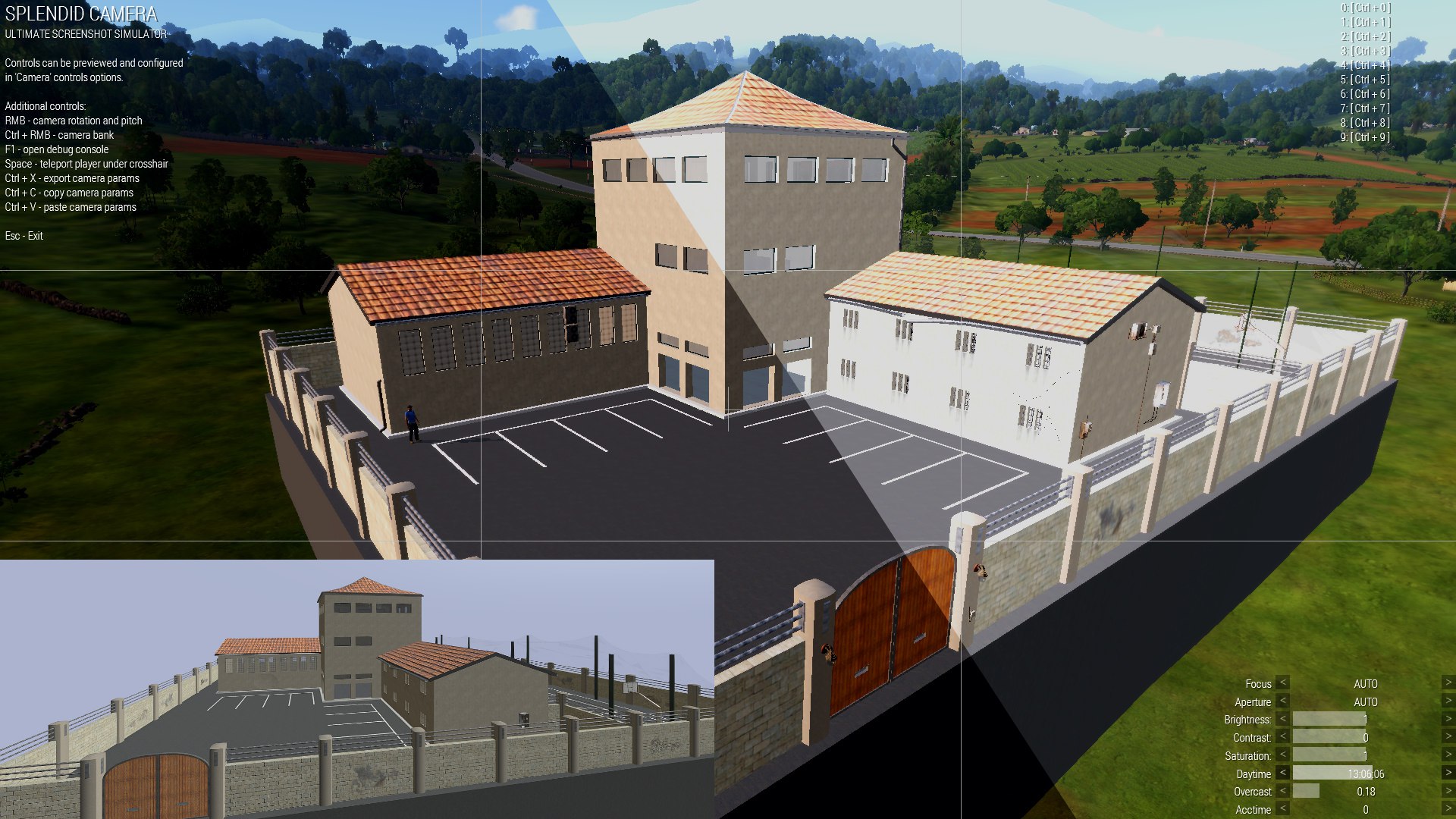
Which .rvmat values should i change to fix this brightness under the sunlight?
https://pp.userapi.com/c831208/v831208957/2972f/Y_55_AkBIxw.jpg
 nocturne lake
diffuse[] probably
quaint shadow
^
ambient on the contrary will mostly affect the lighting in shadows
by tweaking diffuse and ambient, you can, for example, make a type of camouflage blend in to a map's environment perfectly: https://cdn.discordapp.com/attachments/227027935142477834/306855852093079572/20170426201434_1.jpg

to visualise it better, here's a screenshot with ambient set to 1,0,0 (red) and diffuse set to 0,1,0 (green): https://cdn.discordapp.com/attachments/227027935142477834/306857293578764288/20170426202104_1.jpg
 lavish lintel
@quaint shadow many thanks
 viscid laurel
one more thing, I had my unit logo/texture showing up previously when I was playing multiplayer on my arm patch
now it's no longer showing, I get an error saying couldn't load squad texture
silver gull
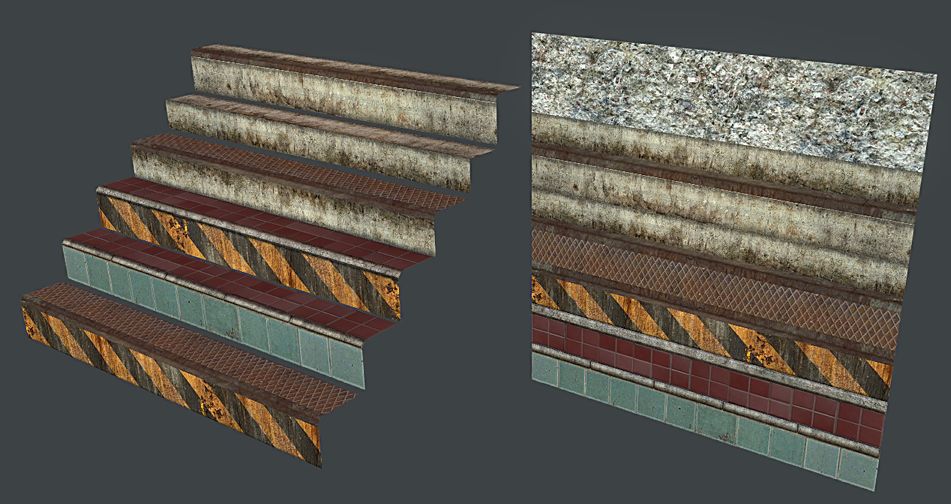
substance designer question - does anybody know how to efficiently combine an image (atlas texture if you will) out of multiple images? I have multiple trims, 2048x X pixel (X=64, 48, 32, ...) that i want to combine into one square texture nondestructively. Tried with transform2D node but its beyond extremely tedious to do
 nova hatch
I have a substance designer file that combines like 4-5 2048x2048 into one, do you mean like that? only issue is it will overlay if something is already there
silver gull
the "square" analog would be if you have 4 2048² ( or 16 1024²) maps and want to combine them into a 4096 map. Thats what i'm after.
if i plug the different maps just into one via blend nodes, they get stretched to suit the "final result" instead of beeing applied pixel correct.
quaint shadow
you could probably achieve that by layering the different images ontop, setting them to not tile, adjusting the width/height so as to not stretch the image, then play with the offset to position them properly
only problem I see with this is that the offset is in the range from -1 to 1 in relation to its resolution, rather than being in pixels
silver gull
which is what i meant by transform2D beeing hellishly tedious to do
offset and scale matrix is all based around center of the image
ancient smelt
Can't you just do it once and make that a subgraph?
 unreal magnet
Like ianbanks says, make it a graph and link that
silver gull
getting it pixel correct would be, as said, hellishly tedious. Also, since not all things have the same aspect ratio, doing it once as graph would not be usefull - as it would need to be readjusted every time.
example - https://abload.de/img/clipboard01ywuyo.jpg Every different material would be a seperate source graph/image and resolutions vary (including non-power by 2). This is just a concept, the final version i planned will have additional stripes stacked.
 silver gull
i looked into how to create functions and made a function that converts me pixel input (distance from border) to the center-based offset and matrix values.
Only thing i have no idea how to do is to reference the image size parameter of the input node in a function of another node. Currently i have to manually define the input's image pixel size
nova hatch
@silver gull maybe make a material out of it in SP and then export with no stretching so it can be more modular?
silver gull
i made a solution (see post above)
silver gull
https://www.file-upload.net/download-12897220/X3KJ_PixelCompositor.sbs.html if somebody wants to have a look. $!&"§% google drive for not working since months for me
 golden niche
what is _cs texture suffix?
it seems to be color texture with alpha channel for some purpose
 full quarry
Where have you seen one?
golden niche
apex vegetation
 shrewd arrow
Is there a way to make a rvmat that reflects light to the surrounding area? linke just a little bit?
full quarry
no
emmission is the only value in rvmat that emulates light/glowing, but it does not affect its surroundings
ancient smelt
If it's bright enough it will bloom though.
shrewd arrow
okay, how would i go about it?
 coarse scaffold
Guys, why my textures are heavier than ones I found in other mods? O.o
Resolution is the same, paa
coarse scaffold
approx twice
mine:
from other mod:
mine is 1.41 mb
the other is 665kb O.o
full quarry
what do you convert with
theyre both _CO i presume
could be yours just got more varied colors
coarse scaffold
I put in folder, then open OB and select TGA ttexture and it converts itself. Converting with Texview gives same results
full quarry
try imageToPaa
coarse scaffold
ok will do
full quarry
but would not worry about it too much
coarse scaffold
about what?
full quarry
about the size
 rare lake
err why are people worrying about meaningless stuff?
coarse scaffold
Just asking, becouse I will have about 6 texture sets, each 8mb
full quarry
you can easily test by decreasing the amount of colors in the image
full quarry
looks great
silver gull
more colors, more noise -> less compressability. Can always use a black image if you want to save on gpu memory...
srsly 1.4mb vs 600kB is a non-issue. ESPECIALLY not for a ViewPilot LOD that only one person ever sees
unreal magnet
I would worry more about the 6 texturesets to be honest
silver gull
for a cockpit? nah
coarse scaffold
Ok thank you all
silver gull
13GB substance designer ram usage... fuck me. and thats just 2k
full quarry
santa did not bring more ram? :C
silver gull
16GB was enough until now...
full quarry
😄 32+ is the way to go with 2k+ texturing
silver gull
apparently (?). Especially when you're lazy as me and have max+painter+designer open at once...
full quarry
that does not help it
quaint shadow
wrong channel - head to #creators_recruiting
 spare rampart
Alright, thank you buddy.
 zenith mirage
can someone tell me how to find this texture and where?
U_I_CombatUniform
 somber pier
@zenith mirage
- Find said item in the editor
- Place it on the ground
- Right click on it
- View in config browser (or whatever it says)
- Find the hidden selections in the config that shows up
zenith mirage
Thanks
 craggy vale
Hey, I'm pretty sure this is the right channel for this question. I've been having a problem with a face texture for my addon, it has solid black on it but the black always shows as transparent and I can't seem to find anything to help me fix this issue through searching on forums. I'm not too knowledgeable on texturing but any advice for this issue would be appreciated.
unreal magnet
is it having an alpha channnel?
craggy vale
It shouldn't
full quarry
got pics?
craggy vale
I saved it as a JPG in Photoshop before putting it into texview2
Yeah, I can get pics, give me a min
Is there something I need to do in texview to make it not create an alpha channel?
full quarry
no the source image just must not have one
jpg tho does not have alpha layer so it should not be an issue
just so you know jpg is the worst format to save textures
craggy vale
I've saved it as a jpg in Photoshop and I've tried re-saving it as a jpg in paint
I know
I'm purely making this face as a joke so it's not supposed to look great
full quarry
get pics in game too so the issue can be seen
craggy vale
Yeah, just starting my PC up now
I'll post them in the screenshots channel
don't have image perms here
full quarry
seems you got answers already
and seems you were not aware of the naming conventions of arma.
nocturne lake
I think the issue there is with the underlying head .rvmat shader
iirc there is some skin-coloured diffuse/ambient/specular setting on it
full quarry
that may be true too
craggy vale
I checked the RVMAT
and didn't see anything related to transparency
and thank you, Goat, for the link, i'll be sure to check that out
full quarry
while its not apparent there the skin uses totally different shader than the rest of arma modles. so it behaves completely different
craggy vale
Tried having _co at the end of the original file name, nothing changed, this is probably something to do with the shader
full quarry
did you save it as _co or just renamed it?
craggy vale
saved it as a _co
I also tried using a really dark brown and that still showed up as transparent
full quarry
likely you would need to make a completely new face material for it too.
and face class if you dont have one yet
 last delta
Hello everyone! May I ask you one question regarding a problem I'm been having for a while?
severe rune
@last delta consider http://sol.gfxile.net/dontask.html
TLDR: Just ask.
last delta
Well, I just tried to be polite! 😅
severe rune
That link explains everything in length 😉 Just go ahead and just ignore me ^^
last delta
Here I go: I'm in a unit, and we are using the uniforms from Military Gear Pack, an unupdated mod, retextured. Those uniforms has 5 hiddenSelections. Chest, pants, equipment, unit and insignia. The problem happened just after the Malden update. The insignia texture was misplaced in the pants. After a few Arma updates, that was fixed. But the problem changed: Now, when a player connected to the server, sometimes, the new player saw the other player's texture of the pants as black. It is client side, indeed, and sometimes happens sometimes not. The original author of the Military gear Pack gave me the p3d's after I contacted him (He was very helpful, indeed, but now i'm unable to reach him). I can give you the code if you don't mind, but the error is quite strange
full quarry
are the textures in use the ones originally on the models or new ones changed with scripts in mission?`
last delta
The textures are different, changed by me, and included in the unit mod. The paths of the textures in the p3d are changed by me. The strange part is that this issue only happens with the pants
full quarry
could be that someone is not using right version of the mod
last delta
Everyone is using the same version, as it is uploaded in the workshop
full quarry
it does not always mean its updating. but fair enough it at least should be the right version
last delta
Mmmmh....
full quarry
are you sure you have changed all the texture paths in the model
last delta
I'm completely sure, if that part wasn't done right, the model would give me problems of textures paths, right?
last delta
From the pbo to the texture
mcoe_uniforms/textures/texture.paa
The code is the same as the chest and equipment
And the chest and equipment works fine
full quarry
so youre still switching the texture with a script?
last delta
In the config.cpp. I'm sorry, don't quite understand what you mean when you say by script
😰
In the p3d there is a hardcoded texture, just in case the texture in the cpp fails
But the uniforms are made by cfg Vehicles and cfg weapons
full quarry
ok so you have set the texture on the model
and put the same texture into the hiddenselections array in config.cpp
last delta
For one uniform, yes, but there are some variants
Do you need the code in the config.cpp? 😃
full quarry
do the variants work?
last delta
The problem of the black pants persist in all variants
As I said, when everyone joins the mission at the same time, it is ok
The problem is when someone joings 5,10 minutes later
He could see some people with the black pants, and if another one joins later, he could see other people (not the same as the first one) with black pants. That's why I assume is a client problem
When that happens, if you drop the uniform in the floor and equip it again, the problem is fixed
full quarry
Id suspect its jip problem, perhaps with the mission you are playing
last delta
The same as reequip it in the arsenal
This problem happens in all the missions we play; At base, Liberation, official missions...
full quarry
join in progress has pretty much always been problematic to synchronize
full quarry
You could try making a few odd colored variants from some vanilla uniforms and try what happens with those
last delta
But the JIP problem is quite difficult to fix I'm afraid
We have RHS and some other mods, and the problem is unique of your mod and uniforms
I haven't see this problem before
full quarry
version mismatch is also still possible
last delta
Mmmmh
Let's focus on the other option, JIP
I didn't know about JIP problems before
Anything we could do about that?
There must be a reason why this happens with ONLY the pants
 dense peak
Create new serverkey & resign for each update
That way you will know people have the latest version if any weird issues
last delta
Understood
But if that was due to the version of the mod, that should give us more problems that just the black texture of the pants, right?
hardy basin
Hey guys I am about to lose my mind here over alpha map textures! I have been trying to figure out how to solve this problem for months, and I finally solved it, only to discover that I don't know what I did and I can't reproduce it. The issue is 32 bit alpha map textures end up being partially transparent in the game. I am told that if you import 24 bit png with 1-bit alpha it solves this problem (I think it was either @full quarry or @silver gull who told me this). However I haven't been able to get that method to work with TexView2 - even if I use TweakPNG to edit the tRNS chunk. I usually use gimp but I even downloaded photoshop to see if the "Save for Web" feature would do the trick. (It didn't) I've also tried using the levels menu to make all alpha pixels either 0 or 1, although I think that doesn't change the 32 bit format.
What I do know for sure is that I want DXT1 encoding on these textures... the only alpha map texture I've successfully made without that weird shading glitch was DXT1 for whatever reason. I am scratching my head because it appears I was somehow able to make this happen last night with one of my textures, to my great joy. However now I can't figure out what I did... haha...
Can anyone tell me what is their successful workflow for getting alpha mapped textures into the game without the 32 bit shading glitch?
I'm just talking like, for grass, where things are either completely transparent or not. I don't have any need for partially transparent pixels in these textures
full quarry
if you save image file with alpha channel as _CO it should save only 1bit alpha
silver gull
which shading glitch? You mean AO of other objects shining through ?
try forcenotalpha parameter ->> https://community.bistudio.com/wiki/LOD#.3Cresolution.3E last sentence of that section
hardy basin
yes it worked with _CO thanks horriblegoat I know you told me that once before I'll write it down this time 😃
forcenotalpha works too, but it changes the appearence of the texture somewhat
silver gull
dxt5 textures do not receive shadows from objects. They always count as "in the sun"
so that maybe why
unreal magnet
yep
dense peak
Hello
is anyone here?
I have a real quick question for you guys.
https://i.imgur.com/q262q46.jpg
https://i.imgur.com/ni7gztB.jpg
The first image is the original, the second is a copy of the first, with some editions to it.


close up on the patches.
https://imgur.com/a/3VE4A
Do you see they are the identical? The medical patches and the bottom text patch in yellow-ish color.
full quarry
could be. You could compare the texture files themselves
dense peak
@full quarry we can't, they encrypted the addons
and they won't send or show the file
full quarry
well that does sound like they got something to hide
so could be theyre just straight copies
severe rune
@dense peak If it has time drop me a Todo on https://github.com/dedmen/TodoStuff/issues I can unpack that pbo for you and check. But right now I'm working on 2 dead hard drives and I can't do anything before they are rescued. prolly atleast a week
obsidian nimbus
In a specular texture, what does the blue channel do? What is the difference between the Green and Blue channel? I still don't quite understand
nocturne lake
gloss map (acts as scalar of the specularpower value)
obsidian nimbus
If I understand correctly, the green channel determines what areas are most/least affected, and the blue channel determines how "shiny" the areas are. I did some testing on a blank texture plane and making the blue more visible seems to increase the reflectiveness of the surface, how clear the env texture is
is this correct?
So a shiny metallic surface would have a lot of white areas in the blue channel, and a dull plastic surface would be darker in the blue channel.
nocturne lake
depends in a way what manner you consider shiny
things with low gloss can look pretty shiny because they have wider specular highlights
visibility of the env texture has more to do with the fresnel values
obsidian nimbus
I would consider a mirror shiny.
and something that has a more diffused reflection less shiny
like chrome paint vs flat paint
Also I didn't know what the fresnel did until now. I still don't but I know what it affects lol
usually I just copy an rvmat from an object in vanilla A3 that is similar to my custom object and modify it
 warm nexus
Hello, I have some noob questions about texturing vanilla assets as well as adding new stuff to create a mod. So my first is how do begin texturing, what programs do you recommend. Do I need knowledge in code, mine is very limited. Any help is appreciated, oh I tried watching some YT vids and got lost with them.
full quarry
re-texturing requires the texture file of the model you want to rework or (preferably) a template file of the texture in question that has already been set up with different layers to help with the retexturing.
To do the actual work you will need a image editor software such as Gimp, Photoshop, Paint (would not recommend) etc.
And to get it in game properly you would need the Arma modding tools and modding environment set up and your new asset will need a new config that has the code that makes it use your texture instead of the one it uses by default.
Im pretty sure there are a lot of text about it on the forums
adding new stuff is similar but requires more work depending on what you want to make.
I think those are the basics pretty much
warm nexus
Ok thats a great start. Is there a preffered method for doing it, or just a tonne of trial and error?
full quarry
Re-texturing? I would guess its just a compilation of different image editing techniques and depend a lot on what you are trying to achieve. Im mora new asset maker myself so I dont have to do much texture editing like that. Most of it is done on the model itself when its made.
warm nexus
Mostly just taking some assets and giving them a fresh coat to suit the group I'm in better and compliment what we already have. nothing drastic, for now
So clothing, vests, helmets, backpacks etc
full quarry
to get started I would think Forums is a good place to start your quest
warm nexus
Sounds good, thanks for the assist
full quarry
np this is a good place to ask too but its a lot easier to answer more specific questions
dense peak
Anyone have some tips regarding the _dt texture? All of my custom ones makes the model so dark. Looking for something for tank metal
 glossy crown
Who texture make texture very very dark, i want to setup a really dark texture for a tunnel ?
nocturne lake
@dense peak very few Arma models use _DT at all these days
dense peak
Check! All is done by normals instead?
nocturne lake
Too loud for me to look at the outside while using it 😛
unreal magnet
hahahahaha
 frozen blade
@dense peak make sure the grey is a neutral (RGB - 0.5,0.5,0.5) or whatever - 128 / 128 / 128
@glossy crown MC
dense peak
Does anyone have a template for the nato pilot coveralls?
ancient smelt
_DT and _MC work like this in Super shader:
vec3 output_colour = mix(base_sample, macro_sample.rgb, macro_alpha_sample) * 2.0 * detail_sample;
So a _DT value of 0 causes the colour channel to be black, and a _DT of 1 causes it to be double. (and 0.5 does nothing, as PuFu said).
ancient smelt
This is for terrain MCO's, but the same applies to Supershader _DT's:
You can simulate the mco blending in photoshop by:

* Creating a bottom layer to simulate a part of your satmap (taking a small area and enlarging it by around 40 would be a good approximation).
* Adding a "curves" layer, and then moving the line to between (0, 0) and (255,128). The coordinates are in (input, output) order.
* Adding your _mco as a layer above the curves layer, and changing the blending mode from "Normal" to "Multiply".
* Adding another "curves" adjustment layer above the _mco layer, and then changing the line to between (0, 0) to (64, 255).
* The function is 2 * _co * satmap, but since that would saturate in Photoshop you're doing (((satmap * 0.5) * _co) * 4) to get the same thing.

If you want to muck about with adding multiple layers (like adjustment layers) on the _mco layer, replace it with a new layer group, set the layer group mode to "Multiply" and then add your _mco (now set to normal blend) in there with whatever other layers you want. As long is it is in the group it'll compose all those layers and then multiply the entire group with the lower layers.
I'm getting much better results with Cycles when doing texturing rather than Blender Render. Should I just use nodes in BR or is it worth the effort using Cycles for Arma
full quarry
yes
 dry rapids
So I made a texture with smdi plus normal map and used a vanilla rvmat. Works fine in bulldozer on both TB and OB. But for some reason ingame it looks really dark almost pitch black with the texture barely visible and really shiny
Has anyone else encountered this before?
Im just not feeling the super in the trooper right now
Cant post screenshot, not at home atm
full quarry
does the vanilla rvmat use supershader and if so what kind of AS map you have for it?
pics & paste of rvmat could help to debug it
unreal magnet
probably AS map, yeah
dry rapids
Can aquire a screenshot soon
dense peak
Any blender node guru around?
full quarry
dunno about a guru but might know a thing or two
dense peak
I got some errors applying a _MC texture
it works however the material gets 50% darker because of the mix shader node
full quarry
Lets rewind. Nodes where?
 full quarry
do you have notepad++? @dry rapids
dry rapids
Yes my dude
full quarry
could you open up the rvmat there and copy paste it into pastebin
for me at least it makes more sense in there
dry rapids
full quarry
ok yeah your supeshader material is all broken there
you are missing lot of stages
and you need them all for it to work right
full quarry
check out pretty much any weapons or vehicles data folder in the unpacked A3 data
full quarry
got it working?
 eager egret
Any ideas how to make this in arma? https://srt-autoteile.com/media/image/product/373611/md/motip-dupli-color-milchglas-effekt-150-ml-deko-spray-fenster-glas~2.jpg
 nocturne lake
not sure how to get the blurriness behind the glass. Maybe with the heat blur shader if that can be done on objects and not just particles
acoustic dove
blurrinnees could be done with blurry alpha maybe?
not sure because arma shaders are so outdated
or it could be done with layers of glass with one blurry texture?
unreal magnet
theres no blurry alpha 😛
full quarry
Not very well I think
I think the refraction shader would be way too "busy"/"alive" for such
 low creek
When I convert a PNG to PAA via TexView, the reds in the image appear as blue in-game. Any tip to make the colors work?
rare lake
no idea, but often times people just save mytexture.paa instead of mytexture_co.paa or what suffix is required.
low creek
k I'll try the prefix, thanks
nocturne lake
if the colours change it's usually because the texture is the wrong dimensions
must be e.g 256, 512, 1024, 2048 etc. pixels in both dimensions
any 2^N value
dense peak
I've made a retexture of the viper uniform, however I can't get the wounded textures to apply when the uniform takes damage.
What do i need to add to the config to enable the wounded textures?
 earnest plaza
what model does the uniform use
dense peak
o_viper.p3d
earnest plaza
Hmm the uniform base is custom model too , you don't use the underwear model of Bis ie the suitpack ?
full quarry
hidden selections is the right place to put new textures
theres also similar paramter for wound textures
check the config youre inheriting from in the game config viewer
dense peak
ah yes, the config viewer, that's the ticket, thx
dense peak
Hey, quick question. I get small dots in my _smdi i belive. Any ideas regarding that?
Squares to be exact
full quarry
pics?
severe rune
Could that match your texture resolution?
dense peak
Yeah, they are all the same
severe rune
So instead of smoothing between pixels and subsampling (I think that's the word) it's just using hard boundaries
dense peak
2048x2048
severe rune
If you make it 4k do the squares get smaller?
dense peak
Let me check, 4k was a bit over the top but i´ll try 😃
severe rune
Just for testing ofc 😄
severe rune
Would DXT5 be better? Can you just choose what compression is to be used?
silver gull
increase contrast in your texture, reduce specular value by rvmat settings instead
it's the result of too low contrast -> compression issues
earnest plaza
sometimes you can tile the materails more for a less zoomed in effect tryu in rvmat aside and up instead of 1.000 to higher tiled occurence
 torpid imp
Best way to convert to PAA? The PAA converter tool seems to not like some of my png files
silver gull
i use tga generally... 24bit that is. 32bit seems to produce errors
i use png only for textures with transparency
 distant rose
32bit will work fine for tga's with an alpha channel
8bits/channel | r/g/b/a = 4x8bit=32bit | r/g/b = 3x8bit = 24bit.
unreal magnet
pretty much what Uro said
 quasi gulch
Is there any specific font that resembles this: http://d2ydh70d4b5xgv.cloudfront.net/images/8/6/vintage-wooden-russian-ammunition-ammo-box-crate-military-collectors-7-62mm-m67-9aadcaeb0d2f6a70f92fcd5c25b24abb.jpg ?
 full quarry
Arial?
quasi gulch
Doesn't look like it.
full quarry
well you will need cyrillic alphabet font
quasi gulch
Gotcha ty.
nocturne lake
try this one: http://legionfonts.com/fonts/gost-2930-62-part-1 it's not stencilled though, and best to use a russian keyboard like http://www.lexilogos.com/keyboard/russian.htm
 gleaming lintel
trying to pack real basic terrain into pbo, no binlog errors...only this
severe rune
Which windows version?
xcopy missing is definetly the issue.. .Dunno.
More #arma3_tools than #arma3_terrain
Totally not #arma3_config
gleaming lintel
😦
gleaming lintel
thanx
somber pier
Anyone know how I can view .BISURF texture files?
acoustic dove
notepad
 bronze anvil
Hey guys, is there any tutorials on adding in textures with specular and dispacement maps to a texture. As my results are just producing black images
full quarry
just to make sure you are trying to make a ground texture?
as only ground materials use parallax (displacement)
bronze anvil
Decals at the moment
full quarry
then displacement is not on the table
bronze anvil
Ive never really touched textures
full quarry
BIKIs RVMAT page describes used texture types pretty well I recall
but what textures are used depend on what material shader is used
bronze anvil
Im trying to setup decals and im trying to read into it and test different ones but nothings been succesful. Sop was curious if theres any documentation
full quarry
dont think anything decal specific
you could check out vanilla decal rvmats and do similar setup
bronze anvil
Thats actually not a bad shout, Didnt think to do that
Can we use JPG with transparent backgrounds?
Where its all blured
full quarry
jpg does not have transparency
bronze anvil
The texures i have are designed to be used with opacity map, will i need to convert it into Png
Then remove the background
full quarry
probably
you can likely use your opacity map as alpha layer and save as png
strange textures you got there tho
full quarry
ah
bronze anvil
That works a treat thanks
torpid imp
Can anybody tell me what the overall conversion is for Arma 3 meters to texture?
I'm having a friend make custom footprint textures, but obvisly if they get scaled wrong..
severe rune
there is no overall conversion.
Depends on the UV map
one pixel can be one meter big. or a millimeter
torpid imp
mmm
severe rune
Take a existing texture of a existing footprint as template for your size
torpid imp
It's just using custom user textures entity on the map editor
Would it be smart to just scale it big then scale the texture down?
full quarry
what
severe rune
Can you even change the size of the custom user texture entity in the MISSION editor?
If you can't change it to fit then you obviously have to scale with the texture
If you can change the object size then it doesn't make much sense to scale the texture too
full quarry
dont think you can change objects size in runtime
severe rune
Yeah. Same.
full quarry
except if its animated to do so
ok so If I understand right you want to have mission placed footprint decal object
torpid imp
Yea, I think I'll just make some debug grid textures to see the proper scale
full quarry
yes if youre not making the object too thats good approach
 prime trail
Hi guy's im trying to add textures like this to those wooden signs with user textures but cant get it working any help would be greatly appreciated https://steamuserimages-a.akamaihd.net/ugc/928174371262712938/B487A7AE89A2E58678FC3408D9BE27D5FE569A50/
severe rune
What can't you get to work? Screenshot looks fine to me
severe rune
Make a texture. Then use script command 'setObjectTexture'
full quarry
had to google out this "user texture" thing since its popped up a couple of times now. So its a mesh square of some predefined size. which I would say is not very good for replacing something of so different size
full quarry
you dont Im guessing
prime trail
If you don't it's massive.
full quarry
if you got a square it will be uvmapped so that a square texture is covering the whole mesh
im pretty sure its not quite meant for such
you could perhaps make a texture where everything else but the area you want to cover is trarnsparent
but that will lose a lot of texture pixels
and is not quaranteed to look good
if those buildings have hiddenselection textures set up you should use those
if not, you could make your own sign object and place that over the building sign
prime trail
Just need to know the image dimensions to get the correct size
full quarry
I saw "user texture" object of 10 meters are you using that or are there other sized ones
full quarry
how would we know that?
prime trail
That's the entire problem, not knowing the dimensions of the banner.
full quarry
you got to test it by making some sort of measurement texture
prime trail
Takes like half a year to take the image to photoshop resize load it in and see it's not actually the right size.
full quarry
make a grid texture and count how many grid units you got to make your texture
moaning that its hard takes you nowhere
severe rune
enable -filePatching aand use it. Then you don't need to restart arma everytime. So every try only takes like 20 seconds or so
frozen blade
^^
prime trail
Restarting arma isn't required anyway it's just the pain of going through resizing hence why i was wondering if anybody has the dimensions.
frozen blade
can you give me the .p3d names of the buildings you wanna set these tex for?
assuming these are vanilla ones
also, i suggest you use one of these and simply count them afterwards
http://snowynoble.co.uk/wp-content/uploads/2016/10/UV_Grid_Sm.jpg

 prime trail
Alright, i'll give this a go thanks buddy.
 spice wharf
@prime trail if you apply this texture to a 10x10 blank it will line up nicely on top of those boards
https://i.imgur.com/F3s9ciC.png
 prime trail
Fantastic thanks buddy 😄
 full quarry
wut?
frozen blade
🔨
nova hatch
Never, most likely
 quasi python
😦
nova hatch
Hopefully in the next arma 😃
prime trail
What's the ETA on arma 4? 😄
 west python
Yesterday
quasi python
it isnt worth for there to b an arma 4
 white cargo
"it isnt worth for there to b an arma 4"
Uh, what?
silver gull
troll is trolling...
quasi python
uh i mean
look at the current player base
20k and dropping
and this is what they r working on anyways https://incubator.bistudio.com
severe rune
https://steamdb.info/app/107410/graphs/ I don't see the drop
quasi python
severe rune
There has been a drop half a year ago. but looks stable now
quasi python
Eh.... was going off steam charts but yea it was jst a bit unstable
frozen blade
yeah and? i fail to see the point you are trying to make?
in the wrong channel just as well
quasi python
was just trying to say that it is unlikely that we see arma 4 in the near future also what channel should this be in then......
severe rune
earnest plaza
Arma 4 will come but first Engine needs a Boost 😃 https://twitter.com/maruksp/status/959445284320407552
dense peak
Read thid post about tiling textures and using an Atlas for details. But how well would this work in A3? its mainly the _as map im curious about.
full quarry
afaik it doesnt
earnest plaza
tiling is done in the rvmat in the aside and up
dense peak
Yeah the tiling isnt the issue
earnest plaza
i use it to gain FPS where less tiling is required in the land and on Buildings
full quarry
theres no shader in arma to do teh same kind of combining SC has
full quarry
tiling was not the question
earnest plaza
anyway after DayZ look like Arma 4 starts and this new Enfusion has PBR IIRC ?
full quarry
overlaying higher resolution details on surfaces was
earnest plaza
then i can use my lisence for substance painter woohoo maybe 2022 ish ?
full quarry
maybe
earnest plaza
we see but first we just want NOPX on Building Plez biz
coarse scaffold
Hello there, how do I make glass texture(transparent) for my HUD glass? I havent found tutorial on that
coarse scaffold
Ok nvm found that
dense peak
How do I go about making a new skin I.E. an arctic camo for a Cyrus? And then release it as a new weapon via workshop to be used on my server.
earnest plaza
find if the model as a "camo" selection and release a config addon with no model
dense peak
Sorry.
dense peak
What all do I need to make said camo?
full quarry
check out BIforums for retexturing info
severe rune
nocturne lake
there is a Photoshop .psd file for the Cyrus in the Arma 3 samples on Steam
dense peak
Thank you
obsidian nimbus
is there a full list of .rvmat shaders anywhere?
full quarry
Old list is available. Not sure if theres been any new additions to that.
search for "arma rvmat"
obsidian nimbus
see, that's why I specified the "full" part
most of it is just as vague anyway
even if it is accurate to the older shaders
full quarry
are you looking for something specific?
obsidian nimbus
right now TreeAdv and every variant of it
particularly TreeAdvModNormals
and if there is a trunk variant of that
full quarry
ah yeah those
dont think those are documented anywhere
the vanilla A3 rvmats are only examples I know of
obsidian nimbus
my current strategy is to make my textures looks as close color wise as possible to an A3 texture and make almost identical .rvmats
hopefully my trees will look decent finally
ancient smelt
Malden trees use translucency maps too if you're looking for samples.
(Whereas no vanilla trees do)
obsidian nimbus
translucency maps?
ancient smelt
Yeah, they turn on and off translucency per pixel.
obsidian nimbus
isn't that just an alpha mask?
ancient smelt
They're used in the high LOD polyplanes so that the leaves remain translucent but the trunks don't.
Nope, Arma trees have translucent leaves.
full quarry
oh that may be useful!
obsidian nimbus
pretty sure they always have just used the alpha mask
ancient smelt
It's modelled as diffuse light but on the opposite side of the leaf from the light source.
Nope, alpha mask is different.
obsidian nimbus
I don't understand how they are different
ancient smelt
Translucency is light that's scattered within the leaf, transparency it goes straight through unscattered.
ancient smelt
If you go look at a thin leaf (like a rose bush leaf) in the sun versus a piece of cardboard you'll see the back of the leaf is diffusely lit.
full quarry
or put a flashlight against your finger
ancient smelt
Yeap, and also it's scattered. Things that are translucent (like glass) doesn't scatter light like leaves.
ancient smelt
The model they use for leaves is for virtually complete scattering (so for example a large flat plane would be a uniform colour no matter what light was on the other side of it)
obsidian nimbus
so it would just be a REALLY blurry window
that's a shame
Arma could use some cool glass shaders
ancient smelt
From memory the tree shader doesn't sample the environment map at all, it just uses the main light and hemispherical ambient (and local lights).
The Malden trees use TreeAdvTrans to switch on that translucency map, by the way.
obsidian nimbus
I'll have to check it out
ancient smelt
The translucency map replaces the _MCA slot
obsidian nimbus
I will probably look more closely at the Malden trees as well
most of the vanilla trees just use procedural MCA's anyway
ancient smelt
In Arma 3? They shouldn't; it's how they bake lighting variation on the leaves.
obsidian nimbus
In my experience more A2 trees have them
ancient smelt
Yeah, A2 trees aren't good examples.
ancient smelt
They should. Ideally you should use a raytracer to bake the MCA texture with lighting.
Tree branches have two UV maps, one where every branch maps to the same colour (_ca) image of the branch, and another UV map where each branch maps to a completely unique UV space.
obsidian nimbus
I have noticed that they use different UV layouts
I just don't quite understand the function of an MCA texture
ancient smelt
The RGB is multiplied with the base colour.
And every leaf has a unique area in the _MCA image.
So you have a high resolution colour images of the branch/frond, and then the _MCA RGB is a low resolution multiplier that applies to each individual branch/frond.
So then the areas inside the tree that are darker can be made darker.
Also you can change the colour of branches too to give it variation (for example in many trees there as a very noticable lightening at the top of the crown where the young leaves are).
The alpha in the MCA is also for baked occlusion (some trees only use the alpha)
obsidian nimbus
I have seen them used to break up the appearance of tiling and give variation to larger areas
which is why they are called macro textures I would assume
I just didn't understand their purpose with the trees
but I think I get it now
ancient smelt
Macro and detail textures are used anywhere you want different texture resolutions.
(They're used in houses to bake low resolution lighting generated from global illumination raytracing for example)
obsidian nimbus
speaking of detail textures
I came across something odd when designing this crash site on my current project: https://i.imgur.com/D5CgXY5.jpg

on one of the decals, the layered rock one, it uses the wood detail texture


Can't decide if that is more clever or lazy lol
obsidian nimbus
My tree models needed some serious optimizing
I cut the section count in half on some LOD's by simply sorting the face textures
glad I decided to revisit the textures and materials for them or I wouldn't have noticed how bad they were lol
ancient smelt
Might be worth checking the second count post-binarization too (using Eliteness), M1lkm8n found some issues with O2's counting of them at one point.
obsidian nimbus
one of my tree models had a separate texture for the fucking branches
why
there was literally no reason for me to have it that way lol
obsidian nimbus
eliteness rarely seems to work for me
the only time it works is when I manually open the exe directly and browse all the way to the model through the software
 digital mantle
Do I have to just do.. like.. trial and error to see how a texture turns up ingame? Just did a dark green, showed up as a bright green. Heh.
digital mantle
It's broken for me.
Just crashes constantly.
tried to fix it multiple times, gave up, fine with just constantly packing heh.
full quarry
then thats your only option
but you know in the long run it would be better if you worked with working tools.
digital mantle
How would I put a texture on a small object, that when shown, it's enlarged as heck?
How would I make the texture.. is what I'm asking. Is there a certain size.. or something?
full quarry
I would use some totally different program and look up uv mapping and texturing guides for it
digital mantle
So.. texture it with like.. blender?
full quarry
that can be used for that yes
digital mantle
alright.
obsidian nimbus
tweaking an mca texture for my tree is so finicky
either the darker areas are pitch black, or they are basically unshaded
obsidian nimbus
None of the A3 trees use mca textures on their polyplanes
I don't understand why mine still look so weird
 ocean river
Greetings ! I'm looking for someone who can help me with a p3d file ? i want to add a watch to the fatigues uniform?
distant rose
you dont need to spam in multiple rooms, when someone sees your message they will reply
dense peak
Okay, so I’m new to this. How would I extract textures from a mod?
quasi python
Depends on what mod but you should just be able to go into its directory and find the images or...?
have you tried that
quasi python
^___^
ocean river
People rather complain.. instead of helping. if you don't know or can't help stop telling people what to do.
To extract textures you need to open the pbos and extract the textures. pbo's are like winrar
with data inside
frozen blade
like a win rar with a license though ^^
you cannot edit any of the .p3d to add a watch btw
somber pier
Wait for Arma 4 when BI unbins all their A3 stuff for porting haha
ocean river
that's lame
dense peak
Okay, Their in the pbos!!!! thank you so much!!!!!
dense peak
quick question: anyone know how to crack "obfuscated" Pbos?
severe rune
Yes. But why?
dense peak
Cause I’m having trouble doing it
 surreal lance
Why are you trying to crack obfuscated pbos -_-
severe rune
Well they probably have a reason to keep you out of their stuff?
white cargo
You just walked into a bank and asked how to crack a vault.
dense peak
I have no actual drive to steal the files, I just want to mess around with specific textures from a mod.
full quarry
🚪
digital mantle
yes
dense peak
Look, I don’t want to steal another’s work, I just want to try to texture one of the helmets. I don’t want to publish it, I just want to try to texture one thing, just for personal use.
white cargo
well then the appropriate action is to ask the author for the source files
severe rune
They don't want you to do it. Even if it's for personal use
Blame them for obfuscating their stuff
dense peak
Just avoid using addons that obfuscate = problem solved
somber pier
Well it defintely stops people from stealing shit easily thats for sure
Ask the Auther for the texture files
 worldly sail
I have been thinking of a WW3 German Reich, not so much National Socialist but more Imperial.... I think it could be done with a mix of retextures (After permissions) what do you think?
ocean river
Anyone knows how to fix this problem?: No entry "bin\config.bin/CfgVehicles/Wounds.scope'.
full quarry
fix config
could be inheritance problem or missing classes somewhere
not a Texture related issue mind you
#arma3_config could be right place
ocean river
You mean class like this?: B_Soldier_base_F
cause this is how i have it: class NBS_ACU_G3_A: B_Soldier_base_F {
full quarry
Im betting if youre not certain about classes there may be other problems too. #arma3_config
and look at the sample character config
ocean river
okay
 dull junco
Are there any advantages other than transparancy support with using PAA files over JPG files for textures?
ancient smelt
GPU's can't use JPG's so the game engine ends up doing the conversion anyhow, and PAA encoding is CPU heavy.
(like 100% of a core for 500ms-ish for large ones)
 tawdry delta
anyone had problems with glass before? http://prntscr.com/id5ji0
earnest plaza
only when alpha is sent to top on the face and maybe a shadow lod left a texture on
tawdry delta
i havent setup shadow lod yet
earnest plaza
i think it can render in BD just from visual
tawdry delta
and finally sorry for all the hassell http://prntscr.com/id83gd
 wild mural
Hi there, has anyone here made expierences with Affinity Designer/Photo and is willing to share whether its useful for working on textures?
full quarry
never heard of it myself but anything you can edit images/paint with and can use it should work
one could do textures with paint even
frozen blade
@wild mural it should be more or less the same as PS, you should be able to use same tuts and the like
wild mural
@frozen blade Thanks
dense peak
Hey there Guys!
Anyone here have a way I could set up Substance Painter for use in Arma 3?
Currently clueless as to how to set up a proper export setting in Substance for use with Arma 3
severe rune
Wow. I just talked about that about an hour ago elsewhere 😄
https://forums.bohemia.net/forums/topic/189197-substance-painter-to-create-the-rvmat-textures/
I also use specular/glossyness together with what he posted in the forum thread https://imgur.com/cgnBO5F
ancient smelt
...and also... https://github.com/ianbanks/arma_3_substance_shader
severe rune
Ohhh I was looking for that a couple hours ago. I wanted to try and get them out of the blender Arma toolbox.
https://github.com/ianbanks/arma_3_substance_shader/blob/master/arma3apex.glsl#L13 Height map and Normal map are different things though
ancient smelt
Yeah, it doesn't work with manual normals, haven't gotten around to fixing that yet.
What do you mean regarding the Blender Arma toolbox?
severe rune
The blender tool box also has shaders in it. I thought I can just rewrite them to fit with Substance
ancient smelt
Shaders for super shader?
severe rune
yeah
ancient smelt
Got an URL to it?
severe rune
http://www.armaholic.com/page.php?id=6891 woops. 3dsmax not blender. ArmAToolBox\shaders\ has superShader and glass
Do you know where I can get a Arma env map from? I know there is a 16x16px one in a pbo. But for paining I would want a higher res env map obviously.
ancient smelt
The 3DS shaders aren't remotely correct.
You want a3\data_f\env_land_co.paa for most things.
There's a _ca too, but that's HDR, and not commonly used. (HDR environment maps do get used for things like car interiors though)
frozen blade
@severe rune A2 tools by SA are absolete (was always a WIP thing), the shaders are well, not correct to say the least
@ancient smelt where is that _ca? really is that a HDR file (wasn't even sure .paa can can have that)
ancient smelt
a3\data_f\env_land_ca.paa
It works by having an exponent encoded in the alpha channel.
frozen blade
hmm, needs to have a look, cheers
nocturne lake
Are the env maps that are encoded in the terrain files, any higher res than the standard env_land_co?
the ones that are loaded with useWorldEnvMap="true";
frozen blade
@ancient smelt ^
severe rune
That's what I meant. Isn't the env_land_c*.paa just like 16x16 pixel? or 32x32
distant rose
they are 512^2
@nocturne lake they are the same files.
since the lighting update they use different env maps depending on the overcast level

 rare dove
hi, seems that in Unsung we have quite a few transparent textures when Ambient Occlusion is enabled in the video settings, see https://media.discordapp.net/attachments/309262042492043276/412276024613666826/20180211165720_1.jpg?width=800&height=422

any advice on how to fix those transparencies? I tried so far to convert the transparent textures (ca) to tga, rename them from _ca to _co, convert them back to _co.paa and that didn't exactly work
rare lake
did you check the alpha channel? used texview2 to convert tga to paa after renaming?
rare dove
yes, I thought when I name the texture _co.tga in tga format, the tool takes care of removing the alpha channel?
rare lake
actually not sure, but just checked our ch34_co the infamous transparent helos texture and it was pure white in alpha channel. not sure if that fixed it back in arma2. been a long time heh.
 brittle cosmos
Have you tried forcenotalpha = 1 in the geometry LOD?
full quarry
are there non transparent and transparent bits on same texture?
nocturne lake
in some instances it will happen if a reasonable amount of the model's surface is covered by a transparent alpha texture. In which case you do as Penny suggested
rare dove
@brittle cosmos thanks, forcenotalpha = 1 did the trick!
white cargo
Question: What would cost more resources on a model, an AO map that's 4096x2048, or two 2048x2048 textures?
full quarry
2 textures
 twin bane
anytime you can avoid making additional sections it's a good thing.
 nocturne prairie
@full quarry 👌
white cargo
Is my AO too weak here? https://s26.postimg.org/6j5n2ww7r/Untitled-1.jpg
 frozen blade
a bit yeah, my 2 cents anyways, by comparing with other structures\
white cargo
I'm having a hard time being consistent with the AO from building to building
 tawdry pewter
Thoughts on Orca texture? https://i.imgur.com/A9uoFQr.png

 knotty marsh
it's red
tawdry pewter
over saturated?
knotty marsh
joke aside, maybe lacking a bit of "darker" around the engine parts, but it gives well
also, IDK if it is on purpose but the number on the tail is mirrored
tawdry pewter
whole tail is mirrored on that side, orca texture doesn't have both sides on the sheet, looks normal on flip side
knotty marsh
ah, too bad then
the inner part of the tail rotor could be darker, too, aside from that... try adding "dirt" or darker on detail parts (like window or engine contour)
else, good looking!
full quarry
Stuff like that is usually baked from highpoly model to low poly model so if thats your self made model you could explore that avenue. If its from some other game you should not be using it in the first place
full quarry
foxmods?
if you mean foxmods.com it seems theres some GTA5 stuff there thats been taken from Forza for example so that place is a bit questionable as a source
silver gull
^not the first time this dude pops up with this <questionable> stuff
full quarry
I see. :C
digital mantle
Do seeds in TP do much?
full quarry
@hasty cosmos dont think his stuff is self made either
digital mantle
rip wrong chat
full quarry
because its not right
someone made it and its part of someone elses product that is sold with such user agreement that the user has no rigth to use the models elsewhere
or extract them
its just not right
severe rune
whats wrong with some ported stuff from other games
That's exactly it. Porting stuff from other games. That's exactly what's wrong.
whats wrong with some ported stuff from other games there is so much shit like that floating around.
What's wrong with killing someone? There are so many people dying everyday anyway.
See? That's not how the world works.
 potent trout
So, possibly to save myself another hour and 30 some odd minutes of mind numbing config viewer/wiki exploration, could anyone point me to the general location of H_MilCap_gry specifically just looking for it's texture so I can get started on a set of officer caps.
ocean river
Anybody here knows why my uniform is invisible when i drop it on the ground?
i mean should look like a folded uniform..
am i missing some line of code ?
ancient smelt
It uses a separate .p3d to represent the model on the ground.
ancient smelt
Not off the top of my head, does the sample uniform have it?
 odd crane
Hey guys, can you help me out with the material issue with my sails to a ship? I need light to pass through the model, but not shadows cast by other models, including the sails themselves. Here's what my model looks like https://dl.dropboxusercontent.com/s/e19ys968enymtu2/Sails.jpg and here is the effect I'm trying to achieve http://gonautical.com/blog/wp-content/uploads/2014/07/P_and_P_SKF.jpg
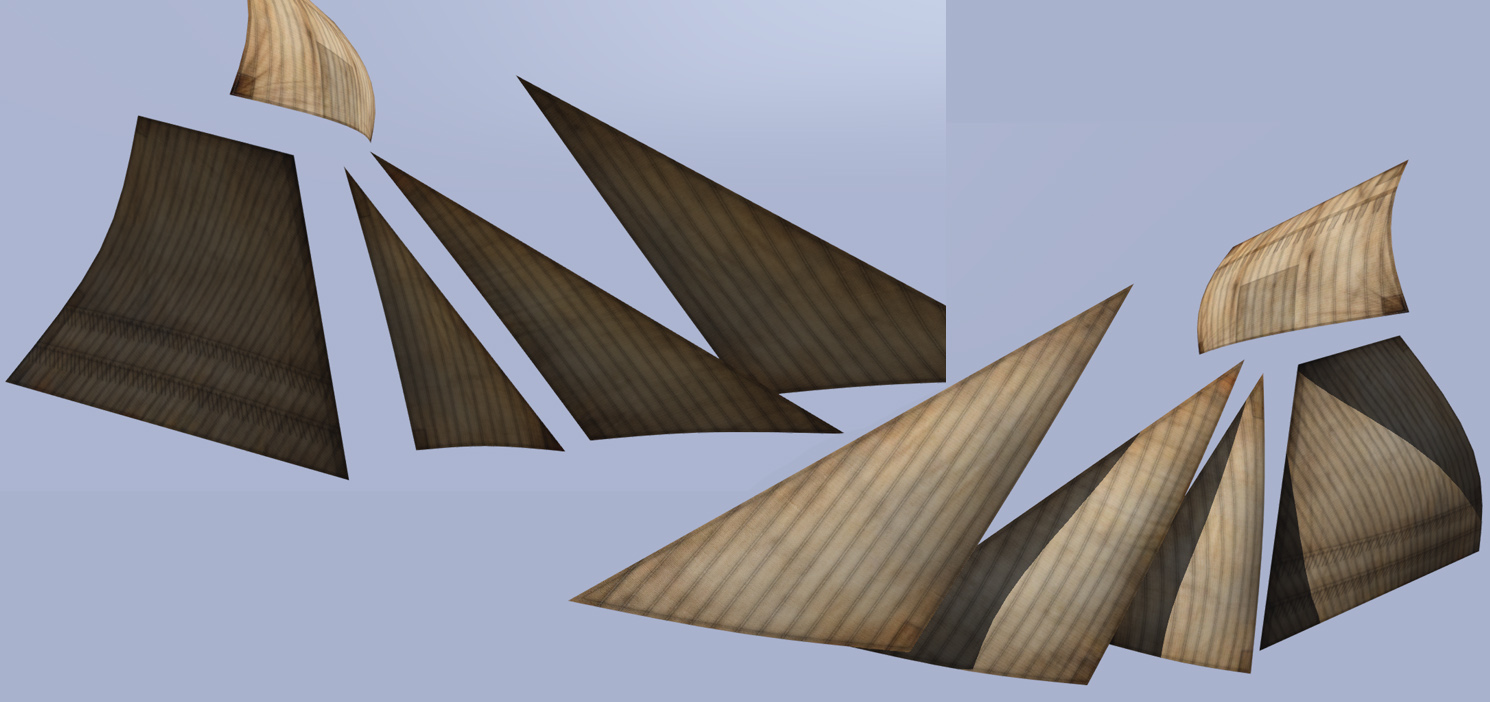

Any suggestions would be greatly appreciated!
 frigid escarp
@potent trout
    class H_MilCap_gry: H_MilCap_oucamo
    {
        scope = 2;
        scopeCurator = 2;
        author = "Bohemia Interactive";
        _generalMacro = "H_MilCap_gry";
        displayName = "Military Cap (Grey)";
        picture = "\A3\Characters_F_Bootcamp\Data\UI\icon_H_MilCap_gry_ca.paa";
        hiddenSelectionsTextures[] = {"\A3\Characters_F\Common\Data\cappatrol_grey_co.paa"};
};```for future cases get a AIO config/config dump from the forums
@ocean river you need an item definition in cfgVehicles in addition
    class Item_U_B_CombatUniform_mcam: Item_Base_F
    {
        scope = 2;
        scopeCurator = 2;
        displayName = "Combat Fatigues (MTP)";
        author = "Bohemia Interactive";
        editorCategory = "EdCat_Equipment";
        editorSubcategory = "EdSubcat_Uniforms";
        vehicleClass = "ItemsUniforms";
        model = "\A3\Weapons_f\dummyweapon.p3d";
        class TransportItems
        {
            class U_B_CombatUniform_mcam
            {
                name = "U_B_CombatUniform_mcam";
                count = 1;
            };
        };
};```thank dude
potent trout
@frigid escarp Thanks, slightly new to the whole 'reskin scene' so what's the config dump? and where do I usually find these to make things easier once I've got classnames?
frigid escarp
Bohemia Interactive Forums
Here is the All in One Config for Apex, as of June 11th stable branch update (1.62.137494).I will be updating these periodically and will include dumps with...
potent trout
Thank ye, seems like a very useful tool
dull junco
What's good practice for keeping vehicle/clothing textures at a good file size? I can get them all good as .jpg files, but when they get converted to .paa files with TexView, they almost triple in size again
ancient smelt
Do they have a suffix like _co or _ca before you convert them?
dense peak
Anyone here able to tell me if I've exported from Substance right?
Just a quick glance
I've set up the Substance Painter exporter exactly like that thread had told me on the BI Forums
Just wondering if the textures should look like that
dense peak
@full quarry https://www.artstation.com/artwork/YYaGd
I do make OC
I will NOT be porting any of it to ARMA till the project I'm working on is released.
full quarry
alrgiht
dense peak
Till then I'm tinkering with what's already out there.
full quarry
as in the ripped SW assets?
dense peak
lol
full quarry
we take that pretty serious around here
dense peak
As in ripped content?
full quarry
no one likes their stuff used without permission
dense peak
True
Then again most popular Arma mods based on other universes are still, or have at some point used ripped assets.
full quarry
that does not make it right
dense peak
Exception being the Halo mods and a few others (They tend to have FAR slower release dates)
dense peak
True. I'm not redistributing it.
full quarry
youre endorsing it
dense peak
Explain?
dense peak
Yeap.
Anyway...
Honest question.
Are those how the textures should look on Export?
I've got other projects I work on that I've been wanting to use Substance Painter for.
(Referring to the image of the folder containing the textures - not the test renders)
dull junco
@ancient smelt I didnt know that made a difference, I dont use either. This is just for a mission, not a mod or anything. Just trying to keep the textures small in size but not horrible quality
full quarry
all textures in arma need suffix to work right and preferably be converted to .paa
dull junco
Ive been using no suffixes and they work fine, its just a matter of their file size. For example I could convert a 150 KB jpg texture to a .paa and it will triple in size.
full quarry
as you wish then
potent trout
Oh jpg. I haven't even thought of using jpg.
going between .png and .paa compresses them fine.
as seen here:
https://cdn.discordapp.com/attachments/284160797440212993/414796727070228481/unknown.png
 full quarry
jpg due to its compression is terrible texture format
potent trout
^ that's why I've never used it.
Png has always been more useful. Plus in texview you can just Save As and replace the extension with paa or png iirc TexView doesn't convert to jpg by default.
tawdry pewter
I hope the ripping comment wasn’t about my orca, cause that was OC 😬, apart from military logos, I’m new to this discord also so hello!
dull junco
Is the texture size for info stands meant to be the same as leaflets (722 x 1024)? I'm applying it to an info stand but its showing the white borders on the left and right side for some reason.
severe rune
afaik it should be 1:1 aspect ration. As every other textures besides leaflets
dull junco
I thought the info stand texture would use the same resolution because of what I saw in the IDAP showcase, the images on the info stands looked like leaflet ones. It turns out it isn't though, had to make a stretched 1024 x 1024 and it worked
So yeah, a 1:1 aspect ratio by the looks of it @severe rune
nocturne lake
@frozen blade it's 1024*1024 but the UV's cover only the centre 722px on the U axis
frozen blade
@nocturne lake alright
dull junco
How would I go about debinarizing binarized rvmat files?
ancient smelt
Mikero's tools should do that when the PBO is extracted.
frigid escarp
derap.exe - armake can do probably too
dull junco
Cheers, ended up using armake
 unborn river
Hi guys. When using textureSources to be able to Edit Vehicle appearance in 3den, is it possible to set categories or subcategories?
Primary color, secondary color etc
lets say if I wanted to have groups like this:
Turret:
- red
- green
- blue
Body:
- red
- green
- blue
Wheels:
- red
- green
- blue
can it be done?
nocturne lake
Don't think so. Textures are written in an array that corresponds with the hiddenselections, so using blank values for the other selections in the array will maybe turn them invisible. But you can try adding them with "" and see what happens.
 stiff mountain
If I'm having a problem with a texture appearing on a model. Should I troubleshoot here or #arma3_model ?
digital mantle
Is there any other way to convert a PNG to PAA without ImageToPAA. <- Been giving me nonstop issues. It says the file is fine during check, doesn't convert. TexView won't open either.
The wiki for it says to attempt to use 8bit, though it already is..
nevermind
white cargo
I think there was a photoshop plugin, but I can't remember what it was called
unborn river
Hi guys. Can someone show me how to make _AS maps?
I know how to compose _smdi, but never did _as before
nocturne lake
you bake them using the 3D model
unborn river
oh. Im used to compose them in GIMP ^^ I know how to bake an ao map
but in arma its pinkish coloured
how to convert it into arma format?
nocturne lake
it's do that automatically so long as it's named _as
unborn river
like ths F35 AS map

oh really? its enough just placing a b/w image and call it _as and its converted when you pack it?
nocturne lake
yep
nocturne lake
imageToPaa will fill in the Red and Blue channels all white. Arma only uses the greyscale info from the Green channel to do the ambient occlusion map
unborn river
ty
unborn river
in many rvmats I see this alot
uvSource="none";
and it produces this warning
19:12:38 Bad uvSource None in apcs\data\materials\chimeratracks.rvmat stage 2 (Super, tex #(argb,8,8,3)color(0.5,0.5,0.5,1,dt))
should the rvmat have something else as uvSource?
nocturne lake
tex
unborn river
oh
is "none" deprecated?
shouldit be tex when not using a texture?
class Stage2
{
texture="#(argb,8,8,3)color(0.5,0.5,0.5,1,DT)";
uvSource="none";
};
nocturne lake
I imagine it still needs UV coords even if it's a procedural
like you get st errors for having zero-area faces in the UV map
unborn river
ok I c
thanks
about making the _as map (when arma does it for you)
does that apply to smdi as well?
All my life I've been spending lots of time composing them with gimp myself
😂
nocturne lake
no, with _smdi you still need to compose the G and B channels from specular and gloss
can't remember if it discards info from the red channel or not, maybe
there's a file in the imagetopaa folder that has all the code for the conversion rules
unborn river
ah okey
nocturne lake
can even write new ones if you like - I have co2, smdi2 etc. with DXT disabled. For when I re-save a texture based on an already compressed .paa - but then I rename the .paa file after conversion to get rid of the 2
tawdry pewter
speaking of materials, anyone have a list of the arma 3 materials, looking for a glossy look like the hatchback but scripts return [""] for it
tawdry pewter
Anyone know if you can animate the Hunter to remove the back covering like in this image? https://i.imgur.com/emseYWr.jpg
Using a transparent paa just makes it black, and I cant find a hide animate part
 severe rune
you need to use a rvmat instead of just changing the texture I'm guessing.
full quarry
If the covering has separate hidden selection then you might be able to set its texture to blank or if it has configured hide animations for such, but if not then no can do. Also what Ded there said, you would need a new .rvmat made and fiddle with the specular values to get it shine more. Each vehicle has their specific material (rvmat) and texture (_CO.paa/_CA.paa) that make them look like what they look like so there are really no "universal" materials in Arma that you could just slap on stuff.
digital mantle
that looks like a sick hunter tbh
unborn river
Can I make an object always glow, and not being overshadowed by a shadow lod? If so, guessing it must be a property in the rvmat
 vast solstice
What program would you guys recommend for converting from .p3d to something I can import into substance painter?
full quarry
if its packed p3d you cant
if youve modeled the thing in Object Builder then export in 3ds or fbx
somber pier
.obj also works
 ivory ruin
I have a quick question about rvmat's. so when I pack my addon in a pbo and test it local and on steam it doesnt show the rvmat. This is my following work space.
P:\Projectfolder\objectfolder\data\rvmat
When I apply my _CO and rvmat in object builder, i remove the P:\ section of the path which would be as followed.
Projectfolder\Objectfolder\data\rvmat, this is for all lod's expect shadow.
and the _co is ofcourse the same
Projectfolder\Objectfolder\data\paa_co
However it doesnt show up, in my rvmat file which I edit with sublime text 3, the path to the texture's are as followed.
Project\objectfolder\data_AS
Project\objectfolder\data_SMDI
Project\objectfolder\data_NOHQ
anyone know what I'm doing wrong ?
frozen blade
Project\objectfolder\ DATA ?
i assume all your textures + rvmat are in P:\Projectfolder\objectfolder\data\
so the textures should have the same path
projectfolder\objectfolder\data\data_nohq.tga
projectfolder\objectfolder\data\data_as.tga
projectfolder\objectfolder\data\data_smdi.tga
just like rvmat
projectfolder\objectfolder\data\data.rvmat
frozen blade
@ivory ruin ^
ivory ruin
.tga not .paa ?
because thats how i have set it up. the only difference is that I saved my texture file's as .tga
ivory ruin
@frozen blade
ivory ruin
thought so, and yes I'm using paa
nocturne lake
.tga is fine in .rvmat. Buldozer and .pbo binarisation tools will convert it to .paa anyway
if it's assigned to a model
ivory ruin
alright, but what am I doing wrong then with my rvmat file ?
full quarry
looks alright.
digital mantle
ingame pic pls
ivory ruin
yes only if I apply the p drive path
full quarry
im sensing there could be something wrong with your tools setup
full quarry
yeah if you put p:\ there it reads it from your hdd
not from the pbo
could be your pboprefix is wrong
though in that case I think nothing should work
in OB does the texture/material replacer show your texture paths with red or black?
ivory ruin
red
full quarry
then it cant read them
for some reason
in OB settings
(file menu)
what is your path to textures set to?
ivory ruin
none, now if you that is wrong and stupid you can call me a stupid idiot :p
ivory ruin
alright now everything is black
silver gull
second image -> looks like AO is black
ivory ruin
BuldozerConfigurator in the arma 3 tools folder or the bulldozer in the P drive ?
full quarry
are you using mikeros tools?
ivory ruin
no, the steam arma 3 tools
full quarry
are you packing with addon builder?
ivory ruin
correct
full quarry
ok so addon builder cant do much right if you dont absolutely know what youre feeding it
so first step is Id get yourself the free mikeros tools and use pboProject to pack
it gives you feedback on errors and so on
silver gull
using addonbuilder only for quick testing is also possible - without binarizing. For finding errors and stuff, and packing final stuff, pboProject is the way to go
full quarry
it may be arma tools have not set up right
if the packing fails
were you using pboprefix?
ivory ruin
pboprefix? with the arma 3 tools ?
to be honest I only watched the video's on youtube that are using the Arma 3 tools from steam.
ivory ruin
yeah, been messing around with the arma 3 tools, the model is from my command and conquer 3 mod
ivory ruin
thanks, I'll give it a shot tomorrow if thats ok. its currently 12:35 AM here
ivory ruin
@full quarry so mikero's tools works fine its loading the rvmat thanks for the link, however it creates for each folder its seperated pbo, is there a way to make it so that it create's a single pbo instead of all my addons/changes
full quarry
humm you need to have a config.cpp in the root folder I believe
I recall it starts packing from where it finds the first config
simple config with cfgPatches in it is enough
ivory ruin
ahh thanks
ivory ruin
yep that did the trick !
 merry marten
Does anyone know of a tutorial on youtube that shows you how to make/retexture/import a house or building into arma 3?
frozen blade
no, there isn't one
merry marten
great welp im stuck
frozen blade
with what?
 inner carbon
How to video on making an object for arma 3 (in blender)
https://www.youtube.com/watch?v=GxGIgurkzW4
merry marten
I have a fully made building and I think textures that are correct but idk how to put the the textures on the building and import it into arma
frozen blade
are you using a multimat?
or multimats?
is the building unwrapped?
do you have 2 UV sets for it?
merry marten
idk anything about this stuff 😦 i just know i got P3D building are ready made into arma had a interior but somone used it and put a shit texture over it just to make it look like they made it im trying to use the default one but idk how and i know i have the texture because a guy showed me how to put it on and i did but idk how to full put all the textures on etc.
frozen blade
oh, so you didn't make that building then ok. who did it? which building that is
post a picture of it please
merry marten
you know project life?
frozen blade
nope
merry marten
how do i post the image?
frozen blade
you use imgur or something and put the link here
merry marten
well the building is a old model of that communitys
sure
one sec
thats the imagew
its got a interior and everything doors working but idk how to add those textures in
lol
rip
frozen blade
do you have permission to use/edit a model that isn't yours then?
merry marten
well I think i can one since its on the internet from the people that made it with the files open for anyone to use like you can download the p3d texture etc. from the creators
frozen blade
well, i wish you good luck with it then
merry marten
so you cant help me?
frozen blade
oh, i surely can but i'll choose not to.
merry marten
why
The files are open its not like I'm stealing them there from the creators not a leak places or anythings idk why it would be bad to get files from the creators
frozen blade
- because you only assume that is a model that is free to grab, edit and make your own, with no info about the original author and license
- becuse i am not fond of life communities that don't make their own stuff and used ripped/stolen assets
- because that particular model could just as well be as descriped as in p.2, due to how most life communities operate
merry marten
so you think im stealing them>???????
frozen blade
no
merry marten
life communities that don't make their own stuff and used ripped/stolen assets
frozen blade
as in 99% of them
listen i don't wanna argue with you man, i am not saying you are right or wrong
merry marten
I think I know that I have not stolen anything I have made scripts from scratch I have made my map on my own and cars idk why you think that i would steal a building and I can give you the link to it its open and its from the other
*author
well its sounds like you think im in the wron
g
frozen blade
no, i am just saying that neither you or I knows who is the original creator of that mesh/textures