#arma3_texture
1 messages · Page 23 of 1
 fresh hill
You will never get what you see in Quixel to Arma, no matter how you set up your project.
And if you need to make any kind of adjustments, as you both just described, its shoehorning the results to fit into arma. 😃 (Which is a very unhappy thing)
 unreal magnet
@fresh hill I never had any problems bringing my Quixel textures into Arma.
And Quixel works perfectly with specular texturing workflow
fresh hill
I dont have problems with exporting from it as well anymore.
Its just not 1:1 WYSIWYG
unreal magnet
no texturing tool is that way
fresh hill
My objection however is mostly due to how supershader works and the things it does.
I.e using linear and srgb in different circumstances.
The post apex lighting update added a bit more headaches in regards to how lighter and darker colors at both ends of the intensity behave. To a get a nice white effect ingame, 50% grey is fairly accurate. If I go to 60%-70%, it immediately turns very dark.
But yeh, what works for you, works for you. 😃
 gritty sky
those are all things you can adjust without using quixel at the very end in ps 😃
i am looking for substance painter results to compare 😃
 nocturne lake
Quixel and PS are one though. You can do those same adjustments at any time, within the Quixel project
gritty sky
@da12thMonkey#2096 i am no expert in that as i own quixel for last few days only 😛
 silver nimbus
any idea how to fix this white transpart outline around my leaves on my custom tree, seems to be an alpha but not really sure how to fix it as it looks through the rest of the tree leafs. https://images-ext-2.discordapp.net/eyJ1cmwiOiJodHRwOi8vaS5pbWd1ci5jb20vQnFwc3JHMC5qcGcifQ.B_viElfzkc1RItb-wFUvWvOA10U
 frozen blade
alpha sorting issue it seems
 pale oasis
yeah, writing transp pixels to depth
silver nimbus
any tips to fixing that or documentation that I should be looking at? Sorry, this is my first go at vegetation and I can't seem to find anything that pertains to this problem.
 full quarry
not much documentation for vegetation available I guess. Do you use A3 rvmats as basis for your own?
silver nimbus
Yeah, I am using the plane rvmat from an a3 tree to get the most accurate results for leaves, and a bark one for the branches. I just noticed that the leaves use a different type of normal it seems...
full quarry
and you've saved the leaces as _ca
silver nimbus
yep, going to try one thing real quick. Just seen my "VertexShaderID" might have been wrong.
full quarry
I got VertexShaderID ="TreeAdvModNormals";
silver nimbus
yeah this one I was just using had "TreeAdv" just changed it to "TreeAdvModNormals" to see if that fixes it.
that didn't seem to do it, it seems the issue only happens on one side of the plane
Top-down: http://i.imgur.com/6bWOtyo.jpg Bottom-up: http://i.imgur.com/aSdcjTp.png
full quarry
are the plane corner verticles merged?
silver nimbus
Yes, I needed double sided planes so I copied and pasted it and then flipped and merged in object builder.
for some reason when I imported into object builder it didn't want to show both sides so that is what I found on the forums to fix it.
full quarry
Try without merging them.
silver nimbus
@full quarry seems to work perfect without being merged... only problem is that everything is doubled.
full quarry
yeah thats how the trees seem to work
silver nimbus
damn ok, well I guess that will affect performance by a lot then. Wish there was a better method.
full quarry
Not really. Id suppose Arma trees are like that too.
Not sure if you can import them in with custom normals though. The smooth shading is what I think messes the face normal when they are merged
Have not studied that bit too deep yet.
silver nimbus
Thanks for the help tonight, if I find any better methods I will let you know.
frozen blade
@full quarry yes you can and one should (import with custom normals)
full quarry
@silver nimbus Theres your answer! Thanks @frozen blade!
frozen blade
there is tut about it
from a guy that did his own vegetation (a single tree) for a2
i might hunt it later on
 median stirrup
frozen blade
median stirrup
frozen blade
yeah
frozen blade

Bohemia Interactive Forums
Hey guys I've just finished writing part 1 of a 2 part tutorial about making foliage and trees, not sure why my thumbnails dont work on this forum, ill even...
i need to find his tut about making custom vert normals for the foliage
https://forums.bistudio.com/topic/91550-how-does-one-create-custom-trees
some images are missing of course
Bohemia Interactive Forums
As per the title. Thanks in advance. :) Abs
@full quarry + @silver nimbus ^^
full quarry
o7 @frozen blade
silver nimbus
😍
 brittle cosmos
mikebart also released the source for a bunch of his foliage https://forums.bistudio.com/topic/167570-custom-trees-and-vegetation/?do=findComment&comment=2624008
 silver gull
released on mediafire... means its propably no longer available
ok the link in the thread still works, but the ones on devheaven not
brittle cosmos
Yeah, but you can atleast get the texture from the PSDs or from the released versions available on armaholic
silver nimbus
most of them but not all sadly
 rare lake
I can search my drives, I should have the MLODs.
frozen blade
please do @rare lake ^
rare lake
mb_veg_mlods_v0.9.rar, includes dirs for bushes, clutters and trees.
oh the mediafire link works sorry missed that heh.
 nova hatch
can someone help me explain a bit of the multimaterial texturing for buildings?
I am reading mondkalb's tutorial about it
just having trouble figuring it out is all, are stage0-3 just textures that will blend through with the colors black/red/green/blue are like a satmask for terrain?
basically you paint the uvmap what you want the colors to be then this defines based on the mask
frozen blade
yes, you use the mask to define what goes where
similar to a materialID
that said blends is a bit too much to say, but yeah, one could use that to blend between them as well
nova hatch
so then based on the tutorial, the _MC texture is where the window textures are defined? @frozen blade
I think I mostly understand it, just missing where the custom parts would go, for example on https://community.bistudio.com/wiki/Mondkalb's_MultiMaterial_Tutorial which file would host the window textures etc
frozen blade
no _MC texture is an overlay (MaCro)
in this case (structures in general) it is used to emphasis the shadows or overlay color
say you wanna use same textures, but some areas to have a different tint
windows (as in glass, not windows including frame)
is always a separate supershader
not sure how you define "custom parts"
nova hatch
I mean more like the windows he drew into the texture
frozen blade
in fact to rephrase, what you mean by custom parts
frozen blade
how do you know these aren't
i can use the same method for both seamless tilable textures
and not so seamless textures just as well
in fact i for one always have one set with accesories and alike
unless i really want it shinny and then i use a supershader
nova hatch
ohh
frozen blade
i am not really sure why he put that as an MC
in any case, the MC is always always an overlay
nova hatch
So using multimaterial for lets say the whole building, or walls then a regular texture for accesories
frozen blade
there are multiple ways of achieving different results
depends on your structure
i ussually use 2 multimats (1 interior 1 exterior)
although you can mix em
and a supershader for accesories
nova hatch
i see
frozen blade
sec
nova hatch
k
frozen blade

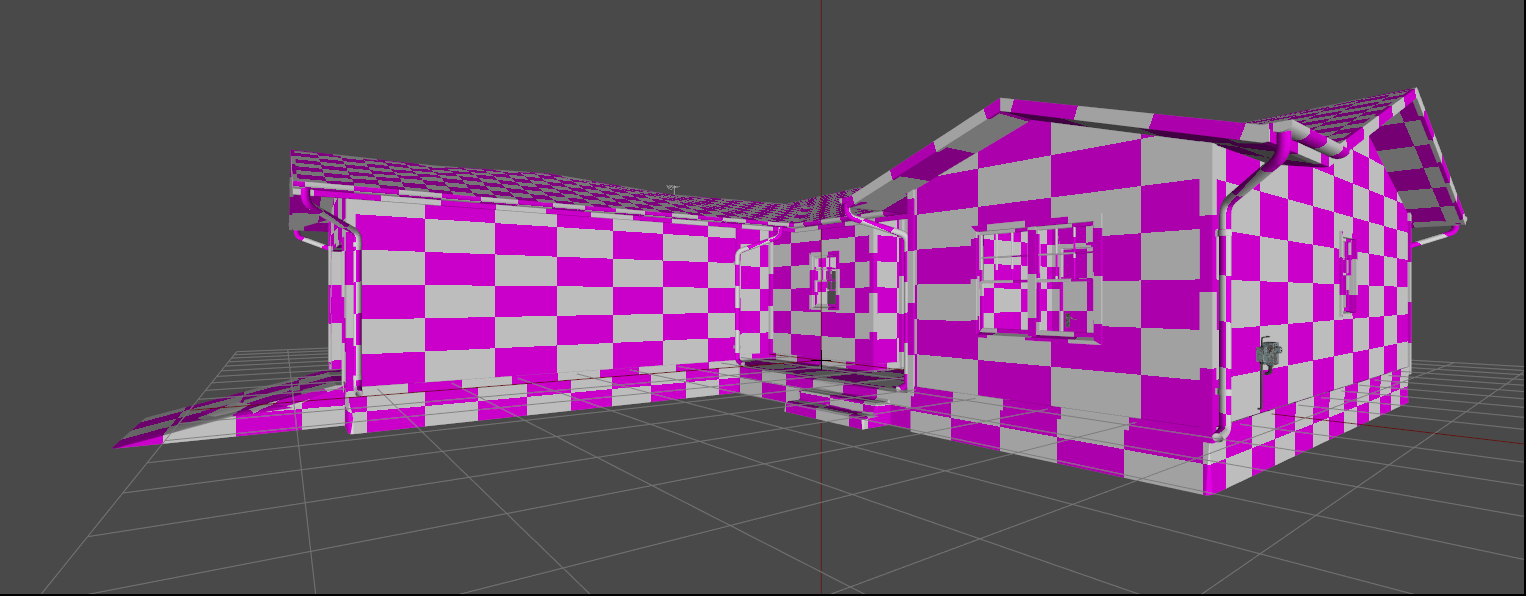
OB viewere - the pinkish parts are obviously multimats (2 of them)
the textured parts (most on the interior in this case, but you can see the electric meter right side) are accesories

OB view, the multimats for now have only CO textures in use, didn't get to make DTSMDIs and NOHQs just yet for them
but mask, ADS and MC are present
hence why the interior is darkish
in this case i have 2 multimats, 1 superhsader for accesories and there will be another one for the glass panels
frozen blade
hardly finished
nova hatch
how many faces is it, or how many are recommended for arma 3 buildings?
frozen blade
it depends, there isn't set in stone, the least amount of section counts the better
nova hatch
so you have 4, 2mm 1 super and 1 more
frozen blade
i have 14733 vertices (mind you i have wall sockets, light switches, a delapidated WC, ceiling laps etc)
and 4 sections yes
in the end will be 6 i think (sections)
ahh and a garage door that will be working (its structure visible from the inside)
nova hatch
very nice
thanks much for the help 😃
I think I got my head wrapped around it, I am gonna try to make a mockup house with it and I'll use the rvmat from the tutorial
which should work for arma 3
frozen blade
here's a quick example i made
use the rvmat inside as a layout
much easier to work with
because it is based on mask color
nova hatch
ok
wow that looks really good haha
thanks
now I gotta figure out how to properly do _mc and _ads textures haha
fresh hill
i am not really sure why he put that as an MC
Back then I was figuring out the MultiMat, and that gave me the best results at the time. It is as you say, the window frame and such are separate objects with normal Super Shader parts.
Putting the details on MC kinda helps with distant lods. These days my MC looks like this:
http://i.imgur.com/Nt9syUo.png
Arguably one could split outside and inside onto two separate textures, but the results are alright for now. But I havent worked on this in about two years, actually. :/
unreal magnet
thanks @frozen blade 😛
frozen blade
for what? @unreal magnet
unreal magnet
the multimap example ^^
frozen blade
lol
@fresh hill yeah i still don't really get why you have ao stuff in mc
but anyways...
nova hatch
In PuFu's example the mc was like a tinted dark black-blue-grey, while mondkalb's there was a bit more like actual textures either way thanks to both for explanation and guides, time to dig my hands into it 😄
frozen blade
as i said, i use MC to adjust the shading in the distance
nova hatch
Yea
frozen blade
as in mostly black with blue channel from ADS (with adjustemnts) as alpha
and inverted of course
nova hatch
@frozen blade what do you use for texturing? From regular _co/diffuse to normals etc?
frozen blade
in general or for structures?
a mix of photoshop, quixel (NDO for seamless) and substance painter 2
nova hatch
Are you able to output the sets for arma use through an export setting in them?
frozen blade
yes to some degree, but i always do manual corrections
nova hatch
I have a method for substance painter that works-ish
nova hatch
Yea, but even then my setup is a bit wonky
I make each different texture I want a different material in blender then load in substance painter and set textures then sitch together the outputs lol
 prime saffron
hey guys, need your help
ingame my model looks like this
but in my blender it looks like this:
do you have a idea, why my texture get strechted and deformed so much??
even with the original textures, it looks like this...
frozen blade
how did you get that mesh from modelling software into o2?
prime saffron
@frozen blade exporting it with blender to fbx and import the fbx into o2
frozen blade
how many uv sets does that model have? @prime saffron
because if you say 2, then fbx does that
prime saffron
Ok, I'll have a look in a few minutes @frozen blade
prime saffron
i had active 0 and active 1, deleted 1 because it was empty...
@frozen blade to do this didn't helped me...
prime saffron
@frozen blade should i export the model into obj and then import it?
nova hatch
@prime saffron I would try messing around with importing it in obj and check the uv maps for stretching, possibly with a new p3d file to test stuff
brittle cosmos
I'm thinking about redoing the ADS textures for some of the A2 buildings and curious what people's thoughts are. This is quite an image heavy album, as it has the original and new ADS textures, along with in game comparisons of the old and new for one building.
http://imgur.com/a/3YYSo
I guess the most noticeable difference is I baked the AO with proxies, so they now have a better shadow, but I'm not sure if it's all too dark
 dense peak
the AO definitly looks better, but i think for sand/mud buildings its a tad bit cold color wise
silver gull
cold? i barely see any difference on the ingame shots
the only difference i see is that the furniture objects (proxies i assume) have too much AO behind them - so i would say that part is definitely a bit much
its almost all black behind the little shrine desk drawer thingy
dense peak
oh i completly ingored the image titles :D
mistake the overcast shots for the new ones
silver gull
yeah assumed as much, its confusing having no clear designation what title belongs to where
fresh hill
@brittle cosmos What about the new ADSHQ? Afaik it uses another channel for higher accuracy.
brittle cosmos
Yeah I guess it's. It's not super obvious on imgur which image matches the description, but it's the one below the image. I tried it with ADSHQ as well, but noticed no notable difference.
I'm wondering if I should bring my green channel's black up to more of a middle grey. That way the shadows on the proxies aren't so drastic.
 nocturne prairie
anyone knows what is the problem? https://cdn.discordapp.com/attachments/264753400170807317/273758485563310080/unknown.png
frozen blade
because that image makes a lot of sense
nocturne prairie
its a LOD properties problem...
 distant rose
what are you trying to show with that pic?
frozen blade
what am i looking at would be a nice way to. begin a debug
it's a bird...it's a plane...it's an image of what?
nocturne prairie
in the screen you can read "bank" and "building". For example. :D
so, my problem is the shadow and light effect. When i use in geometry LOD
Sbsource = shadowvolum,
Prefershadowvolum = 0
Looks so with lines etc.
frozen blade
do you have a svlod?
nocturne prairie
yes, i use my resolution mesh for it
nocturne prairie
yes
frozen blade
does your visual lod have lodnoshadow=1 named properties?
nocturne prairie
no, only forcenotalpha = 1
frozen blade
all res lods should have losnoahadow=1 present
frozen blade
well that is extent i can guestimate your issue
one more thing svLOD should NEVER have an UV map
brittle cosmos
I believe that banding issue is from their faces being too close together, so try reducing the size of your shadow LOD
nocturne prairie
Is a littlebit better with smaler size
fresh hill
svLOD should NEVER have an UV map
How do assigned UV coordinates in SV lods affect the shadow ingame?
silver nimbus
Anyone able to explain why one of these may be better for arma and why? http://iforce.co.nz/i/gvbnfyf0.yma.png http://iforce.co.nz/i/cixa2piq.52v.png
silver gull
they are both pretty bad actually...
you want to leave as little empty space as possible
fresh hill
Its a target conflict really.
On the one hand you want to use as much area as possible of the texture. On the other hand you want to make sure the UV islands are correctly separated along sharp edges so your normal map bake is fine.
Also you may want to orient visually prominent edges to be horizontal/vertical to avoid edges/stairs in the normal map that AA doesnt get rid of satisfactory.
So you will have to find a compromise for each face. 😃
However, both of those look like auto unwrap. 😛
 bronze stone
wow, what a waste of Space
fresh hill
Oh, and mip-map "bleed" can influence your UV layout as well.
brittle cosmos
For some reason I thought I read that shadow LOD UVs are lost during binarization, but that couldn't be true for the special shadow LODs that vegetation and a few other objects use
fresh hill
yes, shadow = hybrid will require textured shadow lods
However, that is specific to the shadow buffer: shadow lods 1000.0 and up.
silver nimbus
@silver gull @fresh hill @bronze stone Thanks, it was for one of our modelers.
he probably thinks I am crazy
bronze stone
your welcome.
nova hatch
UVs are fun
silver gull
i aim for 4 pixels minimum distance between islands but also not much more than that. That holds up in second mipmap and maybe third, so when you will get bleed you are unlikely to see it anyway
nova hatch
@silver gull do you have a program or process when uv mapping that will smush them together after you map? Or do you do it by hand
4 pixels is pretty small 😛
silver gull
mk1 eyeball and mk1 hand are the tools i use
frozen blade
@fresh hill no, unrelated to the described issue at hand, but UV information should NOT be in svlod
that info doesn't get dumped on binarization
fresh hill
But other than file size, does it have a negative impact?
frozen blade
not that i know of, minus the special alpha enabled svlods
silver gull
well people can extract shadow lod from your binned model with intact uv so theres that
 acoustic dove
with all all those dev updates that has over Gigs - still no sign of this thing https://feedback.bistudio.com/T82480
 steel oriole
^
 proper pivot
Hi Folks. I was wondering if I could ask for a little Substance Painter advice. I've been modding for only 6 months so still learning a lot... I think I've seen a post relating to this before but I've struggle to find it so apologies if this is a repeat questions. The issue I have is that when baking my normal map from my high poly model, I seem to get small wrinkles in what it produces. I've set a shiny base texture so it's a bit clearer on this screencap: https://www.dropbox.com/s/tt5i04h0bdc1jpw/Capture.JPG?dl=0
Does this happen when trying to ask too much of the normal bake? I.e. there's too much difference between the high and low poly models?
Changing max frontal /rear distances affects other parts of the bake (as you'd expect) but does not seem to have any effect on these creases
frozen blade
what do you use to bake? SP2?
proper pivot
Yep SP2
frozen blade
do you use a cage for that bake?
proper pivot
Nope. I've not tried to make any cages for baking yet. Is that your prefered technique in SP2?
frozen blade
i don't always bake in SP2 for a number of reasons
but the only way to bake is with cage
i never baked without it (minus zbrush) as in ever in my life (most bakes i do are in max anyways)
fresh hill
http://wiki.polycount.com/wiki/Texture_Baking#Cages
This sums it up really well why you should use a cage.
Plus, this is also good to know:
http://i.imgur.com/O2OPVuX.png
proper pivot
Thanks for that. I think I understand what's happening. My attempts with a cage are disasterous so far - it's as if my cage file is somehow scaled (not offset) compared to my low res mesh despite importing them into Blender showing they are what I'm after... I'll keep trying!
proper pivot
OK -just for info, it's actually the second link that @fresh hill posted that's what's helped me out. I got the cage 'working' in the end but it actually made no real difference. My error is that I'd been exporting (from Blender) the entire mesh as non-smooth / flat and so Blender was splitting all those curved surfaces up into separate smoothing groups but my UV splits had them as very few UV tiles. So I think I was getting image3 in this link. Many thanks once again.
fresh hill
Also, while at it, make sure to check if you need to invert the green channel on your normal map. You'll immediately see the difference and whether your normal baker needs -Y or +Y
 warm stag
That example with the cubes is misleading; one smoothing group can work with tangent-space iff (if and only if) you are using a synced workflow (where the baker's tangent space matches the engines). But texture res/compression can also get in the way there.
For a full exaplanation though of when/why to use splits + hard edges, see http://polycount.com/discussion/107196/youre-making-me-hard-making-sense-of-hard-edges-uvs-normal-maps-and-vertex-counts/
 plucky olive
Anyone got suggestions for good places to get decent res real world height maps
 hot grove
someone was chatting about real world terrain data yesteday in the terrain makers channel, might be worth poking around in there
plucky olive
not gunna lie I thought this was the terrain channel I miss clicked... my bad lol but thanks!
hot grove
aha no worries 😛
 static depot
Good Morning, anyone here?
silver gull
no
static depot
Huh! I could have sworn I saw somebody duck out the back.
do you have the time and/or patience to walk a noobie texture maker through some process @silver gull?
I've got the texture open in GIMP, but I've never used the program before and I have some questions.
silver gull
in that case you are better off looking for youtube tutorials and the like. If you have arma specific questions, this is the right place.
static depot
well, it's a texture from a vehicle in a CUPs mod in ARMA...but really the question is more about "how to make a texture" than truly ARMA specific.
I'm just trying to repain a vehicle.
*repaint.
silver gull
repaint as in recoloring?
static depot
Yeah.
Basically from tan to white.
but then I want to paint a stripe also which I think will be it's own kind of problem.
silver gull
ah the police car type...
static depot
Actually, I want to turn a British Ridgeback PPV into an Ice Cream Truck to lure Zombies to their death.
I want to paint it white with a blue strip at the bottom and white wheels. Then maybe pink, yellow, blue poka dots wrapped around the body.
But first I just want to figure out how to color it at all.
silver gull
there are retexturing tutorials for arma i'm sure. but any other tut for other game will do, its always the same.
static depot
I've never used GIMP before, but I used to use Photoshop about 15 years ago. I just don't have a licensed copy of photoshop anymore.
full quarry
GIMP can do what you need. Differs a little from PS by tools names and such at some occasions. If you have 64bit system make sure you get the 64bit GIMP.
 worn jasper
Hey guys, Im having an issue where there is a big black almost shadowy thing covering part of my textures. I think its probably an RVMAT issue but I cannot find any issues in the RVMAT . I will post a screen shot in a minute
As you can see, it covers everything below the MFDs. I can upload my RVMATs too if wanted
full quarry
can it be your shadowLOD? @worn jasper
worn jasper
I do not think so. LODNoShadow is a property of my view pilot lod
and my rvmat points to the correct textures
brittle cosmos
Yeah I'm very doubtful of it being a shadow LOD issue. Could you pastebin your RVMAT? And if you remove the material, is it still black? If so, then it's most likely something wrong with the texture or UVMap.
worn jasper
I took the cockpit model and put it in its own p3d separate from the F/A-18 LODS, and it looks fine. I will upload RVMATS. One sec
Those are them
brittle cosmos
I'm in mobile so I can't view those RVMATs, but is that how you expect it to look in game?
silver gull
do you have a black AO ? because thats what that does.
worn jasper
That would be the _AS correct?
 twin bane
correct.
twin bane
link a screen?
worn jasper
twin bane
@worn jasper that looks proper'ish
sorry, kids now running interference here locally now. i be slow to reply for a bit.
 silver adder
LODNoShadow in the viewpoint lod tells it to not use it as a shadow, it will still use the standard shadow volume to shadow it, just try turning shadows off in game settings, and try again @worn jasper
do you have a ShadowVolume - View Pilot?
 potent swift
Fail to process imagetopaa
worn jasper
@silver adder I do not
silver adder
i would suggest maybe add one to the p3d, and also the property in the config http://pmc.editing.wiki/doku.php?id=arma:modeling:shadows
you can add those shadow lods, they can be empty if that works for you, they will be ignored unless the config values are set
I'm sure the viewpilot works, but I think that viewgunner and/or viewcargo are broken
static depot
Hey, guys. Anyone got a second to show me where to find a certain vehicle in the ArmA 3 .pbos?
I've searched through every folder I can find .pbos in and extracted all the ones that make sense, I just can't find the files.
silver gull
ingame configviewer, find the class and look what model="<name+path>" it has
static depot
okay. I found the config viewer, but I've never used it before. do I spawn the vehicle I want first?
there's a name when you hover over it in the drop down. I took that to be the name of the file, but I couldn't find it by that file name.
and I'm not sure how to open the path to vehicles.
oh for Pete's Sake! I just didn't scroll down far enough smack
Thank you.
static depot
Which approach is better? Converting .p3d files to .obj files in Blender and then working them in 3ds Max or
using the P3D to FBX converter which hasn't been updated since 2012?
Because 3ds Max doesn't seem to natively recognize .p3d files after unpacking .pbo.
full quarry
using blender and the blender arma toolbox to export straight to p3d
though there are different opinions on that depending on what program one primarily uses.
Also unpacking a pbo and using the p3ds packed in there is a big nono.
@Blackhammer#7474 you might get better help if you elaborate what you are trying to do.
 ashen granite
Hey guys, do anyone know how to make a shadow based on a texture alpha ? e.g the camo net has that type of effect, I'm actually creating a hut roof, and I would need this technique
static depot
Well, great. All I get is a cube when I try to convert the .p3d to an .obj and import into Blender. To clarify. by big "no-no" do you mean we can't do it? How da heck are we supposed to retexture the 3d vehicles if we can't get the models to work with? Do I have to go to a mod someone else has already done to get a vehicle there?
full quarry
You edit the textrue templates
static depot
_co files?
full quarry
the only way to retexture binarized .p3ds
those or the ones provided in the Arma 3 sample files
static depot
well, I tried a few different things these last two hours to recolor the textures. I'm not having much luck.
static depot
I basically need to color the Box of the Box Truck to white instead of black.
And then I have to layer decals all over the cab and box.
full quarry
https://forums.bistudio.com/topic/176288-community-texture-templates/ this post might help you
in any case retexturing is purely image editting since the source models are not available
static depot
That step should be easy....the decals. but the initial coloring has me stumped. I thought by recreating the layers from the original 3d object I could just paint them in 3ds max.
so what you are saying is they don't even want you to alter the 3d images...or even have access to the vanilla polys
full quarry
3d images? and yes no access
static depot
because later I was going to try to figure out how to animate lifting the side panel to reveal a built out interior.
static depot
I know I can't. Not till I learn how.
full quarry
I mean that you cant edit any packed model
static depot
but you are saying can't as in BI doesn't want you to.
static depot
so basically what you are saying is that I either have to make it from scratch or find it somewhere outside BI content or any mods.
static depot
yeah, but there are people that will make them for you for a few bucks.
static depot
Or I can figure it out after a few dozen or hundred hours.
what about scripts to get them to actually function in game?
full quarry
best bet is to make it yourself since you can then alter it when needed
well there are guides and tutorials for all the configs and shizles
static depot
okay. that's a whole nother kettle of fish.
full quarry
Indeed.
static depot
even though you are dashing all my hopes and dreams, thanks for responding.
maybe I just need to have another go at retexturing.
I just can't figure out how to simplify the process of recoloring the panels.
I even have correct sample colors from the cab and other parts of the panel area.
but I'm pulling my hair out trying to figure out how to color it properly while preserving seams and details.
at least I finally found the right .paa file after about 2 hours... that was a major breakthrough in itself.
full quarry
👍
static depot
bleh. I know you guys are laughing into your sleeves because you had to go through the same process back in the day.
ashen granite
Hey, any ideas how to get rid of this blue alpha artifact in game ? http://imgur.com/a/r82eY
full quarry
is it _ca or _co texture?
ashen granite
It is a _ca
full quarry
try selecting all faces and in OB faces menu - move top
ashen granite
Nope, still have that weird outline: http://imgur.com/a/W44JD
Does _ca faces with that kind of alpha requires any special type of rvmat ?
full quarry
sorry, getting too zzZZzz to remember. Have you searched the BiForums? Similar questions have been asked a few times I think.
ashen granite
Yep, still not got it working unfortunately
nova hatch
I think pufu had the same issue with a fence and a house
iirc it was a problem of the house not the fence.. I think
@Blackhammer#7474 Not laughing because we had to do it back in the day, you still have to start up arma and test all the time
so its.. fun
 glacial star
hey guys does anyone know any good indepth info for the multimaterial rvmats?
like how many colors can the mask containt and such?
better description of the _mc and _ads layers
 still ibex
@ashen granite try increasing the size of the texture, had a simular issue once and that fixed it
dense peak
@glacial star
https://forums.bistudio.com/topic/185296-multimaterial/
read this and download pufus multimat example
https://community.bistudio.com/wiki/Multimaterial
https://community.bistudio.com/wiki/Mondkalb's_MultiMaterial_Tutorial
pretty much all relevant info out there
 viscid gazelle
I just discovered that I suck at UVW unwrapping.
ashen granite
@still ibex Switched from 1024² to 2048², still the same results sadly
 woven storm
Can anyone help me on making Pal2PacE convert to png instead of paa?
brittle cosmos
If you'd like to be able to convert PAA to PNG from Right click > Send to, then you can enter shell:sendto in file explorer. Then make a bat file in that directory with the name of your choosing, and inside of it put
"C:\Program Files (x86)\Steam\SteamApps\common\Arma 3 Tools\TexView2\Pal2PacE.exe" %1 %~n1.png
You would of course need to change the path to Pal2PacE if your tools are installed elsewhere
woven storm
okay it works for only the first file though
brittle cosmos
Did you get it working with send to? I can give you something else for it to work on every selected PAA
woven storm
ya it's working when sending to tha bat
brittle cosmos
for %%x in (%*) do (
  "C:\Program Files (x86)\Steam\SteamApps\common\Arma 3 Tools\TexView2\Pal2PacE.exe" %%x %%~nx.png
)
Should work for converting only the selected files
woven storm
says the filename or extension is too long
I think I'm doing too many at once
can I send the whole folder?
brittle cosmos
I'll say no
Well I might have misunderstood what you meant. You should be able to select all the PAAs within a large folder, and then use it, but you can't just send it a directory
woven storm
it said
the filename or extension is too long
when I tried sending all the files at once
brittle cosmos
Odd, I haven't gotten that error. Did it work when you tried less?
woven storm
yes
trying to find the threshold now
seems to be somewhere slightly over 100
164 apparently
"slightly"
I did it in batches, thanks for the help
ti seems to be relative from 140-180 depending on filesize and name length
plucky olive
Does anyone know what the emmisive[]={0,0,0,1} value does because changing it seems to have no visual impact?
ashen granite
It is in the R G B A format, being Red Green Blue Alpha
So basically you're just changing the alpha of a negative emmissive value, which is nothing
nocturne lake
Compared to A2 you have to have reasonably high values for emmisive in A3 before they glow brightly
but as Sam says, zero wont do dick
and the alpha value is redundant if the rest are 0
plucky olive
right, so basically its like adjusting the hue in a image?
ashen granite
The emmissive value is defining how much the material is emitting light
e.g: Arma 3 gas stations signs, etc.
ashen granite
Take note that it will not emit light in the world (and therefore casting shadows), this is purely visual and acting only on the surface the material is applied
plucky olive
ok, thank you for all the info guys!
ashen granite
This is what happens when you turn on your cars lights at night in-game, some dashboard elements will glow: emissive
plucky olive
oh that makes sense
nocturne lake
if the values are all the same number, it will emit as "white light" which will use whatever colour the base texture on the object is
altering the values in an un-even manner shifts the colour towards Red, Green, Blue etc. at night
plucky olive
ok so like thats how the lightbulbs appear 'lit up' at night
proper pivot
Am I correct in saying this acts on the whole texture? If so, can you use the alpha channel of the main colour texture to decide what parts of the texture/model actually emit light? E.g. Save a small white area into the alpha channel and only that section will emit?
silver gull
no you cant to my knowledge. THe entire texture will emit light. Thats why emitting textures are usually overlays with alpha over the original texture (e.g. lighted truck dashboard)
acoustic dove
they do? like having a proper maps? aka emisive map?
nocturne lake
i seem to remember they had a devblog about it
acoustic dove
if so that would be ten times better than what we have now
also those speculars that have colors would help alot too
which Dwarden told me before Tanoa expansion that "They been thinking of that for the expansion"
acoustic dove
cool , thats the emisive map , very good
silver gull
at least that means it will be in arma 4, so small consolidation price i guess
acoustic dove
that should have been in Arma a long time
nocturne lake
I'd imagine we keep the alpha stuff now since in most Arma applications it's useful to have the lights turning on/off based on animation rather than material changes
acoustic dove
you can imagine that how easier would be to do a emisive map for a cockpit for a example
instead of actual emisive models
nocturne lake
indeed, but as I said, how does one then transition from the emmisive to the non-emissive state when the engine is off? You still need to hook it in to the animation system somehow
but I guess it would then be easier just mapping the whole cockpit to animate hide/unhide and not having to fuck around with alphas
acoustic dove
ofc for complex things sure it is better have models of those parts
nocturne prairie
anyone knows why the shadow from building hide the normalMap? is a RVMAT problem?
full quarry
got a picture?
proper pivot
@X3KJ (and all!) I've not tried to do any emitting textures yet but would love to learn how to do it/implement them. Would looking at vehicles in the ARMA samples be the best way of seeing an example of how this is implemented?
nova hatch
Look at the lights sample models, has a thin selection on top of the light that emits
nocturne prairie
lights samples?
full quarry
@nocturne prairie have you tried it in the other maps like stratis or altis? VR lighting conditions might affect it , But it just might be that as the shadow cuts all light from the surface it just doesnt show. What kind of rvmat you have on it though?
nocturne prairie
yes, vr lightning is not the same. but i test it and i have the same problem. can i send you my RVmat private?
full quarry
sure
brittle cosmos
Does he have an AS or ADS? My guess would be there is something wrong with it, and it's probably hard to see that normal map through black
nocturne prairie
no my AS_map is white and a littlebit light red or so? i dont know which color is it in english 😄
silver gull
@proper pivot idk if the sample has a dashboard, but it should have head and tail lights (not the lightbeams, but the glowing reflectors) so yes
dense peak
hi guys, so im trying to add a x intersection road and the texture loads in TB but when it ingame it looks like this -->https://gyazo.com/81f0b45bafa4012361fccd3ab78b9dbc
all the paths form the p3d are white
dense peak
this may help, i found this in my rpt log
12:45:25 e76_roads\kr_x_usc4_4_usc.p3d - Not all levels have On Surface set
12:45:33 invalid center
nocturne prairie
Hey guys, my problem is, i have really problems with glossy. Here in the pitcure is my specular [ 1,1,1,1]. You see, many glossy.
When i change the specular to [0.5,0.5,0.5,0.5] in the rvmat , i cant see my normalmap details (planks) in the shadow. But in the sun or light works great.
https://cdn.discordapp.com/attachments/279334987285790720/279756342342975488/unknown.png (Works in the shadow, but many glossy)
https://cdn.discordapp.com/attachments/279334987285790720/279768050394202112/unknown.png (change the specular, dont works in shadow)
 quaint shadow
from my experience, the procedural fresnel texture can make a big difference when it comes to reflections, so you may want to try to mess with that
texture = "#(ai,64,64,1)fresnel(1.5,0.5)";```the 2 values I usually play around with are the ones inside fresnel(), I'm not sure what the other ones do but I think you can leave them like that
nocturne prairie
hm ok
 brisk mountain
Texture+model doesn't show when selected in virtual arsenal. https://cdn.discordapp.com/attachments/98696477882204160/280105595850194945/20170211233829_1.jpg
I don't get any errors, and have no idea what to call this problem.
This is my config: https://gist.github.com/haxfar/bb54895d76b05cbdff322645a10cf12e
nova hatch
@brisk mountain it seems you dont have any hidden selection selected to override or even if the model allows hidden selections hiddenSelections[] = {"Camo"}; best would to be look at their config to see
brisk mountain
@nova hatch The config for the Gorka uniform in RHS?
nova hatch
Yes
brisk mountain
I found the Gorka in rhs_infantry2, the config in it just has a CfgPatches, witch has a rhs_infantry rather than A3_Characters_F under requiredAddons
Changing A3_Characters_F to rhs_infantry or rhs_infantry2 didn't change anything.
Thanks for the help either way @nova hatch , I'll have to look into the hiddenSelection
brisk mountain
Got it solved now. Under CfgWeaponds I had uniformClass = "haxfar_uniform_gorka_r_autumn"; but under CfgVehicles it was class haxfar_gorka_r_autumn : rhs_vdv_gorka_r_y_rifleman "_uniform" got removed and now it works.
frozen blade
@brisk mountain where you gonna release that retexture. mind if i see it?
brisk mountain
@frozen blade https://drive.google.com/file/d/0B7CJfpUissSqTXVWWnlGSGZsemc/view?usp=sharing
I'm not too much into how rights and licensing works, so yeah...
frozen blade
I'm not too much into how rights and licensing works, so yeah...
so yeah what?
brisk mountain
I don't know how that stuff works, only that I don't intend to infringe on RHS's work.
frozen blade
if you didn't want to, maybe you should have asked first
brisk mountain
I knew what I meant, but couldn't put it down properly
frozen blade
and since the gorka is my work, a word of advice here
i don't mind it, but on the other hand:
- gorkaR doesn't come with camo
- keep the credits as they are
frozen blade
yeah that is fine
viscid gazelle
Day 1: I'm now going to attempt some texturing work. This is unknown territory. May the odds be ever in my favor.
 mellow timber
I'm working on a few variants of this and wondering if you guys have any camo textures you're willing to share? http://imgur.com/jm0B8Ii
 olive monolith
http://imgur.com/a/9u0I2 http://imgur.com/a/8Gi78 RHS tests didn't go so bad...
silver nimbus
anyone know what would be the cause of this? http://images.akamai.steamusercontent.com/ugc/89347228432430552/7A5517D9BA47B915CEC82C83D59C8A475A6F70BC/
You can see other damaged windows through damaged windows which seem to almost overlap the closest window you are looking through. It is trippy
glacial star
any house builders in here? 😃
working on improving the SFP object pack a bit
i am a bit stumped as to the _DTSMDI maps and their workings though
also, does anyone have a good workflow for lowpoly ao rendering
for the house light maps for example
frozen blade
the rest behaves (the green and blue channels) just like a normal smdi
glacial star
@frozen blade thanks
i just looked at a vanilla DTSMDI and the G and B channels were blank
frozen blade
lol what
@glacial star - what file?
for baking ADS
- green channel is pure AO (fixed spread distance from edges)
- blue channel is lighting map (full range spread)
metal_plate_wave_DTSMDI:
https://i.gyazo.com/d2677cd2e78b3d8950ac1ce27b5cf4d6.png
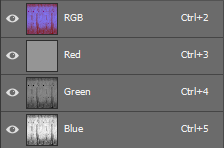
for example
glacial star
@frozen blade both ADS and MC maps really.. like more of a workflow, been trying both Xnormal and handplane baker but is hard to get convincing look, so was more interested in what program to bake in, what settings and so on.. a large question for sure..
also i was wondering why my _DTSMDI does not tile like the rest of the textures in my multimaterial rvmat.. annoying
it refers the same texgen as _co and _nohq, according to my admittedly humble understanding this means it should tile much the same way
frozen blade
- neither xnormal nor handplane will be of any use for anything bar the green channel in the ADS.
- I personally use 3ds max, and for bakes i use MentalRay and AmbientOcclusion (MR) with a spread of 0.8~1.0 and a max distance of 0 for blue and around 20-50cm for green
- your DTSMDI most likely doesn't tile due to some fuckup you have in your rvmat
more on 3 - what stage is that in? @glacial star
or post here the rvmat
glacial star
stage 7, the metal roof dtsmdi
the values work but the tiling is wrong
OK cool Pufu so you assign a pure white material and bake a lightmap to texture or?
frozen blade
it doesn't matter if you assign a white mat or not
frozen blade
on that rvmat, da fuck you use that format instead of the one i kept posting everywhere....i can't even read that
glacial star
it's vanilla arma 3 asset rvmat i borrowed 😄
if you have a better blank multimat I'd be glad to use it though
frozen blade
sec
glacial star
thx
frozen blade


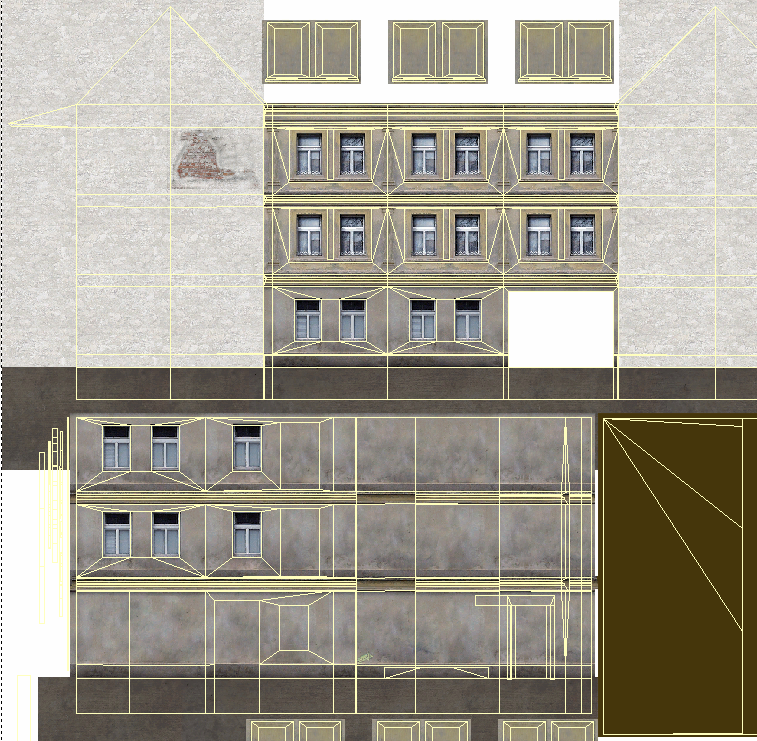
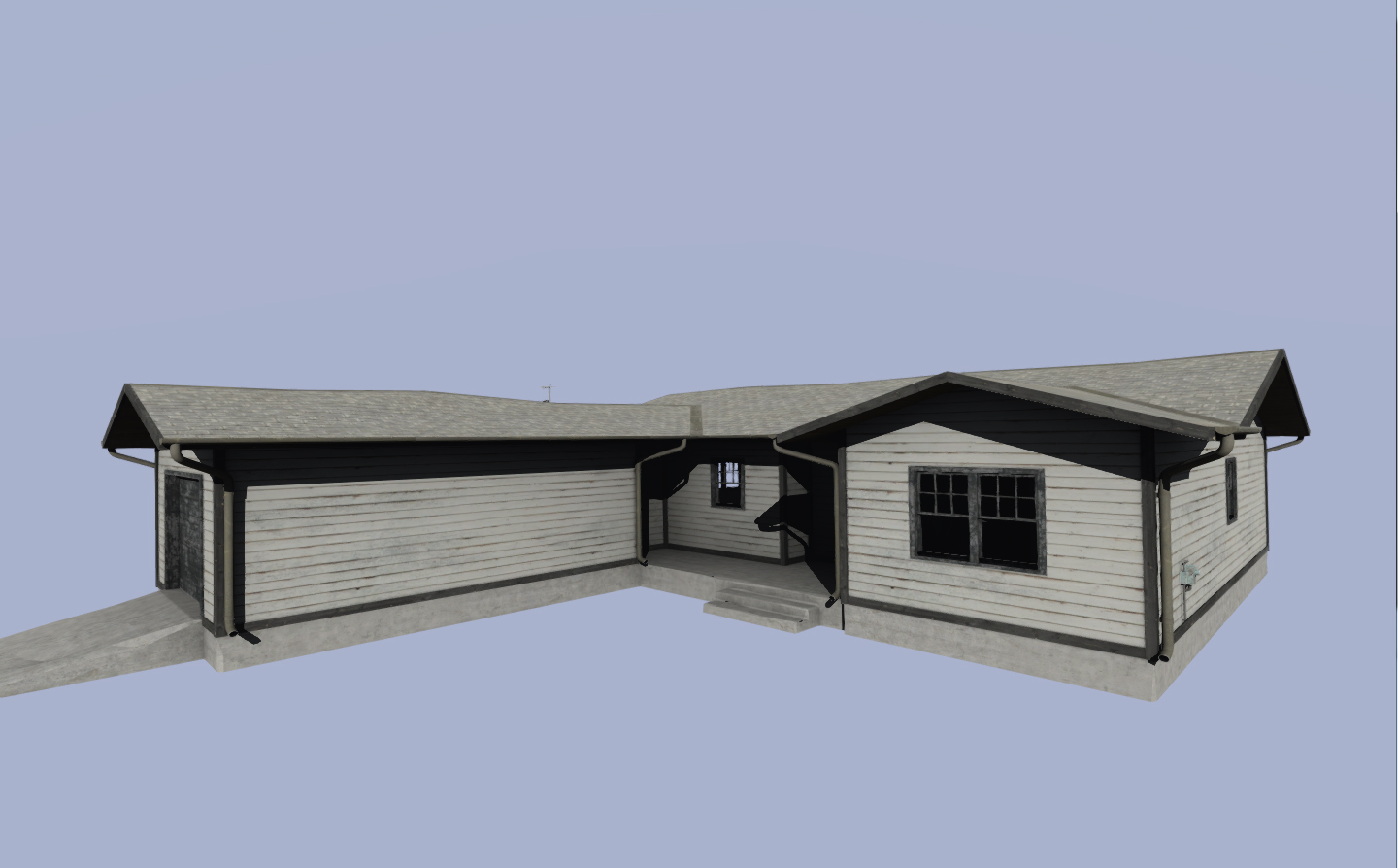


your issues is simply because you cannot change the relation between stage and texgen
stage 7 = texgen 7
glacial star
Ok coolio thank you
i got it sort of working on my rvmat but I will change to yours for sure
I'm wondering how dark I should go on the _ADS and MC maps now that BIS are changing their assets also
frozen blade
well, i asked...for now i need to manually adjust the black/white range till it fits...which is pita
https://forums.bistudio.com/topic/202042-structures-ambient-occlusion-improvements/?do=findComment&comment=3152863
Bohemia Interactive Forums
Liking the changes so far, after the lighting update interiors never quite felt the same, and while I understand there's that whole thing of light bouncing...
glacial star
yeah saw the thread too
silver gull
yeah sometimes i wonder how hard it is for BIS to post some simple details to answer simple questions like this... did they already forget what settings they used? xD
glacial star
guess i gotta update my dev branch install and extract some maps to see
frozen blade
extracting maps is pretty useless if you ask me
not 2 are gonna be the same
because at least the blue channel is different based on the number of holes in the model
@silver gull - also wonder that...i don't care what sort of software that is in...
since these changes are already in RC, i wonder there will be more bakes done...
silver gull
or they realised that... "well shit we forgot to make things consistent yet again" and try to push it under the carpet
frozen blade
most likely not hence a question could be answered
@silver gull neah, that'd be irrelevant
brittle cosmos
They didn't touch many of the vanilla A3 assets. It was mainly Tanoa. In addition they darkened _co textures
glacial star
@frozen blade still largely the same, the _DTSMDI map does not tile like the _CO and _NOHQ map -> no big deal, i just thought they would
or actually, do they
wait
frozen blade
another pita on that one (color equal), no matter the settings, i wasn't able to get O2 to show correctly the texture after visual upgrade...
@glacial star if it is not a generic one and it is made to fit the co, it should
glacial star
@frozen blade yeah it tiles now just like it is supposed to, thank you!
now my metal roof looks like a metal roof
awesome
got any more good tips for making houses? I am still a bit struggling regarding the finer points of the MC and ADS textures
frozen blade
i gave you an overview on the ADS
for MC, it is an inverted blue from ADS with some grey output change
glacial star
ok
thanks
now it looks better
gotta go back to 3ds max though and rebake some stuff, fix some errors though
but overall the ingame importing went a lot smoother than I would have expected
also, do you bake the interior separate from the exterior or all in one go? i got excessively dark maps when I did it all in one go, that was in xnormal and handplane baker mind you
frozen blade
i usually have 2 mats, 1 for interior one for exterior...the last one is diff, because reasons. I always back with everything that doesn't really move visible
glacial star
ok cool, yeah i have one for ext and one for int too
ps. care to reveal what houses you are working on? 😄
glacial star
ok, didnt know that's all
glacial star
here's the result of my bakes now ingame
@frozen blade thanks for the assistance!
bronze stone
1 Channel is enough 😉
viscid gazelle
Well, he's only thanking for the help here and asking for feedback in the other. 🤓
glacial star
yeah.. i didn't know there was such strict rules here.......
anyways, does anyone know if/how to export multiple UV sets from 3ds max to Object builder?
frozen blade
fbx or bitxt export
viscid gazelle
It's too easy to do something nice in Substance Painter. I feel like I'm cheating on a test.
bronze stone
nice floor.
frozen blade
needs a lot more MC dirt about...too prestine..
frozen blade
it is a lot easier to have that sort of detail on a 2:1 texture that only needs to tile on a single direction
without the obvious repetition...
bronze stone
Wouldn't it be easier just to add a single Plane above the wall itself and use the Mold as an overlay?
frozen blade
you mean using a ca texture?
bronze stone
Oh yeah, banana. Apples are also nice.
( ?? )
ca = ffs... whats the name for it... alphaBackground? -.- my head is killing me today...
frozen blade
fucking noob...
color alpha = ca
yeah, wrong way to do that sort of thing, you just fucked the normals 😃
bronze stone
Alpha! Thats what i meant! yeah! 😄
glacial star
@frozen blade damn that's nice! Getting a kind of North american vibe from the building? THe mapping community could sure use more american buildings and stuff
your house looks a lot lighter inside though, I think i need to lighten the B channel of my _ADS map
btw how does map keypoints support å ä ö?
in your screenies they do?
glacial star
I updated my lightmaps now to be lighter and character models no longer stick out like a sore thumb, so that's nice. Gotta try it on DEV branch still and see how it compares... http://imgur.com/a/zHohp
glacial star
http://imgur.com/BdBJuSH my textures as they are now
oh just noticed it is exterior mc and not interior.. oh well.. it is just inverted BLUE channel
 slate totem
nvm; i derped
silver gull
stop showing buildings, i cant restrain myself forever to not start yet another thousand models
doesnt necessarily help that i got by a few cool abandoned industrial areas recently and played stalker again
bronze stone

 fresh hill
More buildings is always good. 😃
Any plans for destruction states? First just DMG Texture, then destroyable parts.
silver gull
i wanna have a big city that is actually crowded (unlike falluja where its alot of "in between")... not sure how performance would end up, so not sure if worth it.
and with that "wish" everything else has to follow suit. I was thinking maybe have interior, but only unhide it when someone breaks the door or windows
twin bane
wants navmesh functionality.. and really large buildings...
silver gull
large enough? goo.gl/A8cLp7
bronze stone
@silver gull
What about:
"Hide" the interiour (i fkn hate that word) and connect it with Door Anims?
twin bane
lol
twin bane
be curious to see how it works. i'd imagine it's not a clean scenario.
bronze stone
ignore Windows, they don't exist in this reality
😄
(of course its bullshit what i wrote 😄 )
twin bane
lol
bronze stone
I mean, technicly, its working, but it would look ugly from outside
twin bane
performance is overrated, end of discussion.
bronze stone
Exactly!
But: For bigger Buildings -> Every room a single Model (remember: Occluder thingy)
oh snap, i thought we were in #arma3_model
twin bane
yeah i would still like some more time to do heavier occluder testing. they do work, and i'd like to think with some planning you could make really good use of them.
bronze stone
lets switch over there Hatch0rt
twin bane
aye
fresh hill
Not sure if this is the right spot, but does anyone know why BIS_fnc_exportEditorPreviews produces such faded images when following the wiki guide recommendations?
Seems to me the screenshot is dumped from some cache and doesnt get the final color grading applied. some post FX sorts it out for me, but not ideal...
brittle cosmos
Yeah mine were always washed out. After taking the images I could get them to look "normal" by changing some settings in my NVIDIA control panel, but I never figured out a way to translate those changes to an image editing program.
My solution was to use my own DLL for taking screenshots, but Killzone Kid made his own DLL as well http://killzonekid.com/arma-extension-scr_cap-dll-screen-capture/. The only downside to those is that they require you to edit the BIS function, and also keep A3 in "focus" while the script is running. The screenshot command works even if you have another window open on top of A3
unreal magnet
how do you guys go about baking AO for building interiors?
fresh hill
Extract furniture from proxies first, then as usual.
unreal magnet
well, "as usual" is still unknown territory for me 😛
fresh hill
Ah. Any specifics depend on your AO baking tool. And there are hella plenty out there. Which one are you currently using?
unreal magnet
3ds
fresh hill
Oofff... its a while ago since I last did it there. But I am vaguely remembering setting the distance to 100 and falloff to 2. But these values depend on your import scale. Metres/Centi/Milli
unreal magnet
mh kay, will search around for a bit
dense peak
i remember someone talking about baking the interior indipendent from the exterior
depends a lot on what you wanna achive really...
if by interior you mean buildings
do not explode it
same for vehicle interiors.
you can choose to bake a limited falloff if needs be
if you want that sort of effect
stick a light inside, besides the normal baking sky dome or whatever method of dome you use for baking AO(bearbeitet)
PuFu - 11.07.2016
for that sort of bake, you surely don't want shit exploded, because the lighting informaiton would not fit, unless you duplicate the light source about
which makes things way more complicated than it needs to be
plus exploding is soooooooo 1999s
you can choose to bake based on matIDs
max and maya at least
Schultz - 11.07.2016
Yes blender aswell
I'll do some tests, thanks!
X3KJ - 11.07.2016
@Schultz mental ray in max - no light source required```


from model makers channelBI updated a bunch of their AO textures for the next update, so PuFu asked what new bake settings they were using, but hasn't got a response https://forums.bistudio.com/topic/202042-structures-ambient-occlusion-improvements/?do=findComment&comment=3152863
silver gull
i would use mental ray in 3ds max... you can adjust the range of the "ambient shadow cast" Light tracer doesnt work, it makes stuff too dark for interiors / you would have to rely on manual lighting (a pain)
unreal magnet
is there a nice tut around? not really feeling like fucking around lol
frozen blade
@unreal magnet there isn't
frozen blade
i set 2 ao (mr)
unreal magnet
that reminds me, you can save baking presets. mind sending yours to me?
unreal magnet
kk thx
slate totem
Hey guys, I'm having a weird issue on an object I'm working on, in regards to receiving shadows. I get the following effect, as opposed to a proper shadow.
http://i.imgur.com/Y9KKqWE - Is this an RVMAT issue?
slate totem
On the back of the chieftain (tank to the right, with the radiators shown), there's a spot of shadow as opposed to the full shadow casted from the Bulldog.
full quarry
which one is the bulldog?
slate totem
The one in the air on the left, that one is from CUP and I just used it to cast a shadow on top of the tank.
full quarry
oh its in the air
now wonder it cast no shadow under it
your picture is a bit confusing sorry 😄
slate totem
You should be able to see the shadow start behind the chieftain, and it's my fault, the perspective is horrid.
full quarry
yeah I thought that was the chieftains shadow
and then wondered where all other shadows were
does the chieftain cast shadow properly?
full quarry
it does look strangely shiny
slate totem
Would you like to see the RVMAT?
I've been scratching my head: http://pastebin.com/raw/xczxbsxZ
slate totem
Yeah, I'm very new to this, just trying to get a grasp of each element before I move on
slate totem
Okay, I found out the issue if anyone else is to encounter it. When creating the texture, I had not attached the suffix _co before converting to .paa, and it wasn't passed through the correct encoding. Thanks for the assistance, @full quarry. Much appreciated. :)
full quarry
I wasnt much of help there.. 😄 Great that you figured it out!
slate totem
Yeah, but you offered your time and might have set me off on a different line of thinking to find the issue. :)
full quarry
I'll take it! You're welcome!
quaint shadow
hey @dense peak, if you don't mind me asking - I was looking at a twitter link you posted in #arma3_model and came across your post about the supershader for Substance Painter, so I was wondering if there was any additional information or any news about that project?
dense peak
Oh i was just linking to it 😄 @ancient smelt is the guy that does all that awesome stuff 😛
quaint shadow
ah, gotcha, looking forward to using that shader when it's done, as I already spent more time messing with rvmats than with my textures - despite the fact this is the first time I've used SP2 😄
dense peak
I think its available, scan the foxhound international website
 dry otter
Hello !
Does anyone know how to get rid of this transparency issue with alphas ?
http://i.imgur.com/psZgCt7.png
 full quarry
whats the issue?
dry otter
ambiant occlusion of other models is visible through the helmet
full quarry
is this 3rdperson mode?
dry otter
no, arsenal view
http://i.imgur.com/no6C9uy.png
Even more visible here, you can clearly see the face under the helmet
 unreal magnet
lol ghost helmet
full quarry
ok yeah took me a while though but yeah thats an ear
dry otter
just the helmet, because of the net's alpha I guess
distant rose
try adding forcealpha = 1 into geolod properties
looks similar/same as alpha issue with structures, looks like ghosting in engine
distant rose
more info from vbs wiki: ```
forcealpha 1
If this is set to "1" then the model will be drawn in a different pass, which can help address certain alpha artifacts
uups talked to fast, not fixed
distant rose
ah well, worth a pop
dry otter
what if this property is set to resolution lod directly ?
it made the alpha texture nicer but did not fix the ghosting
distant rose
there is also:```
Forcenotalpha 1
Deprecated: This functionality is now handled by RVMATs.
Force the whole model not to be considered as alpha model so that shadows will be cast on it. Various alpha sorting artifacts may appear on alpha blended parts of such models negating the usefulness of this named property.
iirc its a geometry lod property only but feel free to go forth and test
nocturne lake
Is the netting alpha a separate texture to the helmet shell?
dense peak
i recall that mostly being the problem what da12thMonkey is after
fresh hill
Try applying a _CO to the helmet, and then changing the netting to the correct _Ca texture via hiddenSelectionTextures. For my helmets I found that if the model is binarized with _CO applied to the faces it behaves a lot better with shading as if it were to be binarized with a _CA.
dense peak
iirc a face in a p3d with a alpha texture applied is diffrent to one that is not, hence why you have to apply a alpha texture for binarizing when you want to add alpha textures via setTexture or hiddenSelectionTextures to the model later on
stuff like this could happen otherwise:
http://images.akamai.steamusercontent.com/ugc/171538338096368580/ED2A1657D4AB9813DE701B7ABD6FDE24E4A52C3C/
fresh hill
I just double checked what I did for my helmets. I use _CO assigned to the faces for binarize and then apply the desired foliage via hiddenSelectionTextures, which is also a _CO. I had to rely on 1bit alpha, as otherwise the shading went all crazy.
dry otter
@nocturne lake yep it's on a separate texture
@fresh hill currently, netting faces have the #(argb,8,8,3)color(0,0,0,0) texture and _ca is applied via hiddenselections
I'll try with you trick
slate totem
Did that fix your issue?
dry otter
Assign _co texture to the netting (I used the texture of the helmet itself) + _ca texture via hidden selections : nope
Assign _co texture to the netting + _co texture (same texture renamed) via hidden selections : nope
Result : http://imgur.com/qi6SD83
TexView : http://imgur.com/wjpNHTW
dense peak
as i said:
stuff like this could happen otherwise:
http://images.akamai.steamusercontent.com/ugc/171538338096368580/ED2A1657D4AB9813DE701B7ABD6FDE24E4A52C3C/````Yep
I'm trying alpha setup in O2 atm (move to top didnt work, trying move to next alpha)
silver gull
you have to apply procedural alpha map to be able to use alpha textures later
dry otter
what does this mean ?
fresh hill
initial _CA instead of _CO
silver gull
use this as texture for the netting: #(argb,8,8,3)color(0,0,0,1.0,CA)
fresh hill
However, initial _CA + supershader causes weird shading behaviour. I.e the faces themselves don't recevie shading from the Shadowvolume anymore.
dry otter
X3KJ, I'm already using this setup, then CA or CO applied by hiddenselection doesnt work
fresh hill
I.e vehicle decals that are changed vie hiddenselections show up super bright and unaffected by shading if they are _CA.
silver gull
@fresh hill thats because alpha with DXT5 does not receive shadows in general. Alphas with DXT1 (means alphamaps with _co tag, resulting in 1bit alpha) work with shading
fresh hill
Ohh, gotta try that! 😃
dry otter
my bad didn't see the 1.0,CA at the end
fresh hill
Ah wait, I did already. 😄
silver gull
1bit alpha generally sucks
fresh hill
Thats why I use _CO for my decals.
dry otter
#(argb,8,8,3)color(0,0,0,0) i'm using this now I'm going to try your #(argb,8,8,3)color(0,0,0,1.0,CA)
fresh hill
Yes, 1bit alpha is barebones and OK for decals, but netting and feathered foliage... much of the poo
silver gull
i had to use dxt1 for my tank track textures, would look too shit otherwise
i upped the resolution to counter the "1 bit stepping"
dry otter
how do you change from dxt5 to 1 ?
silver gull
terrible workaround...
fresh hill
texture extension from _CA to _CO
dry otter
ok this I did
silver gull
if you compress an alpha map with a _co tag, you get 1 bit alpha. If you compress it with _ca tag you get 8 bit alpha
dry otter
🤔
silver gull
how you rename it after paa compression doesnt matter, it stays the same type
fresh hill
HA!
Actually, I found the shader relies on the naming of the .paa
at least for _smdi
its utter BS
dry otter
ok so from tga to paa with _co extension
silver gull
for alpha maps it doesnt matter if you have 8bit alpha (DXT5) and _ca or _co tag in paa name.
dry otter
does it work with texview (open tga > save as > paa) or do I have to use BI tools ?
fresh hill
texView is just the nice(er) interface for pal2pac.exe. Its really the only way to get it to .paa
silver gull
should work yes... i just dragndrop my tga/png files onto ImageToPAA.exe
fresh hill
Ah right, these days it's called ImageToPAA. 😄
fresh hill
duplication / leftover, I reckon.
Its called ObjectBuilder now, but it's still called O2Script 😄
dry otter
hehe
silver gull
it still needs to breathe... so thats logical
dry otter
ok so, with a properly exported _co texture :
#(argb,8,8,3)color(0,0,0,0) = shader issue
#(argb,8,8,3)color(0,0,0,1.0,CA) = black alpha
fresh hill
http://i.imgur.com/OQSITVc.png

here I was derping with the _smdi compression to get rid of the squarish dots. Tried using uncompressed texture instead, found that SMDI stopped working entirely as soon as the file extension of the .paa is not _smdi (regardless of how the .paa was converted)

Last picture shows the same .paa file just renamed.
silver gull
the shader issue you cant solve. Its how it is. You can only use dxt1 in this case. Idk if there is another shader that you could use for your dxt5 alpha
i reckon there is, considering camo nettings etc exist
just dont use super shader for the netting
fresh hill
Could give it a try without any material and old face/vertex flags. But that is a minefield in its own. Technically disabled and deprecated, but still real and active. 😦
dry otter
diffuse[]={1,1,1,1};
forcedDiffuse[]={0,0,0,1};
emmisive[]={0,0,0,1};
specular[]={0.4,0.4,0.4,1};
specularPower=3;
PixelShaderID="NormalMapDetailSpecularMap";
VertexShaderID="NormalMap";
class Stage1
{
    texture="WW2\Assets_t\Characters\Americans_t\US_Airborne\us_helmet_net1_nohq.paa";
    uvSource="tex";
    class uvTransform
    {
        aside[]={1,0,0};
        up[]={0,1,0};
        dir[]={0,0,0};
        pos[]={0,0,0};
    };
};
class Stage2
{
    texture="#(argb,8,8,3)color(0.5,0.5,0.5,1,DT)";
    uvSource="tex";
    class uvTransform
    {
        aside[]={14,0,0};
        up[]={0,14,0};
        dir[]={0,0,0};
        pos[]={0,0,0};
    };
};
class Stage3
{
    texture="WW2\Assets_t\Characters\Americans_t\US_Airborne\us_helmet_net1_smdi.paa";
    uvSource="tex";
    class uvTransform
    {
        aside[]={1,0,0};
        up[]={0,1,0};
        dir[]={0,0,0};
        pos[]={0,0,0};
    };
};```I took the base from A3 alphas
fresh hill
Try using superShader then. I guess we all assumed you did. 😄
silver gull
i think BIS (or someone at BIS) took note of the Supershader DXT5 shading issue, but who knows what happened/ if it was forgotten/ or deemed "too complicated"
fresh hill
Find a way to use it so that it CTD's the game, but would be awesome nonetheless. Then tweet about it and have PCGamer write about it. Then BI will fix it 😄
fresh hill
One man's bug is another man's feature...
dry otter
PixelShaderID="super";
VertexShaderID="super";
no difference
still _co texture
#(argb,8,8,3)color(0,0,0,0) = shader issue
#(argb,8,8,3)color(0,0,0,1.0,CA) = black alpha
🤦
silver gull
the other way round i presume...
and thats to be the expected result... look for what the BI camo nets use for their alpha texture. If its 8bit alpha, use their shader/material
if not... i guess crying in the corner and cursing at Arma is the other option
fresh hill
BI's camonets are 1bit alpha, too. I checked back when I did mine. 😄
silver gull
😱 😪
fresh hill
Only other way I could see here is tree shaders
but they come with a whole new set of limitations that don't make them work on headgear / vehicles. 😄
dry otter
Yep DXT1 but they seem not to have anyrvmat assigned to the faces
silver gull
please remind me when BIS writes "look at what our engine is capable of" somewhere .... I shall remind them that their alpha texture tech is still stuck in 2001
fresh hill
The entire list of things stuck in 2001 may not fit onto that page. 😄
silver gull
gotta start somewhere
dry otter
http://imgur.com/a/rd9kr eliteness
        {
            "camo1",
            "camo2"
        };
        hiddenSelectionsTextures[]=
        {
            "\A3\Characters_f\BLUFOR\Data\equip1_co.paa",
            "\A3\characters_f\common\data\ghillie2_co.paa"
};```if its dxt1 it doesnt matter. I was hoping that some stuff uses dxt5 with proper shading.
the ghillie uses dxt1 too? wow
dry otter
yet they dont have this shadow issue, and I do 😄
fresh hill
Yep. Ghillie and the camo helmet too. All DXT1
silver gull
jeez
fresh hill
Just give us attachToBone so we can add the shrubs directly to the head.
fresh hill
Thats the nice part about the grass shader... but it prevents the stuff from being skinned to a bone. :/
dry otter
omg.. If I remove the rvmat from the face I still have the shader issue + texture is alpha + black
😑
silver gull
you cant prevent shader issue with 8 bit alpha. Use dxt1 alpha map (compress your trexture with _co tag) and then whatever shader you fancy
dry otter
I already did
fresh hill
Do you have the net in your shadow lod?
dry otter
no
silver gull
what do you mean by "shader issue" exactly
dry otter
Copy pasted from above :
http://i.imgur.com/no6C9uy.png
Even more visible here, you can clearly see the face under the helmet
transludancy
fresh hill
The characters face (the one with eyes and nose?) I am not sure what I am supposed to see here.
silver gull
the strips are translucent (half transparent even where alpha is 1)
thats not the shader issue that we mentioned, thats something else
dry otter
yes you can somewhat see the ambiant occlusion through the model
no, the alpha texture makes all the faces under it transludent
silver gull
ok then you have 2 problems or just one?. AO through model is solved by putting forcenotalpha=1 as property in GeoLOD
dry otter
this as alaways been my only issue but I thought you had scroll up to get the information
trying forcenotalpha
fresh hill
FWIW: This is how I solved it:
http://i.imgur.com/WQhCdwV.png

I just painted the damn net onto the helmet itself.
dry otter
Yeah but no 😢
http://i.imgur.com/zilIjuR.png
progress : no more issue of transludancy but red texture :p

with forcenotalpha=1
silver gull
the fuck? what shader did you use for that?
also, i recommend trying to assign the alpha texture directly to the net. Get that working. Then worry about set texture things.
Go one step at a time, solve the issue, move on. Rather than trying to shoot down all things with one shot ... and missing constantly
dry otter
forcenotalpha=1
- #(argb,8,8,3)color(0,0,0,0)
- dxt 1 _co in hidden selection
- superShader
silver gull
its unlikely the hidden selection worked in this case. Otherwise you would at least see some texture...
oh wait no, the alpha is there
dry otter
yep
silver gull
your rvmat?
dry otter
diffuse[]={1,1,1,1};
forcedDiffuse[]={0,0,0,1};
emmisive[]={0,0,0,1};
specular[]={0.4,0.4,0.4,1};
specularPower=3;
PixelShaderID="super";
VertexShaderID="super";
class Stage1
{
    texture="WW2\Assets_t\Characters\Americans_t\US_Airborne\us_helmet_net1_nohq.paa";
    uvSource="tex";
    class uvTransform
    {
        aside[]={1,0,0};
        up[]={0,1,0};
        dir[]={0,0,0};
        pos[]={0,0,0};
    };
};
class Stage2
{
    texture="#(argb,8,8,3)color(0.5,0.5,0.5,1,DT)";
    uvSource="tex";
    class uvTransform
    {
        aside[]={14,0,0};
        up[]={0,14,0};
        dir[]={0,0,0};
        pos[]={0,0,0};
    };
};
class Stage3
{
    texture="WW2\Assets_t\Characters\Americans_t\US_Airborne\us_helmet_net1_smdi.paa";
    uvSource="tex";
    class uvTransform
    {
        aside[]={1,0,0};
        up[]={0,1,0};
        dir[]={0,0,0};
        pos[]={0,0,0};
    };
};```yep let me update it hold on
it worked
all fixed sir 👌 so it was this :
- DXT1 _co texture
- #(argb,8,8,3)color(0,0,0,0) to the faces
- forcenotalpha=1 in geo lod
- superShader rvmat
@fresh hill @dense peak @distant rose and @silver gull thanks for helming me ❤ love you guys
unreal magnet
been working the day on the quixel plugin. for the last couple of hours I was trying to get the exports closer to arma.
results are promising so far.
Before:
https://abload.de/img/2017-02-2315_28_56-mo34u5n.jpg
https://abload.de/img/2017-02-2315_33_15-mo3gu2e.jpg


After:
https://abload.de/img/2017-02-2315_28_22-modrulr.jpg
https://abload.de/img/2017-02-2315_33_43-mo0uukc.jpg

 distant rose
👍
unreal magnet
its a lot closer to 3DO
I just hope they will allow us to use custom shaders. since 3do is unity engine, that actually wouldnt be too hard I think
distant rose
yeah
acoustic dove
@unreal magnet did you updated your quixel export thing?
unreal magnet
not yet
I want to spend a couple more ours checking everything before I push an update.
acoustic dove
ok cool , i hope that Quixel update will release soon tho
nova hatch
Can you link the post or where to get the update when its released?
frozen blade
@Andrew#0693 you get the update by opening quixel and confirming you want that update...
nova hatch
@frozen blade i meant redphoenix export tool that roberthammer was talking about
ashen granite
Hey guys, is it possible to mimic the specular effect of light reflection ? Like seen on safety jackets, it can be seen in the night if lighted. Any ideas ?
nova hatch
the light could be on a different rvmat and then emit a bit of light
 merry vapor
@unreal magnet the quixel plugin looks great, I dont suppose you'll be working on something similar for substance painter at some point will you? (or know of anything that I have missed in that area).
twin bane
There is a plugin/extension thingie for SP.
frozen blade
yeah but there is no need for exporting it
rather than having a similar viewport lighting
and hello @twin bane 😛
for exporting one can set their own maps as they want
twin bane
hello @frozen blade 😃
frozen blade
@merry vapor ^^
ashen granite
@nova hatch Yeah but it will still emit light at night, even without any lights around
nova hatch
reflective maybe?
merry vapor
@twin bane @frozen blade I understand setting up the exports correctly etc, but I havent managed to set the viewport up looking super similar, that was what I was after. If you guys have any tips on optimal settings in that respect I'd be interested to hear!
frozen blade
@merry vapor @ancient smelt was doing a shader
merry vapor
@frozen blade yeah that would be perfect! I'll have a rummage thanks 😃
unreal magnet
 dense peak
light source is on a diffrent position
unreal magnet
yeah its not perfect yet
merry vapor
Good work still though!
fresh hill
Shading around the edges seems off ingame.
unreal magnet
true, but this might be the normal calculation or the light direction
Anyway, I pushed an update.
https://forums.bistudio.com/topic/201245-rv4-calibration-preset-for-quixel-suite-2/#comment-3156820
merry vapor
Anybody around who's using substance painter at the moment? I just updated and it seems like everything is super glossy when rendering in Iray all of a sudden...?
merry vapor
http://pasteboard.co/DwUhiLq8k.png - this sphere has a 100% black specular & a 100% black gloss, for example.
 twin bane
that seems suboptimal. i do not have a good answer for that one. maybe one of these pro SP goons knows though. if it's black in SP, but not on export ... i'd assume something in that part of the flow. (super helpful i know..) 😬
merry vapor
I havent actually tried exporting yet to be honest, I'll double check the exports and see, but I seems to me like its just a problem with Iray (which doesnt really affect my Arma stuff too much).
Yep, the export 100% black as expected, so it seems like an Iray issue, so shouldnt affect my modding.
tanks & baby oil dont mix... http://pasteboard.co/Dvqg6eQtA.png
 distant rose
cool, that actually looks like an off the shelf model kit
twin bane
😆 model looks great though! @merry vapor
merry vapor
@distant rose maybe I'll just bring it in game at 0.00001 then 😉
distant rose
hehe
twin bane
@merry vapor https://www.allegorithmic.com/products/substance-painter/release-notes
presumably all better now.
merry vapor
I can't see the date of the latest release on my phone, but I'm fairly sure 2.5.1 was what I updated to yesterday. I think it was the 2.5.0 update a couple of days ago that broke it. Seems I'm not alone at least... https://forum.allegorithmic.com/index.php/topic,15486.0.html @twin bane
merry vapor
yeah, I've never touched quixel, just jumped straight into SP
twin bane
this should be a hotfix, to the best of my current knowledge @merry vapor
within the last several hours anyway. curious to know if it persists for you though and you are running 2.5.1. that is certainly suboptimal.
merry vapor
thats the version I'm on, just checked. Hopefully they'll hotfix soon!
frozen blade
should be fixed in 2.5.1, which was just released earlier today
merry vapor
It definitely isnt fixed in 2.5.1, looks like theyre aware of the issue from the forums/discord and are looking into it though.
still ibex
@merry vapor great looking tank!
 jolly barn
Anyone ever have Texture Viewer not work upon installing? Basically I have associated the .paa extensions with it. It opens texView but then shows an empty 8x8 32b square. No .paa. I've attempted running it as admin & compatability with vista through win 8. No luck.. Any ideas? Tried re-installing 3 times. Trying to just open Arma .paas. Just recently installed a new ssd. Had zero problems before. D:
viscid gazelle
Which shaders are best for the scope lenses, for resolution LOD and pilot LOD respectively?
acoustic dove
supershader works fine
viscid gazelle
For both LODs?
acoustic dove
yes why not?
nova hatch
for the Virtual Reality 4 Export for quixel, does anyone know how I can get my images to export only whats defined by the color id or something
and whats not, transparent?
or how to combine all as one map
unreal magnet
@nova hatch you mean only export one material?
Not quite sure, but in export window there's export all materials and export selected materials
If that doesn't work, just deactivate the ones you don't need
Transparency doesn't work with this preset yet
nova hatch
@unreal magnet yea, I get a texture for each group, I applied the texture to a material ID so its not too bad
unreal magnet
Good
nova hatch
I actually don't know if you can do what I am thinking for quixel
never used it before now though, using your preset/plugin - thanks for it
dense peak
Hey, is there any way to convert multiple PAA files into PNG?
full quarry
Arma 3 Tools\ImageToPAA @dense peak
dense peak
Does this tool also convert back into PNG? Thats New To me 😁
rare lake
check batch file examples: http://pmc.editing.wiki/doku.php?id=arma3:batch-file-examples#paa_to_tga_png
pal2pace == imagetopaa
dense peak
thanks!
distant rose
An updated version of xnormal is out folks http://www.xnormal.net/
acoustic dove
yay
unreal magnet
wow
nocturne lake
Is the UI still beautiful?
unreal magnet
I dont think they changed much 😄
nocturne lake
Can confirm. It still looks like a CDROM app from 1999
all is right with the world
twin bane
@distant rose 👍
silver gull
as long as the UI is properly usable, it doesnt need to look good. It gets bad when its illogical and nested
most recent UI's i've used (cad environment) where maybe nice to look at but totally bullshit in terms of usability. Designed to impress business people, totally inefficient to use for the dude supposed to work with it
frozen blade
yeah i know, i stil much like prefer the old autocad style UI than the newer (since 2012) ribbon bullshit
and other way too contextual stuff
silver gull
have you tried fusion 360 from autodesk? Its like "dude we have so sweet design, it even runs on iDevice and tiny laptop screen"... yeah, sure, click a tiny context menu arrow everytime you want to access ANY tool seems like a good idea.
frozen blade
yeah i did, the pc software is decent, but the UI is bull
UI/UX design needs to take into consideration usability before looky
silver gull
exactly
its ~12 times cheaper than inventor pro though... nothing to sniff at. + still better than freeCad, which is just a nightmare on every level.
merry vapor
I actually really like the newer autocad ui's, and I use it all day every day. There are some bits that are placed illogically, but the same can be said about the old style/versions, and many other programs!
frozen blade
with autocad i use type comands in 99% of the cases
so i prefer this
https://i.gyazo.com/9f201d1dafe4c8b4e064f902566a5ee7.png
over this
https://i.gyazo.com/92c4977d6e0e376a008f4245fb1daf5b.png

 merry vapor
Yeah I definitely type commands most of the time, but I like the option of having the ribbon there as well.
 finite zealot
The USAF mod is looking for texture artists (prefered if you can also UV map)!! Contact me if you are interested! Or join our discord: https://discord.gg/bFz8qYB
silver gull
has anybody a suggestion for a nice and easy way to create blur textures for rotors ? (helicopters, jetturbines)
fresh hill
Bake rotors to a plane, apply radial blur?
silver gull
that was my first try, doesnt really look good on rotors with a lot of blades
nocturne lake
bake one blade to a plane with the edge of the plane at the centre of the rotor's rotation (so when you radial blur from that edge it accounts for the diameter of the rotor hub).
in PS, fill the canvas with the main colour of the rotors and create concentric arcs from that centred edge that represent the coloured tips and other details you might have on the texture
colour fill the blade white and duplicate the layer a few times
apply radial blur from the centred edge, using different values so the blade is more opaque in the middle and kind of feathers from the edge
stick a black background under these blurred white blades and merge them to form the alpha for the colour map you make from the concentric rings
was how I did the rotor blurs on the RHS Mi-28 anyway
silver gull
ok thanks, guess its trial and error time again for the proper mix then... in my case its a jet turbine, so many blades which blurred radially looks not that great, as there is more "blade" than "inbetween"
thought somebody might have experience rendering with motion blur and shutter setting stuff to achieve a less artistic, more realistic effect
 lunar walrus
Lets just hope it doesn't end up with lots of bulletproof spaces 😛 @glacial star
glacial star
hmm care to elaborate what you mean?
here is my AO for the _ADS blue slot.. any toughts, @frozen blade
also is 2048x2048 excessive for _ADS map? vanilla is only 1k..
dense peak
Guys, why after I binarize with addon builder the glass of the cars show a silver color without any transparency?
any tip?
brittle cosmos
@glacial star 2048x2048 is fine, BIS uses more than just 1k
frozen blade
@glacial star a bit noisy
silver gull
@dense peak maybe learn model basics instead of using models you "found" somewhere...
dense peak
@silver gull I don't use models from others search 😉
steel oriole
@Bl4cKSh4d6W#2060 Except you clearly purchased stolen models from Shounka (for use on your life server), the evidence is in quite a few other channels now.
glacial star
@frozen blade pretty tempted to get the Substance painter 2 and designer combo on steam - esp after seing your AKs 😃
frozen blade
i only got the painter so far. live is somewhat the better deal, i'll see if i grab that when sp3 pops up
nova hatch
I want to do the opposite, SP2 -> Quixel because of the bigger selections it has for scans
frozen blade
@nova hatch you mean megascans. as a suite 2 owner you have access to 50+ points worth of megascanned data
nova hatch
@frozen blade Yes, and base scans it comes with. More selections to start off
lunar walrus
@glacial star I was just making a joke that most first time house models have railings and windows that you can't shoot through
ashen granite
Does _nopx applies to buildings ?
brittle cosmos
No, it's only used for ground textures
frozen blade
lol
silver gull
unfortunate... some nice large cobble stone foundations would be nth
nova hatch
Welcome to arma
full quarry
model them! >8D