#arma3_texture
1 messages · Page 19 of 1
 fresh hill
I just used the a3 env map and overlaid some golden-tint.
Ah, found some pictures:
Here without _nohq: http://imgur.com/DuDtfxb
and with: http://imgur.com/z0cmctl
 leaden meadow
What did you use for finding the argb color for diffuse and ambient in the rvmat ?
And Also when i load in an Rvmat into Object builder and open buldozer the object turns black
Okay it was a white detail map causing the problem, but how on earth did you get your buldozer to render the normal maps and secularmaps
mine one render the texture (co)
 nocturne lake
there's an option to display materials (i.e. .rvmat data) in View\Viewers\Buldozer
leaden meadow
OK thank you.
Not seening the option and still comming up black
My Object builder is so fucked xD
It gets annoying haveing to compile everything and load into arma to view the model.
nocturne lake
Yeah, seems you don't have it set to Hide Materials so I would think it should work
Do you have path to textures set to your P:\ drive in your ObjBldr options?
leaden meadow
yes
does that spesify where the texture from the curernt object loaded into object builder wil load from becuase All of my project are on a seperate drive
http://prntscr.com/a8f2t8 here are my settings
 silver adder
paste an rvmat in pastebin or somewhere similar
silver adder
so it works fine in game .... with epoch loaded aswell i would assume?
leaden meadow
No, I got the Rvmat from the gold ingot in arma 2 wpoch folder
epoch*
and added my own textures with my ingot.
I used it just for the speculare power and deffuse amd abient map stuff because I still ahve no clu how to config them.
ambient*
silver adder
when you try to load the model with buldozer, it is looking for textures on P:/ drive
if you have
texture = "rev_ingots\data\bar_ao.paa";
it will search for "p:\rev_ingots\data\bar_ao.paa"
leaden meadow
ok
silver adder
if your source files are not on p:/drive then it wont find them..........you should for the sake of sanity work with source files that are on p
leaden meadow
So if I have it onmy Desktop for EG I would spesify "C:\Users"UserName"\Desktop" ?
silver adder
well you could, but then when someone else loads your model on their computer, will it find the same path? it will only work for yourself
leaden meadow
I see.
Ok 1 sec I will move everthignt o my P drive
Can I make afolder on my P Drive and Name is something liek Projects and have it spesift to that ?
silver adder
yes
leaden meadow
Ok
And why does buldozer load up when I sater Object builder ?
Sorry for all these question i just want to sort everthing out so I can do everthing smoothly
silver adder
i guess there might be setting somewhere to load it on startup
leaden meadow
Yeah I'm trying to find it xD
silver adder
in Options, 'Start Viewer During Startup Time' i found it on your above screenshot
leaden meadow
Yes, thank you man, I relly appreciate your help.
and I
moved everthing.
it loads buldozer fine now but the rvmat is not displaying.
no speculare or normals showing just diffuse.
My buldozer if fucked xD
is*
So I'm fucked ?
leaden meadow
Guys I have an issue I noticed something I'm getting this http://prntscr.com/a8lbmm
I never had Not mapped before
nocturne lake
Not mapped just means there's a face with no assigned texture
If you have proxies in the model they'll add a not mapped texture group, since you don't usually apply any materials to the proxy triangles
yet they are still a face
leaden meadow
nvm fixxed it.
it was project locaion
I have a folder inside my P drive and I have to adda texture location in Object builder to "P:\Project\ " instead of "P:\Project"
 frozen blade
actually it should be "\Project" instead of "P:\Project"
 dull tusk
which program is best to directly paint textures on your model?
dull tusk
nvm i found the same question I asked some time ago 😄
leaden meadow
Hey guys is their a shortcut to focus on your object in Object builder ?
I lost my object in the left view xD
 unreal magnet
cloe and open againn
silver adder
Not enough info, I would say it looks like something drawn in MS Paint
dull tusk
does anybody here use quixel suite 2 for his texturing work?
 clear sapphire
I do, and I'm not the only one here.
dull tusk
is the albedo texture the same that will have the _co tag in arma? (i've just started testing the 30 day test version)
clear sapphire
Yep.
(Cue someone correcting me for misunderstanding how it works in 3.... 2... )
dull tusk
thanks 😄 but why is every texture for a shiny metal black?
it's the specular texture that is colored in that case
how can i make that work in arma ?
dull tusk
because imported in arma it's just shiny black
clear sapphire
Well, that's something you'll have to work around. I don't know if you can find it, but there was a whole discussion in this channel a few days ago about making 'gold'.
You'd have to mess with the environment map to get coloured specular effects. (So if you want gold, you need to tell the game that the terrain it's reflecting is gold-coloured)
dull tusk
oh ok, i'll search for it thank you 😄
silver adder
Negative, that is not correct at all
If you want it too reflect gold you set the Specular color too gold, add a night spec power, and find the right fresnal values for gold
Never any reason to mess with the environment texture
You do also have too have the right color in the diffuse texture as well, but take a look in A3/data_F for the brass shell casing and work from that
clear sapphire
Just repeating what I read here, but I believe the point was made that then you'd only have yellow 'highlights' from the specularity, while you'd actually expect some near-white bright areas. But whatever, I haven't tried it myself.
fresh hill
Yep, messing with the specular color array in the rvmat will change your highlight colors, which you'd want to be white, even for gold.
You can use that array to dim the overall specularity by setting all values to 0.5, but a similar effect can be reached by tweaking the fresnel values. It's all a giant net of interwoven dependencies, and there are a bazillion ways to do to something, simply because the entire way of dealing with specularity is... suboptimal. There is no per-pixel-specular-color map.
 granite kindle
Still trying to find an MX to M4 retexture.
Even though, I'm sure that's damn near impossible.
 ancient smelt
@fresh hill @silver adder Yeah, went and rechecked my GLSL shader; the environment map is multiplied by the specular value in the RVMAT, before anything else happens to it.
e.g. http://i.imgur.com/GMQouFu.png is with only specular
ancient smelt
How do you get specular highlights that are a different colour from the reflection, anyhow? Would seem like you'd have to have a non-linear BRDF for a single incoming/outgoing angle for that to actually happen.
 fringe vortex
Not sure if this is the place to ask this.. But I'm trying to create a uniform pack. However when I try to launch the mod it says Include xxxx\BIS_AddonInfo.hpp... Still can't find anyi info on this.
 hollow shoal
Is that a .hpp file of yours? The new mikeros tools excludes .hpp files from pbos by default.
so if a script is trying to include one it'll fail with something like that
fringe vortex
I didn't use mikero tools. I'll try as again using them.
dull tusk
I don't know what I'm doing wrong....the textures on my weapons just look like shit
fringe vortex
I haven't done weapons yet. But with uniforms it seems to deal with the image size and how hq the image is.
dull tusk
i don't mean in terms of resolution and blurriness but in terms of specularity and such things
this is how it looked in quixel suite 2.0 http://img5.fotos-hochladen.net/uploads/screen015yj2up90wn.png
it's not even close to what I wanted lol
nocturne lake
Don't rely on the spec/gloss to do all the work. Arma doesn't have PBR. You will need to change the abledo base colour of the scratch etc. layers that Quixel makes
 gritty pasture
does anybody have a supershader rvmat template for paper?
asking before fiddling with values, maybe I'm lucky
gritty pasture
well I fiddled, I guess this works fine, had to create my own _cdt texture though
ancient smelt
@dull tusk What specular power did you use in the RVMAT?
Oh, actually that looks like mostly diffuse actually. Set the diffuse to near-black in your RVMAT. You'll want the specular power up high to get the kind of highlights you want but then for the exposed/rough metal you'll want to turn down the specular power by making the blue channel 255 for the black metal and something much lower for the exposed/worn metal.
 crude skiff
is it possible to add a texture in game, that is not in a mod, or in the mission?
for instance maybe the same way its done via a Squad xml, but for something like a vehicle texture
 strange thicket
No
dull tusk
@ianbanks thanks, will check that as soon as I get home ;)
fringe vortex
Has anyone here recently done textures for uniforms/backpacks/vests?
unreal magnet
yes
 brittle depot
Did some one have an template or know which size i should be use for Textures used on the "Noticeboard" and "Infostand" so it will not be shrinked or look squashed
fresh hill
Has anyone here recently done textures for uniforms/backpacks/vests?
Yep.
dull tusk
what is the best export target in quixel suite 2.0 when making textures for arma?
or is specular PBR ok?
nocturne lake
I get the white/chrome faces in 3Do when model isn't one single group/selection
nocturne lake
Just make it one part while you're texturing it. Doesn't have to be the exact same file as you import to ObjectBuilder
So long as the UVs don't change, the suite outputs will still match the mesh
dull tusk
yeah but I'm applying different materials to the different selections
nocturne lake
How is that relevant to Quixel suite?
You use a 2D selections map to make materials groups in Quixel
You only need your selections in Object Builder
dull tusk
oh okay....how do these 2d selections work?
nocturne lake
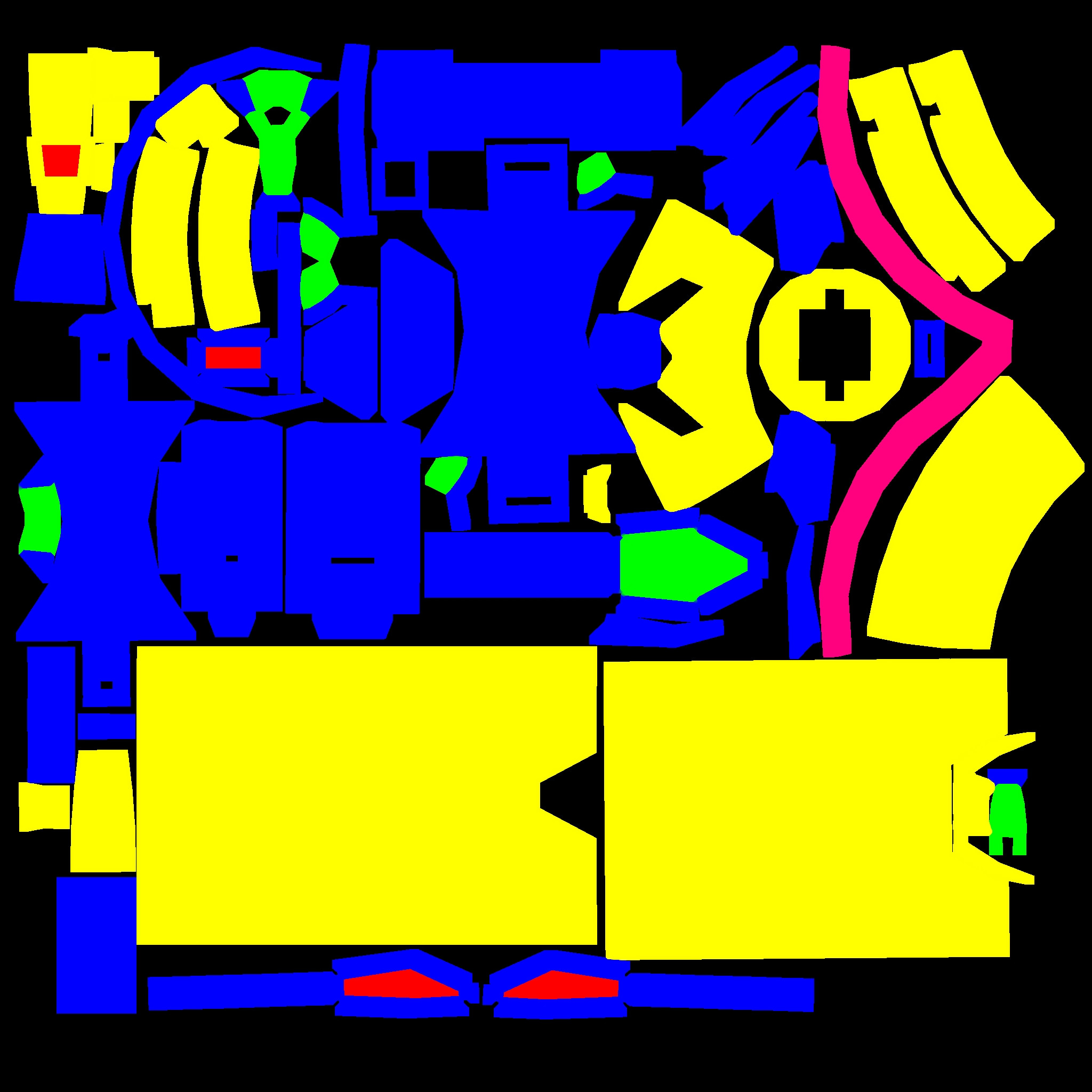
it's called an ID map or something
basically you paint solid colours for each material you want, and where on the UVs they are located
Would look like this: http://i.stack.imgur.com/lA9dC.jpg
each colour is a different material
dull tusk
does quixel recognize the different colors automatically?
nocturne lake
yes
nocturne lake
When you create a material, you can right-click the mask window and it'll bring up a window with your ID map on it, you can then select the part you want and it will create a mask from that colour selection
there's a way to do it in the 3Do previewer as well, but I forget
read this anyway: http://quixel.se/usermanual/quixelsuite/doku.php?id=ddointro
But it is possible to work in quixel without making an ID map, it just makes creating the layer/material masks faster if you have them ready as an ID map
dull tusk
hmmm it's one object now but the white faces are still there 😦
weird....model would look awesome if those faces were colored lol
i just saw....they aren't white
nocturne lake
Are the normals okay? No backfaces or something?
dull tusk
a part of the material is on it
yes they are
yeah the details are visible
but not the other parts ofthe material
nocturne lake
Not so sure what it would be then. As I said, I only experienced it when there was something with the selection names not matching the Quixel project, or if I import a model with multiple UV sets
 ashen granite
Yes, even if some faces are mesed up in Quixel, it will write on the correct UV Map anyway, it will work good on Object Builder. So no worries.
dull tusk
how do I combine the specular and the gloss texture that I get from quixel so that it works in arma?
clear sapphire
You'd want to combine them into an _smdi file that has the specular in the green channel, and gloss in the blue one. But if you're using Quixel, I can recommend this: https://github.com/p1nga/RV4-Calibration which will do it for you.
dull tusk
thank you I'll check that out
silver adder
I should really update that to ther version on my PC that fixes a couple of things......
silver adder
Which i just did ^^
dull tusk
i'm going to just give up on texturing my weapons....there's just no bit of gloss on the fu**ing thing lol
ashen granite
Use the specular then
There is a filter in BI Editing Tools, use it in TexView with your specular map loaded to render the smdi.
ancient smelt
If you want gloss you have to have a high specular power (it goes up to 1000ish), high specular power in the _smdi channel, and proper fresnel.
dull tusk
I'm going to jump off a bridge.....I'm wondering why my smdi texture isn't working while the line in the rvmat is commented out
for about 4 days
ancient smelt
Running Eliteness on your binarized files and using the in-game config viewer to make sure things are being binarized properly is always a good troubleshooting sanity check.
nocturne lake
@silver adder Thanks for updating the RV4 tools for Quixel. Something you might want to fix though, is that it's currently export the normal map as "_nohg" instead of _nohq
dull tusk
any ideas where I can find custom materials for quixel?
or better said: does somebody know of a good smart material for tan colored weapons?
silver adder
fark must of copied pasted an old code block....
 bronze stone
applaus
unreal magnet
Thanks pinga 😃
@dull tusk just use the standard weapon camo and put a couple of color layers on top
Usually there's a layer called "color"
silver adder
i just checked the code on github on my phone, there was a line that had nohg in the past, but it was fixed, so i can only assume it is fixed, i have used it recently and it worked
unreal magnet
yeah it should
@dull tusk just scrolled up - If you use 3ds MAX, download Textools Toolbox
It can render color ID maps automatically
dull tusk
Thanks but I'm using Blender. Best way to do it is to apply a different material for each ID and bake Colors to Texture
unreal magnet
yup, that works too.
I also use this method if I want to quickly adjust the colormap to my liking
nocturne lake
@silver adder Sorry, was my mistake - the release version in the green "download" link wasn't updated to v1.1.0 that has the latest .jsx file, so I was downloading v1.0
dull tusk
any ideas what might be a reason for materials not working sometimes?
sometimes when I start the game the rvmat works for one weapon but not for another
which is basically the same model but different rvmat and textures through hiddenSelectionsMaterials and hiddenSelectionsTextures
sorry for so many questions 😄 I'm into texturing since I tried Quixel
 silver gull
check for typos in your paths if rvmats dont work
dull tusk
they work but sometimes they are gone like the game did not load them on startup
this only happens with the ones where I changed the materials with hiddenSelectionsMaterials
i could probably have a workaround by just having 3 models and change the rvmats in the p3d but that would not be the best way I guess
dull tusk
no it doesn't
this is my config where I have the hiddenSelections
and I doublechecked the paths
dull tusk
no
ashen granite
define the hiddenSelections, textures and materials in your base class and try again
dull tusk
did not work unfortunately
it's just a random bug lol....i started arma went into the arsenal, tried the three weapons -> black with rvmat, tan with rvmat, olive without rvmat
tried again without changing anything -> only black with rvmat
ashen granite
Apparently hiddenMaterials doesn't work
dull tusk
the rvmat for the black one is the rvmat applied in the p3d
so I'll have to have 3 p3ds?
dull tusk
i think I'll test out what happens if there is no rvmat applied in the p3d
first run worked
yeah second run as well
reminder: "If you work with hiddenSelectionsMaterials do not apply an rvmat to the hiddenSelection in the p3d"
and a third run worked as well
hours spent for such a simple problem 😄
ashen granite
Welcome to arma
brittle depot
hello, is it possible to make an Objetct (e.g. Shooting Target) constantly visible on Thermanl and NVG View?
ashen granite
Oh
fresh hill
Quixel is 40% off today.
brittle depot
I don't know if i am in the right Section, but maybe someone can help me. I was read that it should be possible to retexture a Proxy in 1.56 but i don't find how i place my Texture on a Proxy
 rare dove
I'm still struggling with a blue colour mixed in the texture on the ground floor of the Nimitz. I've added a cube, used e and selected the texture and while the side faces of the cube look correct, the top face has a blue base color. Any advice on what's wrong there?
silver adder
not sure if the proxy camo selections work across the board, or just for wrecks ... https://community.bistudio.com/wiki/Arma_3_Setting_Textures_for_Wrecks
because the way the Wrecks work is it is not really a proxy, it replaces the normal model in the world, with the one defined in the config and properties in the p3d.
nocturne lake
It works on general-use proxy parts in the same way (like for vehicles) But Pettka says it makes the model slightly more resource-hungry.
No idea if it works for proxies like weapon attachments though
Since you don't use cfgnonaivehicles for those
rare dove
on the blue texture, seems it's a shadow problem. when I place the rooms on land and remove the ceiling the texture shows perfectly
silver adder
https://youtu.be/1pIoA34MVBA but, but, but I had just settled into Quixel....
frozen blade
i wonder if 4k is still max
ancient smelt
Substance 2 has scripting support too, I'm hoping it means I can now export RVMAT's based on all the Supershader settings in the Painter UI...
 dense peak
Hey guys. I'm having trouble converting to paa. After conversion I always get weird artficats on the paa image https://i.imgur.com/PaYLFjV.png
I tried tga and png as source so far with no luck
the artifacts are still there
frozen blade
what file format are you converting it from
what are you using to convert
is your tex file 2^n pixel format?
dense peak
hey pufu, im tried to convert from png or tga. no difference there. artifacts remain. the source image is 2048x2048. I tried to convert from imagetopaa and from texview with no difference at all.
i do get rid of the artifacts if i increase the contrast/brightness of the image tough.
did you use the correct tags for all textures while converting?
which tags do you mean?
exampletexturename_CO.tga
then you convert it to a .paa
same for SMDI and NOHQ and whatever textures you use
im at a loss, what does a naming convention have to with the conversion result? Nevertheless i just tried it wit co as suffix. The artifacts remain.
there is a very subtle light fall off in the source image from left to right which seems to be causing this issue at compression trough paa
explained in the link i sent you:
textureType is predefined suffix, that allows to choose proper compression and other transformation for the texture. The actual transformation is defined by TexConvert.cfg (used by both Pal2PacE and TexView 2 tools).
use the correct tags for all textures on your model, the artifact does not have to be produced by the CO texture but also by the SMDI or NOHQ or any other texture type you use
dense peak
unfortunately the artifacts are still there even if use the a suffix for the texture which will be an ui element. the only explanation i have right now is that the paa compression is messing up the areas where similar colors are used.
silver adder
^ as you said compression does not work great with large areas of similar color, you can add some noise which will break the compression up into smaller areas and reduce its effect
You can also try to export the image from Photoshop using Save for Web, and let photoshop handle the compression, img>paa should then do virtually nothing to the image
ancient smelt
@dense peak That looks like quantization is the issue, the only way you can deal with that is noise either in the _co (which has to be high enough to get over paa's 5/6-bit quantization) or noise in the normals (which can be pretty subtle and still have an effect)
dense peak
hi @ancient smelt how would I do that? I assume noise has to be added to the source image? Just to make sure. This is not a texture for a model but a gui element for a radio.
ah ok, i think i got it. i just added 0.5% noise vie photoshop to the source image. after paa compression the results are better. not perfect yet but i assume i have to play with the values.
ancient smelt
Yeah, the other thing you can do is dithering.
dense peak
cheers mate you just saved me from doing tons of work all over again
dull tusk
how do I make a rvmat that renders everything black, non transparent and reflective?
silver gull
black and non transparent is not in the rvmat, thats the diffuse texture which is seperate
use procedural "textures" (aka colors)
go in OB and select a color instead of a diffuse texture, and you will see the "code"
nocturne lake
well, you can make a texture all black in the rvmat is you set the ambient, diffuse, forceddiffuse etc. way down to {0,0,0,1}
we used to use that for making reticles that were illuminated at night, but black in the day
but after OA came out, rvmats stopped working in modeloptics
would work on other kinds of models though
 eager wedge
anyone know how to quickly load up a dialog for checking the locations like this? http://hastebin.com/vucajofigi.tex
 honest pagoda
so if i get it correctly, those assets from https://www.humblebundle.com/cryengine-bundle can be incorporated into any engine / game / mod project:
Plants and Shrubs
Trees
Environment Props
Prototyping Kit
Textures, Decals, & Visual Effects
Audio Kit
Vehicle Pack SE
City Pack SE
Weapons Pack
Vehicle Pack HQ
City Pack HQ
Character and Animals

Humble Bundle
Create your own game using CRYENGINE with loads of environment and character assets!
silver gull
"texture pack": there are textures in it. What a great description
honest pagoda
better than not-so random colors of pallete in digital format 😉
 serene needle
Not sure if this is the best channel to ask but its sort of texture related, anyone know what could cause //dll Unknown throw Error
Derap: Missing name for class or array in eliteness when I try to unrap a RVMAT? Also any ideas on how to get arround this problem?
dull tusk
how can I get a higher intensity on the normalmap I'm using?
frozen blade
duplicate layer and overlay is the simplest way
 unborn river
Can someone tell me how to make ambient shadow maps?
frozen blade
AS maps = Ambient Occlussion maps
with all channels white but the green on
that said, if you feed a texture_as.tga (with the correct naming) into O2, either buldozer or texview will convert that one correctly (as in make RB channels white)
unborn river
Thanks!
ancient smelt
Check how it looks at night though, when the ambient is virtually nil. If things look too flat at night you can use an _ads or bake a tiny bit of AO onto the _co.
frozen blade
yeah, i always bake AO/AS into CO
simply because arma is using diffuse, and diffuse is not albedo
unborn river
Ok, I am already baking a little AO into the texture. So maybe I don't need AS maps at all? I'm very new to this
unborn river
One more question. How high resolution textures can/should I use?
bronze stone
Depends on
You dont need a 4096x4096 Texture for a tincan
and using a 512x512 for a huge Building is also not the best choice
unborn river
but is it ok to use an 8k res texture on my aircraft fuselage? I want the tiny text on the decals to be readable
does the game have limitations?
bronze stone
1 thing, you have to ask you everytime: How often do ppl look at it?
unborn river
That's true, but Im a perfectionist. I wan't it to be as detailed as it possibly can within the limitations of the game engine
bronze stone
perfectionist vs Memory.
dense peak
i think you shouldn't go over 2k
unborn river
so 8k is ok, but not recommended if you have a low end computer then
hmm.. 2k is really low isn't it? most of the aircraft I've studied use 4k
bronze stone
Just my guess: 4k for a Vehicle is more than enough.
Just imagine: Your Vehicle might have 8k. Thats okay. But: Now imagine 30-40 other Vehicles with 8k (or even 2-3 8k) Textures on it.
dense peak
would be best to check arma 3 vanilla textures.. but i don't think they use more than 2k
bronze stone
@frozen blade You got 4k Textures on the RHS Ural's, or?
dense peak
rhs only uses 2k afaik
 brittle cosmos
Has anyone used a 4096x4096? I didn't even think you could
dense peak
they do the texuters in 4k and scale them down to 2k
unborn river
many of the top rated aircraft mods on steam uses 4k
bronze stone
Top Rated != good.
frozen blade
@bronze stone - dunno by heart
bronze stone
Hell, i've seen some crappy SUVs in Steam Workshop... they looked just terrible.. but... top Rated
frozen blade
@brittle cosmos - 4K works without issues on most modern GPUs. (3GB Vram+) On older ones you got them mipmapped, so as long as it is possible, we dunnot use 4k
@dense peak - we do have some 4k textures in, that someone forgot to downsample...and some that are so by design (the fewer part of the whole)
bronze stone
@unborn river
http://images.akamai.steamusercontent.com/ugc/317873200933583466/89ADEC15D27B5503DF415B350528312A83E8157F/
2k Texture on the Door.
 unborn river
good to know. Anyway Im making them in really high res, and will scale them down if I have to. I want high res textures for Arma 4 when I need to port my mods 😃
bronze stone
Even that is too much, tbh 😛
unborn river
it looks really nice
frozen blade
@unborn river - lol..what are these mods you'd want to port later on if you don't mind me asking?
@bronze stone - multimap?
unborn river
I was just thinking when people port mods from arma 2 to arma 3 they often have to make new higher res textures. I just want to make it easy on myself if Arma 4 comes out
bronze stone
Arma 4 = Years away
frozen blade
@unborn river - everyone i know actually bakes higher rest maps then scales it down
so although all the maps i used for my own content is 2k
i still have the 4k PSDs
for the content i aimed for 4k, i worked with 8k and so forth
although truth be told, my 24GB workstation did take a beating with quixel and these 8k textures. Everything above that is not aimed for games anymore, and it is in MARI's lands
unborn river
ok good to know. Seems I have to downscale to 4k at least
frozen blade
dude, make them 4k. get them 2k in game. 4k textures is something that most games don't even have, or even support
4k is gonna be enough for next generation games either way
unless everyone moves to 4k screens in the next 2 years (which it won't), there is no point in having more pixels on the textures than what your monitor can display
unborn river
I dont necessarily need it for my whole aircraft, but the decals and text looks so damn ugly if I dont buff up the res.
Any suggestion how to go around that?
brittle cosmos
You could always have the decal or text with its own section, you just add to the section count doing so
unborn river
do you mean making a new flat mesh on top of the model where I want the decal to be?
frozen blade
no, he means using a secondary uv set for these
parts of the mesh
and use an mc map
i think that is what he meant anyways
brittle cosmos
Uhh not really, I was suggesting a separate section/texture for it
unborn river
but wont that overlap? I dont understand
frozen blade
yeah but then why nit simple use mc on tex1
damn phone ^^
that's precisely the point of mc
brittle cosmos
You'd use it on a vehicle with text?
unborn river
Im sorry but Im very new to this modding business. I only started a few months ago with no prior knowledge to this. what is MC map?
yes thats right
frozen blade
yeah, on a diff uv set
well, unless you'd want these decals to change
either random or manually
unborn river
lets say I have a panel line below the decal using 2k res texture. Are you saying I can have a highter res number above it without making a new mesh?
number og logo or whatever
brittle cosmos
PuFu knows alot more than I do, so if he thinks that's the best way to do it I would side with him.
frozen blade
bear in mind that for this purpose (overlay text on top of existing texture)
you'd need a secondary uv set to work
otherwise you'll end up with the same stuff, same res
you can use MCs to colorize (in fact that is what it is used for in multimaps shaders)
unborn river
you wolden happen to have example files where this is beeing done?
frozen blade
yes i do, but i don't share personal files
brittle cosmos
My thought process was just that instead of having one large texture because you wanted text to be readable, to have two smaller ones.
unborn river
maybe it's in the arma 3 sample files somewhere
unborn river
I would be forever grateful. You guys rule
brittle cosmos
That'd be great thanks 😃
 finite zealot



 silver gull
wouldn't using a MC texture for decals and font prevent stuff like a damaged texture?
frozen blade
good question haven't tested, but depends on how you setup your damage
 dire laurel
Any one here have experience with substance painter and multi tile uv maps
or how to make them work?
silver adder
By putting each one on a seperate UV set I guess, there is no UDIM support yet
dull tusk
So I want to buy Quixel Suite 2 for texturing weapons for ArmA but I'm not sure if I need to buy a indie licence or if a academic licence is enough
nocturne lake
If there is zero possibility you will sell models textured using Quixel Suite, then Academic is acceptable
"modding" is rolled in to the indie license because you have various games that have pay-for mods
like the TF2 hat industry
Indie license provides you that oportunity to sell items, where academic is strictly non-comercial
dull tusk
ok, thanks 😄 I hope the 40% discount lasts for a bit 😄
 sour sphinx
what's the best way to make a new TI_ca for the BLUFOR uniform guys?
silver adder
if you really need too, i guess make a mask of the different material types, and then do some overlay/screen of AI / Cavity, but you shouldnt really need to change the Thermals for a uniform unless you are well, making it all metal or something
sour sphinx
I want to get rid of the Shiny knee pads
silver adder
well i wouldnt go redoing a entire thermal map, just get it in photoshop and hand paint it
sour sphinx
yeah that's pretty much what I would be doing, just wanted to make sure there was no specific special needs to make one
 low helm
how do i make my model to use several UV maps? Do i have to uvs to go seperate uv channels or...?
unreal magnet
yes
dull tusk
So I bought Quixel Suite 2 now 😄 How do I change the amount of gloss and specular for a certain smart material
frozen blade
check the specular and gloss channels
dull tusk
lol
thanks
i did not realize the color thingy that appears when switching the channels -.-

if it only would look like this in ArmA
nocturne lake
yeah, would be nice if Arma had better per-pixel specularity/gloss
Worth checking out P1NGA's scripts for Quixel too if you don't have them already: https://github.com/p1nga/RV4-Calibration
dull tusk
yes I'm using it for export
dull tusk
also for some reason the normal maps exported from quixel suite seem to have a very small intensity and I need to add some overlaying layers to it so it has the proper effect in ArmA
frozen blade
that was always the case for any sort of normal bake and arma behaviour
dull tusk
http://i.imgur.com/RRsfvMZ.png - http://i.imgur.com/QrgZK4k.jpg why is the difference SOOOO big 😦
 frozen blade
quixel doesn't create textures by itself, not rvmats
dull tusk
so what do I have to do? because I know it doesn't create rvmats but what are the rvmat settings that are important?
nocturne lake
I don't recommend previewing any textures in the Virtual Reality island/Virtual Arsenal
do it on Altis/Stratis
but other than that, the important .rvmat settings are specularPower, the Fresnel stage (stage 6 usually) and the specular[] colour array
As I said though, Arma's per-pixel specular rendering isn't great. You often need to include a bunch of highlight/lowlight detail in the diffuse _co texture - so change the colour of scratches in your Albedo to make them lighter than the base metal and stuff like that
 young hound
you need shading parameters 😃 the green part seems like a simple diffuse
when it could be a specular / reflective material
dull tusk
It is supposed to be nearly without specular/reflection
Where do I need shading parameters?
young hound
Your rvmat define the shading, not sure exactly how it works : but in this image http://i.imgur.com/RRsfvMZ.png you have fresnel + specular + reflective surface on the green part. The 2 engines a(arma 3 and quixel renderer) are differents
could you post your rvmat and a preview of the textures your are using in rvmat ?
dull tusk
those are the textures
and the rvmat
this is the first weapon where I'm trying to have all those maps and rvmats instead of just color so thank you for your patience 😄
young hound
I think your main problem is that you haven't any detail in your normalmap : https://mir-s3-cdn-cf.behance.net/project_modules/disp/7b070d51404543.5608b3029a996.jpg this is what it should look like

so the light has nothing to bump on. Same in your color file, you should play with layers to add detail : http://gamasutra.com/db_area/images/blog/237327/ACR_Dmerge1024.jpg
 dull tusk
yes it is actually there but the intensity after export is extremely low
I will edit it real quick and see if it looks better
young hound
well, if the normalmap is just a pattern tiled, it won't enhanced your model
did you just textured it in quixel ? without any baking process ?
dull tusk
yes I did
if I duplicate the normalmap layer and set it to overlay the detail is visible
young hound
another tip : you can multiply your ambiant occlusion in your specular map, to force the lighting to not shine on darker area, sometimes the render is cool
the pattern on the normalmap even boosted will not change they way light bump on your model, you should try to make a quick high poly from your gun, and bake the normalmap to the lowpoly
because right now, the uniformity of the textures is causing the lighting to be uniform
dull tusk
i have never done this before :S
young hound
it's not that hard
if you have a low poly model (the one you are using), try to bevel and chamfer all edges
then once you're happy with the shape, install Xnormal : it's a program where you import 1 high model and 1 low model, then ask for a baking on the uv's. Very easy to work with
but keep in mind it wont change the way arma lighting works ^^
it will just enchanced a bit the render
unreal magnet
Making completely new MFDs for the L-159. Animating all of this is going to be a real bitch tho :S
http://abload.de/img/2016-04-0311_59_00-moelsnl.jpg
http://abload.de/img/2016-04-0312_23_12-momls1v.jpg

 young hound
very good ! rendering in an island looks better than in VR ^^ What did you do exactly ?
dull tusk
i baked the normals with xnormal
and used the normalmap from there instead of the other one
also I set specular[] = {0.1,0.1,0.1,1.0}
and specularPower = 200;
nocturne lake
I recommend you overlay your ambient occlusion bake on your _co texture a bit - set to multiply and drop opacity
in fact, if you're using Quixel and have the ambient occlusion and normal map defined as inputs, there's a "Base" smart material that will add those on top of your Albedo and usually adds some decent definition in Arma
dull tusk
thanks, trying this 😃
dull tusk
I guess it looks kinda good so far but for some reason everything is ultra glossy when having a shadow on it
nocturne lake
If it's very glossy in shadow, it's often the fresnel
dull tusk
it actually was very glossy anyways and looks better now but what actually does the fresnel?
nocturne lake
controls the amount of reflection given by the environment map
dull tusk
is there any documentation on what all the values do?
dull tusk
which would be best for polymer?
dull tusk
but I guess I'll need at least one extra rvmat then
one for the plastic stuff and one for the metal stuff
but if this makes my weapon look good: why not 😄
nocturne lake
I wouldn't bother with that. Just try to get something in the middle
Adding a separate .rvmat adds extra sections
dull tusk
i guess this looks alright
so I need to add another material for the metal parts
and then I can start painting some details on the weapon
although the specular power seems to be a bit high
anyways: I need to go to bed now thank you for your help 😃
dense peak
Hey guys, does anyone know how to get the UV mapping from custom vehicles. Right now I am just putting random color spots all over the car to figure out where things go lol. Any thanks would be appreciated!
frozen blade
yeah open the vehicle on O2, open UV editor, save image as EMF
unborn river
Hi guys. I'm having problems with my canopy glass. It's look ok (kinda) from one side, but I get this "wall" when looking at it from the other side.
https://www.dropbox.com/sh/fbo1zlmys8tcum7/AADp7pxEOm1K9tDWCsZUjh4Oa?dl=0
Any suggestions on what's going on here? I don't think there's a problem with the rvmat because it's in use on another model and works fine there
unborn river
thanks. I didn't know glass needed reversed normals
hm when I do that the whole aircraft becomes transparent
 nocturne lake
That's because you have faces selected in object builder
Buldozer shows all un-selected faces as transparent red when viewing models from Object Builder
if you deselect everything, or select everything it'll show it all as solid
nocturne lake
no
it's for Z-sorting
Faces\Reverse (or press the W key) is what flips your normals
 autumn osprey
Hello guys, i'm new at arma 3 modding (3d artist). i came from unity3d, i made a c4 model for a friend and i need some help to how import to arma 3 enigine.
I downloaded the arma 3 tools and launched the Object builder, imported the model and the diffuse texture, but i can't find a option to add the normal and specular map.
nocturne lake
You apply the normal and specular map in a material file called an .rvmat, then apply the .rvmat to the model
autumn osprey
theres is a template for this .rvmat?
or a tutorial showing each config?
btw, this is how the model lookts in game http://i.imgur.com/5vgBqz1.png

Model viewer*, only with diffuse.
nocturne lake
I usually just decompile the .rvmats from the game. But I'll stick one of mine up on pastebin in a sec so you can use it as an example
very important, is that your maps adhere to these naming rules first: https://community.bistudio.com/wiki/ArmA:_Texture_Naming_Rules
nocturne lake
brittle cosmos
nocturne lake
do you have specular/gloss maps too?
autumn osprey
i made the texture in Substance Painter and exported the maps for non pbr shader (diffuse, Normal and Specular)
nocturne lake
okay, well to make the _smdi map, you only want the Specular information in the Green channel. Red and Blue should be solid white. If you had a gloss map too, that's what would go in the Blue channel
autumn osprey
oh, ok. like in unity3d, wheres use the specular of a alphamap from the diffuse map
in the .rvmats, the paths, where is the root folder?
nocturne lake
Should create a root folder on your P:\ drive that is part of the tools suite.
So e.g. my normal map would have been in P:\RKSL_EOT552\data\RKSL_EOT552_NOHQ.tga
autumn osprey
the p drive is a "mirror" of my main drive (eg C:) right?
in my case, the texture are in C:\Users\TocaFita\Google Drive\3D Models, License, Plugins, Scrits and Stuff\3d Models, Libarary\Weapons\Breach Charger c4\Textures
nocturne lake
Well the P:\ drive is a virtual drive that gets mounted when you start the tools. Basically it creates a symlink to the folder you designate in the tools settings
If you start the tools app on Steam and go to Preferences\Settings (ini file)
Then click the P Drive tab you can choose the folder that will act as this virtual drive
Then when you mount the drive through the tools it'll create the symlink
autumn osprey
the folder i create in p:. will showing where in my real drive? in arma3 folder?
nocturne lake
Wherever the folder is in the settings.ini. Mine is set to M:\Users\User\Documents\A3Work
autumn osprey
oh. got it
nocturne lake
I think by default it uses the Steam Arma 3 Tools installation folder, you have to un-check the "Use Default" box to move it to a custom location
autumn osprey
yeap. if i will make more arma content, i will need fix my second hdd :/
btw, each stage in .rvmat are for a texture map, right?
i have 3 maps, diffusal, normal and specular. this will be 3 stage in .rvmat file?
nocturne lake
If you're using supershader you have to use all the stages
brittle cosmos
nocturne lake
if you don't have a physical image/file to represent one of the maps/stages you generate a procedural one
the link pennyworth gave has the codes for the procedural substitutes for each kind of map./stage
autumn osprey
this is complicad for me at the first look, in unity is basic drag and drop :D.
ty everyone to help ;D
nocturne lake
Yeah, it's a lot to get used to at first. Once you have the initial setup going for one model though it's often just a matter of copy& paste
autumn osprey
i think so 😃 ty again.
btw, i cant export as a pbr shader in substance painter right?
i see a reddit post showing the new apex jeep model, and are in pbr shader. So arma 3 uses PBR shader?
young hound
Mb tanoa :p ? (edit : i mean, maybe apex uses it )
nocturne lake
It doesn't use PBR
IIRC somebody made some histograms that adjust Substance Painter outputs for Arma, but I don't remember where it was posted
Sometimes you'll need to adjust values in the .rvmat, like specularPower and the fresnel stage (manages the strength of the environment map reflection)
And sometimes adjusting the specular[] = {R, G, B, A}; array at the top of the .rvmat to adjust colour and brightness of the specular highlights can help
dense peak
Anyone know how to open Binarized files to get the UV mapping for it?
ancient smelt
Just the UV? Or the model too for painting?
sour sphinx
Intersting use of colour for the TI stage, never knew about that, now I know why I'm getting TI errors after deleting them!! as Supershader needs those!!
low helm
is it possible to paint mesh with multiple UV channels on substance painter? If so, how?
frozen blade
google has all the answers

In this video, we discuss how to use Texture Sets and Material IDs to work with higher texel data in UV Sets
low helm
exactly what i did before but those materials doesn't work with arma, correct?
frozen blade
what doesn't?
low helm
in video, author assigns diffrent material to diffrent faces of cube in maya, if I also do so to my mesh, those materials won't be assigned to diffrent UV channels but all UVs are on only 1 UV channel, no?
that do work with substance but not in Arma, yes?
frozen blade
depends on the way you have it setup and the uv set that is selected
class StageNo
{
texture="path\data\texture_suffix.paa";
uvSource="tex";
};
uvSource tex means uv set 0 (or first)
UvSource ="tex1" means uv set 1 (or second)
and so on
frozen blade
what file format do you export as to substance?
low helm
so i have to take the model back to maya, assign materials correctly to each UV channel and import new model file to maha
FBX
*import new model file to substance
frozen blade
yeah
low helm
sounds dumb that i HAVE to have maya in order to use multiple UV channels on substance 😐
Thanks again PuFu!
frozen blade
no dude, you can have whatever
as long as you assing materials for each UVs before export
it could be anything that supports FBX export
low helm
alright
dire laurel
@frozen blade im trying to texture model that saunatyyny has uv mapped for me in substance and im hitting wall with these material and uv maps, currently theres 3 materials/uvmaps and so on. The problem is when im trying to normally edit these areas like selecting uv faces for substance black / white maps it only allows me to change materials for the whole material/map selection ? Any idea why this is happening?
frozen blade
inages i don't get what the issue is from above
dire laurel
there might be some issue with new substance 2 because it seems to work in substance 1.73
when i save and open it in substance 2 it works..... lol
dire laurel
btw how do you create see through material in arma? rvmat?
brittle cosmos
dire laurel
thx
young hound
Hey, i have some trouble figuring out what is the exact purpose of _MC textures, seems like I'm using it but I don't understand why either I should or shouldn't use it in my multimat ? Can you explain me ?
And how to best use / create it... Right now, i thought it was a baked version of the _CO into the second Uvset (like a _AS map but for colors instead of shadows), but in game it sucks. 😦
frozen blade
macro texture can be used for a number of reasons
one of the uses is to overlay on a secondary UV set things that would otherwise require a shit ton of tex resolution
type on planes comes to mind
it works as an overlay
for multimats, you can either use it to color some textures, or parts of textures
or, as it is mostly used, to have some sort of shadow when distance is above 50m (i think) and the shadowlod is not drawn anymore
it is a RGBA texture this one. RBA acts as either color, shadow of sorts (can be full black, or mixed), Alpha acts as a mask for where you wanna have the overlay present
hope that helps
young hound
oh, ok i think I get it. Might be indeed usefull for typo and symbols. I'll change what I've done !
thanks again captain @frozen blade !
frozen blade

Bohemia Interactive Forums
Texture Map Help - (CO, SMDI, AS, NOHQ) - posted in ARMA 3 - MODELLING - (O2): I have searched and searched and have been unable to find a straight forward answer to this question.
Im working on retexturing and need to make new texture map files as im changing the RVMAT values.
Some of these files I have, some I need to create, but I do not have proper information on what the CO, SMDI, AS, and NOHQ files are, or how you create them. For example If i run the 2 specular map fil...
young hound
My AV is blockign that site ^^
fresh hill
RGBA in _mc texture: Make sure to use the _mca texture suffix if you intend to use alpha gradients, else the texrules in texview will reduce your alpha channel to values that are either 0 or 255 when converting a _mc texture to .paa.
Have a look at the TexConvert.cfg inside of the texview folder. The purpose behind these rules are to save filesize.
You can use this file to adjust your texview conversion to match your PBR output and do the channel swapping for example either in substance or texview.
frozen blade
@fresh hill please develop arpund the texconvert thing
fresh hill
?
nocturne lake
Also, nowadays it would need to be the TexConvert.cfg file in the ImageToPAA folder as well/instead. Right?
fresh hill
yep. TexConvert.cfg. The tool itself was just rebranded 😄
Tho I believe the new imagetopaa doesnt have the ability to run scripts.
nocturne lake
I have both installed but only use TexView to do as the name suggests, and view the PAA files 😄
But anyway, I think the man Pufu wanted you to expand on the way in which you meant you can modify the texconvert to match PBR output
I assume it's just automation of the basic brightness/contrast kind of adjustments one might do to the channels in PS after exporting from Substance etc.
fresh hill
Its very crude really. For example some time ago my output from quixel required me to invert the blue channel in PS after export (I was using the unity preset). With texconvert rules I automated this by changing my _smdi rule to channelSwizzleB = "1-B"; and I wouldn't need to manipulate the texture through PS first.
Substance's exporter is far superior to texviews convert. I believe that would be obvious 😄
nocturne lake
You had to invert the Quixel gloss output?
frozen blade
yeah the question was not about the automation, but matching PBR to RV
fresh hill
Yeh, quixels gloss map output needs inverting.
PBR -> RV is a path full of tears. There's no one right solution. You have to tweak and tweak and tweak. Also need to understand RVMAT and what (surprisingly silly) things it does.
Lock down the Fresnel values to one set and never ever ever touch it ever again. Instead adjust blue and green channels. Same applies to the specular power. Lock it down and then go. Otherwise you are trying to zero in on something that is influenced by three values instead of just a single one.
nocturne lake
Weird. I thought gloss was one thing that Arma actually did the same as most engines - higher gloss = tighter specular width, so figured the spec map output should be the same
fresh hill
SpecularPower acts as a "global" modifier for this. Like a scale factor for the effect.
The pair of values in the fresnel texture modify this value yet again.
nocturne lake
I know that, but still white in _SMDI_B = SpecularPower from .rvmat, and black in SMDI_B = SpecularPower = 0, so I'm not sure why you'd invert it.
I know Arma somehow makes per-pixel high specular intensity is more apparent with low gloss than it is on areas with high gloss so possibly better to invert it for the high intensity areas
fresh hill
Quixel spat out files where it was inverted.
nocturne lake
Oh. I've never experienced that
frozen blade
i cannot confirm the inverted gloss
nocturne lake
mine have always been high-gloss = white from Quixel
frozen blade
for quixel, that said i am using non pbr preset for both input and output
same here ^^
for the fresnel thing, the nk might be more advanced but i cannot get my head around it anyway. i cannot translate that into real values, unlike IOR fresnel
fresh hill
In quixel I only had it for the Unity5 export preset.
nocturne lake
n = refractive index, k = extinction coefficient
fresh hill
Possibly some other, not sure, its some time ago. 😄
the n and k values were in the beginning kinda similar to reality, but by now real values are just a rough guide at best.
nocturne lake
and it's pretty hard to find n values for opaque materials
frozen blade
@nocturne lake - yeah i know what it means, but i have no idea how to deal with it
fresh hill
We deal with it by having them fixed for anything thats not glass, and then solve everything over blue and green channels.
frozen blade
while with IOR, there are already listed in multiple places (mainly mental and vray related, but it doesn't matter): http://forums.cgsociety.org/showthread.php?t=513458
CGTalk
CGTalk, the CGSociety's official forum for digital artists
nocturne lake
been ages since my Physics degree so I'm not sure how best to describe it 😄
IOR would be the same as n. k is basically how much the refracted light is attenuated by the surface
frozen blade
well, i prefer to actually understand the how to reach some values for N and K
and while for metals it is easier, for things like wood, concrete (so less reflective and spec mats) is a bitch
fresh hill
Assuming the simulation of n and k via rvmats are even correct.
nocturne lake
Well the n value will determine the angle at which an observer will see fresnel reflection from the surface. The k value is the "strength" of the fresnel reflection
so for non-reflective surfaces you want k to be high
the higher the refractive index n, the further the angle from the surface normal where incident light will be reflected
frozen blade
yeah but neither N or K seems to be defined between some boundaries. they aren't 0-1 or 0-10. while i understand the non limits i do not understand how to set orrectly
it's such a hit and miss system
young hound
Hey, I have some issues with a mesh : http://i.imgur.com/DOWs6Qe.jpg?1 night and day version : http://i.imgur.com/d4DaRvv.jpg?1
I don't know what's going on... DO you have any idea ? At first I thought of a shitty uvisland, but the MASk, MC and AS are correctly set... So I don't know. 😦

 young hound
the seams / shading issue on the white wall parts
here is my rvmat : http://pasted.co/686e6e95
The problems appeared when I added SMDI and NOHQ textures
frozen blade
yeah that makes sense. the smdi seems that is not seamless, and that there are big diffs
young hound
( the dots are my MC map)
frozen blade
also seems the wrong size
young hound
wrong size ?
frozen blade
hmm, just lockedm you haven't scaled anything there
young hound
the SMDI texture is seamless btw
frozen blade
class Stage12 {texture="EMOGLOBINSKY\EM_buildings\Data\textures\bricks_red_horizontal_NOHQ"; texGen="1";};
missing the file fromat
class Stage11 {texture="EMOGLOBINSKY\EM_buildings\Data\textures\plastic_wall_white_a_NOHQ"; texGen="0";};
young hound
omg
frozen blade
same here
young hound
that's why we really need a visual interface for all this modding stuff 😄
40 minutes i'm trying to understand
frozen blade
this multimap layout is a lot better than the other one
see if that fixes is, if not see the gloss/spec uniformity as well in your smdi
young hound
thanks a lot, i'll check that
silver adder
You do know you can open rvmats with a GUI editor that is in ABuilder, doesn't get more visual than that
frozen blade
shities thing around 😉
silver adder
It is pretty bad, I use notepad++ it is faster
fresh hill
Anyone know what happened to Quixel Megascans?
silver adder
development alpha, you can get access if you know people, or work for a AAA studio
i did hear that it was litteraly on the cards for the next few releases of Suite at some point before middle of the year
fresh hill
Yeh, that was my latest info on it as well. But now all info about it has disappeared from their website.
 coarse tree
How does one use dDo anyway? I tried using it very briefly to learn some things, but it was so incredibly slow
frozen blade
it depends a lot on SSD/HDD and ram available. and yes, it can get slower for anything above 4k
and yes it seems to be slower than substance, but not by a lot, and not making it unusable
coarse tree
I guess I'll have to try and run it on SSD then. I don't really know any texturing but wanted to give it a try because it seemed like a nice program to work with. Waitinhg 15 seconds on every button press was getting frustrating really quickly though 😄
frozen blade
there is something wrong there, it's def not 15 seconds. that said, find it weird you would be willing to spend money (even 40% off) on a piece of software you have no use for..;)
fresh hill
Oh right, its currently on sale 😄
Also, if you have no idea about the texturing process to begin with, I'd recommend going with the basics. Photoshop alone is already an investment difficult to get a return on if you're not using it professionally.
frozen blade
yeah, but 50EUs a month, it's not bad at all
coarse tree
I was just using the trial. Didn't realize they had one because it's not mentioned anywhere, but if you install it you get the option to use as trial for 30 days instead of using license.
Photoshop I use a lot and understand. I've done texturing in photoshop itself as well, so that's not the issue 😄
silver gull
if you use ddo the first time you better only use 1K or 2K (or if using dDo, use lowered work resolution) ... otherwise, yes it will take ages - unless you have a very good machine
If you want to work in 4K in quixel you definitely need more then 8GB ram
 torn mesa
i have a question, what is stageTI in the rvmat config and how do i create wounds config for my unit? looked in the samples, found the config but couldn't get it to work
silver gull
TI is short for thermal imaging - so that's the texture it will use if you use thermal vision
torn mesa
oh okay, is it really needed for let's say prop object or i can just ignore it?
and what about the wounds configuration?
silver gull
you can use texture="a3\data_f\default_ti_ca.paa"; if you dont have a specific texture. i THINK that it then uses information from the ambient occlusion channel and some specularity values
torn mesa
thanks
how do i make the camo selection work
i'm trying to create another uniform class of my uniform with just inhereting from previous uniform and change hiddenselection but it doesn't work
that model has the camo selection
okay nvm, got to configure the soldier for the new uniform too, forgot about that
the last question remains, how to make the wounds work
frozen blade
you need to define names selections
have a look in the samples, for both model.cfg and named selections
torn mesa
for wounds?
frozen blade
do you know how the wounds work?
torn mesa
i have an idea, when the game calls detect the damage, it asks for the new rvmat to apply the new stage over the unit
okay i see injury selections
they do exist on my new soldier too
frozen blade
hm, what are you inheriting from
torn mesa
i'm making a uniform, config inheriting from C_man_1, selections are in place and everything else works fine
apart from the wounds, they just don't show up on the model
torn mesa
sure one sec
if you want to look at the p3d you can, it's an unbinarized version
i tried to add wounds class from samples but it did nothing
unborn river
Hi guys. I'm having a problem with the glass on my canopy. It does not shine at all in the sun. I am using the exact same .paa and .rvmat that another aircraft is using (and it shines beautifully). I did select my glass in OB and clicked face->top. Please help
brittle cosmos
Could you post a picture of it "not shining"?
unborn river
Im comparing it to the f-35 and f-14
and it not the angle either. It wont shine no matter how I move the camera
silver gull
what does your smdi texture look like?
unborn river
class Stage5
{
texture="#(argb,8,8,3)color(0,1,1,1,SMDI)";
uvSource="none";
};
I've tried that, and this one
class Stage5
{
texture="a3\data_f\glass_air_512_smdi.paa";
uvSource="tex";
class uvTransform
{
aside[]={1,0,0};
up[]={0,1,0};
dir[]={0,0,0};
pos[]={0,0,0};
};
};
silver gull
check your .rpt for errors - i assume that it couldnt find the rvmat, in which case it only displays diffuse texture
silver gull
unborn river
I don't think it's saying anything about the rvmat
but look at this


could it be something with my mesh?
it seems to shine a bit when looking at it from that extreme angle
silver gull
well you have gloss = 1 in your first rvmat example -> only a very small highlight point reflects. Try a gloss value of 0.7 and see what it does
gloss = blue channel
frozen blade
@torn mesa = you need to define wound rvmats, and in these wounds rvmats have a new MC blood textures
torn mesa
@frozen blade so for example i need class wounds { "path_to_orignial_rvmat", "path_to_damage05_rvmat", "path_to_damage1_rvmat" } is that correct?
also someone on the ace slack told me that wounds work inconsistent with hidden selections, not sure what he meant
i tried a few cup uniforms and some of them had working wounds and some of them not, i checked their configs and all wounds were configured properly at it seems
frozen blade
        {
            tex[] = {};
            mat[] =
            {
                "rhsafrf\addons\rhs_infantry\data\flora.rvmat",
                "rhsafrf\addons\rhs_infantry\data\flora_w1.rvmat",
                "rhsafrf\addons\rhs_infantry\data\flora_w2.rvmat",

                "rhsafrf\addons\rhs_infantry\data\flora_bz.rvmat",
                "rhsafrf\addons\rhs_infantry\data\flora_bz_w1.rvmat",
                "rhsafrf\addons\rhs_infantry\data\flora_bz_w2.rvmat",

                "rhsafrf\addons\rhs_infantry\data\flora_vydra.rvmat",
                "rhsafrf\addons\rhs_infantry\data\flora_vydra_w1.rvmat",
                "rhsafrf\addons\rhs_infantry\data\flora_vydra_w2.rvmat",

                "rhsafrf\addons\rhs_infantry\data\6b23.rvmat",
                "rhsafrf\addons\rhs_infantry\data\6b23_w1.rvmat",
                "rhsafrf\addons\rhs_infantry\data\6b23_w2.rvmat"
            };
};```there is no issue with classes using same model by different textures via hiddenselections
dunno about what ace told you, but afaik, they have no characters released in A3
nocturne lake
wounds stop working is you use hiddenSelectionsMaterials to change e.g. the normal map of a model, but work okay with hiddenSelectionsTextures AFAIK
torn mesa
okay thanks alot, will try
torn mesa
well, it worked!
but
it worked only after i change rvmat to
PixelShaderID = "Super";
VertexShaderID = "Super";
and now all the uniform looks weird as hell
with the old
PixelShaderID = "NormalMapSpecularDIMap";
VertexShaderID = "NormalMap";
the wounds just don't work
which is the strangest thing
is there any detailed info on what how stages work or how i can test the rvmat without restarting the game each time?
nocturne lake
what info do you need on the stages?
The most comprehensive info on supershader is probably this https://community.bistudio.com/wiki/Super_shader
torn mesa
yeah found that link too, looking at it atm
nocturne lake
shaders need all of the stages that BIS use for a given shader type, but if you don't have a .tga/.paa for a particular stage you code the procedural texture="#(argb,8,8,3)color(R,G,B,A)"; lines quoted on that page
as for testing .rvmats, I do it in Buldozer since you have your own model
 stable heath
Hey guys, i have a weird and private request
im shit at photoshop/gimp, whenever i use any of those i get a ptsd. Didn't find any easy way to do it otherwise.
So basicaly: I'd like to import my face into game
does anyone know how to do it easy way? or can point towards program/tutorial how to cut stuff step by step?
silver gull
no, it's not easy. You need to make multiple pictures from multiple angles and then blend the various bits together onto a distorted UV-layout for the head. If you get ptsd from using photoshop base functions... look for other things to spend your time on.
torn mesa
well, me and my friend figured everything out about the rvmats and the wounds system, thanks to everyone who helped there guys!
but we have a new question
we're making a hostage uniform
and we want to randomly generate a prisoner number on the back of the unit
can this be done in arma?
also our result
dense peak
i think that could be done with a hiddenSelection and a randomisation script that uses setObjectTexture or setObjectMaterial
 unkempt fulcrum
damn really got that james foley looks going on
torn mesa
we aimed for mgsv gz hostages kind of look
hmm, when i spawn unit it gets the randomized number, but if i choose the uniform via virtual arsenal it doesn't, is there a workaround for that?
dense peak
how do you trigger your script?
torn mesa
class EventHandlers {
init = "_this execVM '\mgsr_units\scripts\init.sqf'";
};
in the CfgVehicles
dense peak
i don't know how units work but could you add that to the clothing class instead of the unit class?
torn mesa
i tried, didn't work
closing is configured in the CfgWeapons and you can't add an event handler to that
dense peak
hmm that would surprise me
torn mesa
unless i'm missing something
well this thing here says there's no event handlers class for the CfgWeapons
dense peak
i wouldn't count too much on documentation
torn mesa
as bohemia once said what is not documented do not exist 😀
it's somewhere on their wiki
dense peak
😄
nocturne lake
@torn mesa use a nested eventhandler for that mate: https://community.bistudio.com/wiki/CfgVehicles_Config_Reference#EventHandlers..._Class
nocturne lake
yeah, it was added in during like 1.54 but the page hasn't changed
torn mesa
roger, thanks alot
torn mesa
silver gull
which one of them is caiden?
torn mesa
who's that
silver gull
the one who eats babys
ashen granite
lol
frozen blade
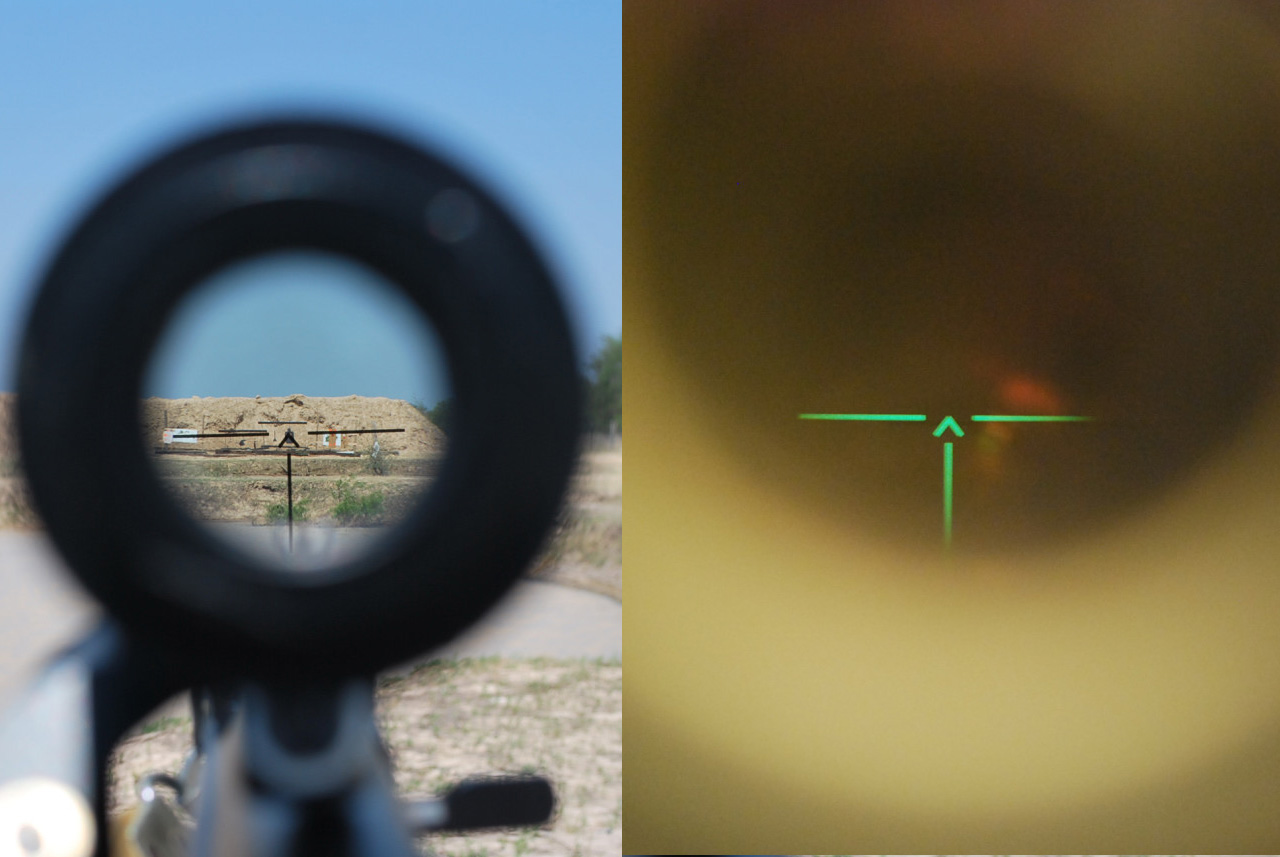
i cannot get a sight to be emissive only during night, and be black during day. (collimator not model optics)
anyone knows any way to do that
what i am trying to achieve: http://zenphotos.net/file/Online/SVD/Optics/Rakurs_Reticule.JPG
 torn mesa
i so wish arma had proper pip for scopes, rhs 3d scopes feel so natural
 stoic urchin
@frozen blade You'll probably need a script similiar to this:
https://github.com/acemod/ACE3/blob/master/addons/map/functions/fnc_determineMapLight.sqf
Then depending on how you model it ideally blend linearly between the two 2D scope textures or change opticmodel at a certain darkness level
frozen blade
@stoic urchin - i am trying to find a mre direct approach, without scripting where possible
ashen granite
Maybe modifying the emmissive in the model config with clockHour ?
frozen blade
that might work, although i need to average it out
nocturne lake
"old way" didn't work?
frozen blade
nein
frozen blade
fixed it, in case anyone wonders is actually pretty easy, if you don't forget to take alpha in consideration as well (thanks to @nocturne lake is solved)
stoic urchin
doubt this is possible without scripting
unreal magnet
It is - Pufu just proved it 😉
frozen blade
@stoic urchin
diffuse[]={0,0,0,1};
forcedDiffuse[]={0,0,0,1};
emmisive[]={25,25,25,1};
specular[]={0,0,0,1};
specularPower=8;

PixelShaderID="Collimator";
VertexShaderID="Basic";
RenderFlags[] = {"NoZwrite"};

    class Stage0
    {
      uvSource="texCollimator";
};```not really sure why you doubt that is possible though...
stoic urchin
Just didnt think that you could do it through rvmats...
ashen granite
model.cfg my friend
nocturne lake
That'd be no good since you can't animate any attachments besides bipods, which only have 2 working animation sources specifically designed for them
dense peak
I am looking for a texture maker for my server
frozen blade
what's the pay?
dense peak
5 dollars a year? 😛
 distant rose
plenty of free image applications on the internet, go forth and create your textures
frozen blade
[1:27 AM] marines4never: 5 dollars a year?
yeah thought as much
young hound
Hey, could someone point me to a vegetation rvmat or a tutorial, in use in A3 of course 😉
frozen blade
there is no such thing afaik
young hound
just leaving this here : http://i.imgur.com/kH75sLQ.jpg 😉 auto-generated with speedtree, would love to have a fonctionnal sample ^^
 silver gull
why dont you look at the game's files? plenty of rvmats...
frozen blade
speed tree is fine and all
but you need to have a look at how both textures and faces normals are handled
young hound
Binarized rvmat can be openned ? I'll try to see if I can open A3 ones.
brittle cosmos
Arma3P should unpack them all in the a3 directory
nocturne lake
I use Kegety's old unRAP tool for opening binarised .rvmats and config.bin. Still works
young hound
thanks, that worked @nocturne lake 😉
silver gull
just drag&drop the binarized text file onto cfgconvert.exe in the tools folder ... and voila. Debinarized
nocturne lake
with unRAP I just set file association for .bin and .rvmat, and it converts it to a readable .cpp next to the original file when I double-click the binarise file. No dragging or dropping to other locations. Haven't tried doing file association for cfgconvert but maybe that'd work the same way too
unborn river
Hi guys. I'm having a little problem with my MC file. Some of the markings get streetched ingame, but they look alright in Buldozer
ingame:
https://www.dropbox.com/s/zf8ohym1rred33v/20160508120005_1.jpg?dl=0
bulldozer:
https://www.dropbox.com/s/c5y2quvilgm2uam/ob.png?dl=0


I got no clue as to what causes this. Most of the markings look fine, but a very few of them looks like this
unkempt fulcrum
does anyone have any texturing guides
mostly not trying to do anything super complicated
just replacing vehicle textures using preexisting textures
 tender fjord
with unRAP
kegs and I wrote unRap for the XBox elite. we got most of it right except for delete and enums. since then the world has moved on, and you should be using deRap.exe (functionally identical).
las time i checked the bis tool to do similar would not decode enums
 modest dragon
Hey Mikero, would just like to say thanks for Eliteness. Great tool
tender fjord
appreciated
silver adder
When did @tender fjord finally join the dark side .... I mean discord
tender fjord
that's coz i missed you pinga.
frozen blade
oh shit mikeros about
 cerulean sandal
@unkempt fulcrum I have some guides on how to get started replacing textures for uniforms but the process still applies to vehicles. https://youtube.com/ma77h3hac83r
unkempt fulcrum
 you @cerulean sandal
cerulean sandal
@unkempt fulcrum If you need any more help or explanation just PM me here.
tender fjord
everyone except those who find 'undocumented features' in my tools.
 primal spade
The optre mod has a number of models that may be pretextured, does anyone know a way around it?
 woven storm
What do you mean pretextured?
dull tusk
i guess he means no hiddenselections
woven storm
Oh
dull tusk
just textured inside the p3d
woven storm
Got it
primal spade
basically ya, they already textured the model before putting the textures in the config.
 stuck geyser
can anyone make a hook model?
modest dragon
sour sphinx
has anyone had issue with their rvmats not being loaded recently?
nocturne lake
With hiddenSelectionsMaterials? Yes, it's fucked
sour sphinx
yep, that's the culprit, I can no longer see the details of my nohq's in custom uniforms thanks mate
unreal magnet
yeah, I tried contacting @crisp edge about it so he redirects me to someone in charge, But no answer yet
sour sphinx
Has BIS changed the way/format of their RVMATS since the Splendid visual update then?
unreal magnet
it doesnt even work with the old lightning
sour sphinx
the uniform addons I made before, using the same config.cpp there's no issues, but anything new, it's fucking mince
It seems pointless for the guys now making custom uniforms, the likes of RHS and Cunico, as they wont work
unreal magnet
not even uniforms, but also weapons...
sour sphinx
I hadn't notice the weapons as I haven't made new ones for a while.
nocturne lake
They seem to be hiddenselectionsmaterials-able if they are applied to one .p3d. So you can swap textures and materials sets between models, but not call new .rvmats
sour sphinx
yeah, it's wank! I've ripped apart several uniform sets I've made, and still no joy, but the old ones made 2-4 months ago are fine... argghhhh
nocturne lake
Yeah, I'm starting to wonder if it's an issue with how the updated tools handle .rvmats. Haven't tested whether leaving them un-binarised (i.e. put in the "list of files to copy directly") helps
sour sphinx
they fixed the DLC icons, and break the rvmats hahahahaa
now there's an idea!! don't binarise, and maybe use the old tools from A2?
nocturne lake
old tools wont handle stuff like v70 p3ds
sour sphinx
The new sets I'm making were done with the A3 tools
not so much for the p3d's but for the rvmats for uniforms?
nocturne lake
perhaps, if it's just textures and config it might work
sour sphinx
I shall give that a try , yeah all texture and config shit
nocturne lake
something to raise with @crisp edge if the old tools work but the new ones don't, certainly
sour sphinx
back in 5 mins, will let you know if there's any success 😄
yep, I used binPBO and didn't binarise and the HiddenSelectionMaterial worked @crisp edge can you take a look at the way that's structured please?
it also stopped the error "13:33:48 Deinitialized shape [Class: "CRYEGEN3_Tan_01"; Shape: "a3\characters_f\blufor\b_soldier_03.p3d";]
bollocks that deinitialised error is still there !
 crisp edge
@unreal magnet I replied to your message :)
@sour sphinx Are you talking of binPBO from BI Tools 2.5+? A shape deinitialization is not necessarly an error.
Ps: Be aware that I'm not reading the Discord chats on a regular basis
@nocturne lake rvmat are processed by CfgConvertFileChange and it wasn't recently updated
sour sphinx
Yes Tom, that tool works fine when you make the pbo, using the HiddenSelectionMaterials, but the new updated A3 tools will not work, the deinitialization doesn't seem to be a show stopper
when I think back, I used BinPBO to create my previous uniform addons, that used the HiddenSEelectionMaterials, and not the A3 addon maker
but appreciate you taking ther time to respond
crisp edge
Could you send me all intel you have on your issue, I will try to go through it (by PM otherwise, I will probably loose track of it)
As the old tools are dicountinued, using them is not a proper solution 😃
sour sphinx
For sure yes, I will put them into a PM for you, I actually asked about this on the forums, I shall give you the link for that as well for your perusal
Whatever algorithms are used in the Old BinPBO's with regards to the hiddenSelectionMaterials, hasn't seem to have migrated to the A3 Addon builder in the A3 tools
there's maybe some conflict when it binarises as well, I'm not savvy enough to understand the process and procedure
crisp edge
Oh, I already have this topic in my list. As for the algo, add it in the PM, I will double check. As for the deinitialization, in brief and English, it's unload ^^
sour sphinx
you've lost me, I don't know the algorithm used, I just hit "make addon" and let the tools do their thing lol
Da12thMonkey suggested trying the old tools to see if the errors were there, and low and behold, the old tools created the rvmats, with the hiddenSelectionMaterials, so there's maybe something not quite working with the A3 addon maker, that BinBPO seems to rectify?
sour sphinx
Anyone any ideas what would make my rvmats crash? when I open them and go to select the texture for the nohq, the rvmat crashes
nocturne lake
Crashes what? Material editor? I just do .rvmat editing in notepad
sour sphinx
yeah the actual rvmat just crashes, normally I could edit it by opening it, but it's crashing now as soon as I select the drop down box, so yeah have had to start editing in notepad++
 dusk bone
its curious , the mirror.rvmat from A3/data_f/mirror.rvmat : i try to UV maping a box, the top , bottom, front and back are really fine , both of side are reversed like the sun are in bottom not in top of the face .( i tryed to mirror it on Y axe or X axe , but nothing happen ) any one know why this uv mapping dont change any visual ?
if you want see the visual bug : http://www.noelshack.com/2016-20-1463651377-bug-rvmat.png

if i take off the rvmat i can UV mapping this really fine , but with this rvmat im almost stuck to this image
dense peak
maybe not mirror but rotate?
dusk bone
no, finaly i found
i need to smooth (keybinding : i )
just after a smooth all was placed exactly where i wanted
primal spade
Is there a video tutorial that talks about making new maps and rvmats?
frozen blade
no, but there are written tuts on the matter
torn mesa
i have a question, sometimes hands loose material for the hands (they start to look flat with just a skin texture on it) of the unit if the unit was loaded first after the game starts, what can possibly cause that?
torn mesa
after hours of testing i found the problem, it was requiredAddons section, i didn't wait for the proper pbo that has all those materials and textures, never underestimate the power of requiredAddons
 frozen blade
0/10 😉
 twin bane
😆
silver gull
i find camoed guns look a bit poor ingame unless they are very heavily weathered (just general observation)
or maybe i'm just no fan of fully sprayed guns in general... pure metal please 😄
ashen granite
Typed "philipine service gun" on google, and found this:

Please someone explain wtf is going on in this picture
dense peak
I guess the tape is to prevent that dirt gets into the barrel

Mail Online
These pictures show policemen on parade for a 'sealing of firearms' ceremony at their headquarters in Camp Crame, suburban Quezon city, north of Manila, yesterday afternoon.
 worn jasper
Hey guys, is there anyone on here who would help me texture a cockpit?
silver gull
which vehicle?
worn jasper
EA-18G
unreal magnet
I'd lvoe too, but I already have enough projects 😦
silver gull
@worn jasper do you look for somebody who does the work for you, or do you look for advice how to create cockpit textures (labels, dials, etc) ?
worn jasper
Ive never done it before, so I was looking for both, so I could learn along the way.
silver gull
well i have too much to do to do the work for you, but i can give you advice how to do it
worn jasper
I have never done a base texture in my life, so anything at all would help
silver gull
max or blender?
worn jasper
max
silver gull
ok good
worn jasper
its basically all unwrapped too, just on the texturing stage, and dont even know where to start
worn jasper
Anyhow, if anyone could help me that would be great, really eager to get this plane out for you guys
unreal magnet
Message me in direct.
dense peak
I have one of the ArmA 2 samples for the Blackhawk helicopter. I would like to make it green. Would you say using Photoshop's selective color replacement is the best way for this?
silver adder
The best way? deffinatley not! the easiest and fastest sure, but far from the best
 hardy atlas
Hey, can anybody help me export from substanec painter to rvmat?
frozen blade
@silver adder had an exporter for SP2
frozen blade
nope
hardy atlas
do you know how i can contact pinga other than discord?
nocturne lake
I thought Pinga's exporter was for Quixel Suite rather than substance?
He made one for Quixel certainly https://github.com/p1nga/RV4-Calibration
hardy atlas
can i send somebody 2 models and they port it to A3 for me? just the mesh and texture (no LODS or whatever)
twin bane
mr rampling did the one for SP
i have it uploaded somewheres, i'll find it here in a minute..
dire laurel
how do these exporters work?
primal spade
Any tips i can follow to get a semi-worn down paint on metal? Im working on retexturing OPTRE's ODST armor but im having a hard time getting the armor feel like its been through a lot.
unreal magnet
Just take a look at Russian tanks
silver gull
@primal spade For rusted paint - Step 1: Create a base rust materials consisting of diffuse, specular and gloss texture (the darkish brown areas here http://www.traveladventures.org/countries/south-georgia-and-south-sandwich-islands/images/grytviken09.jpg) Step 2: create a base paint texture with diffuse, spec, gloss. Use a mask to blend between base paint and rust. How the mask is supposed to look depends on what state of "been through alot" you want it to be. Once that is done, add rust-colored-streaks that run downwards (this is due to the rain "washing out" the rust) onto the base paint layer
warthunder has some very nice textures on their tanks. It's F2P, so you can check all the models in the menu viewer for free. They don't have alot of rust though. Only chips and dirt.
 daring mauve
Hi, there please can you give me advice, how to texture objects like this http://www.kralickysneznik.net/photo/687/download ? Should I use multimaterial or more individual textures?
frozen blade
multimat
silver gull
multimat + tiling textures
multimat due to higher calculation efficiency and blending between textures, tiling textures due to allowing detailed textures on large objects
 nova hatch
Anyone know of a program or a way within arma to see an object in 3d while you are retexturing an object in arma? It would be like retexturing a hatchback by using hiddenselections rather then it being a brand new model
brittle cosmos
Retexturing a binarized model? Otherwise I can't see why you couldn't load it into a 3D modeling program or OB
Worst case if it is a binarized model you could include the texture in a mission file and keep reloading the mission after you made changes to the texture
silver gull
too bad tanoa terrain textures will likely be in an EBO ... would have liked to create more bunkers with those textures. The church also looks pretty dope
dense peak
Couldn't one use a dummy texture with the same path and it will show up ingame?
dense peak
Yea...
silver adder
if you create some fake files at the correct path on p:drive you can deffinatley utilize stuff from inside ebo at runtime, but you will never see it outside of the engine without doing some 'frowned upon' things
brittle cosmos
You could get creative to find the textures and see what they look like without doing anything frowned upon. You can find the model path from the config browser, then check the data folder for every possible combination of characters for let's say a length of 20, and use the loadFile command on it. If loadFile returns "", then you know the texture doesn't exist, but if it returns something else you now know the path to the texture and can just display it using a dialog
Practical, no
Possible, yes
silver adder
yeah, but if you want to texture over the top of it...........dxdump........
nocturne lake
doesn't always work with some alpha textures and .rvmats if they're not unpacked to your P:\ drive though