#arma3_animation
1 messages · Page 23 of 1
 desert raven
 sacred oxide
i know parenting the very basic, but when i press shift up, between two armatures, no physical changes seem to happen? so im confused
shift p sorry to make/remove parents, the procedure isnt clear cut
desert raven
I dont know what you are even trying there at all
I dont think you are in the right track there at all
sacred oxide
im trying to move the hands from handling the rifle, downwards to moving up towards where the NVG would be, to simulate turning NVG's on/off
desert raven
while that sounds simple, it is not that when you dont know how the rig you are using is build and meant to be used.
sacred oxide
me trying to remove parent - but getting nothing happening - https://imgur.com/a/ZFzzfu1
desert raven
why are you trying to remove the parent?
also what you probably are after is the constraints
not parents
it wont work if you just bash it with a hammer
and I know its frustrating as you want to do something simple sounding and it you want to do it fast
but you are lacking a lot of basic knowledge there
sacred oxide
indeed
im trying to get research down, but found nothing but modelling and animating a weapon, and the way the guy talks is even more confusing
desert raven
you dont want anything about animating a weapon
you need basic baaaaasic animation stuff to begin with
sacred oxide
not because im stupid, but his delivery isnt simple and to point, his whole pitch and delivery on info isnt articulate
desert raven
you are trying to find too exact information
sacred oxide
i am, remember them videos i posted the other day? ive looked at them, theyve helped me understand alot of things
before i complain any further, and rant (which is what im doing now), im going to just try and look at this david abbitts youtube page again
desert raven
you dont want anything Arma related
sacred oxide
David abbitts content isnt arma related, so, thats good, i guess lol
desert raven
well if his methods dont fit you then you need to find something else
Aslo older 2.79 tutorials are still valid even if the UI is different
sacred oxide
all i know is, once ive cracked it, im going to do my own video tutorial, covering all the very basics in one long video (then probably condense that big video into smaller videos), so that others dont get into the same struggle as i)
so theres longevity to this struggle
again, @desert raven thanks for bearing with
found some tutorials on grant abbits page, dude is a godsend, https://www.youtube.com/watch?v=4OUYOKGl7x0
my eagerness clouds my judgement, once again
@desert raven last question, is the arma 3 rig a high poly person? lol
or, in laymans terms, whats the difference between a low poly person and the arma 3 person in blender?
desert raven
I dont really understand what you are referring to. The example model you see in the Macsers rig is the Sample character from the Arma 3 Samples
the character does not transfer over anyway. its just there to preview what your bone movements do
 naive hemlock
i said this will happen - 100% of the questions here are in relation to the lack of knowledge regarding both software and animation in general, nothing to do with arma's animations hiccups or constrains....
sacred oxide
@naive hemlock You were right all along, i guess...i just wish you said it with abit more patience, like @desert raven did.
but, although im reading more and more videos, there will still be some 'silly' questions, as im gathering knowledge to best of ability. Ive also found way more helpful discord channels that help, so probably wont post here again, as responses are somewhat limited.
*correction - right with the context of what you said, but your delivery and content was off
just do everyone a favor, and never become a teacher though, teaching/instruction is 100% not your field
so, others will look at my message now, think of this channel and say to themselves 'well, damn, im abit reluctant to post now, incase i get flack'
naive hemlock
you still can't get your head around it
of course there are other discords and places that are aim to get you the help you need
for every single skill level, from noob to pro
that are software specific
autodesk has such discords for max and maya etc
blender has its own and so on and so forth
it's best to ask the questions where you will get more help
example here, about 30% of the people in ArmA modding are using blender
around 10% of these have the know how and/or are making animations
what i always said is that you need to do the leg work yourself, and once you are stuck, then ask the questions
in this particular case, ask the questions that people who make animations for arma can answer arma specific questions, not really software specific - my case, i don't use blender, i use max, the principles are the same, the import process is a bit less straight forward
but again, the general principles are precisely the same
desert raven
When I started modding Arma I basically had about 6 months of time between jobs where I just combed through forums and such to understand how to put stuff into Arma. That gave me enough knowledge to go forward. Back then there was no Disocord either, for me there was just the forums and what else was online (6-7 years ago). I had some prior knowledge of animating but not much in Blender, that knowledge I gained by experimenting with stuff for couple of years.
naive hemlock
everyone learned that way
not sure how the teaching goes these days, but back 8 years when i was in uni, no one was holding your hand anyways
maybe things changed and everyone has a 1:1 sessions with a teacher these days, all the time
 zenith token
todays modding beginners are spoiled with information material. If i would have to start learning now, i could do it in less than half the time required that it took me to learn what i know now, propably
sacred oxide
@desert raven makes sense, that makes me the lucky one, @naive hemlock go read @zenith token 's comment, hes 100% right. You comment, is just indirect, passive agressive, child, i need my dummy comments. Resentment comes to mind.
desert raven
All in all what you should take from all this is that you may need to lower your expectations on the possible timeline you may have had in mind. It may take weeks, even months before you know enough.
sacred oxide
i believe it will take me a few days, but, if im wrong, will put my hands and say 'you were right', ambitious? yes. Eager? yes. Possible? definitely, im lucky enough to find a plefora of recently uploaded free tutorials, and a blender/dev discord.
think im just very lucky
to have so much information to hand at the touch of a mouse
desert raven
Indeed.
 mystic skiff
@naive hemlock Hi, As I was saying the other day, i'm having trouble importing my animations fbx in ob, could you give me a tip on how do you manage to import your animations from max ?
zenith token
export with bones and animations, and then import... there is no special process required
so you are doing something wrong, which means you need to give details exactly what problem you have and what you use for export & import settings etc
mystic skiff
I've detailed everything (i think) upper in this channel (28/04/2020)
zenith token
what fbx plugin version / what max version?
mystic skiff
max 2018 same fbx plugin version tried with fbx converter also
zenith token
i use 2013, binary, no problems there.
mystic skiff
well when exporting, I tried 2009 /2013 / 2014-15 format, didn't work
you're using max 13 ?
zenith token
yeah, max 13 and fbx 13
i convert everything to editable poly (except bones... naturally)
mystic skiff
Ok, I must have it somewhere, i'll reinstall it and will give it a try (if i can downgrade my .max file version to 13)
No it loads well in blender, and fbx from blender don't get read either by ob
Yeah i know that you have to convert in editpoly everything before
zenith token
you cant downgrade max files... not to my knowledge anyway. Maybe with some (propably not orthodox) 3rd party tool... but doubt it. You can transfer via obj or .3ds though
except rigs...
unless you install max versions in between... i think max can "downsave" 3 versions - at least mine does
naive hemlock
@mystic skiff does it work importing amything as fbx?
or is it just the animation that doesn’t work?
as in animated FBX
mystic skiff
yes Pufu the character fbx from arma sample does work
I don't think it is rig is it ?
X3KJ you can, but yes it think you are limited in terms of which version you want
naive hemlock
have you given fbx2rtm a try?
mystic skiff
yes i did
naive hemlock
not the character fbx file
make a box or alike
export from max
import in ob
no anim
see if that works
shouldn’t matter tbh, afaik the fbx plugin for ob works with fbx version up to 2016
mystic skiff
I did already and it doesn't
i've try converting the fbx in binary 2011 (and ASCII 2011 just to give it a try) as was the sample but it doesn't work neither
I think i got to learn blender ^^
naive hemlock
i think there is an issue with your tools tbh
 deft fern
@mystic skiff https://forums.bohemia.net/forums/topic/221859-new-animation-workflow/ did you tried this one?
Bohemia Interactive Forums
Hey guys, Ive just finished up a guide and new rig for Arma 3, it uses 3DS Max, so unfortunately anyone using other software are out of luck. It completely omits Object Builder and uses FBXtoRTM instead, Ill let the guide explain all, cheers.https://gum.co/KAOLj (Pst, its free...
It contains quite neat step by step instructions for animations import from 3ds max
mystic skiff
@deft fern i did not. I’ll try
sacred oxide
- (Trying to move an animation from blender into video game (Arma 3)
(have tried to research and watched several videos prior to asking, but seems to be a datagap here)
(currently have 3 versions of one anim (.blend, .mkv, .p3d)
Question:
- unable to export as RTM (https://imgur.com/a/pFIeLBI), (RTM option grayed out) (following this video here https://www.youtube.com/watch?time_continue=57&v=Q0ACIBZrNIA&feature=emb_logo @ 1:14)
- Do i need to have a BVH file? if so how do i make my anim a BVH file?
- Any general advice?
desert raven
rtm export is the way to go.
dont bother with the bvh stuff
RTM export needs you to have the armature selected and set up with the Arma Properties the Toolbox uses to export for Arma
sacred oxide
wow...again im 100% lost
no im not
@desert raven successfully exported as RTM, thankyou so much (definitely going to do that video tutorial) lol
desert raven
I would actually think that a written tutorial would be better
it would be easier to maintain and update
because you may not get everything right the first time
sacred oxide
id do a video tutorial, and have sections, so, its not one consistent shot
desert raven
I got to admit that I for one will likely not proof view it
sacred oxide
so, one shot for one area, one shot for another, so when going back to video edit, can reshoot and simply replace, on the video editing program, with ease
desert raven
as video tutorials dont really work for me
sacred oxide
it will be a basic video tutorial, and then, as i learn more or others give critique, will update accordingly
desert raven
I get distracted
desert raven
the pace is too fast or too low or some tidbit is still missing etc
there has been very few video tutorials I have found helpful
sacred oxide
indeed
desert raven
or well if they are very short that works
sacred oxide
ive had to take little bits of info from all
desert raven
but long ones are not easy to navigate
if 10 things happen in 5 second period
and that can often happen
sacred oxide
indeed, hence why i try to give timestamps when referring help points to guys looking for help
desert raven
or the video is slooow paced and takes forever
where a text document I can go through on my own pace
and if I need to ask about something I can basically point to a line number
instead of timestamp
and there a loot of "moving parts" in this process
desert raven
if you want your workflow to be proofread by people here text version should come first
that way you could have your method validated
sacred oxide
my inclination to provide media reference, is the information retention rate, is better (not always, but generally)
i believe is around 80% new information retention rate over text, which, (varies, is aroun 65%)
desert raven
seems like people are saying that a lot these days
perhaps the problem is the quality and false information in most Arma related videos
sacred oxide
(and also im a videographer/photographer by trade)
yeah, misinformation, not articulate enough
desert raven
could be thats partly why I dislike video tutorials
but since we can incorporate pictures, gifs and videos on a written tutorial I find that much more informative way to convey complex procedures
anyway, thats just my 2 cents about the matter.
carry on.
sacred oxide
well, were on the same page atleast, whats your background? coding?
desert raven
I've learned this stuff mostly as a a hobby though it turned into job opportunities later.
 tired depot
I think videos can be an excellent learning resource. The preferred one for me. But it's not an easy thing to do well. Some people are just better at it than others. Even the more "static" type of tutorial, with text and images.
sacred oxide
very nice, same for me, turned all my hobbies into jobs, i wouldnt say i was lucky though, i worked hard for it all
@tired depot hey, thanks for your resources you made public, thanks very much, if it wasnt for you armarig and video (first and foremost)
tired depot
Thanks. It's nice to see that people got some usage out of it. 🙂
sacred oxide
@tired depot im going to be making a video how to soon, to help people in carrying out basic video production tasks, will send it your way once its done, since youd like to know that kind of stuff
sacred oxide
@tired depot Hey dude, do you know how to export animations onto arma 3 from blender by any chance please?;
- Animations into arma 3 (triggered via keyboard button)
- Animations into arma 3 (triggered by actions, e.g pressing i for inventory)
- Animations into arma 3 (how to replace dynamic walk/run cycles?)
 fast canopy
What do you have?
http://friedenhq.org/arma-ii/fhq-arma-toolbox-for-blender/
- RTM Export. Arma Toolbox can now export RTM animation files ready to go.
@sacred oxide
sacred oxide
arma rig by macser, alwarrenstoolbox, the one anim in .blend, .mkv, and .rtm
fast canopy
You've .rtm? Is that your goal isn't it?
sacred oxide
so your link is another convenient feature in this process?
i got to the RTM point, but lost on the next steps
sacred oxide
i wouldnt know that lol
can i direct message you? to prevent channel spam? i wont take much of your time, if thats ok? please @fast canopy ?
fast canopy
It's okay but I'm not an expert either
sacred oxide
thanks
sacred oxide
i want to make new animations, for them to work in game, should i work off the existing rifle pose? https://imgur.com/a/FPH0RCR
and, how do i make this red triangle, be attached back to the wrist area? https://imgur.com/a/4Sy4qrZ to https://imgur.com/a/f50oyLR ?
desert raven
The red triangle is part of how Macsers rig is build. Unfortunately RTM import disables all constraints so the special in build features of the rig are unavailable. You can try to rebuild the constraints but it is not easy task. In that regard you might get better results with your own rig that you are more familiar with how it is build.
sacred oxide
i think i can work without the red triangle, just means i have to highlight multiple armatures at the same time (especially when working with the hand/finger area) for now
_________________________so, if i was to make my own rifle standing anim, and then make my resective gestures (e.g hand signals) off that, how does that transfer onto current game?
- everytime a relevant button is pressed, the model goes into my rifle pose then plays hand signals, then goes back to default rifle pose?
- my rifle poses becomes the new normal rifle poses, and hand signals work off that, nicely
@desert raven ?
please
desert raven
Hand signals as gestures can be set up to blend by time so the initial position does not necessarily need to be that accurate at the beginning
The config part I can't remember off the top of my head.
Your rifle pose you can't really easily use to replace the default one however
As its tied to all movement animations
I don't think that is in your skill level yet.
sacred oxide
right, so that ties into my request in #creators_recruiting post point 3 (Point 3. Animations into arma 3 (how to replace dynamic walk/run cycles?))
someone told me somewhere, that...;
'For 3. I doubt it's possible to replace by default/dynamically by such like weapons. Vertexmacht mentioned about this and they didn't imlement the system
Either way the thing you need to look is CfgMovesMaleSdr'
so...long story cut short, its in my best interests to just work off the existing rifle combat stance? https://imgur.com/a/FPH0RCR
desert raven
Well since you are in a hurry, yes reworking the movement animations is not really in your reach.
The config parts are not really much documented so it would require you to understand how Arma configs work very well and interpolate/deduce what to change and where to make it work.
sacred oxide
ok...right that makes sense
so point 3 of introducing new walk/run cycles/styles is a big no no for me
but, for other stuff, like hand gestures, (answer for this already may have been given), its best to make the hand gestures based off the curent rifle pose ?https://imgur.com/a/FPH0RCR
 slow inlet
Do you want the hand gestures to be based on while you are holding a weapon? Was some time ago i did gestures but doesn't playAction preform a smooth transition to the gesture?
slow inlet
My best suggestion is then try something simple. Move his hand or something. Write your config and get it working, play it through playAction in editor and then go back creating something more advanced (Thats atleast what I did when I was making animations and gestures)
sacred oxide
@slow inlet what im doing at the moment is working on the 'halt' hand gesture, (As for config will learn abit more bit by bit over coming days), then yes will play in editor
then, will go onto more advanced stuff, that was already my initial plan, after alot of self deliberation and reflection, but the advise you give is taken in nonetheless, appreciate your input and help 🙂
but i got to say, this https://imgur.com/a/oGMoFKg is poorly designed and designed with no thought for the future users, i mean look at this https://imgur.com/a/1VxWGxi
@tired depot's 6.2 rig is alot more ergonomic and user friendly
i mean look at that poorness https://imgur.com/a/Lrfotii - how are you supposed to line up all the knuckles like that? and the mesh gets distorted if you move only the forearm, not the hand...doesnt/shouldnt the hand go with the forearm?...https://imgur.com/a/hxPgKZ3
https://imgur.com/a/lDl68id all of macsers rig controls no longer work on this pose.... @tired depot dude i give you props..how long would it take you to update this rtm pose rig to your standard? out of curiosity?
For Clarification: (comparison is betweeen macsers v6.2 rig vs ARMA 3 Samples 'AmovPercMstpSrasWrflDnon' rig pose) (release dates unknown) @tired depot @slow inlet @desert raven
tired depot
I'm not familiar with the rig you mention. Although I don't see anything wrong with it, technically. Apart from the apparent lack of a hierarchy, it's a forward kinematic rig. "Updating" it would simply give you the same thing as my rig. I think what you and a few others really want, is the ability to import rtms and retain the ability to use constraints, drivers and control actions.
That's a different ball game. But I have done some experiments with it. It's not perfect though. Occasionally there's issues with the rigs going haywire after the blend is saved and then reopened. But it works at least for the period of time the file is open. There's basically two rigs, one for import, and one for export. Export (with IK) is constrained to the import.
sacred oxide
yeah, i seen that same issue you mention on the bis forums around 2 days ago, apparently its a solution no one knows the answer to...so, i guess, until this 'no ones' issue is resolved, were stuck with two rigs, for different purposes, right? @tired depot ?
have you tried to forward this issue onto BIS at all? since it is their creation
well, i fixed my fist...so now it looks like a fist...but it should be at macsers spec, e.g a control that varies the open/closed fist movement with consistency
my whole point being is boost work productivity and workflow...unnecessary time lost due to poor controls...a BIS issue
desert raven
This kind of animation workflow is not real production workflow. Its not a BI issue because they don't specifically intend these files to be used like this.
BI not BIS
Rtm importing is very backwards way of making animations due to how the format is. Rtm is the end product, not a easily manipulated animation work file.
This is something that will very unlikely improve.
Also you are now working with totally community made tools that are all out of BIs own pipelines.
Also. Like Macser said there are ways to try to keep the constraints working but those require the advanced knowledge on how it's done. There are no foolproof out of the box methods that would let you skip ahead of just purely learning how the animation tools work in Blender.
sacred oxide
I see, but BI and its CDLC would mean they should have an interest in developing the Community made items...
desert raven
If you aspire to make a CDLC you should perhaps talk to BI about what it means.
you cant just say you are making a CDLC, you have to be approved and contracted by BI
Or if you are working for some CDLC you should talk to its leadership who can try to talk to BI
and if you have already promised/contraced yourself to a CDLC to make animations thats a big ouchie.
sacred oxide
I see, but BI and their CDLC idea would mean they should have an interest in developing the Community made TOOLS* sorry (i cant use the word CDLC when advertising or recruiting, until accepted by BI) so i just say 'project' until then
anyway, i digress once again
desert raven
They cant develop community made tools as the tools are made by people who dont work for BI. Whatever DLC you want to make you will have to be able to make with whatever tools are available. I would say extensive animation stuff is not something they are looking for so as far as I know from what has been communicated about the intentions and goals of CDLCs back when they were announced
sacred oxide
ok, where can i find this 'info on the intentions and goals of CDLC when announced'?
desert raven
But yes not the point of this channel. I recall BI had a news article about that and stuff on BI forums. Like with most things the answer is "googling"
sacred oxide
will find it
desert raven
But I got to be honest here, you are not nearly there yet to make a CDLC pitch.
sacred oxide
i wouldnt even dream of pitching, i will apply when the CDLC is more or less done. no pitching required
desert raven
I dont think you understand at all what you are talking about.
sacred oxide
i know, exactly what im talking about
sacred oxide
thank you
https://imgur.com/a/IxeSGC3 - how do i get this transform toolback over my editing area?
please
sacred oxide
no, ive been doing alot of blender work via hotkeys, and must have accidentally pressed a key and no cant go bck
i remember someone saying something along the lines of geometry>geometry to origin
but i cant remember how to get there
 next eagle
How do I put a animation from animation viewer for a squad that is moving forward and clearing a hallway tactically while checking their surroundings
desert raven
possibly combination of playMove/switchMove commands
tired depot
@sacred oxide I assume they meant select the forearm bone and move the cursor to that location. Then select the IK target and move that to the cursor position. Using the snap menu.
next eagle
Okay would anyone be able to teach me how to do that bcoz scripting has been difficult and confusing for me for a long while and I can screen share
desert raven
probably #arma3_scripting or #arma3_scenario would be better place
sacred oxide
@next eagle ill help u even though its on wrong channels, forward on from @desert raven statement
next eagle
Okay thanks
sacred oxide
just give me 5 mins plz
@tired depot hey dude, im in the transform tool 'active tool' box, but not seeing the option to origin on cursor?
ok i got it now
i clicked on the forearm and the options werent showing, then i clicked off and clicked, then they did 😕 @tired depot
no, still got issues
all i want to go is geometry to origin!? can someone please save me pops SOS flare
desert raven
Geometry to origin refers to tool that centers objects mesh on its world space origin. I dont see how that is anyway connected to animation work
you cant treat this channel as 24/7 hotline on how to use Blender.
sacred oxide
ok, will lessen how much i use this channel, been on it more or less all day 😆
tired depot
A little brush up on the basics wouldn't be a bad idea. You don't have to do an in-depth study. Get familiar with the UI elements at the very least.
Then you'll be able to ask the right questions.
sacred oxide
@tired depot ok, will stop trying to learn everything in one day, will learn coding a bit, day by day instead. Good point. 👍
 broken seal
Hello, I did a walk animation with Blender (Arma 3 tools for blender) but my character won't walk. I know that I must add the xstep property on the geometry LOD but it doesn't work when I add it to my character geometry LOD.
Maybe I should apply this property on the skeleton before export and set the skeleton as geometry LOD
What do tou think about that ?
broken seal
I've just find the solution, I didn't know we can import from matrices in object builder (I don't use it) to edit the properties of the rtm
desert raven
the movement vectors can be set in the Arma Toolbox RTM export propertiese
 hexed hornet
but with blender 2.82 that panel is partially broken because of the missing icon
hexed hornet
someone already made a patch some time ago but it wasn't merged/released yet - https://github.com/AlwarrenSidh/ArmAToolbox/pull/10
@desert raven
broken seal
Thank you very much for providing the fix link. It works perfectly now
desert raven
i dont quite understand whats missing in my pics 😵
oh maybe I have newer version?
broken seal
@desert raven yeah I think you have the right version
desert raven
Best to remember to keep tools up to date
 swift burrow
holy,ive spent an hour or so getting a "ghetto fist" anim done but i am too stupid.could anyone help me with that,i am using blender and armarig
anims and me is like kryptinite and superman
desert raven
what seems to be the main problem?
swift burrow
well how can i get this into a fluid motion?i dont even seem to understand how i can record an anim and when i do the live editing its shivering
desert raven
best would be to start from basic Blender animation tutorials
swift burrow
is there an automatic "from t pose to end gesture"
desert raven
blender interpolates between keyframes so yes, if you set first frame keyframe to T pose and then frame 100 to your desired pose, Blender will interpolate the bone movement between the key frames
but as said, basic tutorials on how the animations work would be essential
swift burrow
yeah.well i overestimated my abilities to "throw that ghetto fist into the mod" haha
desert raven
yes animating is not quite that simple
when you know how the tools and the process works then it is simple
 tall walrus
Why are there animations that when I run them the player appears lying on the ground?
desert raven
you may need to explain what you are doing a bit more
tall walrus
you may need to explain what you are doing a bit more
@desert raven Im trying to execute some animations from A3L mod with "switchMove", and when i do it with some of them the player appears lying on the ground
desert raven
perhaps those animations are configured poorly or broken in some way
Life stuff is not known for quality
comparte to some A3 default animation if that plays properly
tall walrus
Okay, thanks, I thought it was my problem. Greeting!
naive hemlock
anims > a3l, pretty sure
swift burrow
well got it sorted now,kind of.how would i save an anim that is the exacts same but playing backwards?
desert raven
copy paste the starting frame somewhere after the hand frame on key it there
 carmine pendant
hi guys, tell me how to correctly export from 3d max animation when importing into OB everything breaks ..
carmine pendant
and with what parameters ?? model breaks upon import ... = (
desert raven
that I dont know, I dont use 3dsmax.
carmine pendant
😩
sacred oxide
blender interpolates between keyframes so yes, if you set first frame keyframe to T pose and then frame 100 to your desired pose, Blender will interpolate the bone movement between the key frames
@desert raven - how does this work? if i make an animation from T pose on blender? when i go to play it on arma 3 will it briefly play the t pose, before playing the intended pose?
or play straight from the combat/non combat stance within arma 3?
desert raven
it plays what frames you export
usually you probably would not want your animation to start from the T pose though
what I described was just an example of how the key frames work
sacred oxide
ok, so in order to do these non combat gestures, from unarmed/non combat stance, you need the actual .rtm for that pose?
desert raven
gestures can blend between the underlying animation but usually it helps to make it smoother if the starting frame is close to what the characters pose is
sacred oxide
found a video, (but its in francais) https://www.youtube.com/watch?v=kMt3xKUXAuI
@swift burrow ^^
desert raven
this is also a reason why video tutorials are not optimal
text tutorial could be auto translated
sacred oxide
indeed, abit of both works well
how do i access all of the file versions of the arma 3's animation viewer?
 regal dawn
Hi, all (: sorry if this is misplaced but I'm new to this Discord. I play Arma 3 and make little movies as a hobby. I always need more animations to use for short shots. Usually involving zombies, I can't find ANY. I was wondering if it is feasible to pay someone to port FBX animations to RTM or however it is done so I can apply them to characters?
Thanks for any help!
sacred oxide
regal dawn
Like, if I were to buy this https://sketchfab.com/3d-models/zombie-pro-27-motion-capture-animations-2aebf722ce9c4a8381e28242e3ee4661 would someone be able to make it useable in Arma 3 for hire?
sacred oxide
@regal dawn https://www.youtube.com/watch?v=kMt3xKUXAuI, you may aswell take time to learn, i am at stage of learning to port into arma 3, and this video shows u how
desert raven
that wont really work very easily @regal dawn
animations using differenty skeleton dont really translate into Arma
regal dawn
well hell
are there any programs you'd recommend for this kind of thing like scene building?
sacred oxide
scene building for arma 3?
regal dawn
no, if i can't port the animations into arma then i'd have it do it elsewhere
desert raven
well I suppose Blender could do it
regal dawn
like i tried to get into blender but damn it is extensive
desert raven
well what you are trying to do is not very simple
regal dawn
like making machinimas or animated shorts?
desert raven
that Steam/Valve movie maker probably would fit that bill
but you wont have access to Arma models or stuff in that
or well anywhere else either
regal dawn
hmm, i'll look into that then.. thank you so much!
sacred oxide
@regal dawn check out this guy, https://www.youtube.com/user/mediagabbitt he goes over alot of things very well, watch all of his videos for one day to get up to speed, if your making scenes, learning some CGI and animations, is a definite and a bonus
desert raven
Id say the key point here is that making machinima is a loooot more complex that it sounds
regal dawn
oh wow, that looks like a great place to start! i was just worried i'd end up learning like stuff about advanced particle effects or creating an animated model when i really just want to buy or use other animated models and stuff to build scenes
i know i sound dumb or ignorant, i'm just new to it all so i don't know what's possible or not possible yet
sacred oxide
@regal dawn to be honest, its an inevitable step videographers/content creators/cgi guys have to learn, whether you end up using it everyday or not, the skills you learn ALWAYS come in handy
regal dawn
okay i understand, i'll give it a go thank you! (:
sacred oxide
@regal dawn forward to what is possible and what is not possible, in concern to arma 3 (as this is the discord of course lol), there is alot of restrictions within the game, physix, animations, ai behaviour in and out of combat, and to code AI for a zombie situation? (i know nothing about coding, but it sounds like a big task) https://www.youtube.com/watch?v=XSex2K2TAQA (this video won arma 3's machinima video contest)
@regal dawn from writing storyboard, script, planning production and shooting scenes, arma 3 is a nightmare scenario, fvery labour intensive, just to set up one scene takes 1 hour or two, even before recording. (you can check out my youtube channel and on social media @sacred oxidegaming, i do what you do also) 😄
and just to wrap it all up, im working on a campaign for arma 3, so i have to make video cutscenes, but id advise against using arma 3 for video production, theres alot better ways of getting out higher quality content in a shorter timeframe @regal dawn (last point)
@desert raven do you know how i can access all of the arma 3 animations, that we see in animation viewer by any chance please?
fast canopy
switchMove
sacred oxide
@fast canopy no, as in like extract the raw file so i can use the rtm in blender to make gestues? please?
fast canopy
Illegal
fast canopy
As of EULA
sacred oxide
as in
i want to build off the unarmed stance and the weapon lowered stance?
i dont need the rest, just them two?
still illegal?
fast canopy
Extract raw file itself is legal, but impossible and illegal to unbinarize them
fast canopy
And what exactly do you want? Making a gesture never requires Blender if you just wanted to use existed rtm
sacred oxide
didnt even know that...think i need to read through that eula soon
for example, i want to make the peace sign with two fingers
or a selfie (holding phone) pose, for example
fast canopy
Basically you just wanted to make your own?
sacred oxide
i have to make it from a t pose, from 0 frames, how does this work?
yeah just want to make my own, i dont want to take arma 3 anims, not all of them, just the two neutral stances (arma 3 samples has 4 stances; 1 stand, 2 crouch, 1 prone)
something thats like the anims you can work off, that are found in samples
desert raven
@fast canopy I dont think BI will come after anyone who has used the .rtms to create more arma content
another thing would be to put them into another game or engine
fast canopy
If you're talking about Arma 3 Samples, it's (as long as you're not doing to rip into other games/products) kind of free to use
sacred oxide
yeah, everything i do is solely for arma 3
desert raven
no Im talking about the game file rtms
fast canopy
I mean fur, not you
sacred oxide
POLPOX, arma 3 samples is a public tool, like arma 3 tools
oh, well, yeah, i know that, but thanks for informing, best someone knows than dont know eh 😄
horriblegoat you reckon i should ask BI for clarification?
desert raven
I dunno.
sacred oxide
unless, i can just put my pose in from t pose from .blend to .rtm and put into game, id rather do that
desert raven
thats not how it works, no.
sacred oxide
because i would like some fluid transition between non combat stance into my poses
and thats what you were talking about earlier, right horrible?
desert raven
I dont know anymore
sacred oxide
lmao
desert raven
you bounce too much
fast canopy
Maybe FHQ Toolbox for Blender and Macser's ArmaRig will help you, as I said I'm not an animation pro
regal dawn
@regal dawn from writing storyboard, script, planning production and shooting scenes, arma 3 is a nightmare scenario, fvery labour intensive, just to set up one scene takes 1 hour or two, even before recording. (you can check out my youtube channel and on social media @sacred oxidegaming, i do what you do also) 😄
@sacred oxide yeah trust me, i know lol it takes me days to get just 30 seconds of the video
i uploaded this to show where i'm at, using vanilla Arma 3 animations https://youtu.be/XRZ2OaMDGj0
You can see how I cut real quick during zombie attacks since there's no native Arma 3 animations that would be 'authentic' as even the zombies mods use a grenade throwing anim
sacred oxide
@regal dawn 8 seconds in and hooked, your camera angles, choice, timing, transition and flow is amazing! (just going to finish off video)
regal dawn
Thank you! I really appreciate that, my biggest issue is with quick cuts during zombie contacts since it's near impossible to replicate a movie style zombie attack without good animations, you know?
I hired voice actors for this lmao 
Using randomLip for the military briefing near the end still proved hard to do so i used quick cuts there too
thanks so much! i'll dm you
naive hemlock
@sacred oxide there is a specific channel for this
sacred oxide
where else can i find a dertm tool apart from mikeros tools, thats free? please?
fast canopy
It's not free
 white juniper
You are working on a CDLC, but are asking where to get a paid tool for free? You should maybe overthink your ideas
sacred oxide
there many conversion tools out there that are free, so i thought it would be the same situation with the dertm, guess im wrong... 😢
desert raven
indeed.
you may need to save up to that. In the mean time you can still work on your animations
zenith token
save up for the grand investment of what... 15 bucks? I dont think CDLC is such a good idea if thats a problem...
naive hemlock
he is also searching for people to screenshare / hold his hand, payed thing, to teach him "scripting"
zenith token
the new era of game development and modding... apparently
white juniper
Dude CLDC's have budgets of thousands and expected earnings of tens to hundreds of thousands.
And you are debating about a $15 tool that you know you want?
I'd say forget that CDLC Idea, you are clearly not up to the task
tired depot
Is it really bothering you guys that much? I really don't see how it could be affecting your lives so terribly that it requires 3 or four of you to keep making a point. Not to mention the hint of arrogance on display regarding disposable income.
naive hemlock
@tired depot fair enough
white juniper
Is it really bothering you guys that much?
The same guy asking the same stuff dozens of times over a few weeks and also copying the questions to some of our DMs to get quicker replies? Yes.. Its bothering a bit tbh.
 hearty fractal
Not to mention that he's already been warned for spamming this channel......
sacred oxide
to be honest, i dont give a damn about what you guys think, do you pay my bills? are you my friends? No. So, unless you got something productive, helpful, or positive...just keep it moving
youve had your 2ps worth of input, and theres mine.
@tired depot amen brother 🙏
 smoky void
Hi, I got an animation for the rescue basket operator for the CH-46 in Arma 3. It's in bvh format from blender. I loaded Macser's ArmaRig_V6_2.blend, but the imported bvh is 90 degrees off the unit. I'm unfortunately not very skilled in blender, can someone do the conversion into rtm for me? Pretty please 🙂
smoky void
@crisp flicker you need load it in the animation window, not like a p3d
it's something 'open from matrices' or some such
you need to have the sample male p3d loaded in the main view
desert raven
You probably don't want to do the editing in OB though.
Unless you already are familiar with how the animation manipulation can be done in it.
desert raven
Yup. I've done few weapon hold animations in OB in the past, its not exactly fun xD
There is not really any easy/fast way to make animations if you dont know anything about the subject
desert raven
@sacred oxide with comments like that you are now adding to the toxicity you critize. Please dont do that. Asking stuff here is ok but certain types of questions, especially how all different programs work are not really in the scope of the channel. Such questions can be asked too but then expectations for answers have to be realistic.
So you are correct that for learning how animation making works in Blender there are more suitable places to find that direct information.
I dont
It was not comment on his knowledge
just statement that there is no easy fast ways of doing so when coming from 0 knowledge
I am not a paid teacher here. I advice voluntarily here with what knowledge I have
I cant take everyone under my wing and hold their hand through the process
what you are accusing me of is very uncalled for and is now the end of the line for my advice for you.
naive hemlock
you dude has some nerve
there are people in this channel who have shared their knowledge for the past 10 years
and now you come and try and teach people like goat
how to help others?
sacred oxide
keep chat to animations only
smoky void
thanks, got some help already 😄
sacred oxide
Is there a way to port the arma 3 backpack into blender anyone, please?
 compact ravine
no, because that would involve breaking the EULA.
if you need sample models, look at the arma3 samples package on steam.
but given i've just read up, since you seam fluent in animations - and by definition that includes modelling and mesh weighting too, you shouldn't need to.
being the pro you are.
sacred oxide
@compact ravine thanks for calling me a pro, read further up, and notice how new i actually am, thanks for the compliment. But your same sentence shows that you pick and choose your information to include to suit your agenda. Keep the chat solely positive and to animations, no passive, underhanded comments.
oh yh, my oldest comments were deleted as regarded as spam, even though it was a complete rookie learning the ropes, so you cannot reference, further to that point, wise advice, unless you know the full situation, dont speculate and have your input, because youre going to make yourself look stupid
compact ravine
you seem like a really petty type of person, in the effort to rise above your big-headedness I'm going to reserve any help to people who actually appreciate it.
sacred oxide
All im asking for is to give help, without the unnecessary additional comments. You can't just say anything you want and not expect a rebound. Lets keep it nice and colloquial, no hard feelings or grudges on my side
 edgy patio
Hi Guys
I was working on an animation pack of some nice static animations using the blender toolbox, and now ALL vanilla in game animations are broken for me with the addon not loaded. Placing units in eden editor are all in the vanilla CPR animation and if I try and move it puts me into the dead animation, reloading the 9mm pistol does the reloading the revolver animation and dozens and dozens of other animation glitches. The game is completely unplayable. When I load the addon all of the game animations work fine. I can join any vanilla MP server even with signatures enabled and when playing on KOTH and stuff I can't move and all the animations are still broken. I have verified my steam game integrity and its not fixed anything.
It is seriously so confusing
desert raven
sounds like a config issue that manages to overwrite/break the vanilla config
you can put pbos in wrong places
sacred oxide
hey guys, if i make a new animation, e.g putting NVGs on and off, do i only need to do it once or three times for each stance ?
sacred oxide
well thats very good news indeed, took a big anticipated weithy workload off 🙂
thanks @crisp flicker
desert raven
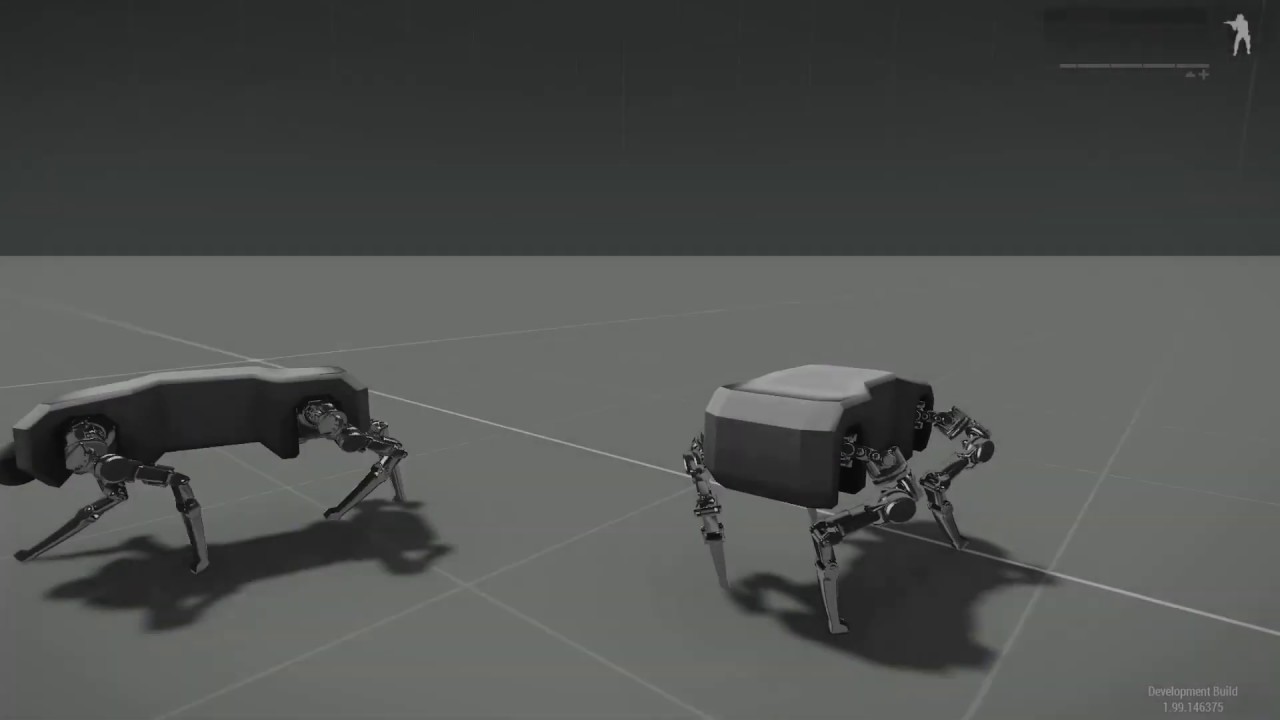
Doggo moves!
naive hemlock
@desert raven really nais, but i would alternate front and back legs
as in left front right back
and right front left back
desert raven
I could try that yeah
 viscid arrow
nice!!!
 desert raven
yeah theres little of that in there but its not maybe quite there yet
its enough to test it in game though 😄
naive hemlock
:)))
 worthy elm
Ah, I see your issue. All shiny and chrome, those legs are rising to Valhalla to live eternal.
 proud fossil
was working on this, but decided to make changes to the legs so it scrapped.
https://gyazo.com/c3f3fcae79b4cbe99327786860ea542b
 proud fossil
she destroyed that poor doggo with her mind 
desert raven
@meager oar you happen to remember if bones marked with @ in front of their name still get ingnored on RTM export
proud fossil
yeah they still get ignored. I checked a few months ago when i was having problems.
proud fossil
hmm weird, i just tested it and mine get ignored.
desert raven
2.8 blender?
proud fossil
yeah, 2.8.3
desert raven
odd
desert raven
ho. Someone had rotated armature 90 degrees without applying it
so animations exported sideways
fast canopy
Maybe because I didn't read this topic carefully but I didn't realized you're doing an rtm-animated doggo until now
fast canopy
So basically you do the new set of CfgMoves?
desert raven
ye
fast canopy
Cool
desert raven
I've done a few already in the past
or at least started them xD
and got them working in game
but still lot to do to finish them
girl and her doggo
fast canopy
21C style family
desert raven

Long time no news!
Well here's some!! Little teaser of things we've combined from various tests! Still a bit raw here and there.. But you can see where this is going!
The legs are still the old version but new ones are on the assembly line waiting to get stomping!!
Music b...
but also mechs
desert raven

Testing out new character concept for Arma 3
tap-tap-tap-tap-tap-tap-tap-tap
 zinc wadi
aaahhh that cam shaking
fast canopy
Time to mount a turret
desert raven

From popular demand, now with a turret.
already ahead of you @fast canopy
fast canopy

desert raven
 desert raven
@zinc wadi Gangnam Style!
zinc wadi
gj dude
 ancient drift
Can weapons have animations beyond just 1-0 frames?
desert raven
I think most animationSources play only between 0-1
deft fern
There are some above 1 though like time or ammo
sacred oxide
hey guys, do i need to include the launcher as present on every anim part?
sacred oxide
(i currently have access to)
- blender (.blend)
- Binarised sample RTMs (.RTM (unbinarised))
(currently have no access to)
- binarised RTM (.RTM (binarised))
- 'skel' file ? (.skel)
How do i debinarise a binarised RTM and move it into blender for editing?
white juniper
How do i debinarise a binarised RTM and move it into blender for editing?
You don't
sacred oxide
@white juniper elaborate please my friend
white juniper
If you made them yourself, or got them from someone else with permission you'll have the source files.
You don't edit binarized RTM's
sacred oxide
so, are we speaking legally here?
white juniper
Legally and technically
sacred oxide
technically i understand, as cant move binarised RTMs into blender
legally, well, ive got my own animations i created which i want to move into game, thats allowed (i believe)
white juniper
making your own content is allowed yes.. Taking someone elses content is not
sacred oxide
im not taking anyone elses content
white juniper
How do i debinarise a binarised RTM and move it into blender for editing?
Very much sounds like it
sacred oxide
well
im looking to edit some current in game anims, as part of a big mod
this is the part/step im confused about technically, and slightly legally
white juniper
im not taking anyone elses content
im looking to edit some current in game anims
 sacred oxide
so,do i need to email BI and get approval before i can make edits?
or apply for that CDLC application?
white juniper
Yes you would, but I am not aware of BI having given such approval in the past, considering even technically you shouldn't be able to make edits
If your CDLC got approved, you surely can talk to your contact at BI about that
But asking in here how to take/edit/republish someone elses content that you do not have permission for, before even thinking about asking for it... won't go well for your CDLC application if you plan so..
Especially not as a CDLC is paid content, which means you are selling content that you stole from someone else...
sacred oxide
right...well im trying to ask here, in public, in the open...for transparency, and clarification
white juniper
You asked how to edit binarized RTM's. Not if you are allowed to, or if its legal.
I told you so because I suspected what you were trying to do with that.
sacred oxide
how did the author of enhanced movement, or cups tank reload anim, were able/allowed to do that?
@white juniper
white juniper
They didn't
Considering this is your 5th time (if I counted that right) that you ask how to rip/steal content, despite every time being told that its not allowed, I will not further discuss this with you.
sacred oxide
sorry, let me make this clear, its not my intention to maliciously rip/steal content, i ask to provide clarification, so i am abiding by all legal laws, but also moral/ethical laws. There is nothing wrong with that, you jumping to the conclusion/presuming that i want to rip/steal content, is wrong.
i was hoping for quick clarification on what i can and cant do, not a situation develloping
sacred oxide
@white juniper sorry if caused any negativity your side, as your very busy dealing with multiple requests each day, would be inclined to act the same way as u do if was in your shoes, so yh 👍
 fleet matrix
Whats the best way to start making animation in Arma 3? Is there a basic tutorial created like ones for Terrain Builder or Object Builder etc or is it more open the samples and mess around till it works?
sacred oxide
@fleet matrix can send you some links mate
tall walrus
Good morning, I have a problem with an animation. When I run it to a unit it stays doing the action, but if I run it locally, it does the animation and almost instantly it is removed.
white juniper
Yes because the unit is remote
you need to run it where the unit is local so, remoteExec
Ah you are already doing that
uh 
tall walrus
Solution? @white juniper with player switchMove is not working
white juniper
my brain is confused now
desert raven
Player input might be cancelling out switchmove
Gesture would overlay with currently playing animation
tall walrus
@desert raven So disableUserInput could solve the problem you said? Or what can be the solution
 bold flicker
@rapid tiger
Depends on what you are trying to achieve with the animation, is it on of those altis life things where a player checks their phone?
Then maybe disableUserInput, open the phone dialog and reenable userInput.
tall walrus
Let me try, thx @bold flicker
@bold flicker ```sqf
disableUserInput true;
[player,"w_phone2"] remoteExec ["switchMove",0];
createDialog "telf";
disableUserInput false;
uhm, semicolon after "telf"?
tall walrus
But if i exeute just
    disableUserInput true;
    [player,"w_phone2"] remoteExec ["switchMove",0];
``` on debug console it works, but i cannot close debug xduhm, semicolon after "telf"?
@bold flicker I didnt wrote it, on the code is set
bold flicker
>     disableUserInput true;
>     [player,"w_phone2"] remoteExec ["switchMove",0];
>     createDialog "telf";
>     disableUserInput false;
> ``` I wrote this just to test, not working
> @tall walrus What's "not working"?
> Is the animation snapping back?
> Is the dialog not showing up?
> Does nothing happen?This @bold flicker https://gyazo.com/b8c10cab4b8ff8b649e71b6d51fb080c
bold flicker
_fnc_doMove = {
   disableUserInput true;
   player switchMove "w_phone2";
   createDialog "telf";
   disableUserInput false;
};
[_fnc_doMove] remoteExec ["call",0];
Just tested this, this should work
@tall walrus
tall walrus
let me check thx
white juniper
BIS_fnc_call
just use spawn command
tall walrus
@bold flicker Not working, same result as in the video
bold flicker
oops, seems BIS_fnc_call and spawn aren't that interchangeble afterall.
use call instead of spawn.
bold flicker
Then there is something wrong with the animation i'm afraid
Using the "AmovPercMstpSrasWrflDnon_diary" animation, the script works fine.
tall walrus
And after switchmove "w_phone2" player cannot run and any animation is showing
bold flicker
Like i said, the animation is scewed, my friend
Have had it happen, animation works on AI, but falls apart on player. I don't know what causes it and the actual animators will probably have to help you.
tall walrus
Ok, thx for helping anyway!
bold flicker
No problem mate
tall walrus
I also have "Enhanced Movement" mod, im gonna check deleting it
white juniper
oops, seems BIS_fnc_call and spawn aren't that interchangeble afterall.
use call instead of spawn.
@bold flicker
But.. they are?
Call makes no sense. You instantly lock and unlock input at the same time.. don't see how that would help. You are essentially doing nothing
bold flicker
It work though, you lock the control, create the dialog with prevents chrachter movement, then unlock the controls to allow interaction with the dialog
white juniper
But you freeze the game from start to finish
The character couldn't move even if it wanted
bold flicker
Indeed it does, should have just used createDialog.
And BIS_fnc_call ran the script, where spawn did not have effect. In this context the were not fully interchangeble. Is wat i meant.
Thanks for the feedback though.
white juniper
They are the same tho, if you pass the right arguments
bold flicker
They are the same tho, if you pass the right arguments
@white juniper If, indeed.
 visual bronze
is there any guide on how to start making animation?
desert raven
not in the sense of one that explains everything.
what you would need to do as first step is pick a 3D modeling software that can do animations and start to learn how they are done in it
every program has multitude of "how to do animations" type tutorials
the generic skills then can be applied to Arma
visual bronze
Okay thanks
 inland vale
@desert raven How did you make bone stretching meshes?
desert raven
where?
inland vale
Doggy
desert raven
Theres no stretching?
just lot of bones
or maybe I dont understand the question
ah well for model.cfg animations thats different matter
inland vale
I'm new to blender(with regards to animation and pivots)
desert raven
you need bones for both ends
you dont make vehicle animations in blender
or well in theory you can but its not something simple
there is a page about "how to animate a model" in BI wiki
start there
inland vale
ok thx
 ripe lotus
How could one add recoil animation for gun on pylon?
broken seal
Hello, I managed to import that (https://cdn.discordapp.com/attachments/422388703097257984/712050147319611402/unknown.png) in Arma 3 but there is a problem with the animations. The names of the bones from my model are the same as those from Arma 3 but my model is taller than Arma 3 models so I did some custom animations based on my own rig but the only problem is that the stand animation from Arma 3 is still there but mixed with my own stand animation (probably the gestures). For example, the character has the stand animation I want but only his head, his hands and his fingers are moving and don't want them to move. I want to disable these remaining gestures. Tell me if you know, I think it's probably in the config.cpp
desert raven
you wont be able to get that moving with the standard animations
the animations do not scale with characters
broken seal
@desert raven yeah I know that, this is why I made custom one but the gestures from the base game are still there (head is moving and some other body parts), even with my own custom animation
 timid rover
Hello everyone, I got a question , Im working on zombie animations right now. And I added 2 , a slow one and a fast one. I want that the zombie only does the fast one if he is running and chasing someone. So I added the animation under "FastF" , "FastLF" etc....
He does only the slow animation ingame ,how can I bring him to do the FastF animations ? I alrdy tried to forceSpeed , but it didnt work.
desert raven
There are different actions for differnt movement speeds.
timid rover
So I assueme if I put the animation in FastF he would run if his speed is forced to 6 for example
but he dosent
desert raven
Animation configs are rather complex. Maybe you have some other issue there.
timid rover
Does CivilStandActions stands for the normal move actions of a unit?
 floral swan
anyone know if it is possible to prevent changes in the animation stance of the unit when inside a small bunker? The bunker has geometry, so a player unit has to crouch in order to enter. However, once in, it is currently possible to stand up, despite the roof of the bunker have a working geometry. I was wondering if it would be possible to restrict this change in stance while inside. I am going to guess not given that all the BI bunkers are large enough to stand inside. Just wondered though.
desert raven
Are you sure the geometry is working right? I'm pretty sure it should restrict movement.
floral swan
it does. The geometry is there as far as I can tell. You cannot enter the bunker unless you are crouched as the geometry prevents you walking through the roof. Once kneeled and inside the bunker, you can fire up at the bunker and the bullets impact (likewise you can walk on the roof). However, once inside, if you stand, you clip into the roof.
I think it can happen on the large hesco watchtower (the one with the ramp leading up into it). I seem to recall you can clip through the roof as well.
timid rover
Is there someone here who can help me with a cfgMoveBasic of an unit ?
 solar mesa
If you share your issue here everyone on this discord can take a look at it and maybe help.
zinc wadi
is it possible to forbide ai to open doors ?
@timid rover https://discordapp.com/channels/105462288051380224/105462984087728128/714293133646495785
Delete yours here... Read the rules regarding crossposting questions.
timid rover
@zinc wadi deleted it , but it was for two diffrent topics. Thats why I asked in both channels. Maybe I could fixed it per script or per animation configs.
 floral basalt
Hi. Does anyone know why hands change their size every animation frame? Im trying to import an animation from mixamo https://cdn.discordapp.com/attachments/338097031505641473/716488266635018291/insta.gif
desert raven
broken conversion likely
 bleak iron
Hey, how do I import a .rtm to blender?
desert raven
if its one of the Arma ones, you cant as they are binarized
it its not one of those or one of the unbinarized sample ones there is a rtm importer plugin
bleak iron
Okay. I have some guns that I was given as a project to learn animating. They're "dual" guns, so two small pistols.
I have to do reload, and the "down position" animation.
Any guide on where to start with this?
bleak iron
Or does it not exist, like always....
desert raven
and yes there are not really full guides for that
desert raven
also dual weapons are not very great in Arma
bleak iron
I know this haha
They're in the game, but with no reload or anything...
This Dutch guy just told me to do the animations for him, because he didn't know how to haha
desert raven
you can always say no you know
bleak iron
I need to learn this
desert raven
well first thing you want to learn is just how Blender animating works
bleak iron
Need it for other projects I'm doing rn haha
I know how to do that. So check in that box.
bleak iron
I have a guy, with two pistols in front of him, hands attached to the pistols, but left arm floating like it's holding a normal rifle.
desert raven
dunno how you have rigged your skeleton ¯_(ツ)_/¯
desert raven
you may want to set it up then
bleak iron
But there are already some anims for it, don't I need to use the same kind of things for it?
desert raven
armature with inverse kinematic constraints and whatnot is much easier to use
bleak iron
I'll act like I know what that means, and try to do that now.
desert raven
Its a bit too complex matter to go through here
well you just said you know how to animate stuff
😛
desert raven
ah thats not what I meant at all
you probably want to go through blender tutorials for skeletal animations and rigging
bleak iron
Okay. Will do, thank you haha
desert raven
and you can expect to spend couple of weeks on that
bleak iron
I have like 5 days, how does that sound?
desert raven
impossible
or at least quite unlikely
you might be very fast learner though
I hope you have not promised to do something before you know how to do it

bleak iron
I have a weird kind of memory, where I remember a lot of information.
But don't I just need to rig the hands?
and like the forearm=
desert raven
idk, maybe
weapon animations dont really use more than the hand positions and weapon bone position
the rest is interpolated from the underlying stance
which basically means akimbo is very likely to look very weird
bleak iron
it already does -.-
bleak iron
Already know how to do inverse kinematics now lmao
bleak iron
How many keyframes should an animation be?
naive hemlock
as many as needed
deft fern
depends on how fast is your animation - you would like to keep 30 key frames per second though
bleak iron
Okay, thanks !
 teal gull
Hi all just a quick question relating to animations, I am looking to have an animation for using launchers while sitting down.
What or how is the best way of doing this, or is there a current animation that I could call in A3 at current?
desert raven
sitting down?
teal gull
Yeah, the model will be sitting down on a seat, for example if the player was sitting on a quad etc, they could pull out a launcher and fire it.
At current the asset is codded to to allow launchers, but no matter what animation I set it to, it defaults to the normal "passenger_flatground_4_vehicle_passenger_stand_1" animation.
As the only animation I can get to use the launcher when turned out is "passenger_flatground_4_vehicle_passenger_stand_1" nothing else will allow the user to use a launcher.
desert raven
I would guess those animations are not set up for launcher use then.
teal gull
Do you know of any information out there I could try and learn from or anyone I could hire to make said animation, as I have zero experience when it comes to animations.
desert raven
Well I would perhaps recommend learning Blender use then. Plenty of tutorials for how its animations tools work. And There is an addon "FHQ Arma Toolbox" that allows exporting of Arma RTM animations and also there is Macsers Armarig that can be used to create such a pose.
Though it might be as simple as making a duplicate animation class out of one of the existing ones and enabling launcher in it.
teal gull
Thank you, I will give that a try.
teal gull
@desert raven Just a quick question as I said I am lost when it comes to animations, how do I open / view the contents of the samples provide by BI.
What program do I use op open the sample rtm files in Arma 3 Samples?
desert raven
theres not really good quick answer to that.
It can be imported on a Arma character in OB, but OB is not very good program to do animations in.
Blender import can be done with another plugin but that requires you to understand Blender and animation making a bit more.
teal gull
Is there an information page showing how to import a rtm file onto a p3d model in OB, as I am looking to see how this all works on both blender and OB.
desert raven
not really
animation stuff is documented very little
Id suppose I figured it out with stuff on BI forums back in the day
teal gull
Hi all is there someone with experience with animation free for a 1 to 1 bit of advise on animations.
naive hemlock
unlikely for that to happen tbh ^^
 hoary adder
Does anyone have any information regarding effectively manipulating the character model for ArmaRig in blender? I'm entirely new to animating and after a ton of videos I figured out how to keyframe and sort of manipulate the rigged model but I can't get the limbs to move correctly and I ended up with problems like this
https://i.gyazo.com/02d301dd61a1b437459925ddeb6eb51f.mp4 This is my test to try and get anything to work
this isn't exactly what I want
desert raven
It basically just needs practice.
Or you may need to set up your own rig to make it move more like you want. The armarig is made in one of million ways it can be done. And depending on the pose you want to achieve there may be other ways that are better.
hoary adder
Is there a way to move it without the joints not connecting like that? I can't get the whole arm to move only the small segments
https://i.gyazo.com/13e5e6f39166ddfa790d23e2120e9ef9.png This is the problem I run into with the bone itself moving but the joint that connects it to the next bone seems to not move with it.
 mint flax
idk
naive hemlock
which rig are you useing @hoary adder ?
hoary adder
ArmaRig for blender 2.6
I found a way to move the entire arm by using the hand join to guide the arm around but its really touchy and only moves certain ways
desert raven
Seems like you are using it the wrong way.
hoary adder
Yeah that's kind of what I'm thinking
desert raven
That particular rig is made so the you move the red hand targets around and the tweak a little with the green blobs
If you want different kind of manipulation you will need to make your own rig.
 reef hound
can i do put all Keyframes vom 0 - 100 instantly in Blender RMT Keyframe window? Or only manuel step by step ?
zenith token
lerp is for weaklings, doing it manually is what pros do
desert raven
I think you have some old version of the toolbox in use there
the frame dialog is missing tools
reef hound
hmm my version is 3.0.4
desert raven
reef hound
which version is it?
hoary adder
I've been looking all over but can't find anything, does anyone have either a video or some knowledge on how to convert a finished .blend animation from blender into .rtm for arma 3 to test it in game?
desert raven
FHQ Blender Arma Toolbox Addon has RTM export. There are few videos for it on its BI forum page.
hoary adder
Ah okay I have the toolbox to import other rtms but I missed that it had an exporter built in and I was trying to find a way to convert it after it was saved, ty so much
desert raven
no the toolbox does not import
you have the other addon that imports rtm
but it does not do anything else
the rtm exporting is in the FHQ Blender Arma Toolbox
hoary adder
so I got it exported as an rtm but it came out like this
https://i.gyazo.com/5b14fc801b2ff90288c36bdbb280c5f3.mp4 this is a gif btw
https://i.gyazo.com/96af3c1e5e659d68b65e8a39d37c2b4a.mp4 this what the animation looks like in blender
any idea what's going on here?
naive hemlock
yeah, you managed to rekt the rig
hoary adder
So I have the FHQ Arma toolbox for blender, is there a specific way I need to export or just go to file>export>arma 3 RTM
desert raven
That would be it yes. No idea how you managed that.
hoary adder
Every time I export it, its exporting as a 13kb file and its not doing anything https://i.gyazo.com/58a78ea037cd0be7c9b87ec7630577bc.png
desert raven
Yes well rtms are not necessarily big if you don't have many frames
If I recall right the rig may have launcher and weapon bones first letter in wrong size. Compare to the model. Cfg in sample character
Needs to be Weapon or weapon. Can't remember which
naive hemlock
@desert raven if you check that anim, even the blender one is fubared
and the splines controllers associated with the rig are floating aways
which leads me to believe he moved/edited some parenting/bones
hoary adder
I did a simpler animation directly from scratch and the the rtm keyframes inserted with the toolbox, now its at 60kb but still showing the same animation for 0.900 seconds
I just rotated the lower spine and had it recording the movements like this as a test https://i.gyazo.com/8e3f584965ddfa37cfcd0f9e7e1ffc74.mp4
still runs this though https://i.gyazo.com/8f136c6aa11852ef88b84b357a1474e7.png
hoary adder
yeah I renamed the
"Weapon" in properties to "weapon"
And I got the rig from armaholic here http://www.armaholic.com/page.php?id=24137
desert raven
I've used that same rig without a problem.
teal gull
@desert raven how many bones should show in a normal standing position on the rtm, I know when I look at the samples and test them on DeRtm I get 103, but on all the exports I try I get 67. Cabose and I have been trying to solve this export problem out together.
desert raven
Dunno, never compared rtms like that
hoary adder
Is there maybe a step I'm missing? I have the arma rig and I've added the RTM Keyframes, then I go to File>Export>Arma 3 RTM, I tick the "Clip at 0'1" and un-tick "Static pose". IS there anything else that needs to be done or how does anyone else do it?
desert raven
thats just the default pose?
hoary adder
Yeah even exporting the default pose like that with no animations it comes out like that
desert raven
are you sure you are exporting to right file
or using right file
also what are you binarizing the addon with?
hoary adder
Does it need to be binarized?
hoary adder
packing it into a pbo, and adding it to a local mod
desert raven
packing it how
hoary adder
PBO manager and mikero tools
desert raven
ditch the manager
thats probaly the source of all your problems
despite the name, its not proper pbo tool
have no idea how you manage to use both to make pbos xD
hoary adder
Both did the same thing not at the same time
desert raven
they do not do the same thing
if you want working rtms, pboProject is the thing to make them with
or should say working mods
hoary adder
pboproject is what we used in mikero tools
desert raven
same result then?
hoary adder
That's what every animation comes out as
desert raven
do you have classes that use these animations?
hoary adder
Yeah it's assigned to a class
and it loads in editor under animation viewer but every time it comes out as that
Is it possible you cold tell me how you export the animations out of blender because obviously there is a step I'm missing because this happens with every animation lmao
desert raven
if you pack in one of the sample rtms and put that into your animation class what does that look like?
hoary adder
Same thing
desert raven
that is not really possible
hoary adder
Let me double check
desert raven
what animation class are you using as config base?
hoary adder
A custom one
desert raven
did you base it on any working animation?
or just put random stuff together?
My export workflow is simple, I put in the frames I want to export into the Arma Toolbox frame list and hit file - export- rtm
hoary adder
It's based on cargo_base
Also we
we're double checking that the sample animations work
desert raven
did it work?
teal gull
The files needed to be binarized to work. That was the source of that problem.
hoary adder
Does anyone know what would cause the hands to get stuck to the rifle?
desert raven
the rifle handanimation
hoary adder
I don't know what that means
is that parenting or is there a special way of unbinding it? Because when its un parented it still does the same thing
hoary adder
Yeah in blender
desert raven
the rig is mainly made for weapon animations in mind by default so the hand is constrained to follow the weapon bone if I recall right
the connection is either in the hand bone or in the weapon bone
hoary adder
The animation is for the rocket launcher, but it's still holding onto the hands when it should be holding onto the launcher making it look all weird
how do I switch to make it follow the launcher
 hoary adder
So we figured out how to get the other animations to bind to the launcher and weapon, but how do we get the pistol to correctly show like where the reference is?
 icy mantle
Does the program OFP Anim still work for ArmA3 to make .rtm files?
desert raven
Don't think I have heard anyone mentioning using it for many years now.
icy mantle
Im a veteran, still using ObjectBuilder for 3D models 😂😂
desert raven
It probably works. 😝
icy mantle
Maybe not. Cause arma3 models cant be open with O2 light. And probably ofp anim works with the o2 light module (the old ob)
Open old p3d files is possible with OB, but not reversed. I should check that when i got time 😂
 light folio
Anyone know of any good or existent tutorials in creating a character with a custom skeleton?
desert raven
there are none.
for modeling, animating part all major 3D programs have their tutorials for how that is done
the Arma part requires deeper understanding of how the configs work so you can read and understand how the different pieces work together and where you need to plug in your new things
how configs work in general BI wiki has pretty good info on and the forums have more answered questions. Character nimation config part is a bit stump but some of the used parameters and classes are explained.
light folio
Ah okay, thanks, that should be a good start
desert raven
beyond that making custom characters has been a rocky road of experimenting and deduction
 fervent parrot
Hello. I'm trying to config a handheld gatling cannon/ minigun with a barrel that revolves. However, the cannon seems to be orbiting (like a moon) the axis rather than rotating in 1 place (what you would want from a gatling gun).
Here is the animation in the model config
            {
                type="rotation";
        source="revolving";
                selection="Cannon";
        axis="Cannon_axis";
                minValue=0;
                maxValue=1;
                memory=1;
                angle0=0;
        angle1=240;
            }; ```

Any suggestions?you sure theres not typo?
also you maybe want 360 angle if you want it to go around
fervent parrot
I'll double check everything but I swear I've done it a few times now. (I was messing around with random number to see if that was the problem). Although 90% of arma errors are typos.
desert raven
also is the skeleton hierarchy correct?
fervent parrot
    {
        pivotsModel="";
        isDiscrete = 0;
        skeletonInherit = "Test_Weapon";
        skeletonBones[] =
        {
        "Cannon", ""
        };
}; ```Hmm, that okay or does it need to be connected to something?
desert raven
should not
the axis points are in the middle of it?
and theres only 2 verticles in the selection?
desert raven
what they look like from up front?
fervent parrot
desert raven
looks to be in order
so in OB these are in memory lod right?
and the selection name is same Cannon_axis
with the big C
desert raven
did you check it in OB?
the selection names and such?
and if it works in OB buldozer?
and are all your lod object origins in Blender in 0.0.0
desert raven
all Lod objects that you export must have the object orgin in 0.0.0 coordinates
or they will export with wrong offset
if you copy those points in OB memory lod and paste into the resolution lod, are they in right place
fervent parrot
You mean set rotation, scale and location?
desert raven
yes
fervent parrot
Oh yes, I've done that.
desert raven
so all lods have it in the origin
and if they do, do the copy paste of points in OB
fervent parrot
Unsure what you mean autocenter 0. How would I do that?
desert raven
or this
named properties tab is probably not toggled by default in OB
the default UI is a bit of an mess
mine is nice and tidy
fervent parrot
Okay i shall try the autocentre 0
fervent parrot
probably is the problem. Was not informed about it, haha. Haven't come across it before so will make sure to add it to all my weapons.
Yep, that fixed it, thanks for the help 😄
desert raven
Don't recall anyone doing such before at least. What's the use case? Maybe there is a better solution?
solar mesa
Something like https://steamcommunity.com/sharedfiles/filedetails/?id=1480333388 ?
PS. also has an ACRE version
 hasty anvil
I may be wrong but... you asked about animations while aiming down sights... Not sure whether these do that, never tried them
Yeah... interested whether those mods get around that tbh... don't have the time to check so please report back when you know 🙂
 sterile ice
Only works for primary weapons yea.
Don't know exactly why it doesn't work for handguns, I tried it, but I couldn't even get a scripted workaround.
desert raven
Then again, while nice detail, who sees/benefits from it?
sterile ice
It's slightly bothering to be forced out of ads everytime you transmit over radio, in a firefight it can be annoying.
But you barely use handguns in Arma since they are more like airsoft guns and on close range you don't need to ads.
So it's not really a big problem
desert raven
It's not like it's vanilla feature. Why can't it be made so that when you're aiming, it does not have to play the animation?
sterile ice
Hola, I've converted some anims to gestures, but I'm having issues with looping them.
Some have the config entry looped = 0; yet they are still looping.
Some have the config entry looped = 1; and are not looping.
It seems like this config entry doesn't even do anything, instead it depends on the p3d?
Does anyone have an explanation to this?
bleak iron
Anyone got a good tutorial on animating a character? Looking to do an "arrest" animation for police.
Using "ArmaRig V6.2"
desert raven
What you need is to pick 3d program to work with and then look into how it's animation tutorials work
If its blender there's plenty of tutorials on how skeletal animation is done.
How it's done specifically for Arma there are not much
bleak iron
I'm aware of how to animate, I just need to know the specifics of Arma 3's animations, as they seem to be a little different (Such as RTM's)
desert raven
Rtms I've found easiest to produce with the fhq blender toolbox
bleak iron
Yup, using that one too haha
But is there a specific setup, or do I just take the Arma rig and make my keyframes with A3 tools enabled on rig?
desert raven
That would be it basically
bleak iron
Alright, thank you 🙂
desert raven
Fhq toolbox bi thread and/or Macsers rigs bi forum thread may have some more details
bleak iron
How about if I only wanna do arms? Do I then only keyframe those, and leave the rest, to then be overwritten by default animations?
naive hemlock
no unless it’s a gesture of sorts
 carmine hatch
is it possible to open rtms in Object Builder?
deft fern
yes, only unbinarized ones
carmine hatch
how?
deft fern
carmine hatch
Thank you
 floral moat
is there a specific way to make guys hold the barrel of a gun, or is it a trial or error kinda deal, because I know weaponIK = 1; exists but is there some similar thing regarding hold the weapon with the other hand?
floral moat
oh so i just place the hand in a rough spot of where i want it and just keep checking it over and over until it looks right? @fast canopy ?
and yeah i have both of those lines in my config too but im not sure what they do
oh left hand curve did something
fast canopy
Yes. IK only do it its work on one predefined place per weapon class
floral moat
yeah I tried leftHandIKCurve {1}; and it worked beautifully
floral moat
I'm trying to use pboproject but when i click to crunch it gives me and error and this is the error <rebuilding units[]= and friends>...P:\temp\Dave_Anim\config.bin 1 File(s) copied "<Bis Binarise...>" ""E:\Steam\steamapps\common\Arma 3 Tools\Binarize\Binarize.exe" -targetBonesInterval=56 -textures=p:\temp -binPath=P:\ "Dave_Anim" "p:\temp\Dave_Anim""
Not sure what to make of it
 vague saddle
any one does know how to make an animation form the begining
naive hemlock
google does
hasty anvil
Can I PM them out of the blue?
naive hemlock
?
hasty anvil
A joke about how if you show any knowledge people just PM you randomly on discord...
solar mesa
That's why I blocked DM's... I'm not a helpdesk...
And already answered the question, people just don't read or want to do anything themselves...
 coarse swallow


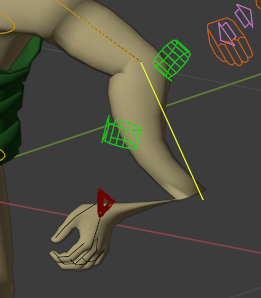

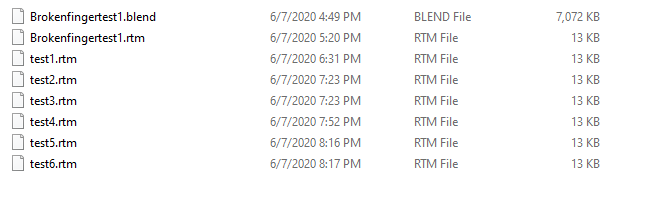
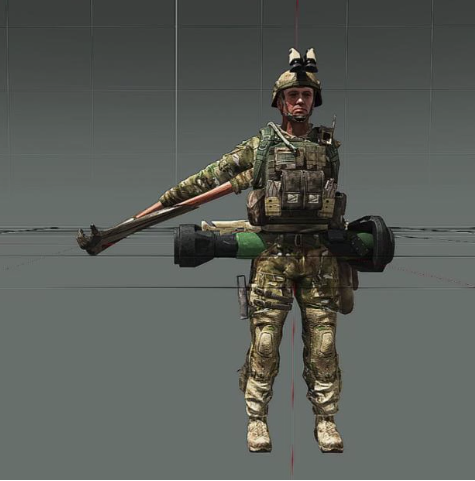 desert raven
@vague saddle start by choosing program to do animations in and then learn how to use that program. The most common 3D (Blender, 3DsMax etc) programs have very good tutorials online on how to use them.
When you are through with that you likely know enough to start looking how to put animations into Arma. The documentation on that can be harder to find though. BI forums is good place to start on that journey, but requires you to know a bit more to be able to look for right questions and answers.
There are few youtube videos that may help too with the Arma part, but it is very essential that you know your tools first
vague saddle
Thank you i was just looking for someone to build a. Blinde faire animation for me
naive hemlock
@vague saddle #creators_recruiting
 winter fiber
With creating new movement sets ive noticed there is "run", "run with gun raised". If I were to be making my own movement on a custom skeleton and wanted this functionality, do I create two different run animations. One with gun up and one with it lowered? Or is there some weird blending going on between the arms and rest of body?
vague saddle
how can i build an animation from the bigenning
help me please
@winter fiber do you know how to build an animation from the beging
winter fiber
Animation in general yes.
vague saddle
do you know the smk animation in arma2
winter fiber
Sounds familiar but not really.
winter fiber
Cool stuff
vague saddle
you agree to make one simulare
winter fiber
Nope got my own projects to do
vague saddle
i I have benn loking for a similar one
no problem whay should i learn to build a similar one
just guide me and do the rest
winter fiber
Sorry im not really in the whole teaching someone from scratch.
If you want to learn animation, pick a software. I know blender has a arma tools with a rigged man
3ds has something from Kiory, or just rig your own
vague saddle
but how i do to importe the animation to arma
winter fiber
Import fbx to Object Builder > Export Matrices > save rtm
winter fiber
Thats what its for
vague saddle
thank you any way
solar mesa
just like any other Blender add-on
- Select Edit > Preferences
- Move to the Add-ons tab
- Click Install... at the top-right of the window
- Find the downloaded zip file and select it (Double click)
5- 'Arma: Toolbox' should be the only add-on shown if installed correctly. Check the box to the left and wait a moment for activation to complete.
@vague saddle no need to cross-post in all channels... especially when you already have an answer ^^
 viscid forge
anybody know why my open pilot door animation is just snapping right to being fully open instead of going through the animation, it works fine in buldozer. Is there a setting or something that i'm missing?
floral moat
is there anyway to freeze the primary weapon from moving in blender when im using the ArmaRig thing? Because I wanna work around it but anytime i move the hand it moves the gun and it's just a hassle
desert raven
it is possible yes. I may have written some of it down sometime previously
not sure though
constraints stuff if I recall right how the rig was build
floral moat
i gave it a quick search on google and it looks complicated
desert raven
well
animation stuff kinda is when you go into such advanced features
it just requires practicing
white juniper
https://forums.bohemia.net/forums/topic/230021-issues-with-vehicle-config-and-animations/ person on forums needs help with vehicle cargo seat animations for fun looking project
naive hemlock
it's more of a #arma3_config issue as far as i can tell
deft fern
Indeed, thing objects cannot have cargo