#arma3_animation
1 messages · Page 20 of 1
 white juniper
you plug it in straight. Most animations I've seen rotate the magazine into the holder from the front.
Like. going with the bend of the mag
 lone cobalt
id love to do that aswell, but how do you implement such a thing into arma?
white juniper
Well just angle the hand a bit. Maybe, from perspektive of your gif angle it about 5-10° clockwards. When you have the magazine, come in slightly from the front, go back till you bump into the magazine compartment, then go up. And angle the hand back suck that the magazine "clicks" in
lone cobalt
yes but that would mean the magazine wouldnt move with the hand ingame, right?
white juniper
Don't know if that's realistic. But it seems more dynamic atleast. Not so clunky/straight.
Well I guess you have to animate the magazine too ^^
lone cobalt
the hand would pretend to hold a magazine until its on the position where it is righ now
if there is a way to make this happen ingame without the magazine just to pop up in the last few frames, id love to do that
white juniper
I think I have seen animations where the magazine just pops up in your hand while you are at the ammo pouch on your vest
You already animate the magazine in your gif. Can't you just animate it further to go with the hand?
lone cobalt
but the mag is at no point a child of the hand, right?
well the problem is
I dont actually implement the animations into arma 3, that I have no god damn clue of 😄 thats why I work with someone else together. that person explained to me that every piece of the weapon that wants to be animated has to be made with configs
how do you animate the weapon using a config if you want the magazine already pop up at the ammo pouch?
white juniper
There are some ways to make fancy animations with config. Don't know how though ^^
lone cobalt
ask me about it 😄
white juniper
Guess we'll have to wait for a real #animation_maker 😄
lone cobalt
do you know someone how does?
white juniper
The half a dozen people that wrote in this channel yesterday. But they are all offline right now 😄
lone cobalt
then I gonna wait for such a person to read all this
 ruby hill
Making the magazine follow the hand is not a trivial task. The mag is part of the weapon, and thus can't be animated via .rtm
You're left with the possibility of matching the mag to the hand via linear animations configured via model.cfg type configuration.
lone cobalt
thats what i assumed..
ruby hill
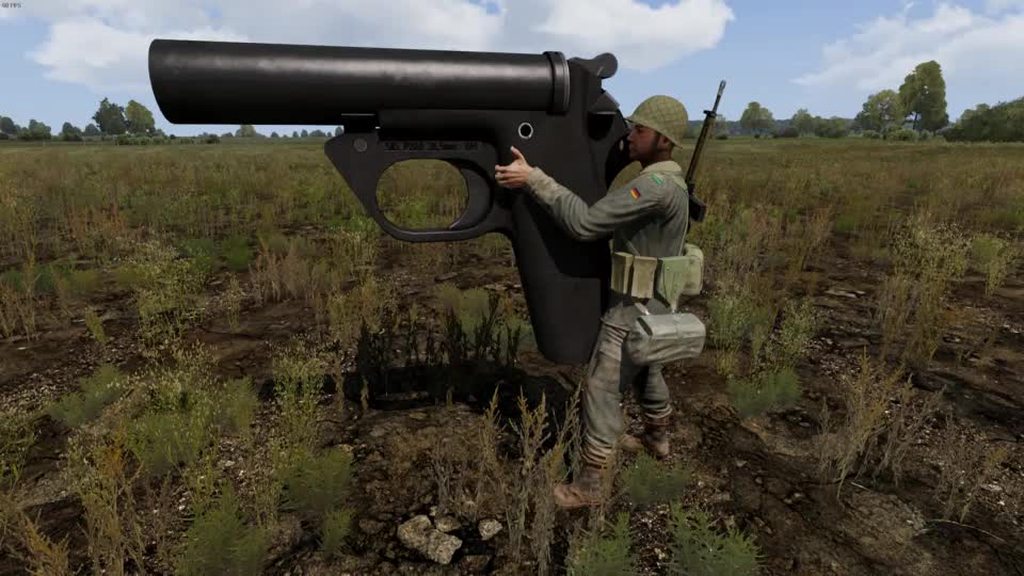
It's generally tedious and impractical to do, so virtually all addon weapons out there (including official content from arma3) do not animate the proxy along with the hand. Longest I've seen is a mag appearing at the last moment and it's just following straight up, possibly a slight angle.
However, it is technically possible:
https://i.imgur.com/n0Oxyvc.gifv
 queen stump
Pls share 
ruby hill
Pls fix proxy simul rate 😄
Mag proxies arent simulated at the same frequency as the host weapon, which means you can see it jittering on other characters when they reload.
queen stump
Nothing I can do personally 
queen stump
Oh yeah, please do
 desert raven
AI/other than local character animations do that in some occasions I've noticed it too.
 naive hemlock
@ruby hill can i haz awesome tool plox
 deft fern
@naive hemlock hope it's not delayed by 1 month every time you ask 😄
desert raven
Should we crowd fund it?
ruby hill
Its currently not a priority, sorry.
naive hemlock
yeah man i know, still in awe about it 😃
white juniper
I want to make a "static" object with rtm animations. I have the fbx with animations inside it.
I looked at the fbxToRtm tool in Arma3Tools. Do I need to create a bind pose for my object? It doesn't have a skeleton that already exists in game like the humans or animals
 thorny anvil
you need bones to position the model.. static cargo positions are typical of this.
nothing stopping you creeating your own skeleton with the namedSelections you choose to use.
white juniper
I see I need to create a skeleton config as xml and will need to write the model.cfg skeleton too. No problem.
What is that bindPose fbx that one can select in the fbxToRtm tool, and do I need it?
desert raven
@white juniper where did you pick the xml requirement?
white juniper
from the "fbxtortmgui" tool. It asks for a model config. And the file explorer asks for xml filetype
lone cobalt
sooo.. there is this: my weapon now does that jump when the reload animation begins. https://imgur.com/a/Ost0wgI
whats the best way to get rid of that?
re-adjust the animation?
its probably the head, isnt it?
footage is coming
im so frustrated.. 😄 this is the very final polish for me to finish this g36 project
lone cobalt
I would like to combine this question with another one: are there any templates aviable that have the exact pose of when the player just stands still with his weapon raised?
 sterile ice
I'm pretty sure toadies rig for max fits perfectly. Haven't tried any for blender.
naive hemlock
check the FBX provided with the samples or tools - it has all the static poses you would need
white juniper
Never used that tool. are there other ways to do it that might be simpler?
desert raven
well I use Blender and armatoolbox so can import directly to .rtm
in a time long before I've used fbx to transfer the animation into OB and saved the rtm there
white juniper
I tried that too. And got the animation frames into OB but the animation was not correct. Like instead of turning left/right it turned up/down and parts stretched and bugged into eachother.
Basically it didn't load the animation correctly. Maybe just some fbx export setting
naive hemlock
i personally didn't get the gist of that fbx2rtm
and blender feel convulted to work with when i am familiar with another package, but at least it exports rtm directly perfectly
ruby hill
I use FBX2RTM extensively.
BI's version however uses an old fbxSDK, so it simply doesnt work with newer fbx file versions.
I use it to batch convert anims I made.
desert raven
ah mondy you beautiful butterfly
ruby hill
Make tons of actions in blender, export those to FBX helper skeleton, (best done via script), and then RMB on that export folder, send to FBX2RTM.bat I made and off it goes converting all my new FFV anims.
luckily blender spits out old enough FBX for that tool 😄
https://community.bistudio.com/wiki/FBX_to_RTM
However, Mobu 2015 has been tested and does not work with FBXtoRTM.
suggests that BI never actually upgraded the embedded SDK.
"fixing" rifle/launcher bug
this appears to be an issue with the MoBu rig they are using. Never encountered such a problem.
Export .rtm via Objectbuilder is possible, however you must use the correct model for it.
FBXToRTM\skeleton\Male\Male.p3d
This one is neutrally weighted, meaning each vertex is only skinned to a single bone.
When exporting .rtm from this model, OB will be able to calculate a fairly accurate bindpose using these to create an .rtm that can be used on other meshes than this.
if you expor an .rtm via OB from your custom character with proper skinning, the resulting rtm will be not universally useable, and only look correct on your model.
In case of making animals, this way can be used. But it's not correct and will mess up should a different type of animal try to use the same anim with same "t-pose"
lone cobalt
the Arma 2 Animation samples in the Arma samples folder, are these exclusive arma 2? or are they used in arma 3 aswell?
I still struggle getting a proper template ready. I think I used an outdated rig from toadie
I think I definetly need help from someone who is familiar with such things..
Ive got my hands on a file that may have just what I need. Problem is, I cannot put the main pose from that file into the rig of my animation. The unit scaling is completely different
white juniper
Export .rtm via Objectbuilder is possible, however you must use the correct model for it. Problem is I have my own skeleton, not the Arma human one or anything that's already there.
I can figure out how to do human animations by using the existing skeleton. But don't know where to start with a custom skeleton.
How do I export RTM from OB? couldn't find the button anywhere ^^
are these exclusive arma 2? or are they used in arma 3 aswell? Afaik the Arma 3 human skeleton didn't have many changes. You probably have to do some minor converting though to get it to work
ruby hill
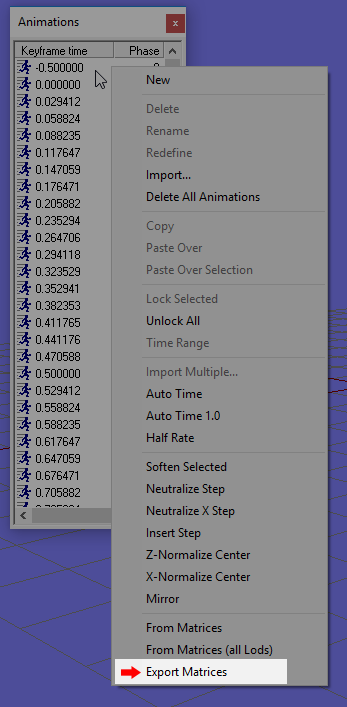
This is how you can export .rtm from OB. Right click into the animations window.
A2 and A3 anims are compatible.
@white juniper
Regarding 100% custom skeleton:
https://forums.bohemia.net/forums/topic/201941-operation-blockhead/
I have released full sources for this, that should get you started.
Bohemia Interactive Forums
Heya,
Almost half a year ago a purely curious adventure into Arma3's animation setup got out of hand and turned into what this is now.
However,...
Wow. Never even thought of right clicking there 🤦
Ah right. Completely forgot about that
ruby hill
Are you making new character/animal/lifeform anims, or static building destruct .rtms?
The latter is configured completely differently.
white juniper
I am making a fox that turns his read left and right 😄
ruby hill
ok then my lego sources are good to go. 😄
white juniper
https://cdn.discordapp.com/attachments/329978448938532868/534415586416001035/arma3_x64_2019-01-14_17-10-54.png That one. Just human sized and looking cute
 ruby hill
Postal 2.
white juniper
Yeah People already told me that ^^
ruby hill
Attachments cant have .rtm though.
white juniper
Yeah. Just example of the model. I have a bigger variant that sits on the ground that I want to use as a Arsenal access point.
Just sitting around, wagging his tail and looking around from time to time.
Can probably do that with model.cfg too, but I don't really wanna go to that effort
https://cdn.discordapp.com/attachments/508635914646323202/534089492794048522/2019-01-13_20-20-52.png That. Just looks boring when it's so static. Though it already glows in the dark.
 ruby hill
oh genuinly cute
queen stump
That's nice!
ruby hill
Let me if you encounter problems with the lego sample man, it should let you do exactly this.
The sources also contain an .xml for Fbx2RTM. 😄
 regal dawn
This song was obviously the inspiration behind @white juniper ‘s Fox mod: https://youtu.be/jofNR_WkoCE
All joking aside, excellent work on the design 👍
 vapid cairn
Will you actually release the foxes as a mod?
white juniper
Well they are just static objects. Maybe with a wagging tail. So not really that useful I guess?
I might throw it onto the workshop, But it's really just static object that acts as ACE Arsenal and a goofy looking silencer ¯_(ツ)_/¯
sterile ice
👀
queen stump
That sounds already worth releasing 
white juniper
Btw mondkalb. In a macro in a config.cpp you use scope = ##integer##
But scope = #integer should be enough
white juniper
Shouldn't be too hard figuring all this out.... Except that I never used blender and don't even have it installed :D
Does the bindpose model have to be cubes on every bone?
Okey Arma toolbox says I need to enable Arma stuff in the object properties.. No Arma stuff there though..
Maybe the toolbox doesn't work with latest blender? I don't have enough time to learn blender just to make some small animations 😄
lone cobalt
it works fine for me
do you use the 2.8 beta?
addons from 2.7 do not work in 2.8 any more
white juniper
2.79 I tried. the standalone zip version
lone cobalt
you sure you took the files into the correct path?
should work
But I can confirm that the arma tooblox should work with 2.79
white juniper
yeah. The plugin worked. I could import/export p3d's. Just the stuff in the object properties panel wasn't showing up
lone cobalt
idk that should work aswell
desert raven
I had that happen. Just reinstalled the toolbox and it was fine again.
lone cobalt
"have you tried turning it on and off?"
desert raven
that does really help occasionally
lone cobalt
it also can fix a broken marriage
 shadow holly
How would one start making custom player animations? A google search did not yield much as far as tutorials, which I skimmed. These mainly show how to add triggers and using vanilla animations. Essentially I'm trying to recreate from scratch a mod/script that never got released; a more fluid light saber animation for personal use. Can anyone point me in the right direction?
desert raven
Animation part should be done with proper tools and compatible Arma skeleton (blender+macsers armarig / max+toadies rig).
Then there is the configs for the animation to play properly in game that has very little documentation. Most of the time it's all about studying the vanilla configs and finding something similar that you can adapt to your use.
And then there is the scripting side for which there is nothing written down for such specific use, but possibly studying the example you want to improve might be a good place to start. The scripting commands and their generic use is documented fairly well in the wiki.
lone cobalt
I can only help on the part with the raw animation
desert raven
Also might add that what you want is likely very difficult to achieve so do pack a lot of patience
shadow holly
I just got "done" learning dialogs... lol that was fun. thank you for the input! I'm surprised of the lack of tutorials on this subject Web side
ruby hill
@white juniper
sorry, only got back to regular PC+Internet now.
Not sure what config you are referring to, but
scope = MACROVAR;
will work just fine. no need for any #-symbols if no concatenation is needed.
Single #-symbol just wraps the following in quotation marks, which are not really needed needed in configs at all. (To the horror of many people :D)
white juniper
ah yeah the stuff from that guy.. Right. He didn't need quotes in the path element at all
^^
 winter fiber
Does a3 have facial animation? If im making a chin strap is there bones for me to weight it too? Im not finding any facial rigs in the samples
desert raven
It has and there is a sample bust in there I recall.
sterile ice
I think the bone was called Llip(double L) , not sure tho.
desert raven
there are others too
 final gull
Friends. I want to do a simple animation of waving his hand. Tell me what I need to create an animation. Thanks.
desert raven
2 Most common options would be either using Blender and Macsers Armarig or 3dMax and toadies armarig.
Both Blender and Max have huge amount of tutorials on how to use the animation tools to make the animation ready for exporting.
The method of exporting however differs.
For Blender I would recommend FHQToolbox that allows you to export directly to RTM (Arma animation format) and with 3D max you would export them as FBX and import into Object Builder into one of the Arma Sample P3Ds and export again as RTM
final gull
@desert raven Thank you! How to create config?
desert raven
youll have to look how Arma animation configs classes are done and find one that fits your need and make a new version of it
for animation configs there is not really tutorials available
winter fiber
@desert raven Where are you seeing this bust? Im only able to find the normal body skeleton, none relating to lip bones. Im in Arma 3 Samples\Addons\Test_Character_01
desert raven
Might have been Sample RTM perhaps
 dusk kindle
Am I right to think that the game's RTMs aren't meant to work with A3_character_example.p3d? (when previewing them with Object Builder/Buldozer)
 drowsy nymph
they're binarised
there are a couple of unbined ones in \Arma 3 Samples\Addons\Test_Anims
dusk kindle
bummer, that's what I'd figured :/ I was hoping to preview all the game's RTMs with the tool
I can probably just script something to do that ingame instead
drowsy nymph
there's an ingame animation viewer
though I think there's also one in the debug console now maybe
yeah, the "animations" button https://community.bistudio.com/wikidata/images/8/88/Arma3_Debug_ExecutionResult.jpg
Also this, but I've never tried this one https://forums.bohemia.net/forums/topic/219181-wip-anevi-animation-easy-viewer/
 spice walrus
This one is good also @dusk kindle
https://steamcommunity.com/sharedfiles/filedetails/?id=1341387001
dusk kindle
@spice walrus awesome, thanks! Anything that makes looking through the stock anims easier is welcome
 digital steppe

It's been a long time coming, and honestly I had this crap figured out a long time ago, but never released it. Check back here soon for a link to the downloa...
desert raven
soon™ 🤔
digital steppe
Very soon
ruby hill
wohoooo, fbx2rtm is being used by someone other than me 😄
digital steppe
You don't remember helping me set up the Bindpose stuff? @ruby hill XD
ruby hill
Uhm... errr 😊
digital steppe
haha, it was a year ago, I'll let it slide 😛
ruby hill
😄
digital steppe
A lot of people use max, and there hasn't been a defacto rig that works with FBXtoRTM with it
ruby hill
some ideas to improve it, as fbx2rtm really makes batchprocessing easy, too.
first check if rig and bindpose have a camera bone
you'll need it for prone reload variants.
digital steppe
oh really?
I have a camera but it's more for visual stuff, where would it go exactly?
ruby hill
Otherwise you get a nasty jump in 3rd person when reloading while prone
Another thing:
I've made a small toRTM.bat in my sendTo folder, it consists of this
    echo %%i
    "G:\Steam\steamapps\common\Arma 3 Tools\FBXToRTM\Fbx2Rtm.exe" -cfg p:\animsource\modelbox.xml -skeleton ManSkeleton -bindpose "P:\ANIMSOURCE\bindpose_w_camera.fbx" -fps 30 -scale 1.0000 %%i
)
pause```ecamera
digital steppe
The bindpose is acting as the skeleton in my rig
it's constrained to the rig
and then FBXtoRTM is converting them into proper naming
I guess it's the modelbox.xml that does it
ruby hill
Yes it is.
camera bone's parent is "pelvis", but it may need manual repositioning and relying just on the parenting will not always match the other anims.
resulting in camera jumps in 3rd person
digital steppe
let me check my hierarchy
ruby hill
I think BI used a 1.3m offset upwards from pelvis and just bakes that in.
digital steppe
hmm, it's linked to spine2
ruby hill
going off memory. In vbs its parented to pelvis 😄
digital steppe
Ahh, I think this is based off the old Bindpose they provided us, so I haven't changed the hierarchy
I don't want to break anything if I change it
ruby hill
Camera bone should always stay above whatever it's parent is, like a simple addition of the offset to boneposition in modelspace (not bone/local space)
"Camera","Pelvis",
from model.cfg of character's base. So its deffo still Pelvis
digital steppe
Ok I can change that, not a huge deal
ruby hill
Important: .rtm files contain no hierarchy
digital steppe
I hadn't really noticed
ruby hill
So the hierarchy in your rig is really unimportant in regard to arma. You can join your bones in your rig as you see fit
digital steppe
Oh, well then I don't really need to change anything 😛
ruby hill
Yes
You can also add a shittonne of helper bones and use them with modifiers
like weapon slots for rifle/launcher on back,
digital steppe
I think these are meshes that get converted over into bones
ruby hill
your exporthelpers are. ePelvis for example
digital steppe
so you can actually animate the camera and have it affect the FPS camera in game?
digital steppe
oooh I see
ruby hill
First person is tied to pilot-memorypoint, which is skinned to Head bone
ruby hill
Thats why some of Bi's anims have the head detach and move around
digital steppe
I guess I'd need to remake all the animations for action cam though XD
ruby hill
action cam, now here's a massive blast from the past that basically nobody knows about
digital steppe
I remember it being a big deal in the ghost recon games for console, and gears of war
ruby hill
All the way up until 3den you could select specific camera maneuvers in a trigger in the editor. Like camera circle around, zoom in, etc.
These were in fact .rtm controlled.
digital steppe
interesting
ruby hill
Which means, if you set up your own small camera animation rig, you can make really awesome nonlinear camera movements and have them play
digital steppe
What would be nice is if I could overwrite specific bones in an animation, that way I'd only need to animate the camera specifically
ruby hill
gestures do that
digital steppe
So I could have an action cam gesture?
digital steppe
huh..
ruby hill
Have it affect camera bone only for some change in 3rd person camera behaviour
digital steppe
ideas....
ruby hill
same for head in first person. But there obviously the head will move around 😄
digital steppe
yea
I'll mess with that at a later date, would be nice to have some dynamic movement in the camera
something subtle
ruby hill
camera type objects have always been awesome jokers to hack anything
You could attach vehicles to cameras in arma2 still 😄
And then move them around using camera's camSetPos and camCommit.
With A3's vehicles moving into PhysX simulated scene this stopped being possible 😦
digital steppe
that's a shame
ruby hill
It was particularly great for horror/zombie missions. Attach a particleSource to a camera and have it float trough the forest, following players, drawing pentagrams and such
ruby hill
Slow-motion missiles without needing setAccTime 😄
lone cobalt
looks great! whats that in his hands? some kind of bullpup xm8?
 light pollen
Would like to try my hand at weapon animation, have a few early beginner questions if anyone is feeling generous with their time;
- Haven't yet got my head around when and where per-weapon animations take effect. For instance when switching to my weapon how is the transition interpolated/blended to reach my weapon raised pose?
- Related to the above, given several different man rigs around how important is it to have a starting pose which exactly matches the default soldier pose. If it is important how do the different rigs compare in this respect. I guess what I'm asking here is what steps need to be taken to avoid unsightly snaps/jumps?
- If I was feeling masochistic, is it possible to do the whole workflow in ObjectBuilder? So far I can import an unbinzarized rtm (from Matrices) over a skeleton p3d and step it but I haven't the foggiest what menu/tool would allow me to manipulate joints.
ruby hill
- No need to worry about this. The configuration of the entire moves setup takes care of fading in and out of weapon hand-animations
- Very important to avoid visual artifacts from appearing when transitioning to a new anim (i.e reload prone or reload layered animation)
- Yes
light pollen
Thanks very much. Confess I was still pretty confused as there appeared no concept of bones anywhere in OB but have just found a video by eggbeast which clarifies a lot, skeleton is a mesh?
 zenith token
its just that there is no IK in OB... so you have to move every bone on its own, and they are never attached. So if you move the shoulder, the hand stays where it is. And there is no safeguard. So you can create spaghetti man accidentally easily
desert raven
its not very efficient animation tool
zenith token
you can make pure static vehicle sitting animation if you feel like it, but anything dynamic (or anything involving fingers)...
light pollen
ok, blender it is (though I haven't warmed to it so far, none of the ways of interacting with it i might try intuitively yield expected results) just, you know, you want to spend your time making rather than learning yet another new tool
desert raven
but you cant do stuff if you dont know how to use the tools
it applies to everything
zenith token
you dont need to know how to model to animate though
light pollen
sure, just a question of how differently it works to what you already know
zenith token
so you dont have to learn the full skillset
light pollen
for instance still haven't found the key/mouse combo that will let me pan the view in blender, normally expect some combination of ctrl/shft/alt and LMB/RMB
just slow when you have to google every little thing
light pollen
ta
light pollen
so macser's rig is the way to go?
and let's say i was animating a new launcher, is there a place i can find an existing launcher pose so I only need to tweak the hands?
desert raven
you would need Mikeros subscriber tools for DeRtm tool so you can convert the animations back to readable format
light pollen
roger, get from the game release
any advice on bringing the debinned rtm into blender?
desert raven
you will want the rtmimporter addon
light pollen
thx
light pollen
is it this one; https://github.com/4d4a5852/rtm_import
desert raven
thats the one yeah
light pollen
sigh python, oh, right python runtime is built-in to blender
desert raven
indeed it is
and the addon will just add an import button into the import menu
you dont have to do anything special
light pollen
thank you chaps, seems i have everything i can think of now, time to watch some videos
ruby hill
So if you move the shoulder, the hand stays where it is.
The sample skeleton unit should have hierachical bone selections that let you work around this. But you shouldn't be animating in O2 in the first place
drowsy nymph
The Arma 2 sample skeleton was better, sadly. At least that one had automated positioning of the local axis
light pollen
Do you know then why in this video eggbeast is apparently able to move just hands and have the arms move automatically via IK?
I think he says the RTMs he's working with are from A2.
@acoustic oar
light pollen
right, and the case here is that the engine only incorporates the hand positions relative to the weapon? (i think i read somewhere)
"RTM of handgrip is configured in the weapon config and engine uses only hand bones position relative to weapon bone." - Armored_Sheep
desert raven
in weapon animation only the hand and finger positions are read in their relation to the weapon bone on the character
 ripe lotus
I have flaps in a jet (obviously). How can I make them accesible with two sources that dont add to each other? I mean I want to hook flaps to source rpm and flap. But for both the angle is the same and they add so it effectively makes it double maximum angle of rotation
zenith token
thats the only way. there is no formula driven thing
digital steppe
https://gum.co/KAOLj Alright, I finally got to releasing the rig, don't be scared, it's free, just put in 0.

Gumroad
This Rar contains a 3DS Max file for the Arma 3 rig that I made, as well as some additional files and a PDF guide.
Enjoy, let me know how it goes.
sterile ice
You're a legend🙌
ruby hill
Bad form. No credits given to the people whose work you built on AND asking for donations. 0/10
digital steppe
I had help from a lot of people, which is why I thanked everyone
I'll make amendments if you want your name specifically on the document
The truth of the matter is that I shouldn't of had to build this rig and introduce the ability to use FbxtoRtm in the first place, if there's bad form anywhere it's on BI's part.
And I'm not sure what you mean by the work I built on, I can't credit anyone really because I made all of that by hand, no one else did anything @ruby hill that includes needing to edit the broken bindpose and modelbox.xml, which belong to BI, who I credited
Other than the original mesh, bones (come to think of it, I re did those as well, in a way that would retain the original skinning of the mesh) and the inclusion of the bindpose stuff, it's all mine baby.
And building it took time and effort, as well as making the guide, I see nothing wrong with asking for donations
lone cobalt
I wish I could take a look right now. but its valentines day. A mans gotta do what he must do
light pollen
@drowsy nymph The Arma 2 sample skeleton was better, sadly. At least that one had automated positioning of the local axis By this do you mean that the A2 sample had selections defined with a local axis for each joint (and its whole descendant mesh)? If so should I assume from your comment that neither BI nor anyone else has ever released the same for A3? EDIT: Nevermind after fossicking through the A3 samples I found a combination of source files that more or less explain what I was asking.
light pollen
Also can somebody confirm my understanding of 'weighting' a model? If I had to guess I'd suppose it controls how completely a vertex conforms to movement of the bone/selection it's linked to? If that's correct would it then be right to say it's largely a matter for clothing and the base (naked) character mesh typically conforms 100% to skeletal movement?
ruby hill
Replace "weighting" with "influence", then that concept should be easier to understand.
Note that there is a limit: A vertex can only be influenced by up to four bones (not named selections, these are different)
Not sure what you mean by 100% conforming to skeletal movement. There is no other source but skeletal for characters.
light pollen
Thanks very much, everything I needed to know.
regal dawn
can someone give me the name of a vanilla "talking on radio" animation please?
light pollen
Thanks to those who have helped with my questions, making progress. To set context, I'm still exploring OB as an animation tool. Appreciate this ignores your expert advice but I have no ambitions as a modeller/animator - just looking to extend my ability to put stuff in game (with small tweaks and/or new hand pose) and OB is v. convenient (at this stage I think worth putting up with lack of skeletal constraints).
Am I right in supposing that the source for matrix export is all vertices in the named selection resolved to some sort of average vector (in lieu of a 'bone') which is compared (translation/rotation-wise) with the same selection/vector in the T-Pose?
naive hemlock
rephrase the question plox
light pollen
I'd like to see if I can assemble an OB 'rig' that combines a poseable skeleton with the actual a3 character mesh. I'm hoping I can bring the mesh in as 'work selections' (prefix '-') so they'll be (AFAIK) ignored when it comes to exporting matrices and then have a very simple 'triangle man' skeleton beneath (plus work selections which include a local axis for descednant nodes). So I'm just trying to get my head around what is/need-be weighted, what won't/shouldn't-be and which bits will actually be the source for matrix export.
AFAIK the matrices represent translation/rotation when compared to the t-pose but in a conventional workflow i expect these would be simple bones (origin, direction, magnitude) where OB seems to use an actual mesh comprising many vertices. So, specifically my question is how is the mesh associated with each named selection converted to DX matrices (being more complex, by virtue of having many more data points than a bone).
naive hemlock
OB doesn't use skeleton per see
there is a Tpose someplace in your samples or tools, but that is just a simple representation
what you'd want is a base mesh in Tpose where you could transfer weights from the base mesh to a new mesh
i for one haven't tried that myself, but afaik, you cannot transfer weight from mesh to mesh B like you can with other software out there
there are 2 tools i haven't tried and i am not sure how they work
tools - copy weights
and
tools - weight automation
that you might wanna look into
light pollen
thanks, sounds like i need to start with the a3 character sample as the initial model (with weights intact)
and bring simple 'skeleton' to that
naive hemlock
SteamLibrary\steamapps\common\Arma 3 Samples\Addons\Test_Character_01\A3_character_example.p3d is in Tpose
again, you need to get your head around how the skeleton works in A3
there isn't one
not in the general sense anyways
SteamLibrary\steamapps\common\Arma 3 Tools\FBXToRTM\Skeleton\Male\male.p3d
light pollen
no ('skeleton in general sense), hence my question/assumption about how it generates matrices from a mesh rather than a bone. i'm guessing the collection of points can be resolved to a vector (probably similar to OB direction-from-faces) and then compared with the same thing for the same selection in the anim frame.
naive hemlock
the animation matrices for rtm
is nothing more but a set of translations/rotations/scale anims
based on a set of “origin” points which are the joints
you can indeed set a new custom skeleton if needed, but then again, all the existing rtms won’t work
can i ask what you intent doing?
might be easier to answer things more acurate
light pollen
nothing special/particular just my first foray into anims and still doing 'tool selection' for my purposes it is most convenient to use OB so I'd like to generate the most accurate/useful base model.
probably the first thing i'd actually want to produce is a full set of jump anims (there's only the rifle raised variant in the base game)
naive hemlock
my 2 cents here
you are gonna hammer some nails into your own foot
trying to use ob to create an animation from scratch
the entire point of a proper keyframe animation is to get manually do the least amount of manual keys
and let the rest “interpolate” on its own
with adjustements when/where needed
and that is something ob cannot do. so you’ll be forced to do a single frame at a time for all the frames needed
this is why everyone suggests you use a proper 3d software
for that sort of thing
light pollen
roger, appreciate (all) the advice, animation from scratch isn't something i'm planning to get into, just a few adjustments to existing anims
drowsy nymph
If you're not satisfied with it the current skele and are wasting time trying to make an pose-able skinned character model, logic would suggest that in fact it is not the "convenient" workflow you think it is
naive hemlock
if that comes from monkey
who is more OB savy than myself
and doesn't have a inner hate towards it
says it all
drowsy nymph
I've used OB to animate things before, but accepted that if i want to see it on a skinned model I need to export the .rtm and import it to another instance of OB
but nowadays i just use Blender with Macser's rig and Alwarren's exporter
light pollen
my thinking was effort now, convenience thereafter (from matrices, export matrices)
naive hemlock
does macser rig/alwarren exporter importer combo
allow RTM import as well?
@light pollen what i am trying to say is that OB is simply not worth the effort for some stuff
i personally use it just for setting up some things
there are way way faster ways to achieve anything with a proper 3d software than it is with OB
drowsy nymph
@naive hemlock AFAIK the manipulators don't work right after importing .rtm
but the rig itself would make recreating poses somewhat less of a hassle anyway
or building the new pose from scratch
or maybe just animating the parts you want and doing the "paste over selection" crap in OB to add it to an existing .rtm
light pollen
beyond ease of rtm import/export i also wondered if the original a3 mesh over the original a3 pivots would yield more accuracy, a video series i watched on using blender suggested nobody's rig is really super accurate when it comes to finger placement (meaning repeated trial exports to game are required to refine this).
drowsy nymph
super accuracy of the fingers will go out of the window on some models anyway because the gloves etc aren't always weighed the same as the bare hands, and have different scale/geometry
light pollen
well i expect i will throw in the towel and swim with the tide eventually but i'm going have a go at this, might potentially turn into a useful resource and certainly will be a good learning exercise. i very much appreciate you all sharing your advice/experience.
desert raven
With some trickery Blender rig can be made to use the imported RTM with constraints.
The constraints just have to be enabled and perhaps tweaked a bit after RTM import.
 tired depot
By default, importing with the addon is going to disable the ik constraints. The widgets, and ik targets won't have any keys in the rtms. But the standard bones do. You'd get a right old mess as the ik solvers conflict with existing keys. If you wanted to use ik on an existing animation, I'd suggest removing the keys for the limbs you want, then switch the ik constraint back on. Animate. You can do this from the dope sheet. Same window used to store and edit all your actions.
desert raven
Usually ppl might need a single frame from one of the vanilla anims to match transition between them which makes that a little easier
light pollen
don't suppose anyone has (or knows of someone who has) explored facial animation?
naive hemlock
i have rigged / weighted a head once
it has been a pain
have not made a facial anim myself though
desert raven
I've done some tinkering in that regard
You can search this channel for that
We have recreated facial rig for Blender floating around somewhere around here.
ruby hill
Biggest issue here is playing face anims. There's not exactly a switchmove equivalent. You can use setMimic and thats about it.
light pollen
In a surprise to nobody (even me), experiment is a bust. Having a weighted mesh in bone selections queers the exported matrices (somewhat predictably given BI only gave us Michelin Man). And if the mesh only exists in work selections then it doesn't animate with the bones. Blender it is then.
ruby hill
Yes, you cannot derive an rtm from a non-discretely weighted skeleton in O2. 😄
The bone center caluclation that O2 does to "guess" the bindpose gets all screwed up
light pollen
Actually I'm now thinking it might not be such a deal-breaker as I have a work selection just for the weighted mesh which I can delete immediately prior to export (leaving only the 'bones').
desert raven
sounds quite complicated to produce simple animations
light pollen
Fully intend to learn the Blender workflow also (yesterday I was asking for a definition of 'weighting' so lots learnt either way). But a per-joint poseable version of the A3 mesh for quick tweaks and hand anims in OB feels like a good thing to have; https://imgur.com/a/LhoyoI1. Ditching the mesh before export is like <Click> [Delete]. https://nofile.io/f/cAoYRfxr4qs/ArmaMan.A3.Defunkt.v02.p3d
desert raven
Bohemia Interactive Forums
A constrained Ik rig built in Blender.Aimed at A2/A3. Intended for use with Alwarrens Arma toolbox. Static and hand anims can be exported direct to PBO. Dynamic animations like walk/run cycles can be also be exported directly with some extra work. Im not an expert on the inte...
light pollen
Thanks, got that and the toolbox and the importer.
desert raven
I would argue that "quick tweaking" in OB is not as quick as doing it externally
of course it might depend on what one is used to use
naive hemlock
there is nothing quick about object builder / oxygen
light pollen
Unless you're standing at the foot of the Blender learning curve. 😉
queen stump
@naive hemlock Don't hate 😛 You just didn't master it yet 
naive hemlock
@queen stump 😄 i wanna see you do a full reload animation in it, since you've master the inner workings of dis blyatiful software
zenith token
whenever you do a full install you get to appreciate the blyatifulness of it in all its glory... UI efficiency 3%
queen stump
NO
ripe lotus
Is there any source for vehicle model cfg that will go 0-1 and repeat ? (Constant loop)
digital steppe
ruby hill
ClockMinute for seamless movement, clockSecond for discrete steps.
 slow inlet
So I made a gesture where it puts your hands up. However for people to be able to see the gesture I need to remotexec it on the mission. Is there a good way to handle that in the mod instead?
desert raven
I think thats just how you have to do it in MP
slow inlet
Ahh I see, cheers for the info
ruby hill
No
Ah wait, no. BI broke the MP synch of playAction
so yeh, you'll have to RExec it.
naive hemlock
gets his hope high each time he sees Mondkalb posting in the animation channel
ruby hill
💩
naive hemlock
¯_(ツ)_/¯
lone cobalt
quick question
the shoulder bones are not affected by a default stance for a weapon, right?
drowsy nymph
the weapon handanim?
zenith token
stance -> prone, crouch, stand, anything inbetween. Yes stance affects shoulder bones.
weapon holding animation (handanim) doesnt
unfortunately, because the default shoulder positions are awefull -> they change position for every stance, so that if the weapon is properly placed in the shoulder in standing, it will look off in low stand, high crouch etc. (clipping)
lone cobalt
I noticed that and expected this answer
thank you tho
finally going to try out kiorys rig
digital steppe
Might want to hold off @lone cobalt I'll be releasing an update later today
Less bone popping, much less
 desert raven
yeah
so far have had no luck setting up the ragdoll config
as far as I know the bone/skeleton/selection setup, memorylod, pivotmodel setup, ragdoll and moveset config, are identical to ArmaMan except for the different shape of the character
and few classname changes
but the joints go wild when it ragdolls
no errors/warnings anywhere and no documentation to go on about it. Except Mondkalbs BlockMan, but so far I have not been able to gleam any apparent differences with my setup
I also dont think the ragdoll joints would still be using the ArmaMan points as they seem to blow way past the man ragdolls dimensions
digital steppe
Wonder if it's as simple as missing an autocenter entry somewhere, probably not
desert raven
hmm
that would be the character or the pivots p3d
pivots p3d as far as I know only contains memory lod
and character is a copy of the sample character p3d
tweaked to fit the new rig
digital steppe
I know it's weird, but I've seen autocenter placed in BI's mem lods as well, whether it's accidental, oversight, I don't know
particularly character related stuff
my only guess as to why this is happening though? It's probably defaulting to the old rig for ragdoll
although, it's weird the arms are stretched but not the legs
actually, if anything, it looks like the pivots for the joints are off
so it's defaulting the pivots rather than the bones
desert raven
yeah It might be some sort of config issue too. But since theres absolutely no documentation for ragdoll congif, I have no started messign with it at all yet
for me it looks like the joints actually break
digital steppe
well we're made of hard stuff when it comes to config shit, I'm sure you'll find it eventually
like they aren't actually connected?
digital steppe
Do they like fall apart and start rolling around on the floor etc?
desert raven
they dont move far but yeah it looks more like that
I might be wrong about that too though
digital steppe
there must be a config for how the physics behave on the ragdoll then, even UE4 does this without a proper setup
desert raven
oh yeah the ragdoll config is quite big package
digital steppe
where is it located?
desert raven
class CfgRagDollSkeletons
digital steppe
which folder/file XD
desert raven
ummmm not sure. I took mine from the AllConfig dump
desert raven
was in data_f\config.cpp
I do have some ideas what to poke at
but swinging blind gets a bit frustrating at times
lone cobalt
@digital steppe alright, gonna put my animations on hold then
digital steppe
There are two entries, one of them has an idle animation applied to it
{
    class BaseRagdoll;
    class Soldier: BaseRagdoll
    {
        idleAnim = "A3\anims_f\data\Anim\sdr\ragdoll_fingers.rtm";
    };
};```I doubt that is it, but it's something to look at
The rest of it is setting up the physics and behaviour, so if you're extending from this, it should work
that's assuming you've named everything exactly the same
desert raven
I've duplicated the soldier ragdoll class and renamed it
so I have everything in it visible
and tweak-able
digital steppe
I'm remaking it again
if you need animations absolutely right now, the current version will work fine
digital steppe
It's honestly me not being satisfied with how the CAT rig is positioned
I'm also trying to make it IK/FK and MoCap friendly
lone cobalt
perfectionism strikes back 😉
digital steppe
no use half assing it
 sinful dragon
When trying to run the bulldozer - I can not see any of the animations. Pressing enter only writes "anim" on the top left corner. Could I know just with that if the issue is in the p3d or in the model.cfg?
desert raven
your model and model.cfg do not seem to connect
so likely you have issue in modle.cfg
like for example the name of the class for the model is not named the same as the .p3d
sinful dragon
which of the classes should be the same name? the one in class CfgSkeletons or CfgModels?
desert raven
the one inside the cfgModels
sinful dragon
Thanks, will try that
desert raven
sinful dragon
does in need to be the full "name.p3d" or just "name" ?
sinful dragon
Thanks, will read througth all of it just incase
desert raven
👌
 dull warren
Am I correct in thinking that animation types (e.g. for reloading weapons) are limited to translations, rotations and hide/unhide? From the Wiki that seems to be the case but I was curious as to whether it is possible to scale as well.
desert raven
yes there is no scaling animation in model.cfg as far as I know
you would have to animate points with multiple bones to achieve scaling effect
drowsy nymph
You can sort of scale with a hide animation if you have the object weighed to multiple bones
but it's more a case of exploiting a bug than an actual scale anim
drowsy nymph
Yeah, it shouldn't really happen and it's not like it's useful since it only scaled relative to [0,0,0] instead of a user-defined coordinate
dull warren
Thanks. I was in the process of converting some of my weapons to use magazine proxies but discovered a major issue. The external width of a mag well on one rifle is exactly 26mm (assuming 1 Arma unit =1m) which is slightly too thin in reality but should still be thick enough to hide any 556 mag inside it. (I think the widest part of an ar15 mag well is 24.7mm)
Sadly, both BI and RHS proxy mags are wider than this so poke out the side of the mag well slightly.
I was trying to work a sneaky way where I could still use them...
deft fern
@dull warren both bi and RHS magazines will be changed
dull warren
Fantastic!
sinful dragon
My weapon model's holding animation is correct, but the handgun is not held between the 2 hands but instead is inside the right hand's fingers
queen stump
Well, that's correct? But I'm not sure, if I understand correctly.
sinful dragon
the pistol grip is inside the right hand, inside the skin, bone etc, instead of being between the right and left hands
queen stump
Then offset the weapon bone in anim or weapon itself
sinful dragon
Not really sure how to do that - I copied the animation code from Arma 3 Samples and didn't change much other than the paths to things
queen stump
Open the pistol model and move it around in model space
If you are using vanilla animations and not your own
sinful dragon
Ok gotcha, just wasn't sure if I needed to fix that in the model or somewhere in the code! Using vanilla animations btw
ripe lotus
Speed of anims with vanilla sources can't be adjusted, correct?
I just found out they can. Damn
desert raven
👍
ripe lotus
Sorry
ripe lotus
Although no I dont think I found a way, tried with AnimationSources
and since animPeriod works only with user sources then Idk
desert raven
you can overwrite a engine source and alter its parameters
theres how-to in the model.cfg wikipage
cant quarantee it works though
ripe lotus
But I wanted to have different speeds for two anims using same source so that might be tricky
ripe lotus
The flaps anim in F18, minor detail but outer flaps move faster in real jet
Kinda did it just by setting minValue to 0.2 and maxValue to 0.8
zenith token
you can animate the same bone twice btw... overlaying multiple animations on the same bone can give some nonlinearity. Its not particularly efficient...
desert raven
min and maxValues would be good way to do it
 tardy hound
Is it possible to do a delay in model.cfg animation for something like a door? I'm trying to create an elevator door where the second piece doesnt start to close until the first piece is mostly inside it already.
desert raven
1st piece minvalue = 0 maxvalue = 1, 2nd pieces minvalue = 0.5 maxvalue = 1
tardy hound
Thanks!
sinful dragon
I have a reload animation - this is how it is supposed to go:
"exctractor" goes out, "bullets" still in, after a bit they disapear. After another bit "bullets" re-appear and "extractor" goes back in.
              class bulletsOut
            {
                type = "hide";
                source = "reload";
                selection = "bullets";
                minValue = 0.8;
                maxValue = 1;
                hideValue = 0.9;
            };
              class bulletsIn : bulletsOut
            {
                minValue = 0.35;
                maxValue = 0.8;
                unHideValue = 0.9;
            };
            class cylinderOut
            {
                type = "rotation";
                source = "reload";
                selection = "extractor";
                axis = "extractor_axis";
                minValue = 0.9;
                maxValue = 1;
                angle0 = rad 0;
                angle1 = rad 110;
            };
            class cylinderIn : cylinderOut
            {
                minValue = 0;
                maxValue = 0.2 ;
                angle0 = rad 0;
                angle1 = - rad 110;
};```but there is 1 problem - bullets are out from the first frame.
Everything else works as intended
Any idea what could be causing it? I tried giving the "bulletsOut"'s min and maxValues different values, but to no vane
desert raven
possibly the bullets area part of another animating selection
sinful dragon
Nope, only this animation in the code so far
or do you mean something else by that?
sinful dragon
yes
"trigger","",
"extractor","",
"cylinder","extractor",
"bullets","cylinder",
"hammer",""
yes, cylinder
desert raven
so in OB teh bullet is part of "bullet" and "cylinder" selections?
if so that would be the problem
sinful dragon
not in OB, they are separete
I can select "cylinder" in the selection and drag it wihtout the bullets moving, and wise wersa
zenith token
would it be possible to limit FFV to one axis and have regular turretmovement on the other?Say the FFV axis is vertical, and turret is horizontal.
It would enable AI to use small windows in buildings by occupying an invisible turret with that property. Up and down they move their upper body, left right their entire body is moved around an axis that is close to the wall (as opposed to their body center), like in case of a bipod
deft fern
@sinful dragon what the hell are those radians in hideValue
sinful dragon
@deft fern ehh I noticed that too after posting, just a copy-paste issue )
removing them didn't solve the issue througth
sinful dragon
Not sure what that means
does it mean that I can only use values 1 and 0 in hideValue, and nothign in-between?
sinful dragon
indeed, and I tried switching around those numbers a couple of times - with no good effects
deft fern
If you minValue = 5 & maxvalue = 10 then I. E. HideValue = 0.5 means that selection will be hidden when source value is at 7.5
sinful dragon
Ok, I understood that so far
But shouldnt that mean then that
minValue = 0.8;
maxValue = 0.801;
hideValue = 1;
gets the "bullets" hidden at 0.8? Because in my case - they are hidden at 1.0, even througth my values are set to that right now
deft fern
No it will be hidden at 0.801
sinful dragon
meant that, but still - the bullets are hidden when they shouldn't be. I will try a solution I just came up with, but most likely it wont work
sinful dragon
doesn't the value in hideValue and unHideValue get affected by the min and max vallues?
deft fern
?
sinful dragon
not sure what you mean that same value for hide/unHideValue make no sence
deft fern
You have same values for hide and unhide in bulletsin class
sinful dragon
Ok I think I got what you meant, will try ajusting and see if it works
            class bulletsIn
            {
                type = "hide";
                source = "reload";
                selection = "bullets";
                minValue = 0.3;
                maxValue = 0.4;
                hideValue = 0.5;
            };
            class bulletsOut : bulletsIn
            {
                minValue = 0.7;
                maxValue = 0.8;
                unHideValue = 1;
};```tried this, but still same issue
"bullets" doesn't unHide at any point after it gets hiden at 0.35
desert raven
why dont you just do 1 hide animation wiht minValue 0 maxValue 1 and hideValue 0.35 and unhideValue 0.75?
sinful dragon
I didn't know I could have mutliple parameters in 1 class, will try taht out!
edit - it's late, going to sleep will come back at you if it worked !
deft fern
@sinful dragon also don't forget that reload is going from 1 to 0
sinful dragon
            {
                type = "hide";
                source = "reload";
                selection = "bullets";
                minValue = 0;
                maxValue = 1;
                hideValue = 0.4;
                unHideValue = 0.8;
};```@desert raven finally came around to trying that - but to no effect
the bullets still don't get unHiden at 0.8, or at all after 0.4
drowsy nymph
ingame, or in buldozer?
sinful dragon
bulldozer so far
drowsy nymph
because as reyhard said above, ingame the reload source runs 1 to 0, so you have to play it backwards in Buldozer
sinful dragon
Yeah I knew that, I go over to the end (1) and scroll back to 0
bullets are hidden all the way down to 0.4, but I wanted them to be unHiden from 1 to 0.8 and then again unhiden from 0.4 to 0
deft fern
can you paste whole model.cfG?
sinful dragon
1 sec
" Your message could not be delivered because you don't share a server with the recipient or you disabled direct messages on your shared server, recipient is only accepting direct messages from friends, or you were blocked by the recipient. "
thanks discord, I'll upload it to pasteBin or smth
deft fern
yeah, pastebin is fine
sinful dragon
the "reload" didn't work even before adding all the other animations, I just did those while ignoring reload for a couple days. Also it's only the bullets part, rest of "reload" works as intended
deft fern
so you want to hide bullets between 0.4 - 0.8, right?
sinful dragon
Yes
when cylinder goes out - bullets gets removed, and added back right before cylinder goes back in
sinful dragon
What about this - could the issue be that I am using Oxygen 2 (ArmA 2), while in the biki it says "unHideValue (A3 only)" ?
desert raven
@sinful dragon you have installed arma 3 tools and run the Object BuildeR?
sinful dragon
Yes
desert raven
thats not Oxygen 2
sinful dragon
I know, I preffer Oxygen 2, I will try opening up the model in the Arma Tools one instead
sinful dragon
Yes, separetly
desert raven
dont
sinful dragon
Why not? Does it fuck with some settings/configurations etc?
Also unHide still doesn't work OB from Arma Tools, so has to be something else
desert raven
ok so right now I have no idea if you have your tools set up correctly at all
so debug is pretty much obsolete
and yes the old tools should not be installed at the same time
and they definitely should not be used for Arma3
sinful dragon
I don't have the old tools installed, only oxygen 2. I used Arma 3 Tools before downloading oxygen 2, so it should be installed correctly, I haven't ran in too any other problems so far
Ok gotcha, will double check if it is all installed correctly
desert raven
There is 0 reason ot use O2
Object Builder is pretty much the same with likely few fixed things
and its possibly you are not running the right engine as buldozer
sinful dragon
For some reason OB doesn't "save" my layout, every time I open it I have to manually re-open every tab and window and reposition them all again aswell which gets annoying when I open and close it fairly often
sinful dragon
Yeah, I'll check if my tools are installed correctly now just in case, even througth I haven't had issues with other "arma 3 exclusive" functions before
I followed this https://forums.bohemia.net/forums/topic/190353-howto-work-drive-setup-bulldozer/ when installing tools last time, is that one incorrect or a copy post?
desert raven
yeah thats not right
it is how its supposed to work
but using the Arma Tools Launcher causes more trouble than good
so quite possibly why yout layout does not save is because you run it from the launcher
sinful dragon
Well shit, I guess I'll have to do the PMC one, and link it to everybody else who for some reason asked me "how 2 install tools fast?"
lone cobalt
question:
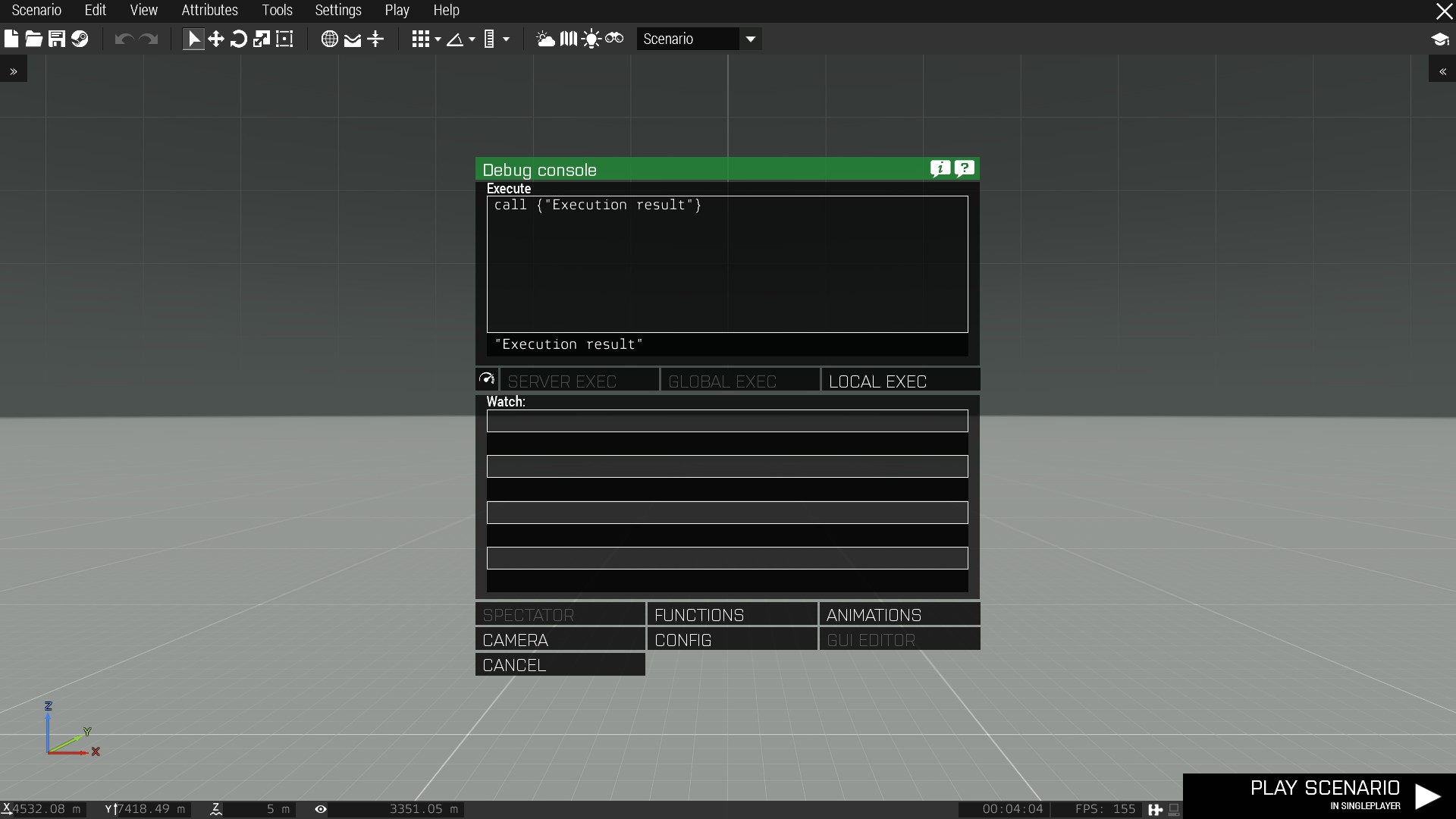
im sitting on some mg animations atm and Im struggling like probably so many before me with the left hand clipping through the ammunitionbox. My goto solution is to grab the mg at the ammunitionbox, but im playing around with the idea holding the entire mg at stomach height. How many things need to be considered if I want to have a weapon be hold at stomach height?



 lone cobalt
is it possible to have handanims only for the prone stance?
next to the default handanims I mean
desert raven
No
1 handanim /weapon
If you made a custom move set fot hip fire weapons you could possibly alter prone stance for it
But that is quite unknown waters.
And a lot of work
ruby hill
And not easily trackable. The solution here would be weapon specific action maps that automatically trigger.
I've made a prototype set of animations for MGs held at hips, and it requires a massive amount of scripted tracking to ensure the character stays in that stance, as there quite a lot of cases that will "snap out" the character from using that set of animations.
lone cobalt
I guess I gonna stick with grabbing ammunition boxes then 💁
sinful dragon
Got my P drive re-installed and animations done (I just went with another animation), but now I have this ingame :
while both OB and Bulldozer look normal https://imgur.com/a/DEI7Aeu
any idea what is causing it & how to fix it?
desert raven
you mean the offset?
sinful dragon
The cylinder being on top of the gun
desert raven
your animations are not set up right
likely
something is moving the cylinder on top
sinful dragon
Guessed so, but what is it that is doing that?
& should I post my model.cfg ?
desert raven
is there any animation that moves the cylinder to that position?
sinful dragon
shouldnt be
all animations are rotations
            class cylinderRot
            {
                type = "rotation";
                source = "fire";
                selection = "cylinder";
                axis = "cylinder_axis";
                minValue = 0.5;
                maxValue = 1;
                angle0 = 0;
                angle1 = - rad 60;
            };```
for rotating 60 degrees when firingdid you test all animations in buldozer?
sinful dragon
yes
they all work correctly in bulldozer
I also noticed then I was trying to fix it by renaming the source to something else - the cylinder wasn't right above the python anymore, but still not where it was supposed to be
drowsy nymph
does the weapon model's geometry LOD have autocenter 0?
sinful dragon
No idea what that means, do you mean the LOD called 0.000 ?
sinful dragon
Thx, will check that out
sinful dragon
but first - am I supposed to have autocenter 0? or disable it?
desert raven
autocenter 0
drowsy nymph
you're supposed to have it on weapons
desert raven
compare to the sample rifle
sinful dragon
Ok, will try that out now. and I basicly copied the code from sample rifle so idk why I didn't have autocenter there /
drowsy nymph
it's in the model itself, not the config
you can only copy named properties in to another model by physically pasting geometry from one .p3d to another
desert raven
sinful dragon
Since I haven't done any other propertynames - are there any other super required ones like this one?
sinful dragon
Ok, will keep that in mind
 fossil sun
How can I get custom animations into arma? Is there a mod or addon of lots of animations for civillian tasks?
sinful dragon
Static or moving animations @fossil sun ?
desert raven
character animations?
sinful dragon
No mods for that, but there are scripts I believe
desert raven
do you mean like how to make new animations?
or how to use animations in game?
and no, there are no animation packs
animations are quite time consuming to make and get into Arma
sinful dragon
these are your best bet at something "easy"
Also most fancy mods add their own animations to list, but you'd have to find them manually, and probably none of them are for "Civilian voice acting"
fossil sun
Well I jsut need civillian things like. animations for working and animations for speaking and just normal things we do day today. Answer a cell phone and stuff.
sinful dragon
My 2 links is the best you gonna go without spending >ALOT< of hours on creating animations yourself. You can also view those animations ingame in the animation viewer, saves some time
desert raven
yeah there are no such animations as far as I know
fossil sun
Ah, oh welll.
If i got a bunch of 3d Max/Blender/Maya animations how easy could it be to import it into arma?
desert raven
not easy
you would have to figure a way to project them onto the Arma skeleton
and then export that out into Arma animation format .RTM
and then build configs for each animation
sinful dragon
(akward having having a channel for animations with disabled image imbeding imo)
so new issue, my "reload" animation plays when I fire, I guess thats an easy fix - I just put the "fire" source to be "reload" instead
 hasty anvil
🤔
sinful dragon
but what do I name the old "reload" source for it to animate on reload of weapon?
found it I think, I guess it's "reloadMagazine" based on BIKI/Model_Config
is there any description somewhere on what each individual source= does?
drowsy nymph
The middle column on the biki page describes what the sources do
sinful dragon
Thanks,somehow didn't realize that fore some reason until now
 hazy plaza
After the Arma 3 update, which appeared a few days ago. All my Custom Animations are broke can someone help me ?
For Example all Driver sit on the hood etc.
at version 1.88 all animations work
desert raven
odd, never heard such happening
do they still use the correct animation?
how many animations are affected?
have you repacked them?
hazy plaza
my arma is the problem after the update dont work any animations :C
regal dawn
what about vehicle wheelbase realistic demage animations in game?who have mod or something like this?
naive hemlock
no idea what you are talking about
besides this is not the place to ask for mods or find me a mod sort of questions
desert raven
@regal dawn unless you explain what you are after we can't help you.
regal dawn
i mean more nice animation for game ,demage system with more nice animations
naive hemlock
lol
desert raven
@regal dawn thing like that can't really be modded.
ripe lotus
Trying to animate wheel, with simple rotationX it will rotate ok, but also scale itself, why?
drowsy nymph
Bone is probably sharing verts with other selections
ripe lotus
You are correct, thank you
 harsh jacinth
Hello, guys, does enableBinocular = class even works?
i have managed to make gesture not stopping from using rifle optics with the enableOptics = 1; parameter, but enableBinocular = 1; and enableMissile = 1; cant do the same
Ha ha, you know what? Ive got it to work with -1
This makes no sense
sterile ice
Lol
There are alot of settings for animations which are not working properly, or I'm too dumb.
Gotta try setting these values to - 1 to see if it works 🙃
harsh jacinth
Comrades, have anyone got the idea how i can estimate weapon reload animation time?
drowsy nymph
why estimate it when it's in the config?
harsh jacinth
where?
afaik there is only the reload animation name and its speed
magazinereloadtime is only for launchers
drowsy nymph
no it's not
defined in the gesture speed IIRC. Time = 1/speed
.rtm and model.cfg both run 0 to 1
harsh jacinth
hmm
Thank you! It works for most of non rhs weapons
rhs reloading lasts exactly like the speed parameter in seconds
and the srifle_GM6_F have 0 speed)
desert raven
out of curiosity, why does the reload time matter?
harsh jacinth
im making workaround reloadstart handler
i though i had already, but suddenly reload speed method of rhs is completely different
drowsy nymph
my advise would be not to bother with workarounds @harsh jacinth
https://forums.bohemia.net/forums/topic/140837-development-branch-changelog/?do=findComment&comment=3343690 Added: Muzzle event handlers for reloading weapons (reload - start, reloaded - finished)
harsh jacinth
Yep i heard about that
but our community already uses the kola's cool radio animation mod
and i build some serous mess for it)
for some unfourtunate reason i have tested only on guns with rhs reload time method
dull warren
I'm in the process off trying to convert some of my mods over to using magazine proxies. I'm running into two issues and can't seem to make progress despite going through the biki info etc.
The first issue is that I don't seem to be able to get the magazine to move/animate on reloading. I assumed that I'd just need to add the magazine proxy to my skeletonBones list and either make it a child of the old magazine (which already has animations setup) or add new animations for the magazine proxy. However neither of these seem to work making me wonder if I'm not naming the proxy correctly in the model.cfg file. (I'm using A3\Data_f\proxies\weapon_slots\MAGAZINESLOT.p3d as the proxy that I've inserted in my weapon and am referencing this as 'MAGAZINESLOT' in my model.cfg)
The second issue I suspect I can't fix and my only hope is that BI make further tweaks to their 5.56x45 stanag models as we've already discussed the fact that scaling is not possible during animations.
BI and RHS have both now changed their 5.56x45 magazine to be the correct width (THANK YOU, guys!) so they don't poke through my magwells anymore. However, BI's stanag magazine looks to be significantly too long so can be see where the bolt necks down: https://cdn.discordapp.com/attachments/383593050900791297/556139434710401038/unknown.png

I've already positioned the magazine proxy about 2-3mm too low so don't really want to lower it further...
If anyone has any help/suggestions for these two problems, I'd be most grateful!
drowsy nymph
You shouldn’t need to make a new bone or anim for the mag to move. Just name the proxy what ever the mag bone was before you changed it to a proxy
dull warren
I had noticed the example in the wiki was just called 'magazine' but when I attempt to re-name the proxy in Object Builder, it wants to change the name of the file/proxy it points to. (I.e. the whole A3\Data_f....)
But I'm just giving that a go now
queen stump
Don't change path to proxy, just select the proxy in viewport and then in selection list right click and create new selection
dull warren
Ah - thanks, I'll try that (as re-naming the proxy did not work as expected/predicted!)
dull warren
Brilliant! That's fixed problem no.1. Many thanks. Do we think the chances of BI tweaking their model again are close to zero? (I.e. do I still need to find a solution for issue 2?) For info, I'm fairly sure all my dimensions are pretty accurate and this does tie up with RHS's mag position/dimensions as well. So other mod makers may have a similar issue at some point.
queen stump
@deft fern 👀 ?
deft fern
well, they have correct length according to factory drawings
so I guess magazine proxy is too deep in your weapon? @dull warren
dull warren
Probably easiest to ping you a DM with an image if that's OK?
deft fern
well, you have sent same image as here so I think there is no point in DMing it 😉
dull warren
Ah - I thought you'd not seen that. Sorry!
deft fern
just experiment with mag proxy position till it fits
dull warren
The mag will sit far too low in order to do that so I'm very keen not to!
For reference, this is with RHS's PMAG with the proxy about 3mm higher than the image I previously posted: https://cdn.discordapp.com/attachments/383593050900791297/556139166124212246/unknown.png

So this proxy position looks to be pretty much spot on
deft fern
pmag doesn't have correct size yet
it's old model
only USGI & magpull magazines were adjusted

 dull warren
Yeah - my magwell dimensions is from that second link. I'll just check my original mag against that first link (very handy - thanks!)
For info, the lower edge of my original mag overlays the bottom edge of the BI one with the proxy in that position. But I'd be delighted to discover my mag being too short and lower the proxy - especially if there's a chance RHS will update their mag models in time....😉
So my original mag is actually 3mm longer/deeper than that CAD drawing
drowsy nymph
@deft fern BIS mag could be placed a little high. I know when we introduced Pufu's new STANAG mag to RHS, it was the correct length but aligned such that the top of the mag was where the feed lips on the original oversized mag was. This made it sit too high. I lowered the whole magazine model a bit so now the cutout detent lines up with the mag-release latch on our M4/M16s and the feed lips don't go as far beyond the base of the bolt-carrier
deft fern
bis mag is selected
drowsy nymph
That Pufu's new one? I thought it had more bullets and the follower?
deft fern
ah, might be the old one then
drowsy nymph
yeah, I open the old one by accident a lot because they're named the same save for a n somewhere to indicate it's the new one 😄
dull warren
Something doesn't tie up somewhere - assuming 1 ARMA3 unit is 1m. This image is with the BI mag (white arrows) and my original mag (yellow arrow):https://cdn.discordapp.com/attachments/383593050900791297/556445953347944458/unknown.png

As you can see, they line up almost perfectly with the BI mag sitting may be 1mm lower than my mag
My mag is about 3mm too deep when compared to the CAD drawing and the feed lips sit just below the bolt carrier. So this suggests the BI mag is about 10-15mm longer than my mag/the CAD drawing
😕
deft fern
alright, I'm try resize it then
dull warren
Thank you!!!
naive hemlock
@drowsy nymph ideally should have just replaced the old one, which i obviously didn't
😄
drowsy nymph
well keeping the textures and mats for the old one is necessary at least. For now
fossil sun
What sort of animation can I do with scripting? I learning SQF and I was wondering what can I do with just the scripting? Am I just stuck with all the animations in the editor? I have downloaded quite a few mods but I can't seem to find some more less military more civilian type animations, how hard is it to import custom animations? I haven't done 3D stuff in 10 yeas but I only really learnt the basics , would that be enough?
desert raven
no that would unfortunately not be enough
you cant do any new animations with scripting
only run existing ones
and character animations could be said to be advanced level stuff
animations have to be basically made from scratch as they need to be made with the same skeleton the Arma man uses
so using animations from other sources can be difficult
on top of that there is the animation config work that can be simple for simple animations but if you want to do something more advaced like animations sequences that properly blend together it will get more difficult
 crisp berry
@fossil sun what exactly are you after?
 vivid onyx
hi guys. is it possible to make an hide animation that will hide on a range of values? for example, can I make it hide when value is lower than 0.33 AND value is higher than 0.66 ?
desert raven
I think that would need 2 animations
vivid onyx
yeah thats what I thought. I see the vanilla slammer tank dont have 3 stages of damage on its monitors
I wanted to add green, orange and red damage levels on my monitor
green and orange are working as expected. guess I can just put the red on top of the orange one instead
desert raven
you can have have 3 animations from with hide and unhide values 0.0/0.3 0.3/0.7 0.7/1.0
hmm actually yeah that does not quite work xD
drowsy nymph
Why the 0.3/0.7 anim?
should only need 2 anims both with min/maxValue 0/1 and appropriate hide and unhide values
desert raven
yeah after I sent that I realized it was not right
zenith token
you can also rotate instead of hiding... depends on use case what is better
desert raven
uu thats true
 toxic tendon
someone should make a ceramonial footdrill / rifledrill pose pack 😉
fossil sun
@crisp berry I was just trying to make a little film sequence and iI was looking for some more civilian style animations.
 frozen fable
Any way to unbin rtm files?
desert raven
Mikeros subscriber tools
frozen fable
Which one specifically?
desert raven
deRTM
frozen fable
Thanks, appreciate it
 formal merlin
who knows how to correctly calculate the speed if there are animations of different lengths, for example -> there are 90 cars and there are 220, and there are 650 and so on
class GestureReloadM24: GestureReloadAnfield{speed = 0.26;file = "\slm\anims\rtm\reload\GestureReloadStandM24.rtm";};
class GestureReloadProneM24: GestureReloadM24{mask="ReloadMask";file = "\slm\anims\rtm\reload\GestureReloadProneM24.rtm";};
naive hemlock
what?
desert raven
cars = frames. And how I explained to him in DM that how I see Speed variable working is speed * rtm frame count = fps it plays
so for an animation that has 90 frames for example you would set speed to 0.333333 to get approximate 30fps playback
naive hemlock
i didn't get cars = frames thing
naive hemlock
never heard car = frame before, but whatever
desert raven
a mishap ¯_(ツ)_/¯
zenith token
gopnik translator perhaps?
i remember cooking recipes translated via google or some other in ~2000 or so... utter train wreck 😄
frozen fable
What rig do you blender users primarily use to animate with?
frozen fable
I found 3 so far
desert raven
Links?
frozen fable
macsers is one, http://www.armaholic.com/page.php?id=23432 this is two. Third was send to me by a friend
desert raven
Macsers is the most advanced unless your friend has made some wizardry of his own
desert raven
shit how?
frozen fable
As in i'm pretty sure it doesn't even work
desert raven
ah
so you just dont know how to use it 😛
it is also possible you have some older version
frozen fable
_>
desert raven
but I can assure it works
frozen fable
I used macsers one before and like it but i was just checking if anything new and potentionally better got released in the meantime
desert raven
no I think its become pretty much default to use since its readily set up
https://www.youtube.com/watch?v=95SNlcS_v_A this for example is made with it

Improved entry animation for WK-209 gunner position. This version is good enough for testing it out in game to see how it works there and what needs to be im...
zenith token
maybe because its rendered in blender? 😛
desert raven

Aaand ACTION! This time presenting you with a view on how the climb in animation looks in game! Seems that the "get in/out" animations dont play as smoothly ...
indeed. it does look more like Arma in game
naive hemlock
really nais
 clear prism
thats sick
frozen fable
What is a reliable way to position your character relative to the vehicle you want to animate him for? (For example position him in the driverseat) Currently i'm just doing it in a trial and error way.
desert raven
The origin of the model will be the origin of the proxy position. So it can be easier to first drag the whole armature in side the vehicle and then pose him
naive hemlock
or drag the vehicle around the rig (or whatever, armature or whatever blender calls it)
desert raven
Oh true that's an option too :D
lone cobalt
about reload animations: how do you make the trigger finger point forwards? Since there are no keyframe informations of the hand that leads the weapon
desert raven
trigger finger is controlled by weapons trigger animation as far as I know
which activates when you fire
lone cobalt
Does that also control the finger within the reload animation? I observed that many other mods also have the issue with their reload animations, that the finger is on the trigger while vanilla animations somehow overcame this issue, this would be likely my last polish to my animations
desert raven
It is possible it's set in the reload animations config
lone cobalt
how if I may ask?
desert raven
no idea, was just thinking its a possibility
you could compare to vanillar reloads if there is something different
also it is possible the finger is actaully animated in the reload animation
 proper mist
Hi, i have ha problem with sound on a animated object. Its a permanetly spinning fan and i want to add sound on it. model.cfg:
class Animations
{
class spinn
{
type="rotation";
source="time";
memory=1;
selection="rotor";
axis="spinnAxis";
animPeriod=5;
minPhase=0;
maxPhase=1;
minValue="0.0";
maxValue="1.0";
sourceAddress="loop";
angle0="0";
angle1="360";
};
};
config.cpp
class AnimationSources
{
class time
{
source = "user";
sound = "huge_fan_02";
SoundPosition = "spinnAxis";
};
};
whats the default for AnimationSources class time or how do i inherited it right ?
desert raven
you want to create a custom source class. like FanSource, and instead of user, have its source as "time"
 slim wedge
Does anyone knows how I can get custom effects ingame ? I want to do a sort of plasma bullet effect with custom effect for ground impact with particles. But I can't find any tutorial for this
desert raven
There are now tutorials for that kind of things. You would have to study how impact effects are configured for ammo, then study how those effects are build in the effects configs and then create your own
crisp berry
@slim wedge may get you started: https://forums.bohemia.net/forums/topic/221163-emitter-3ditor/
Bohemia Interactive Forums
Eden WYSIWYG emitter editor Use particle and light emitters in your scenarios without any scripting. Adds an emitter editor akin to the old utility mission editor that has floated around since the original OFP and the Eden way of adding emitters via object attributes. Does NO...
 snow seal
I'm having some trouble implementing reload animations. The animation itself plays fine, but when it ends, character goes into a somewhat awkward pose then shifts into the handanim. I want to eliminate this strange behavior. Also, what is the proper method for making prone variants of reload animations so that your character's torso does not lift up off the ground?
Here is the issue in video form: https://gfycat.com/PhysicalIndelibleBengaltiger
 chrome perch
Hey can someone help me understand the animation configs a bit more? I am trying to create animation config entries which are just used to switch to other random defined animations. However the unit stays at the first animation and does not switch to another one.
here is the config
https://github.com/diwako/ACE3/blob/unconscious_anims/addons/medical_engine/CfgMoves.hpp
Mainly talking about the GVAR(face***) animation entries. startin at line 81
 small badge
Is there a way to animate a pistol slide firing on the last round? I have a gun here that does not lock the slide back on the last round. I tried having anims on the isempty but it doesn't seem to animate it in-game. it looks like the anim phase ingame goes from 0 to 1 instantly and it doesn't slowly transition.
drowsy nymph
There is isEmptyNoReload too
small badge
I replaced the isEmpty source with isEmptyNoReload and sadly it remains the same, I looked at the other guns in the game and it looks like the bolt doesn't reciprocate on the last round
drowsy nymph
But I think you won’t get it to be non-instantaneous since a mag is either empty or not so it’s a binary 0 or 1 state
snow seal
yeah afaik isempty and isemptynoreload are meant to be used in conjunction with reload and reloadmagazine
 cyan glen
Anyone know if any mad man have mad a custom animation for when you dont use your rifle (so not on the back like it is right now)? Or is "Tactical Weapon Swap" the only one?
desert raven
@deft fern you happen to know if zeroing animation source for weapons is not synced in MP?
lone cobalt
heyho Ive got a problem with the fingers of the right hand not moving in a reload animation. Is there something that needs to be activated in order for the fingers to move? the left hands fingers are doing just fine
 sharp beacon
Hi all, im having problems with my custom weapon reload animation, it's related to IK curves as my reload anim in 3ds max doesnt appear the same in game. Can someone explain arma IKCurves and the best way implementing them?
lone cobalt
how different are they?
sharp beacon
@lone cobalt i'm pretty sure that my custom animation is playing just that the blending with the hand anim makes it look wonky, i.e hands not in the correct place when pulling the charging handle and jerking at the start and ends of the anim
lone cobalt
can you show a recording?
sharp beacon
Sure thing, will do so when I get home
desert raven
your animation playback speed may be set as faster
and the IK blend curve might not be optimal
whats the framerate your animations is exported with?
 proud bay
I'm discovering crew animations and planning on upgrading all IFA3 crew anims that are still not custom
I have a question regarding cargo anims
is it possible, via any mean, to force the camera to look in the direction of the head ?
 desert raven
Like lock the free look?
proud bay
reason being on those anims, laid down cargo units are watching horizontally inside themselves
not necessarly lock it but at least not have the camera facing front but sky
desert raven
does your animation rig have the camera bone?
desert raven
yes
proud bay
let me look for the list
i'm using the blender one from alwarren I think it is

I guess no
I don't even have weapon 🙄
proud bay
until I need one with visible weapon 🤓 but yeah
still camera is a bit annoying for those laid downs guys
desert raven
macsers armarig could be useful
proud bay
 desert raven
im not 100 sure if the camera bone would be needed though
it might be related to the 3rd person more
proud bay
reason I have a static line paradrop plane exit animations (3 secondes freefall before chute deployment)
and we want people who will fall headfirst (anim is random) to panic a bit 😄
desert raven
ye definitely
mm im not actually sure where thats set, I have similar issue with my getin animation that I have not actually had time to look into yet
@ruby hill we could use your arcane wisdom in this one. is camera/1st person view movement locked to the animation/head bone movement somewhere in the animation config?
desert raven
hmm I actually have that in my get in animation but since the animation is anchored to the proxy the view does not work/ the head points to the direction the sitting proxy does.
well its not todays problem but thanks anyway @ruby hill for quick help, perhaps @proud bay will have his problem sorted with this
proud bay
trying right now
ruby hill
Those are the settings that give me correct head control for our get in anims.
head = empty;
proud bay
empty head ? hey that's me !
desert raven
😄
hmm I''ll try that "empty", Had "defautlHead" in it
might as well run pack for it on the background 😄
proud bay
I'm still looking "into my neck" with these parameters


class LIB_Stretcher_1: Crew
        {
            file = "\WW2\Core_a\IF_Animations_a\Vehicles\Stretcher\stretcher_1.rtm";
            interpolateTo[] = {"KIA_LIB_Stretcher_1",1};
            headBobMode = 4;
            headBobStrength = -1;
};```put the head = "empty"; there too
proud bay
yep just made that and starting the game
same issue
probably in issue from viewCargo
looks ok
¯_(ツ)_/¯
desert raven
you got it working?
proud bay
nope
config dump of the anim configfile >> "CfgMovesMaleSdr" >> "States" >> "LIB_Stretcher_1"
ruby hill
Might be related to the proxy orientation and view limits
desert raven
in my case the proxy faces the opposite direction than where the animation begins and the view movement is very limited. I'll look into that
sharp beacon
@desert raven Noted, I think it was exported as 30fps
crisp berry
can you trigger ragdoll somehow? like if you eject crew from a moving vehicle
desert raven
I think so. Doesnt ACE do that?
crisp berry
ty
deft fern
cargo anims head direction is overwritten by ViewCargo
one workaround that I came up was setting up disabled personTurret
desert raven
For get in?
Could the cargo proxy be animated to rotate
Or will that actually mess up the animation
Probably
deft fern
FFV turrets on offroad are animated because of that
desert raven
Animated to do what? Turn after\during get in?
deft fern
turn 180 degrees when turn out occurs
desert raven
Uuh
Have to check that out!! Thanks @deft fern
In theory I could have a turned out/stand on the chair and peek out of the hatch position in between the actual seat and getin/out animation
If its made right it would not even clip into the guy sitting on the seat if someone manages to climb in while there's another character already sitting. XD
proud bay
I will try too TY
crisp berry
how hard is it to either port the jump over animation to pistol/unarmed/binocular or to make a new one from scratch?
config wise it should be pretty much the same as for rifle but just using the other Wxxx classes
desert raven
Id suppose if you know what you are doing and have right tools blending leg movement from one animationa and upper body movement from another should not be too difficult
crisp berry
wouldnt you "just" replace the weapon in hand and rather not touch the movement parts?
sharp beacon
Alright at the last stretch of animation right now, open bolt weapon.
When in isEmpty state, bolt is forward - reloadmagazine bolt slides back.
However when there is still rounds in magazine, bolt is open (to the rear) - reloadmagazine slides bolt from open position to the back, out of my weapon.
Any reccomendations on a remedy for open bolt reload? ( Sorry if I dont make any sense, it's been a long week )
//
class Firing_BoltAssembly
{
type = "translation";
source = "reload";
sourceAddress = "clamp";
selection = "BoltAssembly";
axis = "Bolt_Translate";
minValue = 0;
maxValue = 0.8;
offset0 = 0.5;
offset1 = 0;
};
class Empty: Firing_BoltAssembly
{
source = "isempty";
offset0 = 0;
offset1 = -0.5;
};
class Empty_Bolt
{
type = "translation";
source = "isempty";
sourceAddress = "clamp";
selection = "Bolt";
axis = "Bolt_Translate";
minValue = 0.7;
maxValue = 0.8;
offset0 = -0.01;
offset1 = 0.05;
};
What I would like to achieve is that if there is still rounds in the magazine, reloadMagazine would not move "boltAssembly"
desert raven
Oh @crisp berry I must have misunderstood what you wanted. Id suppose it would not be very hard at all if you only want to swap whats held
but doesnt the default one already work like that with different items
crisp berry
i havent tried yet to add it in instead of the regular step over, however playMove results in the unit to switch to rifle first