#arma3_animation
1 messages · Page 14 of 1
 desert raven
gestures also have
            leftHandIKCurve[] = {0.013,1,0.017,0,0.992,0,0.996,1};
rightHandIKCurve[] = {0.011,1,0.014,0,0.989,0,0.992,1};```or can have that is
 dawn forge
Thanks, ill take a look after work 😃
desert raven
One option could be figuring out a animation that moves the same bits as yours do and check out how its configured.
 reef hound
can anyone tell me, what are you doing for animated model? i have a shild and i make it rotate in 360grad loop. No Actiopnpoint and so. ModelCFG
class Schild : Default
{
skeletonName="pub_schild_bones";
sections[] = {};
class Animations
{
class pub_Schild
{
type="rotation";
source="Schild";
selection="Schild";
axis="Schild_axis";
memory=1;
sourceAddress="loop";
minValue=0;
maxValue=1;
angle0=0;
angle1="(rad 360)";
};
};
};
};```
need anyone new in the config? zinc wadi
```
CODE
```
reef hound
what?
reef hound
better?... anyone a answer?
 drowsy nymph
Is it a weapon?
drowsy nymph
but what is it configured as ingame? A house? Car? Rifle?
Animations don't just happen. You need something to control the source
drowsy nymph
Then use the time animation source if you just want it to rotate constantly
drowsy nymph
source="Schild"; needs to be changed to something that the game understands
you can't just make up animation sources out of nowhere
reef hound
source undertand?
source="wheel";
change that to whichever of these sources hopefully does what you want https://community.bistudio.com/wiki/Model_Config#Animation_sources
source wheel wont do shit on a static object
use time
reef hound
ok work. can i change the animtime?
dawn forge
@reef hound either you set it to time, and it will constantly be updating and spinning or something you control with a custom animationSource
reef hound
whats definde in customs? or what you mean?
        {

                class Schild_rotation
                {
                    source = Time;
                    initPhase = 0;
                    animPeriod = 20;
                };
        };
    };
i have solved. thx
drowsy nymph
Can also just increase the MaxValue on the default time animation source to slow the rotation
reef hound
Yes i have it rdy.
 dull warren
Hi folks. I'm just trying to do my first 'animations' in Blender starting with a static pose. (Rifle stance.) The pose looks sensible in Blender and if I export it to ObjectBuilder, it looks the same there. However, in Arma, the legs, torso and head all look sensible but the arms and hands shoot off to form a big mess to the side of the body! Any ideas what I've done wrong? (This was all using ArmaRig for Blender V6.1)
drowsy nymph
if they're pulled to one side it would suggest that the weapon bone is not where it should be
dull warren
Could that be the case if the weapon is being displayed in the correct place?
drowsy nymph
Weapon always shows in the correct place since its position is determined by the stance animations, not the handanim
handanim calculates the position of the hands relative to the weapon
I would try to load your handanim.rtm on the BIS example skeleton in Object Builder
if the weapon doesn't move from its start position, that's probably the issue
 nimble flare
sounds like you're using AddonBuilder
drowsy nymph
AddonBuilder creates the "thing" messy arms IIRC
nimble flare
indeed, that's what screwed me over for the longest time
drowsy nymph
wrongly placed weapon bone just makes arms stretch to one side
dull warren
I am using AddonBuilder. What I end up with almost looks like a tree with how the arms and hands deform!
nimble flare
that'll be the problem then
drowsy nymph
then that's AddonBuilder being shit
This is how it looks with a bad weapon bone http://i1161.photobucket.com/albums/q515/dr_neshone/Help_zps0sgvrge3.png~original vs completely fugged by AddonBuilder trying to binarise .rtm https://cdn.pbrd.co/images/rHNr3SrKH.jpg

 nimble flare
note: my problem looked like the weapon bone issue, however it turns out it was because of AddonBuilder
dull warren
My issue looks much more like the second of those two images
drowsy nymph
interesting. Most cases I've seen are like the second. The first one manages to get the finger "pose" correct, so indicates that the .rtm is not completely fucked like I expect of AddonBuilder
zinc wadi
Shamelessly stolen from Epoch Discord
( full Credits to @frank palm who didn't want to use BI Tools - his fault 😄 )
http://stokesmagee.net/i/teeming_deer.png

 dull warren
Very helpful as always - many thanks. I could have spent hours trying different things here
nimble flare
@zinc wadi that's beautiful
zinc wadi
Wait, @tardy gyro made a better Selfie:
http://i.imgur.com/UHU2KZy.jpg

 nimble flare
"selfie"
arms so broken they loop back around the camera
dull warren
When I import my .rtm into ObjectBuilder onto the A3_Character_example, it looks exactly as I would expect. So I take it this is more evidence it's an AddonBuilder issue? Presumably, there's no work around in AddonBuilder and it's time to use Mikero's tools? I did try to set these up before when BI completely broke AddonBuilder but never actually got them working. I think it was related to visibility of the P drive which always seems odd on my PC.
zinc wadi
It is an AddonBuilder issue. Try PBOProject from Mikero.
nimble flare
coming from someone who had the same problem as you, yes, do try to use Mikero's tools
zinc wadi
+there are just way to many benefits, when you compare Mikeros Tool to the BIS Tools. Feedback about errors is the most important one.
I haven't touched the BI Tools for more then 2 1/2 Years, never had a prob with them.
 frank palm
@zinc wadi what u doin with my picture!
brb, gotta submit a copyright on @zinc wadi 😉
 rocky frost
stokes is a pro at that https://gyazo.com/1b67fb322b548a9cfa728094b35a898c
rocky frost
that's how he does alphas haha
frank palm
@zinc wadi the reason why that happened is because i changed the OFP2_ManSkeleton and the configs etc.. are setup for that. (i changed it to OFP2_WomanSkeleton and ArmaWoman. i was going to setup animations for each skeleton i had, but it was just stuff that i had forgot to remove after i "tried" it lol
that's why there was a fixed screenshot RIGHT after it 😛
zinc wadi
Of course, i bet your tree moves way better then the StandardTrees
frank palm
she*
zinc wadi
*fixed
frank palm
😉
zinc wadi
I don't wanna trigger any NPC, for assuming their gender 😄
zinc wadi
NonPreathingCharacter (my grammar sucks, so Preathing is correct)
frank palm
who said zombies don't preath or breath?
zinc wadi
i hope they are not triggered for assuming their biological metabolism!
They are dead ffs! ^^
frank palm
they still have lungs!
frank palm
hahaha
zinc wadi
(aka: We spammend enough in here^^)
 ruby hill
Thats what we call Tree people (treeple in short)
Many nightmares were had
(RE: epoch picture)
desert raven
@dull warren did you change the Weapon bone name to weapon in blender?
dull warren
Thanks for the follow-up, @desert raven . No I've not changed any bone names in Blender. I have just got Mikero's tools working (although only the free version at the moment) and saw the same result as yesterday so will fire up Blender now to have a look!
@desert raven it's already named 'Weapon' but did you mean it's case sensitive and needs re-naming 'weapon'?
dull warren
Sadly no improvement re-naming to weapon. So this is suggesting I've some how got the weapon bone in the wrong place. (Or perhaps I need to udpate to the subscription Mikero's tools?)
desert raven
mm that usually has been the issue with what you have experienced
dull warren
Also strange that the weapon bone in blender ends up a little way infront of the right shoulder (so seens sensible) and if I import the .rtm onto the A3_character_example in ObjectBuilder, it looks as I expect it to from the work I've done in Blender.
desert raven
Its the Macsers rig right?
dull warren
Yep
Looking at a few other videos, the one thing I did not do before starting the pose was click on the little ghost icon on the dope sheet menu
That 'includes objects/bone that are not visible'. As far as I'm aware, all the arm, finger + weapon bones are visible so I'm not sure this would have caused the issue.
Looking at Hope Johnson's example, my weapon bone has ended up in almost an identical position to his
OK - what I've just tried is exporting an rtm that has no pose adjustments - the only thing it does have is me adding my weapon to it which I want to pose around. This is not as bad as my final pose but again has the arms shooting off to the side very badly. So either I'm breaking the rig when adding my custom weapon or the starting rig is a bit knackered!
Rolling right back to unadjusted rig, I get the same result so it looks like the starting point is the issue...
drowsy nymph
You do have a character model.cfg in the folder with the .rtm, right?
dull warren
Ah... No. I've got a model.cfg for the rifle I'm working on but I don't have any reference to the A3 skeleton or bones anywhere. The only other mod I've generated is a vest and for that, I was referencing all of the OFP_ManSkeleton. So presumably, I need to do something similar for this? (Apologies for my ignorance!)
drowsy nymph
Yeah, just stick the .rtm in a separate subfolder to your weapon model and drop the character model.cfg from the Arma 3 samples in there (easier than trying to merge two model.cfg files for both your weapon and the .rtm)
AFAIK you don't need to add anything to the model.cfg in the same way you do when you make vests, helmets etc.
dull warren
Hmmm. Does not seem to have helped on my final .rtm. Will try the more basic ones just to check it's not my stance that's the issue.
Yeah - still getting the same issue with just an un-altered stance. This is with the model.cfg from \Arma 3 Samples\Addons\TemplateRTM placed in a subdirectory of my mod with the .rtm file.
ruby hill
how are you generating your .rtm?
drowsy nymph
@dull warren You need the one from \Arma 3 Samples\Addons\Test_Character_01 with OFP2ManSkeleton
the one in TemplateRTM has a different skeleton name
dull warren
I think I tried that one as well but let me just double check...
Yeah - no improvement. This is just exporting an rtm from an un-altered ArmaRig_v6_1! So I'm definitely doing something wrong somewhere...
dull warren
Does the model.cfg in the RTM directory not need to reference the .rtm file in some way like a model.cfg would reference a .p3d file in the main mod directory?
 torpid star
nah don't think so
desert raven
nope
dull warren
Just reading some posts from nearly 2 years ago with the same problems. Some suggestions that the .rtm must be binarised before packing. I'm using Eliteness at the moment and I believe if I use Rapify, it only binarises cofig.cpps, rvmats etc. Do you binarise first before packing and if so, what method do you recommend?
(I've previously been using AddonBuilder so have just been allowing that to binarize everything.)
dull warren
pboProject?
desert raven
yeah thats what works for me with all my animations
dull warren
Currently fails to build for me but unfortunately writes empty log files so just trying to work out what it's getting upset with!
torpid star
hm. are you sure your rtm isn't corrupted in some way? if the log is empty you should try packing only the rtm and what belongs to it and the rest of whateveryou are doing seperately so you can know if that is the case.
i'd use pboproject whenever possible. didn't have any problems since i started using it. but i haven't done handanims, only full body. seems like handanims are their own little beast
dull warren
It turns out pboProject was unhappy because I was basing my weapon mod on Apex content. (I'm basically using the Spa16 as the starting point for my weapon.) So I was using a path for sounds that it appears does not exist on the P drive. Interesting that this actually worked (with correct sounds) with AddonBuilder. I've just finished a build with those lines removed so we'll see what happens...
(But that is at least my first successful build with pboProject so some progress...)
Still getting exactly the same result even with just the default 't' pose exported from Blender's arma rig. It appears correctly in ObjectBuilder but something is clearly going wrong somewhere... Just going to see if there's anything useful in the log files.
torpid star
isn't there an option to disable checkign for file paths?
dull warren
Not that I spotted. No complaints in the build log regarding the animation. (It winges a bit that I've not made any shadow lods for the main model yet but that's it.)
torpid star
yea you will get used to the nagging. and it will turn from a nagging girlfriend that nags for no reason to a coach that yells at you to get the best out of you.
dull warren
OK - pretty sure something is going wrong with the export to .rtm from Blender. It seems that others have struggled this year so Macser has posted an example .rtm. When I pack with this, I have no issues.
desert raven
have you overwritten the old file or deleted it and saved new
dawn forge
yea you will get used to the nagging. and it will turn from a nagging girlfriend that nags for no reason to a coach that yells at you to get the best out of you. Best description of pboproject I have ever seen
dull warren
Overwritten .rtm files?
desert raven
I dunno worth trying to delete the old one and saving new
dull warren
I've re-installed Al Warren's Blender tool box and using a different rig file that Macser has posted recently. Although I've only done small movements, I think I'm getting something much more sensible now
dull warren
All seems to be working now so many thanks for everyone's help. The handanims are actually quite tricky! The effects of the handanim are quite local to the hand positions so although I've created a stance that appears quite natural, I guess becase ARMA is trying to blend it back into the main stance, I end up with wrists in 'uncomfortable' positions!
desert raven
ah yes only the hand postions matter
torpid star
hand anims are HAND anims
desert raven
the rest comes from arm inverse kinematic setup
torpid star
if you want to tweak the arms you need to move the weapon model inside its p3d
dull warren
Does the positon of the local origin of the weapon in the p3d file determin the position of the weapon bone in game?
drowsy nymph
The "bone" is the centre of the weapon proxy, which corresponds to the grid origin in the weapon model
moving the weapon does not move the bone per-se, but it does offset the weapon model from the bone's origin in a manner akin to moving the weapon itself
 minor valley
Question: Is that possible to change the handAnims on a pistol without fucking everything up
ruby hill
Hand IK does not work for pistols or binoculars.
Those two items are not dedicated bones. Instead, they simple get engine-magic-attached to left hand or right hand.
Interestingly, the anim configs for the moves have weaponIK = 2; defined for pistol anims...
 zenith token
hacks i say
ruby hill
Yeh, you could add a custom gesture layer. But those are always a big PITA, as you need to check for states and updegree changes in script. So basically a scripted anim engine in parallel. much pain. not worth.
nimble flare
can confirm, not worth the headaches and the time and effort you'd put into it
 violet barn
Can someone help me out with a small problem, which I havent been able to resolve by searching yet:
in the arma blender rig, what do I need to do to detach the movement of the right hand to the primaray weapon
I wanna do a launcher anim, so I dont need the primary but the launcher to follow the hand
violet barn
nvm got it to work
torpid star
random questions for the nerds: would hand IK named selections in a weapon model work like they do in a vehicle (example would be steering wheel or bicycle)? i'm thinking, if that was the case one could make a way more adaptive bolt action system than using gestures, which always make the upper body go into weird poses causing the aim to shift. so no calm controlled bolt pulling while staying on target.
my guess is no but hoping to be proven wrong
 naive hemlock
afaik the answer is no ^
ruby hill
I'd be surprised if it did. Entirely different simulation types (engine wise) mean it is likely not implemented to work with the bones inside the weapon proxies. Getting to the bones inside a weapon is already a pain.
ruby hill
Its exactly that. The weapon skeleton does not reach outside of its own simulation bubble. you can't access it from anywhere that is not that weapon 😄
maybe it'll happen the day keyframe animations can be applied to weapons, too...
desert raven
Arma 5...
zenith token
calm controlled bolt pulling while staying on target
how do you do such thing in RL? ^^
beeing able to controll the hands from the weaponside would be awesome however.
torpid star
so you prefer weird uber jerks yea? typical arma nerd logic. also we are talking about sniping in most cases which happens with support or prone a lot fo the time. but yea. why make something better when you can justify its shittines with weird realism arguments? 😄
naive hemlock
and can't that calm controlled bolt pulling happen with a custom reload animation you say? @torpid star
ruby hill
Overlay a nice reload anim using the gesture layer to make it all nice and giddy. Problem only is to know when to trigger this. I don't think there is an EH for cycling in a new bullet. So you'd have to script your way around using the fired EH. Not too unreasonable, but also hacky...
 regal dawn
isn't there a animation for the trigger finger that could be expanded?
ruby hill
The trigger finger is an additive layer. Its transforms add ontop of the current anim.
Also, it may be limited to just the hand mask, but I am not sure here, I'd have to look that up.
Plus: triggerAnim is defined in CfgVehicles.
regal dawn
i guess thats one of the problems with the whole bolt cycling animation, you have a weapon specific thing that needs to trigger a animation for the player (shooter)
ruby hill
A magazine specific magazine-reload manAction can already be defined, but a weapon-specific reload (cycle) manAction would be nice, too. 😄
regal dawn
i actually don't remember how it is with the vanilla sniper rifles that need cycling, is the bolt just magically cycling without a hand anim?
ruby hill
No idea. It has been a long time since I used Vanilla/Marksmen content 😮
regal dawn
now that i think of i'm surprised they didn't add this with the marksmen dlc
torpid star
yea i think people were suggesting that before it got released too. but BIS pussied out. probably with good reason though. you'd need a total revamp of hte system i guess.
@naive hemlock don't reload anims do the same jerky stuff? you can even still break them by starting a reload when standing and lying down while doing that...i think.
it's no big deal. i jsut noticed again when playing with IFA3 and resting on a window frame. scope view went somewhere crazy in the sky. i think it resets fine. so it's jsut really ugly and you can't watch the target area while doing it. which should be reasonable i thought. wasn't talking about tracking the next target while doing the bolt action 😄
zinc wadi
~~Okay, fk it:
I need someone who can lend me a fricking hand -.- I wanna add a simple ReloadAnim to the fricking config RandomSwearWord stupid anim stuff, i knew, why i never touched it before -.- ~~
stupid arma
zinc wadi
yeah, stupid Arma.
 fluid breach
😆
minor valley
Does anyone know how to make a proper anim for a vehicle pilot ? Like steering a wheel
Or if there are any docs out there / someone that already did that in here
drowsy nymph
If you want the hands to turn with the steering wheel you need to define driverLeftHandAnimName and driverRightHandAnimName as the name of your steering wheel bone in the config.cpp
minor valley
By defining that, will it nicely follow the wheel, or do I have to set something else up ?
drowsy nymph
the class you are using for driverAction needs left/rightHandIKCurve[] set to 1 as well
minor valley
So the anim would be a simple RTM (let's say I animate a loop like moving hands or something like on the offroad) and configure it, and that's it ?
dawn forge
@kind jewel_#1250 yes
no
its a static anim, basically just the position you want the character to be
then the left/right ik to 1 and it will attach to the stearing wheel when the wheel moves left and right
drowsy nymph
Most BIS driver anims have some sort of idle animation where the hands move a bit
but just doing a static pose works fine
dawn forge
yea like gripping the wheel etc
ruby hill
Random question to the other anim makers: When you make weapon reload animations, how do you match the rifle raised posture for your in and out keyframes? Do you just best-guess it due to a lack of .rtm import?
naive hemlock
@rare peak ^
nimble flare
I did that, yes
took me a few hours of trial and error, but the results are fairly good, I'll upload a clip in a moment
same thing with prone animations: https://dl.dropboxusercontent.com/u/7087057/u/2017.03.08-11.39.mp4
what's interesting about the prone gesture is that to get the transition to be like that in-game, my rig in Blender has to look like this: https://dl.dropboxusercontent.com/u/7087057/u/blender_rig.png

so rather than aiming straight forward horizontally, I need the weapon to be facing up slightly
ruby hill
Ah, I may know why you have to do this.
Are you using your prone reload anim as gesture or animationstate?
If you are using a gesture, then the issue lies with the mask you are using. Yours very likely includes the "Pelvis" bone in its mask. Pelvis is the root bone and thus causes some cascade-offset. Use a mask that doesn't include the pelvis bone (BI has some available, I believe <something>_context)
Ingame this issue shows as when reloading the rifle the character "bops" upwards a bit, even though the in frame of the reload gesture matches 1:1 the outframe of the idle pose.
nimble flare
that'll probably be it, I'm using the handAnim mask, however I also have a copy of my gesture that uses handAnim_context which I believe is required to enable player movement while doing the prone reload
I've noticed that with some vanilla weapons, you cannot move when reloading while prone, which is odd because with how I set it up, I can
ruby hill
Its a design choice. I configure all mine so that you cant move while reloading prone. (How would you even do it?) 😄
I'm going even further and preventing reload on the move for machineguns, too.
nimble flare
I agree that it's not realistic, but since we can't interrupt reloads it's the next best thing to do, since (in my opinion) movement should always be possible
ruby hill
True.
nimble flare
while unlikely, I would hate being stuck reloading and seeing a grenade land infront of me, knowing I could just roll to the left and take cover behind a H-barrier but the reload animation prevents me from doing it 😛
ruby hill
Indeed. 😄
drowsy nymph
Added: New "thrusttime", "inittime", "rudder", and "elevator" animation sources for flying missiles
Bit surprised by that. Missiles are usually too fast in the game to notice the control surfaces moving
ruby hill
Maybe for detailed slow-mo cutscenes in jet-dlc?
torpid star
@ruby hill can you also force walk while reloading MG through config? i'm sure it should work through script but config would be bad ass and much better than not moving at all
torpid star
i wouldn't mind force walk for all reloads, if one could stop the reload simply by starting to sprint like in other games. i always liked that
ruby hill
Ha... so I just found out that BI lists all their prone reload animations in the animclass of Prone Rifle Raised in a MASSIVE connectTo[]... instead of referencing that one anim with connectFrom in each reload anim config... or just once in class RifleReloadProneBase... Also, connectWith seems to be unheard of in anims_f.pbo 😡
This is probably also the reason why everyone uses gestures for prone reload anims...
 rustic cape
Hi guys. Got a little bit of a problem with some hand anims. instead of filling up discord I hope you dont mind me putting a link to the issue on the BI forums https://forums.bistudio.com/topic/161228-armarig-for-blender/?page=5#comment-3162936
drowsy nymph
@rustic cape Weapon position relative to the body is determined by the .p3d file. Handanim only plots the position of the hands relative to the weapon. If you want your weapon moved further forward you have to do it in the weapon model and then adjust the handanim to follow suit
you can see that the hands are placed in the same position on the weapon in both images, so handanim is functioning as you made it
it's only the position of the weapon relative to the body that is different
ruby hill
Yup. The weapon is positioned into the "weapon" proxy in each character .p3d. The position of this proxy needs to be exactly where it is. An .rtm applied to the character will place this weapon bone in front where the hands can grab it nicely. Handanims are really only specifying the position RELATIVE to the weapon bone and how the fingers are to be posed and oriented. So your weapon needs to be shifted forwards in modelspace (In O2) and your hand anim will have to shift accordingly.
Shifting the weapon forwards can be done very well and the other walk anims won't be influenced by it. If you try to shift the weapon down extremely, to be held the way a machinegun is normally held, you'll basically break every other anim, including prone, when your weapon is equipped.
One of the more glaring limitations of A3's anim system.
rustic cape
Thanks guys, this was really helpfull
 somber grail
Hi guys! Any one know of a kicking animation? I'm working on the RSO buildings and sorting the door animations out. Is there a way a kick animation can be made for the doors? Tie it into the user action menu maybe?
violet barn
What could be the reason for this:
when a unit gets killed, it gets stuck at the very same position yet plays some of the animation it was in
then with a delay of a second or so goes into ragdoll
most of the time when sprinting
desert raven
broken movescfg perhaps
ruby hill
Custom anims, or A3 vanilla?
naive hemlock
@Spooky#8432 - check the animation viewer, might be one yes. opening doors is a user action anyways, so don't see why kicking door shouldn't be possible
zinc wadi
playMove(now) / switchMove bound with OpenDoor Action inside the model itself (or called by an external addAction)
ruby hill
NOOOOOOOOOOOOOO
never play/switchMove
Everytime switchMove and playMove are used, a tiny cute animal is being eaten. But you don't know about it, because it doesn't transmit this over network. 😉
zinc wadi
Who cares? It's just an animal 😄
ruby hill
The most best correctest solution is to define a "openDoor" manAction (same was as you make a my_specific_car_driver_out manaction in CfgMovesBasic\ManActions)
zinc wadi
(Currently checking what i used all the time.. hmm..)
ruby hill
and then playActionit.
zinc wadi
Ah, then i was right before the Edit.
ruby hill
Added benefit here: you can have stance specific door opening animations, without having to look in your script for what stance the character is currently in and what animationState to use.
zinc wadi
player playActionNow "medicStart";```Checked some files of mine =}
Damn, Dinos? Means: At least 1 Gallon of Fuel lost! damnit.
violet barn
@ruby hill they are custom, but I dont really have that much knowledge about what could cause this
torpid star
random question. would a full body gesture on death override ragdoll until it's done playing? thinking about adding arma 2 death anims as gestures with smooth interpolation to get a mix of anim and ragdoll on death. but only if it can look totally smooth
somber grail
With kicking doors, I looked in the animation viewer and couldn't find a kicking type animation at all. Or anything that would be suitable. Idk if there is one?? Will I need to create it and use the code suggestions above??
@naive hemlock this was what I thought it's just having the animation available for it. I know mod mocap has one, but have no idea yet what to do about it.
 waxen jasper
Can't say I know of one, the only thing that comes to mind is DIREONE's static animations has a door kicking one, but that is of course static
somber grail
Yeah asked him about it, didn't know it was a static.
naive hemlock
@Spooky#8432 best way to do it would be to create your own obviously
 blazing panther
Need some quick help.
I've currently got an aircraft throttle synced up with the new % increment analogue throttle that BI just added in the latest dev branch
However when I throttle up, the animation takes the throttle animation backwards? While throttling down take the throttle animation forwards? So its all opposite. Anyone know what could cause this
desert raven
you need to flip the axis memorypoints
zenith token
it seems they fixed the throttle source for PlaneX simulation vehicles... YAY
blazing panther
@desert raven Cheers mate. I didn't come to that conclusion but I just swapped out the negative values on each and it fixed. Thanks for the suggestion though I'll remember it for the future 😃
desert raven
both are viable solutions! @blazing panther
 light folio
Hey guys a friend of mine has lost the animation slider in his object builder, how does he get it back?
the thing on the right https://gyazo.com/0182e7c696ff89412c610d411a9744be
(Ignore shitty setup i don't use object builder)
 winter fiber
Anyone know if arma allows retargetting of animations?
My model doesnt for the man model 100% and i need to adjust the arms some. I can stretch the arms but itll turn into a gorilla...
desert raven
@light folio if youre talking about @slate condor he asked the same on the other channel.. Anyways you dont need it if you do your animations in some external program better suited for animation making.
@winter fiber no it does not support that. If it is custom not man like character you need to redo all movement animations
winter fiber
It is a man like character
One moment I can show the exact issue
arma man is transparent mine is white
desert raven
so a female character?
winter fiber
Basically
Been working on a full armor set for her and really hoping i didnt fuck up https://gyazo.com/58b5ec50615383b59ccd180c14090c79
desert raven
if you want it to work with the man animations properly its joints need to be in the exact same spot or at least close.
winter fiber
Im going to assume moving the bones to fit wont go well
desert raven
I've got a community female skeleton project in the works but been slow to work on that so only option is to fit it to the man skeleton
cant move bones
theyll strech
gotta keep the bones in the same place
and fiddle with weights
winter fiber
ffffffffff
desert raven
but in my opinion that just does not look good enough
just saying there are reasons you dont see much women in arma
zinc wadi
Imagine the Manly movements... urgs
winter fiber
Well was hoping I could retarget it or move the skeleton to fit a bit better and just make the armor to fit the model
zinc wadi
afaik that stuff will be "baked" inside the model, sooo...
winter fiber
So im basically stuck with make all the animations over again then
zinc wadi
The Skeleton at least
winter fiber
Gah
desert raven
the bone locations are saved in the animation files
winter fiber
Well looks like i wasted a ton of tim then :/
desert raven
sure the man skeleton can be used but the body dimensions have to be the same
well no
you can wait a bit and join the community effort to produce working animation set
😄
not like im recruiting or anything 😛
winter fiber
Lol I dont do much animating I just model pretty shit
desert raven
no better time than the presenet to start 😜
winter fiber
Lol
zinc wadi
Its like UI stuff -> Its not that hard, just fricking time consuming.
winter fiber
I just spent the past two weeks making the mesh and the kit so now im gonna go jump out a window lol
 winter fiber
Looking good
desert raven
as @zinc wadi said its just a lot of work
winter fiber
I mean i can do it I just dont want to lol
Making the models takes alot of time and I have a backlog already lol
desert raven
I know right
Thats why that project takes so long to porgress.
but you know keep tabs on that topic and you'll get to use it too when its ready
desert raven
No problem. Its a shame Arma does not have animation system that could support multiple skeletons with just single animation set.
That would be something.
desert raven
Thats just how it is right now. Im working on it though.
winter fiber
retargetting for arma?
desert raven
xD no just the female skeleton
winter fiber
Oh lol
desert raven
next best thing.
winter fiber
Yeah maybe if I decide to ever spend time doing this stuff again ill make a set for it
desert raven
Im pretty sure your model would need only small adjustments for the new skeleton
winter fiber
Maybe
The problem is adjusting the clothes and everything to fit
again
and if she isnt the same dimensions as you I run into the same issue
desert raven
Well yeah thats true too
But only if you want something totally different from what Im doing.
winter fiber
Well the mesh i made is specific for this female base mesh
The armor was custom tailored to fit
That isnt some arma base models thrown on
anyway thanks again and good luck on oyur project
desert raven
Thanks!
ruby hill
@desert raven Let me know if you have technical questions or problems with your fem-anim project. I'm sure I can answer most/all questions.
Indeed, A3 does not do any retargeting for characters. Your only chance for re-using the anims is by:
- Importing an A3 anim onto an OFP2ManSkeleton into MotionBuilder or similar
- Retarget this action to your fem-skeleton in motionbuilder
- Export this back as .rtm for the fem-skeleton.
desert raven
yeah I've thought of that
ruby hill
This process can very well be automated, but the issue with retargeting is of course you will always lose fidelity.
desert raven
Yeah that exactly was what I've worried about.
I fear it wouldnt look good enough so have not explored it further
ruby hill
It should be good enough as long as you really just shift the location of joints. Dont mess with hierarchy at all.
But thats retargeting basics. 😃
desert raven
gotta give it a shot then!
ruby hill
But then again I've seen people retarget human anims onto dogs in Morpheme... so anything goes, it seems 😄
desert raven
xD
ruby hill
Also .rtm import is not difficult, either.
The most poo I've encountered with .rtm importing is in dealing with the DCC's own temper and language.
desert raven
Im just a humble Blender user and my access to pro tools is rather limited, but I'll see what I can come up with! And Im sure to pester you with questions when it comes to that! 😝
ruby hill
I did .rtm import in blender, too. But retargeting in blender... honestly no idea.
You could link the effectors of your fem-skel to the import of OFP2ManSkel, but it's always super poo and requires lots of hand tweaking.
Using this method I tried importing the original OFP anims and converting them to A3. But quickly I moved on to things more useful ^^
desert raven
New stuff to learn I suppose 😄
ruby hill
The technical stuff is fun. The part thats not fun is how arma just butchers everything.
desert raven
The technical stuff is what I need to dwelve deeper into. 😬
nimble flare
I remember there's been some talk about importing RTMs, and I never gave it any thought... until today - and I realised there's this Blender extension which, in combination with Mikero's deRTM, allows me to import A3 animations: https://github.com/4d4a5852/rtm_import
my question now is, generally speaking, am I allowed to import these animations to make slightly altered variations for a mod?
(as an example, adjusting the fingers on the right hand of the unarmed walking/running animations)
zenith token
to my knowledge BIS has nothing against modifying animations
ruby hill
Oh nice. Didn't know this already publically exists. His matrix assembly looks a bit out of order, but this very well may be a specific thing adjusted for the rig it is used with.
Ah no, the matrix assembly is correct, he's just using it as a full 4x4. A 3x3 would've been enough, tho. Many ways solve the thing. 😃
desert raven
Got to take a look!
nimble flare
I guess matching existing A3 animations to get rid of ugly transitions won't be a problem anymore...
once I have more free time on my hands, I definitely want to try something more advanced such as this: https://media.giphy.com/media/3ohze3gxNvYt1btiAo/giphy.gif
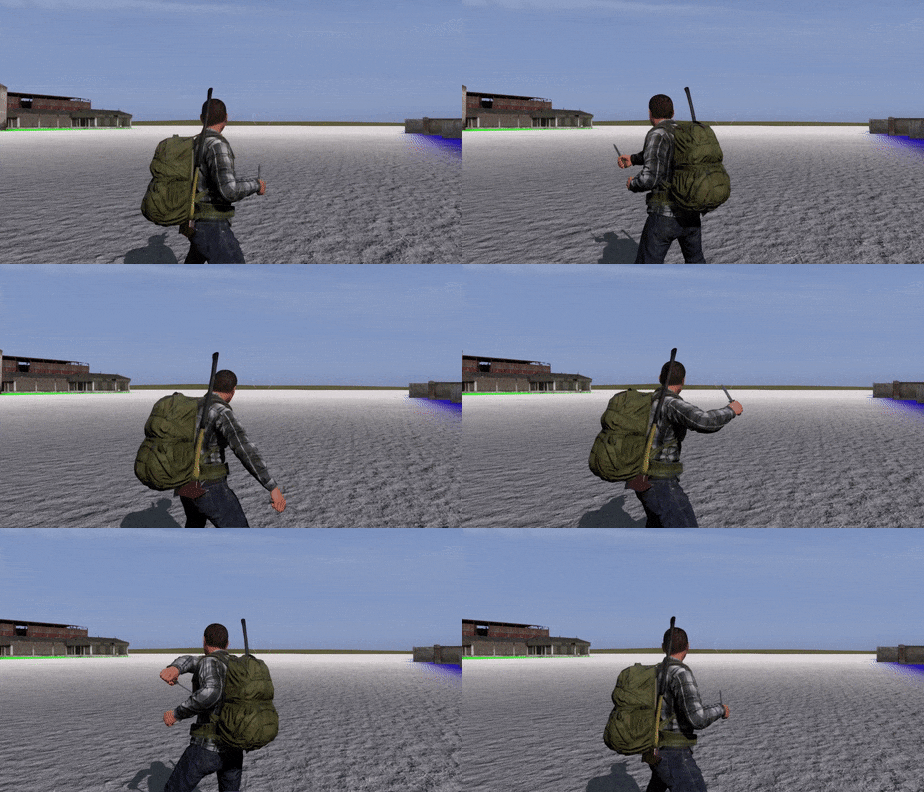 ruby hill
Yes, this is the main use for it: you can directly match your In and out frames
HOWEVER
This entirely depends on your rig and how accurate it allows to take in the rtm data
I.e the shoulder may be moved by the rtm to some extra offset, but the rig forces a connected-bone here, thus creating a nasty artifact.
The way I set up the import is by having an entirely unconnected bone skeleton that I use for importing rtm, and then I "retarget" from there onto my rig.
It would be best to overlay this via NLA in blender as in and out frame transitions.
Hand keying the anim you linked: easily a couple days to a week 😄
nimble flare
I'm hoping that since it is meant to be used with Macser's ArmARig, the animations will import fine (at least for the most part)
I'll try importing and re-exporting an existing A3 anim, so I can stick it into my config and test it out in-game
ruby hill
Another tip: Blender looped anim playback looks best if first and last frame are not identical. While for arma they must be
nimble flare
if I see any artifacts, I'll rethink this idea lol
so far I always animated with the first and last frame being identical, that way if I forget to animate a certain bone it'll definitely transition back to its original position/angle
ruby hill
Yeh, so do I. But I then just preview range 1 to target, instead of 0 to target.
nimble flare
any specific reason for that?
ruby hill
The way it loops is funky.
Lets say I have an anim with 100f.
so frame 0 to frame 99 in total
1sec
So once frame 99 is completed it will SKIP to frame 0 instantly, and lerp from there to frame 1
i.e this:
f98 -> lerp -> f99 -> skip (new loop begins) -> f0 -> lerp f1
While it should lerp from f99 to f0
Blender does this nicely.
nimble flare
but the last frame gets displayed just as long as any other frame, right? as in, it doesn't skip at the beginning of the frame, but at the end?
nimble flare
ah, so it doesn't even display it
ruby hill
it will always have a frame time of 1.00 if your rtm is correctly exported
Thats why first and last frame in loops are clones
nimble flare
I see
cool, I haven't worked with looping anims yet but this will come in handy when I get to them 😃
ruby hill
I must admit I havent looked at the macser(?) rig yet. But IMO 90% of the work of animating is already done by just having a nice rig
the rest is knowing your tools. Blender is awesome for animating. It simply lacks full body IK to make it perfect. Certainly had less raging with blender than with maya, for sure. 😄
Beginning with these little things that blender's .py implementation comes with all the nice extras like numpy and scipy, while pyMel... well :/
Definitely have a look at Blender's NLA editor and get an understaning of the Take/Action concept. It'll turn your workflow upside down for the better. Equally have a look at basic rigging and understand that the rig (presumably macser's you are using) is not a fixed thing entirely
toggle and modify it as you need for each anim. Incluing IK chain length and stiffness.
nimble flare
oh, yeah, I've been playing around with the actions in Blender, though at the time I didn't really understand what they were for, so I used them to separate my 4 gun cycle and reload animations (standing and prone) in different actions
that way I had all the data in one project file
ruby hill
Valid use for it.
the NLA editor lets you blend and queue these as needed.
Then just hit space, type in "bake action" and done: you have all your pieces merged into a new extra action that combines all these and their blends. Its pretty awesome. 😃
nimble flare
while I imagine this is useful for cutscene animations or even 3D movies, I'll admit I don't see the use for Arma, since all the animation blending is done by the engine - especially with masked animations such as gestures
but maybe I'm just blind and I'm missing something completely obvious 😛
ruby hill
Come think, the only real BAD thing I have to say about blender is that they use effing COMIC SANS on their badges for the yearly blender conferences... 😄
nimble flare
hah, now that is a major flaw
ruby hill
Arma is uniquiely... backward in how it deals with anims. BLending and layering is essentially moved to data.
Want locomotion with a machinegun instead of a rifle? Instead of sandwiching on top a "walking with machinegun" layer, you'll esentially have to define the ENTIRE data for walking with machinegun in the same way currently the walks between Rifle and Launcher are separate sets.
nimble flare
oh yes, and that is a nightmare to work with
ruby hill
Thats where the layering and baking would come in handy. You take the A3 locomotion anims (AmovPercMwlk / Mrun / Mspr / Mstp), import them, and then sandwich your context on top.
That is, if you don't want to hack it horribly with the gestures layer ingame...
nimble flare
ah, I understand
no, that's a great idea actually
I was thinking of making variations of the unarmed animations set to support a different kind of weapon holding type (such as swords, tools, etc)
desert raven
soo one could make a new moveset for a special weapon? 😮
ruby hill
Kinda.
nimble flare
yes, I tried that
and gave up after realising just how many animation classes you need to clone and tweak
ruby hill
You'll still be fighting the engine anim logic on all fronts.
Because all the engine knows is: Rifle, Launcher, Pistol, Unarmed, Binocular
nimble flare
well, if you define your own animation action set, it's actually not that bad since the engine then drives the animations
ruby hill
This ties into the deep level animation configuration, action maps and the whole shebang.
And that is a largely undocumented and unknown area to the community.
nimble flare
I imagine all you really need is a flawlessly set-up action set (no gaps, no animations left unedited), and then you tell the game to enter that action set somehow (via scripts, possibly weapon EH)
ruby hill
It should be possible. I.e configure your sword as rifle, and then make use of the rifle upDegree IDs. Then everything should stay fine and engine-side-native without problems.
desert raven
well as long as its not completely ruled out its something worth exploring.
nimble flare
exactly!
ruby hill
I'd say its very well possible with a 10% chance of unexpected poo.
nimble flare
but trust me, the config side of things is absolutely horrible
desert raven
https://www.youtube.com/watch?v=HYNDdDTQP4I This could use a new set to move as I want it to move.
ruby hill
The config side is not horrible, its just slightly complex.
What would make it horrible is a lack of structure in the configs. 😛
desert raven
yeah it is :L
nimble flare
well, to give you some insight on why I think it's horrible:
every animation has an action set associated to it, right?
ruby hill
Ah... I see where you're going. 😄
nimble flare
the game determines which action set you are in based on the animation you are currently using
and from there it determines which animation to play next based on your keyboard inputs
ruby hill
Ok, lets first set terms so we all talk the same lingo:
nimble flare
so in effect, you have to go through a maze of animations, redefining their associated action and the animations they connect to 🤕
ruby hill
animation states = stuff like AmovPercMwlkSnonWnonDf (moves >> "states")
manActions = stuff like "walkF" "die" and "put"
action map = the class that does walkF = AmovPercMwlkSnonWnonDf
Each action map has an upDegree value that tells the engine what "kind" of set of moves this this. The upDegree tells it that this set if rifle standing or pistol kneeling.
Then, each action map has a manAction called "default", this is the one it is in if the character is not doing anything and the upDegree matches what the charcter is supposed to do.
So if you want an anim where the unit remains in a loop of smoking cigarettes, you'll need a dedicated smokingCigs action map where "default = yourSmokingAnim"
Lets say this smoking action map has the upDegree for unarmed standing. (Civilian having a smoke)
If you then give this char an rifle, the target upDegree will change from unarmed standing to rifle lowered standing.
It now goes into your smokingCigs action map, looks at the "stand" or "combat" manAction (possibly a different one. manActs are seldom named sensible)
it picks the animation state from this manAction in your ActionMap (:D) as target. and will essentially do a playMove to this animationState
If the target animation state does not specify the correct action map with a correct upDegree (say: it is still in an unarmed upDegree) it will triger "stand" or "combat" or whatever ONCE again
until it reached an action map with an upDegree that it wants
IMO, a pretty genious system, but oh boy has it been neglected and deformed. 😦
The other side of this complex is the A* animation linking system. Again, a UNIQUE thing that arma does. I havent seen any other middleware that assigns cost values to transitions
desert raven
It is certainly build on logic. Its just hard to follow whats connecting to where sometimes.
ruby hill
Yes, the complexity will turn this into massive spaghetti if your structure is bad.
Especially since each state can define connectTO, connectFROM and connectWITH. (Also for interpolations)
And then there is class Interpolations, too.
So that gives each anim state a possible 7 config location where it is enabled to transition
Working tidy here is the only solution
nimble flare
while it seems relatively clear and manageable, what scares me is the amount of work that goes into adding just one (basic) action map
ruby hill
Of a new move type?
nimble flare
when ArmA 3 introduced the limping animations, they introduced maybe... 50-60 new animations?
and yet
1sec
I see 1135 results for "Mlmp" in the animatons config
and that is just a scary amount
ruby hill
I havent looked at how they did limping. possibly in a more complex way then they should have
What we did was give each anim state a limping equivalent for limping left and limping right
nimble flare
think of a new set of movement (8 directions) similar to walking, and it exists for both standing and crouching, and for 4 weapon states (rifle, pistol, launcher and unarmed)
ruby hill
Yup.
~300 anims for an entire new set. I did the calcs and estimations 😄
Or about roughly half a day of mocap 😛
nimble flare
well, let's look at something simpler then, the panic animations that were introduced with ArmA
there are 8 running animations, 8 walking (not sure on this), 3 sprinting, 2x for erect and crouch, + 8 prone animations + 1 prone sprint
so 47 animations, provided I remembered them all and didn't screw up somewhere
and again, 852 results for "APan" (panic) in the config
this is the main reason I gave up on trying to add a new action map, because you have to go through hundreds of animations, editing small details just so that the engine doesn't leave the action map via an obscure path
and it just feels like there is a way to automate this somehow, which makes this entire process feel very pointless
almost like trying to sum up all numbers from 1 to 1000 by hand, without formulas...
ruby hill
You can have manActions point at empty string to block the transition.
So you dont have to have all them.
count (configFile >> "cfgMovesMaleSdr" >> "states")
Run this in A3. Im curious to see how many exist. 😄
nimble flare
hm, I suppose I won't need to add any transitions from existing anims to my action set if I intend on using a script to enter it
ruby hill
Just a basic locomotion set is easy
All you need as framework is a stopped anim and 8 directionals.
So 9 anims:
Multiply this by each stance: Stand, Crouch Kneel
9 * 3
Multiply this by three speed modes: Walk, run and all out sprint
9 * 3 * 3 = 81 Dedicated anims.
But you can cheat. The anims you need to make/mocap are only the four directions and idle. Diagonals can be composed in your tool. 😃
nimble flare
and suddenly, what seemed like a trivial feat now sounds like a dauting task 😄
ruby hill
So 5 * 3 * 3, just 45 unique anims. 😃
As for the manActs you'll need in your action map:
stop
idle
die

walkF
walkLF
walkRF
walkB
walkLB
walkRB
walkL
walkR

slowF
slowLF
slowRF
slowB
slowLB
slowRB
slowL
slowR

fastF
fastLF
fastRF
fastB
fastLB
fastRB
fastL
fastR
For Death anims; you're saved by ragdoll 😛
nimble flare
to be fair, with what I have in mind, I'd only need to edit the arms of the character on existing A3 animations, meaning I could just make one "action" in Blender and layer that ontop of the existing anims
which would make it even easier
ruby hill
Yep.
But do start only with the walk set, see where you are, try it ingame, then proceed
nimble flare
ofcourse, I'm not going to sink days of my time into something only to realise it doesn't work 😃
ruby hill
I have the feeling something that would really be useful to the community would be a dedicated anim workshop.
nimble flare
(especially since I'm taking exams next week, so time is my most valuable resource)
ruby hill
haha 😄
nimble flare
oh, and since you asked: 5078 😱
ruby hill
ha, thats impressive. But I reckon half of that is the stance adjust. 😄
WHICH SHOULD HAVE BEEN DONE WITH BLENDING/FBIK
nimble flare
haha
ruby hill
but hell no, gotta bake data transforms ^^
But yeh, if you go ahead with your project. let me know. I may be able to help out. 😃
nimble flare
yeah, once I have more time (in ~2 weeks) I'll give it a shot
ruby hill
The beauty is, all your weapon equip EH would need to do is _unit playAction "switchToHeavyWeapon" 😄
and it will work nicely
desert raven
@ruby hill thanks man! you're a treasure to the community!
ruby hill
Thanks!
I am actually thinking about doing a machinegun carry walk thing today. Just to see where it would go. 😃
zenith token
a possibility for a different handanim for prone would be an alternative. Ok it doesnt solve the issue that the eyeball for ironsights goes to hip heigth for carried machineguns when going into optic mode...
could be fixed by this https://feedback.bistudio.com/T82141 though
ruby hill
Dedicated prone handanim is generally possible, but hacky
Currently browsing the files for a heavy weapon walk... its a lot of work 😮 and requires some hacky BS :/
zenith token
youd be a hero though .. to the handfull of people who can appreciate that at least ^^
ruby hill
Patience. It will be done. 😄
ruby hill
zinc wadi
Rambo! \o/
torpid star
yes! keep it up! i love where this is going
how's 1st person. is the weapon totally out of view?
ruby hill
Almost. But I deliberatly disabled iron-sights as well. Cant aim properly until prone 😄
torpid star
you mean for iron sights? should be possible to disable iron sights unless you are prone/crouch or resting/deployed
nice
ruby hill
if you have crosshairs disabled too, then you gotta aim by tracers 😄
zenith token
disabled it? you a wizard?
zenith token
in animations?
ruby hill
yep
torpid star
wait so why do civ anims have ironsights? or did they fix that? i remember getting weirdly stuck until i realised my imaginary sights were up when unarmed
zenith token
ok. well, to the peasants the professionals appear like wizards^^
ruby hill
I had a look at the A3 anim configs, and there is a lot of funky stuff going on. It feels like the configs were automated by a tool and some stuff slipped through.
zenith token
i cant imagine that they wouldnt use automation... the sheer amount of it is insane
ruby hill
Theres a graph tool, but its not as nice. A proper template works wonders.
torpid star
i once saw a screenshot of the spaghetti stuff visualised in a sitrep or whatever. looked like FSM editor
ruby hill
But either way, I'll prod this project a bit further. Expect a release soon (tm).
torpid star
yea that
ruby hill
Right now I am busy walking my M60 through the jungle while on on allowDamage = False...
torpid star
hey btw. any way to make prone rotation slower like in battlefield?
torpid star
hm
does that really work? seemed like it's all mouse input. but haven't looked at it closely for while
ruby hill
The movement speed is directly linked to the playback speed of the animation file. Mouse input for turning is linked to the actionmap configs params turnspeed
torpid star
i'll have to check again but last time i tested it felt like turnspeed was ignored. i thought it worked in arma 2 but didn't anymore in arma 3. but all goign by cloudy memory
ruby hill
actually yes, now I believe turnspeed is only for AI and when you rotate using the turn left and turn right keys. (which nobody does)
so it'll be linked directly to mouse input
desert raven
@ruby hill Loving this!!
Also thanks for the prod to test the rtm import to blender
just set up the female rig and it seems to import the rtms just fine
ruby hill
😄
desert raven
without even retargeting
ok some weird finger stuff is going on xD but other than that this is very promising
hmm ok doing something wrong with the DeRTM. but anyways not a total failure either!
ruby hill
The problem I had with mine is that it expects bone names to be 100% matching. Its case sensitive. Could very well be that yours is having the same issue
desert raven
yeah gotta double check
nimble flare
damnit @ruby hill, stop being so awesome! how do you expect us to keep up with you?! 😅
I wonder, how many animation states, and/or action maps did you have to edit/clone?
I'm assuming you have 8 new animations for walking, 8 for running and 1 for the idle pose, so 17 total?
ruby hill
correct!
I duplicated all action maps for rifle wlk and run. Replaced relevant anims.
But yeh, still a lot to do. All the connection anims and then all again for kneel.
Oh, and evasive, too. Then the stance adjusts, ooofff
nimble flare
yeahhhh, I'll probably skip those when I get to making my melee animations
not like you'd really need to adjust stances when using a sword... 😄
ruby hill
The last great melee combat game system I played was in mount and blade. I heard chivalry is awesome too, but never got to it.
And the shitty hand-to-hand combat system is the reason I never played skyrim further than the first cave... 😳
desert raven
@ruby hill you got to check out Mordhau if you like melee! Its spiritual successor for Chivalry and from the looks of it many times greater!
haha no wonder I kept importing single standing frame as I constantly opened the same wrong file
walking animation came through! except the fingers
torpid star
@desert raven oh thx for the tip. game looks great
desert raven
@badbenson#0154 Youre welcome!
On the subject of rtm import. I think I got the fingers fixed too. Problem seemed to be that there were no actual connecting bones between hand bone and the finger bones.
torpid star
oh wow. seems to work great. do one with the silly dance too pls 😄
 compact ravine
lol
desert raven
Couldn't find it in A3 anims
compact ravine
its a2 iic
desert raven
that explains it 😄
torpid star
oh. this one is in arma 3?
desert raven
I found only a single dancing .rtm but its 4kb and single frame.
compact ravine
there was an addon that had all the a2 anims ported to a3 iirc
desert raven
I got the released A2 files and the animations in there are already unbinarized
Should be able to convert those too
just need to remember to fix that one ring finger bone that got renamed
torpid star
this is important! get on it! i need the silly finger pointing dance
torpid star
😄
desert raven
ok just for you this once
torpid star
i'm surprised the model deforms this well dude. good job. good testing anim too actually
desert raven
yep me too! the weights came out pretty well!
desert raven
takes ages to import large animations 😄
desert raven
@badbenson#0154 https://www.youtube.com/watch?v=7acMAPG63BA
compact ravine
👍
desert raven
Nice! Couldnt spot it anywhere though. The A2 dance is good enough for proving the import works tho!
torpid star
@desert raven what are your plans with the female model? is it for lost dragons or jsut for research?
desert raven
I wanted the project to be a community effort and pretty much started it as practice. The initial aim was to provide a config and model base where everyone could contribute and build up to a proper working animation set. But now I think I can provide much better working base set of animations to people to build on.
 blissful forge
@desert raven What tool flow are you now using exactly?
desert raven
I got the Macsers Armarig fitted to my new skeleton (Though I did end up having to edit it a lot as it pretty much broke with the smaller skeleton and the import did not like floating bones) that I import DeBinned RTMs from A3 on to and those I export via FHQ Toolbox back to resized .RTMs.
thee importer I got from aaa lets see where did I put the link
posted by @nimble flare yesterday. https://github.com/4d4a5852/rtm_import
I recon my original skeleton would have worked too since the bone names and structure is what is important
but in any case its working
ruby hill
The import is always depending on how your rig is. RTM itself really is just the world transformation matrix of each joint. How you set up your rig determines how you apply this data.
desert raven
@ruby hill Top of the day to you sir! And thanks again for prodding me to this direction!
ruby hill
ha 😄
What I do: I have an import skeleton where the joints are all disconnected and just in bindpose/respose locations. There are no other constraints or relations. I import the RTM onto this, and then I have my actual rig copy transforms from the import skeleton. I found that this gives me an extra level of control as the import is not directly applied to my rig, but with a step once removed.
Added bonus: I can easily toggle between original and imported and control the copy influences of each bone/(bonegroups) per frame.
desert raven
That should import the man animations in man scale right?
ruby hill
What do you mean? Man scale? Scaling shouldnt be an issue at all.
desert raven
I mean that in the female rig I first didnt have fingers connected to the hand and the imported all deformed but when I connected them to the rest of the rig they imported fine
so I thought maybe they imported in the original man skeleton scale
ruby hill
No, that sounds like a issue specific to the import/rig constellation
desert raven
alrigth
ruby hill
RTM stores a relative transformation matrix to the implied restpose. the data doesnt know what it's origin is supposed to be. it just takes it and applies itself to it
desert raven
aa ok thats probably what I've been confused about
ruby hill
you can see how this effs up your character when you move the bones in rest pose (bone edit mode) from where they are supposed to be and then import RTM onto it
each frame assumes the bone is at XYZ, then rotates it by for example 20° on X axis
but if your bone is... say at ZYX: rotation of 20° around X is actually a 20° rotation around Z, and thus the horrors begin 😄
The same happens with the armature modifier in bloender. Move your character mesh away from the rig in model space (edit mode) and see it eff up
thats 1:1 the same issue
desert raven
that Im familiar with
ruby hill
there you go 😄
desert raven
thanks for the explanation!
ruby hill
If you enjoy the fun side of math(s):
http://www.codinglabs.net/article_world_view_projection_matrix.aspx
desert raven
Yeah I've been trying to read those to figure out a way to calculate import rotations for Terrain builder but have got nowhere. That article looks more understandable so I may have been looking at the wrong places.
ruby hill
Yeh, its a good writeup.
NEVER go to wikiderpia for math related stuff.
Its usually some sad professors with too much time writing the technical math stufffs.
desert raven
Heh I tried asking our friend google, but that also got me nowhere.
ruby hill
Numberphile on YT is a great place, tho. The profs involved there have their own channels and cover awesome useful advanced maths.
I absolutely hated math in school, and it nearly killed my A-levels, but nowadays, on my own pace and curiosity I cant get enough of it ^^
desert raven
Exactly! Im slowly worming my way into more advanced maths too.
ruby hill
Netflix should have internationally available all the recent documentary by Marcus du Sautoy. Definitely watch them!
Given, its pretty nerdy stuff. But nobody cares that it is 😄
regal dawn
could be intresting for you anim geeks
https://www.youtube.com/watch?v=68CY4gBEa2Y
nimble flare
damn, I wish mocap was more affordable
nimble flare
what about the equipment, all the cameras and the software?
surely that would add up to at least a few hundred, if not thousands of dollars
regal dawn
I think you can mocap with some pretty cheap gear, the qualtiy might suffer tho
Wasnt there some software that can mocap with 2 cinect cams?
dawn forge
Was the question really answered above, does bi allow modifications of their anims?
I saw a they dont care but
desert raven
In theory they could shut you down if you did something like that but would they is highly inprobable. Probably.
dawn forge
desert raven
My conversion of man animations to the new skeleton assummes they wont shut me down.
regal dawn
Probably yea, just remember some video i saw
ruby hill
Kinect mocap is shit. dont do it
I'd say .rtm modding is the same as retexing. APL-SA license
ruby hill
If you feel adventurous, have a go at the inertia tracking sensors like the Perception neuron type of things.
torpid star
yea i read that the kinect method produces really noisy data that will need way too much work to clean up. it depends on what you need generally. there is actually more free mocap data out there than one thinks. mostly in biped format. or whatever that old rig was called
ruby hill
biped just means two-legged. Quadruped is forlegged, like dogs and cows 😄
torpid star
i know but there was this premade rig in 3ds max some years ago. let me dig up a picture
when i was playing around with my arma 3 rig i added a layer that had that connected to my rig so i could import mocap data in that format
seems like the format is *.bip
ruby hill
ah ^^
 granite bay
Hello, hope this message fits this room:
The Stalker Life mod team is looking for an animation maker to breath the life into the mutants and animals. If you are interested, welcome to PM!
Project's forum thread - https://forums.bistudio.com/forums/topic/202904-wip-stalker-life-mod-online-explorationsurvival-rpg
blazing panther
Does anyone have a good basic animation tutorial for me? I wish to animate an exhaust nozzle of an aircraft.
torpid star
@blazing panther not a classic tutorial i think but a good start
https://community.bistudio.com/wiki/ArmA:_How_to_animate_a_model
https://community.bistudio.com/wiki/Model_Config
https://resources.bisimulations.com/wiki/ArmA:_Howto_Model_Config (might have some VBS stuff that's doesn't apply to arma)
also check the samples
blazing panther
@badbenson#0154 Thankyou mate I'll have a look
dawn forge
animations dont translate positions do they?
if I start at pos x and end at pos y, the player isn't moved there at the end of the animation correct?
drowsy nymph
you have to do stuff with the xstep/ystep properties to make them move AFAIK
dawn forge
@da12thMonkey#2096 thx
desert raven
dont forget zstep if you want it to move up
dawn forge
thx @desert raven
ruby hill
yStep does not work in the game as directly as the others
ah, srry. Y step *
If you import an rtm into o2, the step values appear as
step (should be zStep) and xStep
yStep as such does not directly exist. The space for yStep component is present in the .rtm, however.
But not even the ladder animations use it. 😄
Fwds movement is "step", sideways is "xStep" and upwards should be "yStep" then.
dawn forge
@ruby hill how would one make someone move up on something? Like climb up the side of a building, like how enhanced movement mod does it
If the ystep doesnt work
ruby hill
It'll be scripted.
dawn forge
Ah okay, thanks
ruby hill
While on the topic: these step values are used linearly
If your anim has step = 10; and is 10f long, it will mean that for every frame played the character will move 1m through the world. (measureable via getPos). Your anim itself would need to look like walking on the spot (modelspace)
if transitioning from frame 1 to frame 2 takes 10 seconds, then the character will still smoothly interpolate through the world at 10cm per seconds.
This means if your animation contains changes in speeds, you'll have to split the files up, else you risk sliding feet if not made purposely for this. Its all a bit funky. :&
torpid star
yer it's a bummer. a curve like for IK stuff would be much better. that and upwards movement would allow me to do literal climbs. but then again. none of it would be dynamic. so not really totally solving the problem.
ruby hill
yep, the correct way would be to just have a dedicated extra bone that handles world translation in all axises using delta-change per frame 😄
torpid star
yea. the other day i had this idea of scripting the climb by jsut smoothly lerping the position epr frame. but good luck syncing the animation in a way that it looks good. it's just not hte engine to do this proper
ruby hill
Heres hoping Enfusion will solve this 😄
desert raven
🤞
ruby hill
You could try this: Keyframe the camera bone to be your Y step curve. Then read the position of this bone via selectionposition. No matter when you start, it'll be always in synch as you read the output on a per-frame basis anyway.
And it shouldn't be an issue visually, as the camera bone has to get over the obstacle nicely, too.
Plus all character models have a "camera" memory point anyway.
Certainly worth a try. 😃
modelToWorld would take care of setpos/getpos mess, too.
 sturdy grove
Hey guys! I've some noob questions about animations!
When doing the reloading animations for prone, does one just need to make the hand animations like the Charakter is already in prone, or bring the whole character in blender into a prone animation.
Thanks in advance for any help!
ruby hill
Whole character as prone.
sturdy grove
Thank you Mondkalb 😃
ruby hill
It really depends on how you intend to use it. Generally having the character in prone position will yield better visual results. Next step is to decide whether the prone reloading animation should be done via layered animations ("Gesture") or as proper animation state. I prefer doing the proper animation state to prevent movement while reloading prone, but I found that A3's configs make setting up such a prone reloading state more problematic. Thats why many go with the gesture approach.
So technically, for the gesture approach, you could animate with an upright character, but the visual fidelity will suffer.
 proud bay
Just saw your heavy weapon anim mondkalb, very nice ! :O too bad a3 never implemented this.
Is there any full workflow video tutorial about how to animate hands to a specific weapon with blender ?
I could not find a detailed one.
ruby hill
Yes, it's a mix of knowing the tool (Blender) and knowing the animation rig you will be using.
proud bay
Ok i'll look for it thanks
i've always been annoyed by replacing the weapons from the rig blablabla
ruby hill
Replacing your weapon in the rig shouldnt be a difficult thing. Simply set your weapon to be the shape of the weapon bone.
desert raven
what is important is that your weapon objects origin is in the same position as the weapon bone.
 torpid hemlock
Does anyone know how to implement an animation for a deployed weapon?
torpid hemlock
can someone assist me with why my model.cfg isn't working? https://pastebin.com/iynkwYuL
 sleek island
@torpid hemlock you need those bipod parts into sections
torpid hemlock
they are in the .p3d file if thats what you mean
the issue isn't just the bipod its that no animation defined in model.cfg is working, not even the hide magazine
sleek island
do you have the proper name of the model in the model.cfg that happends often
torpid hemlock
yeah the model is called BBB_Lewis_MG.p3d
sleek island
hmm interesting
torpid hemlock
i have no idea why it wouldn't be working
sleek island
have you tried if you used the model.cfg from A3 weapon sample and adding your p3d name into it
if that works?
torpid hemlock
no i'll give that a go
actully i remember that i couldn't actully find the model.cfg file
torpid hemlock
cheers found it
torpid hemlock
i tried and no success 😑 https://pastebin.com/KFCcbj6R
changing BBB_Lewis_MG_01_f to BBB_Lewis_MG didn't fix it either (the origonal file the .p3d is test_weapon_01_f)
desert raven
just to make sure your .p3d is named bbb_lewis_mg_bipod_01_F.pd3?
torpid hemlock
no its BBB_Lewis_MG.p3d
that class would be refering to the bipod.p3d wouldn't it?
desert raven
your class name under CfgModels and p3d name must be the same for them to work together
torpid hemlock
ok
https://pastebin.com/iynkwYuL this was my original but it didn't work https://pastebin.com/iynkwYuL
desert raven
was your .p3d named BBB_Lewis_MG.pd3 then?
torpid hemlock
yes
desert raven
and nothing moved?
torpid hemlock
nop, magazine didn't even dissapear when reloading
desert raven
there is something missing then. Did you try it in buldozer?
ir sometimes gives an error that might help
torpid hemlock
no i can't get buldozer to work properly
desert raven
well that is unfortunate. It is the fastest way to test if model.cfg is set up correctly
cant see any obvious errors in there either
torpid hemlock
it actully was working until I had someone else edit my config
but they don't directly reference each other do they?
torpid hemlock
yes
desert raven
just making sure
torpid hemlock
haha easy mistakes
desert raven
it usually is something very small
proud bay
hey there I have a small issue : https://cdn.discordapp.com/attachments/289395924378058755/301784147146571778/unknown.png
any idea ?
 zinc wadi
DAB went wrong?
dawn forge
is the addon binarized?
 flat fractal
@zinc wadi lol i had to do it x) https://www.youtube.com/watch?v=6Omn1t16iRk
zinc wadi
🤦 why?
sleek island
thats a issue of hand anim , at least from the looks of it
you might typo in the config or the actual anim isnt properly defined in model.cfg
drowsy nymph
you don't need to define the anim in the model.cfg
looks like either it's not binarising correctly (addonbuilder) or the weapon bone wasn't moved when you positioned the gun to make your handanim
since the handanim IK is calculated from the position of the hands relative to the weapon bone, which is moved by the base character animations for running, aiming etc.
flat fractal
Hey guys, little question : if i create a new vehicle and i want to have a custom animation for the passenger. What do i have to do ? Only define my .rtm as an action in ManActions class, and use the name of this action in cargoAction[] = { } in the vehicle class ?
drowsy nymph
yes
zenith token
@proud bay handanim only cares about the bones of the hand and places them in relation to the weapon bone. Everything else of the handanim rtm gets discarded/ignored. So change position of weapon bone in the animation to be exact same as your guns model of origin (in p3d).
proud bay
ok thans for your advices
flat fractal
My passenger animation is not working :/
the animation is correct if i use player playAction "test";
i have this in the vehicle class
transportSoldier = 1;
cargoProxyIndexes[] = {1};
cargoAction[] = {"test"};
the proxy is on the vehicle http://prntscr.com/ew3b0e
i don't know what's missing..
zinc wadi
Hint:
```cpp
ConfigCodeStuff
```
Also: search for "getInAction" (or something similar, cba to search for it myself atm)
flat fractal
problem solved, i was using CfgGesturesMale instead of CfgMovesMaleSdr
thanks to @drowsy nymph
sturdy grove
Hey there! Is there any A3 rig in prone position or anyone has one? Struggling with reloand prone animation
ruby hill
Just animate the person into a prone positon. It has nothing to do with the rig.
sturdy grove
I know...Just having some probs :)
https://i.gyazo.com/thumb/1200/_e326fc2629fdc93673df90b2f74a7191-png.jpg
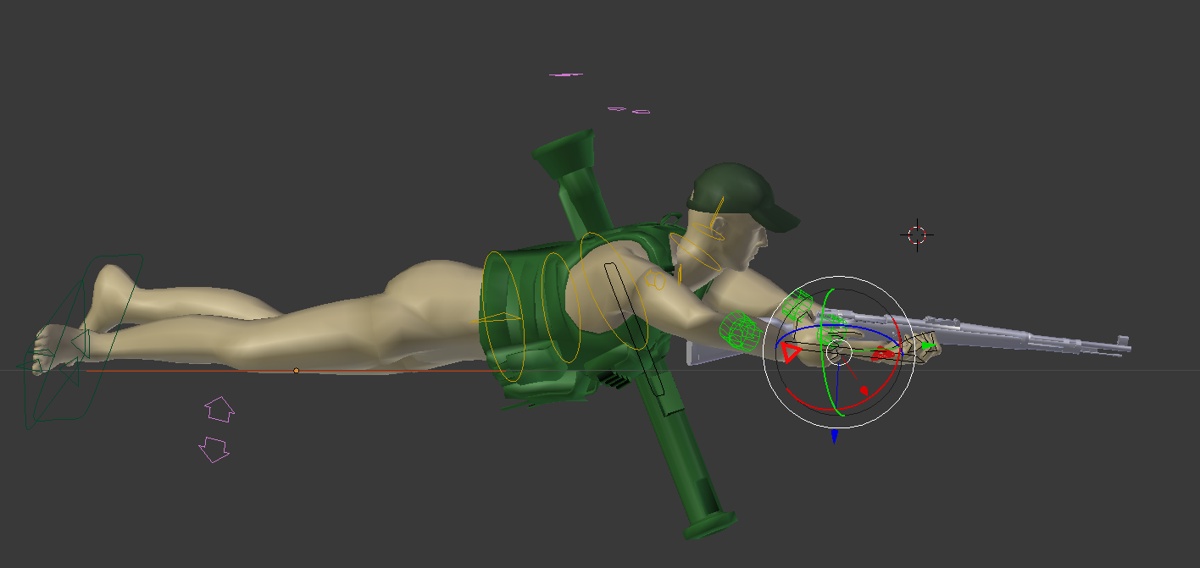 somber grail
Anyone got any idea how to combine two rotations together on aircraft undercarriage?
I've got the undercarriage in the raised position, with the wheel further forward than the top of the leg. If i rotate this 90 degrees, it ends up being offset in the vertical position.
I'm trying to work out how I get the wheel to rotate 90 degrees to the vertical lowered position but also to rotate about 45 degrees to the rear so that the whole gear is fully vertical and straight.
Anyone any ideas on how I can work this out?
drowsy nymph
picture would help
but in short you'll probably need to divide the thin in to two bones and have the part you want to rotate back, as a child of the main bone. So in skeleton it'd be defined as C "part1","", "part2","part1"
the axis you want to rotate part2 around in the second animation should be named part2_axis or whatever, and also named part1 so that it animates with the first rotation
somber grail
@da12thMonkey#2096 thanks dude, I'll give it a try tomorrow, I've switched off now. Heads a bit config wrecked.
Been trying to get my head round how the values work so I can understand how the + and - values are defined. Be a little easier if it were written like, + 90 or - 45 from point of origin for example.
zenith token
spooky you can do that with "rad 90" for example
look at the plane sample.
minValue and maxValue only define "when" the animation is played during the "active animation phase"
angle0 and angle1 define amount of rotation. (or offset0 and offset1 for translation)
you can overlay animations without problems (e.g. two rotation animations on the same selection)
somber grail
That's good to know. I had an idea rotating two animations was possible, I've seen it on an aircraft before, but can't remember which one.
I've noticed now though that the wheels are stuck in the raised position in game. Is there a common mistake I have made here to see this?
I should say the rear carriage. The nose wheel is fine.
@zenith token Penny has dropped on the minvalue and max value.
👍
somber grail
right I worked my animation issue on the rear carriage, but I have now discovered I can't for the l;ife of me work out how to get the airbrake to work as a custom user action from the UI. I have the animation working in model viewer under its own source, but actually having it as a user action and having a vital effect on the airframe in flight is beyond me atm.
Should I really be asking this in the config channel?
drowsy nymph
don't bother making it a user action. There's a keybind for airbrakes coming in the jetsDLC
it's separate from throttle now
somber grail
aaahh intersting. I might disable it then from the model.cfg until then. I think its having an affect in flight being sourced to the flaps with the anmations.
sturdy grove
hey there! Does anyone know how to fix this "hide" problem:
http://imgur.com/a/xEkLf
ruby hill
Check if your rifle-grenade is skinned to some other selection. It should not be.
sturdy grove
probably my problem is that i've created two selections:
"GL_magazine", "GL",
And i've this:
            {
                type="hide";
                source="weaponMuzzle";
                selection="GL";
                minValue = 0.0;
                maxvalue = 1;
                hideValue = 0.00;
                unhideValue = 0.01;
            };
            class gl_magazine_hide
            {
                type="hide";
                source="revolving.1";
                selection="GL_magazine";
                minValue = 0.0;
                maxvalue = 1;
                hideValue = 0.00;
                unhideValue = 0.01;
};```GL_magazine should should be the clip thinger
Or the other way around... Your grenade cannot be part of two selections
via bone parenting you take care of this
sturdy grove
basically i've to remove the GL_magazine verts from GL selection?
in that case when GL will be hidden, will GL_magazine be hidden aswell?
sleek island
yes
drowsy nymph
if that's not it, try changing the isDiscrete value of the skeleton
from 1 to 0 or whatever way it's set now
sturdy grove
it works perfectly now! Thank you very much!
sleek island
thats the feature of parenting bones ^^ - i did the same mistake before 😛
sturdy grove
yeah...Now i've to have more fun with vehicles animations 🙃 🔫
sleek island
haha , have fun with that xD
regal dawn
Hey guys, i´ve got a problem where the model is being stretched in the animation phase, any ideas?
desert raven
bad weighting or maybe wrong extra selection group that affects it
zinc wadi
Unit or ModelAnimation (like a Door)
desert raven
vanilla or custom animations?
regal dawn
Custom, trying to import a blender animation for a moose
desert raven
bad weighting, wrong skeleton setup in model.cfg, wrong selections can cause that
regal dawn
Cool will check
desert raven
also do you have the model.cfg in the folder with the .rtms?
regal dawn
Yep
Could very well be the config, gotta check the sample files
anyway time for bed, thanks for the help
desert raven
np. hope you sort it out
ruby hill
Regarding model.cfg for .rtm binarization: It's enough to have the model.cfg defining the skeleton somewhere higher up in the folder structure.
I.e:
mod\model.cfg
mod\addon_01\data\anims\stuff.rtm
See my OBH sources for a working setup.
somber grail
Can anyone explain to me why I have the animations working in model viewer for my rear hatch doors for the undercarriage on my aircraft, yet when I go in game they are stuck in the down position? The undercarriage works fine front and back. The front hatch doors open and close as they should, yet, the two main rear doors refuse to move.
drowsy nymph
Bones might be overlapping. i.e. the rear hatch selections are also part of another named bone in the skeleton
somber grail
the rear hatches are actually attached to the fuselage on the inner spine of the body. Do you think I should lower them down on the model without making it look detached?
torpid hemlock
can someone help me with my model.cfg? I'm trying to get my magazine to rotate 13 degrees after every shot but after each animation it transforms back to it's origonal position
regal dawn
do you use the ammo animation source? https://community.bistudio.com/wiki/Model_Config
torpid hemlock
no i'm using reload
ah, so I should be using ammo? the idea is that the magazine rotates after each shot
regal dawn
ammo should do that
you can set it up so that for every round it moves one step which you define how much that is
torpid hemlock
oh ok thanks
so something like this? class magazineRotate{
type="rotationY";
source="ammo";
selection="magazine";
axis="";
minValue=0.000000;
maxValue=26.000000;
angle0="rad 0";
angle1="rad 360";
uhh.... that shrunk my magazine to 1/4 the origonal size
torpid hemlock
i fixed the problem but "ammo" isn't causing the magazine to rotate anymore
*is
*ammo isn't working and the magazine no longer rotates
regal dawn
afaik the min and max value can only be within 0 and 1 (didn't do much in model.cfg tho)
no idea about the shrinking 😄 sounds funny
zinc wadi
nah
also works:
minValue= -1000;
maxValue= 1000;
you can, for example, making a "hidden" Animation, by using -1, instead of 1 (wich is mostly used)
regal dawn
i see ^^ but weird about the scaling, is that even a thing in model.cfg animations?
zinc wadi
Not rly, was just an example
with AnimateSource you can Time some Animations with easier. Like a Crane, for example: 0->4
at 1: crane moved 5m forward
at 2: Crane turned right
at 3 Crane turned left again
at 4 Right moves 5m backwards
(for example)
drowsy nymph
@[No.4]B.Conway(bigbangben)#9273 the revolving animation source was designed for exactly this purpose
blazing panther
Would anyone know of a quick and efficient way to put memory points on a jet exhaust nozzle for aniamtion purposes?
Looks like a cluster fuck having to line everything up around the circumference of the nozzle perfectly etc..
drowsy nymph
Use the pin C key to centre on your current selection and Shift+C to activate. then when you press Insert it'll drop a mem point aligned with whatever selection you had
you can also use the rotation and scale tools set relative to the pin
blazing panther
So I just move the pin along an axis to where I need the mem point, then insert there?
drowsy nymph
Well, say you want the axis to run down the exact centre of a cylinder, you'd select the verts at one end of the cylinder, press C to snap the pin there, activate it if it's not already active, go to your mem LOD and Insert to place a memory point, then select the verts at the other end of the cylinder and do the same thing. The resulting axis between the two mem points would then be aligned exactly with the angle of the object
blazing panther
Hmm interesting, I'm following
drowsy nymph
or if you wanted to mirror the memory points exactly from one side of an object to another, you select two symmetrical objects in the model. Hit C to move the pin to the mid-way point between the two. You can then copy, paste and \Points\Transform 2D\Mirror X or Y to flip the memory points to the other side of the model
blazing panther
I'm still quite unfamiliar with O2 so that sounds complex to me, but I'm following the overall process
torpid hemlock
@drowsy nymph I've tried that as well but i can't seem to get it to animate either, at the moment only "reload" animates the gun
*magazine
class magazineRotate{
type="rotationY";
source="revolving";
selection="magazine";
axis="";
minValue=0;
maxValue=1;
angle0=0;
angle1="rad +13.846";
};
sturdy grove
Does anyone know how to fix this animation problem?
http://imgur.com/a/n3Gdf
zinc wadi
Wich one?!
sturdy grove
the gl should be hidden
it works when i've it as weapon
but as soos as i drop it
the GL appears
sleek island
do you have that GL as part of the main weapon?
if yes then thats the arma issue because when the weapon is dropped it ignores the model.cfg anims
blazing panther
Lol Arma engine
sturdy grove
@sleek island in that case how the GL would work?
sleek island
well best probably way to do it , is to make a special GL variant of the Garand
ruby hill
What about modelSpecial without the grenade attachment? (Is modelSpecial even a thing in A3?) 😄
sleek island
maybe , i dont have a experience with that hehe
only thing that i remember in OFP , they used muzzle loaded grenades
ruby hill
ModelSpecial used to be the loaded variant of rocket launchers, and one of those showed when dropped on the ground. (even in OFP)
ruby hill
Not 100%. But I am sure modelSpecial was related to deal with equipped/dropped versions.
sturdy grove
in that way i can't use the GL as attachment when "loaded" or am i wrong?
the problem is that it's a really "special" case. I want the AI to be able to shoot GL, if i script it i lose this opportunity
ruby hill
Best bet here is to depbo OFP and see how the M16 GL was done. Then hoping that it still works.
sleek island
then make it like i said above as a GL version
ruby hill
Chances are good, as the stupid christmas tree pa_sx.p3d hardcoded thing is also still there.
sleek island
loaded muzzle will show the nade in the model
sturdy grove
the GL think is already working
I just want to not show it when dropped 😃
having two version is not a solution for this sadly
I don't have ofp, i've started with A1 😦
too young 😛
drowsy nymph
modelSpecial doesn't work with model.cfg anims either AFAIK. I seem to remember people having issues with porting the Javelin from A2
so no trigger, bolt movements etc.
I believe R3F use a scripted system for their FAMAS to spawn muzzle slot attachments when a grenade is loaded, and remove them when fired
sturdy grove
or i can just ignore when weapons are dropped
drowsy nymph
yeah
sturdy grove
😄
sturdy grove
as long as i don't care it's fine 😄
another approach could be to script when the weapon is dropped, but imo it's too much for the result i want i guess
sturdy grove
Hi everyone! I'm having some issues to make this reload animation working in game.
The cfg should be okay, since it's working with another rtm, but as soon as i switch the rtm to this one, i can see the weapon moving, but the hands are stuck to the weapon bone.
I've checked the rtm in OB and it seems fine.
https://gyazo.com/68fe2bc985827efeef2f4fe7146abe61
drowsy nymph
what mask and HandIKCurve are you using?
 brittle isle
indeed this /\
sturdy grove
        {
            file = "fow\fow_anims\weapons\gestureReloadBoltAction.rtm";
            looped = 0;
             speed=0.15;
            mask = "handsWeapon";
            enableOptics = 0;
            rightHandIKBeg = 0;
            rightHandIKEnd = 0;
            rightHandIKCurve[] = {0};
            leftHandIKBeg = 1;
            leftHandIKEnd = 1;
            leftHandIKCurve[] = {1};
            disableWeapons = 1;
            disableWeaponsLong = 0;
}; ```you need to add timings to the IK curves
if it's 1, it'll continually use the handanim IK
try something like leftHandIKCurve[] = {0, 1, 0.07, 0, 0.81, 0, 0.86, 1};
drowsy nymph
yea, if one of the hands doesn't move from the weapon you can keep it as 1
sturdy grove
oh
drowsy nymph
the code I posted is transitioning from the handanim IK for the up until the 0.07 keyframe of the anim, then has 0 IK so it'll move however the gesture .rtm tells it to, until it gets to the 0.81 keyframe where it will start to transition back to having full IK from the handanim again at the 0.86 keyframe
so between 0.07 and 0.81 the left hand is animated by the gesture
sturdy grove
my question is, since in those rtm the hands are animated for the entire animation, can i just leave 0?
what's the pro of having an IKCurve?
drowsy nymph
it just creates smoother transition between handanim and the reload gesture
means you don't have to have the exact handanim pose at the start and end of your reload anim, and if you're making e.g. grip variants of the weapon you can use the same reload anims
sturdy grove
I understand now!
So it's always good to have some "sleep" at the beginning and at the end
in between if you want some cool transitions too
drowsy nymph
yeah, the first two pairs and the last two pairs in the array basically morph/blend the two .rtms together
sturdy grove
Thank you very much for your explanation!!
zenith token
 drowsy rock
Ummm..launching while prone? Does your back hurt a little bit?
zenith token
not launching just pulling out
drowsy rock
I see
 timid loom
its perfectly possible to fire a AT weapon when prone, just really really bent in a abt 45* angle from the weapon (this includes the helper, if the weapon require one ( gunner assistant is ofc on oppersit side of the weapon)
i belive is was possible in A2 with some mod ?
ruby hill
I'll drop a few helpers in that thread.
 smoky void
hello, I have a gunner animation for a BTR-40 in Unsung that will have the gunner 'levitate' over the map for several seconds when he exits the vehicle. I changed the get in memory points and such, and they work for example with driver_mid01, but the custom animation makes the gunner fly over the map. Any idea what might be off there?
 bronze gorge
Hey guys
in my team, we havethis problem: https://www.youtube.com/watch?v=FTlaqcUFlEw
even though in Blender the character looks down at the weapon, ingame you can't see them
unless ofcourse you use freelook
but it would be nice if somehow we could "force" the camera down, looking at the weapon
nimble flare
tried playing with https://community.bistudio.com/wiki/CfgMoves_Config_Reference#head ? @bronze gorge